Owner’s Manual
Model: LHB953
AsanE
NERGY
S
TAR
®
Partner,LG
hasdeterminedthatthisproduct
orproductmodelsmeetthe
E
NERGY
S
TAR
®
guidelinesfor
energyefficiency.
E
NERGY
S
TAR
®
isaU.S.registeredmark.
Netflix Support
ForhelpwithNetflixInstantStreaming:
Call 1-866-579-7113 or
Visit www.netflix.com/help
© Copyright2009,LGElectronicsU.S.A.,Inc.
ENGLISH
Network Blu-ray Disc
Home Theater System
P/NO:MFL62596606
HB954SA-AP.BUSALL_ENG_6606 8/14/09 5:12 PM Page 1

2
CAUTION: TOREDUCETHERISKOFELECTRIC
SHOCKDONOT REMOVECOVER(ORBACK)
NOUSER-SERVICEABLEPARTSINSIDEREFER
SERVICINGTOQUALIFIEDSERVICEPERSON-
NEL.
Thislightningflashwitharrowheadsymbol
withinanequilateraltriangleisintendedto
alerttheusertothepresenceofuninsulated
dangerousvoltagewithintheproduct’s
enclosurethatmaybeofsuf ficientmagni-
tudetoconstituteariskofelectricshockto
persons.
Theexclamationpointwithinanequilateral
triangleisintendedtoalerttheusertothe
presenceofimportantoperatingandmainte-
nance(servicing)instructionsinthelitera-
tureaccompanyingtheproduct.
WARNING: TOPREVENT FIREORELECTRIC
SHOCKHAZARD,DONOT EXPOSETHISPROD-
UCT TORAINORMOISTURE.
WARNING: Donotinstallthisequipmentinacon-
finedspacesuchasabookcaseorsimilarunit.
CAUTION: Donotblockanyventilationopenings.
Installinaccordancewiththemanufacturer's
instructions.
Slotsandopeningsinthecabinetareprovidedfor
ventilationandtoensurereliableoperationofthe
productandtoprotectitfromoverheating. The
openingsshallbeneverbeblockedbyplacingthe
productonabed,sofa,rugorothersimilarsurface.
Thisproductshallnotbeplacedinabuilt-ininstalla-
tionsuchasabookcaseorrackunless
properventilationisprovidedorthemanufacturer's
instructionhasbeenadheredto.
CAUTION: ThisproductemploysaLaserSystem.
Toensureproperuseofthisproduct,pleaseread
thisowner’smanualcarefullyandretainitforfuture
reference.Shalltheunitrequiremaintenance,con-
tactanauthorizedservicecenter.
Useofcontrols,adjustmentsortheperformanceof
proceduresotherthanthosespecifiedhereinmay
resultinhazardousradiationexposure.
Topreventdirectexposuretolaserbeam,donottry
toopentheenclosure.Visiblelaserradiationwhen
open.DONOT STAREINTOBEAM.
CAUTION: Theapparatusshall notbeexposedto
water(drippingorsplashing)andnoobjectsfilled
withliquids,suchasvases,shall beplacedonthe
apparatus.
CAUTION concerning the Power Cord
Most appliances recommend they be placed
upon a dedicated circuit;
Thatis,asingleoutletcircuitwhichpowersonlythat
applianceandhasnoadditionaloutletsorbranch
circuits.Checkthespecificationpageofthis
owner'smanualtobecertain.Donotoverloadwall
outlets.Overloadedwalloutlets,looseordamaged
walloutlets,extensioncords,frayedpowercords,or
damagedorcrackedwireinsulationaredangerous.
Anyoftheseconditionscouldresultinelectric
shockorfire.Periodicallyexaminethecordofyour
appliance,andifitsappearanceindicatesdamage
ordeterioration,unplugit,discontinueuseofthe
appliance,andhavethecordreplacedwithan
exactreplacementpartbyanauthorizedservice
center.Protectthepowercordfromphysicalor
mechanicalabuse,suchasbeingtwisted,kinked,
pinched,closedinadoor,orwalkedupon.Paypar-
ticularattentiontoplugs,walloutlets,andthepoint
wherethecordexitstheappliance. Todisconnect
powerfromthemains,pulloutthemainscordplug.
Wheninstallingtheproduct,ensurethattheplugis
easilyaccessible.
FCC WARNING: Thisequipmentmaygenerateor
useradiofrequencyenergy.Changesormodifica-
tionstothisequipmentmaycauseharmful
interferenceunlessthemodificationsareexpressly
approvedintheinstructionmanual. Theusercould
losetheauthoritytooperatethisequipmentifan
unauthorizedchangeormodificationismade.
REGULATORY INFORMATION: FCC Part 15
Thisequipmenthasbeentestedandfoundto
complywiththelimitsforaClassBdigitaldevice,
pursuanttoPart15oftheFCCRules. Theselimits
aredesignedtoprovidereasonableprotection
againstharmfulinterferencewhentheproductis
operatedinaresidentialinstallation. Thisproduct
generates,uses,andcanradiateradiofrequency
energyand,ifnotinstalledandusedin
accordancewiththeinstructionmanual,maycause
harmfulinterferencetoradiocommunications.
However,thereisnoguaranteethat
interferencewillnotoccurinaparticular
installation.Ifthisproductdoescauseharmful
interferencetoradioortelevisionreception,which
canbedeterminedbyturningtheproductof fand
on,theuserisencouragedtotrytocorrectthe
interferencebyoneormoreofthefollowing
measures:
• Reorientorrelocatethereceivingantenna.
•
Increasetheseparationbetweentheproductand
receiver.
• Connecttheproductintoanoutletonacircuit
differentfromthattowhichthereceiveris
connected.
• Consultthedealeroranexperiencedradio/TV
technicianforhelp.
FCC COMPLIANCE: Theresponsiblepartyforthis
product’scomplianceis:
LGElectronicsU.S.A.,Inc.,1000SylvanAvenue,
EnglewoodCliffs,NJ.
Phone:1-201-816-2000.
CAUTION
RISK OF ELECTRIC SHOCK
DO NOT OPEN
HB954SA-AP.BUSALL_ENG_6606 8/14/09 5:12 PM Page 2

3
Important Safety
Instructions
1. Readtheseinstructions.
2. Keeptheseinstructions.
3. Heedallwarnings.
4. Followallinstructions.
5. Donotusethisapparatusnearwater.
6. Cleanonlywithdrycloth.
7. Donotblockanyventilationopenings.Installin
accordancewiththemanufacturer’sinstructions.
8. Donotinstallnearanyheatsourcessuchas
radiators,heatregisters,stoves,orotherappa-
ratus(includingamplifiers)thatproduceheat.
9. Donotdefeatthesafetypurposeofthepolar-
izedorgrounding-typeplug.A polarizedplug
hastwobladeswithonewiderthantheother .A
groundingtypeplughastwobladesandathird
groundingprong.Thewidebladeorthethird
prongareprovidedforyoursafety.Iftheprovid-
edplugdoesnotfitintoyouroutlet,consultan
electricianforreplacementoftheobsoleteoutlet.
10. Protectthepowercordfrombeingwalkedon
orpinchedparticularlyatplugs,convenience
receptacles,andthepointwheretheyexitfrom
theapparatus.
11. Onlyuseattachments/accessoriesspecifiedby
themanufacturer.
12. Useonlywiththecart,stand,
tripod,bracket,ortablespecified
bythemanufacturer,orsoldwith
theapparatus.Whenacartis
used,usecautionwhenmoving
thecart/apparatuscombination
toavoidinjuryfromtip-over.
13. Unplugthisapparatusduringlightningstorms
orwhenunusedforlongperiodsoftime.
14.
Referallservicingtoqualifiedserviceperson-
nel.Servicingisrequiredwhentheapparatus
hasbeendamagedinanyway,suchaspower-
supplycordorplugisdamaged,liquidhasbeen
spilledorobjectshavefallenintotheapparatus,
theapparatushasbeenexposedtorainor
moisture,doesnotoperatenormally,orhas
beendropped.
Contents
Introduction ..........................5-8
Remotecontrol ........................9
Frontpanel ..........................10
Rearpanel ...........................1 1
Speakerconnection ....................12
Positioningthesystem ..................13
ConnectionstoyourTV ..............14-15
ResolutionSetting ...................16-17
Internetconnection ..................17-18
NetworkSoftwareUpdate .............19-20
Settingthesoundmode .................21
Adjustthespeakerlevelsettings ..........21
Usingthelatenightfunction ..............21
Usingthesleeptimer ...................21
UsingUSBdevices .....................22
UsingtheHomeMenu ..................23
AdjusttheSetupsettings ..... ..... ...23-29
Playadisc ........... ....... ......30-33
DisplayingdiscInformation ...............34
EnjoyingBD-LIVE™ .................35-36
Playingamovie .......................3 6
Listeningtomusic .....................3 7
Viewingaphoto ......... ...... .....38-39
PlayingNetflixStreaming ..............40-42
PlayingCinemaNowvideos ............43-46
UsingPandora ......................47-49
PlayingYouTubevideos..... ..........50-52
Listeningtotheradio ...................53
PlayingtheiPod ....................53-54
Listeningtomusicfromyourportableaudio
player ..............................55
Listeningtothesoundfromyourcomponent .55
UsingDIGITAL AUDIOINjacks ...........56
Reference ...........................57
CodenumbersofcontrollableTVs .........58
LanguageCodes ......................59
AreaCodes ..........................59
Troubleshooting ....................60-61
Specifications ........................62
IMPORTANT INFORMATIONRELATINGTO
NETWORKSERVICES .................63
Opensourcesoftwarenotice .............64
LimitedWarranty ...............BackCover
Beforeconnecting,operatingoradjustingthis
product,pleasereadthisinstructionbooklet
carefullyandcompletely.
HB954SA-AP.BUSALL_ENG_6606 8/14/09 5:12 PM Page 3

4
Notes on Copyrights
BecauseAACS(AdvancedAccessContent
System)isapprovedascontentprotection
systemforBDformat,similartouseofCSS
(ContentScrambleSystem)forDVDformat,
certainrestrictionsareimposedonplayback,
analogsignaloutput,etc.,ofAACSprotected
contents.Theoperationofthisproductand
restrictionsonthisproductmayvarydepending
onyourtimeofpurchaseasthoserestrictions
maybeadoptedand/orchangedbyAACSafter
theproductionofthisproduct.
Furthermore,BD-ROMMarkandBD+are
additionallyusedascontentprotectionsystems
forBDformat,whichimposescertainrestrictions
includingplaybackrestrictionsforBD-ROMMark
and/orBD+protectedcontents.Toobtain
additionalinformationonAACS,BD-ROMMark,
BD+,orthisproduct,pleasecontactan
authorizedCustomerServiceCenter.
ManyBD-ROM/DVDdiscsareencodedwith
copyprotection.Becauseofthis,youshouldonly
connectyourplayerdirectlytoyourTV,nottoa
VCR.ConnectingtoaVCRresultsinadistorted
picturefromcopy-protecteddiscs.
Thisproductincorporatescopyrightprotection
technologiesthatareprotectedbycertainU.S.
patentsandotherintellectualpropertyrights
ownedbyMacrovisionCorporationandother
rightsowners.Useofthiscopyrightprotection
technologymustbeauthorizedbyMacrovision
Corporationandisintendedforhomeandother
limitedviewingusesonly,unlessotherwise
authorizedbyMacrovisionCorporation.Reverse
engineeringordisassemblyisprohibited.
UndertheU.S.CopyrightlawsandCopyright
lawsofothercountries,unauthorizedrecording,
use,display,distribution,orrevisionoftelevision
programs,videotapes,BD-ROMdiscs,DVDs,
CDsandothermaterialsmaysubjectyoutocivil
and/orcriminalliability.
Software Update
Thesoftwareoftheplayercanbeupdatedby
connectingittotheInternetusingtheLANcable.
Werecommendtoupdatetheplayerusingthe
latestsoftwaretoenhancetheproductsoperation
and/oraddnewfeatures(seepage19-20).
To use BD-Live functionality
YoumustattachanexternalUSBdeviceusingthe
USBport(seepage22).
What is SIMPLINK?
Somefunctionsofthisunitarecontrolledbythe
TV’sremotecontrolwhenthisunitandLG TV’swith
SIMPLINKareconnectedthroughHDMI
connection.
ControllablefunctionsbyLGTV’sremotecontrol;
Play,Pause,Scan,Skip,Stop,PowerOf f,etc.
RefertotheTVowner’smanualforthedetailsof
SIMPLINKfunction.
LGTV’swithSIMPLINKfunctionhavethelogo
asshownabove.
Notes:
Dependingonthedisctypeorplayingstatus,
someSIMPLINKoperationmaydifferfromyour
purposeornotwork.
If“SIMPLINK”functiondoesnotwork,checkthat
yourHDMIcablesupportsbyCEC(Consumer
ElectronicsControl)forHDMI.
Ifthesoundisoutputfromboththesystem’ s
speakersandTVspeakerornotoutputfromboth
themduringSIMPLINKoperation,resetspeaker
settingofLGTV’sSIMPLINKmenu.
Licenses
JavaandallJava-basedtrademarksandlogosare
trademarksorregisteredtrademarksofSun
Microsystems,Inc.intheUnitedStatesandother
countries.
ManufacturedunderlicensefromDolbyLaboratories.
Dolby,ProLogic,andthedouble-Dsymbolare
trademarksofDolbyLaboratories.
ManufacturedunderlicenseunderU.S.Patent#’ s:
5,451,942;5,956,674;5,974,380;5,978,762;
6,226,616;6,487,535;7,392,195;7,272,567;
7,333,929;7,212,872&otherU.S.andworldwide
patentsissued&pending.DTSisaregistered
trademarkandtheDTSlogos,Symbol,DTS-HD
andDTS-HDMasterAudioIEssentialare
trademarksofDTS,Inc.© 1996-2008DTS,Inc.All
RightsReserved.
HDMI,theHDMIlogoandHigh-Definition
MultimediaInterfacearetrademarksorregistered
trademarksofHDMIlicensingLLC.
“BD-LIVE”logoistrademarkofBlu-rayDisc
association.
“DVDLogo”istrademarkofDVDFormat/Logo
LicensingCorporation.
“x.v.Color”isatrademarkofSonyCorporation.
“Blu-rayDisc”isatrademark.
“BONUSVIEW”istrademarkofBlu-rayDisc
Association.
ThisproductislicensedundertheAVCpatentport-
foliolicenseandVC-1patentportfoliolicensefor
thepersonalandnon-commercialuseofacon-
sumerto(i)encodevideoincompliancewiththe
AVCStandardandVC-1Standard(“AVC/VC-1
Video”)and/or(ii)decodeAVC/VC-1Videothatwas
encodedbyaconsumerengagedinapersonaland
non-commercialactivityand/orwasobtainedfroma
videoproviderlicensedtoprovideAVC/VC-1Video.
Nolicenseisgrantedorshallbeimpliedforany
otheruse.Additionalinformationmaybeobtained
fromMPEGLA,LLC.Seehttp://www.mpegla.com.
“AVCHD”andtheAVCHDlogoaretrademarks
ofPanasonicandSonyCorporation.
iPodisatrademarkofAppleInc.,registeredin
theU.S.andothercountries.
iPhoneisatrademarkofAppleInc.
“MadeforiPod”meansthatanelectronic
accessoryhasbeendesignedtoconnect
specificallytoiPodandhasbeencertifiedbythe
developertomeetAppleperformancestandards.
“WorkswithiPhone”meansthatanelectronic
accessoryhasbeendesignedtoconnect
specificallytoiPhoneandhasbeencertifiedby
thedevelopertomeetAppleperformance
standards.
Appleisnotresponsiblefortheoperationof
thisdeviceoritscompliancewithsafetyandreg-
ulatorystandards.
HB954SA-AP.BUSALL_ENG_6606 8/14/09 5:12 PM Page 4
5
Introduction
Toensureproperuseofthisproduct,pleasereadthisowner ’smanual
carefullyandretainforfuturereference.
Thismanualprovidesinformationontheoperationandmaintenanceof
yourplayer.Shouldtheunitrequireservice,contactanauthorizedservice
location.
About the Symbol Display
“ “mayappearonyourTVdisplayduringoperationandindicatesthat
thefunctionexplainedinthisowner ’smanualisnotavailableonthatspe-
cificmedia.
Symbols Used in this Manual
Note:
Indicatesspecialnotesandoperatingfeatures.
Tip:
Indicatestipsandhintsformakingthetaskeasier .
A sectionwhosetitlehasoneofthefollowingsymbolsareapplicableonly
tothediscrepresentedbythesymbol.
Alldiscslistedbelow
BD-ROMdisc
DVD-Video,DVD±R/RWinVideomodeorVR
modeandfinalized
DVD±R/RWinAVCHDformat
AudioCDs
MusicfilescontainedintheUSB/Disc
Handling the Unit
When shipping the unit
Pleasesavetheoriginalshippingcartonandpackingmaterials.Ifyouneed
toshiptheunit,formaximumprotection,re-packtheunitasitwas
originallypackedatthefactory.
Keeping the exterior surfaces clean
Donotusevolatileliquidssuchasinsecticidesprayneartheunit.
Wipingwithstrongpressuremaydamagethesurface.
Donotleaverubberorplasticproductsincontactwiththeunitforalong
periodoftime.
Cleaning the unit
Tocleantheplayer,useasoft,drycloth.Ifthesurfacesareextremelydirty ,
useasoftclothlightlymoistenedwithamilddetergentsolution.
Donotusestrongsolventssuchasalcohol,benzine,orthinner ,asthese
mightdamagethesurfaceoftheunit.
Maintaining the Unit
Theunitisahigh-tech,precisiondevice.Iftheopticalpick-uplensanddisc
drivepartsaredirtyorworn,thepicturequalitycouldbediminished.
Fordetails,pleasecontactyournearestauthorizedservicecenter .
Notes on Discs
Handling Discs
Donottouchtheplaybacksideofthedisc.Holdthediscbytheedgesso
thatfingerprintsdonotgetonthesurface.Neverstickpaperortapeonthe
disc.
Storing Discs
Afterplaying,storethediscinitscase.Donotexposethedisctodirect
sunlightorsourcesofheatandneverleaveitinaparkedcarexposedto
directsunlight.
Cleaning Discs
Fingerprintsanddustonthedisccancausepoorpicturequalityandsound
distortion.Beforeplaying,cleanthediscwithacleancloth.Wipethedisc
fromthecenterout.
Donotusestrongsolventssuchasalcohol,benzine,thinner ,commercially
availablecleaners,oranti-staticsprayintendedforoldervinylrecords.
MUSIC
ACD
AVCHD
DVD
BD
ALL
HB954SA-AP.BUSALL_ENG_6606 8/14/09 5:12 PM Page 5

Playable Discs
Blu-ray Disc
- Discssuchasmoviesthatcanbepurchasedorrented
- BD-R/REdiscsthatcontainaudiotitles,MP3,WMA,orPhoto
files.
DVD-VIDEO (8 cm / 12 cm disc)
Discssuchasmoviesthatcanbepurchasedorrented
DVD-R (8 cm / 12 cm disc)
- Videomodeandfinalizedonly
- Supportstheduallayerdiscalso
- AVCHDformat
- DVD-Rdiscsthatcontainaudiotitles,MP3,WMA,orPhotofiles.
DVD-RW (8 cm / 12 cm disc)
- VRmode,Videomodeandfinalizedonly
- AVCHDformat
- DVD-RWdiscsthatcontainaudiotitles,MP3,WMA,orPhoto
files.
DVD+R (8 cm / 12 cm disc)
- Finalizeddisconly
- Supportstheduallayerdiscalso
- AVCHDformat
- DVD+Rdiscsthatcontainaudiotitles,MP3,WMA,orPhoto
files.
DVD+RW (8 cm / 12 cm disc)
- Videomodeandfinalizedonly
- AVCHDformat
- DVD+RWdiscsthatcontainaudiotitles,MP3,WMA,orPhoto
files.
Audio CD (8 cm / 12 cm disc)
AudioCDsorCD-Rs/CD-RWsinaudioCDformatthatcanbe
purchased
CD-R/CD-RW (8 cm / 12 cm disc)
CD-R/CD-RWdiscsthatcontainaudiotitles,MP3,WMA,orPhoto
files.
Notes:
DependingontheconditionsoftherecordingequipmentortheCD-
R/RW(orDVD±R/RW)discitself,someCD-R/RW(orDVD±R/RW)discs
cannotbeplayedontheunit.
Donotattachanysealorlabeltoeitherside(thelabeledsideorthe
recordedside)ofadisc.
DonotuseirregularlyshapedCDs(e.g.,heart-shapedoroctagonal).
Doingsomayresultinmalfunctions.
Dependingontherecordingsoftware&thefinalization,somerecorded
discs(CD-R/RWorDVD±R/RW)maynotbeplayable.
DVD±R/RWandCD-R/RWdiscsrecordedusingapersonalcomputeror
aDVDorCDRecordermaynotplayifthediscisdamagedordirty ,orif
thereisdirtorcondensationontheplayer ’slens.
Ifyourecordadiscusingapersonalcomputer ,evenifitisrecordedina
compatibleformat,therearecasesinwhichitmaynotplaybecauseof
thesettingsoftheapplicationsoftwareusedtocreatethedisc.(Check
withthesoftwarepublisherformoredetailedinformation.)
Thisplayerrequiresdiscsandrecordingstomeetcertaintechnicalstan-
dardsinordertoachieveoptimalplaybackquality.Pre-recordedDVDs
areautomaticallysettothesestandards. Therearemanydifferenttypes
ofrecordablediscformats(includingCD-RcontainingMP3orWMA
files)andtheserequirecertainpre-existingconditionstoensurecompat-
ibleplayback.
Customersshouldnotethatpermissionisrequiredinordertodownload
MP3/WMA filesandmusicfromtheInternet.Ourcompanyhasnoright
tograntsuchpermission.Permissionshouldalwaysbesoughtfromthe
copyrightowner.
Youhavetosetthediscformatoptionto[Mastered]inordertomakethe
discscompatiblewiththeLGplayerswhenformattingrewritablediscs.
WhensettingtheoptiontoLiveSystem,youcannotuseitonLGplayer .
(Mastered/LiveFileSystem:DiscformatsystemforwindowsV ista)
6
HB954SA-AP.BUSALL_ENG_6606 8/14/09 5:12 PM Page 6

7
BD-ROM Disc Features
BD-ROMDiscscanstore25GB(singlelayer)or50GB(duallayer)ona
singlesideddisc-about5to10timesthecapacityofaDVD.
BD-ROMDiscsalsosupportthehighestqualityHDvideoavailableinthe
industry(upto1920x1080)-Largecapacitymeansnocompromiseon
videoquality.Furthermore,aBD-ROMdischasthesamefamiliarsizeand
lookasDVD.
ThefollowingBD-ROMdiscfeaturesarediscdependentandwillvary .
Appearanceandnavigationoffeatureswillalsovaryfromdisctodisc.
Notalldiscswillhavethefeaturesdescribedbelow .
BD-ROM,HybriddischavebothBD-ROMandDVD(orCD)layersonone
side.Onsuchdiscs,BD-ROMlayerwillbeonlyplayedbackinthisplayer .
Video highlights
TheBD-ROMformatformoviedistributionsupportsthreehighlyadvanced
videocodecs,includingMPEG-2,MPEG4AVC(H.264),andSMPTEVC1.
HDvideoresolutionsarealsoavailable:
1920x1080HD
1280x720HD
Graphic planes
Twoindividual,fullHDresolution(1920x1080)graphicplanes(layers)are
available,ontopoftheHDvideolayer.Oneplaneisassignedtovideo-
related,frameaccurategraphics(likesubtitles),andtheotherplaneis
assignedtointeractivegraphicelements,suchasbuttonsormenus.
Forbothplanes,variouswipes,fadesandscrollef fectsmaybeavailable.
For High-Definition Playback
Toviewhigh-definitioncontentsfromBD-ROMdiscs,anHDTVisrequired.
SomediscsmayrequireHDMIOUT forviewingofhigh-definitioncontents.
Abilitytoviewhigh-definitioncontentsinBD-ROMdiscsmaybelimited
dependingontheresolutionofyour TV.
Menu sounds
Whenyouhighlightorselectamenuoption,soundscanbeheardsuchas
buttonclicksoravoice-overexplainingthehighlightedmenuchoice.
Multi-page/PopUp Menus
WithDVD-Video,playbackisinterruptedeachtimeanewmenuscreenis
accessed.DuetoBD-ROMdisc’sabilitytopreloaddatafromthediscwith-
outinterruptingplayback,amenucanconsistofseveralpages.
Youcanbrowsethroughthemenupagesorselectdif ferentmenupaths,
whiletheaudioandvideoremainplayinginthebackground.
Interactivity
CertainBD-ROMDiscsmaycontainanimatedmenusand/ortriviagames.
User Browsable Slideshows
WithBD-ROMDiscs,youcanbrowsethroughvariousstillpictureswhile
theaudioremainsplaying.
Subtitles
DependingonwhatiscontainedontheBD-ROMdisc,youmaybeableto
selectdifferentfontstyles,sizesandcolorsforsomesubtitles.Subtitles
mayalsobeanimated,scrolledorfadedinandout.
BD-J Interactive Capability
TheBD-ROMformatsupportsJavaforinteractivefunctions.“BD-J”of fers
contentprovidersalmostunlimitedfunctionalitywhencreatinginteractive
BD-ROMtitles.
BD-ROM Disc Compatibility
ThisplayersupportsBD-ROMProfile2.
• DiscssupportingBD-Live(BD-ROMversion2Profile2)thatallowsinter-
activefunctionstobeusedwhenthisunitisconnectedtotheInternetin
additiontotheBONUSVIEWfunction.
• DiscssupportingBONUSVIEW(BD-ROMversion2Profile1version
1.1/FinalStandardProfile)thatallowsVirtualpackagesorPicture-in-
Picturefunctionstobeused.
HB954SA-AP.BUSALL_ENG_6606 8/14/09 5:12 PM Page 7

Regional Code
Thisunithasaregionalcodeprintedontherearoftheunit. Thisunitcanplay
onlyBD-ROMorDVDdiscslabeledsameastherearoftheunitor“ALL”.
AVCHD (Advanced Video Codec High Definition)
• ThisplayercanplaybackAVCHDformatdiscs.Thesediscsarenormally
recordedandusedincamcorders.
• TheAVCHDformatisahighdefinitiondigitalvideocameraformat.
• TheMPEG-4AVC/H.264formatiscapableofcompressingimagesat
higherefficiencythanthatoftheconventionalimagecompressingfor-
mat.
• SomeAVCHDdiscsusethe“x.v.Color”format.
• ThisplayercanplaybackAVCHDdiscsusing“x.v.Color”format.
• “x.v.Color”isatrademarkofSonyCorporation.
• SomeAVCHDformatdiscsmaynotplay,dependingontherecording
condition.
• AVCHDformatdiscsneedtobefinalized.
• “x.v.Color”offersawidercolorrangethannormalDVDcamcorderdiscs.
Compatibility Notes
•
BecauseBD-ROMareanewformat,certaindisc,digitalconnectionand
othercompatibilityissuesarepossible.Ifyouexperiencecompatibilityprob-
lems,pleasecontactanauthorized CustomerServiceCenter.
•
Viewinghigh-definitioncontentandup-convertingstandardDVDcontentmay
requireaHDMI-capableinputorHDCP-capableDVIinputonyourdisplay
device.
•
SomeBD-ROMandDVDdiscsmayrestricttheuseofsomeoperation
commandsorfeatures.
•
DolbyDigitalEX,DTS-ESandDTS96/24areoutputasDolbyDigital5.1or
DTS5.1.
•
YoucanusetheUSBdevicethatisusedtostoresomediscrelated
information,includingdownloadedon-linecontent. Thediscyouareusingwill
controlhowlongthisinformationisretained.
Certain System Requirements
Forhighdefinitionvideoplayback:
•
HighdefinitiondisplaythathasCOMPONENT inputjacks.
•
BD-ROMdiscwithhighdefinitioncontent.
•
HDMIorHDCP capableDVIinputonyourdisplaydeviceisrequiredfor
somecontent(asspecifiedbydiscauthors).
•
Forup-conversionofstandarddefinitionDVD,aHDMIorHDCP capableDVI
inputonyourdisplaydeviceisrequiredforcopyprotectedcontent.
8
HB954SA-AP.BUSALL_ENG_6606 8/14/09 5:12 PM Page 8
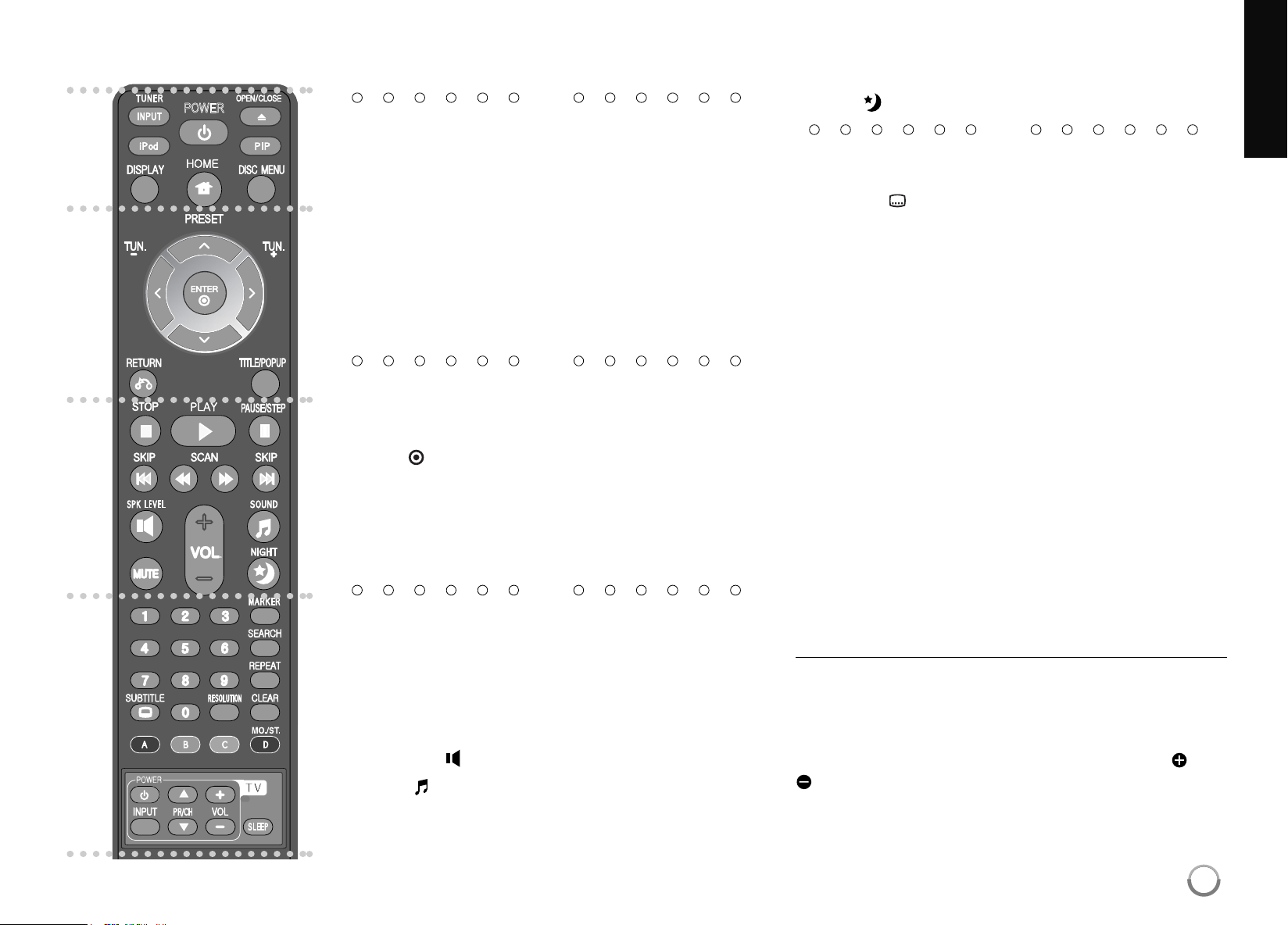
Remote control
a
INPUT (TUNER): Changestheinputsource
(FM,AM,AUX,PORTABLE,OPTICAL,COAXIAL).
POWER: SwitchestheplayerONorOFF.
OPEN/CLOSE (
Z
): Opensandclosesthedisctray.
iPod: SelectsREMOTEIPODorOSDIPODmode.
PIP*: Switcheson/offSecondaryVideo(Picture-in-pic-
ture)(BD-ROMonly).
DISPLAY: DisplaysorexitsOn-ScreenDisplay.
HOME: Displaysorexitsthe[HomeMenu].
DISC MENU: Accessesmenuonadisc.
b
Direction buttons: Selectsanoptioninthemenu.
PRESET (
v/V
): SelectsprogrammeofRadio.
TUN. (+/-): Tunesinthedesiredradiostation.
ENTER ( ): Acknowledgesmenuselection.
RETURN (
O
): Exitsthemenuorresumesplayback.
Theresumeplayfunctionmayworkdependingonthe
BD-ROMdisc.
TITLE/POPUP: DisplaystheDVDtitlemenuor
BD-ROM’spopupmenu,ifavailable.
c
STOP (
x
): Stopsplayback.
PLAY (
N
): Startsplayback.
PAUSE/STEP (
X
): Pausesplayback.
SKIP (
.
/
>
): Gotonextorpreviouschapter/
track/file.
SCAN (
m
/
M
): Searchesbackwardorforward.
SPK LEVEL ( ):
Setsthesoundlevelofdesiredspeaker.
SOUND ( ): Selectsasoundmode.
MUTE: PressMUTEtomuteyourunit. Youcanmute
yourunitinorder,forexample,toanswerthetelephone.
VOL. (+/-): Adjustsspeakervolume.
NIGHT ( ): Setsthelatenightfunction.
d
0-9 numerical buttons: Selectnumberedoptionsina
menu.
SUBTITLE ( ): Selectsasubtitlelanguage.
RESOLUTION: SetstheoutputresolutionforHDMIand
COMPONENT VIDEOOUT jacks.
MARKER: Marksanypointduringplayback.
SEARCH: Displaysorexitsthesearchmenu.
REPEAT: Repeatadesiredsection.
CLEAR: Removesamarkonthesearchmenuora
numberwhensettingthepassword.
Colored (A, B, C, D) buttons: UsetonavigateBD-
ROMmenus.
-Dbutton:SelectsMONOorSTEREOinFMmode.
TV Control Buttons: Seepage57.
SLEEP: Setsacertainperiodoftimeafterwhichtheunit
willswitchtostandby.
* Dependingonadisctypeorthepre-recordedcon-
tentsoftheBD-ROMdisc,differentfunctionsmaybe
executedthanothermediaortherearenoresponse
whenpressingsomebuttons(dependingonmedia
used).
Remote Control Operation
PointtheRemoteControlattheremotesensorand
pressthebuttons.
Remote Control Battery Installation
RemovethebatterycoverontherearoftheRemote
Control,andinsertaR03(sizeAAA)batterywith and
matchedcorrectly.
POWER
a
b
c
d
9
HB954SA-AP.BUSALL_ENG_6606 8/14/09 5:12 PM Page 9
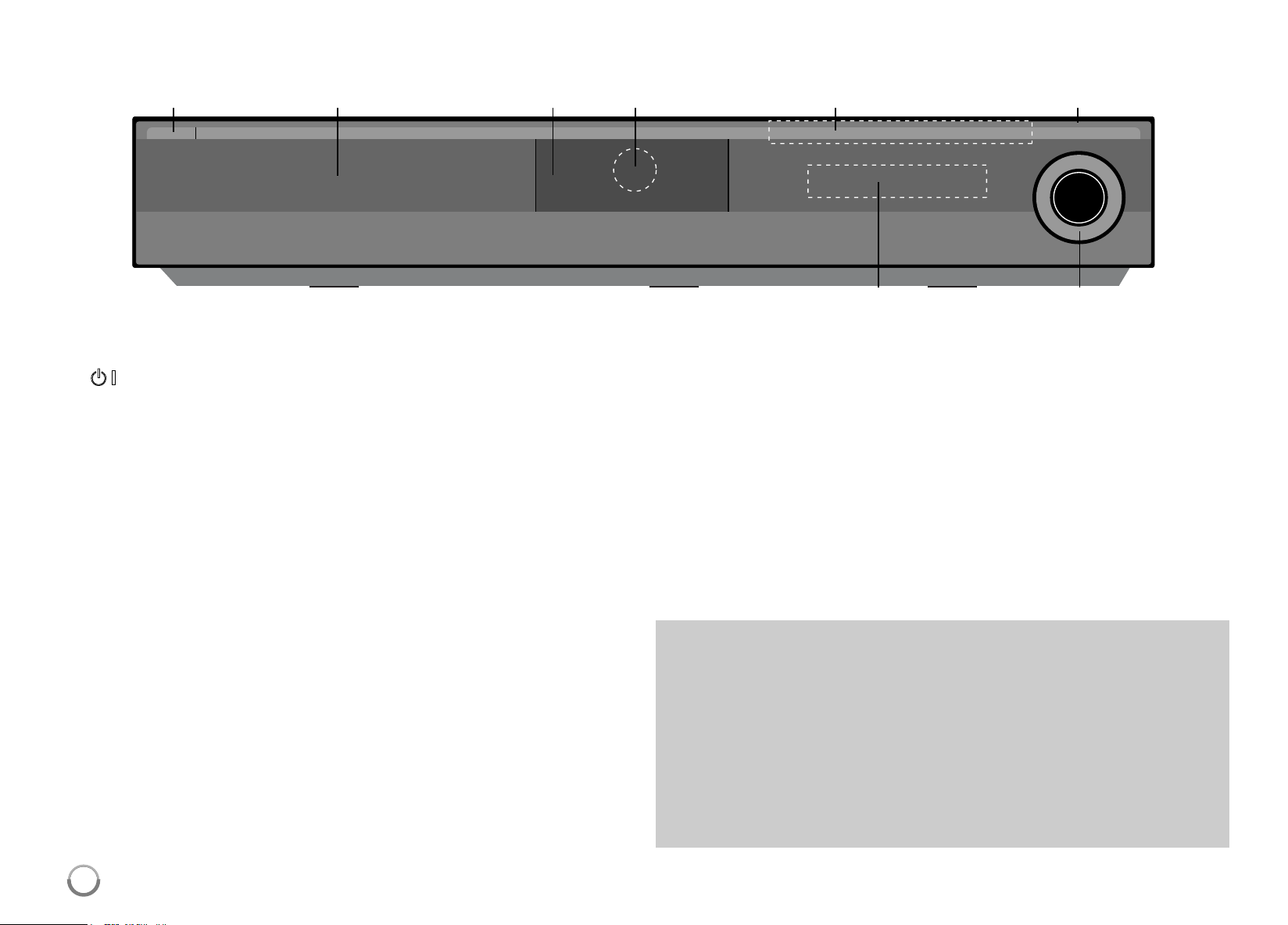
10
a
1
/
}
(POWER) Button
SwitchestheunitONorOFF.
b
Disc Tray
Insertadischere.
c
iPod Dock
ConnectyouriPodhere.
Push
Z
toopentheiPodDock.
d
Remote Sensor
Pointtheremotecontrolhere.
e
Touch Buttons
-
Z
(OPEN/CLOSE)
Opensorclosesthedisctray.
- (
N
/
X
)PLAY / PAUSE
Startsplayback.
Pauseplaybacktemporarily,
pressagaintoexitpausemode.
-
x
(STOP)
Stopsplayback.
-
.
/
>
(SKIP)
Gotonextorpreviousfile/track/chapter.
Searchesbackwardorforwardifyoupressandholdit.
- FUNC.
Changestheinputsource(FM,AM,OSDIPOD,REMOTEIPOD,
AUX,PORTABLE,OPTICAL,COAXIAL)ordisplaysOn-Screen
Display.
f
USB Port
ConnectaUSBdevice.
g
Display Window
Showsthecurrentstatusoftheplayer.
h
VOLUME
Adjustsspeakervolume.
Front panel
g h
a b c d e f
Precautions in using the touch buttons
•Usethetouchbuttonswithcleananddryhands.
-Inahumidenvironment,wipeoutanymoistureonthetouchbuttons
beforeusing.
•Donotpressthetouchbuttonshardtomakeitwork.
-Ifyouapplytoomuchstrength,itcandamagethesensorofthetouch
buttons.
•Touchthebuttonthatyouwanttoworkinordertooperatethefunction
correctly.
•Becarefulnottohaveanyconductivematerialsuchasmetallicobject
onthetouchbuttons.Itcancausemalfunctions.
HB954SA-AP.BUSALL_ENG_6606 8/14/09 5:12 PM Page 10
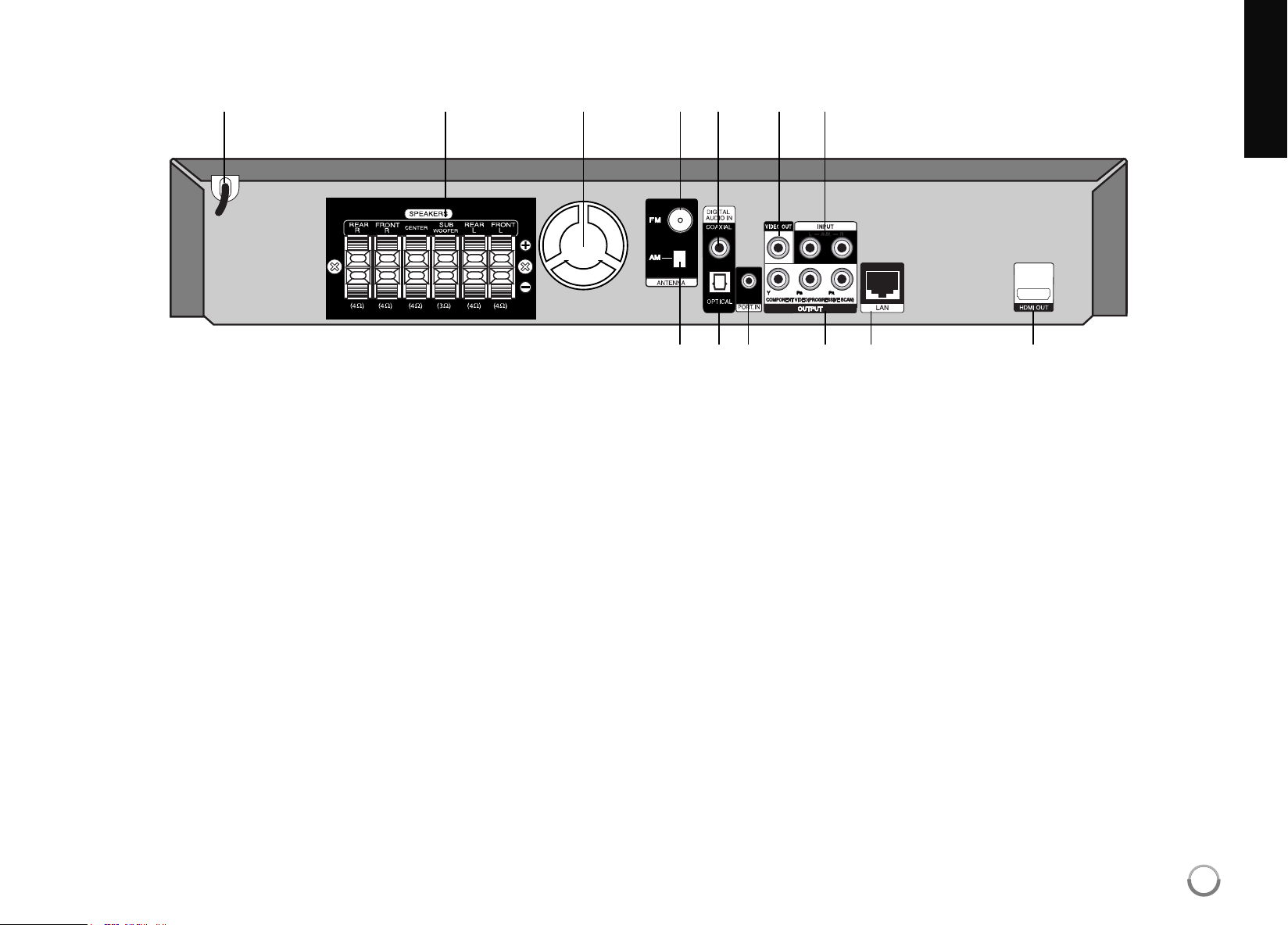
11
a
AC Power Cord
Plugintothepowersource.
b
SPEAKER Connectors
Connectthespeakers.
c
Cooling Fan
d
FM ANTENNA Connector
ConnecttheFMantenna.
e
DIGITAL AUDIO IN (COAXIAL)
Connecttodigital(coaxial)audioequipment.
f
VIDEO OUT
ConnecttoaTVwithvideoinputs.
g
AUX (L/R) INPUT
Connecttoanexternalsourcewith2channelaudiooutputs.
h
AM ANTENNA Connector
ConnecttheAMantenna.
i
DIGITAL AUDIO IN (OPTICAL)
Connecttodigital(optical)audioequipment.
j
PORT. IN
Connecttoaportableplayerwithaudiooutputs.
k
COMPONENT VIDEO (Y P
B
P
R
)
OUTPUT (PROGRESSIVE SCAN)
ConnecttoaTVwithY PbPrinputs.
l
LAN port
Connectanetworkwithanalways-onbroadbandconnection.
m
HDMI OUT (Type A)
ConnecttoTVwithHDMIinputs.(Interfacefordigitalaudioandvideo)
Rear panel
a b c d e f g
h i j k l m
HB954SA-AP.BUSALL_ENG_6606 8/14/09 5:12 PM Page 11
12
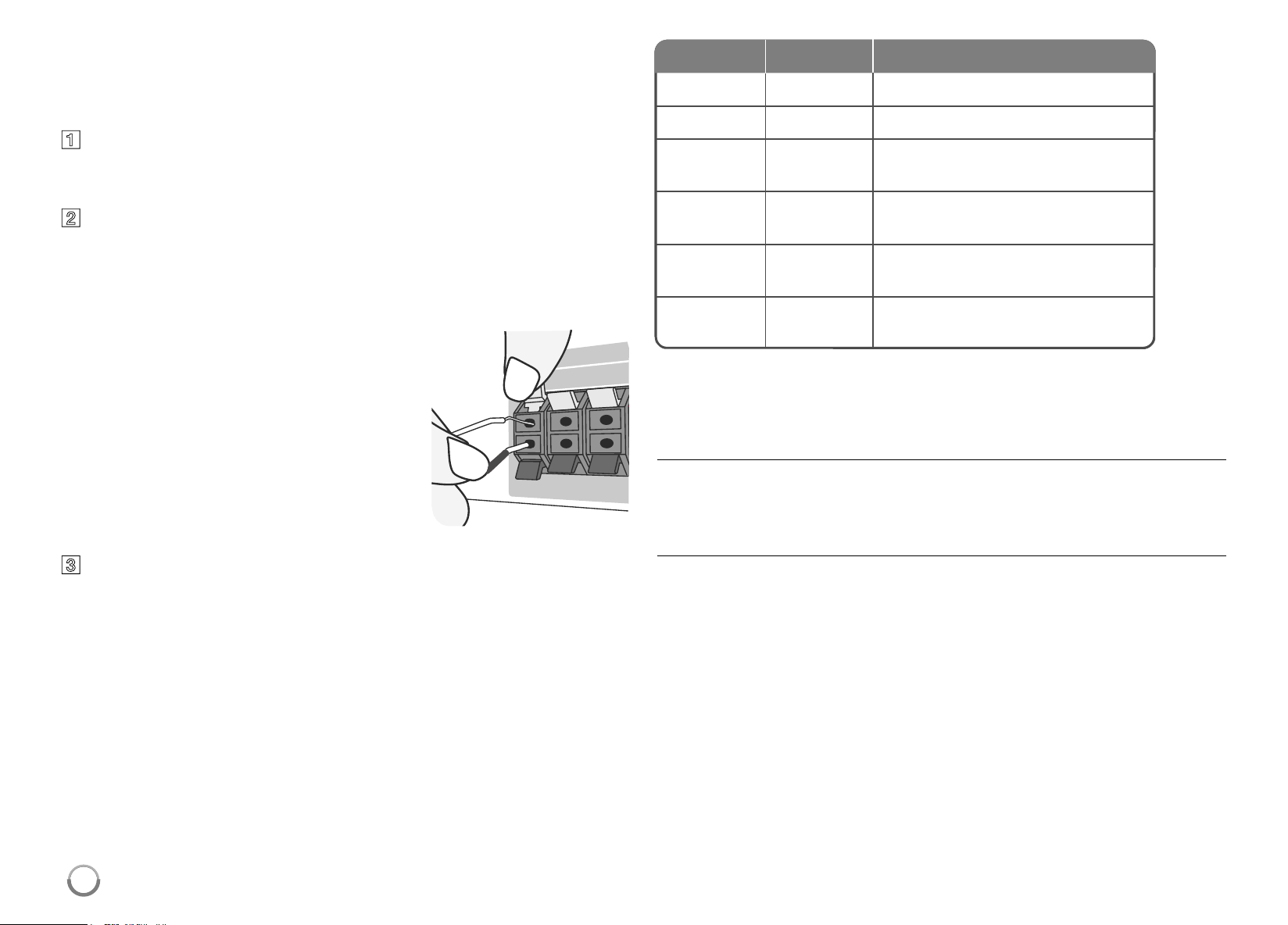
Speaker Connection
Connecttheblackendofeachwireto
theterminalsmarked-(minus)andthe
otherendtotheterminalsmarked+
(plus).
c
Connect the wires to the speakers.
Connecttheotherendofeachwiretothecorrectspeakeraccordingto
thecolorcoding
.
Attaching the speakers to the player
a
You will have received six speaker cables.
Eachoneiscolor-codedbyabandneareachendandconnectsoneof
thesixspeakerstotheplayer.
b
Connect the wires to the player.
Matcheachwire’scoloredbandtothesamecoloredconnectionterminal
ontherearoftheplayer.Toconnectthecabletotheplayer ,presseach
plasticfingerpadtoopentheconnectionterminal.Insertthewireand
releasethefingerpad.
Toconnectthecabletothespeakers,presseachplasticfingerpadtoopenthe
connectionterminalsonthebaseofeachspeaker .Insertthewireandrelease
thefingerpad.
Be careful of the following
Becarefultomakesurechildrennottoputtheirhandsoranyobjectsintothe
*speakerduct.
*Speakerduct:A hallforplentifulbasssoundonspeakercabinet(enclosure).
FM/AM Antenna connection
AM-ConnecttheAMloopantennatotheplayer.
FM-ConnecttheFMantennatotheplayer .
Thereceptionwillbeitsbestwhenthetwolooseendsofthe antenna areina
straightandhorizontalline.
Grey
Blue
Green
Orange
Red
White
Rear
Rear
Center
SubWoofer
Front
Front
Behindyouandtoyourright.
Behindyouandtoyourleft.
Aboveorbelowscreen,directlyinfront
ofyou.
Thiscanbeplacedinanyfront
position.
Infronto fy ou,t ot herightof
thescreen.
Infrontofyou,totheleftof
thescreen.
POSITION
SPEAKER
COLOR
HB954SA-AP.BUSALL_ENG_6606 8/14/09 5:12 PM Page 12
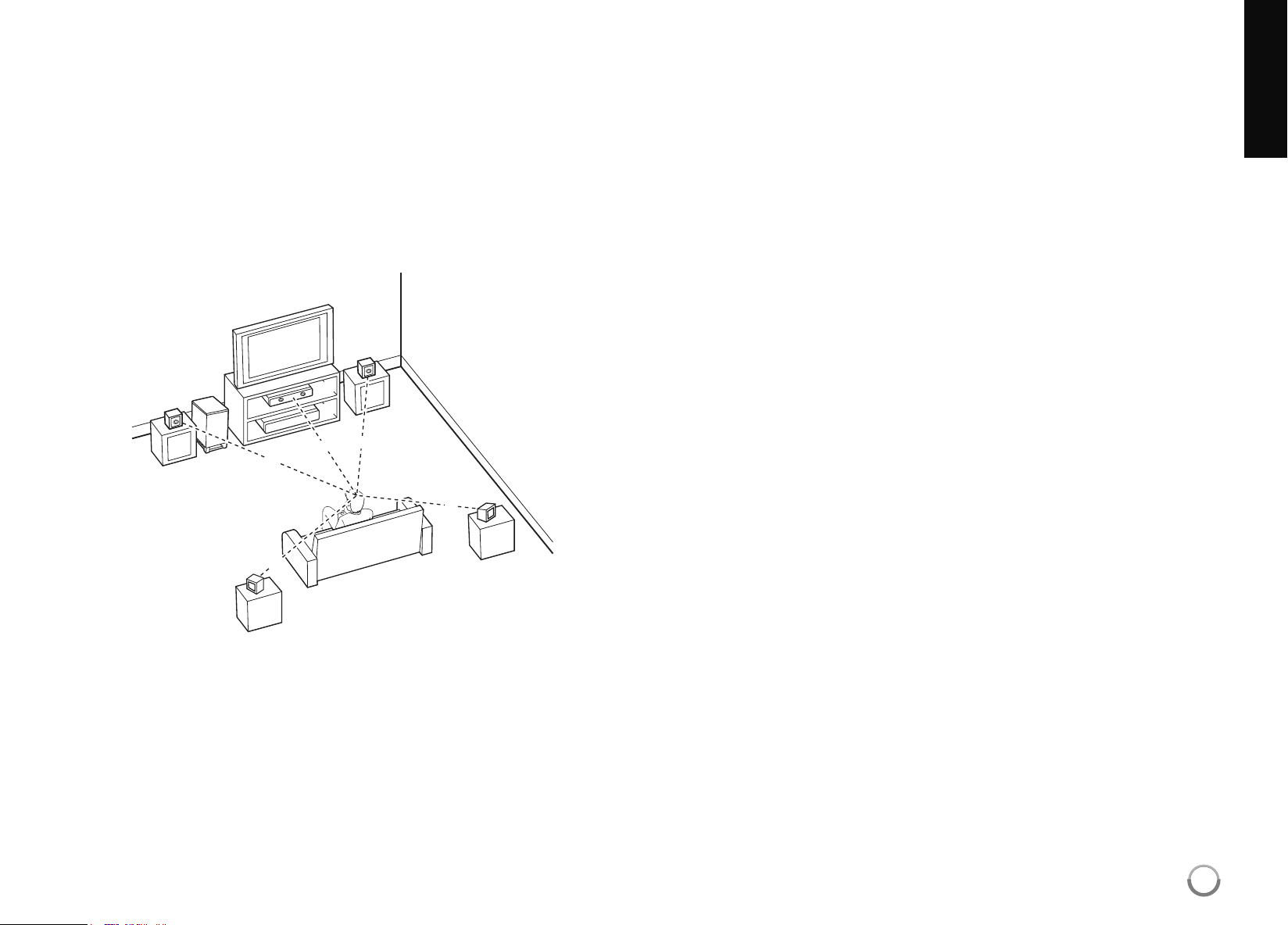
Positioning the System
Thefollowingillustrationshowsanexampleofpositioningthesystem.
Notethattheillustrationsintheseinstructionsdif ferfromtheactualunitfor
explanationpurposes.
Forthebestpossiblesurroundsound,allthespeakersotherthanthe
subwoofershouldbeplacedatthesamedistancefromthelistening
position(
A
).
A
B
D
E
F
A
A
A
A
A
G
C
A
Frontleftspeaker(L)/
B
Frontrightspeaker(R):
Placethefrontspeakerstothesidesofthemonitororscreenandas
flushwiththescreensurfaceaspossible.
C
Centerspeaker:Placethecenterspeakeraboveorbelowthemonitor
orscreen.
D
Surroundleftspeaker(L)/
E
Surroundrightspeaker(R):
Placethesespeakersbehindyourlisteningposition,facingslightly
inwards.
F
Subwoofer:Thepositionofthesubwooferisnotsocritical,because
lowbasssoundsarenothighlydirectional.Butitisbettertoplacethe
subwoofernearthefrontspeakers.Turnitslightlytowardthecenterof
theroomtoreducethewallreflections.
G
Unit
13
HB954SA-AP.BUSALL_ENG_6606 8/14/09 5:12 PM Page 13
14
Connections to your TV
Makeoneofthefollowingconnections,dependingonthecapabilitiesof
yourexistingequipment.
Tips:
• DependingonyourTVandotherequipmentyouwishtoconnect,there
arevariouswaysyoucouldconnecttheplayer.Useonlyoneofthecon-
nectionsdescribedbelow.
• Pleaserefertothemanualsofyour TVorotherdevicesasnecessaryto
makethebestconnections.
Cautions:
• Makesuretheplayerisconnecteddirectlytothe TV.TunetheTVtothe
correctvideoinputchannel.
• DonotconnectyourplayerviayourVCR. Theimagecouldbedistorted
bythecopyprotectionsystem.
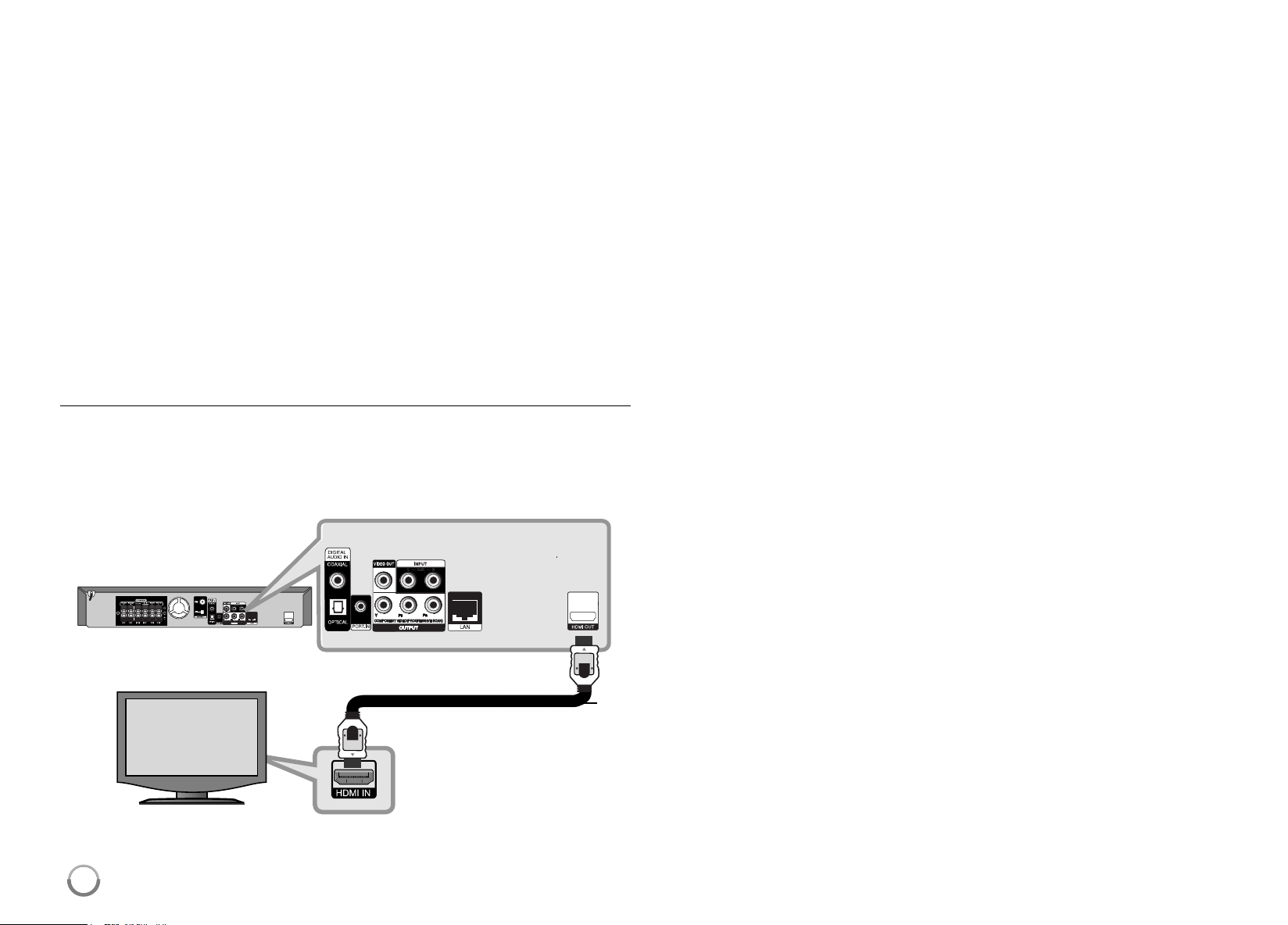
HDMI Connection
IfyouhaveaHDMI TVormonitor,youcanconnectittothisplayerusinga
HDMIcable.
ConnecttheHDMIOUT jackontheplayertotheHDMIINjackonaHDMI
compatibleTVormonitor(H).
SettheTV’ssourcetoHDMI(referto TV’sOwner’smanual).
Notes:
• YoumustselectaHDMIaudiooutputthatyour TVacceptsusing
[HDMIAudio]optionsonthe[Setup]menu(seepage26).
• IfaconnectedHDMIdevicedoesnotaccepttheaudiooutputoftheunit,
theHDMIdevice’s audiosoundmaybedistortedormaynotoutput.
Tips:
•
Youcanfullyenjoydigitalaudioandvideosignalstogetherwiththis
HDMIconnection.
•
WhenyouuseHDMI connection,youcanchangetheresolutionforthe
HDMIoutput.(Referto“
ResolutionSetting
”onpage16-17.)
• SelectthetypeofvideooutputfromtheHDMIOUT jackusing
[HDMIColorSetting]optiononthe[Setup]menu(seepage24).
Cautions:
• Changingtheresolutionwhentheconnectionhasalreadybeen
establishedmayresultinmalfunctions.Tosolvetheproblem,turn
offtheplayerandthenturnitonagain.
• WhentheHDMIconnectionwithHDCP isnotverified,TVscreenis
changedtoblackorgreenscreenorthesnownoisemayoccuronthe
screen.Inthiscase,checkthetheHDMIconnection,ordisconnectthe
HDMIcable.
•
Ifthereisnoiseorlinesonthescreen,pleasechecktheHDMIcable
(lengthisgenerallylimitedto15ft)anduseaHighSpeedHDMIcable
(Version1.3).
H
BD player
TV
HB954SA-AP.BUSALL_ENG_6606 8/14/09 5:12 PM Page 14
15
Additional Information for HDMI
• WhenyouconnectaHDMIorDVIcompatibledevicemakesureofthe
following:
- TryswitchingofftheHDMI/DVIdeviceandthisplayer .Next,switchon
theHDMI/DVIdeviceandleaveitforaround30seconds,thenswitch
onthisplayer.
- Theconnecteddevice’svideoinputissetcorrectlyforthisunit.
- Theconnecteddeviceiscompatiblewith720x480p,1280x720p,
1920x1080ior1920x1080pvideoinput.
• NotallHDCP-compatibleHDMIorDVIdeviceswillworkwiththisplayer .
- Thepicturewillnotbedisplayedproperlywithnon-HDCP device.
- Thisplayerdoesnotplaybackand TVscreenischangedtoblackor
greenscreenorthesnownoisemayoccuronthescreen.
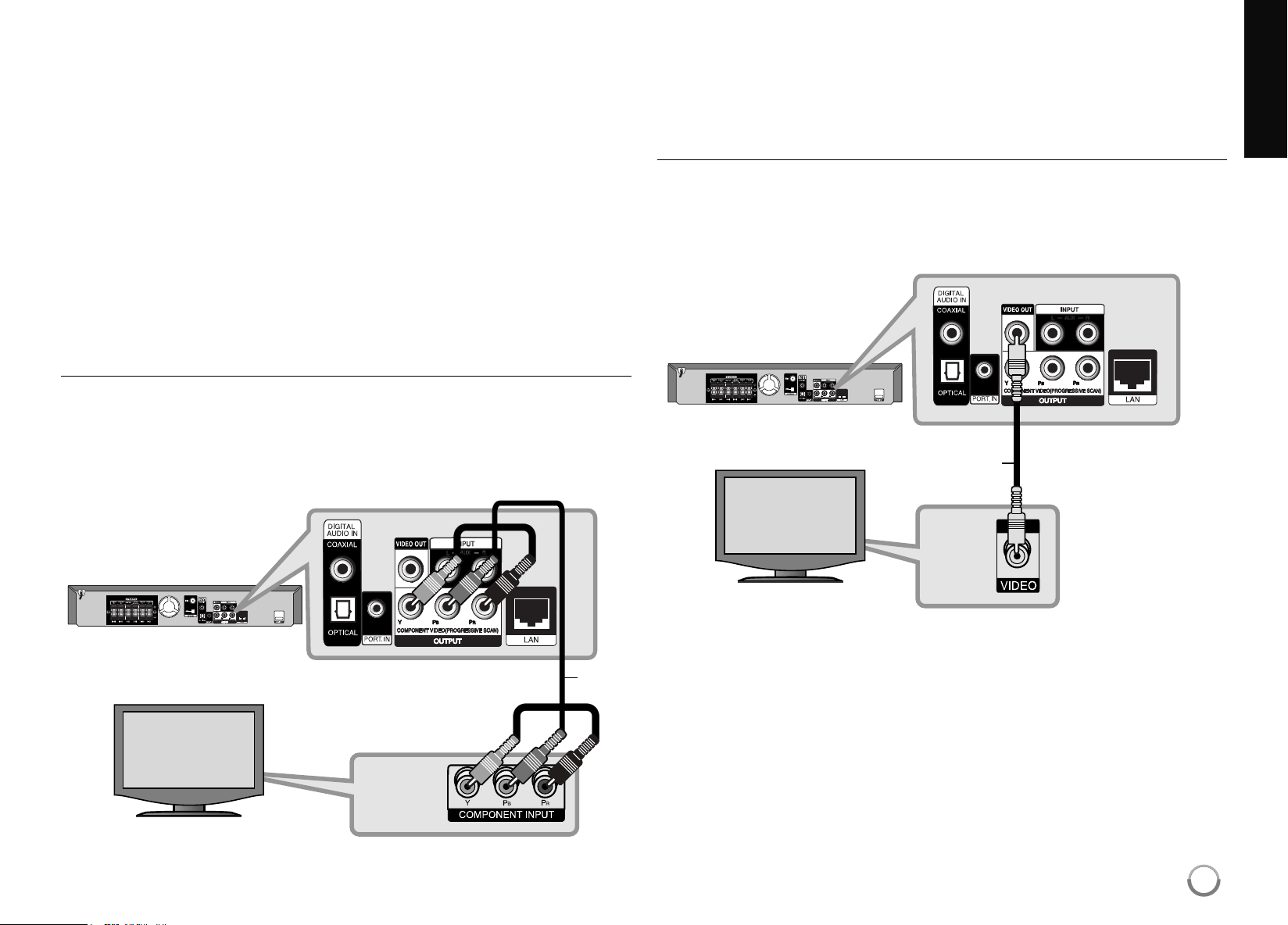
Component Video Connection
ConnecttheCOMPONENT VIDEOOUT jacksontheplayertothe
correspondinginputjacksonthe TVusingY PbPrcables(C).
Youcanhearthesoundthroughthesystem’ sspeakers.
Tip:
WhenyouuseCOMPONENT VIDEOOUT connection,youcanchange
theresolutionfortheoutput.(Referto“Resolutionsetting”onpage16-17.)
Video Connection
ConnecttheVIDEOOUT jackontheplayertothevideoinjackonthe TV
usingavideocable (V).
Youcanhearthesoundthroughthesystem’ sspeakers.
C
V
BD player
TV
BD player
TV
HB954SA-AP.BUSALL_ENG_6606 8/14/09 5:12 PM Page 15
16
Resolution Setting
TheplayerprovidesseveraloutputresolutionsforHDMIOUT and
COMPONENT VIDEOOUT jacks.
Youcanchangetheresolutionusing[Setup]menuorpressingthe
RESOLUTIONbuttonin[HomeMenu]and[Setup]Menu.
Note:
Sinceseveralfactorsaffecttheresolutionofvideooutput,see“A vailable
resolutionaccordingtotheresolutionsetting”totheright.
How to change the resolution using RESOLUTION
button
PressRESOLUTIONrepeatedlyin[HomeMenu]and[Setup]Menuto
changetheresolution.Thedisplaywindowwillshowyouthecurrent
resolution.
How to change the resolution using the [Setup] menu
PressHOMEandthe[HomeMenu]appears.
Selectthe[Setup]andpressENTER. The[Setup]menuappears.
Use
v
/
V
toselect[DISPLAY]optionthenpress
B
tomovetothe
secondlevel.
Use
v
/
V
toselectthe[Resolution]optionthenpress
B
tomovetothe
thirdlevel.
Use
v
/
V
toselectthedesiredresolutionthenpressENTERtoconfirm
yourselection.
Note:
IfthevideosignalfromtheHDMIOUT jackisnotoutputfromthe TV
screenwhen[Resolution]issetto[Auto],changethevideooutput
resolutionbypressingRESOLUTIONbutton.
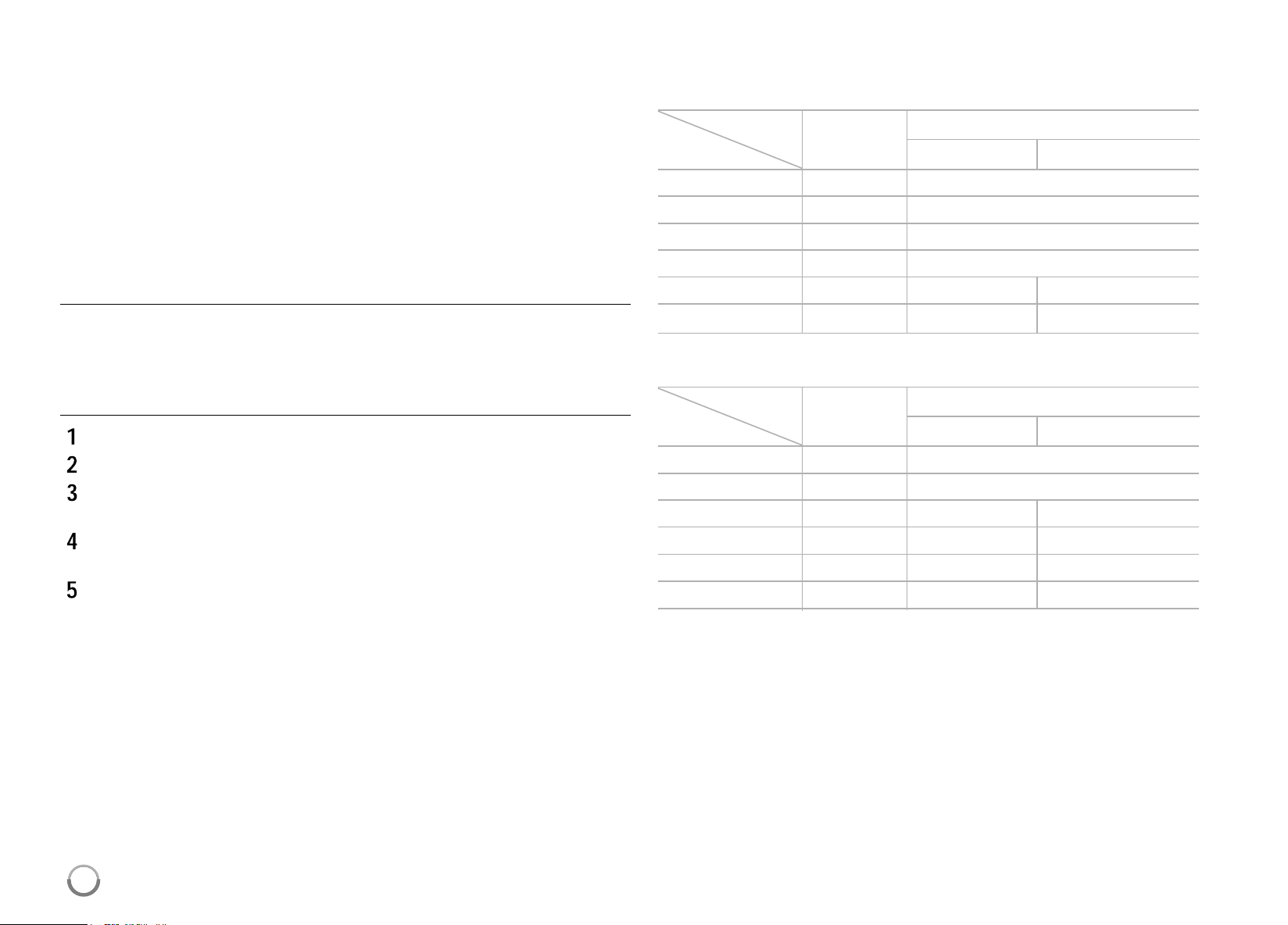
Available resolution according to the resolution setting
Notes:
• Dependingonyourdisplay,someoftheresolutionsettingsmayresultin
thepicturedisappearingoranabnormalpictureappearing.Inthiscase,
pressHOMEthenRESOLUTIONrepeatedlyuntilthepicturere-appear .
• Thisplayersupportssimultaneousoutputofallvideooutjacks. The
resolutionoftheHDMIoutputwillnotbethesameastheresolution
outputonthecomponentvideooutput.
• When the non-copy protected media is playing back
Video Output HDMI OUT COMPONENT VIDEO OUT
Resolution HDMI connected HDMI disconnected
480i 480p 480i
480p 480p 480p
720p 720p 720p
1080i 1080i 1080i
1080p/24Hz 1080p/24Hz 480i 1080i
1080p/60Hz 1080p/60Hz 480i 1080i
• When the copy protected media is playing back
Video Output HDMI OUT COMPONENT VIDEO OUT
Resolution HDMI connected HDMI disconnected
480i 480p 480i
480p 480p 480p
720p 720p 480i 480p
1080i 1080i 480i 480p
1080p/24Hz 1080p/24Hz 480i 480p
1080p/60Hz 1080p/60Hz 480i 480p
1
HB954SA-AP.BUSALL_ENG_6606 8/14/09 5:12 PM Page 16
17
HDMI OUT connection
• Forthe480iresolutionsetting,realoutputresolutionofHDMIOUT will
changeto480p.
• IfyouselectaresolutionmanuallyandthenconnecttheHDMIjackto
TVandyourTVdoesnotacceptit,theresolutionsettingissetto[Auto].
• Ifyouselectaresolutionthatyour TVdoesnotaccept,thewarning
messagewillappear.Afterresolutionchange,ifyoucannotseethe
screen,pleasewait20secondsandtheresolutionwillautomatically
revertbacktothepreviousresolution.
• The1080pvideooutputframeratemaybeautomaticallysettoeither
24Hzor60Hzdependingbothonthecapabilityandpreferenceofthe
connectedTVandbasedonthenativevideoframerateofthecontent
ontheBD-ROMdisc.
COMPONENT VIDEO OUT connection
• Forthe1080presolutionsettingwithunprotectedmedia,realoutput
resolutionofCOMPONENT VIDEOOUT willchangeto1080i.
• Forthe720p,1080i,1080presolutionsettingwithprotectedmedia,real
outputresolutionofCOMPONENT VIDEOOUT willchangeto480ior
480pdependingontheconnectivityofHDMIcable.
• BD,DVDorNetflixvideostreamcouldpreventup-scalingonanalog
output.
VIDEO OUT connection
TheresolutionoftheVIDEOOUT jackisalwaysoutputtedat480i
resolution.
Internet connection
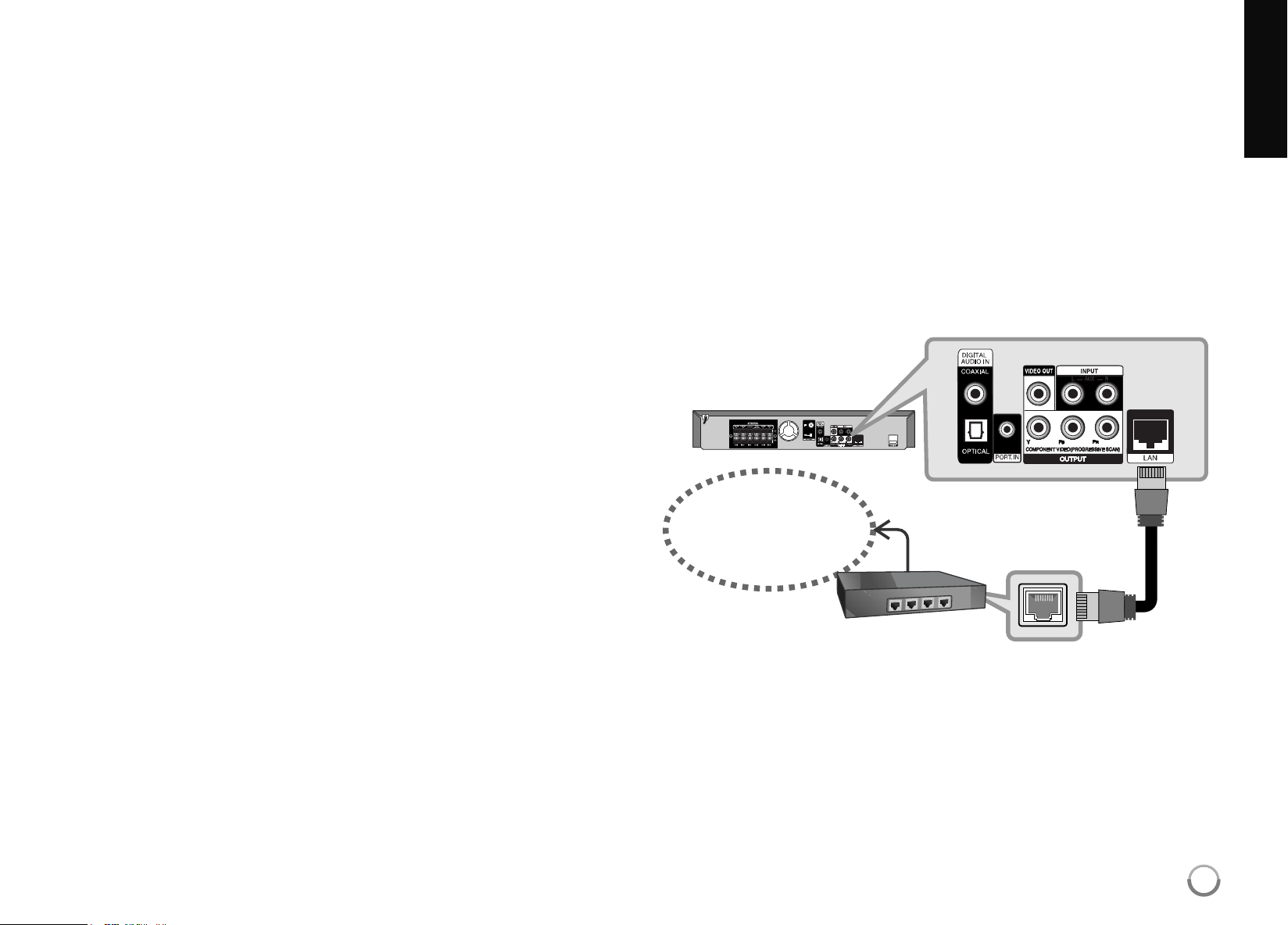
Thisplayercanbeconnectedtoalocalareanetwork(LAN)viatheLAN
portontherearpanel.
Byconnectingtheunittoabroadbandhomenetwork,youhaveaccessto
servicessuchassoftwareupdates,YouTube,BD-Liveinteractivity,and
streamingservicessuchNetflix,etc.
• Ethernet cable connection
Connecttheplayer’sLANporttothecorrespondingportonyourModemor
RouterusingaLANcable.
UseacommerciallyavailableLANorEthernetcable(CA T5orbetterwith
RJ45connector.Iftheplayerisnotnearanetworkconnection,many
retailershaveLANcablesinlengthsof50feetormore.
• Ethernet Adapter connection
AnotherconnectionoptionistouseanEthernetadapter .Oneofthemost
popularEthernetadapteroptionsavailablefrommanyretailersisa
PowerlineEthernetAdapter.
Broadband
Service
Router
BD player
LAN
HB954SA-AP.BUSALL_ENG_6606 8/14/09 5:12 PM Page 17

18
Cautions:
• WhenpluggingorunpluggingtheLANcable,holdtheplugportionofthe
cable.Whenunplugging,donotpullontheLANcablebutunplugwhile
pressingdownonthelock.
• DonotconnectamodularphonecabletotheLANport.
• Sincetherearevariousconnectionconfigurations,pleasefollowthe
specificationsofyourtelecommunicationcarrierorinternetservice
provider.
Notes:
• Manynetworkconnectionproblemsduringsetupcanoftenbefixedby
re-settingtherouterormodem.Afterconnectingtheplayertothehome
network,quicklypoweroffand/ordisconnectthepowercableofthe
homenetworkrouterorcablemodem. Thenpoweronand/orconnect
thepowercableagain.
• Dependingontheinternetserviceprovider(ISP),thenumberofdevices
thatcanreceiveinternetservicemaybelimitedbytheapplicableterms
ofservice.Fordetails,contactyourISP.
• Ourcompanyisnotresponsibleforanymalfunctionoftheplayerand/or
theinternetconnectionfeatureduetocommunicationerrors/malfunc-
tionsassociatedwithyourbroadbandinternetconnection,orothercon-
nectedequipment.
• Ourcompanyisnotresponsibleforanytroubleinyourinternetconnec-
tion.
• ThefeaturesofBD-ROM discsmadeavailablethroughtheInternet
Connectionfeaturearenotcreatedorprovidedbyourcompany ,andour
companyisnotresponsiblefortheirfunctionalityorcontinuedavailabili-
ty.SomediscrelatedmaterialavailablebytheInternetConnectionmay
notbecompatiblewiththisplayer.Ifyouhavequestionsaboutsuch
content,pleasecontacttheproducerofthedisc.
• Someinternetcontentsmayrequireahigherbandwidthconnection.
• Eveniftheplayerisproperlyconnectedandconfigured,someinternet
contentsmaynotoperateproperlybecauseofinternetcongestion,the
qualityorbandwidthofyourinternetservice,orproblemsattheprovider
ofthecontent.
• Someinternetconnectionoperationsmaynotbepossibleduetocertain
restrictionssetbytheInternetserviceprovider(ISP)supplyingyour
broadbandInternetconnection.
• AnyfeeschargedbyanISP including,withoutlimitation,connection
chargesareyourresponsibility.
• A 10Base-T or100Base-TXLANportisrequiredforconnectiontothis
player.Ifyourinternetservicedoesnotallowforsuchaconnection,you
willnotbeabletoconnecttheplayer .
• YoumustuseaRoutertousexDSL service.
• A DSL modemisrequiredtouseDSL serviceandacablemodemis
requiredtousecablemodemservice.Dependingontheaccessmethod
ofandsubscriberagreementwithyourISP,youmaynotbeabletouse
theinternetconnectionfeaturecontainedinthisplayeroryoumaybe
limitedtothenumberofdevicesyoucanconnectatthesametime.(If
yourISP limitssubscriptiontoonedevice,thisplayermaynotbe
allowedtoconnectwhenaPCisalreadyconnected.)
• Theuseofa“Router”maynotbeallowedoritsusagemaybelimited
dependingonthepoliciesandrestrictionsofyourISP.Fordetails,con-
tactyourISP directly.
• YourISP mayprotectthisplayerfrombeingconnectedtonetworkwhen
confirmingMACADDRESS.Inthatcase,contactyourISP torequestto
initializeMACADDRESS.
• Werecommendaminimumconnectionspeedof1.5Mbps.Forthebest
playbackcondition,aconnectionspeedof4.0Mbpsisrequired.
SometimesyourbroadbandspeedvariesbasedonyourISP’ snetwork
conditions.ContactyourISP ifyouhaveproblemsmaintainingafast
connectionthatisreliable,orifyouwanttoincreaseyourconnection
speed.ManyISPsofferavarietyofbroadbandspeedoptions.
HB954SA-AP.BUSALL_ENG_6606 8/14/09 5:12 PM Page 18
Network Software Update
Network update notification
Fromtimetotime,performanceimprovementsand/oradditionalfeaturesor
servicesmaybemadeavailabletounitsthatareconnectedtoabroadband
homenetwork.Ifthereisnewsoftwareavailableandtheunitisconnected
toabroadbandhomenetwork,theplayerwillinformyouabouttheupdate
asfollows.
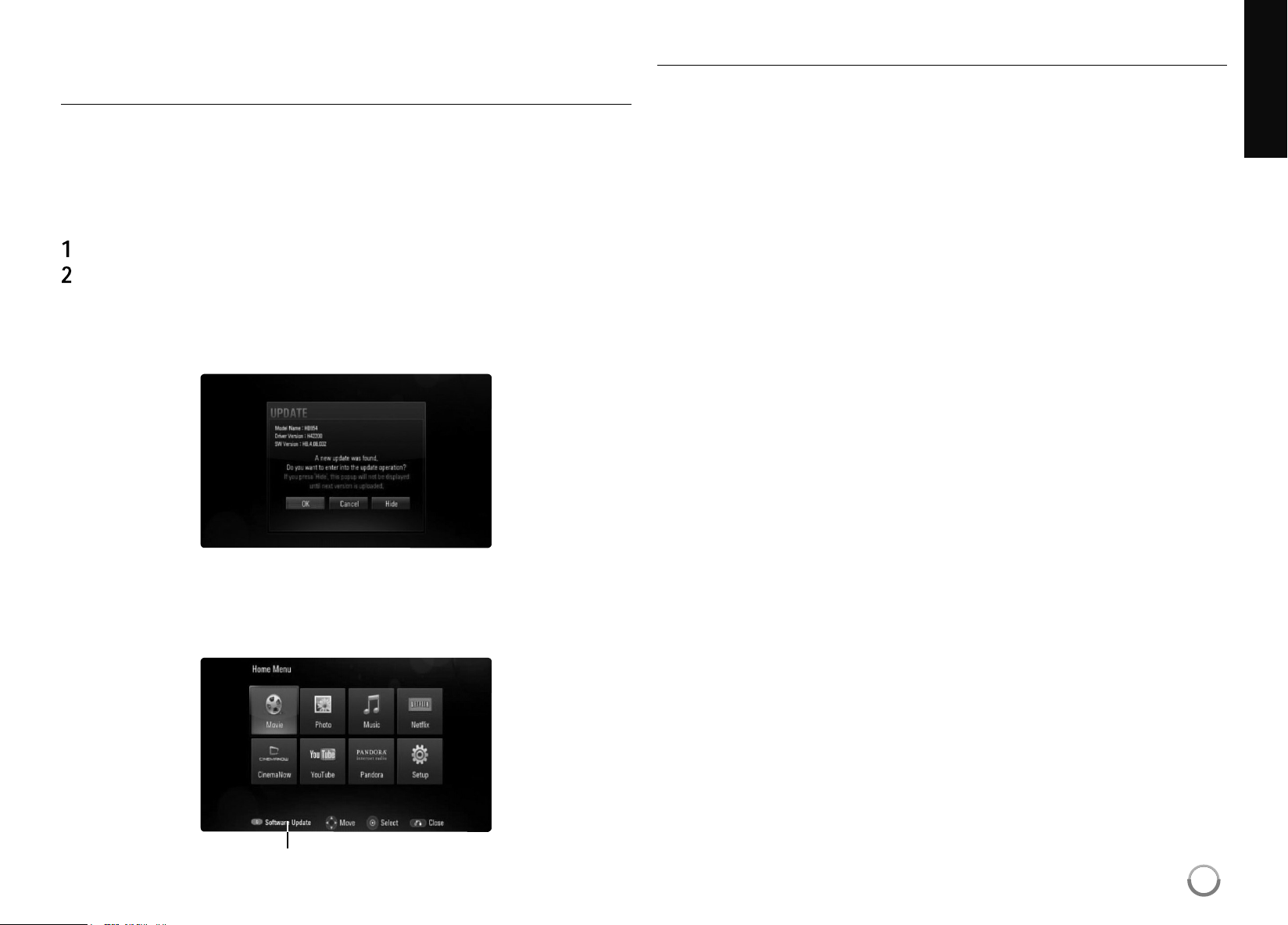
Option 1:
Theupdatemenuwillappearonthescreenwhenyouturnontheplayer .
Use
b
/
B
toselectadesiredoptionandthenpressENTER.
[OK] -Startsthesoftwareupdate.
[Cancel] -Exitstheupdatemenu.
[Hide] -Exitstheupdatemenuanditdoesnotappearuntilnext
softwareisuploadedintheupdateserver.
Option 2:
Ifthesoftwareupdateisavailablefromtheupdateserver ,the“Software
Update”iconappearsatthebottomoftheHomemenu.Pressbluecolored
buttontostarttheupdateprocedure.
SoftwareUpdate
Updating software in the [Setup] menu
Youcanupdatetheplayerusingthelatestsoftwaretoenhancethe
productsoperationand/oraddnewfeatures. Youcanupdatethesoftware
byconnectingtheunitdirectlytothesoftwareupdateserver .
Step 1: Check the Network Connection and settings
Seepage17-18and28.
Step 2: Checking Network Configuration
Seepage28.
Step 3: Updating Software
Cautions:
• Beforeupdatingthesoftwareinyourplayer,removeanydisc
andUSBDevicefromtheplayer.
• Beforeupdatingthesoftwareinyourplayer,turntheplayeroff
andthenturnitbackon.
• During the software update procedure, do not turn off the
player or disconnect AC power, or do not press any button.
• Ifyoucanceltheupdate.Turnoffthepowerandturnitonfor
stableperformance.
• Thisunitcannotbeupdatedtoprevioussoftwareversion.
1. Select[SoftwareUpdate]optioninthe[Setup]menuthenpress
B
or
ENTER.
19
HB954SA-AP.BUSALL_ENG_6606 8/14/09 5:12 PM Page 19
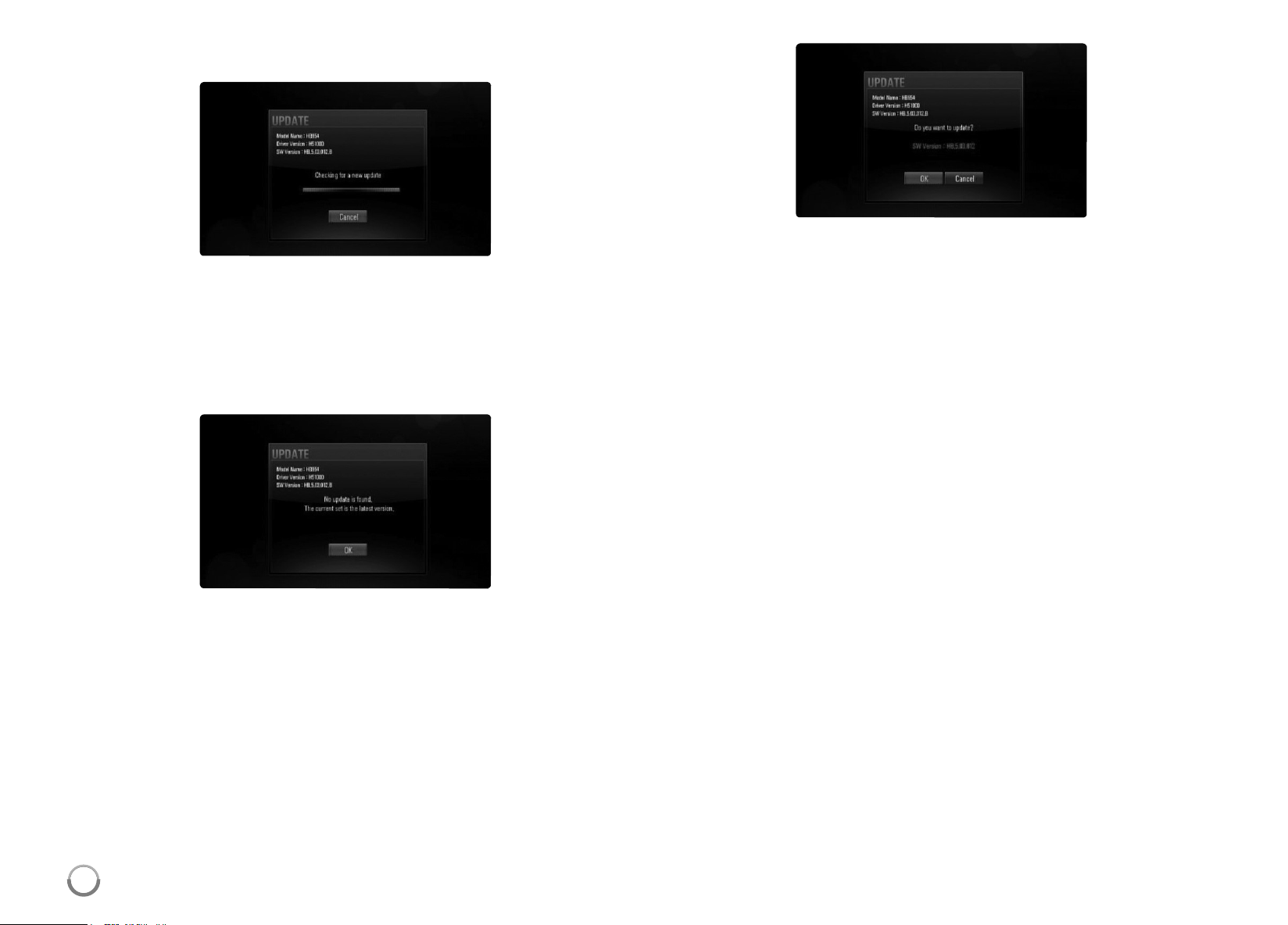
2. Theplayerwillcheckforthenewestupdate.
Caution: PressingENTERwhilecheckingfortheupdatewillendthe
process.
Note: Ifthereisnoupdateavailable,theMessage,
“Noupdateisfound.”appears.PressENTERtoreturntothe[Home
Menu].
3. Ifnewerversionexists,themessage“A newupdatewasfound.Do
youwanttodownloadit?”appears.
4. SelectOKtodownloadtheupdate.(Selecting[Cancel]willendthe
update.)
5. Theplayerstartsdownloadingthenewestupdatefromtheserver .
(Downloadingwilltakeabout80secondsatthenetworkspeedof
4MbpsSpeed.)
6. Whendownloadingiscompleted,themessage,“Downloadis
complete.Doyouwanttoupdate?”appears.
7. SelectOKtostartupdating.
(Selecting[Cancel]willendtheupdateanddownloadedfilewillnotbe
re-usable.Toupdatesoftwarethenexttime,thesoftwareupdate
procedurehastobestartedfromthebeginningagain.)
Caution: Donotturnoffthepowerduringthesoftwareupdate.
Note: Ifthesoftwareincludesthedriverupdate,disctraymayopen
duringtheprocess.
8. Whenupdateiscompleted,themessage,“Updateiscomplete.”will
appear,andthepowerwillturnof fautomaticallyafter5seconds.
9. Turnthepowerbackon.Thesystemnowoperateswiththenew
version.
10. Aftercompletingtheupdateprocess,repeatprocedures1-2inStep3
andcheckiftherearenomoreupdatesavailable.
Tip:
TheSoftwareUpdatefunctionmaynotworkproperlydependingon
yourinternetenvironment.Inthiscase,youcanobtainthelatest
softwarefromtheauthorizedLGElectronicsServiceCenterthen
updateyourplayer.Referto“CustomerSupport”onpage61.
20
HB954SA-AP.BUSALL_ENG_6606 8/14/09 5:12 PM Page 20

Setting the sound mode
Youcanselectasuitablesoundmode.PressSOUNDrepeatedlyuntilthe
desiredmodeappearsonthefrontpaneldisplayorthe TVscreen.
Thesettingthesoundmodeisnotavailablewhen[HDMI Audio]issetto
[On](seepage26).
[Natural] mode: Youcanenjoycomfortableandnaturalsound.
[Bypass] mode: Softwarewithmultichannelsurroundaudiosignals
isplayedaccordingtothewayitwasrecorded.
[Bass Booster] mode: Reinforcethebasssoundeffectfromfrontleft
andrightspeakerandsubwoofer.
[PL ll Movie] mode: PerformsProLogicllmoviemodedecodingto
theinputsignalandproducesfivefull-bandwidthoutputchannelsfrom
2channelsources.Thissettingisidealforwatchingvideosof
overdubbedoroldmovies.Thismodeisavailableonlyto2channel
sources.
[PL ll Music] mode: PerformsProLogicllmusicmodedecodingto
theinputsignalandproducesfivefull-bandwidthoutputchannelsfrom
2channelsources.Thissettingisidealfornormalstereosourcessuch
asCD.Thismodeisavailableonlyto2channelsources.
[News] mode: Thismodemakesvoicesoundclear,improvingthe
qualityofvoicesound.
Thismodeoutputssoundfromthefrontleftandrightspeakers,center
speaker,andsubwoofer.
[Drama] mode: Youcanenjoymoredynamicsoundwithimproved
centerchannelwhilewatchingatelevisiondrama.
Thismodeoutputssoundfromthefrontleftandrightspeakers,center
speaker,andsubwoofer.
[Sports] mode: Thismodeproducesdynamicsoundexpansionforthe
sportsprogram.
[Game] mode: Youcanenjoymorevirtualsoundwhileplayingvideo
games.
[Concert] mode: Createsthesoundofconcerthall.
[Music ReTouch] mode: WhenlisteningtoMP3filesorother
compressedmusic,youcanenhancethesound.
Thismodeisavailableonlyto2channelsources.
Adjust the speaker level settings
Youcanadjustthesoundlevelofeachspeaker .
PressSPKLEVEL repeatedlytoselectadesiredspeakertoset.
PressVOL.(+/-)toadjustthesoundleveloftheselectedspeakerwhile
thelevelsettingmenuisdisplayedonthefrontpaneldisplayorthe TV
screen.Repeatandadjustthesoundleveloftheotherspeakers.
Using the late night function
Youcancompressthedynamicrangeofthesoundtrack.
PressNIGHT repeatedly.
Thismaybeusefulwhenyouwanttowatchmoviesatlowvolumeslateat
night.
[NIGHT OFF]: Latenightfunctionoff.
[NIGHT ON]: Reductionindynamicrange.
Notes:
•
Thelatenightfunctionmaybelessef fectiveorhavenoeffectdependingon
thesource.
•
Duringthelatenightmodeison,thelightingofthetouchbuttonsandthe
volumeknobareturnedoffandthefrontpaneldisplayisdimmed.
Using the sleep timer
Youcansetthesystemtoturnof fatapresettime,soyoucanfallasleep
listeningtomusic.
- PressSLEEP repeatedlytoselectthedesiredtimeperiodoptions(inminutes):
(Dimmeron
t
Sleeptimervalue
t
Dimmeroff)
Dimmeron:
Thelightingofthetouchbuttonsandthevolumeknobareturned
offandthefrontpaneldisplayisdimmed.
- Toviewthetimecountdowntothestandbymode,pressSLEEP again.
- Todeactivatethesleeptimer,pressSLEEP untilthepreviousstatusisdisplayed
orpressPOWERtoswitchtheunittostandby .
21
HB954SA-AP.BUSALL_ENG_6606 8/14/09 5:12 PM Page 21

22
Tip:
Ifyouselectthe[Photo]or[Music]optionwhentheUSBdeviceis
connectedandadiscisinsertedsimultaneously,themenuforselecting
amediawillappear.SelectamediathenpressENTER.
For example:
Inserting/Removing the USB device
Inserting the USB device – Insertstraight-inuntilitfitsintoplace.
Removing the USB device – WithdrawtheUSBdeviceorcable
carefully.
Notes:
• ThisplayersupportsUSBflashmemory/externalHDDformattedin
FAT16,FAT32andNTFSwhenaccessingfiles(music,photo).
However,forBD-Live,onlyFAT16andFAT32formatsaresupported.
PleaseusetheInternalFlashMemoryorUSBflashmemory/external
HDDformattedineitherFAT16orFAT32whenusingBD-Live.
• TheUSBdevicecanbeusedforthelocalstorageforenjoying
BD-LivediscswithInternet.
• Thisunitcansupportupto4partitionsoftheUSBdevice.
• DonotextracttheUSBdevice duringoperation(play,etc.).
• A USBdevice whichrequiresadditionalprograminstallationwhenyou
haveconnectedittoacomputerisnotsupported.
• USBdevice:USBdevicethatsupportUSB1.1andUSB2.0.
• Musicfiles(MP3/WMA)andphotofiles(JPEG/PNG)canbeplayed.For
detailsofoperationsoneachfile,refertorelevantpages.
• Regularbackupisrecommendedtopreventdataloss.
• IfyouuseaUSBextensioncableorUSBHUB,theUSBdevicemaynot
berecognized.
• SomeUSBdevices maynotworkwiththisunit.
• Digitalcameraandmobilephonearenotsupported.
• USBPortoftheunitcannotbeconnectedtoPC.
Theunitcannotbeusedasastoragedevice.
Using USB devices
Thisunitcanplaythemusicandphoto
filescontainedontheUSBdevice.
ON REMOTE
1 Connect a USB device: –
2 Displays the [Home Menu]: HOME
3 Select a main option:
b B
, ENTER
[Photo]or[Music]option
4 Select the [USB] option:
b B
5 Displays corresponding menu list: ENTER
[PHOTO]or[MUSIC]menuappears.
Detailsforthemenuareonpages36-39.
BD player
USB Flash Drive
USB External HDD
HB954SA-AP.BUSALL_ENG_6606 8/14/09 5:13 PM Page 22

[Movie]–Startvideomedia’splaybackordisplaysthe[MOVIE]menu.
(page36)
[Photo]–Displays[PHOTO]menu.(page38-39)
[Music]–Displays[MUSIC]menu.(page37)
[Netflix]–Instantlywatchsomemovies& TVepisodesstreamedfrom
NetflixtoyourTV.(page40-42)
[CinemaNow]–Instantlywatchsomemovies&TVepisodesstreamed
fromCinemaNowtoyourTV.(pages43-46)
[YouTube]–WatchYouTubevideosstreamedfromthe Youtubeservervia
theinternettoyourTV.(pages50-52)
[Pandora]–InstantlylistentosomemusicsstreamedfromPandora.
(page47-49)
[Setup]–Displaysthe[Setup]menu. (page23-29)
Tips:
• Ifyouselectthe[Photo]or[Music]optionwhentheUSBdeviceis
connectedandadiscisinsertedsimultaneously,themenufor
selectingamediawillappear.SelectamediathenpressENTER.
• If“SoftwareUpdate”appearsonthe[HomeMenu],itmeansthereisa
softwareupdateavailablevianetwork.Toupdatetheunit,pressblue(D)
button.Fordetails,seepage19-20.
Notes:
• Theunitwillbeinstopmodethenthe[HomeMenu]willappearifyou
pressHOMEduringplayback.
• IfyouinsertaDVDoranunplayablediscthatisformattedasISO9660
orUDF,the[Photo]or[Music]optioncanbeselectedinthe
[HomeMenu].Butyoucannotplayit.
Using the Home Menu
1 Displays the [Home Menu]: HOME
2 Select an option:
v V b B
3 Displays the selected option menu: ENTER
4 Exit the [Home Menu]: HOME
ON REMOTE
Adjust the Setup settings
1 Displays the [Home Menu]: HOME
2 Select the [Setup] option:
b B
, ENTER
3 Select a desired option on the first level:
v V
4 Move to second level:
B
5 Select a desired option on the second level:
v V
6 Move to third level:
B
7 Adjust or confirm the setting:
v V
, ENTER
Someitemsrequireadditionalsteps. 0-9 Numeric
8 Go back to the previous level:
b
9 Exit the [Setup] menu: HOME or RETURN
ON REMOTE
First level
Second level
Third level
23
HB954SA-AP.BUSALL_ENG_6606 8/14/09 5:13 PM Page 23
24
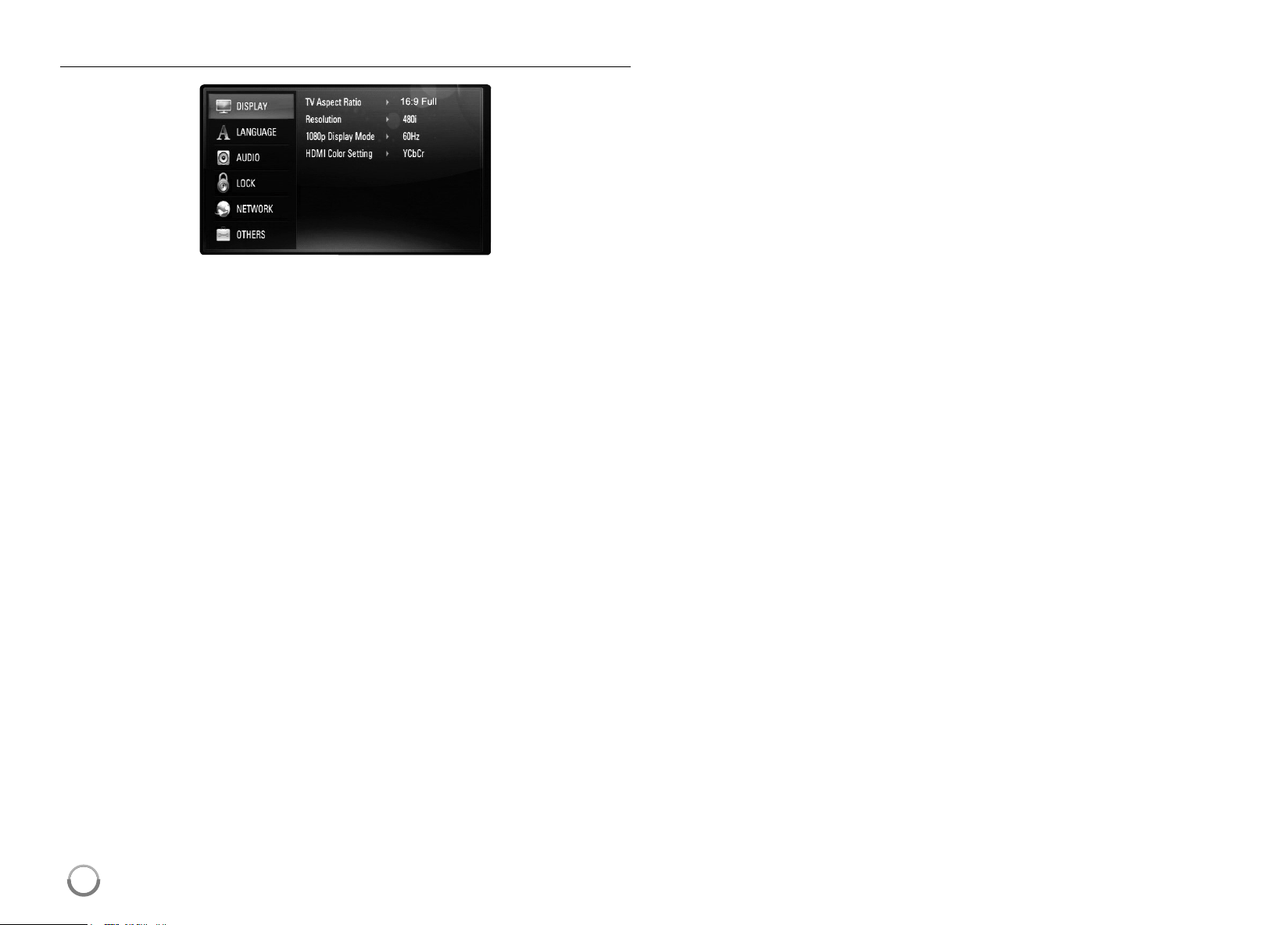
[DISPLAY] Menu
TV Aspect Ratio
[4:3 Letter Box] – Selectwhenastandard4:3 TVisconnected.
Displaystheatricalimageswithmaskingbarsaboveandbelowthe
picture.
[4:3 Pan Scan] – Selectwhenastandard4:3 TVisconnected.
Displayspicturescroppedtofillyour TVscreen.Bothsidesofthe
picturearecutoff.
[16:9 Original] – Selectwhena16:9wideTVisconnected.The4:3
pictureisdisplayedwithanoriginal4:3aspectratio,withblackbars
appearingattheleftandrightsides.
[16:9 Full] – Selectwhena16:9wideTVisconnected.The4:3
pictureisadjustedhorizontally(inalinearproportion)tofilltheentire
screen.
Note:
Youcannotselect[4:3LetterBox]and[4:3PanScan]optionwhenthe
resolutionissettohigherthan720p.
Resolution
SetstheoutputresolutionoftheComponentandHDMIvideosignal.
Referto“ResolutionSetting”onpage16-17fordetailsaboutthe
resolution.
[Auto] – IftheHDMIOUT jackisconnectedforTVsprovidingdisplay
information(EDID),automaticallyselectstheresolutionbestsuitedto
theconnectedTV.IftheCOMPONENT VIDEOOUT isonlyconnected,
thischangestheresolutionto1080iasdefaultresolution.
[1080p] – Outputs1080linesofprogressivevideo(onlyforHDMI
connection).
[1080i] – Outputs1080linesofinterlacedvideo.
[720p] – Outputs720linesofprogressivevideo.
[480p] – Outputs480linesprogressivevideo.
[480i] – Outputs480linesofinterlacedvideo.
1080p Display Mode
Whentheresolutionissetto1080p,select[24Hz]forsmoothpresentation
offilmmaterial(1080/24p)withaHDMI-equippeddisplaycompatiblewith
1080/24pinput.
Notes:
• Whenyouselect[24Hz],youmayexperiencesomepicturedisturbance
whenthevideoswitchesvideoandfilmmaterial.Inthiscase,select
[60Hz].
• Evenwhen[1080pDisplayMode]issetto[24Hz],ifyour TVisnot
compatiblewith1080/24p,theactualframefrequencyofthevideo
outputwillbe60Hztomatchthevideosourceformat.
HDMI Color Setting
SelectthetypeofoutputfromtheHDMIOUT jack.Forthissetting,please
refertothemanualsofyourdisplaydevice.
[YCbCr] – SelectwhenconnectingtoaHDMIdisplaydevice.
[RGB] – SelectwhenconnectingtoaRGBdisplaydevice.
HB954SA-AP.BUSALL_ENG_6606 8/14/09 5:13 PM Page 24
25
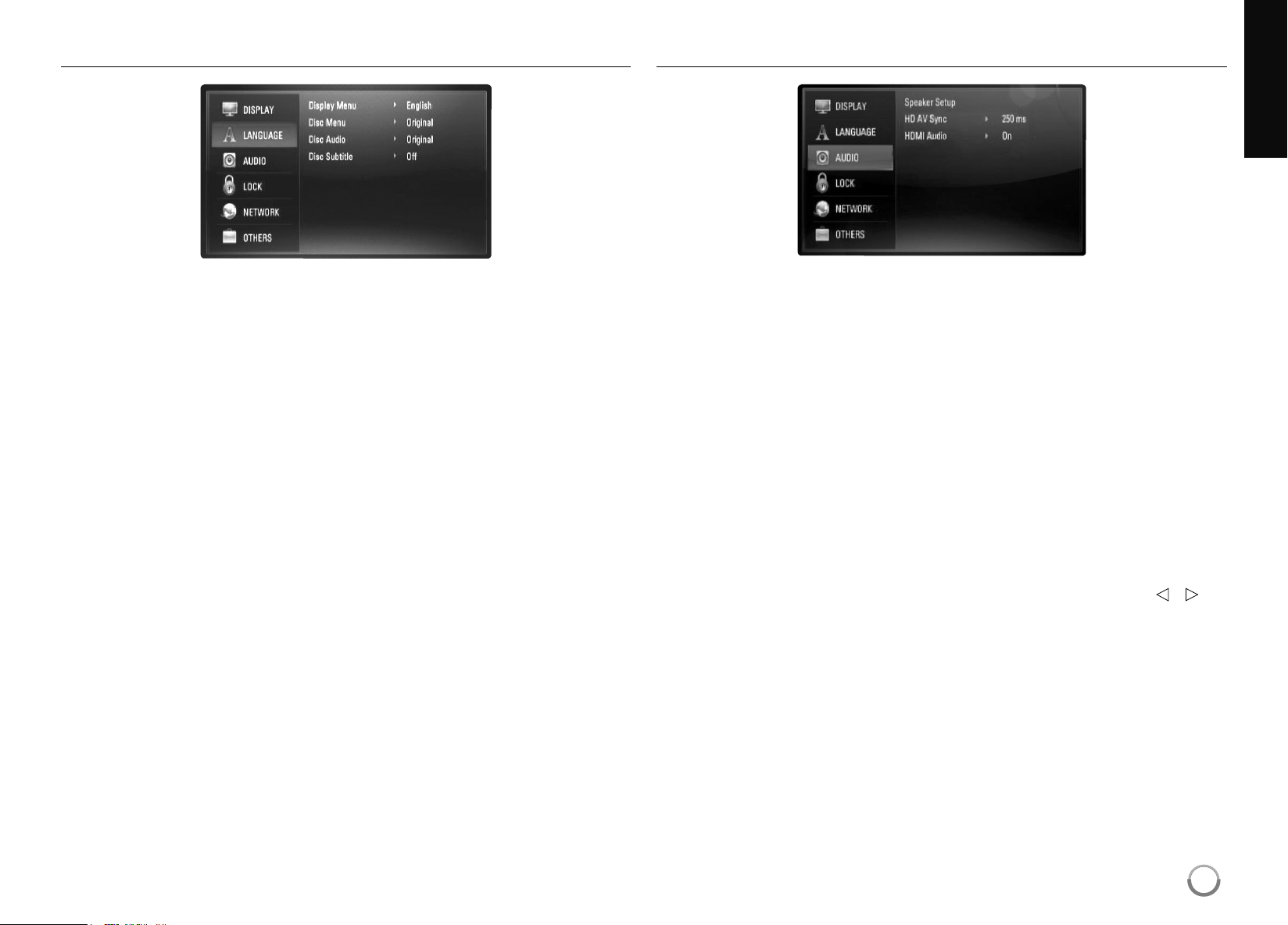
[LANGUAGE] Menu
Display Menu
Selectalanguageforthe[Setup]menuandon-screendisplay .
Disc Menu / Disc Audio / Disc Subtitle
Selectthelanguageyoupreferfortheaudiotrack(discaudio),subtitles,
andthediscmenu.
[Original] – Referstotheoriginallanguageinwhichthediscwas
recorded.
[Other] – PressENTERtoselectanotherlanguage.Usenumber
buttonsthenENTERtoenterthecorresponding4-digitnumber
accordingtothelanguagecodelistonpage59.
[Off] (for Disc Subtitle) – TurnoffSubtitle.
Note:
Dependingonadisc,yourlanguagesettingmaynotworkforsomedisc.
[AUDIO] Menu
Speaker Setup
Toobtainthebestpossiblesound,usetheSpeakerSetupdisplayto
specifythevolumeofthespeakersyouhaveconnectedandtheirdistance
fromyourlisteningposition.Usethe Testtoadjustthevolumeofthe
speakerstothesamelevel.
[Speaker] – Selectaspeakerthatyouwanttoadjust.
[Volume] – Adjusttheoutputlevelofeachspeaker.
Besuretoset“Test”to“All”foreasyadjustment.
[Distance] – Adjustthedistancebetweeneachspeakerandthe
listeningposition.
[Test] – Thespeakerswillemitatesttone.
All:Thetesttoneisemittedfromeachspeakerinsequence.
Tosaveyoursettings,pressENTERandselect[Yes]bypressing
b
/
B
.
HB954SA-AP.BUSALL_ENG_6606 8/14/09 5:13 PM Page 25

26
HD AV Sync
SometimesDigitalTVencountersadelaybetweenpictureandsound.Ifthis
happensyoucancompensatebysettingadelayonthesoundsothatit
effectively‘waits’ forthepicturetoarrive:thisiscalledHD AVSync.
Use
v V
toscrollupanddownthroughthedelayamount,whichyoucanset
atanythingbetween0and300msec.
Thedelaywillvarydependingonwhichdigital TVchannelyouareon.Ifyou
changechannelyoumayneedtoreadjusttheHD AVSync.
HDMI Audio
YoucansetTVspeakeroutputfortheaudiosignalfromtheHDMIOUT jack.
[Off] – Audiosignalsareoutputtothesystemspeakersonly .
[On] – Audiosignalsareoutputfromthe TV’sspeakerandthe
system’sfrontleftandrightspeakerandsubwoofer .
Note:
When[HDMIAudio]issetto[On],thesoundmodeisswitchedto
[BYPASS]automatically.
[LOCK] Menu (Parental Control)
The[LOCK]settingsaffectonlyNetflixmovie,BDandDVDplayback.
Toaccesstheanyfeaturesin[LOCK]settings,youmustenterthe4-digit
securitycodeyouhavecreated.
Ifyouhavenotenteredapasswordyet,youarepromptedtodoso.Enter
a4-digitpasswordandpressENTER.EnteritagainandpressENTERto
verify.
Password
Youcancreate,changeordeletethepassword.
[New] – Entera4-digitpasswordandpressENTER.Enteritagainand
pressENTERtocreateanewpassword.
[Change] – EnterthecurrentpasswordandpressENTER.
Entera4-digitpasswordandpressENTER.Enteritagainandpress
ENTERtocreateanewpassword.
[Delete] – Enterthe4-digitpasswordandpressENTERtodeletethe
password.
Tip:
IfyoumakeamistakebeforepressingENTER,pressCLEAR. Theninput
thecorrectpassword.
If you forget your password
Ifyouforgetyourpassword,youcanclearitusingthefollowingsteps:
Removeanydiscthatmightbeintheplayer .
Highlight[Password]inthe[LOCK]option.
UseNumberbuttonstoenter“210499”. Thepasswordiscleared.
HB954SA-AP.BUSALL_ENG_6606 8/14/09 5:13 PM Page 26

27
DVD Rating
Blocksplaybackofrateddiscbasedontheircontent.(Notalldiscsare
rated.)
[Rating 1-8] – Ratingone(1)hasthemostrestrictionsandratingeight
(8)istheleastrestrictive.
[Unlock] – Ifyouselectunlock,parentalcontrolisnotactiveandthe
discplaysinfull.
BD Rating
SetanagelimitofBD-ROMplay.Usenumberbuttonstoinputanagelimit
forBD-ROMviewing.
[255] – AllBD-ROMcanbeplayed.
[0-254] – ProhibitsplayofBD-ROMwithcorrespondingratings
recordedonthem.
Notes:
• The[BDrating]willbeappliedonlyfortheBDdiscthatcontainingthe
AdvancedRatingControl.
• FortheregionusingMPAA ratinglevel,refertothetablebelowasan
example.
Area Code
EnterthecodeoftheareawhosestandardswereusedtoratetheDVD
videodisc,basedonthelistonpage59.
BDRating MPAA rating
0G
8PG
13PG-13
17R
18NC-17
255Not restricted
HB954SA-AP.BUSALL_ENG_6606 8/14/09 5:13 PM Page 27
28
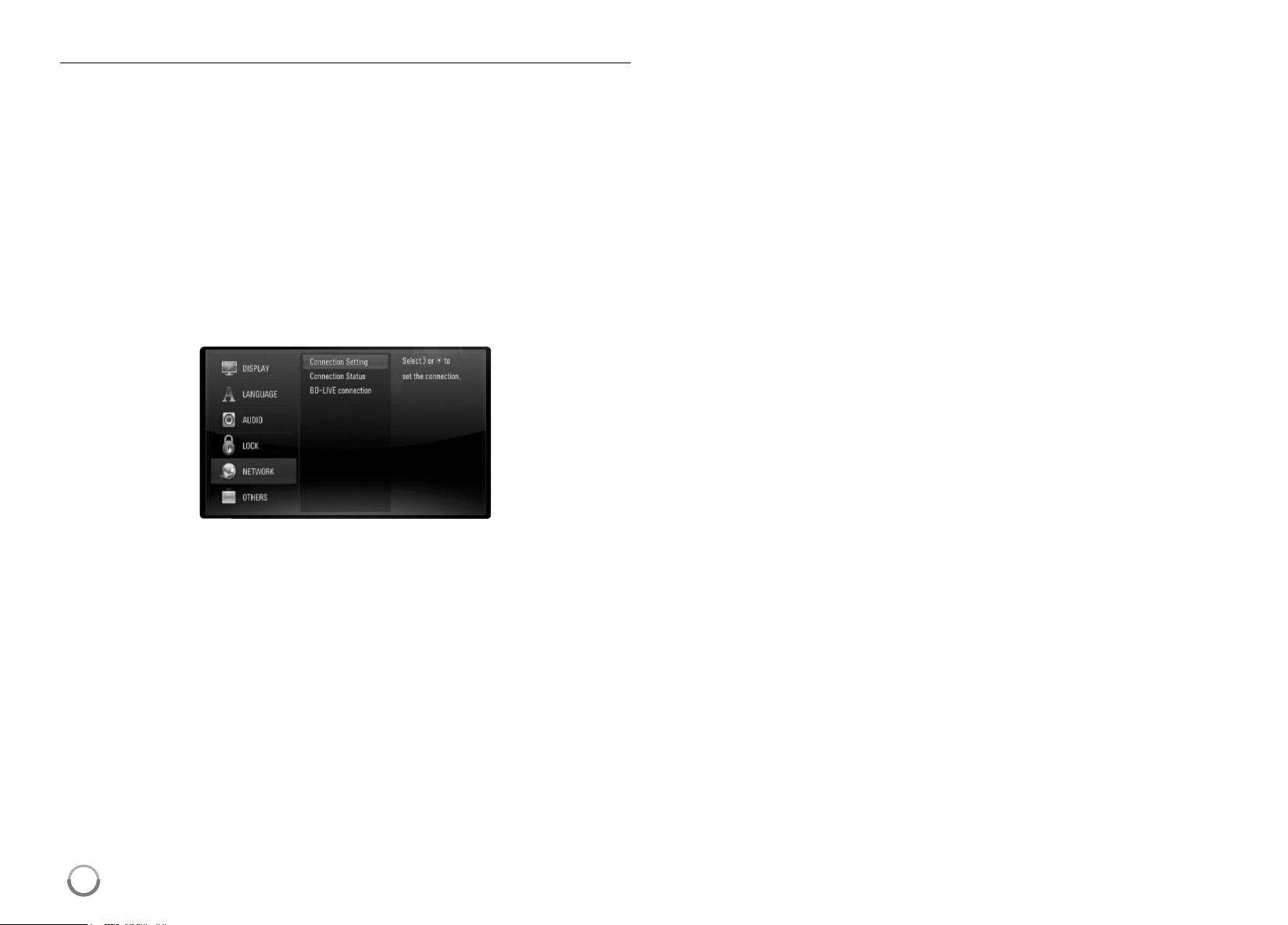
[NETWORK] Menu
The[NETWORK]settingsareneededtousethesoftwareupdate,BDLive,
Netflix,Pandora,CinemanowandYouTubefeatures.
SomeBD-ROMdiscsmayenableyoutoaccessspecialBD-ROMsites,if
youconnecttheplayertotheInternet.Forexample,ifaBD-ROMsite
includescontentsuchaslinkstofuturemovietrailers,youcanwatchthe
downloadedon-linecontentontheplayer.
YoudonotneedtoconnecttoaPCtousethisfunction.
Preparations:
• Thisfeaturerequiresanalways-onbroadbandinternetconnection.
(seepage17-18.)
• A BD-ROM disccompatiblewiththisfeatureisrequired.NotallBD-
ROM discsarecompatible.
Connection Setting
Ifyouhaveconnectedthisplayertoalocalareanetwork(LAN),theplayer
needstobesetupfornetworkcommunication.(See“Internetconnection”
onpages17-18.)
Connection Status
Ifyouwanttocheckthenetworkstatusonthisplayer ,selectthe
[ConnectionStatus]optionsandpress
B
orENTER tocheckwhethera
connectiontothenetworkandtheinternethavebeenestablished.
BD-LIVE connection
YoucanrestrictInternetaccesswhenBD-Livefunctionsareused.
[Permitted] – InternetaccessispermittedforallBD-Livecontents.
[Partially permitted] – InternetaccessispermittedonlyforBD-Live
contentswhichhavecontentownercertificates.Internetaccessand
AACSOnlinefunctionsareprohibitedforallBD-Livecontentswithout
acertificate.
[Prohibited] – InternetaccessisprohibitedforallBD-Livecontents.
HB954SA-AP.BUSALL_ENG_6606 8/14/09 5:13 PM Page 28

29
[OTHERS] Menu
Skin
Changesthebackgroundoftheinitialscreen.
Initialize
[Factory Set] – Youcanresettheplayertoitsoriginalfactorysettings.
Note:
Ifyouresettheplayertoitsoriginalfactorysettingsusing[FactorySet]
option,youhavetosetthenetworksettings,CinemaNow ,Netflixand
Pandoraactivationagain.
[BD Storage Clear] – InitializestheBDcontentsfromtheconnected
USBstorage.
Netflix
[Netflix ESN] – DisplayitsuniqueNetflixESN(ElectronicSerial
Number)thatallowsyoutousetheNetflixstreaming.
[Deactivate Netflix] – Deactivatesyourplayer.ToactivatetheNetflix
again,seepage40.
Software Update
Youcanupdatethesoftwarebyconnectingtheunitdirectlytothesoftware
updateserver (seepage19-20).
Disclaimer Notice
PressENTERor
B
toviewthenoticeofNetworkServiceDisclaimeron
page63.
HB954SA-AP.BUSALL_ENG_6606 8/14/09 5:13 PM Page 29
30
Notes:
• Whenyouturnontheplayerorreplaceadisc,theplayerreturnstothe
initialdefaultsetting.Dependingonadisc,aspecifictypeofaudiothat
thedischasisoutput.
• Dependingonthepre-recordedcontentsoftheBD-ROM,some
functionsmaynotbeavailableormaybeoperateddif ferentlythan
othermedia.
If a disc menu screen is displayed
Themenuscreenmaybedisplayedfirstafterloadingadiscwhichcontains
amenu.
Use
b
/
B
/
v
/
V
buttonstoselectthetitle/chapteryouwanttoview ,then
pressENTERtostartplayback.
Skip to the next/previous chapter/track/file
Duringplayback,press
.
or
>
togotothenextchapter/track/fileor
toreturntothebeginningofthecurrentchapter/track/file.
Press
.
twicebrieflytostepbacktothepreviouschapter/track/file.
Resume playback
Duringplayback,pressSTOP (
x
)tostopplayback.
Theunitrecordsthestoppedpoint,dependingonthedisc.“
Xx
”appears
onthescreenbriefly.PressPLAY (
N
) toresumeplayback(fromthe
scenepoint).IfyoupressST OP (
x
) againorunloadthedisc(“
x
”appears
onthescreen.),theunitwillclearthestoppedpoint. (
Xx
= Resume Stop,
x
= Complete Stop)
Notes:
• Theresumepointmaybeclearedwhenabuttonispressed
(forexample;POWER,OPEN/CLOSE,etc).
• OnBD-VideodiscsincludingBD-J,theresumeplayfunctiondoesnot
work.
• OnBD-ROMinteractivetitle,theunitwillbeinCompleteStopmodeif
youpressSTOP onceduringplayback.
Pause a playback
Duringplayback,pressPAUSE/STEP (
X
)topauseplayback.PressPLAY
(
N
)tocontinueplayback.
Tip: DuringAudioCDorMP3/WMA playback,pressPAUSE/STEP (
X
)
onceagaintoresumeplayback.
Frame-by-Frame playback
PressPAUSE/STEP (
X
)repeatedlytoplayFrame-by-Frameplayback.
Slow down the playing speed
Whiletheplaybackispaused,pressSCAN
M
repeatedlytoplayinslow
motion(4steps,forwardonly).
Fast forward or fast reverse
PressSCAN(
m
or
M
)toplayfastforwardorfastreverseduring
playback.
YoucanchangethevariousplaybackspeedsbypressingSCAN(
m
or
M
)repeatedly.PressPLAY (
N
)tocontinueplayatnormalspeed.
Note:
Thisfunctionmaynotworkonsomediscortitles.
ALL
AVCHD
DVDBD
AVCHD
DVDBD
ALL
ALL
ALL
AVCHD
DVDBD
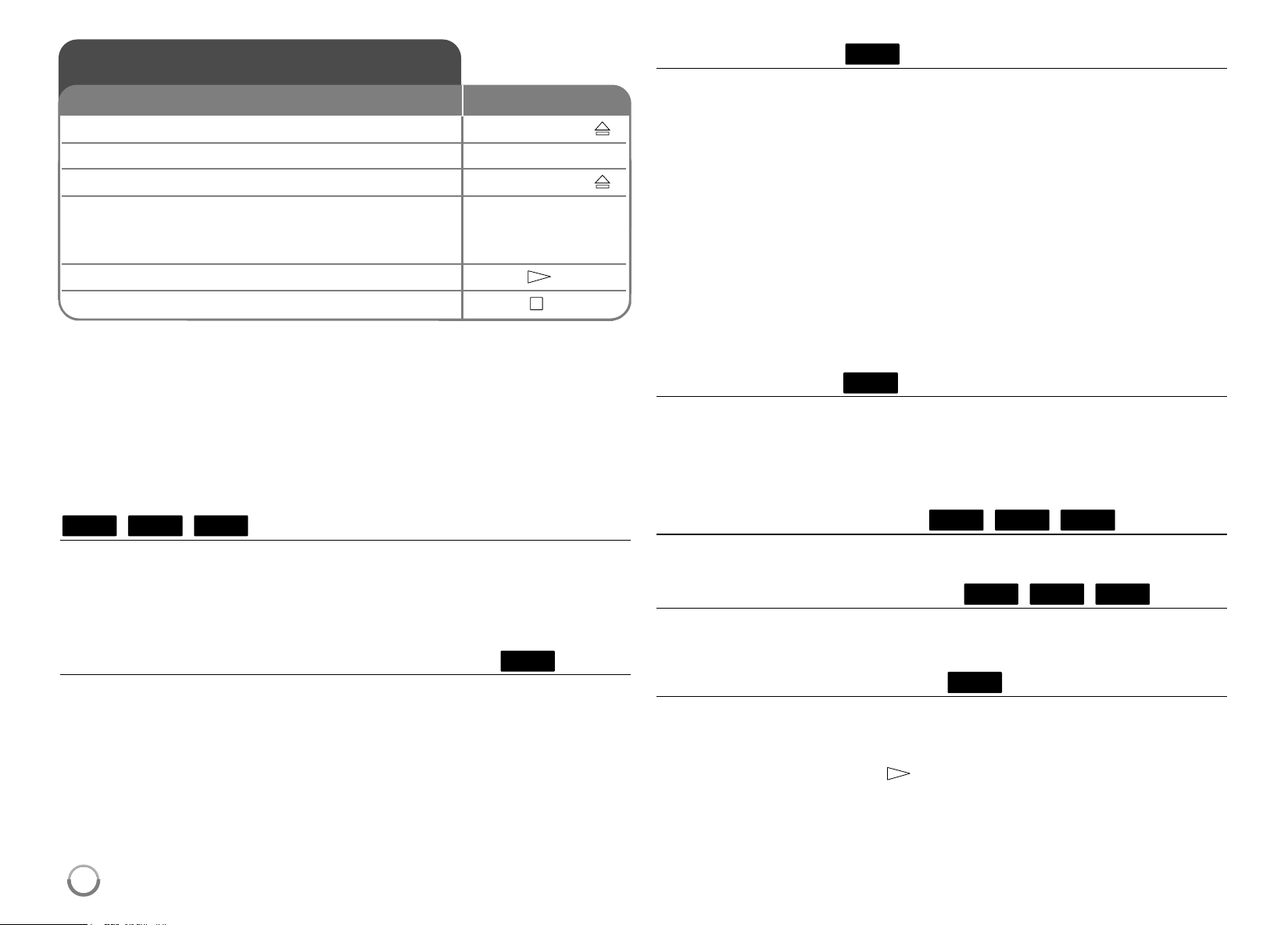
Play a disc
1 Open the disc tray: OPEN/CLOSE (
Z
)
2 Insert a disc: -
3 Close the disc tray: OPEN/CLOSE (
Z
)
4 Adjust the disc menu settings:
v V b B
, ENTER
A discmenumaynotappearonthescreen
dependingonthedisc.
5 Starts playback: PLAY (
N
)
6 Stops playback: STOP (
x
)
ON REMOTE
HB954SA-AP.BUSALL_ENG_6606 8/14/09 5:13 PM Page 30
31
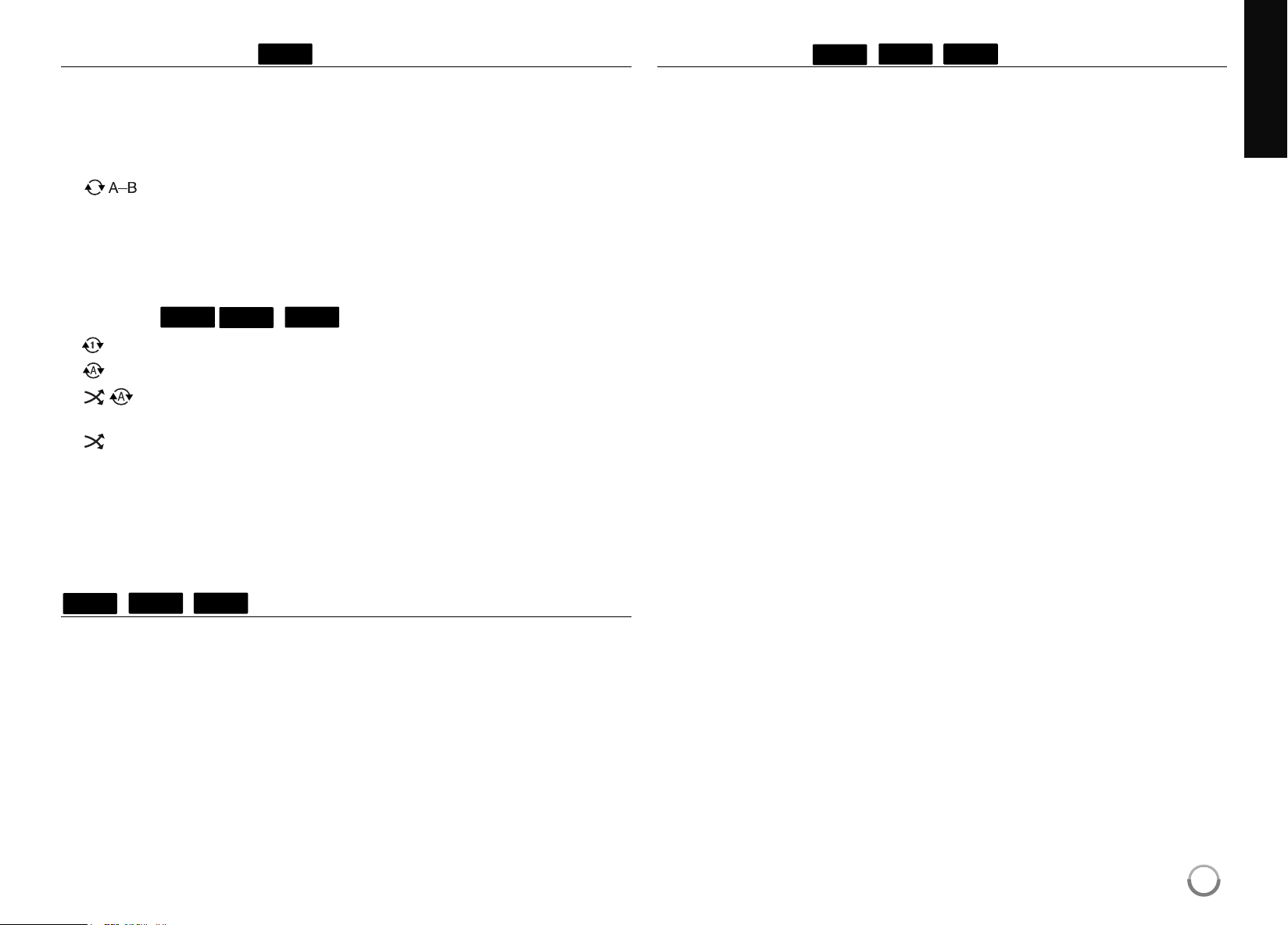
Playing repeatedly
Duringplayback,pressREPEAT repeatedlytoselectadesiredrepeat
mode.Thecurrenttitle,chapterortrackwillbeplayedbackrepeatedly .To
returntonormalplayback,pressREPEAT repeatedlytoselect[OFF].
Whenyouareusingtherepeat,A-Brepeatorrandomfunctionsinthe
[MUSIC]menu,refertothemodeiconsasshownbelow .
–Selectedportionwillberepeatedcontinually.
PressREPEAT toselect[A-]atthebeginningoftheportionyou
wishtorepeatandpressENTERattheendoftheportion.
Yourselectedportionwillberepeatedcontinually.
Youcannotselectaportionlessthan3seconds. Toreturnto
normalplayback,pressREPEAT repeatedlytoselect[OFF].
Track –Thecurrenttrackorfilewillbeplayedbackrepeatedly .
All –Allthetracksorfileswillbeplayedbackrepeatedly .
All –Allthetracksorfileswillbeplayedbackrepeatedlyin
randomorder.
–Thetracksorfileswillbeplayedbackinrandomorder .
TocanceltheA-Brepeat,repeatorRandomplayback,pressCLEAR.
Note:
Ifyoupress
>
onceduringRepeatChapter/Trackplayback,therepeat
playbackcancels.
Viewing the Title menu or Popup menu
PressTITLE/POPUP todisplaythetitlemenuorpopupmenu.
IfthecurrentDVDorBD-ROMdischasamenu,theTitlemenuorPopup
menuappearsonthescreen.Dependingonthedisc,themenumaynotbe
available.
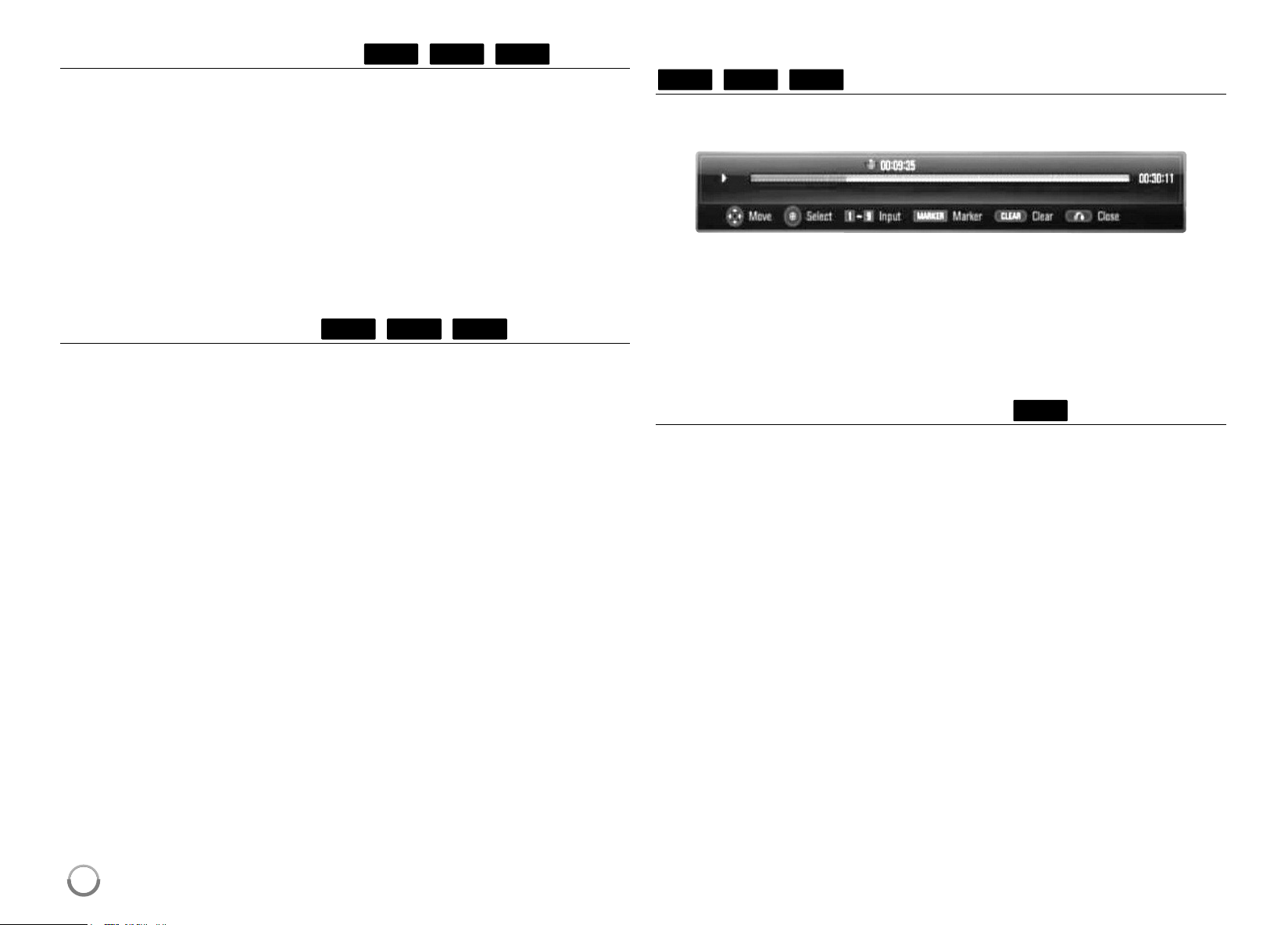
Marker Search
To enter a Marker
Youcanstartplaybackfromuptoninememorizedpoints. Toentera
marker, pressMARKERatthedesiredpointonthedisc. TheMarkericon
appearsontheTVscreenbriefly.Repeattoenteruptoninemarkers.
To Recall or Clear a Marked Scene
PressSEARCHandthesearchmenuappearsonthescreen.
Press anumberbutton toselectamarkernumberthatyouwanttorecall.
Playbackstartsfromthemarkedscene.
OR
Press
V
tohighlightamarkernumber.Use
b
/
B
toselectamarkedscene
thatyouwanttorecallorclear.
PressENTER andplaybackstartsfromthemarkedscene.PressCLEAR
andthemarkedsceneiserasedfromthesearchmenu.
Notes:
• Thisfunctionmaynotworkonsomediscortitles.
• AllmarkedpointsareclearedifyoupressST OP (
x
) twice(complete
stop),thetitleischangedorifyouunloadthedisc.
AVCHD
DVD
BD
AVCHD
DVD
BD
BD
DVD
ACD
ALL
HB954SA-AP.BUSALL_ENG_6606 8/14/09 5:13 PM Page 31
32
Selecting a subtitle language
Duringplayback,pressSUBTITLErepeatedlytoselect a desiredsubtitle
language.
OR
Duringplayback,pressDISPLAY todisplaytheplaybackmenu.
Use
v V
toselectthe[Subtitle]optionthenuse
b B
toselectdesired
subtitlelanguage.
Note:
Somediscsallowyoutochangesubtitleselectionsonlyviathediscmenu.
Ifthisisthecase,press TITLE/POPUP orDISCMENUbuttonandchoose
theappropriatesubtitlefromtheselectionsonthediscmenu.
Hearing a different audio
Duringplayback,pressDISPLAY todisplaytheplaybackmenu.
Use
v V
toselectthe[Audio]optionthenuse
b B
toselectdesired
audiolanguageoraudiotrack.
Notes:
• Somediscsallowyoutochangeaudioselectionsonlyviathedisc
menu.Ifthisisthecase,press TITLE/POPUP orDISCMENUbutton
andchoosetheappropriateaudiofromtheselectionsonthediscmenu.
• Immediatelyafteryouhaveswitchedsound,theremaybeatemporary
discrepancybetweenthedisplayandactualsound.
• OnBD-ROMdisc,themultiaudioformat(5.1CHor7.1CH)isdisplayed
with[MultiCH]intheon-screendisplay.
Using the search menu
Duringplayback,pressSEARCHtodisplaythesearchmenu.
Press
b B
toskip theplayback15secondsforwardorbackward.
Tip:
Youcanselectapointthatyouwanttoskipbypressingandholding
b
/
B
button.
Notes:
• Thisfunctionmaynotworkonsomediscortitles.
Using colored (A, B, C, D) Buttons
ThesebuttonsareavailableonlyduringBD-Jcontentsplayback.Usethe
appropriatebuttonsasindicatedbythedisplay.Dependingonthedisc
contents,thefunctionsofeachbuttonmaydif fer.
BD
AVCHD
DVDBD
AVCHD
DVDBD
AVCHD
DVDBD
HB954SA-AP.BUSALL_ENG_6606 8/14/09 5:13 PM Page 32
33
Last Scene Memory
Thisunitmemorizeslastscenefromthelastdiscthatisviewed. Thelast
sceneremainsinmemoryevenifyouremovethediscfromtheunitor
switchofftheunit.Ifyouloadadiscthathasthescenememorized,the
sceneisautomaticallyrecalled.
Notes:
• Settingsarestoredinmemoryforuseanytime.
• Thisunitdoesnotmemorizesettingsofadiscifyouswitchof ftheunit
beforecommencingtoplayit.
• LastSceneMemoryfunctionforapreviousdisciserasedoncea
differentdiscisplayed.
• Thisfunctionmaynotworkdependingonthedisc.
Screen Saver
ThescreensaverappearswhenyouleavetheplayerinStopmodefor
aboutfiveminutes.
Note:
Dependingontheunitstatus,thescreensavermaynotappear .
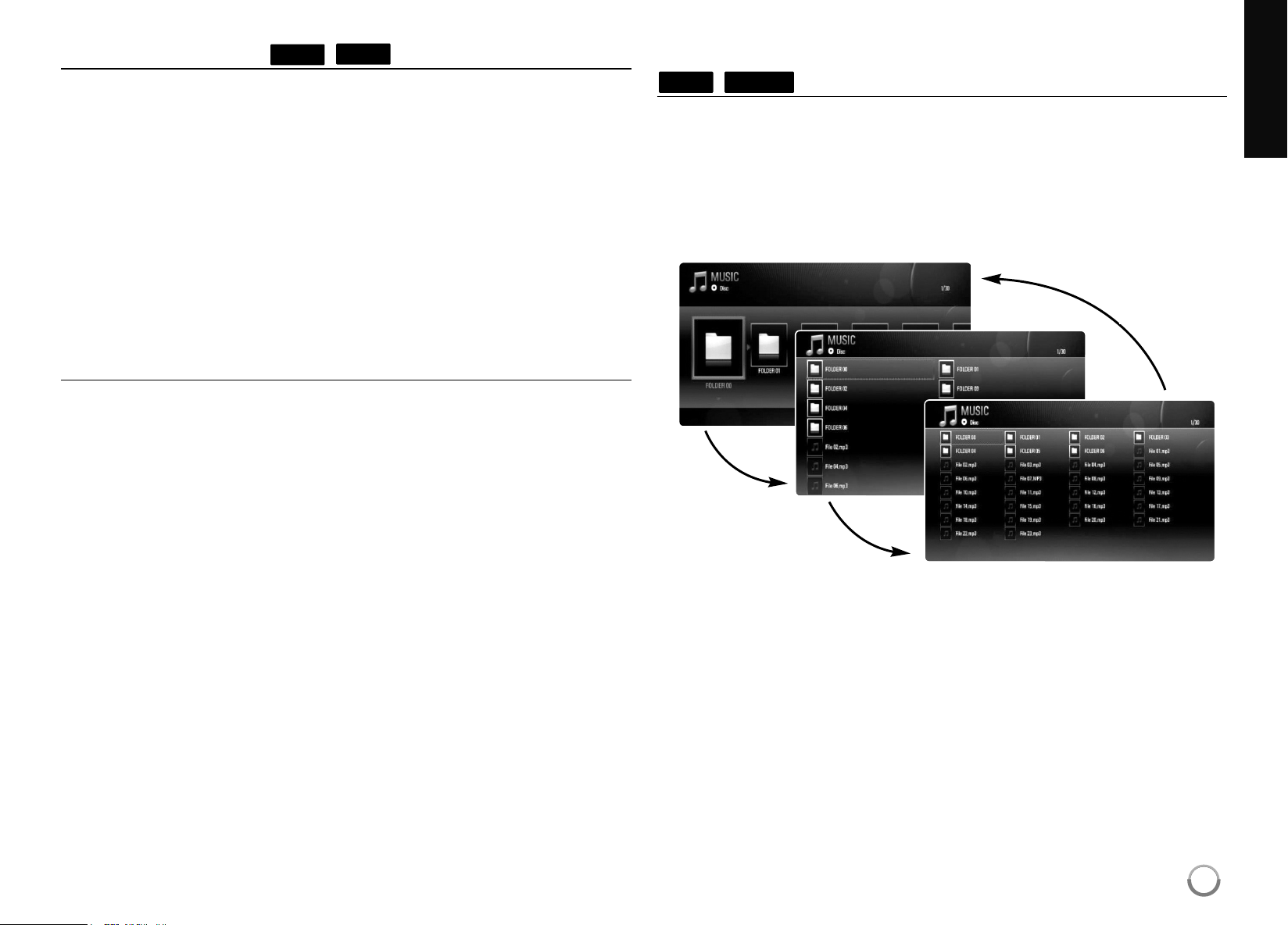
Changing content list view
Onthe[Music],[Photo]menu,youcanchangethecontentlist
viewbypressingDISPLAY repeatedly.
Note:
Theequalizerwillbedisappearedwhenyouchangethemusiccontentslist
view.
MUSICACD
DVD
BD
thirdpush
firstpush
secondpush
HB954SA-AP.BUSALL_ENG_6606 8/14/09 5:13 PM Page 33
34
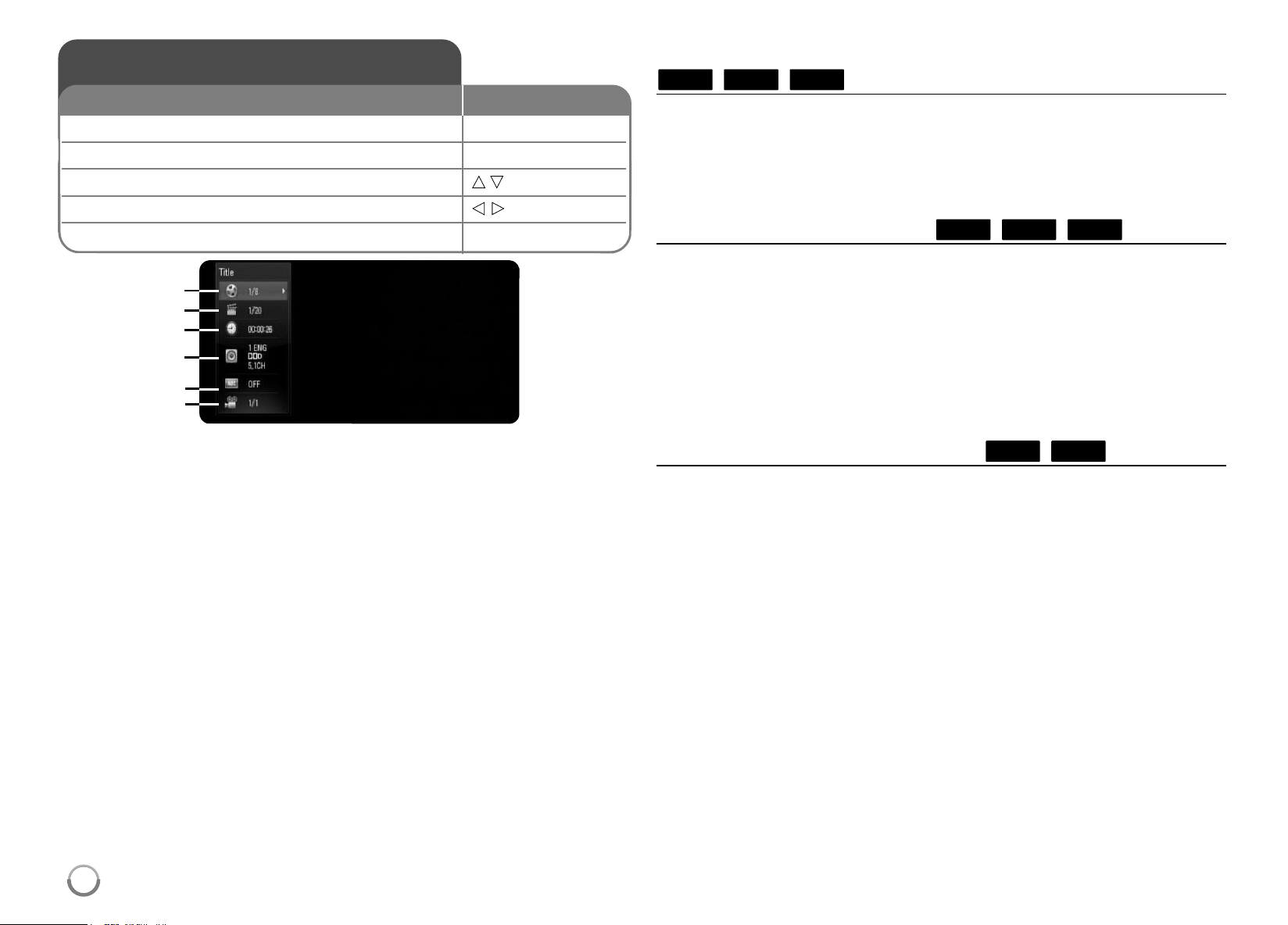
a
Title–Currenttitlenumber/totalnumberoftitles.
b
Chapter–Currentchapternumber/totalnumberofchapters.
c
Time–Elapsedplayingtime.
d
Audio–Selectedaudiolanguageorchannel.
e
Subtitle–Selectedsubtitle.
f
Angle–Selectedangle/totalnumberofangles.
Notes:
• Ifnobuttonispressedforafewseconds,theon-screendisplay
disappears.
•
A titlenumbercannotbeselectedonsomediscs.
• Anitemmaynotbeavailableonsomediscsortitles.
• IfBDinteractivetitleisplayingback,somesettinginformationis
displayedonthescreenbutprohibitedtobechanged.
Moving to another title/chapter
Whenadischasmorethanonetitle/chapter ,youcanmoveto
anothertitle/chapter/track.
PressDISPLAY duringplaybackthenuse
v
/
V
toselectthe
[Title/Chapter]icon.Then,presstheappropriatenumberedbutton
(0-9)or
b
/
B
toselectatitle/chapternumber.
Playing from selected time
PressDISPLAY duringplayback.Thetimesearchboxshowstheelapsed
playingtime.Selectthe[Time]optionandtheninputtherequiredstarttime
inhours,minutes,andsecondsfromlefttoright.Forexample,tofinda
sceneat2hours,10minutes,and20seconds,enter“21020”andpress
ENTER.Ifyouenterthewrongnumbers,pressCLEARandenterthe
correctnumbers.
Note:
Thisfunctionmaynotworkonsomediscortitles.
Watching from a different angle
Ifthedisccontainsscenesrecordedatdif ferentcameraangles,youcan
changetoadifferentcameraangleduringplayback.
Duringplayback,pressDISPLAY todisplaytheplaybackmenu.Use
v V
toselectthe[Angle]option,thenuse
b B
toselectdesiredangle.
DVDBD
AVCHD
DVDBD
AVCHD
DVDBD
Displaying disc information
1 Play the disc loaded on the unit: PLAY
2 Displays the playback menu: DISPLAY
3 Select an item:
v V
4 Adjust the playback menu settings:
b B
5 Exit the disc playback menu: DISPLAY
ON REMOTE
a
b
c
d
e
f
HB954SA-AP.BUSALL_ENG_6606 8/14/09 5:13 PM Page 34
35
Thisunitallowsyoutoenjoyfunctionssuchaspicture-in-picture,
secondaryaudioandVirtualpackages,etc.,withBD-Videosupporting
BONUSVIEW(BD-ROMversion2Profile1version1.1/FinalStandard
Profile).InadditiontotheBONUSVIEWfunction,BD-V ideosupporting
BD-Live(BD-ROMversion2Profile2)thathasanetworkextension
functionallowsyoutoenjoymorefunctionssuchasonlinegamesby
connectingthisunittotheInternet.
Enjoying BD-Live discs with Internet
ThisunitsupportsBD-Live,anewBD-Videofunctionthatallowsyoutouse
thefollowinginteractivefunctionswhenconnectedtotheInternet.(The
usablefunctionsandtheoperatingmethodmayvarywitheachdisc.For
details,refertotheinstructionsforthedisc.)
– Additionalcontentssuchasmovie’strailer,subtitlesandBD-J,etc.can
bedownloadedtotheUSBdevicetoplaythem.
– Specialvideodata,etc.maybeplayedbackwhiletheyarebeing
downloadedtoaUSBdevice.
Preparations:
•
TheunitmustbeconnectedtotheInternetandsetuptousethe
BD-Livefunctions(seepage17-18and28).
•
A USBdeviceisrequiredtousethisfunction.ConnectaUSBdevice
(seepage22).
•
ThefreespaceintheUSBdevicemustbemorethan1GB.
Caution:
DonotextracttheconnectedUSBdevicewhilecontentisbeing
downloadedoraBlu-raydiscisstillinthedisctray .Doingsomaydamage
theconnectedUSBdeviceandBD-Livefeaturesmaynotoperateproperly
withthedamagedUSBdeviceanymore.
IftheconnectedUSBdeviceseemsdamagedfromsuchanaction,you
canformattheconnectedUSBdevicefromthePCandreuseitwiththis
player.
Notes:
• SomeBD-Livecontentsmayberestrictivelyaccessedinsome
territoriesbycontentsprovider’sowndecision.
• ItmaytakeuptoseveralminutestoloadandstartenjoyingBD-Live
contents.
• Dependingonadisc,theBD-Livefunctionmaynotbeoperatedif[BD-
LIVEconnection]optionissetto[Partiallypermitted].(Seepage28.)
• TheconnectiontotheInternetmaytaketimeortheInternetmaynot
beconnecteddependingontheconnectionenvironment.Itisrequired
thatyouuseabroadbandconnection.
• DonotremovetheUSBdeviceduringoperation. TheUSBdevice may
bedamaged.Stopplaybackandturnof fthemenubeforehand.
Tip:
Specialvideodata,etc.maybeplayedbackwhiletheyarebeing
downloadedtoaUSBdeviceusingonefunctionofBD-Live. Theplayback
maybepauseddependingonthecommunicationenvironment.
Somefunctionsmaybedisabledtopreventskippingtosectionsthathave
notbeendownloaded,etc.
AACS Online
WhendiscssupportingBD-Liveareplayedback,theplayerordiscIDs
maybesenttothecontentproviderviatheInternet.
Servicesandfunctionstobeprovideddif ferdependingonthedisc.
– Youcanbeintroducedtoothersimilarmoviesifyourecordyour
viewinghistoryontheserverbyusingtheseIDs.
– Gamescorehistoriescanbesaved.
Enjoying BD-LIVE™
1 Inserts a BD-ROM disc with BD-LIVE™ OPEN/CLOSE (
Z
)
features:
2 Check the network connection and settings: –
BD-Livefeaturesneedtheinternetconnection.
3 Connect a USB device: –
A USBdeviceisrequiredtousethisfunction.
4 Select a BD-LIVE™ features on the
v V b B
, ENTER
disc menu:
ON REMOTE
HB954SA-AP.BUSALL_ENG_6606 8/14/09 5:13 PM Page 35
36
Playing secondary video (picture-in-picture)
Secondaryvideocanbeplayedfromadisccompatiblewiththepicture-in-
picturefunction.
Fortheplaybackmethod,refertotheinstructionsforthedisc.
Toturnon/offsecondaryvideo,pressPIP.Secondaryvideoisplayed.
PressthebuttontoturnitONorOFF.
Notes:
• Discsmaynotalwaysbeplayedbackaccordingtothesettingsonthis
unit,ascertainplaybackformatsareprioritizedoncertaindiscs.
• Onlytheprimaryvideoisplayedduringsearch/slow-motionorframe-by-
frame.
• Thisfunctionmaynotworkdependingonthedisc.
Notes:
• Youcanusevariousplaybackfunctions.Refertopages30-33.
• Onthe[MOVIE]menu,useredorbluebuttontomovetothefirstorthe
lastfileortrackandgreenoryellowbuttontomovetothepreviousor
nextpage.
• UnfinalizedDVDVRformatdiscsmaynotbeplayedinthisplayer .
• SomeDVD-VRdiscaremadewithCPRMdatabyDVDRECORDER.
Thisunitcannotsupportthesekindsofdiscs.
What is CPRM?
CPRMisacopyprotectionsystem(withscramblesystem)onlyallowing
therecordingof‘copyonce’ broadcastprograms.CPRMstandsfor
ContentProtectionforRecordableMedia.
Playing a movie
1 Inserts a disc containing movie contents. –
2 Displays the
[Home Menu]
: HOME
3 Selects the [Movie] option:
b B
, ENTER
4 Selects a movie from the [Movie] menu:
v V
5 Plays the selected movie: PLAY
6 Stops the playback: STOP
Theplayercanplayvideocontentsrecordedona
DVD-RW(VRmode)discs.
ON REMOTE
HB954SA-AP.BUSALL_ENG_6606 8/14/09 5:13 PM Page 36
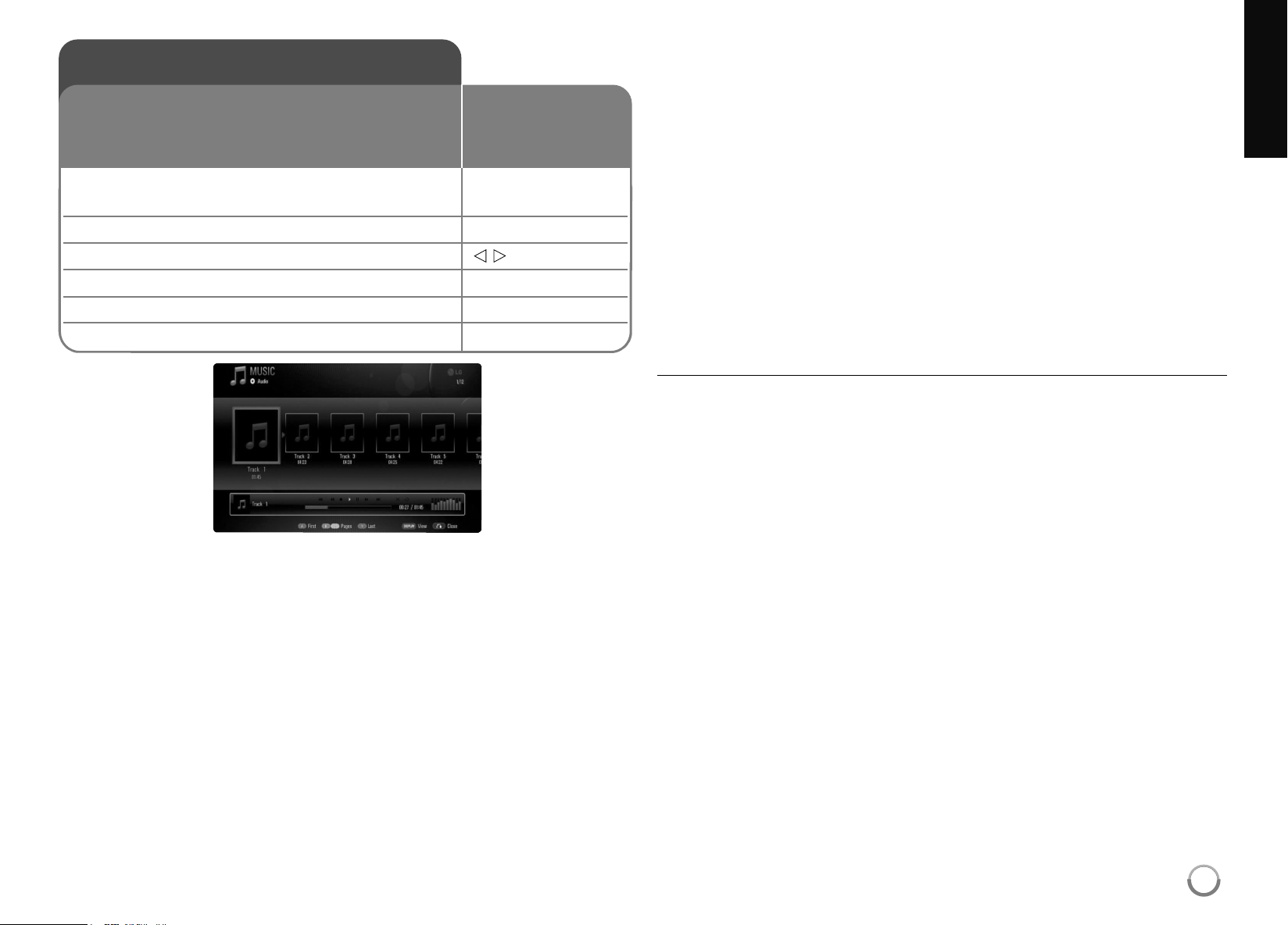
37
Example) MP3 files
Notes:
• WhentheUSBdeviceisconnectedandadiscisinserted
simultaneously,themenuforselectingamediawillappear .Selecta
mediathenpressENTER.
• Youcanusevariousplaybackfunctions.Refertopages30-33.
Tips:
• Togodirectlytoanytrackorfileandplay ,enterthetrack/filenumber
usingthenumberedbuttons(0-9).
• Theplaybackmaystartautomaticallyifthe AudioCDinserted.
• Use
v
/
V
/
b
/
B
toselectafolderthenpressENTERandyoucanviewthe
filesinthefolder.Ifyouwanttomovetotheupperorlowerdirectory ,
use
v
/
V
tomovetothedesireddirectory.
• Onthe[MUSIC]menu,useredorbluebuttontomovetothefirstorthe
lastfileortrackandgreenoryellowbuttontomovetothepreviousor
nextpage.
• Theequalizerindicatorisnotcoupledwiththemusicinplayback.
• Ifthereisimpossiblecodetoexpressinthefilename,itmaybe
displayedasillegible.
MP3/WMA audio file requirement
File extensions: “.mp3”,“.wma”
Sampling frequency: within8-48 kHz(WMA),within11-48 kHz(MP3)
Bit rate: within8-320 kbps(WMA,MP3)
CD-R/RW, DVD±R/RW, BD-R/RE Format:
ISO9660+JOLIET,UDFandUDFBridgeformat
Maximum Files/Folder: Lessthan2000
(totalnumberoffilesand
folders)
Notes on MP3/WMA file
• DependingonthesizeandnumberoftheMP3/WMA files,itmaytake
severalminutestoreadthecontentsofthemedia.
• ThisunitcannotsupporttheID3 TagembeddedintheMP3file.
• Thetotalplaybacktimeindicatedonthescreenmaynotcorrectfor
VBRfiles.
Listening to music
1 Inserts an Audio CD or a disc/USB Flash –
Drive containing MP3/WMA files.
2 Displays the [Home Menu]: HOME
3 Selects the [Music] option:
b B
, ENTER
4 Selects a music from the [MUSIC] menu:
v V
5 Plays the selected music: PLAY
6 Stops the playback: STOP
TheplayercanplayAudioCDsandMP3/WMA
files.BeforeplayingMP3/WMA files,read
“MP3/WMA audiofilerequirement”.
ON REMOTE
HB954SA-AP.BUSALL_ENG_6606 8/14/09 5:13 PM Page 37
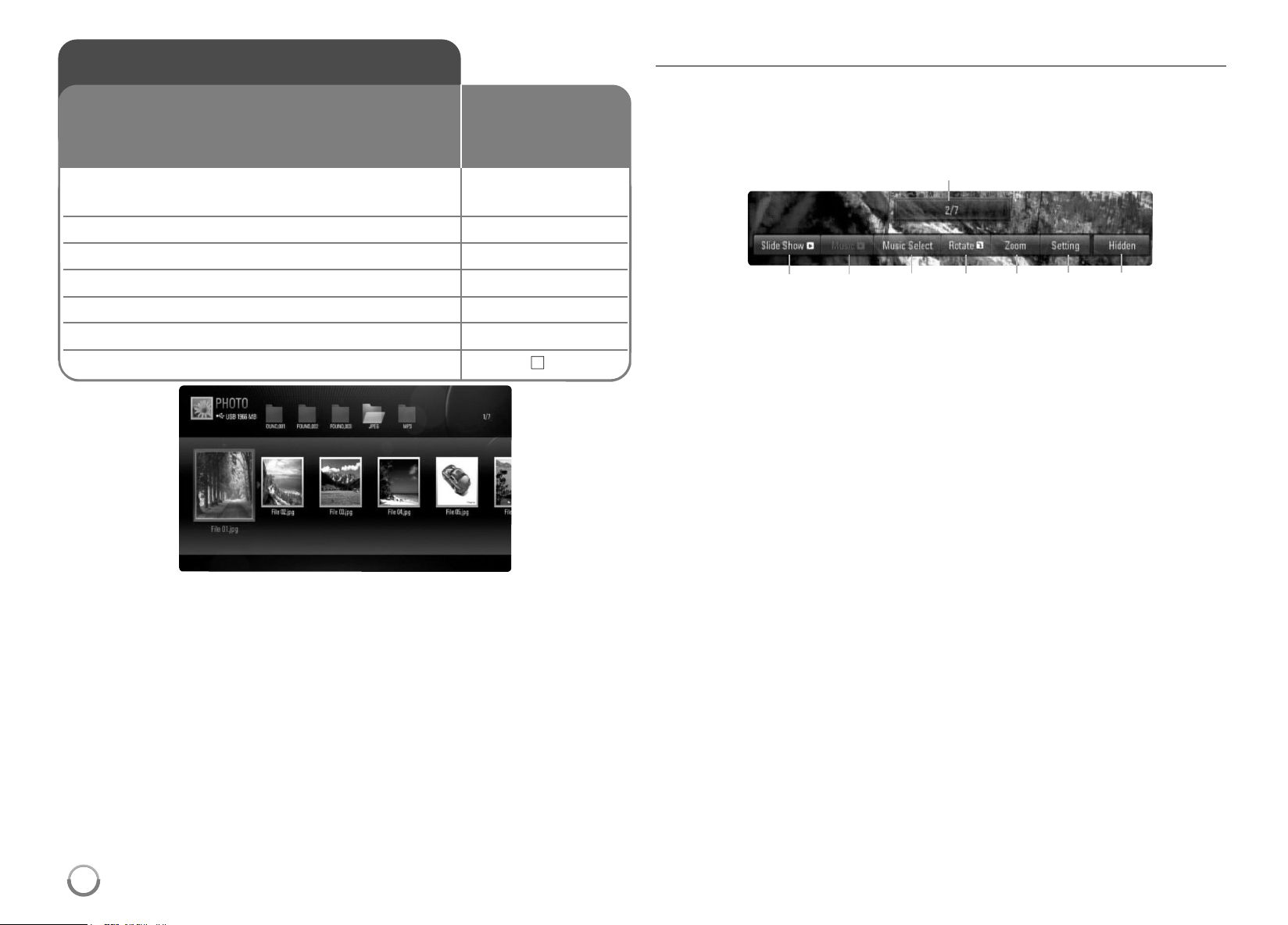
38
Notes:
• WhentheUSBdeviceisconnectedandadiscisinserted
simultaneously,themenuforselectingamediawillappear .Selecta
mediathenpressENTER.
• YoucanstarttheslideshowbypressingPLA Y (
N
)whilephotofileis
selectedinthe[PHOTO]menu.
• Onthe[PHOTO]menu,useredorbluebuttontomovetothefirstor
thelastfileandgreenoryellowbuttontomovetothepreviousornext
page.
• YoucanchangethecontentlistviewbypressingDISPLA Y repeatedly.
Options during viewing a photo file in full screen
Youcanusevariousoptionsduringviewingapictureinfullscreen.
Use
v V b B
toselectanoptionandusetheoptionsasdescribedbelow .
Options of [PHOTO] menu
a
Use
b B
toadvancetothepreviousornextfile.
b
PressENTERto startorpausetheslideshow.
c
PressENTERtoplayorpausethebackgroundmusic. Thisoption
isavailableafterthebackgroundmusicisselectedusing
[MusicSelect]option.
d
Selectsthebackgroundmusic.
1) PressENTERandthemenuwillappear.
2)Use
v V b B
toselectamediaorfolderthattherearemusic
file(s).
3) PressENTERtoconfirmyourselection.
e
PressENTERtorotatethepictureclockwise.
Thisoptionisnotavailableduringslideshow .
f
Usegreenoryellowbuttonstozoominoroutthepicture. Youcan
movethroughthezoomedpictureusing
v V b B
buttons.Press
RETURNtoexitthe[Zoom]menuandreturntothenormalpicture
size.
Viewing a photo
1 Inserts a disc/USB device containing –
photo files.
2 Displays the [Home Menu]: HOME
3 Selects a [Photo] option:
b B
, ENTER
4 Selects a photo from the [PHOTO] menu:
v V b B
5 Displays the selected photo in full screen: ENTER
6 Displays the next or previous photo:
.
/
>
7 Returns to the [PHOTO] menu screen: STOP (
x
)
Thisunitcanplayaphotofiles.Beforeplaying
photofiles,read“Photofilerequirement”onpage
39.
ON REMOTE
b c d e f g h
a
HB954SA-AP.BUSALL_ENG_6606 8/14/09 5:13 PM Page 38

39
g
Use
v V
toselectsanoptionbetween[Ef fect]or[Delay].
Use
b B
toadjustsandpressENTERtosettheselectedoption.
[Effects]–Youcanapplyvariouseffectswhenslidingphotos.
OFF:SlideShowwithoutanyef fect.
Random:Slideshoweffectsareappliedrandomly.
Slide:Slidesaphotofromvariousdirection.
Door:Photowillbeappearlikedooropening.
Lattice:Photowillbeappearfromtiledpiecestofullscreen
image
[Delay]–YoucansetthephotodelayingtimewhileSlideShow .
h
PressENTERtoexittheoptionmenu.
Toappearthemenuagain,pressENTER.
Tips:
• ForthefilesthatarecontainedinadiscorUSBdevice,youcanenter
thefilenumberusingthenumberedbuttons(0-9)togodirectlytoa
specificfile.
• Youcanadvancetothepreviousornextfilebypressing
.
or
>
duringviewingaphotofileinfullscreen.
• Youcanstarttheslideshowwithoutoptionmenubypressing
PLAY (
N
)duringviewingaphotofileinfullscreen.
• Use
v V b B
toselectafolderthenpressENTERandyoucanview
thefilesinthefolder.Ifyouwanttomovetotheupperorlower
directory,use
v V
tomovetothedesireddirectory.
• Ifthereisimpossiblecodetoexpressinthefilename,itmaybe
displayedasillegible.
Photo file requirement (USB/DISC)
File extensions: “.jpg”,“.jpeg”,“.png”
Recommended size:
Lessthan4,000x3,000x24bit/pixel
Lessthan3,000x3,000x32bit/pixel
CD-R/RW, DVD±R/RW, BD-R/RE Format:
ISO9660+JOLIET,UDFandUDFBridgeformat
Maximum Files/Disc:
Lessthan1999(totalnumberoffilesandfolders)
Notes on Photo file
• Progressiveandlosslesscompressionphotoimagefilesarenot
supported.
• Dependingonthesizeandnumberofthephotofiles,itmaytake
severalminutestoreadthecontentsofthemedia.
HB954SA-AP.BUSALL_ENG_6606 8/14/09 5:13 PM Page 39
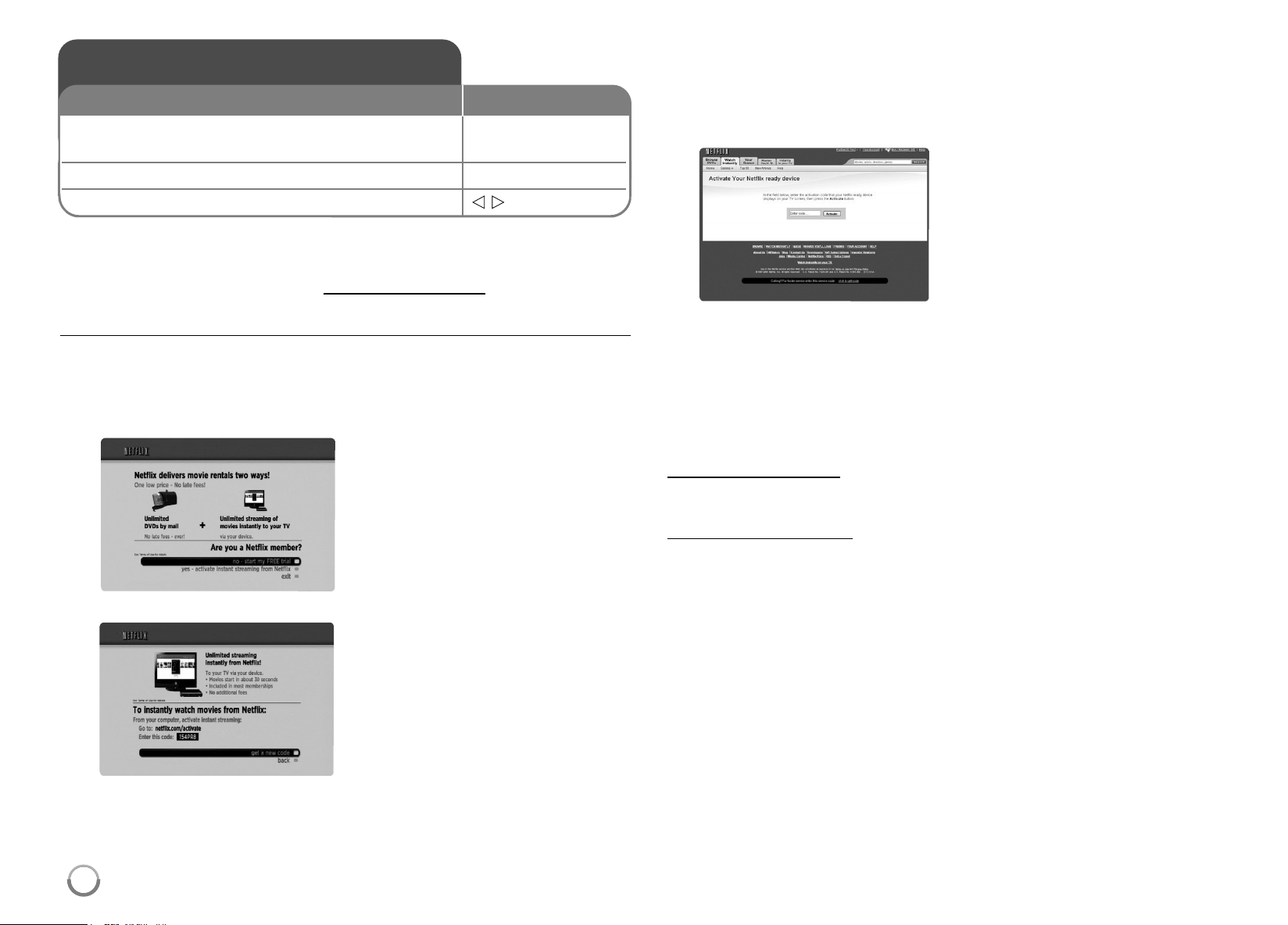
40
Youcaninstantlywatchmovies(veryfewnewreleases)& TVepisodes
fromNetflixstreamedovertheinternettoyour TVviayourLGBDplayer.
TobecomeaNetflixmembervisit: www.netflix.com/LG
Activating your player
Youmustactivateyourplayerbeforeyoucanuseittowatchmovies
streamedovertheINTERNET fromNetflix.
3. Onyourcomputer,visit
www.netflix.com/activate.
4. Ifnecessary,enteryour[EmailAddress]and[Password]tologinto
youraccount.
Notes:
•Ifnewersoftwareisneeded,asoftwareupdatescreenwillautomatically
appearwhenyouselect[Netflix]fromthe[HomeMenu].Fordetailson
softwareupdates,seepage19-20.
•
ForquestionsregardingtheNetflixservicepleasevisit:
www.netflix.com/help
or call 1-866-579-7113
•Forquestionsregardingyourplayerpleasevisit:
http://us.lgservice.com
or call 1-800-243-0000
•YoucandeactivatestreamingfromNetflixtoyourplayerusing
[DeactivateNetflix]optiononthesetupmenu(seepage29).
Playing Netflix Streaming
1 Check the network connection and settings: –
Seepage17-18and28.
2 Displays the [Home Menu]: HOME
3 Select the [Netflix] option:
b B
, ENTER
ON REMOTE
1.
2.
Use
v
/
V
toselectthe[yes-
activateinstantstreamingfrom
Netflix],thenpressENTER.
Waitfortheactivationscreento
appearonyourTVscreen.You
arenowreadytocomplete
activationontheNetflixwebsite.
5.
Entertheactivationcodethat
appearsonyourTVscreen.
HB954SA-AP.BUSALL_ENG_6606 8/14/09 5:13 PM Page 40

41
Using your player for Netflix
Afteryouactivateyourplayer,you’rereadytoaddmovies& TVepisodes
toyourinstantQueue.Youcanthenuseyourplayer ’sremotetobrowse
yourinstantQueueandtoselectandwatchtitlesonyour TV.Youwillbe
amazedathowquickandeasyitis.
Filling your Queue
YourinstantQueueworksjustlikeyourDVDQueue. Addandmanagethe
movies&TVepisodesinyourinstantQueuefromtheNetflixwebsiteon
yourcomputer.YourinstantQueuealsoappearsonyour TVviayour
player,soyourselectionsareavailabletowatchanytime.
1. VisittheNetflixwebsiteonyourcomputer: www.netflix.com
5. Repeatstep4toaddmoremovies& TVepisodestoyourinstant
Queue.
6. (Optional)ArrangeyourinstantQueuebyclickingthe[Instant]subtab.
• TorearrangeyourinstantQueue,draganddropthetitlesinthe
orderyouwantthem,orchangethenumberstotheleftofthetitles
andthenclick[UpdateInstantQueue]toyourchanges.
• ToremoveatitlefromyourinstantQueue,clickthe[Remove]check
boxtotherightofthetitle.
• Torecovertheremovedtitle,press[Undo].
Ifnecessary,enteryourEmail
AddressandPasswordtologinto
youraccount.
Click[WatchInstantly]tab.
Whenyoufindamovieor TV
episodeyouwanttowatch,
mouseoverthe[Play]buttonto
revealadditionaloptions,and
thenclick[AddtoInstantQueue].
2.
3.
4.
HB954SA-AP.BUSALL_ENG_6606 8/14/09 5:13 PM Page 41
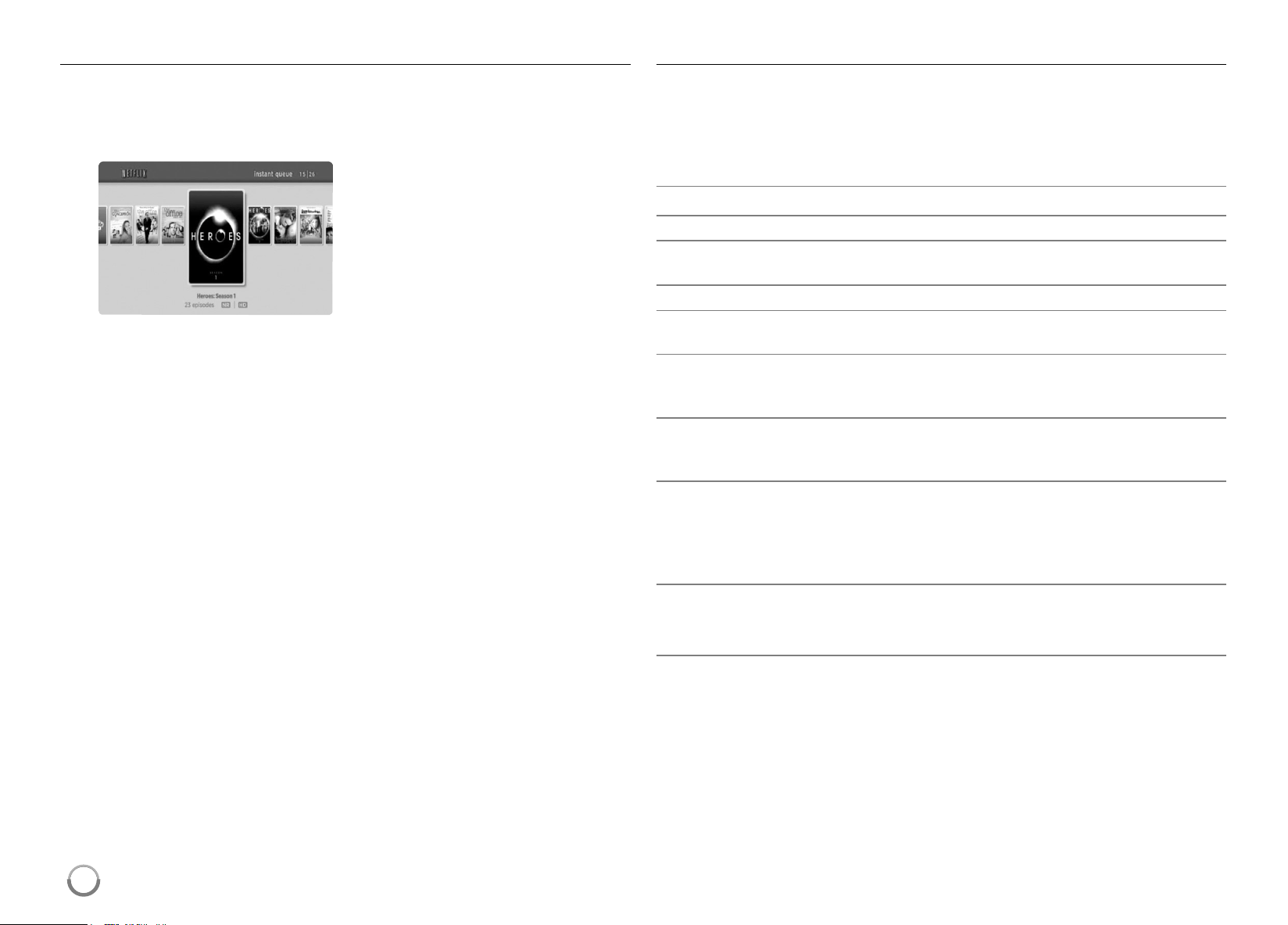
42
Selecting a movie to watch on your TV
Afteryousetupyourplayerandaddmovies& TVepisodes,youcan
browseandwatchthemonyour TV.
1. PressHOMEandthehomemenuwillappear .
3. Use
b
/
B
tohighlightamovieonyourinstantQueue.Use
m
/
M
buttontomovetothepreviousornextpage.
Theselectedmovieshowsthetitle,ratingandtotaltime.
4. Doeitherofthefollowing:
• Press
N
(PLAY)toplaybackthehighlightedtitle.
• PressENTERtoviewdetailsforthehighlightedtitle,andthenuse
v
/
V
tochooseanyofthemenuitems:
[play]Startsplayingtheselectedtitle.
[resumeplaying]Playsapreviouslypausedtitlefromthescene
whereyoupausedit.Thisoptionisavailableonlyifyoubegin
watchingatitleandthenpauseit.
[playfrombeginning]Startsplayingfromthebeginningofthe
selectedtitle.
[chooseadifferentepisode](TVseriesonly)Enablesyoutoselect
aspecificshowofa TVseries.Press
b
/
B
tohighlighttheshow
youwanttoview,andthenpressENTERtochooseit.
[rate]Enablesyoutorateamovieorshow .Themorestars,the
highertherating.PressENTERtoaccesstheratingfeature,and
thenpress
b
/
B
toincreaseordecreasetherating.PressENTER
againtoconfirmtheselectedrating.
[remove]DeletestheselectedmoviefromyourinstantQueue.
[removeseries](TVseriesonly)Deletestheselected TVseriesfrom
yourinstantQueue.
5. Press
v
toreturntoyourinstantQueue.
Playing a movie
WhilewatchingamovieorTVepisodefromNetflixviayourplayer,you
havefullcontroloveryourviewingexperience. Youcanusethebuttons
ontheremotetopauseandresumeviewingandtoscanforwardand
backward,justlikewhenyouwatchaDVD.Whileplayingamovie,the
buttonsontheremotedothefollowing:
Button(s) Operations
N
Startsplayingbackthemovie.
X
Topauseamoviewhileit’splaying.Toresumeplaying
apausedmovie,press
N
(Play)again.
x
/
v
StopsthemovieanddisplaysyourinstantQueue.
ENTER Pausesplayingthemovieandentersframescanning
mode.
B
Pausesplayingthemovieandentersframescanning
mode.Toscanforwardoneframeatatime,pressthe
buttonagain.
b
Pausesplayingthemovieandentersframescanning
mode.Toscanbackwardoneframeatatime,pressthe
buttonagain.
M
/
m
Pausesplayingthemovieandscansforwardorbackward
throughthemovie.Toscanfaster,pressthebuttonagain.
Toplaythehighlightedscene,pressENTERor
N
.
Toresumeplayingfromthepointyoupausedthemovie,
press
v
.
HOME Whenyouhavefinishedwatchingmoviesstreamedfrom
Netflix,simplypresstheHOMEbuttonontheremote
controltogototheHomeMenu.
Note:
Evenifyouuseahigh-resolutionsetup,audio/videoqualitymaybe
compromisedbasedonthespeedofyourbroadbandinternetconnection.
YourInternetServiceProvider(ISP)determinesyourbroadbandspeed.
Use
b
/
B
toselectthe[Netflix]
thenpressENTER.
TheinstantQueuescreenwill
appear.
HB954SA-AP.BUSALL_ENG_6606 8/14/09 5:13 PM Page 42
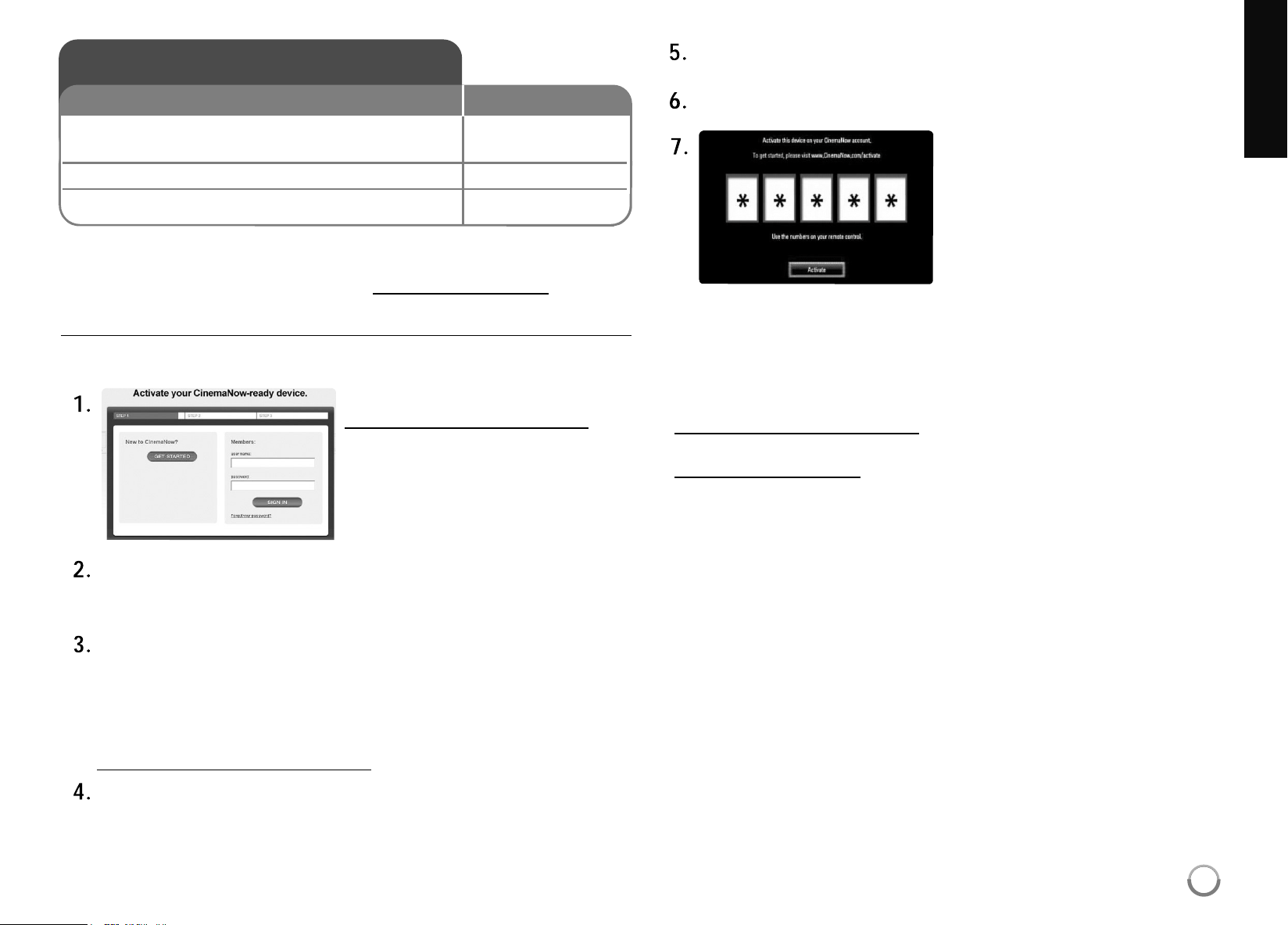
43
Youcanbrowse,searchandwatchmovies& TVepisodesfrom
CinemaNowstreamedovertheinternettoyour TVviayourLGBDplayer.
TobecomeaCinemaNowmember,visit:www.cinemanow.com
Activating your player
Youmustactivateyourplayerbeforeyoucanuseittowatchmovies
streamedovertheINTERNET fromCinemaNow.
Enteryour[username]and[password]tologintoyouraccount.Ifyou
arenotamemberofCinemaNowyet,click[GET STARTED]tobea
member.
EnterthePersonalInformation,PaymentInformation,GiftCode
RedemptionandAdultAccessRestrictions,andthenclick
[CONTINUE].
Notes:
Tolearnmoreaboutcontrollingaccesstoadultcontent,pleasevisit
www.cinemanow.com/adultcheck/
Theactivationcodenumberappears.Notetheactivationcode
number.
Onyourplayer,select[CinemaNow]inthe[HomeMenu]andpress
ENTER.
Use
v V b B
toselectthe[Settings]andpressENTER.
Notes:
• Ifnewersoftwareisneeded,asoftwareupdatescreenwillautomatically
appearwhenyouselect[CinemaNow]fromthe[HomeMenu].For
detailsonsoftwareupdates,seepage19-20.
• ForquestionsregardingtheCinemaNowservicepleasevisit:
www.cinemanow.com/support
• Forquestionsregardingyourplayerpleasevisit:
http://us.lgservice.com
or call 1-800-243-0000
• YoucandeactivatestreamingfromtheCinemaNowserviceonyour
playerusing[De-activate]optiononthe[settings]menuitem.
• UsermustloginCinemaNowwebsitetoactivateyourplayer .Towatch
thestreamvideo,youshouldbrowseandbuytitlesattheplayer .
Playing CinemaNow videos
1 Check the network connection and settings: HOME,
v V b B
Seepages17-18and28.
2 Displays the [Home Menu]: HOME
3 Select the [CinemaNow] option:
v V b B
, ENTER
ON REMOTE
Onyourcomputer,visit:
www.cinemanow.com/activate
Select[Activate]andpressENTER
todisplaytheactivationcodeinput
screen. Entertheactivationcode
displayedonyourcomputerusing
v V b B
andnumericbuttons,and
thenpressENTERwhile[Activate]
isselected.
HB954SA-AP.BUSALL_ENG_6606 8/14/09 5:13 PM Page 43
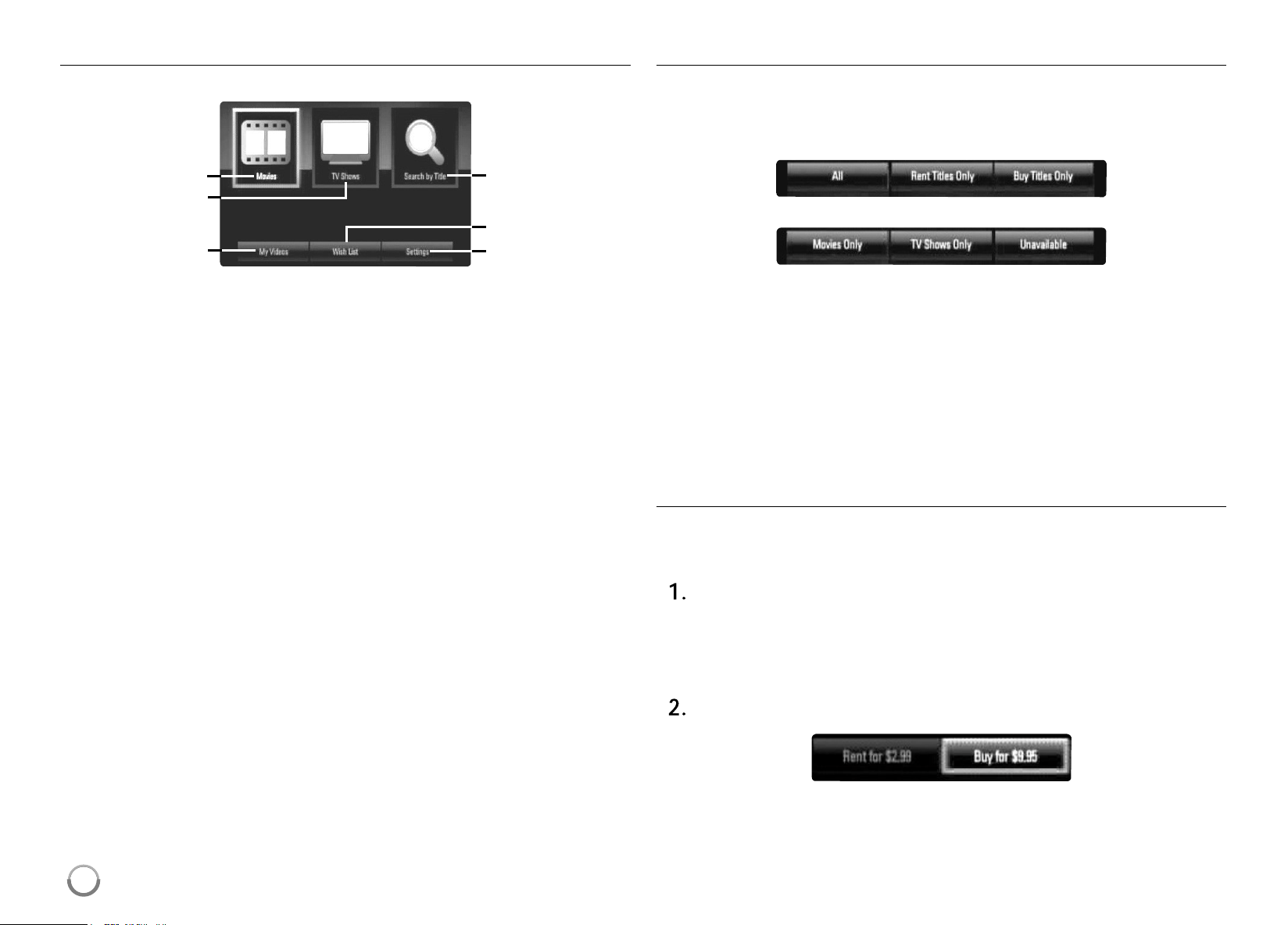
44
About the CinemaNow menu
Afteractivatingyourplayer,you’rereadytousetheCinemaNowservice.
a
Movies–Themovielistappearsonthescreen.Browsemovies
youwanttobuy/rentfromthecategorizedoptionsorsearchby
selectingthe[SearchbyTitle]option.
b
TVShows–TheTVshowlistappearsonthescreen. Youcan
browseTVepisodesyouwanttobuyfromthecategorizedoptions
searchbyselectingthe[Searchby Title]option.
c
SearchbyTitle–Searchmovies&TVepisodesbyenteringthe
titlenameonthekeyboardmenu.
d
MyVideos-Displaysthemovies& TVepisodesyouhavebought
orrented.Youcanbrowsethevideosfromcategorizedoptionsas
wellasplaythevideosfromthisscreen. TheMyvideosscreenis
whereyoucangetaccesstoallyourpreviouslyrentedor
purchasedcontentfromanyCinemaNowpoweredbydevice.
e
WishList–Displaysthemovies& TVepisodesyouhaveaddedto
yourCinemaNowWishList.Youcanbuy,rentorremovevideos
fromthelist.
f
Settings–Youcanactivateorde-activatetheCinemaNowService
fromyourplayer.Youcansetthecheckboxtoonlyshowthetitles
thatareavailableforrent.
My videos
TheMyvideosscreeniswhereyoucangetaccesstoallyourpreviously
rentedorpurchasedcontentfromanyCinemaNowpoweredbyservice.
Youcanviewyourcontentunderdif ferentfilters:
a b c
d e f
a
All–showallmovies& TVcontent
b
Renttitlesonly–showrenttitlesonly
c
Buytitlesonly–showbuytitlesonly
d
Moviesonly–showMoviesonly,noTV
e
TVShowsonly–showTVcontentonly,nomovies
f
Unavailable–videosthatarecurrentlyun-availableforstreaming
duetocontentownerrestrictions
Renting and Purchasing videos
Afteractivatingyourplayer,youarereadytobuyorrentmovies& TV
episodes.Youcanthenuseyourplayer ’sremotetobrowse,searchand
watchdirectlyonyourTV.
Selectavideoyouwanttobuyorrentfrom[Movies]or[TVShows]
menu.PressENTERwhileselectingthevideothumbnailtodisplay
the[TitleDetails].
The[TitleDetails]screenshowstheinformationofthevideosuchas
rating,runtime,etc.
Use
v V b B
toselect[Buy]or[Rent]andpressENTER.
a
b
d
c
e
f
HB954SA-AP.BUSALL_ENG_6606 8/14/09 5:13 PM Page 44
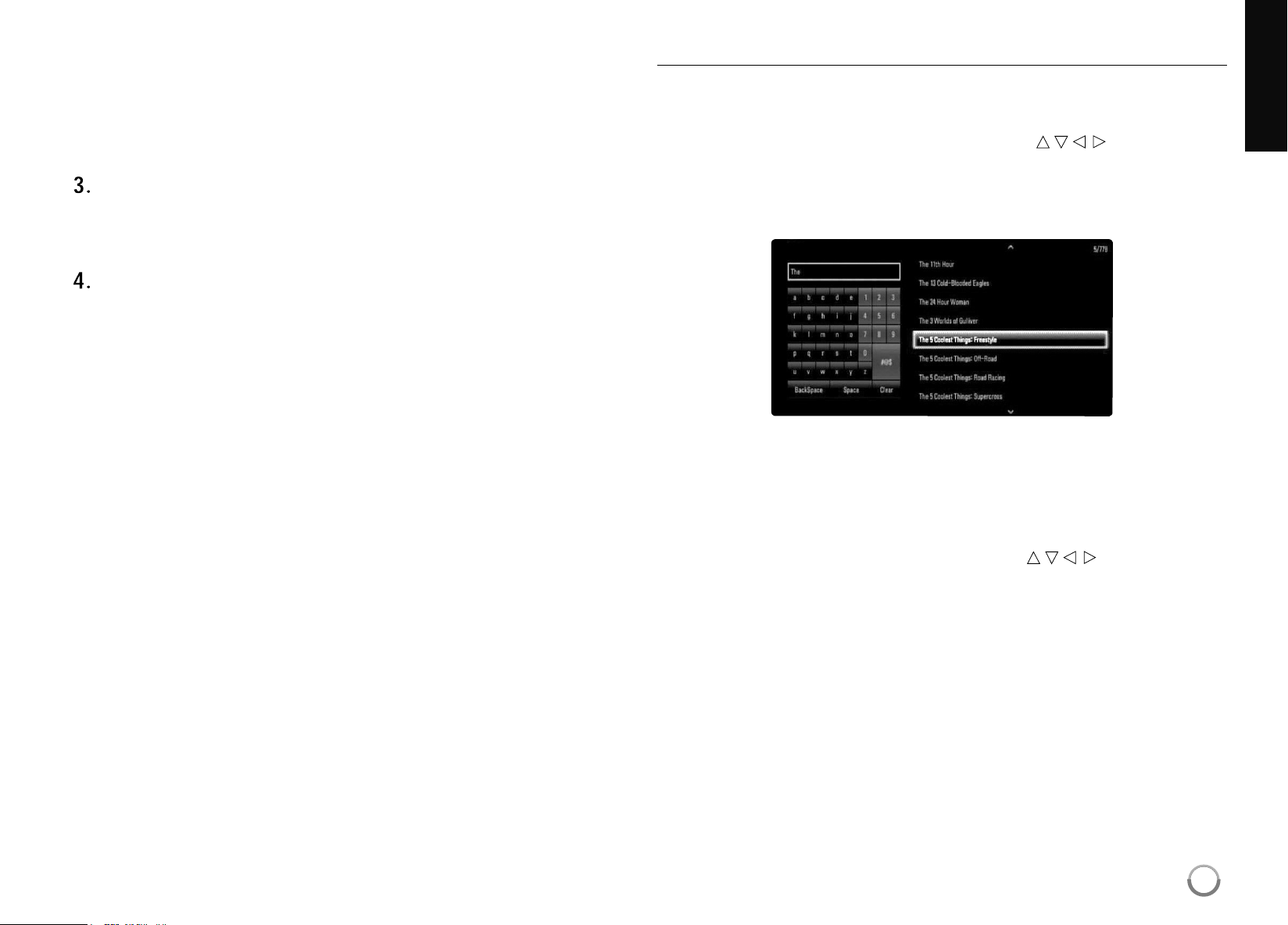
45
Tips:
• Ifyouselect[AddtoWishList]from[T itleDetails]menu,thevideo
willbestoredinthe[WishList]. Youcanbuy,rentorremovethis
videofromthe[WishList]menu.
• For[TitleDetails]menuof[TVShows],Use
v V b B
toselectan
episode,andthenselect[Buy]topurchaseeachepisode.
Select[Placeorder]toconfirmyourpurchase. Anygiftcodebalance
youhavepreviouslyredeemedwillbeappliedautomatically .Ifyou
wanttoredeemanewgiftcode,select[RedeemGiftCode]andpress
ENTERtoenterthegiftcodeonthekeyboardmenu.
Select[WatchNow]toplaythevideoimmediatelyor[Continue
Browsing]toaddthemovietothe[MyV ideos]andreturntothe
[Movies]menu.
Notes:
• Rentalvideosareavailabletowatchfora24hourperiod(inmost
cases),startingfromthefirsttimetheyareplayed.
• IfyouhaveaCinemaNowgiftcode,youcanredeemitbyselectingthe
[RedeemGiftCode]buttonatcheckout.
• Whilemostvideosareavailableforrentalandpurchase,someare
availableforpurchaseonlyduetocontentownerrestrictions.Ifyou
wanttoviewcontentthatisonlyavailabletorent,youmaydosoby
goingtothesettingsmenu,andcheckingthe“Showonlytitles
availableforRENT inbrowseresults”.
• Pleasenotethattheremaybeadif ferencebetweenthecontent
offeredtobuyandwatchontheCinemaNowserviceontheLGplayer ,
andthatonwww.cinemanow.com.Thisisduetocontentownerrestric-
tions.
Searching for videos
Youcansearchforvideosbyenteringsearchwordsofupto26
characters.Use
b B
toselect [SearchbyTitle]optionfromthe
CinemaNowmenuor[Searchby Title]from[Movies]/[TVShows],andthen
pressENTERtodisplaythekeyboardmenu.Use
v V b B
toselecta
characterthenpressENTER toconfirmyourselectiononthekeyboard
menu.
Whenyouenteringcharacters,titlesthatstartwiththelettersyouare
enteringwillbedisplayedontheRight.
[Clear]:Clearallenteredcharacters.
[Space]:Insertsaspaceatthecursorposition.
[Backspace]:Deletesthepreviouscharacteratthecursorposition.
[ABC/abc/#@$]:Changethekeyboardmenusettingstocapital
letter,smalllettersorsymbols.
Whenyoufinishenteringthesearchwords,Use
v V b B
toselectatitle
fromthelistshownontheright,andthenpressENTERtodisplaythe
[Titledetails]screenofthevideo.
HB954SA-AP.BUSALL_ENG_6606 8/14/09 5:13 PM Page 45
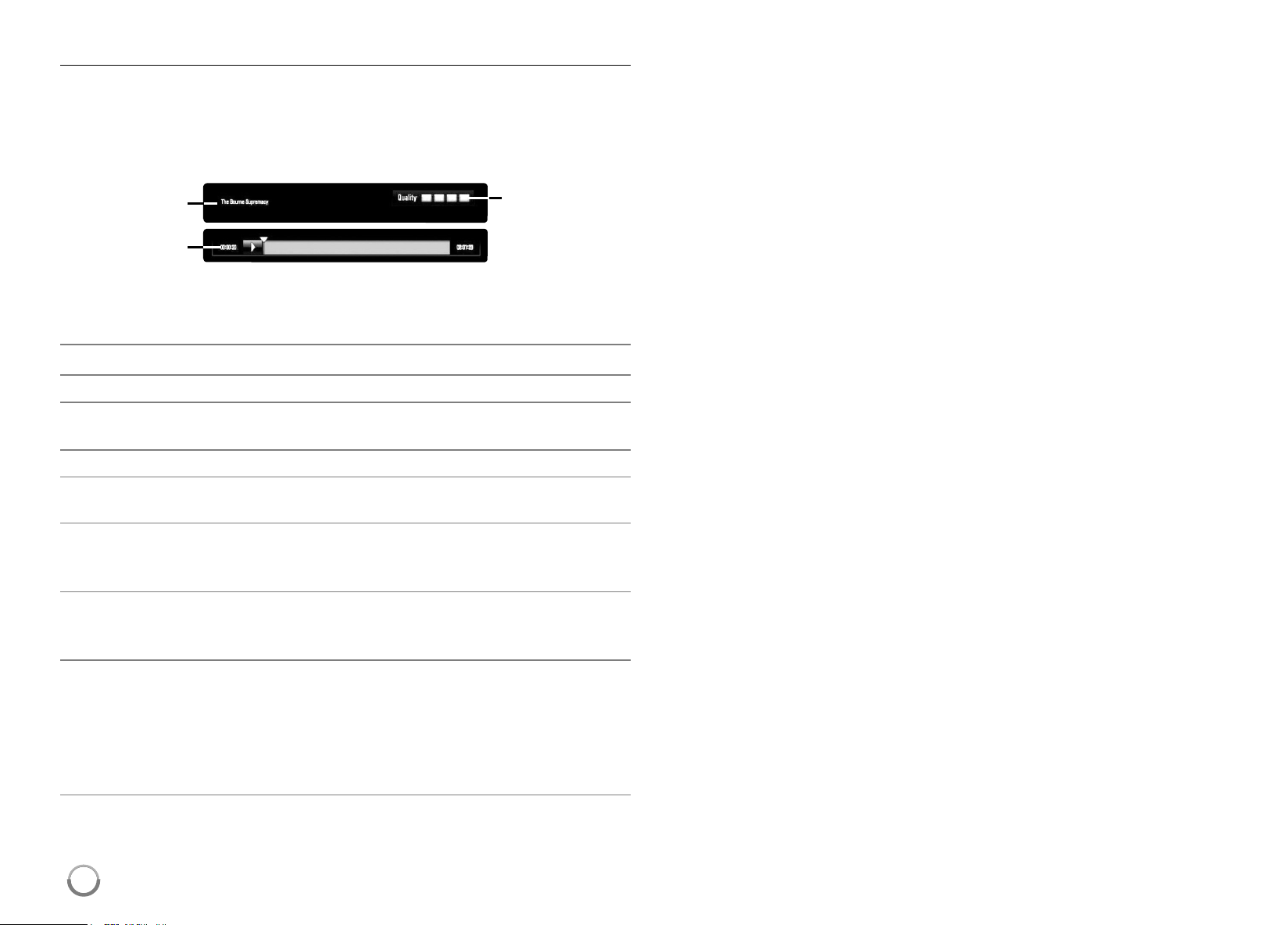
46
Playing a video
Whilewatchingamovieor TVepisodefromCinemaNowviayourplayer,
youhavecontroloveryourviewingexperience. Youcanusethebuttons
ontheremotetopauseandresumeviewingandtoscanforwardand
backward,justlikewhenyouwatchaDVD.Whileplayingamovie,the
buttonsontheremotedothefollowing:
Notethevideoqualityindicatoronthetoprighthandsideofthescreen
whileavideoisplaying.Thequalitylevelisdependentonyourcurrent
internetnetworkconditionsandwillimproveasthosedo.
Button(s) Operations
N
Startsplayingbackthemovie.
X
Topauseamoviewhileit’splaying.Toresumeplaying
apausedvideo,press
N
(Play)again.
x
Stopsthemovieanddisplayspreviousscreen.
ENTER Displaysthevideoqualityindicatorandprogressbaron
thescreen.
m
/
M
Scansforwardorbackwardthroughthemovie. Toscan
faster,pressthebuttonagain.
Toresumeplayingback,press
N
.
HOME Whenyouhavefinishedwatchingmoviesstreamedfrom
CinemaNow,simplypresstheHOMEbuttonontheremote
controltogototheHomeMenu.
ZOOM Duringplaybackorpausemode,pressZOOMtodisplay
the[Zoom]menu.Usegreenoryellowbuttonstozoomin
oroutthepicture.Youcanmovethroughthezoomedpic-
tureusing
v V b B
buttons.Toreturntothenormalpicture
size,pressyellowbuttonrepeatedlytofullyzoomoutthe
picture.PressRETURNtoexitthe[Zoom]menu.
Note:
TheplaybackofCinemaNowvideosmaybepaused,stoppedorbuf fering
occurringoftendependingonyourbroadbandspeed.
Werecommendaminimumconnectionspeedof1.5Mbps.Forthebest
playbackcondition,aconnectionspeedof4.0Mbpsisrequired.
SometimesyourbroadbandspeedvariesbasedonyourISP’ snetwork
conditions.ContactyourISP ifyouhaveproblemsmaintainingafast
connectionthatisreliable,orifyouwanttoincreaseyourconnection
speed.ManyISPsofferavarietyofbroadbandspeedoptions.
Videoquality
indicator
progress
bar
videotitle
HB954SA-AP.BUSALL_ENG_6606 8/14/09 5:13 PM Page 46
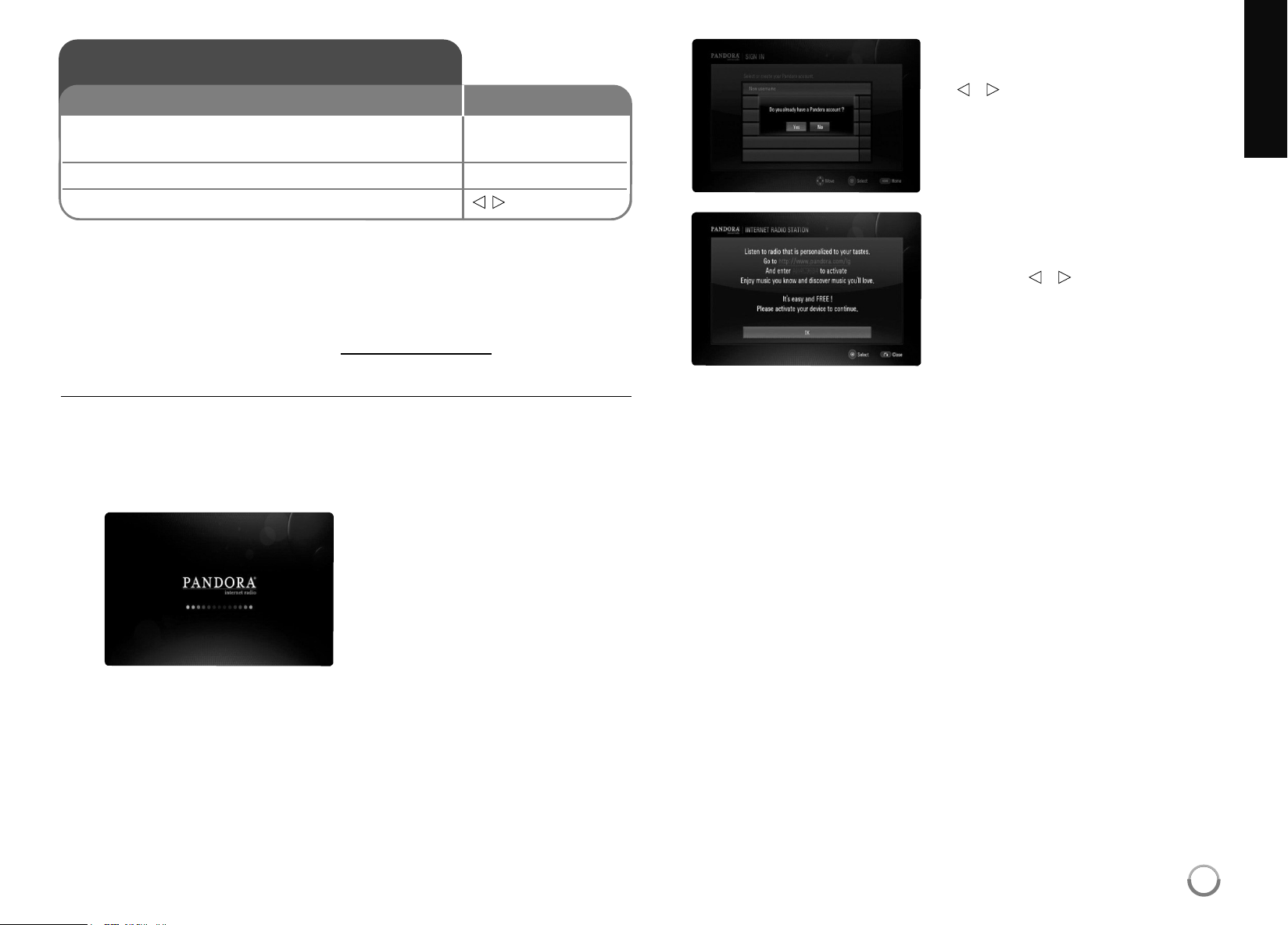
Youcaninstantlylistentopersonalizedradiostations,streamedoverthe
internet,fromPandorathroughthesystemspeakersviayourLGBDplayer .
TousePandoraontheweb,pleasevisit:www .pandora.com.Tosetup
PandoraonyourLGBDplayer,pleasefollowtheactivationinstructions
below.
TobecomeaPandoramembervisit: www.pandora.com
Activating Pandora on your player
YoumustactivatePandoraonyourplayerbeforeyoucanlistentoor
createpersonalizedradiostations.
1.
2.
IfyoualreadyhaveaPandora
accountselect[Yes]bypressing
b
/
B
,andthenpressENTER.
Yourplayerwillbeautomatically
activatedatthispoint.
Gotostep3.
AfterlaunchingPandoraonyour
player,theinitialscreenappears.
Ifyoudon’talreadyhavea
Pandoraaccountyouwillneedto
createone.Select[No]by
pressing
b
/
B
,andthenpress
ENTER.OnyourTVscreenyou
willseeanactivationcode.
Pleasewritetheactivationcode
downandthenvisitthewebsite
addressdisplayedonscreento
completethePandoraregistration
process.Afteryouhavecompleted
theregistration,returntoyour TV
andpressENTERandgotostep
4oftheinstructions.
Using Pandora
1 Check the network connection and settings: –
Seepage17-18and28.
2 Displays the [Home Menu]: HOME
3 Select the [Pandora] option:
b B
, ENTER
ON REMOTE
47
HB954SA-AP.BUSALL_ENG_6606 8/14/09 5:13 PM Page 47

48
Notes:
•Pandorawillpauseaplaybackaftereighthourswithoutanyinput.
Atthispoint,Pop-upmessageappearsandyouhavetopressENTERto
resumethemusic.
•Youmaynotgetthesonginformationsaccordingtothenetwork
conditions.
•
ForquestionsregardingthePandoraservicepleasevisit:
http://www.pandora.com/help
or e-mail: pandora-support @ pandora.com
•Forquestionsregardingyourplayerpleasevisit:
http://us.lgservice.com
or call 1-800-243-0000
Using Pandora on your LG BD player
YouwillbeamazedathowquickandeasyitistousePandoraonyourBD
player.Usingyourplayer’sremotecontrol,youcanplaystationsthatyou
havealreadycreatedorcreatenewonesbyprovidingthenameofasingle
songorartist.Whilethemusicisplaying,youcangiveasonga Thumbs
UporDownandPandorawillinstantlychangethemusicselectiontobet-
termatchyourtastes.Bestofall,youcanlistentoyourPandorastations
throughtheBDplayersystemspeakersoronlineatpandora.com.
3.
EnteryourPandorausernameand
passwordonthevirtualkeyboard
withthesuppliedremote.
4.
Youmayhavetocreateanew
stationifyoudon’thaveoneyet.
Enteroneofyourfavoriteartistsor
songstocreatea
station.
5.
Aftercreatingthestations,it
automaticallyshowsthelistof
stationscreatedfromthewebor
player,andplaysmusic.
[OK]:FinishesenteringanE-mailorpassword.
[
T
Delete]:Deletesthepreviouscharacteratthecursorposition.
[Space]:Insertsaspaceatthecursorposition.
[ClearAll]:Clearsallenteredcharacters.
[ABC/abc/#+=]:Changesthevirtualkeyboardmenusettingstocapital
letters,smalllettersorsymbols.
Tips:
•YoucanuseCLEARonthesuppliedremoteinsteadofselecting
[
T
Delete].
•Youcanusethenumericalbuttonsonthesuppliedremoteinsteadof
selectingthenumericalbuttonsonthevirtualkeyboard.
HB954SA-AP.BUSALL_ENG_6606 8/14/09 5:13 PM Page 48
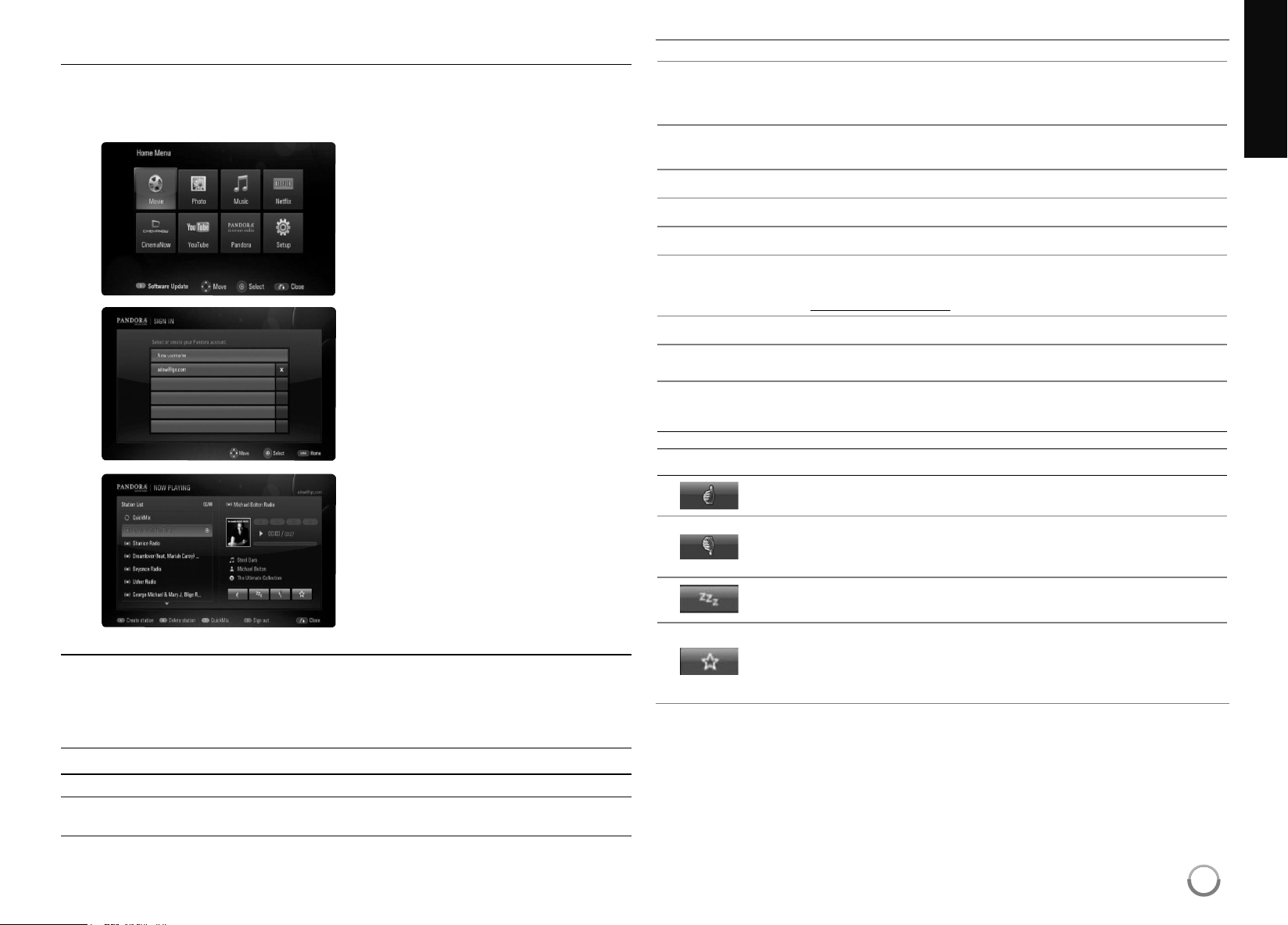
Adding multiple Pandora user accounts
ItiseasytosetupmorethanonePandorauseraccountonthisdevice.
EveryoneinyourhouseholdcancreatetheirownPandoraaccountsso
theycancreateandlistentotheirownstations.
Playing Pandora stations
WhilelisteningtomusicsfromPandoraviayourplayer ,youhavefull
controloveryourlisteningexperience. Youcanusethebuttonsonthe
remotetopauseandresumelisteningto.Whilelisteningtoamusic,the
buttonsontheremotedothefollowing:
Button(s) Operations
N
(PLAY) Startsplayingbackthemusic.
X
,
x
Topauseamusicwhileit’splaying.Toresumeplaying
apausedmusic,press
N
(PLAY)again.
ENTER Acknowledgesmenuselection.
HOME Whenyouhavefinishedlisteningtomusicsstreamed
fromPandora,simplypresstheHOMEbuttononthe
remotecontroltogototheHomeMenu.
>
Skipstothenextsong.
(Thisislimitedtoatmost6times.)
O
(RETURN) Goesbacktothepreviousmode.
A (redbutton) Createsstation.
B (greenbutton) Deletesstation.
C (yellowbutton) Playsthestationsinrandomorder.(QuickMix)
TocreateoredittheQuickMixvisit:
www.pandora.com
D (bluebutton) Signsout
v
/
V
/
b
/
B
Movestotheup/down/left/right
Using the main screen
Menu Button(s)
Operations
TellsPandorathatyoulikethecurrentlyplayingsong.
Pandorawillthenplayyoumoresongsthataresimilar .
TellsPandorathatyoudonotlikethecurrentlyplaying
song.Pandorawillimmediatelyskiptothenextsong
andwon’tplayyouthesong,orotherslikeit,again.
Excludestheselectedsongfromtheallstationsfora
month.
Bookmarksthecurrentlyplayingsong. Youcanviewall
ofyourbookmarksbyloggingintoPandoraontheweb
atwww.pandora.comandclickingonthe“YourProfile”
link.
Use
b
/
B
toselect[Pandora]
thenpressENTER.
Theusernamelistscreenwill
appear.
Use
v
/
V
toselecta
usernameonyourusername
list.Thestationlistsofthe
selectedusernameappearand
playsmusic.Ifnecessary,
youcancreateanew
usernamehere.
2.
3.
PressHOMEandthehome
menuwillappear.
1.
49
HB954SA-AP.BUSALL_ENG_6606 8/14/09 5:13 PM Page 49
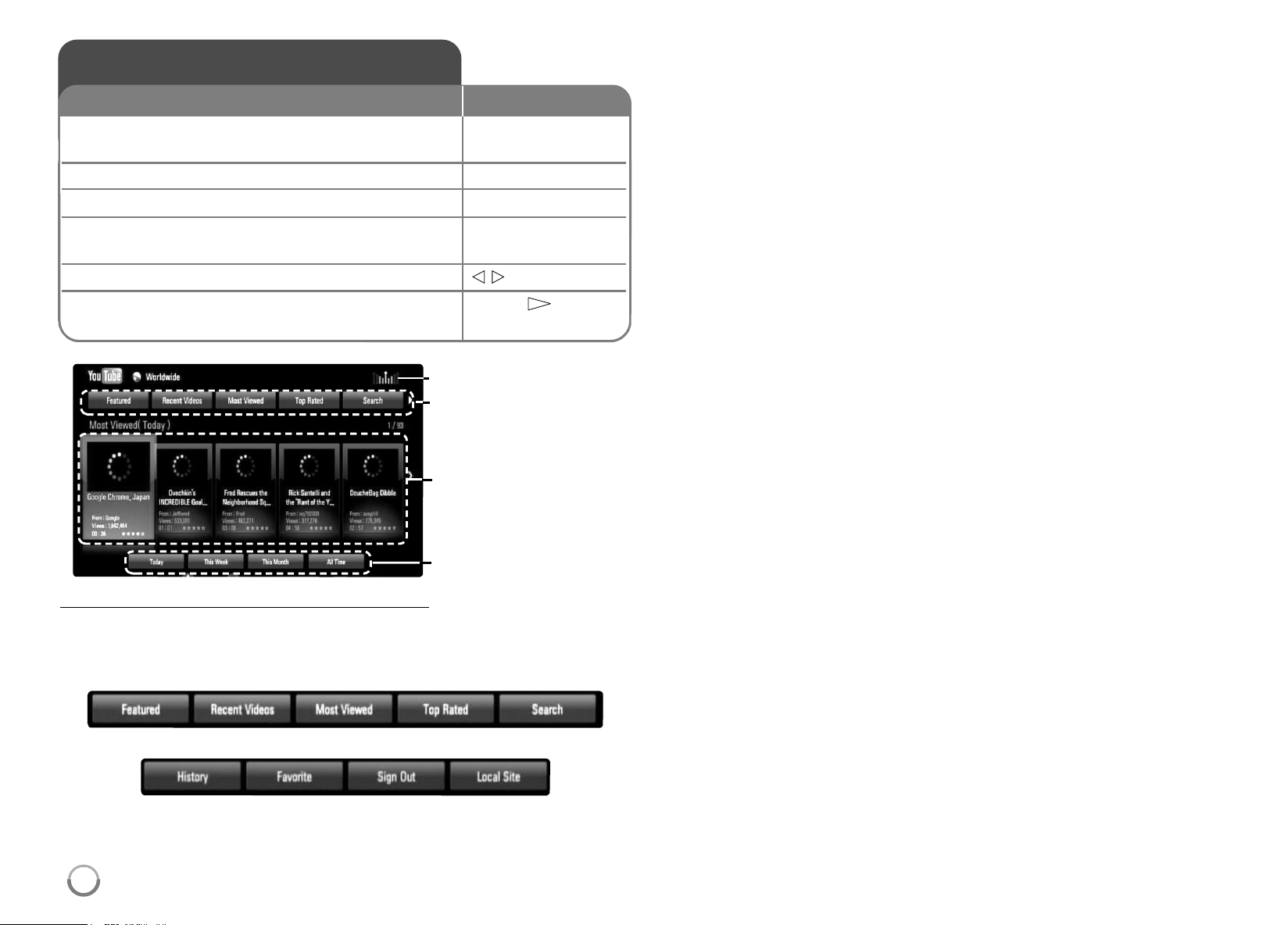
50
About the YouTube menu
Therearevariousoptionsonthe YouTubemenu.Use
v V b B
toselect
anoptionandpressENTERtoselecttheoptionsasdescribedbelow .
a b c d e
f g h i
a
Featured–Thefeaturedvideoslistwillbedisplayed.
b
RecentVideos–Themostrecentlyupdatedvideoslistwillbe
displayed.
c
MostViewed–Themostviewedvideoslistwillbedisplayed. The
periodoptionappearsatthebottomofthescreen.
d
TopRated–Thebestratedvideoslistfrom YouTubeserverwillbe
displayed.Theperiodoptionappearsatthebottomofthescreen.
e
Search–Thekeyboardmenuwillbedisplayed.
See“Searchingvideos”onpage52formoredetail.
f
History–Thevideoslistthatyoupreviouslyplayedonthisunitwill
bedisplayed.Maximumof25videoscanbestored.
g
Favorites–Thisoptionwillbeappearedonlywhentheunitisin
sign-instatus.Displaysthevideoslistthatisarrangedinthe
YouTubeserverwithyouraccount.
Somevideosmaynotappearonthe[Favorites]list,evenifthe
videosarearrangedintheserver.
h
Signin(SignOut)–Displaysthekeyboardmenutosigninor
returnstothesign-outstatus.See“Signinwithyour YouTube
account”onpage52formoredetails.
i
Localsite–Choosewhichcountry’svideosyouwouldliketoview.
Thecountrieslistedonthe[LocalSite]menumaydif ferentwith
thoselistedontheYouTubewebsite.
Notes:
• TheYouTubemenucandisplay5videosinthevideoslist.Pressredor
bluebuttontodisplaynext/previous5videos.
• Ifyouselectthe[MostV iewed]or[TopRated]optioninthe YouTube
menu,theperiodoptionsappearatthebottomofthescreen.Use
v V
b B
toselectaperiodoptionandpressENTERtodisplaythevideos
listwithintheselectedperiod.
• Thevideoslistsearchedfromtheplayermaydif ferentwiththelist
searchedfromawebbrowseronPC.
Playing YouTube videos
1 Check the network connection and settings: HOME,
v V b B
Seepages17-18and28.
2 Displays the [Home Menu]: HOME
3 Select the [YouTube] option:
v V b B
, ENTER
4 Select a desired option on the YouTube
v V b B
, ENTER
menu:
5 Select a video you want to play:
b B
6 Starts playback the selected video: PLAY (
N
), ENTER
or DISPLAY
ON REMOTE
YouTubemenu
videolist
periodoptions
Networkcondition
HB954SA-AP.BUSALL_ENG_6606 8/14/09 5:13 PM Page 50
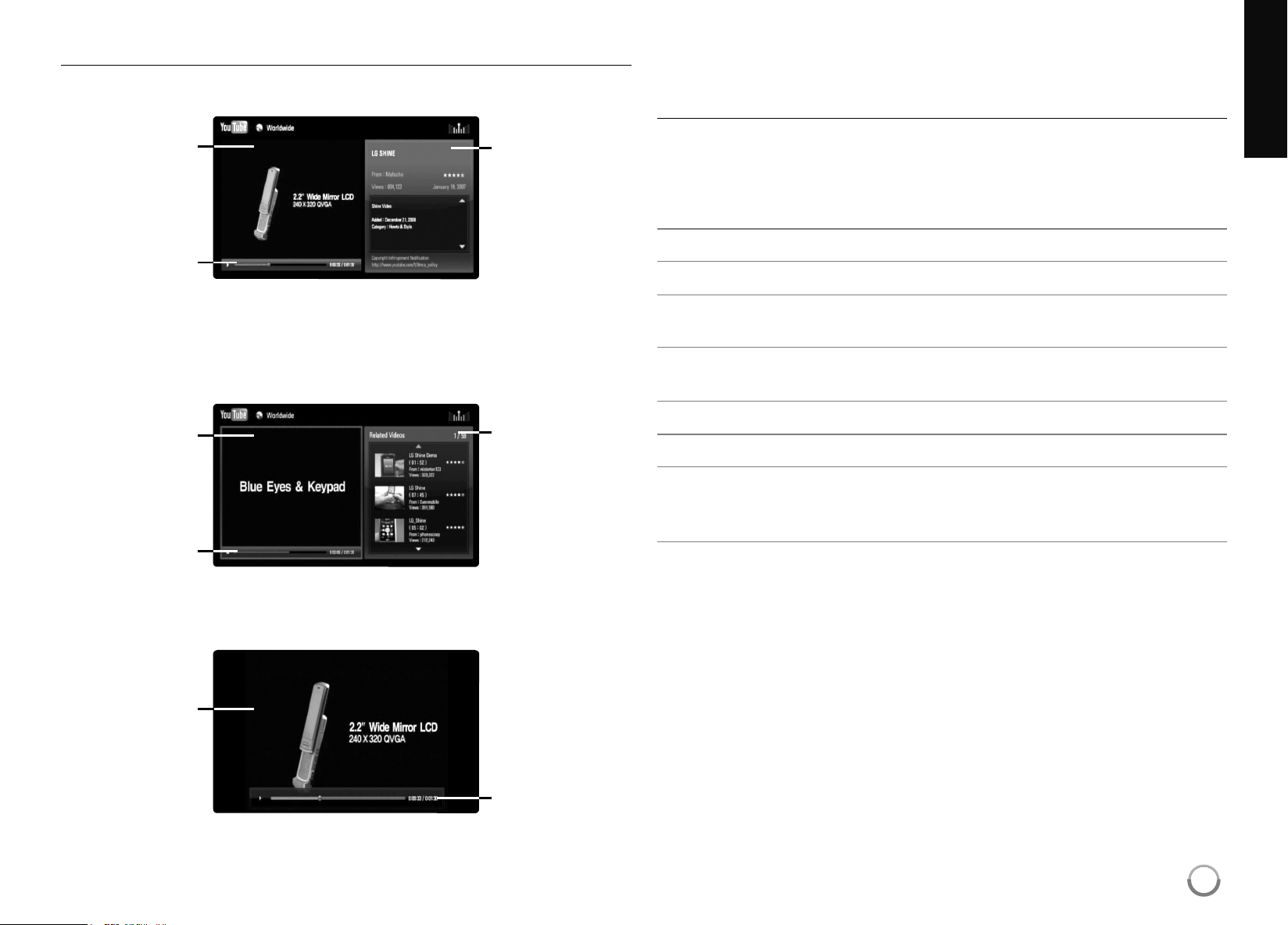
51
About YouTube playback screen
Whenyoupress PLAY (
N
)orENTERatthevideoyouwanttowatch,the
playbackscreenandcontentdetailwillappearonthescreen.
while playing
Andwhentheplaybackendsorstops,thestoppedplaybackscreenand
relatedvideoslistappearonthescreen.Use
v V b B
toselectthecur-
rentvideooravideofromtherelatedvideoslistandthenpressPLA Y (
N
)
orENTERtoplaytheselectedvideo.
while stopped
Whenyoupress DISPLAY atthevideoyouwanttowatch,theplayback
startsinfullscreen.
Full Screen
PressDISPLAY totogglebetweenplaybackinfullscreenandplayback
screenwithcontentdetail.
Playing a video
WhilewatchingavideofromYouTubeviayourplayer,youcancontrolthe
YouTubevideoplayback.Youcanusethebuttonsontheremotetopause
andresumeviewing,justlikewhenyouwatchaDVD.Whileplayinga
video,thebuttonsontheremotedothefollowing:
Button(s) Operations
N
orENTER Startsplaybackthevideowithcontentdetail.
DISPLAY Togglebetweenplaybackinfullscreenandplayback
screenwithcontentdetail.
X
Topauseavideowhileitisplaying. Toresumeplaying
apausedvideo,pressPLAY (
N
)again.
x
Stopsthevideoanddisplaysrelatedvideoslist.
.
/
>
Skip theplaybackforwardorbackward.
HOME Whenyouhavefinishedwatchingvideos,simplypress
theHOMEbuttonontheremotecontroltogotothe
[HomeMenu].
Notes:
• Thesettingsofthisplayerdonotaf fecttheYouTube’splaybackquality.
• TheplaybackofYouTubevideosmaybepaused,stoppedorbuf fering
occurringoftendependingonyourbroadbandspeed.
playback
screen
contentdetail
playback
screen
progressbar
progressbar
playback
screen
relatedvideos
list
progressbar
HB954SA-AP.BUSALL_ENG_6606 8/14/09 5:13 PM Page 51
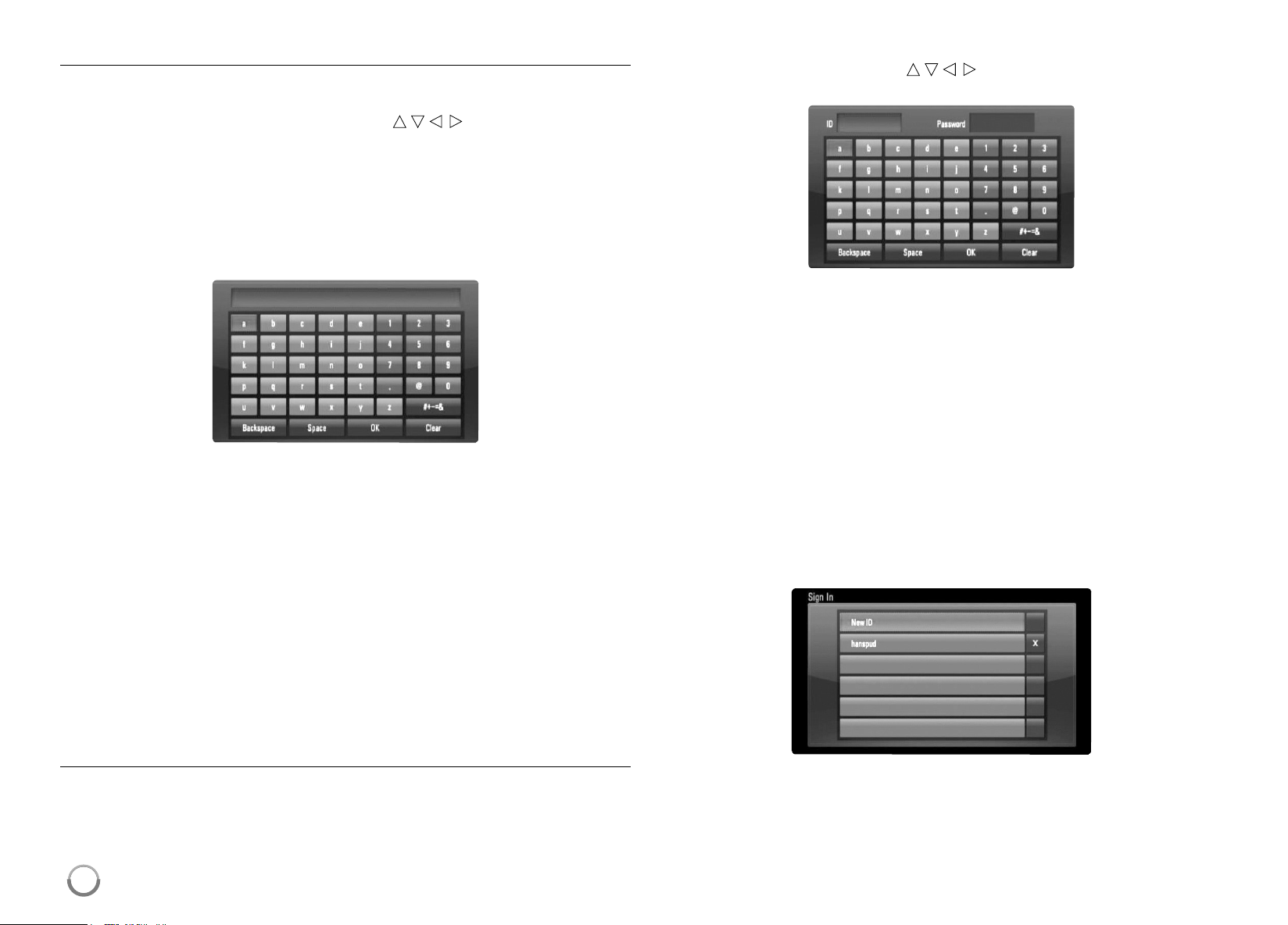
52
Searching videos
Youcansearchforvideosbyenteringsearchwordsofupto128
characters.Use
b B
toselect [Search]optionfromthemenuandpress
ENTERtodisplaythekeyboardmenu.Use
v V b B
toselectacharacter
thenpressENTER toconfirmyourselectiononthekeyboardmenu.
Whenyouenteringacharacter,maximumof5suggestionwordswillbe
displayed.
Toenteraletterwithanaccentmark,selecttheletterfromextended
characterset.
Example:Select“D”andthenpressDISPLAY todisplaytheextended
characterset.Use
b B
toselect“D”or
“Ď”
andthenpressENTER.
[OK]:Searchingrelatedvideosofsearchwords.
[Clear]:Clearallenteredcharacters.
[Space]:Insertsaspaceatthecursorposition.
[Backspace]:Deletesthepreviouscharacteratthecursorposition.
[ABC/abc/#+-=&]:Changethekeyboardmenusettingstocapital
letter,smalllettersorsymbols.
Whenyoufinishenteringthesearchwords,select[OK]andpressENTER
todisplaytherelatedvideoslist.
Note:
Availablelanguagestoenteronthekeyboardmenuareasfollows:
English,Spanish,Italian,French,German,Dutch,Portuguese,Swedish,
PolishandCzech.
Sign in with your YouTube account
Towatchvideosfromyour[Favorites]videolistonthe YouTubeserverwith
youraccount,youneedtosigninwithyour YouTubeaccount.
Use
b B
toselect [SignIn]optionfromthemenuandpressENTERto
displaythekeyboardmenu.Use
v V b B
toselectacharacterthenpress
ENTER toconfirmyourselectiononthekeyboardmenu.
[OK]:FinishenteringanIDorpassword.
[Clear]:Clearallenteredcharacters.
[Space]:Insertsaspaceatthecursorposition.
[Backspace]:Deletesthepreviouscharacteratthecursorposition.
[ABC/abc/#+-=&]:Changethekeyboardmenusettingstocapital
letters,smalllettersorsymbols.
Ifyouwanttosignout,selectthe[SignOut]fromthe YouTubemenuand
pressENTER.
Thisunitcanautomaticallystoreupto5IDswhichwerepreviously
signed-in.TheIDslistappearswhenyouselectthe[SignIn]option.
SelectastoredIDonthelistandpressENTERtodisplaythekeyboard
menuwiththeselectedIDisentered. Youwillthenonlyneedtoenterthe
passwordtosignin.
[NewID]:DisplaysthekeyboardmenuforenteringanewIDand
password.
[X]:DeletethestoredIDasshownleftofthe[X]symbol.
HB954SA-AP.BUSALL_ENG_6606 8/14/09 5:13 PM Page 52
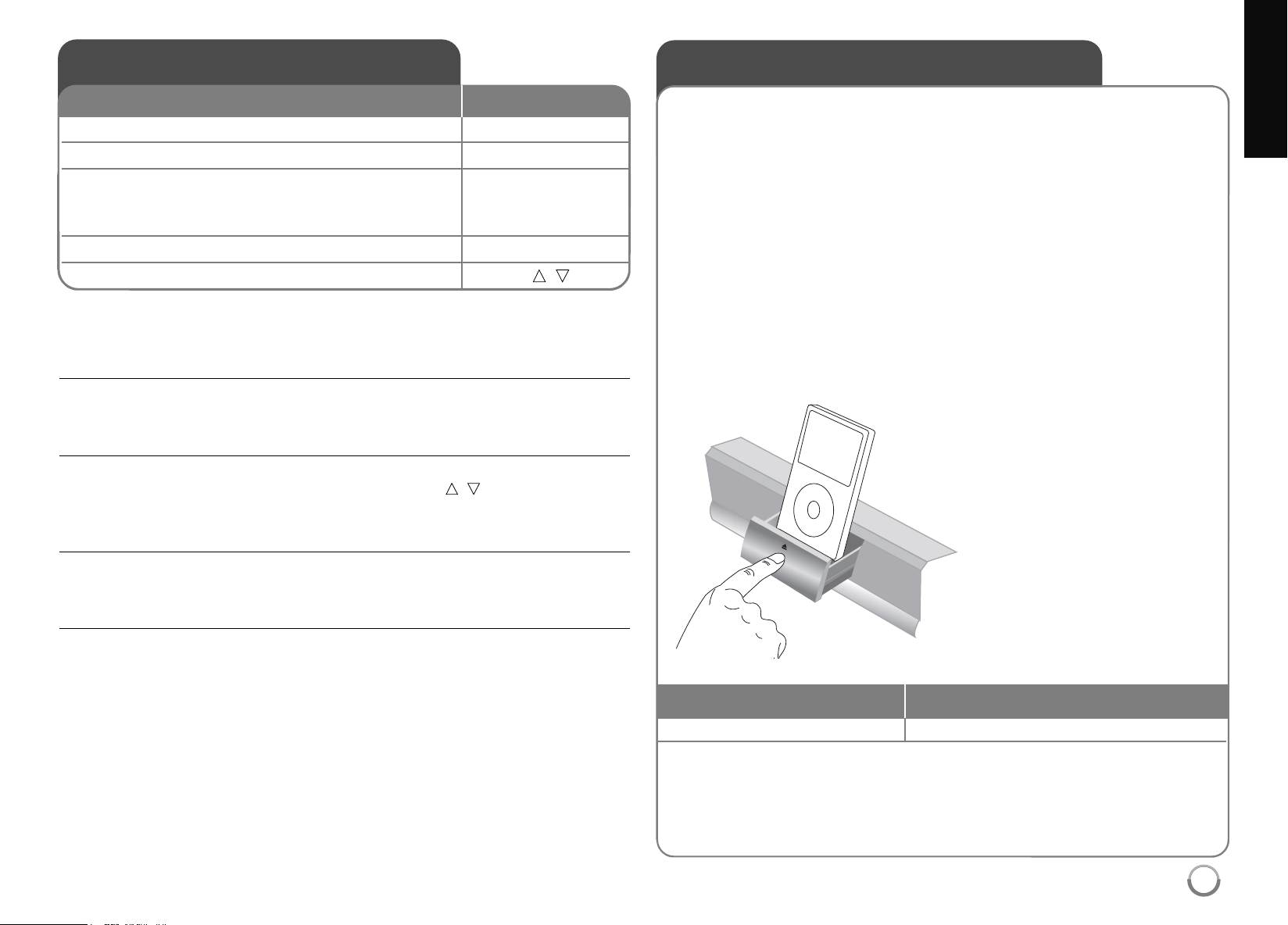
53
Listening to the radio - more you can do
Look for radio stations automatically
PressandholdTUN.-/TUN.+formorethanasecond. Thetunerwillscanauto-
maticallyandstopwhenitfindsaradiostation.
Choose a preset number for a radio station
Whenstoringaradiostation,thepresetnumbercanbechosen.Whenthisunit
automaticallyshowsapresetnumber,pressPRESET
v
/
V
tochangeit.Press
ENTERtosaveyourchosennumber.
Delete all the saved stations
PressandholdENTERfortwoseconds.ERASE ALL willflashuponthe
display.PressENTERtoeraseallsavedradiostations.
Improve poor FM reception
PressMO./ST.(D).Thiswillchangethetunerfromstereotomonoandusually
improvethereception.
Listening to the radio
1 Select FM or AM: TUNER ( INPUT)
2 Select a radio station: TUN.-/+
3 To save a radio station: ENTER
A presetnumberwillshowonthedisplay.
Upto50radiostationscanbesaved.
4 To confirm press: ENTER
5 To select a saved station PRESET
v
/
V
ON REMOTE
BesurethatFMandAMantennasareconnected.
Playing the iPod
FordetailsaboutiPod,refertotheiPodUserGuide.
Preparation
•ToviewiPod’sVideosandPhotosontheTVscreen.
-BesuretousethevideoconnectionthroughtheVIDEOOUT jackon
therearpanelofthisunit.
Selecttheappropriatevideoinputmodeonthe TV.
-DependingontheiPod,makesurethatselectV ideos>Videosettings,
andthensetTVOuttoAskorOnfromyouriPod.
FordetailsaboutVideoSettings,refertotheiPodUserGuide.
-TheviewingphotosisavailableonlyifthisunitisinREMOTEIPOD
modeandyoucanviewphotosonlyasaslideshow .
YouhavetostartaslideshowonyouriPodtoviewaphotoona TV.
Fordetailsaboutaslideshow,refertotheiPodUserGuide.
•BeforeconnectingtheiPod,turnthisunitof fandreducethevolumeof
thisunittoitsminimum.
Connect the iPod firmly.
ToopentheiPodDock:
Pushthemarked
Z
.
ToclosetheiPodDock:
PushtheiPodDockforward.
Select an iPod mode PressiPod.
•
REMOTE IPOD mode:YoucanoperateyouriPodthroughaniPod’ s
displaybyusingthesuppliedremotecontrolandalsocontrolonyouriPod.
•OSD IPOD mode: YoucanoperateyouriPodbycontrollingOSDmenu
ontheTVscreenwiththesuppliedremotecontrol. Thecontrolson
youriPodarenotoperationalintheOSDiPodmode.
Do this on remoteTo
•Ifyouturnthisuniton,youriPodisautomaticallyturnedonandrechargingstarts.
HB954SA-AP.BUSALL_ENG_6606 8/14/09 5:13 PM Page 53
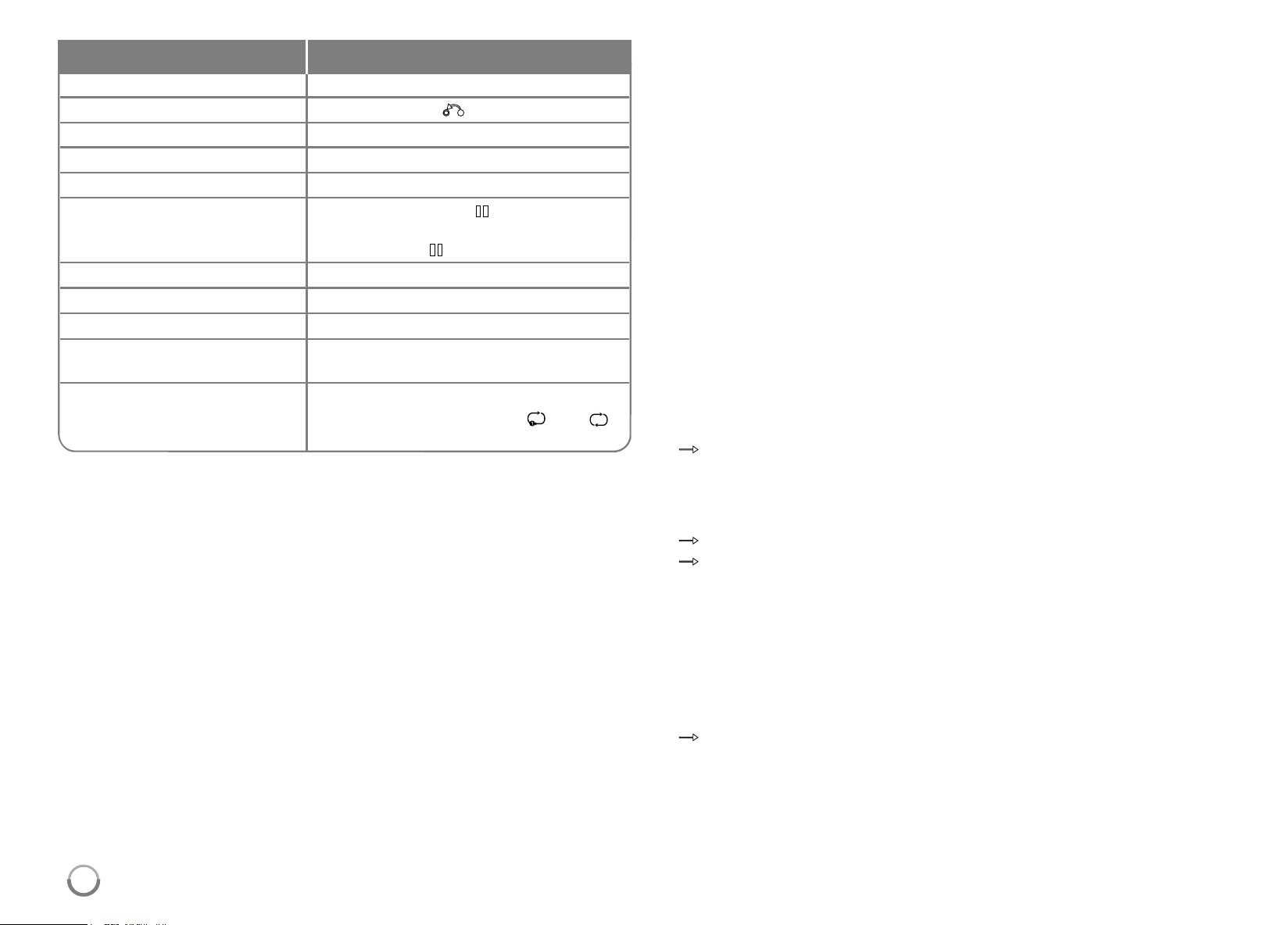
54
Tip:
YoumayusethedockadapterwhichshouldbesuppliedwithyouriPodto
thedockforthestableuseoftheiPod.
Ifyouneedanadapter,consultyouriPoddealer.
Notes:
•
CompatibilitywithyouriPodmayvarydependingonthetypeofyouriPod.
•iPodtouchandiPhonehaveanydif ferenceinoperationotherthaniPod.
Youmayneedanyadditionalcontroltousethemwiththisunit.
(e.g.“slidetounlock”)
•If you use an application, make a call, or send and receive SMS text
message, etc. on iPod touch or iPhone, disconnect it from iPod
dock of this unit and then use it.
•DependingonyouriPod’ssoftwareversion,itmaynotbepossibleto
controlyouriPodfromthisunit.W erecommendinstallingthelatest
softwareversion.
•ThevideoqualitydependsonthevideosourcesonyouriPod.
•WhenLGTV’sSIMPLINKissettoOn,theaudiosignalsareoutputtothe
systemspeakersonly.
•Ifthisunitdisplaysanerrormessage,followthemessage.
Anerrormessage“CHECKIPOD”or“PleasecheckyouriPod.”
appearswhen:
-thecommunicationbetweenthisunitandyouriPodisfailed.
t
Undock&re-dockyouriPodinthisunit.
-youriPodisnotconnectedfirmly.
-thisunitrecognizesyouriPodasunknowndevice.
-youriPodisexceptionallylowonpower.
t
Thebatteryneedstobecharged.
t
IfyouchargethebatterywhileiPodisextremelylowinpower ,itmay
takelongertocharge.
Anerrormessage“CHECKIPOD”or“ConnectediPodmodelisnot
supported.”appearswhen:
-youriPodisnotavailableforthefunctiontobeoperated.
Anerrormessage
“CHECKIPOD”or
“PleaseupdateiPod’ssoftware.”
appearswhen:
-youriPodhasanoldsoftwareversion.
t
UpdateyouriPodsoftwaretolatestversion.
•IfyouhaveaproblemwithyouriPod,pleasevisit
www.apple.com/support/ipod.
Select a menu item Press
v V
and
B
orENTER.
Go back to the previous menu
PressRETURN(
O
)orDISCMENUor
b
.
Browse for a song Fromthemainmenu,selectMusic.
Browse for a video Fromthemainmenu,selectVideos.
Play a song or video
SelectthesongorvideoandpressENTER.
Pause a song or video PressPAUSE/STEP (
X
)orPLAY (
B
).
Tocontinueplayback,press
PAUSE/STEP (
X
)orPLAY (
B
)again.
Skip to the next song or video PressSKIP (
>
).
Start a song or video over PressSKIP (
.
).
Play the previous song or video
PressSKIP (
.
)twice.
Fast-forward or rewind a song PressandholdSCAN(
m
or
M
).
or video
Repeat a song PressREPEAT repeatedlytoselecta
desiredrepeatmode:Track( ),All( ),
Off(Nodisplay).
Do this on remoteTo
HB954SA-AP.BUSALL_ENG_6606 8/14/09 5:13 PM Page 54
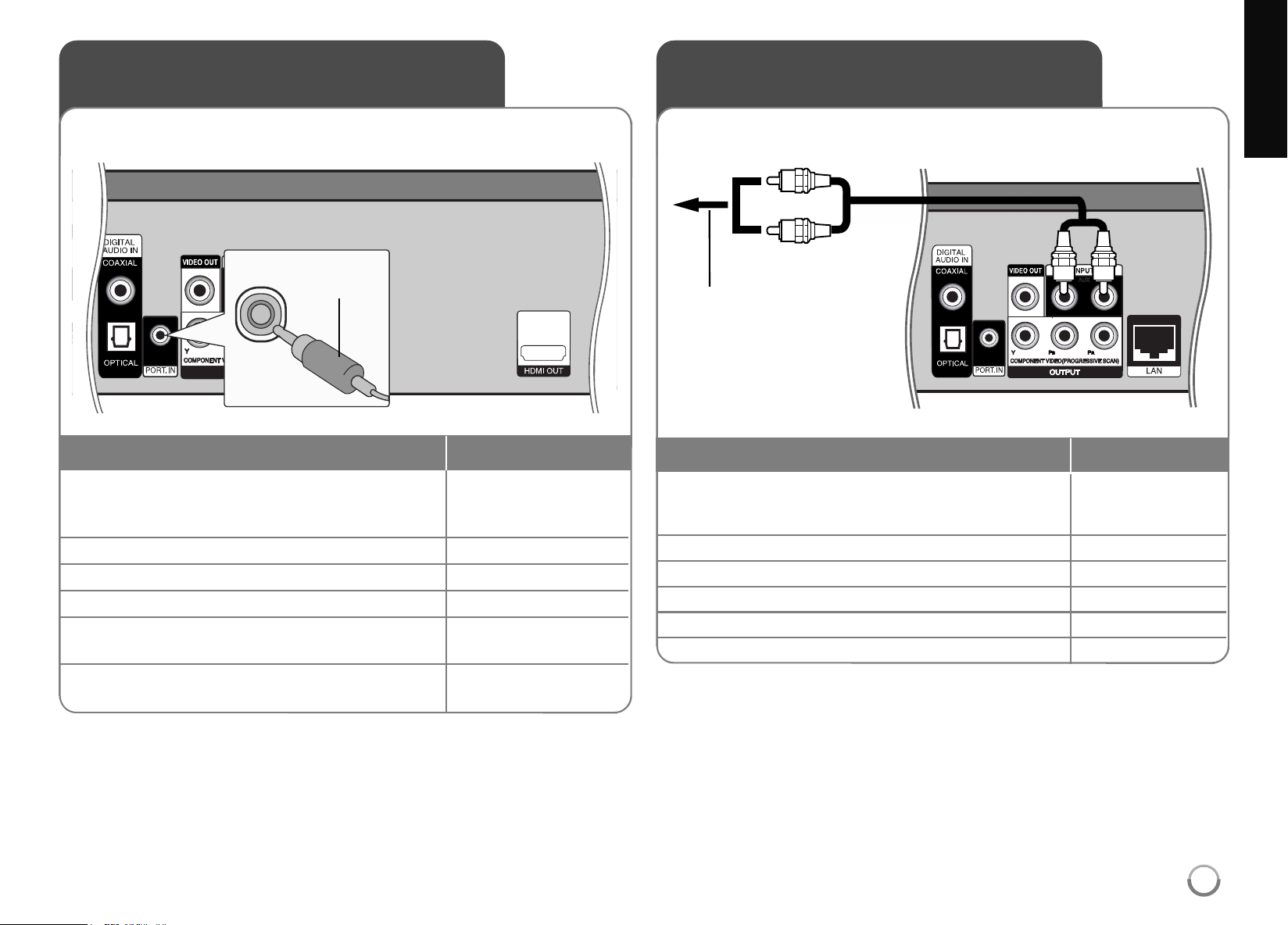
Listening to music from your
portable audio player
1 Connect the headphones (or line out ) jack
of the portable audio player into the PORT.
IN on the rear panel of this unit: -
2 Turn the power on: POWER
3 Select the [PORTABLE] option: INPUT
4 Turn down the volume of this unit: VOL. (+/-)
5 Turn the portable audio player on and start
it playing: -
6 Adjust the volume of this unit and your VOL. (+/-)
portable audio player:
Youcanenjoythesoundofyourportableaudioplayerfromthespeakers
ofthesystem.
ON REMOTE
Listening to the sound from
your component
1 Connect the analog audio output jacks of your
component into the AUX L/R (INPUT) on the rear
panel of this unit: -
2 Turn the power on: POWER
3 Select the [AUX] option: INPUT
4 Turn down the volume of this unit: VOL. (+/-)
5 Turn your component on: -
6 Adjust the volume: VOL. (+/-)
Youcanenjoythesoundofyourcomponentwiththeanalogaudio
outputjacksfromthespeakersofthesystem.
ON REMOTE
3.5mmstereo
miniplugcable
Totheaudiooutputjacks
ofyourcomponent
(TV,VCR,etc.)
55
HB954SA-AP.BUSALL_ENG_6606 8/14/09 5:13 PM Page 55

56
1 Connect the optical or coaxial output jack
of your component into the OPTICAL or
COAXIAL (DIGITAL AUDIO IN) jack on the
rear panel of this unit. -
2 Turn the power on: POWER
3 Select the [OPTICAL] or [COAXIAL] option: INPUT
4 Turn down the volume: VOL.(+/-)
5 Turn your component on: -
6 Adjust the volume: VOL.(+/-)
Youcanenjoythesoundofyourcomponentwiththedigital
opticalorcoaxialoutputjackfromthespeakersofthesystem.
ON REMOTE
Using DIGITAL AUDIO IN jacks
Tothedigitalopticaloutputjackofyourcomponent
Tothedigitalcoaxialoutputjackofyourcomponent
or
HB954SA-AP.BUSALL_ENG_6606 8/14/09 5:13 PM Page 56
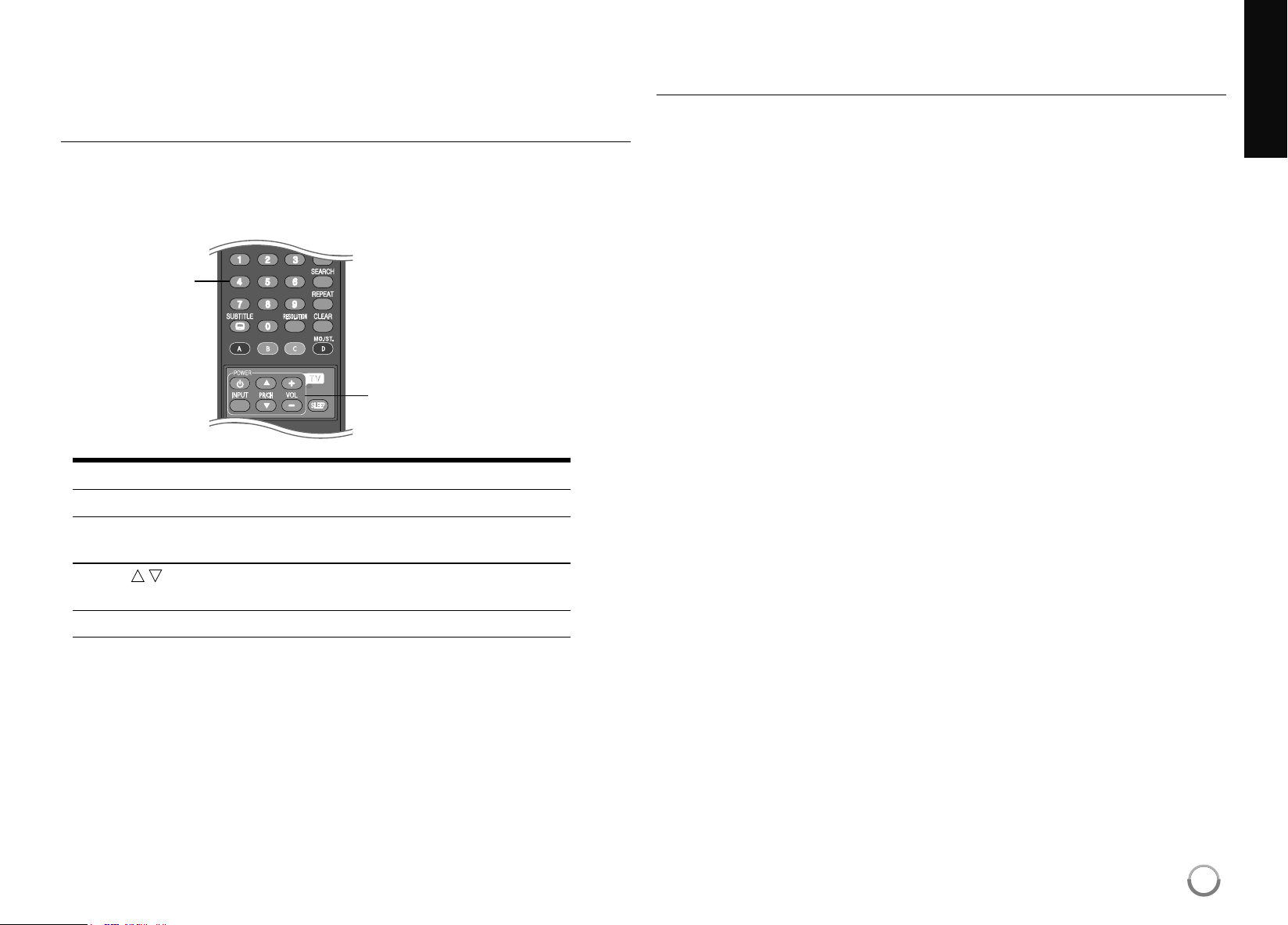
57
Reference
Controlling a TV with the Supplied Universal
Remote Control
Youcancontrolthevolume,inputsource,andpowerstateofyour TVwith
thesuppliedUniversalRemoteControl.
YoucancontrolyourTVusingthebuttonsbelow.
By pressing You can
TVPOWER TurntheTVonoroff.
INPUT SwitchtheTV’sinputsourcebetweenthe
TVandotherinputsources.
PR/CH
v
/
V
Scanupordownthroughmemorized
channels.
VOL +/– AdjustthevolumeoftheTV.
Note:
Dependingontheunitbeingconnected,youmaynotbeabletocontrol
yourTVusingsomeofthebuttons.
To program the remote to control the TV using the
manufacturer code
IfyourTVislistedinthetableonthenextpage,settheappropriate
manufacturercode.
1. WhileholdingdownTVPOWERbutton,pressthenumberbuttonsto
selectthemanufacturercodeforyour TV(Refertotableonthenext
page).
• Ifmorethanonecodenumberislisted,tryenteringthemoneata
timeuntilyoufindtheonethatworkswithyour TV.
2. ReleaseTVPOWERbutton.
Notes:
• DependingonyourTV,someorallbuttonsmaynotfunctiononthe TV,
evenafterenteringthecorrectmanufacturercode.
• Ifyouenteranewcodenumber,thecodenumberpreviouslyentered
willbeerased.
• Whenyoureplacethebatteriesoftheremote,thecodenumberyou
havesetmayberesettothedefaultsetting.Settheappropriatecode
numberagain.
TV Control
Buttons
Number
Buttons
HB954SA-AP.BUSALL_ENG_6606 8/14/09 5:13 PM Page 57

58
Code numbers of controllable TVs
Manufacturer Code Number
a
ADMIRAL 16,33,37,44,45
AIWA 70
AKAI 01
AMARK 09
AOC 01
BELL &HOWELL 33
BROKSONIC 18,19
CANDLE 51
CCE 07
CENTURION 08
CINERAL 43
CITIZEN 49,50,51,52,53,54,55
CORONADO 09
CROWN 09
CURTISMATHES 01,03,08,33,35,37,44
DAEWOO 16,38,39,40,41,42,43
DAYTRON 01,08
EMERSON 01,09,16,17,18,19
FISHER 28,29
FUNAI 46,47
GENERAL ELECTRIC 03,10,11,13,37,44
GOLDSTAR 01,07,08,09,35,39,40
GRADIENTE 01,56,57,63,67
HITACHI 09,14,15,43
JCPENNEY 01,08,10,27,35
JVC 20,21,63,67
KIOTE 43
KMC 09
KTV 01,08,09,31
LG01,07,08,09,35,39,40
LODGENET 33
LOGIK 33
LXI 09,24,25,26,27,28,29
Manufacturer Code Number
MAGNAVOX 01,02,04,05,06,
07,08,09,20,
34,35,43,51,61,62,65
MAJESTIC 33
MARANTZ 01,32
MEMOREX 33
MGA/MITSUBISHI 01,08,32,34
MONTGOMERY
01,06,08,09
WARD
23,24,32,33,34
NEC 01,08
NOBLEX 07
PACKARDBELL 43
PANASONIC 07,11,13,25,35,36
PHILCO 01,06,07,08,09,
15,38,43,58
PHILIPS 06,07,43,61,62,65
PIONEER 30
PORTLAND 09
PROSCAN 03,37,44
QUASAR 11,13
RADIOSHACK 16,17,23
RCA 01,03,37,44,69
REALISTIC 16,17,23
SAMPO 08
SAMSUNG 01,08,09,25,68
SANYO 28,29
SCOTT 01,08
SEARS 09,25,26,27,28,29
SEMP 64
SHARP 09,22,23,24,60,66
SIGNATURE2000 01,06,08,09,10,
23,24,33,34
Manufacturer Code Number
SONY 12,62
SOUNDESIGN 51
SYLVANIA 01,04,05,06,07,
08,35,51
SYMPHONIC 46,47
TATUNG 11
TEKNIKA 07,09,16,33,51
TELERENT 09,33
THOMSON 69
YORX 08
TOSHIBA 01,25,26,27,64
WARDS 01,06,08,09,10,33,34
XR1000 48
ZENITH 01,02,33,59
HB954SA-AP.BUSALL_ENG_6606 8/14/09 5:13 PM Page 58
59
Language Codes
UsethislisttoinputyourdesiredlanguageforDisc Audio,DiscSubtitleandDiscMenu.
Area Codes
Chooseanareacodefromthislist.
Language Code
Afar6565
Afrikaans6570
Albanian8381
Ameharic6577
Arabic6582
Armenian7289
Assamese6583
Aymara6588
Azerbaijani6590
Bashkir6665
Basque6985
Bengali;Bangla 6678
Bhutani6890
Bihari6672
Breton6682
Bulgarian6671
Burmese7789
Byelorussian6669
Chinese9072
Language Code
Croatian7282
Czech6783
Danish6865
Dutch7876
English6978
Esperanto6979
Estonian6984
Faroese7079
Fiji7074
Finnish7073
French7082
Frisian7089
Galician7176
Georgian7565
German6869
Greek6976
Greenlandic7576
Guarani7178
Gujarati7185
Language Code
Hausa7265
Hebrew7387
Hindi7273
Hungarian7285
Icelandic7383
Indonesian7378
Interlingua7365
Irish7165
Italian7384
Japanese7465
Kannada7578
Kashmiri7583
Kazakh7575
Kirghiz7589
Korean7579
Kurdish7585
Laothian7679
Latin7665
Latvian,Lettish 7686
Language Code
Lingala7678
Lithuanian7684
Macedonian7775
Malagasy7771
Malay7783
Malayalam7776
Maori7773
Marathi7782
Moldavian7779
Mongolian7778
Nauru 7865
Nepali7869
Norwegian7879
Oriya7982
Panjabi8065
Pashto,Pushto 8083
Persian7065
Polish8076
Portuguese8084
Language Code
Quechua8185
Rhaeto-Romance8277
Rumanian8279
Russian8285
Samoan8377
Sanskrit8365
ScotsGaelic 7168
Serbian8382
Serbo-Croatian8372
Shona8378
Sindhi8368
Singhalese8373
Slovak8375
Slovenian8376
Spanish6983
Sudanese8385
Swahili8387
Swedish8386
Tagalog8476
Language Code
Tajik8471
Tamil8465
Telugu8469
Thai8472
Tonga8479
Turkish8482
Turkmen8475
Twi8487
Ukrainian8575
Urdu8582
Uzbek8590
Vietnamese8673
Volapük8679
Welsh6789
Wolof8779
Xhosa8872
Yiddish7473
Yoruba8979
Zulu9085
Area Code
AfghanistanAF
ArgentinaAR
AustraliaAU
AustriaA T
BelgiumBE
BhutanBT
BoliviaBO
BrazilBR
CambodiaKH
CanadaCA
ChileCL
ChinaCN
ColombiaCO
CongoCG
Area Code
CostaRica CR
CroatiaHR
CzechRepublic CZ
DenmarkDK
EcuadorEC
EgyptEG
ElSalvador SV
EthiopiaET
FijiFJ
FinlandFI
FranceFR
GermanyDE
GreatBritain GB
GreeceGR
Area Code
GreenlandGL
HongKong HK
HungaryHU
IndiaIN
IndonesiaID
IsraelIL
ItalyIT
JamaicaJM
JapanJP
KenyaKE
KuwaitKW
LibyaL Y
LuxembourgLU
MalaysiaMY
Area Code
MaldivesMV
MexicoMX
MonacoMC
MongoliaMN
MoroccoMA
NepalNP
NetherlandsNL
NetherlandsAntilles AN
NewZealand NZ
NigeriaNG
NorwayNO
OmanOM
PakistanPK
PanamaP A
Area Code
ParaguayPY
PhilippinesPH
PolandPL
PortugalPT
RomaniaRO
RussianFederation RU
SaudiArabia SA
SenegalSN
SingaporeSG
SlovakRepublic SK
SloveniaSI
SouthAfrica ZA
SouthKorea KR
SpainES
Area Code
SriLanka LK
SwedenSE
SwitzerlandCH
TaiwanTW
ThailandTH
TurkeyTR
UgandaUG
UkraineUA
UnitedStates US
UruguayUY
UzbekistanUZ
VietnamVN
ZimbabweZW
HB954SA-AP.BUSALL_ENG_6606 8/14/09 5:13 PM Page 59
60
Troubleshooting
Possible Cause
• Thepowercordisdisconnected.
• Nodiscisinserted.
• TheTVisnotsettoreceiveDVDsignaloutput.
• Thevideocableisnotconnectedsecurely.
• Theselectedresolutionisnotcapablewithyour TV.
• Theequipmentconnectedwiththeaudiocableisnot
settoreceivediscsignaloutput.
•
Thepoweroftheequipmentconnectedwiththeaudio
cableisturnedoff.
• The[AUDIO]optionsaresettothewrongposition.
• Theplayerisinreverseplay,fastforward,slowmotion
orpausemode.
• Thediscisupsidedown.
• Anunplayablediscisinserted.
• Theratinglevelisset.
• Thediscwasrecordedonanotherunitandwasnot
finalized.
• TheRemoteControlisnotpointedattheremote
sensorontheplayer.
• TheRemoteControlistoofarfromtheplayer .
Symptom
Nopower.
Thepowerison,butthe
playerdoesnotwork.
Nopicture.
Nosound.
Theplayerdoesnotstart
playback.
TheRemoteControldoes
notworkproperly.
Correction
• Plugthepowercordintothewalloutletsecurely .
• Insertadisc.(Checkthediscindicatorinthedisplaywin-
dowislit.)
• Selecttheappropriatevideoinputmodeonthe TV.
• Connectthevideocablesecurely.
• SelectanotherresolutionusingRESOLUTIONbutton.
• Selectthecorrectinputmodeoftheaudioreceiversoyou
canlistentothesoundfromtheplayer .
• Turnontheequipmentconnectedwiththeaudiocable.
• Setthe[AUDIO]optionstothecorrectposition
(seepage25-26).
• Returntothenormalplayback.
• Insertthediscwiththeplaybacksidedown.
• Insertaplayabledisc.(Checkthedisctypeandregional
code.)
• Changetheratinglevel.
• Finalizethedisconthatunit.
• PointtheRemoteControlattheremotesensorofthe
player.
• OperatetheRemoteControlclosertotheplayer .
HB954SA-AP.BUSALL_ENG_6606 8/14/09 5:13 PM Page 60
61
Resetting the unit
If you observe any of the following symptoms.
• Theunitispluggedin,butthepowerwillnotturnonorof f.
• Thefrontpaneldisplayisnotworking.
• Theunitisnotoperatingnormally.
You can reset the unit as follows.
• PressandholdthePOWERbuttonforatleastfiveseconds. Thiswill
forcethePlayertopoweroff.PressthePOWERbuttonagaintoturn
thePlayerbackon.
• Unplugthepowercord,waitatleastfiveseconds,andthenplugitin
again.
Customer Support
YoucanupdatethePlayerusingthelatestsoftwaretoenhancethe
productsoperationand/oraddnewfeatures.
Toobtainthelatestsoftwareforthisplayer(ifupdateshavebeenmade),
pleasevisit
http://us.lgservice.com
orcontactLGElectronicscustomer
carecenter.
Designandspecificationsaresubjecttochangewithoutnotice.
Troubleshooting
Possible Cause
• A USBdeviceisnotconnected.
• TheconnectedUSBdevicedoesnothaveenough
space.
• Internetconnectionisnotestablished.
• The[BD-LIVEconnection]optioninthe[Setup]menu
issetto[Prohibited].
• TheconnectedUSBdevice isdamaged.
• Youbroadbandservicespeedmaynotbefastenough
tostreamvideoservicecs(suchasNetflix,etc.)
• TheIDlistisfull.
• Thesignalstrengthofthestationsistooweak(when
tuninginwithautomatictuning).
Symptom
BD-Livefeaturedoesnot
work.
Streamingvideoservices
(suchasNetflix,etc.)often
stopor“buffer”during
playback.
TheYouTubeIDisnot
automaticallystoredinthe
IDlist.
Radiostationscannotbe
tunedin.
Correction
• ConnectaFAT16orFAT32formattedUSBdevicetothe
USBport(seepage22).
• Secureatleast1GBfreespaceintheUSBdevicefor
usingBD-Livefeatures
• Ensurethattheunitiscorrectlyconnectedtothelocalarea
networkandcanaccesstheinternet(seepage17-18).
• Setthe[BD-LIVEconnection]optionto[Permitted].
• FormattheUSBdevice onyourPCthenre-connectitto
USBportontheunit.
• ContactyourInternetServiceProvider(ISP)andincrease
thebroadbandspeedisrecommended.
• DeleteoneofthestoredIDsandsigninwiththeIDagain.
• Usedirecttuning.
HB954SA-AP.BUSALL_ENG_6606 8/14/09 5:13 PM Page 61
62
Specifications
General
Power requirements: AC120V~,60Hz
Power consumption: 130W
Dimensions (W x H x D): Approx. 16.9x2.9x14.9inches
(430x76x379mm)withoutfoot
Net Weight (Approx.): 10.5lbs(4.8kg)
Operating temperature: 41°Fto95°F(5°Cto35°C)
Operating humidity: 5%to90%
Inputs/Outputs
VIDEO OUT: 1.0V(p-p), 75Ω,syncnegative,
RCA jackx1
COMPONENT VIDEO OUT: (Y)1.0V(p-p),75 Ω,syncnegative,
RCA jackx1
(Pb)/(Pr)0.7V(p-p),75 Ω,RCA jackx2
HDMI OUT (video/audio): 19pin(HDMIstandard,TypeA)
ANALOG AUDIO IN: 2.0Vrms(1kHz,0dB),600 Ω,
RCA jack(L,R)x1
DIGITAL IN (COAXIAL): 0.5V(p-p),75Ω,RCA jackx1
DIGITAL IN (OPTICAL): 3V(p-p),Opticaljackx1
PORT. IN: 0.5Vrms(
3.5 stereojack)
Tuner FM/AM
FM Tuning Range: 87.5-108.0MHz
AM Tuning Range: 520-1,710kHz
Amplifier
Stereo mode: 155W+155W(4Ω at1KHz,THD10%)
Surround mode: Left+Right:155W+155W(THD10%)
Center:155W
Surround:155W+155W
(4Ω at1KHz,THD10%)
Subwoofer:225W(3Ω at30Hz,THD10%)
System
L
aser: Semiconductorlaser,
wavelength:405nm/650nm
Signal system: StandardNTSCcolorTVsystem
Frequency response: 20Hzto20kHz
Signal-to-noise ratio: Morethan100dB
Harmonic distortion: Lessthan0.008%
Dynamic range: Morethan95dB
LAN port: Ethernetjackx1,10BASE-T/100BASE-TX
Speakers
Front Rear Center Passive
speaker Speaker Speaker Subwoofer
Type
1Way1speaker 1Way1speaker
1Way1speaker
1Way1speaker
Impedance 4Ω 4Ω 4Ω 3Ω
Rated
Input Power 155W 155W 155W 225W
Max.
Input power 310W 310W 310W 450W
Net Dimensions
3.7x9.4x4.2inches
3.7x9.4x4.2
inches
13.7x4x3.6
inches
8.5x15.9x12.2
inches
(W x H x D) (
96x240x108mm)
(
96x240x108mm)
(
350
x
105
x
93
mm)
(
216x405x310mm)
Net Weight 1.7lbs(0.8kg) 1.7lbs(0.8kg) 1.9lbs(0.9kg) 13lbs(5.9kg)
Accessories
Speakercable(5),Remotecontrol(1),Battery(1),Componentcable(1),
AMantenna(1),FMantenna(1),V ideocable(1)
HB954SA-AP.BUSALL_ENG_6606 8/14/09 5:13 PM Page 62

63
IMPORTANT INFORMATION RELATING TO
NETWORK SERVICES
PLEASEREADCAREFULLY.USEOFTHENETWORKSERVICESIS
SUBJECT TOTHEFOLLOWINGTERMSANDCONDITIONS.
UseoftheNetworkServicesrequiresanInternetconnectionwhichissold
separatelyandforwhichyouaresolelyresponsible. TheNetworkServices
maybelimitedorrestricteddependinguponthequality ,capabilitiesand
technicallimitationsofyourInternetservice.
TheNetworkServicesbelongtothirdpartiesandmaybeprotectedby
copyright,patent,trademarkand/orotherintellectualpropertylaws. The
NetworkServicesareprovidedsolelyforyourpersonalandnoncommercial
use.Unlessexpresslyauthorizedbytherespectivecontentowneror
serviceprovider,youshallnotmodify,copy,republish,upload,post,
transmit,translate,sell,createderivativeworks,exploit,ordistributeinany
mannerormediumanycontentorservicesaccessiblethroughthis
product.
LGISNOT RESPONSIBLEFORYOURUSEOFTHENETWORK
SERVICES.THENETWORKSERVICESAREPROVIDED“ASIS.”TO
THEFULLEST EXTENT PERMISSIBLEBY LAW,LGMAKESNO
REPRESENTATIONSORWARRANTIESOFANY KINDWHATSOEVER
(i)FORTHEACCURACY,VALIDITY,TIMELINESS,LEGALITY,OR
COMPLETENESSOFANY NETWORKSERVICEMADEAVAILABLE
THROUGHTHISPRODUCT;OR(ii)THAT THENETWORKSERVICES
AREFREEOFVIRUSESOROTHERCOMPONENTS THAT MAY
INFECT,HARM,ORCAUSEDAMAGE TOTHISPRODUCT,YOUR
COMPUTER,TELEVISION,OTHEREQUIPMENT,ORANY OTHER
PROPERTY.LGEXPRESSLY DISCLAIMSANY IMPLIEDWARRANTIES,
INCLUDINGBUT NOT LIMITEDTO,WARRANTIESOF
MERCHANTABILITY ORFITNESSFORA PARTICULARPURPOSE.
UNDERNOCIRCUMSTANCESANDUNDERNOLEGAL THEORY,
WHETHERINCONTRACT,TORT,STRICT LIABILITY OROTHERWISE,
SHALL LGBELIABLETOYOUORANY THIRDPARTY FORANY
DIRECT,INDIRECT,INCIDENTAL,SPECIAL,STATUTORY,
CONSEQUENTIAL OROTHERDAMAGESORATTORNEY FEESOR
EXPENSESRELATINGTOORARISINGOUT OFTHENETWORK
SERVICESEVENIFADVISEDOFTHEPOSSIBILITY OFSUCH
DAMAGESORIFSUCHDAMAGESCOULDHAVEBEENREASONABLY
FORESEEN.
TheNetworkServicesmaybeterminatedorinterruptedatanytime,and
LGmakesnorepresentationorwarrantythatanyNetworkServicewill
remainavailableforanyperiodoftime.UseoftheNetworkServicesmay
besubjecttoadditionaltermsandconditionsoftherespectivethirdparty
serviceprovider.TheNetworkServicesaretransmittedbythirdpartiesby
meansofnetworksandtransmissionfacilitiesoverwhichLGhasno
control.LGEXPRESSLY DISCLAIMSANY RESPONSIBILITY OR
LIABILITY FORANY INTERRUPTIONORSUSPENSIONOFANY
NETWORKSERVICE.
LGshallbeneitherresponsiblenorliableforcustomerservicerelatedto
theNetworkServices.Anyquestionorrequestshouldbemadedirectlyto
therespectiveNetworkServiceproviders.
“NetworkService(s)”meansthethirdpartyservicesaccessiblethroughthis
productincludingbutnotlimitedtoalldata,software,links,messages,
videoandothercontentfoundthereonorusedinconnectiontherewith.
“LG”meansLGElectronics,Inc.itsparentcompanyandalloftheir
respectivesubsidiaries,affiliatesandrelatedcompaniesworldwide.
HB954SA-AP.BUSALL_ENG_6606 8/14/09 5:13 PM Page 63

64
Open source software notice
ThefollowingGPL executablesandLGPL librariesusedinthisproductare
subjecttotheGPL2.0/LGPL2.1LicenseAgreements:
GPL EXECUTABLES: Linuxkernel2.6,bash,busybox,dhcpcd,mtd-utils,
net-tools,procps,sysutils,tinylogin
LGPL LIBRARIES: uClibc,DirectFB,iconv,cairo,gnutls,libcrypt,libgpg-
err,libusb
gSOAP Public License 1.3 LIBRARY: gsoap
LGElectronicsofferstoprovidesourcecodetoyouonCD-ROMfora
chargecoveringthecostofperformingsuchdistribution,suchasthecost
ofmedia,shippingandhandlingupone-mailrequesttoLGElectronicsat:
Thisofferisvalidforaperiodofthree(3)yearsfromthedateofthedistrib-
utionofthisproductbyLGElectronics.
YoucanobtainacopyoftheGPL,LGPL licensesfrom
http://www.gnu.org/licenses/old-licenses/gpl-2.0.html and
http://www.gnu.org/licenses/old-licenses/lgpl-2.1.html .
AlsoyoucanobtainacopyofgSOAP publiclicensefrom
http://www.cs.fsu.edu/~engelen/license.html.
ThissoftwareisbasedinpartontheworkoftheIndependentJPEGGroup
copyright© 1991-1998,ThomasG.Lane.
Thisproductincludes
• Freetypelibrary:copyright© 2003TheFreeTypeProject
(www.freetype.org).
• libpnglibrary:copyright© 2004GlennRanders-Pehrson
• Zlibcompressionlibrary:Copyright© 1995-2002Jean-loupGaillyand
MarkAdler.
• Expatlibrary:copyright© 2006expatmaintainers.
• OpenSSL library:
– cryptographicsoftwarewrittenbyEricYoung(eay@cryptsoft.com).
– softwarewrittenbyTimHudson(tjh@cryptsoft.com).
– softwaredevelopedbytheOpenSSL ProjectforuseintheOpenSSL
Toolkit.(http://www.openssl.org)
• libcurllibrary:Copyright© 1996-2008,DanielStenberg,
• boostC++library:© CopyrightBemanDawes1999-2003
• UPnP SDK:Copyright© 2000-2003IntelCorporation
• Libpcap
Thisproductincludesotheropensourcesoftware.
• Copyright© DavidL.Mills1992-2006
• Copyright© 1998-2003DanielVeillard.
• Copyright© 1998,1999ThaiOpenSourceSoftwareCenterLtd.
• Copyright© 1990TheRegentsoftheUniversityofCalifornia.
• Copyright© 1998-2005TheOpenSSL Project.
• Copyright© 1995,1996MichaelElizabethChastain
Allrightsreserved.
Permissionisherebygranted,freeofcharge,toanypersonobtaininga
copyofthissoftwareandassociateddocumentationfiles(the"Software"),
todealintheSoftwarewithoutrestriction,includingwithoutlimitationthe
rightstouse,copy,modify,merge,publish,distribute,sublicense,and/or
sellcopiesoftheSoftware,andtopermitpersonstowhomtheSoftwareis
furnishedtodoso,subjecttothefollowingconditions:
THESOFTWAREISPROVIDED"ASIS",WITHOUT WARRANTY OF
ANY KIND,EXPRESSORIMPLIED,INCLUDINGBUT NOT LIMITEDTO
THEWARRANTIESOFMERCHANTABILITY,FITNESSFORA PARTICU-
LARPURPOSEANDNONINFRINGEMENT.INNOEVENT SHALL THE
AUTHORSORCOPYRIGHT HOLDERSBELIABLEFORANY CLAIM,
DAMAGESOROTHERLIABILITY,WHETHERINANACTIONOFCON-
TRACT,TORT OROTHERWISE,ARISINGFROM,OUT OFORINCON-
NECTIONWITHTHESOFTWAREORTHEUSEOROTHERDEALINGS
INTHESOFTWARE.
HB954SA-AP.BUSALL_ENG_6606 8/14/09 5:13 PM Page 64
ThisLGElectronicsproduct,willberepairedorreplaced,atLG’ soption,ifitprovestobedefectiveinmaterialorworkmans hip,undernormaluse,duringthewar-
rantyperiod(“WarrantyPeriod”)listedbelow,effectivefromthedate(“DateofPurchase”)oforiginalconsumerpurchaseofth eproduct.Thiswarrantyisgoodonly
totheoriginalpurchaseroftheproductandef fectiveonlywhenusedintheUnitedStates,excludingU.S. Territories.
THIS WARRANTY IS IN LIEU OF ANY OTHER WARRANTIES, EXPRESS OR IMPLIED, INCLUDING WITHOUT LIMITATION, ANY WARRANTY OF MER-
CHANTABILITY OR FITNESS FOR A PARTICULAR PURPOSE. TO THE EXTENT ANY IMPLIED WARRANTY IS REQUIRED BY LAW, IT IS LIMITED IN
DURATION TO THE EXPRESS WARRANTY PERIOD ABOVE. LG ELECTRONICS WILL NOT BE LIABLE FOR ANY INCIDENTAL, CONSEQUENTIAL, INDI-
RECT, SPECIAL OR PUNITIVE DAMAGES OF ANY NATURE, EVEN IF ADVISED OF THE POSSIBILITY OF SUCH DAMAGES, INCLUDING WITHOUT LIMI-
TATION, LOST REVENUES OR PROFITS, LOST OR CORRUPTED PROGRAMMING OR DATA, OR ANY OTHER DAMAGE WHETHER BASED IN CON-
TRACT, TORT OR OTHERWISE. Somestatesdonotallowtheexclusionorlimitationofincidentalorconsequentialdamagesorlimitationonhowlonganimplie d
warrantylasts,sotheaboveexclusionorlimitationmaynotapplytoyou. Thiswarrantygivesyouspecificlegalrightsandyo umayalsohaveotherrightsthatmay
varyfromstatetostate.
THIS LIMITED WARRANTY DOES NOT APPLY TO:
• Damagesoroperatingproblemsthatresultfromshipping,installation,adjustmentofusercontrols,calibration,maintenanceor failuretomaintain,orseparate
systemcomponents;and
• Damagesoroperatingproblemsthatresultfromnormalwearandtear ,misuse,abuse,operationoutsideenvironmentalspecificati onsorcontrarytothe
requirementsorprecautionsintheOperatingGuide,accident,lightningstrikesorothernaturalcauses,unauthorizedmodificat ionoralteration,incorrectelec-
tricalcurrentorvoltage,receptionproblemcausedbyinadequatehomeantennaorfaultyantennaconnections,computersoftware ,institutionalorcommercial
use,orothercausesnotarisingoutofdefectinmaterialorworkmanship.
Therefore,thecostofrepairorreplacementofsuchdefectiveproductshallbebornebytheconsumer .
CUSTOMER INTER-ACTIVE CENTER NUMBERS:
LGELECTRONICSU.S.A.,INC.
1000SYLVANAVENUE
ENGLEWOODCLIFFS,NJ
IssueO
PrintedinIndonesia
WARRANTY PERIOD:
LABOR: 90 days fromtheDateofPurchase.
PARTS: One Year fromtheDateofPurchase.
* Partsreplacedarewarrantedfortheremainingportionoftheoriginalwarranty
period.
HOW SERVICE IS HANDLED:
Call 1-800-243-0000
forinstructionsongettingthedefectiveunitrepairedor
replaced.
Please retain dated sales receipt and your box toreturntheunittoLGforrepair
orreplacement.
ShippingbothwayswillbepaidbyLGduringtheW arrantyPeriod.Afterthe
WarrantyPeriod,youpayinboundshippingchargesandLGpaysreturnshipping
charges.
Visitourwebsiteat:http://www.lgservice.com
For nearest Authorized Service Center, Where to buy, Product Assistance, or
Customer Assistance
Call
1-800-243-0000
(24hoursaday,365daysperyear)andselectappropriate
optionsfromthemenu.
Orvisitourwebsiteat http://us.lgservice.com
LG Electronics, Inc. Limited Warranty - USA
HB954SA-AP.BUSALL_ENG_6606 8/14/09 5:13 PM Page 65