355-0736
PAGE: 1 / 8
201202
1
2
3
4
5
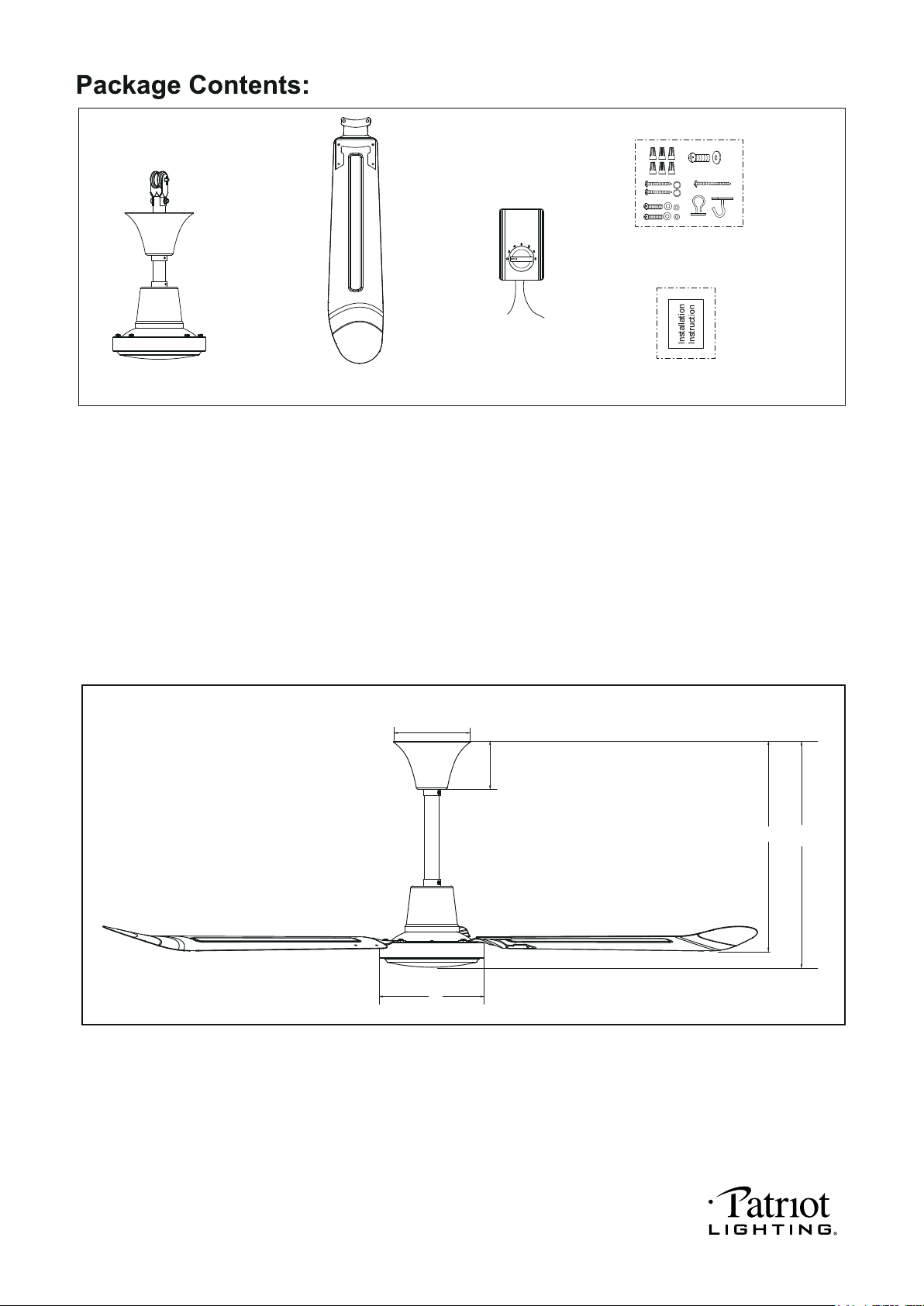
Unpack your fan and check the contents. You should have the following items.
1.) Fan Motor Assembly
2.) Fan Blade with Blade Bracket (3 PCS)
3.) Wall Control
4.) Assembly Kit
5.) Installation Instructions
A. 16” B. 17-1/2” C. 4-1/2” D. 7-5/8” E. 5-3/4”
E
C
A
B
D
Dimension Reference
PAGE: 2 / 8
201202
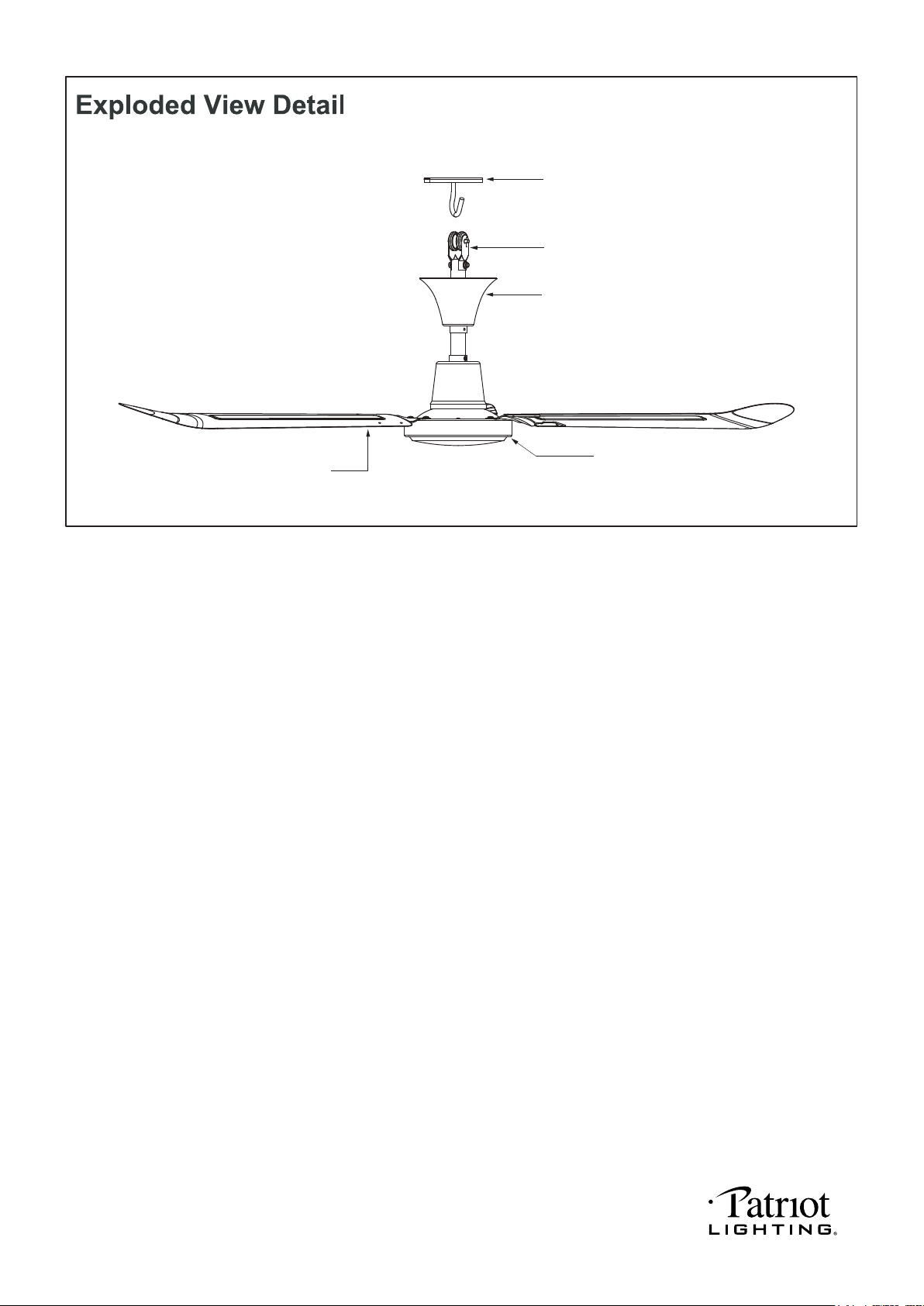
Fan Motor Assembly
Fan Blade
Canopy
Roller
Hanger Bracket
PAGE: 3 / 8
201202
PAGE: 4 / 8
201202
Roller
Fan Motor
Assembly
PAGE: 5 / 8
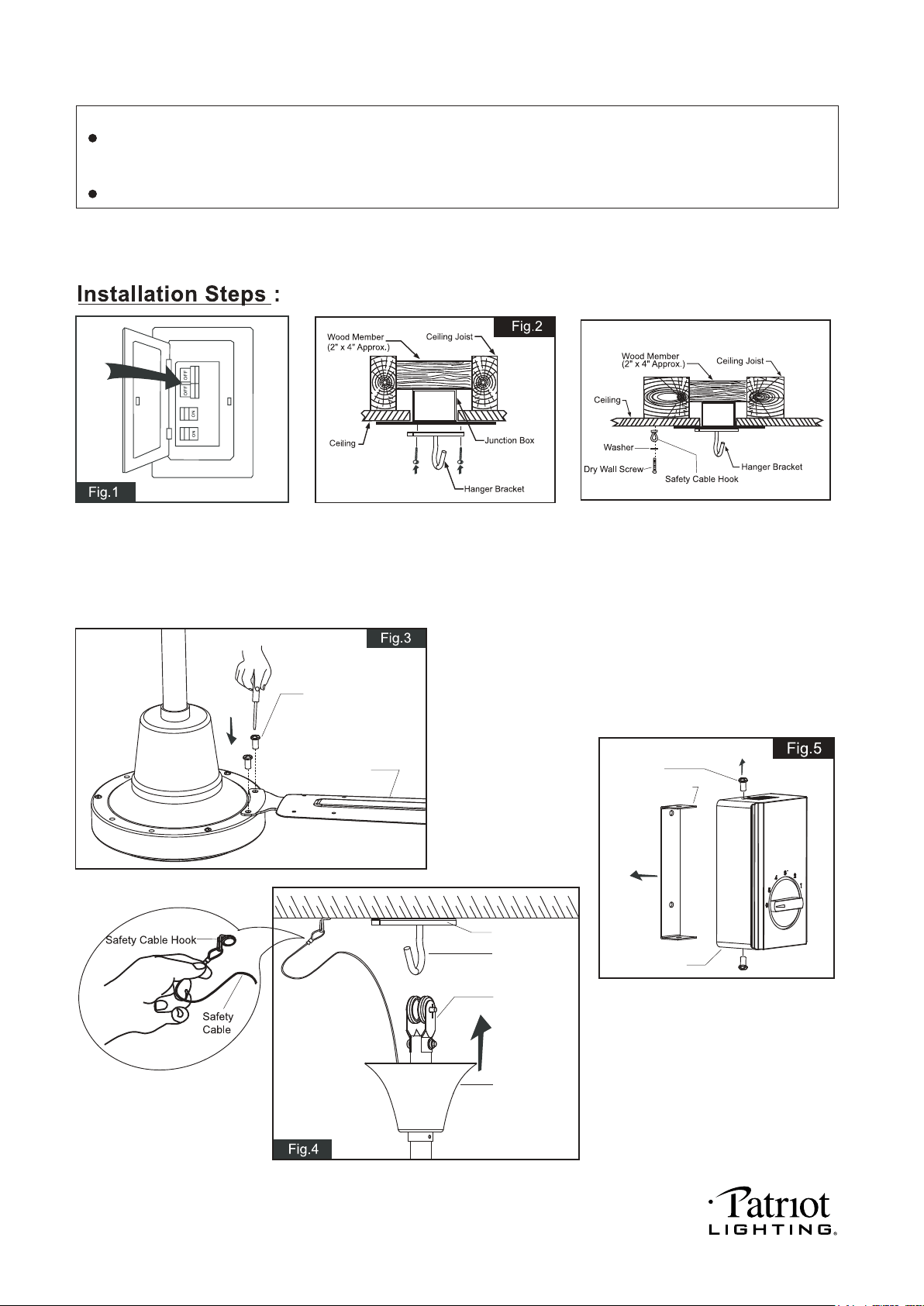
Secure blade brackets to the fan motor assembly with motor screws.
Attach the roller of the fan
motor assembly to the hook
of the hanger bracket in
position. Then hang the
safety cable on to the safety
cable hook.
Unscrew the set screws and remove
the mounting strap from wall control.
Turn OFF the electric circuit at the
main fuse or circuit breaker box.
Tighten the hanger bracket to the outlet box with two mounting screws. (Make sure
the outlet box is securely installed so that it will be able to support the fan
weight.) Attach the safety cable hook to the ceiling with the dry wall screw and
washer, and make sure the safety cable hook is covered by the fan canopy.
WARNING: MOUNT ONLY TO AN OUTLET BOX MARKED “ACCEPTABLE FOR
FAN SUPPORT”.
Wall Controller
Set Screw
Motor Screw
Blade
Mounting Strap
Hanger Bracket
Hook
NOTE: The fan weight is 12.79 lbs (5.8 kgs). Be sure the outlet box you are using is securely attached to the building
structure and can support the full weight of the fan. Failure to do so can result in serious injury.
INSTALLATION INSTRUCTIONS
IMPORTANT:
BEFORE YOU BEGIN INSTALLATION, CAREFULLY READ ALL INFORMATION PROVIDED IN THE
SAFETY INSTRUCTIONS AND INSTALLATION INSTRUCTIONS. IF IN DOUBT, CONSULT A QUALIFIED
ELECTRICIAN.
SAVE ALL INSTRUCTIONS.
201202
PAGE: 6 / 8
T
201202
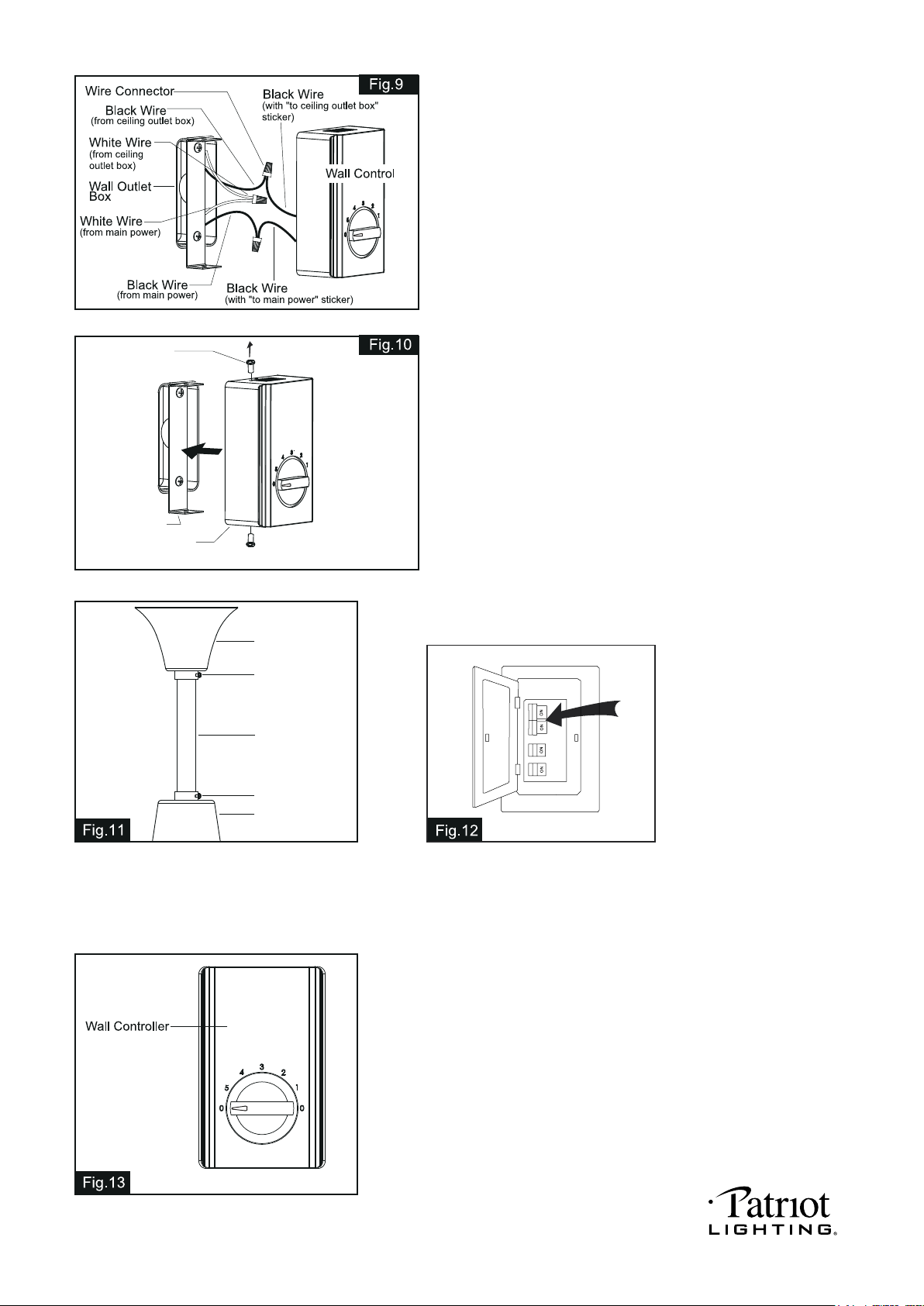
Use wall controller to control the fan speed.
Switch knob to 0 to turn off the fan.
Switch knob to 1 to turn the fan in high speed.
Switch knob to 2 to turn the fan in high-medium speed.
Switch knob to 3 to turn the fan in medium speed.
Switch knob to 4 to turn the fan in medium-low speed.
Switch knob to 5 to turn the fan in low speed.
Note: Allow one ceiling fan to operate from one wall control.
Turn ON the electric circuit at the
main fuse or circuit breaker box.
Attach the canopy to the ceiling and attach the
downrod stand cover to the housing then secrure
them with set screws.
After the all control splices have been made, put the wires
carefully into the wall outlet box.
Reattach the wall control back to the mounting strap with two
set screws.
Turn the arrow of the knob to the “0” position marked on the
wall control.
Canopy
Set Screw
Mounting Strap
Wall Control
Set Screw
Downrod
Set Screw
Downrod Stand
Cover
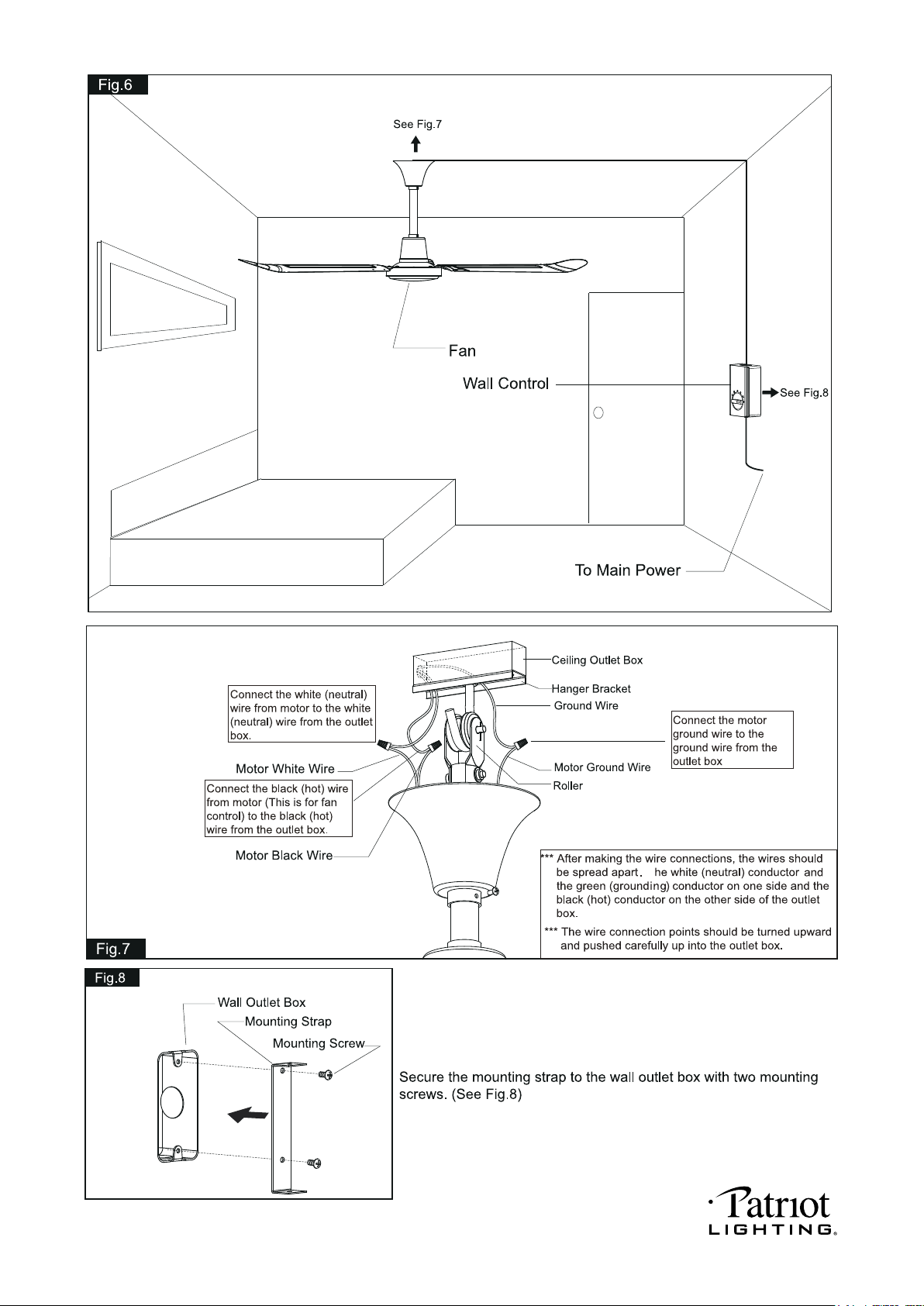
Make wire connections in wall outlet box: (See Fig.9)
1). The white (neutral) wire from main power to the white (neutral)
wire from the ceiling outlet box with a wire connector.
2). The black (hot) wire from main power to the black wire from the
wall control (with “to main power” sticker) with wire connector.
3). The black (hot) wire from ceiling outlet box to the black wire
from the wall control (with “to ceiling outlet box” sticker) with
wire connector.
PAGE: 7 / 8
201202
CAUTION: Make sure main power is turned off.
CAUTION: Make sure main power is turned off before entering switch housing.
PAGE: 8 / 8
201202
