QUICK-START GUIDE
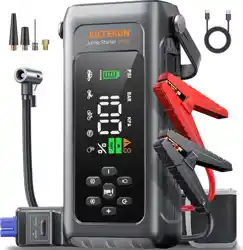
VP30 Jump Starter With Air Compressor
Ver.1.0

1
ATTENTION: Please read the following safety warning before using
the product and take safety protection measures to avoid malfunc-
tions caused by accidental operation.
1. Store in a cool and well-ventilated place out reach of children and
pets.
2. Do not place the product in high temperature environment for a
long time. The operation temperature of this product is -4°F~140°F.
The storage temperature should not exceed 122°F.
Personal Safety
1. Do not litter the product and it should be safely recycled.
2. Do not incinerate the product or exposed to high temperaturesas
they may explode.
3. Only use replacement parts or accessories provided or recom-
mended by manufacturer.
Battery Safety
1. Only start vehicles with the smart jumper cable supplied by the
manufacturer.
2. Do not use the product if the clamp or cable is damaged.
3. Do not connect the red and black clamps together when the
product is outputting.
4. Do not connect the red and black clamps to the same piece of
metal.
5. Do not disassemble or modify this product.
6. Do not use detergent to clean this product.
7. Do not abuse this product and avoid heavy dropping or repeatedly
hitting it.
8. Do not operate the product in explosive environments such as
flammable liquidsgases or dusts.
9. Do not immerse the product in water.
Electrical Safety
EN
2
WARRANTY
JOLTEKON provides customers with warranty of 24 months from the
date of purchase.
For assistance or warranty cover claim, please contact us via email at
support@joltekon.com
1. Please use the included USB-C cable and 5V/2A or above adapter
for charging.
2. Please make sure the device is fully charged before using the
product for the first time.
3. It is recommended to fully charge the device at least once every 3
months to help extend the life of the device.
PRECAUTIONS BEFORE USE
SPECIFICATIONS
Model
Capacity
USB-C IN
USB OUTPUT
VP30
7200mAh, 26.64Wh
5V/2A, 9V/2A, 12V/1.5A
5V/2.4A
EN
3
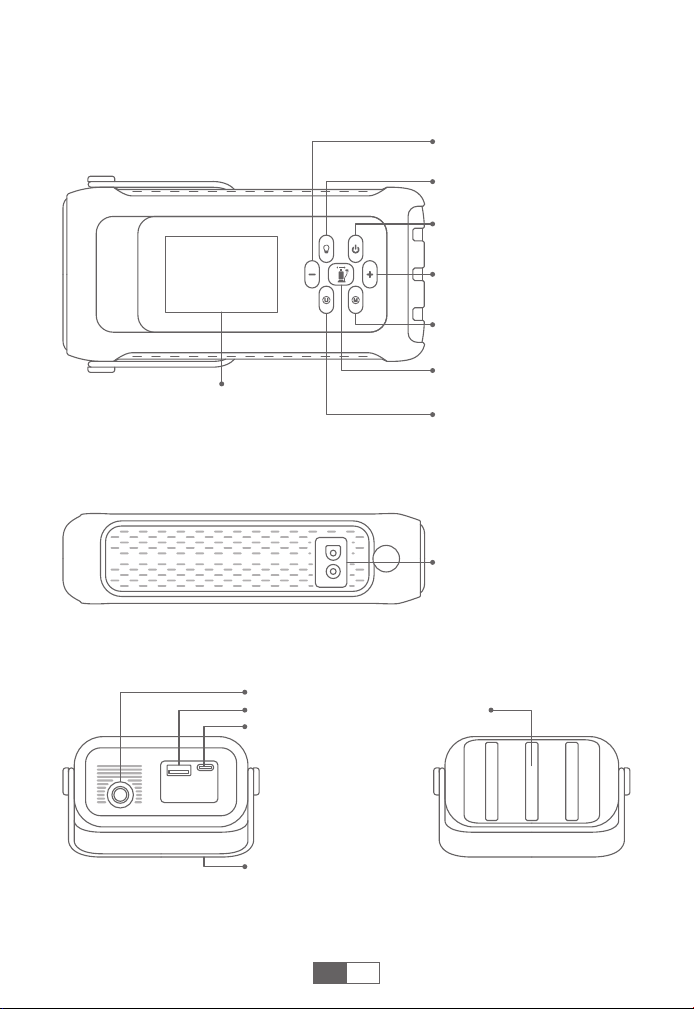
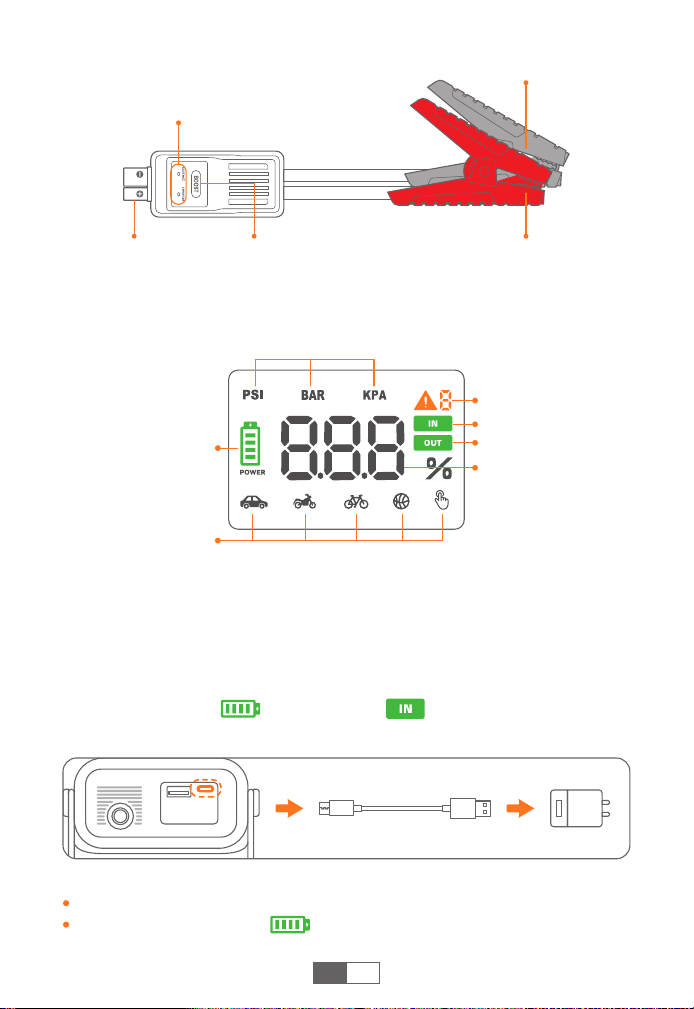
PRODUCT OVERVIEW
Power Button
Air Pressure Increase
Button (+)
Inflation Mode Switch
Button
Pressure Unit Switch
Button
Inflation Button
LCD Display
LED Light Button
Air Pressure Reduction
Button (-)
Jumpstart Port
USB-C Input
Silicone Handle
LED LightUSB Output
Air Hose Interface
EN
4
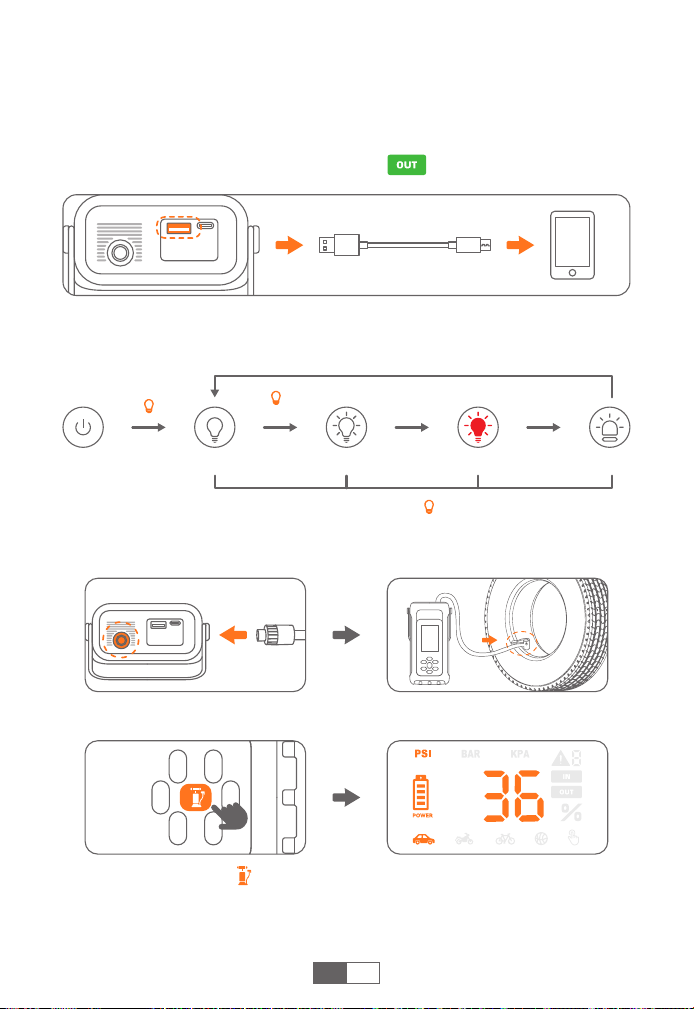
DISPLAY OVERVIEW
CHARGING YOUR JUMP STARTER
❶
Insert the charging cable into the USB-C port.
❷
Connect the charging cable to a 5V/2A or above adapter (adapter
not included).
❸
When charging, is flashing and is steady. It will be
automatically off when fully charged.
Tips:
Fully charge the device before first use.
When the battery is low, will flash. Please recharge the device.
EN
Smart Clamp
Indicator
BOOST
Button
Smart Clamp
Connector
Red Clamp (Positive)
Black Clamp (Negative)
Inflation Mode
Air Pressure Unit
(3 Types)
Battery Symbol
Error Indicator
Air Pressure Value,
Battery Percentage
Input Indicator
Output Indicator
5
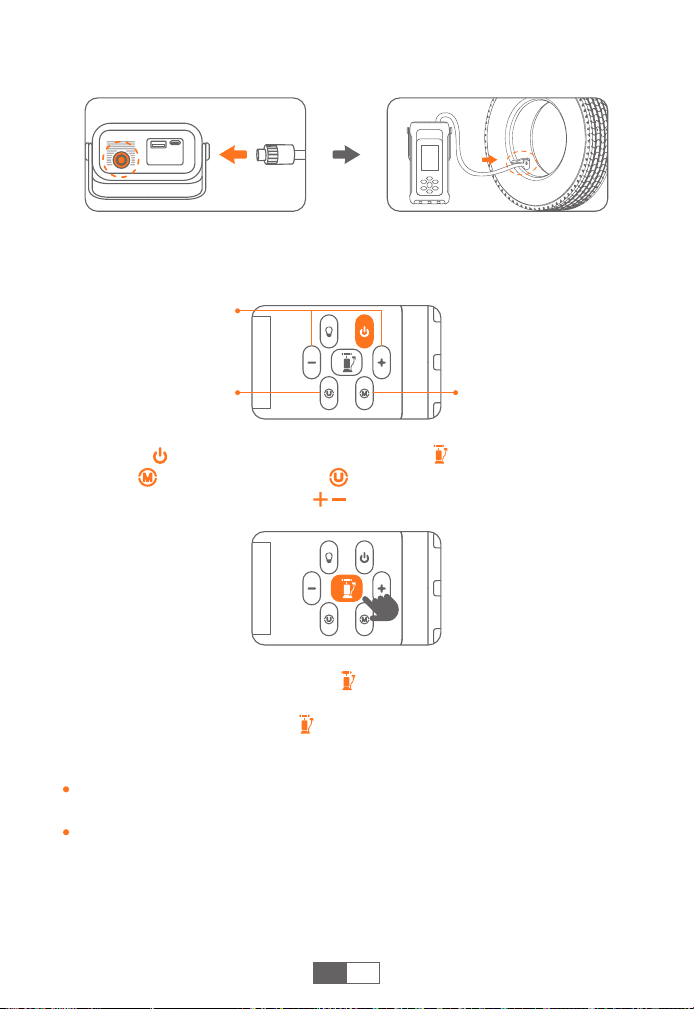
CHECK YOUR CAR'S TIRE PRESSURE
❶
Firmly connect the air hose to both the product and the tire.
❷
Turn on and press , the screen will display a preset pressure
value, then it will automatically switches to real-time tire pressure 3
seconds later.
EN
LED LIGHTING
Lighting SOSStrobe(White) Strobe(Red)
Press shortly Press shortly Press shortly
Press shortly
Turn on and long
press for 3s
In any light mode, long press the to turn off the light directly.
CHARGE ELECTRONIC DEVICES
❶
Plug the cable into USB output port.
❷
Connect to electronics, such as smart phones.
❸
When the device has current output, is steady.
6
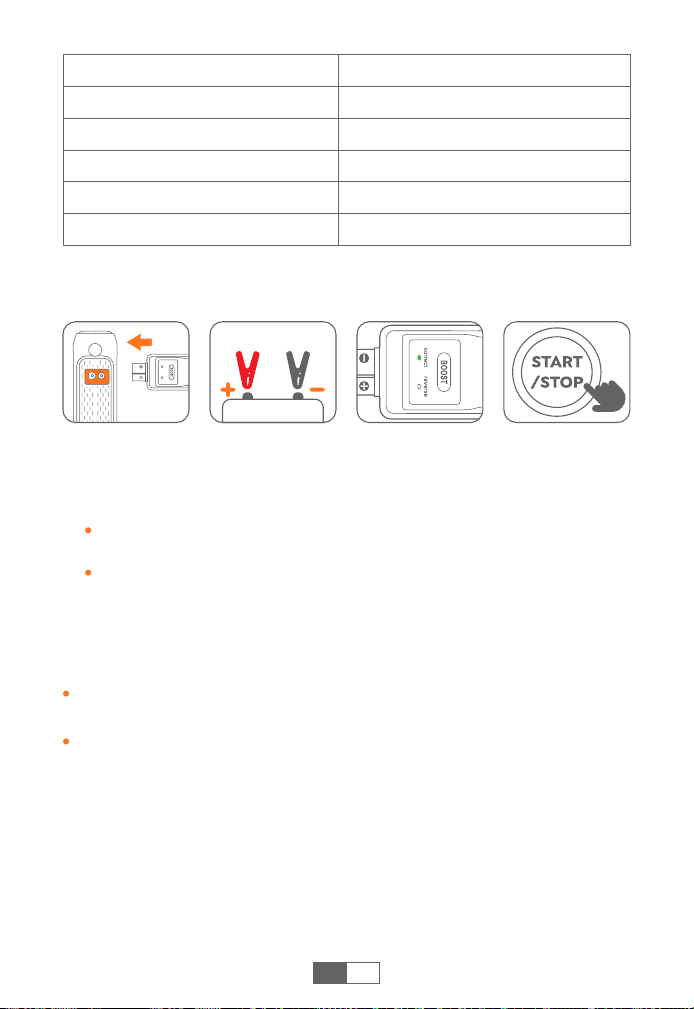
❸
Long press the inflation button to start pump. It will stop
automatically when the air pressure reaches the preset value, and
you can also shortly press again to stop.
Tips:
If used for a long time, it is recommended to stop every 10 minutes to
cool down.
Pressure above 65 PSI can only be set in customized inflation mode.
EN
INFLATE YOUR CAR TIRES
❶
Connect the air hose firmly to the product and tire respectively,
and tighten it.
❷ Turn on and short press inflation button . Select the inflation
mode and air pressure unit , then optionally adjust the air
pressure value with buttons .
Inflation Mode Switch
Customized Pressure
Value Adjust
Pressure Unit Switch
7
EN
Inflation Modes
Car inflation mode
Motorcycle inflation mode
Bicycle inflation mode
Basketball inflation mode
Custom inflation mode
Pressure Range
26~51 PSI, 1.8~3.51 Bar, 180~350 Kpa
26~43.5 PSI, 1.8~3.0 Bar, 180~300 Kpa
30~65 PSI, 2.08~4.47 Bar, 205~450 Kpa
4~16 PSI, 0.27~1.1 Bar, 30~110 Kpa
0~150 PSI, 0~10.3 Bar, 0~999 Kpa
Caution:
Do not press the “BOOST” button until the clamps are connected to
the car battery.
Turn off all electronic devices in the car before starting it.
JUMP START YOUR CAR
❶
Insert the jumper cable into the jump starter (50% power at least).
❷
Connect the clamps to the car battery (red to +, black to -). The
smart clip indicator should remain solid green.
If the indicator flashes green or shows no light, press the “BOOST”
to turn solid green.
For other abnormal conditions, refer to the “TROUBLESHOOTING”
section and try again.
❸
Start your car engine within 30s.
8
EN
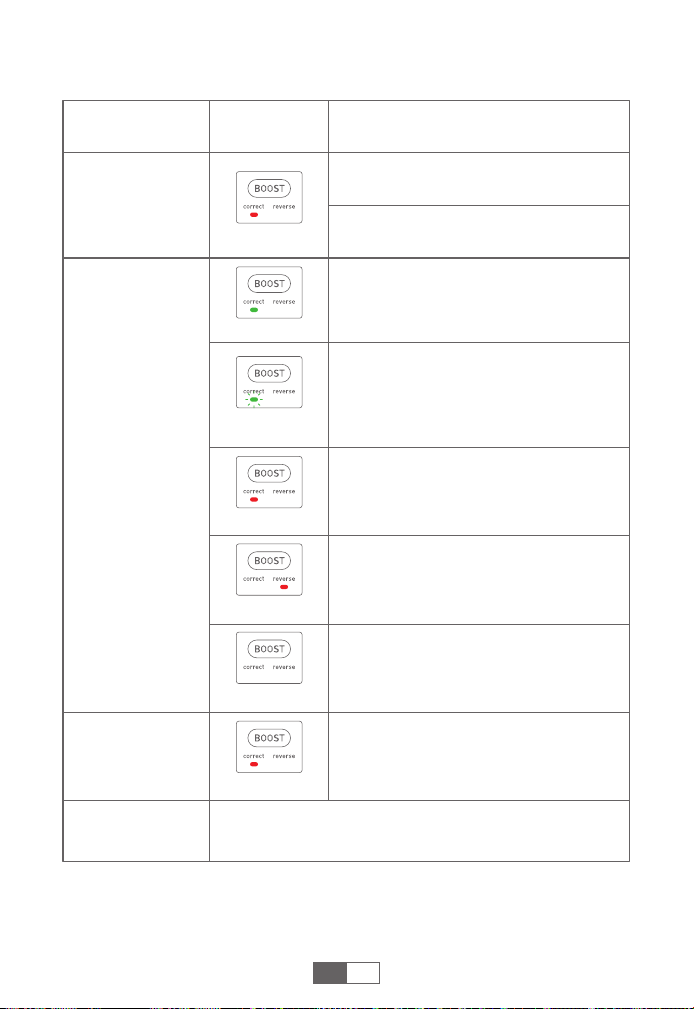
TROUBLESHOOTING ABOUT CLAMPS
Connection
Status
Indicator
Situations and Solutions
Smart clamps
connected to the
jump starter only
After car ignition
Others
Smart clamps
connected to
both the jump
starter and the car
battery
Abnormal connection
---Plug the product and the clip tightly.
Low voltage protection
---Recharge the product.
Ready to start.
Low car battery voltage
---Press BOOST and the indicator turns
solid green, then start your car in 30s.
Solid red
Solid green
Flashing green
Short-circuit protection
---Don't connect the clips together or
to the same metal.
Reverse polarity protection
---Reverse the clips and ensure the
correct connection (red to +, black to -).
Solid red
Over-heating protection
---Remove the clamps to let it cool.
Please contact support@joltekon.com with details.
Solid red
Solid red
Car battery may be dead
---Press BOOST and the indicator turns
solid green, then start your car in 30s.
No Light
9
EN
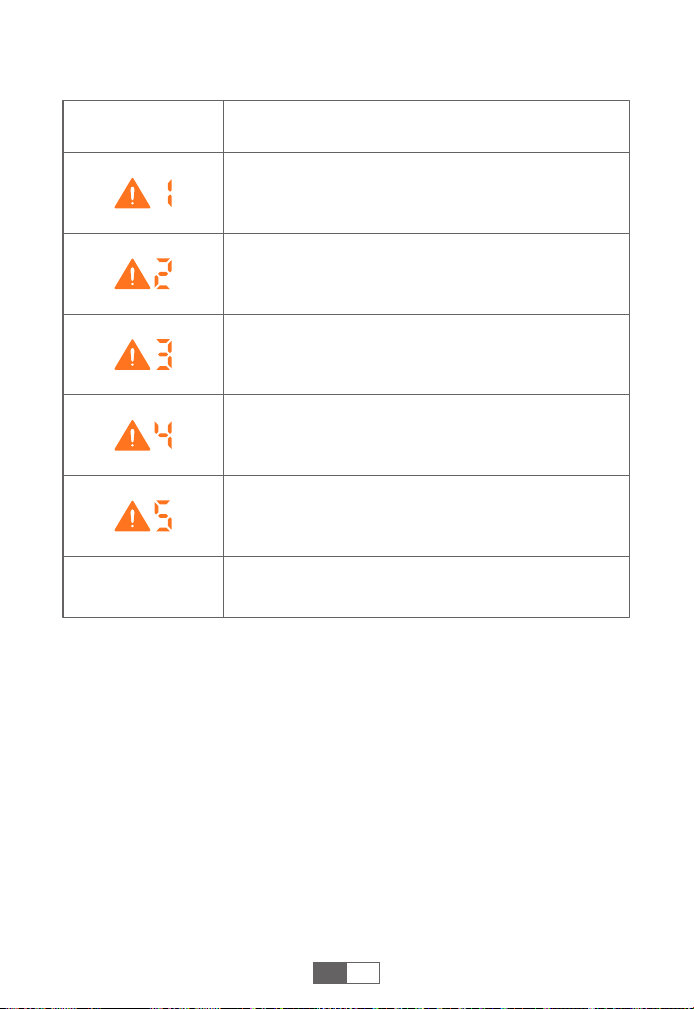
TROUBLESHOOTING ABOUT JUMP STARTER
Other
Indicator Situations
Overcurrent Protection
---The connected device is not compatible. Please
contact us to confirm.
Short-Circuit Protection
---Please replace the charging cable or clean the
charging interface.
Sensor Detection Failure
--- Make sure the smart clamp connector is fully
inserted.
Inflation High Temperature Protection
--- Stop inflation and wait 10 minutes for automatic
recovery.
High Temperature Protection
---Please disconnect and wait 10 minutes for the error
to disappear before using it.
Please contact support@joltekon.com with details

Federal Communication Commission Interference Statement
NOTE: This equipment has been tested and found to comply with the
limits for a Class B digital device, pursuant to part 15 of the FCC Rules.
These limits are designed to provide reasonable protection against
harmful interference in a residential installation. This equipment
generates, uses and can radiate radio frequency energy and, if not
installed and used in accordance with the instructions, may cause
harmful interference to radio communications. However, there is no
guarantee that interference will not occur in a particular installation. If
this equipment does cause harmful interference to radio or television
reception, which can be determined by turning the equipment off and
on, the user is encouraged to try to correct the interference by one or
more of the following measures:
· Reorient or relocate the receiving antenna.
· Increase the separation between the equipment and receiver.
· Connect the equipment into an outlet on a circuit different from that
to which the receiver is connected.
· Consult the dealer or an experienced radio/TV technician for help.
Caution: Changes or modifications not expressly approved by the
party responsible for compliance could void the user's authority to
operate this equipment.
This device complies with part 15 of the FCC Rules. Operation is subject
to the following two conditions:
(1) This device may not cause harmful interference, and
(2) This device must accept any interference received, including
interference that may cause undesired operation.
[email protected] https://www.joltekon.com
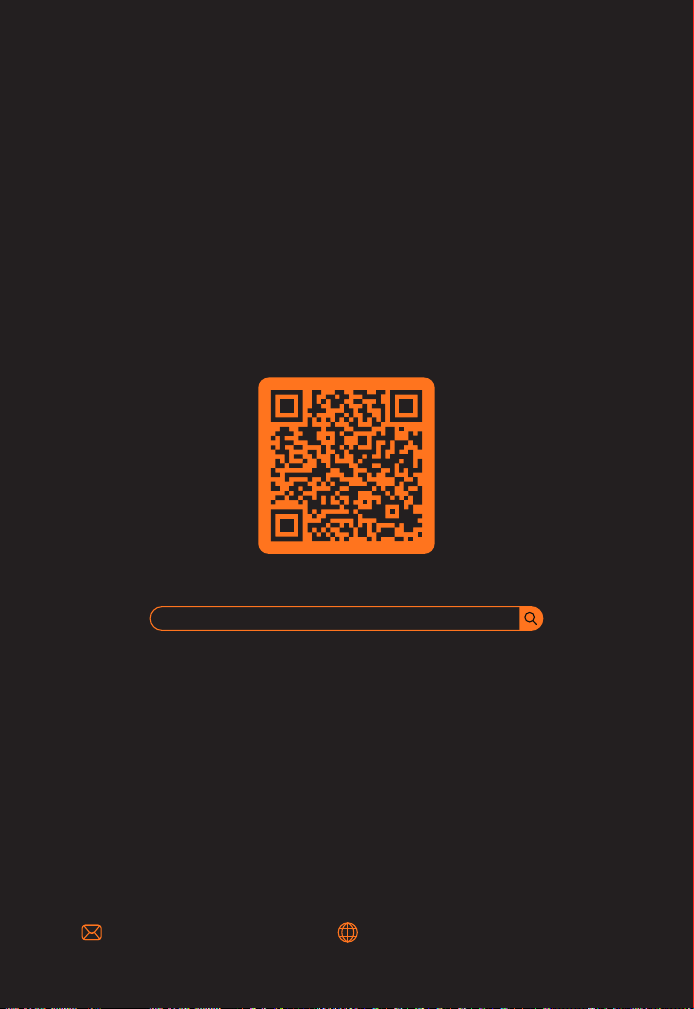
WHERE TO GET MORE HELP
Scan And Download PDF Version Of User Manual
https://www.joltekon.com/pages/manuals
