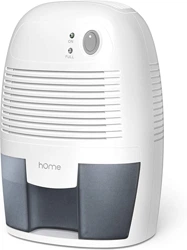
User Manual for Dehumidifier
BEFORE FIRST USE:
To prevent any internal damage, it is very important to keep refrigeration units (like this one) upright throughout their journey. Please leave it standing upright and outside the box for 24 HOURS before plugging it in.
Getting to know your Dehumidifier
The Compact Dehumidifier uses Peltier technology (no compressor), making it light and quiet. It is perfect for small rooms because poor ventilation causes musty odors and fungus. The compact dehumidifier aims to lower the humidity of small rooms.
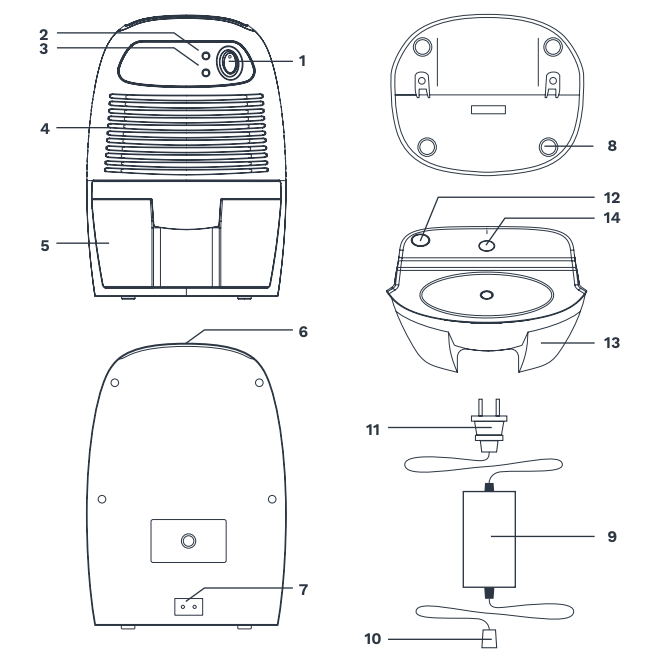
To avoid electric shock, do not open the appliance.
(1) On/Off button
(2) “On”Green LED
(3) “Full” Yellow LED
(4) Air inlet
(5) Removable water tank
(6) Dry air outlet
(7) DC power socket
(8) Rubber feet
(9) AC/DC switching mode power supply
(10) DC power jack
(11) AC plug with power cord. Plug type may change depending on model.
(12) Water displacement hole
(13) Water tank
(14) Float switch
How to use
1. Open box and remove packaging material. Box contains:
a. Compact Dehumidifier
b. AC/DC Power Adapter
2. Plug the DC power jack of AC/DC power adapter to the DC Power socket, then connect the AC plug of the AC/DC power adapter to the appropriate main socket.
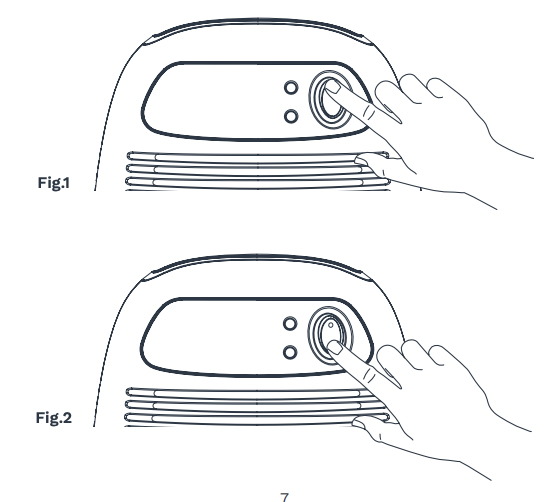
3. Switch the “On/Off” button to the “On” position. The green LED will be turned on. The Compact Dehumidifier will begin to operate. You should be able to feel the air blowing from dry air outlet [Fig.1]
4. To switch off the appliance, switch “On/Off” button to “Off” position. The Compact Dehumidifier will be turned off. [Fig.2]
Removable Water Tank
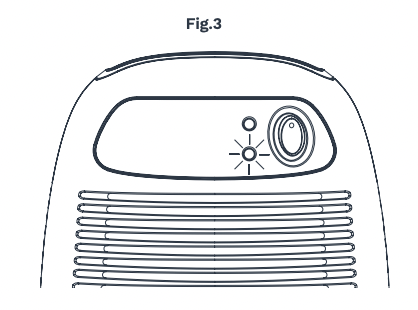
When the water tank is full (approximately 500ml [16.9oz] of water collected), the appliance will switch off automatically and the “FULL” LED will be on. [Fig.3]
To remove the water tank, first switch off the Compact Dehumidifier, press “On/Off” button to the “Off” position. Then, remove the water tank from the appliance and pour the water out into the toilet or bathroom sink. Put the water tank back into the appliance. To continue dehumidifying, push the “On/Off” button to “On” position again.
Cleaning
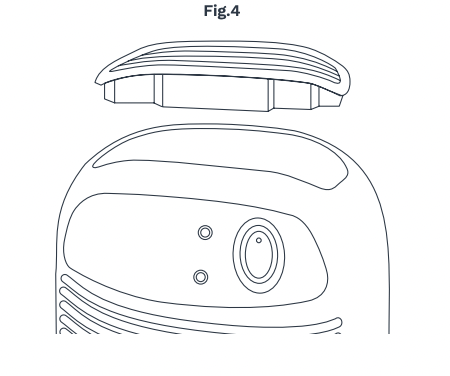
Before cleaning the appliance, turn off the Compact Dehumidifier and unplug the AC plug from the main socket first. Use a piece of soft cloth to clean the surface of the appliance or use a brush to wipe the dust off the grills of the air inlet. You should clear the dry air outlet once a week for optimal performance [as Fig.4].
Troubleshooting
| PROBLEM |
POSSIBLE CAUSE |
SOLUTION |
Appliance does not work properly
|
No Power to appliance. |
Connect plug to power socket. |
| Check fuse and wires in the plug. |
| Check the lead is inserted fully into the back of the appliance. |
| Switch not turned on. |
Switch on (both on the appliance and on the wall socket). |
| Tank is not properly inserted to press the internal switches on. |
Pull tank out and manually test internal switches to see if appliance powers up. Carefully push tank back in. |
| Switch not turned on. |
Pour the water out. |
Appliance collects little water.
|
Air inlet vent is blocked. |
Remove obstacles. |
| Doors and windows are open. |
Seal room from external areas. |
| Extreme temperature changes during brief cold snaps or heatwaves. |
Peltier type dehumidifiers work best within a specific temperature range. Unusually extreme weather will affect the level of performance. |
| Water leaks down the front of the appliance. |
The appliance is on an uneven surface and leaning forward, so water drips out of the front instead of into the tank. |
Place the appliance on an even level surface. |
Warning
Keep all plastic bags away from children.
State of California Proposition 65 Warnings:
THIS PRODUCT COULD CONTAIN ONE OR MORE CHEMICALS, WHICH ARE KNOWN TO THE STATE OF CALIFORNIA TO CAUSE CANCER, BIRTH DEFECTS, OR OTHER REPRODUCTIVE HARM.
Manufacturer, distributor, importer, and seller are not liable for ANY damage caused by improper use, storage, care, or failure to follow warnings associated with this product.
Important Safeguards
SAVE THESE INSTRUCTIONS/FOR HOUSEHOLD USE ONLY
When using your home™ Compact Dehumidifier (appliance), basic safety precautions should always be followed to reduce the risk of fire, electrical shock, and/or injury to persons. Incorrect operation due to ignoring instructions may cause harm or damage.
DANGER ! CAUTIONS !
- Switch the compact dehumidifier off by pressing the “On/Off” button to “Off” position when the compact dehumidifier is not in use.
- Do not use the power adapter in a wet or damp place. Always use the power adapter in an environment with good ventilation.
- Do not block the front inlet grill or the top outlet.
- If the appliance is properly connected, but does not receive power, please contact home™ customer service at 1.800.898.3002.
- Always keep the appliance at an upright position to avoid water leakage.
- The Compact Dehumidifier should not be operated for an extended amount of time. Use a timer to automatically turn on/off the appliance every 12 hours to prolong the lifespan of the appliance.