User Manual
PARTS DESCRIPTION
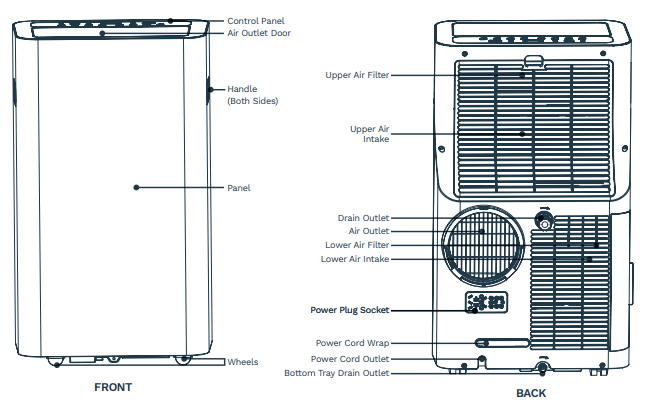
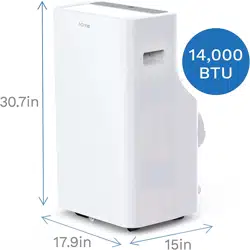
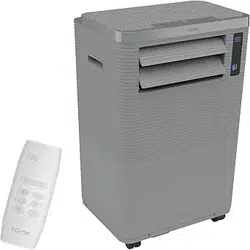
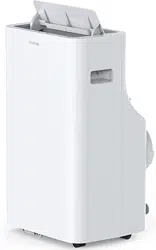
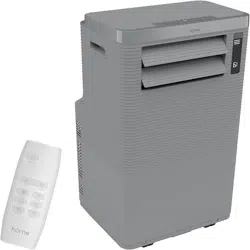
NOTE: All the illustrations in the manual are for the purpose of explanation only. Your appliance may be slightly different.
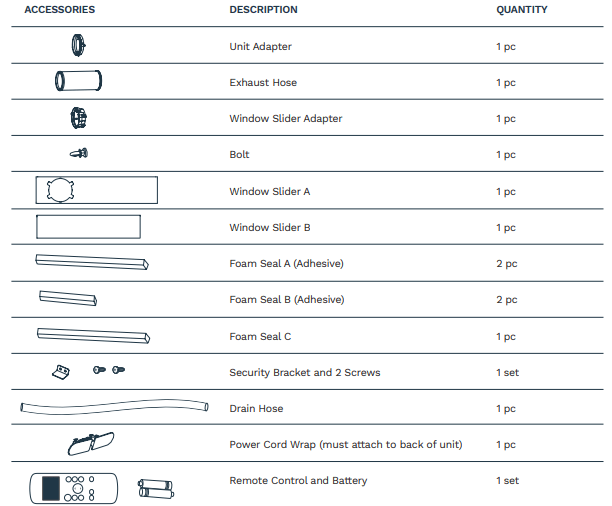
ACCESSORIES
OPERATION
INSTALLATION
Your installation location should meet the following requirements:
- Make sure that you install your unit on an even surface for minimal noise and vibration.
- The unit must be installed near a grounded plug and the Bottom Tray Drain Outlet (on the back of the unit) must be accessible.
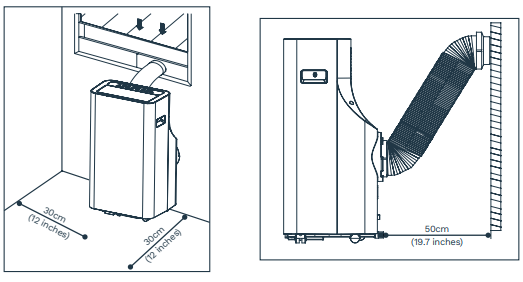
- The unit should be located at least 30cm (12 inches) from the nearest wall to ensure the proper air conditioning effect.
- DO NOT cover the Intakes, Outlets, or Remote Signal Receptor of the unit, as this could cause damage to the appliance.
WINDOW INSTALLATION KIT
TOOLS NEEDED:
- Medium Philips screwdriver
- Tape measure or ruler
- Knife or scissors
- Saw (optional, to shorten Window Slider Adapter for narrow windows)
Step One: Preparing the Exhaust Hose Assembly
Keep the gray, foam tabs on each corner of the Window Slider Adapter in place as assembled. Press the Exhaust Hose into the Window Slider Adapter and Unit Adapter. They will clamp together automatically by the elastic buckles of the adapters. You will hear all 4 corners click once the unit is properly assembled.
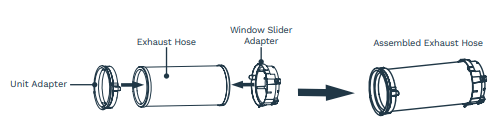
Step Two: Installing the Exhaust Hose Assembly to the Unit
Insert the Unit Adapter (the Unit Adapter hook should remain right-side up) of the Exhaust Hose assembly into the lower groove of the air outlet while the hook of the adapter is aligned with the air outlet. Slide down the Unit Adapter. The hose will slide in and lock in place.
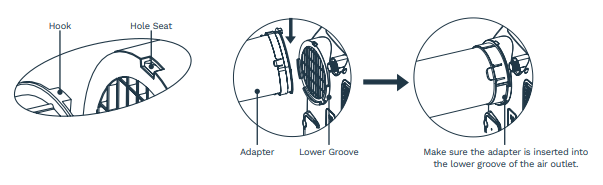
Step Three: Preparing the Adjustable Window Slider
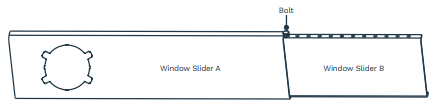
- Based on the size of your window, adjust the size of the Window Slider.
- If the length of the window requires two window sliders, use the bolt to fasten the window sliders once they are adjusted to the proper length.
NOTE: Your Window Installation Kit fits windows 67.5-123cm (26.5-48”) and can be shortened for smaller windows.
NOTE: Once the Exhaust Hose assembly and Adjustable Window Slider are prepared, choose from one of the following two installation methods.
Type 1: Hung Window Installation
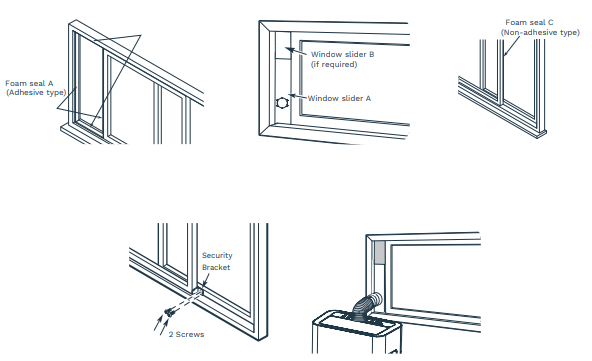
- Cut Foam Seal A and B strips to the proper lengths and remove the adhesive backing. Attach them to the window sash and frame as shown.
- Insert the window slider assembly into the window opening.
- Cut the non-adhesive Foam Seal C strip to match the width of the window. Insert the seal between the glass and the window frame to prevent air and insects from getting into the room.
- If desired, install the security bracket with 2 screws as shown.
- Insert the Window Slider Adapter into the hole of the Window Slider.
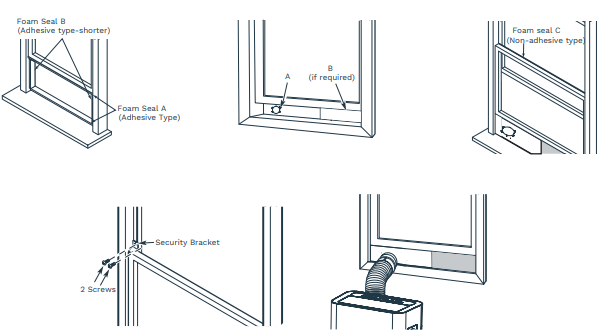
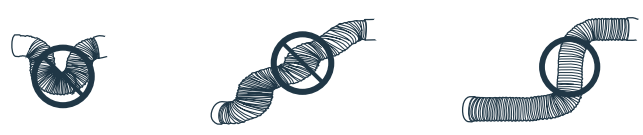
NOTE: To ensure proper functioning, DO NOT over-extend or bend the hose. To ensure the exhaust system works properly, make sure that there is no obstacle around the air outlet of the Exhaust Hose (in the range of 500mm)
Type 2: Sliding Window Installation
- Cut Foam Seal A and B strips to the proper lengths and remove the adhesive backing. Attach them to the window sash and frame as shown.
- Insert the Window Slider assembly into the window opening.
- Cut the non-adhesive Foam Seal C strip to match the width of the window. Insert the seal between the glass and the window frame to prevent air and insects from getting into the room.
- If desired, install the security bracket with 2 screws as shown.
- Insert the Window Slider Adapter into the hole of the Window Slider.
POWER CORD WRAP
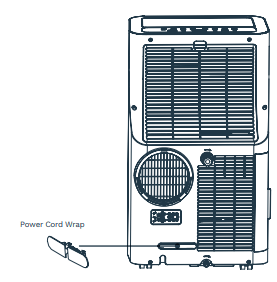
Attach Power Cord Wrap to back of unit.
CONTROL PANEL
OPERATION INSTRUCTIONS
NOTE: The unit can be operated by use of the control panel or the Remote Control.
Expect a 1-second delay when using the Remote Control to operate.
COOL OPERATION
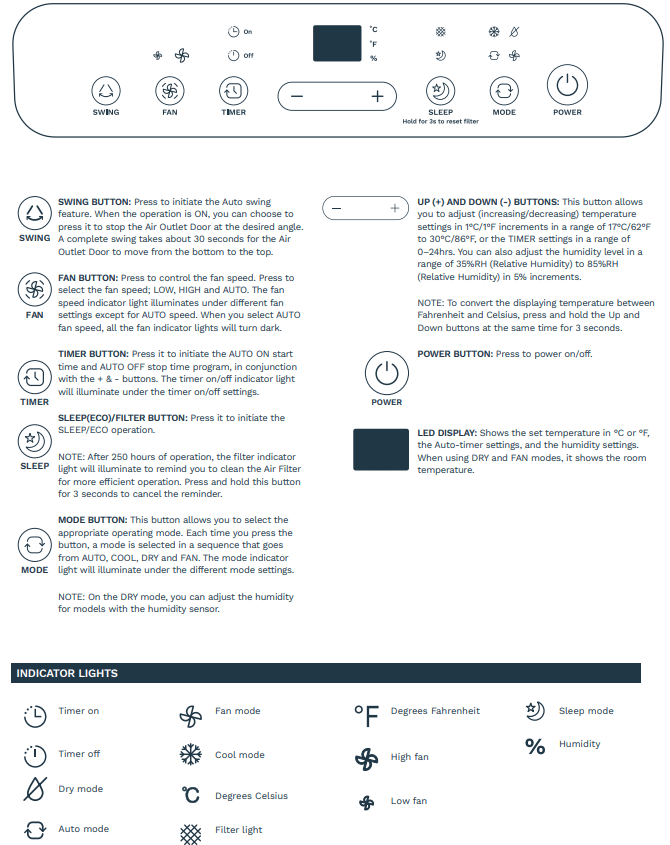
- Press the MODE button until the "COOL" indicator light illuminates.
- Press the ADJUST button "+" or "-" to select your desired room temperature. The temperature can be set within a range of 17°C~30°C / 62°F~86°F.
- Press the "FAN SPEED" button to choose the fan speed.
DRY OPERATION
- Press the MODE button until the "DRY" indicator light illuminates.
- Under this mode, you cannot select fan speed or adjust the temperature. The fan motor operates at LOW speed.
- Keep windows and doors closed for the best dehumidifying effect.
- You can set the humidity level as the unit has a humidity sensor. Put the Drain Hose in the Drain Outlet for the best dehumidifying effect. You don't have to connect the duct to the window.
AUTO OPERATION
- When you set the air conditioner in AUTO mode, it will automatically select cooling or fan only operation, depending on what temperature you have selected and the room's specific temperature.
- The air conditioner will adjust the room temperature automatically to your set temperature.
- Under AUTO mode, you are not able to select the fan speed.
FAN OPERATION
- Press the MODE button until the "FAN" indicator light illuminates.
- Press the FAN SPEED button to choose the fan speed. The temperature cannot be adjusted.
- Do not put the duct to the window.
TIMER OPERATION
- When the unit is on, press the Timer button to initiate the Auto-off program, and the TIMER OFF indicator light will illuminate. Press the UP or DOWN button to select the desired Auto-off time. Press the TIMER button again within 5 seconds, and the Auto-on program will be initiated and the TIMER ON indicator light will illuminate. Press the UP or Down button to select the desired Auto-on time.
- When the unit is off, press the Timer button to initiate the Auto-on program. Press it again within five seconds to initiate the Auto-off program.
- Press and hold the UP or DOWN button to change the Auto time by 0.5-hour increments for up to 10 hours, then at 1-hour increments for up to 24 hours.
- If there is no operation in 5 seconds, the system will automatically revert back to display the previous temperature setting.
- Turning the unit ON or OFF at any time or adjusting the Timer setting to 0.0 will cancel the Timer program.
- When a malfunction occurs, the Timer program will be canceled.
SLEEP/ECO OPERATION
- By pressing this button, the selected temperature will increase (cooling) or decrease (heating) by 1°C/2°F in 30 minutes. The temperature will then increase (cooling) or decrease (heating) by another 1°C/2°F after an additional 30 minutes. This will be maintained for 7 hours before it returns to the original temperature. The unit will continue to operate as originally programmed.
NOTE: This feature is unavailable under FAN or DRY mode.
OTHER FEATURES
AUTO-RESTART
If the unit shuts off unexpectedly due to a power outage, it will restart with the previous function setting automatically when the power resumes.
WAIT FOR 3 MINUTES BEFORE RESUMING OPERATION
After the unit stops working, do not restart operation for the next 3 minutes to protect the unit.
Operation will automatically start again after 3 minutes.
AIR FLOW DIRECTION ADJUSTMENT
The Air Outlet Door can be adjusted automatically. Adjust the air flow direction automatically:
- When the Power is ON, the Air Outlet Door opens fully.
- Press the SWING button on the panel or Remote Control to initiate the Auto swing feature. The Air Outlet Door will swing up and down automatically.
- Please do not adjust the Air Outlet Door manually
WATER DRAINAGE
During the dehumidifying process, remove the upper drain plug from the back of the unit, install the Drain Hose (5/8" universal female mender) with ¾" hose (locally purchased). For the models without the drain connector, just attach the Drain Hose to the hole. Place the open end of the hose directly over the drain area in your basement floor or a water reservoir.
- When you set the humidity level, put the Drain Hose in the water outlet for the best dehumidifying effect. You don't have to connect the duct to the window.
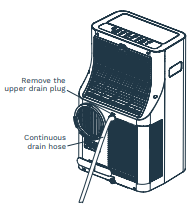
NOTE: Make sure the hose is secure so there are no leaks. Place the hose directly toward the drain, making sure that there are no kinks that will stop the water from flowing. Place the end of the hose into the drain and make sure the end of the hose is pointed downward to let the water flow smoothly. The moisture capacity of the unit measures 1.96L/hour. When the Drain Hose is not used, ensure that the drain plug and the knob are installed firmly to prevent leakage.
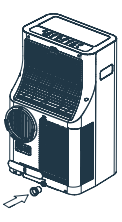
- When the water level of the bottom tray reaches a predetermined level, the unit beeps 8 times and the digital display shows "P1". At this time, the air conditioning/dehumidifying process will immediately stop, however, the fan motor will continue to operate (this is normal). Carefully move the unit to the drain location, remove the bottom drain plug, and let the water drain away. Reinstall the bottom drain plug and restart the machine until the "P1" symbol disappears. If the error repeats, call a service agent or a professional to repair the unit.
NOTE: Be sure to reinstall the bottom drain plug firmly to prevent leakage before using the unit.
MAINTENANCE
WARNING:
- Always unplug the unit before cleaning or any repairs.
- DO NOT use flammable liquids or chemicals to clean the unit.
- DO NOT wash the unit under running water.
- DO NOT operate the unit if the power supply was damaged during cleaning. A damaged power cord must be replaced with a new cord from the manufacturer.
Clean the Air Filter
CAUTION: DO NOT operate the unit without the filter. Dirt and lint will clog the unit and reduce performance.
Maintenance Tips
- Be sure to clean the air filter every 2 weeks for optimal performance.
- The Water Collection Tray should be drained immediately after P1 error occurs, and before storage to prevent mold.
- In households with animals, you will have to periodically wipe down the grill to prevent blocked airflow caused by animal hair.
Clean the Unit
Clean the unit with a damp cloth and mild detergent. Dry the unit with a dry cloth.
Store the Unit When Not in Use
- Drain the water collection tray by following the instructions in the previous sections.
- Run the appliance on FAN mode for 12 hours in a warm room to dry and prevent mold.
- Turn off the unit and unplug it.
- Clean the air filter according to the instructions in the previous sections. Reinstall the clean, dry filter before storing.
- Remove the batteries from the Remote Control.
- Be sure to store the unit in a cool and dark place. Exposure to direct sunlight or extreme heat can shorten the lifespan of the unit.
DESIGN AND COMPLIANCE NOTES
Design Notice
In order to ensure the optimal performance of our products, the design specifications of the unit and its Remote Control are subject to change without prior notice.
Energy Rating Information
The Energy Rating for this unit is based on installation using an unextended Exhaust Hose without a Window Slider Adapter (as shown in the Installation section of this manual).
Exhaust Hose Installation
The Exhaust Hose and adapter must be installed or removed in accordance with the usage mode.
For COOL or AUTO mode, the Exhaust Hose must be installed.
For FAN or DEHUMIDIFY mode, the Exhaust Hose must be removed.
Disposal
Do not dispose of this product as unsorted municipal waste. Collection of such waste separately for special treatment is necessary.
It is prohibited to dispose of this appliance in domestic household waste.
For disposal, there are several possibilities:
- The municipality has established collection systems where electronic waste can be disposed free of charge.
- As old products contain valuable resources, they can be sold to scrap metal dealers.
Wild disposal of waste in forests and landscapes endangers your health. Hazardous substances leak into the groundwater and find their way into the food chain.
TROUBLESHOOTING
The unit does not turn on when pressing the ON/OFF button.
- P1 Error Code
- The Water Collection Tray is full. Turn off the unit, drain the water from the Water Collection Tray and restart the unit.
- In COOL mode: the room temperature is lower than the set temperature.
- Reset the temperature to a lower degree.
The unit does not cool well.
- The air filter is blocked with dust or animal hair.
- Turn off the unit and clean the filter according to the instructions.
- The Exhaust Hose is not connected or is blocked.
- Turn off the unit, disconnect the hose, check for blockage, and reconnect the hose.
- The unit is low on refrigerant.
- Call a service technician to inspect the unit and add refrigerant.
- Temperature setting is too high.
- Decrease the set temperature.
- The windows and doors in the room are open.
- Make sure all windows and doors are closed.
- The room area is too large.
- Double-check the cooling area.
- There are heat sources inside the room.
- Remove the heat sources if possible.
The unit is noisy and vibrates often.
- The ground is not level.
- Place the unit on a flat, level surface.
- The air filter is blocked with dust or animal hair.
- Turn off the unit and clean the filter according to instructions.
The unit makes a gurgling sound.
- This sound is caused by the flow of refrigerant inside the unit.
Error codes and protection code:
E1-Room temperature sensor error.
E2-Evaporator temperature sensor error.
E3-Condenser temperature sensor error.
E4-Display panel communication error.
E7-Zero-crossing malfunction.
P1-Bottom tray is full-Connect the drain hose and drain the collected water.
NOTE: When one of the above malfunctions occurs, turn off the unit and check for any obstructions.
Restart the unit if the malfunction is still present. Contact the manufacturer, its service agent, or a similarly qualified person for repair.
WARRANTY
hOme™ offers a limited two-year warranty (“warranty period”) on all of our products purchased new and unused from hOme Technologies, LLC or an authorized reseller, with original proof of purchase and where a defect has arisen, wholly or substantially, as a result of faulty manufacturing, parts, or workmanship during the warranty period. The warranty does not apply where damage is caused by other factors, including but without limitation: (a) normal wear and tear; (b) abuse, mishandling, accident, or failure to follow operating instructions; (c) exposure to liquid or infiltration of foreign particles; (d) servicing or modifications of the product other than by hOme™; (e) commercial or non indoor use.
The hOme™ warranty covers all costs related to restoring the proven defective product through repair or replacement of any defective part and necessary labor so that it conforms to its original specifications. A replacement product may be provided instead of repairing a defective product. HOme™’s exclusive obligation under this warranty is limited to such repair or replacement.
A receipt indicating the purchase date is required for any claim, so please keep all receipts in a safe place. We recommend that you register your product on our website, homelabs.com/reg. Although greatly appreciated, the product registration is not required to activate any warranty and product registration does not eliminate the need for the original proof of purchase.
The warranty becomes void if attempts at repair are made by non-authorized third parties and/or if spare parts, other than those provided by hOme™, are used.
You may also arrange for service after the warranty expires at an additional cost.
These are our general terms for warranty service, but we always urge our customers to reach out to us with any issue, regardless of warranty terms. If you have an issue with a hOme™ product, please contact us at 1-(800)-898-3002, and we will do our best to resolve it for you.
This warranty gives you specific legal rights and you may have other legal rights, which vary from state to state, country to country, or province to province. The customer may assert any such rights at their sole discretion