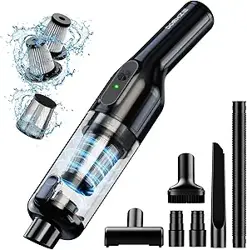
dormzie VC029 Handheld Vacuum Cordless, 16000Pa Powerful Suction

Product's Documents

Below are documents related to this product, you can read online or download:
VC029 photo

Overview

The dormzie Handheld Vacuum is a cordless, rechargeable cleaning device designed for quick cleanups in homes, offices, and vehicles. It is lightweight and comes with multiple attachments for various surfaces.

dormzie Handheld Vacuum Cordless, 16000Pa Powerful Suction, Lightweight at 1.3 lbs, Type-C Charge, Multiple Accessories, Rechargeable Car Vacuum Cleaners for Home Office Pet

Features and Specifications

Key Features

  • Cordless & Lightweight: Weighs 1.3 lbs (0.59 kg) for easy one-handed use.
  • Powerful Suction: 16000Pa suction power with a brushless motor capable of 80,000 rpm.
  • Dual Power Modes: Two suction modes for different cleaning needs.
  • Long Battery Life: 6000mAh battery provides 25-30 minutes of runtime.
  • Type-C Charging: Recharges fully in approximately 3.5 hours via included cable and adapter.
  • Easy Emptying: One-touch release for the translucent 8.7 oz (0.26 L) dustbowl.
  • Washable HEPA Filter: Captures up to 95% of dust and particles. A replacement filter is included.
  • Multiple Accessories: Includes a brush, long nozzle, and flexible hose for versatile cleaning.

Technical Specifications

  • Brand: dormzie
  • Model Name: VC029 (Style: VC029-3)
  • Color: Obsidian
  • Product Dimensions: 15" L x 3" W x 5" H
  • Item Weight: 2.18 lbs (including accessories)
  • Filter Type: HEPA
  • Power Source: Battery Powered (1 x 12V battery included)
  • Battery Life: 25 minutes
  • Charging Time: ~3.5 hours
  • Dustbowl Capacity: 8.7 oz
  • ASIN: B0DS23GJDR
1 1

What's in the Box

  • dormzie Handheld Vacuum Cleaner (main unit)
  • Washable HEPA Filter (installed)
  • Replacement HEPA Filter
  • Brush Attachment
  • Long Nozzle Attachment
  • Flexible Extension Hose
  • Type-C Charging Cable
  • Power Adapter
1 2

Use Guide

Charging the Vacuum

  1. Before first use, fully charge the vacuum.
  2. Connect the provided Type-C cable to the charging port on the vacuum.
  3. Connect the other end of the cable to the provided power adapter and plug it into a standard wall outlet.
  4. A full charge takes approximately 3.5 hours. You may also charge it using a car charger or other USB Type-C power source.

Powering On/Off and Selecting Mode

  1. Press the power button to turn the vacuum on. It will start in the standard suction mode.
  2. Press the power button again to switch to the high-power suction mode.
  3. Press and hold the power button to turn the vacuum off.

Attaching Accessories

To use an accessory, align it with the front nozzle of the main vacuum unit and push firmly until it clicks into place. To remove, pull the accessory straight off.

  • Brush: Use on fabric surfaces (upholstery, car seats) to remove pet hair and dust.
  • Long Nozzle: Use for cleaning in narrow gaps, between cushions, or on keyboard keys.
  • Flexible Hose: Attach to the main unit first, then add another accessory to the end. Use for cleaning hard-to-reach areas like under furniture or inside car vents.
2 1

Emptying the Dustbowl

  1. Ensure the vacuum is turned off.
  2. Press the dustbowl release button, typically located near the top of the collection chamber.
  3. The translucent dustbowl will detach. Empty debris into a trash bin.
  4. Reattach the dustbowl by aligning it and pushing up until it clicks securely.
Easy To Use

Cleaning and Maintaining the Filter

  1. Empty the dustbowl as described above.
  2. Remove the HEPA filter from the dustbowl assembly.
  3. Gently tap the filter to remove loose dust. For a thorough clean, rinse it under lukewarm water and let it air dry completely for at least 24 hours before reinstalling.
  4. Do not use the vacuum without the filter installed, as this can damage the motor.
  5. Replace the filter with the included spare when cleaning no longer restores performance.

Safety and Maintenance

Safety Instructions

  • Do not use to pick up liquids, burning materials, or sharp, hard objects.
  • Do not use the vacuum if it is damaged or if the dustbowl is not correctly attached.
  • Keep hair, loose clothing, fingers, and all body parts away from openings and moving parts.
  • Unplug the charger from the outlet when not in use and before cleaning or maintenance.
  • This vacuum is for indoor use only.
  • Note: This vacuum is not suitable for cleaning large floor areas.

General Maintenance

  • Empty the dustbowl after each use or when it is half-full to maintain optimal suction.
  • Regularly check and clean the filter as described.
  • Wipe the exterior of the vacuum with a dry or slightly damp cloth. Do not immerse in water.
  • Store the vacuum and accessories in a cool, dry place.
  • If the vacuum will not be used for an extended period, charge it fully before storage.

Troubleshooting

  • Vacuum does not turn on: Ensure the battery is charged. Connect to the charger for at least 30 minutes and try again.
  • Weak suction: Empty the dustbowl. Check and clean the HEPA filter. Ensure no blockages are in the nozzle or hose.
  • Vacuum turns off during use: The battery may be depleted. Recharge the vacuum. The motor may also overheat with prolonged use; allow it to cool down.
  • Dustbowl does not attach properly: Ensure it is correctly aligned and that the filter is properly seated inside.
  • Unusual noise or vibration: Turn off immediately. Check for and remove any large obstructions in the nozzle or dustbowl.

Warranty and Support

Product Warranty: For warranty information about this product, please click here.

Reference file: dormzie VC029 Handheld Vacuum Cordless, 16000Pa Powerful Suction

Specifications

dormzie VC029 Questions and Answers

See other models: ST189CD