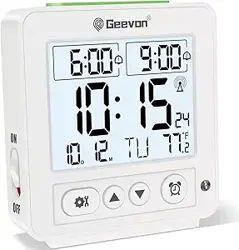
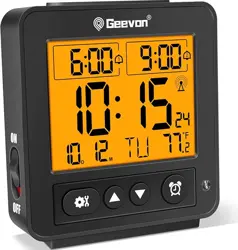
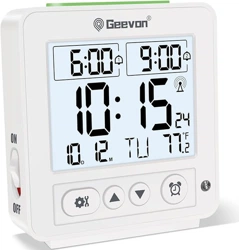
Geevon 86291 Self-Setting Atomic Alarm Clock with Jumbo LCD Display, Backlight & Temp-Friendly Bedside Clock

Product's Documents

Below are documents related to this product, you can read online or download:
86291 photo

1. Overview

The Geevon Self-Setting Atomic Alarm Clock is a digital clock designed for bedroom, office, or nightstand use. It features an automatic time-setting function via WWVB atomic radio signals, a large LCD display, and an alarm with snooze.

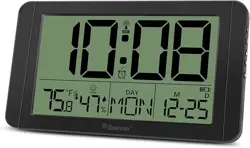
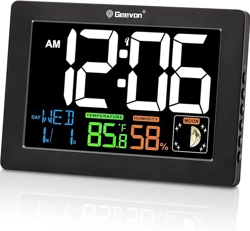
Front view of the Geevon Atomic Alarm Clock showing the large LCD display with time, date, temperature, and humidity readings.

Key attributes include:

  • Model: US-86291
  • Display: Jumbo LCD
  • Power: 2x AA batteries (not included) or optional 5V DC adapter (not included).
  • Dimensions: 5.47" W x 9.7" H
  • Color: Black

2. Features

2.1 Display and Readability

  • Large Digits: 2.3-inch high numbers for easy reading from a distance or for those with impaired vision.
  • Multi-Information Display: Shows time, date, day of the week, indoor temperature (°F/°C), and humidity.
  • LCD Technology: Provides a clear, anti-glare screen.
Close-up of the clock's LCD display showing large time digits, date, temperature, and humidity.

2.2 Atomic Timekeeping

  • Self-Setting: Automatically receives and synchronizes with the WWVB atomic time signal broadcast by NIST (National Institute of Standards and Technology).
  • Automatic DST: Adjusts for Daylight Saving Time without manual intervention.
  • Time Zones: Supports four U.S. time zones: PST, MST, CST, EST.
  • Signal Reception: Typically occurs automatically at night (1:00 AM, 2:00 AM, 3:00 AM, 4:00 AM, 5:00 AM). A tower icon may appear during reception.
Diagram illustrating the WWVB atomic signal reception process for automatic time setting.

2.3 Alarm and Snooze

  • Audible Alarm: Approximately 70dB beep tone.
  • Snooze Function: Allows postponing the alarm for 1 to 60 minutes.

2.4 Backlight

  • 8-Second Backlight (Battery Power): A soft backlight activates for 8 seconds when the top button is pressed, suitable for checking the time in the dark.
  • Adjustable Backlight (Adapter Power): When powered by an optional 5V DC adapter, the backlight brightness can be adjusted and set to remain on. The adapter is not included.

2.5 Physical Design

  • Placement Options: Can be placed on a desktop using the built-in kickstand or mounted on a wall using the keyhole slots on the back.
  • Construction: Plastic/ABS frame with a rectangular, classic design.
The clock displayed on a living room shelf, demonstrating its use as home decor.

3. Use Guide

3.1 Initial Setup

  1. Insert Batteries: Open the battery compartment on the back and insert 2 AA batteries, observing the correct polarity (+/-).
  2. Initial Power-On: The display will activate. It may show a default time (e.g., 12:00).
  3. Automatic Time Setting: Place the clock near a window for best signal reception. The clock will begin searching for the WWVB signal. This process can take up to seven minutes but may require overnight reception in some areas.
    • Once synchronized, the time, date, and time zone will be set automatically.
  4. Optional Adapter: If you wish to use the adjustable, always-on backlight, connect a 5V DC adapter (center pin positive) to the DC jack on the back of the clock. The adapter is not included.
Back view of the clock showing the battery compartment and the DC power jack for an optional adapter.

3.2 Controls and Settings

Control buttons are located on the top and side of the unit.

  • Top Button (Touch Sensor): Press to activate the 8-second backlight when on battery power. Also functions as the snooze button when the alarm is sounding.
  • Side Buttons: Used for setting the alarm, manual time/date adjustment, time zone selection, and 12/24-hour format toggling. Refer to the included quick-start guide for specific button functions and sequences.

3.3 Setting the Alarm

  1. Press the "ALARM" button on the side to enter alarm setting mode.
  2. Use the "+" and "-" buttons to set the desired alarm hour and minute.
  3. Press the "ALARM" button again to confirm and exit.
  4. Ensure the alarm is enabled (an alarm icon should appear on the display).

3.4 Using the Snooze Function

When the alarm sounds, press the top button to activate the snooze. The alarm will stop and sound again after the set snooze duration (1-60 minutes, default is typically 5 minutes).

3.5 Manual Time/Date Adjustment (If Needed)

If automatic reception fails or you need to set the clock manually:

  1. Press and hold the "SET" button on the side.
  2. Use the "+" and "-" buttons to adjust the year, month, date, hour, minute, time zone, and 12/24-hour format.
  3. Press "SET" to move to the next item and finally to save and exit.

4. Troubleshooting

  • Clock does not set time automatically:
    • Ensure it is placed near a window, away from major electronic interference.
    • Wait overnight. Signal reception is strongest between 1:00 AM and 5:00 AM.
    • Check that the correct time zone is selected.
  • Backlight does not stay on:
    • The 8-second backlight is the standard function on battery power. To have a constant or adjustable backlight, you must connect a 5V DC adapter (not included).
  • Display is blank or dim:
    • Check and replace the 2 AA batteries.
    • Ensure battery polarity is correct.
  • Alarm does not sound:
    • Verify the alarm is set and enabled (alarm icon visible).
    • Check the alarm volume setting.
    • Ensure the clock is not in "demo" or "setup" mode.
  • Temperature/Humidity reading seems inaccurate:
    • The sensor measures ambient conditions near the clock. Avoid placing it near heat sources, vents, or in direct sunlight.

5. Specifications

  • Brand: Geevon
  • Model: US-86291
  • Display Type: LCD
  • Display Features: Time, Date, Day, Indoor Temperature (°F/°C), Humidity
  • Power Source: 2 x AA Batteries (not included); DC 5V Jack for optional adapter
  • Alarm: Yes, with 1-60 minute snooze
  • Time Signal: WWVB Atomic Radio Control
  • Time Zones: PST, MST, CST, EST
  • DST: Automatic
  • Backlight: 8-second (battery), Adjustable (with adapter)
  • Dimensions (W x H): 5.47" x 9.7"
  • Mounting: Tabletop (with stand) or Wall Mount
  • Indoor Use Only.

6. Safety and Care

  • Use only 2 AA batteries of the same type. Do not mix old and new batteries.
  • If using an adapter, ensure it is 5V DC with center-positive polarity. Using an incorrect adapter can damage the clock.
  • This product is not waterproof. Use in a dry, indoor environment.
  • Clean the clock with a soft, dry cloth. Do not use abrasive cleaners or solvents.
  • Keep away from extreme temperatures and direct sunlight.
  • Dispose of batteries according to local regulations.

Reference file: Geevon 86291 Self-Setting Atomic Alarm Clock with Jumbo LCD Display, Backlight & Temp-Friendly Bedside Clock

Specifications

Geevon 86291 Questions and Answers

See other models: 281A 24281 22151 228614 248721