1. Overview
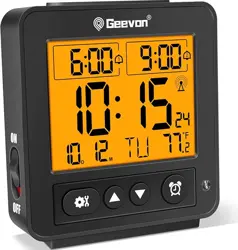
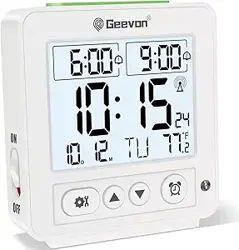
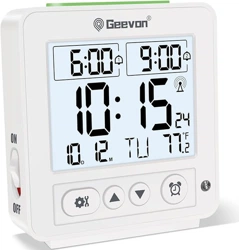
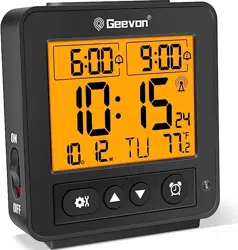
The Geevon Small Atomic Travel Alarm Clock is a compact, battery-operated digital clock designed for bedside, desk, or travel use. It features atomic time synchronization, dual alarms, an indoor temperature display, and multiple backlight modes.

Key capabilities include:
- Automatic time setting via WWVB atomic radio signal.
- Two independent alarm settings with increasing beep volume.
- Indoor temperature monitoring in °C or °F.
- Auto night light and manual 8-second backlight.
- 12/24-hour time format and date display.
- Powered by 2 AA batteries (not included).
2. Product Features
2.1 Display and Controls
The main LCD shows the time, date, temperature, and alarm indicators. The primary control buttons are located on the top and back of the unit.

- Top Button: Manually activates the orange backlight for 8 seconds when the auto light is off.
- SNOOZE Button: Press during an alarm to pause it for 8 minutes.
- UP / DOWN Buttons: Used for setting time, date, alarms, and temperature unit.
- AUTO LIGHT ON/OFF Switch: Toggles the automatic night light function.
2.2 Atomic Timekeeping (RCC Function)
The clock receives daily time calibration signals from the WWVB atomic radio transmitter in the United States.

- Automatically sets and maintains accurate time to within one second.
- Requires correct time zone selection and enabling Daylight Saving Time (DST) if applicable.
- Time zone codes: -4 (AST), -5 (EST), -6 (CST), -7 (MST), -8 (PST), -9 (AKST), -10 (HST).
- Buttons may be temporarily unresponsive while the clock is receiving the atomic signal. Reception stops automatically or can be manually canceled by pressing the UP button.
2.3 Backlight Modes

- Auto Light: When the switch is set to "ON", a soft orange nightlight automatically illuminates the display when the room is dark.
- Manual 8-Second Backlight: When the auto light is "OFF", press the top button to activate a soft orange backlight for 8 seconds.
2.4 Dual Alarm & Snooze

- Two separate alarms can be set for different times.
- When activated, the alarm emits a beeping sound that gradually increases in volume over 2 minutes.
- Press the SNOOZE button during the alarm to silence it for an additional 8 minutes.
- The alarm will stop automatically after 2 minutes if not canceled or snoozed.
2.5 Temperature Monitor

- Displays indoor ambient temperature.
- Range: 14.2°F to 122°F (-9.9°C to 50°C). Accuracy: ±1.8°F (±1°C).
- To switch between Celsius (°C) and Fahrenheit (°F), press and hold the UP button for 2 seconds.
3. Use Guide
3.1 Initial Setup
- Open the battery compartment on the back of the clock.
- Insert 2 AA batteries, observing the correct polarity (+/-).
- The display will activate. Initial time and date may be incorrect until atomic signal is received or manually set.
3.2 Setting Time, Date, and Time Zone Manually
- Enter setting mode (typically by holding the SET or DOWN button).
- Use the UP and DOWN buttons to adjust values for:
- Time Zone (select your zone: -5 for EST, -8 for PST, etc.)
- Daylight Saving Time (DST): Set to ON or OFF.
- 12/24-hour format.
- Time (Hour, Minute).
- Date (Year, Month, Day).
- Press the SET button to confirm and move to the next item, or exit setting mode.


3.3 Setting Alarms 1 & 2
- Enter alarm setting mode (usually by pressing the ALARM button).
- Select Alarm 1 or Alarm 2.
- Use UP/DOWN to set the alarm hour and minute.
- Toggle the alarm ON or OFF.
- Exit setting mode. An alarm icon will appear on the display when an alarm is active.
3.4 Using the Backlight
- For Auto Night Light: Slide the AUTO LIGHT switch on the back or side to "ON". The display will light up automatically in dark conditions.
- For Manual Backlight: Ensure the auto light switch is "OFF". Briefly press the top button to illuminate the display for 8 seconds.
3.5 Viewing Temperature
The current temperature is continuously displayed on the LCD. To change the unit of measurement:
- Press and hold the UP button for approximately 2 seconds.
- The display will toggle between °C and °F.
- Release the button when the desired unit is shown.
4. Specifications
| Display Type | LCD |
|---|
| Power Source | 2 AA Batteries (not included) |
|---|
| Dimensions (L x W x H) | 3.5" x 1.4" x 3.8" |
|---|
| Item Weight | 0.18 lbs |
|---|
| Temperature Range | 14.2°F to 122°F (-9.9°C to 50°C) |
|---|
| Time Signal | WWVB Atomic Radio Signal (USA) |
|---|
| Alarm Duration | 2 minutes (increasing beep) |
|---|
| Snooze Duration | 8 minutes |
|---|
| Backlight Duration | 8 seconds (manual) |
|---|
| Case Material | ABS Plastic |
|---|
| Indoor/Outdoor Usage | Indoor, Outdoor |
|---|
5. Troubleshooting
- Clock shows wrong time:
- Ensure the correct time zone is selected.
- Verify the Daylight Saving Time (DST) setting is correct for your location.
- Place the clock near a window overnight to receive the atomic signal. Avoid metal surfaces or electronic interference.
- Alarm does not sound:
- Check that the alarm is set to ON.
- Verify the alarm time is set correctly for AM/PM in 12-hour mode.
- Ensure battery power is sufficient.
- Buttons do not respond:
- The clock may be receiving an atomic signal. Wait a few minutes or press the UP button to cancel reception.
- Replace batteries if they are low.
- Temperature reading is inaccurate:
- Allow the clock to acclimate to room temperature for at least 1 hour.
- Keep the clock away from direct heat sources, vents, or windows.
- Normal tolerance is ±1.8°F (±1°C).
- Backlight does not turn on:
- For auto light, ensure the switch is in the "ON" position and the room is sufficiently dark.
- For manual light, ensure the auto light switch is "OFF" before pressing the top button.
- Check/replace batteries.
6. Care and Maintenance
- Use a soft, dry cloth to clean the clock. Do not use abrasive cleaners or solvents.
- Replace batteries promptly when the display dims or becomes unstable. Remove batteries if the clock will not be used for an extended period.
- Store in a cool, dry place. Avoid extreme temperatures and direct sunlight.
- For optimal atomic signal reception, position the clock near a window, away from large metal objects or other electronics.
7. Warranty and Support
This product is covered by a 12-month limited warranty from the date of purchase. The warranty covers defects in materials and workmanship.
Note: The warranty does not cover damage resulting from accident, misuse, improper installation, unauthorized modification, or use with incorrect batteries.
For warranty service or product support, contact the seller or manufacturer through your point of purchase (e.g., Amazon order details).