Overview
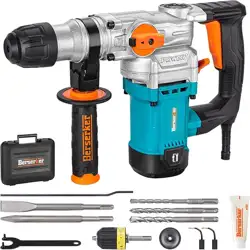
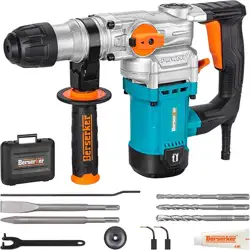
This manual provides instructions for the safe and effective operation of the Berserker 26FA SDS-Plus Rotary Hammer Drill. This is a corded electric tool designed for drilling into concrete, brick, masonry, metal, and wood. It features three operating modes and includes an optional SDS-Plus to keyless chuck adapter.

Safety Information
WARNING: Read all safety warnings and instructions before use. Failure to follow warnings may result in electric shock, fire, and/or serious injury.
- This tool is designed for 120V AC power outlets. Using it with an incorrect voltage can cause damage or injury.
- Always wear appropriate personal protective equipment (PPE), including safety glasses, hearing protection, and a dust mask.
- Ensure the work area is clean, well-lit, and free of obstructions.
- Do not operate the tool if it is damaged. Have it repaired by a qualified technician.
- Use the correct accessory for the material and operating mode. Do not force the tool.
- Secure your workpiece. Do not hold it with your hand or body.
- Keep hands away from the drill bit and chisel during operation.
- The tool features an overload clutch to protect the user and motor if the bit binds. Be prepared for sudden torque.
Product Specifications
- Model: 26FA / 26FAC
- Power Source: Corded Electric
- Voltage: 120 Volts (AC)
- Amperage: 9 Amps
- Power: 1050 Watts
- Impact Energy: 3.3 ft.lbs. (4.5 Joules)
- No-Load Speed: 1050 RPM
Impact Rate: 4200 BPM
- Max Drilling Diameter:
- Concrete: 1-1/8 inch
- Wood: 1-1/4 inch (with adapter)
- Metal: 1/2 inch (with adapter)
- Weight: 9.5 lbs (4.3 kg)
- Chuck Type: SDS-Plus
Included Components
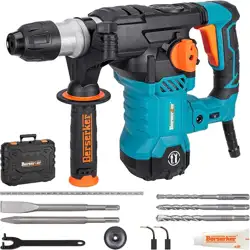
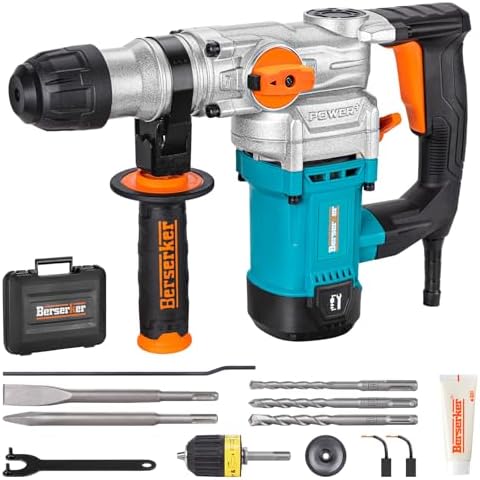
- 1 x Rotary Hammer Drill
- 1 x 1/2" SDS-Plus Keyless Chuck Adapter (included with style "w/ SDS-Plus Keyless Chuck Adaptor")
- 1 x SDS-Plus Flat Chisel
- 1 x SDS-Plus Point Chisel
- 3 x SDS-Plus Drill Bits (1/2", 3/8", 5/16")
- 1 x Depth Gauge
- 1 x Grease
- 1 x Wrench
- 1 x Carrying Case
- 1 x Pair of Replaceable Carbon Brushes
- 1 x 360° Adjustable Side Handle
- 1 x User Manual
Tool Overview and Controls

Main Components
- Motor Housing: Contains the 9 Amp motor. Made of aluminum alloy for durability.
- SDS-Plus Chuck: Accepts SDS-Plus drill bits and chisels. Allows for tool-free bit changes.
- Mode Selector Switch: A dial or switch to select between the three functions.
- Trigger Switch: Controls the tool's speed. The tool has a single speed setting.
- 360° Adjustable Side Handle: Can be rotated and locked in various positions for better control and reduced fatigue.
- Overload Clutch: A safety mechanism that disengages the drive if the bit jams, protecting the user and motor.
Operating Modes
The tool has three specific modes, selected by the mode selector switch:
- Hammering with Rotation (Rotary Hammer Mode): For drilling into concrete, brick, and masonry. Use only SDS-Plus drill bits.
- Rotation Only (Drill Mode): For drilling into wood, metal, or other materials. Requires the use of the SDS-Plus Keyless Chuck Adapter and standard drill bits.
- Hammering Only (Chisel Mode): For chipping, demolition, and removing tiles. Use only SDS-Plus chisels.
IMPORTANT: Ensure the correct mode is selected for the accessory being used. Using a standard drill bit without the adapter in "Hammering with Rotation" mode will damage the tool and bit.
Use Guide
Before First Use
- Inspect the tool and power cord for any damage.
- Verify your power supply is 120V AC.
- Familiarize yourself with all controls and components.
- Install the adjustable side handle to a comfortable position and tighten it securely.
Installing and Removing SDS-Plus Accessories
- Pull the chuck sleeve forward.
- Insert the SDS-Plus shank of the bit or chisel into the chuck.
- Release the sleeve. The accessory will lock automatically with an audible click.
- To remove, pull the chuck sleeve forward and pull the accessory out.
NOTE: It is normal for an installed chisel to have slight up-and-down play.
Using the SDS-Plus Keyless Chuck Adapter
- Set the mode selector to "Rotation Only" (Drill Mode).
- Install the SDS-Plus Keyless Chuck Adapter into the SDS-Plus chuck using the standard SDS-Plus installation method.
- Open the keyless chuck jaws on the adapter by hand, insert a standard round-shank drill bit (max 1/2" diameter), and tighten the chuck securely by hand.
- This setup is for drilling wood and metal. It is for short-term use and not recommended for long-duration drilling.
ATTENTION: The adapter is only for SDS-Plus rotary hammers. It does NOT fit SDS-Max hammers. It must only be used in "Rotation Only" mode.
Drilling Procedure
- Select the correct operating mode and install the appropriate bit.
- Mark the drilling location.
- For precise depth, install the depth gauge on the bit.
- Hold the tool firmly with both hands. Position the bit perpendicular to the work surface.
- Start the tool and apply steady, moderate pressure. Let the tool do the work; do not force it.
- When drilling deep holes, periodically pull the bit out to clear dust from the hole.
Chiseling Procedure
- Set the mode selector to "Hammering Only" (Chisel Mode).
- Install an SDS-Plus chisel (flat or point).
- Hold the tool firmly. Position the chisel at the desired angle on the work surface.
- Start the tool. Use the adjustable handle to optimize your working angle and maintain control.
Maintenance
WARNING: Always disconnect the tool from the power source before performing any maintenance.
Adding Grease
Regular lubrication is required for optimal hammering performance.
- Locate the grease port, typically near the chuck.
- Apply approximately 0.7 to 1 ounce (20-30ml) of the provided or recommended hammer grease into the port.
- Operate the tool in "Hammering Only" mode for a few seconds to distribute the grease.
When to grease: Add grease when you notice a decrease in hammering power.
Replacing Carbon Brushes
The motor uses carbon brushes that wear down with use.
- Locate the brush caps on the sides of the motor housing.
- Remove the caps using a screwdriver.
- Remove the worn brushes and insert the new ones.
- Replace the caps securely.
When to replace brushes: Replace if you notice excessive sparking, unusual odors, or a drop in power. Replacement parts can be found by searching for "Berserker carbon brushes" on Amazon.
General Care
- Keep the tool clean. Wipe off dust and debris after each use.
- Store the tool and accessories in the provided carrying case in a dry place.
- Do not use solvents or harsh chemicals to clean the plastic housing.
- Inspect the power cord regularly for damage.
Troubleshooting
| Problem |
Possible Cause |
Solution |
| Tool does not start |
Not plugged in. Power outlet faulty. Trigger not engaged. |
Check power connection and outlet. Ensure trigger is pressed. |
| Weak hammering action |
Lack of lubrication. |
Add grease to the grease port (see Maintenance). |
| Bit does not rotate or hammer |
Incorrect mode selected. Accessory not installed correctly. |
Select the correct operating mode. Reinstall the accessory. |
| Excessive sparking or burning smell |
Worn carbon brushes. |
Replace the carbon brushes (see Maintenance). |
| Tool stops under load |
Overload clutch has activated due to bit binding. |
Release the trigger. Free the bit from the bind. Restart the tool. |
| Adapter or standard bit slips |
Used in wrong mode. Chuck not tightened. |
Use adapter ONLY in "Rotation Only" mode. Hand-tighten the keyless chuck securely. |
For problems not listed here, contact customer support through your Amazon account.
Warranty and Support
This Berserker Rotary Hammer Drill is backed by a 24-month limited warranty from the date of purchase.
For technical support or warranty service: Please contact the seller directly through your Amazon account order details.