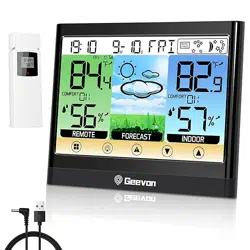
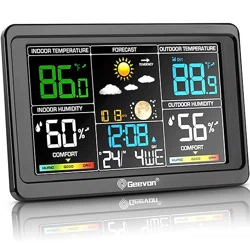
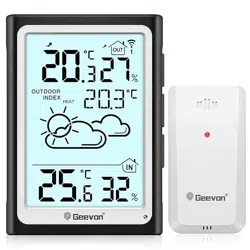
Geevon 25258 Weather Stations Wireless Indoor Outdoor Thermometer with Atomic Clock, HD Color Display Digital Temperature Humidity Gauge with Brometer, Comfort Indicator, and Adjustable Backlight

Product's Documents

Below are documents related to this product, you can read online or download:
25258 photo

Overview

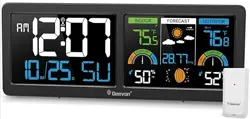
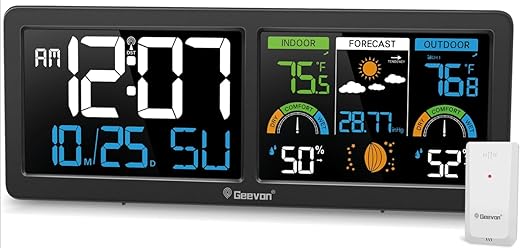
The Geevon Weather Station is a wireless indoor/outdoor monitoring device. It displays time, date, indoor/outdoor temperature and humidity, barometric pressure, weather forecasts, and moon phases. It features an atomic clock for automatic time synchronization and supports connection to up to three remote sensors.

Geevon Weather Stations Wireless Indoor Outdoor Thermometer with Atomic Clock, HD Color Display Digital Temperature Humidity Gauge with Brometer, Comfort Indicator, and Adjustable Backlight (Black)

What's in the Box

  • Main Weather Station Unit
  • TX19 Remote Outdoor Sensor
  • Power Adapter
  • User Manual

Note: 3 AAA batteries for the main unit and sensor are not included.

Features and Specifications

Display and Information

  • Display: Dual 5.9-inch color VA (Vertical Alignment) LCD.
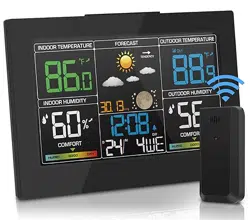
  • Displayed Data: Time, date, day of week, indoor/outdoor temperature and humidity, max/min temperature/humidity records, trend arrows, air comfort level indicator, 12-hour weather forecast, barometric pressure, and moon phases.
VA display weather clock

Atomic Clock

  • Function: Receives WWVB signal for automatic time synchronization.
  • Time Zones: AST(-4), EST(-5), CST(-6), MST(-7), PST(-8), AKST(-9), HST(-10).
  • Daylight Saving Time (DST): Automatic adjustment available.
  • Alarm: Includes alarm clock function with snooze (5-minute intervals).
  • Note: The backlight turns off temporarily during signal reception.

Sensor and Connectivity

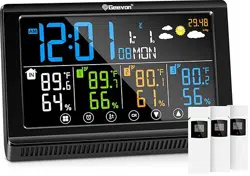
  • Channels: Supports up to 3 remote sensors (1 sensor included).
  • Transmission Range: Up to 200 feet / 60 meters (wireless).
  • Temperature Accuracy: +/-1°C / +/-1.8°F.
weather station with remote sensor

Power and Backlight

  • Power Modes: Can be powered by the included AC adapter or by 3 AAA batteries (not included).
  • Backlight: 3-level adjustable brightness. The backlight stays on only when using the AC adapter. On battery power, it turns off after 15 seconds.
  • Low Battery Indicator: Alerts you when batteries need replacement.
weather station with backlit

Physical Specifications

  • Dimensions (Main Unit): 11.2" W x 4.2" H x 1" D.
  • Weight: 1 pound.
  • Materials: ABS, Glass, Metal, Plastic.
  • Mounting: Includes built-in stand for tabletop use and hanging holes for wall mounting.
Digital Atomic Wall Clock Digital Atomic Desk Clock

Use Guide

Initial Setup

  1. Place the Main Unit: Choose a location indoors. You can place it on a flat surface using the built-in stand or mount it on a wall using the hanging holes.
  2. Install Power: Insert 3 AAA batteries into the main unit's battery compartment, or connect the provided AC power adapter. For permanent backlight, use the AC adapter.
  3. Prepare the Remote Sensor: Insert 2 AA batteries (not included) into the TX19 outdoor sensor.
  4. Position the Sensor: Place the sensor outdoors within 200 ft/60 m of the main unit, in a shaded, well-ventilated area protected from direct rain.

Setting the Time and Date

  1. Ensure the unit is powered and placed in its final location.
  2. Set your correct time zone using the buttons on the back of the unit (refer to button labels in the manual).
  3. Enable the Daylight Saving Time (DST) function if applicable.
  4. Leave the unit plugged in overnight. It will automatically search for and sync with the WWVB atomic time signal.

Pairing the Remote Sensor

The included TX19 sensor should automatically pair with the main unit when powered on. If you add additional sensors (sold separately), follow the pairing instructions in the manual, typically involving pressing a button on the main unit and then on the new sensor.

Using the Alarm

  1. Press the ALARM button to enter alarm setting mode.
  2. Use the UP/DOWN buttons to set the alarm time.
  3. Press the ALARM button again to confirm and activate the alarm.
  4. When the alarm sounds, press the SNOOZE button for 5 more minutes of sleep.

Understanding the Display

  • Trend Arrows: Next to temperature/humidity readings, indicate if values are rising (↑), falling (↓), or steady (→).
  • Comfort Indicator: Uses icons (e.g., a smiley face) to show if the indoor humidity level is comfortable, dry, or wet.
  • Weather Forecast Icons: Icons (sun, clouds, rain) show the predicted weather for the next 12-24 hours based on barometric pressure trends. Accuracy varies by region.
  • Moon Phase: A small icon displays the current moon phase.
digital weather station clock Multi-Functional Atomic Clock Weather Station max min indoor outdoor thermometer

Adjusting Backlight Brightness

Press the LIGHT/BRIGHTNESS button on the top or back of the unit to cycle through the three brightness levels. This function requires the AC power adapter to be connected.

Troubleshooting

  • No Sensor Data: Check that batteries in the sensor are fresh and correctly installed. Ensure the sensor is within 200 ft range without major obstructions. Re-pair the sensor if necessary.
  • Incorrect Time: Verify the correct time zone is set and DST is configured. Ensure the unit is placed in a location with a clear path for the atomic signal (away from large metal objects or electronics) and leave it powered overnight to sync.
  • Dim or No Display: Ensure batteries are installed correctly or the AC adapter is securely connected. Press the LIGHT button to adjust brightness.
  • Low Battery Indicator: Replace the batteries in the main unit or the remote sensor promptly.
  • Weather Forecast Inaccurate: The forecast is an estimation based on barometric pressure trends and may not be precise for all locations.

Care and Maintenance

  • Clean the display and casing with a soft, dry cloth. Do not use liquid or aerosol cleaners.
  • Place the outdoor sensor in a location protected from direct, heavy rainfall for longevity.
  • Replace all batteries at the same time with high-quality alkaline batteries for best performance.

Reference file: Geevon 25258 Weather Stations Wireless Indoor Outdoor Thermometer with Atomic Clock, HD Color Display Digital Temperature Humidity Gauge with Brometer, Comfort Indicator, and Adjustable Backlight

Specifications

Geevon 25258 Questions and Answers

See other models: 24297 116 238665 238667 246204-6