Geevon 24250 Weather Stations Wireless Indoor Outdoor Thermometer, HD Color Display Digital Temperature Humidity Monitor

Product's Documents

Below are documents related to this product, you can read online or download:
24250 photo

1. Overview

The Geevon 24250 is a wireless indoor/outdoor weather station with a color display. It monitors temperature and humidity, provides weather forecasts, and functions as an alarm clock.

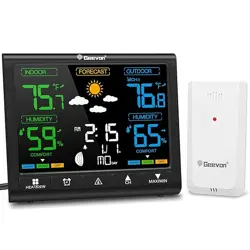
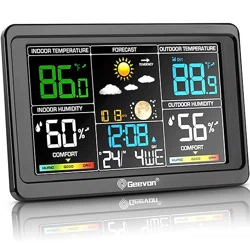
Geevon Weather Station main unit showing color display with temperature, humidity, and time data.

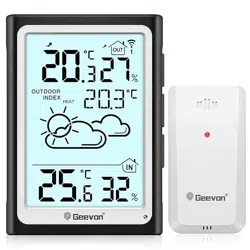
The system consists of a main display unit and one remote outdoor sensor. It can support up to two additional sensors (sold separately).

2. Package Contents

  • Main Weather Station Display Unit
  • Remote Outdoor Sensor
  • USB Cable
  • Instruction Manual (this document)

Note: 3 x AAA batteries for the main unit and 2 x AA batteries for the sensor are required but not included.

3. Product Features

3.1 Display Information

The 5.7-inch color LCD shows the following data:

  • Indoor and outdoor temperature (°F/°C) and humidity (%)
  • Temperature/humidity trend arrows (rising/falling)
  • Maximum and minimum recorded values
  • 12-hour weather forecast (icons)
  • Air Comfort Indicator (icon)
  • Heat Index and Dew Point values
  • Moon phase
  • Time (12/24 hour) and calendar (month/date)
  • Alarm status
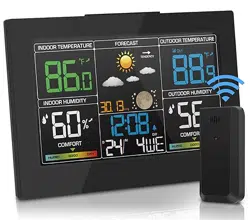
Close-up of the weather station display showing detailed readouts for temperature, humidity, forecast, and time.

3.2 Wireless Sensor

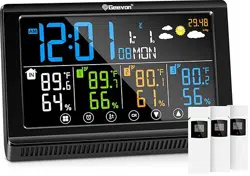
  • Channels: Supports up to 3 remote sensors (1 included).
  • Range: Up to 200 ft (60 m) in open areas.
  • Transmission: 433 MHz wireless technology.
  • Power: 2 x AA batteries (not included).
Remote outdoor sensor unit, typically mounted on a wall or post outdoors.

3.3 Physical Design

  • Dimensions: 5.5" W x 4.5" H x 1" D.
  • Placement: Includes a built-in stand for desk use and a hanging hole for wall mounting.
  • Materials: ABS plastic, metal, and other plastics.

4. Installation & Setup Guide

4.1 Initial Power On

  1. Insert 3 x AAA batteries into the main display unit. Observe correct polarity.
  2. Insert 2 x AA batteries into the remote outdoor sensor.
  3. The display will activate. Allow a few minutes for the unit to establish a connection with the sensor.

4.2 Sensor Placement & Pairing

  1. Place the outdoor sensor in a shaded, well-ventilated location, protected from direct rain and sunlight.
  2. Ensure it is within 200 ft of the main unit, with minimal obstructions.
  3. The main unit should automatically detect and display data from the sensor. If not, press the "CH" button on the back of the main unit to search for the sensor signal.
  4. For additional sensors (sold separately), repeat the process, using the "CH" button to cycle through channels 1, 2, and 3.

4.3 Power Options

  • Battery Only: Backlight turns off after 10 seconds to conserve power.
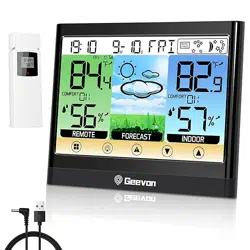
  • USB Power: Connect the provided USB cable to the main unit and a 5V USB power adapter (not included) to keep the backlight permanently on.
  • A low battery indicator will appear on the display when batteries need replacement.

5. Use Guide

5.1 Understanding the Display

Familiarize yourself with the on-screen information:

  • Indoor/Outdoor Readings: Displayed with labels "IN" and "OUT" (or channel number).
  • Trend Arrows: Located next to temperature/humidity values, indicating if readings are rising (↑) or falling (↓).
  • Comfort Indicator: An icon showing the perceived comfort level based on temperature and humidity (e.g., dry, comfortable, wet).
  • Forecast Icons: Symbols representing sunny, partly cloudy, cloudy, or rainy conditions for the next 12 hours.

5.2 Button Functions

Buttons are located on the top or back of the unit. Refer to the physical product for exact layout.

  • SNZ/LIGHT:
    • Short press: Turns on the backlight.
    • Press and hold for 3 seconds: Enters snooze time setting mode for the alarm.
  • ALARM: Press to set or enable/disable the alarm.
  • +/UP & -/DOWN: Adjust values during time, date, or alarm setting.
  • SET/MODE: Enters setting mode for time, date, alarm, and temperature units (°F/°C).
  • CH: Cycles through wireless sensor channels (1, 2, 3).

5.3 Setting the Time, Date, and Alarm

  1. Press and hold the SET/MODE button for 3 seconds. The time field will blink.
  2. Use the +/UP or -/DOWN buttons to adjust the value.
  3. Press SET/MODE to move to the next setting (minutes, year, month, date, 12/24 hour format, temperature unit).
  4. To set the alarm, press the ALARM button once, then use SET/MODE and +/UP/-/DOWN to set the alarm time. Press ALARM again to toggle the alarm on/off.
  5. Settings are saved automatically when you stop pressing buttons for a few seconds.

5.4 Setting Temperature Alerts

  1. Enter the main setting mode by holding SET/MODE.
  2. Navigate to the alert setting option (may be labeled HI/LO ALERT).
  3. Select IN (indoor) or OUT (outdoor).
  4. Set the high and low temperature limits using the +/UP and -/DOWN buttons.
  5. Exit the setting mode. An icon or audible alert will activate when the temperature exceeds these set limits.

5.5 Adjusting Backlight Brightness

When the unit is powered via USB, you can adjust the backlight to one of three levels:

  1. Press and release the SNZ/LIGHT button repeatedly to cycle through the brightness levels (Low, Medium, High).

6. Specifications

  • Display: 5.7-inch Color LCD, 350° viewing angle.
  • Temperature Range: Up to 120°F.
  • Temperature Accuracy: ±1°C.
  • Humidity Sensor: Capacitive technology.
  • Power (Main Unit): 3 x AAA batteries or USB 5V.
  • Power (Sensor): 2 x AA batteries.
  • Wireless Frequency: 433 MHz.
  • Transmission Range: 200 ft / 60 m (open area).

7. Troubleshooting

  • No outdoor data displayed:
    • Check sensor batteries.
    • Reduce distance between sensor and main unit.
    • Press the "CH" button on the main unit to re-sync.
    • Ensure no major metal obstructions or interference sources are present.
  • Display is blank:
    • Check/replace main unit batteries.
    • If using USB power, check the cable and power adapter.
  • Incorrect time or date: Re-enter the settings following Section 5.3.
  • Backlight does not stay on: The backlight timer only works on battery power. Use the USB cable for a permanent backlight.

8. Warranty and Support

The manufacturer offers a 12-month limited warranty from the date of purchase, along with 30-day money-back and lifetime consulting services.

For support, contact the seller through your Amazon purchase history or visit the Geevon Store on Amazon.

Reference file: Geevon 24250 Weather Stations Wireless Indoor Outdoor Thermometer, HD Color Display Digital Temperature Humidity Monitor

Specifications

Geevon 24250 Questions and Answers

See other models: 228646 24268 25258 24297 116