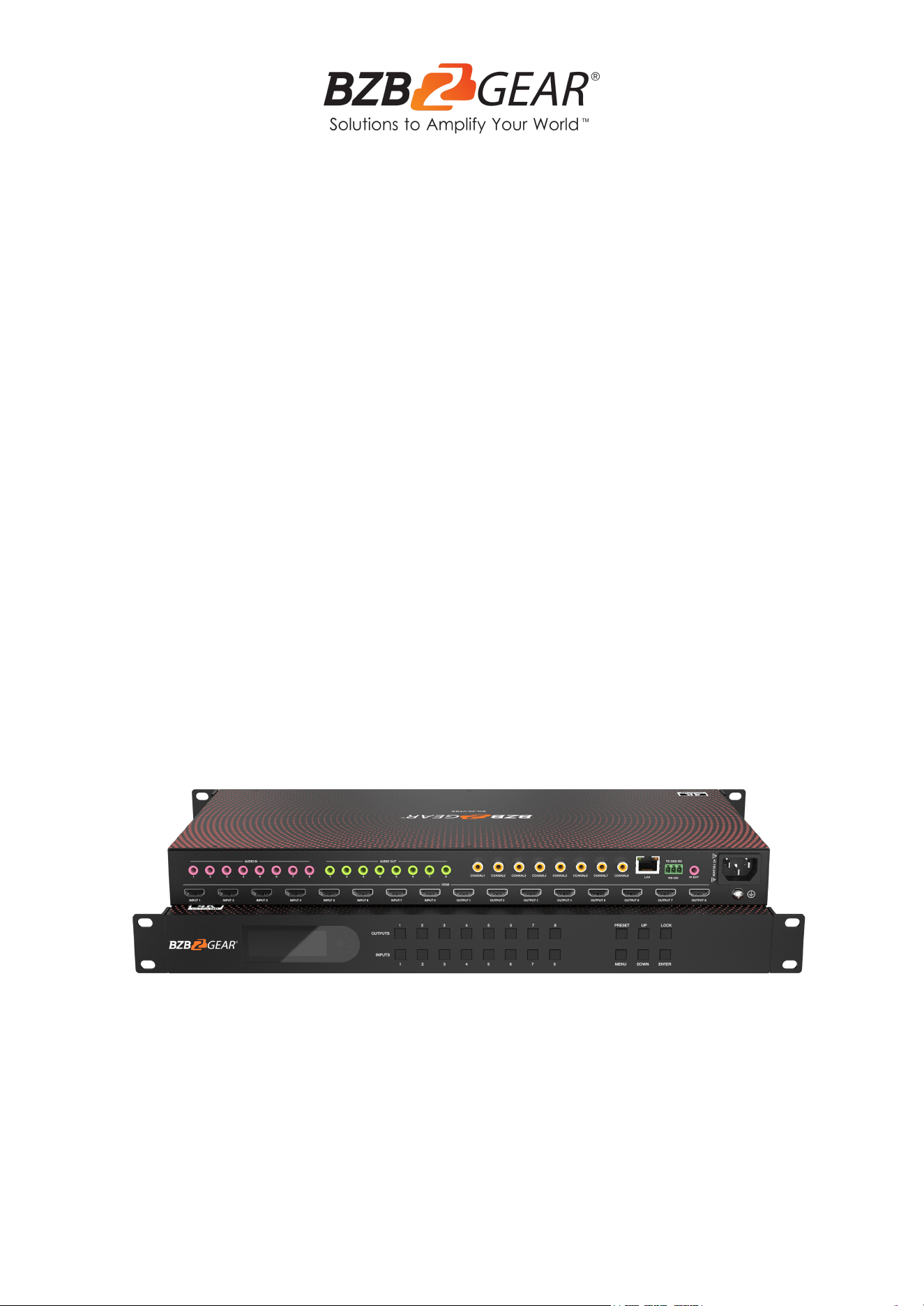
BG-4K-VP88
4K60Hz HDMI 8X8 Seamless Matrix, Video Wall, & Multi-Viewer
with Audio Embedding and Extraction
User Manual

BZBGEAR BG-4K-VP88 PRODUCT MANUAL
Address: 830 National Drive #140, Sacramento, CA 95834, USA · Tel: +1(888)499-9906 · Email: support@bzbgear.com 2

BZBGEAR BG-4K-VP88 PRODUCT MANUAL
TABLE OF CONTENTS
Statement 4
Safety Precaution 4
Introduction 5
Features 5
Packing List 5
Specifications 6
Operation Controls and Functions 6
OSD Information 7
Video Wall Mode 19
Multi-Viewer Mode 22
Image Cropping and TV Coordinate Changes 25
Audio Description 26
Remote Control 27
BG-4K-VP88 Web GUI Overview 28
HDCP 37
Factory Default Setting 37
Tech Support 38
Limited Product Warranty Terms 38
Mission Statement 38
Copyright 38
Address: 830 National Drive #140, Sacramento, CA 95834, USA · Tel: +1(888)499-9906 · Email: support@bzbgear.com 3

BZBGEAR BG-4K-VP88 PRODUCT MANUAL
Statement
Please read these instructions carefully before connecting, operating, or configuring this
product. Please save this manual for future reference.
Safety Precaution
● To prevent damaging this product, avoid heavy pressure, strong vibration, or immersion
during transportation, storage, and installation.
● The housing of this product is made of organic materials. Do not expose to any liquid,
gas, or solids which may corrode the shell.
● Do not expose the product to rain or moisture.
● To prevent the risk of electric shock, do not open the case. Installation and maintenance
should only be carried out by qualified technicians.
● Do not use the product beyond the specified temperature, humidity, or power supply
specifications.
● This product does not contain parts that can be maintained or repaired by users.
Damage caused by dismantling the product without authorization from BZBGEAR is not
covered under the warranty policy.
● Installation and use of this product must strictly comply with local electrical safety
standards.
Address: 830 National Drive #140, Sacramento, CA 95834, USA · Tel: +1(888)499-9906 · Email: support@bzbgear.com 4

BZBGEAR BG-4K-VP88 PRODUCT MANUAL
Introduction
The BG-4K-VP88 is a 4K60hz HDMI 2.0 seamless matrix with 8 hdmi inputs and 8 hdmi
outputs that also supports Multi-viewer & Video wall modes. The unit can be controlled
through TCP / IP, RS232, the included remote controller or the front panel buttons. The
BG-4K-VP88 has the ability to equalize and amplify HDMI signals to ensure that they are
transmitted without loss of quality. The unit also features advanced EDID management as
well as analog audio embedding and extraction.
Features
● 8 x HDMI Inputs and 8 x HDMI Outputs
● HDMI 2.0 4K60Hz YUV 4:4:4 up to 18Gbps
● Seamless matrix switching, multi-viewer, and video wall functionality
● HDCP 1. x / 2.2 compliant
● TCP/IP, RS232 Commands, IR and front panel buttons control
● EDID management and USB firmware upgradable
● PCM 2.0 analog audio embedding and audio extraction
● Audio can be independently switched
● 1U Rack design with rack ears
Packing List
● 1x BG-4K-VP88
● 1x DC 12V/3A power adapter
● 1x Remote control
● 1x Wide-Band IR Receiver cable
● 1x User Manual
● 1x 3 Pin Phoenix terminal plug
Address: 830 National Drive #140, Sacramento, CA 95834, USA · Tel: +1(888)499-9906 · Email: support@bzbgear.com 5
BZBGEAR BG-4K-VP88 PRODUCT MANUAL
Specifications
HDMI Ports
16x HDMI Type A 19 pin, HDMI 2.0b Standard
HDMI Audio
LPCM 5.1, DTS 5.1, Dolby 5.1
HDMI Resolution
4K60/50/30/25/24hz
1080P60/50/30/25/24hz
720P60/50/30hz
HDMI Version
HDMI 2.0b/HDCP1.4/2.2
Max Resolution
4K60Hz (4:4:4)
Data Speed
18Gbps (6Gbps per color)
Clock
600Mhz
Color space
RGB,YUV, 4:4:4, 4:2:2
Bit
8bit,10bit,12bit
Distance
HDMI 2.0 (4K60) Input≤10m / Output≤10m, 4K30/1080P input≤15m / Output≤15
Operation Controls and Functions
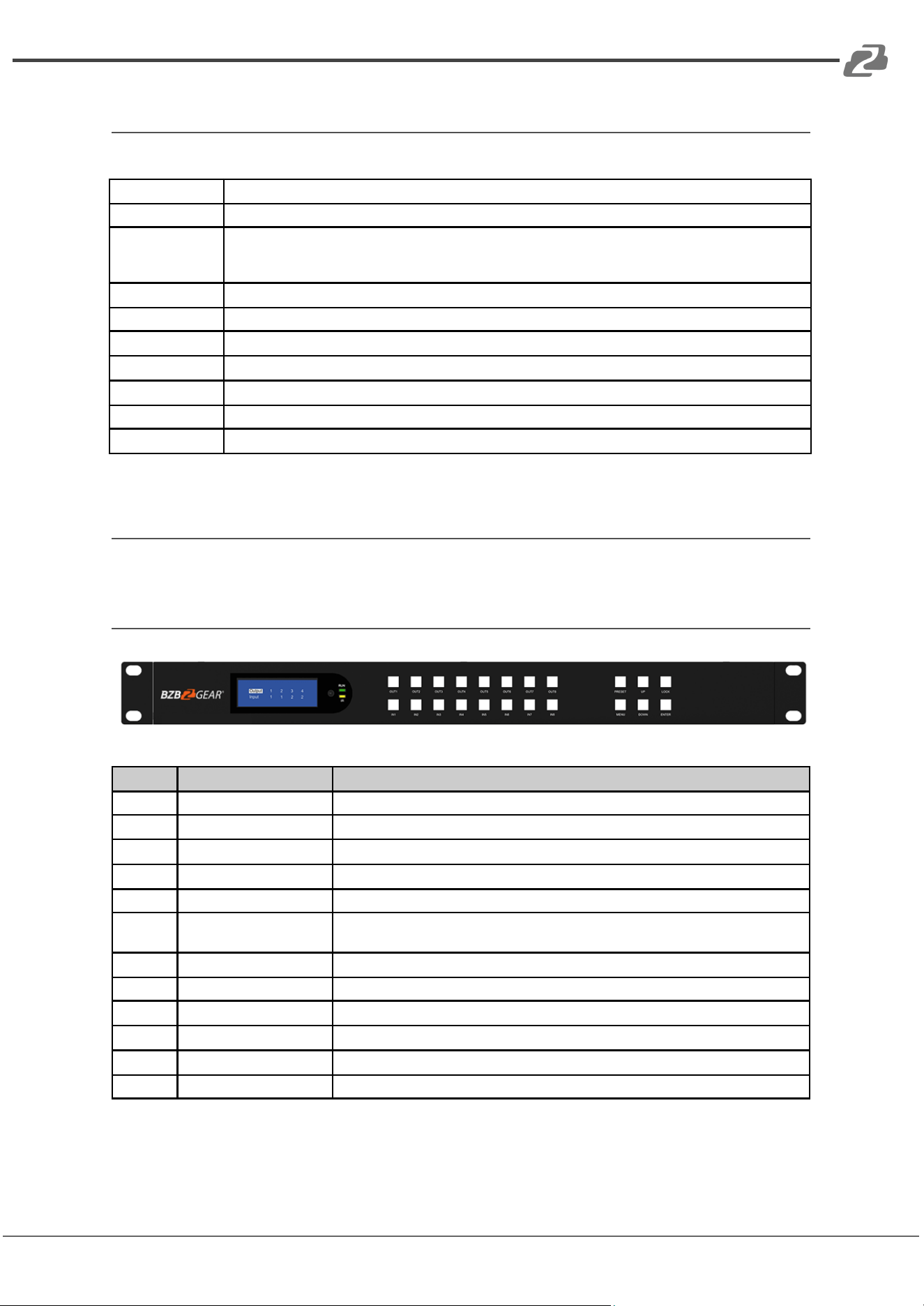
Front Panel
No.
Name
Function Description
1
LCD Screen
LCD Screen for showing the running data such as matrix status and menu items.
2
Output 1~8
Buttons for Matrix switching, Long press means all selected
3
Input 1~8
Button for Matrix switching, Long press means all selected
4
Preset
Used to set and recall preset configurations.
5
UP
Function button: UP
6
Lock
Press for over 1 second and the panel buttons will be locked.
Re-press to unlock the front panel.
7
Menu
Open the onscreen menu.
8
Down
Function button: Down
9
Enter
Function button: Enter
10
IR Ext
Built in IR Receiver.
11
Power Indicator
Illuminated when the device is powered on.
12
IR Indicator
IR feedback indicator flashes when receiving remote controller commands.
Address: 830 National Drive #140, Sacramento, CA 95834, USA · Tel: +1(888)499-9906 · Email: support@bzbgear.com 6
BZBGEAR BG-4K-VP88 PRODUCT MANUAL
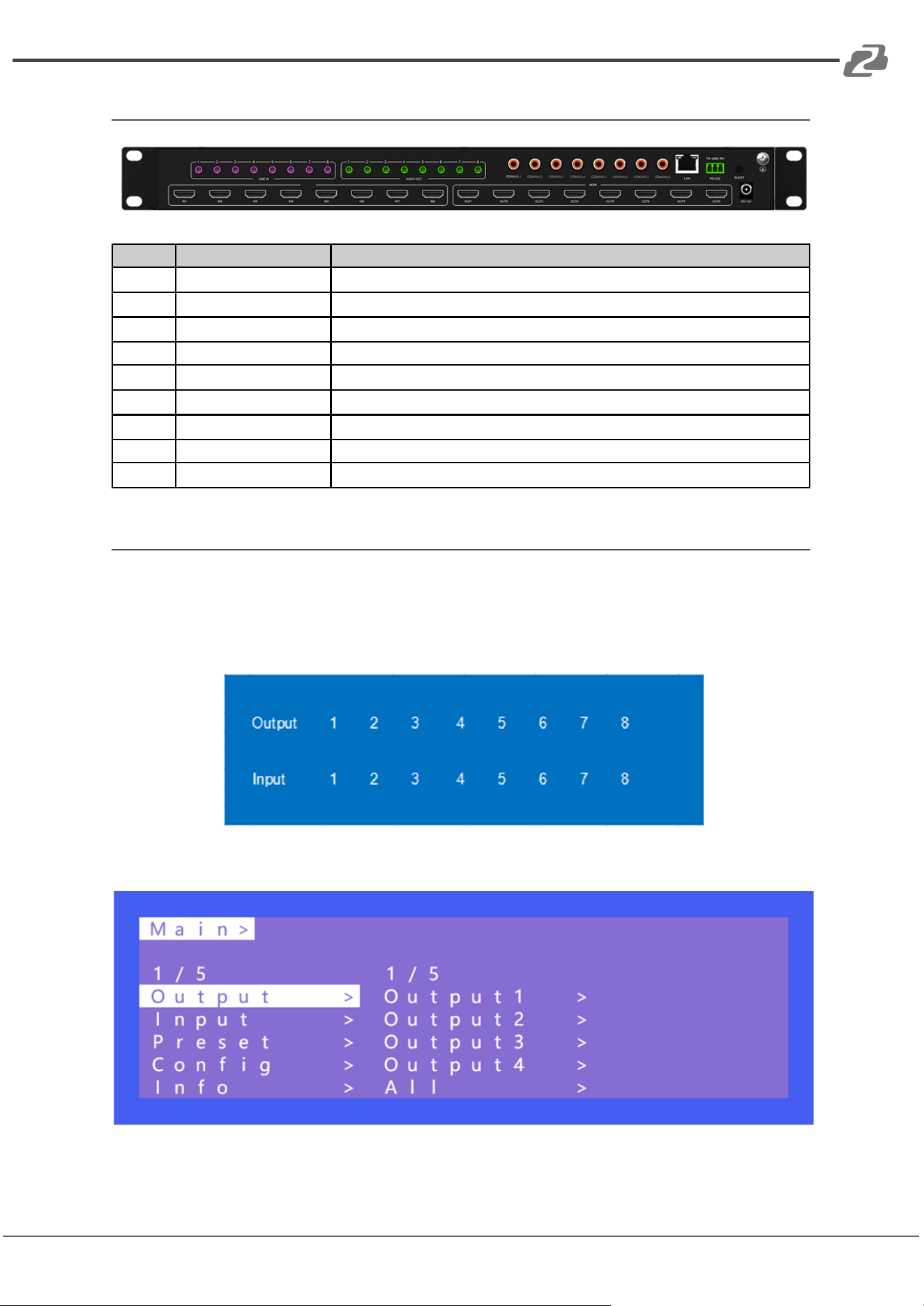
Rear Panel
No.
Name
Function Description
1
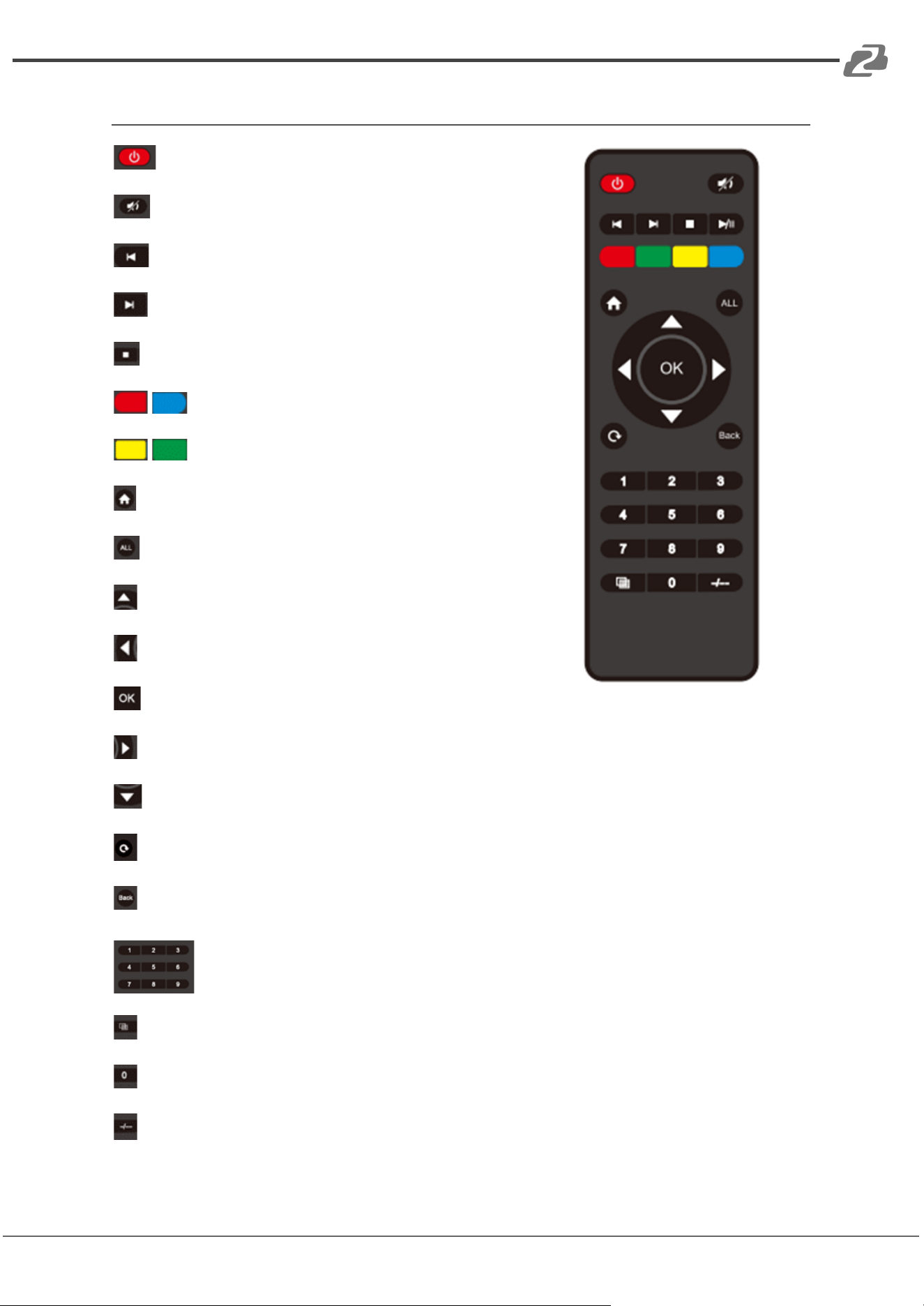
Audio Embedded 1~8
3.5MM ports, Sampling Rate: 32K~192Khz
2
Audio Extraction 1~8
3.5MM ports, Sampling Rate: 32K~192Khz
3
SPDIF Extraction 1~8
Coaxial Port, Sampling Rate: 32K~192Khz
4
RS232 Port
3PIN Phoenix port:TX - GND - RX
5
IR EXT
3.5mm ports, supports 38~52Khz frequency
6
LAN Port
WEB GUI Control
7
HDMI Inputs 1~8
A type 19 PIN-HDMI Port
8
HDMI Outputs 1~8
A type 19 PIN-HDMI Port
9
Power
AC110V~240V
OSD Information
Signal switching includes 8 switching channels which can be configured as one-to-one or
one-to-many to form a matrix of 1×8 ~ 8×8. Any input can go to any output.
Operation format: press the desired “output channel” and then press an “input channel.”
The Main menu includes 5 Modes: Output, Input, Preset, Config, and Info.
Address: 830 National Drive #140, Sacramento, CA 95834, USA · Tel: +1(888)499-9906 · Email: support@bzbgear.com 7
BZBGEAR BG-4K-VP88 PRODUCT MANUAL
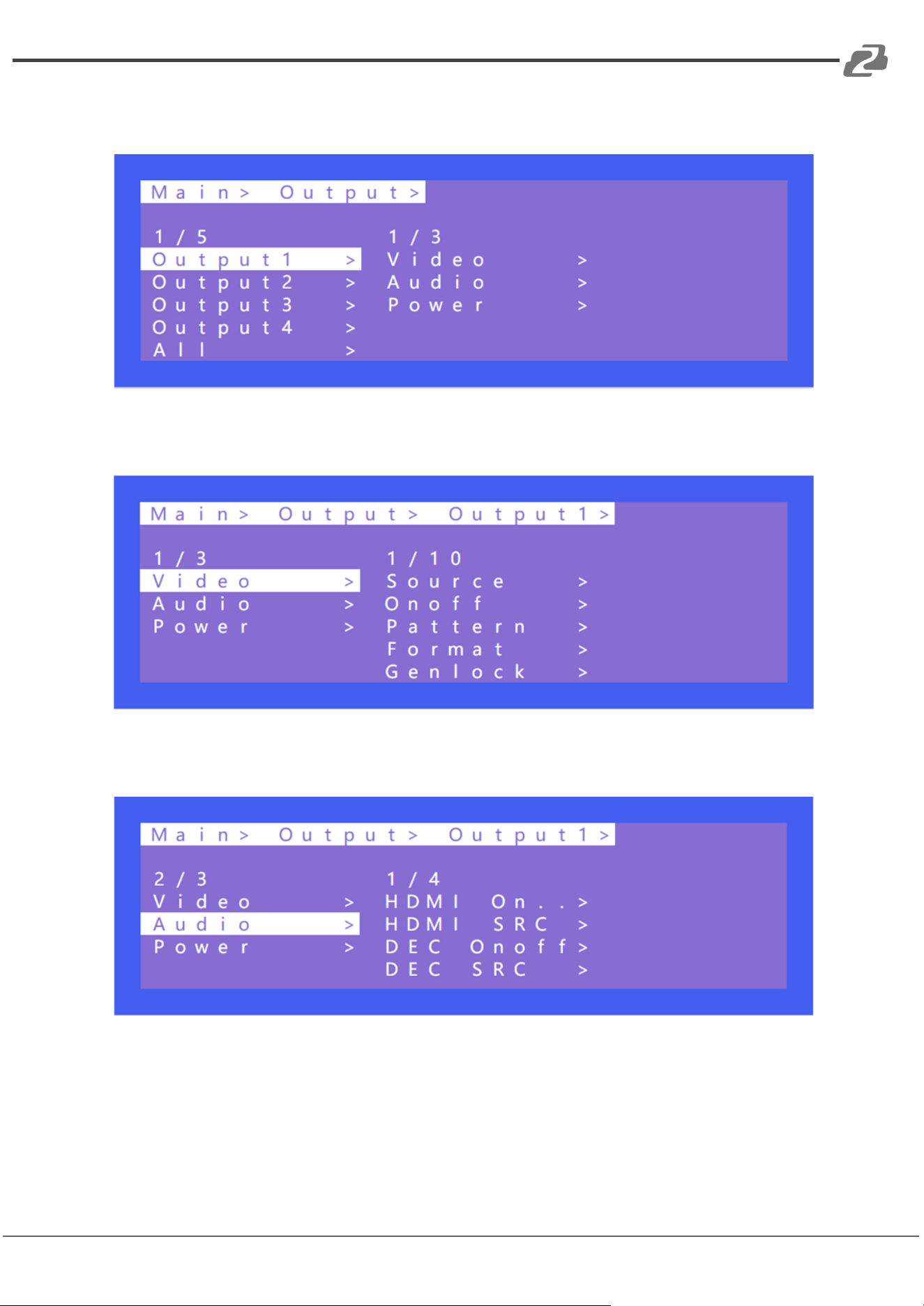
Output includes 9 sub-menus:output 1~8 & all, each channel with video, audio, and power
options.
Video has 10 options:source, on/off, pattern, formart, genlock, mirror, coord, PIP, wall,
image.
Audio has 4 options:HDMI on/off, HDMI SRC, DEC on/off, DEC SRC to control audio
switching, turn on or off.
Address: 830 National Drive #140, Sacramento, CA 95834, USA · Tel: +1(888)499-9906 · Email: support@bzbgear.com 8
BZBGEAR BG-4K-VP88 PRODUCT MANUAL
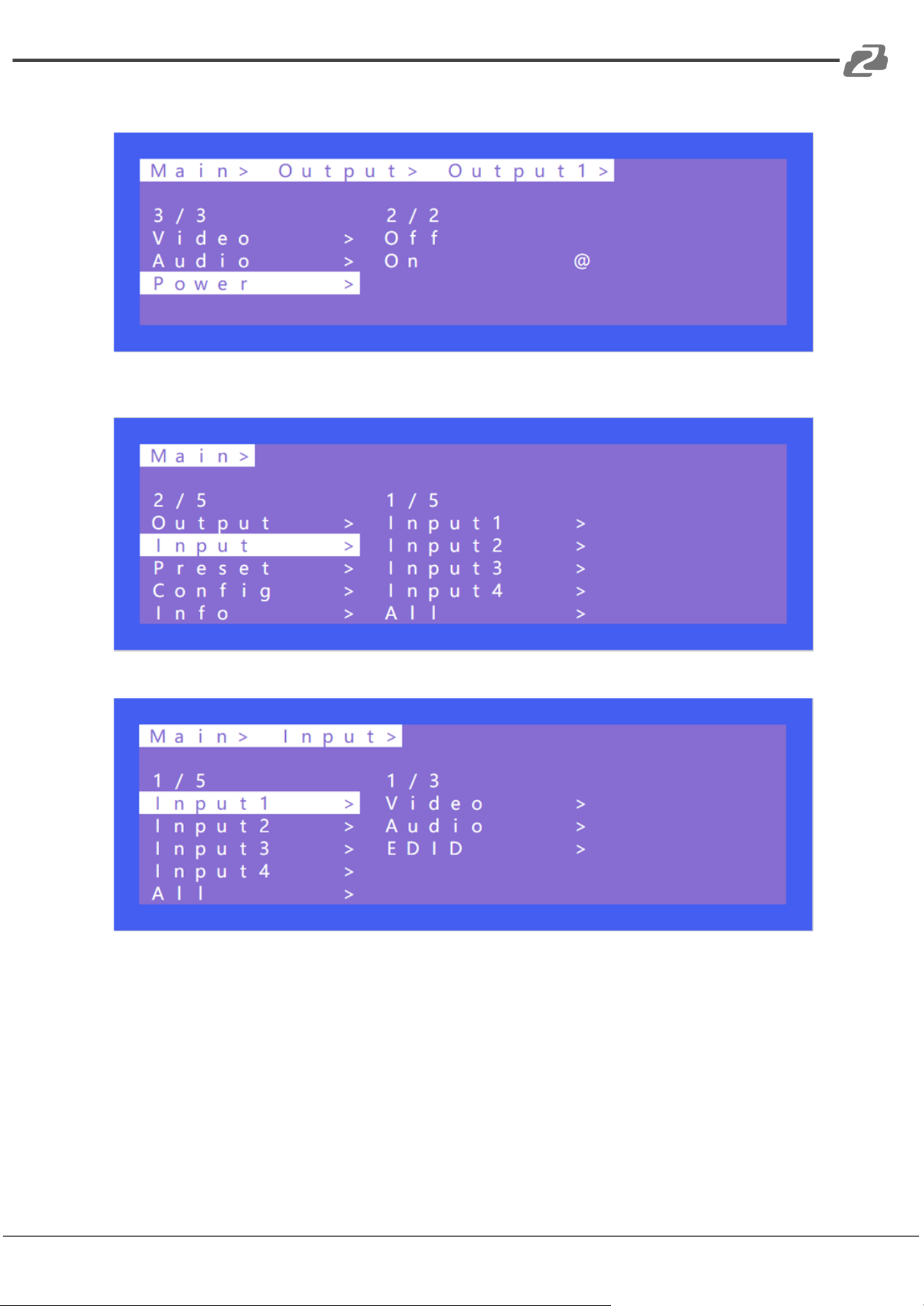
Power: Turns on or off the HDMI Output 5V.
Input contains video, audio, and EDID options.
Address: 830 National Drive #140, Sacramento, CA 95834, USA · Tel: +1(888)499-9906 · Email: support@bzbgear.com 9
BZBGEAR BG-4K-VP88 PRODUCT MANUAL
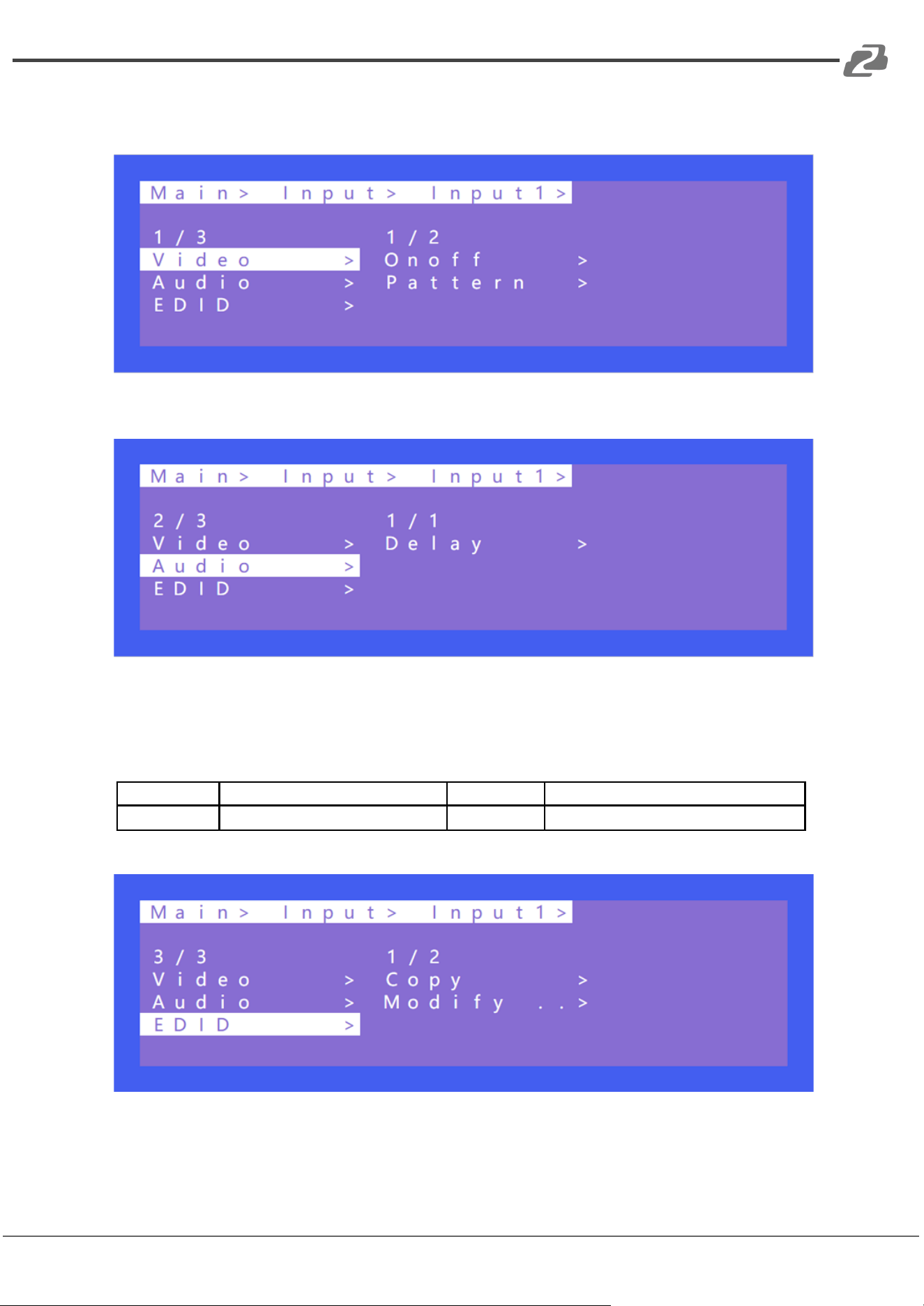
Video has on/off and Pattern options. Pattern is used to replace the picture of the signal
with a static image.
Audio delay range (0~50, auto), Default setting: auto
EDID includes Built-in EDID, User EDID, Copy EDID, Temp, Default setting is using: Default1
With Modify on and after copying the TVs EDID, the audio parameters are automatically
changed to LPCM 2.0. If turned off, the copied EDID will not modify the audio parameters.
Default1
4K60 444-LPCM: 2.0-192Khz
Default2
4K60 420-LPCM: 2.0-192Khz
Default3
4K30 444-LPCM: 2.0-192Khz
Default4
1080P120 444-LPCM: 2.0-192Khz
Address: 830 National Drive #140, Sacramento, CA 95834, USA · Tel: +1(888)499-9906 · Email: support@bzbgear.com 10
BZBGEAR BG-4K-VP88 PRODUCT MANUAL
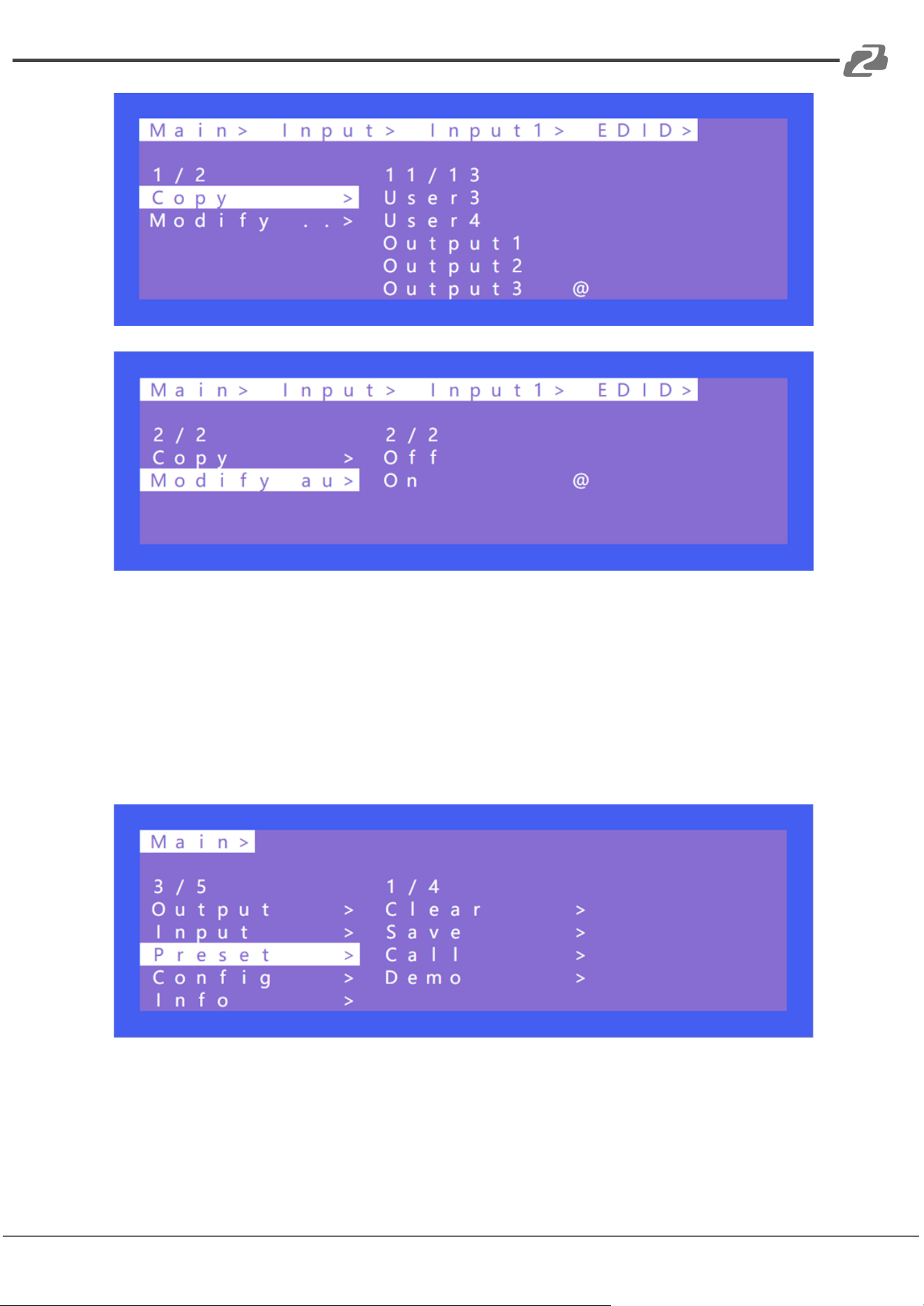
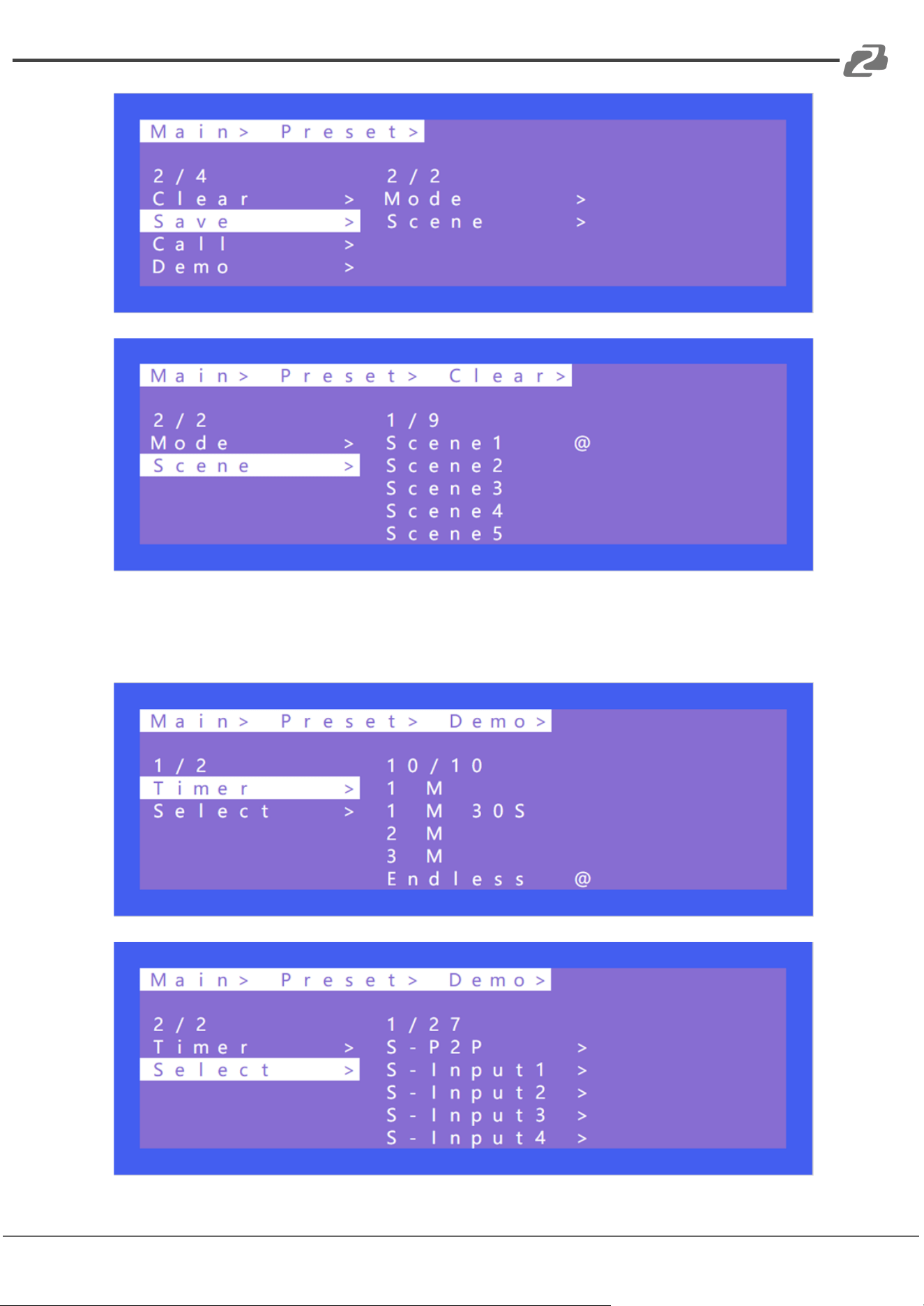
Preset can save the current video, audio, EDID, system settings, and supports 8 different
scenes/presets. Presets can be modified and called using the web interface, RS-232
commands and the front panel. The default preset is consistent with the factory settings.
There are 4 options in the Preset menu as follows:
● Clear: Remove the selected preset.
● Save: Stores the current preset (can be overwritten).
● Call: Activates the currently selected preset.
● Demo: Plays the demo according to the scenes sequence.
Address: 830 National Drive #140, Sacramento, CA 95834, USA · Tel: +1(888)499-9906 · Email: support@bzbgear.com 11
BZBGEAR BG-4K-VP88 PRODUCT MANUAL
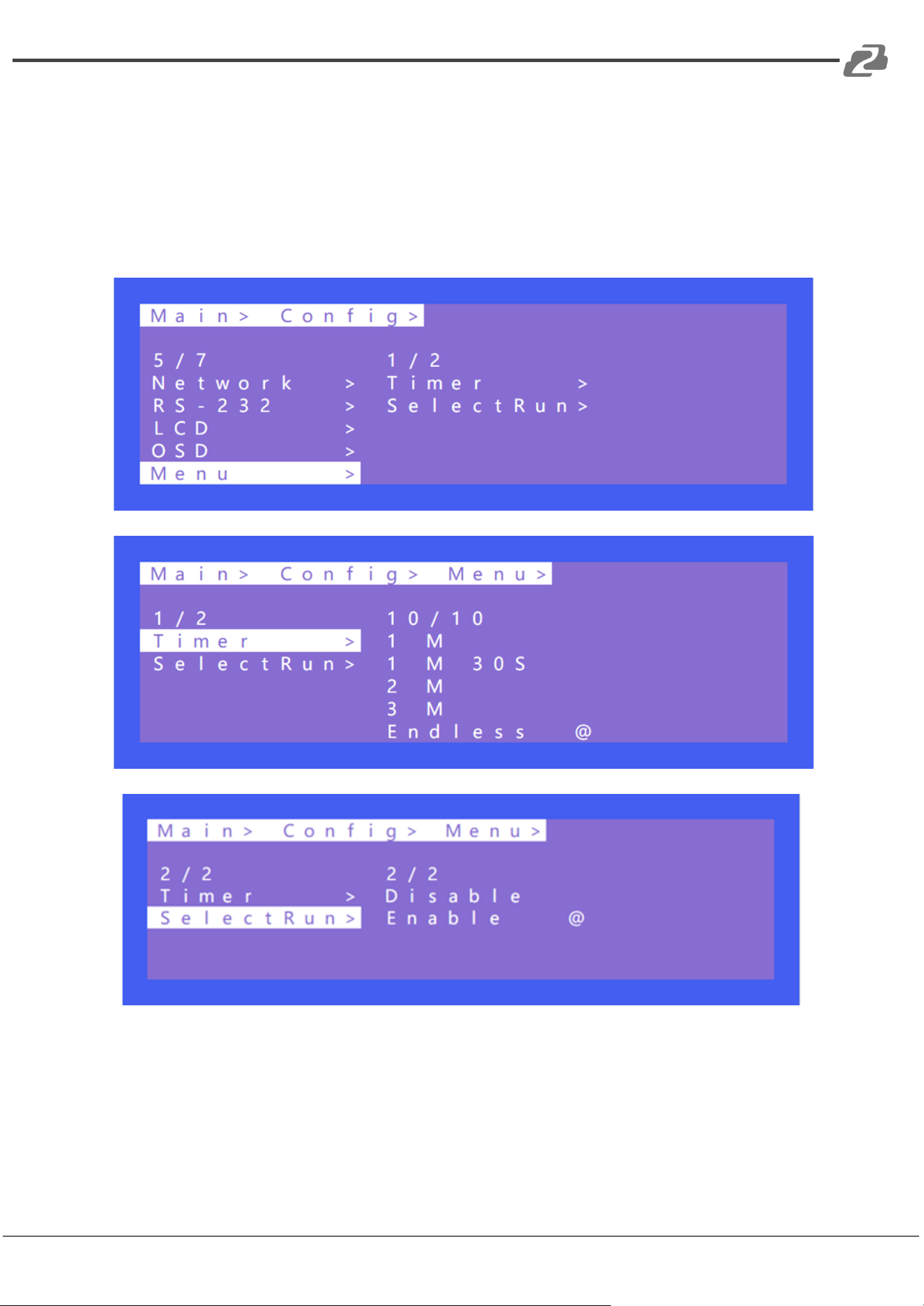
Demo:
Timer can set the demo’s switching time
Select function for selecting the demo modes
Address: 830 National Drive #140, Sacramento, CA 95834, USA · Tel: +1(888)499-9906 · Email: support@bzbgear.com 12
BZBGEAR BG-4K-VP88 PRODUCT MANUAL
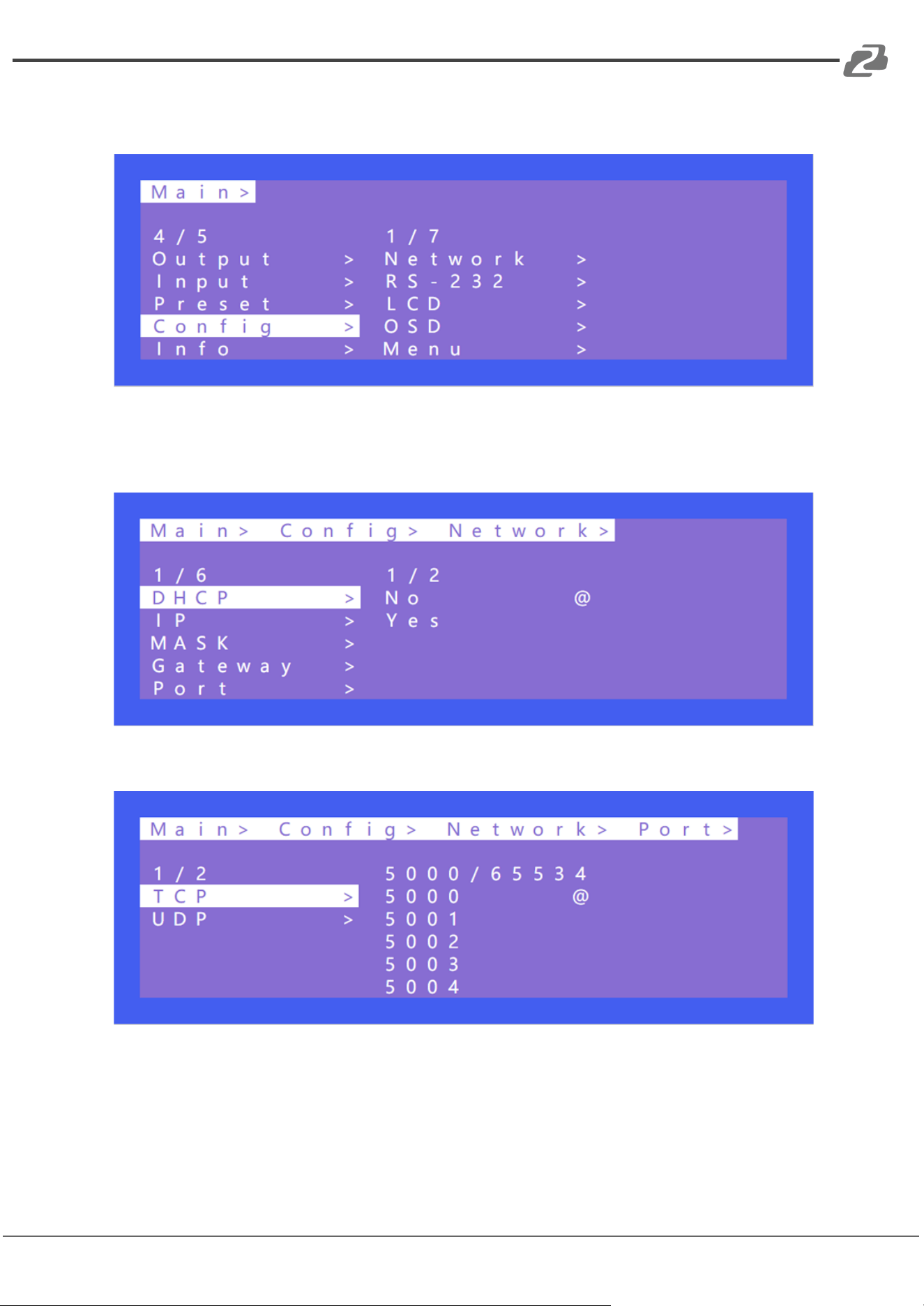
Config contains the Network, RS-232, LCD, OSD, MENU, user EDID, and system setting
pages.
Network contains options for DHCP, IP, mask, gateway, port, and Mac ID.
Default IP:192.168.1.200
TCP/UDP default Port:TCP 5000, UDP 5001
Address: 830 National Drive #140, Sacramento, CA 95834, USA · Tel: +1(888)499-9906 · Email: support@bzbgear.com 13
BZBGEAR BG-4K-VP88 PRODUCT MANUAL
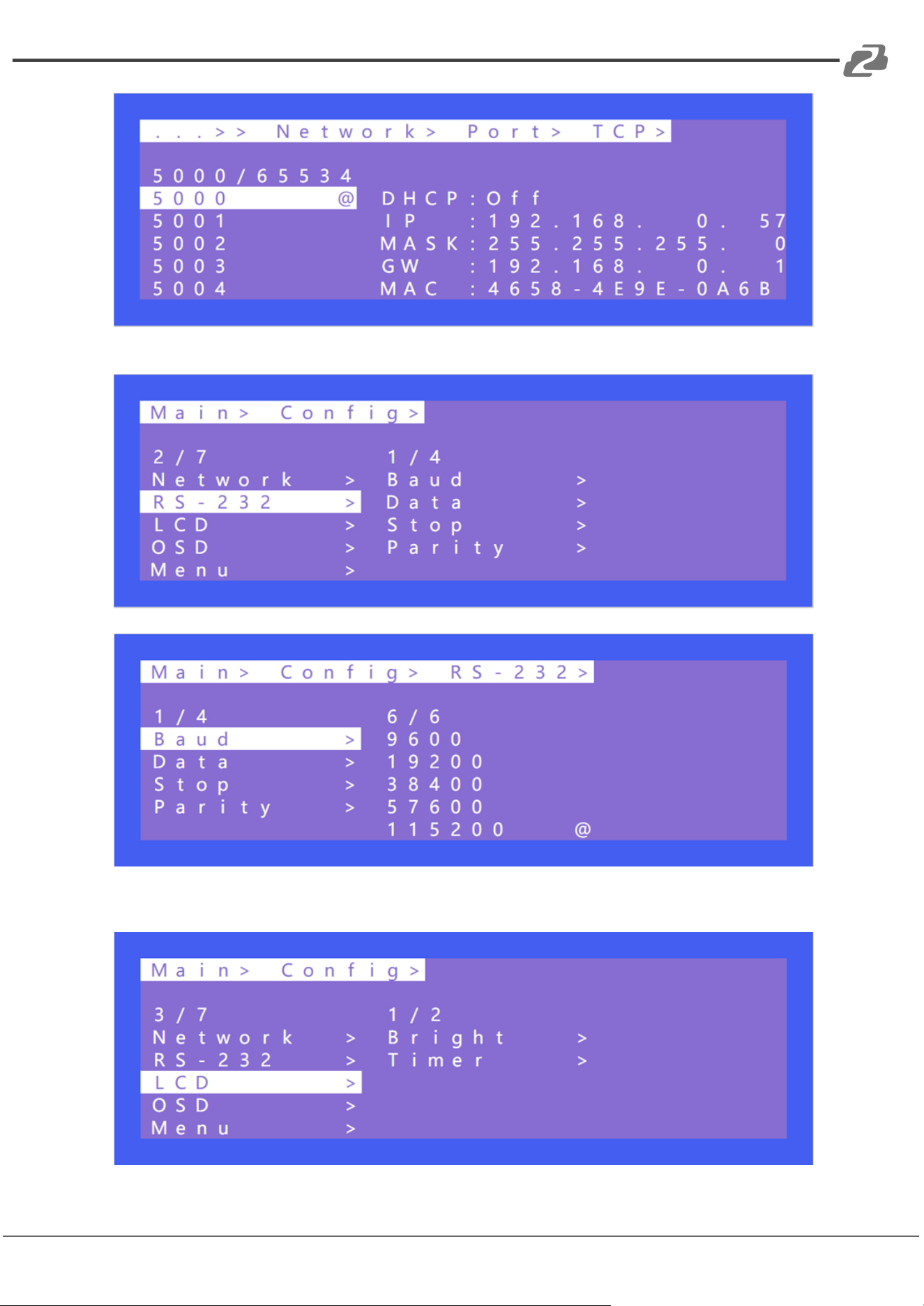
LCD contains settings for screen brightness levels and screen idle time off settings.
Address: 830 National Drive #140, Sacramento, CA 95834, USA · Tel: +1(888)499-9906 · Email: support@bzbgear.com 14
BZBGEAR BG-4K-VP88 PRODUCT MANUAL
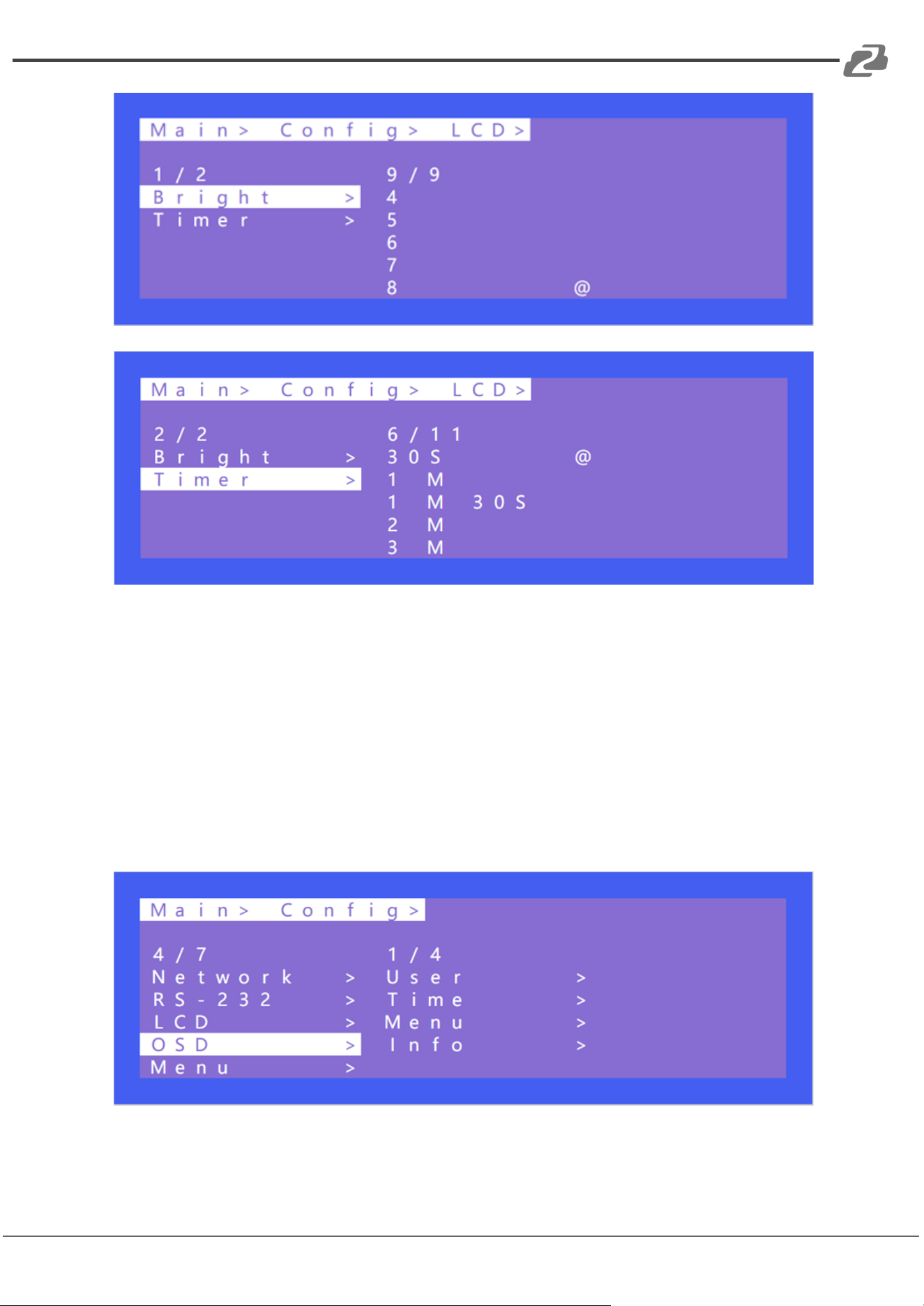
There are 4 options in OSD: User, Time, Menu, and Info.
User indicates the output coordinate time of OSD.
Time indicates the running time after the device is powered on.
Menu indicates that the LCD is mapped to the TV.
INFO indicates the displayed time of audio and video information.
When the parameter is set to 0 seconds the OSD display will be turned off. By default, User
and time are infinite while menu and info are set to 30 seconds.
Address: 830 National Drive #140, Sacramento, CA 95834, USA · Tel: +1(888)499-9906 · Email: support@bzbgear.com 15
BZBGEAR BG-4K-VP88 PRODUCT MANUAL
Timer is used to set the idle time before the system sends users back to the main menu
(default is 30s).
“Select Run” is used to determine whether the confirm button of the last sub-menu is
enabled.
If it is set to disable, you need to press “ENTER”. If it is set to enable, you do not need to
press “ENTER.”
Address: 830 National Drive #140, Sacramento, CA 95834, USA · Tel: +1(888)499-9906 · Email: support@bzbgear.com 16
BZBGEAR BG-4K-VP88 PRODUCT MANUAL
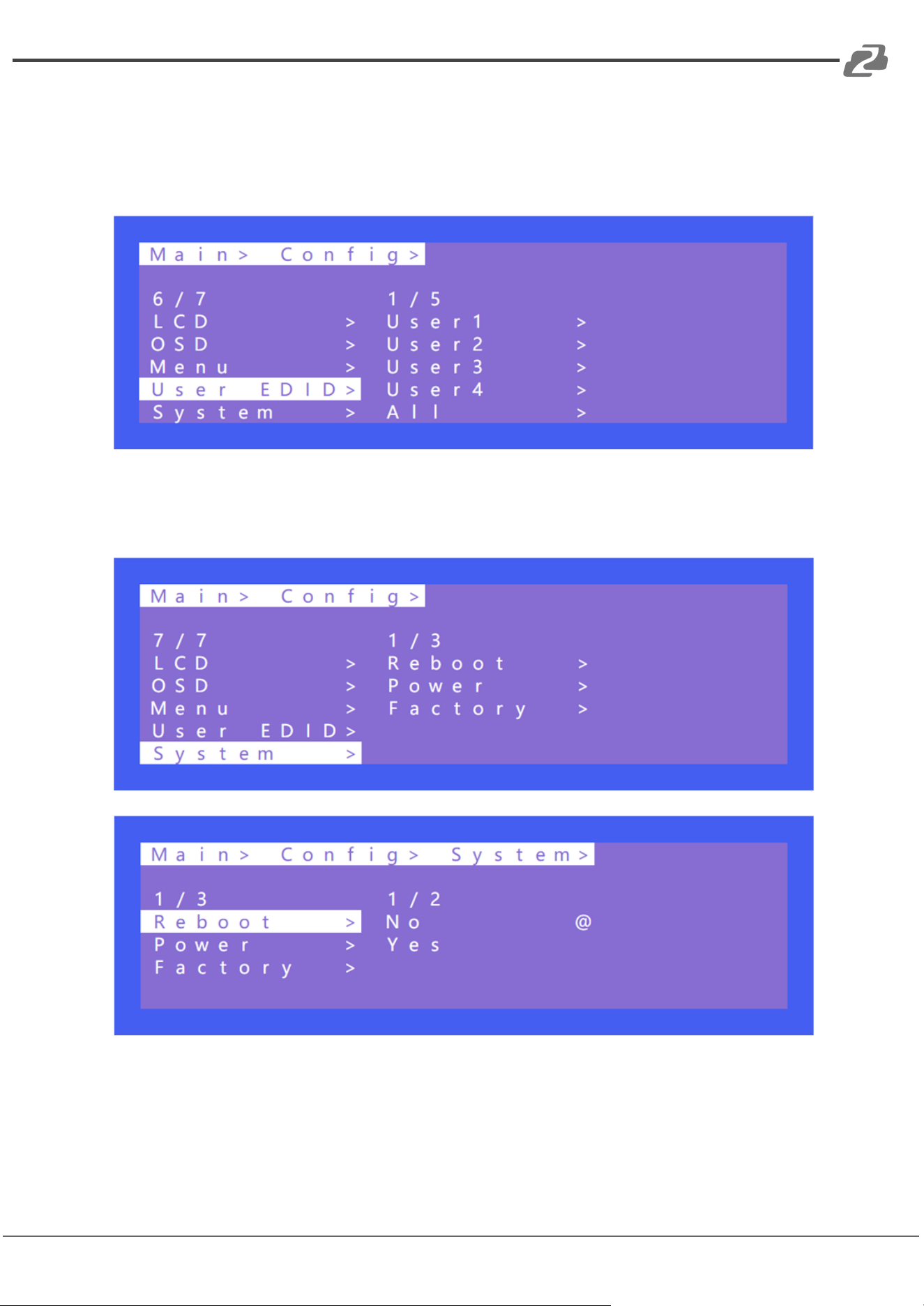
User EDID: Users can store the EDID information of a connected output display device in
the connection matrix to user 1~4, which can be stored in default, output, temp1, and then
used in the EDID list.
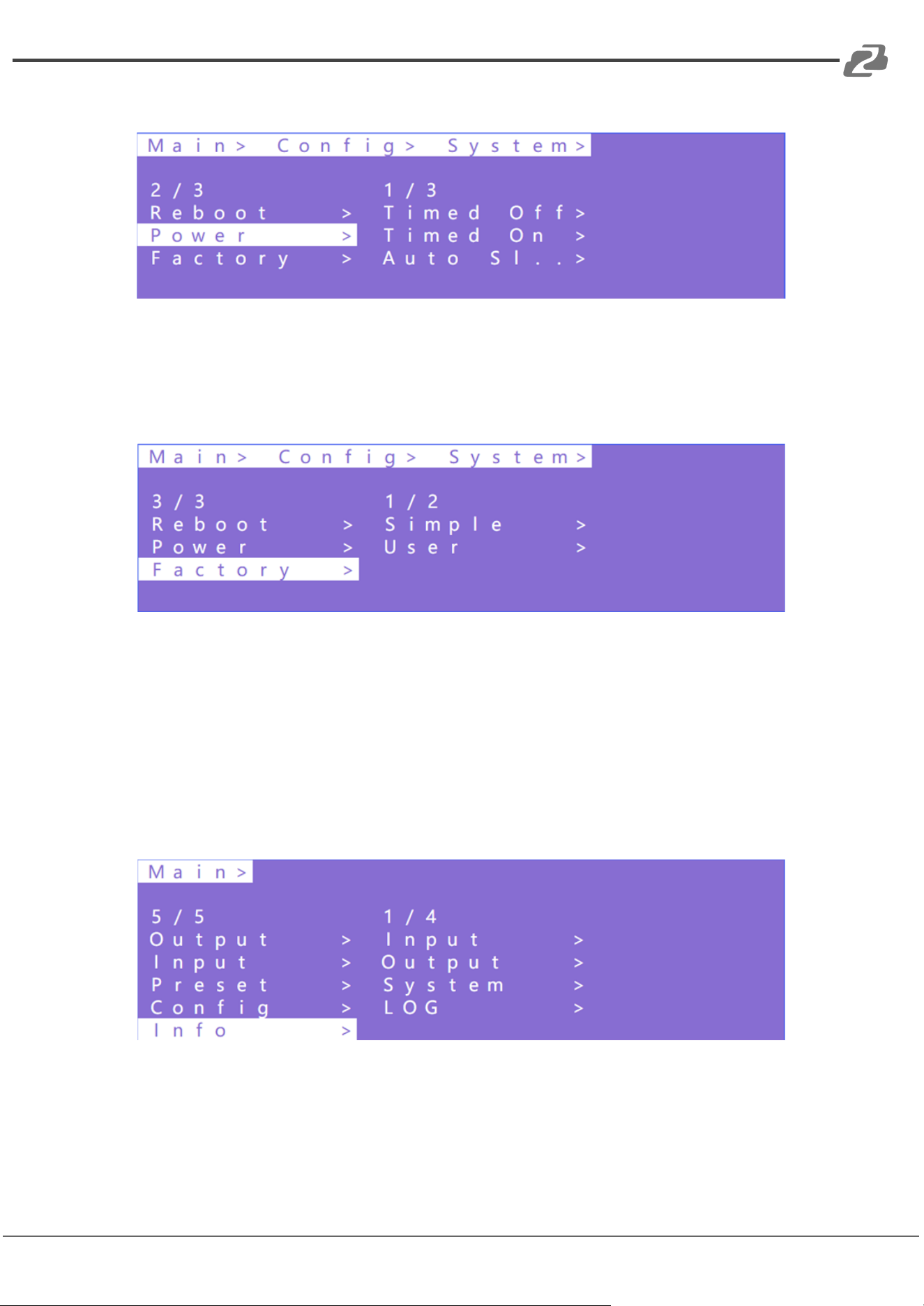
System Setting includes reboot, power, and factory. Reboot is used to restart the device.
Power is used to put the device into sleep mode. Factory is used for factory data reset
which returns the device to original factory settings.
Address: 830 National Drive #140, Sacramento, CA 95834, USA · Tel: +1(888)499-9906 · Email: support@bzbgear.com 17
BZBGEAR BG-4K-VP88 PRODUCT MANUAL
Timed Off indicates timed standby, Timed On indicates timed wake up, and Auto Sleep.
Factory contains two options for factory reset.
Simple: Partially restores factory settings.
User: Restores all factory settings.
Query device information including input, output, system, and log. The information can only
be queried and cannot be set or changed.
Input: resolution information of the signal sources input.
Output: EDID information of the TV of outputs.
System: System information includes web, version, and company info.
Log: Matrix log.
Address: 830 National Drive #140, Sacramento, CA 95834, USA · Tel: +1(888)499-9906 · Email: support@bzbgear.com 18
BZBGEAR BG-4K-VP88 PRODUCT MANUAL
Video Wall Mode
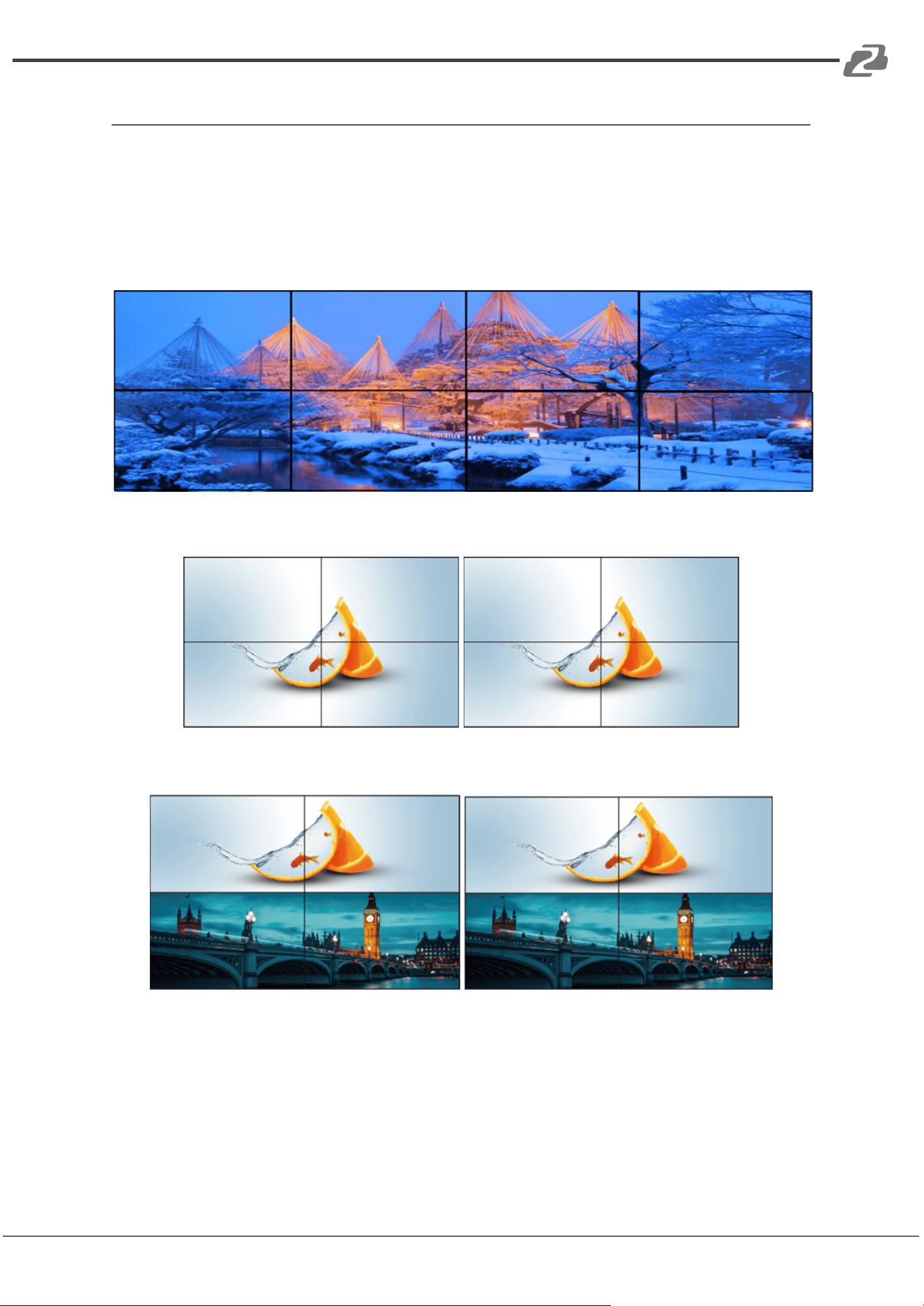
1. Supports margin/bezel adjustments.
2. Supports seamless switching of the video wall (displays must have same resolution)
3. Support mirroring of displays in the video wall.
4. Supports multiple simultaneous video wall settings.
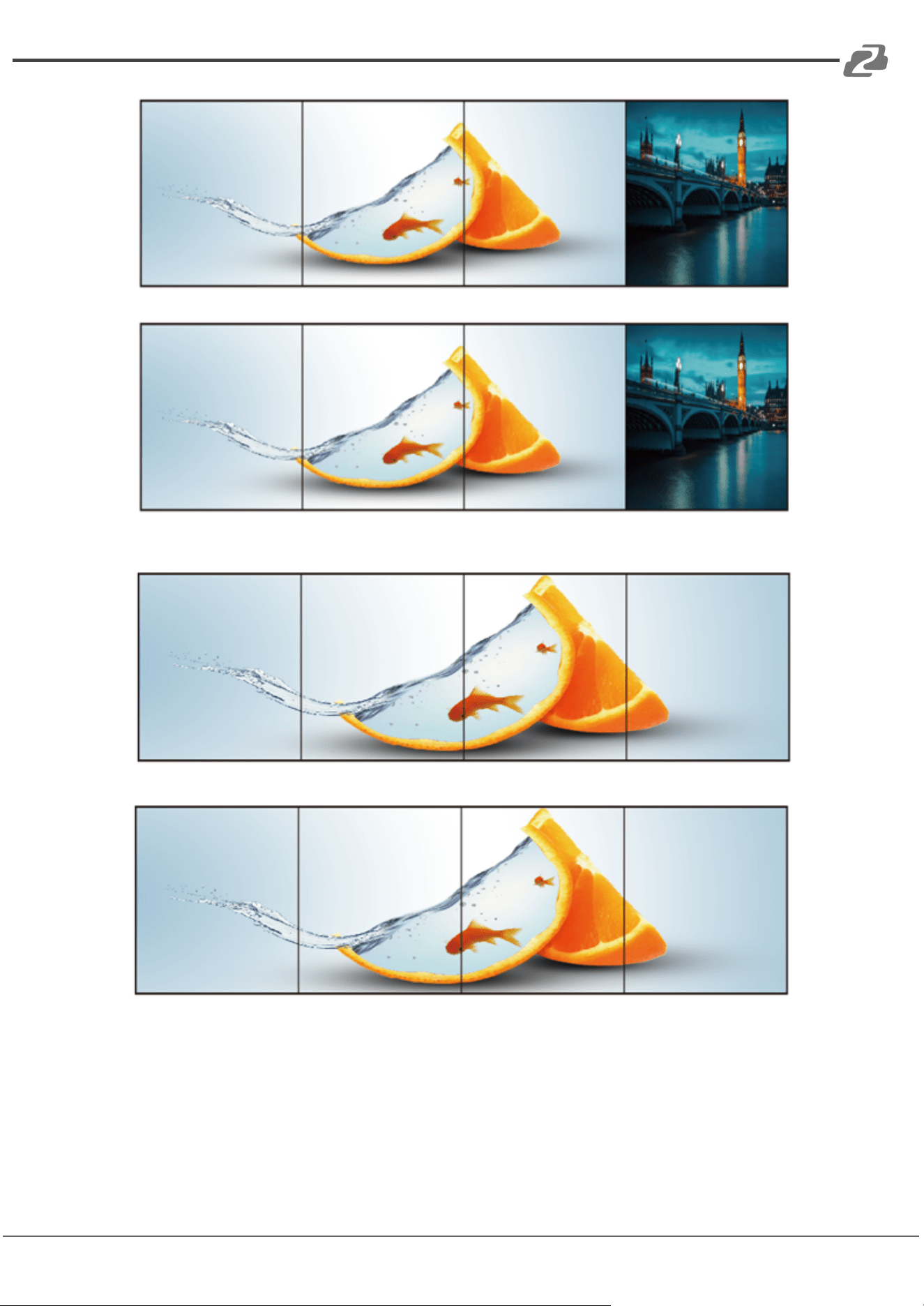
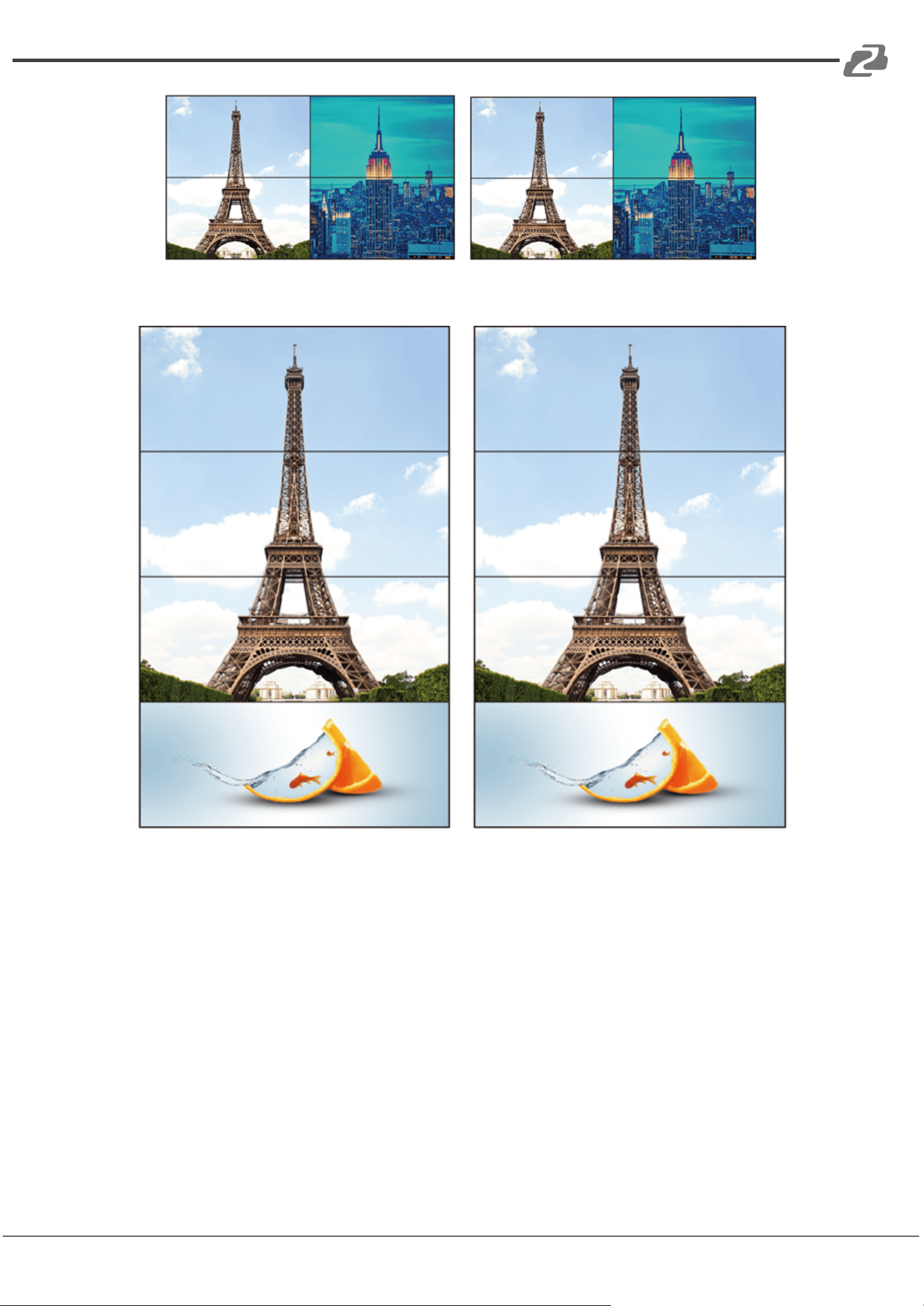
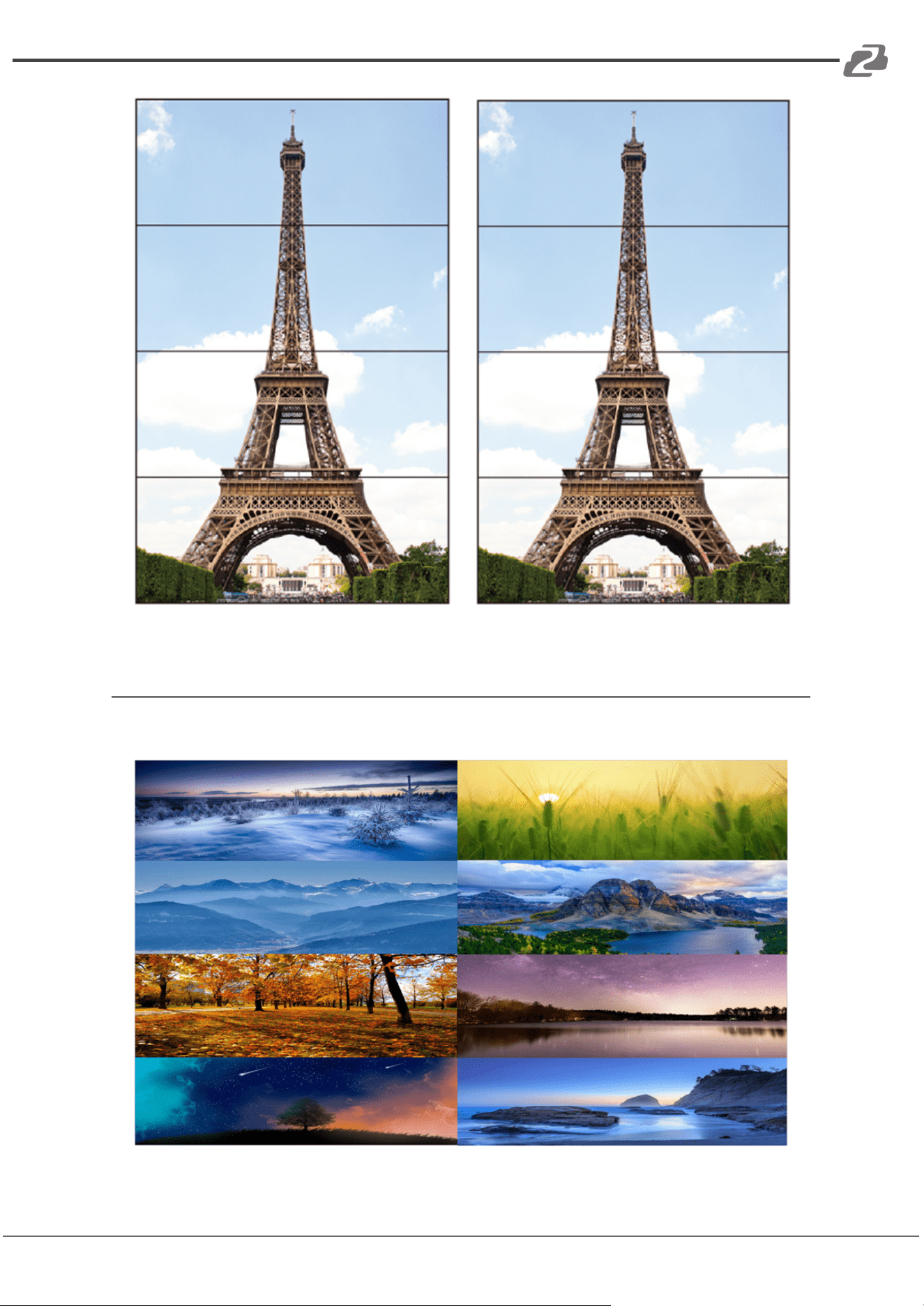
Video wall configurations are as shown:
W-2x4
W-2x2
W-1x2
Address: 830 National Drive #140, Sacramento, CA 95834, USA · Tel: +1(888)499-9906 · Email: support@bzbgear.com 19
BZBGEAR BG-4K-VP88 PRODUCT MANUAL
W-1x3
W-1x4
Address: 830 National Drive #140, Sacramento, CA 95834, USA · Tel: +1(888)499-9906 · Email: support@bzbgear.com 20
BZBGEAR BG-4K-VP88 PRODUCT MANUAL
W-2x1 W-2x1
W-3x1
Address: 830 National Drive #140, Sacramento, CA 95834, USA · Tel: +1(888)499-9906 · Email: support@bzbgear.com 21
BZBGEAR BG-4K-VP88 PRODUCT MANUAL
W-4x1
Multi-Viewer Mode
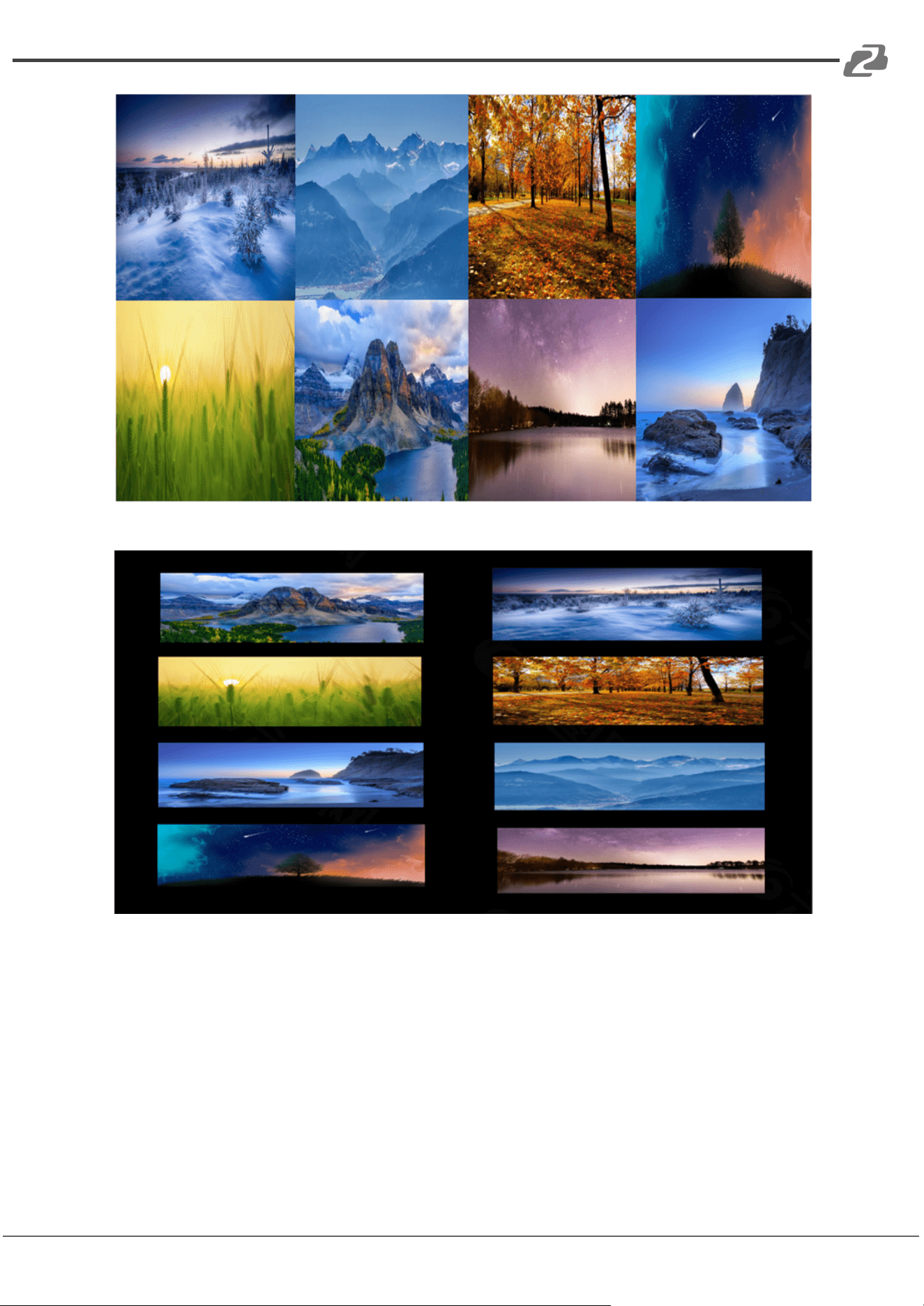
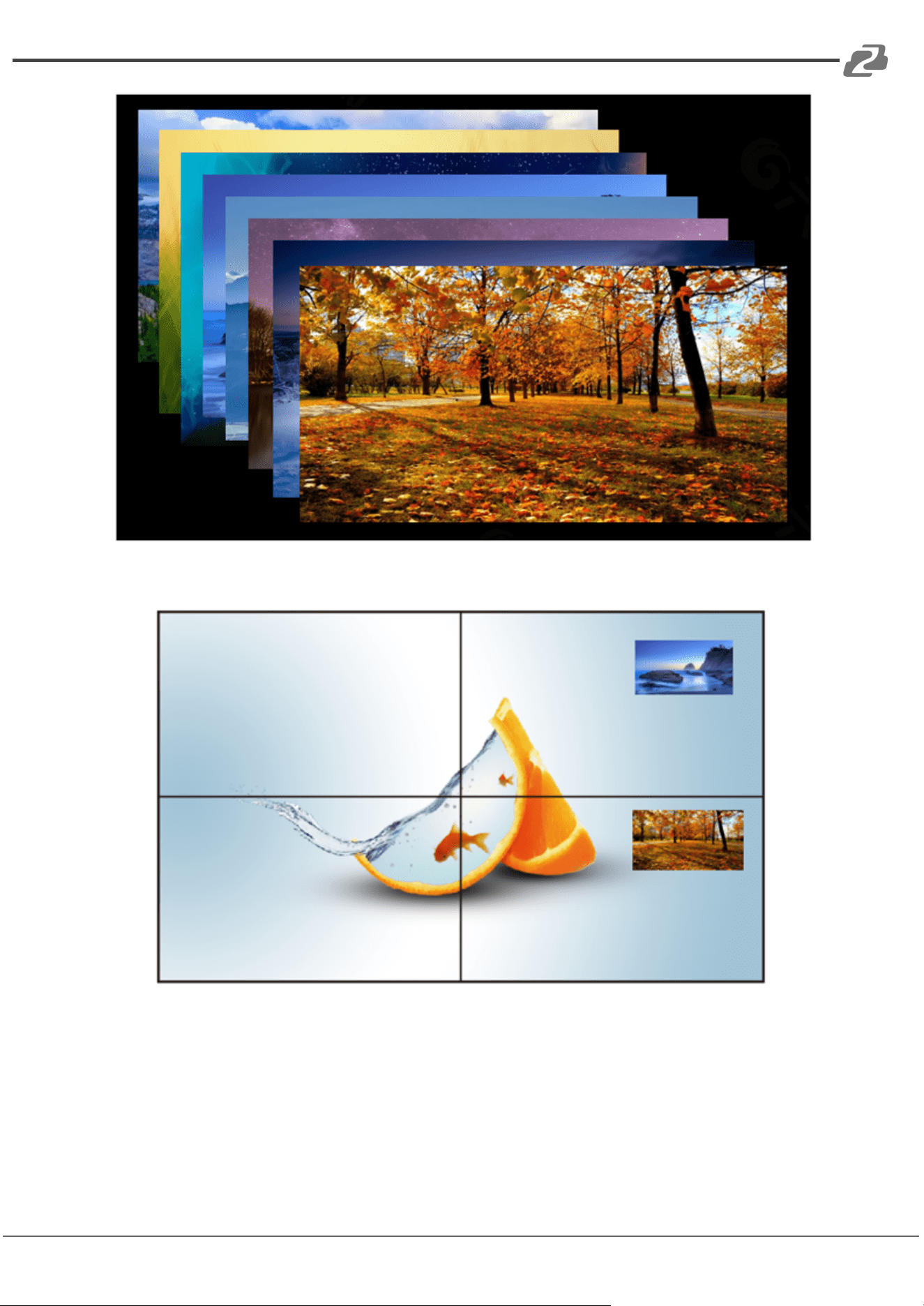
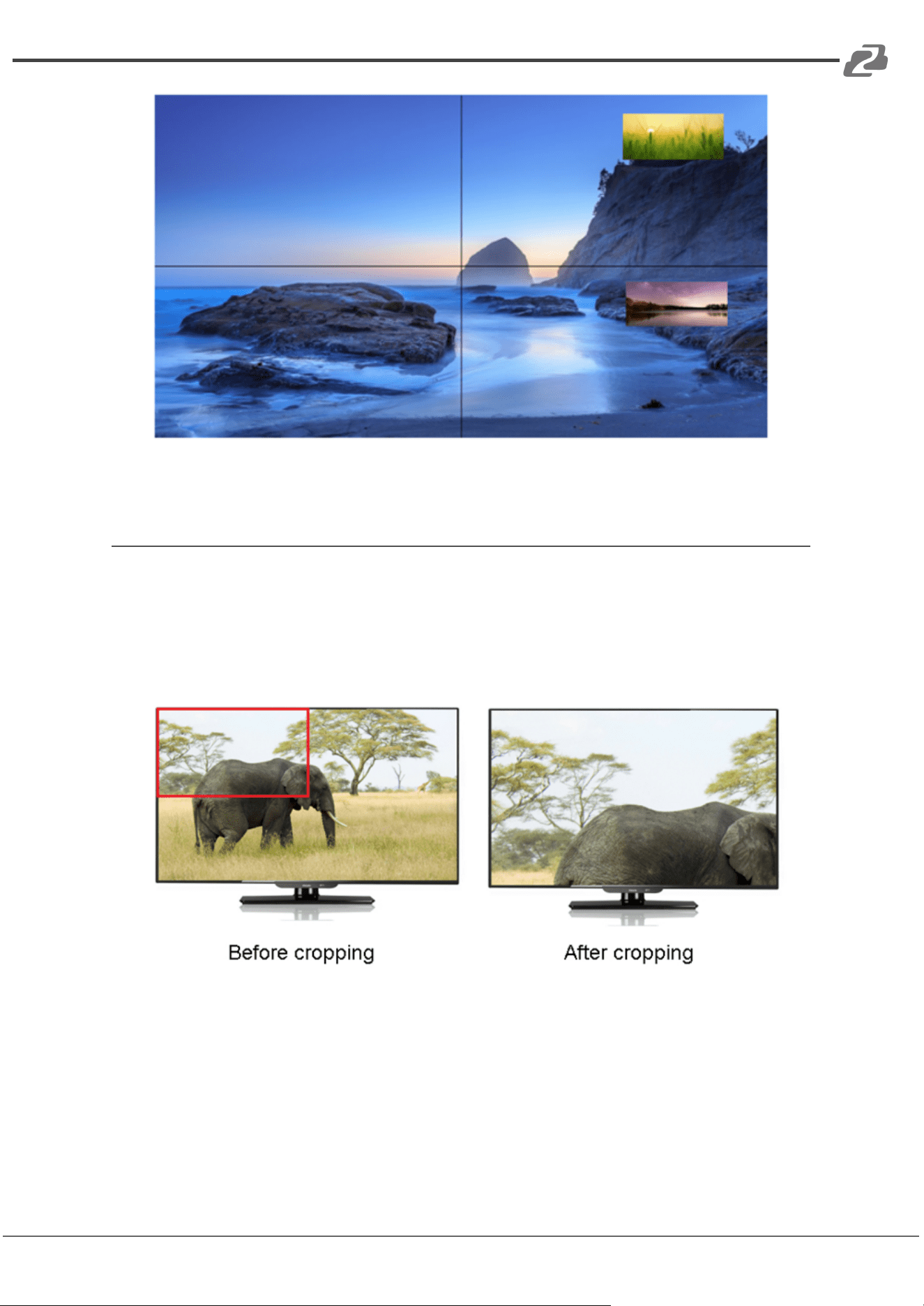
There are 6 different modes when the Multi-Viewer mode is enabled as shown below:
Mode 1
Address: 830 National Drive #140, Sacramento, CA 95834, USA · Tel: +1(888)499-9906 · Email: support@bzbgear.com 22
BZBGEAR BG-4K-VP88 PRODUCT MANUAL
Mode 2
Mode 3
Address: 830 National Drive #140, Sacramento, CA 95834, USA · Tel: +1(888)499-9906 · Email: support@bzbgear.com 23
BZBGEAR BG-4K-VP88 PRODUCT MANUAL
Mode 4
Mode 5
Address: 830 National Drive #140, Sacramento, CA 95834, USA · Tel: +1(888)499-9906 · Email: support@bzbgear.com 24
BZBGEAR BG-4K-VP88 PRODUCT MANUAL
Mode 6
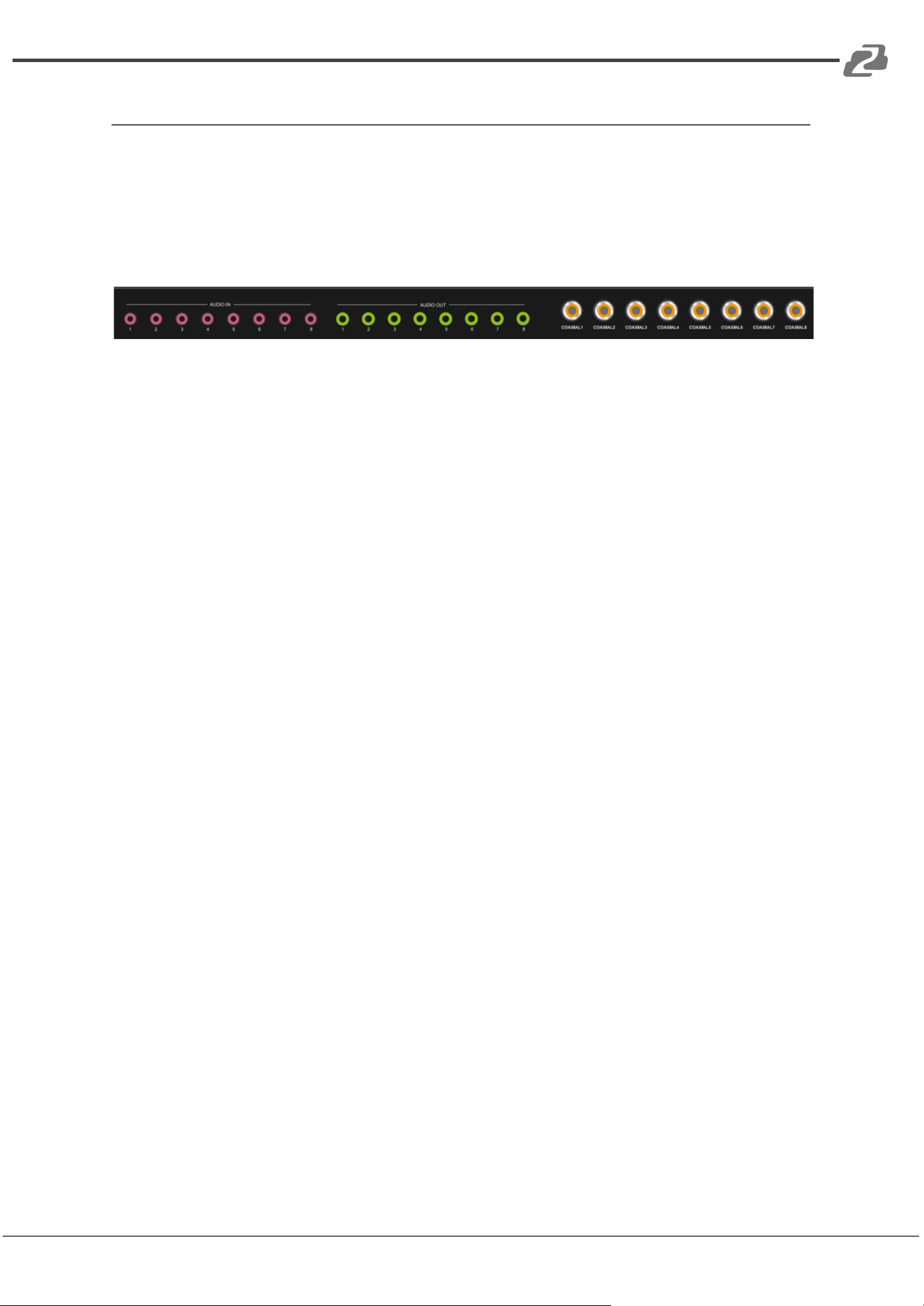
Image Cropping and TV Coordinate Changes
● Input starting point:CROP X0(0), CROP Y (0),
● Input ending point:CROP X1(3000), CROP Y0(3000)
● Input scaling starting point:ZOOM X0(0), ZOOM Y0(0),
● Input scaling ending point:ZOOM X1(6000), ZOOM Y0(6000)
Changing coordinates is only supported in the on-screen display menu;
Default wall coordinates output 1 (0,0) output 2 (1,0) output 3 (0,1) output 4 (1,1);
Output 1 wall width=2 and height=2. Other outputs must be to auto.
If output 1 and output 2 are flipped your coordinates would be as follows:
Output 1 (1,0) output 2 (0,0) output 3 (0,1) output 4 (1,1);
Output 2 wall width=2 and height=2. Other outputs must be set to auto.
Address: 830 National Drive #140, Sacramento, CA 95834, USA · Tel: +1(888)499-9906 · Email: support@bzbgear.com 25
BZBGEAR BG-4K-VP88 PRODUCT MANUAL
Audio Description
By default the HDMI outputs support uncompressed audio PCM, LPCM 2.0, and SPDIF:
5.1.
The maximum sampling rate supports 192KHZ.
COPY EDID audio formats are forced into LCPM 2.0.
HDMI Source:
1. ENC1~8 indicates which HDMI outputs have selected the embedded audio.
2. HDMI1~8 indicates that HDMI outputs have selected another audio source.
3. Auto HDMI indicates that the input signal source is switched with the matrix, but the
audio state is not switched.
4. Auto ENC indicates the HDMI sound will be overwritten and replaced with the
corresponding embedded audio.
Address: 830 National Drive #140, Sacramento, CA 95834, USA · Tel: +1(888)499-9906 · Email: support@bzbgear.com 26
BZBGEAR BG-4K-VP88 PRODUCT MANUAL
Remote Control
:Standby or power on
:Mute button
:Return to upper level
:Move to next level
:Picture off
:Page turn by 100 of the last sub-menu
:Page turn by 10 of the last sub-menu
:Menu
:All output
:Up
:Menu
:OK
:Enter
:Down
:Return or exit
:Menu
When selecting Output,means Out1--out8
When selecting Input, means In1--In8
:Preset
:(N/A)
:Point to Point 1-1, 2-2, 3-3, 4-4…
Address: 830 National Drive #140, Sacramento, CA 95834, USA · Tel: +1(888)499-9906 · Email: support@bzbgear.com 27
BZBGEAR BG-4K-VP88 PRODUCT MANUAL
BG-4K-VP88 Web GUI Overview
The BG-4K-VP88 features an intuitive Web GUI interface, allowing users to configure and
manage the device with ease.
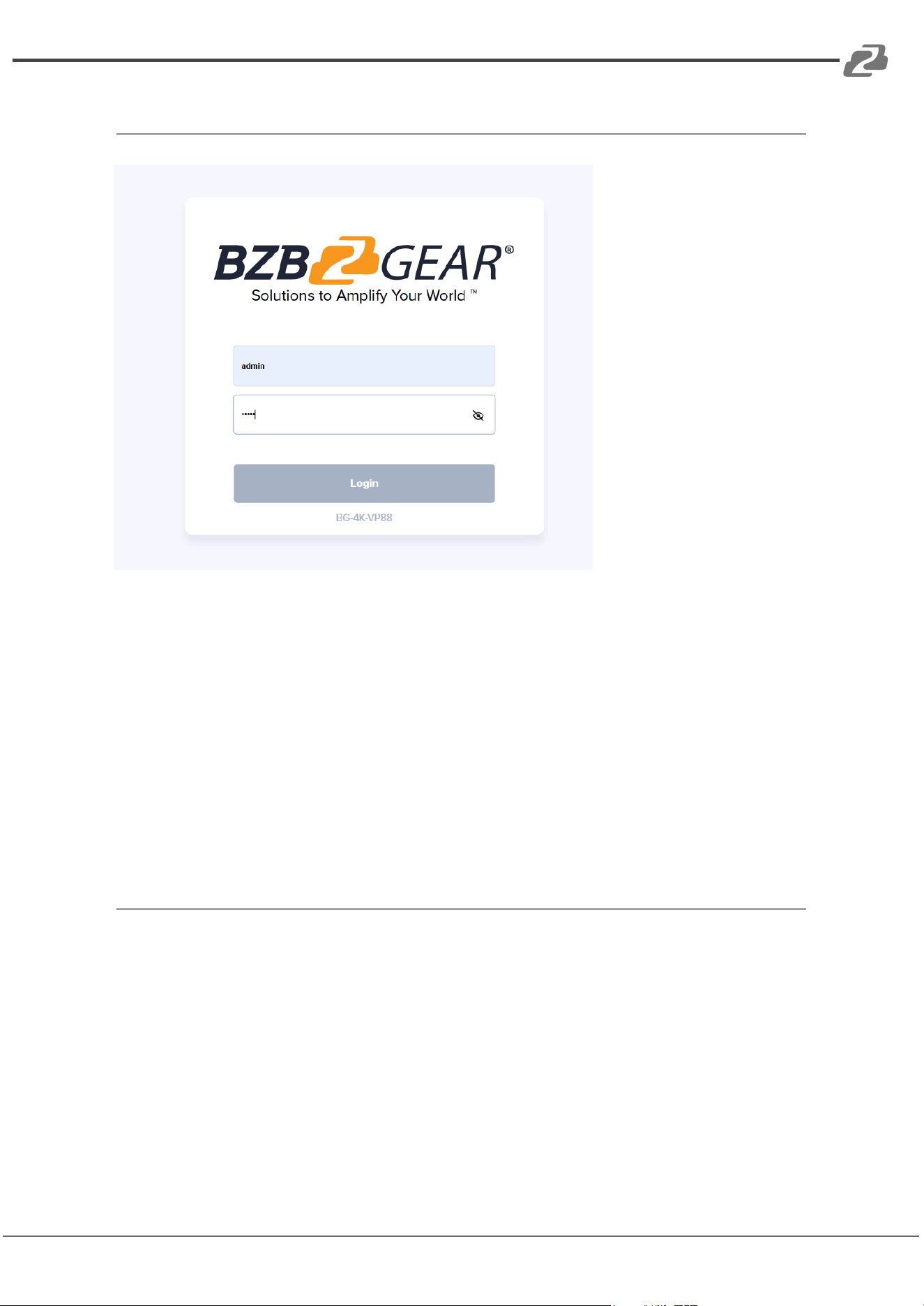
Accessing the Web GUI
1. Ensure the BG-4K-VP88 is connected to the same network as your PC.
2. Enter the device’s IP address into your browser’s address bar.
3. The login page will appear.
○ Default Username: admin
○ Default Password: admin
Address: 830 National Drive #140, Sacramento, CA 95834, USA · Tel: +1(888)499-9906 · Email: support@bzbgear.com 28
BZBGEAR BG-4K-VP88 PRODUCT MANUAL
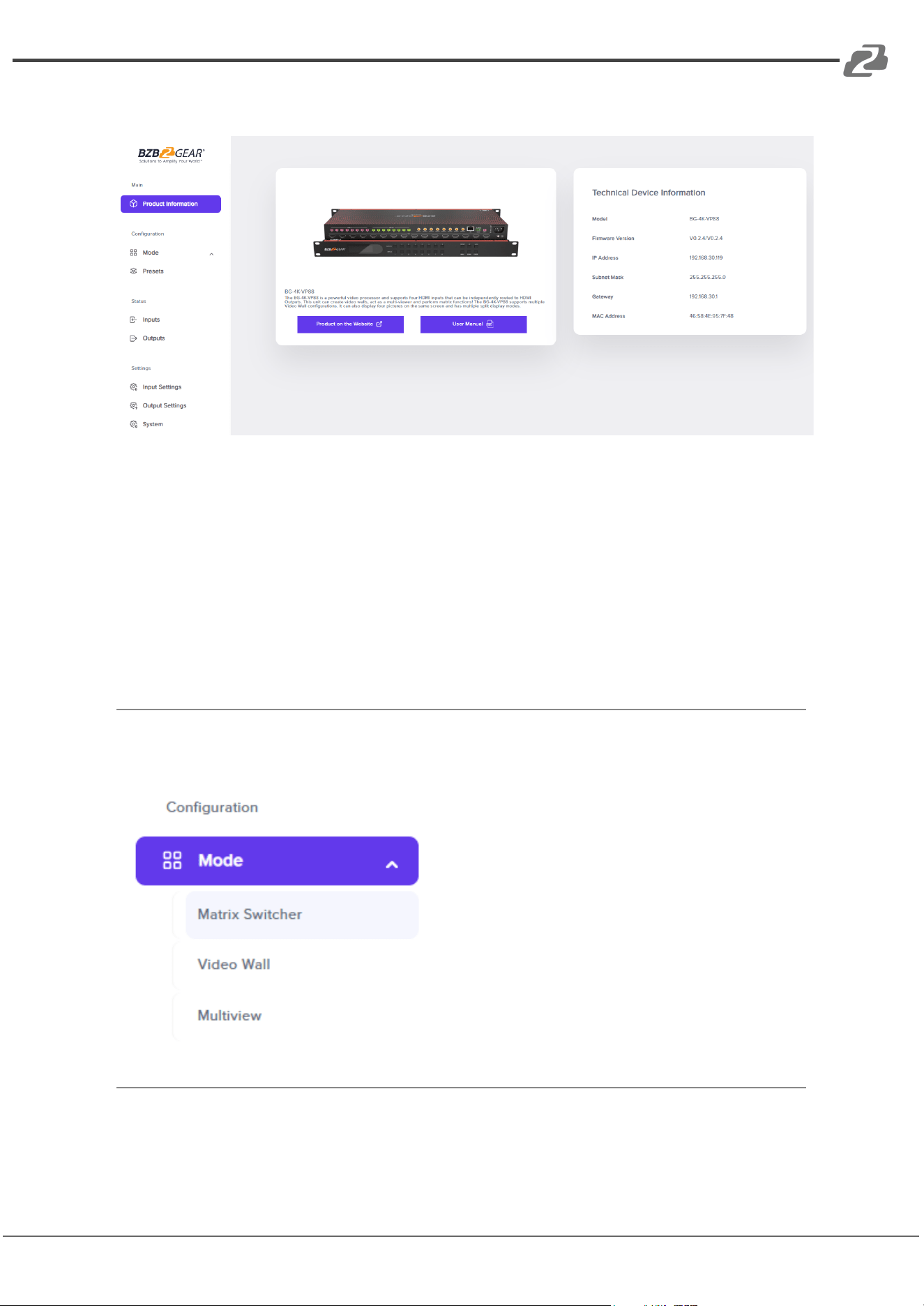
Product Information
The Product Information tab provides essential details about the device and links to
product resources. This includes:
● Model name
● Firmware versions (MCU/HTML)
● IP address
● Subnet Mask
● Gateway
● MAC address
Available Configuration Modes
The BG-4K-VP88 supports three distinct
configuration modes:
● Matrix Switcher
● Video Wall
● Multiview
Note: Any changes made in the active
mode are applied immediately to the
video outputs.
Address: 830 National Drive #140, Sacramento, CA 95834, USA · Tel: +1(888)499-9906 · Email: support@bzbgear.com 29
BZBGEAR BG-4K-VP88 PRODUCT MANUAL
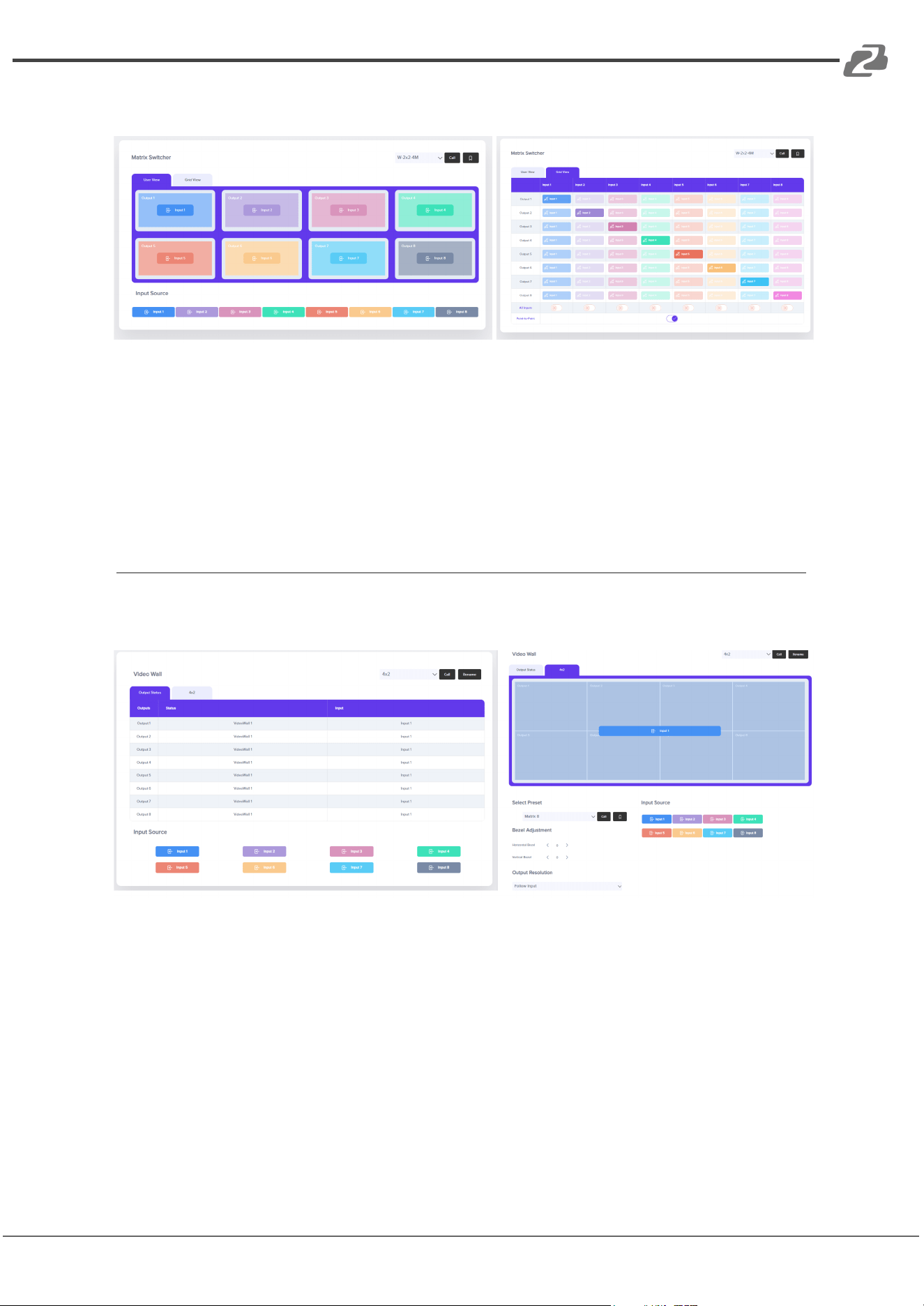
Matrix Switcher Mode
● Live View:
View the current system configuration. Drag and drop input sources onto output
ports for quick and precise routing.
● Grid View:
Access all input and output ports displayed in a grid layout for efficient switching
and configuration.
Video Wall Mode
● Output Status:
View the current input/output assignments for your video wall layout.
● Configuration:
Configure the video wall settings by selecting from preset layouts, assigning input
sources, and saving your setup. Additional controls include:
○ Bezel adjustment
○ Output resolution configuration
○ Saving and recalling presets
Address: 830 National Drive #140, Sacramento, CA 95834, USA · Tel: +1(888)499-9906 · Email: support@bzbgear.com 30
BZBGEAR BG-4K-VP88 PRODUCT MANUAL
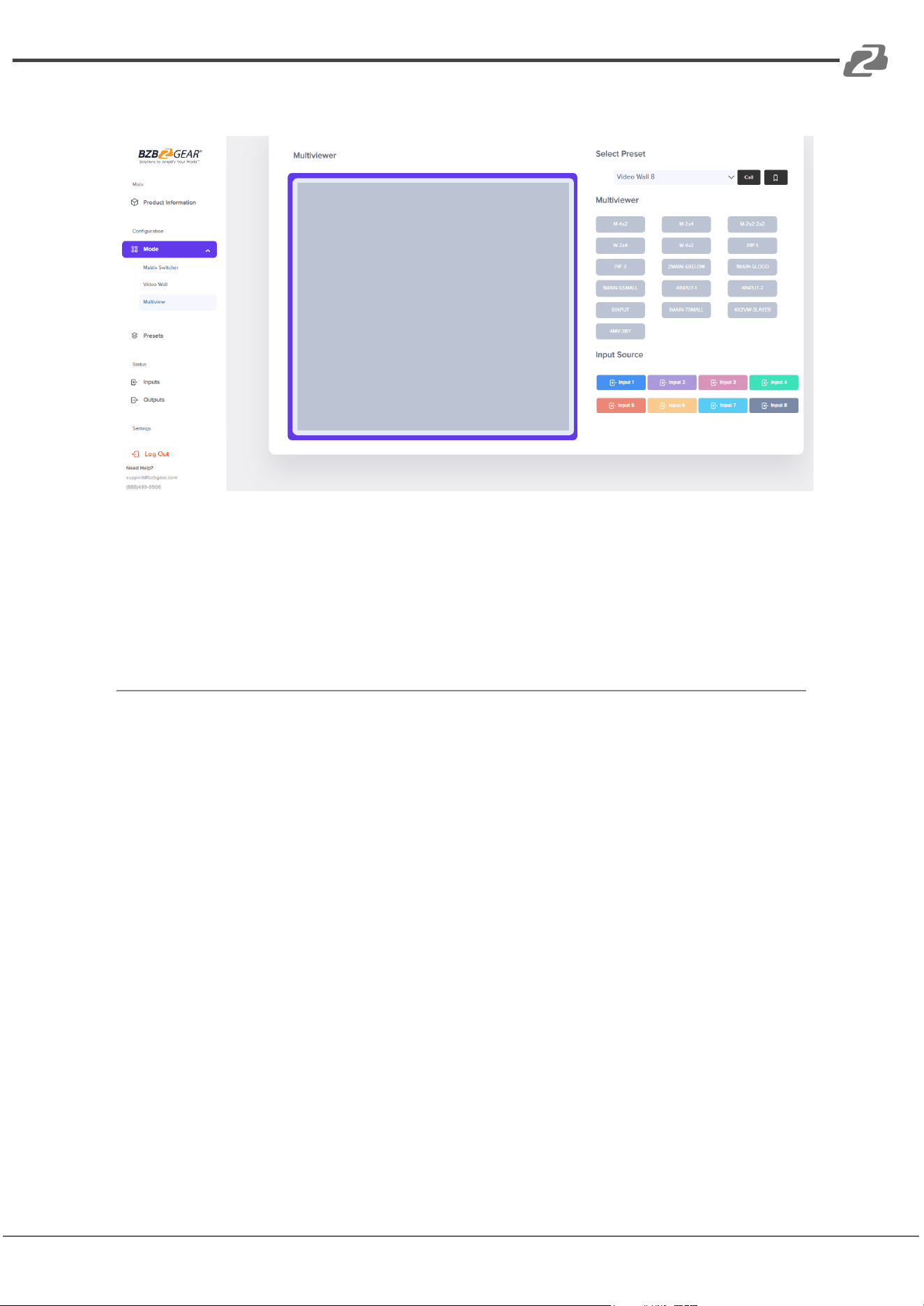
Multiview Mode
In Multiview mode, users can:
● Select a multiview layout from available configurations
● Drag and drop input sources into each window
● Save layouts as presets for easy recall
Address: 830 National Drive #140, Sacramento, CA 95834, USA · Tel: +1(888)499-9906 · Email: support@bzbgear.com 31
BZBGEAR BG-4K-VP88 PRODUCT MANUAL
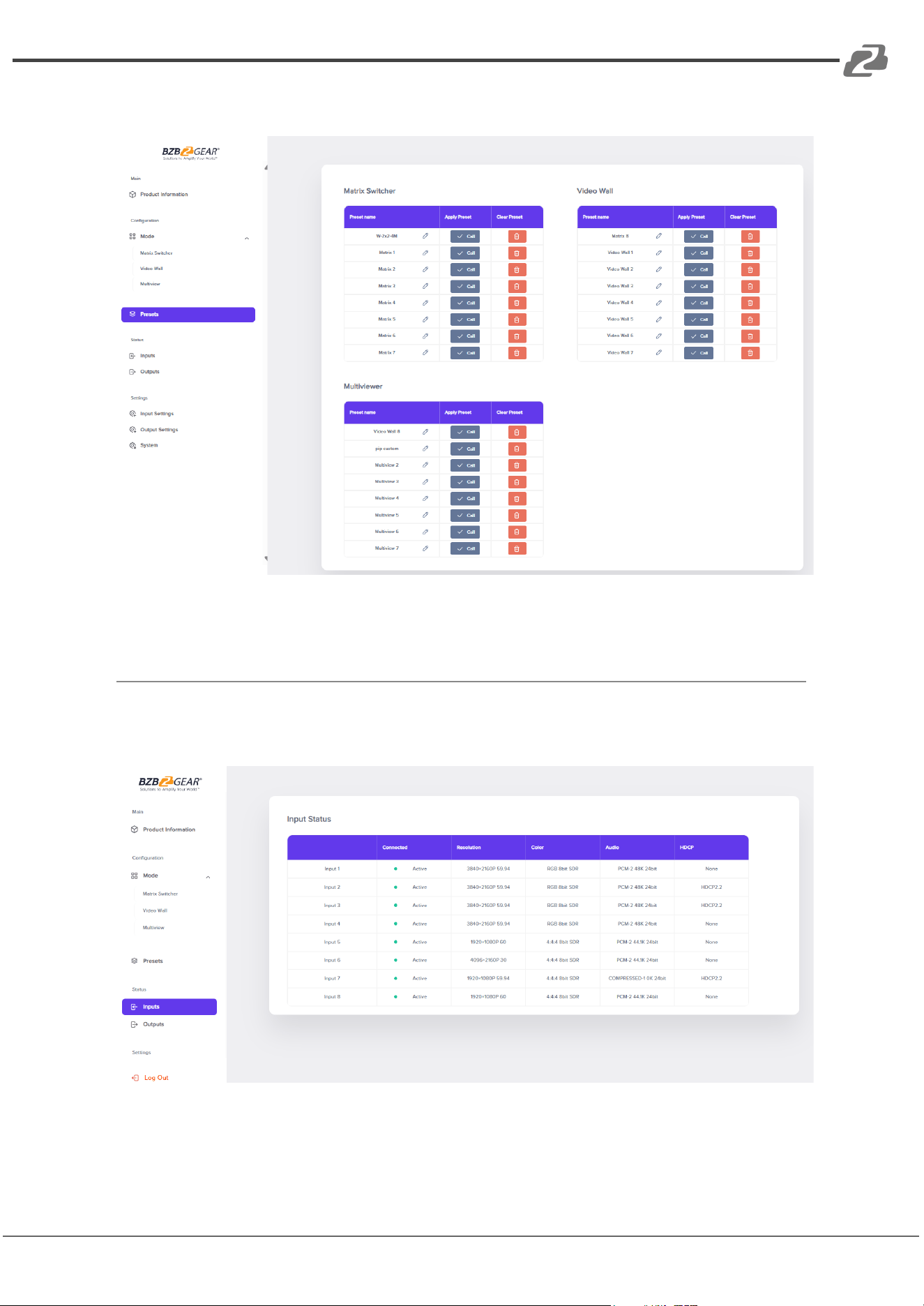
Presets
The Presets tab stores and manages presets across all three operating modes (Matrix
Switcher, Video Wall, and Multiview). Load saved configurations with a single click.
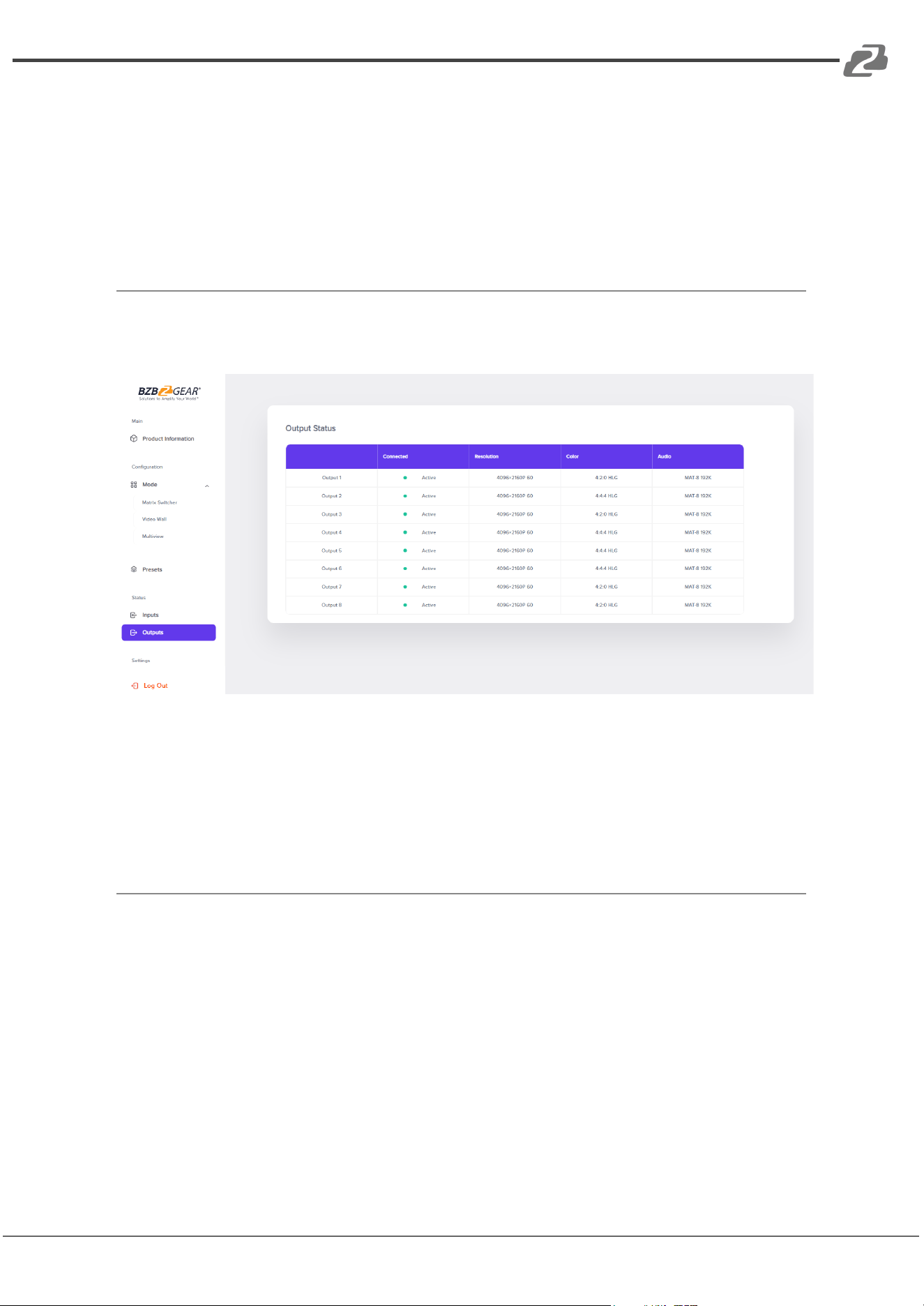
Input Status
Address: 830 National Drive #140, Sacramento, CA 95834, USA · Tel: +1(888)499-9906 · Email: support@bzbgear.com 32
BZBGEAR BG-4K-VP88 PRODUCT MANUAL
Displays detailed information for all input ports, including:
● Connection status
● Source resolutions
● Color format
● Audio format
● HDCP status
Output Status
Shows the current status of all output ports, including:
● Connection status
● Maximum supported resolution of connected displays
● Color format
● Audio format
Address: 830 National Drive #140, Sacramento, CA 95834, USA · Tel: +1(888)499-9906 · Email: support@bzbgear.com 33
BZBGEAR BG-4K-VP88 PRODUCT MANUAL
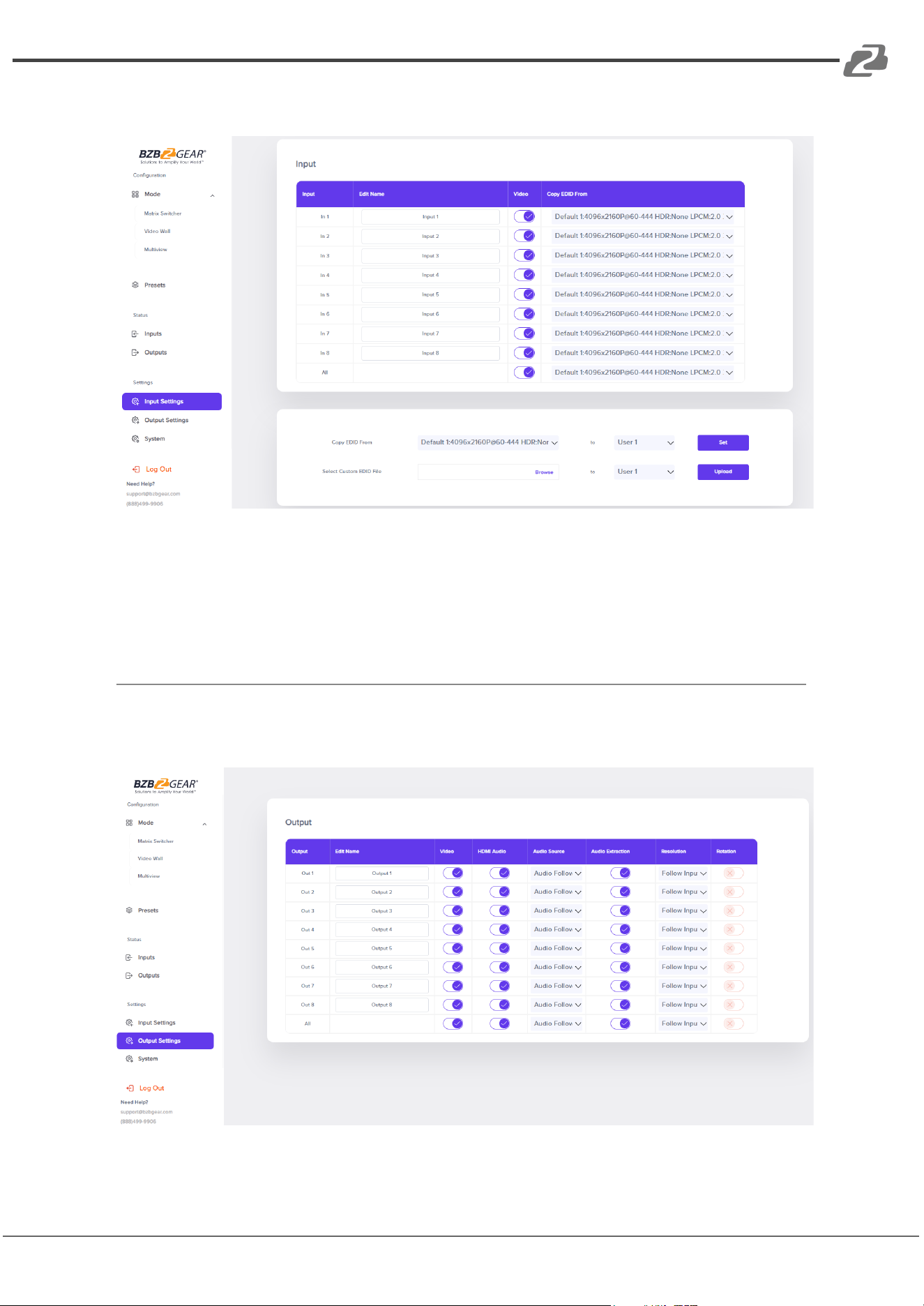
Input Settings
Manage your input devices through the Input Settings page:
● Assign custom names to each input
● Enable or disable video streams
● Configure EDID settings
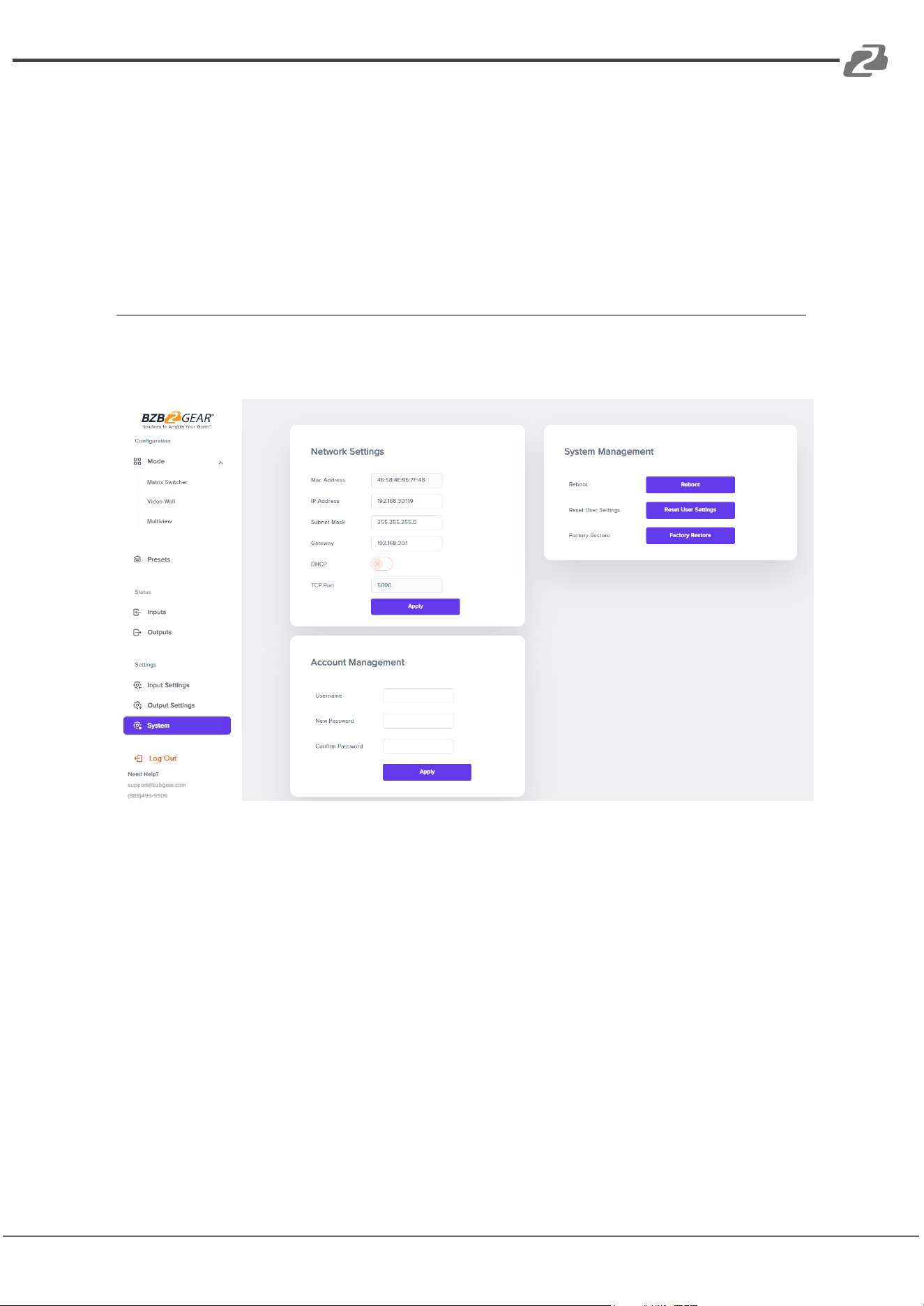
Output Settings
Address: 830 National Drive #140, Sacramento, CA 95834, USA · Tel: +1(888)499-9906 · Email: support@bzbgear.com 34
BZBGEAR BG-4K-VP88 PRODUCT MANUAL
Customize each output port’s behavior:
● Assign custom names to each output
● Enable or disable video and HDMI audio streams
● Select the audio source for each output
● Enable or disable audio extraction
● Adjust the output resolution
● Rotate the video output by 180° when needed
System Settings
The System Settings page offers complete system management:
● Network Settings:
○ MAC Address
○ IP Address
○ Subnet Mask
○ Gateway
○ DHCP configuration
○ TCP Port settings
Address: 830 National Drive #140, Sacramento, CA 95834, USA · Tel: +1(888)499-9906 · Email: support@bzbgear.com 35

BZBGEAR BG-4K-VP88 PRODUCT MANUAL
● System Management:
○ Reboot the device
○ Reset user settings
○ Perform a factory reset
● Account Management:
○ Create and manage user accounts
Address: 830 National Drive #140, Sacramento, CA 95834, USA · Tel: +1(888)499-9906 · Email: support@bzbgear.com 36
BZBGEAR BG-4K-VP88 PRODUCT MANUAL
HDCP
HDMI
Output
Device1
HDCP2.2/1.4
Device2
HDCP1.4
Device3
NO HDCP
HDCP2.2
HDCP2.2
/
No signal
HDCP1.4
HDCP1.4
HDCP1.4
No signal
Off HDCP
NO HDCP
NO HDCP
NO HDCP
Factory Default Setting
1)Video:P-to-P, 1x1, 2x2, 3x3, 4x4, 5x5, 6x6, 7x7, 8x8
2)Audio:Audio Embedding turn off, HDMI Output audio on, Extraction on
3)Network:
● Static IP address
● 192.168.1.200
● Sub net:255.255.255.000
● Gateway:192.168.1.1
● Port:TCP: 5000, UDP:5001, Telnet:23
● Web GUI & Telnet:
● Login: admin
● Password: admin
● MAC Address (cannot be modified)
Address: 830 National Drive #140, Sacramento, CA 95834, USA · Tel: +1(888)499-9906 · Email: support@bzbgear.com 37

BZBGEAR BG-4K-VP88 PRODUCT MANUAL
Tech Support
Have technical questions? We may have answered them already!
Please visit BZBGEAR’s support page (bzbgear.com/support) for helpful information and
tips regarding our products. Here you will find our Knowledge Base
(bzbgear.com/knowledge-base) with detailed tutorials, quick start guides, and step-by-step
troubleshooting instructions. Or explore our YouTube channel, BZB TV
(youtube.com/c/BZBTVchannel), for help setting up, configuring, and other helpful how-to
videos about our gear.
Need more in-depth support? Connect with one of our technical specialists directly:
Phone
1.888.499.9906
Email
support@bzbgear.com
Live Chat
bzbgear.com
Limited Product Warranty Terms
Pro Line: 5-year warranty from the date of purchase for AV/Broadcasting products bought
on or after August 1, 2024.
Essential Line: 3-year warranty from the date of purchase for AV/Broadcasting products
bought on or after August 1, 2024.
Cables: Lifetime Limited Product Warranty.
For complete warranty information, please visit bzbgear.com/warranty.
For questions, please call 1.888.499.9906 or email support@bzbgear.com.
Mission Statement
BZBGEAR is a breakthrough manufacturer of high-quality, innovative audiovisual equipment
ranging from AVoIP, professional broadcasting, conferencing, home theater, to live
streaming solutions. We pride ourselves on unparalleled customer support and services.
Our team offers system design consultation, and highly reviewed technical support for all
the products in our catalog. BZBGEAR delivers quality products designed with users in
mind.
Copyright
All the contents in this manual and its copyright are owned by BZBGEAR. No one is allowed
to imitate, copy, or translate this manual without BZBGEAR’s permission. This manual
contains no guarantee, standpoint expression or other implies in any form. Product
specification and information in this manual is for reference only and subject to change
without notice.
All rights reserved. No reproducing is allowed without acknowledgement.
Address: 830 National Drive #140, Sacramento, CA 95834, USA · Tel: +1(888)499-9906 · Email: support@bzbgear.com 38
