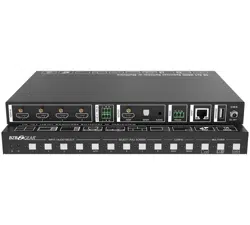
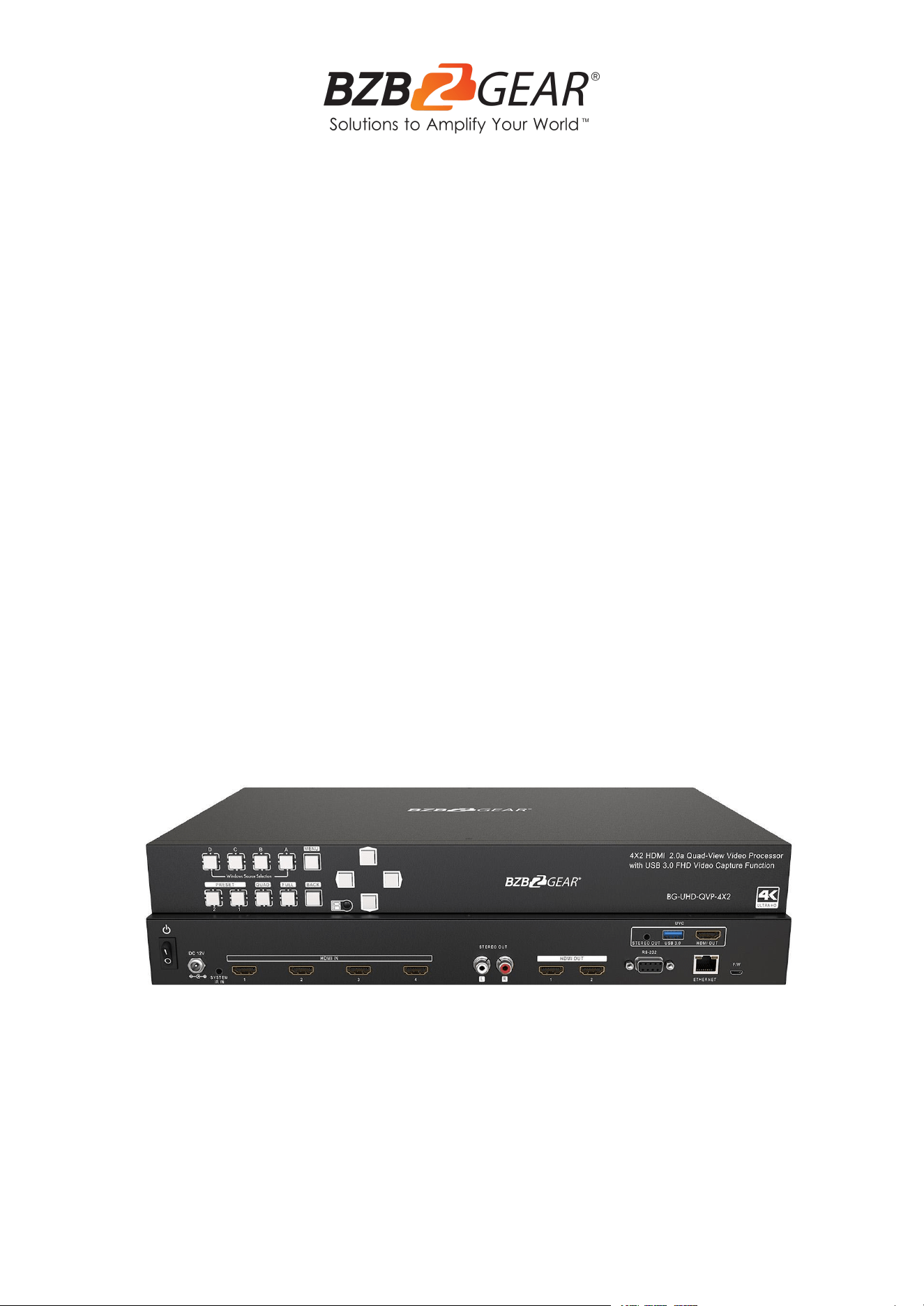
BG-UHD-QVP-4X2
4K/UHD 4X2 Seamless Multiviewer/Presentation Switcher/Scaler
with USB Capture Card
User Manual

BZBGEAR BG-UHD-QVP-4X2 PRODUCT MANUAL
Address: 830 National Drive #140, Sacramento, CA 95834, USA · Tel: +1(888)499-9906 · Email: support@bzbgear.com 2

BZBGEAR BG-UHD-QVP-4X2 PRODUCT MANUAL
TABLE OF CONTENTS
Statement 4
Safety Precaution 4
Introduction 5
Features 5
Packing List 6
Specifications 7
Operation Controls and Functions 9
Method A: IR Remote Control 10
Method B: Software Control through RS-232 / Ethernet port 11
Control interface 11
Connection Status 12
Output Settings 12
Advanced Setting 14
EDID (Extended Display Identification Data) 16
System Setting 17
IP Configure 19
Info 19
Refresh 20
Method C: Cloud Control (Eagleyes) through Ethernet Port 20
Create Account 20
Add Device to Eagleyes 21
USB Pin Definition 22
Hardware Installation 23
Connection Diagram 23
Tech Support 24
Limited Product Warranty Terms 24
Mission Statement 24
Copyright 24
Address: 830 National Drive #140, Sacramento, CA 95834, USA · Tel: +1(888)499-9906 · Email: support@bzbgear.com 3

BZBGEAR BG-UHD-QVP-4X2 PRODUCT MANUAL
Statement
Please read these instructions carefully before connecting, operating, or configuring this
product. Please save this manual for future reference.
Safety Precaution
● To prevent damaging this product, avoid heavy pressure, strong vibration, or immersion
during transportation, storage, and installation.
● The housing of this product is made of organic materials. Do not expose to any liquid,
gas, or solids which may corrode the shell.
● Do not expose the product to rain or moisture.
● To prevent the risk of electric shock, do not open the case. Installation and maintenance
should only be carried out by qualified technicians.
● Do not use the product beyond the specified temperature, humidity, or power supply
specifications.
● This product does not contain parts that can be maintained or repaired by users.
Damage caused by dismantling the product without authorization from BZBGEAR is not
covered under the warranty policy.
● Installation and use of this product must strictly comply with local electrical safety
standards.
Address: 830 National Drive #140, Sacramento, CA 95834, USA · Tel: +1(888)499-9906 · Email: support@bzbgear.com 4

BZBGEAR BG-UHD-QVP-4X2 PRODUCT MANUAL
Introduction
The BG-UHD-QVP-4x2 is a 4x2 HDMI 2.0a quad-view video processor with 4K2K@60 4:4:4
& USB 3.0 capabilities. FHD video capture functionality provides the most flexible and cost
effective solution in the market to route ultra-high definition video from any of the four UHD
HDMI sources to two remote displays at the same time.
Using powerful built-in USB 3.0 capture & auto scaling down features, users can broadcast
up to 1080p video & 2ch audio through real-time online software, such as skype. This
unique function makes this 4K video processor perfect for work as a live switch for either
education or commercial applications. The BG-UHD-QVP-4x2 is also well suited for use in
digital signage, conference room presentation systems or other similar applications.
With up to 4K2K60 4:4:4 output resolution, users can display mixed video with improved
presentation quality. The unit can be controlled through IR, the front panel, and either the
serial or Ethernet ports to provide the most flexible types of control to fit into any
application.
Features
● 4x HDMI inputs and 2x HDMI outputs
● Input resolutions from 640x480 to 4096x2160@60Hz (4:4:4 8bits), interlaced or
progressive
● Output resolutions up to 4K2K@60Hz (4:4:4 8bits)
● Adjustable size & position through software and Cloud
● Supports PIP, PBP, POP, full screen & quad-view display
● HDCP 1.4/2.2 compliant
● Firmware upgradable to support of new features and technology enhancements
● Titles, borders, and colored backgrounds
● Supports Background picture & logo updatable
● Resize, position, zoom, pan, and blend output video
● Supports seamless, fade-in-&-out, wipe and dissolve switching on full screen mode
● Perfect as a video converter and a live video switcher
● Pure, unaltered, uncompressed 7.1ch digital HDMI
● Software control through RS-232 and Ethernet
● Supports IR remote and front panel control
● Supports Cloud Control*
Address: 830 National Drive #140, Sacramento, CA 95834, USA · Tel: +1(888)499-9906 · Email: support@bzbgear.com 5

BZBGEAR BG-UHD-QVP-4X2 PRODUCT MANUAL
● Supports USB 3.0 FHD Video Capture
- HDMI video and audio streams over USB 3.0
- Supports UVC1.0
- Supports video resolution up to 1080p 60Hz (Video stream over USB 3.0)
- Supports HDMI loopout from 640x480 to 4K2K@60 (YUV 4:4:4), interlaced or
progressive
- Supports HDMI audio extraction
- Recording Video Format: H.264 (Software Compression)
- Works on multiple operating system platforms (Windows 7/8.1/10, Mac and Linux
OS)
- Compatible with most 3rd party software such as OBS Studio and AMCap
- Supports USB 3.0 (MJPEG/YUY2) and USB 2.0 (MJPG)
*Cloud support is thru an encrypted communication to provide the best private protection
when using BG-UHD-QVP-4X2
Packing List
● 1 x BG-UHD-QVP-4X2
● 1 x DC 12V 5A
● 1 x Installation Software CD
● 1 x IR Remote control (28 keys)
● 1 x IR Receiving cable
● 1 x USB 3.0 A to A Cable (host to
device)
● 1 x User Manual
Address: 830 National Drive #140, Sacramento, CA 95834, USA · Tel: +1(888)499-9906 · Email: support@bzbgear.com 6
BZBGEAR BG-UHD-QVP-4X2 PRODUCT MANUAL
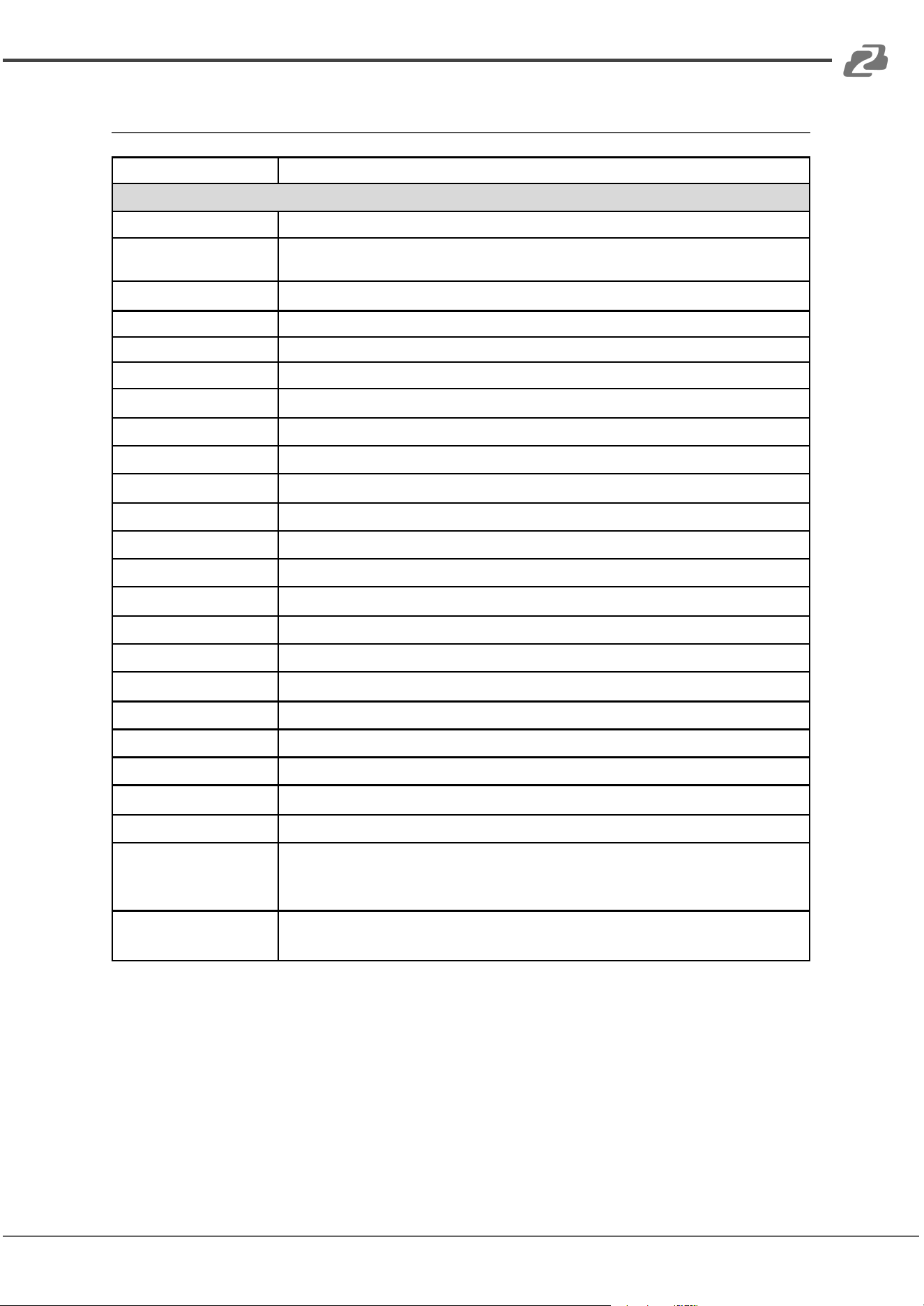
Specifications
Model Name
BG-UHD-QVP-4X2
Technical
Usage
Multiplexer / video processor
Background picture
updatable
Yes
HDCP compliance
1.4 / 2.2
HDMI compliance
HDMI 2.0a
Video bandwidth
HDMI [600MHz [18Gbps]
Output Video Support
Up to 4K2K@60 (4:4:4 8bits)
Video support (USB)
Up to 1080p60
Input Video Support
Up to 4K2K@60 (4:4:4 8bits)
Video Format Support
HDMI 2.0
Audio support
Bypass
Control
RS-232/ Ethernet/ IR/ Front panel Control/ Cloud
Embedded video mixer
Yes
Input TMDS signal
1.2 Volts [peak to peak]
Recording Mode
Software Compression
Recording Video Format
YUY2 (USB3.0), MJPG (USB2.0/3.0)
ESD protection
Human body model — ±15kV [air-gap discharge] & ±8kV [contact discharge]
Input
4x HDMI + 1xRS-232 + 1x RJ-45(Ethernet) + 1x 3.5mm (IR)
Output
3x HDMI + 1x USB + 2x RCA + 1x 3.5mm
HDMI connector
Type A [19-pin female]
USB connector
USB 3.0 Type A (SuperSpeed USB)
RS-232 connector
DE-9 [9-pin D-sub female]
RJ-45 connector
WE/SS 8P8C
Software compatibility
(not complete list)(Video
Capture Function)
OBS Studio (Windows, Linux), AMCap (Windows), Potplayer (Windows)¸ VLC (OS X,
Linux), XSplit Broadcast (Windows), Skype (Windows, OS X), Zoom (Windows),
Hangout (Windows), TeamViewer (Windows)
OS Support (Video
Capture Function)
Windows 7 /8.1 /10, Mac and Linux OS
Address: 830 National Drive #140, Sacramento, CA 95834, USA · Tel: +1(888)499-9906 · Email: support@bzbgear.com 7
BZBGEAR BG-UHD-QVP-4X2 PRODUCT MANUAL
Mechanical
Housing
Metal Enclosure
Color
Black
Dimensions
(L x W x H)
Model: 390 x 248 x 44mm [1'3" x 9.8" x 1.7"]
Package: 526 x 318 x 156mm [1'7" x 12.5" x 6.1"]
Carton: 543 x 335 x 344mm [1'8" x 13.2" x 1'1"]
Weight
Model: 2.2 kg [5 lbs]
Package: 3.5 kg [7.8 lbs]
Power supply
12V 5A DC
Power Consumption
22 Watts [max]
Operating Temperature
0~40°C [32~104°F]
Storage Temperature
-20~60°C [-4~140°F]
Relative Humidity
20~90% RH [no condensation]
Address: 830 National Drive #140, Sacramento, CA 95834, USA · Tel: +1(888)499-9906 · Email: support@bzbgear.com 8
BZBGEAR BG-UHD-QVP-4X2 PRODUCT MANUAL
Operation Controls and Functions
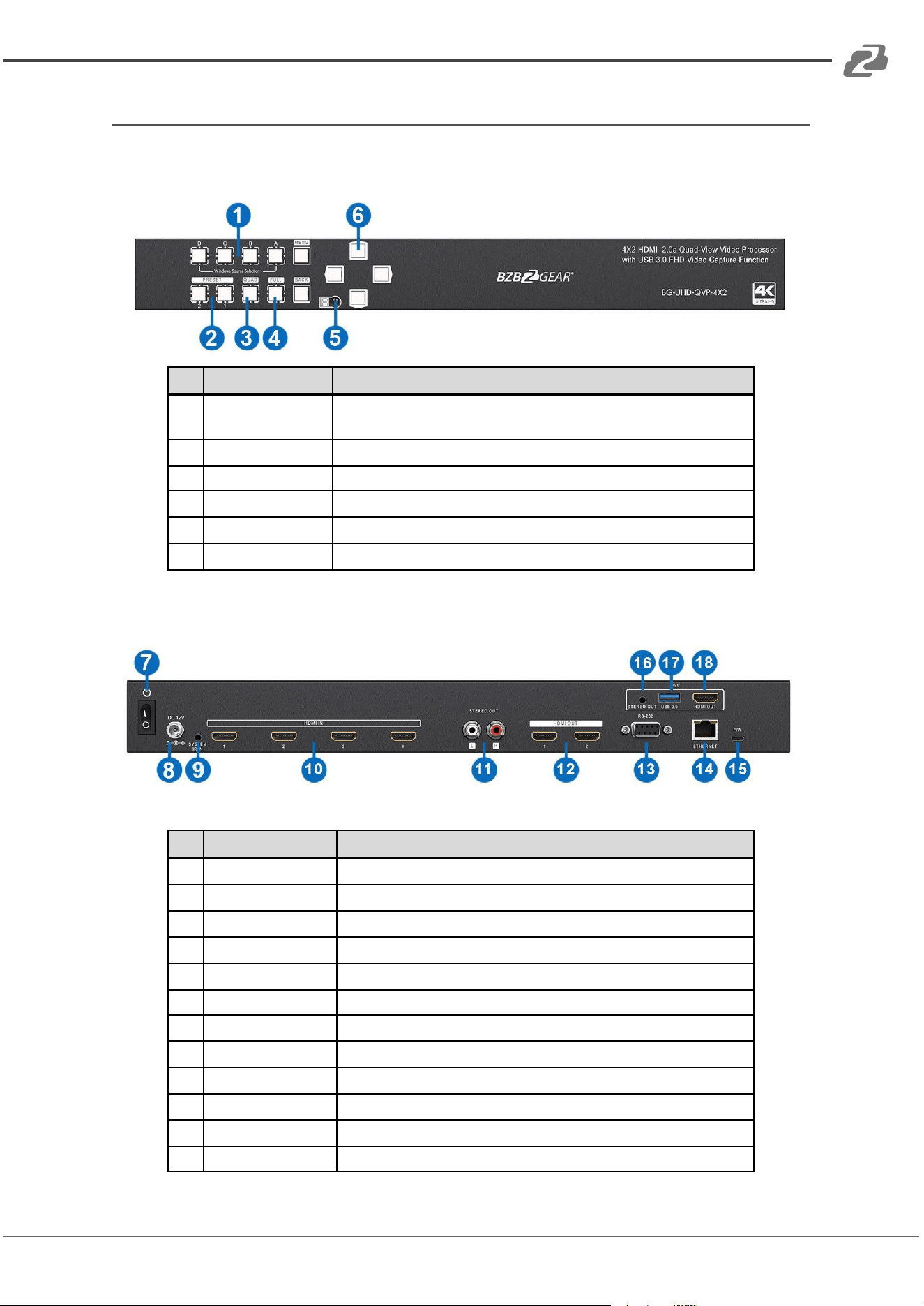
Front Panel
No.
Name
Function Description
1
Windows Source
Selection A-D
Window A-D source selection (from the left to the right is D, C, B, A)
2
Presets
User preset 2 and user preset 1
3
Quad
Fast switch to quad-view mode
4
Full Screen
Switch Window in full screen mode
5
IR SENSOR
IR sensor for receiving the IR commands from IR remote
6
OSD Button
On Screen Display (Menu)
Rear Panel
No.
Name
Function Description
7
Power switch
Power On/Off
8
+12V DC
12V DC power jack
9
IR Receiver
3.5mm socket for plugging in the extension cable of IR receiver
10
SOURCE 1-4
HDMI inputs
11
Stereo audio output
L/R
12
OUTPUT 1-2
HDMI outputs
13
RS-232
RS-232 control port
14
Ethernet
Ethernet control port
15
Micro USB
For F/W update
16
STEREO AUDIO OUT
Audio extracts from selected HDMI input
17
USB OUT
Connect to a USB host (PC, NB, MAC…)
18
HDMI LOOPOUT
Connect to a HDMI display
Address: 830 National Drive #140, Sacramento, CA 95834, USA · Tel: +1(888)499-9906 · Email: support@bzbgear.com 9
BZBGEAR BG-UHD-QVP-4X2 PRODUCT MANUAL
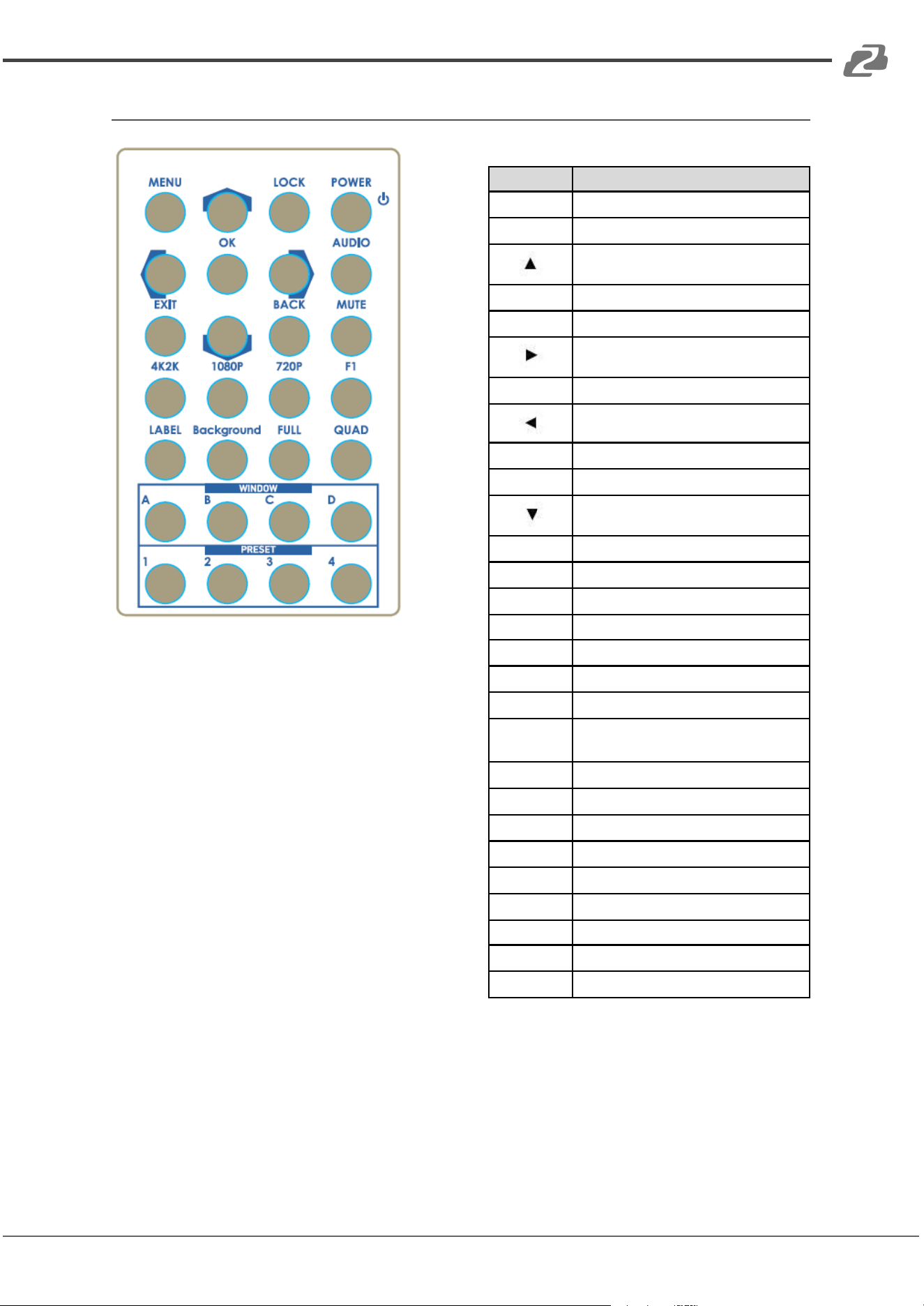
Method A: IR Remote Control
Button
Function
POWER
Power on/off the device
LOCK
Lock/unlock the device
Arrow button (up)
MENU
OSD menu
AUDIO
Select audio sources
Arrow button (right)
OK
Trigger the setting
Arrow button (left)
MUTE
Turn off the audio
BACK
Back to previous page of OSD menu
Arrow button (down)
EXIT
Exit from the menus
F1
Reserved
720P
Switch output resolution to 720p 60Hz
1080P
Switch output resolution to 1080p 60Hz
4K2K
Switch output resolution to 4K2K 60Hz
QUAD
Fast switch to quad-view mode
FULL
Fast switch to full screen mode
Background
To set up the background picture of
window
LABEL
Window label ON/OFF
D
Select source D to be the input source
C
Select source C to be the input source
B
Select source B to be the input source
A
Select source A to be the input source
P4
User preset 4
P3
User preset 3
P2
User preset 2
P1
User preset 1
Address: 830 National Drive #140, Sacramento, CA 95834, USA · Tel: +1(888)499-9906 · Email: support@bzbgear.com 10
BZBGEAR BG-UHD-QVP-4X2 PRODUCT MANUAL
Method B: Software Control through RS-232 / Ethernet port
System Requirement
1. OS information: MS Win XP/7/8/10
2. Baud rates: 115200
3. Software size: 10 MB
4. Minimum RAM requirement: 256MB
Control inter face
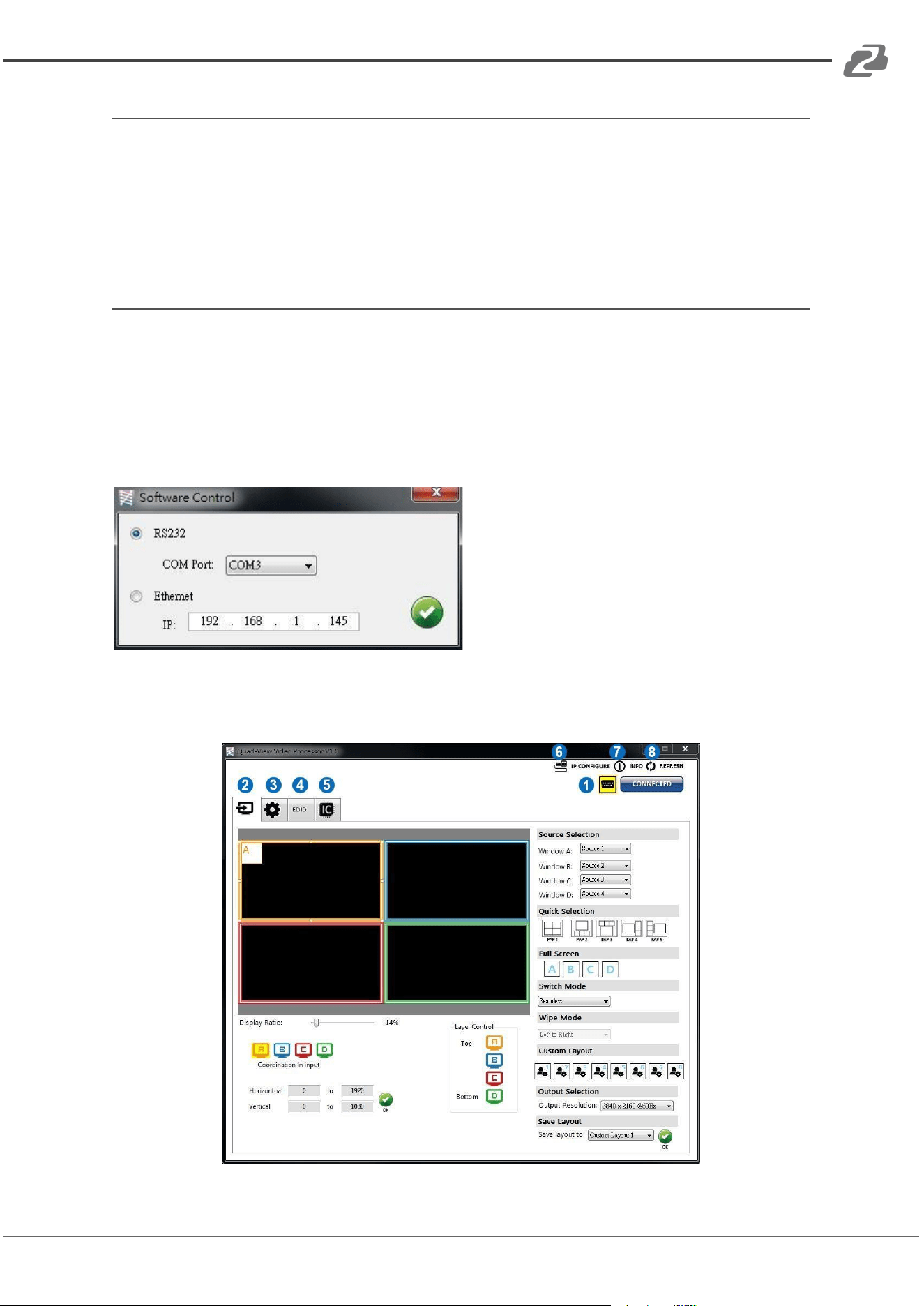
When clicking on the executable file, the following dialog will pop-up (under Microsoft
Windows 7, please run as administrator)
RS-232 serial Mode: Use RS-232 to connect the port on device and computer. Select the
correct COM port and click the OK button.
Ethernet Mode: Enter the IP address of the device and click the OK button.
After successfully setting the Software Control connection parameters the program will
open the control interface.
Address: 830 National Drive #140, Sacramento, CA 95834, USA · Tel: +1(888)499-9906 · Email: support@bzbgear.com 11
BZBGEAR BG-UHD-QVP-4X2 PRODUCT MANUAL
1. Connection Status
Shows connection information and status. If users use RS-232 serial Mode to connect
device, the symbol is . In contrast, if Ethernet is connected then is shown. In
addition, if users would like to change the control method, users can click on the
symbol.
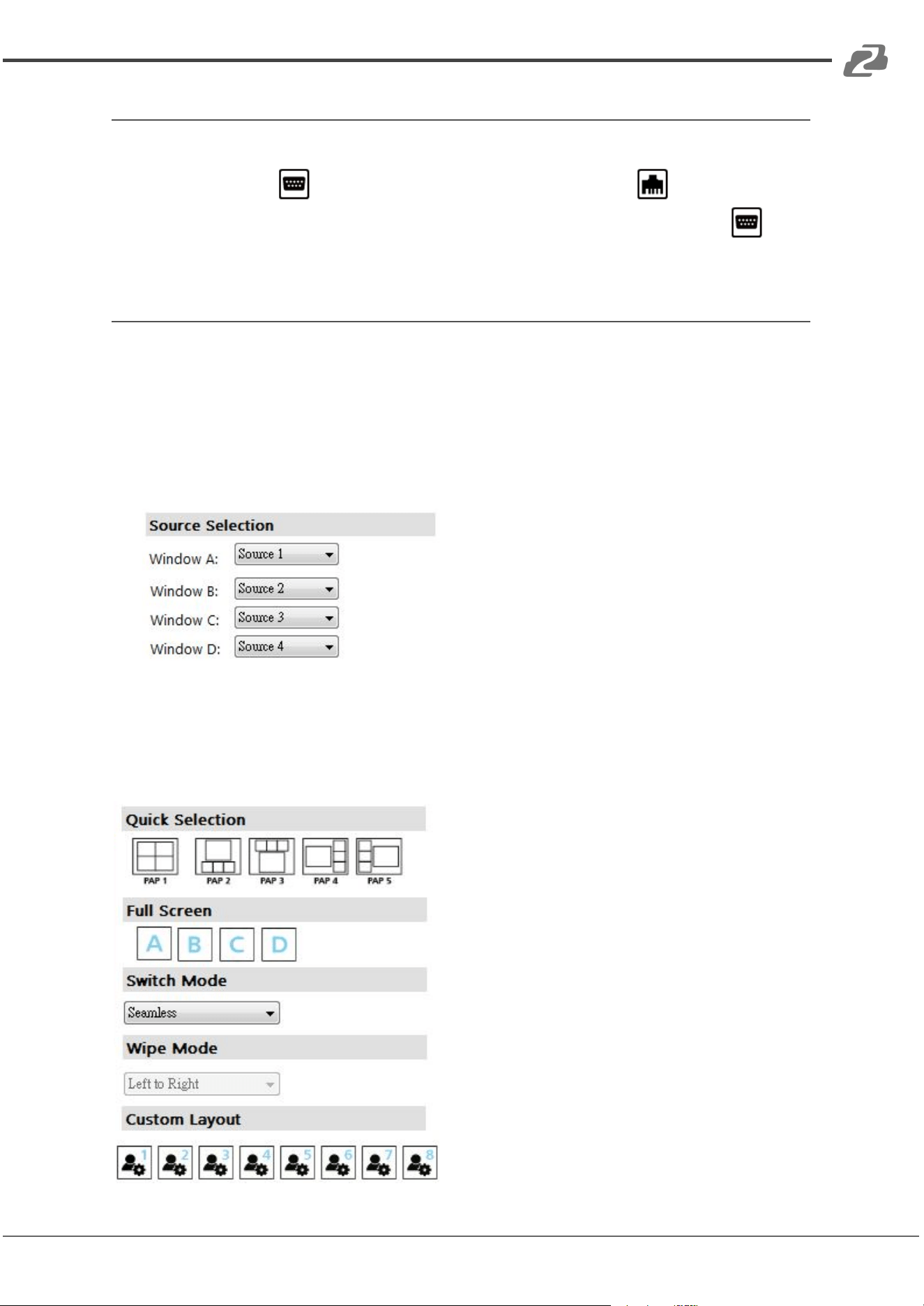
2. Output Settings
In this section, users can select inputs/sources for windows A~D, output resolution, layout
setting (PAP or full screen), and switch mode.
(1) Source Selection
For each display window assign a video source.
(2) Quick Selection
There are 9 default modes, 8 custom modes, and 4 switching effects (Seamless, Fade
in/out, Dissolve, Wipe) for users to select.
Address: 830 National Drive #140, Sacramento, CA 95834, USA · Tel: +1(888)499-9906 · Email: support@bzbgear.com 12
BZBGEAR BG-UHD-QVP-4X2 PRODUCT MANUAL
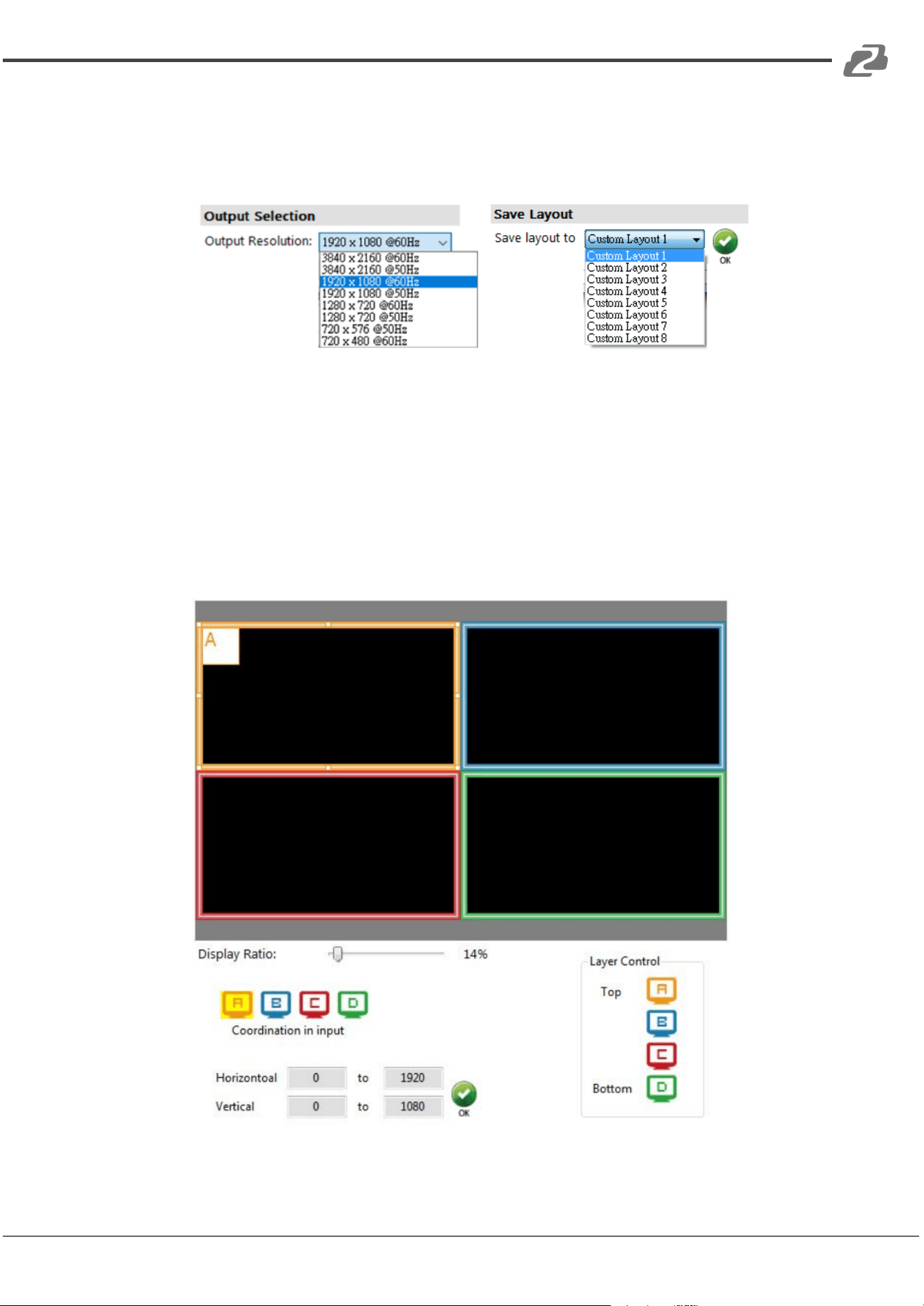
(3) Output Resolution
Set the output resolution.
(4) Save Layout
There are 8 custom layout spaces for users to save frequently used configurations.
(5) Display Panel
In the left part of the control interface, users can customize the display mode. The different
colors of frame represent the different input windows. In addition, users can also set the
display ratio for each window. If you want to change the window layer, drag the window
icon from the Layer Control section to the desired position.
Address: 830 National Drive #140, Sacramento, CA 95834, USA · Tel: +1(888)499-9906 · Email: support@bzbgear.com 13
BZBGEAR BG-UHD-QVP-4X2 PRODUCT MANUAL
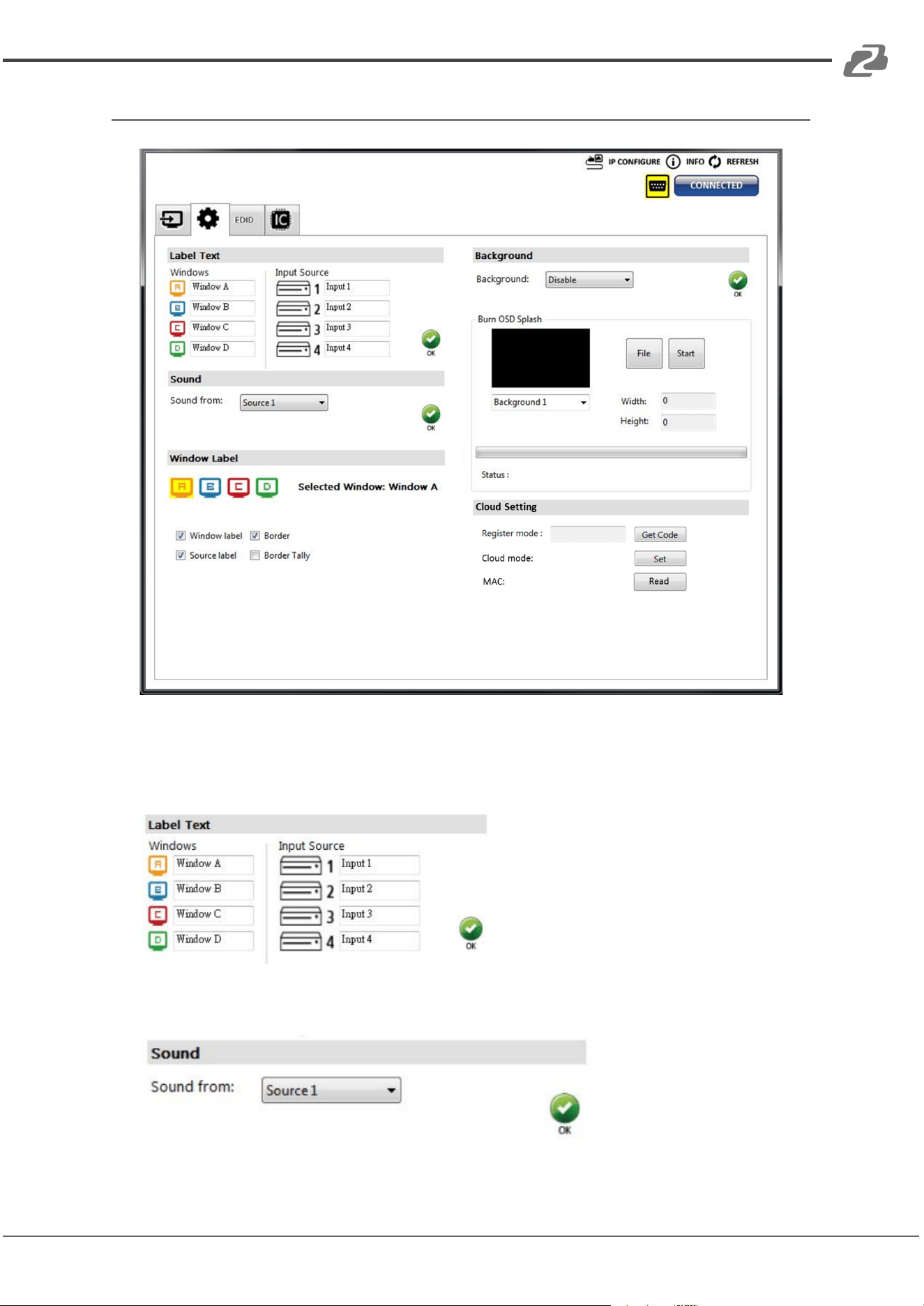
3. Advanced Setting
(1) Label Text
Users can input the text to be shown with the video.
(2) Sound
Select the audio source of the output and R/L channels.
Address: 830 National Drive #140, Sacramento, CA 95834, USA · Tel: +1(888)499-9906 · Email: support@bzbgear.com 14
BZBGEAR BG-UHD-QVP-4X2 PRODUCT MANUAL
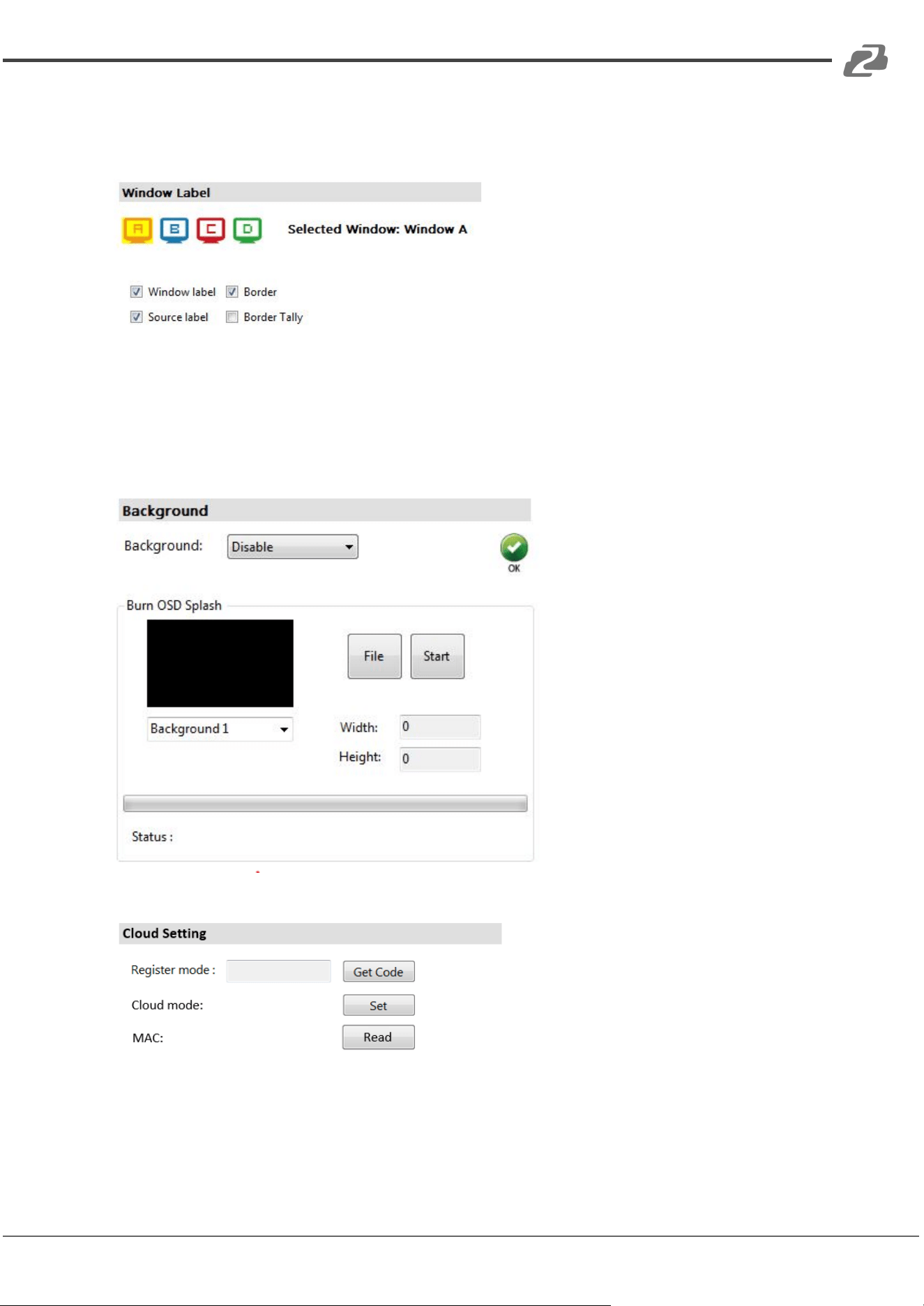
(3) Window Label
On this screen users can turn the window labels/borders on or off.
(4) Background
This screen is used to set the background of a window. Users can upload up to 4
background pictures. Click the File button to load the picture which you want to use and
then click the Start button to write this picture to the device.
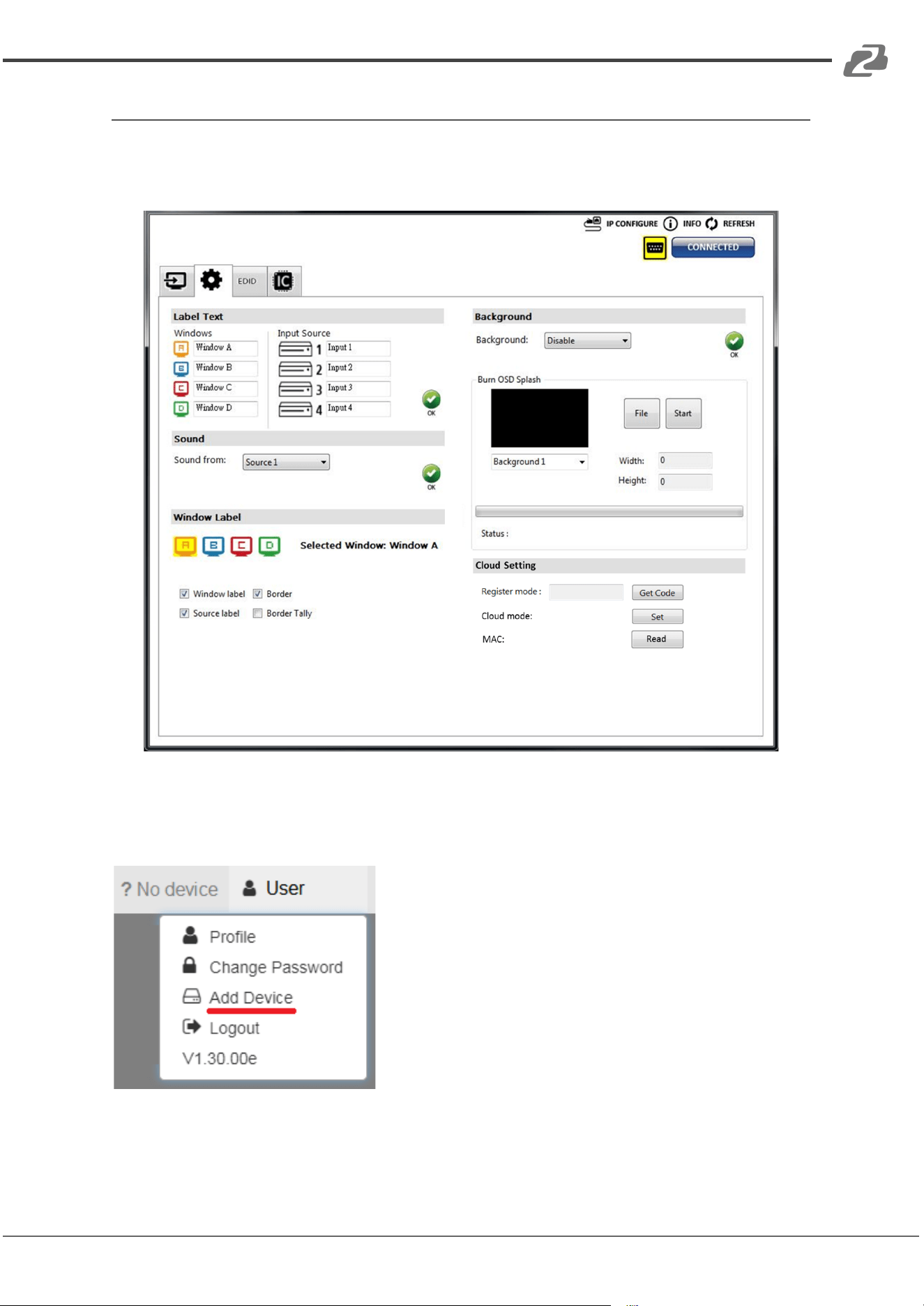
(5) Cloud Setting
➔ Register mode: To get an “association code”. The device can uses this code to pair
with a cloud server.
➔ Cloud mode: To reset cloud after a successful pairing
➔ MAC: Read the device’s MAC address information.
Address: 830 National Drive #140, Sacramento, CA 95834, USA · Tel: +1(888)499-9906 · Email: support@bzbgear.com 15
BZBGEAR BG-UHD-QVP-4X2 PRODUCT MANUAL
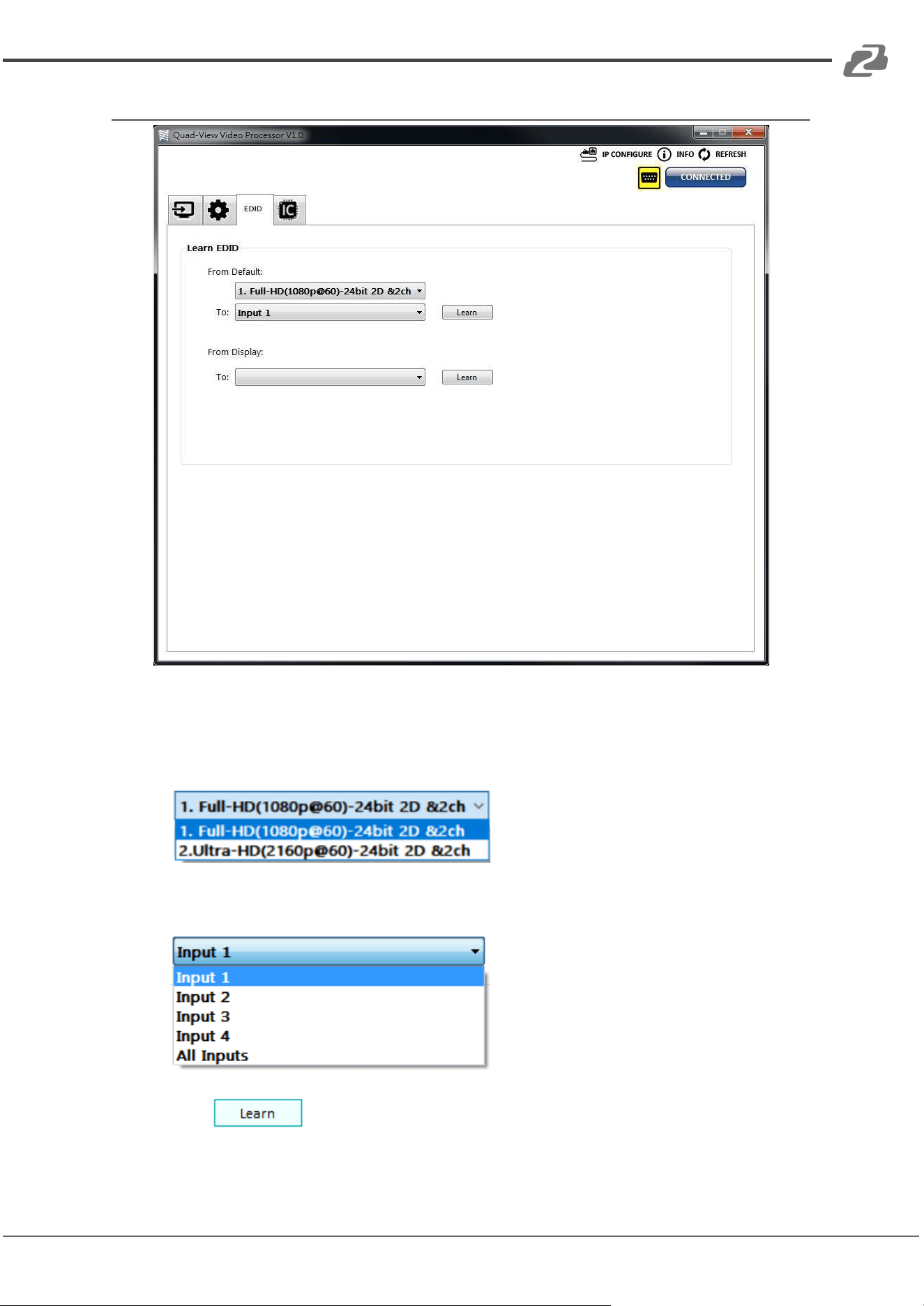
4. EDID (Extended Display Identification Data)
(1) Learn EDID from Default
➔ Select Default EDID
➔ Select Input
➔ Click button to learn default EDID.
Address: 830 National Drive #140, Sacramento, CA 95834, USA · Tel: +1(888)499-9906 · Email: support@bzbgear.com 16
BZBGEAR BG-UHD-QVP-4X2 PRODUCT MANUAL
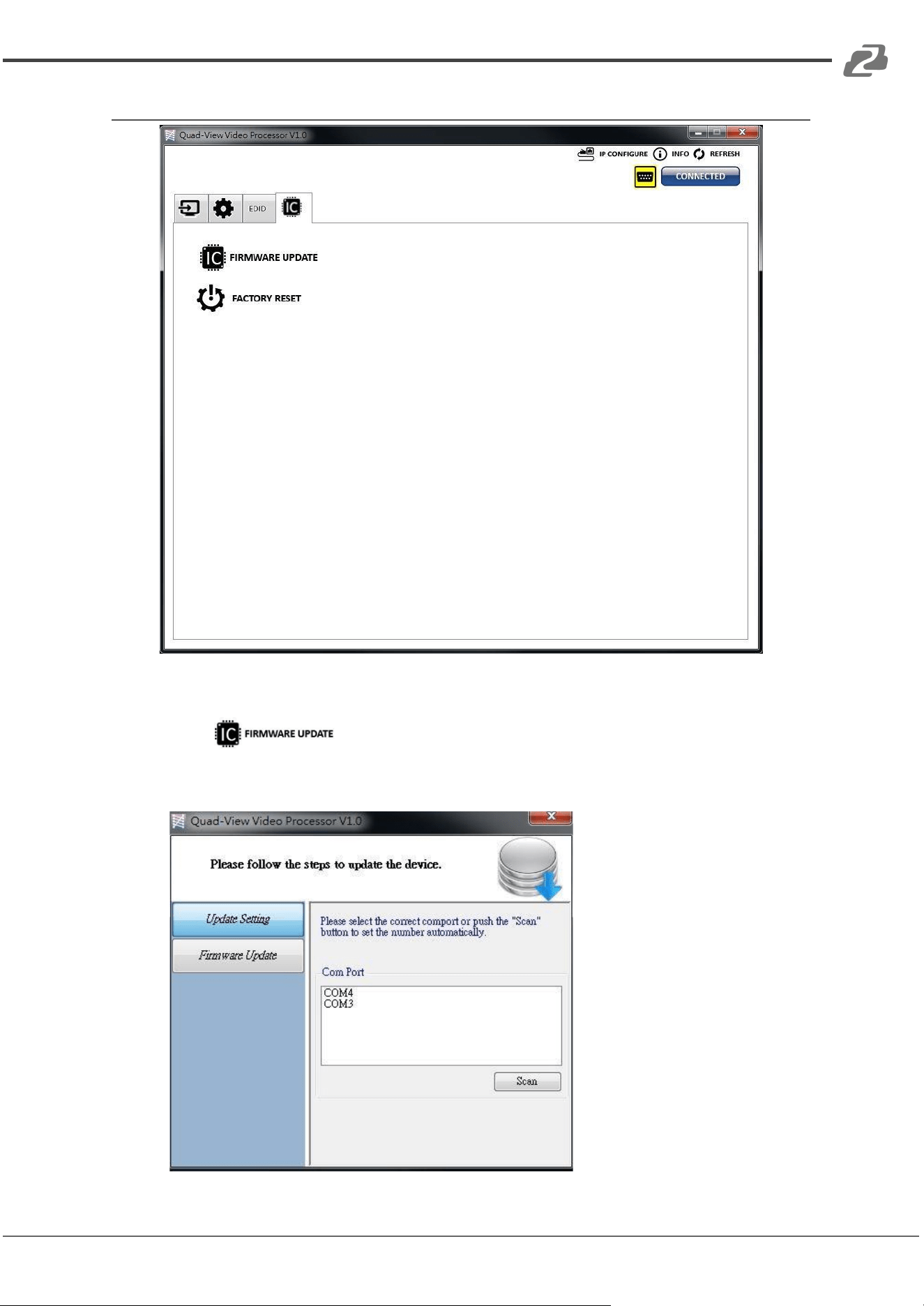
5. System Setting
(1) Firmware Update
➔ Click button to do firmware update.
➔ The “Firmware update” window shows up as below:
Address: 830 National Drive #140, Sacramento, CA 95834, USA · Tel: +1(888)499-9906 · Email: support@bzbgear.com 17
BZBGEAR BG-UHD-QVP-4X2 PRODUCT MANUAL
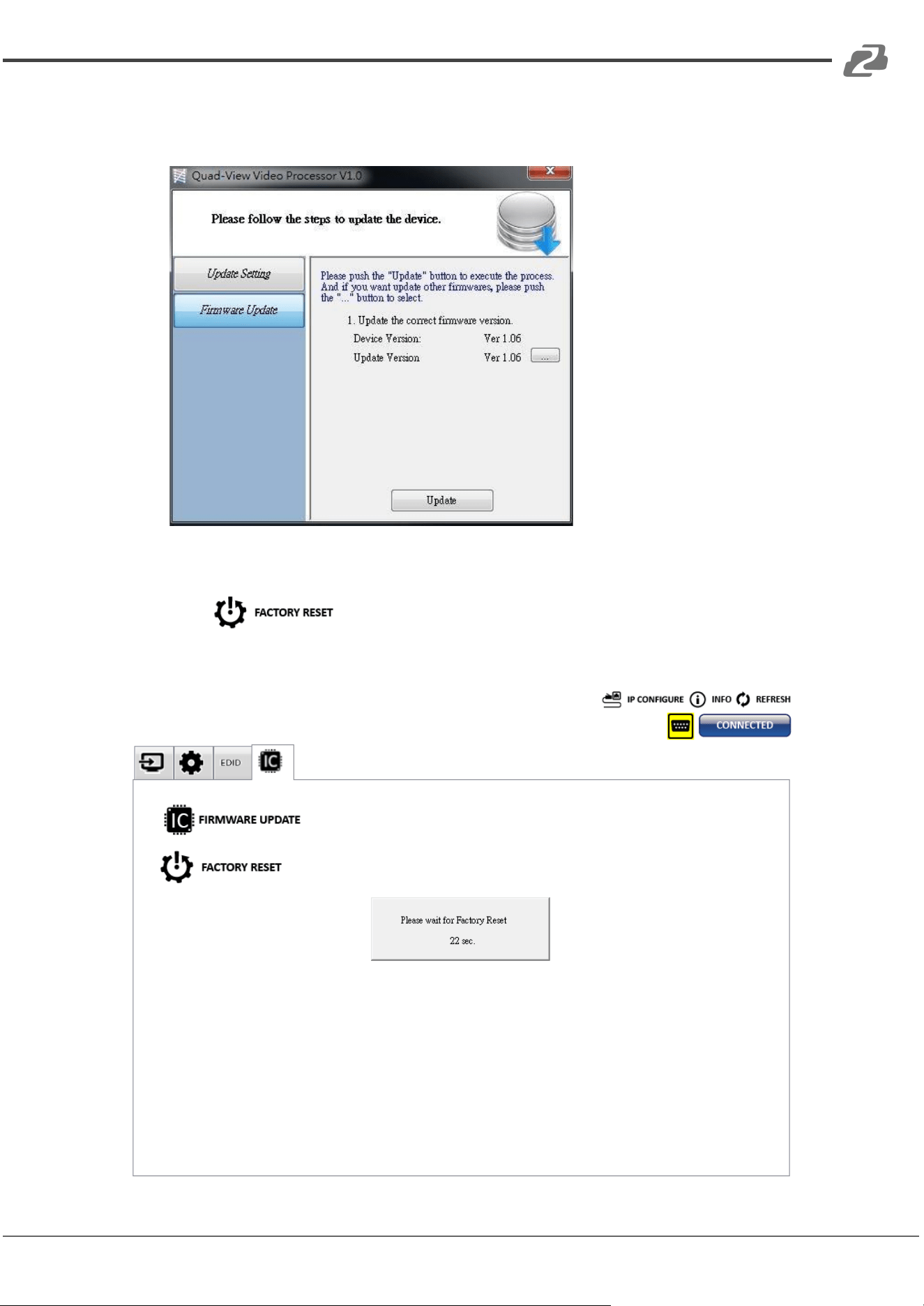
➔ Select the correct COM port or click the “Scan” button to connect a device.
➔ Click the “update” button perform a firmware update.
(2) Factory Reset
➔ Click button to do factory default reset.
➔ The process of default reset will take about 25 seconds.
Address: 830 National Drive #140, Sacramento, CA 95834, USA · Tel: +1(888)499-9906 · Email: support@bzbgear.com 18
BZBGEAR BG-UHD-QVP-4X2 PRODUCT MANUAL
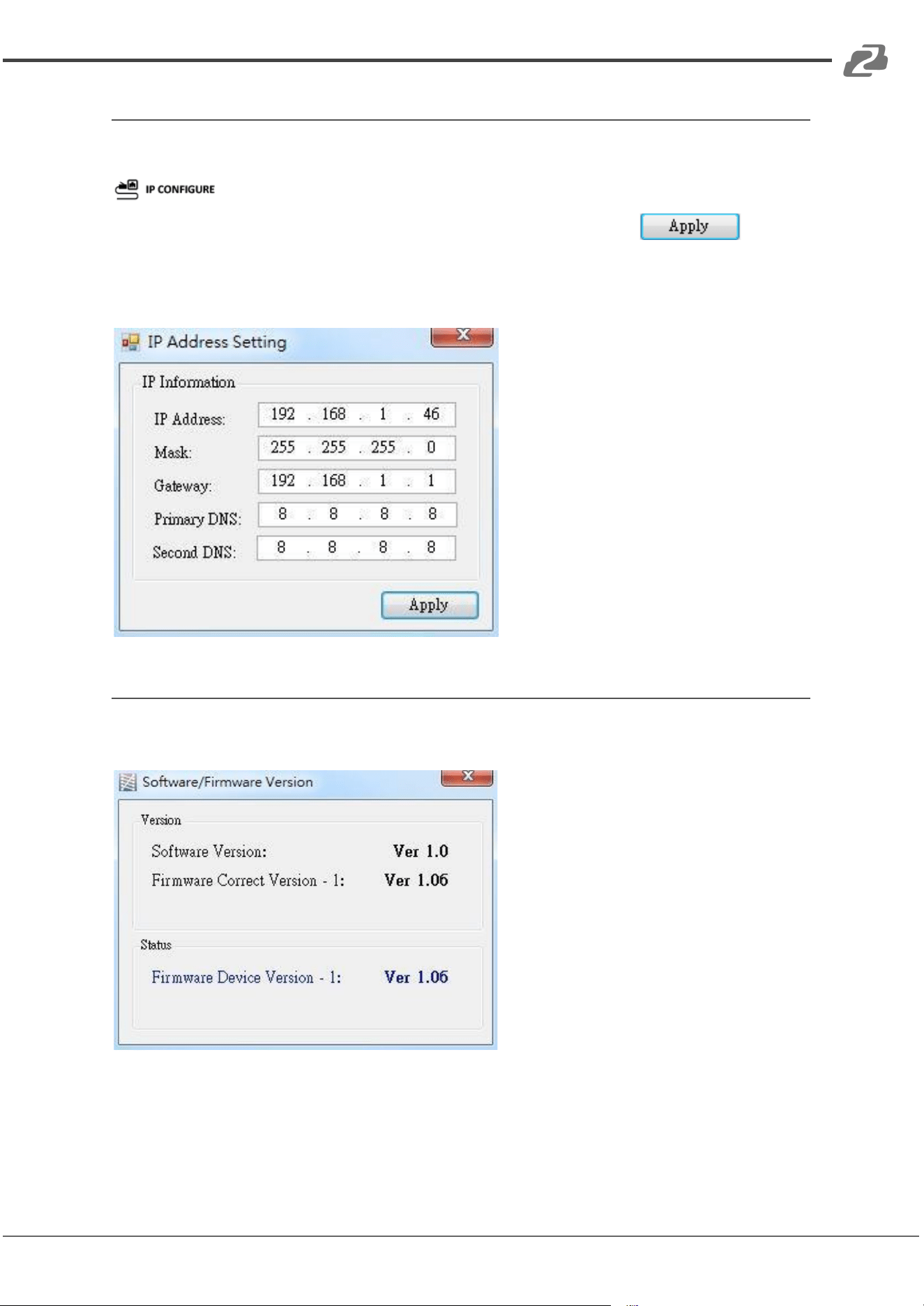
6. IP Configure
Users also can use the WEB to control the mixer. First, users should click on the
button to set network settings. Next, users can set the Ethernet settings for
the unit as shown below. After completing IP configuration, click the
The default IP address of the device is: 192.168.1.46
7. Info
Displays the software and firmware versions.
Address: 830 National Drive #140, Sacramento, CA 95834, USA · Tel: +1(888)499-9906 · Email: support@bzbgear.com 19
BZBGEAR BG-UHD-QVP-4X2 PRODUCT MANUAL
8. Refresh
Refreshes the device and updates the software state.
Method C: Cloud Control (Eagleyes) through Ethernet Port
Create Account
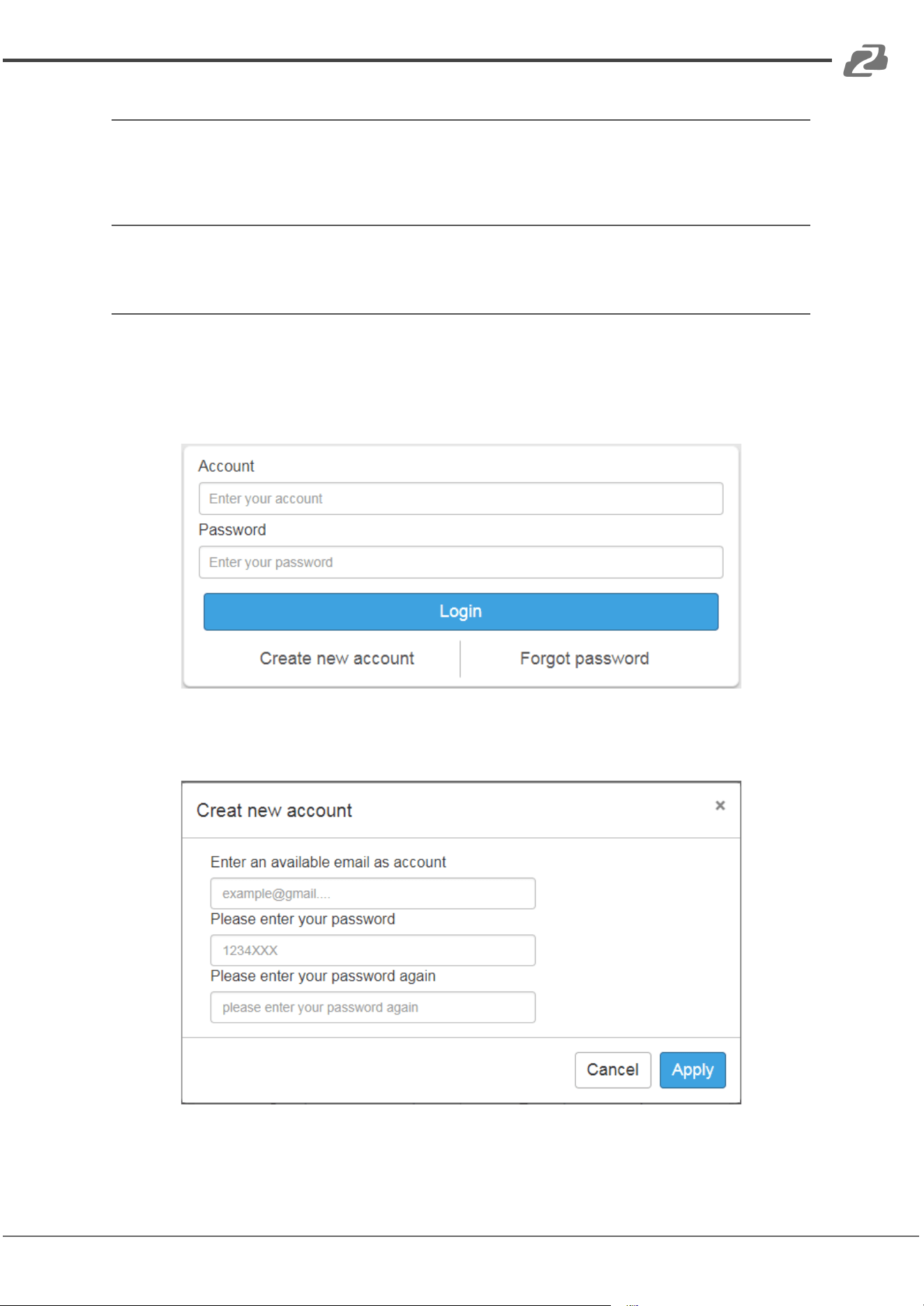
The first time using the Eagleyes service you will need to create a new account.
1. Access Eagleyes at (http://www.eagleyes.io) and click “Create new account”.
2. The Registration page will pop up and you will need to fill in your email and password
information to create your private account.
Address: 830 National Drive #140, Sacramento, CA 95834, USA · Tel: +1(888)499-9906 · Email: support@bzbgear.com 20
BZBGEAR BG-UHD-QVP-4X2 PRODUCT MANUAL
Add Device to Eagleyes
1. First, please make sure the device is connected via Ethernet. Then use the software to
generate the register code (see Section 3 Step 5: ‘Cloud Settings’ above).
2. Access Eagleyes (http://www.eagleyes.io), and then log in your account in the top right
corner. Click Add device to add the device for which you just got its association code.
Address: 830 National Drive #140, Sacramento, CA 95834, USA · Tel: +1(888)499-9906 · Email: support@bzbgear.com 21
BZBGEAR BG-UHD-QVP-4X2 PRODUCT MANUAL
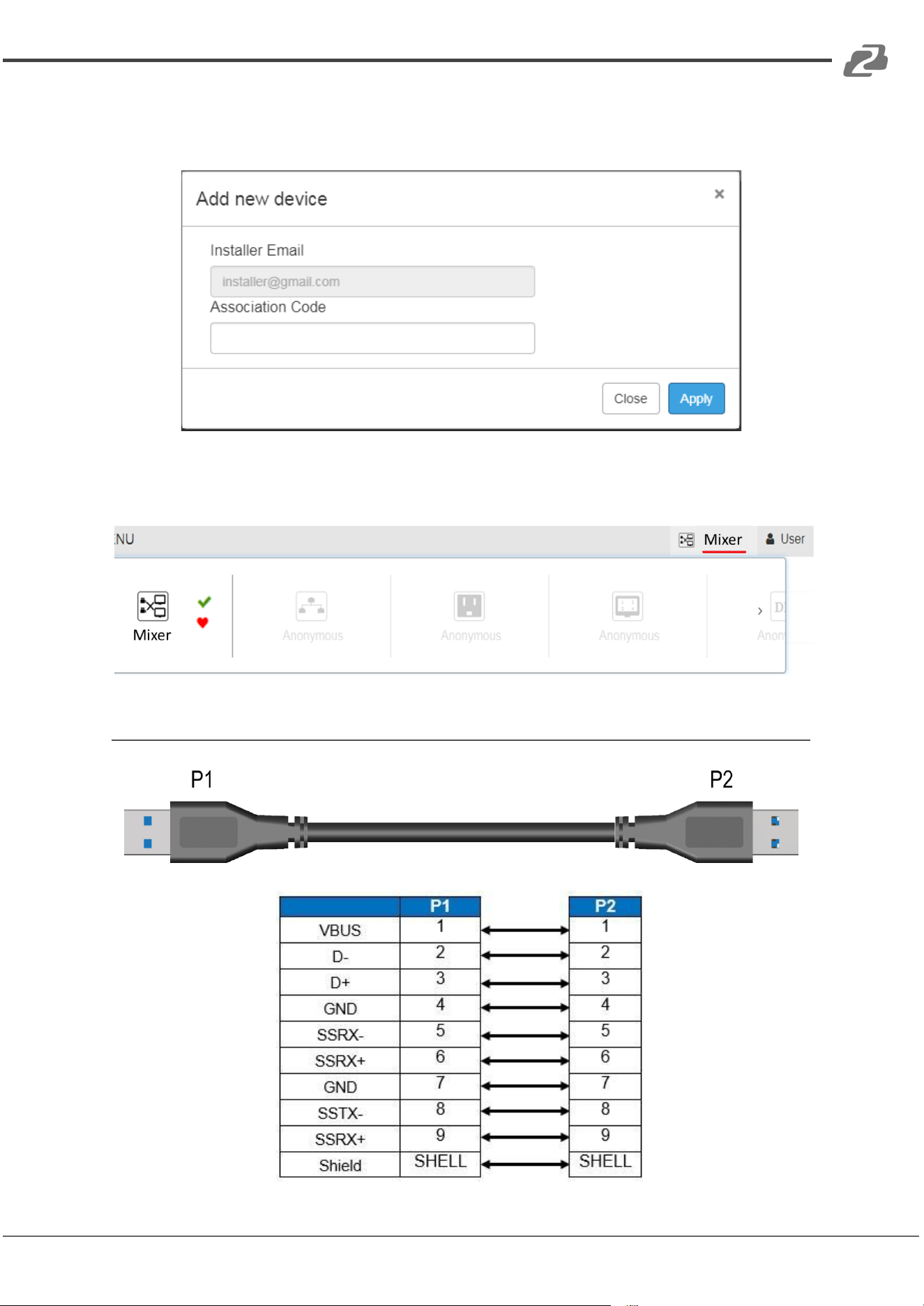
3. Enter the Installer Email for online support in the future, and the Association Code for
pairing your device.
4. After adding the device, the list of devices related to your account will show on the right
top corner. You can click the button to switch the devices for control.
USB Pin Definition
Address: 830 National Drive #140, Sacramento, CA 95834, USA · Tel: +1(888)499-9906 · Email: support@bzbgear.com 22
BZBGEAR BG-UHD-QVP-4X2 PRODUCT MANUAL
Hardware Installation
BG-UHD-QVP-4X2 as master
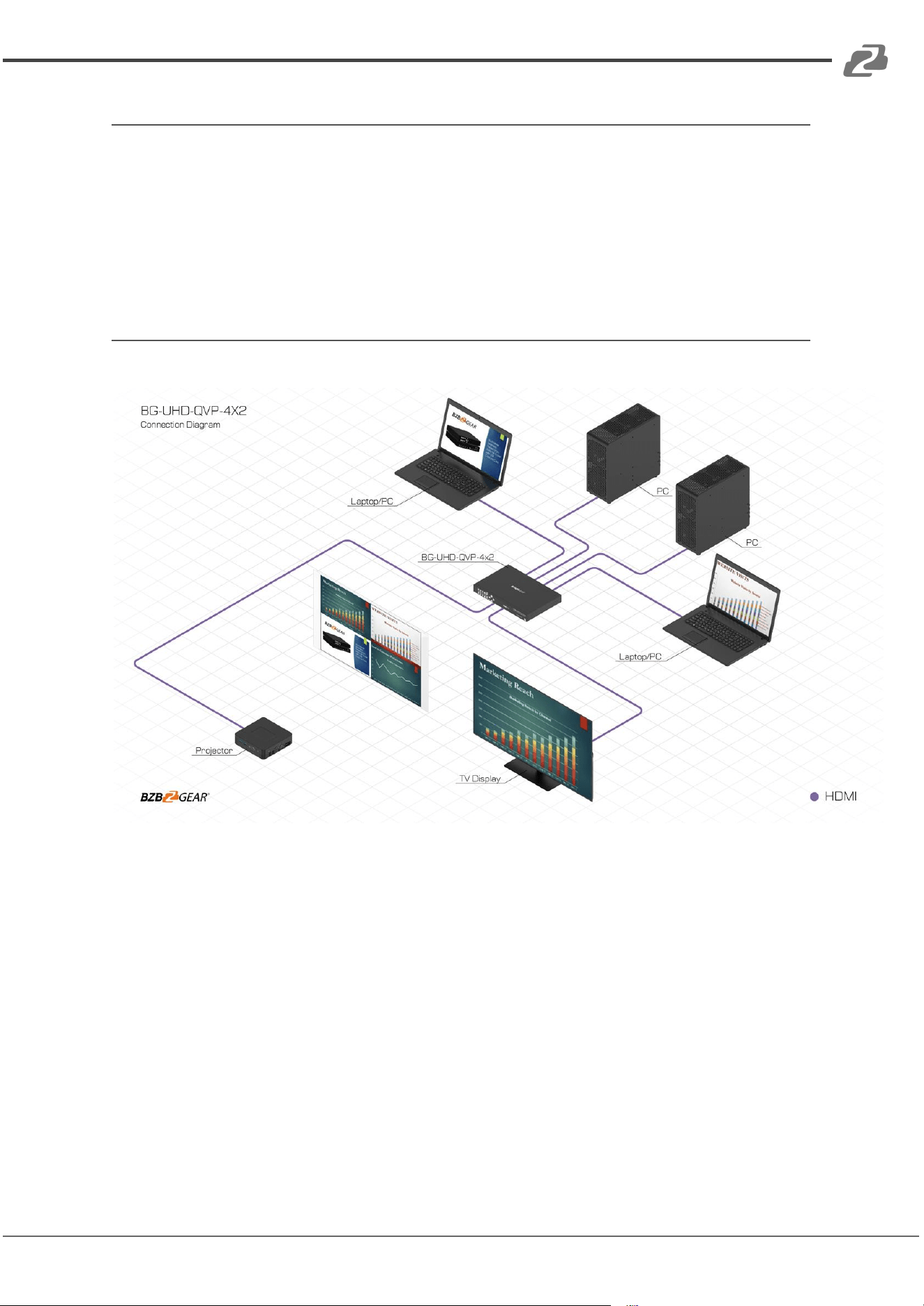
1. Connect all sources to HDMI Inputs on the BG-UHD-QVP-4X2.
2. Connect the display to HDMI Output on the BG-UHD-QVP-4X2.
3. Connect the +12V 5A DC power supply to the BG-UHD-QVP-4X2.
Connection Diagram
Address: 830 National Drive #140, Sacramento, CA 95834, USA · Tel: +1(888)499-9906 · Email: support@bzbgear.com 23
BZBGEAR BG-UHD-QVP-4X2 PRODUCT MANUAL
Tech Support
Have technical questions? We may have answered them already!
Please visit BZBGEAR’s support page (bzbgear.com/support) for helpful information and
tips regarding our products. Here you will find our Knowledge Base
(bzbgear.com/knowledge-base) with detailed tutorials, quick start guides, and step-by-step
troubleshooting instructions. Or explore our YouTube channel, BZB TV
(youtube.com/c/BZBTVchannel), for help setting up, configuring, and other helpful how-to
videos about our gear.
Need more in-depth support? Connect with one of our technical specialists directly:
Phone
1.888.499.9906
Email
support@bzbgear.com
Live Chat
bzbgear.com
Limited Product Warranty Terms
Pro Line: 5-year warranty from the date of purchase for AV/Broadcasting products bought
on or after August 1, 2024.
Essential Line: 3-year warranty from the date of purchase for AV/Broadcasting products
bought on or after August 1, 2024.
Cables: Lifetime Limited Product Warranty.
For complete warranty information, please visit bzbgear.com/warranty.
For questions, please call 1.888.499.9906 or email support@bzbgear.com.
Mission Statement
BZBGEAR is a breakthrough manufacturer of high-quality, innovative audiovisual equipment
ranging from AVoIP, professional broadcasting, conferencing, home theater, to live
streaming solutions. We pride ourselves on unparalleled customer support and services.
Our team offers system design consultation, and highly reviewed technical support for all
the products in our catalog. BZBGEAR delivers quality products designed with users in
mind.
Copyright
All the contents in this manual and its copyright are owned by BZBGEAR. No one is allowed
to imitate, copy, or translate this manual without BZBGEAR’s permission. This manual
contains no guarantee, standpoint expression or other implies in any form. Product
specification and information in this manual is for reference only and subject to change
without notice.
All rights reserved. No reproducing is allowed without acknowledgement.
Address: 830 National Drive #140, Sacramento, CA 95834, USA · Tel: +1(888)499-9906 · Email: support@bzbgear.com 24