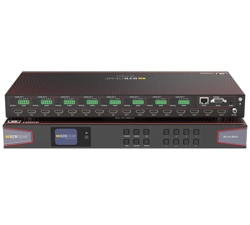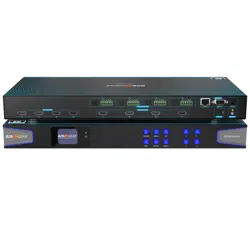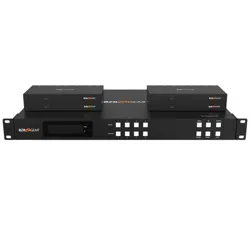
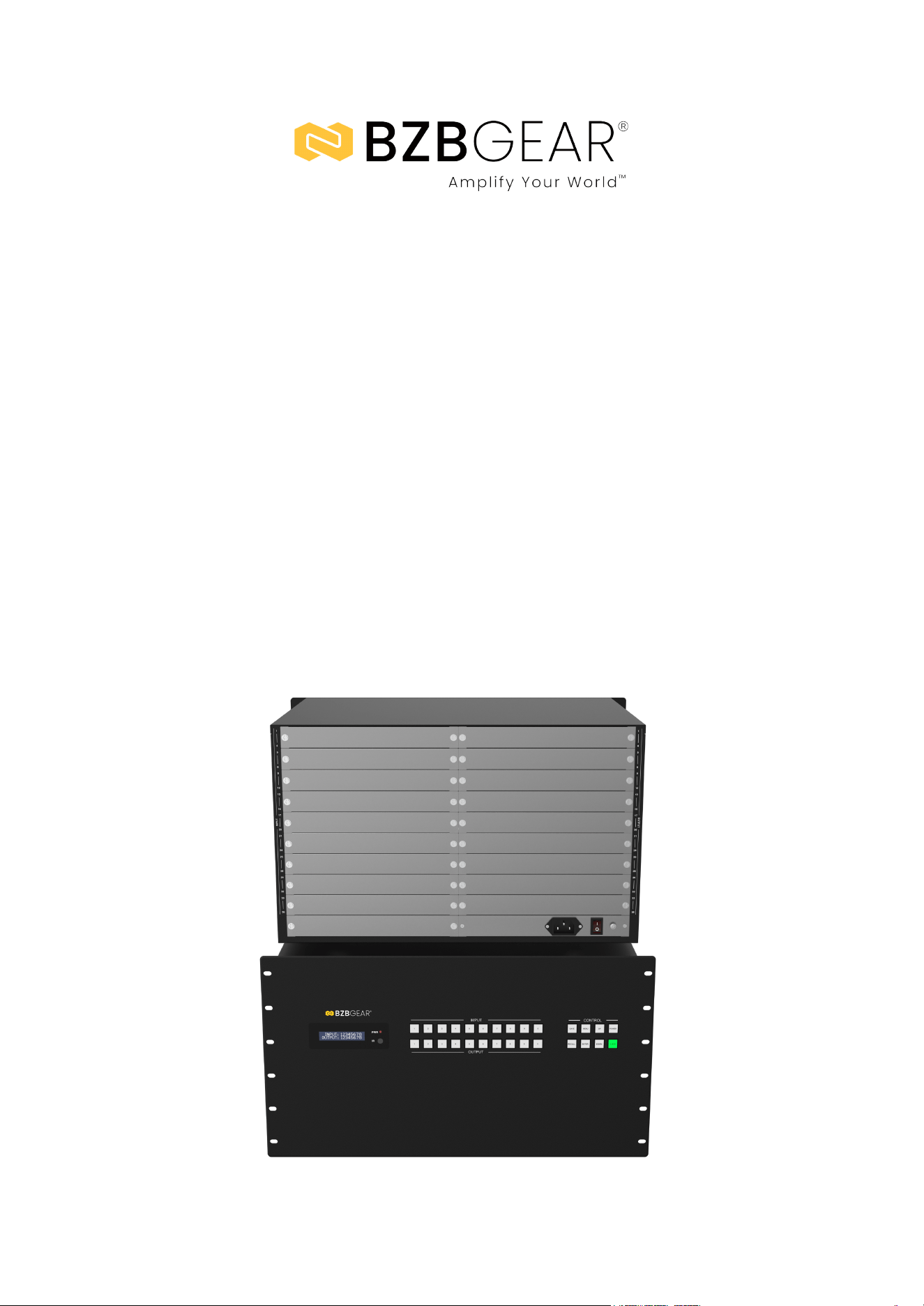
BG-MC-SERIES
Modular Seamless 4K60 Matrix Switcher with Video Wall and
Control System | HDMI 2.0b, HDCP 2.2, 8×8–36×36 Configurable I/O
User Manual

BZBGEAR BG-MC-SERIES PRODUCT MANUAL
Address: 830 National Drive #140, Sacramento, CA 95834, USA · Tel: +1(888)499-9906 · Email: support@bzbgear.com 2

BZBGEAR BG-MC-SERIES PRODUCT MANUAL
TABLE OF CONTENTS
Statement 4
Safety Precaution 4
Introduction 5
Features 6
Packing List 7
Specifications 8
Chassis Models 9
Specifications - Main Control Cards 10
Specifications - Input & Output Cards 12
2K Output Cards 17
4K Input Cards 22
4K Output Cards 25
Specifications-Power Cards 28
Specifications-Blank Card 29
Specifications-Signal Adapters 30
Operation and Use 32
Remote Control Introduction and Operation 34
Host Computer & Web GUI Operation Guide 35
API Control (16x16 Matrix as an example) 38
Connection Diagram 45
Troubleshooting 46
Tech Support 47
Limited Product Warranty Terms 47
Mission Statement 48
Copyright 48
Address: 830 National Drive #140, Sacramento, CA 95834, USA · Tel: +1(888)499-9906 · Email: support@bzbgear.com 3

BZBGEAR BG-MC-SERIES PRODUCT MANUAL
Statement
Please read these instructions carefully before connecting, operating, or configuring this
product. Please save this manual for future reference.
Safety Precaution
● To prevent damaging this product, avoid heavy pressure, strong vibration, or immersion
during transportation, storage, and installation.
● The housing of this product is made of organic materials. Do not expose to any liquid,
gas, or solids which may corrode the shell.
● Do not expose the product to rain or moisture.
● To prevent the risk of electric shock, do not open the case. Installation and maintenance
should only be carried out by qualified technicians.
● Do not use the product beyond the specified temperature, humidity, or power supply
specifications.
● This product does not contain parts that can be maintained or repaired by users.
Damage caused by dismantling the product without authorization from BZBGEAR is not
covered under the warranty policy.
● Installation and use of this product must strictly comply with local electrical safety
standards.
Address: 830 National Drive #140, Sacramento, CA 95834, USA · Tel: +1(888)499-9906 · Email: support@bzbgear.com 4

BZBGEAR BG-MC-SERIES PRODUCT MANUAL
Introduction
The BG-MC-SERIES Modular Seamless Switching Matrix is a professional,
all-in-one AV solution designed for high-performance signal switching, distribution,
and control. Supporting up to 8-36 inputs and 8-36 outputs, it integrates a powerful
video wall processor and intelligent control system, making it ideal for complex
installations. Built on a high-speed, pure hardware matrix switching architecture, it
ensures zero compression, zero latency, and no signal loss for seamless and
distortion-free performance. With advanced full-digital signal processing and a
high-bandwidth backplane, the system supports up to 4K×2K@60Hz (RGB 4:4:4,
24-bit), HDMI 2.0b, 18Gbps video bandwidth, and deep color up to 12 bits -
delivering exceptional image clarity and fidelity across all displays.
Designed with a modular pluggable card structure, the matrix offers flexible
configuration and easy scalability. Input and output cards are available in multiple
formats, including HDMI, DVI-U (DVI/VGA/YPbPr/CVBS), VGA, 3G/HD/SD-SDI,
HDBaseT, and optical fiber, with each card providing four channels. The system
supports seamless switching without image tearing, flicker, or black screens, and
enables advanced Gen-Lock video wall splicing with ultra-low latency (<0.1ms)
between output channels. Audio performance is equally versatile, featuring built-in
audio embedding on input cards and de-embedding on output cards with support
for LPCM 2.0CH analog audio.
Engineered for reliability and control flexibility, the Modular Seamless Switching
Matrix supports multiple control options, including front-panel buttons with LCD
display, IR remote, RS-232, LAN, PC software, and Web GUI. Its built-in intelligent
control system and EDID management provide effortless setup and operation, while
64 scene presets enable fast configuration recall. With its quiet fan design, robust
power module, and standard rack-mount form factor, this matrix is perfectly suited
for professional applications such as video conferencing, broadcasting, control
rooms, government monitoring, education, and corporate AV environments where
stable, high-quality signal management is critical.
Address: 830 National Drive #140, Sacramento, CA 95834, USA · Tel: +1(888)499-9906 · Email: support@bzbgear.com 5

BZBGEAR BG-MC-SERIES PRODUCT MANUAL
Features
● HDCP 2.2 Compliance: Ensures secure transmission of protected 4K UHD content.
● HDMI 18Gbps Bandwidth: Supports resolutions up to 4K60 RGB 4:4:4 24-bit as
defined in HDMI 2.0b.
● Modular Card Design: Features pluggable cards with four channels per module for
flexible configuration.
● Scalable I/O Capacity: Supports 8, 16, or 36 channels of video signal inputs and
outputs.
● Versatile Signal Interfaces: Compatible with HDMI, DVI-U (DVI/VGA/YPbPr/CVBS),
VGA, 3G/HD/SD-SDI, HDBaseT, and optical fiber cards.
● High-Resolution Support: Delivers video up to 1920×1200@60Hz (2K cards) or
3840×2160@60Hz (4K cards).
● Seamless Switching: Provides ultra-smooth transitions with no image tearing, black
screens, or flicker.
● Gen-Lock Synchronization: Utilizes advanced video wall splicing technology with
latency under 0.1ms between outputs.
● Flexible Video Wall Modes: Supports splicing configurations from 8×8 to 36×36,
ideal for LCD or LED video walls.
● Multi-Resolution Output: Offers various output resolutions to match different
display types.
● High-Speed Hardware Switching: Employs a pure hardware matrix chip for high
integration and stability.
● Signal Optimization: Includes built-in signal equalization, recovery, and redriving for
reliable performance.
● Video Enhancement Engine: Allows adjustment of output video quality for optimal
display results.
● Integrated HDCP Logic: Prevents HDCP compatibility issues for seamless device
communication.
● Audio Embedding/De-Embedding: Input cards support audio embedding; output
cards support de-embedding.
● Analog Audio Embedding: Supports LPCM 2.0CH with synchronized analog audio
and video input.
● Analog Audio De-Embedding: Supports LPCM 2.0CH with synchronized analog
audio and video output.
● Scene Presets: Stores and recalls up to 64 customizable scene configurations.
● Advanced EDID Management: Offers internal EDID settings or the ability to copy
from connected displays.
● Multiple Control Options: Operate via front panel buttons, IR remote, RS-232,
TCP/IP, Web GUI, or PC software.
● Integrated Control System: Features an intuitive user interface for streamlined
operation.
● Silent Cooling Design: Low-noise fans ensure quiet, stable, and reliable
performance.
Address: 830 National Drive #140, Sacramento, CA 95834, USA · Tel: +1(888)499-9906 · Email: support@bzbgear.com 6

BZBGEAR BG-MC-SERIES PRODUCT MANUAL
● Integrated Power Module: Equipped with an AC power port and built-in power
supply.
● Rack-Mountable Design: Standard rack size for easy installation and system
integration.
Packing List
● 1 x Modular Seamless Switching Matrix
● 1 x IR Remote
● 1 x RS-232 Serial Cable (DP9 female
connector to 3pin H2.0 Phoenix Connector, 1.5
meters)
● 1 x USB to RS-232 Serial Cable (USB A to
RS-232 serial DB9 male connector)
● 4 x Rubber Foot
● 4 x Machine Screw (M3*4)
● 1 x 100~240V AC 50/60Hz Power Cord (Note:
The dual power card is equipped with two AC
power cords.)
● 1 x User Manual
Address: 830 National Drive #140, Sacramento, CA 95834, USA · Tel: +1(888)499-9906 · Email: support@bzbgear.com 7
BZBGEAR BG-MC-SERIES PRODUCT MANUAL
Specifications
Category
Details
Technical
● HDMI Compliance: 2K series – HDMI 1.4 / 4K series – HDMI 2.0b
● HDCP Compliance: 2K series – HDCP 1.4 / 4K series – HDCP 2.2
● Video Bandwidth: 600MHz / 18Gbps
● Video Resolution: 2K – 1920×1200@60Hz / 4K – 3840×2160@60Hz 4:4:4
● Color Depth: 2K – 8/10/12-bit @1080p60 / 4K – 8/10/12-bit @4K30 & 8-bit
@4K60 4:4:4
● Color Space: RGB, YCbCr 4:4:4 / 4:2:2 / 4:2:0
● Audio Formats: HDMI (LPCM 2.0/5.1/7.1CH), Analog (LPCM 2.0CH)
● ESD Protection: IEC 61000-4-2 ±8KV (air-gap), ±4KV (contact)
Connection
● Input Cards: 8×8 – 2 cards / 16×16 – 4 cards / 36×36 – 9 cards
● Output Cards: 8×8 – 2 cards / 16×16 – 4 cards / 36×36 – 9 cards
● Control: 1 main control card (all configurations)
Mechanical
● Housing: Metal enclosure, black finish
● Dimensions: 8×8 – 483×377×89mm / 16×16 – 483×379×133mm / 36×36 –
483×378×266mm
● Weight (without cards): 8×8 – 5.95kg / 16×16 – 8.62kg / 36×36 – 15.4kg
● Power Supply: AC 100–240V, 50/60Hz
● Power Consumption: 8×8 – 40W–190W / 16×16 – 80W–320W / 36×36 –
200W–840W
● Environmental Conditions: Operating 0°C–40°C (32°F–104°F), Storage
-20°C–60°C (-4°F–140°F), Humidity 20–90% RH (no condensation)
Address: 830 National Drive #140, Sacramento, CA 95834, USA · Tel: +1(888)499-9906 · Email: support@bzbgear.com 8
BZBGEAR BG-MC-SERIES PRODUCT MANUAL
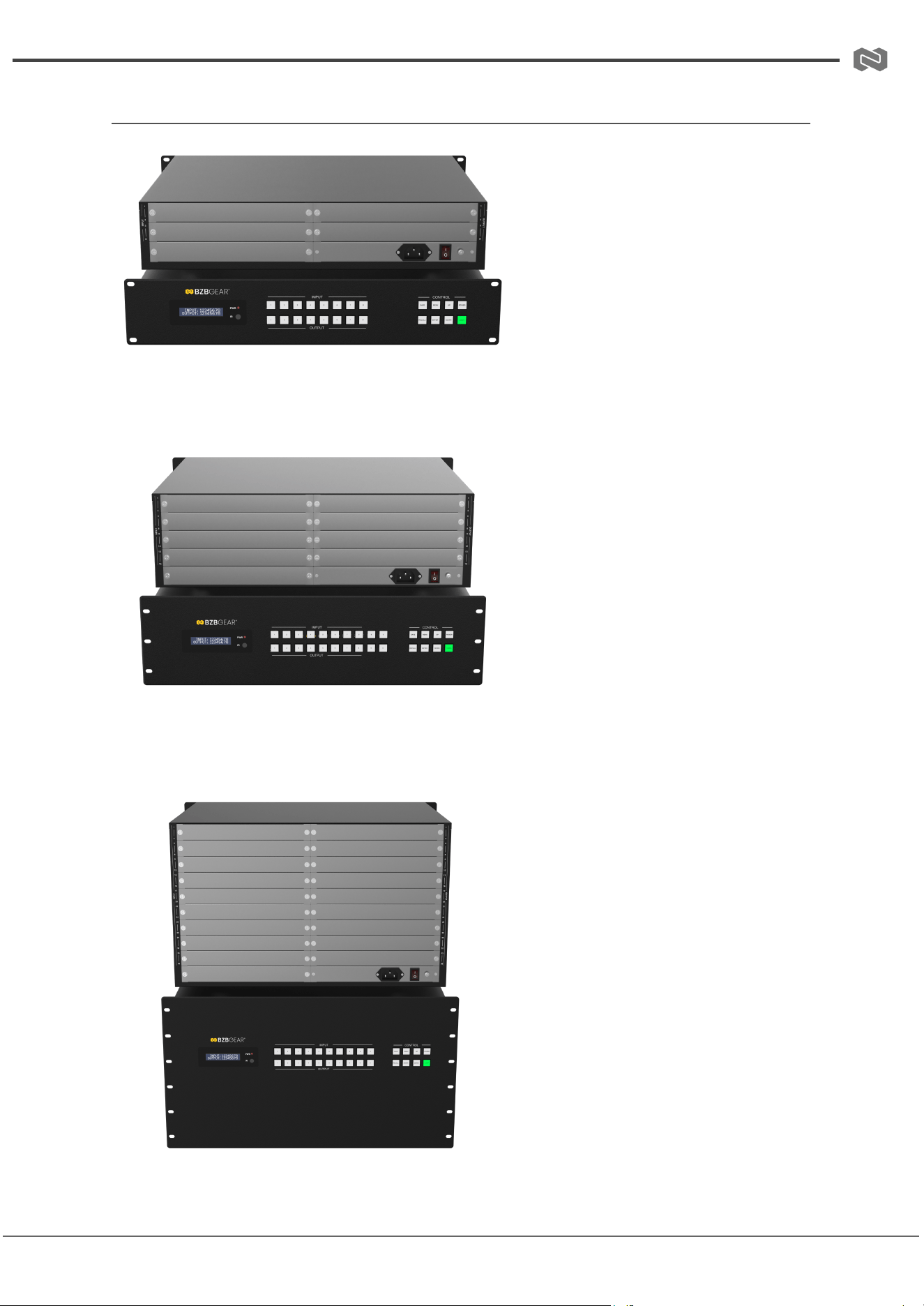
Chassis Models
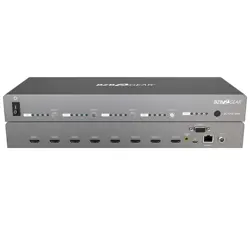
BG-MC-88M
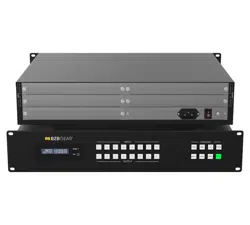
BG-MC-1616M
BG-MC-3636M
Address: 830 National Drive #140, Sacramento, CA 95834, USA · Tel: +1(888)499-9906 · Email: support@bzbgear.com 9
BZBGEAR BG-MC-SERIES PRODUCT MANUAL
Specifications - Main Control Cards
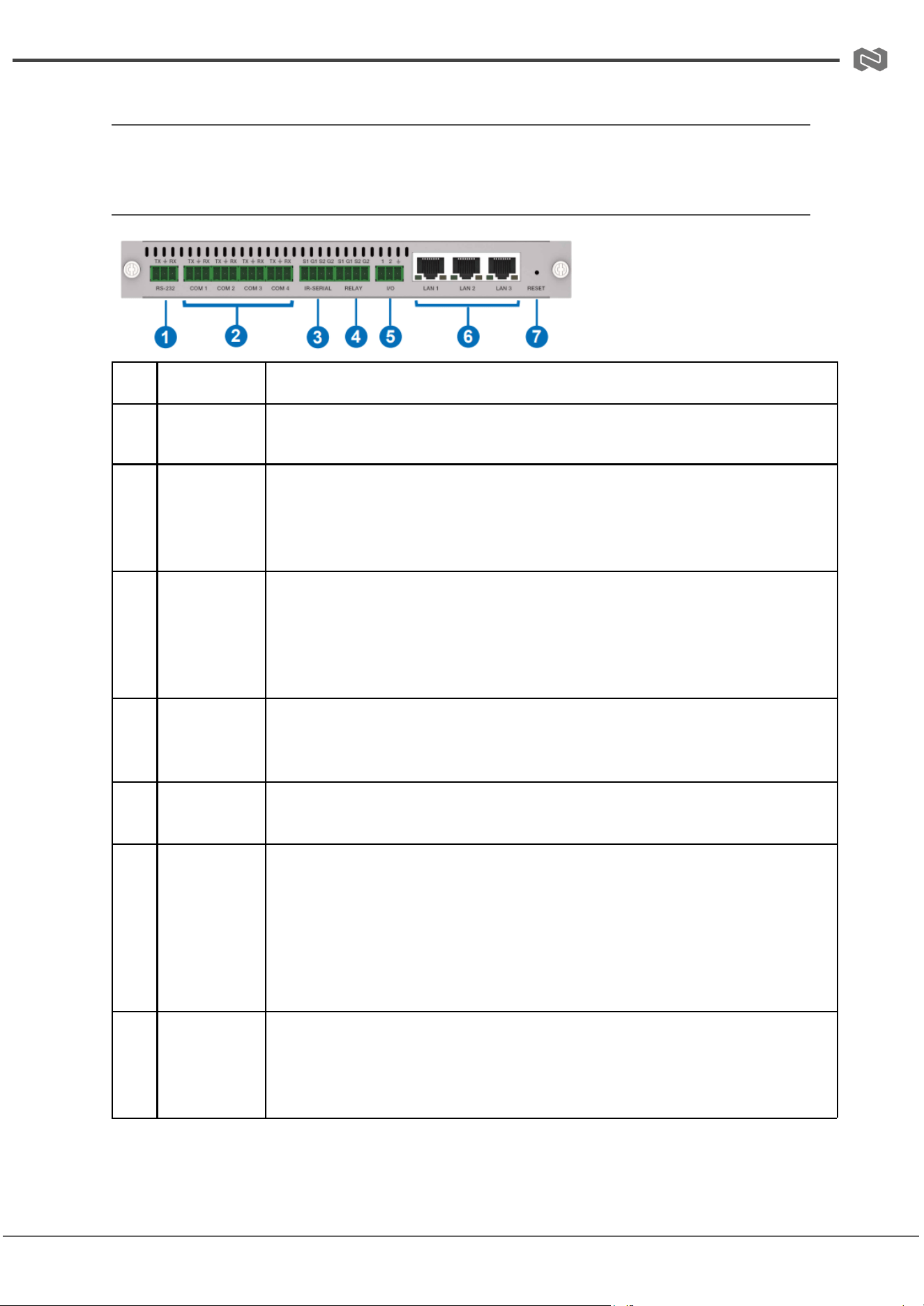
Main Control Card Option 1
BG-MC-CONTROL
No.
Name
Description
1
RS-232
port
Connects to a PC or third-party control processor to transmit RS-232
commands and control the Matrix.
2
COM1-4
Four sets of programmable two-way multi-mode serial ports, 3-pin
phoenix connector (male), compliant with RS-232 protocol, configurable
with 8 baud rates from 2400-115200bps. Pin-outs are PIN1 for TXD,
PIN2 for GND, and PIN3 for RXD.
3
IR-SERIAL
Two sets of 2-PIN phoenix connectors for either IR transmitting or
one-way serial signal outputting. In RS-232 mode, supports devices with
a 0-5V signal level. Left pin is IR/serial data, right pin is signal GND.
Programmable mode: IR transmitting (20K-60KHz) or one-way serial
data output (TXD/GND configurable).
4
RELAY
Two sets of isolated, normally open 2-PIN phoenix relay output ports.
Each relay can switch up to 2A 30VDC / 1A 125VAC peak. Connector
does not support voltage output.
5
I/O
2-channel GPIO dry contact input interface with voltage range 0-24V,
capable of collecting digital level signals and low-level signal sensing.
6
LAN1-3
Standard 10M/100M Ethernet RJ45 ports for device access, connecting
to a PC or third-party control processor. Defaults to DHCP; pre-set IP is
192.168.0.101 if no router is present.
Notes: DHCP mode may assign IP 0.0.0.0 if network
disconnects—power cycle needed. Static IP mode does not pre-set IP;
PC can set pre-set IP manually.
7
Button
Press
Functions
Short press (<1s): no reaction.
Long press (1-5s): device reboots without uploading user projects.
Long press (>5s): factory reset—resets IP to DHCP, login password to
"admin", time to auto mode; user projects are retained.
Address: 830 National Drive #140, Sacramento, CA 95834, USA · Tel: +1(888)499-9906 · Email: support@bzbgear.com 10
BZBGEAR BG-MC-SERIES PRODUCT MANUAL
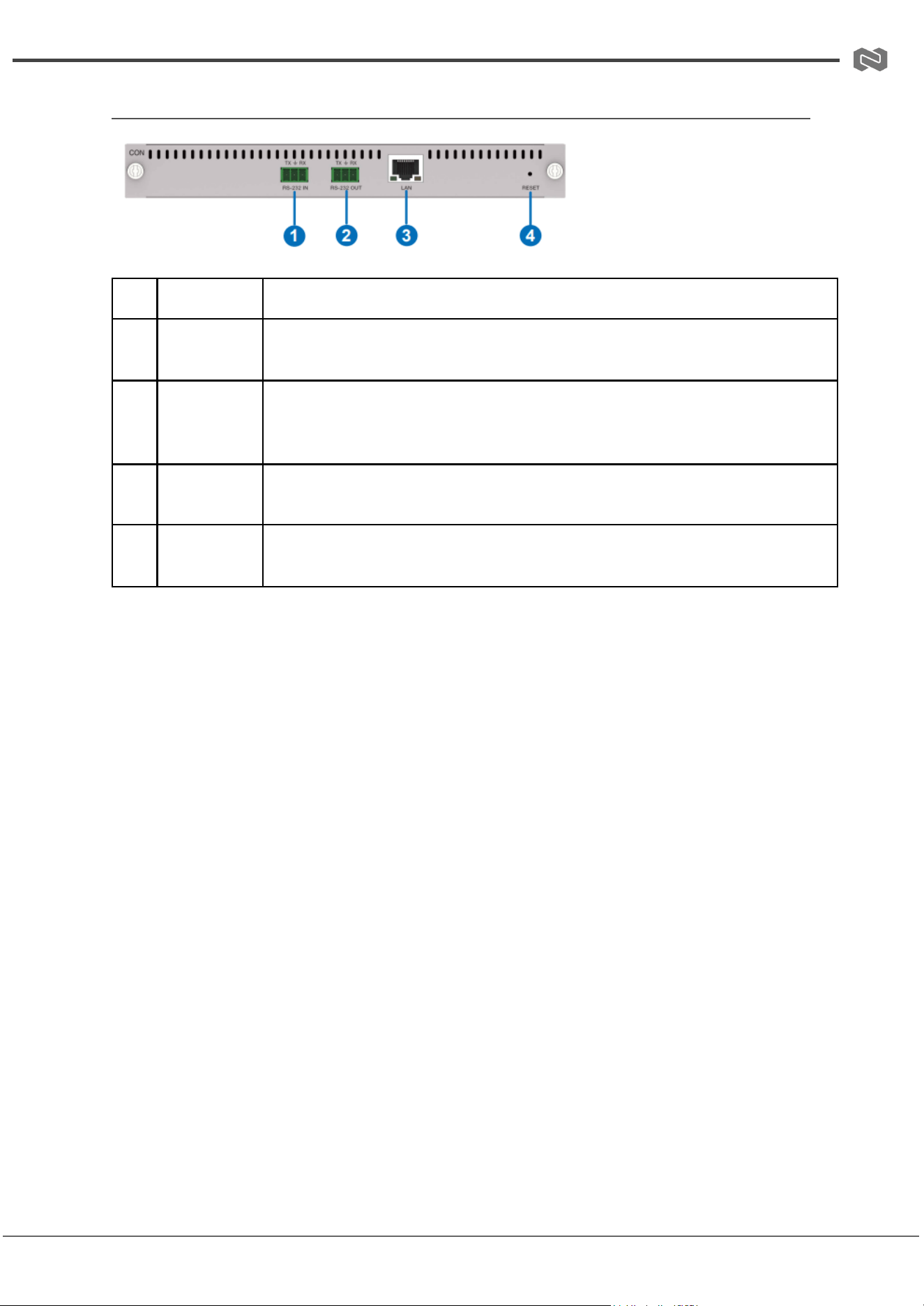
Main Control Card Option 2
No.
Name
Description
1
RS-232 IN
port
Input port for RS-232 serial signals. Connects to a PC or third-party
control processor to transmit RS-232 commands and control the Matrix.
2
RS-232
OUT port
RS-232 serial signal output port. Functions:
1) Connects to and controls external devices via RS-232 commands.
2) Connects to other Matrix devices for cascading.
3
LAN
Standard 10M/100M Ethernet RJ45 port for device access. Connects to
a PC or third-party control processor to control the Matrix.
4
RESET
button
Restores the device to factory settings. Long-press for more than 10
seconds after boot, then release. Resets MCU configuration.
Address: 830 National Drive #140, Sacramento, CA 95834, USA · Tel: +1(888)499-9906 · Email: support@bzbgear.com 11
BZBGEAR BG-MC-SERIES PRODUCT MANUAL
Specifications - Input & Output Cards
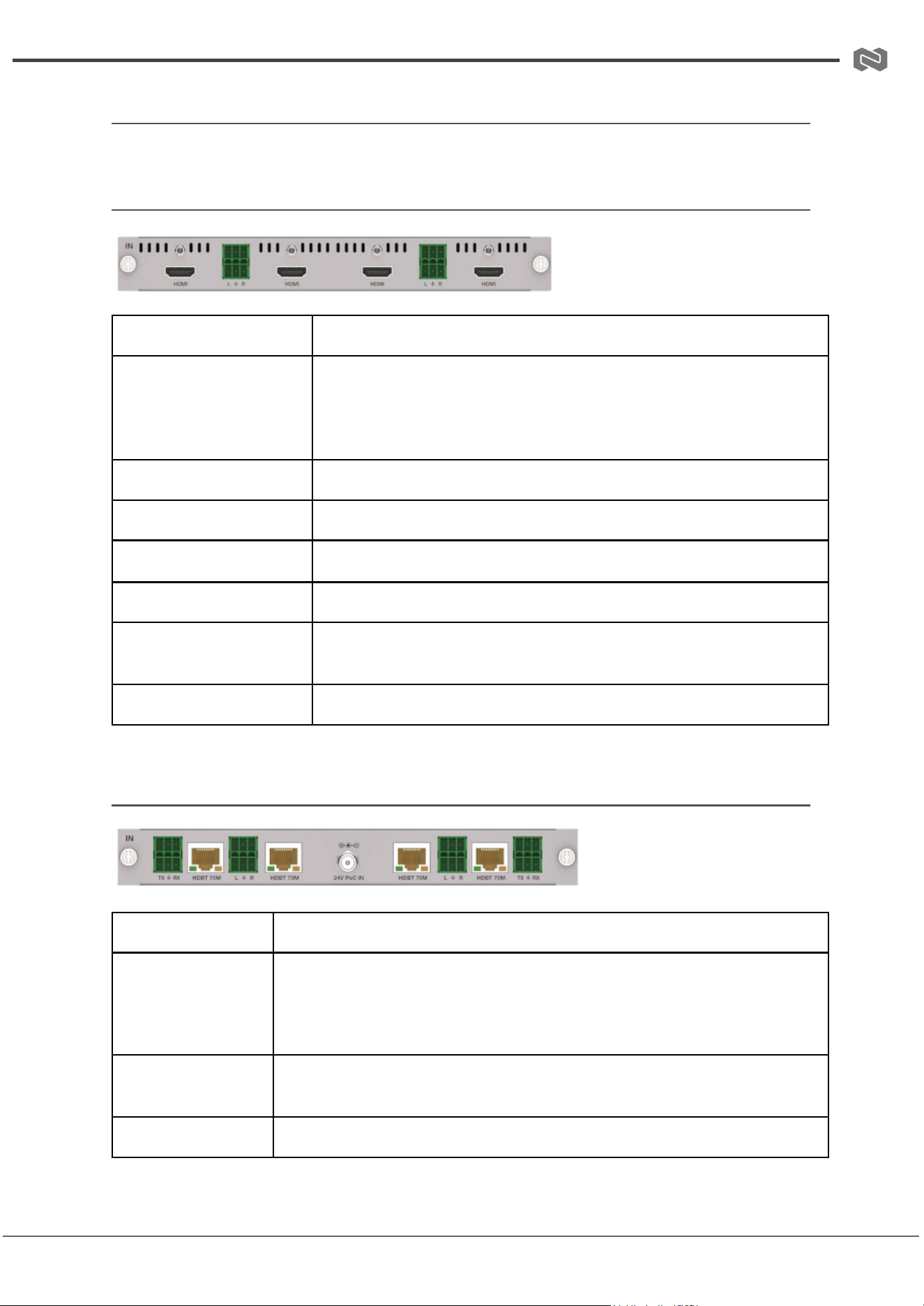
(1) 2K Input Cards
BG-MC-IN-HDMI-2K
Signal Channel
4-Channel HDMI Input Signals
Resolution
PC: 640x480p60Hz – 1920x1200p60Hz;
Video: 480i59/480p59, 576i50/576p50, 720p50/59/60,
1080i50/59/60, 1080p23/24/25/29/30/50/59/60, 1200p60
HDMI Compliance
HDMI 1.4, HDCP 1.4
Video Bandwidth
6.75 Gbps
Color Depth
8/10/12-bit at 1080p60Hz
Audio Input
External LPCM 2.0CH via 3.81mm Phoenix Connector
Max Transmission
Distance
15 meters for HDMI 1080p60Hz
Status Indicator
Displays "NO SIGNAL" if no input is detected
(2) 2K HDBT 70M Input Card
BG-MC-IN-HDBT70-2K
Signal Channel
4-Channel HDMI/HDBT Input Signals
Supported
Resolutions
PC: 640x480p60Hz – 1920x1200p60Hz;
Video: 480i59/480p59, 576i50/576p50, 720p50/59/60, 1080i50/59/60,
1080p23/24/25/29/30/50/59/60, 1200p60
HDCP
Compliance
HDCP 1.4
Video Bandwidth
6.75 Gbps
Address: 830 National Drive #140, Sacramento, CA 95834, USA · Tel: +1(888)499-9906 · Email: support@bzbgear.com 12
BZBGEAR BG-MC-SERIES PRODUCT MANUAL
Color Depth
8/10/12-bit at 1080p60Hz
Audio Input
LPCM 2.0CH via 3.81mm Phoenix Connector
HDBT Port
RJ45 Connector
Max
Transmission
Distance
70 meters for HDBT 1080p60Hz
Status Indicator
Displays "NO SIGNAL" if no input is detected
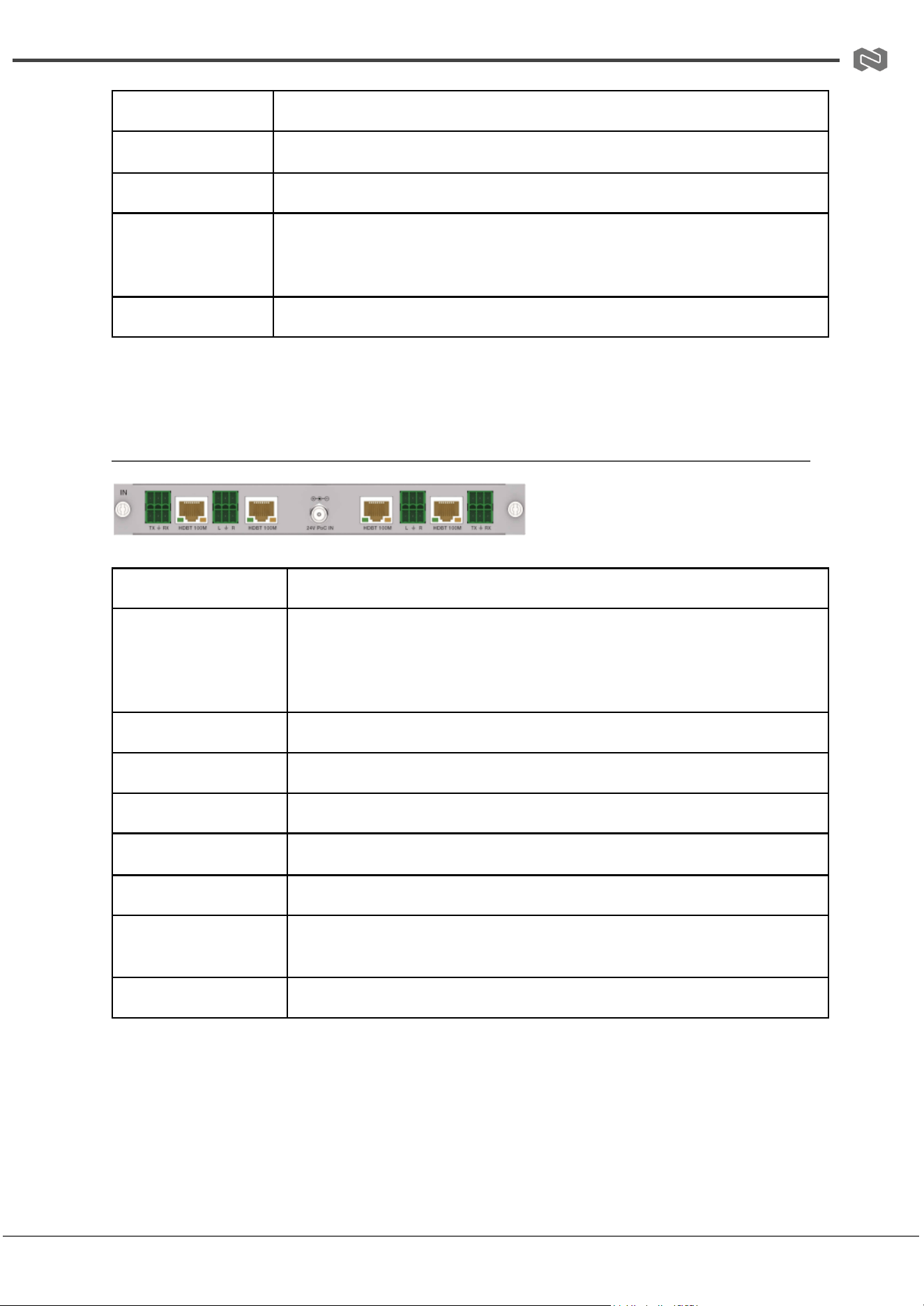
(3) 2K HDBT 100M Input Card
BG-MC-IN-HDBT100-2K
Signal Channel
4-Channel HDBT Input Signals
Supported
Resolutions
PC: 640x480p60Hz – 1920x1200p60Hz;
Video: 480i59/480p59, 576i50/576p50, 720p50/59/60,
1080i50/59/60, 1080p23/24/25/29/30/50/59/60, 1200p60
HDCP Compliance
HDCP 1.4
Video Bandwidth
6.75 Gbps
Color Depth
8/10/12-bit at 1080p60Hz
Audio Input
LPCM 2.0CH via 3.81mm Phoenix Connector
HDBT Port
RJ45 Connector
Max Transmission
Distance
100 meters for HDBT 1080p60Hz
Status Indicator
Displays "NO SIGNAL" if no input is detected
Address: 830 National Drive #140, Sacramento, CA 95834, USA · Tel: +1(888)499-9906 · Email: support@bzbgear.com 13
BZBGEAR BG-MC-SERIES PRODUCT MANUAL
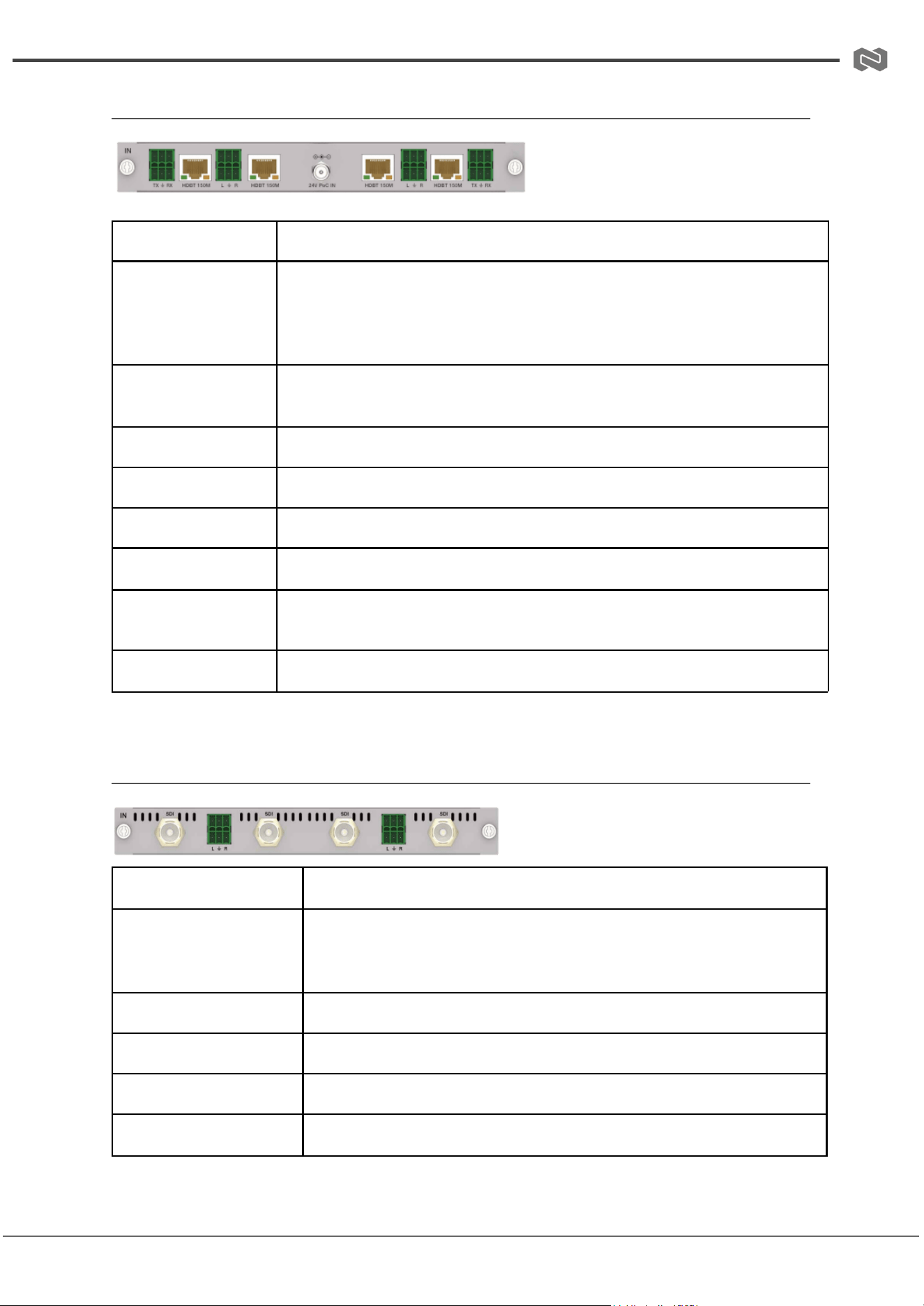
(4) 2K HDBT 150M Input Card
BG-MC-IN-HDBT150-2K
Signal Channel
4-Channel HDBT Input Signals
Supported
Resolutions
PC: 640x480p60Hz – 1920x1200p60Hz;
Video: 480i59/480p59, 576i50/576p50, 720p50/59/60, 1080i50/59/60,
1080p23/24/25/29/30/50/59/60, 1200p60
HDCP
Compliance
HDCP 1.4
Video Bandwidth
6.75 Gbps
Color Depth
8/10/12-bit at 1080p60Hz
Audio Input
LPCM 2.0CH via 3.81mm Phoenix Connector
HDBT Port
RJ45 Connector
Max Transmission
Distance
150 meters for HDBT 1080p60Hz
Status Indicator
Displays "NO SIGNAL" if no input is detected
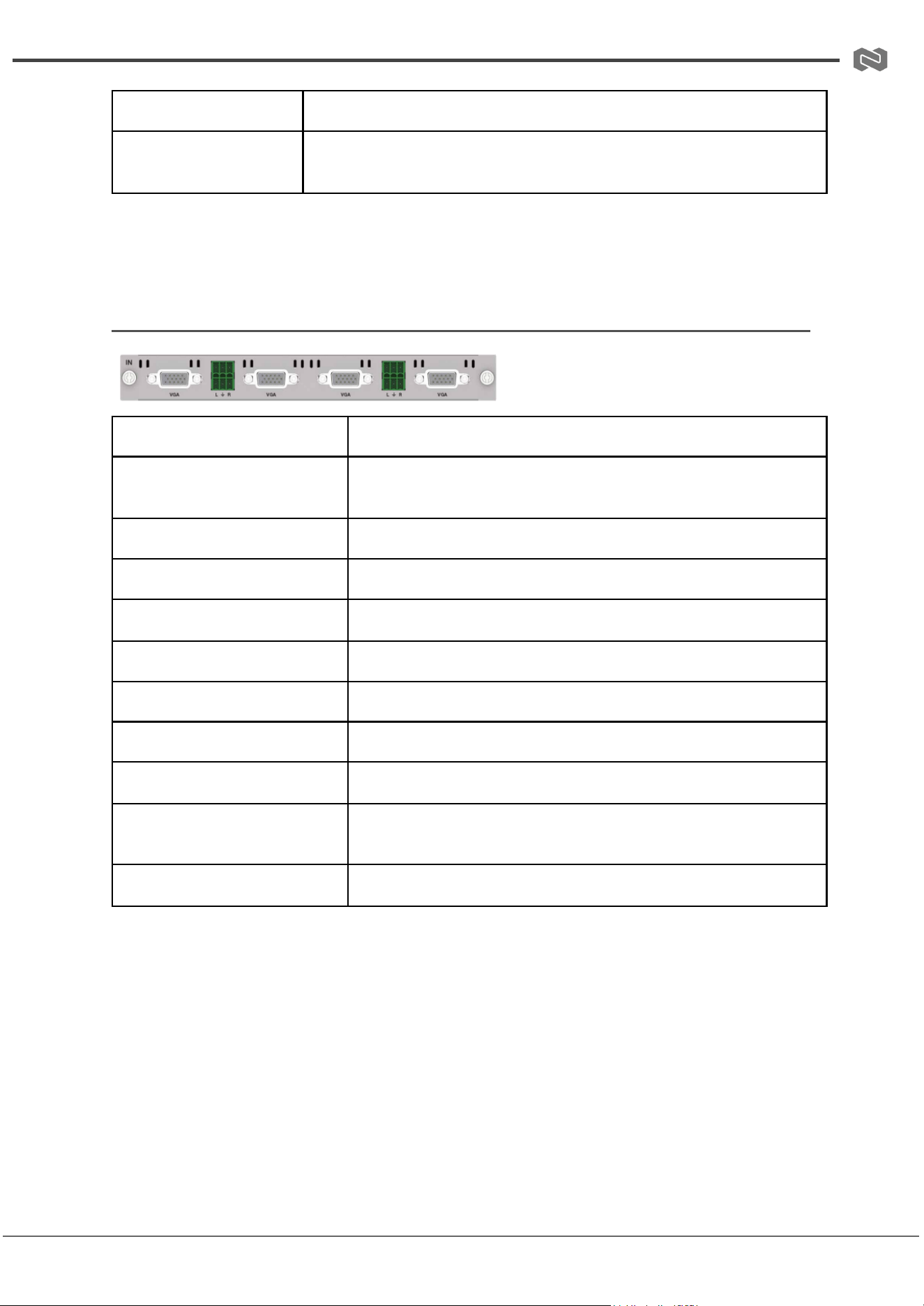
(5) 2K SDI Input Card
BG-MC-IN-SDI-2K
Signal Channel
4-Channel SDI Input Signals
Supported
Resolutions &
Formats
720x480i59.94Hz – 1920x1080p60Hz;
HD-SDI/3G-SDI formats: SMPTE 292M, 425M, 424M, 259M-C;
interlaced and progressive scan
Color Depth
8-bit at 1080p60Hz
Video Bandwidth
2.97 Gbps
Impedance
75Ω
Audio Input
LPCM 2.0CH via 3.81mm Phoenix Connector
Address: 830 National Drive #140, Sacramento, CA 95834, USA · Tel: +1(888)499-9906 · Email: support@bzbgear.com 14
BZBGEAR BG-MC-SERIES PRODUCT MANUAL
SDI Port
BNC/female
Max Transmission
Distance
100 meters for SDI 1080p60Hz
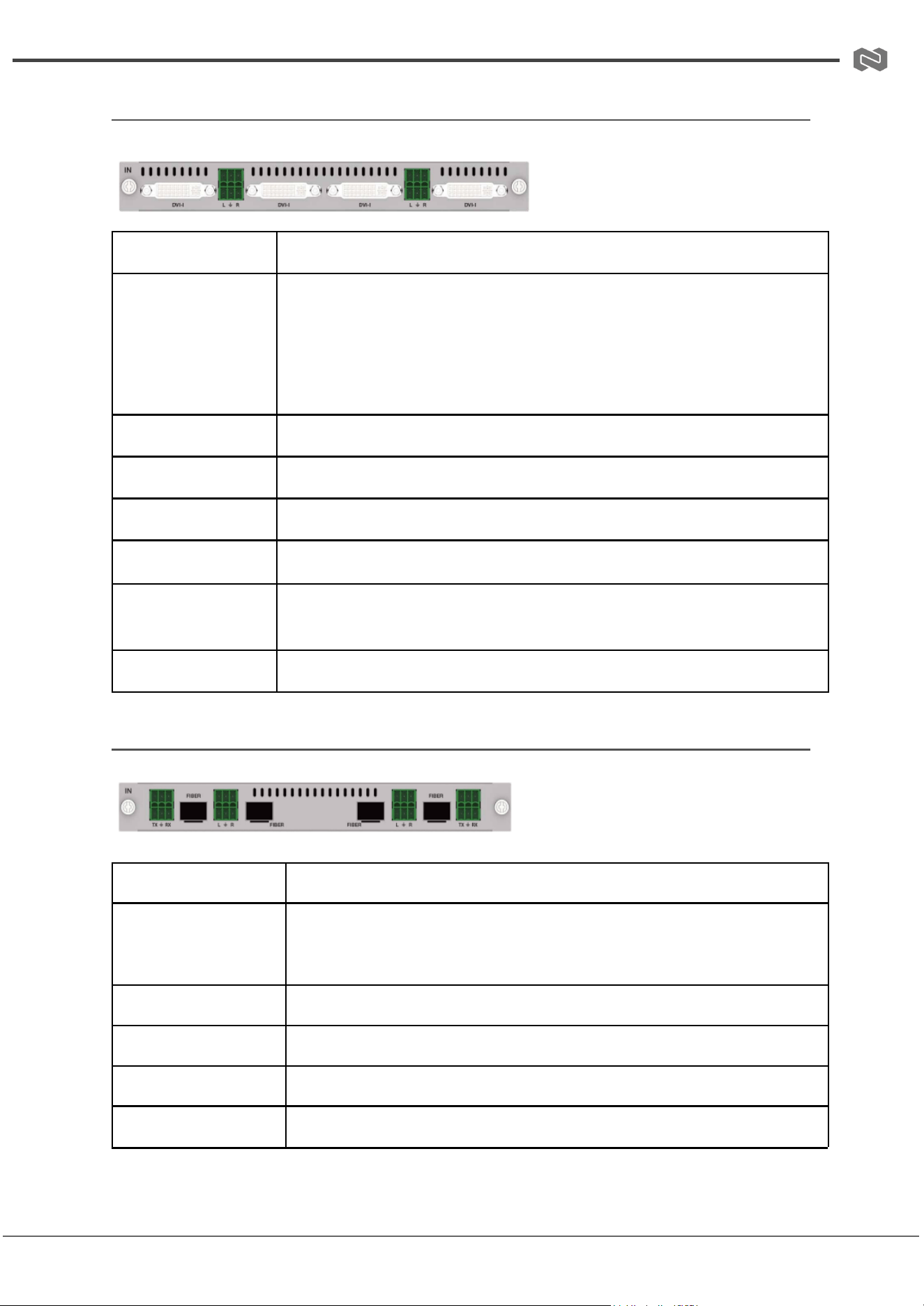
(6) 2K VGA Input Card
BG-MC-IN-VGA-2K
Signal Channel
4-Channel VGA Input Signals
Supported Resolutions &
Format
640x480p60Hz – 1920x1200p60Hz, RGB (Analog), 8-bit
color depth at 1080p60Hz
Video Bandwidth
4.95 Gbps
Impedance
75Ω
Horizontal Scan Frequency
15KHz – 90KHz
Synchronization Type
RGBHV
Nominal Level
0.7 Vp-p
Audio Input
LPCM 2.0CH via 3.81mm Phoenix Connector
VGA Port
DB15, 15-pin female
Max Transmission
Distance
10 meters for VGA 1080p60Hz
Status Indicator
Displays "NO SIGNAL" if no input is detected
Address: 830 National Drive #140, Sacramento, CA 95834, USA · Tel: +1(888)499-9906 · Email: support@bzbgear.com 15
BZBGEAR BG-MC-SERIES PRODUCT MANUAL
(7) 2K DVI Input Card
BG-MC-IN-DVIU-2K
Signal Channel
4-Channel DVI Input Signals
Supported
Resolutions &
Formats
HDMI/DVI: 640x480p60Hz – 1920x1200p60Hz, 1080p23.98–60Hz,
1200p60Hz;
VGA: 640x480–1920x1200p60Hz; YPbPr: 480i60, 576i50, 720p50/60,
1080i50/60, 1080p50/60; CVBS: 720x480i60_PAL, 720x576i50_NTSC
Color Depth
8-bit at 1080p60Hz
Video Bandwidth
4.95 Gbps
Audio Input
LPCM 2.0CH via 3.81mm Phoenix Connector
DVI Port
DVI-I, 28-pin female
Max Transmission
Distance
15 meters for DVI 1080p60Hz
Status Indicator
Displays "NO SIGNAL" if no input is detected
(8) 2K FIBER Input Card
BG-MC-IN-FIBER-2K
Signal Channel
4-Channel FIBER Input Signals
Supported
Resolutions
640x480p60Hz – 1920x1200p60Hz, including
SD (720x480i/p) and
HD (1920x1080p/i) at 50/59.94/60Hz, interlaced and progressive
Color Depth
8/10/12-bit at 1080p60Hz
Video Bandwidth
6.75 Gbps
Audio Input
LPCM 2.0CH via 3.81mm Phoenix Connector
SFP Port
SFP_HOST, 20-pin female
Address: 830 National Drive #140, Sacramento, CA 95834, USA · Tel: +1(888)499-9906 · Email: support@bzbgear.com 16
BZBGEAR BG-MC-SERIES PRODUCT MANUAL
Max Transmission
Distance
10KM (single-mode fiber) / 300M (multi-mode fiber)
Status Indicator
Displays "NO SIGNAL" if no input is detected
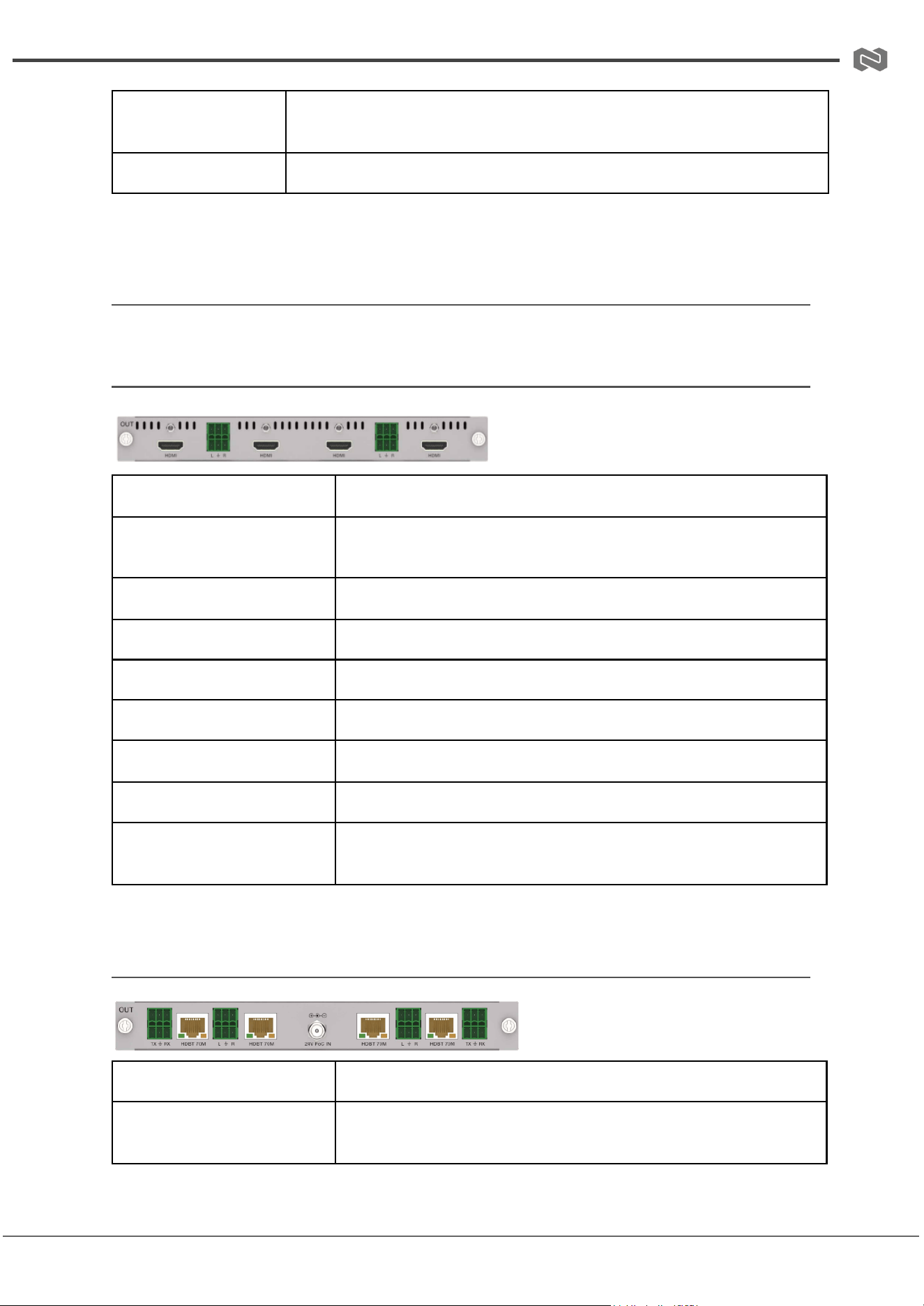
2K Output Cards
(1) 2K HDMI Output Card / 2K HDMI-V Output Card
BG-MC-OUT-HDMI-2K
Signal Channel
4-Channel HDMI Output Signals
Supported Resolutions
1024x768p60Hz – 1920x1200p60Hz (selectable via control
software)
HDMI Compliance
HDMI 1.4
HDCP Compliance
HDCP 1.4
Video Bandwidth
4.95 Gbps
Color Depth
8-bit at 1080p60Hz
Audio Output
Stereo analog LPCM 2.0CH via 3.81mm Phoenix Connector
HDMI Port
Type A
Max Transmission
Distance
15 meters for HDMI 1080p60Hz
(2) 2K HDBT 70M Output Card
BG-MC-OUT-HDBT70-2K
Signal Channel
4-Channel HDBT Output Signals
Supported Resolutions
1024x768p60Hz – 1920x1200p60Hz (selectable via control
software)
Address: 830 National Drive #140, Sacramento, CA 95834, USA · Tel: +1(888)499-9906 · Email: support@bzbgear.com 17
BZBGEAR BG-MC-SERIES PRODUCT MANUAL
HDCP Compliance
HDCP 1.4
Video Bandwidth
4.95 Gbps
Color Depth
8-bit at 1080p60Hz
Audio Output
Stereo analog LPCM 2.0CH via 3.81mm Phoenix Connector
HDBT Port
RJ45 Connector
Max Transmission
Distance
70 meters for HDBT 1080p60Hz
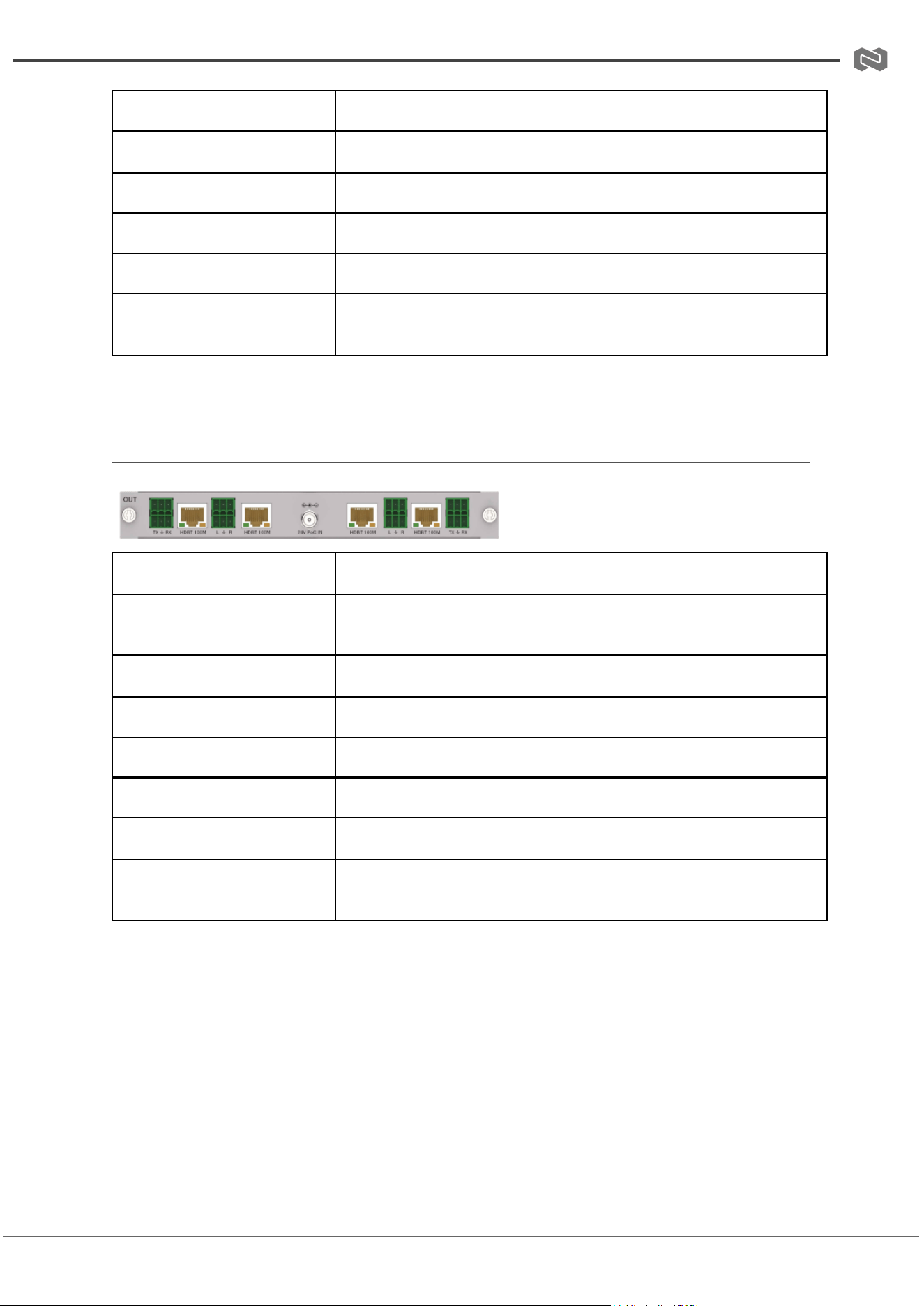
(3) 2K HDBT 100M Output Card
BG-MC-OUT-HDBT100-2K
Signal Channel
4-Channel HDBT Output Signals
Supported Resolutions
1024x768p60Hz – 1920x1200p60Hz (selectable via control
software)
HDCP Compliance
HDCP 1.4
Video Bandwidth
4.95 Gbps
Color Depth
8-bit at 1080p60Hz
Audio Output
Stereo analog LPCM 2.0CH via 3.81mm Phoenix Connector
HDBT Port
RJ45 Connector
Max Transmission
Distance
100 meters for HDBT 1080p60Hz
Address: 830 National Drive #140, Sacramento, CA 95834, USA · Tel: +1(888)499-9906 · Email: support@bzbgear.com 18
BZBGEAR BG-MC-SERIES PRODUCT MANUAL
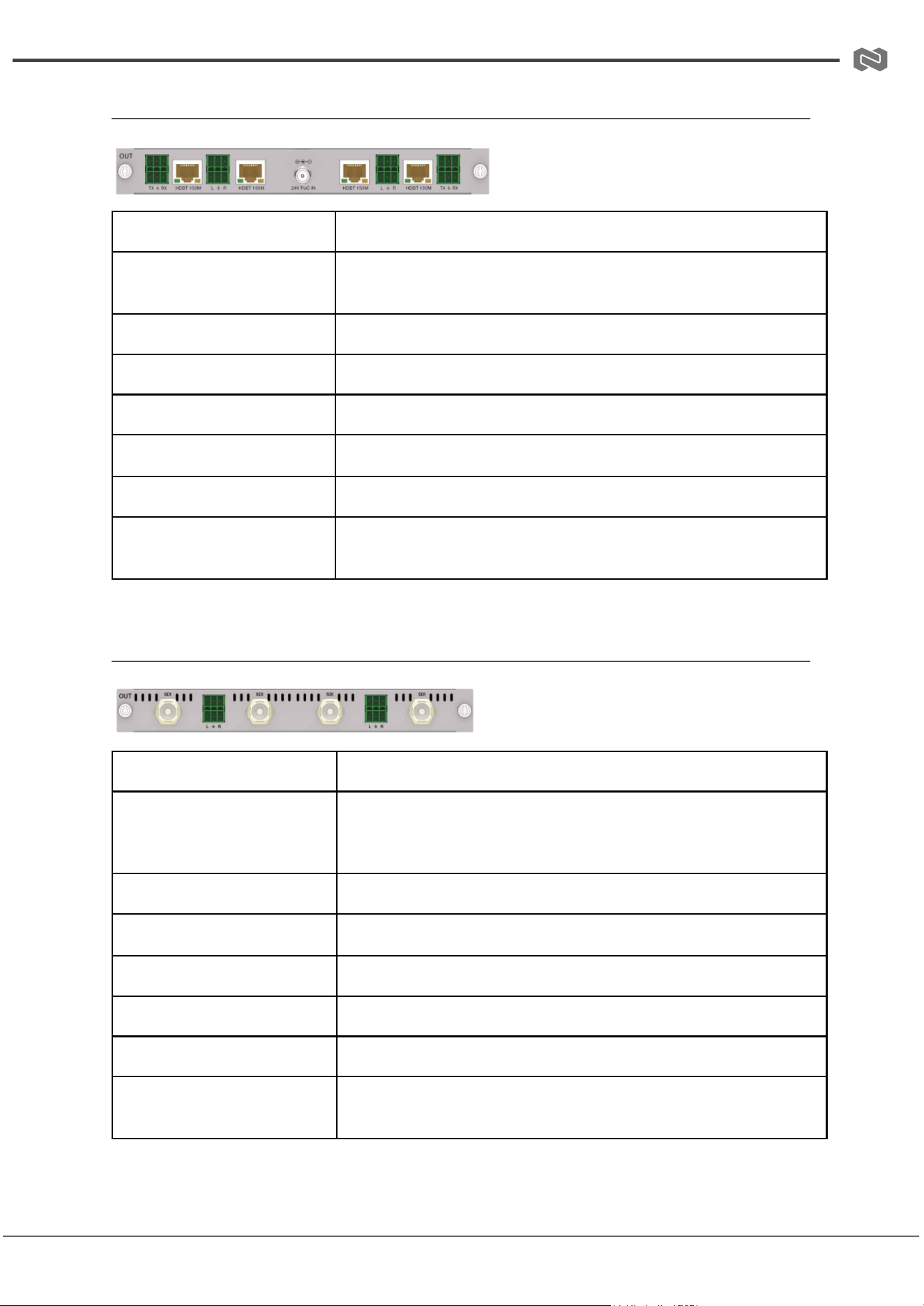
(4) 2K HDBT 150M Output Card
BG-MC-OUT-HDBT150-2K
Signal Channel
4-Channel HDBT Output Signals
Supported Resolutions
1024x768p60Hz – 1920x1200p60Hz (selectable via control
software)
HDCP Compliance
HDCP 1.4
Video Bandwidth
4.95 Gbps
Color Depth
8-bit at 1080p60Hz
Audio Output
Stereo analog LPCM 2.0CH via 3.81mm Phoenix Connector
HDBT Port
RJ45 Connector
Max Transmission
Distance
150 meters for HDBT 1080p60Hz
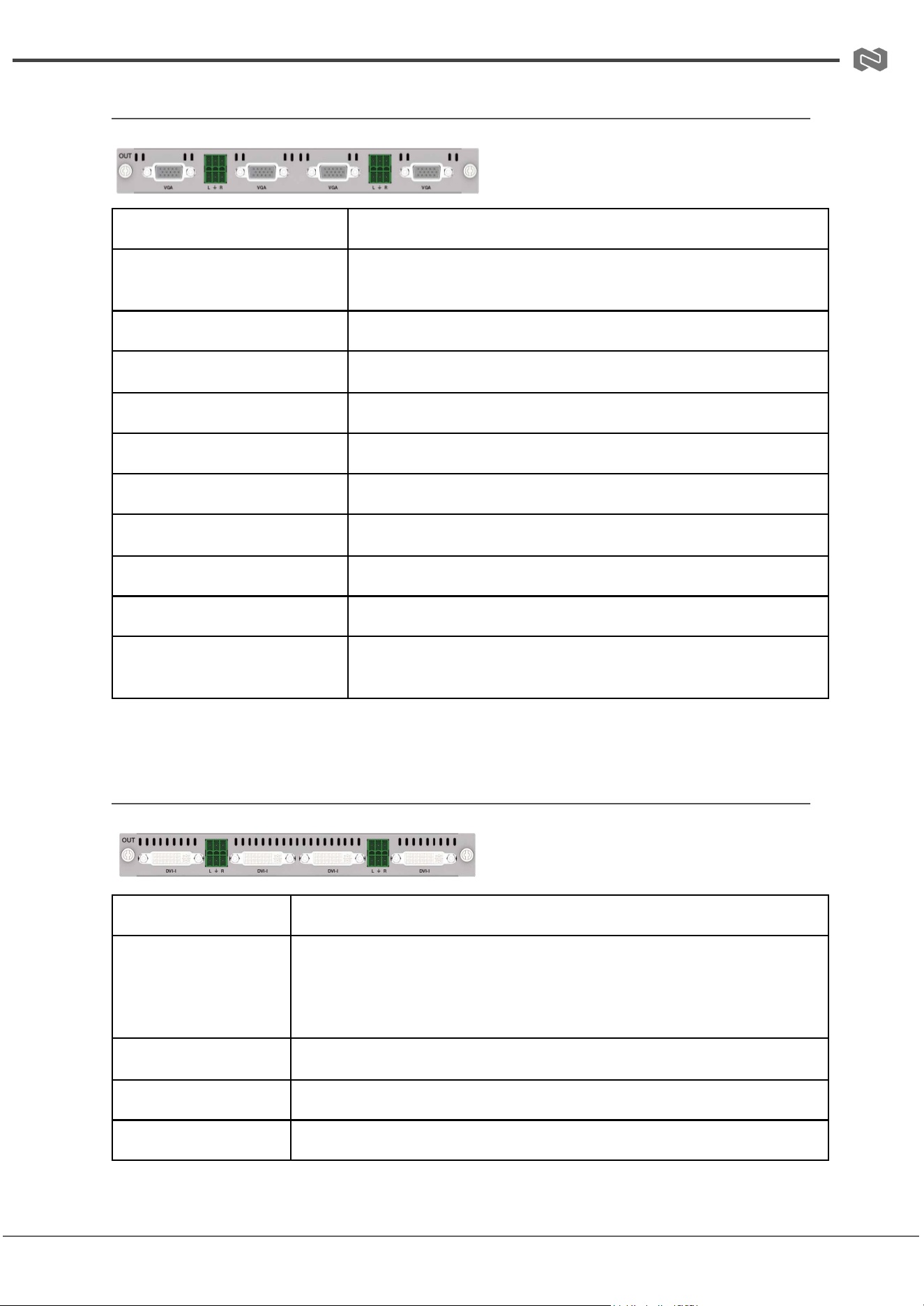
(5) 2K SDI Output Card
BG-MC-OUT-SDI-2K
Signal Channel
4-Channel SDI Output Signals
Supported Resolutions &
Formats
720x480i60 – 1920x1080p60;
HD-SDI (SMPTE 292M),
3G-SDI (SMPTE 424M/425M-AB)
Color Depth
8-bit at 1080p60Hz
Video Bandwidth
2.97 Gbps
Impedance
75Ω
Audio Output
Stereo analog LPCM 2.0CH via 3.81mm Phoenix Connector
SDI Port
BNC/female
Max Transmission
Distance
100 meters for SDI 1080p60Hz
Address: 830 National Drive #140, Sacramento, CA 95834, USA · Tel: +1(888)499-9906 · Email: support@bzbgear.com 19
BZBGEAR BG-MC-SERIES PRODUCT MANUAL
(6) 2K VGA Output Card
BG-MC-OUT-VGA-2K
Signal Channel
4-Channel VGA Output Signals
Supported Resolutions &
Format
1024x768p60Hz – 1920x1200p60Hz, RGB (Analog),
selectable via control software
Color Depth
8-bit at 1080p60Hz
Video Bandwidth
4.95 Gbps
Impedance
75Ω
Horizontal Scan Frequency
15KHz – 90KHz
Synchronization Type
RGBHV
Nominal Level
0.7 Vp-p
Audio Output
Stereo analog LPCM 2.0CH via 3.81mm Phoenix Connector
VGA Port
DB15, 15-pin female
Max Transmission
Distance
10 meters for VGA 1080p60Hz
(7) 2K DVI Output Card
BG-MC-OUT-DVIU-2K
Signal Channel
4-Channel DVI Output Signals
Supported
Resolutions &
Formats
HDMI/DVI: 1280x720p50 – 1920x1200p60;
VGA: 1280x720p50 – 1920x1200p60; YPbPr: 1280x720p60,
1920x1080p60;
CVBS: 720x480i60_PAL, 720x576i50_NTSC
Signal Format
DVI-I full digital TMDS, compliant with DVI 1.0
Color Depth
8-bit at 1080p60Hz
Video Bandwidth
4.95 Gbps
Address: 830 National Drive #140, Sacramento, CA 95834, USA · Tel: +1(888)499-9906 · Email: support@bzbgear.com 20
BZBGEAR BG-MC-SERIES PRODUCT MANUAL
Audio Output
Stereo analog LPCM 2.0CH via 3.81mm Phoenix Connector
DVI Port
DVI-I, 28-pin female
Max Transmission
Distance
15 meters for DVI 1080p60Hz
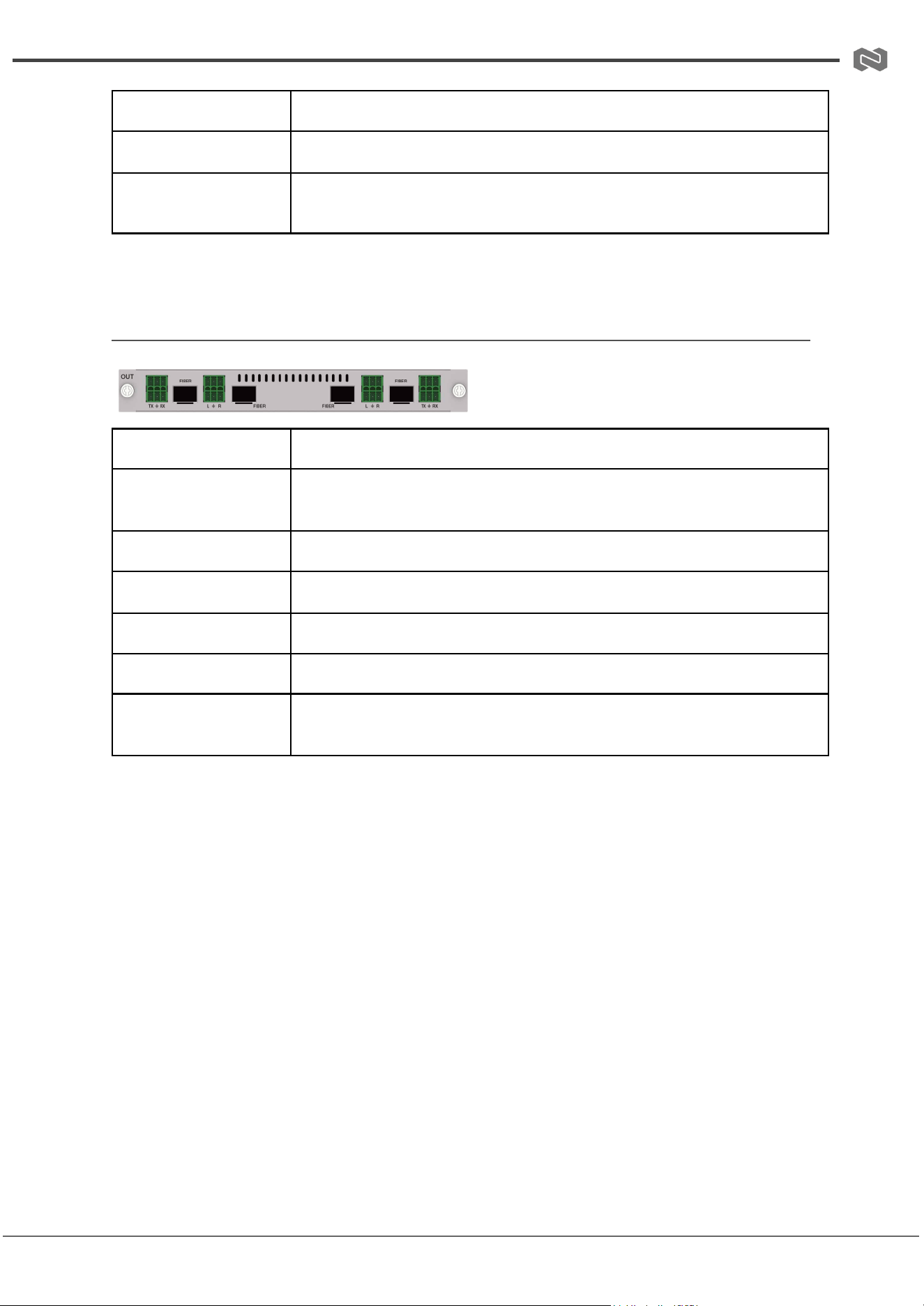
(8) 2K FIBER Output Card
BG-MC-OUT-FIBER-2K
Signal Channel
4-Channel FIBER Output Signals
Supported
Resolutions
1024x768p60 – 1920x1200p60, including 720p/1080p at
24/25/30/50/60Hz, 1600x1200p60; selectable via control software
Color Depth
8-bit at 1080p60Hz
Video Bandwidth
4.95 Gbps
Audio Output
Stereo analog LPCM 2.0CH via 3.81mm Phoenix Connector
SFP Port
SFP_HOST, 20-pin female
Max Transmission
Distance
10KM (single-mode fiber) / 300M (multi-mode fiber)
Address: 830 National Drive #140, Sacramento, CA 95834, USA · Tel: +1(888)499-9906 · Email: support@bzbgear.com 21
BZBGEAR BG-MC-SERIES PRODUCT MANUAL
4K Input Cards
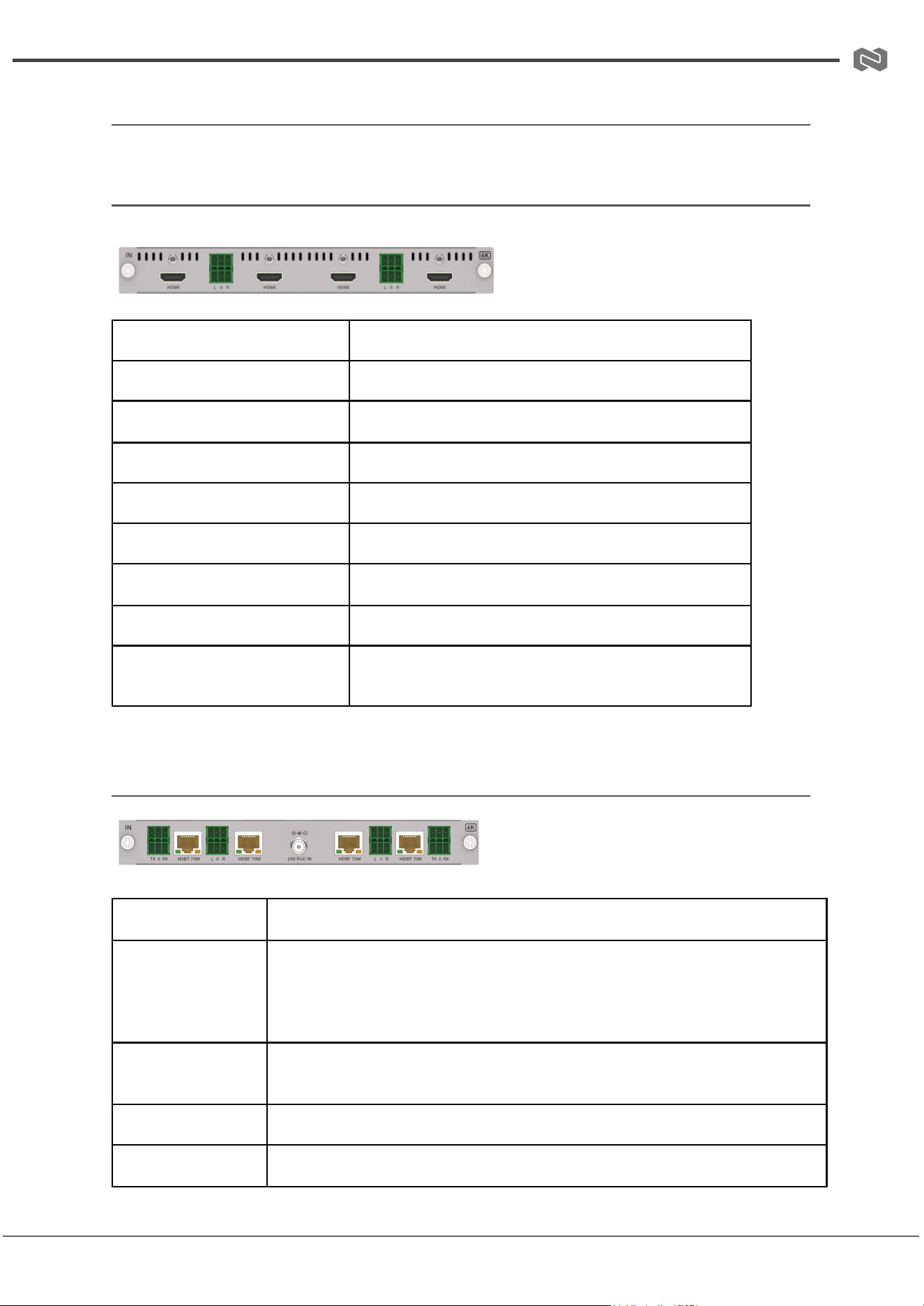
(1) 4K HDMI Input Card
BG-MC-IN-HDMI-4K
Signal Channel
4-Channel HDMI Input Signals
Supported Resolutions
640x480p60Hz – 4096x2160p60Hz (4K)
HDMI Compliance
HDMI 2.0b
HDCP Compliance
HDCP 2.2
Video Bandwidth
18 Gbps
Color Depth
8/10/12-bit
Audio Input
LPCM 2.0CH via 3.81mm Phoenix Connector
HDMI Port
HDMI Type A
Max Transmission
Distance
HDMI 1080p60: 15m; 4K30Hz: 10m; 4K60Hz: 8m
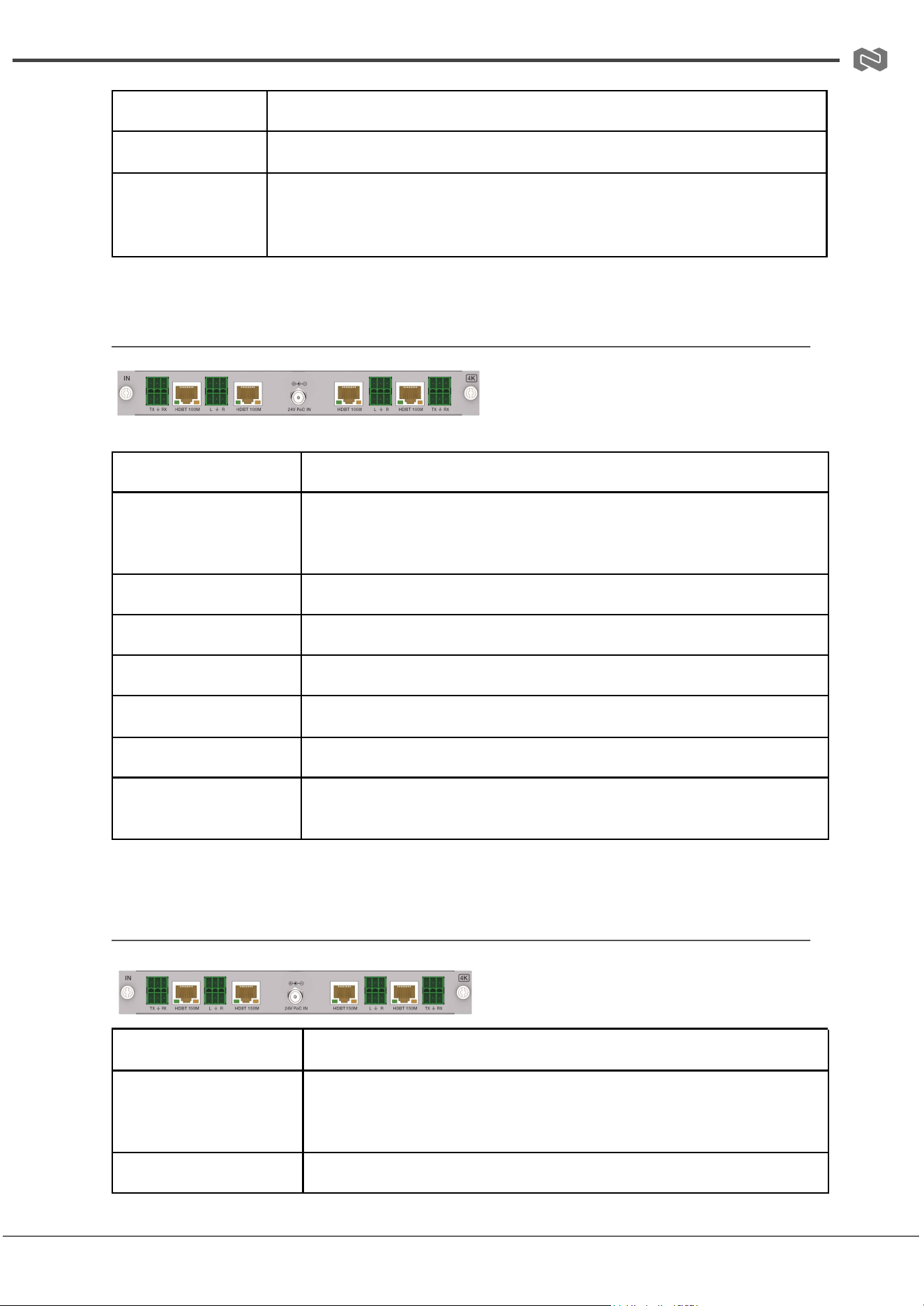
(2) 4K HDBT 70M Input Card
BG-MC-IN-HDBT70-4K
Signal Channel
4-Channel HDBT Input Signals
Supported
Resolutions
SD: 640x480p60, 720x480i/p, 720x576i/p;
HD: 1280x720p50/59/60, 1920x1080p23.98–60,
common PC resolutions;
UHD: 3840x2160p24/25/30/50/60, 4096x2160p24/25/30/50/60
HDCP
Compliance
HDCP 2.2
Video Bandwidth
18 Gbps
Color Depth
8/10/12-bit
Address: 830 National Drive #140, Sacramento, CA 95834, USA · Tel: +1(888)499-9906 · Email: support@bzbgear.com 22
BZBGEAR BG-MC-SERIES PRODUCT MANUAL
Audio Input
LPCM 2.0CH via 3.81mm Phoenix Connector
HDBT Port
RJ45 Connector
Max
Transmission
Distance
1080p60: 70m; 4K30/60: 40m
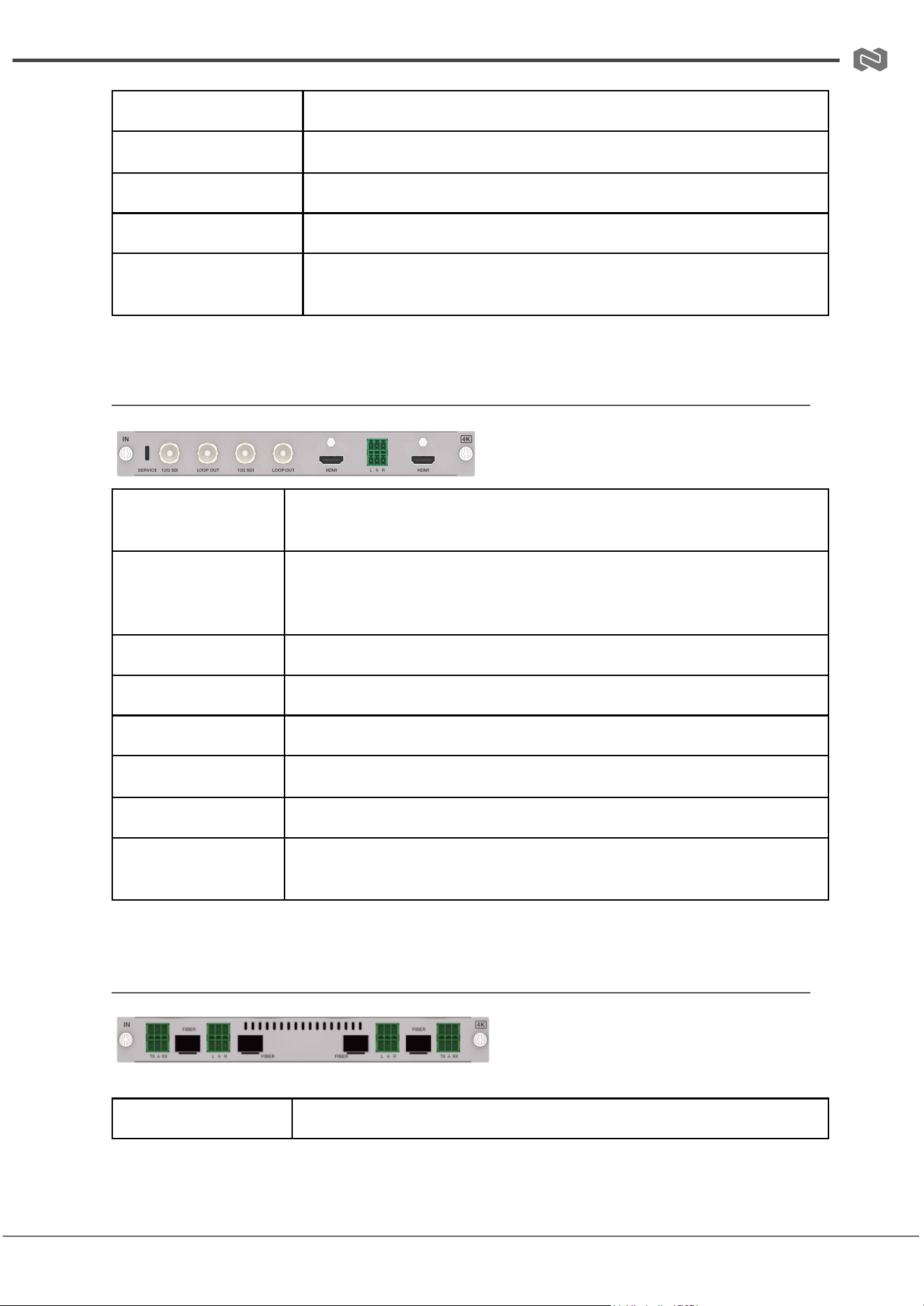
(3) 4K HDBT 100M Input Card
BG-MC-IN-HDBT100-4K
Signal Channel
4-Channel HDBT Input Signals
Supported
Resolutions
SD: 640x480p60, 720x480p59.94;
UHD: 3840x2160p60, 4096x2160p60; various frame rates
23.98–60Hz
HDCP Compliance
HDCP 2.2
Video Bandwidth
18 Gbps
Color Depth
8/10/12-bit
Audio Input
LPCM 2.0CH via 3.81mm Phoenix Connector
HDBT Port
RJ45 Connector
Max Transmission
Distance
HDBT 1080p60: 100m; 4K30/60: 70m
(4) 4K HDBT 150M Input Card
BG-MC-IN-HDBT150-4K
Signal Channel
4-Channel HDBT Input Signals
Supported
Resolutions
SD: 640x480p60~;
HD: 1920x1200p60, 1080p various frame rates;
UHD: 3840x2160p60, 4096x2160p60
HDCP Compliance
HDCP 2.2
Address: 830 National Drive #140, Sacramento, CA 95834, USA · Tel: +1(888)499-9906 · Email: support@bzbgear.com 23
BZBGEAR BG-MC-SERIES PRODUCT MANUAL
Video Bandwidth
18 Gbps
Color Depth
8/10/12-bit
Audio Input
LPCM 2.0CH via 3.81mm Phoenix Connector
HDBT Port
RJ45 Connector
Max Transmission
Distance
1080p60/4K30: 150m;
4K60: 120m
(5) 4K SDI Input Card
BG-MC-IN-SDI-4K
Signal Channel
2-Channel 12G SDI Input & Loop Output, 2-Channel HDMI Input
Supported
Resolutions
HDMI: 640x480p60 – 4096x2160p60, various frame rates
23.98–60Hz;
SDI: 720p50/60, 1080i50/60, 1080p50/60, 4Kx2K 24/25/30/50/60Hz
Color Depth
8/10/12-bit
Video Bandwidth
HDMI: 18 Gbps; SDI: 12 Gbps
Impedance
HDMI: 100Ω differential; SDI: 75Ω single-end
Audio Input
LPCM 2.0CH via 3.81mm Phoenix Connector
Video Ports
HDMI: Type A female; SDI: BNC female
Max Transmission
Distance
HDMI 4K60: 8m; SDI 3G/6G: 100m; SDI 12G: 60m
(6) 4K FIBER Input Card
BG-MC-IN-FIBER-4K
Signal Channel
4-Channel FIBER Input Signals
Address: 830 National Drive #140, Sacramento, CA 95834, USA · Tel: +1(888)499-9906 · Email: support@bzbgear.com 24
BZBGEAR BG-MC-SERIES PRODUCT MANUAL
Supported
Resolutions
SD: 640x480p60~;
UHD: 3840x2160p60, 4096x2160p60; various frame rates and
interlaced/progressive scan options
Color Depth
8/10/12-bit
Video Bandwidth
18 Gbps
Audio Input
LPCM 2.0CH via 3.81mm Phoenix Connector
SFP Port
SFP_HOST, 20-pin female
Max Transmission
Distance
Single-mode: 10KM; Multi-mode: 300M
4K Output Cards
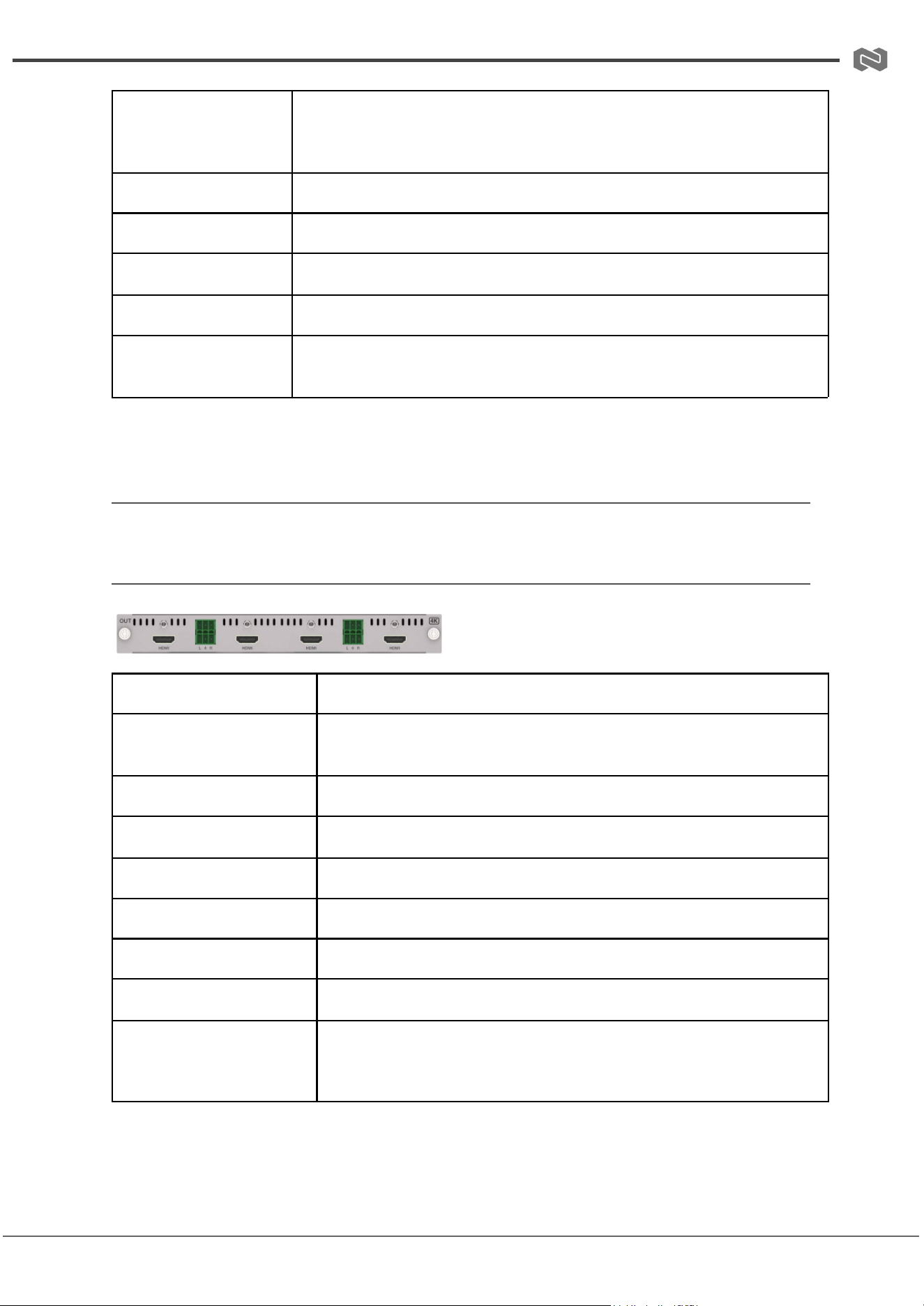
(1) 4K HDMI Output Card
BG-MC-OUT-HDMI-4K
Signal Channel
4-Channel HDMI Output Signals
Supported Resolutions
720x480i60 – 4096x2160p60, including 1080p, 1440p, and 4K at
various frame rates
HDMI Compliance
HDMI 2.0b
HDCP Compliance
HDCP 2.2
Video Bandwidth
18 Gbps
Color Depth
8/10/12-bit
Audio Output
Stereo analog LPCM 2.0CH via 3.81mm Phoenix Connector
HDMI Port
Type A
Max Transmission
Distance
1080p60: 15m;
4K30: 10m;
4K60: 8m
Address: 830 National Drive #140, Sacramento, CA 95834, USA · Tel: +1(888)499-9906 · Email: support@bzbgear.com 25
BZBGEAR BG-MC-SERIES PRODUCT MANUAL
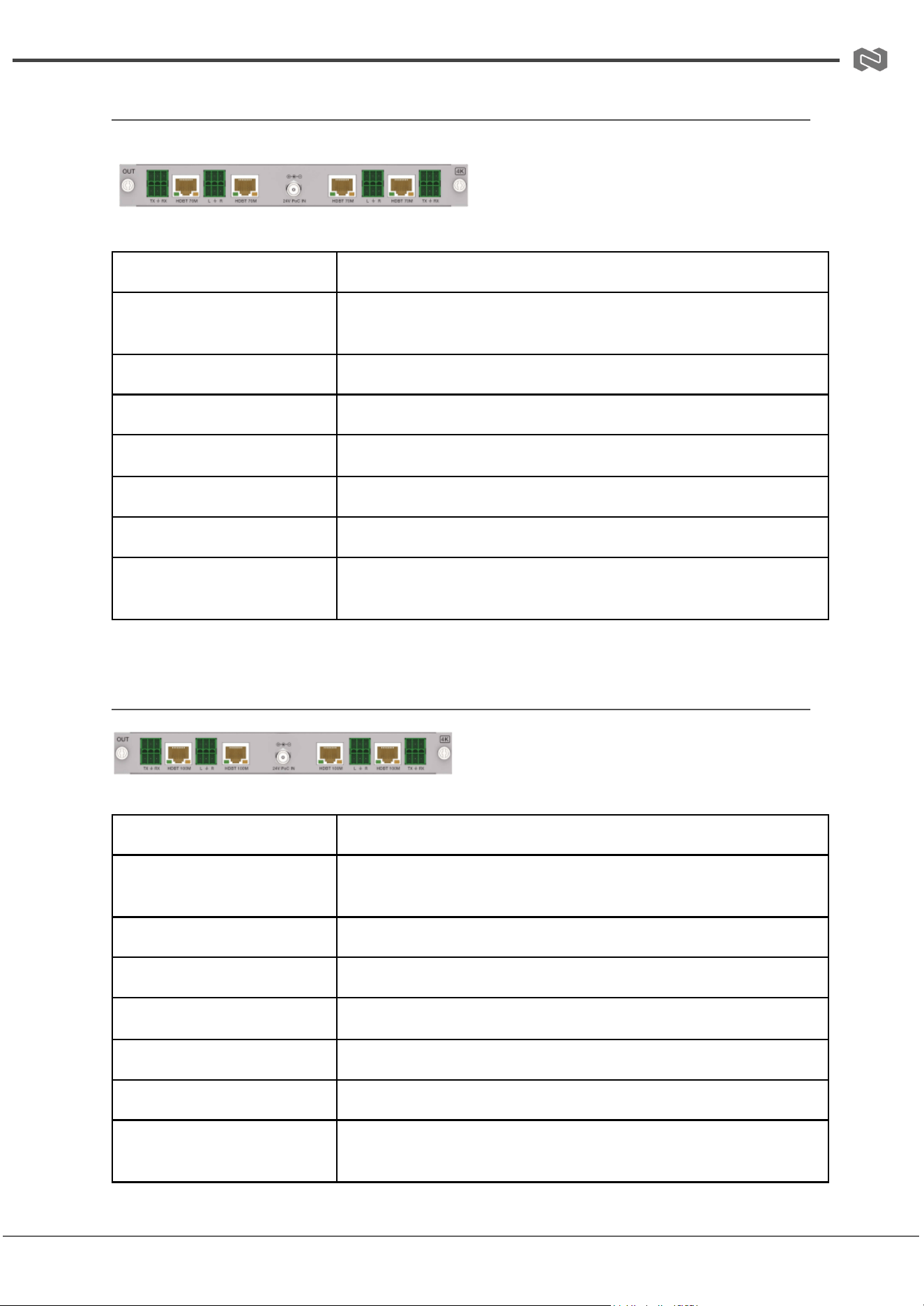
(2) 4K HDBT 70M Output Card
BG-MC-OUT-HDBT70-4K
Signal Channel
4-Channel HDBT Output Signals
Supported Resolutions
SD: 720x480i60, 720x576i50;
UHD: 3840x2160p60, 4096x2160p60
HDCP Compliance
HDCP 2.2
Video Bandwidth
18 Gbps
Color Depth
8/10/12-bit
Audio Output
Stereo analog LPCM 2.0CH via 3.81mm Phoenix Connector
HDBT Port
RJ45 Connector
Max Transmission
Distance
1080p60: 70m;
4K30/60: 40m
(3) 4K HDBT 100M Output Card
BG-MC-OUT-HDBT100-4K
Signal Channel
4-Channel HDBT Output Signals
Supported Resolutions
SD: 720x480i60, 720x576i50;
UHD: 3840x2160p60, 4096x2160p60
HDCP Compliance
HDCP 2.2
Video Bandwidth
18 Gbps
Color Depth
8/10/12-bit
Audio Output
Stereo analog LPCM 2.0CH via 3.81mm Phoenix Connector
HDBT Port
RJ45 Connector
Max Transmission
Distance
1080p60: 100m;
4K30/60: 70m
Address: 830 National Drive #140, Sacramento, CA 95834, USA · Tel: +1(888)499-9906 · Email: support@bzbgear.com 26
BZBGEAR BG-MC-SERIES PRODUCT MANUAL
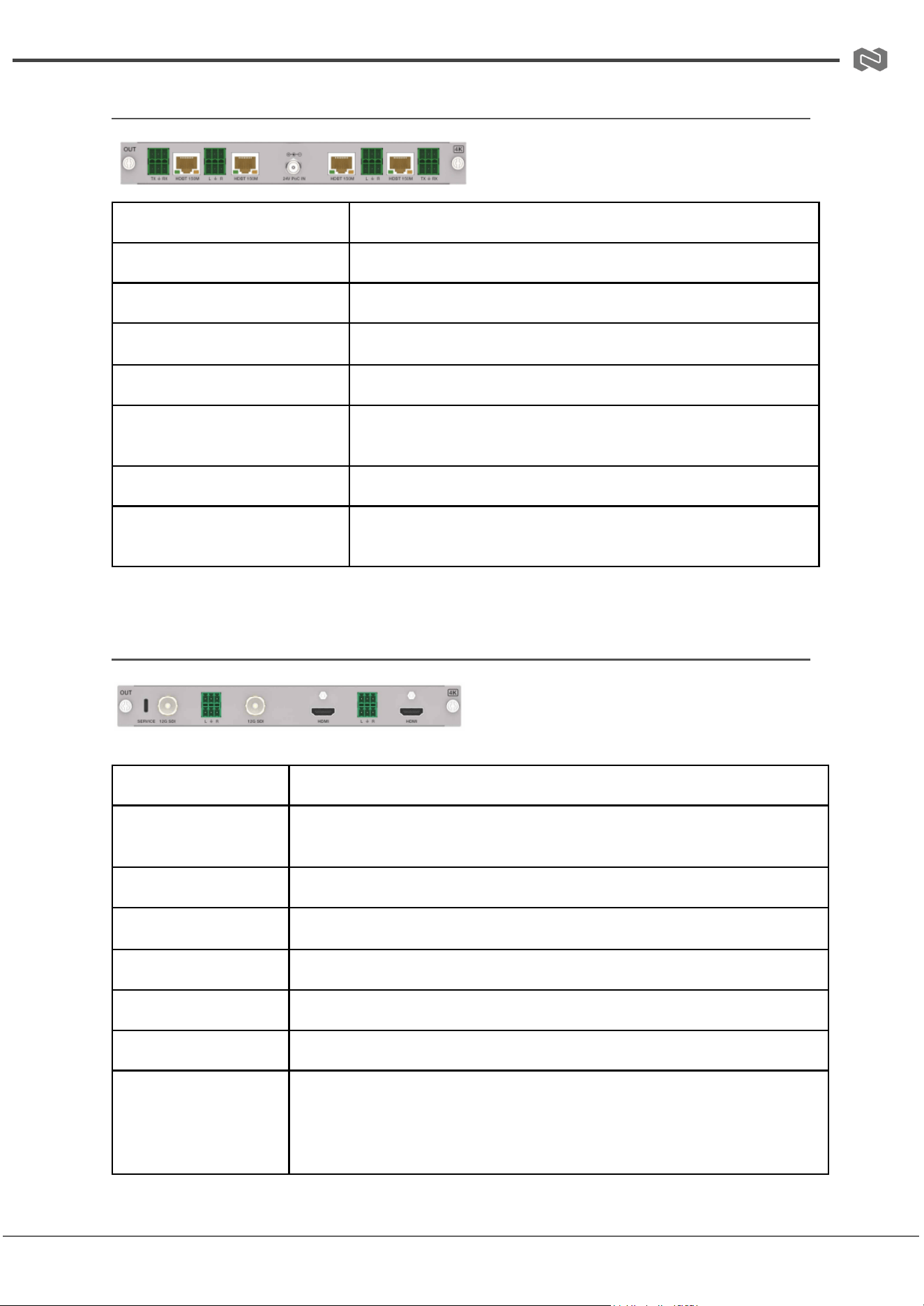
(4) 4K HDBT 150M Output Card
BG-MC-OUT-HDBT150-4K
Signal Channel
4-Channel HDBT Output Signals
Supported Resolutions
720x480i60 – 4096x2160p60
HDCP Compliance
HDCP 2.2
Video Bandwidth
18 Gbps
Color Depth
8/10/12-bit
Audio Output
Stereo analog LPCM 2.0CH via 3.81mm Phoenix
Connector
HDBT Port
RJ45 Connector
Max Transmission
Distance
1080p60/4K30: 150m; 4K60: 120m
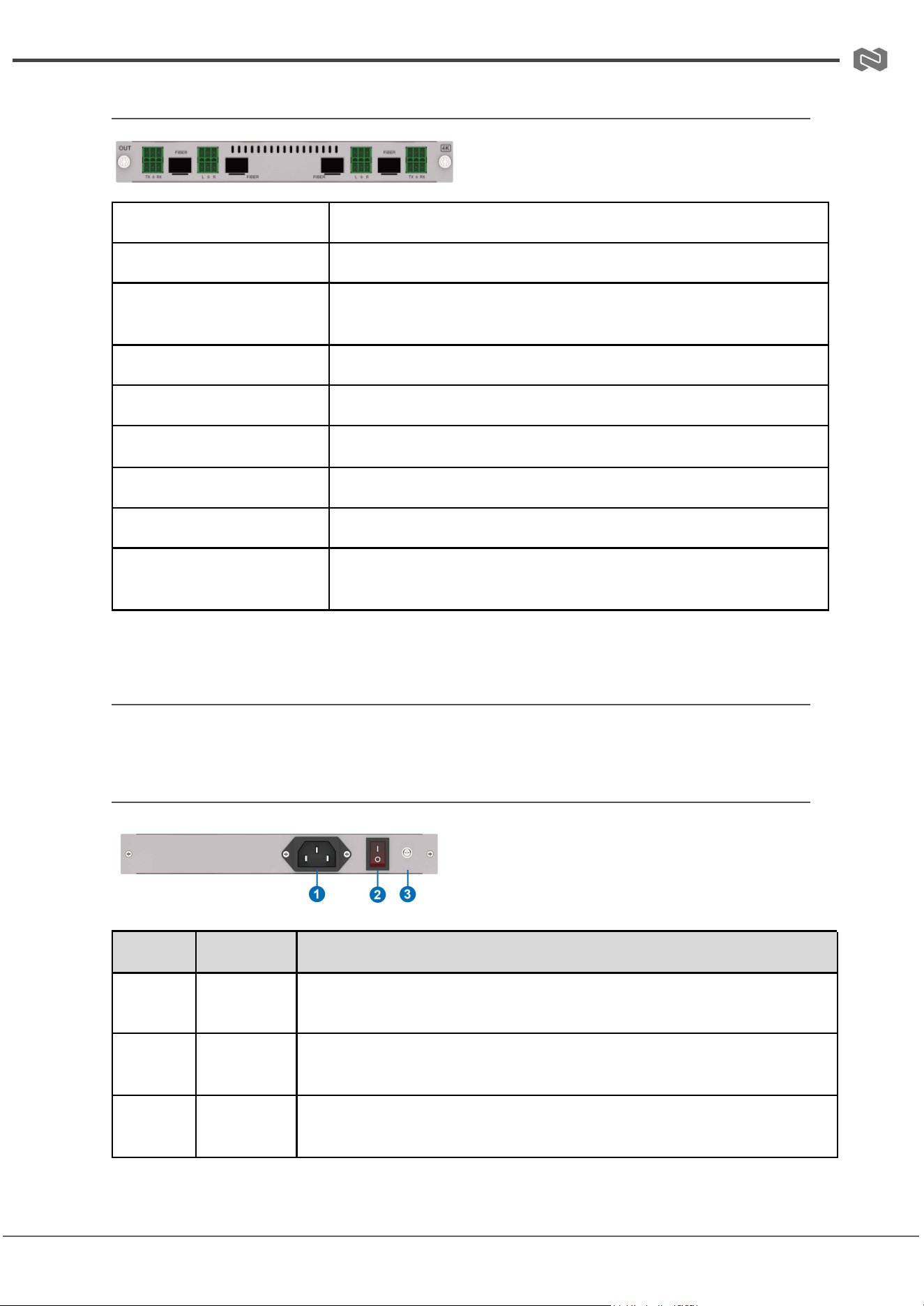
(5) 4K SDI Output Card
BG-MC-OUT-SDI-4K
Signal Channel
2-Channel 12G SDI Output, 2-Channel HDMI Output
Supported
Resolutions
HDMI: 640x480p60 – 4096x2160p60, various frame rates;
SDI: 720p50/60, 1080i50/60, 1080p50/60, 4Kx2K 24/25/30/50/60Hz
Color Depth
8/10/12-bit
Video Bandwidth
HDMI: 18 Gbps; SDI: 12 Gbps
Impedance
HDMI: 100Ω differential; SDI: 75Ω single-end
Audio Output
Stereo analog LPCM 2.0CH via 3.81mm Phoenix Connector
Video Ports
HDMI: Type A female; SDI: BNC female
Max Transmission
Distance
HDMI 1080p: 15m;
HDMI 4K60: 8m;
SDI 3G/6G: 100m;
SDI 12G: 60m
Address: 830 National Drive #140, Sacramento, CA 95834, USA · Tel: +1(888)499-9906 · Email: support@bzbgear.com 27
BZBGEAR BG-MC-SERIES PRODUCT MANUAL
(6) 4K FIBER Output Card
BG-MC-OUT-FIBER-4K
Specification
Details
Signal Channel
4-channel FIBER output signals
Resolution
Supports a wide range, from 640x480p60Hz up to
4096x2160p60Hz
Color Depth
8/10/12-bit
Video Bandwidth
18Gbps
Audio
Supports stereo analog audio output (LPCM 2.0CH)
Audio Port
3.81mm Phoenix Connector
SFP Port
SFP_HOST, 20-pin female
Max Transmission
Distance
Single mode fiber: 10KM, multi-mode fiber: 300M
Specifications-Power Cards
Single Power Card (optional 1)
Number
Name
Function Description
1
Power port
This is used to connect the power input port to an AC power supply
using the included power cord.
2
Power
switch
This is pressed to power the system on or off.
3
GND
This is used for connecting the ground or the earthing conductor of a
rack.
Address: 830 National Drive #140, Sacramento, CA 95834, USA · Tel: +1(888)499-9906 · Email: support@bzbgear.com 28
BZBGEAR BG-MC-SERIES PRODUCT MANUAL
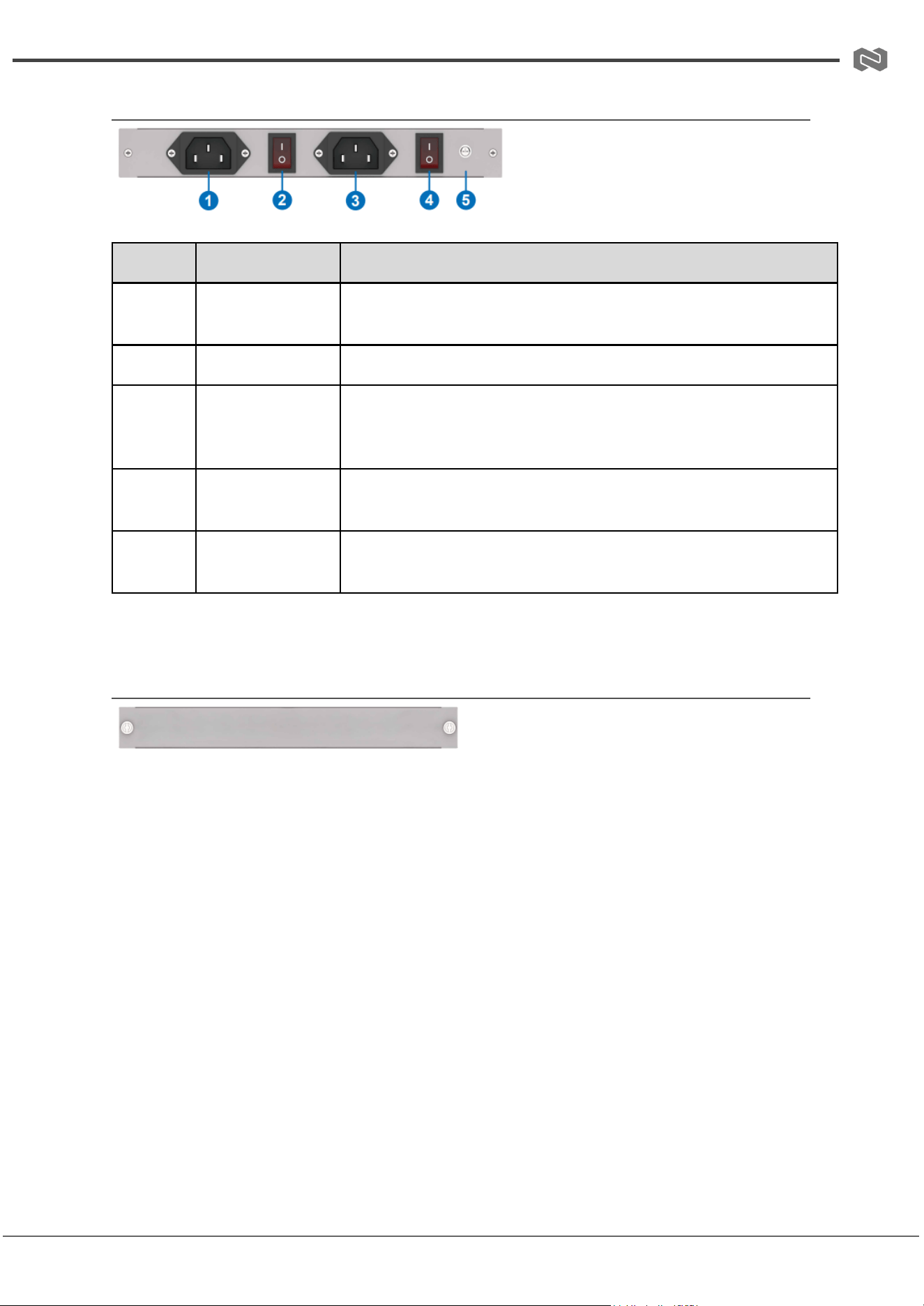
Dual Power Card (optional 2)
Number
Name
Function Description
1
Power port
Connects to the AC power supply using the included power
cord.
2
Power switch
Powers the system on or off.
3
Redundant
power port
Provides power to a faulty device from a redundant power
supply if the main power supply fails, ensuring continuous
operation.
4
Redundant
power switch
Powers the system on or off when using the redundant power
supply.
5
GND
Used for connecting the ground or the earthing conductor of
the rack.
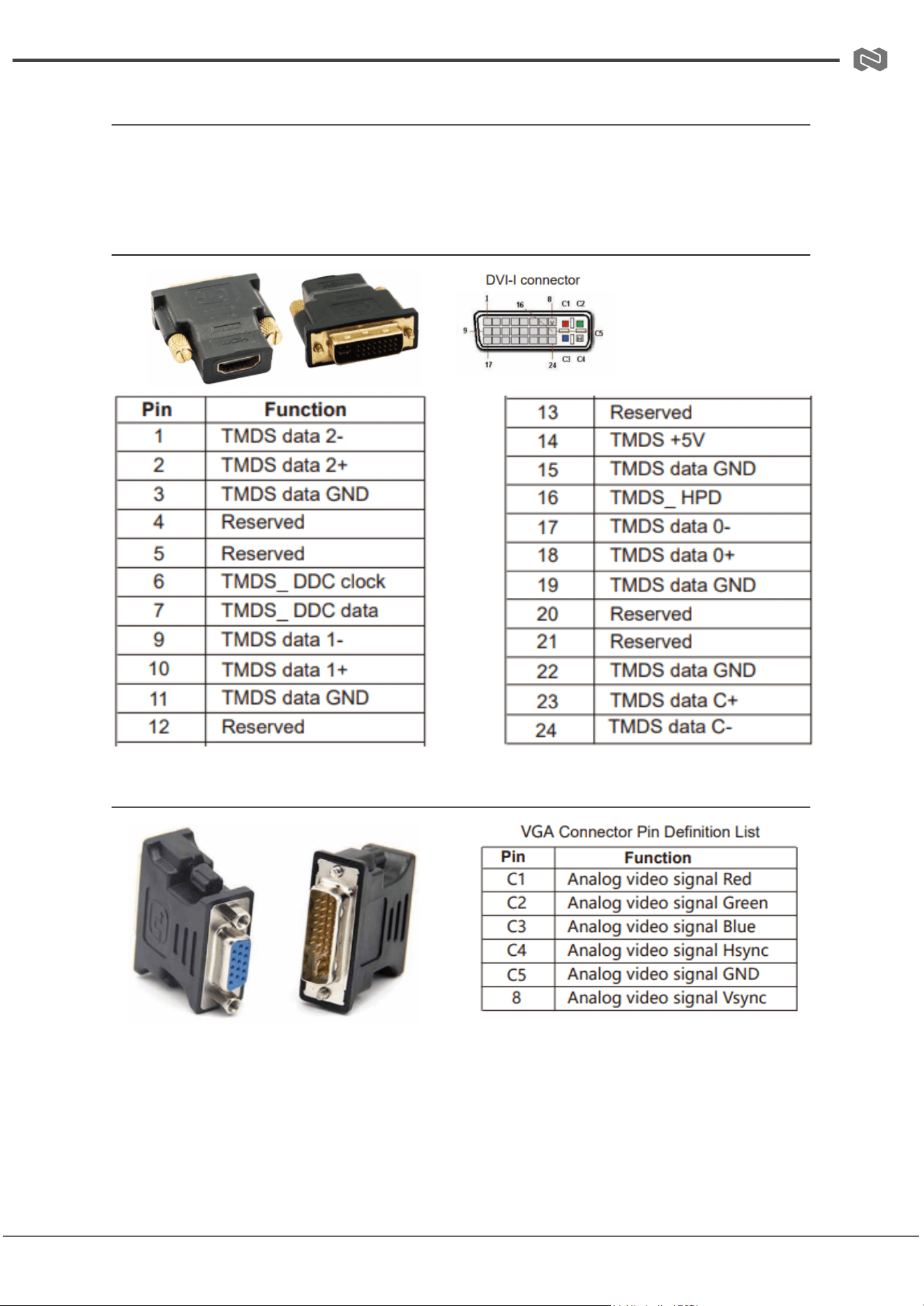
Specifications-Blank Card
Note: If the Matrix is not fully populated with cards, placeholder (blank) cards will be
added automatically.
Address: 830 National Drive #140, Sacramento, CA 95834, USA · Tel: +1(888)499-9906 · Email: support@bzbgear.com 29
BZBGEAR BG-MC-SERIES PRODUCT MANUAL
Specifications-Signal Adapters
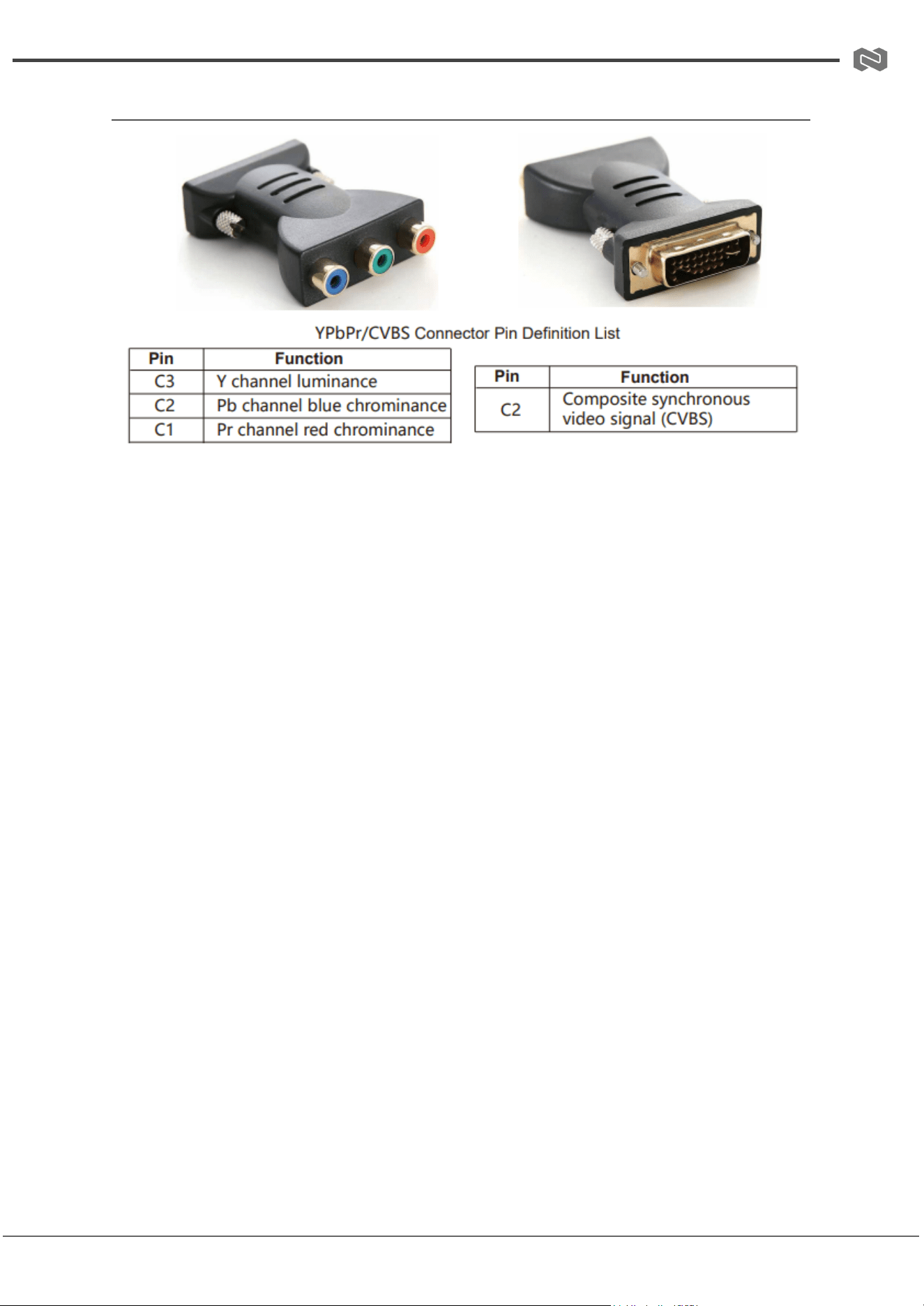
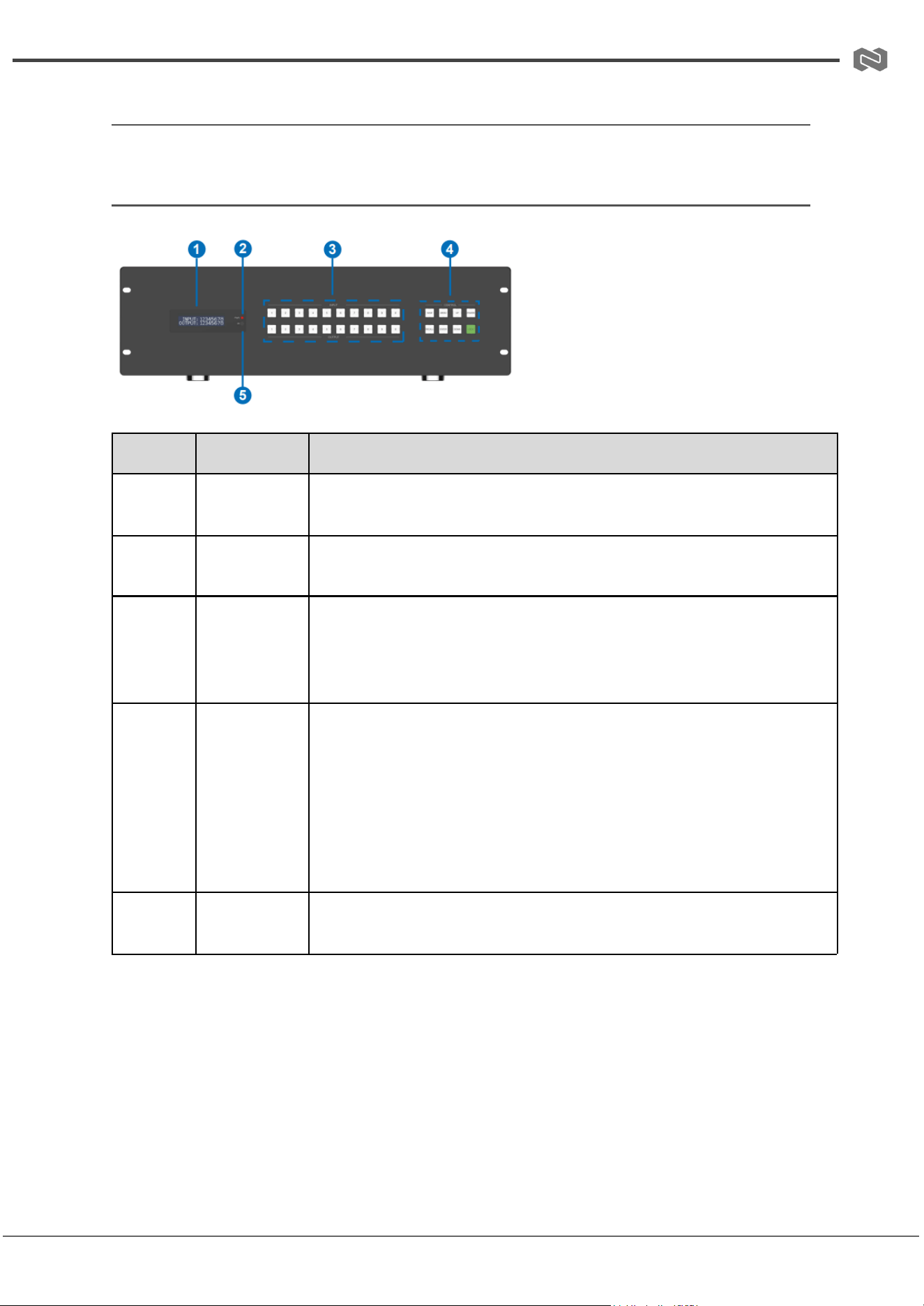
The DVI card includes three signal adapters, allowing DVI output to be converted to
HDMI, VGA, or YPbPr/CVBS. Users can select and use the appropriate adapter as
needed.
DVI Male to HDMI Female Adapter
DVI Male to VGA Female Adapter
Address: 830 National Drive #140, Sacramento, CA 95834, USA · Tel: +1(888)499-9906 · Email: support@bzbgear.com 30
BZBGEAR BG-MC-SERIES PRODUCT MANUAL
DVI Male to YPbPr/CVBS Female Adapter
Address: 830 National Drive #140, Sacramento, CA 95834, USA · Tel: +1(888)499-9906 · Email: support@bzbgear.com 31
BZBGEAR BG-MC-SERIES PRODUCT MANUAL
Operation and Use
Panel Introduction and Operation (16x16 Matrix as an example)
Front Panel
Number
Name
Function Description
1
LED screen
Displays current status information, such as matrix switching
channels, EDID information, and baud rate.
2
PWR LED
Indicates the system's power status. Green when powered on, red
when in standby.
3
INPUT &
OUTPUT
buttons (0-9)
Used to select input and output channels for matrix switching.
Press an input button, then an output button, and finally "ENTER"
to complete the switch. Channels exceeding 16 prompt an
out-of-range message.
4
Control
buttons
SAVE: Save up to 64 display scenes (press SAVE → UP/DOWN →
ENTER).
MENU: Enter menu function settings (UP/DOWN → ENTER).
UP/DOWN: Navigate selections on the display screen.
POWER: Hold 3s for standby; press again to resume.
RECALL: Recall saved scenes (RECALL → UP/DOWN → ENTER).
ENTER: Confirms operations and saves settings.
LOCK: Lock/unlock current settings and panel buttons.
5
IR window
IR receiver window that only receives signals from the product's
remote.
Address: 830 National Drive #140, Sacramento, CA 95834, USA · Tel: +1(888)499-9906 · Email: support@bzbgear.com 32
BZBGEAR BG-MC-SERIES PRODUCT MANUAL
Panel Introduction and Operation (16x16 Matrix as an example)
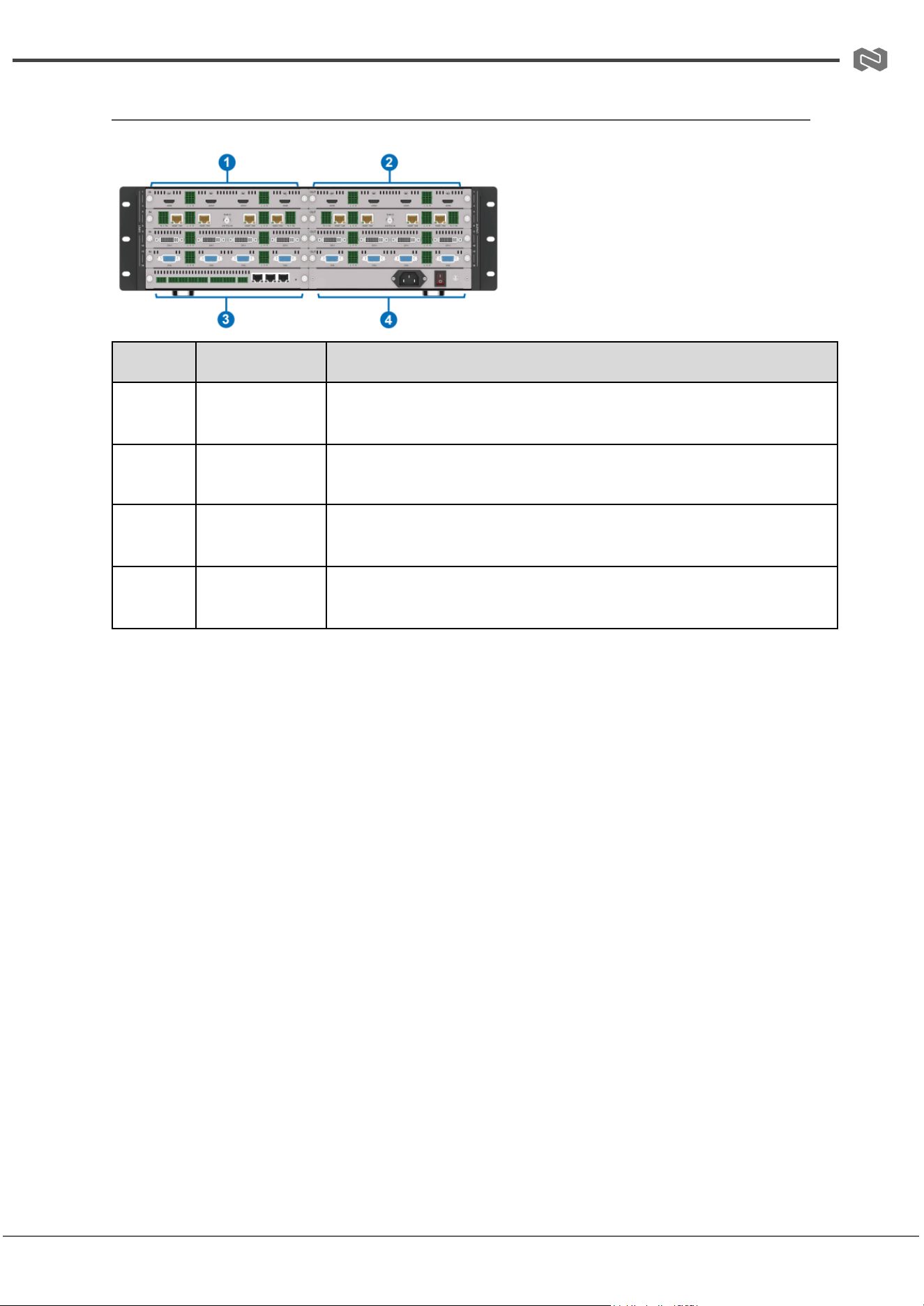
Rear Panel
Number
Name
Function Description
1
Input cards
Used for video input and connects to source devices either
directly or through an Extender.
2
Output cards
Handle video output and connect to display devices directly or
via an Extender.
3
Main Control
card
Serves as the primary control unit and is equipped with various
control ports.
4
Power card
Provides power and includes a power port, a power switch, and
a ground port.
Address: 830 National Drive #140, Sacramento, CA 95834, USA · Tel: +1(888)499-9906 · Email: support@bzbgear.com 33
BZBGEAR BG-MC-SERIES PRODUCT MANUAL
Remote Control Introduction and Operation
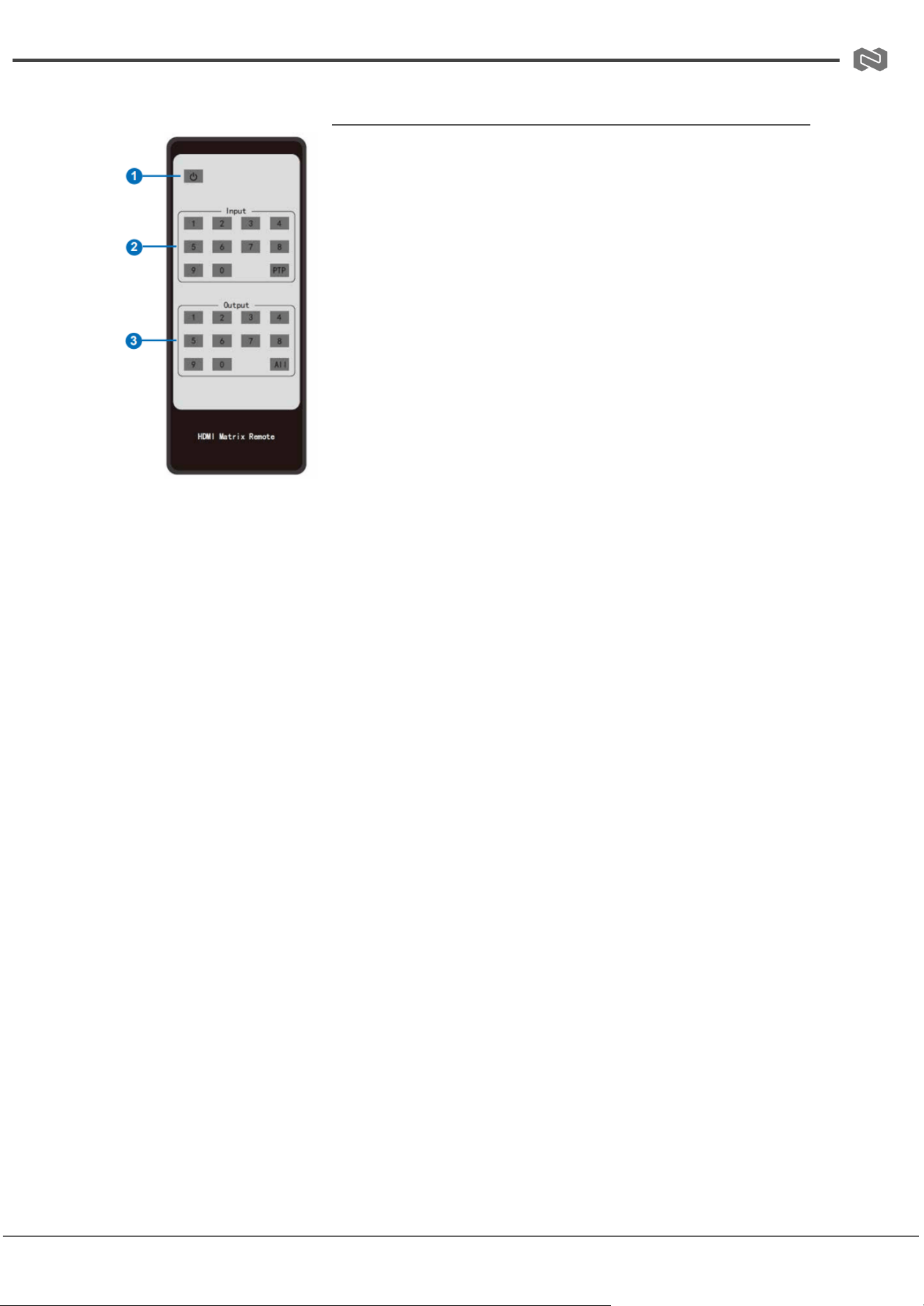
① Power button: Turns the Matrix on or sets it to standby
mode.
② Input 1–36: Selects the desired input channel.
③ Output 1–36: Selects the desired output channel.
The IR Remote supports three operation methods (using the
36×36 Matrix as an example):
Method 1 – Single Input to Single Output:
1. Press the desired input button.
2. Press the desired output button to switch the input
signal to the display device.
Example:
● Press Input-Y (Y = 01 to 36)
● Press Output-X (X = 01 to 36)
Note: Always use double-digit input for channels. For channels
below 10, press 0 first, then the channel number.
● Example: To switch input 1 to output 1, press Input 0
1, then Output 0 1.
Method 2 – PTP (Point-to-Point) Switching:
● Press the PTP button.
● All input channels are automatically mapped to all output channels in one-to-one
correspondence.
Method 3 – Single Input to All Outputs:
1. Press the desired input button.
2. Press the All button.
● The selected input channel signal will be sent to all display devices.
Address: 830 National Drive #140, Sacramento, CA 95834, USA · Tel: +1(888)499-9906 · Email: support@bzbgear.com 34
BZBGEAR BG-MC-SERIES PRODUCT MANUAL
Host Computer & Web GUI Operation Guide
(Example: 36×36 Matrix)
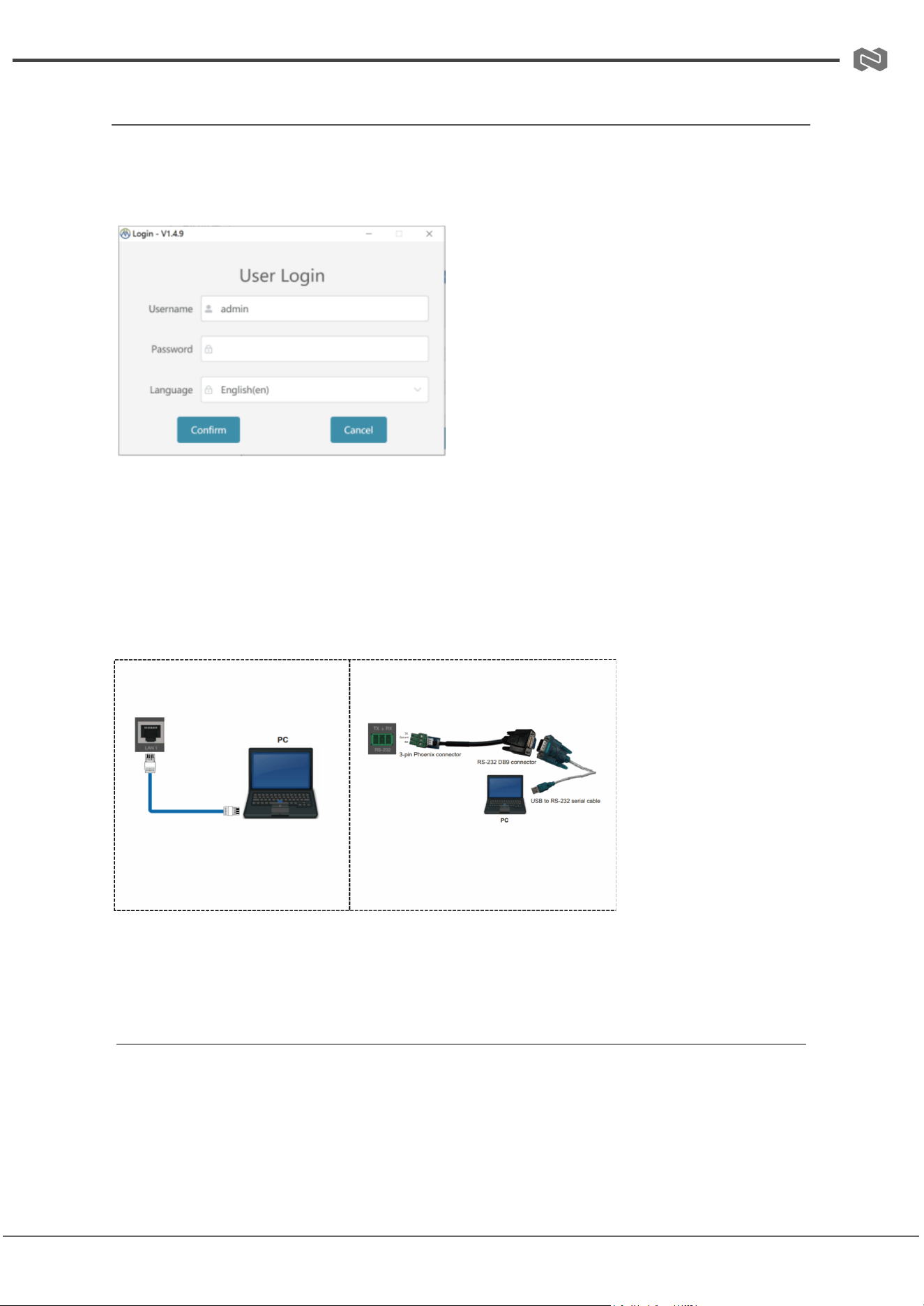
1. Login & Connection
1. Login via Host Computer:
○ Double-click the Host Computer icon → enter username and password
(default: admin/admin) → select language → click Confirm.
○ Password can be reset in System Settings.
2. Connection Methods: Network or Serial Port.
3. Web GUI Login:
○ Enter the Matrix IP in a browser. Default IP: 192.168.0.100.
○ Username & password: admin/admin. Select language → User Login.
2. Matrix Switching Page
Two UI styles available; switch via “Switch UI” button.
Common Functions:
Address: 830 National Drive #140, Sacramento, CA 95834, USA · Tel: +1(888)499-9906 · Email: support@bzbgear.com 35

BZBGEAR BG-MC-SERIES PRODUCT MANUAL
● Refresh Data (①): Refresh current page.
● Power (②): Power on / standby.
● Logout (③): Return to login interface.
Matrix Operations:
1. Rename Port:
○ UI1: Click port → edit → click outside.
○ UI2: Double-click port → edit → click Modify.
○ Names: max 32 English / 16 Chinese characters.
2. Switch Matrix:
○ UI1: Click input → output grid (or “All”) → set.
○ UI2: Click input → output (or “All”) → click Switch.
○ Active outputs: green; selected outputs: yellow.
3. AV Mute: Click output grid → mute output. “All” mutes all outputs.
3. Presets & Configuration
● Save Preset: Choose preset ID → name → Confirm.
● Recall Preset: Select preset ID → Perform.
● Import Config: Select file → Confirm. System returns to login after import.
● Export Config: Select save location → Confirm.
● EDID Management:
○ Export: Select input → choose address → Save.
○ Import: Select address → choose file → Import.
4. Signal & Picture Settings
● Input Card: Configure audio source (bypass/embedding) and EDID.
Notes: 2K VGA input fixed to Audio Embedding; some cards do not support EDID.
● Output Card: Configure resolution & mirroring.
Notes: Some 2K cards and CVBS/YPbPr modes do not support mirroring.
● Picture Quality & Position:
○ Select output → adjust brightness, contrast, chroma, sharpness, H/V
position & size → click Read → refresh.
○ Range: 0–32; reset defaults to 16.
○ Supported only on output ports; certain 2K cards not supported.
Address: 830 National Drive #140, Sacramento, CA 95834, USA · Tel: +1(888)499-9906 · Email: support@bzbgear.com 36

BZBGEAR BG-MC-SERIES PRODUCT MANUAL
5. Video Wall Settings
1. Create Video Wall:
○ Enter name → set rows/columns (1–36) → select Synchronous Mode →
Save.
○ Drag screens to group (gray → blue) → right-click → Screen Splicing.
○ Unsupported on certain 2K output cards.
2. Save/Recall Preset: Same steps as matrix presets.
3. Screen Settings: View/configure input, output, and parameters. Spliced screens
cannot be configured individually.
6. System Settings
1. Network: Set Static or DHCP IP. Save to apply.
2. User Password: Enter old/new/confirm → Save → system returns to login.
3. System Operations:
○ Reboot → confirm.
○ Factory Reset → confirm.
4. Serial Port Pass-through: Add ASCII/HEX commands → select baud rate → click
Send.
7. System Upgrade
● Select upgrade file → click Upgrade. Device reboots after completion.
● Export current version info via Export Version.
8. Screen Setting (Manufacturer Commands)
1. Add Manufacturer: Enter name & baud rate → Confirm.
2. Add Power On/Off Commands:
○ Select manufacturer → enter commands → Setting. Hex option available.
3. Add Other Commands: Enter name & command → Add Command.
4. Send Commands:
○ Method 1: Select manufacturer → enter command → Send.
○ Method 2: Use Screen Poweron/Poweroff on main interface.
○ Other commands: select → Send Command or double-click to send.
Address: 830 National Drive #140, Sacramento, CA 95834, USA · Tel: +1(888)499-9906 · Email: support@bzbgear.com 37
BZBGEAR BG-MC-SERIES PRODUCT MANUAL
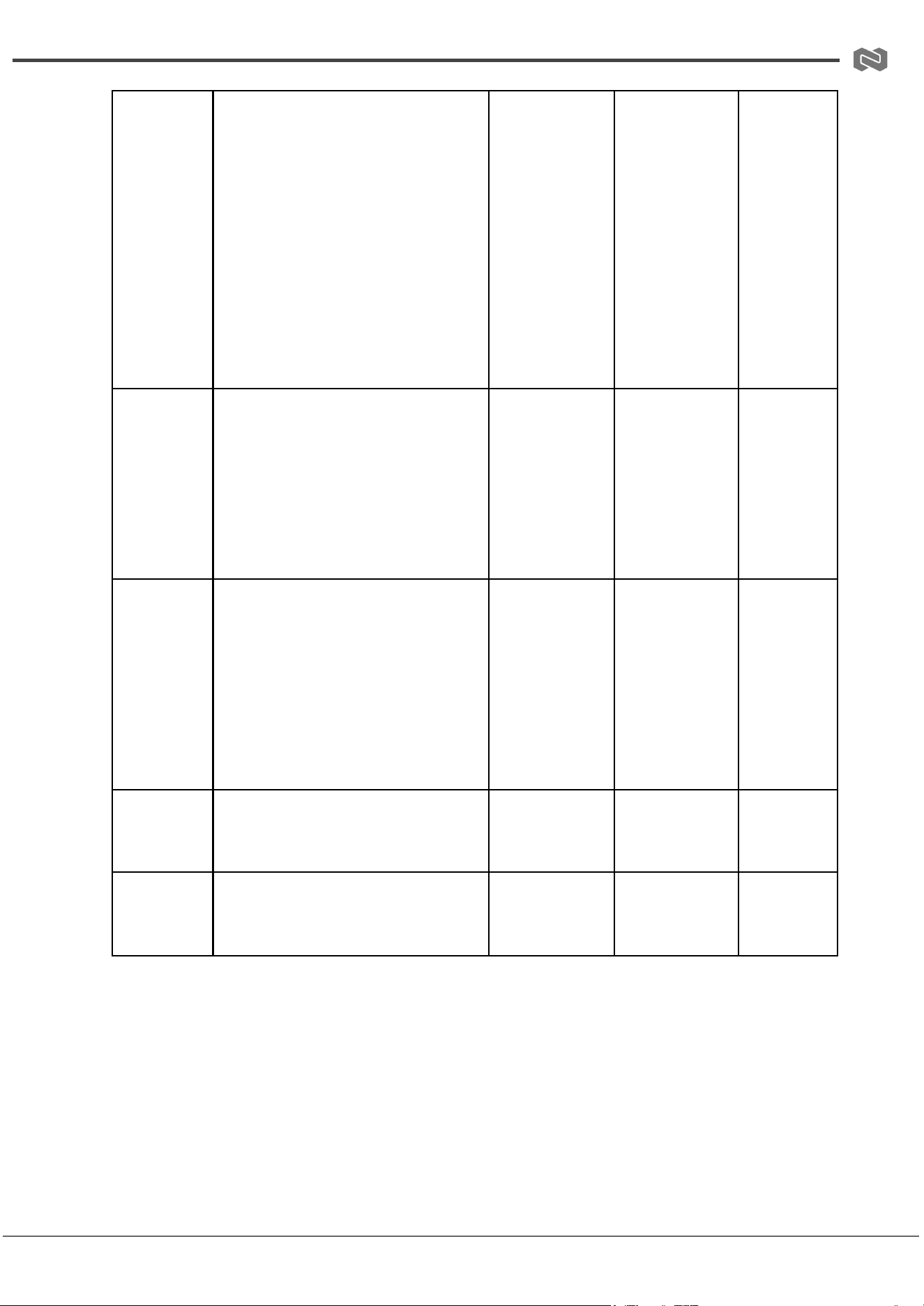
API Control (16x16 Matrix as an example)
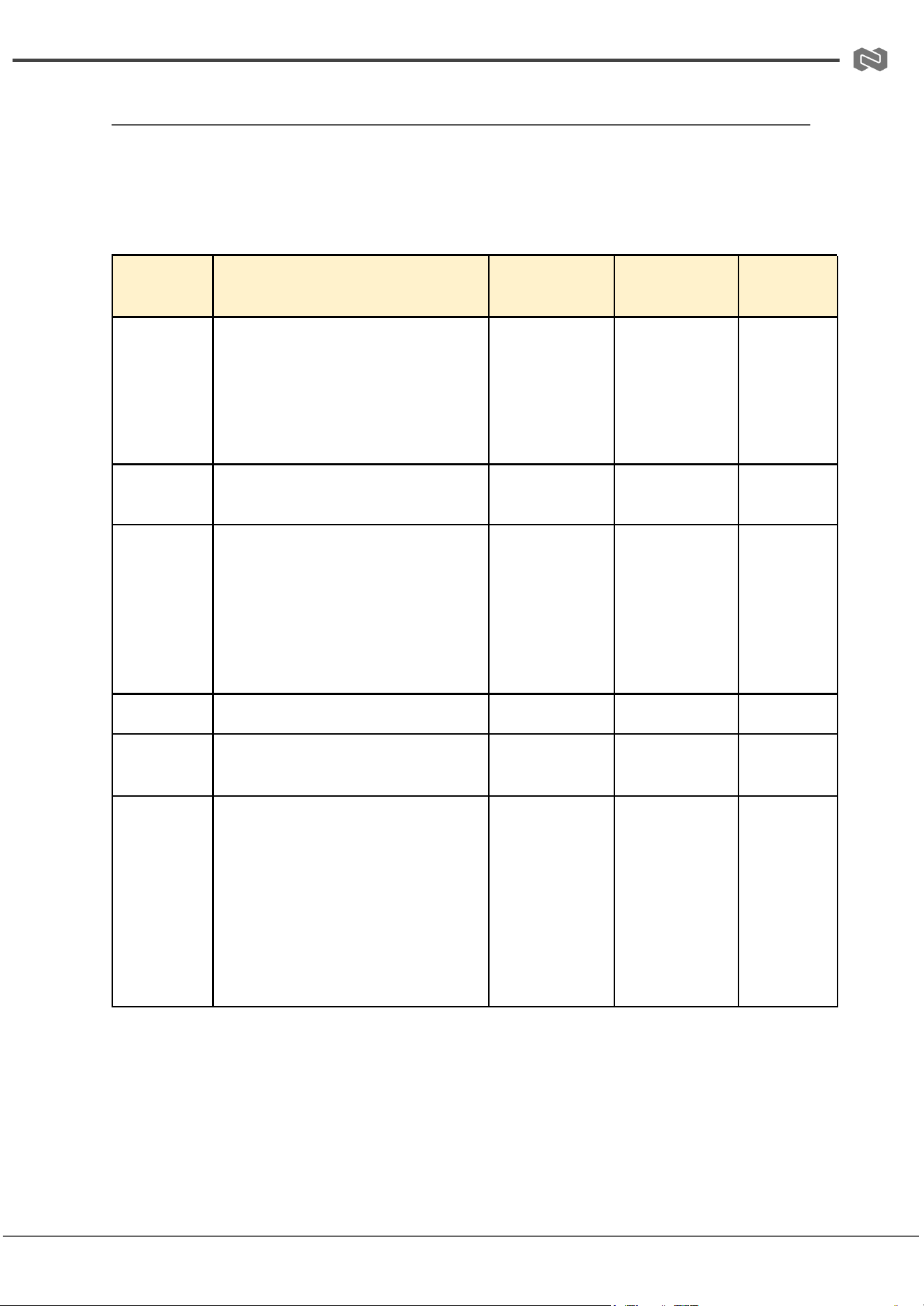
This Matrix supports control via API commands. To use this feature, connect the Matrix’s
RS-232 or LAN port to a PC, then launch a command tool on the PC to send ASCII
commands for controlling the Matrix.
The ASCII command list for this product is provided below.
Command
Code
Function Description
Example
Feedback
Default
Setup
s power z!
Power on/off the device, z=0~1
(0=off, 1=on)
s power 1!
System
Initializing…
Initialization
Finished! FW
version
x.xx.xx
power on
r power!
Get current power state
r power!
power
on/power off
power on
s reboot!
Reboot the device
s reboot!
reboot…
System
Initializing…
Initialization
Finished! FW
version
x.xx.xx
-
help!
List all commands
help!
-
-
r type!
Get device model
r type!
hdp-mx91616
m
-
r status!
Get device current status
r status!
Get all status:
power, beep,
lock, in/out
connection,
video/audio
crosspoint,
EDID, scaler,
network
status
-
Address: 830 National Drive #140, Sacramento, CA 95834, USA · Tel: +1(888)499-9906 · Email: support@bzbgear.com 38
BZBGEAR BG-MC-SERIES PRODUCT MANUAL
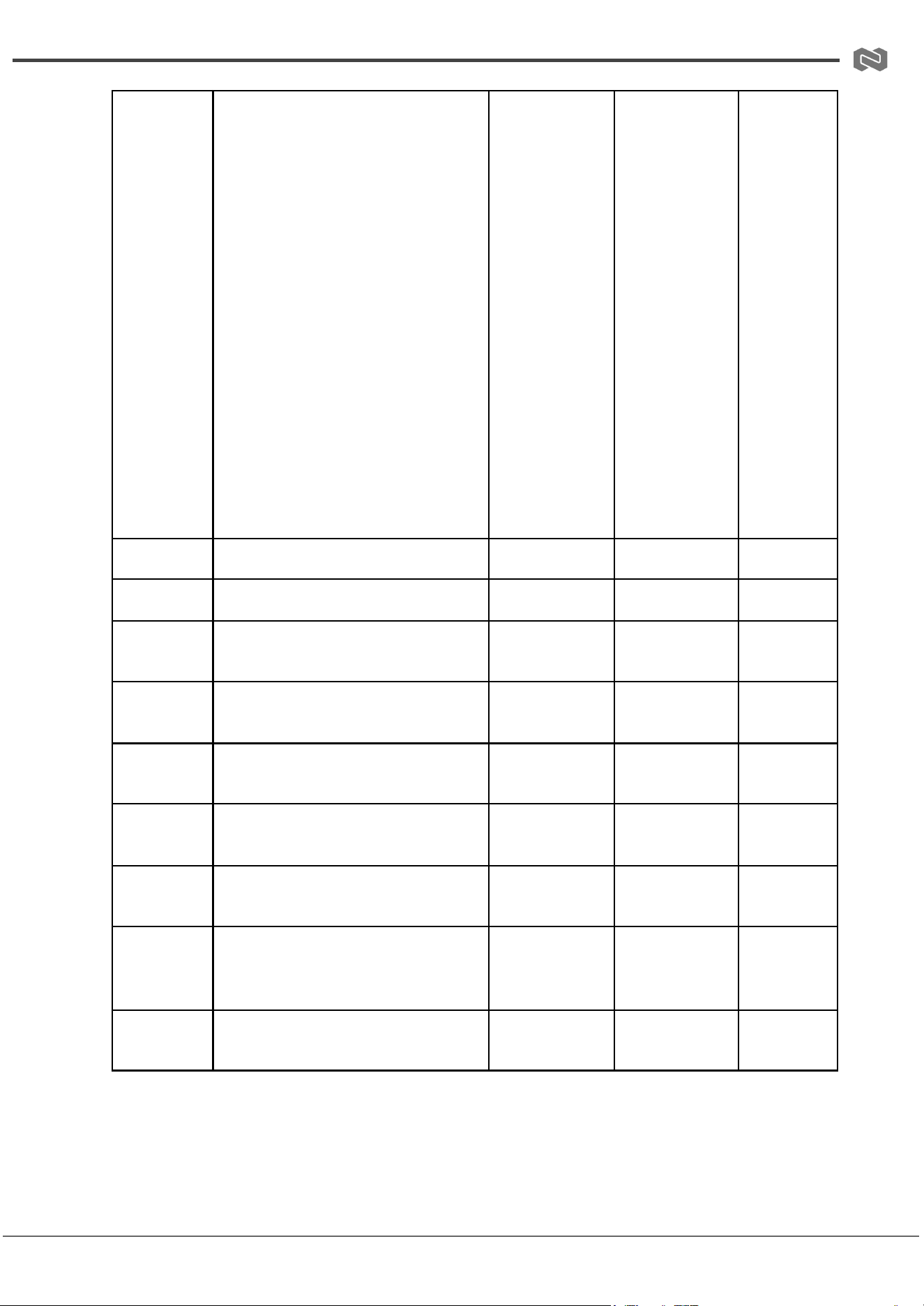
r fw
version!
Get firmware version
r fw version!
ctl-boot:v0.00
.00
ctl-app:v1.00.
01 rs02:v1.13
key-boot:v1.0
0.01
key-app:v1.0
0.01 in board
1:v1.00.01-1.
08/1.08/1.08/
1.08 … out
board
4:v1.00.02
-
r inport x
info!
Get information of input port x,
x=0~16 (0=all inputs)
r inport 1 info!
Input info:
board, type,
name, EDID,
resolution,
audio mode,
HDCP, input
timing, MCU
version
-
r outport x
info!
Get information of output port x,
x=0~16 (0=all outputs)
r outport 1
info!
Output info:
board, type,
name, TV
state, EDID,
resolution,
HDCP, mute,
mirror, input
timing, MCU
version
-
s input x
name yyy!
Set input port name (≤16
characters)
s input 1
name
xiaomi2!
Set input 1
name:
xiaomi2
-
s output x
name yyy!
Set output port name (≤16
characters)
s output 1
name
xiaomiTV!
Set output 1
name:
xiaomiTV
-
Address: 830 National Drive #140, Sacramento, CA 95834, USA · Tel: +1(888)499-9906 · Email: support@bzbgear.com 39
BZBGEAR BG-MC-SERIES PRODUCT MANUAL
s reset!
Reset system to factory defaults
s reset!
Reset to
factory
defaults
Main card:
PTP;
DHCP;
115200;
buzzer on;
panel
unlocked;
LCD 60s;
HDMI
card:
output
1–16
resolution
1920x108
0p60;
HDCP ON;
Splicing
No;
Position
H:16,16 …
s beep z!
Enable/Disable buzzer, z=0~1
s beep 1!
beep on/off
beep on
r beep!
Get buzzer state
r beep!
beep on/off
beep on
s lock z!
Lock/unlock front panel buttons,
z=0~1
s lock 1!
panel button
lock on/off
lock off
r lock!
Get panel button lock state
r lock!
panel button
lock on/off
lock off
s save
preset z!
Save current switch state to
preset z, z=1~64
s save preset
1!
Saved to
preset 1
-
s recall
preset z!
Recall preset z, z=1~64
s recall preset
1!
Recall from
preset 1
-
s clear
preset z!
Clear preset z, z=1~64
s clear preset
1!
Clear preset 1
-
s lcd on
time z!
Set LCD remain-on time, z=0–4
(0=off,1=always,2=30s,3=60s,4=5
m)
s lcd on time
2!
lcd on 30
seconds
lcd on 60
seconds
r lcd
mode!
Get LCD backlight status
r lcd mode!
lcd always on
-
Address: 830 National Drive #140, Sacramento, CA 95834, USA · Tel: +1(888)499-9906 · Email: support@bzbgear.com 40

BZBGEAR BG-MC-SERIES PRODUCT MANUAL
r preset z!
Get preset z information, z=1~64
r preset 2!
Shows all
preset 2 data:
beep, lock,
lcd time,
baudrate,
output
sources,
video wall
name, mosaic
info
-
s baud
rate x!
Set external serial port baud rate
(1:115200,2:57600,3:38400,4:192
00,5:9600,6:4800)
s baud rate 1!
Baudrate:115
200
115200
r baud
rate!
Get external serial port baud rate
r baud rate!
Baudrate:115
200
115200
r
activation!
Get system authorization status
r activation!
activated
permanently
activated
permanent
ly
s in x av
out
y,z,a,b…!
Set input x to outputs y,z,a,b,
x=1~16, y/z/a/b=0~16 (0=all
outputs)
s in 1 av out
2,3,4,8!
input 1 ->
output 2 3 4 8
-
r av out y!
Get output y signal status,
y=0~16 (0=all outputs)
r av out 0!
input 1 ->
output 1 …
input 16 ->
output 16
-
r switch
and mute!
Get all output switch & mute
status
r switch and
mute!
Shows
mapping of
inputs to
outputs and
stream on/off
-
s ptp!
Set input/output to PTP mode
s ptp!
ptp
ptp
s input x
audio
mode y!
Set input x audio mode, x=0~16
(0=all inputs), y=0-follow
video,1-insert
s input 1
audio mode
1!
set input 1
audio mode:
insert
bypass
r input x
audio
mode!
Get input x audio mode, x=0~16
r input 1
audio mode!
input 1 audio
mode: bypass
bypass
s output x
mirror
mode y!
Set output x mirror mode, x=0~16
(0=all outputs), y=0~3
(0:OFF,1:H,2:V,3:H+V)
s output 13
mirror mode
2!
set output 13
mirror mode:
h+v
off
Address: 830 National Drive #140, Sacramento, CA 95834, USA · Tel: +1(888)499-9906 · Email: support@bzbgear.com 41

BZBGEAR BG-MC-SERIES PRODUCT MANUAL
r output x
mirror
mode!
Get output mirror mode
r output 1
mirror mode!
output 1
mirror mode:
off
off
r output x
picture
info!
Get output x picture info
r output 1
picture info!
brightness=1
6,
contrast=16,
colortemp=16
,
sharpness=16
-
s ir x!
Enable/Disable IR, x=0/1
s ir 1!
enable/disabl
e IR
disable
s output x
out mode
y!
Set output x out mode when no
signal, x=0~16, y=0-“NO
SIGNAL”,1-no output
s output 1 out
mode 1!
output 1 out
mode 1
0
s output x
resolution
y!
Set output x resolution (varies by
card type)
s output 13
resolution 8!
1920x1080@6
0 /
1920x1080p
@30
1920x108
0p@60
r output x
resolution!
Get output x resolution
r output 1
resolution!
output 1
resolution:
1920x1200p
@60
1920x120
0p@60
r vw info!
Get video wall info
r vw info!
name:111,
col:4, row:4,
output:1-16,
input:1/7 …,
mosaic info
-
create vw
row x col y
name z!
Create video wall, x=row, y=col,
z=name ≤32
create vw row
4 col 4 name
video wall 1!
create video
wall success
-
s screen x
source y!
Set input y to screen x
s screen 1
source 1!
set screen 1
source: input
1
-
s screen x
output y!
Set output y to screen x
s screen 1
output 1!
set screen 1
output: 1
-
s mosiac x
col y row
z!
Create mosaic, x=mosaic ID,
y=cols, z=rows
s mosiac 1
col 2 row 2!
set mosaic
success
-
s mosaic x
window y
screen z!
Match mosaic window with
screen, x=mosaic ID, y=window,
z=screen ID
s mosaic 1
window 1
screen 8!
set mosaic
window
success
-
Address: 830 National Drive #140, Sacramento, CA 95834, USA · Tel: +1(888)499-9906 · Email: support@bzbgear.com 42

BZBGEAR BG-MC-SERIES PRODUCT MANUAL
delete
mosaic x!
Delete mosaic x
delete mosaic
1!
delete mosaic
1 success
-
s sync
mode x!
Set mosaic sync mode, x=0-no
sync,1-sync
s sync mode
1!
set sync
mode 1
0
s hdmi y
stream z!
Set output y HDMI stream on/off,
y=0~16, z=0/1
s hdmi 1
stream 1!
output 1
stream: on
enable
r hdmi y
stream!
Get output y HDMI stream status
r hdmi 1
stream!
output 1
stream: off
-
s edid in x
from y!
Set input x EDID from default
EDID y, x=0~16, y=1~36
s edid in 1
from 1!
input 1 edid:
1080p, stereo
audio 2.0
1080p,
stereo
audio 2.0
r edid in x!
Get EDID status of input x,
x=0~16
r edid in 1!
input 1 edid:
1080p, stereo
audio 2.0
1080p,
stereo
audio 2.0
s edid
userx yy!
Set user-defined EDID x=1~2,
yy=EDID data
s edid user 1
00ffffffffffffff...!
user1 edid
setting ok
-
r edid
userx!
Get user-defined EDID x=1~2
r edid user 1!
user1 edid
data: 0x00,
0xff…
-
r edid data
hdmi y!
Get EDID data of TV connected to
HDMI output y
r edid data
hdmi 1!
edid: 00 ff ff ff
ff …
-
r ipconfig!
Get current IP configuration
r ipconfig!
ip mode:
dhcp,
ip:192.168.0.
200,
subnet:255.2
55.255.0,
gateway:192.
168.0.1,
MAC:ff-ff-ff-ff
-ff-ff, tcp/ip
port=8000,
telnet port=23
-
r mac
addr!
Get network MAC address
r mac addr!
mac address:
ff-ff-ff-ff-ff-ff
-
s ip mode
z!
Set network IP mode, z=0 static,
1 DHCP
s ip mode 1!
set ip mode:
dhcp
(requires s net
reboot!)
dhcp
r ip mode!
Get network IP mode
r ip mode!
ip mode:
dhcp
Address: 830 National Drive #140, Sacramento, CA 95834, USA · Tel: +1(888)499-9906 · Email: support@bzbgear.com 43
BZBGEAR BG-MC-SERIES PRODUCT MANUAL
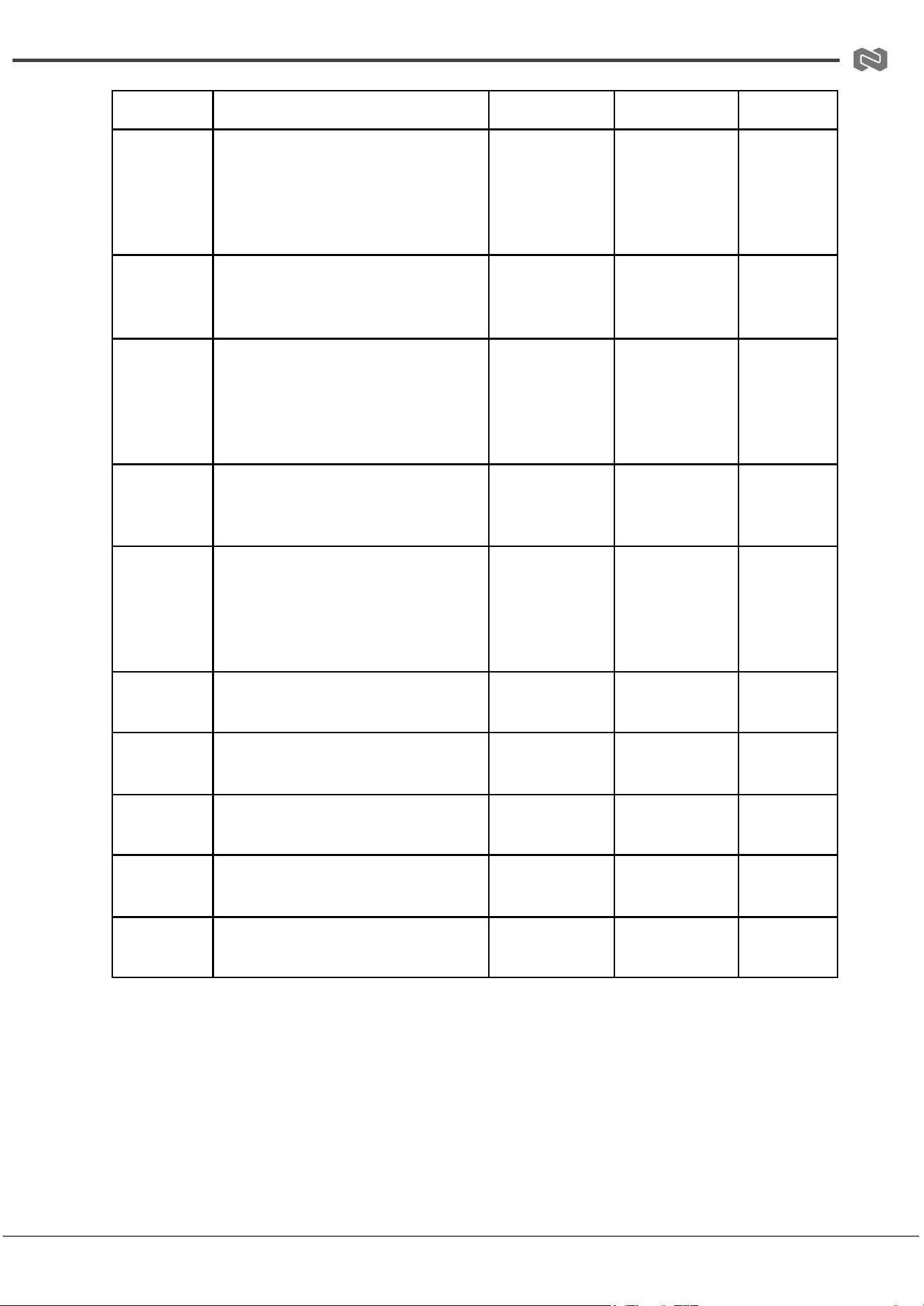
dhcp
s ip addr
xxx.xxx.xx
x.xxx!
Set network IP address
s ip addr
192.168.8.18
0!
set ip
address:192.
168.8.180
(requires s net
reboot!)
-
r ip addr!
Get network IP address
r ip addr!
ip
address:192.
168.8.180
-
s subnet
xxx.xxx.xx
x.xxx!
Set network subnet mask
s subnet
255.255.255.
0!
set subnet
mask:255.255
.255.0
(requires s net
reboot!)
255.255.2
55.0
r subnet!
Get network subnet mask
r subnet!
subnet mask:
255.255.255.
0
255.255.2
55.0
s gateway
xxx.xxx.xx
x.xxx!
Set network gateway
s gateway
192.168.8.1!
set
gateway:192.
168.8.1
(requires s net
reboot!)
192.168.1.
1
r gateway!
Get network gateway
r gateway!
Gateway:192.
168.1.1
192.168.1.
1
s tcp/ip
port x!
Set network TCP/IP port,
x=1~65535
s tcp/ip port
8000!
Set tcp/ip
port:8000
8000
r tcp/ip
port!
Get network TCP/IP port
r tcp/ip port!
tcp/ip
port:8000
8000
s telnet
port x!
Set network telnet port,
x=1~65535
s telnet port
23!
set telnet
port:23
23
r telnet
port!
Get network telnet port
r telnet port!
telnet port:23
23
Address: 830 National Drive #140, Sacramento, CA 95834, USA · Tel: +1(888)499-9906 · Email: support@bzbgear.com 44
BZBGEAR BG-MC-SERIES PRODUCT MANUAL
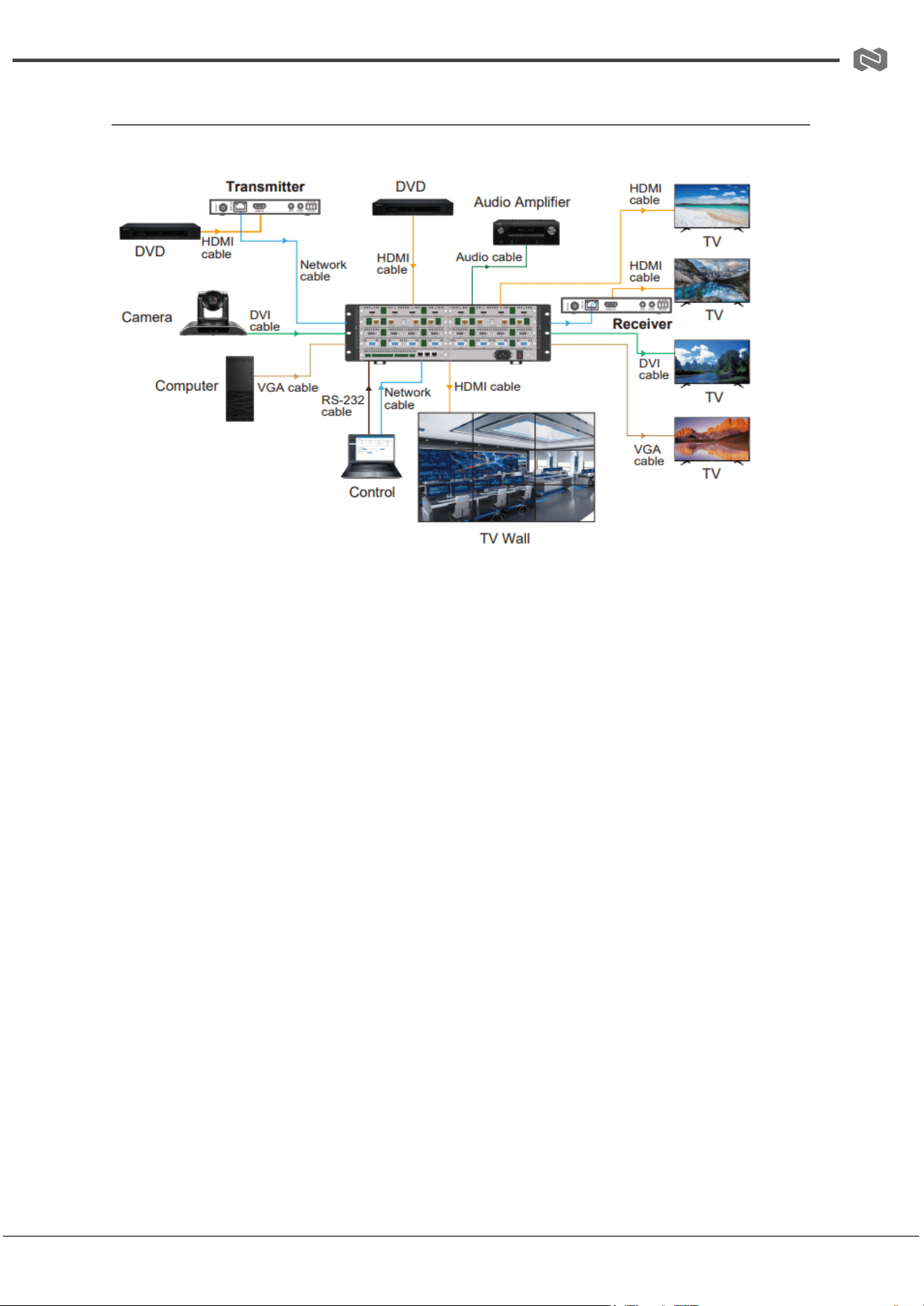
Connection Diagram
16x16 as an example
Address: 830 National Drive #140, Sacramento, CA 95834, USA · Tel: +1(888)499-9906 · Email: support@bzbgear.com 45
BZBGEAR BG-MC-SERIES PRODUCT MANUAL
Troubleshooting
Problems
Causes
Solutions
No Power / All LED off
Power supply not connected,
connected fully, or wrong power
supply.
Check if the power supply is
connected correctly and the
output voltage value is within
recommended specifications.
No sound or sound issues
The HDMI connection is faulty,
the audio format is not
supported by the displays, or
the source player is set to
another port for audio output
Check if the HDMI cables are
connected correctly.
Check if the audio format is
supported by the display and
that a user has not changed the
supported audio format on the
player`s audio output. Ensure
output settings from the HDMI
source device as set correctly.
No picture or picture flickers
The HDMI cable may be faulty
or the category cable quality is
faulty.
Check if the HDMI
and category cable connections
are correct and undamaged.
Change to another good
working HDMI cable or category
cable (CAT6 or better cable is
recommended).
Address: 830 National Drive #140, Sacramento, CA 95834, USA · Tel: +1(888)499-9906 · Email: support@bzbgear.com 46

BZBGEAR BG-MC-SERIES PRODUCT MANUAL
Tech Support
Have technical questions? We may have answered them already!
Please visit BZBGEAR’s support page (bzbgear.com/support) for helpful information and
tips regarding our products. Here you will find our Knowledge Base
(bzbgear.com/knowledge-base) with detailed tutorials, quick start guides, and step-by-step
troubleshooting instructions. Or explore our YouTube channel, BZB TV
(youtube.com/c/BZBTVchannel), for help setting up, configuring, and other helpful how-to
videos about our gear.
Need more in-depth support? Connect with one of our technical specialists directly:
Phone
1.888.499.9906
Email
support@bzbgear.com
Live Chat
bzbgear.com
Limited Product Warranty Terms
Pro Line: 5-year warranty from the date of purchase for AV/Broadcasting products bought
on or after August 1, 2024.
Essential Line: 3-year warranty from the date of purchase for AV/Broadcasting products
bought on or after August 1, 2024.
Cables: Lifetime Limited Product Warranty.
For complete warranty information, please visit bzbgear.com/warranty.
For questions, please call 1.888.499.9906 or email support@bzbgear.com.
Address: 830 National Drive #140, Sacramento, CA 95834, USA · Tel: +1(888)499-9906 · Email: support@bzbgear.com 47

BZBGEAR BG-MC-SERIES PRODUCT MANUAL
Mission Statement
BZBGEAR is a breakthrough manufacturer of high-quality, innovative audiovisual equipment
ranging from AVoIP, professional broadcasting, conferencing, home theater, to live
streaming solutions. We pride ourselves on unparalleled customer support and services.
Our team offers system design consultation, and highly reviewed technical support for all
the products in our catalog. BZBGEAR delivers quality products designed with users in
mind.
Copyright
All the contents in this manual and its copyright are owned by BZBGEAR. No one is allowed
to imitate, copy, or translate this manual without BZBGEAR’s permission. This manual
contains no guarantee, standpoint expression or other implies in any form. Product
specification and information in this manual is for reference only and subject to change
without notice.
All rights reserved. No reproducing is allowed without acknowledgement.
Address: 830 National Drive #140, Sacramento, CA 95834, USA · Tel: +1(888)499-9906 · Email: support@bzbgear.com 48