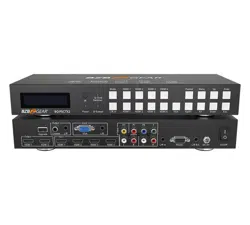
BG-PSC8X2HDB
8X2 4K 18Gbps UHD HDMI/IP/DP/VGA/Audio/HDBaseT Output
Seamless Presentation Switcher
User Manual

BZBGEAR BG-PSC8X2HDB PRODUCT MANUAL
Address: 830 National Drive #140, Sacramento, CA 95834, USA · Tel: +1(888)499-9906 · Email: support@bzbgear.com 2

BZBGEAR BG-PSC8X2HDB PRODUCT MANUAL
TABLE OF CONTENTS
Statement 4
Safety Precaution 4
Introduction 5
Features 5
Packing List 5
Technical Specifications 6
Operation Controls and Functions 7
Application Example 9
Tech Support 10
Limited Product Warranty Terms 10
Mission Statement 10
Copyright 10
Address: 830 National Drive #140, Sacramento, CA 95834, USA · Tel: +1(888)499-9906 · Email: support@bzbgear.com 3

BZBGEAR BG-PSC8X2HDB PRODUCT MANUAL
Statement
Please read these instructions carefully before connecting, operating, or configuring this
product. Please save this manual for future reference.
Safety Precaution
● Unpack the equipment carefully and save the original box and packing material for
possible future shipment.
● Follow basic safety precautions to reduce the risk of fire, electrical shock and injury to
persons.
● To prevent damaging this product, avoid heavy pressure, strong vibration, or immersion
during transportation, storage, and installation.
● Do not dismantle the housing or modify the module.
● Using supplies or parts not meeting the products’ specifications may cause damage,
deterioration or malfunction.
● Do not put any heavy items on the extension cable in case of extrusion.
● Install the device in a place with fine ventilation to avoid damage caused by overheat.
● Do not twist or pull by force ends of the optical cable. It can cause malfunction.
● The housing of this product is made of organic materials. Do not expose to any liquid,
gas, or solids which may corrode the shell.
● Unplug this device during lightning storms.
● Do not use liquid or aerosol cleaners to clean this unit. Clean only with a soft dry
microfiber cloth.
● Always unplug the power to the device before cleaning.
● If an object or liquid falls or spills on to the housing, unplug the module immediately.
● To prevent the risk of electric shock, do not open the case. Installation and maintenance
should only be carried out by qualified technicians.
● Do not use the product beyond the specified temperature, humidity, or power supply
specifications.
● This product does not contain parts that can be maintained or repaired by users.
Damage caused by dismantling the product without authorization from BZBGEAR is not
covered under the warranty policy.
● Installation and use of this product must strictly comply with local electrical safety
standards.
● Product specifications may be subject to technical upgrades without further notice.
● Unplug the power cord when left unused for a long period of time.
● Information on disposal for scrapped devices: do not burn or mix with general
household waste, please treat them as normal electrical wastes.
Address: 830 National Drive #140, Sacramento, CA 95834, USA · Tel: +1(888)499-9906 · Email: support@bzbgear.com 4

BZBGEAR BG-PSC8X2HDB PRODUCT MANUAL
Introduction
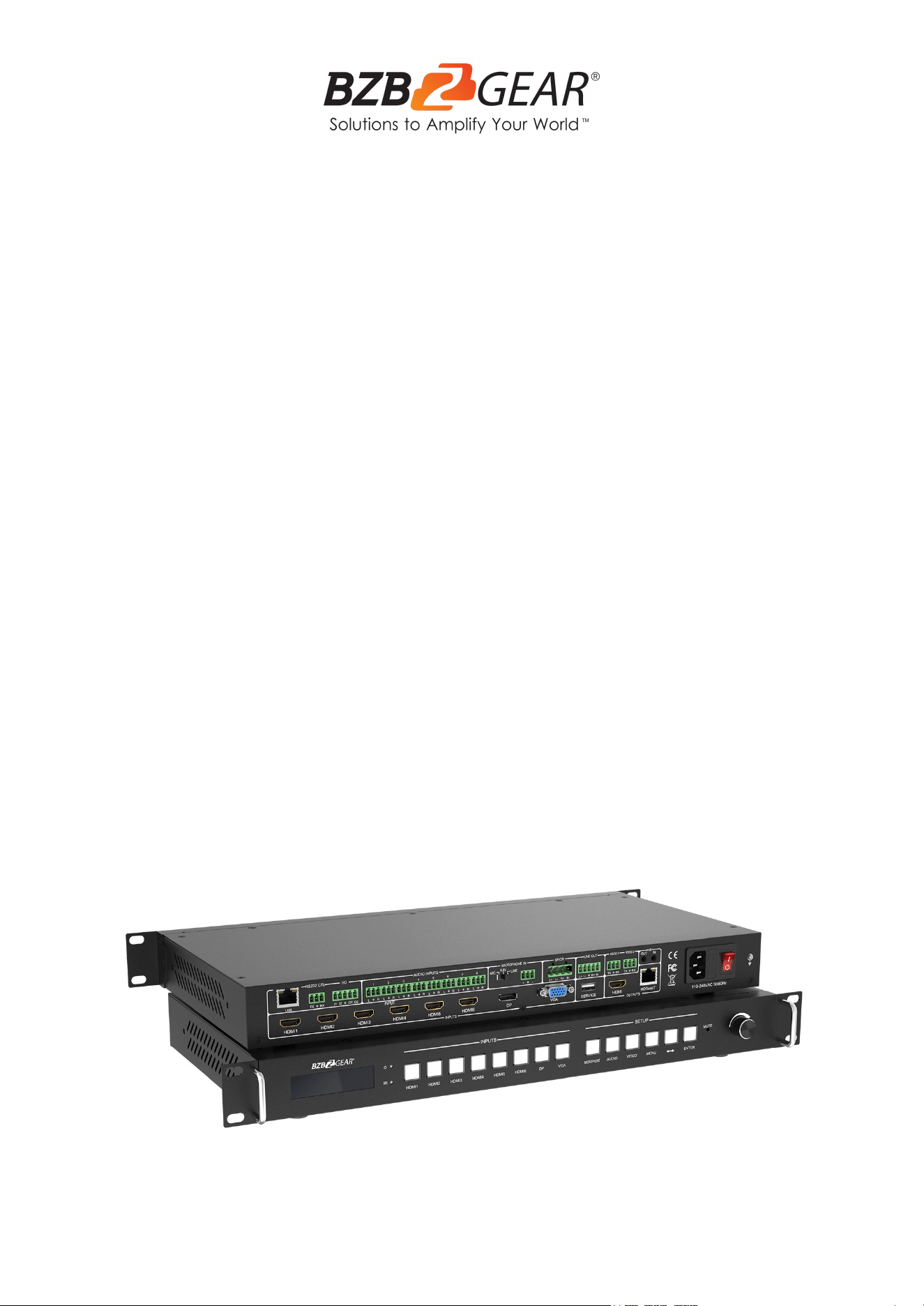
The BG-PSC8X2HDB is an 18Gbps 8x2 seamless 4K presentation switcher. Equipped with
8 video inputs including 6 HDMI ports, 1 DisplayPort, and 1 VGA port, this HDMI 2.0, HDCP
2.2 and DP 1.2 compliant unit supports multi-format signal processing for seamless
switching between all sources. It features automatic input scaling at resolutions up to
4K@60Hz 4:4:4.
Video output is available via simultaneous HDMI and HDBaseT ports. The HDBaseT output
extends the signal up to 70 meters at 1080P, or 45 meters at 4K.
Third-party control is supported with bi-directional IR and RS-232 connections and the
equipped EDID management helps eliminate video compatibility issues.
Easily embed audio with any of the 8 stereo inputs. The integrated microphone mixer
supports adjustable trim and 48V phantom power. Extract audio from the balanced output
or power 2 speakers with the 20W stereo output.
Features
● Crystal Clear Images: Stunning image quality in 4K@60 4:4:4
● Integrated Microphone Mixer: Features adjustable trim and 48V Phantom Power
● HDBaseT Output: Extend signal up to 70 meters at 1080P, or 45 meters at 4K
● Integrated Audio Amplifier: Power 2 speakers via 20W stereo outputs
● EDID Management: Eliminates video compatibility issues
● Multiple Control Options: Bi-Directional IR, RS232, and IP Control
● HDMI 2.0, HDCP 2.2 and DP 1.2 compliant
● Support 18Gbps video bandwidth
● Mirrored output with HDMI and HDBaseT output ports
● Support seamless switching
● 8 video inputs: 6 HDMI ports, 1 DP port, 1 VGA port
● 9 audio source selections (LR1 to LR8 and embedded audio) for HDMI/DP input
Packing List
● 1x 8x2 Seamless UHD Presentation Switcher
● 1x HDBaseT Receiver
● 1x AC Power Cord
● 2x Mounting Ear & 2x Handle
● 12x 3-pin Phoenix Connector
● 1x 4-pin Phoenix Connector
● 1x 5-pin Phoenix Connector
● 1x IR Blaster Cable (1.5 meters)
● 1x IR Receiver Cable (1.5
meters)
● 1x User Manual
● 1х Quick Start Guide
Address: 830 National Drive #140, Sacramento, CA 95834, USA · Tel: +1(888)499-9906 · Email: support@bzbgear.com 5
BZBGEAR BG-PSC8X2HDB PRODUCT MANUAL
Technical Specifications
Technical
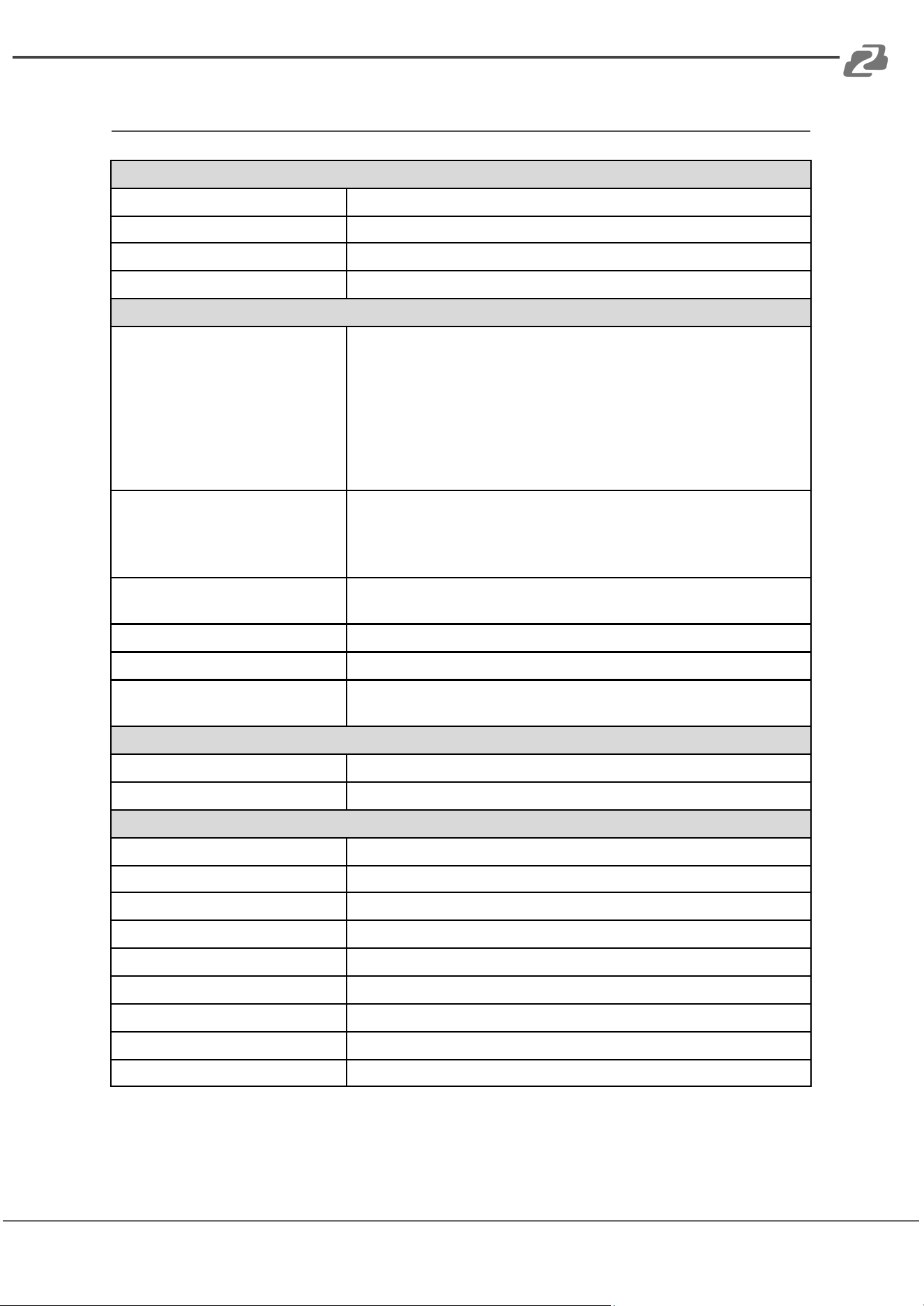
HDMI Compliance
HDMI 2.0
HDCP Compliance
HDCP 2.2
DP Version
DP 1.2
Video Bandwidth
18Gbps
Video Resolution
Input Video Resolution
800x600@60Hz, 1024x768@60Hz, 1280x768@60Hz,
1280x800@60Hz, 1280x1024@60Hz, 1360x768@60Hz,
1366x768@60Hz, 1400x1050@60Hz, 1440x900@60Hz,
1600x1200@60Hz, 1680x1050@60Hz, 1920x1200@60Hz.
480p,576p,720p, 1920x1080i, 1920x1080p, 3840x2160@
24Hz/25Hz/30Hz/50Hz/60Hz, 4096x2160@24Hz/25Hz/
30Hz/50Hz/60Hz.
Note: This device does not support 4:2:0 color space
Output Video Resolution
Auto, 3840x2160@60Hz, 3840x2160@50Hz, 3840x2160@30Hz,
1920x1080@60Hz, 1920x1080@50Hz, 1280x720@60Hz,
1024x768@60Hz, 1360x768@60Hz, 1600x1200@60Hz,
1920x1200@60Hz.
EDID Option
Auto, Manual, 3840x2160@60, 3840x2160@30,
1920x1080@60, 1280x720@60, 1920x1200@60
HDMI Amplitude
T.M.D.S +/- 0.4Vpp
Differential Impedance
100±15ohm
ESD Protection
Human-body Model:
±8kV (Air-gap discharge), ±4kV (Contact discharge)
RS232/Ethernet Control
Baud rate and Protocol
Baud rate: 9600, data bit: 8 Stop bit: 1, no parity checking
Ethernet
IE 10.0+, HTML5
Mechanical
Housing
Metal Enclosure
Color
Black
Dimensions
16.9"(W) x 8.7”(D) x 1.7"(H) [430mm(W) x 220mm(D) x 44mm(H)]
Weight
7lbs [3.2Kg]
Power Supply
AC 110 - 240V
Power Consumption
60W (Max)
Operating Temperature
32°F ~ 104°F / 0°C ~ 40°C
Storage Temperature
-4°F ~ 158°F / -20°C ~ 70°C
Relative Humidity
10%~50% RH (non-condensing)
Address: 830 National Drive #140, Sacramento, CA 95834, USA · Tel: +1(888)499-9906 · Email: support@bzbgear.com 6
BZBGEAR BG-PSC8X2HDB PRODUCT MANUAL
Operation Controls and Functions
Front Panel
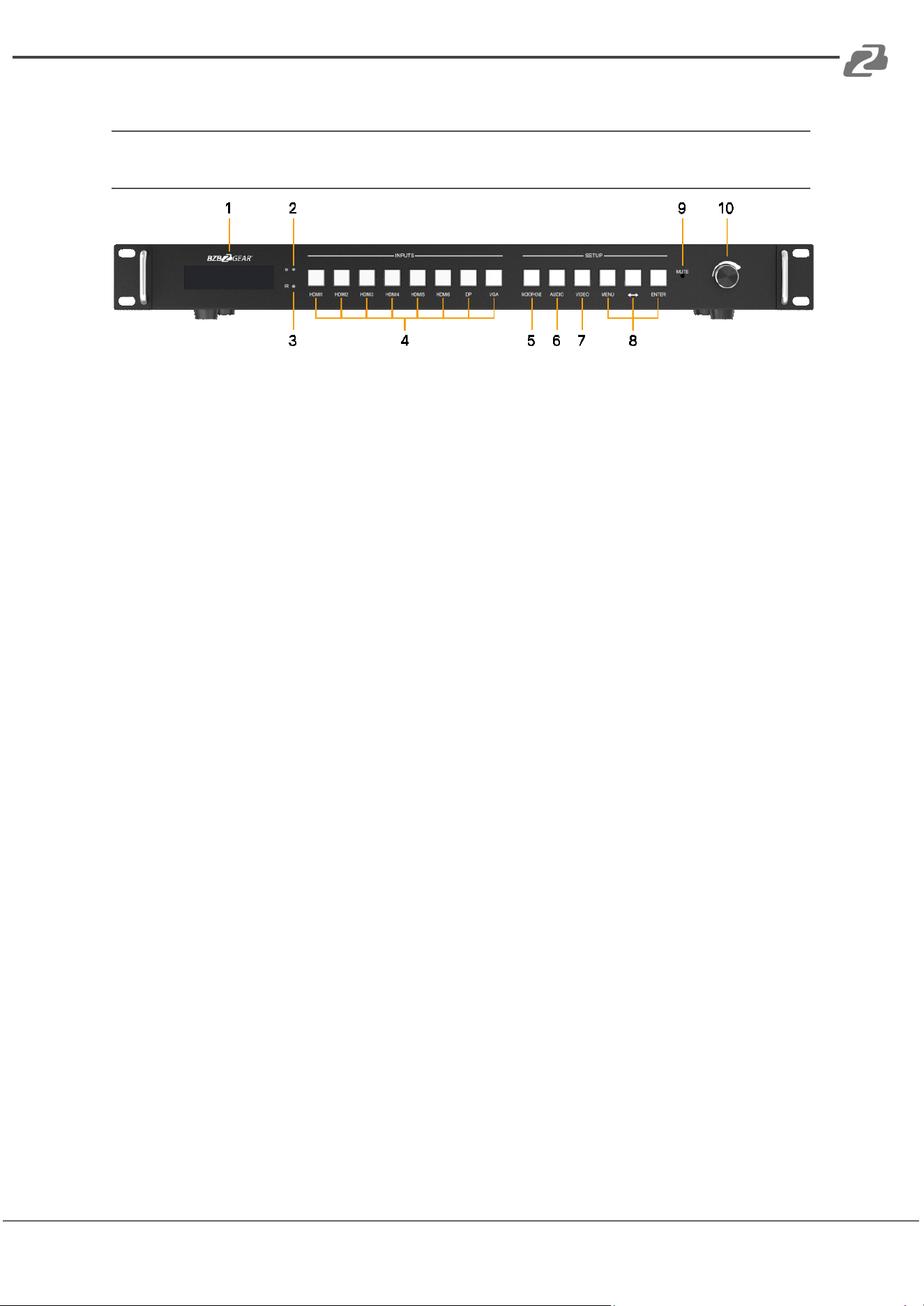
1. LCM screen: Display EDID, output resolution, audio configuration, and other
information.
2. Power LED: When the product is powered on, the red LED will illuminate.
3. IR: IR LED.
4. Input buttons: Press these buttons to switch the corresponding HDMI/DP/VGA
input source.
5. Microphone button: Short press the button to switch on/off MIC input. Long press
the button the LCM screen will display the MIC volume control interface.
6. Audio button: Press the button to switch on/off the current audio source except
MIC.
7. Video button: Press the button to switch on/off video input.
8. MENU, ↔, ENTER button: These three buttons are combination buttons, which can
be used to adjust output resolution/EDID management/audio source selection for
each input port/output HDCP mode.
9. Mute LED: When the speaker is muted, the LED will illuminate.
10. Volume knob & button: Rotate the knob to adjust speaker volume (range 0~50),
press the knob to mute/unmute the speaker. This knob can also be used to control
MIC volume.
Address: 830 National Drive #140, Sacramento, CA 95834, USA · Tel: +1(888)499-9906 · Email: support@bzbgear.com 7
BZBGEAR BG-PSC8X2HDB PRODUCT MANUAL
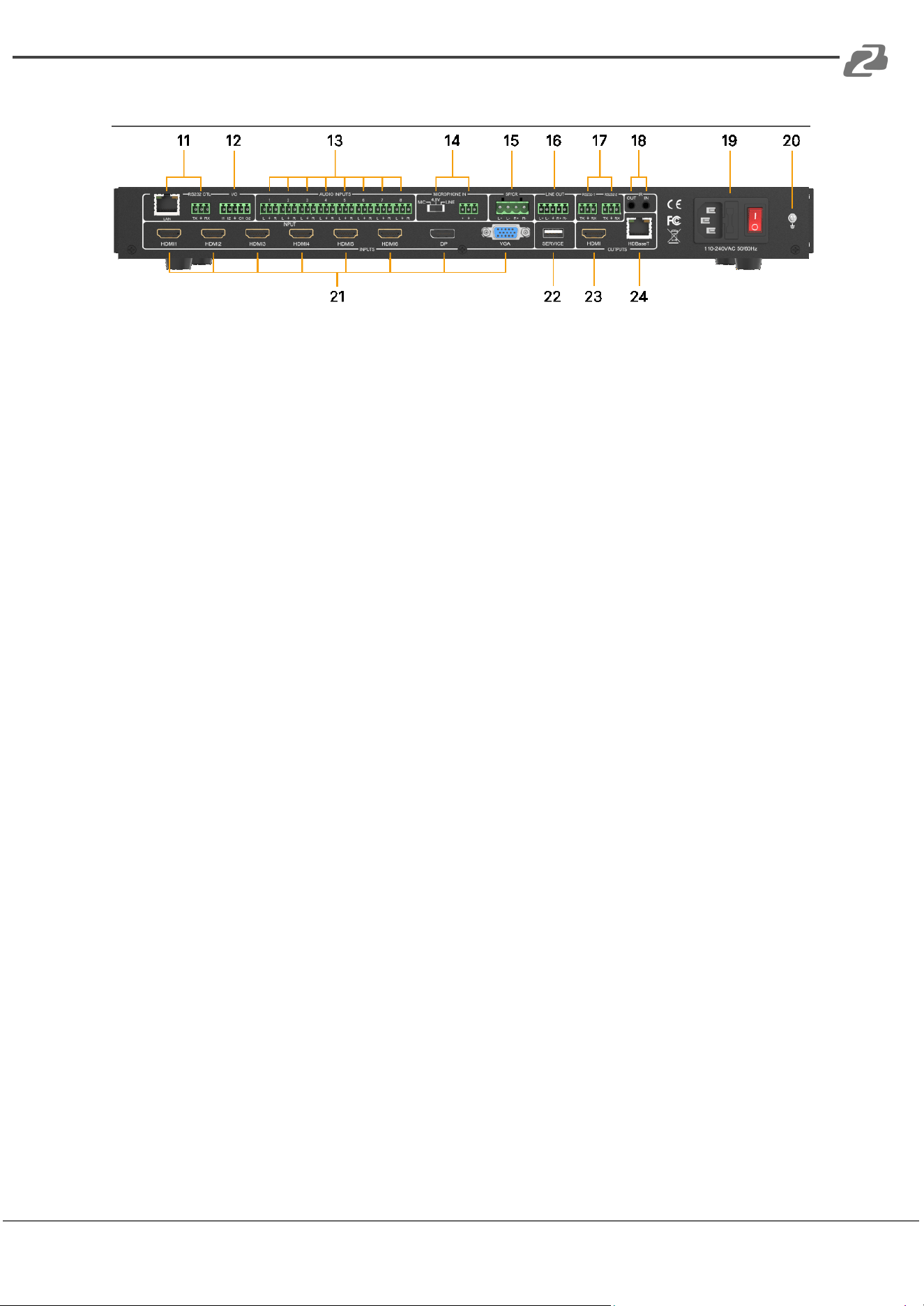
Rear Panel
11. PC control:
LAN port: Connect to a router.
RS-232 CTL: Connect to a PC or control system.
12. I/O port: I1 & I2 are for input level detecting and O1 & O2 are for output level setting.
13. Audio Inputs: Audio input ports. Connect to an external audio source device.
14. Microphone In: Dip switch: Used to switch 48V (Phantom Power)/MIC/LINE
microphone modes. Phoenix connector: Used to connect microphone devices.
15. SPKR port: Audio output port, connect to audio output device such as speaker.
16. Line Out port: Balanced audio output port. Connect to a speaker.
17. RS-232 ports:
RS-232: Reserved port.
RS-232 BP: Used to transmit a separate RS-232 signal superimposed on
HDBaseT transmission.
18. IR Out/In: Connect to IR receiver/blaster cable.
19. Power switch & port:
Power switch: Switch on / off the power supply.
Power port: Connect to 100~240V AC 50/60Hz power cord.
20. GND: Ground the product housing.
21. Input ports: 6 HDMI ports, 1 DP port, 1 VGA port. Connect to source devices.
22. Service port: Firmware update port.
23. HDMI port: HDMI output port. Connect to an HDMI display device such as a TV or
monitor with an HDMI cable.
24. HDBaseT port: HDBaseT output port. Connect to the HDBaseT Receiver via a CAT
cable.
Address: 830 National Drive #140, Sacramento, CA 95834, USA · Tel: +1(888)499-9906 · Email: support@bzbgear.com 8
BZBGEAR BG-PSC8X2HDB PRODUCT MANUAL
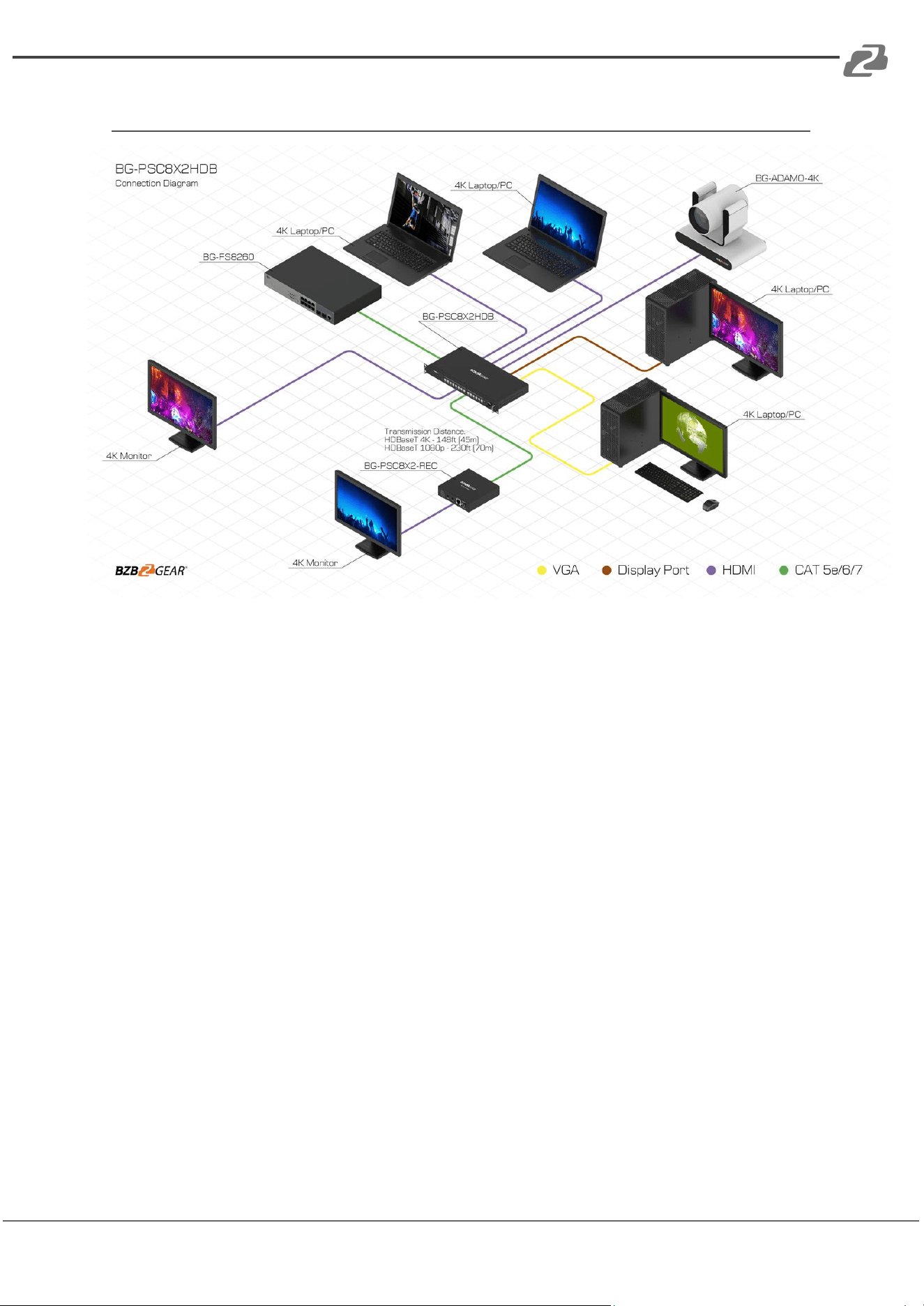
Application Example
Address: 830 National Drive #140, Sacramento, CA 95834, USA · Tel: +1(888)499-9906 · Email: support@bzbgear.com 9

BZBGEAR BG-PSC8X2HDB PRODUCT MANUAL
Tech Support
Have technical questions? We may have answered them already!
Please visit BZBGEAR’s support page (bzbgear.com/support) for helpful information and
tips regarding our products. Here you will find our Knowledge Base
(bzbgear.com/knowledge-base) with detailed tutorials, quick start guides, and step-by-step
troubleshooting instructions. Or explore our YouTube channel, BZB TV
(youtube.com/c/BZBTVchannel), for help setting up, configuring, and other helpful how-to
videos about our gear.
Need more in-depth support? Connect with one of our technical specialists directly:
Phone
1.888.499.9906
Email
support@bzbgear.com
Live Chat
bzbgear.com
Limited Product Warranty Terms
Pro Line: 5-year warranty from the date of purchase for AV/Broadcasting products bought
on or after August 1, 2024.
Essential Line: 3-year warranty from the date of purchase for AV/Broadcasting products
bought on or after August 1, 2024.
Cables: Lifetime Limited Product Warranty.
For complete warranty information, please visit bzbgear.com/warranty.
For questions, please call 1.888.499.9906 or email support@bzbgear.com.
Mission Statement
BZBGEAR is a breakthrough manufacturer of high-quality, innovative audiovisual equipment
ranging from AVoIP, professional broadcasting, conferencing, home theater, to live
streaming solutions. We pride ourselves on unparalleled customer support and services.
Our team offers system design consultation, and highly reviewed technical support for all
the products in our catalog. BZBGEAR delivers quality products designed with users in
mind.
Copyright
All the contents in this manual and its copyright are owned by BZBGEAR. No one is allowed
to imitate, copy, or translate this manual without BZBGEAR’s permission. This manual
contains no guarantee, standpoint expression or other implies in any form. Product
specification and information in this manual is for reference only and subject to change
without notice.
All rights reserved. No reproducing is allowed without acknowledgement.
Address: 830 National Drive #140, Sacramento, CA 95834, USA · Tel: +1(888)499-9906 · Email: support@bzbgear.com 10