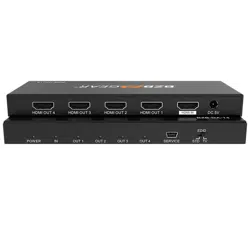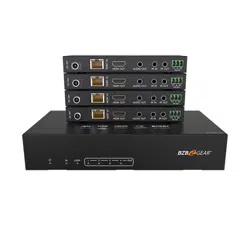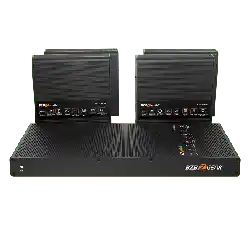
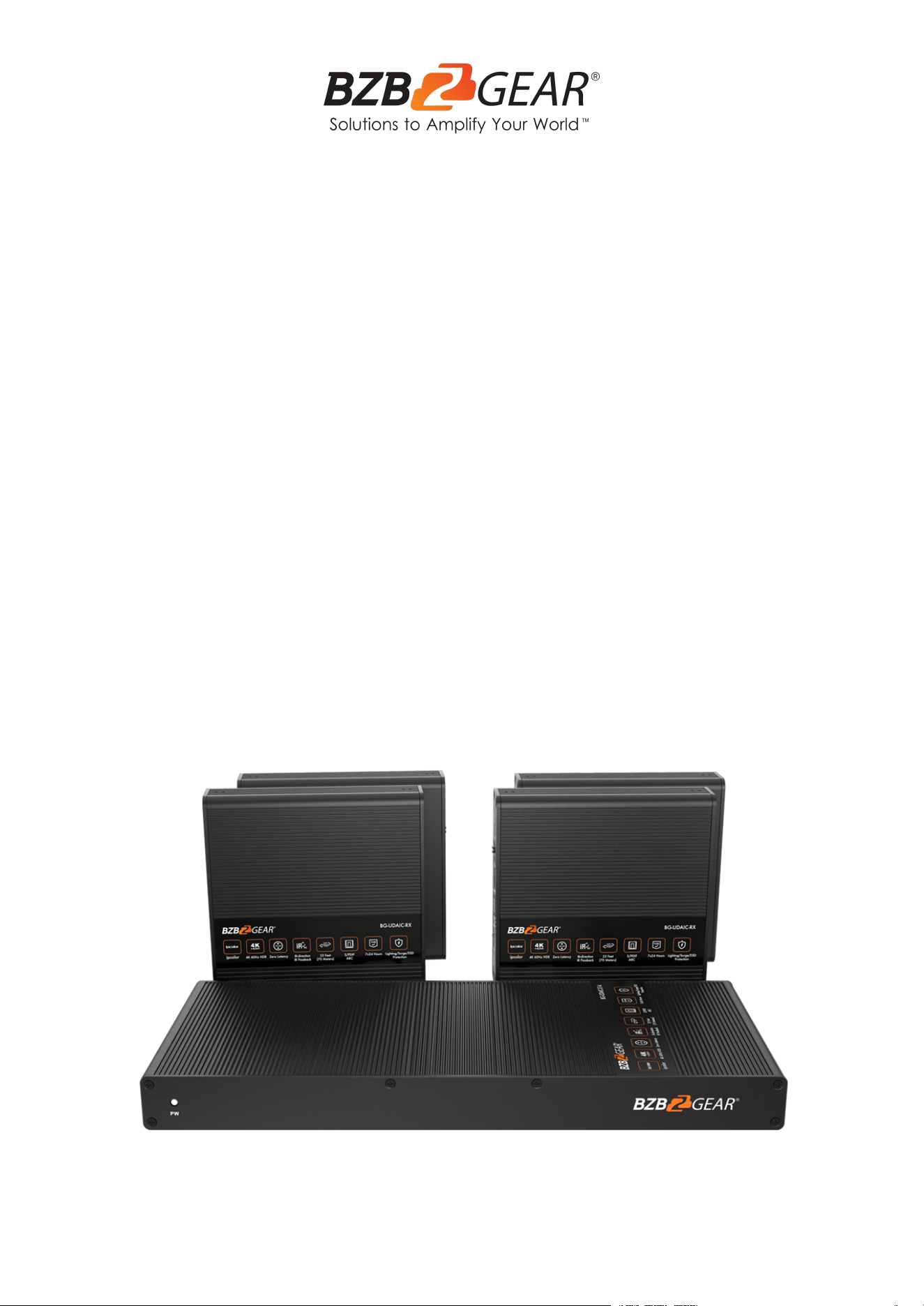
BG-UDAIC-E14
1X4 4K60 UHD 18Gbps HDMI Splitter & Distribution Amplifier
up to 230ft
User Manual

BZBGEAR BG-UDAIC-E14 PRODUCT MANUAL
Address: 830 National Drive #140, Sacramento, CA 95834, USA · Tel: +1(888)499-9906 · Email: support@bzbgear.com 2

BZBGEAR BG-UDAIC-E14 PRODUCT MANUAL
TABLE OF CONTENTS
Statement 4
Safety Precaution 4
Introduction 5
Features 5
Packing List 5
Specifications 6
Panel Description 7
Installation Procedures 9
Control Settings 10
FAQ 12
Tech Support 13
Limited Product Warranty Terms 13
Mission Statement 14
Copyright 14
Address: 830 National Drive #140, Sacramento, CA 95834, USA · Tel: +1(888)499-9906 · Email: support@bzbgear.com 3

BZBGEAR BG-UDAIC-E14 PRODUCT MANUAL
Statement
Please read these instructions carefully before connecting, operating, or configuring this
product. Please save this manual for future reference.
Safety Precaution
● To prevent damaging this product, avoid heavy pressure, strong vibration, or immersion
during transportation, storage, and installation.
● The housing of this product is made of organic materials. Do not expose to any liquid,
gas, or solids which may corrode the shell.
● Do not expose the product to rain or moisture.
● To prevent the risk of electric shock, do not open the case. Installation and maintenance
should only be carried out by qualified technicians.
● Do not use the product beyond the specified temperature, humidity, or power supply
specifications.
● This product does not contain parts that can be maintained or repaired by users.
Damage caused by dismantling the product without authorization from BZBGEAR is not
covered under the warranty policy.
● Installation and use of this product must strictly comply with local electrical safety
standards.
Address: 830 National Drive #140, Sacramento, CA 95834, USA · Tel: +1(888)499-9906 · Email: support@bzbgear.com 4

BZBGEAR BG-UDAIC-E14 PRODUCT MANUAL
Introduction
The BG-UDAIC-E14is an extender splitter kit that distributes 1 HDMI input to 4 HDMI
outputs and extends these signals up to 230 feet (70m). The kit supports resolutions up to
4K@60Hz and the transmitter is also equipped with an HDMI loop out to view the content
near the source. The unit is also capable of bi-directional IR, advanced EDID, and RS232
control .
Features
● Zero latency transmission
● Split and extend 1 HDMI input signal to 4 HDMI outputs
● Up to 4K@60Hz resolutions
● Transmission distance up to 230 feet or 70 meters by using Cat6/6A/7 cables
● Bi-directional IR
● HDMI loop out
● Audio extraction from the TV or source device on the receiver end via S/PDIF.
● EDID passthru or manually set the EDID
● RS-232 command control
● Surge Protection, Lightning Protection, ESD Protection
● Equipped with rack mount ears
Packing List
1. 1x HDMI Splitter Extender TX
2. 4x HDMI Splitter Extender RX
3. 1x User Manual
4. 1x DC12V/2A
5. 4x DC5V/2A
6. 1x Terminal Block (RS-232)
7. 1x IR Blaster Extension Cable
8. 4x IR Receiver Extension Cable
9. 20x Mounting Brackets
10. 40x Screw
Address: 830 National Drive #140, Sacramento, CA 95834, USA · Tel: +1(888)499-9906 · Email: support@bzbgear.com 5
BZBGEAR BG-UDAIC-E14 PRODUCT MANUAL
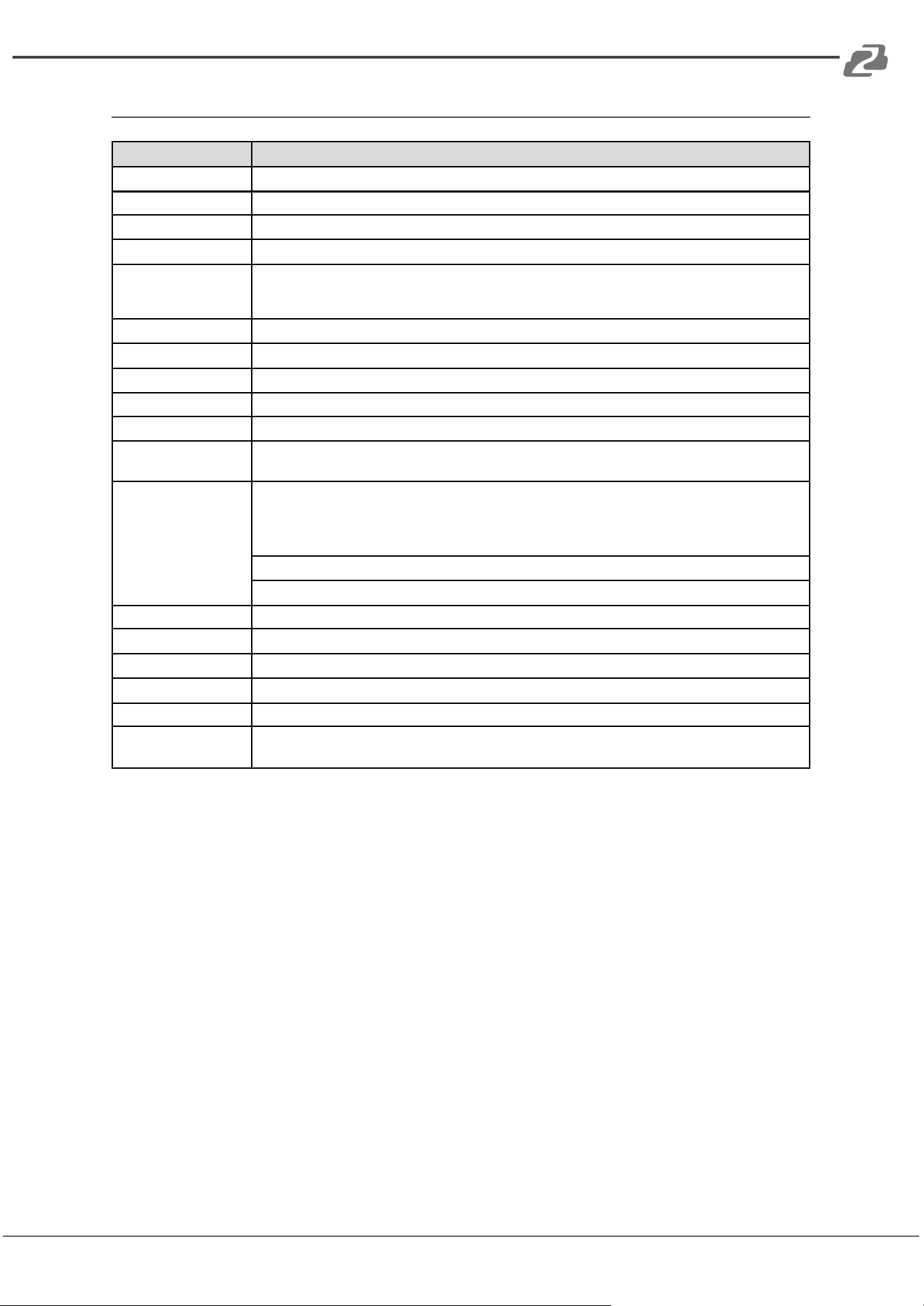
Specifications
Item
Specification
Transport protocol
ipcolor
Split mode
1 IN 4 OUT
Transmission Distance
CAT6/6A/7<70m
HDMI signal
HDMI 2.0, HDCP2.2
Resolution
480i@60Hz, 480p@60Hz, 576i@50Hz, 576p@50Hz, 720p@50/60Hz, 1080i@50/60Hz,
1080p@50/60Hz, 1280x960, 1280x800, 1280x768, 1680x1050, 1360x768, 1366x768, 1600x900,
1024x768,800x600, 3840x2160@24/25/30/50/60Hz, 4096x2160@24/25Hz
Audio formats
LPCM/DTS-HD/DTS-Audio/Dolby Digital 5.1
IR
Bi-directional IR passback (20-60khz)
RS-232
3-pin: TxD-RxD-GND, follows RS-232 levels
Working Temperature
-20~60°C
Storage Temperature
-30~70°C
Humidity (no
condensation)
0~90%
Protection
ESD protection
1a Contact discharge level 3
1b Air discharge level 3
Implementation of the standard: IEC 61000-4-2
Lightning protection
Surge protection
Power supply
TX: DC 12V/2A RX: DC 5V/2A
Power consumption
TX<13W RX<4W
Material
Aluminum alloy material + crystal panel
Color
Black
Weight
TX: 640g RX: 210g
Dimension
TX: 264.00(L) x 104.00(W) x 23.50(H)mm
RX: 106.0(L) x 99.0(W) x 26.2(H)mm
Address: 830 National Drive #140, Sacramento, CA 95834, USA · Tel: +1(888)499-9906 · Email: support@bzbgear.com 6
BZBGEAR BG-UDAIC-E14 PRODUCT MANUAL
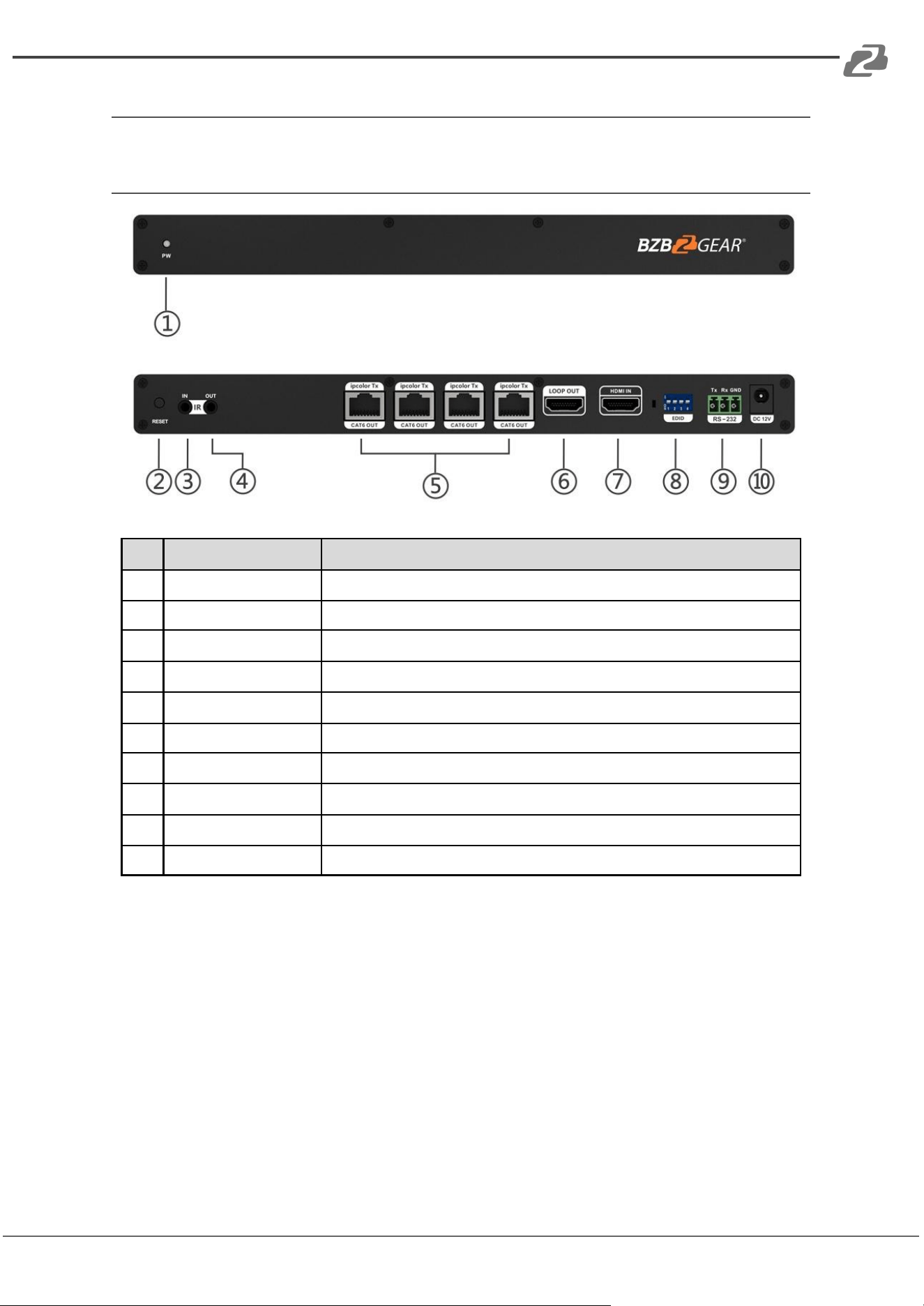
Panel Description
Transmitter (TX)
No.
Name
Function Description
1
Power indicator
The blue light will illuminate when powered on
2
Reset button
Restarts the device
3
IR in
Connect to the IR receiver extension cable
4
IR out
Connect to the IR blaster extension cable
5
RJ45 output port
Connect using CAT 6/6a/7 network cables
6
HDMI output port
Connects to a local HDMI display device using an HDMI cable
7
HDMI input port
Connects to an HDMI source device using an HDMI cable
8
EDID DIP switch
Configure output resolution using the EDID DIP switch
9
RS-232 Port
Connects to an external device to control the transmitter
10
Power
Connects to the supplied DC 12V/2A power adapter
Address: 830 National Drive #140, Sacramento, CA 95834, USA · Tel: +1(888)499-9906 · Email: support@bzbgear.com 7
BZBGEAR BG-UDAIC-E14 PRODUCT MANUAL
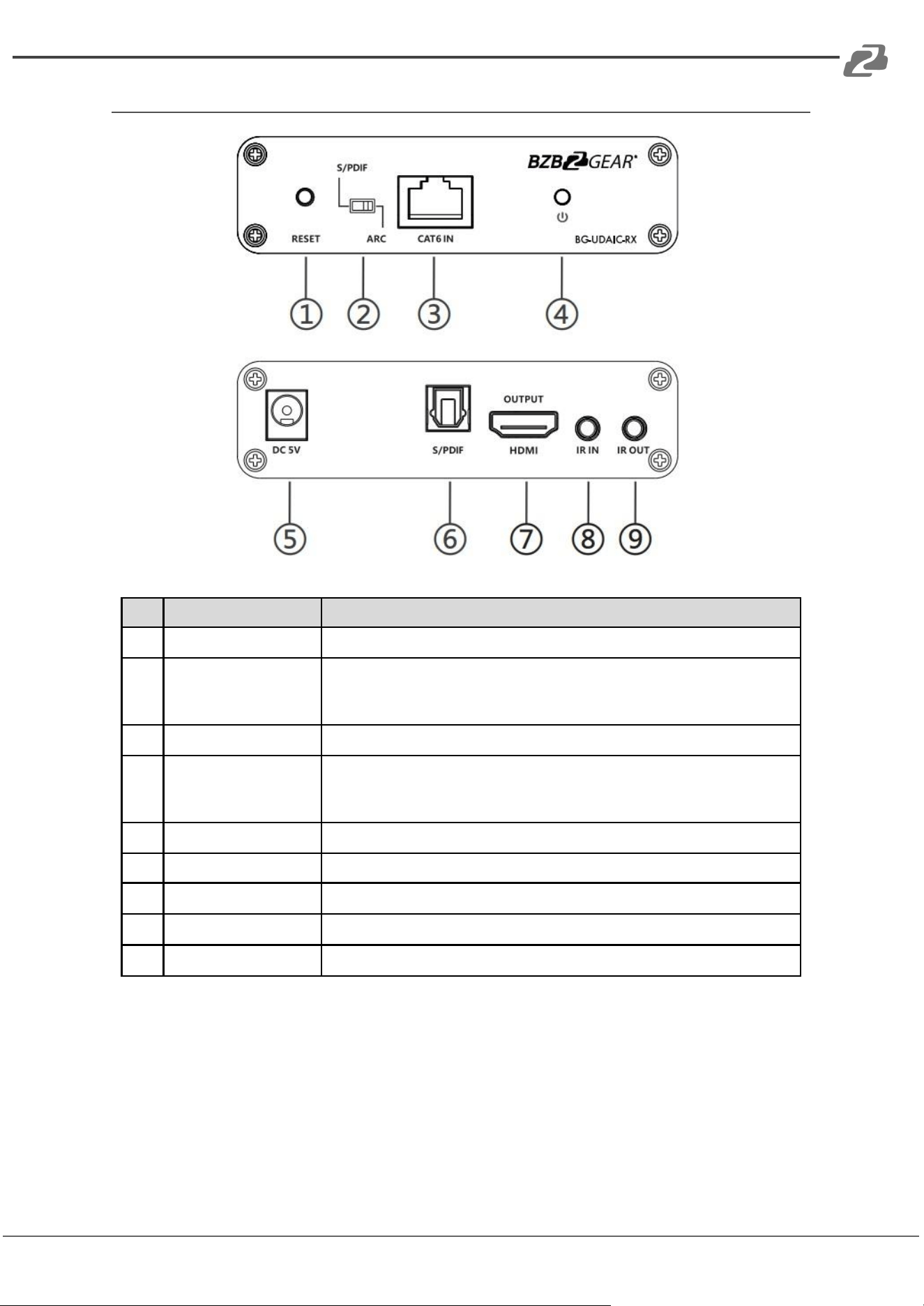
Receiver (RX)
No.
Name
Function Description
1
Reset button
Restarts the device
2
Audio switch
Choose the audio source (output from the S/PDIF port)
S/PDIF: From the source device
ARC: From the TV (receiver end)
3
RJ45 signal input
Connect using CAT 6/6a/7 network cables
4
Power/Signal
indicator
When the device is powered on, the blue indicator light will be solid
if the HDMI signal is detected. If the HDMI signal is not detected,
the light will flash.
5
Power
Connects to the supplied DC 5V/2A power adapter
6
S/PDIF output
Connect to a speaker or amplifier
7
HDMI output
Connects to an HDMI display device
8
IR in
Connect using an IR receiver extension cable
9
IR out
Connect using an IR blaster extension cable
Address: 830 National Drive #140, Sacramento, CA 95834, USA · Tel: +1(888)499-9906 · Email: support@bzbgear.com 8
BZBGEAR BG-UDAIC-E14 PRODUCT MANUAL
Installation Procedures
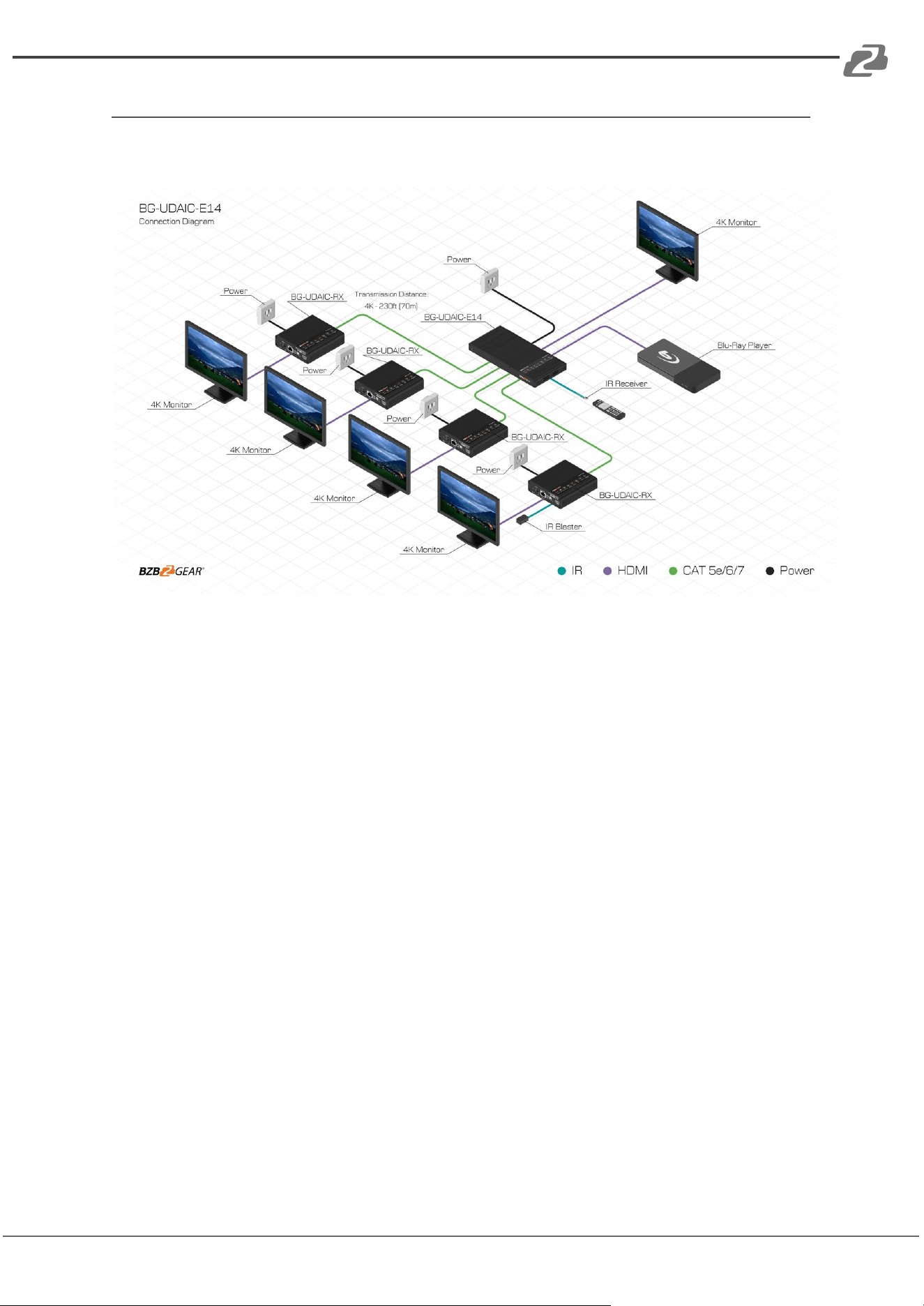
Connection Diagram
Connection Instructions
1. Connect the source device to the transmitter's HDMI IN port using an HDMI cable.
2. Connect the transmitter's CAT6 OUT port to the receiver's CAT6 IN port using
network cables.
3. Connect the receiver's HDMI OUTPUT port to the display devices using HDMI
cables.
4. If using an HDMI loop out, connect the transmitter's LOOP OUT port to the display
using an HDMI cable.
5. If using the RS-232 control, connect the transmitter's RS-232 port to the external
control device.
6. Plug the power into the devices.
IR User Guide
1. The IR blaster extension cable connects to the IR OUT port of the transmitter or
receiver. The IR receiver extension cable connects to the IR IN port of the transmitter
or receivers.
2. The emitter of the IR blaster extension cable is recommended to be as close as
possible to the IR receiving window of the target device.
3. Point the remote control at the receiving head of the IR receiver extension cable to
operate.
Address: 830 National Drive #140, Sacramento, CA 95834, USA · Tel: +1(888)499-9906 · Email: support@bzbgear.com 9
BZBGEAR BG-UDAIC-E14 PRODUCT MANUAL
Control Settings
RS232 Settings
The default configuration is as follows:
Baud rate: 9600 / Data bits: 8 / Stop bits: 1 / Parity: 0
Control Commands
Function Descriptions
ES XX On/n
Turn on the network signal output port(s), choose from “01” to “04” (the network ports from
right to left are: 01, 02, 03, 04.);
“All” means all four ports
ES XX Off/n
Turn off the network signal output port(s), choose from “01” to “04” (the network ports from
right to left are: 01, 02, 03, 04.);
“All” means all four ports
Reset/n
Restart the device
Recover/n
Restore device to factory settings
Baud XX /n
Set the baud rate value: 9600 (default), 19200, 38400, 57600, 115200
Examples of control commands are shown below:
Control Command
ES 04 On/n
Function Description
Turn on network signal output port 04
Return Values
Received
successfully
ES 04 On OK
Receive failed
ES 04 On FAIL
Control Command
ES All Off/n
Function Description
Turn off all the network signal output ports
Return Values
Received
successfully
ES All Off OK
Receive failed
ES All Off FAIL
Control Command
Reset/n
Function Description
Restart the device
Return Values
Received
successfully
Reset OK
Receive failed
Reset FAIL
Control Command
Baud 19200/n
Function Description
Set the baud rate value: 9600
Return Values
Received
successfully
Baud 19200 OK
Receive failed
Baud 19200 FAIL
Address: 830 National Drive #140, Sacramento, CA 95834, USA · Tel: +1(888)499-9906 · Email: support@bzbgear.com 10
BZBGEAR BG-UDAIC-E14 PRODUCT MANUAL
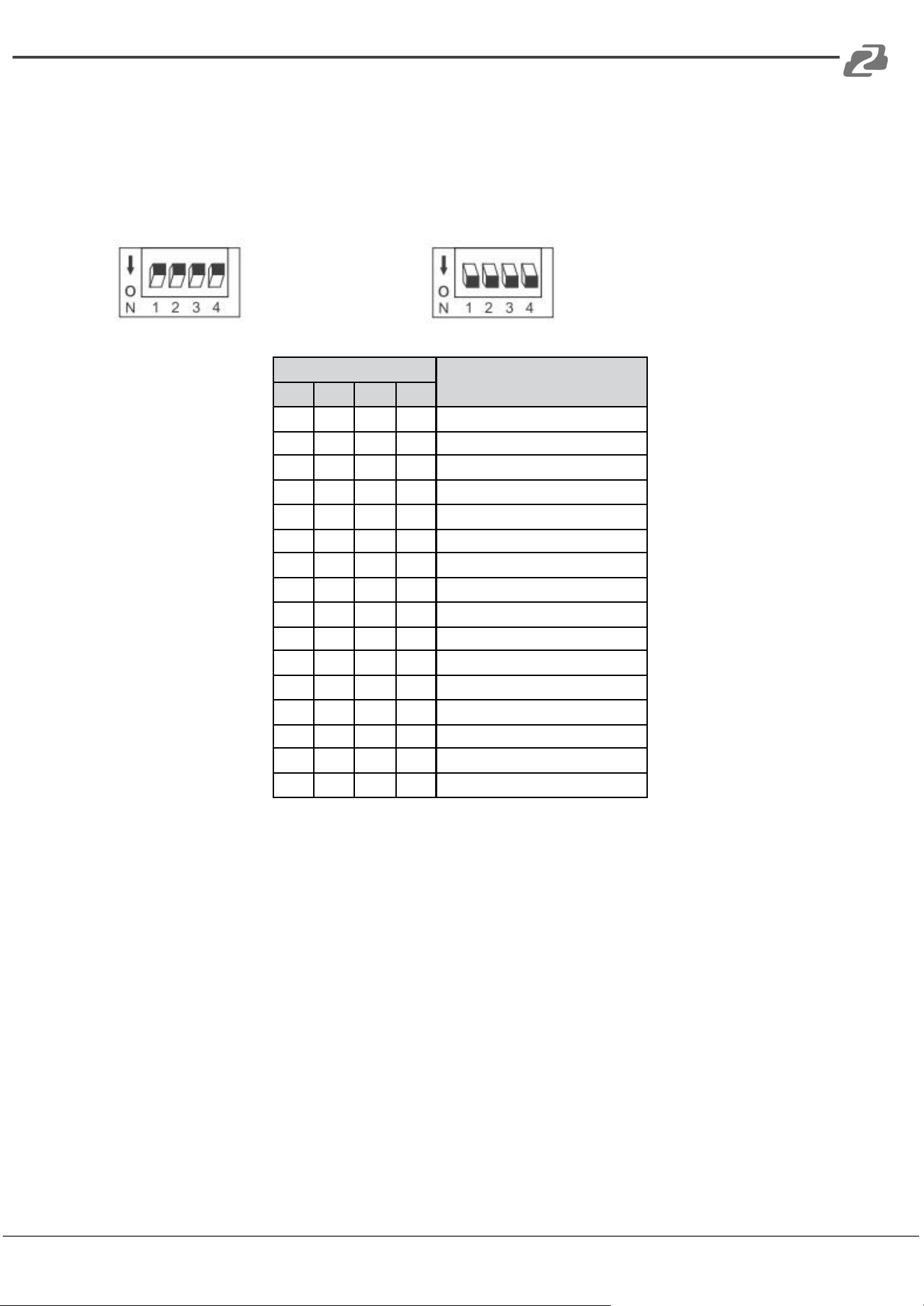
EDID Settings:
The transmitter has 16 built-in EDID settings that can be configured using the DIP switch.
Flipping the DIP switch upward indicates a “1” and flipping downward indicates a “0.”
Switch up for "1" Switch down for "0"
Switch Status
EDID Information
1
2
3
4
0
0
0
0
4K@60Hz 2CH
1
0
0
0
4K@60Hz 5.1CH
0
1
0
0
4K@60Hz 7.1CH
0
0
1
0
4K@60Hz HDR 7.1CH
0
0
0
1
4K@30Hz 2CH
1
1
0
0
4K@30Hz 5.1CH
1
0
1
0
4K@30Hz 7.1CH
1
0
0
1
4K@30Hz HDR 7.1CH
0
1
1
0
1080p@60Hz 2CH
0
1
0
1
1080p@60Hz 5.1CH
0
0
1
1
1080p@60Hz 7.1CH
1
1
1
0
1080i@60Hz 2CH
1
1
0
1
1080i@60Hz 5.1CH
1
0
1
1
1080i@60Hz 7.1CH
0
1
1
1
1080p@60Hz HDR 7.1CH
1
1
1
1
Auto
Auto: Auto output at a resolution compatible with all displays.
Address: 830 National Drive #140, Sacramento, CA 95834, USA · Tel: +1(888)499-9906 · Email: support@bzbgear.com 11

BZBGEAR BG-UDAIC-E14 PRODUCT MANUAL
FAQ
Q: Why does my display device not have an image?
A:
1. Check the power supply and all cables and ensure they are properly connected.
2. Check if the HDMI signal input is detected.
3. Check the corresponding network output and ensure it has not been turned off by
the RS-232 command.
Q: Why is the output image unstable?
A:
1. Check the length of the network cable and ensure it is within the 70-meter limit.
2. Press the "reset" button on TX and RX panels to restart and reconnect.
Q: Why does the TV have a snowy/fuzzy screen?
A:
1. The HDMI cable may be defective or exceeds the recommended cable length and
needs replacing.
2. The recommended length of the HDMI cable connected to the transmitter is ≤3
meters, and the recommended length of the HDMI cable connected to the receiver
is ≤5 meters.
Address: 830 National Drive #140, Sacramento, CA 95834, USA · Tel: +1(888)499-9906 · Email: support@bzbgear.com 12

BZBGEAR BG-UDAIC-E14 PRODUCT MANUAL
Tech Support
Have technical questions? We may have answered them already!
Please visit BZBGEAR’s support page (bzbgear.com/support) for helpful information and
tips regarding our products. Here you will find our Knowledge Base
(bzbgear.com/knowledge-base) with detailed tutorials, quick start guides, and step-by-step
troubleshooting instructions. Or explore our YouTube channel, BZB TV
(youtube.com/c/BZBTVchannel), for help setting up, configuring, and other helpful how-to
videos about our gear.
Need more in-depth support? Connect with one of our technical specialists directly:
Phone
1.888.499.9906
Email
support@bzbgear.com
Live Chat
bzbgear.com
Limited Product Warranty Terms
Pro Line: 5-year warranty from the date of purchase for AV/Broadcasting products bought
on or after August 1, 2024.
Essential Line: 3-year warranty from the date of purchase for AV/Broadcasting products
bought on or after August 1, 2024.
Cables: Lifetime Limited Product Warranty.
For complete warranty information, please visit bzbgear.com/warranty.
For questions, please call 1.888.499.9906 or email support@bzbgear.com.
Address: 830 National Drive #140, Sacramento, CA 95834, USA · Tel: +1(888)499-9906 · Email: support@bzbgear.com 13

BZBGEAR BG-UDAIC-E14 PRODUCT MANUAL
Mission Statement
BZBGEAR is a breakthrough manufacturer of high-quality, innovative audiovisual equipment
ranging from AVoIP, professional broadcasting, conferencing, home theater, to live
streaming solutions. We pride ourselves on unparalleled customer support and services.
Our team offers system design consultation, and highly reviewed technical support for all
the products in our catalog. BZBGEAR delivers quality products designed with users in
mind.
Copyright
All the contents in this manual and its copyright are owned by BZBGEAR. No one is allowed
to imitate, copy, or translate this manual without BZBGEAR’s permission. This manual
contains no guarantee, standpoint expression or other implies in any form. Product
specification and information in this manual is for reference only and subject to change
without notice.
All rights reserved. No reproducing is allowed without acknowledgement.
Address: 830 National Drive #140, Sacramento, CA 95834, USA · Tel: +1(888)499-9906 · Email: support@bzbgear.com 14