wolox.com
The information in this manual is subject to change without notice.
V1.0
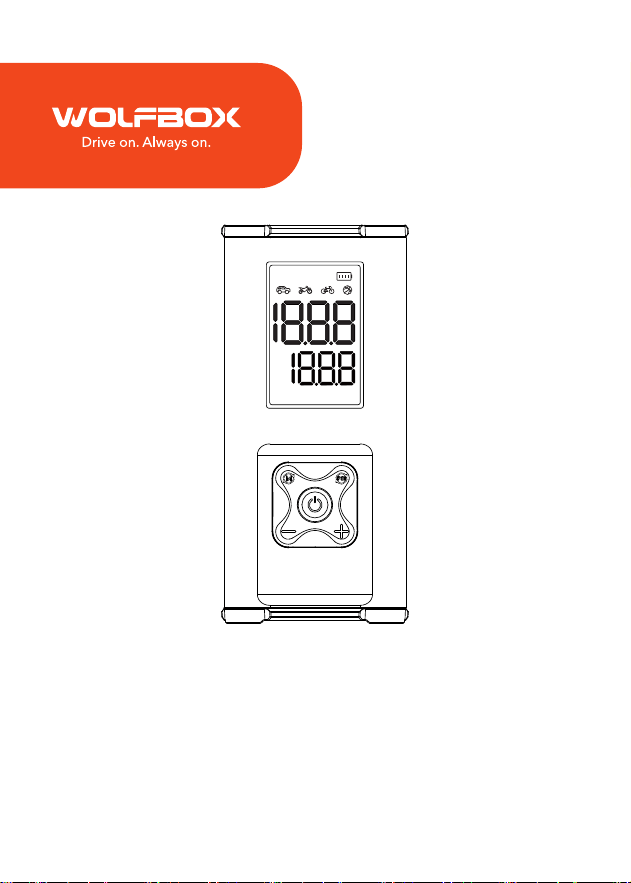
MegaFlow 24 Pro
User Manual
PSI BAR KPA Kg/cm²


1
Content
Warnings & Precautions . . . . . . . . . . . . . . . . . . . .
2
Packing List . . . . . . . . . . . . . . . . . . . . . . . . . . .
3
Pas and Functions Introduction . . . . . . . . . . . . . .
5
LED Display Instructions . . . . . . . . . . . . . . . . . .
12
Technical Specications . . . . . . . . . . . . . . . . . . .
12
Frequently Asked Questions . . . . . . . . . . . . . . . .
14

2
Warnings
• This product is not for children to use alone. Children should be
accompanied by adults. Do not inse the air hose into human
or animal mouths, ears, or eyes for ination.
• Do not use this product as a toy.
• Do not use this product near ammable or explosive liquids and
gases, such as gas stations or gas stations.
• Do not throw the product into the re or heat it. Do not store
the product in high temperatures.
• Do not impact the product with hard objects.
• Do not disassemble the product randomly, and do not change
the product's structure.
• Do not immerse the product in water or other solvents. Pay
attention to keep the product d.
• The air compressor cannot be used during USB C charging.

3
Precautions
• When inating, there will be physical heating due to high-
pressure operation. Be careful when removing the air hose to
avoid burns. Cooling time is recommended.
• After continuous use for about 15 minutes, it is recommended
to wait 5-10 minutes before continuing to use. After charging
is complete, unplug the cable as soon as possible to prevent
overcharging or product damage, and ensure the batte's
lifespan.
• The package does not include a charger. Be sure to connect
to a regular fast charger to charge the product to avoid product
damage.
• It is not recommended to charge and inate simultaneously, as
this may damage the batte.
• Do not inate mattresses.
4
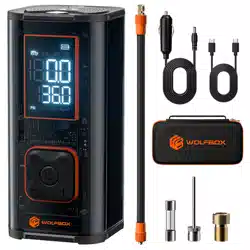
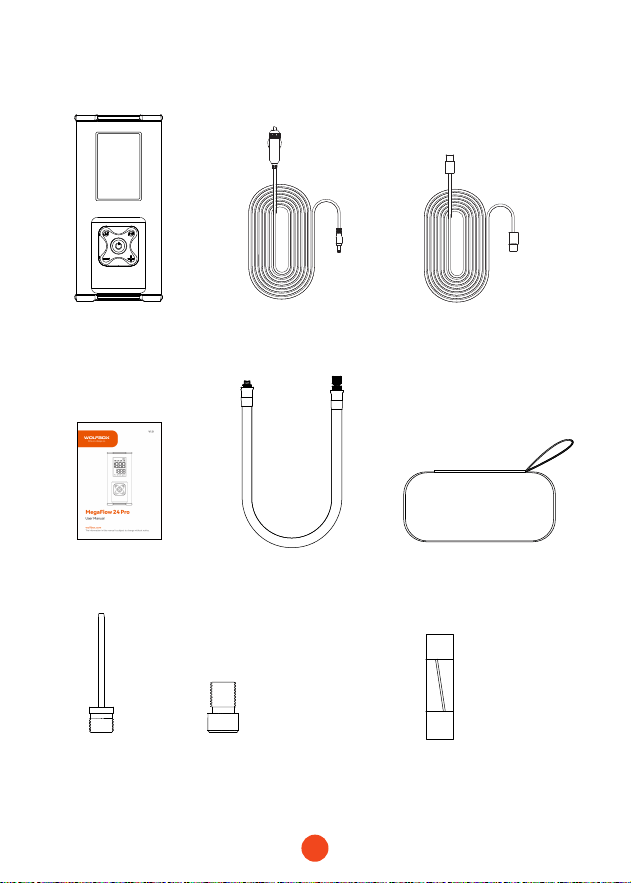
Packing list
・
Air Compressor
・
Inatable Hose
・
C to C Charging Cable
・
DC 12V Car Charger
・
EVA Pack
・
User Manual
・
Air Nozzle*2
・
Fuse wire
Basketball
French
Air Nozzle
5
Pas and Functions Introduction
2
10
1
3
4
6
5
8
9
7
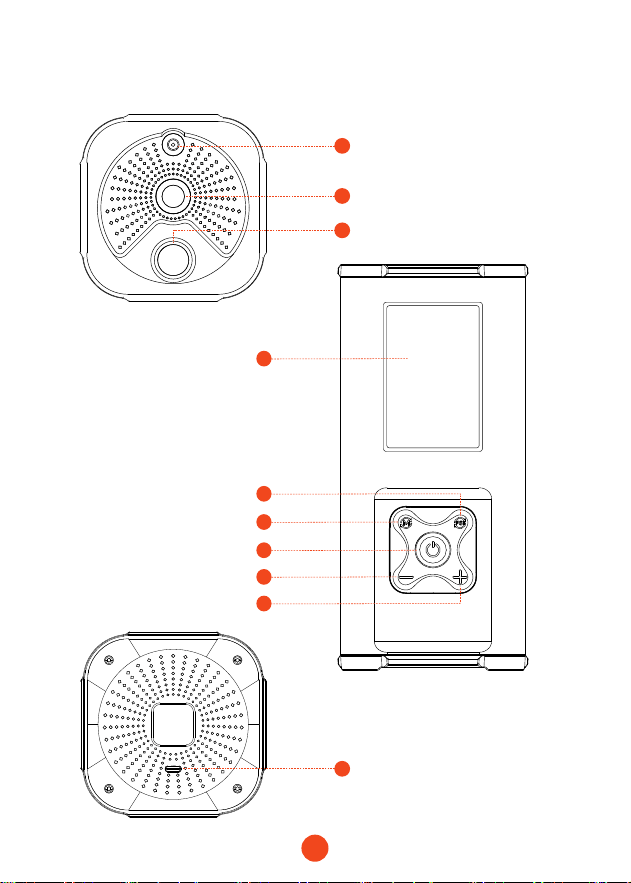
12V DC Power Inteace
LED Light
Inatable Tube Inteace
Power On/O
Display Screen
Mode Selection
Unit Switching & LED Light
Pressure Adjustment
Pressure Adjustment
USB-C Input/Output

6
7
1
3
4
2
6
5
Power On/O
12V DC Power Inteace
LED Light
Display Screen
Inatable Tube Inteace
Mode Selection
Unit Switching & LED Light
Long press the power button for 2 seconds to turn on the air
compressor. Press once to sta ination and the compressor
will automatically stop when the preset pressure is reached.
Long press for 2 seconds to turn off. The product will shut
down automatically after 120 seconds of inactivity.
For connecting to a car charger.
After turning on, press the mode button to select from five
ination modes: Car, Motorcycle, Bicycle, Ball, and Custom. The
default pressure value will automatically change when the mode
is selected.
・Car Mode:
Default 36 PSI; adjustable range 4-65.2 PSI.
・Bicycle Mode:
Default 30 PSI; adjustable range 4-150 PSI.
・Motorcycle Mode:
Default 34 PSI; adjustable range 26-44 PSI.
・Ball Mode:
Default 8 PSI; adjustable range 4-16 Bar.
・Custom Mode:
No icon displayed, allows you to set the pressure
value freely, with a maximum value of 150 PSI.
・Unit Switching:
After selecting the mode, press the unit button
to choose from four pressure units: PSI, BAR, KPA, Kg/cm².
・LED Light: Press and hold the LED button for 2 seconds to turn
on the LED light. Press again to switch to SOS mode. Press and
hold for 3 seconds to turn o the LED light.

7
10
8
USB-C Input/Output
Pressure Adjustment
Suppos 5V/3A, 9V/3A, 12V/3A, 15V/3A, 20V/2.25A.
Use the "+" and "-" buttons to manually adjust the pressure value.
Sho presses adjust by 0.01 Bar, while long presses adjust by 0.1
Bar. After adjusting to your desired pressure value, press the power
button once to sta ination.
9
8
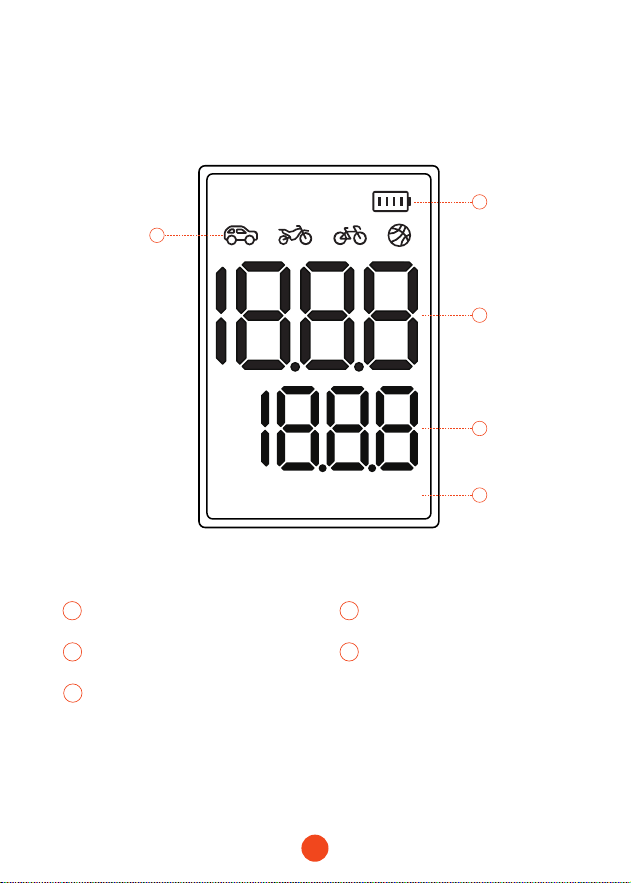
LED Display Instructions
PSI BAR KPA Kg/cm²
4
5
1
2
3
1
Modes
2
Batte Level Display
43
5
Set Pressure ValueInstantaneous Pressure
Pressure Unit
9
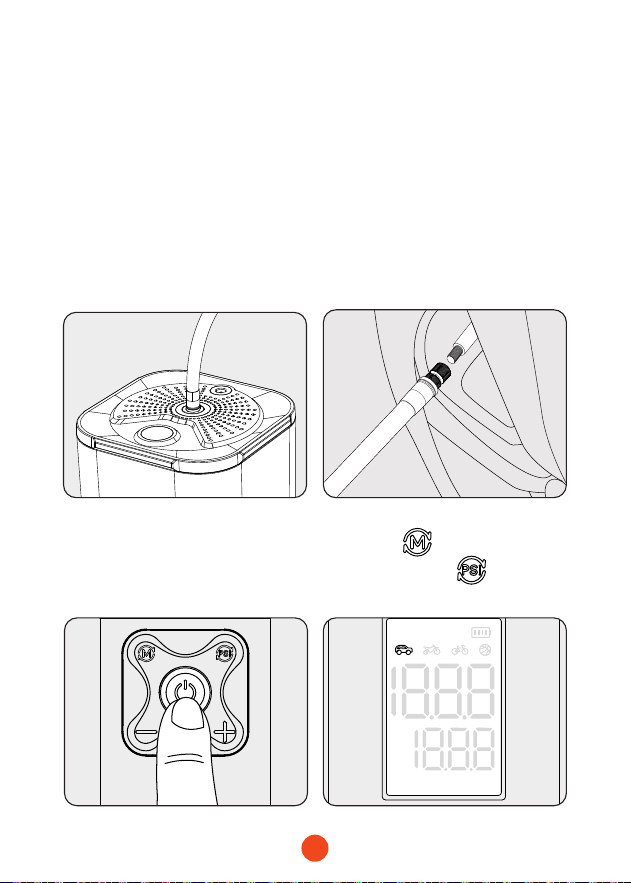
Function 1: How to Inate a Tire
・ Built-in Batte Mode
2. Connect the air hose to
the tire interface and
tighten the nozzle/Quick
Connect Method: Clamp
the tube with the quick
connector and then connect
it to the tire inteace.
3. Press and hold the power
button for 2 seconds to
turn on the device.
4. Press Select the
mode, Press Select
the unit.
PSI BAR KPA Kg/cm²
1. Connect the air hose to the
air compressor's air hose
inteace.
PSI BAR KPA Kg/cm²
10
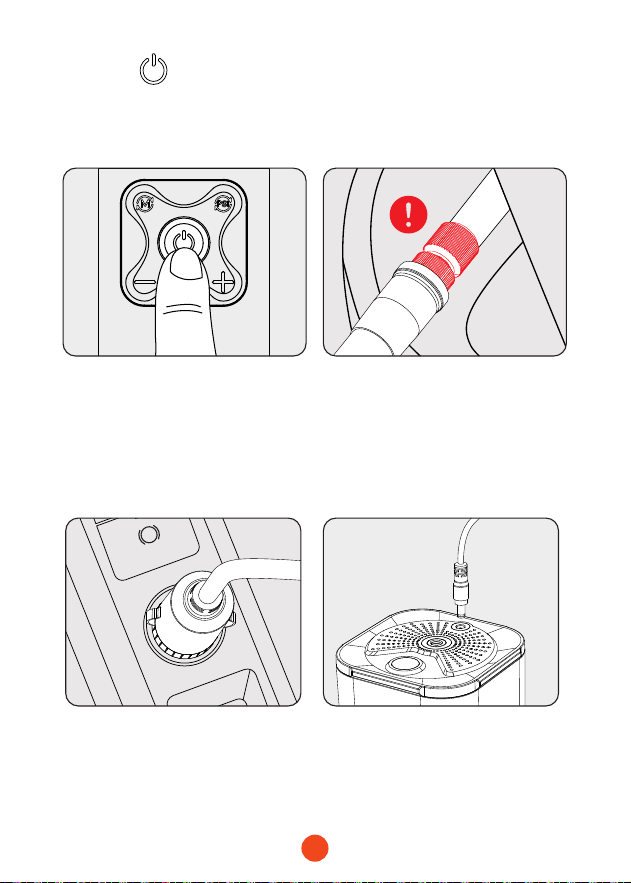
5. Press briey to sta
ination. The device will
automatically stop when
the set value is reached.
A
P
6. After use
:
To prevent burns,
wait for2 minutes, then
remove the air hose and
turn o the device
.
1. Plug the car charger into the
car's cigarette lighter socket.
3. Use it the same way as the
built-in batte mode.
2. Inse the product's
DC inteace, and it will
automatically turn on.
・ DC Power Mode
PSI BAR KPA Kg/cm²
11
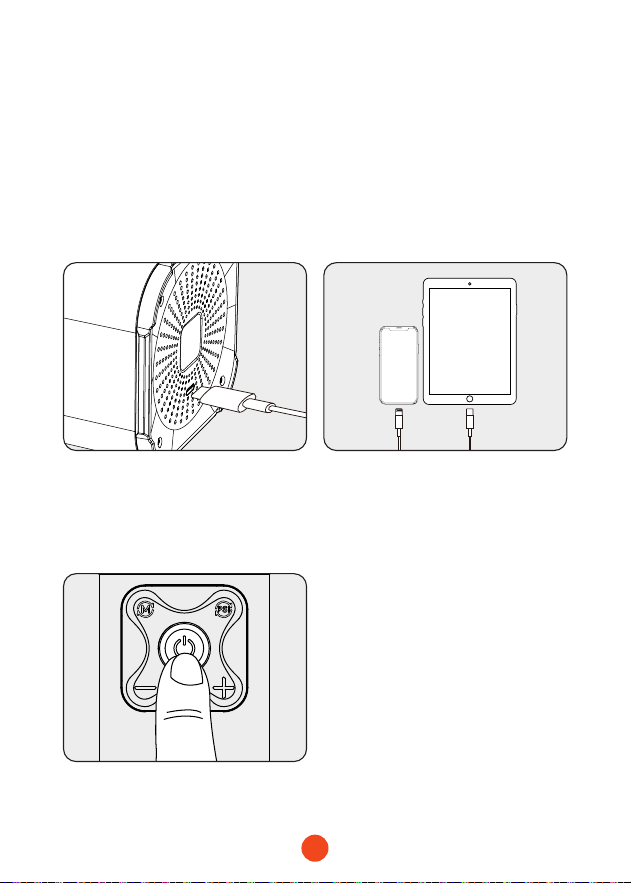
1. Connect the USB-C plug of
the adapter cable to the
main unit's USB-C output
po.
3. Press and hold for 2 seconds
to turn on and sta charging
your mobile phone/tablet or
other electronic devices
.
2. Connect the charging head
to your mobile phone/tablet
or other electronic devices.
Function 2: Charging mobile phones/
tablets and other electronic
devices
PSI BAR KPA Kg/cm²
12
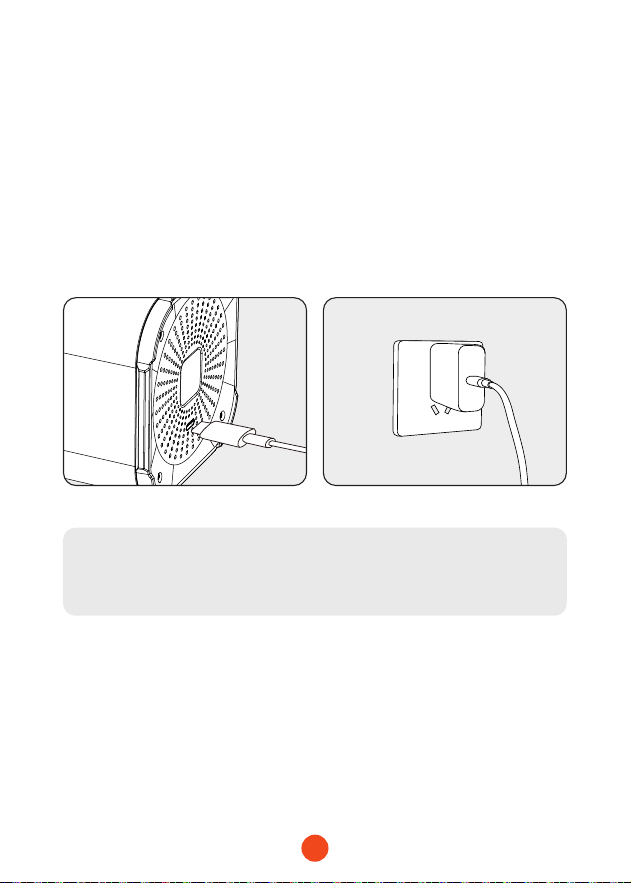
1. Plug the charger into a
power outlet.
2. Inse the plug of the fast
charger or household
charger into the USB-C
input po of the MegaFlow
24 Pro main unit.
Function 3: Charging the main unit of the
product
Note:
Package does not come with adapter
.
13
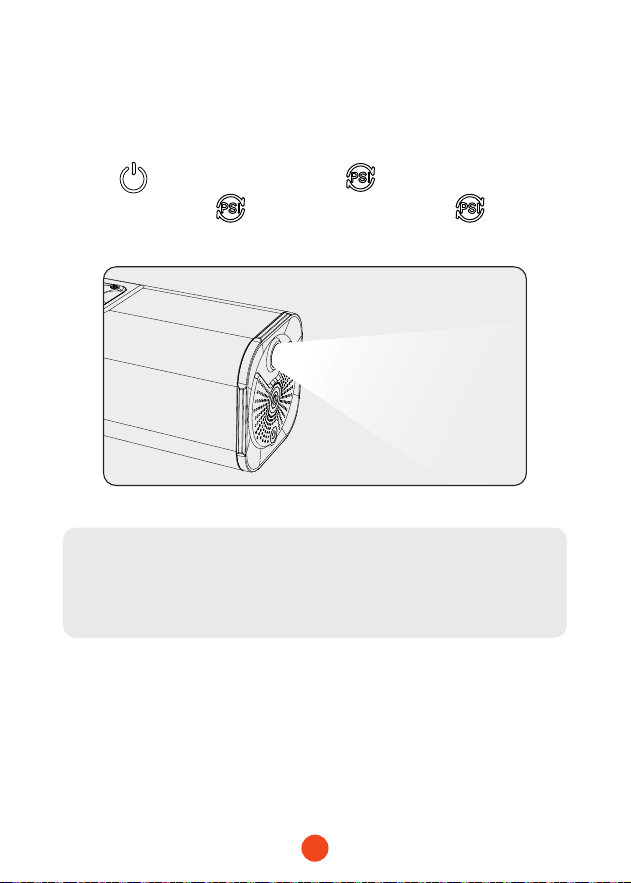
Press for 2s to turn on. Hold for 2s to activate LED,
then briey press to change modes. Hold for 2s to
turn o LED.
Function 4: Switching between dierent
modes of the LED light
Note:
The LED ashlight cannot be used unless the device is
turned on.

14
Technical Specications
Model MegaFlow 24 Pro
Batte
Capacity
43.2Wh
/12000mAh
Pump Core
24 dual-cylinder
pump
Air Flow Rate 58L/Min
USB-C
Input/Output
PD45W(5V/3A9V/3A12V/3A15A/3A20V/2.25A)
DC Input 12V/10A
Operating
Temperature
-20℃ ~ 50℃/-4℉~122℉
Full Charge Time
Approximately
1.5-2 hours
(
You need to get your
own 45W charger
)
Dimensions
(LWH)
9.3x4.16x4.16inch
Weight 4.85lb
Maximum
Pressure
150PSI

15
Frequently Asked Questions (FAQ)
・ What is the noise level?
It produces about 75 decibels, but we have implemented noise
reduction processing and thickened the shell, so the sound is not
paicularly harsh.
・ Can you ll all four tires on one charge? I want to avoid going
to gas station altogether.
For tire sizes ranging from 29 to 36 psi and 185 to 225, you can
ll them up in one go without having to go to a faher gas
station.
・ Can i store the air compressor in the trunk of my vehicle?
Of course, and we can withstand a wide temperature range from
-4℉ to 122℉, so you can keep it in your trunk whether it's winter
or summer.
・ Are the batteries replaceable?
We have a built-in 12000mAh batte, so you don't need to
replace batteries or wor about the risk of running out of
power.
・ Would this work for an air mattress for camping?
I'm sor, this tire inator cannot charge camping mattresses.
・ Can it be used to charge a phone?
Yes, this inator has a built-in 12000mAh batte and comes
with a 45W fast charge po, so you can charge your phone
whenever you want.
16
Help Center WhatsApp
WOLFBOX
For more information:
seice@wolox.com
https://wolox.com/contact-us
www.wolox.com
Customer Seice Center
If you have any problems with the function or installation, please
feel free to reach us.

18
Check us out here!
We have professional customer seice!
www.wolox.com
Email: seice.wolo[email protected]om
Phone: +1 888 296 8399
