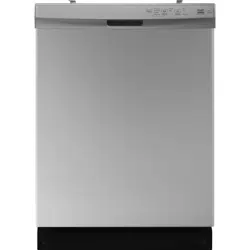
Before using your new product, please read these instructions to prevent any damage.
The most up-to-date User Guide is available from www.bestbuy.com
USER GUIDE
24 in. Front Control
Dishwasher
NS-DWF2WH26/NS-DWF2SS26

www.insigniaproducts.com
2
Introduction . . . . . . . . . . . . . . . . . . . . . . . . . . . . . . . . . . . . . . . . . . . . . . . . . . . . . . . . . . . . . . . . . . . . . . . . . . . . . . . . . . . . . . . . . 3
Important Safety Instructions . . . . . . . . . . . . . . . . . . . . . . . . . . . . . . . . . . . . . . . . . . . . . . . . . . . . . . . . . . . . . . . . . . . . . . . . 3
Features . . . . . . . . . . . . . . . . . . . . . . . . . . . . . . . . . . . . . . . . . . . . . . . . . . . . . . . . . . . . . . . . . . . . . . . . . . . . . . . . . . . . . . . . . . . . . 5
Package contents. . . . . . . . . . . . . . . . . . . . . . . . . . . . . . . . . . . . . . . . . . . . . . . . . . . . . . . . . . . . . . . . . . . . . . . . . . . . . . . . . . . . . . . . . . . . . . . . . 5
Main components . . . . . . . . . . . . . . . . . . . . . . . . . . . . . . . . . . . . . . . . . . . . . . . . . . . . . . . . . . . . . . . . . . . . . . . . . . . . . . . . . . . . . . . . . . . . . . . . 5
Installing and setting up your dishwasher . . . . . . . . . . . . . . . . . . . . . . . . . . . . . . . . . . . . . . . . . . . . . . . . . . . . . . . . . . . . 6
Before using your dishwasher . . . . . . . . . . . . . . . . . . . . . . . . . . . . . . . . . . . . . . . . . . . . . . . . . . . . . . . . . . . . . . . . . . . . . . . . . . . . . . . . . . . . . 6
Finding a suitable location . . . . . . . . . . . . . . . . . . . . . . . . . . . . . . . . . . . . . . . . . . . . . . . . . . . . . . . . . . . . . . . . . . . . . . . . . . . . . . . . . . . . . . . . 6
Providing a proper power supply. . . . . . . . . . . . . . . . . . . . . . . . . . . . . . . . . . . . . . . . . . . . . . . . . . . . . . . . . . . . . . . . . . . . . . . . . . . . . . . . . . 6
Understanding your dishwasher’s features . . . . . . . . . . . . . . . . . . . . . . . . . . . . . . . . . . . . . . . . . . . . . . . . . . . . . . . . . . . 6
How your dishwasher cleans . . . . . . . . . . . . . . . . . . . . . . . . . . . . . . . . . . . . . . . . . . . . . . . . . . . . . . . . . . . . . . . . . . . . . . . . . . . . . . . . . . . . . . 6
Wash cycle selections . . . . . . . . . . . . . . . . . . . . . . . . . . . . . . . . . . . . . . . . . . . . . . . . . . . . . . . . . . . . . . . . . . . . . . . . . . . . . . . . . . . . . . . . . . . . . 6
Filter system. . . . . . . . . . . . . . . . . . . . . . . . . . . . . . . . . . . . . . . . . . . . . . . . . . . . . . . . . . . . . . . . . . . . . . . . . . . . . . . . . . . . . . . . . . . . . . . . . . . . . . 6
DishSenseTM system . . . . . . . . . . . . . . . . . . . . . . . . . . . . . . . . . . . . . . . . . . . . . . . . . . . . . . . . . . . . . . . . . . . . . . . . . . . . . . . . . . . . . . . . . . . . . 6
Using your dishwasher . . . . . . . . . . . . . . . . . . . . . . . . . . . . . . . . . . . . . . . . . . . . . . . . . . . . . . . . . . . . . . . . . . . . . . . . . . . . . . . 7
Using the control panel . . . . . . . . . . . . . . . . . . . . . . . . . . . . . . . . . . . . . . . . . . . . . . . . . . . . . . . . . . . . . . . . . . . . . . . . . . . . . . . . . . . . . . . . . . . 7
Basic operation . . . . . . . . . . . . . . . . . . . . . . . . . . . . . . . . . . . . . . . . . . . . . . . . . . . . . . . . . . . . . . . . . . . . . . . . . . . . . . . . . . . . . . . . . . . . . . . . . . . 8
Preparing and loading dishes . . . . . . . . . . . . . . . . . . . . . . . . . . . . . . . . . . . . . . . . . . . . . . . . . . . . . . . . . . . . . . . . . . . . . . . . . . . . . . . . . . . . . 9
Loading the racks and silverware basket . . . . . . . . . . . . . . . . . . . . . . . . . . . . . . . . . . . . . . . . . . . . . . . . . . . . . . . . . . . . . . . . . . . . . . . . . . . 9
Installing the silverware basket lids . . . . . . . . . . . . . . . . . . . . . . . . . . . . . . . . . . . . . . . . . . . . . . . . . . . . . . . . . . . . . . . . . . . . . . . . . . . . . . 11
Improving dishwasher performance. . . . . . . . . . . . . . . . . . . . . . . . . . . . . . . . . . . . . . . . . . . . . . . . . . . . . . . . . . . . . . . . . 13
Using rinse aid. . . . . . . . . . . . . . . . . . . . . . . . . . . . . . . . . . . . . . . . . . . . . . . . . . . . . . . . . . . . . . . . . . . . . . . . . . . . . . . . . . . . . . . . . . . . . . . . . . 13
Water temperature . . . . . . . . . . . . . . . . . . . . . . . . . . . . . . . . . . . . . . . . . . . . . . . . . . . . . . . . . . . . . . . . . . . . . . . . . . . . . . . . . . . . . . . . . . . . . 13
Heat dry option. . . . . . . . . . . . . . . . . . . . . . . . . . . . . . . . . . . . . . . . . . . . . . . . . . . . . . . . . . . . . . . . . . . . . . . . . . . . . . . . . . . . . . . . . . . . . . . . . 13
Water pressure . . . . . . . . . . . . . . . . . . . . . . . . . . . . . . . . . . . . . . . . . . . . . . . . . . . . . . . . . . . . . . . . . . . . . . . . . . . . . . . . . . . . . . . . . . . . . . . . . 14
Maintaining your dishwasher . . . . . . . . . . . . . . . . . . . . . . . . . . . . . . . . . . . . . . . . . . . . . . . . . . . . . . . . . . . . . . . . . . . . . . . 14
Cleaning the door . . . . . . . . . . . . . . . . . . . . . . . . . . . . . . . . . . . . . . . . . . . . . . . . . . . . . . . . . . . . . . . . . . . . . . . . . . . . . . . . . . . . . . . . . . . . . . 14
Cleaning the door gasket . . . . . . . . . . . . . . . . . . . . . . . . . . . . . . . . . . . . . . . . . . . . . . . . . . . . . . . . . . . . . . . . . . . . . . . . . . . . . . . . . . . . . . . 14
Cleaning the control panel . . . . . . . . . . . . . . . . . . . . . . . . . . . . . . . . . . . . . . . . . . . . . . . . . . . . . . . . . . . . . . . . . . . . . . . . . . . . . . . . . . . . . . 14
Cleaning the glass trap. . . . . . . . . . . . . . . . . . . . . . . . . . . . . . . . . . . . . . . . . . . . . . . . . . . . . . . . . . . . . . . . . . . . . . . . . . . . . . . . . . . . . . . . . . 14
Cleaning the overfill protector . . . . . . . . . . . . . . . . . . . . . . . . . . . . . . . . . . . . . . . . . . . . . . . . . . . . . . . . . . . . . . . . . . . . . . . . . . . . . . . . . . 15
Cleaning the air gap . . . . . . . . . . . . . . . . . . . . . . . . . . . . . . . . . . . . . . . . . . . . . . . . . . . . . . . . . . . . . . . . . . . . . . . . . . . . . . . . . . . . . . . . . . . . 15
Protecting your dishwasher for long periods. . . . . . . . . . . . . . . . . . . . . . . . . . . . . . . . . . . . . . . . . . . . . . . . . . . . . . . . . 15
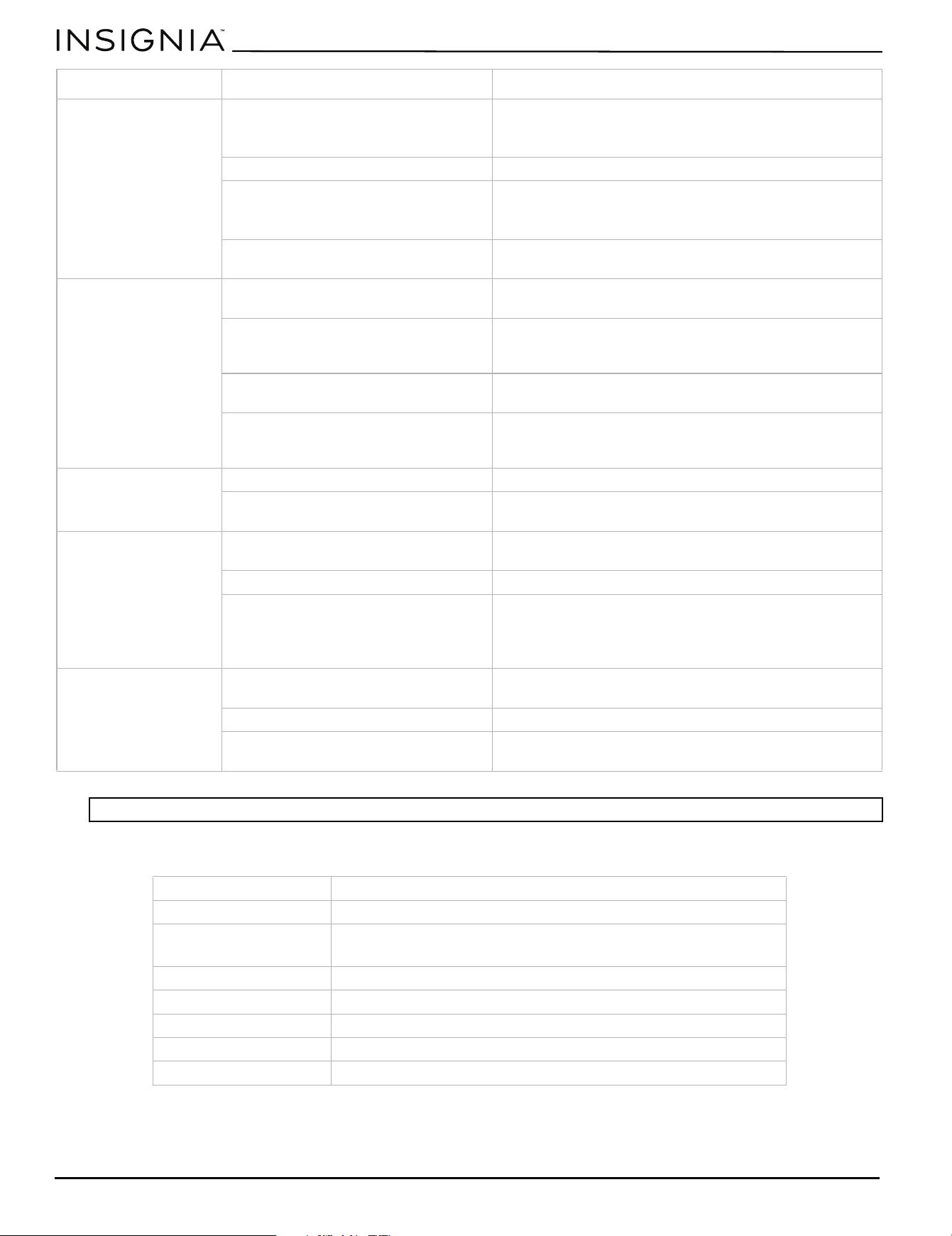
Troubleshooting. . . . . . . . . . . . . . . . . . . . . . . . . . . . . . . . . . . . . . . . . . . . . . . . . . . . . . . . . . . . . . . . . . . . . . . . . . . . . . . . . . . . 16
Specifications. . . . . . . . . . . . . . . . . . . . . . . . . . . . . . . . . . . . . . . . . . . . . . . . . . . . . . . . . . . . . . . . . . . . . . . . . . . . . . . . . . . . . . . 18
ONE-YEAR LIMITED WARRANTY . . . . . . . . . . . . . . . . . . . . . . . . . . . . . . . . . . . . . . . . . . . . . . . . . . . . . . . . . . . . . . . . . . . . . 19

www.insigniaproducts.com
3
24 in. Front Control Dishwasher
Introduction
Congratulations on your purchase of a high-quality Insignia product. Your NS-DWF2WH26 or NS-DWF2SS26 represents the
state of the art in dishwasher design and is designed for reliable and trouble-free performance.
Important Safety Instructions
Read all instructions before use to avoid injury.
Keep these instructions.
WARNING - When using your dishwasher, follow basic safety precautions,
including the following:
For your Safety:
• Use your dishwasher only as instructed in this User Guide.
•This User Guide does not cover every possible condition and situation that may occur. Use common sense and caution
when installing, operating, and maintaining any appliance.
• NSF certified residential dishwashers are not intended for licensed food establishments.
• DISHWASHER MUST BE ELECTRICALLY GROUNDED. Read the Installation Instructions for details.
• This dishwasher is designed to operate on regular house current (120V, 60Hz). Use a circuit equipped with a 15 amp
fuse or circuit breaker. Use a 20 amp fuse if dishwasher is connected with a food disposer.
• Do not operate dishwasher unless all enclosure panels are in their proper place.
• To avoid entrapment and/or suffocation, remove door or door latch mechanism from any dishwasher that is discarded
or not in use.
• Keep young children and infants away from dishwasher when it is operating.
• Do not let children or pets abuse, sit, stand, or play on door or racks of a dishwasher.
• Use only detergents and rinse agents recommended for use in a dishwasher.
• Store dishwasher detergent and rinse agents out of the reach of children or pets.
• Do not wash plastic items unless marked: “Dishwasher Safe” or equivalent. Check with manufacturer for
recommendations, if not marked. Items that are not marked dishwasher safe may melt and create a potential fire
hazard.
• Disconnect electrical power to dishwasher before servicing.
• If the dishwasher drains into a food disposer, make sure disposer is completely empty before running dishwasher.
• If there is any damage to your dishwasher, please contact Insignia Customer Service for assistance.
• Do not tamper with controls.
• Do not touch the heating element during or immediately after wash has completed.
• Use care unloading the dishwasher when the Sanitize option has been selected. Contents may be hot to the touch
immediately after the end of cycle.
• Water vapor from the vent may be hot to the touch when the Sanitize option has been selected. Use care and do not let
small children play around or touch the vent area of the dishwasher.
• When loading items to be washed: Locate sharp items and knives so that they are not likely to damage the door seal or
tub.
• Load sharp items and knives with the handles up to reduce the risk of cut-type injuries.
• Under certain conditions, hydrogen gas may be produced in a hot water system that has not been used for two weeks
or more. HYDROGEN GAS IS EXPLOSIVE. If hot water system has not been used for such a period, before using
dishwasher, turn on for several minutes. This will release any accumulated hydrogen gas. HYDROGEN GAS IS
FLAMMABLE. Do not smoke or use an open flame during this time.
• Do not store or use combustible materials, gasoline, or other flammable vapors and liquids in the vicinity of this or any
other appliance.
www.insigniaproducts.com
4
This is the safety alert symbol. It is used to alert of potential personal injury hazards. Obey all safety messages that
follow this symbol to avoid possible injury or death.
Child Safety
Destroy or recycle the carton, plastic bags, and any exterior wrapping material immediately after the dishwasher is
unpacked. Children should never use these items to play. Cartons covered with rugs, bedspreads, plastic sheets, or stretch
wrap may become airtight chambers, and can quickly cause suffocation.
Safety Instructions
• DO NOT store or use gasoline, or other flammable liquids in the vicinity of this or any other appliance. Read product
labels for warnings regarding flammability and other hazards.
• Remove all staples from the carton. Staples can cause severe cuts, and also destroy finishes if they come in contact with
other appliances or furniture.
SAVE THESE INSTRUCTIONS
IMPORTANT:
IMPORTANT indicates installation, operation, or maintenance information which is important but not hazard-related.
WARNING:
To reduce the risk of fire, electrical shock, or injury when using your dishwasher, follow the previous basic precautions.
WARNING:
Please read all instructions before using this appliance.
DANGER:
DANGER indicates an imminently hazardous situation which, if not avoided, will result in death or serious injury.
WARNING:
WARNING indicates a potentially hazardous situation which, if not avoided, could result in death or serious injury
CAUTION:
CAUTION indicates a potentially hazardous situation which, if not avoided, may result in minor or moderate injury.
www.insigniaproducts.com
5
24 in. Front Control Dishwasher
Features
• 14 place settings to fit your whole family’s dishes.
• Four wash cycles (Heavy wash, Normal wash, 1 Hr wash, and Energy Saver wash) let you choose the ideal cycle.
• Sanitize and High temperature options increase the water temperature.
• Removable silverware basket fits at the front or side of the lower rack.
• 4-hour delay lets you choose when the dishwasher runs.
• Energy Star certification to reduce your energy usage.
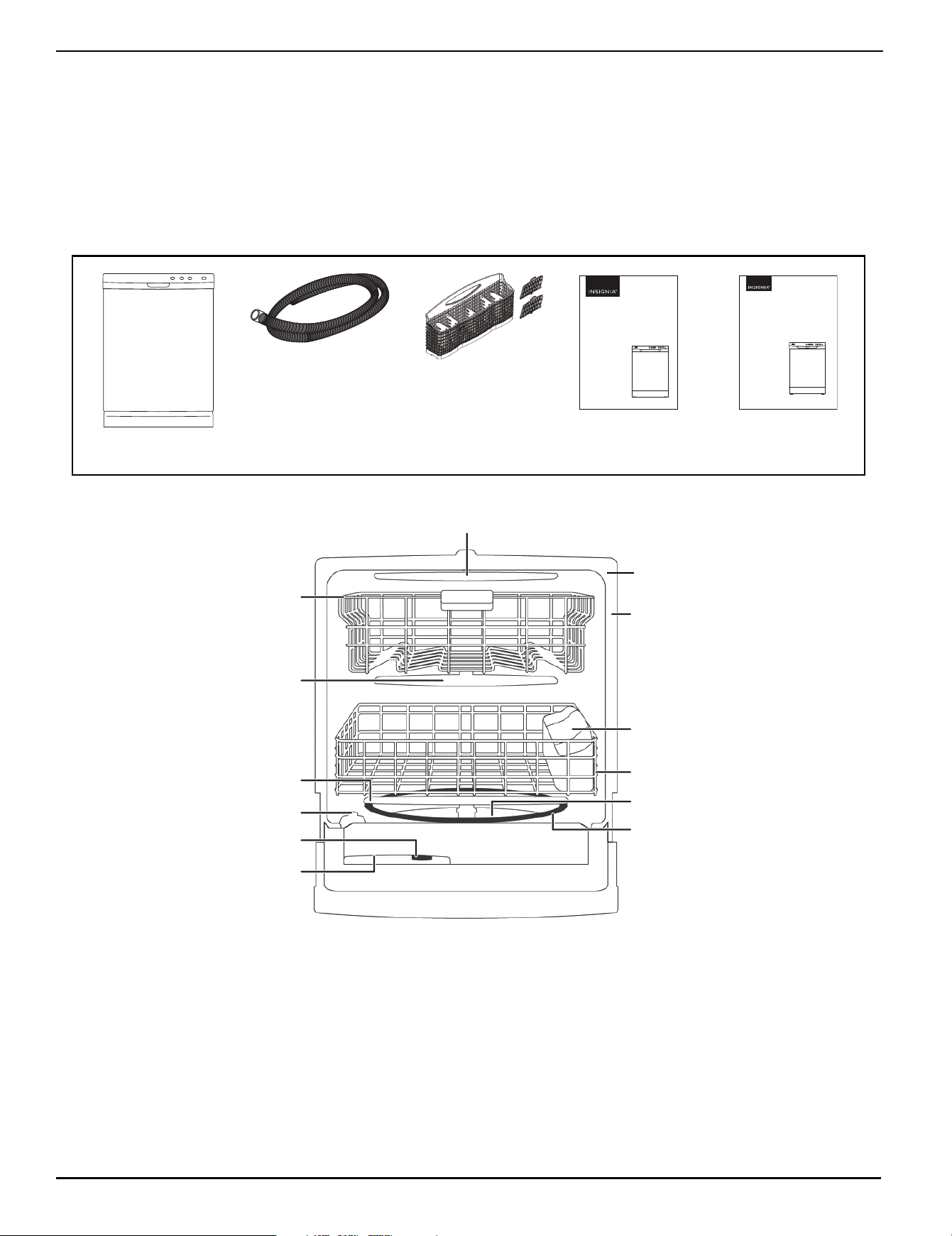
Package contents
Main components
Before using your new product, please read these instructions to prevent any damage.
The most up to date User Guide is available from www.bestbuy.com
USER GUIDE
24 in. Front Control
Dishwasher
NS-DWF2WH26/NS-DWF2SS26
Before using your new product, please read these instructions to prevent any damage.
INSTALLATION GUIDE
24 in. Front Control
Dishwasher
NS-DWF2WH26/NS-DWF2SS26
User Guide
Installation Guide
Drain hose
Installation kit (3 push buttons and 2 counter screws)
Dishwasher
Silverware basket and Side lids (2)
Upper spray arm
Middle
spray arm
Lower spray arm
Detergent dispenser
Rinse aid dispenser
Upper rack
Silverware
basket
Lower rack
Heating
element
Serial number label
Glass trap
Overfill protector
Door gasket
www.insigniaproducts.com
6
Installing and setting up your dishwasher
1 Water supply temperature should be between 120° ~ 149° F (49° ~ 65° C).
2 Dispose of the discarded appliance (if applicable) and packing material properly.
3 Your dishwasher must be electrically grounded or it can result in a risk of electric shock.
4 If there is any damage to your dishwasher, please contact Insignia Customer Service for assistance.
Before using your dishwasher
1 Remove the interior packing.
2 Remove all twist-ties and tape from the racks and spray arms.
3 Clean the interior surface with lukewarm water using a soft cloth.
Finding a suitable location
• This dishwasher is designed to be built-in.
• The dishwasher door must be able to fully open.
Providing a proper power supply
Check your local power source. This dishwasher requires a 120V, 60Hz power supply.
Understanding your dishwasher’s features
How your dishwasher cleans
Your dishwasher fills with water, covering the filter area at the bottom. Water is then pumped through the various filter and
spray arms, spraying a mixture of hot water and detergent against the soiled surfaces of your dishes and silverware. Soil
particles are separated and go down the drain as the dirty water is drained and replaced with clean water. The number of
water fills is determined by the cycle selected.
Wash cycle selections
Cycle times are approximate and will vary with options selected. Hot water is necessary to activate dishwasher detergent
and melt fatty food soils. An automatic sensor checks the incoming water temperature and, if it is not hot enough, the
timer will be delayed to allow for the water to heat for the main wash of all cycles.
Filter system
Your dishwasher has a multiple filter system. It separates dirty water and clean water into different chambers. The multiple
filter system helps your dishwasher to get better performance with less water and less energy.
DishSense
TM
system
Your dishwasher has a smart wash system, under the normal wash, which selects the wash cycle based on how large and
how soiled the load, permitting your dishwasher to clean more efficiently every time. When a partial load of lightly soiled
dishes is placed in the unit, a short wash cycle is automatically selected. When a full load of heavily soiled dishes is placed
in the unit, a heavy wash cycle is automatically selected.
WARNING
• DISHWASHER MUST BE ELECTRICALLY GROUNDED. Read the Installation Instructions for details.
• This dishwasher is designed to operate on regular house current (120V, 60Hz). Use a circuit equipped with a 15 amp fuse or
circuit breaker. Use a 20 amp fuse if dishwasher is connected with a food disposer.
www.insigniaproducts.com
7
24 in. Front Control Dishwasher
Using your dishwasher
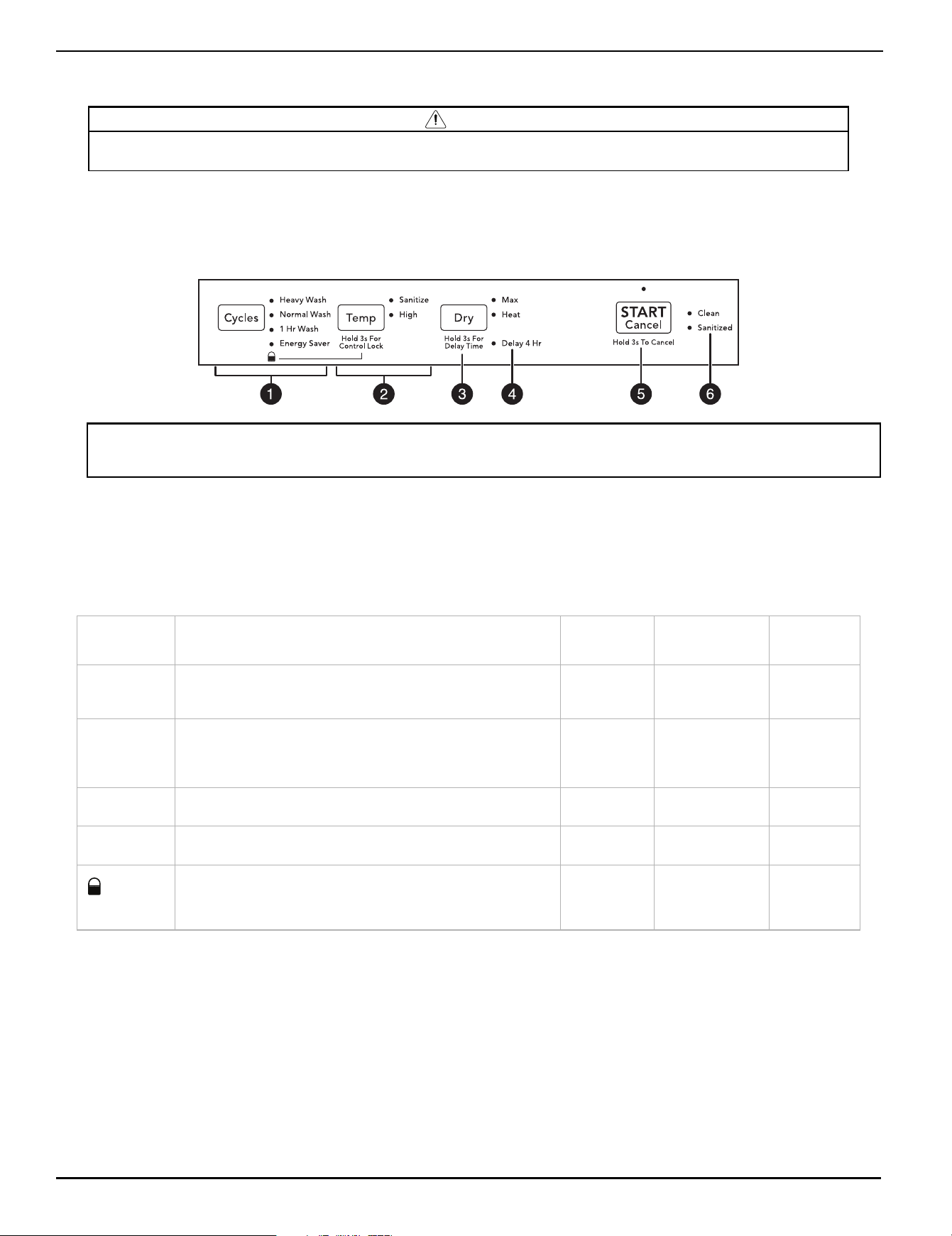
Using the control panel
Your dishwasher’s control panel is located on the front of the door. The door must be closed to make settings and operate
your dishwasher.
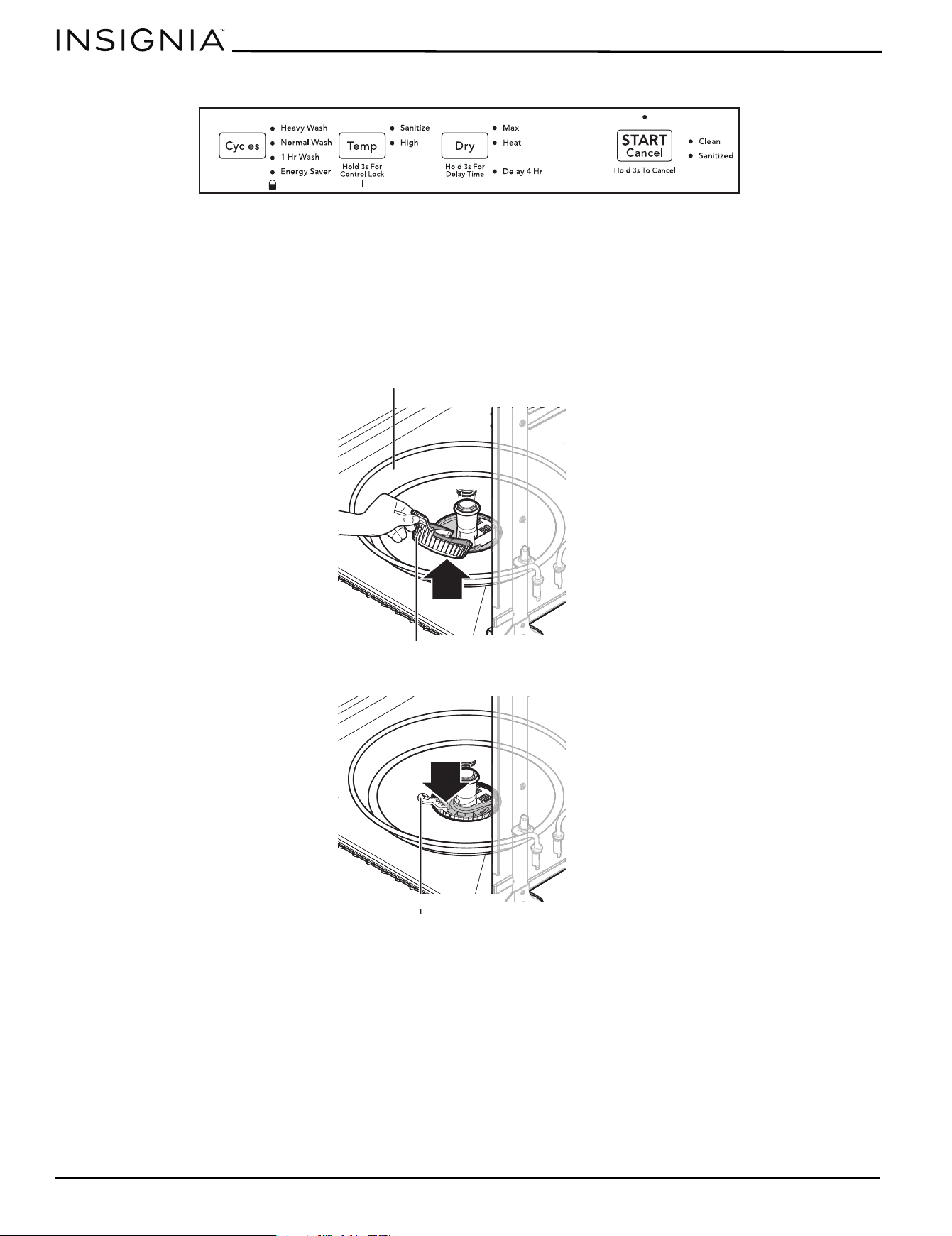
Control panel
1 - Cycle options
Select a cycle based on the type of dishes to be washed and the level of soil on the dishes. The Normal Wash cycle, with its
factory default options (normal temperature and heated dry), provides the best all-around performance. This cycle
selection is recommended for everyday use and is suitable for a variety of load sizes and soil levels.
Cycle times are approximate and will vary with options selected. The timer will be delayed to allow for the water to heat for
the main wash of all cycles if the sensor detects the water is not hot enough. Below is water use and cycle times under
standard conditions.
* Does not include drying time.
CAUTION
Before starting your dishwasher, make sure that a water supply is connected and turned on. Water is required to operate your
dishwasher, so failure to do this could cause damage to your dishwasher.
Note:
Your dishwasher is programmed to remember the last cycle used, so you don’t have to reset each time. To start your dishwasher using
the same cycle and options selected on the previous wash, just press the START/Cancel button.
CYCLE DESCRIPTION OPTIONS
APPROXIMATE
WATER USE
CYCLE
TIME
Heavy Wash
Use for hard-to-clean, heavily soiled dishes, pots, and pans.
Sanitize
Max Dry
Heat Dry
6 - 8.2 Gal.
(23 - 31 L)
2.5 - 3.75 hrs.
Normal
Wash*
Use for regularly soiled dishes or silverware. Uses sensors to
determine the soil level of the load, then adjusts the wash cycle
to optimized wash performance, water, and energy usage.
Sanitize
High Temp
Max Dry
Heat Dry
2.9 - 6.7 Gal.
(11 - 25 L)
2 - 2.75 hrs.
1 Hr Wash
Use for lightly soiled and pre-rinsed dishes and silverware. Heat Dry
5.4 Gal.
(20 L)
1 hr.
Energy
Saver
Use to reduce energy consumption. Heat Dry
3.2 - 4.5 Gal.
(12 - 17 L)
2 - 2.5 hrs.
(control lock)
Use to lock all controls to prevent children from accidentally
changing the dishwasher cycle or starting the dishwasher. Press
and hold the Tem p button for three seconds to activate or
cancel the control lock. The lock indicator light turns on or off.
n/a n/a
n/a
www.insigniaproducts.com
8
2 - Temperature options
The programmed cycles use the Normal Wash cycle water temperature option, where an automatic sensor checks the
incoming water temperature and, if it is not hot enough, extends the cycle to allow for automatic water heating in the
main wash and final rinse of all cycles.
3 - Dry options
4 - Delay 4 Hr option
The Delay 4 Hr option lets you delay starting your dishwasher for four hours. To select this option, press and hold the Dry
button for three seconds. The Delay 4 Hr indicator light turns on, indicating your selection, and remains on until the cycle
starts. To begin the delay period, press the START/Cancel button. If the delay option is interrupted for any reason, press
the START/Cancel button again to resume the delay.
To cancel the Delay 4 Hr option and begin the cycle immediately, press and hold the START/Cancel button for three
seconds.
5 - START/Cancel button
When you have selected the Cycle, Temp, and Dry options you want, the indicator lights turn on to show your selections. To
begin the cycle, press START/ Cancel button and close the dishwasher door immediately.
You can cancel a cycle at any time during the cycle by pressing and holding the START/Cancel button for three seconds.
This stops the cycle and causes the cycle and option indicator lights turn off. The START/Cancel light stays on, your
dishwasher will drain, then the START/Cancel light turns off.
6 - Cycle complete indicator lights
The Clean light turns on at the end of the Normal cycle and remains on until the door is opened.
The Sanitized light turns on when a sanitized cycle is complete. If your dishwasher did not properly sanitize the dishes, the
light will not come on. This can happen if the cycle is interrupted. The light remains on until the door is opened.
Basic operation
1 Load the dishwasher (See Preparing and loading dishes on page 9).
2 Add detergent (See Filling the detergent dispenser
on page 11).
3 Add rinse aid, if needed (See Using rinse aid
on page 13).
4 Select the Cycle, Temp, and Dry that you want (See the Using the control panel
on page 7). The indicators will turn on
when each selection is made.
5 To begin the wash cycle, press the START/Cancel button on the control panel.
TEMP DESCRIPTION TEMPERATURE
Sanitize
Press the Te mp button once to select. This option sanitizes your dishes and glassware.
When selected, the indicator light comes on and remains on until end of the cycle. The
cycle time will be extended until the proper water temperature is reached. Washing
action will continue during the water heating delay. To turn off, press the Temp button
again.
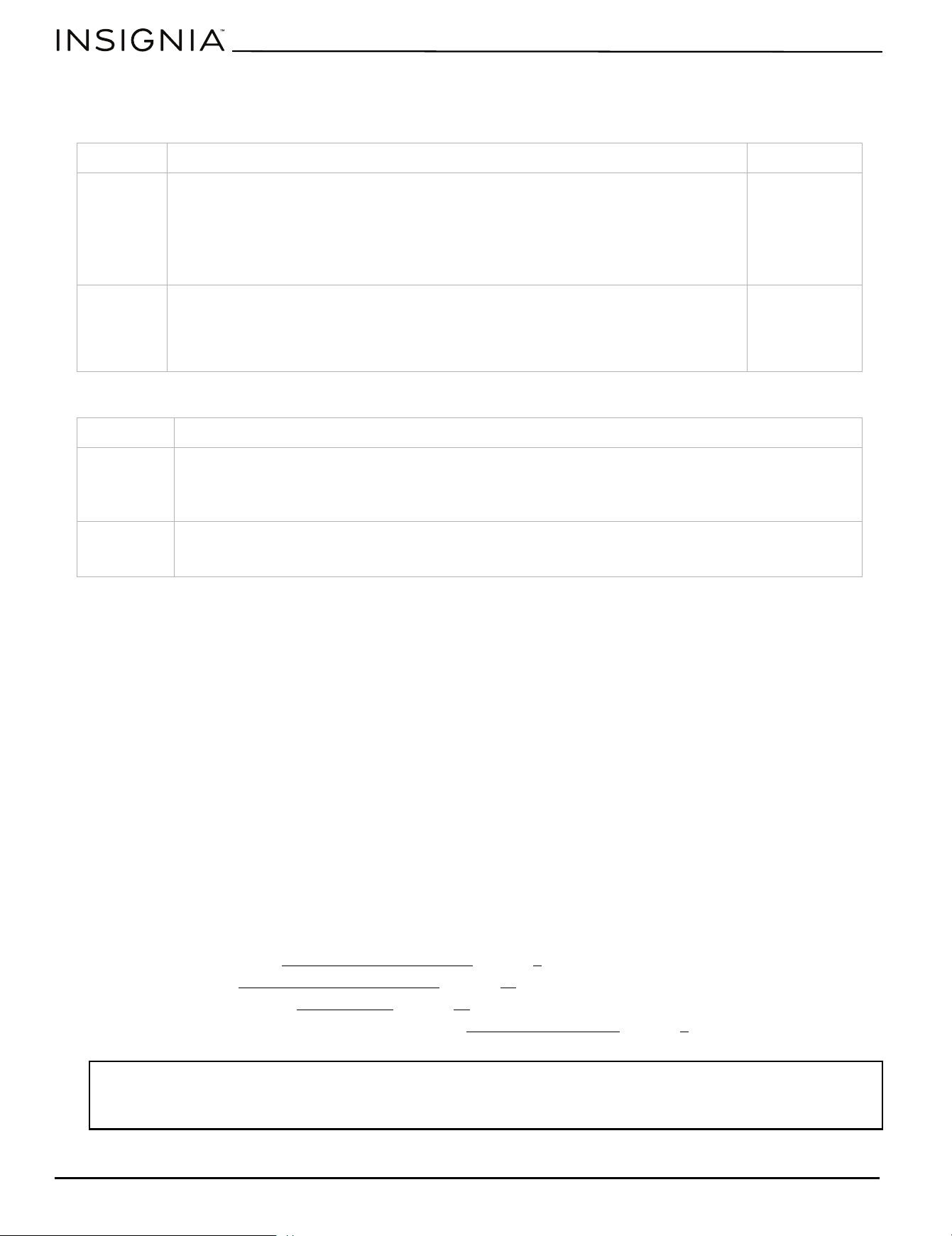
Note: The sanitize criteria may not be satisfied if there is an interruption of the cycle, power failure, or if the incoming water
temperature is below 120° F (49° C).
Final rinse
155° F (68° C)
High
Press the Te mp button to select. The increase in water temperature helps the
dishwasher detergent remove grease and soil from dishes more effectively and aids in
drying the dishes. When selected, the High indicator turns on and remains on until the
end of the cycle. To turn off the High Temp option, press the Temp button to select a
different temperature option.
Main wash
155° F (68° C)
DRY DESCRIPTION
Max
Press the Dry button once to select. Extends normal drying time by approximately 20 minutes. Available
for Normal Wash and Heavy wash cycles. To optimize, also apply to either the High temp or the Sanitize
option.
If you choose not to select the Max dry option, some items in the load may not be completely dry.
Heat
Press the Dry button twice to select. Enhances drying performance. You may still have items in your dish
load that will not be completely dry at the end of the cycle. To optimize, select the Normal wash and
High temp options, along with a rinse aid agent for improved drying performance.
Note:
If your dishwasher is some distance from your hot water heater, you may want to turn on the hot water faucet near your dishwasher
and let it run until the water is hot. This ensures that your dishwasher is supplied with water that is sufficiently hot to optimize the
wash cycle. Be sure to turn the water off when you are finished.
www.insigniaproducts.com
9
24 in. Front Control Dishwasher
6 Close the door. The selected cycle begins.
Preparing and loading dishes
Preparing dishes for washing
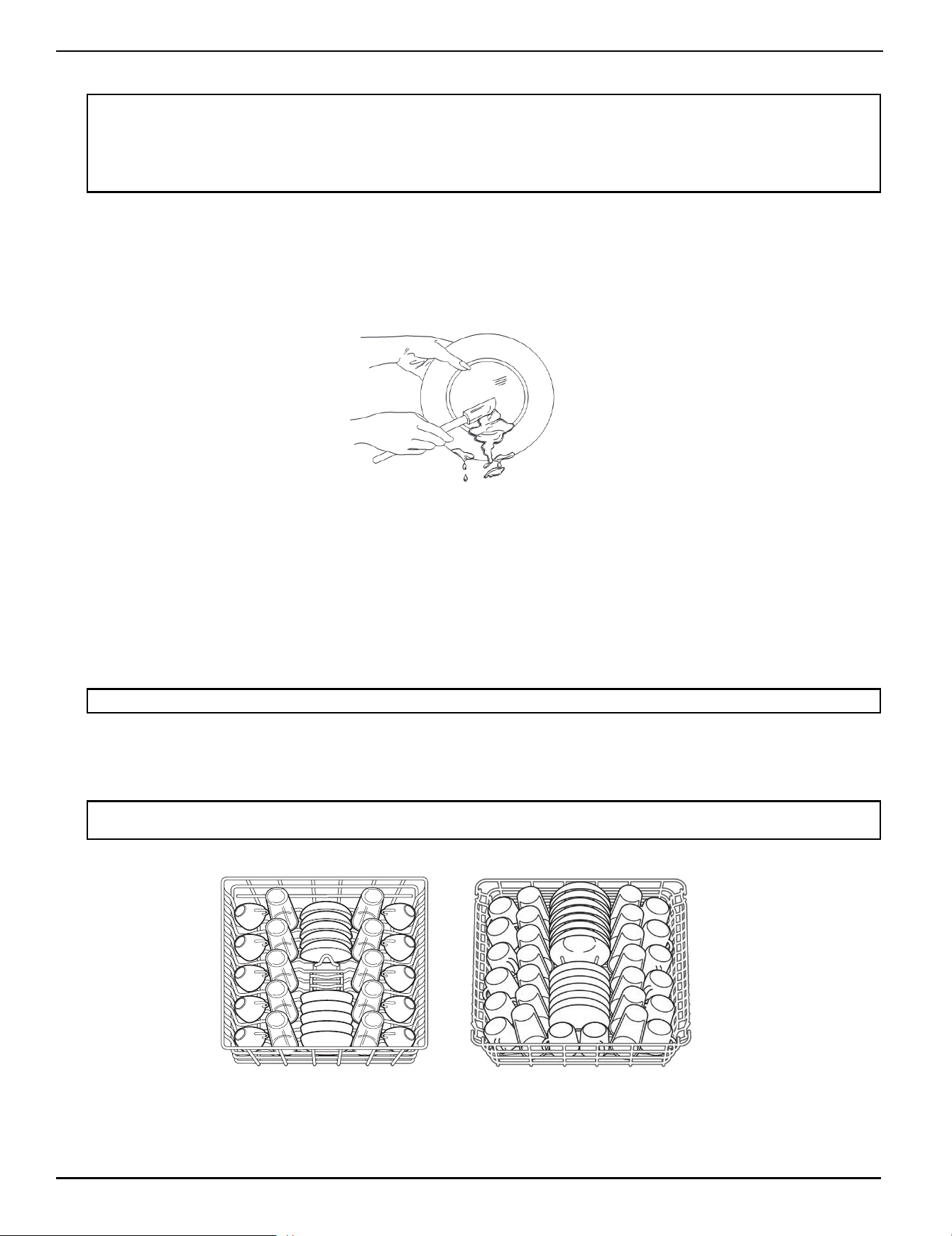
• Scrape away large pieces of food, bones, pits, toothpicks, and similar items.The continuous filtered wash system will
remove the remaining food particles.
• Burned-on foods should be loosened before loading.
• Empty liquids from glasses and cups.
• Foods such as mustard, mayonnaise, vinegar, lemon juice, and tomato-based products may cause discoloration of
stainless steel and plastics if allowed to sit for a long period of time.Unless your dishwasher is to be operated at once, it
is best to rinse off these types of foods.
• For questionable items, check the manufacturer’s recommendation.
• If your dishwasher drains into a garbage disposal, be sure the disposal is completely empty before starting your
dishwasher.
Loading the racks and silverware basket
Loading the upper rack
The upper rack is very flexible and is designed for cups, glasses, small plates, bowls, and plastic items marked
dishwasher-safe.For best results, place the items with the soiled surface facing down or toward the center.Tilt them
slightly for better drainage. Long-handled knives and utensils can also be placed in the upper rack.
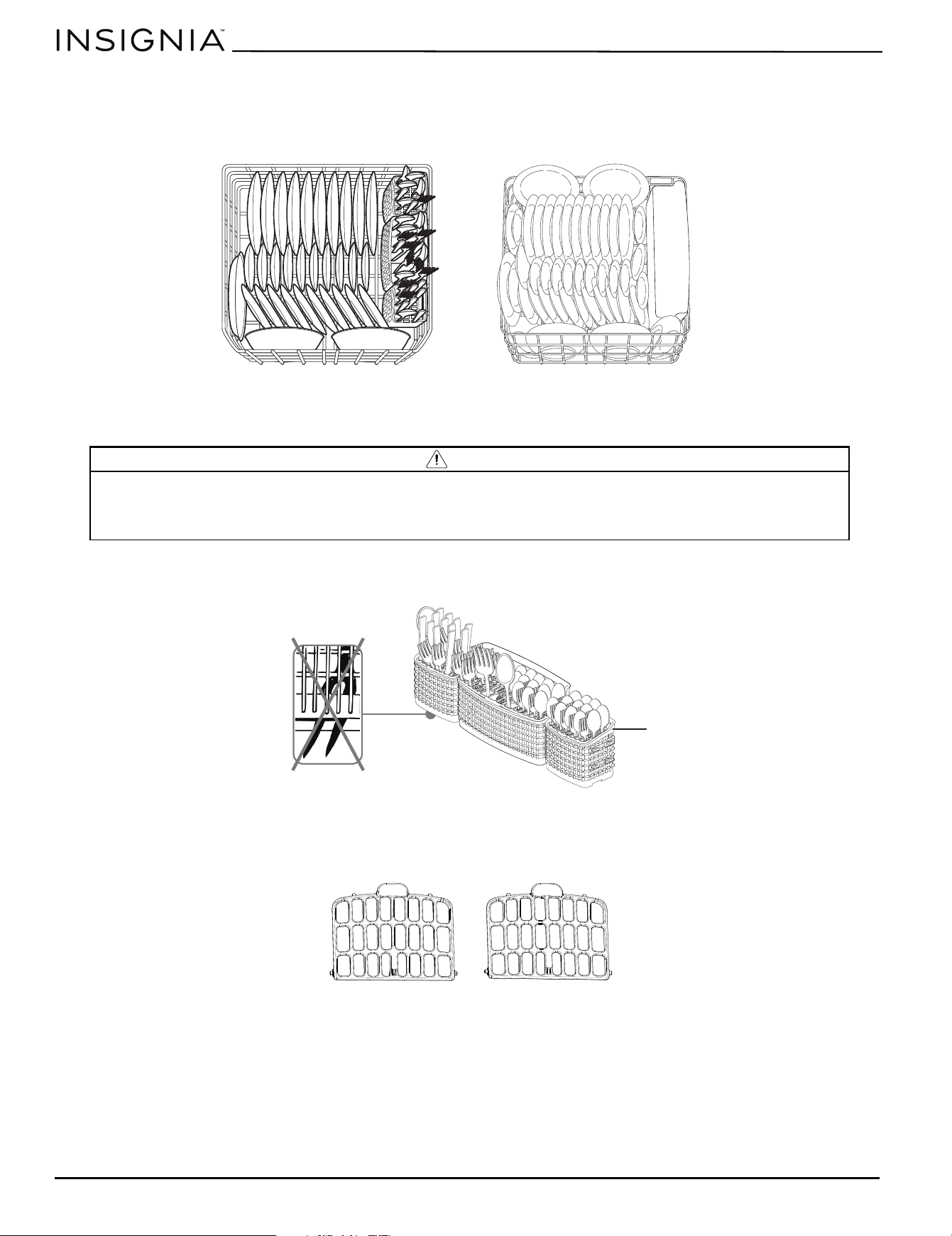
Loading suggestions for the upper rack are shown below:
Note:
If you open the dishwasher door while a cycle is running or delay is counting down, your dishwasher will stop running. To resume,
press the START/Cancel button and close the dishwasher door immediately. Your dishwasher will sound a beep and begin running
from the point of interruption.
If the dishwasher door is kept open for too long, or the door is closed without pressing the START/Cancel button, the running cycle or
delay countdown will be canceled.
Note: The appearance of the racks and baskets may vary, depending your model dishwasher.
Note: Make sure that the loaded dishes do not interfere with the rotation of the middle spray arm, which is located just below the
upper rack. You can check this by rotating the middle spray arm by hand.
10 place settings
14 place settings
www.insigniaproducts.com
10
Loading the bottom rack
The bottom rack is designed to accommodate plates, bowls, saucers, and cookware. Large items should be placed along
the edge, with the inside facing down, so they do not interfere with the middle or lower spray arms or prevent the
detergent dispenser from opening.
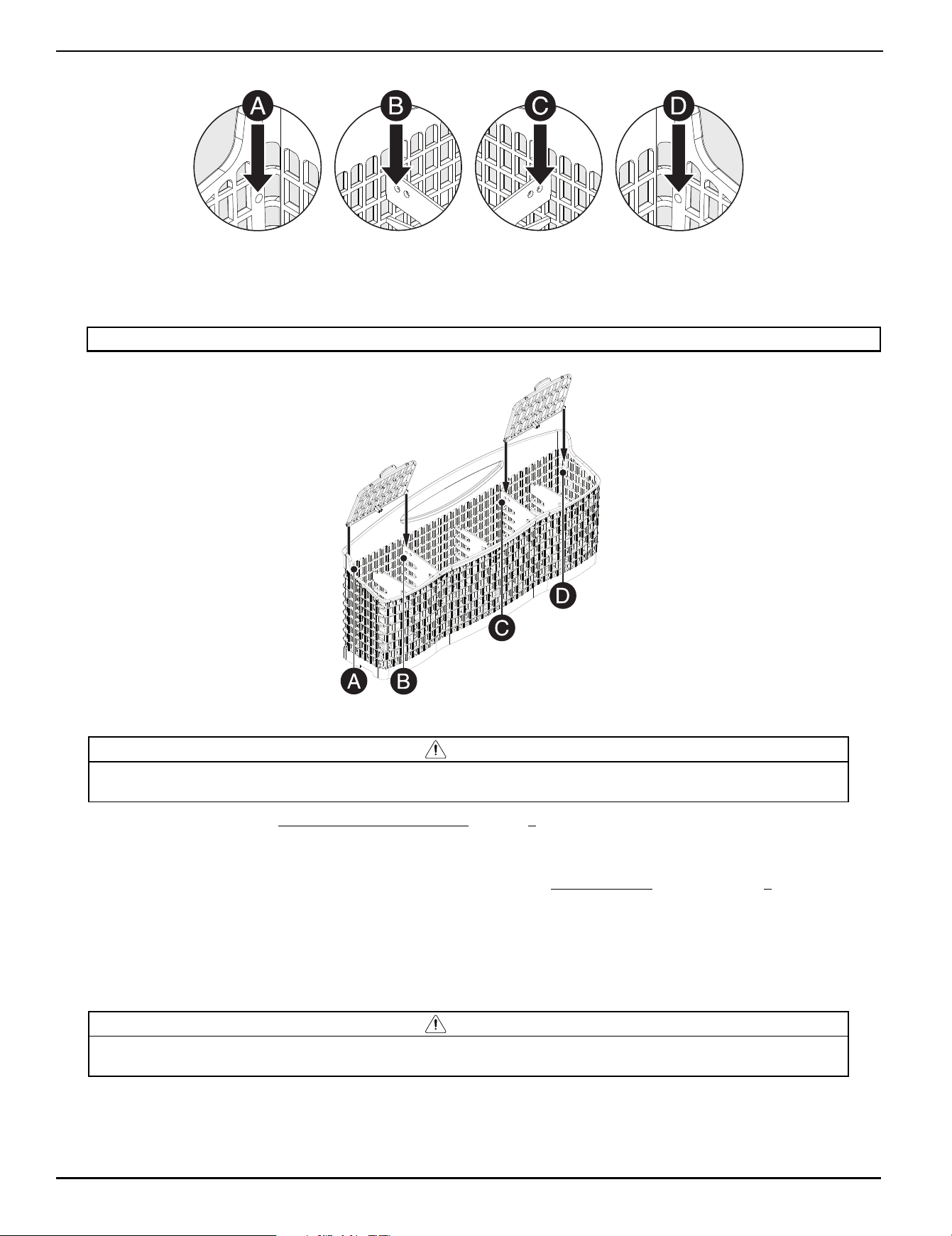
Loading suggestions are shown below:
Loading the silverware basket
Load the silverware basket either while it is in the bottom rack, or remove it and load it on the counter. The basket fits small
forks, spoons, knives, large spoons, and large forks.
Installing the silverware basket lids
Kit includes
CAUTION
• Be sure to load sharp items such as knives, large meat forks, or skewers pointing down to avoid the possibility of injury.
• Don’t mix silver with stainless steel utensils to avoid damaging the silver finish.
• Avoid nesting items, such as spoons, so that the wash spray reaches all surfaces.
• Make sure that nothing protrudes through the bottom of the silverware basket to block the lower spray arm.
10 place settings
14 place settings
Silverware
basket
Side lid (2)
NOTE: Actual silverware basket included
may vary from image.
www.insigniaproducts.com
11
24 in. Front Control Dishwasher
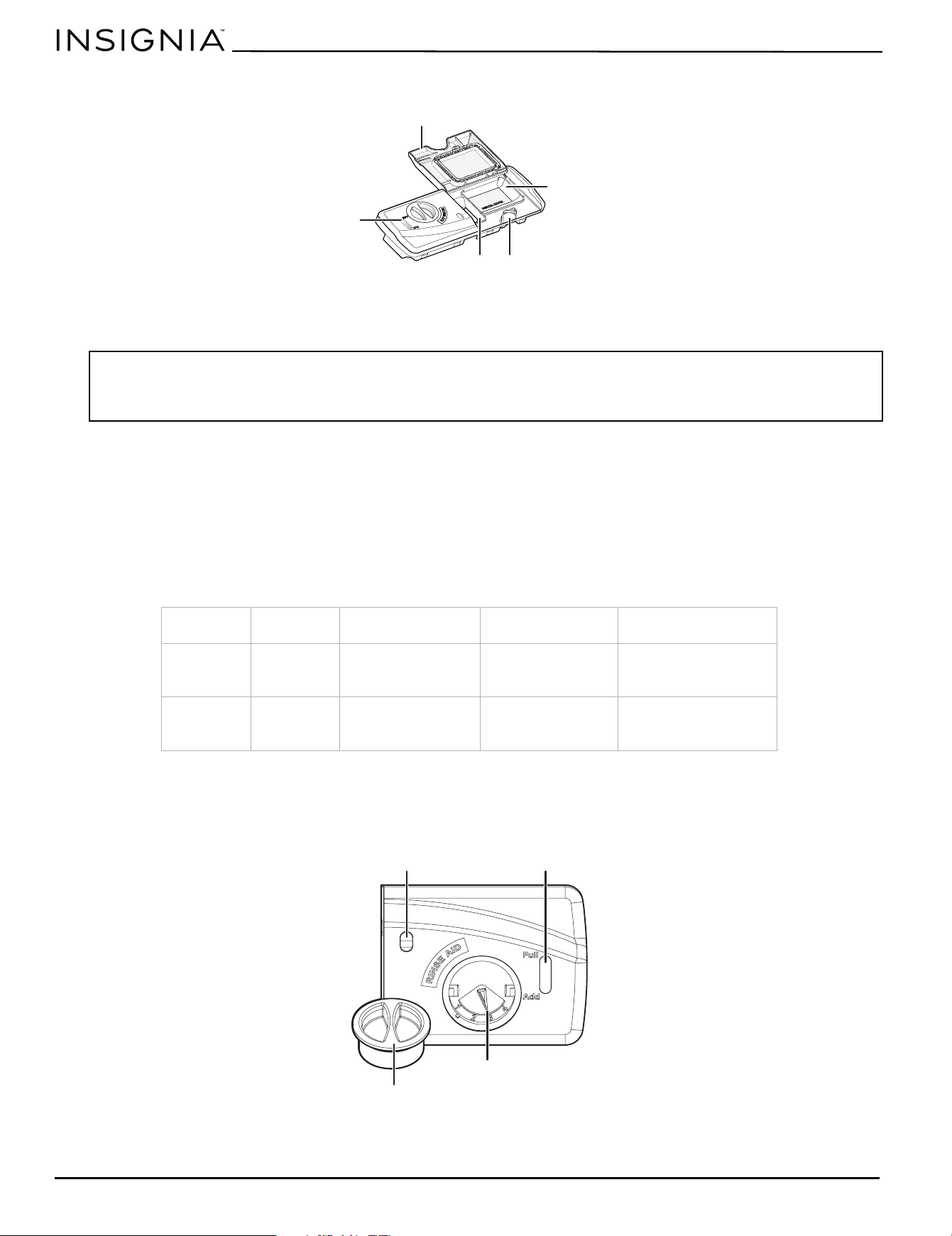
Locating the silverware basket holes
Attaching the side lids
Insert the pins on the side lid into the hinge holes located in the end (A and D) and in the back (B and C) of the center
section of the silverware basket. Repeat for each side lid.
Adding a dish while the dishwasher is in a cycle
Before adding dishes, refer to Preparing and loading dishes
on page 9 for instructions on loading. Once a cycle has started,
you can add more dishes before the main wash portion of the wash cycle has started. To determine this, check the
detergent dispenser in the door after the door has been opened. If the detergent dispenser is still closed, you can add
more dishes. Even if it is open, you can still add more dishes to your dishwasher if the dish quantity is small. If the quantity
is large, restart the cycle. Also see information on START/ Cancel in the Basic operation
section on page 8.
To add or remove items after the wash cycle starts:
1 Open the door slightly and wait a few seconds until the wash action stops before completely opening.
2 Add the item.
3 Close the door, and press the START/Cancel button on the control pad. The cycle automatically resumes.
Filling the detergent dispenser
Note: You may need to bend the side lids slightly to insert into the holes.
CAUTION
TO AVOID BURN INJURY: Open the door slowly and wait until the spray arms and wash action stop. Hot water may splash out of
your dishwasher. Failure to do so may result in injury.
CAUTION
The use of industrial-grade detergents, or other detergents not made specifically for a dishwasher, can damage your dishwashers
components and is not recommended. Use only household-grade, automatic dishwasher detergents.
A. Left lid pin hole location B. Left lid right pin hole location C. Right lid left pin location D. Right lid right pin location
www.insigniaproducts.com
12
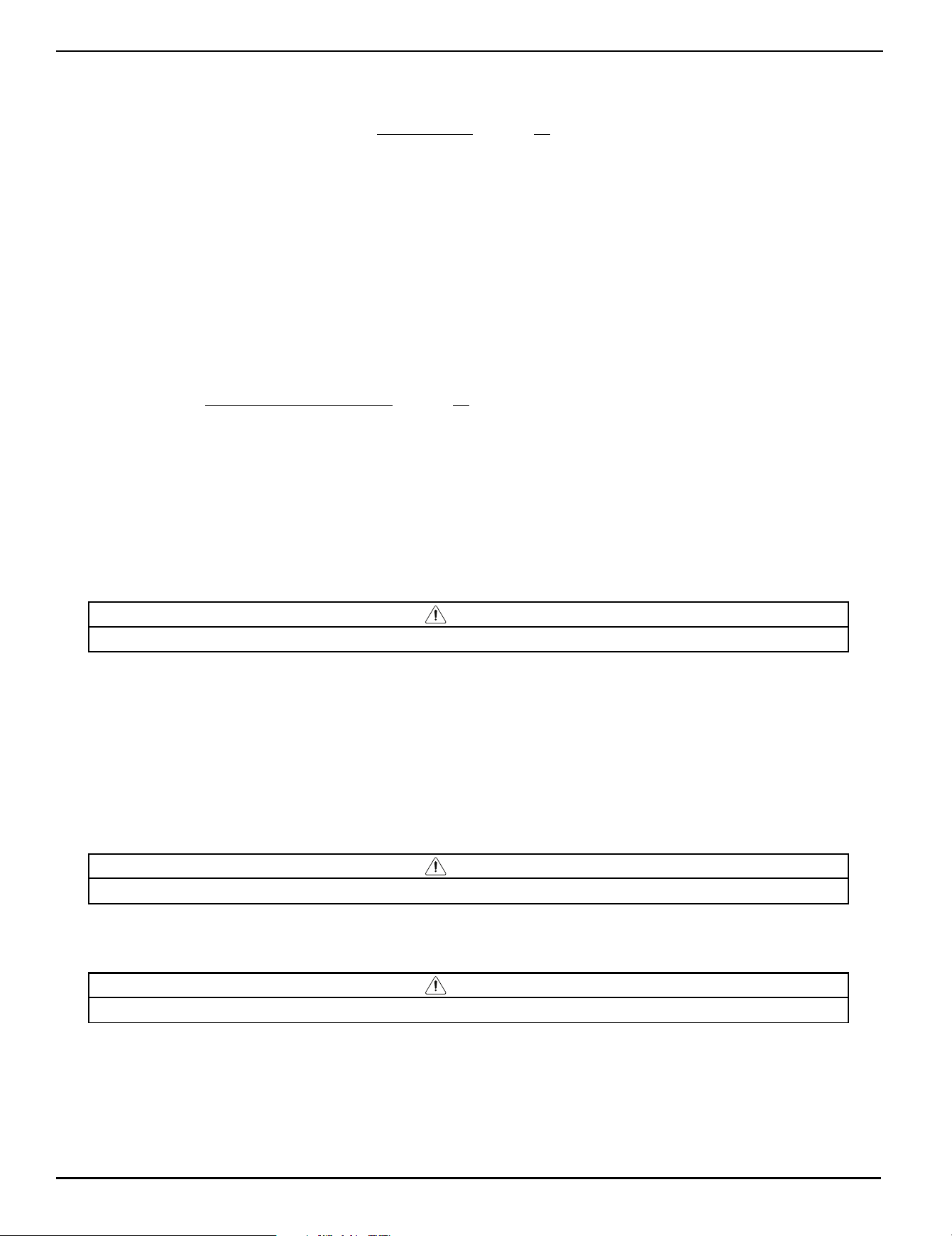
The detergent dispenser has two chambers. The smaller one is for pre-wash detergents and the larger one is for the main
wash.
1 If it’s not already open, push the detergent dispenser cover latch inwards to open the detergent cup. The cover is
spring-loaded and will pop open automatically.
2 Add detergent (dry powder, liquid, or packets) to the cup. If using a packet, make sure the packet is below the edges of
the detergent cup and the cover can close properly.
3 Close the detergent dispenser cover, close the door, and press the START/Cancel button to begin the cycle.
Detergent amount
The amount of detergent required depends on the water hardness, which is measured in grains per gallon. Using too little
detergent can result in poor cleaning, hard water filming, or spotting. Using too much detergent in soft water can cause
etching to some glassware (surface damage like a film but cannot be wiped off ). Your local water company or water
softener company can tell you the water hardness in your area. Refer to the following table for the recommended amount
of detergent.
Filing the rinse aid dispenser
Your dishwasher is equipped with an adjustable rinse aid dispenser, located next to the detergent dispenser, which is
designed to use a liquid rinse aid. Under normal conditions, the rinse aid will last approximately one month. Try to keep the
dispenser full, but do not overfill it.
1 Turn the rinse aid dispenser cap 1/4 turn counterclockwise and lift it out.
Notes:
• We recommend that you use only fresh dishwasher detergent.
• Add detergent just prior to closing the door and starting the cycle.
• Store detergent in a cool, dry location. Detergent that has gotten wet or caked won’t dissolve properly and may lead to poor results.
Cycle Soft Water
(0-3 grains)
Medium Hard Water
(4-8 grains)
Hard Water (9-12
grains)
Very Hard Water (over
12 grains)
Normal Wash
Heavy Wash
2 tsp.
(each cup
1/4 full)
5 tsp.
(each cup fill to line
above “Regular”)
8 tsp.
(each cup completely
full)
Each cup completely
full (water softener
recommended)
1 Hr. Wash
Energy Saver
Wash
2 tsp.
(main wash
cup 1/4 full)
5 tsp.
(each cup fill to line
above “Regular”)
8 tsp.
(main wash cup
completely full)
Main wash cup
completely full (water
softener recommended)
Cover
Main detergent cup
Cover latch
Rinse aid indicator
Pre-wash detergent cup
Dispenser opening
Indicator window
Dispenser cap
Adjustment dial
www.insigniaproducts.com
13
24 in. Front Control Dishwasher
2 Add rinse aid until the liquid touches the indicated fill level. The indicator will be dark when full and will show clear
when it is time to refill. Do not overfill, since this can cause oversudsing. Wipe up any spills with a damp cloth. The
dispenser holds enough for 35 to 140 washes, depending on the dial setting.
3 Adjust the rinse aid dial, if necessary. See Using rinse aid
on page 13 for information on proper adjustment of the rinse
aid setting.
4 Replace the cap and turn it 1/4 turn clockwise.
Improving dishwasher performance
Using rinse aid
The use of rinse aid is recommended, as it greatly improves drying, reduces water spots and filming, and lubricates the
wash arm bearing for proper rotation. Rinse aid allows water to “sheet” off dishes, instead of forming water droplets that
cling to dishes and glassware and leave spots. In addition, the heated dry option will not perform as well without rinse aid.
The rinse aid dispenser, located next to the detergent cup, automatically releases a measured amount of rinse aid during
the last rinse.
If spotting and poor drying is a problem, increase the amount of rinse aid dispensed by rotating the dial to a higher
number. The dial is located under the dispenser cap.
If the rinse aid is low, the rinse aid indicator window will be clear indicating that it is time to refill. To refill the rinse aid
dispenser, refer to Filing the rinse aid dispenser
on page 12.
Water temperature
Hot water is required for optimum dishwashing and drying results. Water entering your dishwasher should be at least 120°
F (49° C) to achieve satisfactory results.
To check the water temperature entering the dishwasher:
1 Turn on the hot water faucet near your dishwasher and let it run for several minutes.
2 Hold a thermometer (a candy or meat thermometer will work) in the water stream to check the temperature.
3 If temperature is below 120° F (49° C), have a qualified person raise the hot water heater thermostat setting.
Heat dry option
The Heat dry option, when used with a rinse aid, enhances drying performance. If you do not choose the heat dry option,
items in your load may not be completely dry at the end of the cycle.
Water pressure
For optimal performance, the hot water supply line for your dishwasher must provide water pressure of at least 20 psi and
not more than 120 psi. You may experience low water pressure during high-demand periods, such as when laundry or
showers are in use while you are washing the dishes. To eliminate this problem, wait until hot water demand is reduced
before starting your dishwasher.
Maintaining your dishwasher
The interior of your dishwasher and the filter are self-cleaning with normal use.
Cleaning the door
Clean the outer door with warm, soapy water and a dishcloth or sponge. Rinse with clean water and dry with a dry cloth.
Do not use harsh cleaners. As previously stated, the interior of the door is self-cleaning.
Cleaning the door gasket
Clean the door gasket with a damp cloth to remove food particles regularly.
CAUTION
Plastic dishes could melt/deform due to the heat, especially if placed in the lower rack.
CAUTION
TO AVOID BURN INJURY: Allow the heating element to cool before attempting to clean the interior of your dishwasher.
CAUTION
Do not use harsh cleaners, appliance wax, polish, bleach, or products containing chlorine to clean the dishwasher door.
www.insigniaproducts.com
14
Cleaning the control panel
Clean the control panel gently with a soft, lightly dampened cloth.
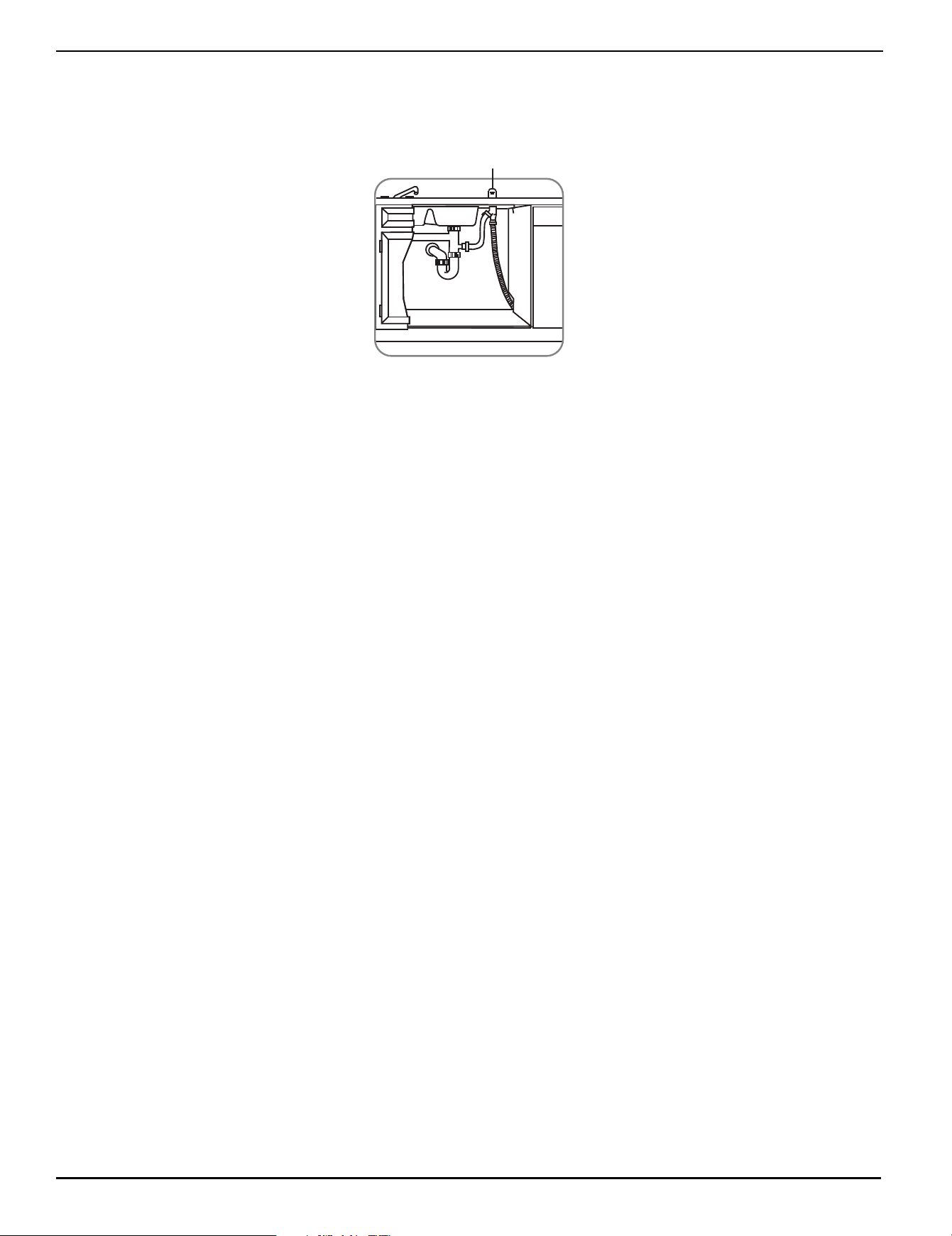
Cleaning the glass trap
The glass trap is designed to collect broken glass and other solid debris and it needs to be cleaned monthly to maximize
wash performance.
1 Remove the bottom rack from your dishwasher.
2 Pull the glass trap handle up, then lift it out of your dishwasher.
3 Empty the glass trap in a safe container and rinse it out, then reinsert the glass trap in your dishwasher.
4 Reinsert the bottom rack.
Cleaning the overfill protector
The overfill protector keeps your dishwasher from overfilling. It is located on the bottom of your dishwasher in the left front
corner of the tub. The overfill protector should move up and down freely about one inch. If it does not move, lift it up and
clean underneath. You should also clean it occasionally with household cleaner containing vinegar or bleach to dissolve
any buildup.
Removing the glass trap
Spray arm removed for clarity
Reinsert the glass trap
www.insigniaproducts.com
15
24 in. Front Control Dishwasher
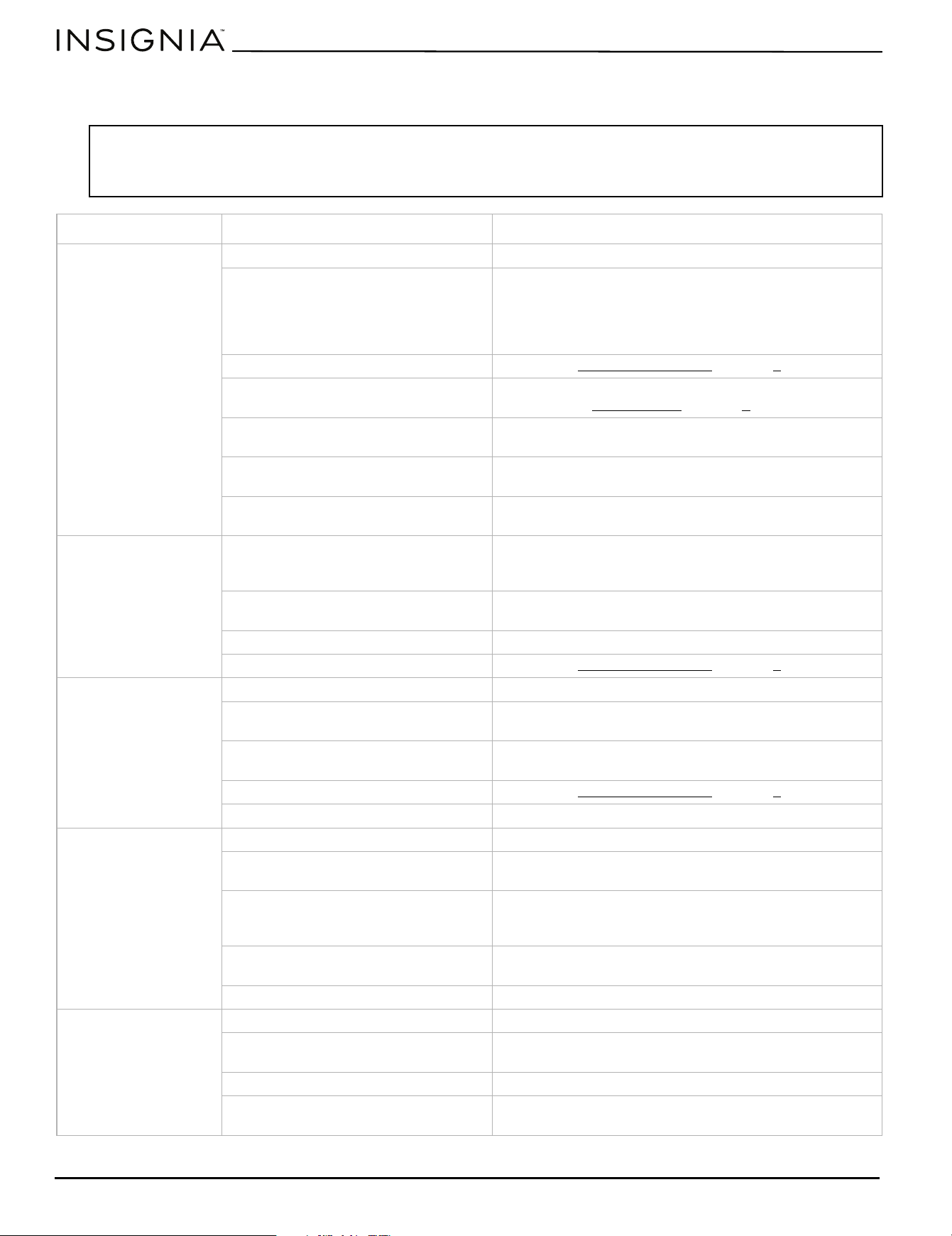
Cleaning the air gap
An air gap is an external plumbing device that is not actually part of your dishwasher. Some state or local plumbing codes
require the installation of a drain air gap between your dishwasher and the home drain system. It is usually located on the
countertop near the sink or your dishwasher.
If there is an air gap installed with your dishwasher, make sure that it is clean and free of debris so your dishwasher will
drain properly. Before you clean the air gap, turn off your dishwasher, then remove the plastic air gap cover and clean with
a toothpick.
Protecting your dishwasher for long periods
Your dishwasher should be protected from freezing if you plan to leave it for extended periods in an unheated place. We
recommend you have a qualified person do the following:
To disconnect service:
1 Turn off the electrical power to your dishwasher at the supply source by tripping the circuit breaker or removing fuses.
2 Turn off the water supply.
3 Place a pan under the inlet valve, then disconnect the water line from the inlet valve and drain it into the pan.
4 Disconnect the drain line from the pump and drain the water into a pan.
To restore service:
1 Reconnect the water, drain, and electrical power.
2 Turn on the water and the electrical power.
3 Fill the detergent cup and the rinse aid cup and run your dishwasher through a heated wash cycle.
4 Check all connections to make sure that they do not leak.
Airgap
www.insigniaproducts.com
16
Troubleshooting
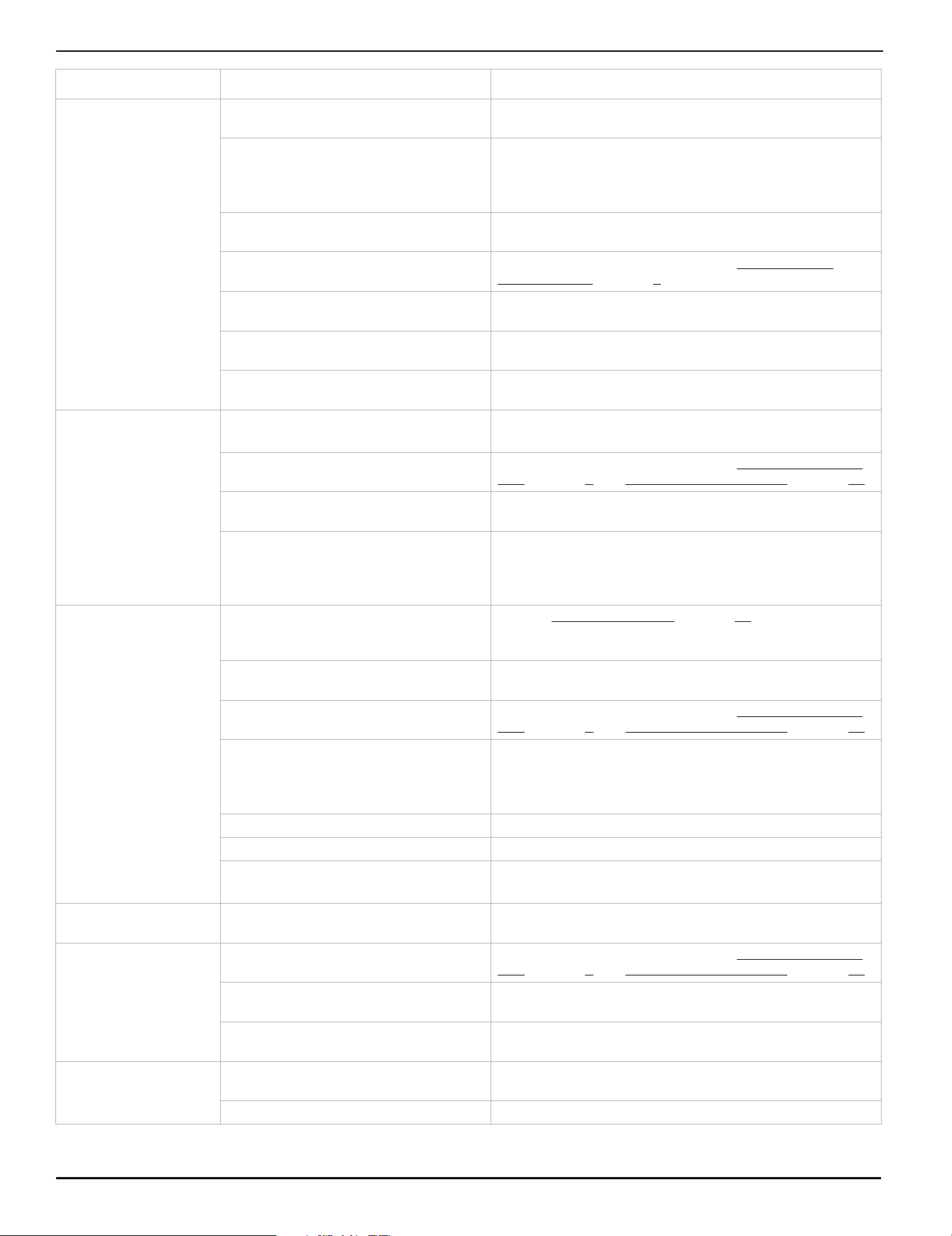
Refer to this table to correct minor issues before calling for service.
Important:
• If an overflow occurs, turn off the main water supply before calling for service.
• If there is water in the base pan because of an overfill or small leak, the water should be removed before restarting your
dishwasher.
PROBLEM POSSIBLE CAUSE POSSIBLE SOLUTION
My dishwasher won’t
run.
The door may not be closed properly. Make sure that the door is closed and latched.
The power is off or not connected. Make sure that the power is connected and turned on. If
your home has a wall switch above your dishwasher that
powers the dishwasher outlet, make sure that the wall
switch is in the On position. Check the fuse box/breaker
panel to make sure that the circuit is on.
The delay start option is selected. Refer to the 4 - Delay 4 Hr option
on page 8.
The control lock is activated. Deactivate the control lock. Refer to the “control lock”
section under Control panel
on page 7.
Make sure that the water supply is
turned on.
Turn on the water supply.
Make sure that the START/Cancel
button has been pushed.
Push the START/Cancel button to start the cycle.
The circuit breaker may have tripped or
the fuse may be blown.
Check the circuit breaker or fuse and reset or replace.
My dishwasher runs too
long.
Your dishwasher is connected to a cold
water supply.
Make sure that your dishwasher is connected to a hot
water supply. If not, change the water supply to a hot
water source.
The cycle time varies, depending on the
soil level of the dishes.
When heavy soil is detected, the wash times will be longer.
Some cycles and options take longer. This is normal.
The delay start option is selected. Refer to the 4 - Delay 4 Hr option
on page 8.
My dishwasher won’t
fill.
The water supply may be turned off. Make sure that the water supply is turned on.
The overfill protector may be stuck. Check to make sure that the overfill protector moves up
and down freely. Clean or free it if necessary.
Some cycles and options take longer. This is normal. Allow your dishwasher plenty of time to
complete the selected cycle.
The delay start option is selected. Refer to the 4 - Delay 4 Hr option
on page 8.
The door may not be closed completely. Make sure that the door is closed and latched.
My dishwasher does
not drain properly.
The drain hose may be kinked. Check to make sure that the drain hose is not kinked.
If your dishwasher is connected to a
garbage disposal, it may not be empty.
Make sure that the garbage disposal is empty.
If your dishwasher is connected to a
garbage disposal, the knockout plug
may still be in place.
Check to make sure that the knockout plug in your
garbage disposal has been removed.
The selected wash cycle may not be
complete.
Check to make sure that the wash cycle is not paused or
that the cycle is complete.
The glass trap may be obstructed. Check the glass trap and empty it if necessary.
There is detergent left
in dispenser cup.
Detergent may be too old. Discard the old detergent and use fresh detergent.
The spray arm is blocked. When you load the dishes, make sure that the spray arms
are not blocked.
The wash cycle may not be finished. Check to make sure that the wash cycle is complete.
The detergent dispenser lid may be
blocked.
Make sure that there are no dishes or utensils blocking the
lid of the detergent dispenser.
www.insigniaproducts.com
17
24 in. Front Control Dishwasher
My dishes are not clean
enough.
The water pressure is too low. Make sure that the water pressure is above 20 psi. Use
your dishwasher when water demand is low.
The inlet water temperature is too low. Make sure that your dishwasher is connected to a hot
water supply (water should be approx. 120° F (49° C). If
not, change the water supply to a hot water source.
Use your dishwasher when hot water demand is low.
The water temperature may be too low
at the start of the wash cycle.
Run the hot water in the sink for several minutes or until
the water runs hot, then start your dishwasher.
Too many dishes or the dishes are too
close together.
Reload your dishwasher as shown in Preparing and
loading dishes on page 9.
Improper use of detergent. Add detergent depending on the water hardness and
washing cycle you choose. Use fresh detergent.
The selected cycle is not suitable for the
soil level on the dishes.
Choose a different cycle with a longer washing time.
The spray arms are blocked. Make sure that the spray arms are not blocked and are free
to rotate.
My dishes are not dry
enough.
The rinse aid dispenser is empty or the
setting is too low.
Fill the rinse aid dispenser.
Increase the rinse aid setting.
Dishes are loaded improperly. Reload your dishwasher as shown in Loading the upper
rack on page 9 and Loading the bottom rack on page 10.
The cycle you chose did not include
drying.
Choose a cycle with drying, such as Heat dry, High temp,
or Sanitize.
The inlet water temperature is too low. Make sure that your dishwasher is connected to a hot
water supply (water should be approx. 120° F (49° C). If
not, change the water supply to a hot water source.
Use your dishwasher when hot water demand is low.
There are spots and
filming on my glasses
or dishes.
Water hardness is too high Refer to Detergent amount
on page 12 to determine the
correct amount for your water conditions. For extremely
hard water, install a water softener.
Water pressure is too low. Inlet water pressure should be between 20 and 120 psi.
You may need to have a plumber check or fix it.
Dishes are loaded improperly. Reload your dishwasher as shown in Loading the upper
rack on page 9 and Loading the bottom rack on page 10.
The inlet water temperature is too low. Make sure that your dishwasher is connected to a hot
water supply (water should be approx. 120° F (49° C). If
not, change the water supply to a hot water source.
Use your dishwasher when hot water demand is low.
Old or damp detergent used. Use fresh detergent.
Old or incorrect rinse aid used. Use fresh, liquid rinse aid.
The rinse aid dispenser is empty or the
setting is too low.
Fill the rinse aid dispenser.
Increase the rinse aid setting.
My glassware is
etching.
Too much detergent being used. Use less detergent if you have soft water.
My dishes are chipped
or damaged.
Dishes are loaded improperly. Reload your dishwasher as shown in Loading the upper
rack on page 9 and Loading the bottom rack on page 10.
Delicate items are placed in your
dishwasher incorrectly.
Place delicate items in the top rack so as not to be
damaged when moving the rack in and out.
Dishes/glassware too delicate to be
washed in a dishwasher.
Hand-wash antique/delicate dishes or glassware.
There are suds in the
tub.
Used the wrong type of detergent. Make sure that you use only detergents approved for
automatic dishwashers.
The rinse aid cup is overfilled. Add rinse aid only to the indicated fill level.
PROBLEM POSSIBLE CAUSE POSSIBLE SOLUTION
www.insigniaproducts.com
18
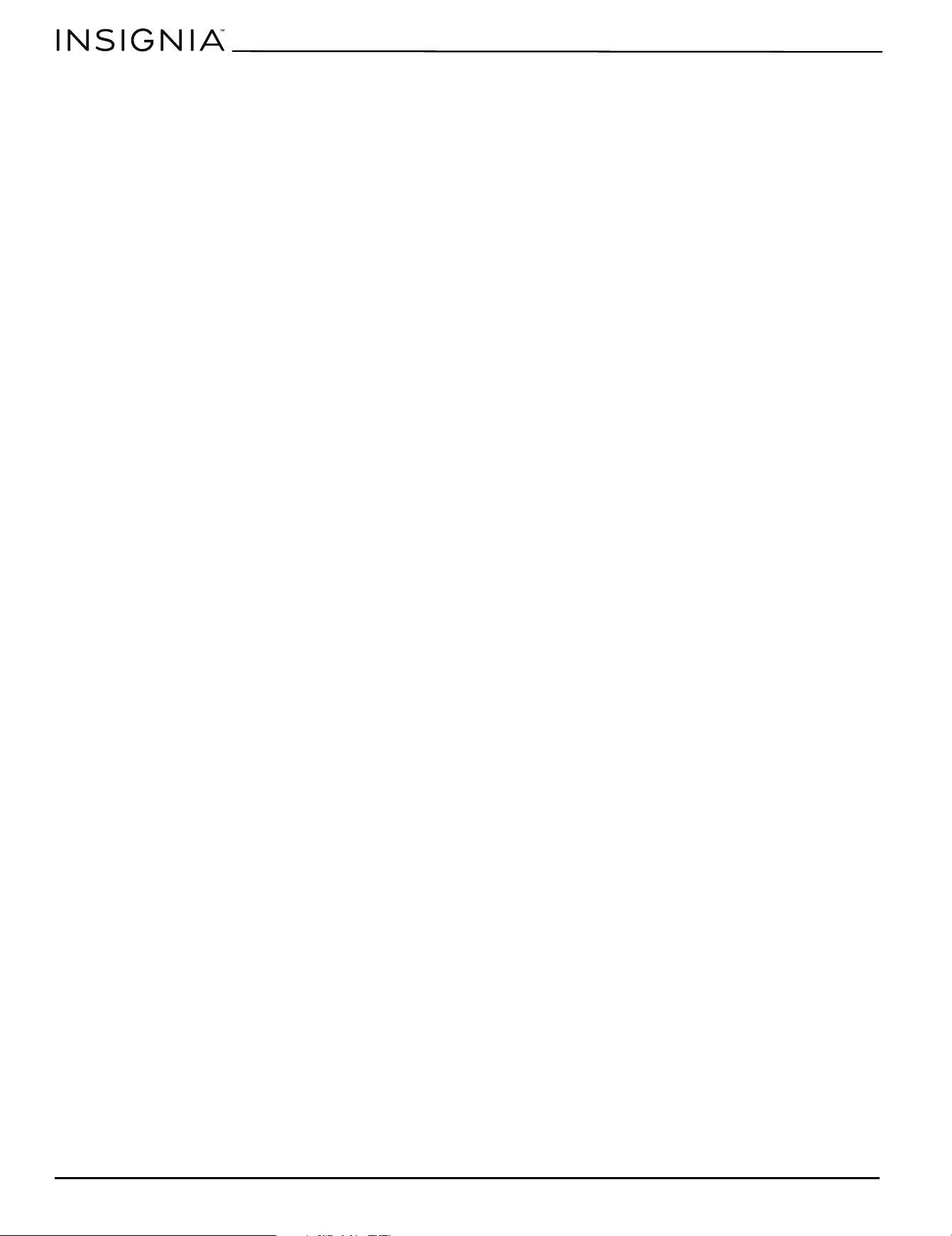
Specifications
My dishwasher leaks. Excessive suds caused by using the
wrong type of detergent or spilled rinse
aid.
Make sure that you use only detergents approved for
automatic dishwashers.
Wipe up any rinse aid spills with a damp cloth.
Your dishwasher is not level. Level your dishwasher (refer to the Installation Manual).
The door gasket is misaligned or dirty. Make sure that the door gasket is aligned properly to allow
the door to close completely.
Make sure that the door gasket is clean.
If the cause of the leak is not one of the
above stated reasons.
Contact Insignia or your service provider.
My dishes are stained
or discolored.
Aluminum utensils have rubbed against
the dishes.
Hand wash aluminum items. Remove aluminum markings
by using a mild abrasive cleaner.
Tea and coffee can stain cups. Remove stains by hand-washing dishes in a solution of 1/2
cup (120 ml) of bleach to one quart (.94 L) of warm water,
then rinse thoroughly.
Iron deposits in your water supply can
cause a brown or yellow film.
You may need to have a special filter installed on your
water supply line.
Some high-acid foods can cause
discoloration on plastics and stainless
steel if left too long.
Rinse immediately by hand in plain water.
The interior of the tub
is stained.
Coffee or tea stains. Use a spot cleaner to remove the stains.
Food or beverage stain. Some tomato products may cause this. Running a rinse
only cycle immediately after loading will help this.
Noises Detergent cup opening/drain
pump/water circulation/motor.
This is normal.
There is a pause in the sound. This is normal.
A hard object or piece of food is in your
dishwasher during the wash cycle.
If the object is a piece of food that can be broken down by
the wash cycle, the noise will stop.
If the noise continues after the cycle is complete, call for
service.
My dishwasher has an
unpleasant odor.
Soiled dishes left in your dishwasher
too long can cause an odor
Wash the dishes as soon as your dishwasher is filled.
Your dishwasher is new. This is normal.
Your dishwasher may not be draining
properly.
Check to make sure that all the water has drained from
your dishwasher each wash cycle is complete.
Note: If you are unable to resolve any of these issues, contact Insignia customer service at 1-877-467-4289.
Capacity Maximum 14 place settings
Dimensions (H × W × D) 33 1/2 × 24 × 25 in. (85.09 × 60.96 × 63.5 cm)
Weight Net: 56 lbs. (25.4 kg)
Gross: 62 lbs. (28.12 kg)
Power requirements 120V~60Hz
Current 10A
Water pressure Between 20 and 120 psi
Noise (dB) 52 dB
Energy Star Yes
PROBLEM POSSIBLE CAUSE POSSIBLE SOLUTION

www.insigniaproducts.com
19
24 in. Front Control Dishwasher
ONE-YEAR LIMITED WARRANTY
Best Buy, or its Authorized Partner of Insignia branded products, warrants to you, the original purchaser of this new Insignia branded product
(“Product”), that the Product shall be free of defects in the original manufacture of the material or workmanship for a period of one (1) year from the
date of your purchase of the Product or the date of delivery (if later than the date of purchase) (“Warranty Period”).
For this warranty to apply, your Product must be (i) purchased in the United States or Canada from a Best Buy branded retail store, online at
www.bestbuy.com or www.bestbuy.ca, or from Best Buy’s Authorized Partner, and (ii) packaged or sold with this warranty statement.
The term “Best Buy”, as used in this warranty, refers to Best Buy branded retail stores, www.bestbuy.com
, www.bestbuy.ca, and Best Buy’s Authorized
Partner.
Because Insignia cannot control the quality of products sold by unauthorized sellers, this warranty applies only to Products that were purchased from
Best Buy or an Insignia Authorized Partner, unless otherwise prohibited by law. Insignia reserves the right to reject warranty claims for Products
purchased from unauthorized sellers, including unauthorized websites.
REPAIR OR REPLACEMENT, AS PROVIDED UNDER THIS WARRANTY, IS YOUR EXCLUSIVE REMEDY FOR BREACH OF WARRANTY. INSIGNIA SHALL NOT BE
LIABLE FOR ANY INCIDENTAL OR CONSEQUENTIAL DAMAGES FOR THE BREACH OF ANY EXPRESSED OR IMPLIED WARRANTY ON THIS PRODUCT,
INCLUDING, BUT NOT LIMITED TO, LOST DATA, LOSS OF USE OF YOUR PRODUCT, LOST BUSINESS, OR LOST PROFITS. INSIGNIA PRODUCTS MAKES NO
OTHER EXPRESS WARRANTIES WITH RESPECT TO THE PRODUCT. ALL EXPRESSED AND IMPLIED WARRANTIES FOR THE PRODUCT, INCLUDING BUT NOT
LIMITED TO ANY IMPLIED WARRANTIES OF AND CONDITIONS OF MERCHANTABILITY AND FITNESS FOR A PARTICULAR PURPOSE, ARE LIMITED IN
DURATION TO THE WARRANTY PERIOD SET FORTH ABOVE AND NO WARRANTIES, WHETHER EXPRESSED OR IMPLIED, WILL APPLY AFTER THE
WARRANTY PERIOD. SOME STATES, PROVINCES, AND JURISDICTIONS DO NOT ALLOW LIMITATIONS ON (i) HOW LONG AN IMPLIED WARRANTY LASTS,
(ii) EXCLUSION OR LIMITATION OF INCIDENTAL OR CONSEQUENTIAL DAMAGES, or (iii) LIMITATION OF INCIDENTAL OR CONSEQUENTIAL DAMAGES, SO
THE ABOVE LIMITATIONS OR EXCLUSIONS MAY NOT APPLY TO YOU. THIS WARRANTY GIVES YOU SPECIFIC LEGAL RIGHTS, AND YOU MAY ALSO HAVE
OTHER RIGHTS, WHICH VARY FROM STATE TO STATE OR PROVINCE TO PROVINCE.
How long does the coverage last?
The Warranty Period lasts for 1 year (365 days) from the date you purchased the Product or the date of delivery (if later than the date of purchase).
Your purchase date is printed on the receipt you received with the Product. In the event that Authorized Partner ceases to sell the covered Insignia
branded product, this warranty shall terminate for that product and there shall be no repair or replacement of the Product.
What does this warranty cover?
During the Warranty Period, if the original manufacture of the material or workmanship of the Product is determined to be defective by an authorized
Insignia repair center or store personnel, Insignia will (at its sole option): (1) repair the Product with new or rebuilt parts; or (2) replace the Product at
no charge with new or rebuilt comparable products or parts. Products and parts replaced under this warranty become the property of Insignia and
are not returned to you. If service of Products or parts are required after the Warranty Period expires, you must pay all labor and parts charges. This
warranty lasts as long as you own your Insignia Product during the Warranty Period. Warranty coverage terminates if you sell or otherwise transfer the
Product.
How to obtain warranty service?
If you purchased the Product at a Best Buy retail store location or from a Best Buy online website (www.bestbuy.com or www.bestbuy.ca), please take
your original receipt and the Product to any Best Buy store. Make sure that you place the Product in its original packaging or packaging that provides
the same amount of protection as the original packaging. If you purchased your Product from an Authorized Partner, call Insignia at 1-877-467-4289.
To obtain warranty service, in the United States and Canada call 1-877-467-4289. Call agents may diagnose and correct the issue over the phone.
If you purchased the Product from an Authorized Partner other than Best Buy, please call 1-888-BESTBUY in the United States or 1-866-BESTBUY in
Canada. You will be asked to provide proof of purchase and to return your Product to Best Buy. Make sure that you put the Product in its original
packaging or packaging that provides the same amount of protection as the original packaging.
Where is the warranty valid?
This warranty is valid only in the United States and Canada to the original purchaser of the product from an Authorized Partner, in the country where
the original purchase was made.
What does the warranty not cover?
This warranty does not cover:
• Food, beverage, and or medicine loss/spoilage.
• Damage to other products caused by a power surge or other similar issue while connected to the Product.
• Customer instruction/education.
• Installation.
•Set up adjustments.
• Cosmetic damage.
• Damage due to weather, lightning, and other acts of God, such as power surges.
• Accidental damage.
•Misuse.
•Abuse.
•Negligence.
• Commercial purposes/use, including but not limited to use in a place of business or in communal areas of a multiple dwelling condominium or
apartment complex, or otherwise used in a place of other than a private home.
• Modification of any part of the Product, including the antenna.
• Display panel damaged by static (non-moving) images applied for lengthy periods (burn-in).
• Damage due to incorrect operation or maintenance.
• Connection to an incorrect voltage or power supply.
• Damage due to attempted repair by any person not authorized by Insignia to service the Product.
• Products sold “as is” or “with all faults”.
• Consumables, including but not limited to batteries (i.e. AA, AAA, C etc.).
• Products where the factory applied serial number has been altered or removed.
• Loss or Theft of this product or any part of the product.
• Display panels containing up to three (3) pixel failures (dots that are dark or incorrectly illuminated) grouped in an area smaller than one tenth
(1/10) of the display size or up to five (5) pixel failures throughout the display. (Pixel based displays may contain a limited number of pixels that
may not function normally.).
• Failures or Damage caused by any contact including but not limited to liquids, gels or pastes.
www.insigniaproducts.com
20
Contact Insignia:
1-877-467-4289
www.insigniaproducts.com
INSIGNIA is a trademark of Best Buy and its affiliated companies.
*Distributed by Best Buy Purchasing, LLC
7601 Penn Ave South, Richfield, MN 55423 U.S.A.
©2025 Best Buy. All rights reserved

For product inquiries, please contact us with the information below:
1-877-467-4289
www.insigniaproducts.com
INSIGNIA is a trademark of Best Buy and its affiliated companies.
Distributed by Best Buy Purchasing, LLC
7601 Penn Ave South, Richfield, MN 55423 U.S.A.
©2025 Best Buy. All rights reserved.
V2 ENGLISH
25-0680
Part #A30150401
