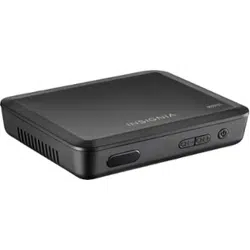

Coupon Eligible Converter Box | Caja convertidora con cupón
NS-DXA1
User Guide | Guía del Usuario

1
www.insignia-products.com
Insignia NS-DXA1
Coupon Eligible
Converter Box
Contents
Welcome . . . . . . . . . . . . . . . . . . . . . . . . . . . . . . . .1
Safety information . . . . . . . . . . . . . . . . . . . . . . . . .1
Introduction to digital TV . . . . . . . . . . . . . . . . . . . .2
Features. . . . . . . . . . . . . . . . . . . . . . . . . . . . . . . . .2
Front. . . . . . . . . . . . . . . . . . . . . . . . . . . . . . . . . . . . . 2
Back . . . . . . . . . . . . . . . . . . . . . . . . . . . . . . . . . . . . . 2
Remote control . . . . . . . . . . . . . . . . . . . . . . . . . . . . . 3
Setting up your converter box . . . . . . . . . . . . . . . .4
Connecting an antenna . . . . . . . . . . . . . . . . . . . . . . 4
Setting basic options . . . . . . . . . . . . . . . . . . . . . . . . 4
Using your converter box . . . . . . . . . . . . . . . . . . . .5
Tuning your converter box on or off . . . . . . . . . . . . . 5
Setting the output channel . . . . . . . . . . . . . . . . . . . . 5
Changing channels. . . . . . . . . . . . . . . . . . . . . . . . . . 5
Adjusting the volume . . . . . . . . . . . . . . . . . . . . . . . . 5
Searching for channels. . . . . . . . . . . . . . . . . . . . . . . 6
Adding new channels to the channel list . . . . . . . . . 6
Editing the memorized channel list. . . . . . . . . . . . . . 6
Creating a Favorites list . . . . . . . . . . . . . . . . . . . . . . 6
Manually adding channels . . . . . . . . . . . . . . . . . . . . 7
Using the on-screen menu system. . . . . . . . . . . . . . 7
Selecting the TV type . . . . . . . . . . . . . . . . . . . . . . . . 8
Selecting the TV program aspect ratio . . . . . . . . . . . 8
Setting the Sleep timer. . . . . . . . . . . . . . . . . . . . . . . 9
Displaying the channel banner. . . . . . . . . . . . . . . . . 9
Using the Simple Guide . . . . . . . . . . . . . . . . . . . . . . 9
Viewing TV program information . . . . . . . . . . . . . . . 9
Controlling closed captions . . . . . . . . . . . . . . . . . . 10
Controlling closed captions . . . . . . . . . . . . . . . . . . 10
Turning the lock system on or off . . . . . . . . . . . . . . 10
Changing the password . . . . . . . . . . . . . . . . . . . . . 10
Blocking channels . . . . . . . . . . . . . . . . . . . . . . . . . 11
Blocking children’s TV programs . . . . . . . . . . . . . . 11
Blocking general TV programs . . . . . . . . . . . . . . . . 11
Blocking movies . . . . . . . . . . . . . . . . . . . . . . . . . . . 12
Downloading rating information . . . . . . . . . . . . . . . 13
Programming the remote control . . . . . . . . . . . . . . 13
Troubleshooting . . . . . . . . . . . . . . . . . . . . . . . . . .15
Specifications. . . . . . . . . . . . . . . . . . . . . . . . . . . .15
Legal notices . . . . . . . . . . . . . . . . . . . . . . . . . . . .15
90-day limited warranty . . . . . . . . . . . . . . . . . . . .17
Español . . . . . . . . . . . . . . . . . . . . . . . . 19
Welcome
Congratulations on your purchase of a
high-quality Insignia product. Your NS-DXA1
represents the state of the art in coupon eligible
converter box design and is designed for reliable
and trouble-free performance.
Safety information
The lightning flash with arrowhead
symbol within a triangle is intended to
alert you to the presence of
uninsulated dangerous voltage within
your converter box’s enclosure that may be of
sufficient magnitude to constitute risk of electric
shock to persons.
The exclamation point within a triangle
is intended to alert you to the presence
of important operating and
maintenance (servicing) instructions in
the literature accompanying your converter box.
Important safety
instructions
1 Read these instructions.
2 Keep these instructions.
3 Heed all warnings.
4 Follow all instructions.
5 Do not use your converter box near water.
6 Clean only with dry cloth.
CAUTION
RISK OF ELECTRIC SHOCK
DO NOT OPEN
CAUTION: TO REDUCE THE RISK OF ELECTRIC SHOCK DO NOT
REMOVE THE COVER (OR BACK). NO USER-SERVICEABLE PARTS
INSIDE. REFER SERVICING TO QUALIFIED SERVICE PERSONNEL.
Warning
To prevent fire or electric shock hazard, do not expose your
converter box to rain or moisture.
Warning
Do not install your converter box in a confined space such a
bookcase or similar unit.
Warning
Do not block any ventilation openings. Install in accordance with
the manufacturer's instructions. Slots and openings in the
cabinet are provided for ventilation and to ensure reliable
operation of your converter box and to protect it from
overheating.
The openings should be never be blocked by placing your
converter box on a bed, sofa, rug or other similar surface.Your
converter box should not be placed in a built-in installation such
as a bookcase or rack unless proper ventilation is provided or
the manufacturer's instructions have been adhered to.
Caution
Your converter box should not be exposed to water (dripping or
splashing) and no objects filled with liquids, such as vases,
should be placed on it.
Power Cord Warning
Most appliances recommend they be placed upon a dedicated
circuit–a single outlet circuit which powers only that appliance
and has no additional outlets or branch circuits.
Overloaded wall outlets, loose or damaged wall outlets,
extension cords, frayed power cords, or damaged or cracked
wire insulation are dangerous. Any of these conditions could
result in electric shock or fire. Periodically examine the cord of
your converter box, and if its appearance indicates damage or
deterioration, unplug it, discontinue use of your converter box,
and have the cord replaced with an exact replacement part by an
authorized servicer.
Protect the power cord from physical or mechanical abuse,
such as being twisted, kinked, pinched, closed in a door, or
walked upon. Pay particular attention to plugs, wall outlets, and
the point where the cord exits your converter box.
To disconnect the main power from your converter box, unplug
the power cord from the power outlet. When installing your
converter box, make sure that the plug is easily accessible.
2
Insignia NS-DXA1 Coupon Eligible Converter Box
www.insignia-products.com
7 Do not block any ventilation openings. Install
in accordance with the manufacturer's
instructions.
8 Do not install near any heat sources such as
radiators, heat registers, stoves, or other
apparatus (including amplifiers) that
produces heat.
9 Do not defeat the safety purpose of the
polarized plug. A polarized plug has two
blades with one wider than the other. The
wide blade is provided for your safety. If the
provided plug does not fit into your outlet,
consult an electrician for replacement of the
obsolete outlet.
10 Protect the power cord from being walked on
or pinched particularly at plugs, convenience
receptacles, and the point where they exit
from the apparatus.
11 Only use attachments or accessories
specified by the manufacturer.
12 Use only with the cart, stand,
tripod, bracket, or table
specified by the manufacturer,
or sold with your converter box.
When a cart is used, use
caution when moving the
cart/converter box combination to avoid injury
from tip-over.
13 Unplug your converter box during lightning
storms or when unused for long periods of
time.
14 Refer all servicing to qualified service
personnel. Servicing is required when your
converter box has been damaged in any way,
such as when the power cord or plug is
damaged, liquid has been spilled or objects
have fallen into your converter box, your
converter box has been exposed to rain or
moisture, does not operate normally, or has
been dropped.
Introduction to digital TV
A digital TV signal transmits more data than an
analog signal. This increase in data provides a
better picture and sound with less static and
interference.
Current analog TVs cannot receive the digital
signal. You need a converter box to convert the
digital signal so your analog TV can display the
picture and play the sound.
Digital sub channels
The increase data capacity of a digital signal lets
broadcasters fit several channels into the same
bandwidth as an analog signal. Broadcasters
may use these sub channels to transmit a
variety of information, such as weather
forecasts, foreign languages, commericals, and
so forth.
A digital sub channel is indicated by the main
channel number followed by a dash and the sub
channel number. For example, 5-1 indicates sub
channel 1 of the main channel 5.
Features
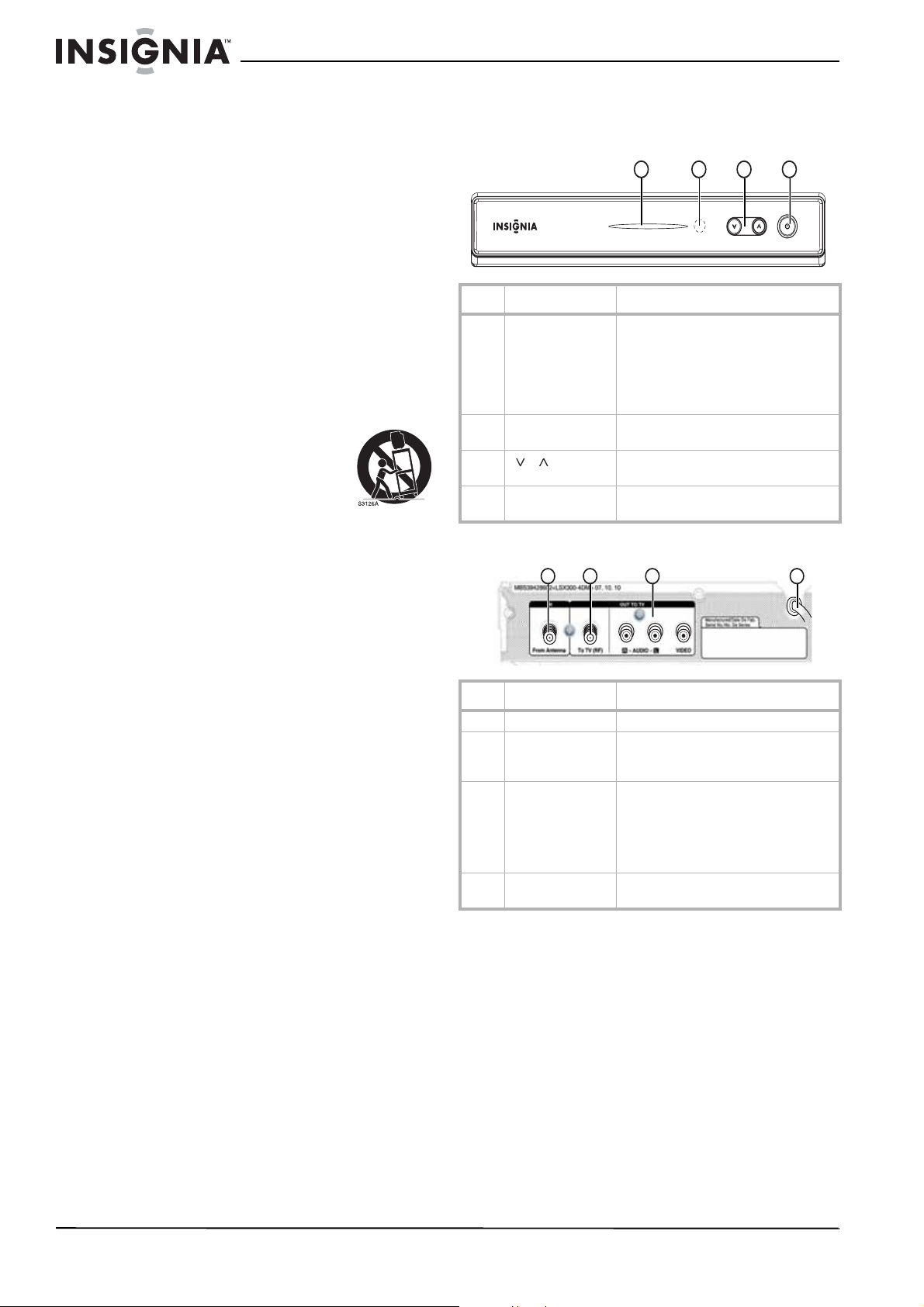
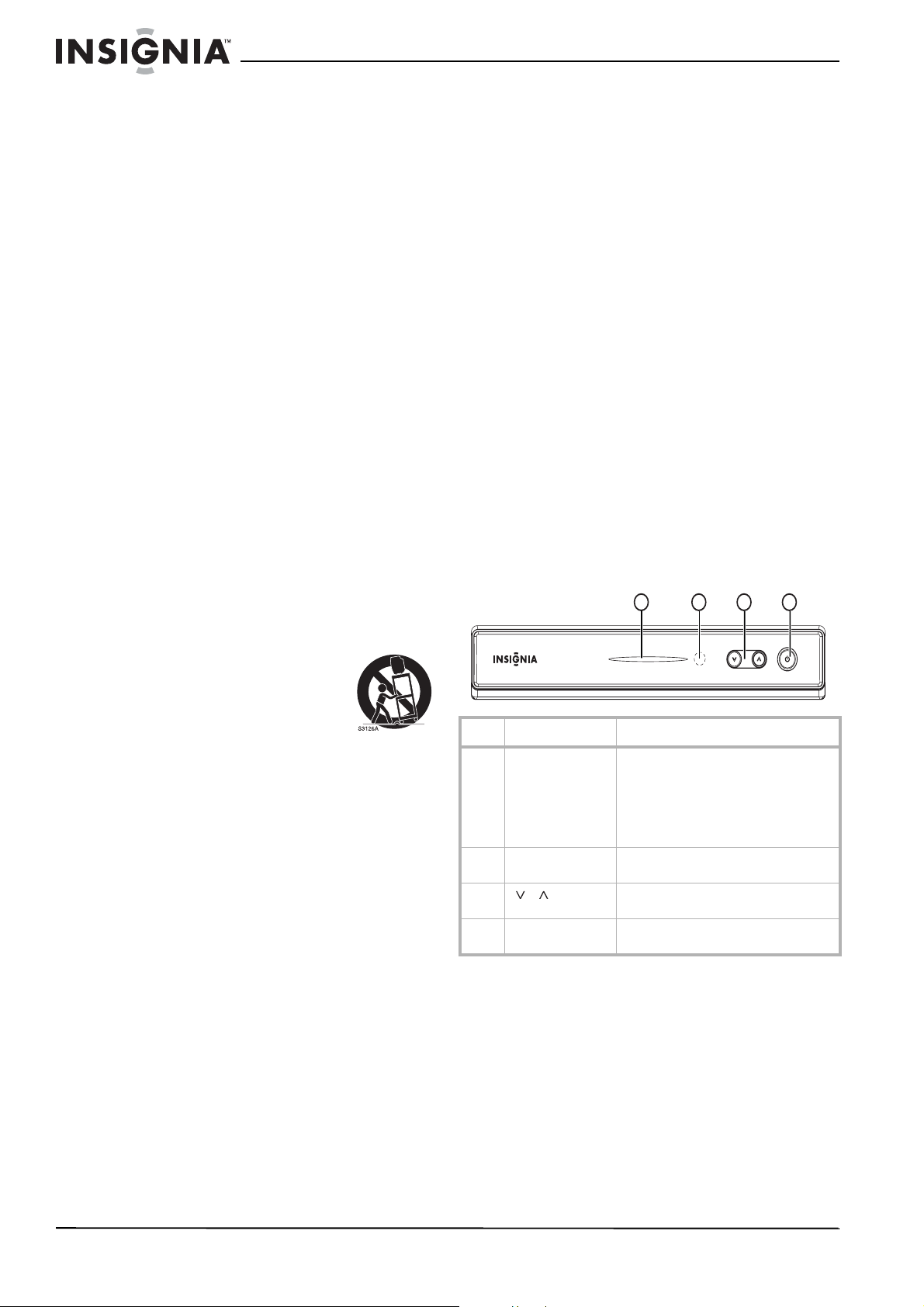
Front
Back
No. Component Description
1 Power indicator Lights when your converter box is
turned on.
Red–Standby mode
Blue–On mode
Blinking–Receiving remote control
signal
2 Remote control
sensor
Receives signals from the remote
control. Do not block.
3
/
Press to scan through memorized
channels.
4 Power Press to turn your converter box on or
off.
No. Component Description
1 From Antenna Connect this jack to your antenna.
2 To TV (RF) If your TV does not have A/V jacks,
connect this jack to the Antenna IN jack
on your TV.
3R AUDIO
L AUDIO
VIDEO
If your TV has A/V jacks, connect these
jacks to the corresponding jacks on
your TV. These jacks provide the best
audio and video. If your TV does not
have A/V jacks, connect your TV to the
To TV (RF) jack.
4 Power cord Plug this cord into a power outlet or
surge protector.
1
2
3
4
1
2
3
4
3
Insignia NS-DXA1 Coupon Eligible Converter Box
www.insignia-products.com
Remote control
Installing the remote control battery
To install the remote control battery:
1 Remove the battery compartment cover on
the back of the remote control.
2 Insert one AAA battery into the battery
compartment. Make sure that the + and – on
the battery align with the + and – in the
battery compartment.
3 Replace the battery compartment cover.
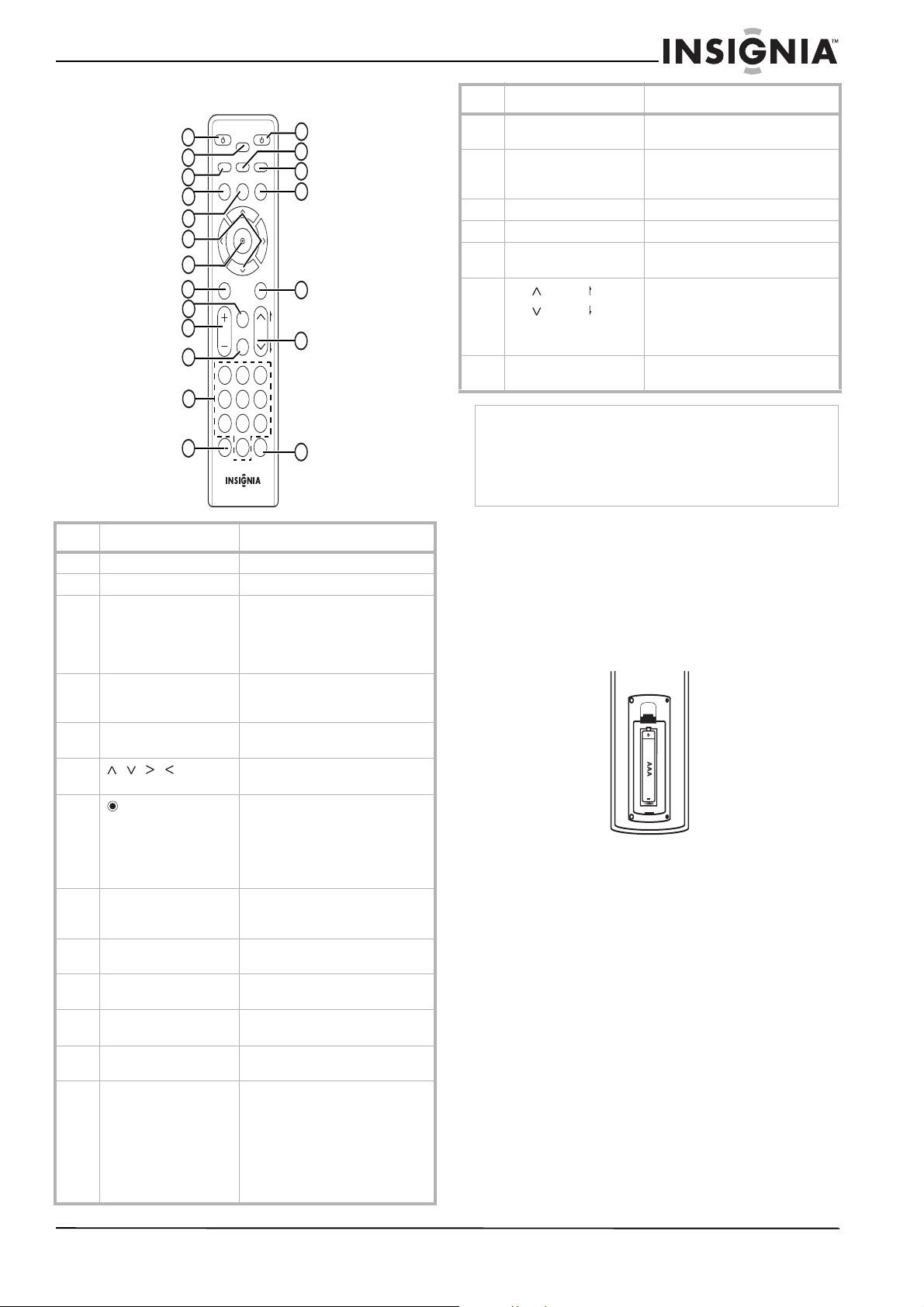
No. Button Description
1 TV POWER Press to turn the TV on or off.
2 SLEEP Press to set the Sleep timer.
3 SIGNAL Press to view the signal strength
for the current channel. You will
also hear a series of beeps. The
faster the beeps sound, the
stronger the signal is.
4 DISPLAY Press to view information about
the program on the current TV
channel.
5 MENU Press to open or close the
on-screen menu.
6 Press to highlight options in a
menu.
7
(Select)
Press after you enter a channel
number with the button numbers
to tune to the channel
immediately.
In on-screen menus, press to
select a highlighted option.
8 EXIT Press to close any on-screen
display or menu and return to
normal TV viewing.
9 FAV Press to select a channel from the
Favorites list.
10 VOL+/VOL– Press to increase or decrease the
volume.
11 MUTE Press to turn off the sound. Press
again to restore the sound.
12 Numbers Press to enter a channel number
or parental control password.
13 — Press to enter a sub channel
number. For example, to enter
sub channel 1 for the main
channel 2, press 2, press this
button, then press 1.
For more information about sub
channels, see “Digital sub
channels” on page 2.
TV
POWER
POWER
SLEEP
SAP
MENU
MENU
SIGNAL
DISPLAY
EXIT
VOL CH
CCD
FAV
P
A
G
E
MUTE
ZOOM
GUIDE
1 2 3
4 5 6
7 8 9
0
RECALL
1
2
3
4
5
6
7
8
9
10
14
15
16
17
18
20
19
12
13
11
14 POWER Press to turn your converter box
on or off.
15 SAP Press to select a secondary audio
program (SAP) for the current TV
program.
16 ZOOM Press to select the aspect ratio.
17 GUIDE Press to open the Simple Guide.
18 CCD Press to select the closed caption
mode, if available.
19
CH / PAGE
CH / PAGE
Press to go to the next or
previous channel, or press to go
to the next or previous page in the
Channel Edit or Block Channel
menu.
20 RECALL Press to go to the last viewed
channel.
Note
If you use a universal remote control, you can use it to
control your converter box.
To program the universal remote control to control your
converter box, set the remote control’s operation mode to
Set-Top Box, then set your remote control to the
manufacturer codes for LG or Zenith.
No. Button Description
4
Insignia NS-DXA1 Coupon Eligible Converter Box
www.insignia-products.com
Setting up your converter
box
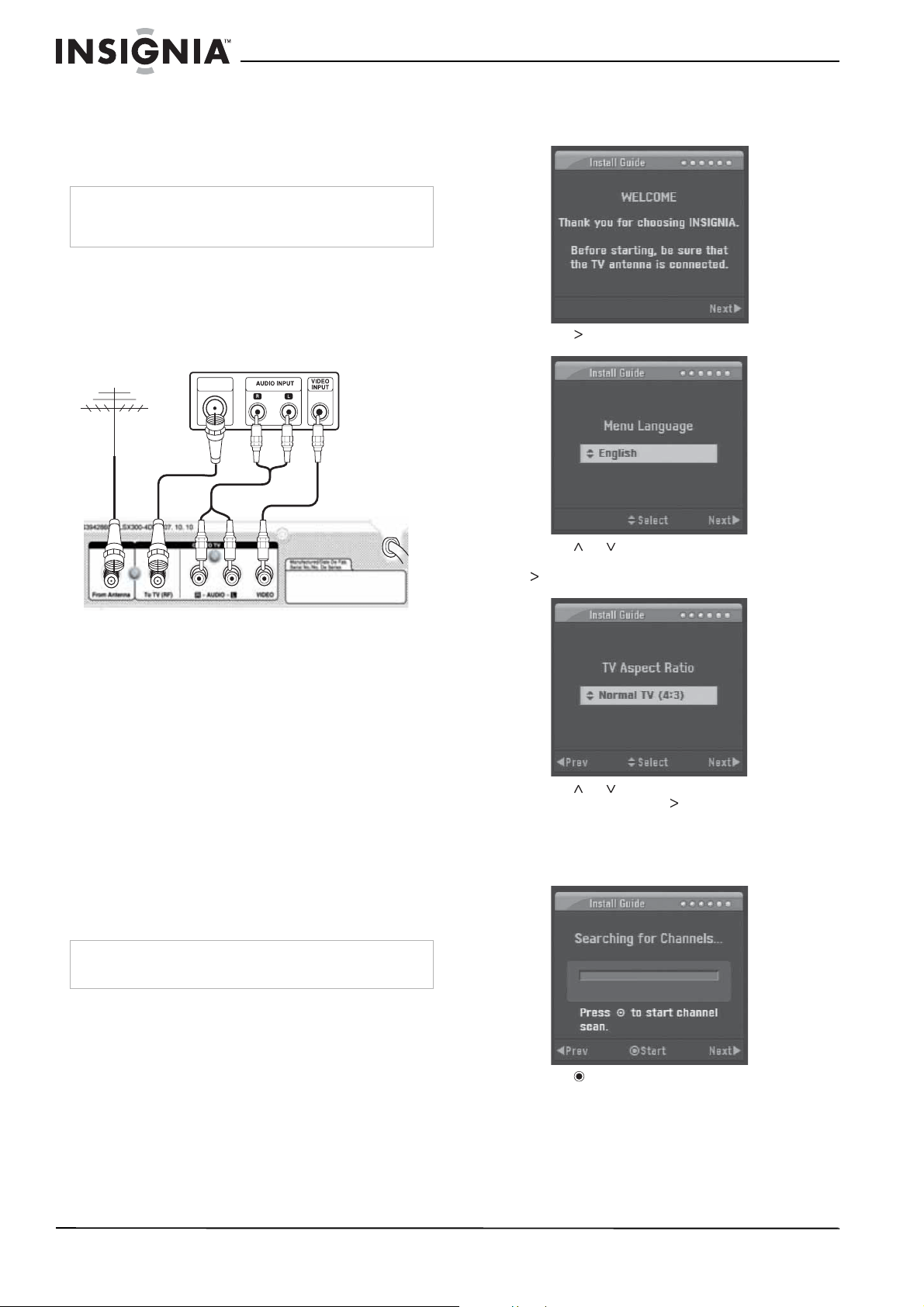
Connecting an antenna
To connect your converter box to an
antenna:
1 Use a coaxial cable to connect the From
Antenna jack on the back of your converter
box to the antenna jack.
2 Use an A/V cable to connect the R AUDIO, L
AUDIO, and VIDEO jacks on the back of your
converter box to the corresponding jacks on
the back of the TV. This connection provides
the best picture and sound.
OR
Use a coaxial cable to connect the To TV
(RF) jack on the back of your converter box
to the Antenna IN jack on the back of the TV.
For best performance with this connection,
change the Audio Output option in the
Options
menu to Mono. For more
information, see “OPTION menu” on page 7.
3 Plug the power cord into a power outlet or
surge protector.
Setting basic options
When you turn on your converter box for the first
time, the Install Guide opens where you can:
• Select the menu language
• Select the TV aspect ratio
• Search for and memorize channels
• Select the time zone
To set basic options:
1 Turn on your converter box. The
WELCOME
screen opens.
2 Press . The
Menu Language
screen opens.
3 Press
or to select the menu language
(English, Spanish, or French), then press
. The
TV Aspect Ratio
screen opens.
4 Press
or to select the aspect ratio for
your TV, then press . The
Searching for
Channels
screen opens. If the TV has a
standard (normal) size screen, select Normal
TV. If the TV has a wide size screen, select
Wide TV.
5 Press to start the channel search. Your
converter box searches for available
channels in your area and stores them in
memory.
Note
If you need information about what type of antenna you
should use in your area, visit www.antennaweb.org on the
Internet.
Note
If you connected the TV to the To TV (RF) jack, the TV must
be tuned to channel 3. Otherwise, you will not see a pciture.
ANTENNA
INPUT
From Antenna
To TV (RF)
R AUDIO/
L AUDIO
VIDEO
OR
Back of TV
Back of converter box
5
Insignia NS-DXA1 Coupon Eligible Converter Box
www.insignia-products.com
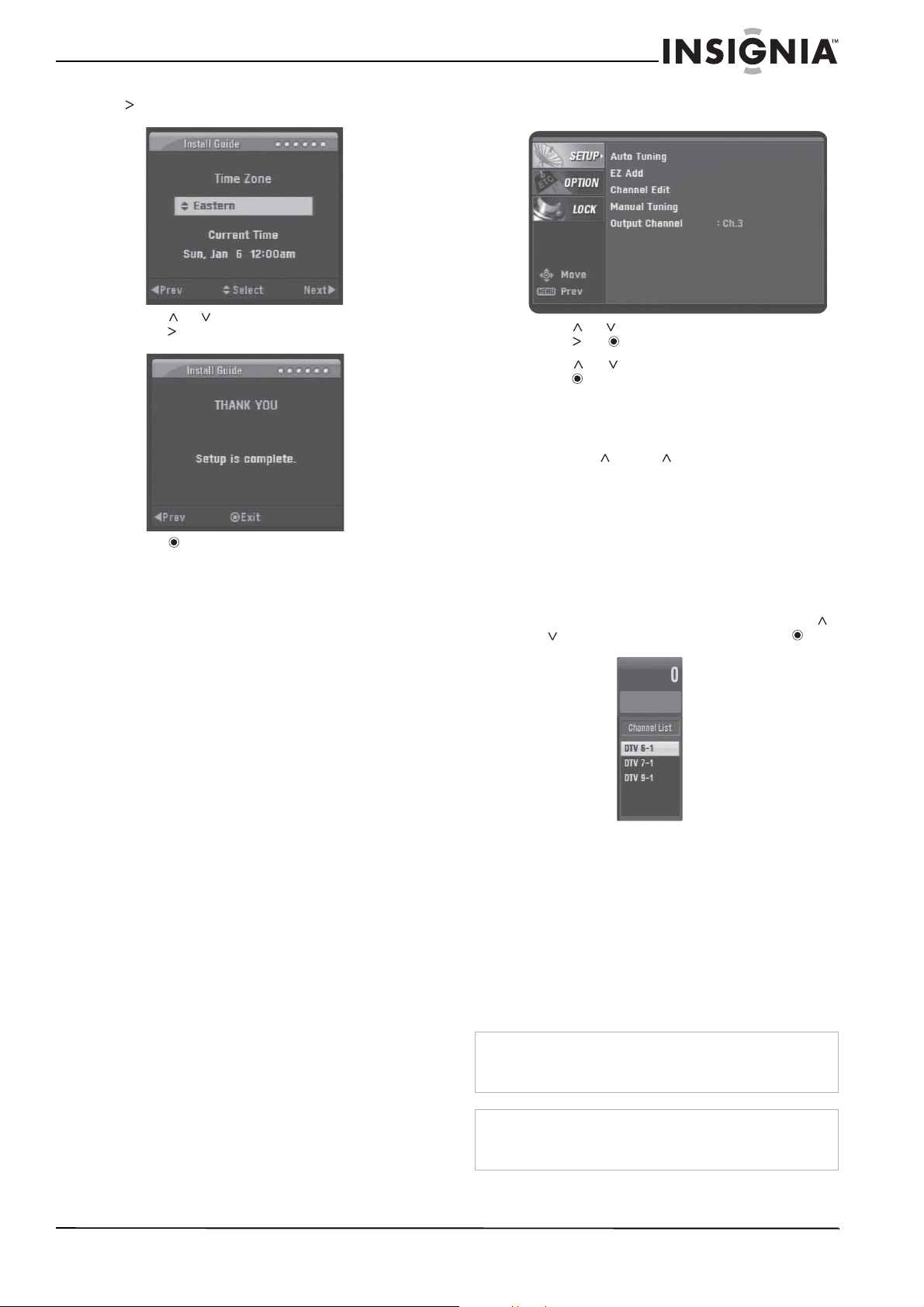
6 After the channel search is complete, press
. The
Time Zone
screen opens.
7 Press
or to select a time zone, then
press . The
THANK YOU
screen opens.
8 Press to complete the setup and close the
Install Guide.
Using your converter box
Tuning your converter box on or off
To turn your converter box on or off:
1 Make sure that the TV is connected to your
converter box and that the TV and your
converter box are plugged into power outlets.
2 Press POWER. The power LED lights.
• Red–Standby mode
• Blue–ON mode
• Blinking–Receiving remote control signal
3 If this is the first time you have turned on your
converter box, follow the on-screen prompts
to set basic options. For more information,
see “Setting basic options” on page 4.
4 To turn off your converter box, press POWER
again.
Setting the output channel
If the TV is connected through the To TV (RF)
jack, you need to set the output channel for the
TV signal. The TV must be tuned to the same
channel as output channel.
To set the output channel:
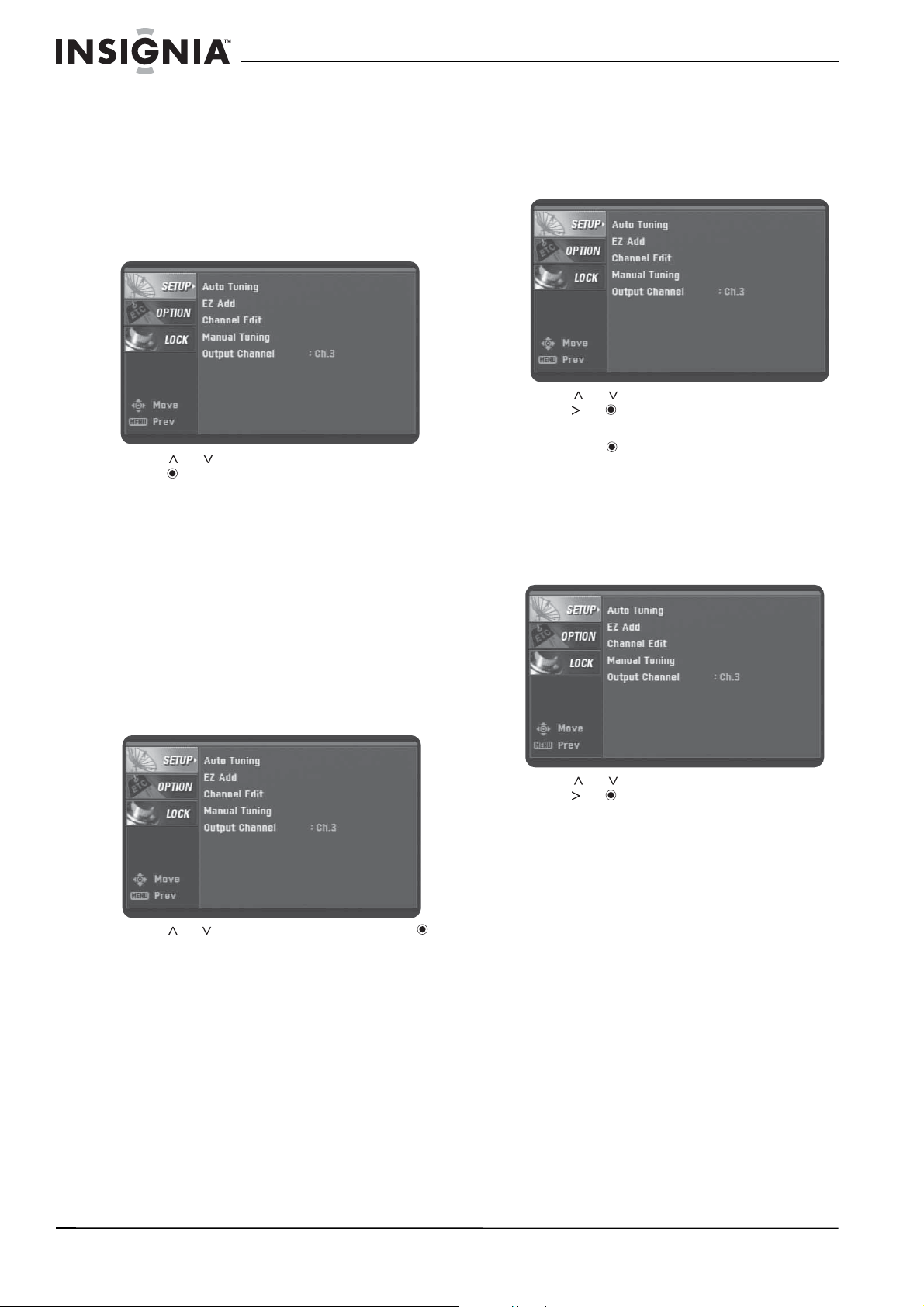
1 Press MENU. The
SETUP
menu opens.
2 Press or to select Output Channel, then
press or .
3 Press or to select channel 3 or 4, then
press .
Changing channels
To change channels:
• Press CH or CH to select a channel in
the memorized channel list.
• Press the number buttons for the channel
you want. If you want a digital sub channel,
press the number buttons for the main
channel, press –, then press the number for
the sub channel. For more information about
sub channels, see “Digital sub channels” on
page 2.
When you use the number buttons to select a
channel, the Channel List appears. Press
or to select the channel, then press .
• Press RECALL to return to the last channel
you were watching.
• Press FAV to select a channel from the
Favorites list.
Adjusting the volume
To adjust the volume:
• Press VOL + or VOL – to increase or
decrease the volume.
• Press MUTE to turn off the sound. Press
MUTE again to restore the sound.
Warning
If the volume is set too high when you press MUTE to
restore the sound, you may damage your hearing or the TV
speakers.
Note
For best performance, set the volume control on the TV to
mid-range, then use the converter box remote control to
adjust the volume.
6
Insignia NS-DXA1 Coupon Eligible Converter Box
www.insignia-products.com
Searching for channels
Your converter box searched for available
channels the first time you turned it on. If you
move your converter box to a new TV viewing
area, move your antenna, or if the available
channels change, you can search for channels
again.
To search for channels:
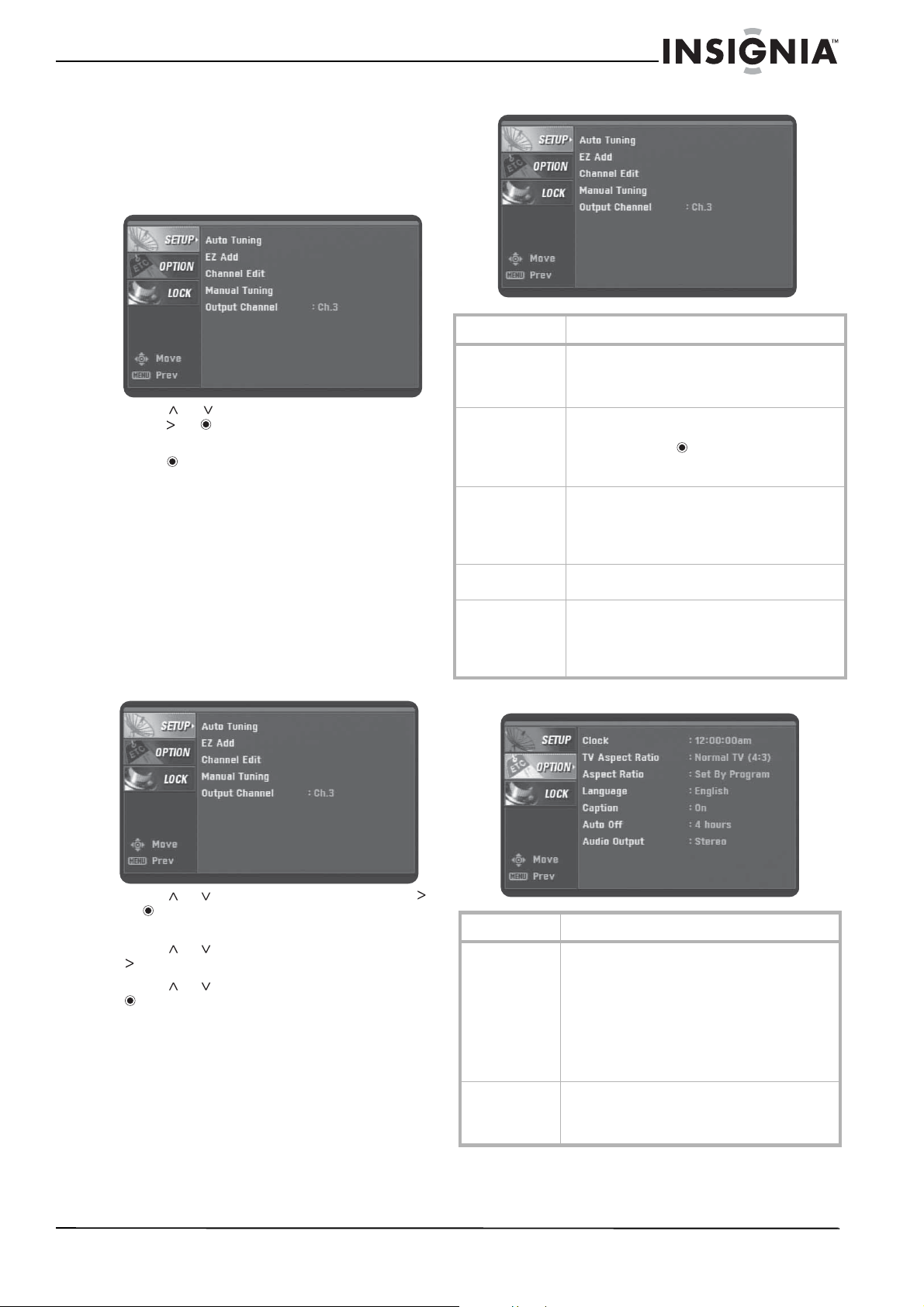
1 Press MENU. The
SETUP
menu opens.
2 Press or to select Auto Tuning, then
press to start the search. Your converter
box searches for available channels and
stores the channel information in the
memorized channel list.
Adding new channels to the channel list
If new channels become available after the initial
search for channels or if you move your antenna
to tune additional channels, your converter box
can search for the added channels and add the
channel information to the memorized channel
list.
To add channels to the memorized channel
list:
1 Press MENU. The
SETUP
menu opens.
2 Press or to select EZ Add, then press
to start the search. Your converter box
searches for new channels and stores the
channel information in the memorized
channel list.
Editing the memorized channel list
After you create the memorized channel list, you
can add or delete channels from the list.
To edit the memorized channel list:
1 Press MENU. The
SETUP
menu opens.
2 Press or to select Channel Edit, then
press or . The
Channel Edit
menu opens.
3 Select the channel you want to add or delete,
then press .
4 Repeat Step 3 to add or delete more
channels.
Creating a Favorites list
To create a Favorites list:
1 Press MENU. The
SETUP
menu opens.
2 Press or to select Channel Edit, then
press or . The
Channel Edit
menu opens.
3 Select the channel you want to add or delete,
then press FAV. The channel is added to the
Favorites list. When you are watching TV,
you can tune to a favorite channel by
pressing the FAV button and selecting a
channel from the list.
7
Insignia NS-DXA1 Coupon Eligible Converter Box
www.insignia-products.com
Manually adding channels
If you need to add a channel that was not found
during the channel search, you can add the
channel manually.
To manually add channels:
1 Press MENU. The
SETUP
menu opens.
2 Press or to select Manual Tuning, then
press or . The
Channel Edit
menu opens.
3 Select the channel you want to add, then
press .
4 Repeat Step 3 to add more channels.
Using the on-screen menu system
The first time you turn on your converter box, the
Install Guide opens, where you can set basic
options. For more information, see “Setting basic
options” on page 4.
Your converter box has an on-screen menu
system that you can use to adjust options such
as picture and sound.
To use the on-screen menu system:
1 Press MENU. The menu system opens.
2 Press
or to select a menu, then press
or to go to the options for the menu you
selected.
3 Press
or to select an option, then press
to go to the next level of options.
4 Press
or to adjust the option, then press
to confirm your setting.
5 Press EXIT to close the menu system.
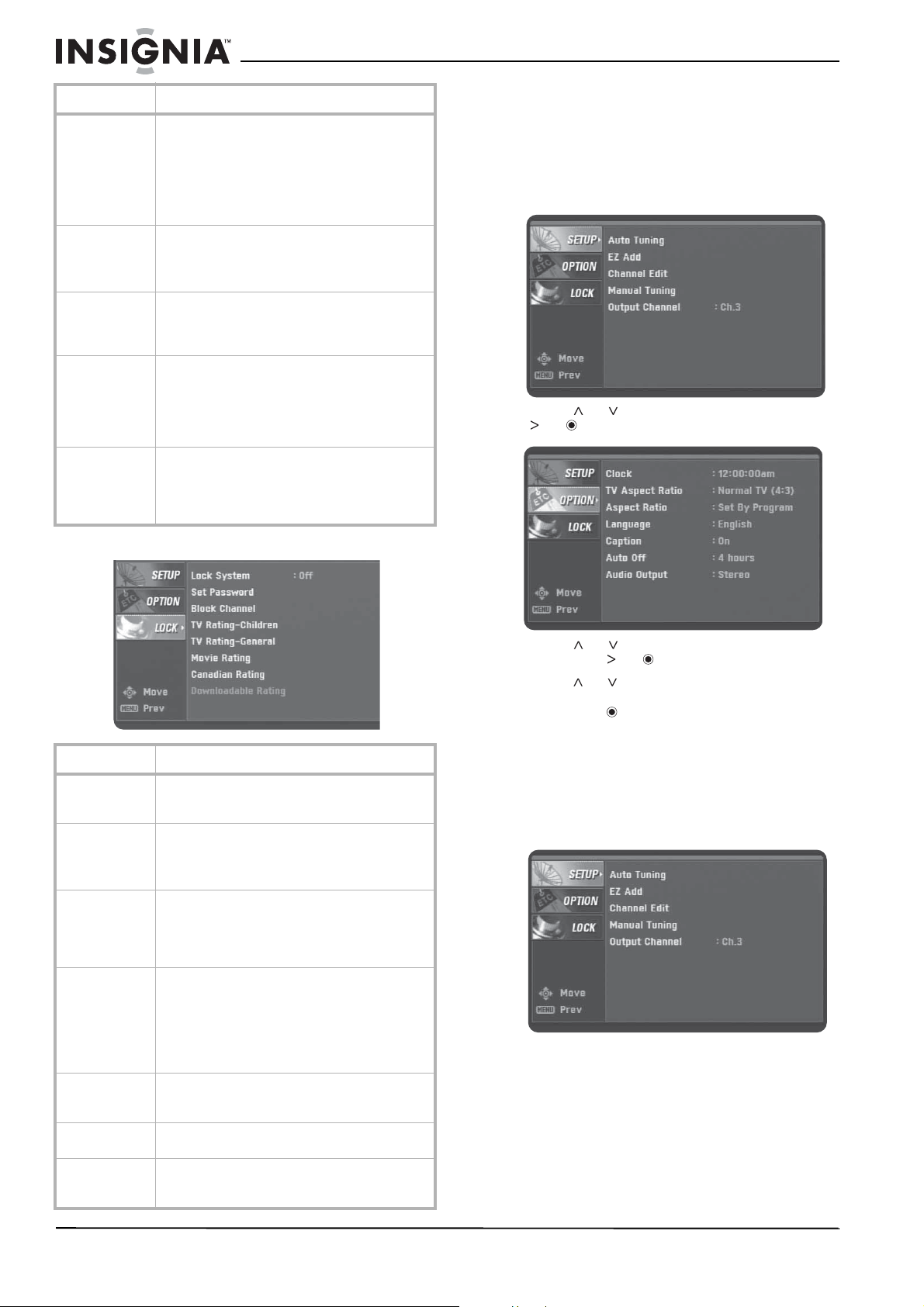
SETUP menu
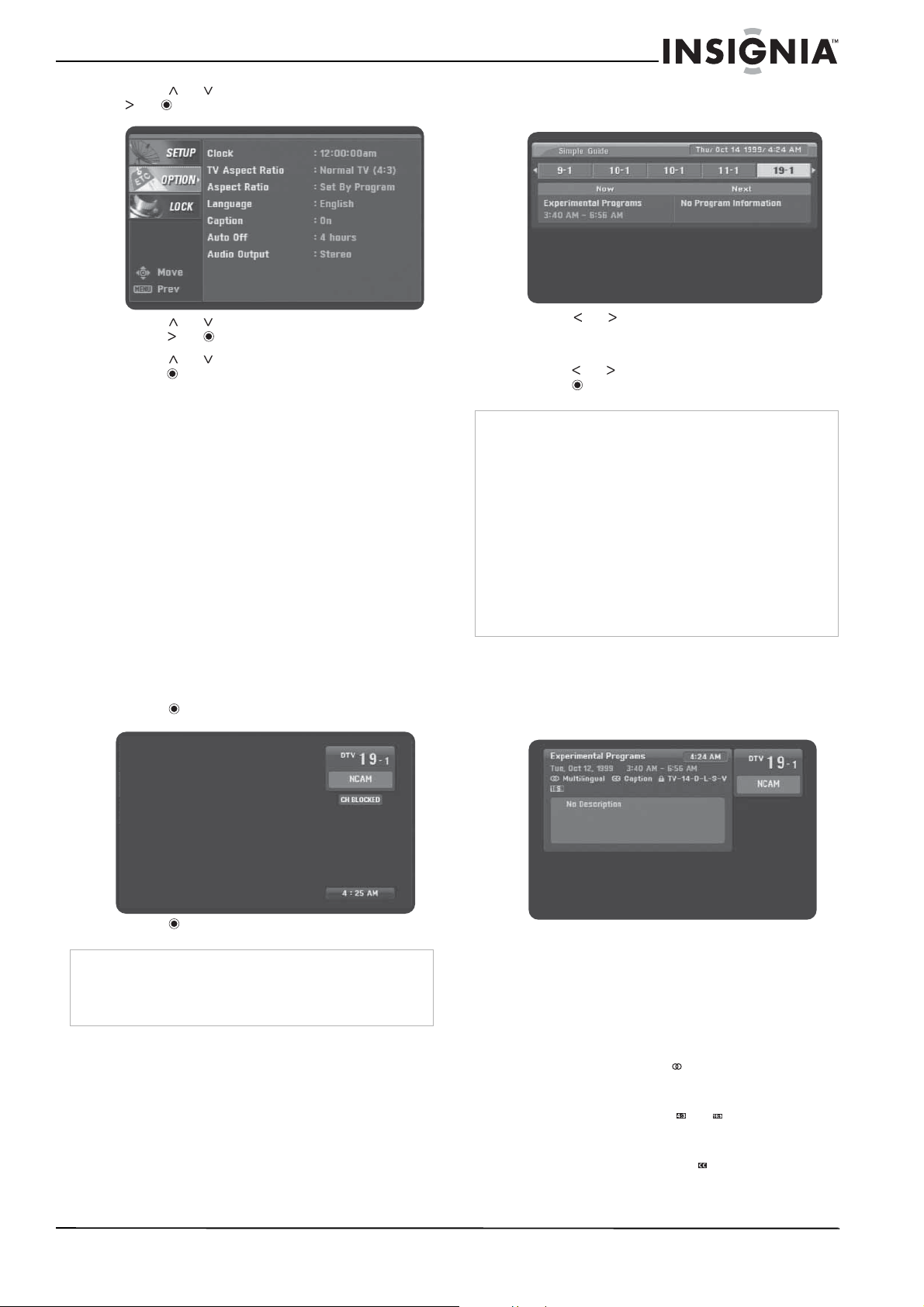
OPTION menu
Menu option Description
Auto Tuning Automatically finds all digital channels available
through the From Antenna jack. For more
information, see “Searching for channels” on
page 6.
EZ Add Automatically adds new channels available
through the From Antenna jack. Select this
option, then press . Your converter box
searches for new channels and adds them to the
memorized channel list.
Channel Edit Manually adds or deletes channels from the
channel list or the Favorites list. For more
information, see “Editing the memorized channel
list” on page 6 or “Creating a Favorites list” on
page 6.
Manual Tuning Manually adds. For more information, see
“Editing the memorized channel list” on page 6.
Output Channel Selects the channel (3 or 4) for the signal from
the To TV (RF) jack. Your TV must be tuned to the
same channel to display the TV image. For more
information, see “Setting the output channel” on
page 5.
Menu option Description
Clock Sets the time. Normally, the clock is set using
signals transmitted by digital TV (DTV) stations.
When you select a time zone, the clock is set
automatically.
Note: If the DTV station does not send a time
signal or sends the wrong time signal, the clock
may be set to an incorrect time.
For more information, see “Controlling closed
captions” on page 10.
TV Aspect Ratio Selects your TV type. Select 4:3 if your TV has a
standard screen. Select 16:9 if your TV has a
wide screen. For more information, see
“Selecting the TV type” on page 8.
8
Insignia NS-DXA1 Coupon Eligible Converter Box
www.insignia-products.com
LOCK menu
Selecting the TV type
You set the TV type (aspect ratio) the first time
your turned on your converter box. You can
change the TV type, if necessary.
To select the TV type:
1 Press MENU. The
SETUP
menu opens.
2 Press or to select OPTION, then press
or . The
OPTION
menu opens.
3 Press or to select TV Aspect Ratio,
then press or .
4 Press or to select channel 4:3 (standard
TV screen) or 16:9 (wide-screen TV screen),
then press .
Selecting the TV program aspect ratio
You can select the aspect ratio for the current
TV program.
To select the TV program aspect ratio:
1 Press MENU. The
SETUP
menu opens.
Aspect Ratio Selects the screen format for the current channel.
The aspect ratio options you can select vary
depending on the TV aspect ratio you select.
While watching TV, you can change the aspect
ratio by pressing ZOOM.
For more information, see “Selecting the TV
program aspect ratio” on page 8.
Language Select the language for the audio and menus. You
can select English, Spanish, or French.
You can select one language for audio and a
different language for menus.
Caption Selects the type of closed captions that are
displayed and changes the appearance of closed
captions. For more information, see “Controlling
closed captions” on page 10.
Auto Off Sets the amount of time your converter box waits
before it automatically turns off the TV. The
default amount of time is four hours. You can
also set the Auto Off time by pressing SLEEP. For
more information, see “Setting the Sleep timer”
on page 9.
Audio Output Selects the audio output mode for the R AUDIO
and L AUDIO jacks. Select Stereo if the TV is
connected with a stereo audio (left/right) cable.
Select Mono if the TV is connected with a mono
cable.
Menu option Description
Lock System Turns the lock system on or off. For more
information, see “Turning the lock system on or
off” on page 10.
Set Password Sets or changes the password. For more
information, see “Changing the password” on
page 10.
The default password is 7777.
Block Channel Blocks or unblocks any channel you do not want
to view. If you tune to a blocked channel, a blank
screen appears with a blinking CH BLOCKED
banner. For more information, see “Blocking
channels” on page 11.
TV
Rating-Children
Blocks or unblocks children’s TV programs based
on ratings. This option only applies to children’s
TV programs. To block TV programs intended for
mature audiences, you must set the TV
Rating-General option. For more information,
see “Blocking children’s TV programs” on page
11.
TV
Rating-General
Blocks or unblocks TV programs based on
ratings. For more information, see “Blocking
general TV programs” on page 11.
Movie Rating Blocks movies based on their ratings. For more
information, see “Blocking movies” on page 12.
Downloadable
Rating
Automatically downloads rating information from
DTV stations. For more information, see
“Downloading rating information” on page 13.
Menu option Description
9
Insignia NS-DXA1 Coupon Eligible Converter Box
www.insignia-products.com
2 Press or to select OPTION, then press
or . The
OPTION
menu opens.
3 Press or to select Aspect Ratio, then
press or .
4 Press or to select an aspect ratio, then
press . The options you can choose vary,
depending on the TV type you selected.
Setting the Sleep timer
To set the Sleep timer:
• Press SLEEP one or more times to select the
amount of time you want your converter box
to wait before it turns off the TV.
• To turn off the Sleep timer, press SLEEP one
or more times until Off appears.
Displaying the channel banner
The channel banner appears briefly when you
change channels. The channel banner shows
the channel number, station name, current time,
and blocked channel information. You can view
the channel banner while you are watching a
channel.
To display the channel banner:
1 Press . The channel banner opens.
2 Press again to close the banner.
Using the Simple Guide
You can use the Simple Guide to view
information for the current or next program.
To use the Simple Guide:
1 Press GUIDE. The Simple Guide opens.
2 Press or to view information for another
channel.
3 If you want to change to another channel,
press or to select the channel, then
press .
Viewing TV program information
To display program information:
• Press DISPLAY. Information for the program
you are watching appears.
The display contains:
• Program title.
• Current date.
• Program starting and ending time.
• Current time.
• Channel number.
• Station name.
• Multilingual icon ( ) if the program has
multiple languages. Press SAP to select a
different language.
• Aspect ratio icon ( or ) that indicates
the program’s aspect ratio. Press ZOOM
to change the aspect ratio.
• Closed caption icon ( ) if the program
has closed captions.
Note
The station name and time are displayed only if the station
provides the information.
Block information includes information such as No Signal,
Rating Blocked, or Channel Blocked.
Note
The channel information displayed depends on the
information provided by the broadcaster.
Channel information can only be received from the
broadcaster if your TV converter box is tuned to the
channel.
For example:
If you are watching a channel and open the Simple Guide,
information for that channel appears.
If you surf through several channels then open the Simple
Guide, information for all the channels you surf appears.
If you surf through channels then watch a specific channel
for an extended amount of time, no information may appear
because the information in the Simple Guide has expired.
To see channel information in the Simple Guide, retune to
the channel.
10
Insignia NS-DXA1 Coupon Eligible Converter Box
www.insignia-products.com
• Content advisory icon ( ) if the program
contains content advisory information.
The program’s rating value also appears.
• Program details provided by the
broadcaster.
Controlling closed captions
You can turn closed captions on or off, select
analog or digital closed captions, and change
the appearance of digital closed captions.
To turn closed captions on or off:
1 Press MENU. The
SETUP
menu opens.
2 Press or to select OPTION, then press
or . The
OPTION
menu opens.
3 Press or to select Caption, then press
or . The
Caption
menu opens.
4 Press or to select Mode, then press or
to select Off, Digital, or Analog.
• Off–Turns closed captions off.
• Digital–Service 1 through Service 6
display languages provided by the
broadcaster.
• Analog–CC1 through CC2 display
program dialog. Text 1 through Text 4
display information provided by the
broadcaster.
5 Press to confirm your selection.
You can change the following closed caption
options.
• Style–Lets you use the program’s default
caption style or customized styles.
• Size–Selects the font size.
• Text Color–Selects the font color.
• Text Opacity–Selects the font opacity.
• Bg.–Selects the background color
• Bg. Opacity–Selects the background
opacity.
• Edge Type–Selects the edge type.
• Edge Color–Selects the edge color.
Turning the lock system on or off
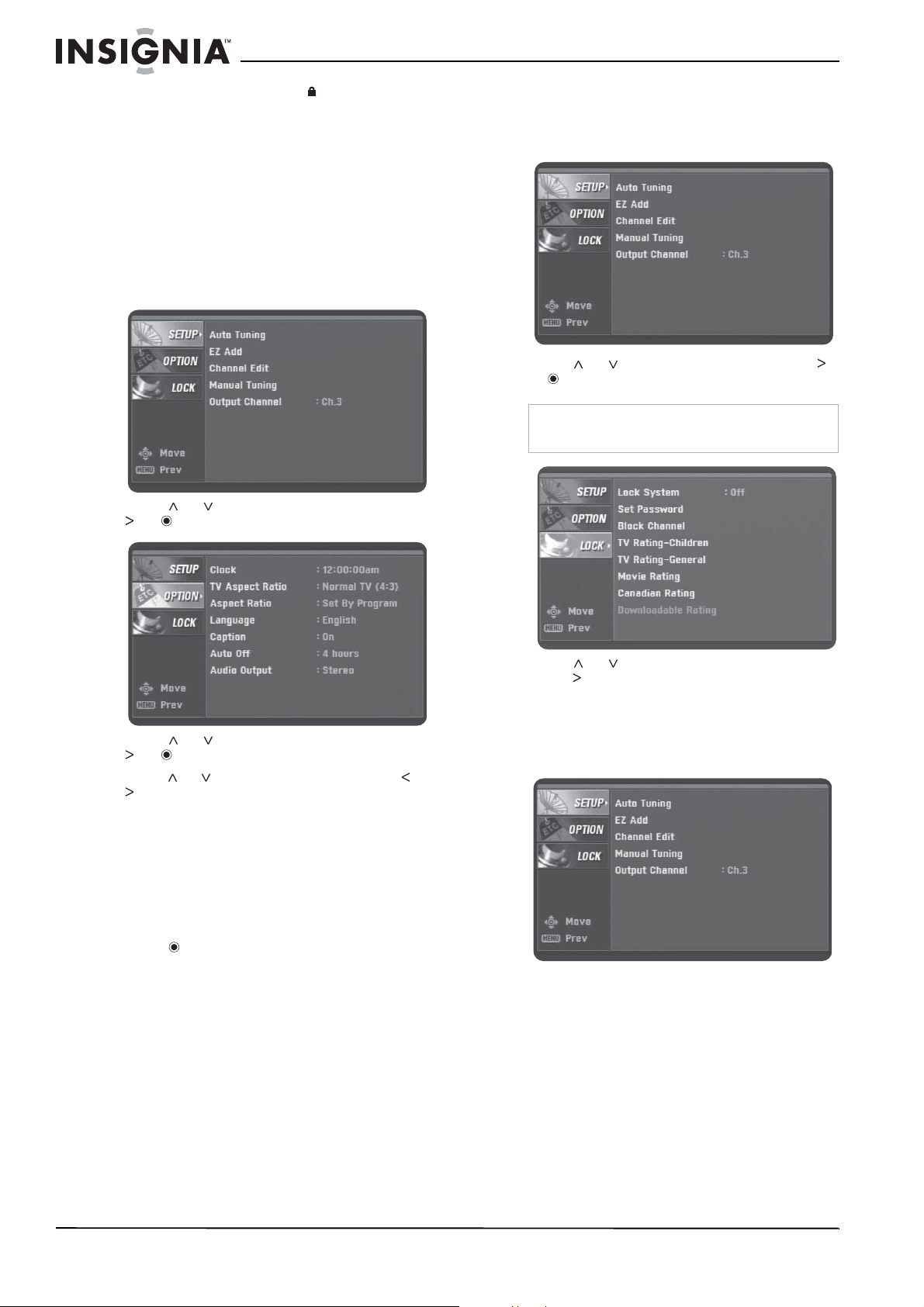
To turn the lock system on or off:
1 Press MENU. The
SETUP
menu opens.
2 Press or to select LOCK, then press
or . The
LOCK
menu opens.
3 Press or to select Lock System, then
press to select On or Off.
Changing the password
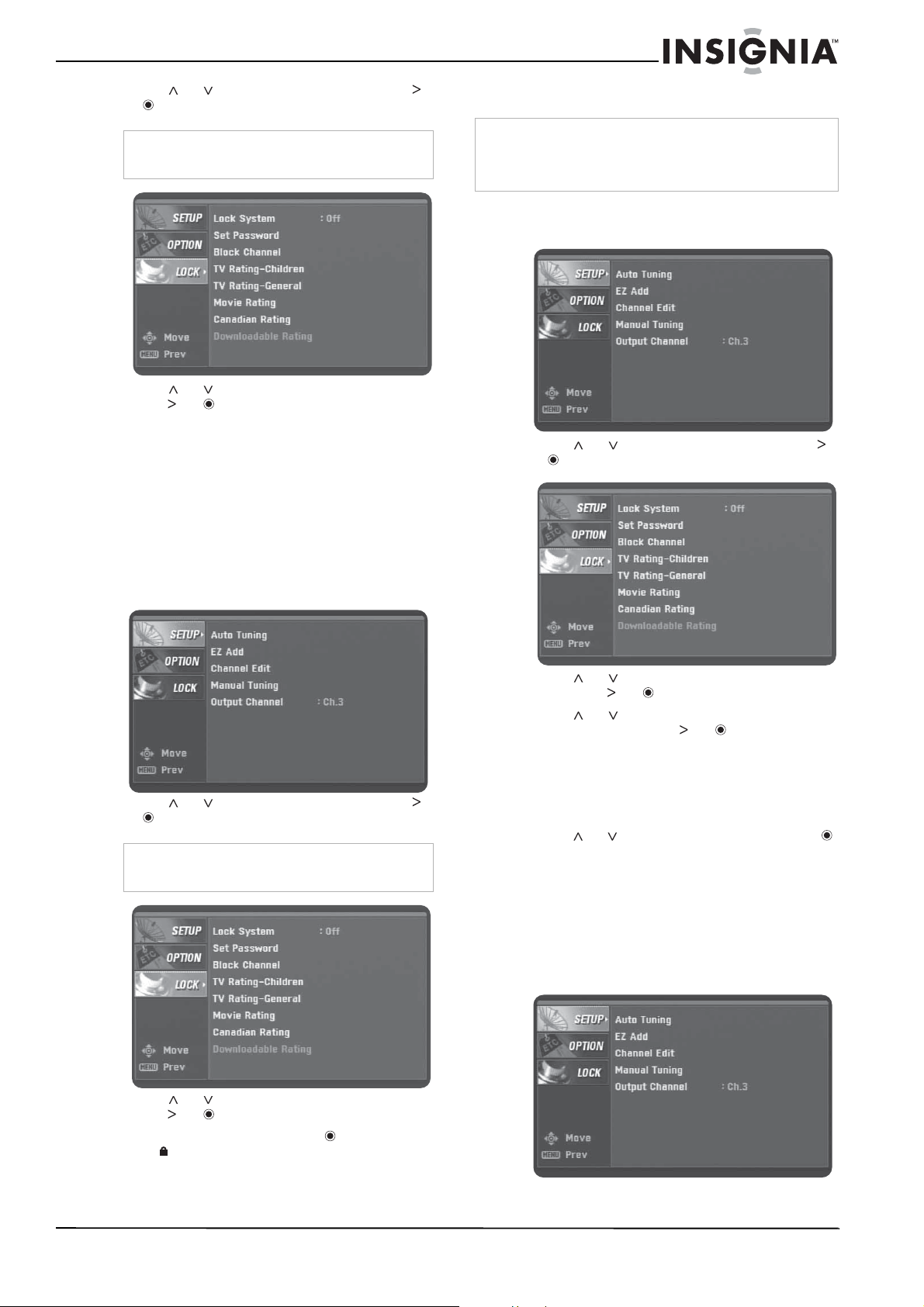
To change the password:
1 Press MENU. The
SETUP
menu opens.
Note
You must enter the password to open the Lock
menu. The default passwrod is 7777.
11
Insignia NS-DXA1 Coupon Eligible Converter Box
www.insignia-products.com
2 Press or to select LOCK, then press
or . The
LOCK
menu opens.
3 Press or to select Set Password, then
press or .
4 Press the number buttons to enter a new
four-digit password, then enter the new
password again.
Blocking channels
You can block channels that you do not want to
view. If you tune to a blocked channel, a blinking
CH BLOCKED banner appears.
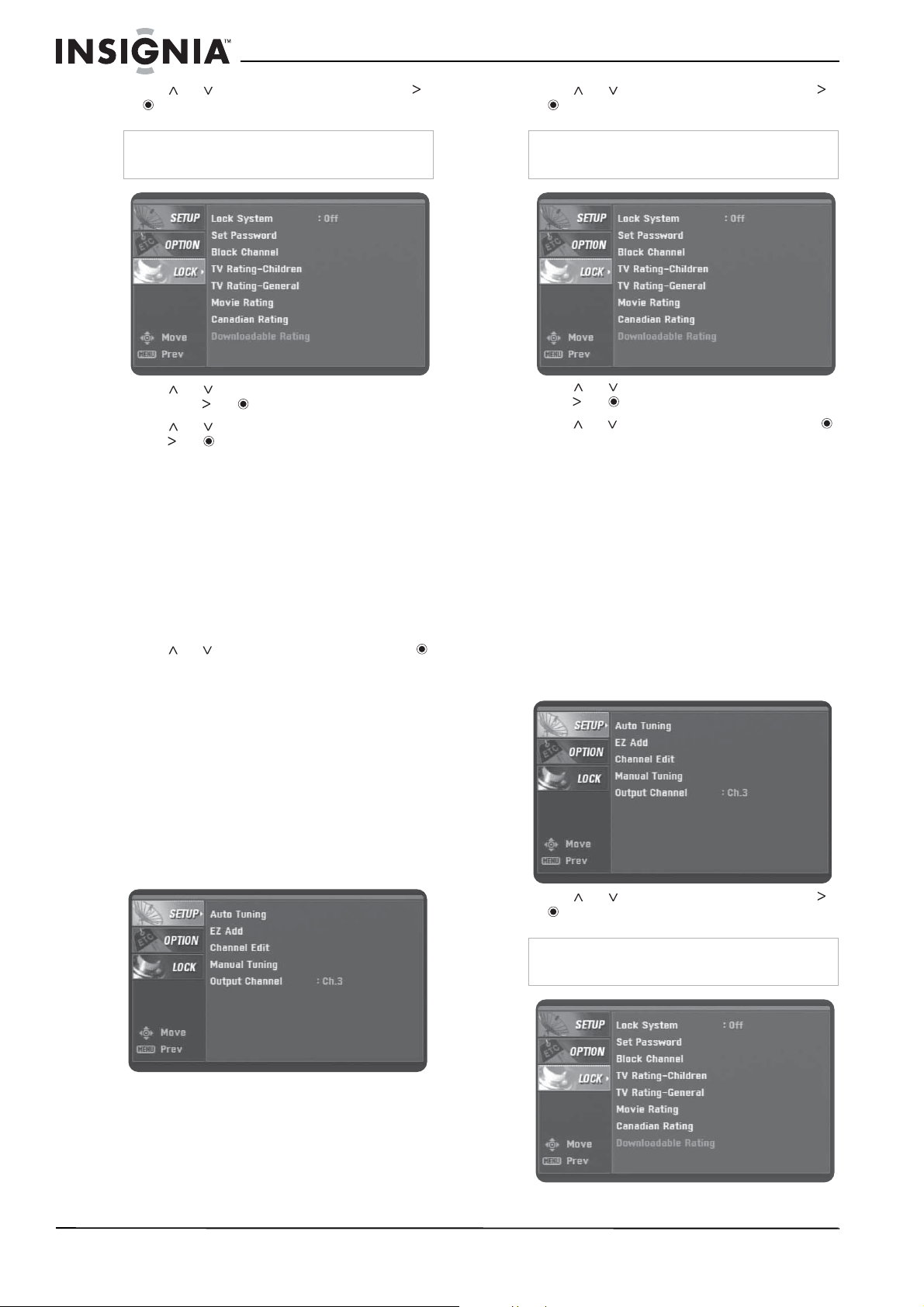
To block channels:
1 Press MENU. The
SETUP
menu opens.
2 Press or to select LOCK, then press
or . The
LOCK
menu opens.
3 Press or to select Block Channel, then
press or .
4 Select a channel, then press . A locked
icon appears next to a blocked channel.
5 Repeat Step 4 to block or unblock additional
channels.
Blocking children’s TV programs
To block children’s TV programs:
1 Press MENU. The
SETUP
menu opens.
2 Press or to select LOCK, then press
or . The
LOCK
menu opens.
3 Press or to select TV Rating-Children,
then press or .
4 Press or to select Age or Fantasy
Violence, then press or .
• Age–Applies regardless of the content
category rating. After you select Age,
select TV-Y or TV-Y7.
• Fantasy Violence–Blocks programs that
have a fantasy violence rating.
5 Press or to select a rating, then press .
TV-Y–Blocks all children’s programs.
TV-Y7–Blocks children’s programs that are
rated TV-Y7 (for children 7 and older).
Blocking general TV programs
To block general TV programs:
1 Press MENU. The
SETUP
menu opens.
Note
You must enter the password to open the Lock
menu. The default passwrod is 7777.
Note
You must enter the password to open the Lock
menu. The default passwrod is 7777.
Note
This option does not block programs intended for more
mature audiences. To block these type programs, you must
use the TV Rating-General option. For more information,
see “Blocking general TV programs” on page 11.
12
Insignia NS-DXA1 Coupon Eligible Converter Box
www.insignia-products.com
2 Press or to select LOCK, then press
or . The
LOCK
menu opens.
3 Press or to select TV Rating-General,
then press or .
4 Press or to select a content rating, then
press or .
• Age–Applies regardless of the content
category rating. After you select Age,
select TV-Y or TV-Y7.
• Dialogue–Blocks programs that have a
suggestive dialog rating.
• Language–Blocks programs that have a
strong language rating.
• Sex–Blocks programs that have a sexual
content rating.
• Violence–Blocks programs that have a
violence content rating.
5 Press or to select a rating, then press .
• TV-G–Blocks programs rated TV-G
(general audiences).
• TV-PG–Blocks programs rated TV-PG
(parental guidance suggested).
• TV-14–Blocks programs rated TV-14
(parental guidance strongly suggested).
• TV-MA–Blocks programs rated TV-MA
(mature audiences only).
Blocking movies
To block movies:
1 Press MENU. The
SETUP
menu opens.
2 Press or to select LOCK, then press
or . The
LOCK
menu opens.
3 Press or to select Movie Rating, then
press or .
4 Press or to select a rating, then press .
• G–General audiences. All ages admitted.
• PG–Parental guidance suggested. May
not be suitable for children.
• PG-13–Parental guidance strongly
suggested. May not be suitable for
children under 13.
• R–Parental guidance suggested for
children under 17.
• NC-17–Not suitable for children under 17.
• X–Adults only.
Blocking Canadian programs
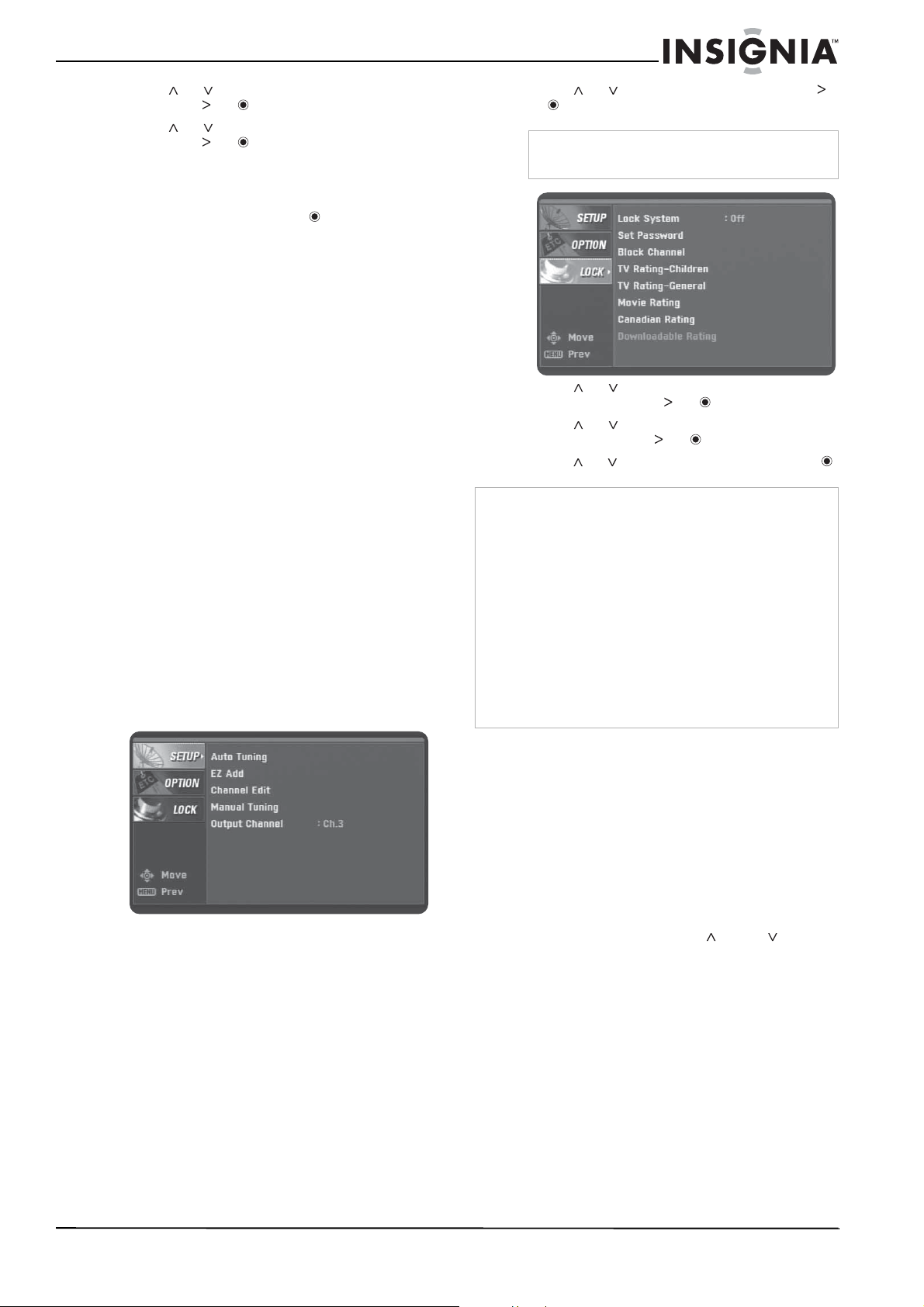
To block Canadian programs:
1 Press MENU. The
SETUP
menu opens.
2 Press or to select LOCK, then press
or . The
LOCK
menu opens.
Note
You must enter the password to open the Lock
menu. The default passwrod is 7777.
Note
You must enter the password to open the Lock
menu. The default passwrod is 7777.
Note
You must enter the password to open the Lock
menu. The default passwrod is 7777.
13
Insignia NS-DXA1 Coupon Eligible Converter Box
www.insignia-products.com
3 Press or to select Canadian Rating,
then press or .
4 Press or to select English or French,
then press or .
5 Select English for Canadian programs that
have English ratings. Select French for
Canadian programs that have French ratings.
6 Select a rating, then press .
For English ratings:
• C–Programs intended for children under
8.
• C8+–Programs generally considered
acceptable for children 8 and over.
• G–General audience.
• PG–Parental guidance.
• 14+–Programs that contains themes or
content which may not be suitable for
viewers under 14.
• 18+–Adult program.
For French ratings:
• G–General programs intended for
audience of all ages.
• 8 ans+–Not recommended for young
children.
• 13 ans+–Programs may not be suitable
for children under 13.
• 16 ans+– Programs not suitable for
children under the age of 16.
• 18 ans+–Programs restricted to adults.
Downloading rating information
You can update rating information if the station
downloadable rating information.
To download rating information:
1 Press MENU. The
SETUP
menu opens.
2 Press or to select LOCK, then press
or . The
LOCK
menu opens.
3 Press or to select Downloadable
Rating, then press or .
4 Press or to select a rating title or TV
rating, then press or .
5 Press or to select a rating, then press .
Programming the remote control
You can control the power button on the TV with
the supplied remote control. To do this, you
need to program the remote control.
To program the remote control:
1 Determine if the TV is a model that can be
controlled by the remote control. See
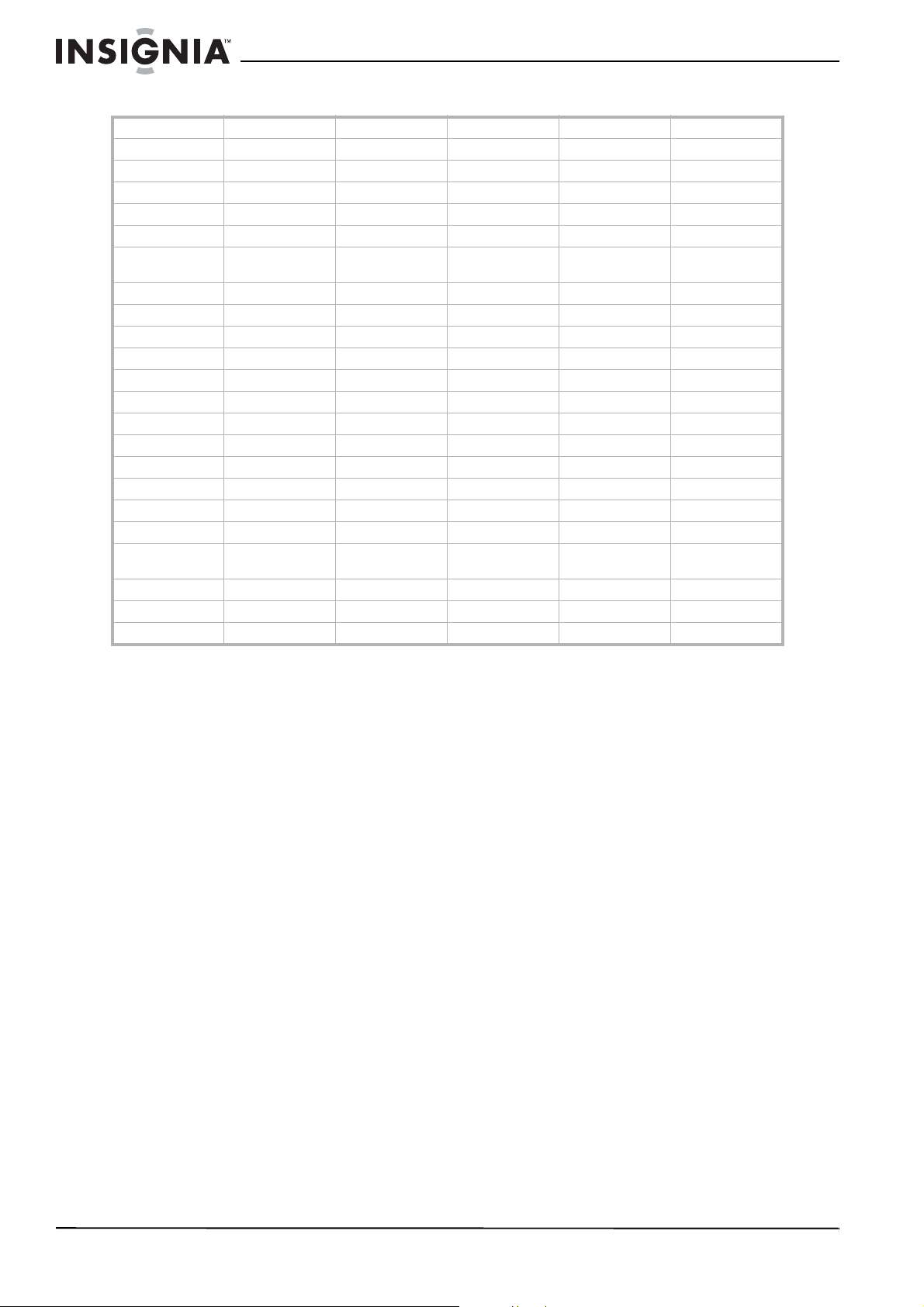
“Controllable TV brands” on page 14.
2 Turn on the TV.
3 While you press and hold TV POWER on the
remote control, press CH or CH one or
more times until the TV turns off. Each time
you press one of these buttons, the remote
control sends a manufacturer code (between
1 and 45) to the TV.
Note
You must enter the password to open the Lock
menu. The default passwrod is 7777.
Note
If information is not downloaded from the TV station, the
Downloadable Rating option is not available.
Rating information is automatically downloaded while
watching DTV channels. It may take several seconds.
The Downloadable Rating option is available for use after
rating information is downloaded from the TV station.
However, depending on the information from the TV station,
it may not be available for use.
Rating levels differ depending on the broadcasting station.
The default option name and Downloadable Rating changes
depending on the downloaded information.
The on-screen display for Downloadable Rating options
appear in the language that the TV station sends.
The rating titles (for example Humor) and TV ratings (for
example MH, H, or VH) may differ depending on the TV
station.
14
Insignia NS-DXA1 Coupon Eligible Converter Box
www.insignia-products.com
Controllable TV brands
Abex Carver Harvard Masushita Portland Supreme
Admiral Celebrity Havermy Megatron Prima SVA
Advent Celera Hello Kitty Memorex Prism Sylvania
Aiko Changhong Himitsy MGA Proscan Symphonic
Akai Citizen Hisense Midland Proton Tandy
America Action Clarion Hitachi Mitsubishi Quasar Tatung
Anam Contec Infinity Motorola Radio
Shack
Technics
Anam National Durabrand Insignia MTC RCA Techwood
AOC Electroband JBL Multitech Realistic Teknika
Apex Digital Elektra JCB NAD Runco Thomas
Audiovox Emerson Jensen NEC Sampo TMK
Baysonic Envision JVC Nikko Samsung Toshiba
Bell&Howell Fisher KEC Norcent Samsux Totevision
Crown Funai Kenwood NTC Sansui TVS
Curtis Mathes Futuretech KLH Onwa Sanyo Vector Research
CXC GE KTV Optimus Scotch Victor
Daewoo Gibralter LG Orion Scott Vidikron
Craig GoldStar Lloyd's Panasonic Sears Vidtech
Crosley Grunpy LXI Penney Sharp Wards
Bradford Haier Magnasonic Philco Sheng Chia White
Westinghouse
Broksonic Hallmark Magnavox Philips Simpson Yamaha
Candle Harley Davidson Magnin Pilot Sony Zenith
Carnivale Harman/Kardon Marantz Poptonica Soundesign
15
Insignia NS-DXA1 Coupon Eligible Converter Box
www.insignia-products.com
Troubleshooting
Specifications
Design and specifications are subject to change
without prior notice.
General
Input/output
Accessories
RF cable (1)
Video cable (1)
Audio (L/R) cable (1)
Remote control (1)
Battery (size AAA) (1)
Quick Start Guide (1)
User Guide(1)
Legal notices
FCC warning
This equipment may generate or use radio frequency
energy. Changes or modifications to this equipment may
cause harmful interference unless the modifications are
expressly approved in the instruction manual. The user could
lose the authority to operate this equipment if an
unauthorized change or modification is made.
FCC Part 15
This equipment has been tested and found to comply with
the limits for a Class B digital device, pursuant to Part 15 of
the FCC Rules. These limits are designed to provide
reasonable protection against harmful interference when the
product is operated in a residential installation. This product
generates, uses, and can radiate radio frequency energy
and, if not installed and used in accordance with the
instruction manual, may cause harmful interference to radio
communications. However, there is no guarantee that
interference will not occur in a particular installation. If this
product does cause harmful interference to radio or
television reception, which can be determined by turning the
product off and on, the user is encouraged to try to correct
the interference by one or more of the following measures:
• Reorient or relocate the receiving antenna.
• Increase the separation between the product and
• receiver.
• Connect the product into an outlet on a circuit different
• from that to which the receiver is connected.
• Consult the dealer or an experienced radio/TV
technician
• for help.
Energy Star
®
As an Energy Star Partner, Insignia has determined that his
product or product models meet the Energy Star guidelines
for energy efficiency.
Problem Solution
No power. • Make sure that the power cord is
plugged securely into a power outlet.
Fragmented picture
and unclear sound.
• Check your antenna input, location,
and signal strength.
No picture. • Select the Auto Tuning or Manual
Scan functions, if you have not
already done so.
• Make sure that all the cables are
installed correctly and that the
correct source is selected on your TV
(for example, CH 3, CH 4, Video 1, or
Video 2).
• The antenna signal strength may be
low. Check the signal strength and
adjust the antenna location and
direction.
For more information about connections,
see “Connecting an antenna” on page 4.
Normal picture but
no sound.
• Check volume levels.
• Make sure that the TV sound is not
muted.
• Make sure that the your converter
box is connected correctly.
Picture is distorted. • Make sure that the correct aspect
ratio is selected.
• Make sure that the video output is
connected to the TV.
Available channels
are missing.
• You can find all the available
channels by running the Auto Tuning
or EZ Add in the on-screen menu
system.
• Adjust the antenna.
• Check the antenna’s signal strength.
You forgot your
password.
Enter the master password 7777.
The remote control
does not work
correctly.
• Point the remote control at the
remote sensor on your converter
box.
• Operate the remote control within 23
feet (7 meters) of the remote sensor.
• Remove any obstacles between the
remote control and the remote
sensor.
• Replace dead batteries with new
ones.
Television system DTV standard ATSC
Channel coverage Terrestrial 2-69
Dimensions (W × H × D) Approximately 8.5 × 1.8 × 6.4 inches
(215 × 46 × 162 mm)
Net weight Approximately 1.65 lbs. (0.75 kg)
Operating temperature 41°F to 104°F (5°C to 40°C)
Operating humidity 5% to 90%
Power requirement 120V 60 Hz AC
Power consumption 7 W
Antenna in
(From Antenna)
Antenna input, ATSC, 75 Ohms
Antenna out (To TV (RF)) Antenna output, 75 Ohms, RF output
channel 3 or 4 (switchable)
Video output 1.0 V (p-p), 75 Ohms, negative sync,
RCA jack (1)
Audio output 2.0 Vrms (1 KHz, 0 dB), 600 Ohms,
RCA jack (L, R) (1)
Warning
Do not attempt to modify your converter box in any way
without written authorization from Insignia. Unauthorized
modification could void the user’s authority to operate this
products.
Your converter box is intended to receive and decode
signals transmitted according to the ATSC Digital Television
Standard A/53 specification and is intended to be used with
an appropriate antenna and display device that you must
provide.

16
Insignia NS-DXA1 Coupon Eligible Converter Box
www.insignia-products.com

17
Insignia NS-DXA1 Coupon Eligible Converter Box
www.insignia-products.com
90-day limited warranty
Insignia Products (“Insignia”) warrants to you, the original
purchaser of this new NS-DXA1 (“Product”), that the Product
shall be free of defects in the original manufacture of the
material or workmanship for a period of 90 days from the
date of your purchase of the Product (“Warranty Period”).
This Product must be purchased from an authorized dealer
of Insignia brand products and packaged with this warranty
statement. This warranty does not cover refurbished
Product. If you notify Insignia during the Warranty Period of a
defect covered by this warranty that requires service, terms
of this warranty apply.
How long does the coverage last?
The Warranty Period lasts for 90 days from the date you
purchased the Product. The purchase date is printed on the
receipt you received with the Product.
What does this warranty cover?
During the Warranty Period, if the original manufacture of the
material or workmanship of the Product is determined to be
defective by an authorized Insignia repair center or store
personnel, Insignia will (at its sole option): (1) repair the
Product with new or rebuilt parts; or (2) replace the Product
at no charge with new or rebuilt comparable products or
parts. Products and parts replaced under this warranty
become the property of Insignia and are not returned to you.
If service of Products or parts are required after the Warranty
Period expires, you must pay all labor and parts charges.
This warranty lasts as long as you own your Insignia Product
during the Warranty Period. Warranty coverage terminates if
you sell or otherwise transfer the Product.
How to obtain warranty service?
If you purchased the Product at a retail store location, take
your original receipt and the Product to the store you
purchased it from. Make sure that you place the Product in
its original packaging or packaging that provides the same
amount of protection as the original packaging. If you
purchased the Product from an online web site, mail your
original receipt and the Product to the address listed on the
web site. Make sure that you put the Product in its original
packaging or packaging that provides the same amount of
protection as the original packaging.
To obtain in-home warranty service for a television with a
screen 25 inches or larger, call 1-888-BESTBUY. Call agents
will diagnose and correct the issue over the phone or will
have an Insignia-approved repair person dispatched to your
home.
Where is the warranty valid?
This warranty is valid only to the original purchaser of the
product in the United States and Canada.
What does the warranty not cover?
This warranty does not cover:
• Customer instruction
• Installation
• Set up adjustments
• Cosmetic damage
• Damage due to acts of God, such as lightning strikes
• Accident
•Misuse
• Abuse
• Negligence
• Commercial use
• Modification of any part of the Product, including the
antenna
• Plasma display panel damaged by static (non-moving)
images applied for lengthy periods (burn-in).
This warranty also does not cover:
• Damage due to incorrect operation or maintenance
• Connection to an incorrect voltage supply
• Attempted repair by anyone other than a facility
authorized by Insignia to service the Product
• Products sold as is or with all faults
• Consumables, such as fuses or batteries
• Products where the factory applied serial number has
been altered or removed
REPAIR REPLACEMENT AS PROVIDED UNDER THIS
WARRANTY IS YOUR EXCLUSIVE REMEDY. INSIGNIA
SHALL NOT BE LIABLE FOR ANY INCIDENTAL OR
CONSEQUENTIAL DAMAGES FOR THE BREACH OF ANY
EXPRESS OR IMPLIED WARRANTY ON THIS PRODUCT,
INCLUDING, BUT NOT LIMITED TO, LOST DATA, LOSS
OF USE OF YOUR PRODUCT, LOST BUSINESS OR LOST
PROFITS. INSIGNIA PRODUCTS MAKES NO OTHER
EXPRESS WARRANTIES WITH RESPECT TO THE
PRODUCT, ALL EXPRESS AND IMPLIED WARRANTIES
FOR THE PRODUCT, INCLUDING, BUT NOT LIMITED TO,
ANY IMPLIED WARRANTIES OF AND CONDITIONS OF
MERCHANTABILITY AND FITNESS FOR A PARTICULAR
PURPOSE, ARE LIMITED IN DURATION TO THE
WARRANTY PERIOD SET FORTH ABOVE AND NO
WARRANTIES, WHETHER EXPRESS OR IMPLIED, WILL
APPLY AFTER THE WARRANTY PERIOD. SOME
STATES, PROVINCES AND JURISDICTIONS DO NOT
ALLOW LIMITATIONS ON HOW LONG AN IMPLIED
WARRANTY LASTS, SO THE ABOVE LIMITATION MAY
NOT APPLY TO YOU. THIS WARRANTY GIVES YOU
SPECIFIC LEGAL RIGHTS, AND YOU MAY ALSO HAVE
OTHER RIGHTS, WHICH VARY FROM STATE TO STATE
OR PROVINCE TO PROVINCE.
Contact Insignia:
For customer service please call 1-877-467-4289
www.insignia-products.com
INSIGNIA™ is a trademark of Best Buy Enterprise Services,
Inc.
Distributed by Best Buy Purchasing, LLC.
Insignia, 7601 Penn Avenue South, Richfield, Minnesota,
U.S.A.

18
Insignia NS-DXA1 Coupon Eligible Converter Box
www.insignia-products.com
19
Insignia NS-DXA1 Caja convertidora con cupón
www.insignia-products.com
Insignia NS-DXA1
Caja convertidora
con cupón
Contenido
Bienvenido . . . . . . . . . . . . . . . . . . . . . . . . . . . . . .19
Información de seguridad . . . . . . . . . . . . . . . . . .19
Introducción a la TV digital. . . . . . . . . . . . . . . . . .20
Características. . . . . . . . . . . . . . . . . . . . . . . . . . .20
Vista frontal . . . . . . . . . . . . . . . . . . . . . . . . . . . . . . 20
Vista posterior . . . . . . . . . . . . . . . . . . . . . . . . . . . . 21
Control remoto . . . . . . . . . . . . . . . . . . . . . . . . . . . . 21
Instalación de su caja convertidora . . . . . . . . . . .22
Conexión de una antena . . . . . . . . . . . . . . . . . . . . 22
Configuración de las opciones básicas . . . . . . . . . 22
Uso de su caja convertidora . . . . . . . . . . . . . . . .23
Encendiendo y apagando su caja convertidora . . . 23
Configuración del canal de salida . . . . . . . . . . . . . 23
Cambio de canales. . . . . . . . . . . . . . . . . . . . . . . . . 24
Ajuste el volumen . . . . . . . . . . . . . . . . . . . . . . . . . . 24
Búsqueda de canales. . . . . . . . . . . . . . . . . . . . . . . 24
Agregando nuevos canales a la lista de canales . . 24
Editando la lista de canales memorizados. . . . . . . 25
Creación de una lista de favoritos . . . . . . . . . . . . . 25
Agregando canales favoritos manualmente . . . . . . 25
Uso del sistema de menú de pantalla . . . . . . . . . . 25
Selección del tipo de televisor . . . . . . . . . . . . . . . . 27
Selección de la relación de aspecto de un programa de
TV . . . . . . . . . . . . . . . . . . . . . . . . . . . . . . . . . . . . 27
Ajuste del temporizador de apagado automático . . 27
Mostrando el titular de canal . . . . . . . . . . . . . . . . . 28
Uso de la guía sencilla . . . . . . . . . . . . . . . . . . . . . . 28
Viendo la información sobre la programación de TV28
Control de los subtítulos optativos . . . . . . . . . . . . . 29
Activación y desactivación del sistema de bloqueo 29
Cambio de la contraseña . . . . . . . . . . . . . . . . . . . . 30
Bloqueo de canales . . . . . . . . . . . . . . . . . . . . . . . . 30
Bloqueo de programas de TV para niños. . . . . . . . 30
Bloqueo de programas de TV general . . . . . . . . . . 31
Bloqueo de películas . . . . . . . . . . . . . . . . . . . . . . . 32
Descargando información de clasificaciones . . . . . 33
Programación del control remoto . . . . . . . . . . . . . . 33
Localización y corrección de fallas . . . . . . . . . . .35
Especificaciones . . . . . . . . . . . . . . . . . . . . . . . . .35
Avisos legales . . . . . . . . . . . . . . . . . . . . . . . . . . .36
Garantía limitada de 90 días . . . . . . . . . . . . . . . .37
Bienvenido
Felicitaciones por su compra de un producto de
alta calidad de Insignia. Su NS-DXA1
representa el más moderno diseño de caja
convertidora con cupón y está concebida para
brindar un rendimiento confiable y sin
problemas.
Información de seguridad
La figura de relámpago que termina en
punta de flecha dentro de un triángulo
tiene por finalidad alertarle de la
presencia de voltaje peligroso sin
aislamiento en el interior de su caja convertidora
que podría tener potencia suficiente para
constituir riesgo de choque eléctrico para las
personas.
El signo de admiración dentro de un
triángulo tiene por finalidad alertarle
de la presencia de instrucciones
importantes de operación y
mantenimiento (servicio) en la literatura que se
incluye con su caja convertidora.
CUIDADO
RIESGO DE CHOQUE ELÉCTRICO
NO ABRIR
CUIDADO: PARA REDUCIR EL RIESGO DE CHOQUE ELÉCTRICO, NO
RETIRE LA CUBIERTA (O PARTE POSTERIOR). NO HAY PARTES
REPARABLES POR EL USUARIO AL INTERIOR DEL EQUIPO. LAS
REPARACIONES DEBEN REALIZARSE POR PERSONAL DE SERVICIO
CALIFICADO.
Advertencia
Para reducir el riesgo de incendio o choque eléctrico, no se
debe exponer su caja convertidora a la lluvia o humedad.
Advertencia
No instale su caja convertidora en un espacio encerrado tal
como un librero o una unidad similar.
Advertencia
No bloquee ninguna abertura de ventilación. Instale de acuerdo
a las instrucciones del fabricante. Ranuras y aberturas en el
gabinete se proveen para ventilación, para asegurar la operación
confiable de su caja convertidora y para protegerla contra el
sobrecalentamiento.
Las aberturas nunca se deben bloquear al colocar su caja
convertidora sobre una cama, un sofá, una alfombra u otra
superficie similar. Su caja convertidora no deberá ser colocada
en una instalación empotrada tal como un librero o un estante a
menos que se provea una ventilación adecuada o si se han
seguido las instrucciones del fabricante.
Cuidado
Su caja convertidora no debe de ser expuesta al agua (goteo o
salpicaduras) y ningún objeto lleno de líquido, como por
ejemplo vasijas, deberá ser colocado sobre la unidad.
Advertencia sobre el cable de alimentación
Se recomienda que la mayoría de electrodomésticos se
conecten en un circuito dedicado — un circuito con un
tomacorriente individual que alimenta solo ese
electrodoméstico y no tiene otro tomacorriente o ramas de
circuito.
Los tomacorrientes sobrecargados, los cables de extensión
flojos o dañados, los cables de alimentación pelados o
aislamientos de cables que se hayan dañado o rajado son
peligrosos. Cualquiera de estas condiciones puede causar un
choque eléctrico o un incendio. Examine periódicamente el
cable de su caja convertidora y si su aspecto indica que ha
sufrido daño o deterioro, desenchúfelo, deje de usar su caja
convertidora y solicite a un centro de servicio autorizado que
cambien el cable por una pieza de repuesto exacta.
Proteja el cable de alimentación de abusos físicos o mecánicos
como cuando se retuerce, se enrosca, se pellizca, se aplasta al
cerrar una puerta o se le pisa. Preste especial atención a los
enchufes, tomacorrientes y al lugar por donde el cable sale de
su caja convertidora.
Para desconectar la alimentación principal de su caja
convertidora, desenchufe el cable de alimentación del
tomacorriente de pared. Cuando instale su caja convertidora,
verifique que el enchufe se puede acceder fácilmente.
20
Insignia NS-DXA1 Caja convertidora con cupón
www.insignia-products.com
Instrucciones importantes
de seguridad
1 Lea estas instrucciones.
2 Conserve estas instrucciones.
3 Preste atención a todas las advertencias.
4 Siga todas las instrucciones.
5 No use su caja convertidora cerca del agua.
6 Limpie únicamente con un paño seco.
7 No bloquee ninguna abertura de ventilación.
Instale de acuerdo a las instrucciones del
fabricante.
8 No instale la unidad cerca de fuentes de
calor tales como radiadores, estufas u otros
aparatos (por ejemplo amplificadores) que
produzcan calor.
9 No anule el propósito de seguridad del
enchufe polarizado. Un enchufe polarizado
tiene dos clavijas planas, una más ancha que
la otra. La clavija ancha se proporciona para
su seguridad. Si el enchufe proporcionado no
entra en el tomacorriente, consulte con un
electricista para reemplazar el tomacorriente
obsoleto.
10 Evite caminar sobre el cable de alimentación
o que este sea aplastado especialmente en
los enchufes, los receptáculos y el punto
donde éste sale del aparato.
11 Se deben utilizar únicamente los
aditamentos o accesorios especificados por
el fabricante.
12 Use solamente con carros,
trípodes, plataformas, o mesas
especificadas por el fabricante
o que se vendan con la caja
convertidora. Cuando se usa un
carro, debe tener precaución al
mover la combinación del carro y la caja
convertidora para evitar lesionarse si el
sistema se da vuelta.
13 Desconecte la caja convertidora durante
tormentas de rayos o cuando no se utilice
por un periodo de tiempo extendido.
14 Remita todas las reparaciones a personal de
servicio calificado. La reparación es
necesaria cuando su caja convertidora ha
sido dañada en cualquier manera, como por
ejemplo, cuando se ha dañado el cable de
corriente o el enchufe, o se ha derramado
líquido u objetos han caído dentro de su caja
convertidora, o esta ha sido expuesto a la
lluvia o humedad, o cuando su caja
convertidora no funcione normalmente, o
cuando se ha dejado caer.
Introducción a la TV digital
Una señal de TV digital transmite más
información que una señal analógica. Este
aumento en la información provee una mejor
imagen y un sonido con menos estática e
interferencia.
Los televisores analógicos actuales no pueden
recibir la señal digital. Necesitará una caja
convertidora para convertir la señal digital para
que su televisor analógico pueda mostrar la
imagen y reproducir el sonido.
Subcanales digitales
El aumento en la capacidad de información de
una señal digital permite que las estaciones
transmisoras envíen varios canales en el mismo
ancho de banda de una señal analógica. Las
estaciones transmisoras pueden usar estos
subcanales para transmitir una variedad de
información, tal como pronóstico del tiempo,
idiomas extranjeros, comerciales y cosas así.
Un subcanal digital se indica por el número del
canal principal seguido por un guión y el número
de subcanal. Por ejemplo, 5-1 indica el subcanal
1 del canal principal 5.
Características
Vista frontal
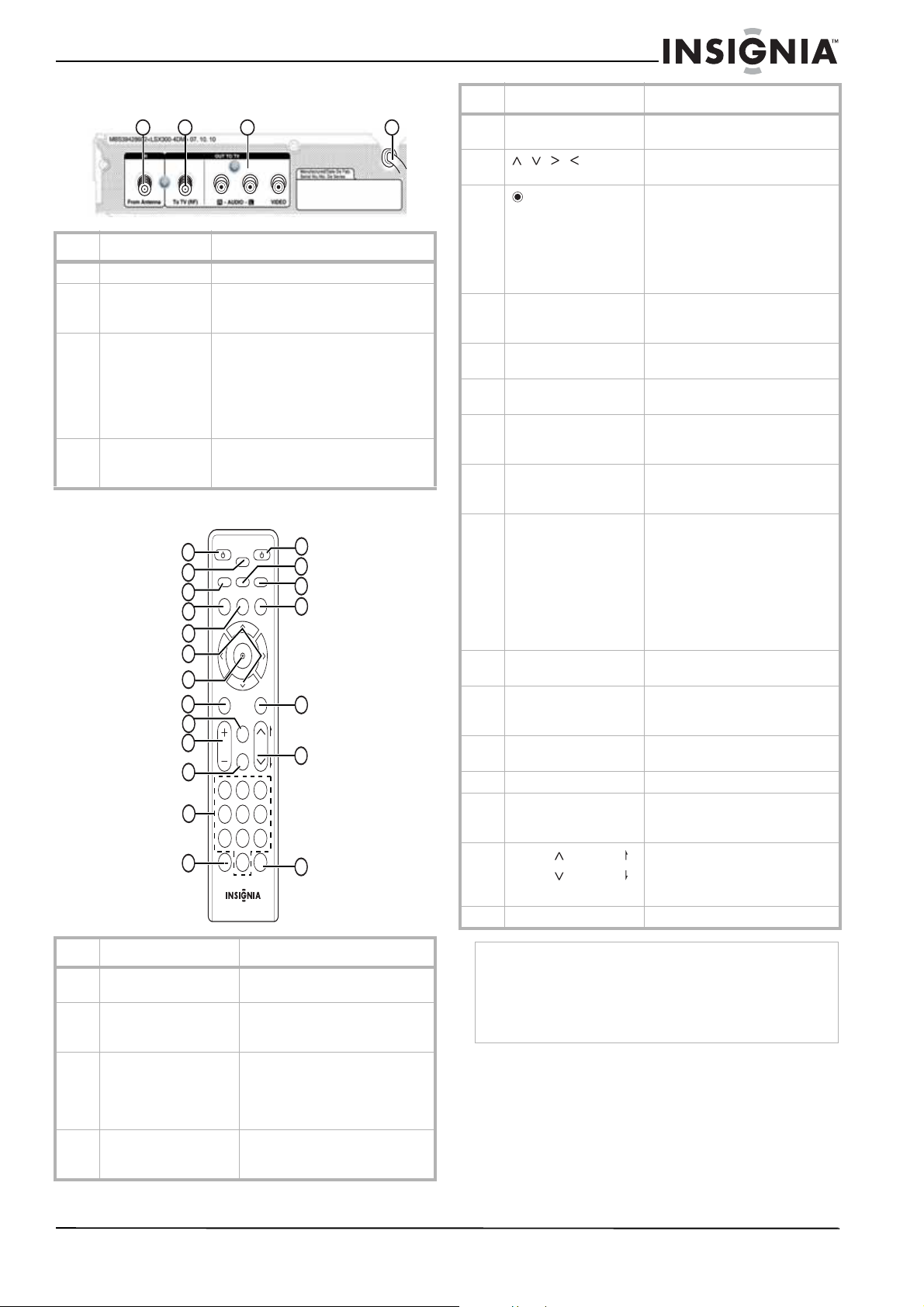
No. Elemento Descripción
1 Indicador de
encendido
Se ilumina cuando su caja convertidora
se encuentra encendida
Rojo – Modo de suspensión
Azul – Modo de encendido
Parpadeando – Recibiendo la señal del
control remoto
2 Sensor del control
remoto
Recibe las señales del control remoto.
No se debe bloquear.
3
/
Permite escanear los canales
memorizados.
4 Encendido Permite encender o apagar su caja
convertidora.
1
2
3
4
21
Insignia NS-DXA1 Caja convertidora con cupón
www.insignia-products.com
Vista posterior
Control remoto
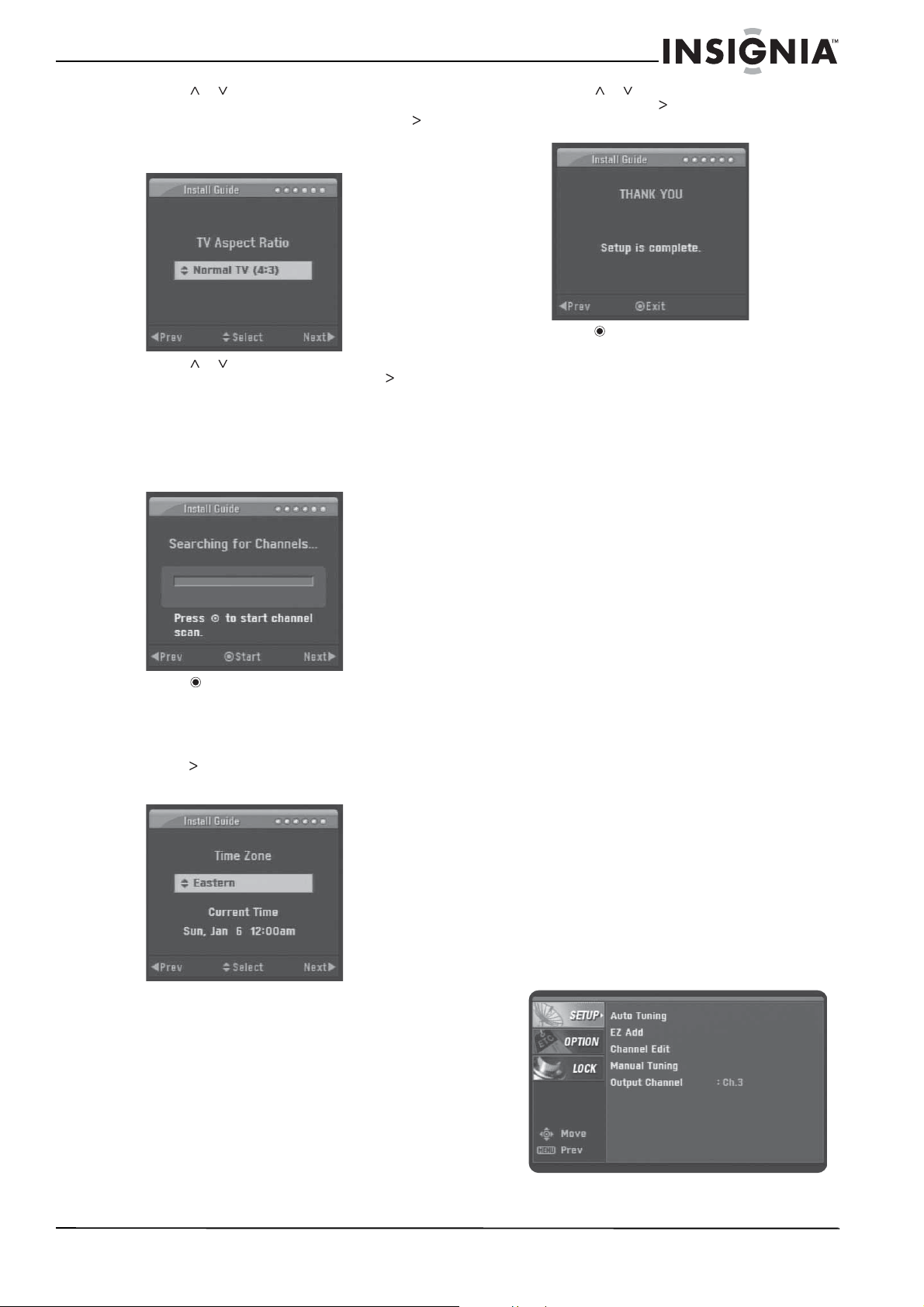
No. Elemento Descripción
1 Desde la antena Conecte esta toma a su antena.
2 Al televisor (RF) Si su televisor no tiene tomas de A/V,
conecte esta toma a la toma de entrada
de antena de su televisor.
3 AUDIO DER.
AUDIO IZQ.
VIDEO
Si su televisor tiene tomas de A/V,
conecte estas tomas a las tomas
correspondientes en su televisor. Estas
tomas proveen el mejor audio y video.
Si su televisor no tiene tomas de A/V,
conecte su televisor a la toma “To TV
(RF)” [Al TV (RF)].
4Cable de
alimentación
Conecte este cable en un
tomacorriente o protector contra
sobretensión.
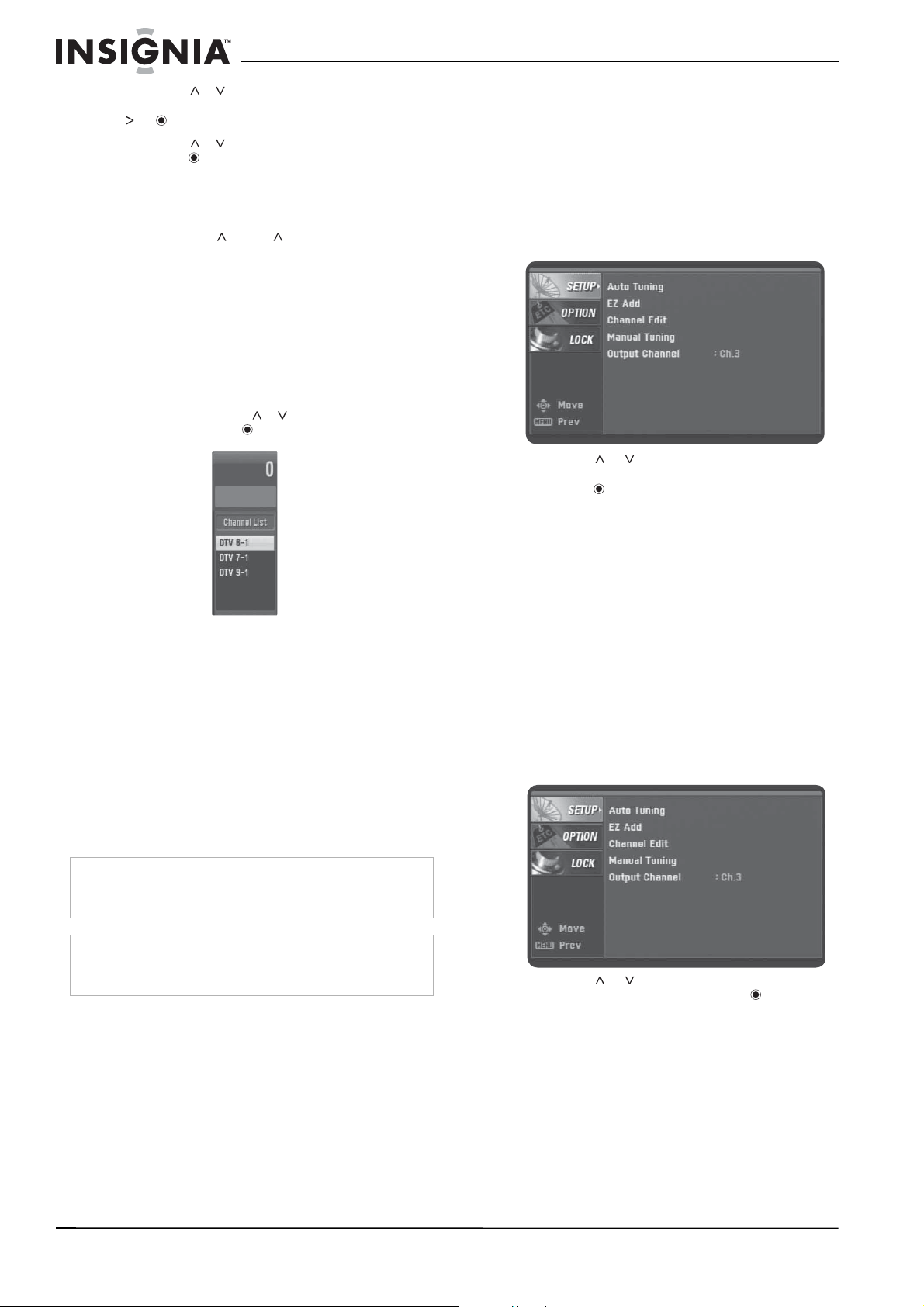
No. Botón Descripción
1 ENCENDER TELEVISOR Permite encender o apagar el
televisor.
2 APAGADO
AUTOMÁTICO
Permite configurar el
temporizador de apagado
automático.
3 SEÑAL Permite ver la intensidad de la
señal del canal actual. También
escuchará una serie de pitidos.
Mientras más rápido suenan los
pitidos, más fuertes es la señal.
4 VISUALIZACIÓN Permite ver la información acerca
del programa en el canal de TV
actual.
1
2
3
4
TV
POWER
POWER
SLEEP
SAP
MENU
MENU
SIGNAL
DISPLAY
EXIT
VOL CH
CCD
FAV
P
A
G
E
MUTE
ZOOM
GUIDE
1 2 3
4 5 6
7 8 9
0
RECALL
1
2
3
4
5
6
7
8
9
10
14
15
16
17
18
20
19
12
13
11
5 MENÚ Permite mostrar u ocultar el
menú de pantalla.
6 Permite resaltar opciones en un
menú.
7
(Seleccionar)
Presione este botón después de
ingresar un número de canal con
los botones numéricos para
sintonizar el canal
inmediatamente.
En los menús de pantalla, permite
seleccionar una opción resaltada.
8 SALIR Permite ocultar cualquier
visualización de pantalla y
retornar a la vista normal de TV.
9 FAV Permite seleccionar un canal de la
lista de favoritos.
10 VOL+ / VOL– Permiten subir o bajar el
volumen.
11 SILENCIAR Permite desactivar el sonido.
Presione el botón de nuevo para
restaurar el sonido.
12 Números Permite ingresar un número de
canal o una contraseña de control
de los padres.
13 — Permite ingresar un número de
subcanal. Por ejemplo, para
ingresar el subcanal 1 del canal
principal 2, presione 2, presione
este botón y luego presione 1.
Para obtener más información
sobre los subcanales, refiérase a
“Subcanales digitales” en la
página 20.
14 ENCENDIDO Permite encender o apagar su
caja convertidora.
15 SAP Permite seleccionar el programa
de audio secundario (SAP) del
programa de TV actual.
16 AMPLIAR Permite seleccionar la relación de
aspecto.
17 GUÍA Permite mostrar la guía sencilla.
18 SUBTÍTULOS
OPTATIVOS
Permite seleccionar un modo de
subtítulos optativos, si está
disponible.
19
CANAL / PÁGINA
CANAL / PÁGINA
Permite ir al siguiente canal o al
anterior o permite ir a la siguiente
página o a la anterior en el menú
de Editar Canal o Bloquear Canal.
20 REGRESAR Permite ir al último canal visto.
Nota
Si usa un control remoto universal, puede usarlo para
controlar su caja convertidora.
Para programar el control remoto universal para controlar
su caja convertidora, configure el modo de operación del
control remoto a Caja de TV por cable y luego configure su
control remoto con el código de fabricante para LG o Zenith.
No. Botón Descripción

22
Insignia NS-DXA1 Caja convertidora con cupón
www.insignia-products.com
Instalación la pila del control remoto
Para instalar la pila del control remoto:
1 Remueva la cubierta del compartimiento de
pilas en la parte posterior del control remoto.
2 Inserte una pila AAA en el compartimiento de
la pila. Asegúrese de que la polaridad + y –
de la pila coincide con la polaridad + y – en el
compartimiento de la pila.
3 Vuelva a colocar la cubierta del
compartimiento de la pila.
Instalación de su caja
convertidora
Conexión de una antena
Para conectar su caja convertidora a una
antena:
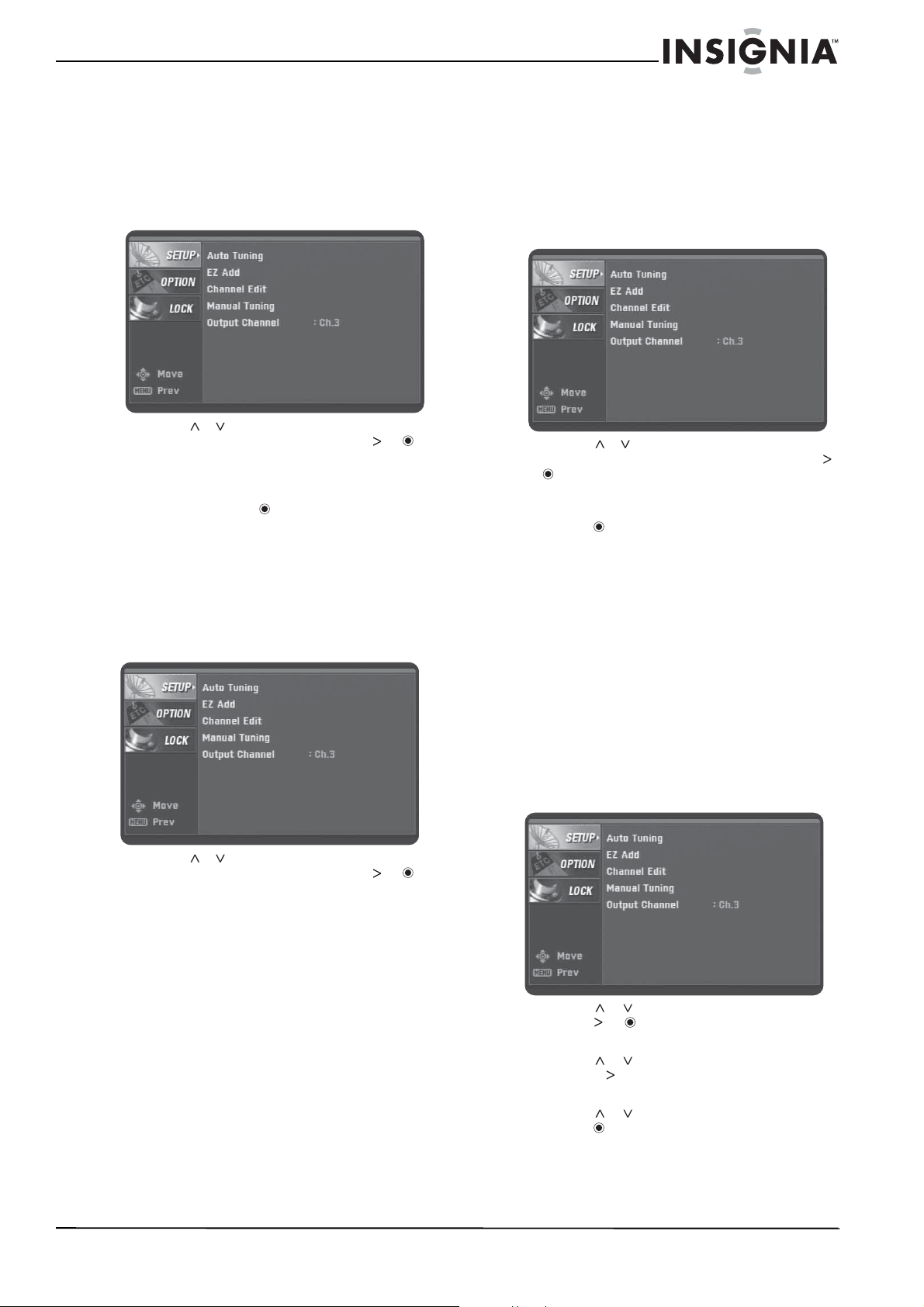
1 Use un cable coaxial para conectar la toma
From Antenna (Desde la antena) en la parte
posterior de su caja convertidora a la toma
de la antena.
2 Use un cable de A/V para conectar las tomas
de R AUDIO (Audio Der.), L AUDIO (Audio
Izq.) y VIDEO en la parte posterior de su caja
convertidora a las tomas correspondientes
en la parte posterior del televisor. Esta
conexión provee la mejor imagen y el mejor
sonido.
O
Use un cable coaxial para conectar la toma
To TV (RF) [Al televisor (RF)] en la parte
posterior de la caja convertidora a la toma
Antenna IN (Entrada de antena) en la parte
posterior del televisor. Para el mejor
rendimiento con esta conexión, cambie la
opción Audio Output (Salida de audio) en el
Menú de opciones a Mono (Monofónico).
Para obtener más información, refiérase a
“Menú de opciones (OPTION)” en la página
26.
3 Enchufe el cable de alimentación en un
tomacorriente o un supresor de
sobretensiones.
Configuración de las opciones básicas
Cuando enciende su caja convertidora por
primera vez, se muestra la guía de instalación
donde puede:
• Seleccionar el idioma del menú
• Seleccionar la relación de aspecto del
televisor
• Escanear y memorizar canales
• Seleccionar la zona horaria
Para ajustar las opciones básicas:
1 Encienda su caja convertidora. Se muestra la
pantalla
WELCOME
(Bienvenido).
2 Presione . Se muestra la pantalla
Menu
Language
(Idioma del menú).
Nota
Si necesita información sobre el tipo de antena que deberá
usar en su área, visite www.antennaweb.org en el Internet.
ANTENNA
INPUT
Desde la antena
Al televisor (RF)
AUDIO DER. /
AUDIO IZQ.
VIDEO
O
Parte posterior del televisor
Parte posterior de la caja convertidora
Nota
Si conectó el televisor a la toma “To TV (RF)”, el televisor
deberá estar sintonizado al canal 3. De otra forma, no podrá
ver la imagen.
23
Insignia NS-DXA1 Caja convertidora con cupón
www.insignia-products.com
3 Presione o para seleccionar el idioma
del menú (English (inglés), Spanish
(español) o French [francés]), y presione .
Se muestra la pantalla
TV Aspect Ratio
(Relación de aspecto del televisor).
4 Presione
o para seleccionar la relación
de aspecto de su televisor y presione . Se
muestra la pantalla
Searching for Channels
(Búsqueda de canales). Si el televisor tiene
un tamaño de pantalla estándar (normal),
seleccione Normal TV. Si el televisor tiene
una pantalla panorámica, seleccione Wide
TV.
5 Presione para iniciar la búsqueda de
canales. Su caja convertidora busca los
canales disponibles en su área y los guarda
en la memoria.
6 Cuando se termina la búsqueda de canales,
presione . Se muestra la pantalla
Time
Zone
(Zona horaria).
7 Presione
o para seleccionar su zona
horaria y presione . Se muestra la pantalla
THANK YOU
(Gracias).
8 Presione para completar la configuración y
ocultar la guía de instalación.
Uso de su caja convertidora
Encendiendo y apagando su caja
convertidora
Para encender o apagar su caja
convertidora:
1 Asegúrese de que el televisor esté
conectado a su caja convertidora y que el
televisor y su caja convertidora estén
conectados en tomacorrientes.
2 Presione el botón POWER (Encendido). El
indicador LED de encendido se iluminará.
• Rojo – Modo de suspensión
• Azul – Modo de encendido
• Parpadeando – Recibiendo la señal del
control remoto
3 Si esta es la primera vez que enciende su
caja convertidora, siga las guías de pantalla
para ajustar las opciones básicas. Para
obtener más información, refiérase a
“Configuración de las opciones básicas” en
la página 22.
4 Para apagar su caja convertidora, presione
de nuevo el botón POWER (Encendido).
Configuración del canal de salida
Si el televisor está conectado a través de las
tomas To TV (RF) [Al televisor (RF)], necesitará
configurar el canal de salida para la señal de TV.
El televisor deberá estar sintonizado al mismo
canal que el canal de salida.
Para configurar el canal de salida:
1 Presione MENU (Menú). Se abre el menú
SETUP
(Configuración).
24
Insignia NS-DXA1 Caja convertidora con cupón
www.insignia-products.com
2 Presione o para seleccionar Output
Channel (Canal de salida) y luego presione
o .
3 Presione o para seleccionar 3 o 4 y
presione .
Cambio de canales
Para cambiar los canales:
• Presione CH o CH para seleccionar un
canal de la lista de canales memorizados.
• Presione los botones numéricos del canal
que desea. Si desea sintonizar un subcanal,
presione los botones numéricos del canal
principal, presione – y presione el número del
subcanal. Para obtener más información
sobre los subcanales, refiérase a
“Subcanales digitales” en la página 20.
Cuando use los botones numéricos para
seleccionar un canal, aparecerá la lista de
canales. Presione o para seleccionar el
canal y presione .
• Presione de nuevo el botón RECALL
(Regresar) para regresar al último canal que
estaba viendo.
• Presione FAV para seleccionar un canal de
la lista de favoritos.
Ajuste el volumen
Para ajustar el volumen:
• Presione VOL + o VOL – para subir o bajar
el volumen.
• Presione MUTE (Silenciar) para desactivar el
sonido. Presione MUTE (Silenciar) de nuevo
para restaurar el sonido.
Búsqueda de canales
Su caja convertidora buscó los canales
disponibles la primera vez que la encendió. Si
movió su caja convertidora a otro lugar, si movió
su antena o si los canales disponibles han
cambiado, deberá buscar los canales de nuevo.
Para buscar los canales:
1 Presione MENU (Menú). Se muestra el menú
SETUP
(Configuración).
2 Presione o para seleccionar Auto
Tuning (Sintonización automática) y
presione para comenzar la búsqueda. Su
caja convertidora busca los canales
disponibles y almacena la información del
canal en la lista de canales memorizados.
Agregando nuevos canales a la lista de
canales
Si nuevos canales se vuelven disponibles
después de la búsqueda inicial de canales o si
mueve su antena para sintonizar otros canales,
su caja convertidora puede buscar los canales
adicionales y agregar la información de los
canales a la lista de canales memorizados.
Para agregar canales a la lista de canales
memorizados:
1 Presione MENU (Menú). Se muestra el menú
SETUP
(Configuración).
2 Presione o para seleccionar EZ Add
(Agregar fácilmente) y presione para
comenzar la búsqueda. Su caja convertidora
busca los nuevos canales disponibles y
almacena la información del canal en la lista
de canales memorizados.
Advertencia
Si el volumen se encuentra ajustado demasiado alto
cuando presione MUTE (Silenciar) para restaurar el sonido,
podría dañar su oído o los altavoces del televisor.
Nota
Para un mejor rendimiento, ajuste el control de volumen en
el televisor a la mitad y use el control remoto de la caja
convertidora para ajustar el volumen.
25
Insignia NS-DXA1 Caja convertidora con cupón
www.insignia-products.com
Editando la lista de canales memorizados
Después de crear la lista de canales
memorizados, puede agregar o eliminar canales
de la lista.
Para editar la lista de canales memorizados:
1 Presione MENU (Menú). Se muestra el menú
SETUP
(Configuración).
2 Presione o para seleccionar Channel
Edit (Editar canal) y luego presione o .
Se muestra el menú
Channel Edit
(Editar
canal).
3 Seleccione el canal que desea agregar o
eliminar y presione .
4 Repita el paso 3 para agregar o eliminar más
canales.
Creación de una lista de favoritos
Para crear una lista de favoritos:
1 Presione MENU (Menú). Se muestra el menú
SETUP
(Configuración).
2 Presione o para seleccionar Channel
Edit (Editar canal) y luego presione o .
Se muestra el menú
Channel Edit
(Editar
canal).
3 Seleccione el canal que desea agregar o
eliminar y presione FAV. El canal se
agregará la lista de favoritos. Cuando esté
viendo televisión, puede sintonizar un canal
favorito presionando el botón FAV y
seleccionando un canal de la lista.
Agregando canales favoritos
manualmente
Si necesita agregar un canal que no ha sido
encontrado durante la búsqueda de canales,
puede agregar el canal manualmente.
Para agregar canales manualmente:
1 Presione MENU (Menú). Se muestra el menú
SETUP
(Configuración).
2 Presione o para seleccionar Manual
Tuning (Sintonización manual) y presione
o . Se muestra el menú
Channel Edit
(Editar canal).
3 Seleccione el canal que quiere agregar y
presione .
4 Repita el paso 3 para agregar más canales.
Uso del sistema de menú de pantalla
La primera vez que encienda su caja
convertidora, se muestra la guía de instalación
donde puede ajustar las opciones básicas. Para
obtener más información, refiérase a
“Configuración de las opciones básicas” en la
página 22.
Su caja convertidora tiene un sistema de menú
de pantalla que se puede usar para ajustar
opciones de imagen y sonido.
Para usar el sistema de menú de pantalla:
1 Presione MENU (Menú). Se muestra el
sistema de menú.
2 Presione
o para seleccionar un menú y
presione o para ir a las opciones del
menú seleccionado.
3 Presione
o para seleccionar una opción
y presione para ir al siguiente nivel de
opciones.
4 Presione
o para ajustar la opción y
presione para confirmar el ajuste.
5 Presione EXIT (Salir) para ocultar el sistema
de menú.
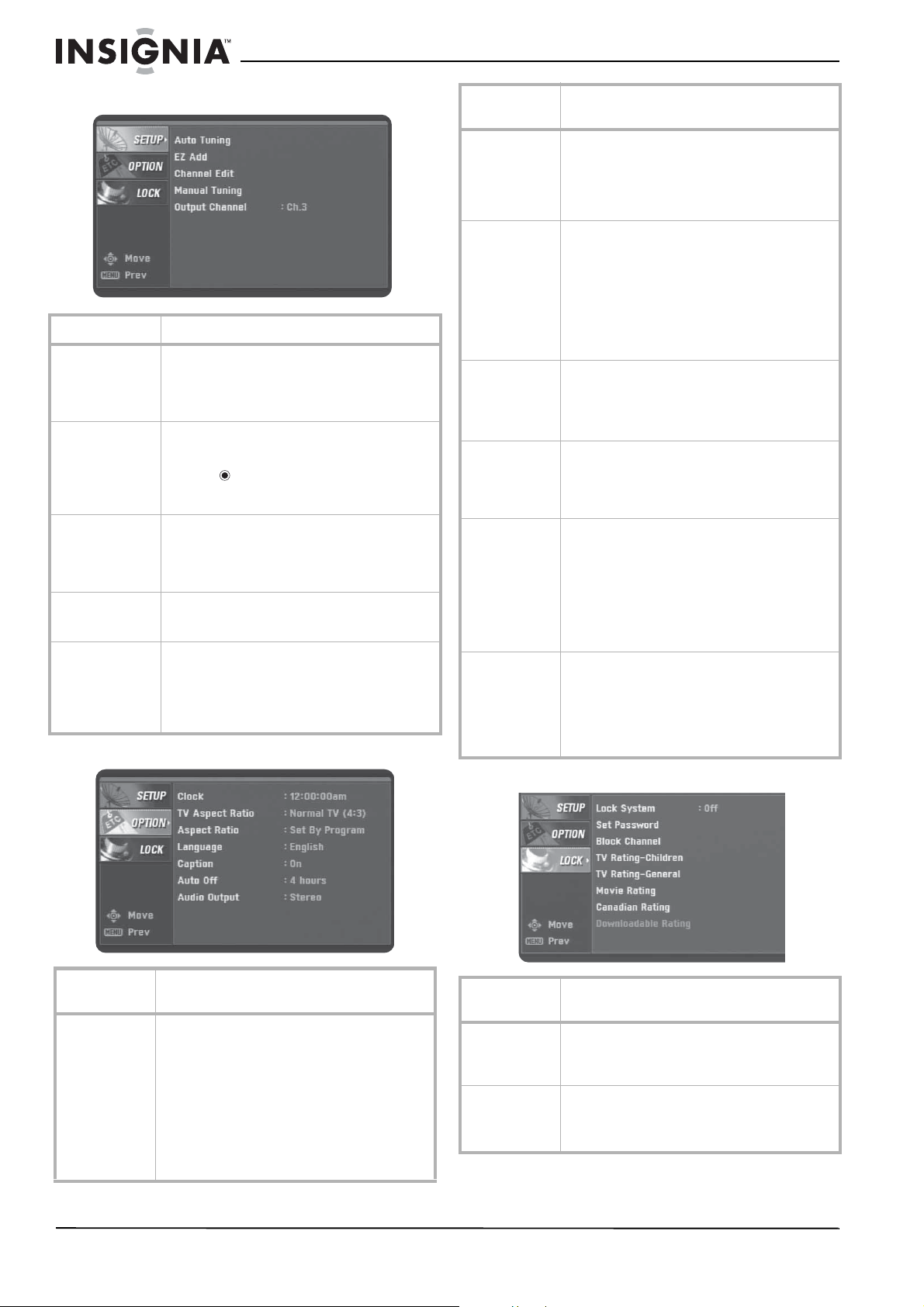
26
Insignia NS-DXA1 Caja convertidora con cupón
www.insignia-products.com
Menú de configuración (SETUP)
Menú de opciones (OPTION)
Menú de bloqueo (LOCK)
Opción de menú Descripción
Auto Tuning
(Sintonización
automática)
Encuentra automáticamente todos los canales
digitales disponibles por medio de la toma From
Antenna (Desde la antena). Para obtener más
información, refiérase a “Búsqueda de canales”
en la página 24.
EZ Add (Agregar
fácilmente)
Agrega automáticamente nuevos canales
disponibles por medio de la toma From Antenna
(Desde la antena). Seleccione esta opción y
presione . Su caja convertidora busca los
nuevos canales y los agrega a la lista de canales
memorizados.
Channel Edit
(Editar canal)
Agrega o elimina canales manualmente de la lista
de canales o de la lista de favoritos. Para obtener
más información, refiérase a “Editando la lista de
canales memorizados” on page 25 o “Creación
de una lista de favoritos” en la página 25.
Manual Tuning
(Sintonización
manual)
Agrega manualmente. Para obtener más
información, refiérase a “Editando la lista de
canales memorizados” en la página 25.
Output Channel
(Canal de salida)
Selecciona el canal (3 ó 4) para la señal de la
toma To TV (RF) [Al televisor (RF)]. Su televisor
deberá estar sintonizado al mismo canal para
mostrar la imagen de TV. Para obtener más
información, refiérase a “Configuración del canal
de salida” en la página 23.
Opción de
menú
Descripción
Clock (Reloj) Ajusta la hora. Normalmente, el reloj se ajusta
usando las señales transmitidas por las
estaciones de TV digital (DTV). Cuando
selecciona una zona horaria, el reloj se ajusta
automáticamente.
Nota: Si la estación DTV no envía una señal de
hora o envía la señal de hora equivocada, el reloj
puede estar configurado con la hora equivocada.
Para obtener más información, refiérase a
“Control de los subtítulos optativos” en la página
29.
TV Aspect Ratio
(Relación de
aspecto del TV):
Selecciona su tipo de televisor. Seleccione 4:3 si
su televisor tiene una pantalla estándar.
Seleccione 16:9 si su televisor tiene una pantalla
panorámica. Para obtener más información,
refiérase a “Selección del tipo de televisor” en la
página 27.
Aspect Ratio
(Relación de
aspecto)
Selecciona el formato de pantalla del canal
actual. Las opciones de relación de aspecto que
puede seleccionar varian dependiendo de la
relación de aspecto del televisor que seleccione.
Mientras ve TV, puede cambiar la relación de
aspecto presionando ZOOM (Ampliar).
Para obtener más información, refiérase a
“Selección de la relación de aspecto de un
programa de TV” en la página 27.
Language
(Idioma)
Selecciona el idioma del audio y de los menús.
Puede seleccionar English (inglés), Spanish
(español) o French (francés).
Puede seleccionar un idioma para el audio y otro
para los menús.
Caption
(Subtítulos
optativos)
Selecciona el tipo de subtítulos optativos que se
muestran y cambia la apariencia de los mismos.
Para obtener más información, refiérase a
“Control de los subtítulos optativos” en la página
29.
Auto Off
(Apagado
automático)
Ajusta la cantidad de tiempo que su caja
convertidora esperará antes de apagar
automáticamente el televisor. La cantidad
predefinida de tiempo es de cuatro horas.
También se puede configurar el tiempo de
apagado automático presionando SLEEP
(Apagado automático). Para obtener más
información, refiérase a “Ajuste del temporizador
de apagado automático” en la página 27.
Audio Output
(Salida de
audio)
Selecciona el modo de salida de audio para las
tomas RAUDIO (Audio Der.) y L AUDIO (Audio
Izq.). Seleccione Stereo (Estéreo) si el televisor
está conectado con un cable de audio estéreo
(izquierdo/derecho). Seleccione Mono si el
televisor está conectado con un cable
monofónico.
Opción de
menú
Descripción
Lock System
(Sistema de
bloqueo)
Apaga o enciende el sistema de bloqueo. Para
obtener más información, refiérase a “Activación
y desactivación del sistema de bloqueo” en la
página 29.
Set Password
(Establecer
contraseña)
Establece o cambia la contraseña. Para obtener
más información, refiérase a “Cambio de la
contraseña” en la página 30.
La contraseña predeterminada es 7777.
Opción de
menú
Descripción
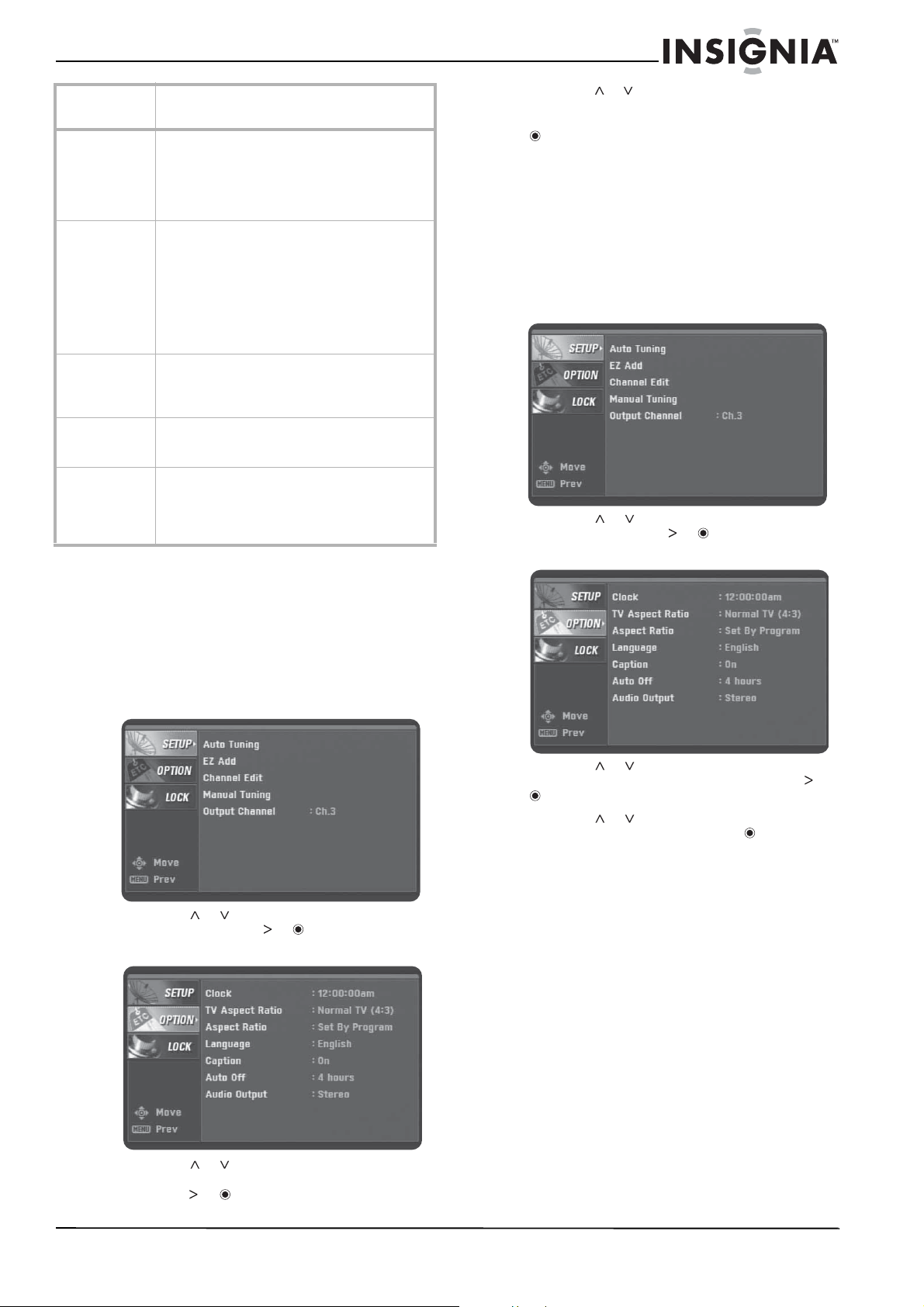
27
Insignia NS-DXA1 Caja convertidora con cupón
www.insignia-products.com
Selección del tipo de televisor
Puede ajustar el tipo de televisor (la relación de
aspecto) la primera vez que enciende su caja
convertidora. El tipo de televisor puede
cambiarse si es necesario.
Para seleccionar el tipo de televisor:
1 Presione MENU (Menú). Se muestra el menú
SETUP
(Configuración).
2 Presione o para seleccionar OPTION
(Opción) y presione o . Aparece el menú
OPTION
(Opción).
3 Presione o para seleccionar TV Aspect
Ratio (Relación de aspecto del televisor) y
presione o .
4 Presione o para seleccionar el canal 4:3
(pantalla de televisor estándar) o 16:9
(pantalla de televisor panorámico) y presione
.
Selección de la relación de aspecto de un
programa de TV
Puede seleccionar la relación de aspecto para el
programa de TV actual.
Para seleccionar la relación de aspecto del
programa de TV:
1 Presione MENU (Menú). Se muestra el menú
SETUP
(Configuración).
2 Presione o para seleccionar OPTION
(Opción) y presione o . Aparece el menú
OPTION
(Opción).
3 Presione o para seleccionar Aspect
Ratio (Relación de aspecto) y presione o
.
4 Presione o para seleccionar una
relación de aspecto y presione . Las
opciones que puede seleccionar varían,
dependiendo del tipo de televisor
seleccionado.
Ajuste del temporizador de apagado
automático
Para ajustar el temporizador de apagado
automático:
• Presione SLEEP (Apagado automático) una
o más veces para seleccionar la cantidad de
tiempo que su caja convertidora esperará
antes de apagar el televisor.
• Para cancelar el temporizador de apagado
automático, presione SLEEP (Apagado
automático) una o más veces hasta que
aparezca el indicador Off (Desactivado).
Block Channel
(Bloqueo de
canal)
Bloquea o desbloquea cualquier canal que no
quiere ver. Si sintoniza un canal bloqueado,
aparecerá una pantalla en blanco con el titular CH
BLOCKED (Canal bloqueado). Para obtener más
información, refiérase a “Bloqueo de canales” en
la página 30.
Clasificaciones
de TV - Niños
Bloquea y desbloquea programas de TV para
niños basados en sus clasificaciones. Esta
opción solo se aplica a programas de TV para
niños. Para bloquear programas para audiencias
adultas, deberá ajustar la opción TV
Rating-General (Clasificaciones de TV -
General). Para obtener más información,
refiérase a “Bloqueo de programas de TV para
niños” en la página 30.
Clasificaciones
de TV - General
Bloquea y desbloquea programas de TV basados
en sus clasificaciones. Para obtener más
información, refiérase a “Bloqueo de programas
de TV general” en la página 31.
Clasificaciones
de películas
Bloquea películas basadas en sus clasificaciones.
Para obtener más información, refiérase a
“Bloqueo de películas” en la página 32.
Clasificación
descargable
Descarga automáticamente información de
clasificación de las estaciones de DTV. Para
obtener más información, refiérase a
“Descargando información de clasificaciones” en
la página 33.
Opción de
menú
Descripción
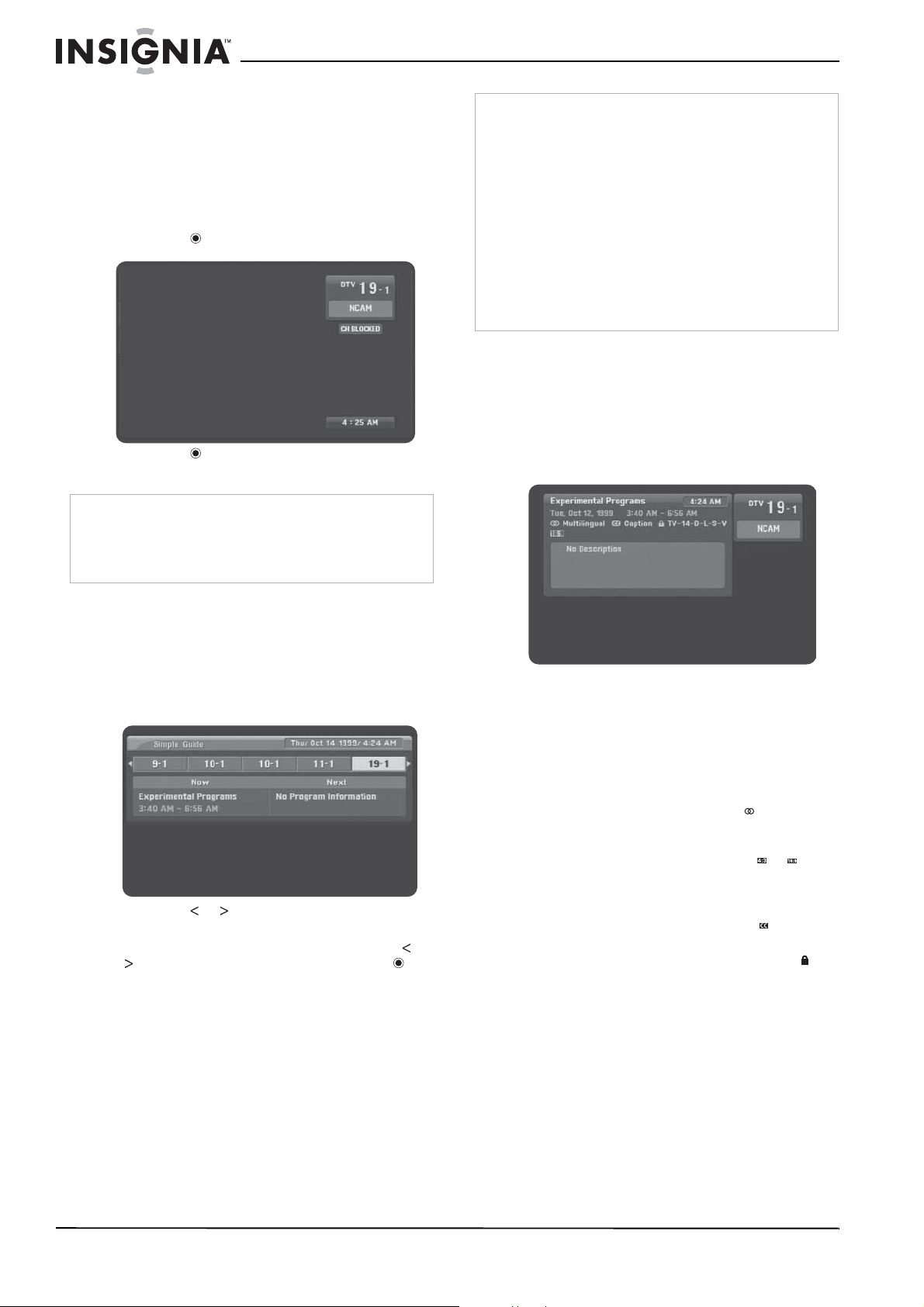
28
Insignia NS-DXA1 Caja convertidora con cupón
www.insignia-products.com
Mostrando el titular de canal
El titular de canal aparece brevemente cuando
cambia de canal. El titular de canal muestra el
número de canal, el nombre de la estación, la
hora actual y la información de canal bloqueado.
Puede ver el titular de canal mientras visualiza
un canal.
Para mostrar el titular de canal:
1 Presione . Se muestra el titular de canal.
2 Presione nuevamente para ocultar el
titular.
Uso de la guía sencilla
Puede usar la guía sencilla para ver la
información del programa actual o el siguiente.
Para usar la guía sencilla:
1 Presione GUIDE (Guía). Se muestra la
Simple Guide (Guía sencilla).
2 Presione o para ver información de otro
canal.
3 Si desea cambiar a otro canal, presione o
para seleccionar el canal y presione .
Viendo la información sobre la
programación de TV
Para mostrar la información sobre la
programación:
• Presione el botón DISPLAY (Visualización).
Aparecerá la información del programa que
está viendo.
La visualización contiene:
• Título del programa.
• Fecha actual.
• Hora de inicio y fin del programa.
• Hora actual.
• Número del canal.
• Nombre de estación.
• Ícono de idiomas múltiples ( ) si el
programa tiene varios idiomas. Presione
SAP para seleccionar otro idioma.
• Ícono de relación de aspecto ( o ) que
indica la relación de aspecto del
programa. Presione ZOOM (Ampliar)
para cambiar la relación de aspecto.
• Ícono de subtítulos optativos ( ) si el
programa los tiene.
• Ícono de advertencia de contenido ( ) si
el programa contiene información de
advertencia de contenido. También
aparece la clasificación del programa.
• Los detalles del programa son
suministrados por la estación
transmisora.
Nota
El nombre de la estación y la hora se muestran solo si la
estación provee la información.
La información de bloqueo incluye información tal como No
Signal (Sin señal), Rating Blocked (Clasificación
bloqueada) o Channel Blocked (Canal bloqueado).
Nota
La información de canal mostrada depende de la
información suministrada por la estación transmisora.
La información de canal solo puede ser recibida de la
estación transmisora si su caja convertidora está
sintonizada al canal.
Por ejemplo:
Si está viendo un canal y muestra la guía sencilla,
aparecerá la información de ese canal.
Si navega por varios canales y luego muestra la guía
sencilla, aparecerá la información de todos los canales que
navega.
Si navega por los canales y luego ve un canal especifico
por una cantidad de tiempo extendida, puede ser que no
aparezca información ya que la información de la guía
sencilla ha expirado. Para ver la información de canal en la
guía sencilla, vuelva a sintonizar el canal.
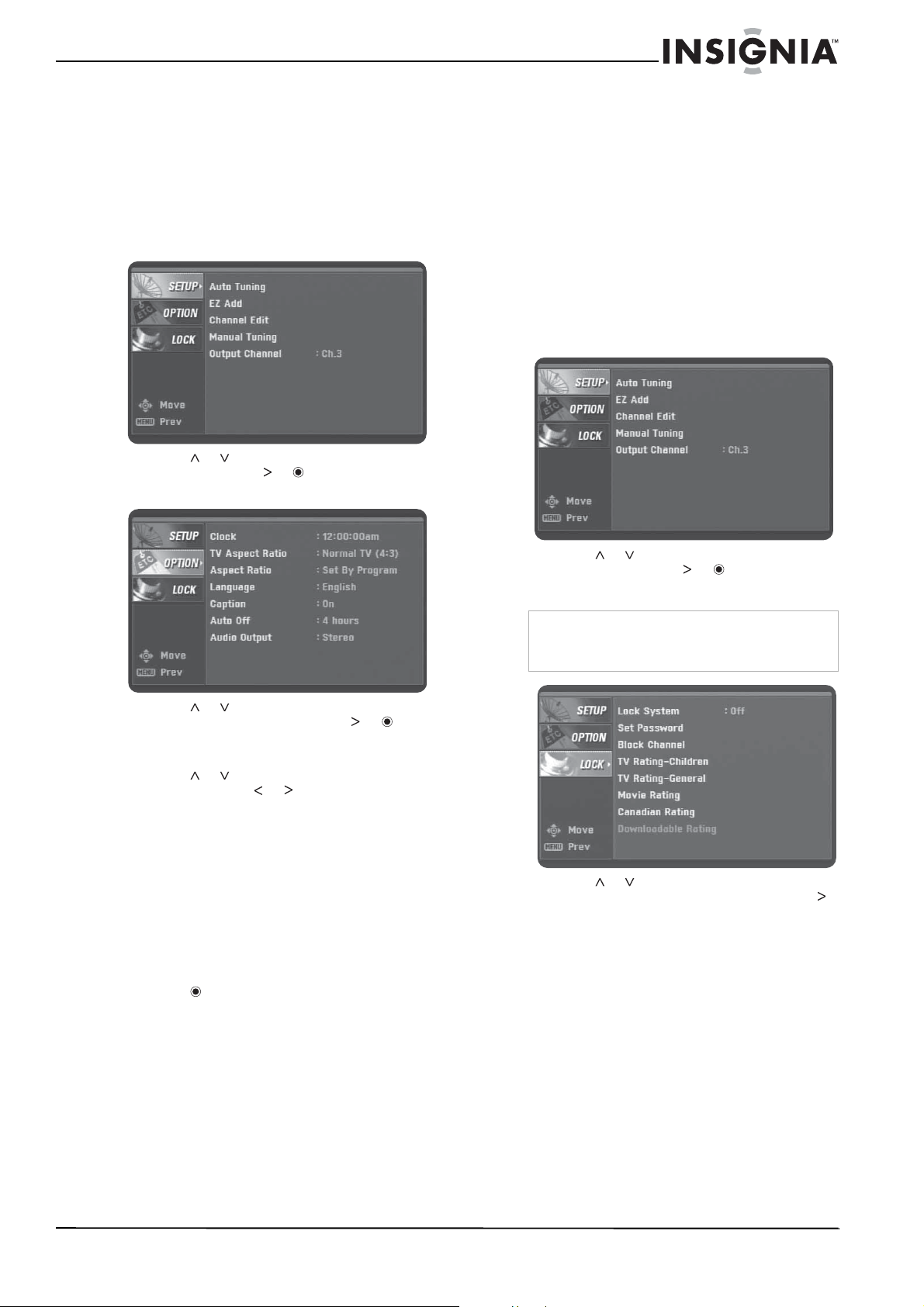
29
Insignia NS-DXA1 Caja convertidora con cupón
www.insignia-products.com
Control de los subtítulos optativos
Puede activar y desactivar los subtítulos
optativos, seleccionar subtítulos optativos
analógicos o digitales y cambiar la apariencia de
los subtítulos optativos digitales.
Para activar o desactivar los subtítulos
optativos:
1 Presione MENU (Menú). Se muestra el menú
SETUP
(Configuración).
2 Presione o para seleccionar OPTION
(Opción) y presione o . Aparece el menú
OPTION
(Opción).
3 Presione o para seleccionar Caption
(Subtítulos optativos) y presione o . Se
muestra el menú
Caption
(Subtítulos
optativos).
4 Presione o para seleccionar Mode
(Modo) y presione o para seleccionar
Off (Desactivados), Digital (Digitales) o
Analog (Analógicos).
• Off (Desactivado) – Desactiva los
subtítulos optativos.
• Digital – Servicio 1 a Servicio 6 muestran
idiomas suministrados por la estación
transmisora.
• Analog (Analógicos) – CC1 a CC2
muestran el diálogo del programa. Texto
1 a Texto 2 muestran información
suministrada por la estación transmisora.
5 Presione para confirmar su selección.
Puede cambiar las siguientes opciones de
subtítulos optativos.
• Style (Estilo) – Le permite usar el estilo
de subtítulos predefinido del programa o
usar estilos personalizados.
• Size (Tamaño) – Selecciona el tamaño de
la letra.
• Text Color (Color del texto) – Selecciona
el color de la letra.
• Text Opacity (Opacidad del texto) –
Selecciona la opacidad de la letra.
• Bg. (Fondo) – Selecciona el color del
fondo.
• Bg. Opacity (Opacidad de fondo) –
Selecciona la opacidad del fondo.
• Edge Type (Tipo de borde) – Selecciona
el tipo de borde.
• Edge Color (Color del borde) –
Selecciona el color del borde.
Activación y desactivación del sistema de
bloqueo
Para activar o desactivar el sistema de
bloqueo:
1 Presione MENU (Menú). Se muestra el menú
SETUP
(Configuración).
2 Presione o para seleccionar LOCK
(Bloquear) y presione o . Se muestra el
menú
LOCK
(Bloquear).
3 Presione o para seleccionar Lock
System (Sistema de bloqueo) y presione
para seleccionar On (Activado) o Off
(Desactivado).
Nota
Deberá ingresar la contraseña para mostrar el
menú Lock (Bloquear). La contraseña
predeterminada es 7777.
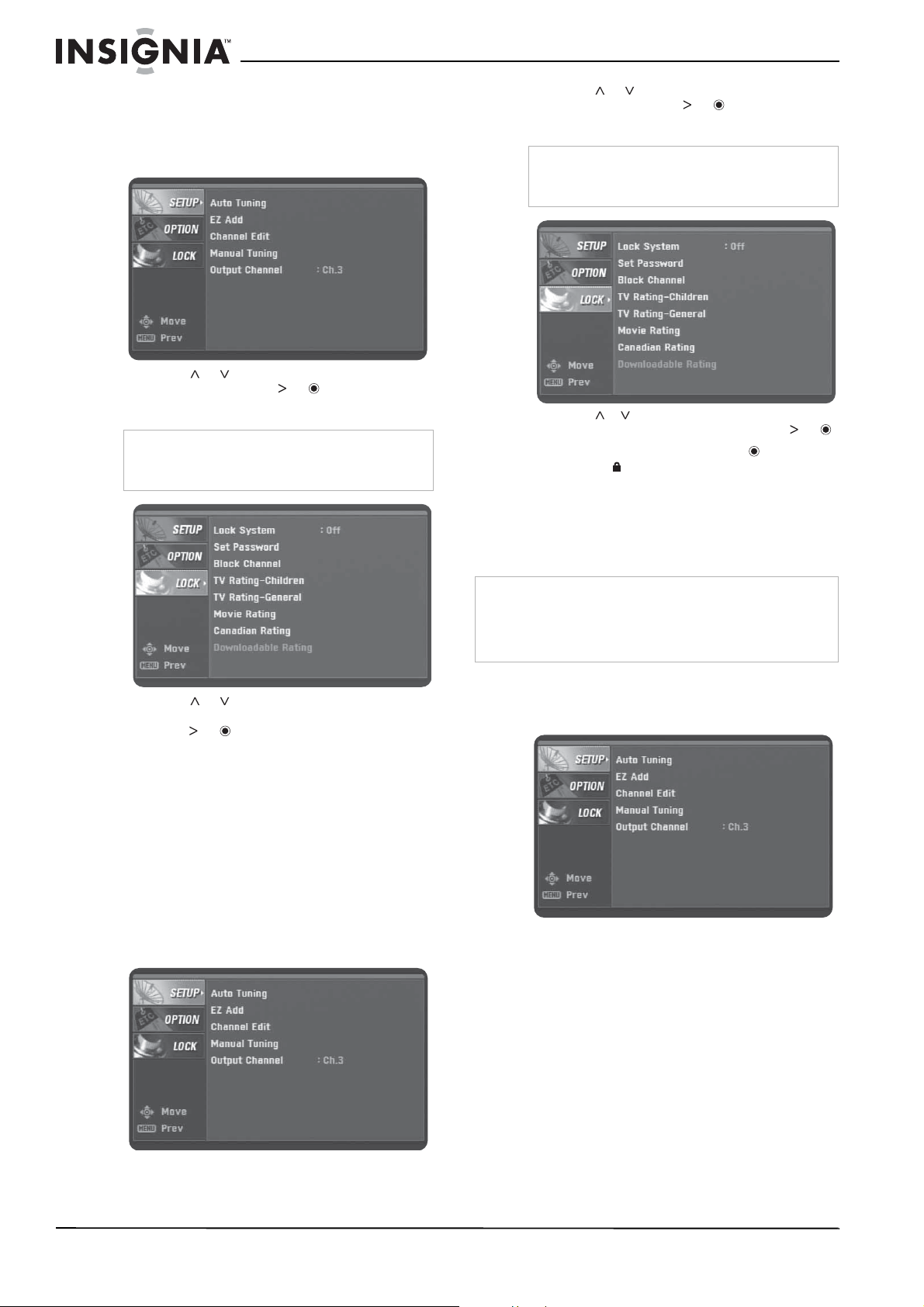
30
Insignia NS-DXA1 Caja convertidora con cupón
www.insignia-products.com
Cambio de la contraseña
Para cambiar la contraseña:
1 Presione MENU (Menú). Se muestra el menú
SETUP
(Configuración).
2 Presione o para seleccionar LOCK
(Bloquear) y presione o . Se muestra el
menú
LOCK
(Bloquear).
3 Presione o para seleccionar Set
Password (Establecer contraseña) y
presione o .
4 Presione los botones numéricos para
ingresar una contraseña de cuatro dígitos e
ingrese la contraseña de nuevo.
Bloqueo de canales
Puede bloquear los canales que no quiere ver.
Si sintoniza un canal bloqueado, se mostrará un
titular parpadeante con el mensaje CH
BLOCKED (Canal bloqueado).
Para bloquear canales:
1 Presione MENU (Menú). Se muestra el menú
SETUP
(Configuración).
2 Presione o para seleccionar LOCK
(Bloquear) y presione o . Se muestra el
menú
LOCK
(Bloquear).
3 Presione o para seleccionar Block
Channel (Bloquear canal) y presione o .
4 Seleccione un canal y presione . Un ícono
de bloqueo aparece junto al canal
bloqueado.
5 Repita el paso 4 para bloquear o
desbloquear otros canales.
Bloqueo de programas de TV para niños
Para bloquear programas de TV para niños:
1 Presione MENU (Menú). Se muestra el menú
SETUP
(Configuración).
Nota
Deberá ingresar la contraseña para mostrar el
menú Lock (Bloquear). La contraseña
predeterminada es 7777.
Nota
Deberá ingresar la contraseña para mostrar el
menú Lock (Bloquear). La contraseña
predeterminada es 7777.
Nota
Esta opción no bloquea programas que sean para
audiencias adultas. Para bloquear este tipo de programas
deberá usar la opción de TV Rating-General (Clasificación
de TV – General). Para obtener más información, refiérase
a “Bloqueo de programas de TV general” en la página 31.
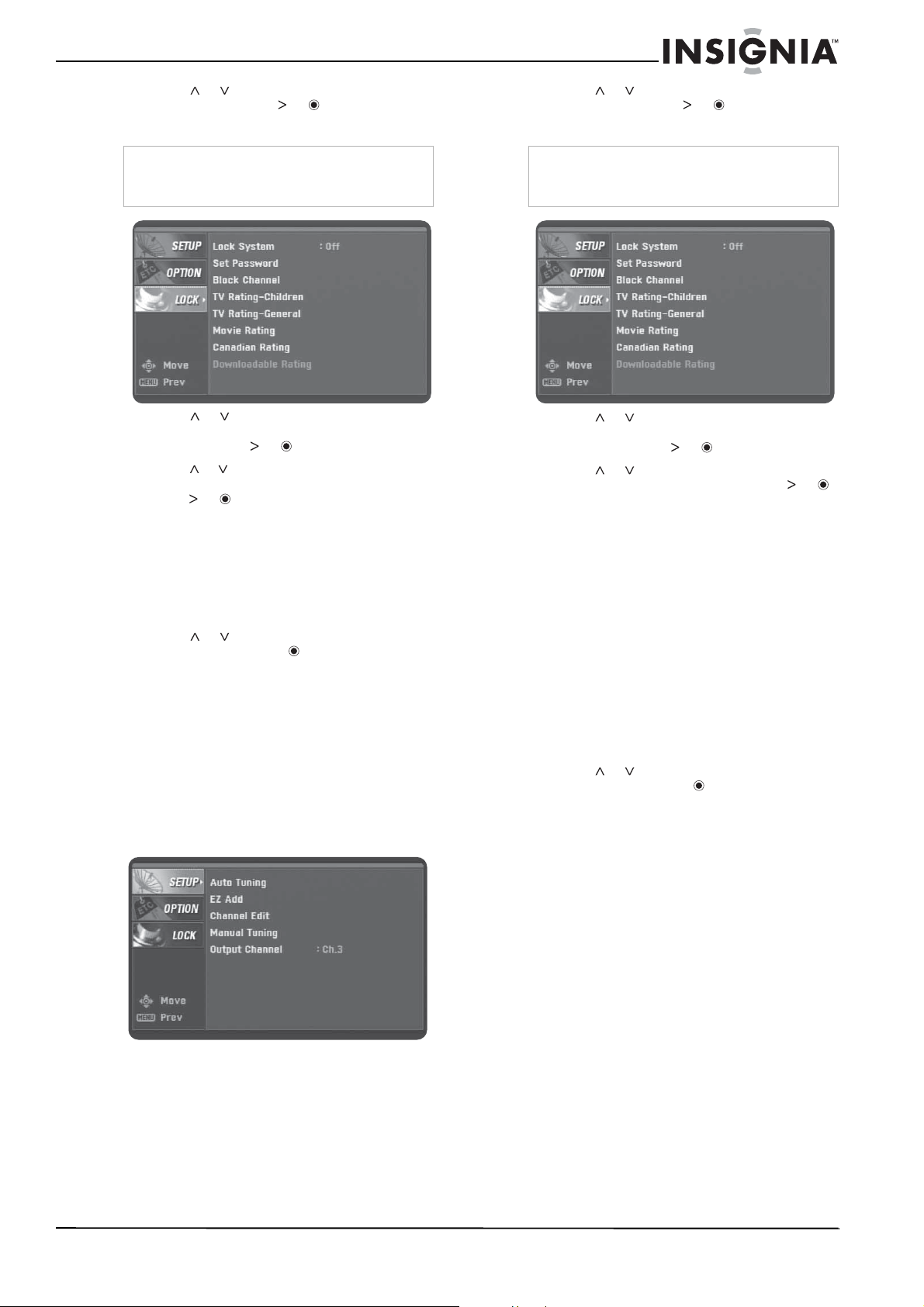
31
Insignia NS-DXA1 Caja convertidora con cupón
www.insignia-products.com
2 Presione o para seleccionar LOCK
(Bloquear) y presione o . Se muestra el
menú
LOCK
(Bloquear).
3 Presione o para seleccionar TV
Rating-Children (Clasificación de TV -
Niños) y presione o .
4 Presione o para seleccionar Age (Edad)
o Fantasy Violence (Violencia de fantasía) y
presione o .
• Age (Edad) – Se aplica sin importar la
clasificación de la categoría de contenido.
Después de seleccionar Age (Edad),
seleccione TV-Y o TV-Y7.
• Fantasy Violence (Violencia de fantasía)
– Bloquea los programas que tienen una
clasificación de violencia de fantasía.
5 Presione o para seleccionar una
clasificación y presione .
TV-Y – Bloquear todos los programas para
niños.
TV-Y7 – Bloquea los programas para niños
que están clasificados TV-Y7 (para niños
mayores de 7 años).
Bloqueo de programas de TV general
Para bloquear programas de TV general:
1 Presione MENU (Menú). Se muestra el menú
SETUP
(Configuración).
2 Presione o para seleccionar LOCK
(Bloquear) y presione o . Se muestra el
menú
LOCK
(Bloquear).
3 Presione o para seleccionar TV
Rating-General (Clasificación de TV -
General) y presione o .
4 Presione o para seleccionar una
clasificación de contenido y presione o .
• Age (Edad) – Se aplica sin importar la
clasificación de la categoría de contenido.
Después de seleccionar Age (Edad),
seleccione TV-Y o TV-Y7.
• Dialogue (Diálogo) – Bloquea programas
que tienen una clasificación de diálogo
sugestivo.
• Language (Idioma) – Bloquea programas
que tienen una clasificación de lenguaje
fuerte.
• Sex (Sexo) – Bloquea los programas que
tienen una clasificación de contenido
sexual.
• Violence (Violencia) – Bloquea
programas que tienen una clasificación
de contenido de violencia.
5 Presione o para seleccionar una
clasificación y presione .
• TV-G – Bloquea los programas
clasificados como TV-G (Audiencia
general).
• TV-PG – Bloquea los programas
clasificados como TV-PG (Guía de los
padres recomendada).
• TV-14 – Bloquea los programas
clasificados como TV-14 (Guía de los
padres fuertemente recomendada).
• TV-MA – Bloquea los programas
clasificados como TV-MA (solo para
audiencias maduras).
Nota
Deberá ingresar la contraseña para mostrar el
menú Lock (Bloquear). La contraseña
predeterminada es 7777.
Nota
Deberá ingresar la contraseña para mostrar el
menú Lock (Bloquear). La contraseña
predeterminada es 7777.
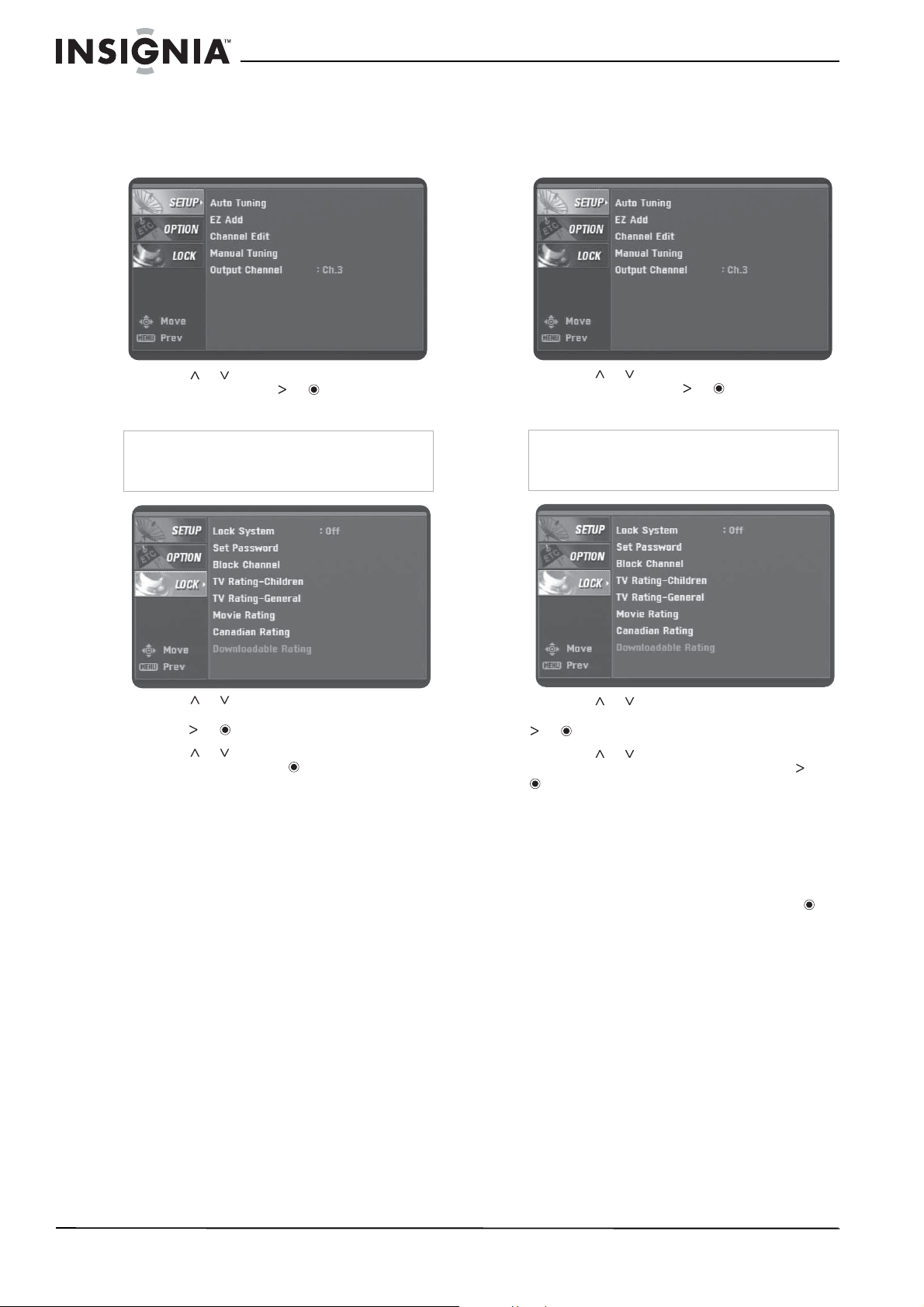
32
Insignia NS-DXA1 Caja convertidora con cupón
www.insignia-products.com
Bloqueo de películas
Para bloquear películas:
1 Presione MENU (Menú). Se muestra el menú
SETUP
(Configuración).
2 Presione o para seleccionar LOCK
(Bloquear) y presione o . Se muestra el
menú
LOCK
(Bloquear).
3 Presione o para seleccionar Movie
Rating (Clasificación de películas) y
presione o .
4 Presione o para seleccionar una
clasificación y presione .
• G – Audiencia general. Para todas las
edades.
• PG – Guía de los padres recomendada.
Puede ser que no sea adecuado para
niños.
• PG-13 – Guía de los padres fuertemente
recomendada. Puede ser que no sea
adecuado para niños menores de 13
años.
• R – Guía de los padres recomendada
para niños menores de 17 años.
• NC-17 – No adecuado para niños
menores de 17 años.
• X – Solo para adultos.
Bloqueo de programas canadienses
Para bloquear programas canadienses:
1 Presione MENU (Menú). Se muestra el menú
SETUP
(Configuración).
2 Presione o para seleccionar LOCK
(Bloquear) y presione o . Se muestra el
menú
LOCK
(Bloquear).
3 Presione o para seleccionar Canadian
Rating (Clasificación canadiense) y presione
o .
4 Presione o para seleccionar English
(inglés) o French (francés) y presione o
.
5 Seleccione English (inglés) para programas
canadienses que tienen clasificaciones para
el Canadá anglófono. Seleccione French
(francés) para programas canadienses que
tienen clasificaciones para el Canadá
francófono.
6 Seleccione una clasificación y presione .
Clasificaciones para el Canadá anglófono:
• C – Programas para niños menores de 8.
• C8+ – Programas generalmente
considerados aceptable para niños de 8
años y más.
• G – Público en general.
• PG — Guía de los padres.
• 14+ – Programas que contienen temas o
contenido que puede ser que no sea apto
para menores de 14
• 18+ – Programas para adultos.
Clasificaciones para el Canadá francófono:
• G – Programas general aptos para
audiencias de todas las edades.
• 8 ans+ – No recomendados para niños
pequeños.
Nota
Deberá ingresar la contraseña para mostrar el
menú Lock (Bloquear). La contraseña
predeterminada es 7777.
Nota
Deberá ingresar la contraseña para mostrar el
menú Lock (Bloquear). La contraseña
predeterminada es 7777.
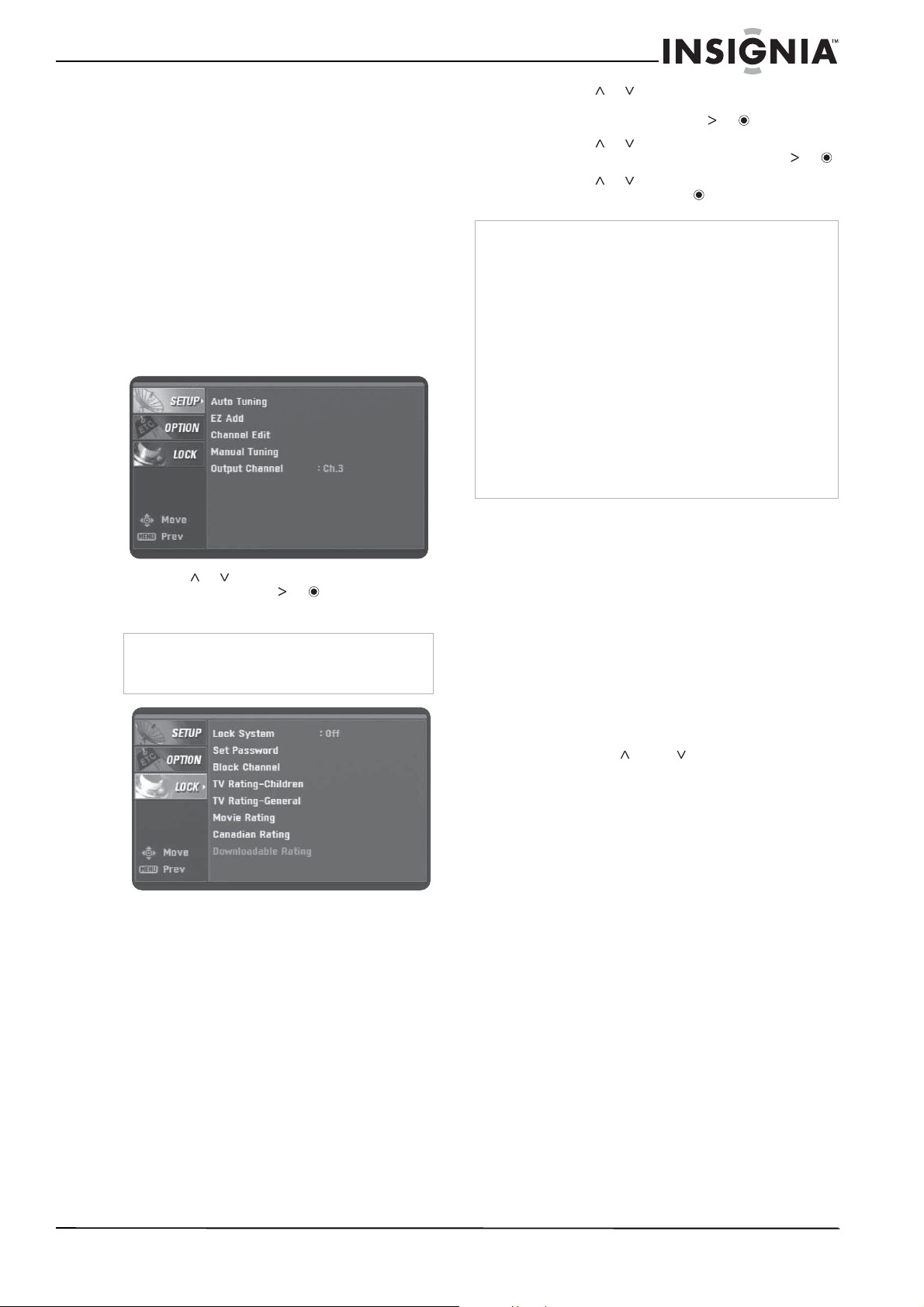
33
Insignia NS-DXA1 Caja convertidora con cupón
www.insignia-products.com
• 13 ans+ – Programas que podrían no ser
adecuados para niños menores de 13
años.
• 16 ans+ – Programas que no son aptos
para niños menores de 16 años.
• 18 ans+ – Programas exclusivamente
para adultos.
Descargando información de
clasificaciones
Puede actualizar la información de
clasificaciones con la información de
clasificación descargable de la estación.
Para descargar información de clasificación:
1 Presione MENU (Menú). Se muestra el menú
SETUP
(Configuración).
2 Presione o para seleccionar LOCK
(Bloquear) y presione o . Se muestra el
menú
LOCK
(Bloquear).
3 Presione o para seleccionar
Downloadble Rating (Clasificación
descargables) y presione o .
4 Presione o para seleccionar una
clasificación de título o TV y presione o .
5 Presione o para seleccionar una
clasificación y presione .
Programación del control remoto
Puede controlar la función de encendido del
televisor con el control remoto suministrado.
Para hacer esto, necesitará programar el control
remoto.
Para programar el control remoto:
1 Determine si el modelo de su televisor se
puede controlar con el control remoto.
Refiérase a “Marcas de televisores
controlables” en la página 34.
2 Encienda el televisor.
3 Mientras mantiene presionado TV POWER
(Encender televisor) en el control remoto,
presione CH o CH una o más veces
hasta que el televisor se apague. Cada vez
que presione uno de estos botones, el
control remoto envía un código de fabricante
(entre 1 y 45) al televisor.
Nota
Deberá ingresar la contraseña para mostrar el
menú Lock (Bloquear). La contraseña
predeterminada es 7777.
Nota
Si la información no se descarga de una estación de TV, la
opción de clasificación descargable no está disponible.
La información de clasificación se descarga
automáticamente mientras se ven canales de DTV. Este
proceso puede durar varios segundos.
La opción de clasificación descargable está disponible para
ser usada después de que se descargue de la estación de
TV. Sin embargo, dependiendo de la información de la
estación de TV, puede que no esté disponible para ser
usado.
Los niveles de clasificación varían dependiendo de la
estación transmisora.
El nombre de la opción predefinida y la clasificación
descargable depende de la información descargada.
La visualización de pantalla muestra las opciones de
clasificación descargable aparecen en el idioma que envía.
Los títulos de clasificación (por ejemplo Humor) y las
clasificaciones de TV (por ejemplo MH, H, o VH) pueden
variar dependiendo de la estación de TV.
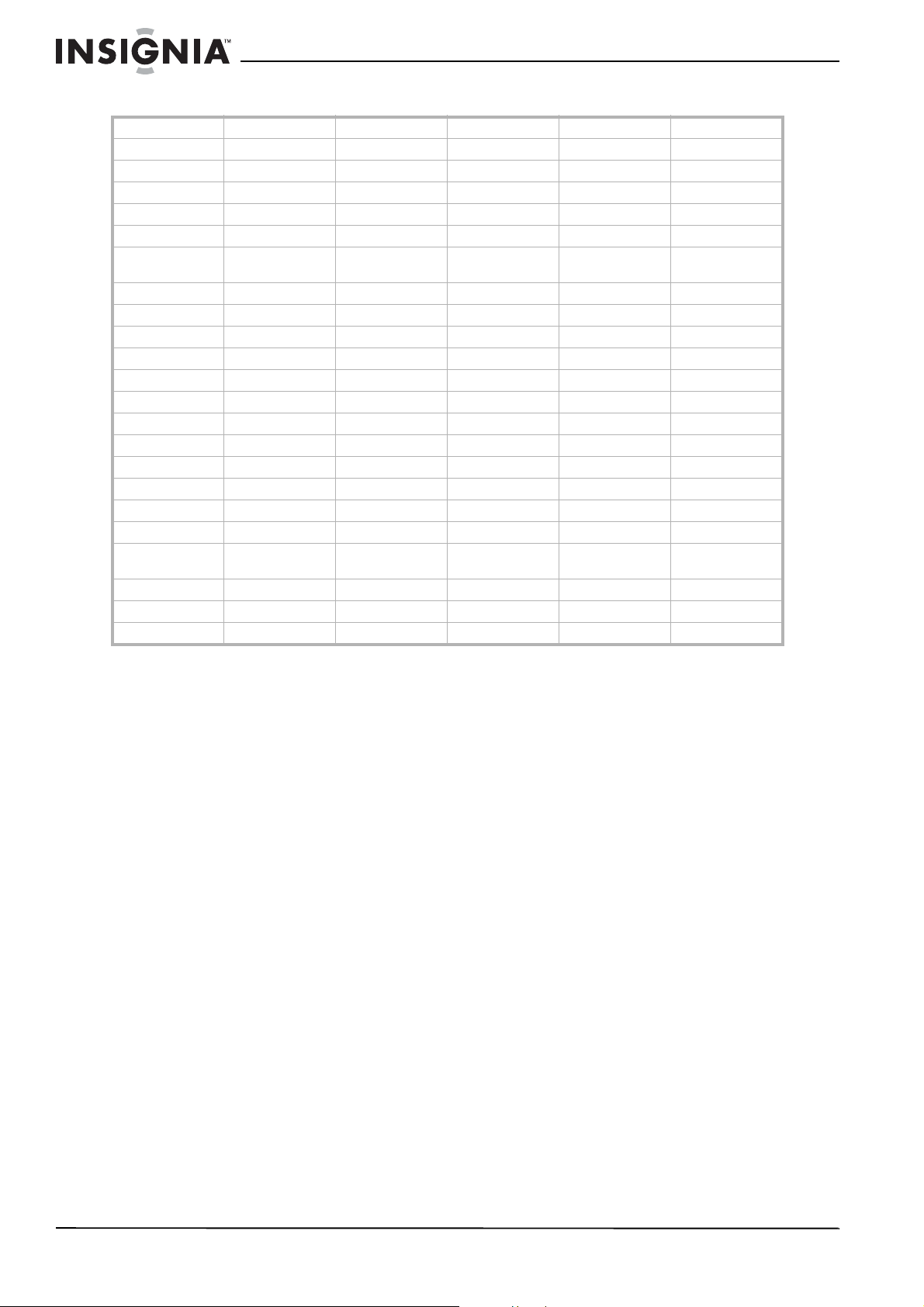
34
Insignia NS-DXA1 Caja convertidora con cupón
www.insignia-products.com
Marcas de televisores controlables
Abex Carver Harvard Masushita Portland Supreme
Admiral Celebrity Havermy Megatron Prima SVA
Advent Celera Hello Kitty Memorex Prism Sylvania
Aiko Changhong Himitsy MGA Proscan Symphonic
Akai Citizen Hisense Midland Proton Tandy
America Action Clarion Hitachi Mitsubishi Quasar Tatung
Anam Contec Infinity Motorola Radio
Shack
Technics
Anam National Durabrand Insignia MTC RCA Techwood
AOC Electroband JBL Multitech Realistic Teknika
Apex Digital Elektra JCB NAD Runco Thomas
Audiovox Emerson Jensen NEC Sampo TMK
Baysonic Envision JVC Nikko Samsung Toshiba
Bell&Howell Fisher KEC Norcent Samsux Totevision
Corona Funai Kenwood NTC Sansui TVS
Curtis Mathes Futuretech KLH Onwa Sanyo Vector Research
CXC GE KTV Optimus Scotch Victor
Daewoo Gibralter LG Orion Scott Vidikron
Craig GoldStar Lloyd's Panasonic Sears Vidtech
Crosley Grunpy LXI Penney Sharp Wards
Bradford Haier Magnasonic Philco Sheng Chia White
Westinghouse
Broksonic Hallmark Magnavox Philips Simpson Yamaha
Candle Harley Davidson Magnin Pilot Sony Zenith
Carnivale Harman/Kardon Marantz Poptonica Soundesign
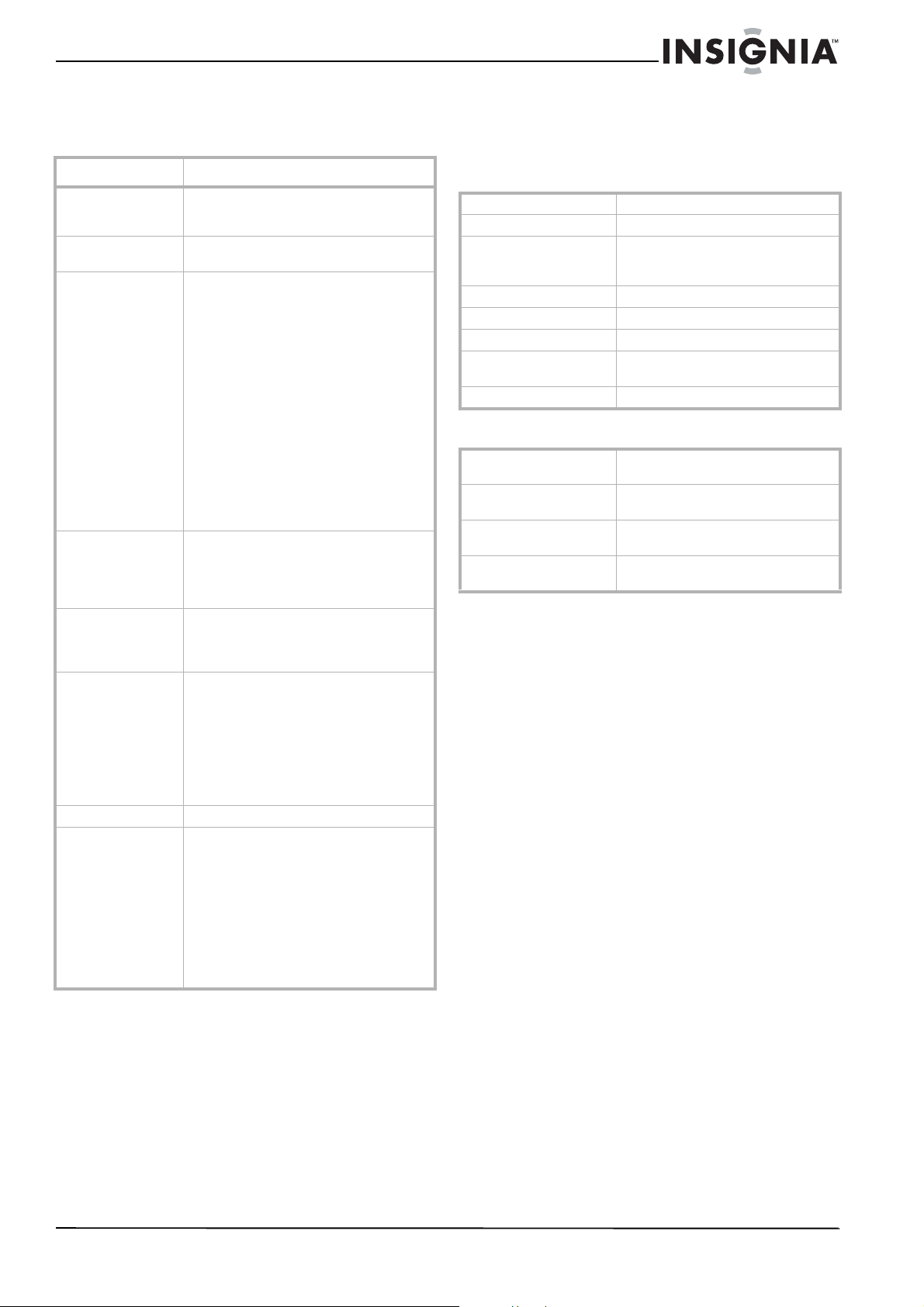
35
Insignia NS-DXA1 Caja convertidora con cupón
www.insignia-products.com
Localización y corrección
de fallas
Especificaciones
El diseño y las especificaciones están sujetos a
cambio sin aviso previo.
General
Entrada/Salida
Accesorios
Cable de RF (1)
Cable de video (1)
Cable de audio (Izq., Der.) (1)
Control remoto (1)
Pila (Tipo AAA) (1)
Guía de instalación rápida (1)
Guía del usuario (1)
Problema Solución
La unidad no
enciende.
• Verifique que el cable de
alimentación de CA está conectado
firmemente en un tomacorriente.
Imagen fragmentada
y sonido sin claridad.
• Revise la entrada de su antena, la
ubicación y la intensidad de la señal.
No hay imagen. • Seleccione las funciones de Auto
Tuning (Sintonización automática) o
Manual Scan (Sintonización
manual), si todavía no lo ha hecho.
• Asegúrese de que todos los cables
están instalados correctamente y
que la fuente correcta se ha
seleccionado en su televisor (por
ejemplo, Canal 3, Canal 4, Video 1, o
Video 2).
• La intensidad de la señal de la antena
puede estar baja. Verifique la
intensidad de la señal y ajuste la
ubicación de la antena y su
orientación.
Para obtener más información sobre las
conexiones, refiérase a “Conexión de una
antena” en la página 22.
Imagen normal, pero
sin sonido.
• Verifique los niveles de volumen.
• Verifique que el sonido del televisor
no esté silenciado.
• Verifique que su caja convertidora
esté conectada correctamente.
La imagen está
distorsionada.
• Verifique que se seleccionó la
relación de aspecto correcta.
• Verifique que la salida de video esté
conectada al televisor.
Hacen falta canales
disponibles.
• Puede encontrar todos los canales
disponibles al ejecutar las funciones
de Auto Tuning (Sintonización
automática) o EZ Add (Agregar
fácilmente) en el sistema de menú de
pantalla.
• Ajuste la antena.
• Verifique la intensidad de la señal de
la antena.
Olvidó su contraseña. Ingrese la contraseña maestra 7777.
El control remoto no
funciona
correctamente.
• Apunte el control remoto al sensor
del control remoto en su caja
convertidora.
• Opere el control remoto dentro de 23
pies (7 metros) del sensor del
control remoto.
• Remueva los obstáculos entre el
control remoto y el sensor del
control remoto.
• Reemplace las baterías gastadas con
unas nuevas.
Sistema de televisión DTV estándar ATSC
Rango de canales Terrestres 2 - 69
Dimensiones (Ancho x
Alto x Profundidad)
Aproximadamente 8.5 × 1.8 × 6.4
pulgadas
(215 × 46 × 162 mm)
Peso neto Aproximadamente 1.65 lb. (0.75 kg)
Temperatura de operación 41 °F a 104 °F (5 °C a 40 °C)
Humedad de operación 5% a 90%
Requisitos de
alimentación
CA 120 V, 60 Hz
Consumo de energía 7 W
Entrada de antena (Desde
la antena)
Entrada de antena, ATSC, 75 ohmios
Salida de antena [Al
televisor (RF)]
Salida de antena, 75 ohmios, Canal de
salida RF 3 ó 4 (conmutable)
Salida de video 1.0 V (p-p), 75 ohmios, sincronización
negativa, toma RCA (1)
Salida de audio 2.0 Vrms (1 KHz, 0 dB), 600 ohmios,
toma RCA (Izq., Der.) (1)
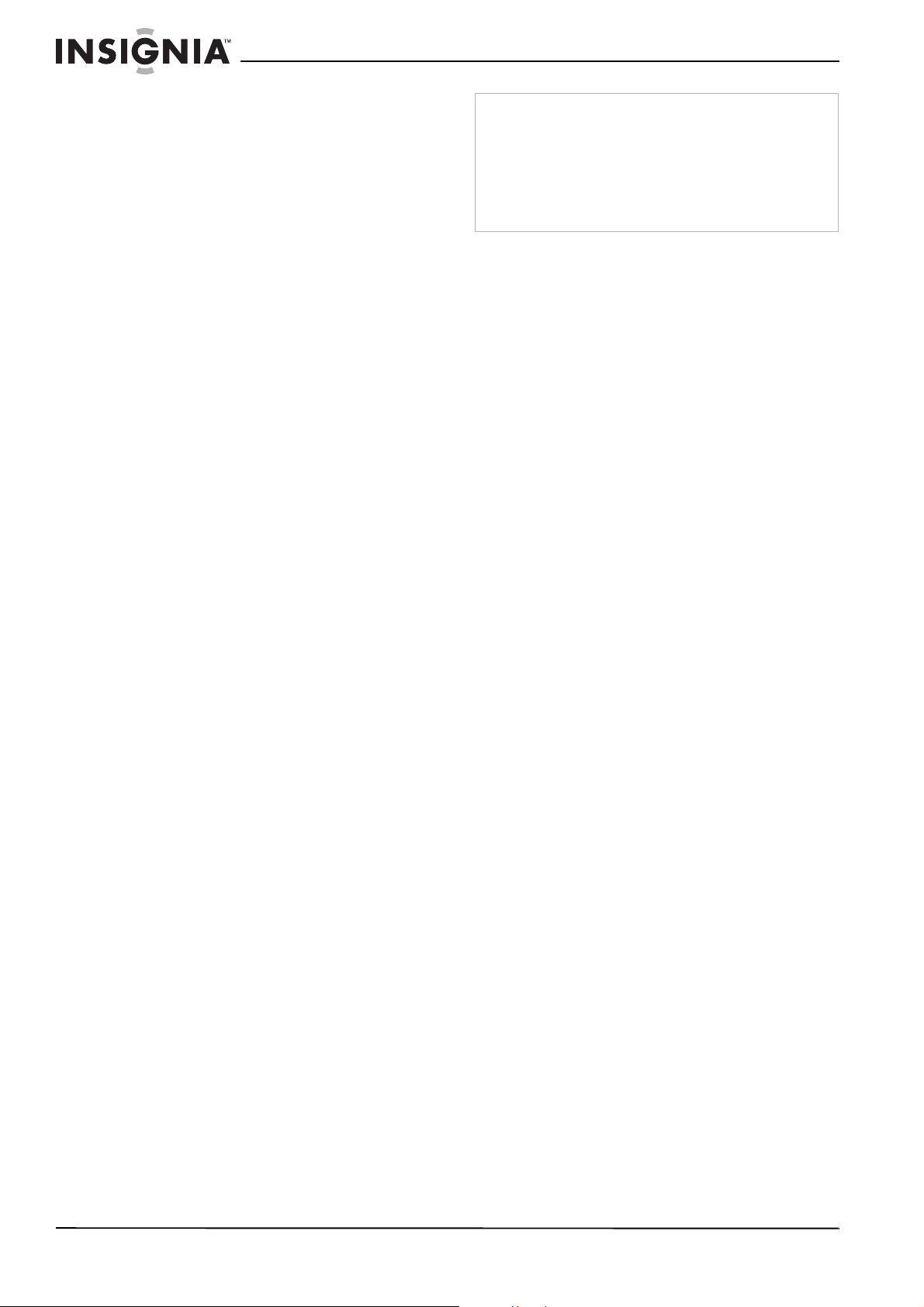
36
Insignia NS-DXA1 Caja convertidora con cupón
www.insignia-products.com
Avisos legales
Advertencia de la FCC
Este equipo podría generar o usar energía de
radiofrecuencia. Los cambios o modificaciones que se
realicen a este equipo podrían causar interferencia
perjudicial a menos que las modificaciones estén
expresamente autorizadas en el manual de instrucciones. El
usuario podría perder la autoridad de operar este equipo si
se realiza un cambio o modificación no autorizada.
FCC Parte 15
Este equipo ha sido sometido a pruebas y se ha
determinado que satisface los límites establecidos para
clasificarlo cómo dispositivo digital de Clase B de acuerdo
con la Parte 15 del reglamento FCC. Estos límites están
diseñados para proporcionar una protección razonable
contra interferencias dañinas cuando el producto funciona
en un ambiente residencial. Este producto genera, usa y
puede emitir energía de radiofrecuencia. Si no se instala y
usa de acuerdo con el manual de instrucciones, este aparato
puede causar interferencias perjudiciales a las
comunicaciones de radio. Sin embargo, no se garantiza que
no ocurrirá interferencia en una instalación particular. Si el
producto causa interferencias perjudiciales en la recepción
de la señal de radio o televisión, lo cual puede comprobarse
encendiendo y apagando el producto alternativamente, se
recomienda al usuario corregir la interferencia mediante uno
de los siguientes procedimientos:
• Cambie la orientación o la ubicación de la antena
receptora.
• Aumente la distancia entre el producto y
• el receptor.
• Conecte el producto en un tomacorriente en otro
circuito
• que no sea en el que está conectado el receptor.
• Consulte con el distribuidor o un técnico con
experiencia en radio/TV
• para obtener ayuda.
Energy Star
®
Como socio de Energy Star, Insignia ha determinado que
este producto o modelos de producto cumplen con las
pautas de Energy Star de eficiencia de energía.
Advertencia
No intente modificar su caja convertidora de cualquier forma
sin obtener una autorización por escrito de Insignia. La
modificación sin autorización puede anular la autoridad del
usuario de operar este producto.
Su caja convertidora está diseñada para recibir y
decodificar señales transmitidas de acuerdo al estándar de
Televisión Digital ATSC A/53 y para ser usada con una
antena apropiada y un dispositivo de pantalla que usted
suministrará.

37
Insignia NS-DXA1 Caja convertidora con cupón
www.insignia-products.com
Garantía limitada de 90 días
Insignia Products (“Insignia”) le garantiza a usted, el
comprador original de este nuevo NS-DXA1 (“Producto”),
que éste se encontrará libre de defectos de material o de
mano de obra en su fabricación original por un período de 90
(noventa) días a partir de la fecha de compra del Producto
(“Período de Garantía”). Este Producto debe ser comprado
en un distribuidor autorizado de productos Insignia y
empacado con esta declaración de garantía. Esta garantía
no cubre Productos reacondicionados. Si notifica a Insignia
durante el Período de Garantía sobre un defecto cubierto
por esta garantía que requiere reparación, los términos de
esta garantía se aplican.
¿Cuánto dura la garantía?
El Período de Garantía dura por 90 (noventa) días a partir de
la fecha en que compró el Producto. La fecha de compra se
encuentra impresa en el recibo que recibió con el Producto.
¿Qué es lo que cubre esta garantía?
Durante el Período de Garantía, si un centro de reparación
autorizado de Insignia concluye que la fabricación original
del material o la mano de obra del Producto se encuentran
defectuosos Insignia (cómo su opción exclusiva): (1)
reparará el Producto con repuestos nuevos o
reacondicionados; o (2) reemplazará el Producto con uno
nuevo o con uno reacondicionado con repuestos
equivalentes. Los Productos y repuestos reemplazados bajo
esta garantía se volverán propiedad de Insignia y no se le
regresarán a usted. Si se requiere la reparación de
Productos o partes después de que se vence el Período de
Garantía, usted deberá pagar todos los costos de mano de
obra y de repuestos. Esta garantía estará vigente con tal
que usted sea el dueño de su producto Insignia durante el
periodo de garantía. El alcance de la garantía se termina si
usted vende o transfiere el producto.
¿Cómo se obtiene la reparación de garantía?
Si ha comprado el Producto en una tienda de ventas, lleve
su recibo original y el Producto a la tienda en donde lo
compró. Asegúrese de que vuelva a colocar el Producto en
su empaque original o en un empaque que provea la misma
protección que el original. Si compró el Producto en un sitio
Web, envíe por correo su recibo original y el Producto a la
dirección postal listada en el sitio Web. Asegúrese de
colocar el Producto en su empaque original o en un
empaque que provea la misma protección que el original.
Para obtener servicio de garantía a domicilio para un
televisor con una pantalla de 25 pulgadas o más, llame al
1-888-BESTBUY. El soporte técnico diagnosticará y
corregirá el problema por teléfono o enviará un técnico
certificado por Insignia a su casa.
¿En dónde es válida la garantía?
Esta garantía sólo es válida al comprador original del
producto en los Estados Unidos y en Canadá.
¿Qué es lo que no cubre la garantía?
Esta garantía no cubre:
• Capacitación del cliente
• Instalación
• Ajuste de configuración
• Daños cosméticos
• Daños debido a actos de la naturaleza, tal como rayos
• Accidentes
• Mal uso
• Abuso
• Negligencia
• Uso comercial
• Modificación de alguna parte del Producto, incluyendo
la antena
• Un panel de pantalla de plasma dañado por la
persistencia de imágenes estáticas (sin movimiento),
mostradas por periodos de tiempo extendido (efecto
“burn-in”).
Esta garantía tampoco cubre:
• Daño debido al uso o mantenimiento incorrecto
• La conexión a una fuente de voltaje incorrecta
• El intento de reparación por alguien que no sea una
compañía autorizada por Insignia para reparar el
Producto
• Productos vendidos tal cual (en el estado en que se
encuentran) o con todas sus fallas
• Productos consumibles, tal como fusibles o baterías
• Productos en los cuales el número de serie asignado
en la fábrica ha sido alterado o removido
EL REEMPLAZO DE REPARACIÓN SEGÚN PROVISTO
BAJO ESTA GARANTÍA ES SU ÚNICO RECURSO.
INSIGNIA NO SERÁ RESPONSABLE POR DAÑOS
INCIDENTALES O CONSECUENTES DEBIDO AL
INCUMPLIMIENTO DE CUALQUIER GARANTÍA EXPRESA
O IMPLÍCITA RELACIONADA CON ESTE PRODUCTO,
INCLUYENDO PERO SIN LIMITARSE A LA PÉRDIDA DE
INFORMACIÓN, LA PÉRDIDA DE NEGOCIOS O DE
GANANCIAS. INSIGNIA PRODUCTS NO HACE NINGUNA
OTRA GARANTÍA EXPRESA E IMPLÍCITA RELACIONADA
A ESTE PRODUCTO, INCLUYENDO PERO SIN
LIMITARSE A, CUALQUIER GARANTÍA IMPLÍCITA DE O
CONDICIONES DE COMERCIALIZACIÓN O IDONEIDAD
PARA UN USO PARTICULAR, ESTÁN LIMITADAS EN
DURACIÓN AL PERÍODO DE GARANTÍA DECLARADO
ANTERIORMENTE Y NINGUNA GARANTÍA YA SEA
EXPRESA O IMPLÍCITA SE APLICARÁ DESPUÉS DEL
PERÍODO DE GARANTÍA. ALGUNOS ESTADOS,
PROVINCIAS Y JURISDICCIONES NO PERMITEN
RESTRICCIONES EN CUANTO A LA DURACIÓN DE UNA
GARANTÍA IMPLÍCITA, ASÍ QUE LA RESTRICCIÓN
ANTERIOR PUEDE NO APLICARSE EN SU CASO. ESTA
GARANTÍA LE DA DERECHOS LEGALES ESPECÍFICOS,
Y USTED PUEDE POSEER OTROS DERECHOS QUE
VARÍAN DE ESTADO A ESTADO, O DE PROVINCIA A
PROVINCIA.
Comuníquese con Insignia:
Para servicio al cliente favor llamar al 1-877-467-4289
www.insignia-products.com
INSIGNIA™ es una marca comercial de Best Buy Enterprise
Services, Inc.
Distribuido por Best Buy Purchasing, LLC
Insignia, 7601 Penn Avenue South, Richfield, Minnesota,
E.U.A.

38
Insignia NS-DXA1 Caja convertidora con cupón
www.insignia-products.com


07-576
www.insignia-products.com (877) 467-4289
Distributed by Best Buy Purchasing, LLC
7601 Penn Avenue South, Richfield, MN USA 55423-3645
© 2008 Best Buy Enterprise Services, Inc.
All rights reserved. INSIGNIA is a trademark of Best Buy Enterprise Services, Inc. Registered in some countries.
All other products and brand names are trademarks of their respective owners.
Distribuido por Best Buy Purchasing, LLC
7601 Penn Avenue South, Richfield, MN USA 55423-3645
© 2008 Best Buy Enterprise Services, Inc.
Todos los derechos reservados. INSIGNIA es una marca de Best Buy Enterprise Services, Inc. Registrada en ciertos países.
Todos los demás productos y marcas son marcas comerciales de sus respectivos dueños.