非常感谢阁下购买本公司产品!在使用产品前,请阁下认真阅读本说明书内容。
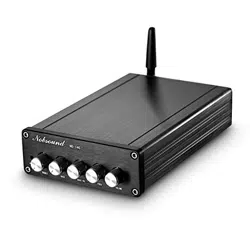
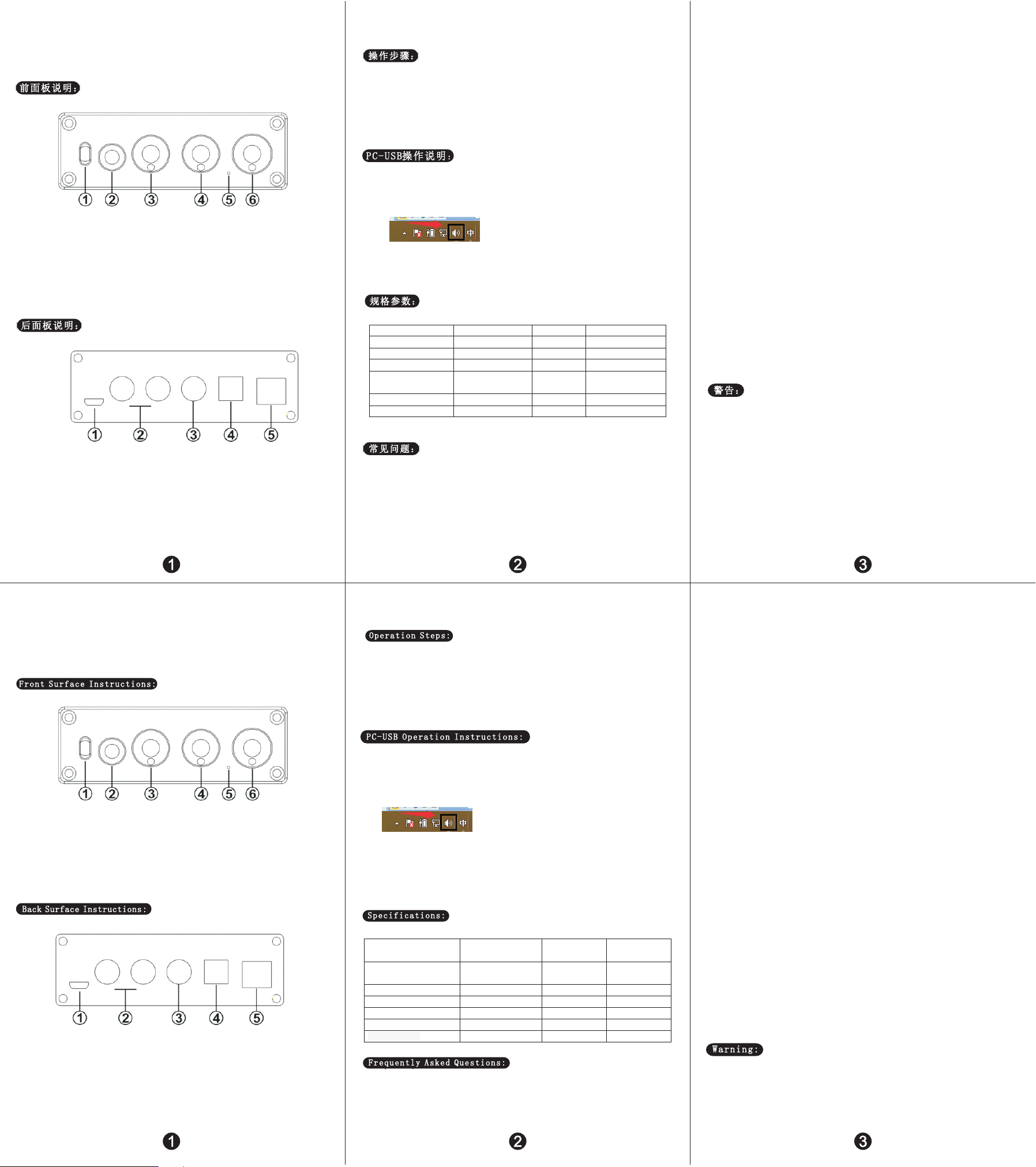
前面板接口说明:
① ………………………… 输入模式选择键
② ………………………… 耳机放大输出接口
③ ………………………… 低音调节旋钮
④ ………………………… 高音调节旋钮
⑤ ………………………… 电源指示灯
⑥ ………………………… 开关机/音量大小调节旋钮
后面板接口说明:
① ………………………… DC 电源输入(最大不能超过 5V)
② ………………………… 模拟输出接口
③ ………………………… 同轴输入接口
④ ………………………… 光纤输入接口
⑤ ………………………… PC-USB 输入接口
操作步骤:
1. 将需要外接的后级设备接到音源输出接口。
2. 将需要使用的音源接到音源输入接口。
3. 接上电源。
4. 顺时针旋转音量旋钮开机,并选择需要的音量大小。
5. 可通过旋转低音高音旋钮选择需要的 EQ。
6. 接耳放输出时,RCA 模拟输出会自动断开。
PC-USB 操作说明:
1. 使用出厂配置的 USB 线接上机器后面板的 PC-USB 接口(USB 可支持热拔插)
2. 按输入信号选择键选择 USB 输入。
3. 如下图在 PC 端右下角找到带有喇叭符号的图标
4. 点击右键弹出对话框点击《选择播放设备》
5. 弹出对话框选择 PC 识别到的播放设备(本机器 USB 为自动识别,免手工安装驱动)
6. 点击确认识别到的数字输出。
带蓝牙版规格参数:
PC-USB 支持输入采样率 96K/24Bit 高低音调整范围 ±6dB
光纤/同轴支持输入采样率 192K/24Bit 频率响应 20Hz-20kHz(±3dB)
PC-USB 支持操作系统 XP/W7/W8/W10/MAC/linux 失真 0.01%
耳放最大输出功率 100mW 32Ω负载 信噪比 ≥105dB
耳机匹配阻抗 16-200Ω 裸机尺寸 长 73.5*宽 98*高 33MM(不
含突出旋钮和端子)
工作电压 DC 5V 裸机重量 0.2kG
RCA 输出电平 2.3V 包装尺寸 长 195*宽 160*高 70MM
常见问题:
问:我所有线都连接好了,但是没有声音输出?
答:1.检查 POWER 指示灯是否亮,按开机键后指示灯依然不亮,此时你可以找一个同等电压输出的(必须是
5V)在测试来判断机器故障或者是电源故障。如 POWER 指示灯亮,检查对应的输入信号是否选择正确;
2.如以上两点都检查完毕还是没声音,检查VOL 旋钮是否在最小的状态,如在最小状态顺时针旋转则正
常;
3.如以上两点都正常,检查输入音源的播放设备是否暂停了、静音了或者音量处于最小状态。
问:为什么声音出现破音?
答:这款产品虽为 DAC 解码器,但也可以作为前级产品,是有放大作用的,如果后级设备音量调到最大,而
前级也调到最大,那就很容易失真,此时你只需要将前级或后级音量调小一些就可以。
问:为什么喇叭出现很大的电流声?
答:如你使用的不是原厂标配的电源,请更换电源后再测试。市面很多电源存在文波干扰系数大则会造成很
大电流声。
问:为什么我插上输入线后不接播放音源,音箱会有很大的嗡嗡声?
答:使用了不带屏蔽的信号线空载时,会有干扰信号进入到功放进行放大,如你讨厌这个声音建议你更换带
屏蔽的信号线,或者拔掉信号线。
问:耳机输出接口可以接话筒吗?
答:不可以,耳机接口为信号输出接口,不是输入接口。
问:为什么机器音量不变,而接入不同的音源(如先接 CD 再换成手机)声音大小却不一样了?
答:不同的播放设备输出电信号幅值是不一样的,比如手机通常是 0.35MV,而 CD 则是 1V。自然声音大小是
不一样的。
问:为什么 PC-USB 接上 PC 后没有声音?
答:先按PC-USB 操作使用步骤确认是否选择了数字播放输出,如果选择了依然没有声音,可以重启电脑再重
复一次操作就可以了。
问:为什么我所线都插好了,但是 RCA 模拟输出没有声音?
答:这时你要检查耳机输出是否插了耳机,或者插了耳机转接头,如果插了你要把耳机或转接头拔下来模拟
RCA 输出才会有声音。
敬告:
1. 请勿私自打开外壳,操作不当可能会引起触电的危险。
2. 请使用正规厂家的开关电源,否则会损坏机器的风险。
3. 请勿将机器放置在高温高湿环境下工作。
Thank you very much for choosing our products!Please read this manual
carefully before using the product.
Front Surface Instructions:
① ………………………… Enter the mode selection key
② ………………………… Headphone amplifier output port
③ ………………………… Bass adjusting knob
④ ………………………… Treble adjusting konb
⑤ ………………………… Power Led
⑥ ………………………… ON/OFF&Volume adjusting konb
Back Surface Instructions:
① ………………………… DC Input(DC power cann’t beyond 5V)
② ………………………… Analog output jack
③ ………………………… Coaxial input jack
④ ………………………… Optical input jack
⑤ ………………………… PC-USB input jack
Operation Steps:
1.Connect the external back-end equipment to the output interface of sound source.
2.Connect the sound source that needs to be used.
3. Connect to power.
4. Turn the volume knob clockwise to turn on the power and select the desired volume.
5. The desired EQ can be selected by rotating the bass or treble knob.
6. When the ear amplifier output, RCA analog output will automatically disconnect.
PC-USB Operation Instructinos:
1. Connect the PC-USB interface of the rear surface of the machine with factory provided USB cable
(USB can support hot plug)
2. Press the input signal selection switch to select USB input.
3. The following photo shows the icon with horn symbol in the lower right corner of
PC
4. Right click to pop up the dialog box and click <choose play device.>
5. Select the playback device recognized by PC in the pop-up dialog box (USB of this machine is
automatic identification, no manual installation and drive).
6. Click to confirm the identified digital output.
Specification:
PC-USBinput
Sampling Frequency
96K/24Bit Bass & Treble Range ±6dB
Optical/Coaxial
input Sampling Frequency
192K/24Bit Frequency Range 20Hz-20kHz(±3dB)
PC-USB System supported XP/W7/W8/W10/MAC/linux THD 0.01%
Headphone Maxpower output 100mW 32Ω load SNR ≥105dB
headphone matching impedance 16-200Ω Product Dimension L73.5*W98*H33MM
Working voltage DC 5V Product Weight 0.2kG
RCA output level 2.3V Package Dimension L195*W160*H70MM
Frequently Asked Questions:
Q: all the cables are connected, but no sound output?
A: 1. Check the POWER indicator is on, press the POWER button if the light is still off, At this
point you can find a same output voltage power supply (must5V) to check if the machine or power
supply failure.If the POWER indicator light is on, check whether the corresponding input signal
is selected correctly.
2. If the indicator light is on, check whether the VOL knob is in the minimum position. If so, turn
clockwise to normal Volume
3. If both of the above are normal, check the input device if it is paused, mute, or the volume
is minimized
Q: Why does the sound is cracking ?
A: This product is for the DAC decoder, but also can be used as preamp, If post equipment is max
volume & preamp too, it's easy to distortion, you just need to turn down the volume of the equipment,
then ok.
Q: Why do loudspeakers make a lot of electric noise?
A: if you are not using the original factory standard power supply, please replace the power supply
before testing.Many power supply in the market have large interference coefficient, which will cause
a lot of current sound.
Q: Why the speaker has drone when I just plug in the input cablebut don’t connect the
sound sources?
A: If you use unshielded signal lines, there will be interference signals entering the power
amplifier. If you hate the sound, you are advised to use the shielded signal lines or unplug the
signal lines.
Q: Can the 6.35mm headphone output port connect to the microphone?
A: no, the headphone interface is the signal output interface, not the input interface.
Q: why does the volume of the machine stay the same, while the sound of different audio sources
(such as CDS and mobile phones) is different?
A: The output range of different types of audio source devices is different, the mobile phone is
usually 0.35mV, and the CD is 1V.The signal output amplitude of the sound source will directly
influence the volume
Q: why there is no sound when PC-USB connects to PC?
A: First press the PC-USB operation to confirm whether the digital playback output has been selected.
If still no sound, you can restart the computer and repeat the operation again.
Q: why is it that all my wires are plugged in, but the RCA analog output is silent?A: at this point,
you should check whether the earphone output is plugged into the earphone or the earphone adapter.
If so, you should unplug the earphone or adapter to simulate the RCA output.
Warning:
1. Please do not open the shell without permission. Improper operation may cause the danger of
electric shock.
2. Please use the power supply of the regular manufacturer, otherwise it will damage the machine.
3. Please do not use the machine in a high temperature and humidity environment.