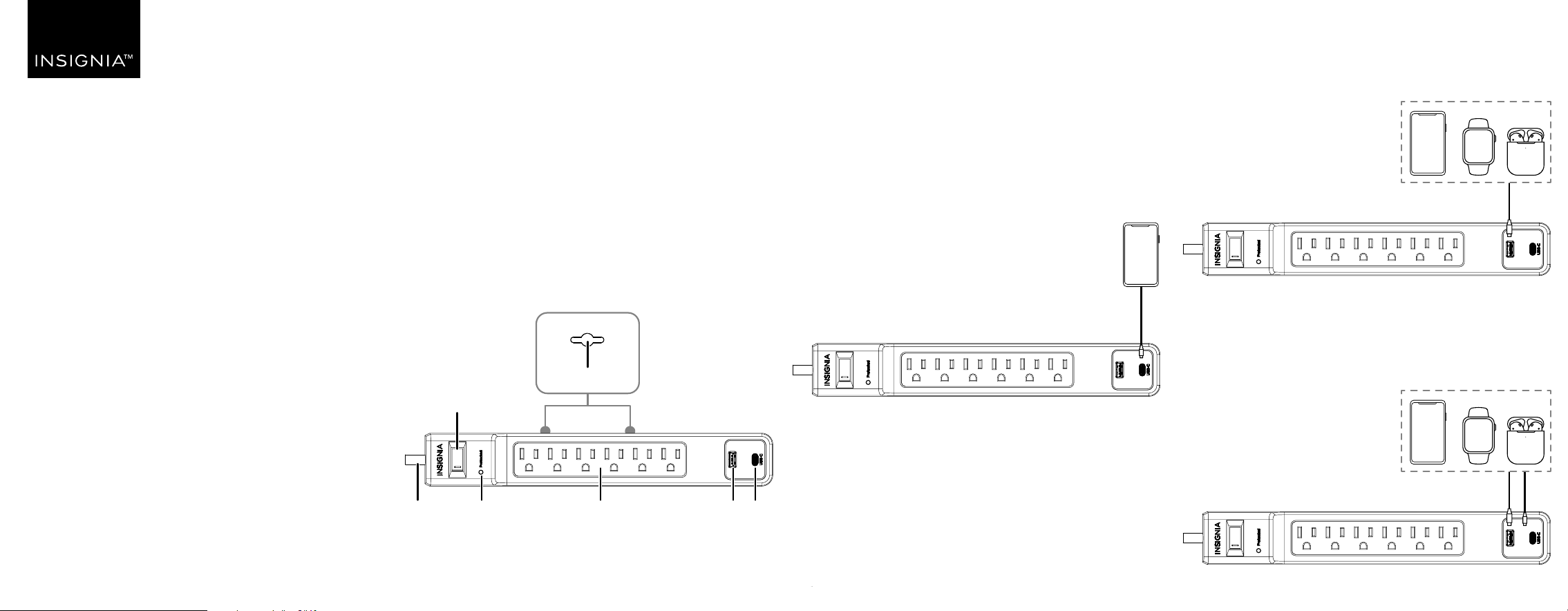
USB-A one-port charging
The USB-A port is suitable for smartphones,
smartwatches, and earbuds. It provides up to 12W of
power when used alone.
Two-ports charging at the same time
USB-C and USB-A provides total 18W (max) when both
ports are used together.
USING YOUR SURGE PROTECTOR
• Plug your surge protector into a wall outlet.
• The Protected LED lights when surge protection is
working. If the indicator no longer lights, your surge
protector has protected your device from a power
surge. Replace your surge protector.
USB-C one-port charging
The USB-C port is suitable for iPads and smartphones. It
provides up to 15W of power when used alone.
See “Specications“ for specic details.
Before using your new product, please read these instructions to prevent any damage.
QUICK SETUP GUIDE
6-Outlet
Surge Protector
NS-SP1A1C26
PACKAGE CONTENTS
• 6-outlet surge protector
• Quick Setup Guide
FEATURES
• Six AC outlets power multiple electronics at the same
time
• One USB-C port and one USB-A port (18W total) charge
your smartphones, tablets, and more
• 1,800 joules of protection safeguard your connected
devices against power surges and spikes
• 6 ft. (1.83 m) cord length oers exible placement
options
• Low-prole 45° oset plug won’t block your other
power outlets
• LED indicator lets you know when your devices are
protected
OVERVIEW
Mounting screw holes
Power switch
Power
cord
Protected LED AC outlets USB-A
port
USB-C
port
USB-C
USB-A
USB-A USB-C

V2 ENGLISH 25-0151
LEGAL NOTICES
FCC Statement
This device complies with Part 15 of the FCC Rules. Operation is subject to
the following two conditions: (1) this device may not cause harmful
interference, and (2) this device must accept any interference received,
including interference that may cause undesired operation.
This equipment has been tested and found to comply with the limits for a
Class B digital device, pursuant to Part 15 of the FCC Rules. These limits are
designed to provide reasonable protection against harmful interference in a
residential installation. This equipment generates, uses, and can radiate
radio frequency energy and, if not installed and used in accordance with the
instructions, may cause harmful interference to radio communications.
However, there is no guarantee that interference will not occur in a
particular installation. If this equipment does cause harmful interference to
radio or television reception, which can be determined by turning the
equipment o and on, the user is encouraged to try to correct the
interference by one or more of the following measures:
• Reorient or relocate the receiving antenna.
• Increase the separation between the equipment and receiver.
• Connect the equipment into an outlet on a circuit dierent from that to
which the receiver is connected.
• It is recommended to consult the dealer or an experienced radio/TV
technician for help.
Warning: Changes or modications not expressly approved by the party
responsible for compliance could void the user ‘s authority to operate the
equipment.
ONE-YEAR LIMITED WARRANTY
Visit www.insigniaproducts.com for details.
CONTACT INSIGNIA:
For customer service, call
1-877-467-4289 (U.S. and Canada)
www.insigniaproducts.com
INSIGNIA is a trademark of Best Buy and its aliated companies
Distributed by Best Buy Purchasing, LLC
7601 Penn Ave South, Richeld, MN 55423 U.S.A.
©2025 Best Buy. All rights reserved.
SPECIFICATIONS
• Dimensions (H×W×L) (not including plug):
12.28 × 1.87 × 1.34 in. (31.2 × 4.75 × 3.4 cm)
• Outlets: Standard grounded outlets (6)
• Power cord length: 6 ft. (1.83 m)
• Surge protection: 1,800 Joules
• USB-A charging port (1): 5V/2.4A
• USB-C charging port (1): 5V/3A
• USB total output: 18W
• Electrical rating: 125V/15A/1875W
• UL clamping voltage: UL1449 4th/800V (L-N, L-G, N-G)
• Maximum peak current: 45,000A
• 3 AC lines protected: L-N: 15,000A; L-G: 15,000A;
N-G: 15,000A
• Response time: Less than one nanosecond
• Circuit breaker: Resettable 15A
TROUBLESHOOTING
Why isn’t my surge protector powering my devices?
• Make sure that the power is not switched OFF or the
15 Amp circuit breaker has not tripped.
• A device may be overloading your surge protector.
Determine which device has overloaded your surge
protector and remove it, then turn the power switch back
to RESET.
Why doesn’t the Protected indicator LED turn on?
• Your surge protector may have received a power surge or
spike beyond its specied limits that overloaded the
protection circuitry and rendered it inactive. This means
that AC lines are no longer protected from surges.
Your surge protector has protected your connected
equipment, as designed, but it will not protect against
future surges and spikes. It should be replaced.
SAFETY INFORMATION
CAUTION: To reduce the risk of electric
shock
Use only in dry locations and only indoors.
DO NOT plug into another relocatable power tap.
DO NOT “daisy chain” surge protectors.
DO NOT use with any aquarium equipment.
DO NOT use if properly grounded outlets are not available.
DO NOT install this device if there is less than 10 meters (30 feet) of wire
between the electrical outlet and electrical service panel.
DO NOT use for medical or life support equipment. This device features an
internal protection that will disconnect the surge protective component at
the end of its useful life, but it will maintain unprotected power to the
load.