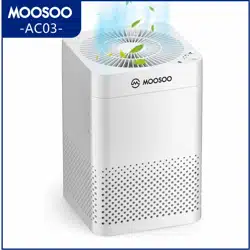
Air Purifier
AC03
Instruction Manual
For any questions and malfunctions of the appliance during use, please contact our customer
service email: [email protected]
何か不明な問題がございましたら、いつでも弊社にお気軽にご連絡くださいませ
MOOSOOLINEID:@665CTQMA
メールアドレス:[email protected]
ウェブサイド:IMOOSOO.JP/PAGES/AMAZON

CATALOGUE
IMPORTANT SAFEGUARDS
OVERVIEW
OPERATING INSTRUCTIONS
SPECIFICATIONS
PRODUCT FEATURES AND FUNCTIONS
FILTER REPLACEMENT
QUESTIONS & ANSWERS
WARRANTY
01
02
03
04
05
06
07
08
目次
安全上のご注意
各部の名称
使い方について
仕様
製品の特徴と機能
フィルターの交換について
よくあるお問い合わせ
保証について
10
11
12
13
14
15
16
17

IMPORTANT SAFEGUARDS
Thank you for purchasing this product. Please read this manual carefully before using this air
purifier and keep this manual carefully for future reference.
1. Remove all protective materials on the appliance including the plastic bag on the HEPA filter
inside the appliance before using it.
2. Do not place the appliance near water or let water go inside it to avoid short circuit and fire.
3. Do not place any objects on top of the appliance in case of causing deformation or malfunc-
tions.
4. Unplug the appliance for leaving unused or before maintenance.
5. It is used indoors and is not used in places where there is direct sunlight and is exposed to
rain.
6. This appliance cannot be used by persons (including children) with reduced physical,
sensory or mental capabilities or lack of experience and knowledge unless they have been
given supervision or instruction concerning use of the appliance in a safe way and under-
stand the hazards involved.
7. If the supply cord is damaged, please contact customer service for help, please do not
replace it by yourself.
8. Please do not block the air inlet and outlet of the appliance to avoid overheating inside the
machine and damage the product.
9. Do not place the appliance near any heating or inflammable objects in case of burning the
housing or causing fire hazard.
10. Do not modify the appliance at any ways in case of triggering short circuit or fire hazard.
01
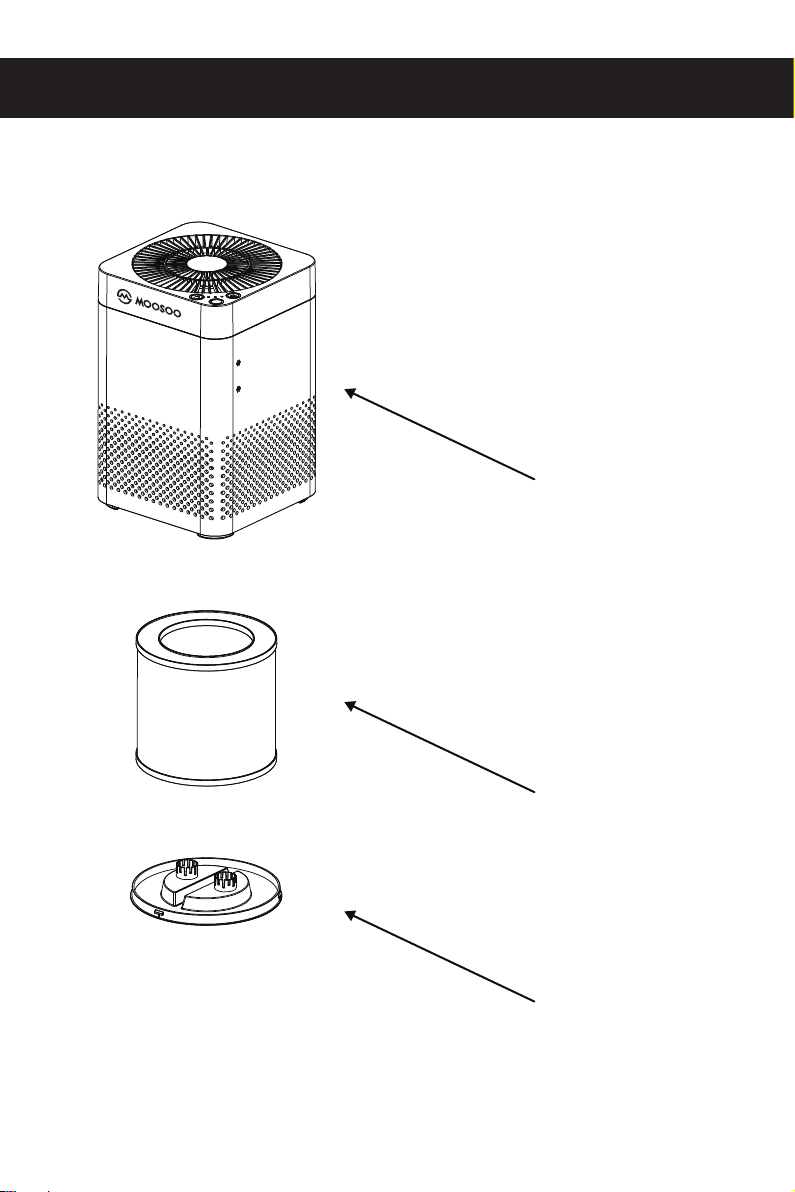
OVERVIEW
Main body
Filter bottom cover
Filter
02
OPERATING INSTRUCTIONS
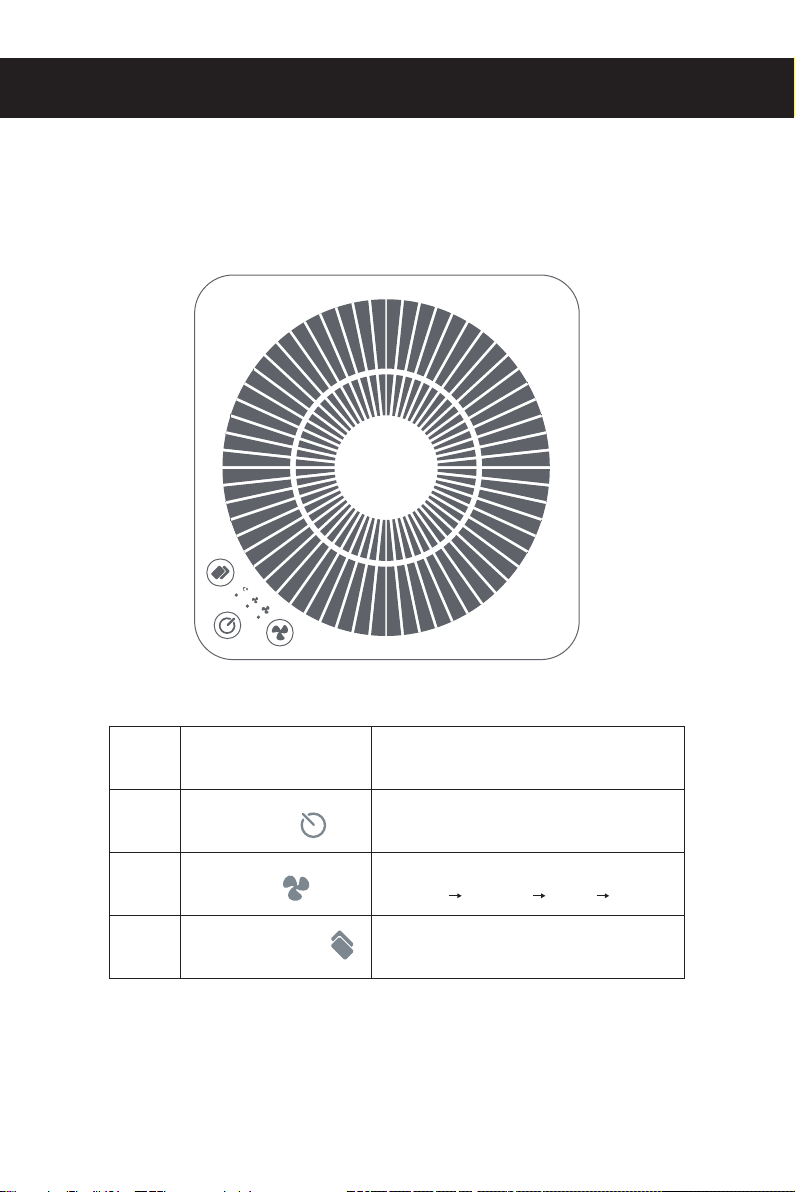
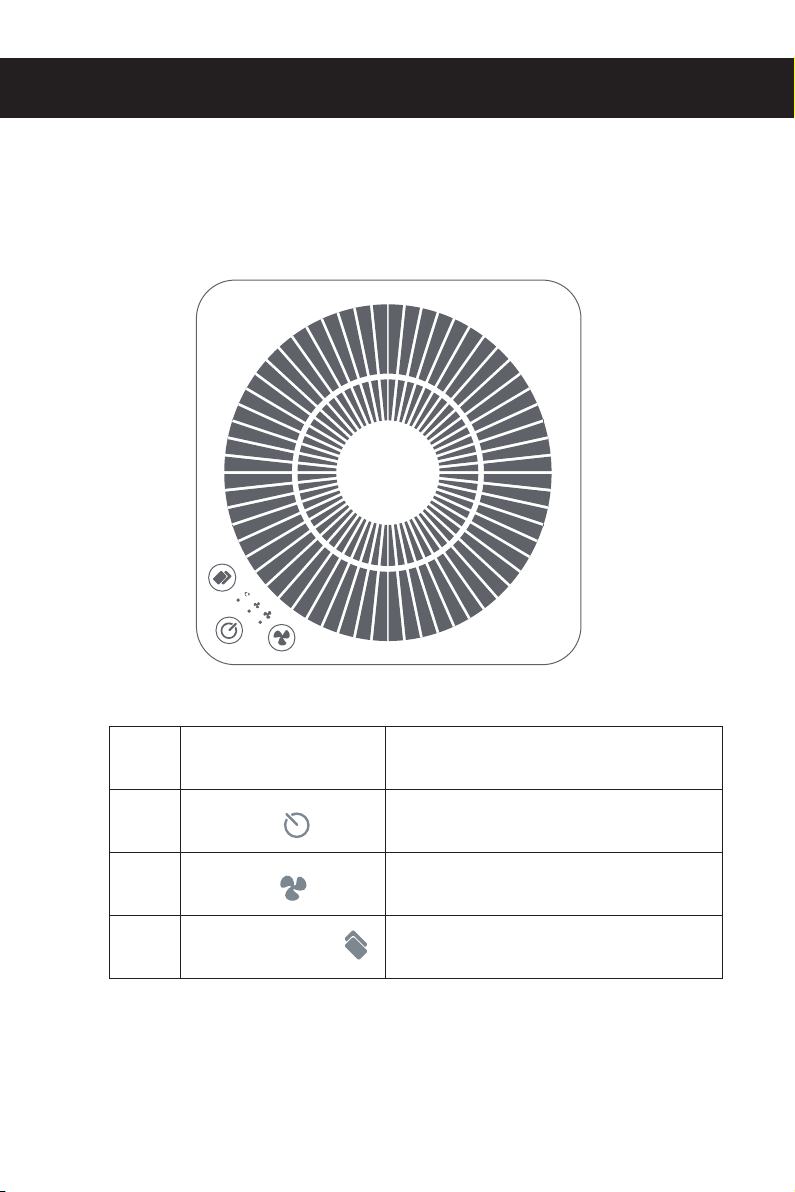
Control panel description
NO.
1
2
3
Button
Power Button
Fan speed
Filter replacement
Function Description
Turn on and off the appliance
Press this button to switch between
“sleep” “medium” “high” “sleep”
Keep pressing for 5 seconds to reset
the filter countdown.
03
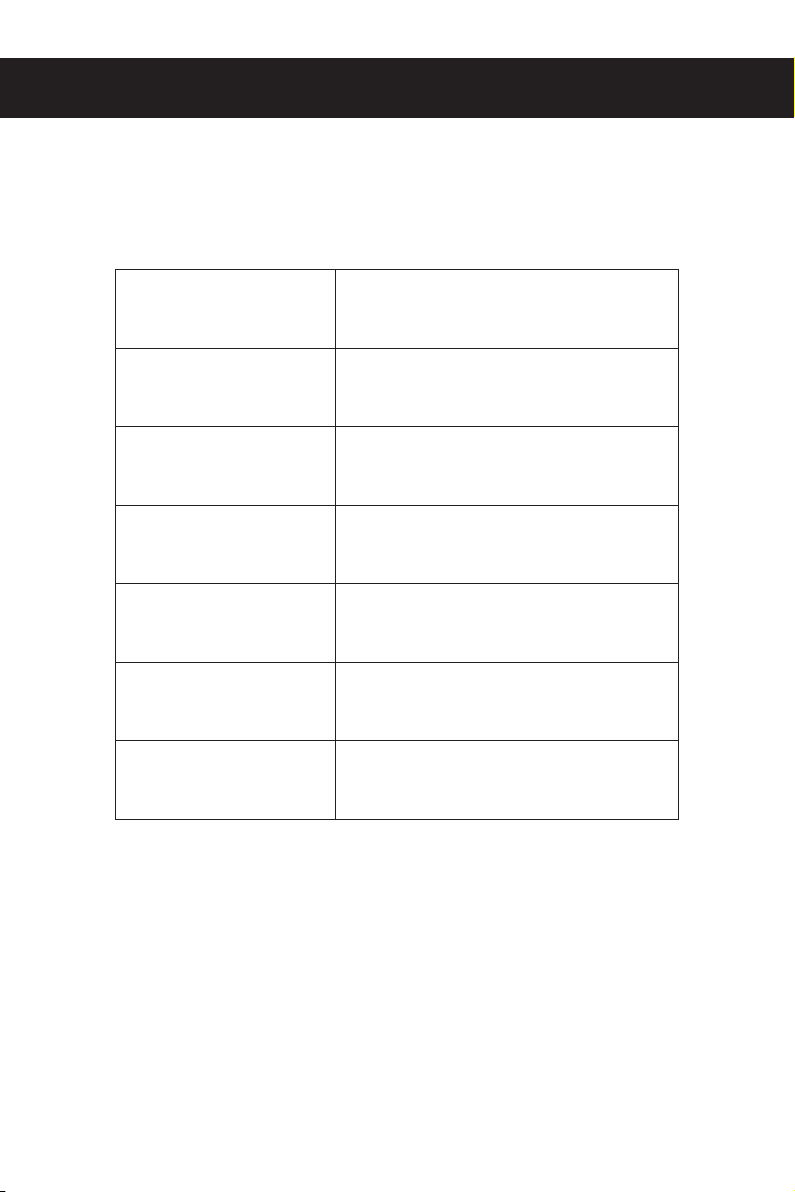
SPECIFICATIONS
Voltage
Rated power
Coverage area
Noise
Weight
Dimension
CADR
AC 110V ( The United States Only )
AC 220V ( The Europe Only )
30W
15-18㎡
50dB(A)
2.7KG
210*210*321 mm
200m³/h (Based on H13 HEPA Filter)
04

PRODUCT FEATURES AND FUNCTIONS
1. Preparation work
When the air purifier is connected to the power supply, the buzzer will beep and all the
indicators will light up. After three seconds, the air purifier will enter the ready mode and the
power button indicator will turn red.
2. Power on / off the appliance
Press the top power button as all buttons light turn white.
3. Wind speed
Please press the wind speed button to adjust "sleep" → "medium" → "high" Loop in turn.
4. Replace the filter
The filter replacement reminder will count down once the purifier is powered on. When the reminder
accumulates to 20000 hours, it will flash to remind you replacing the filter. After replacing the new
filter, keep pressing and hold for 5 seconds to reset filter replacement reminder as a beep would be
heard. The button light will remain on constantly.
05
FILTER REPLACEMENT
Precautions before use
Filter replacement instructions
1. Before using this product, you need to remove the bottom cover and remove the plastic bag
on the filter.
2. Do not use this product in an environment that humidity is over 90% as it will increase the
damage of the fitter and damage the parts of the machine.
3. If the product is used under a smoking or multi-fume environment, the filter of the product will
be covered by the tar or soot of the cigarette. Please use a soft brush to remove particles
(once a month) to avoid affecting the filter effecting.
When the filter is used for more than 2000 hours, it will flicker to remind you to replace the filter.
In order to protect the product from impact during transportation, the filter is installed at the bottom,
which may require a little more effort than usual.
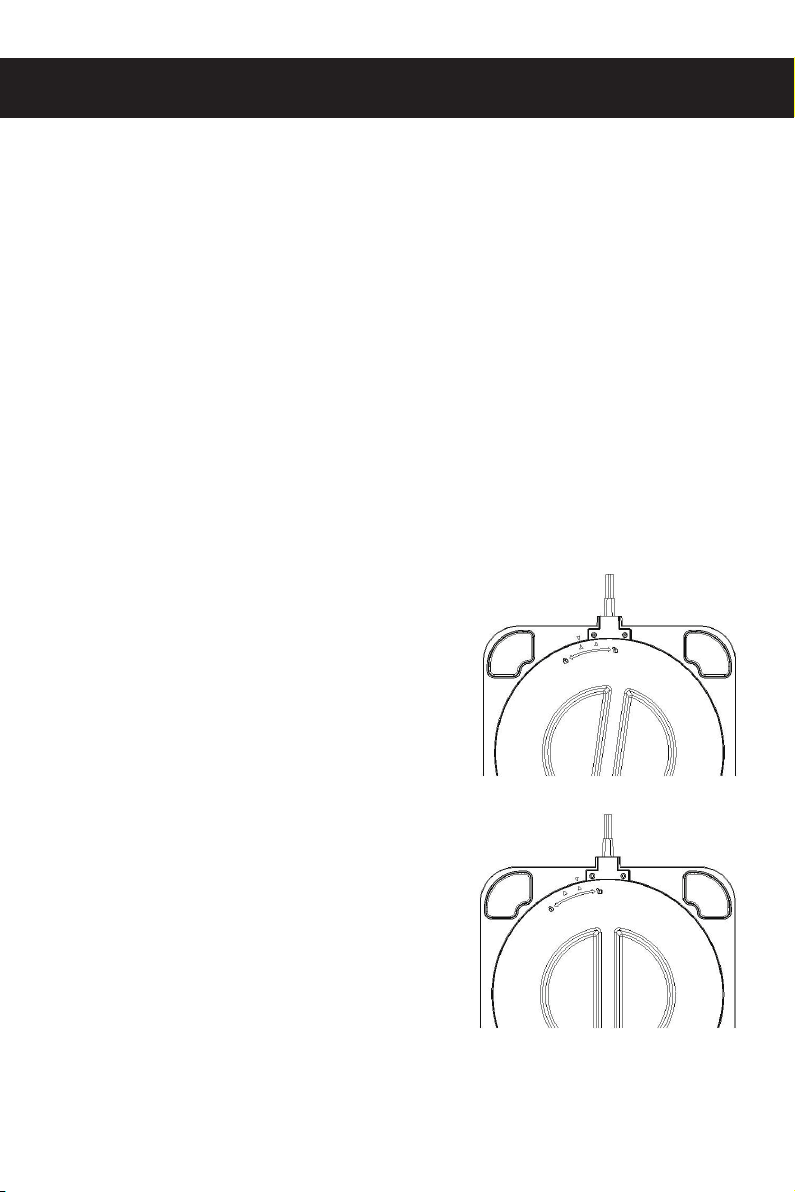
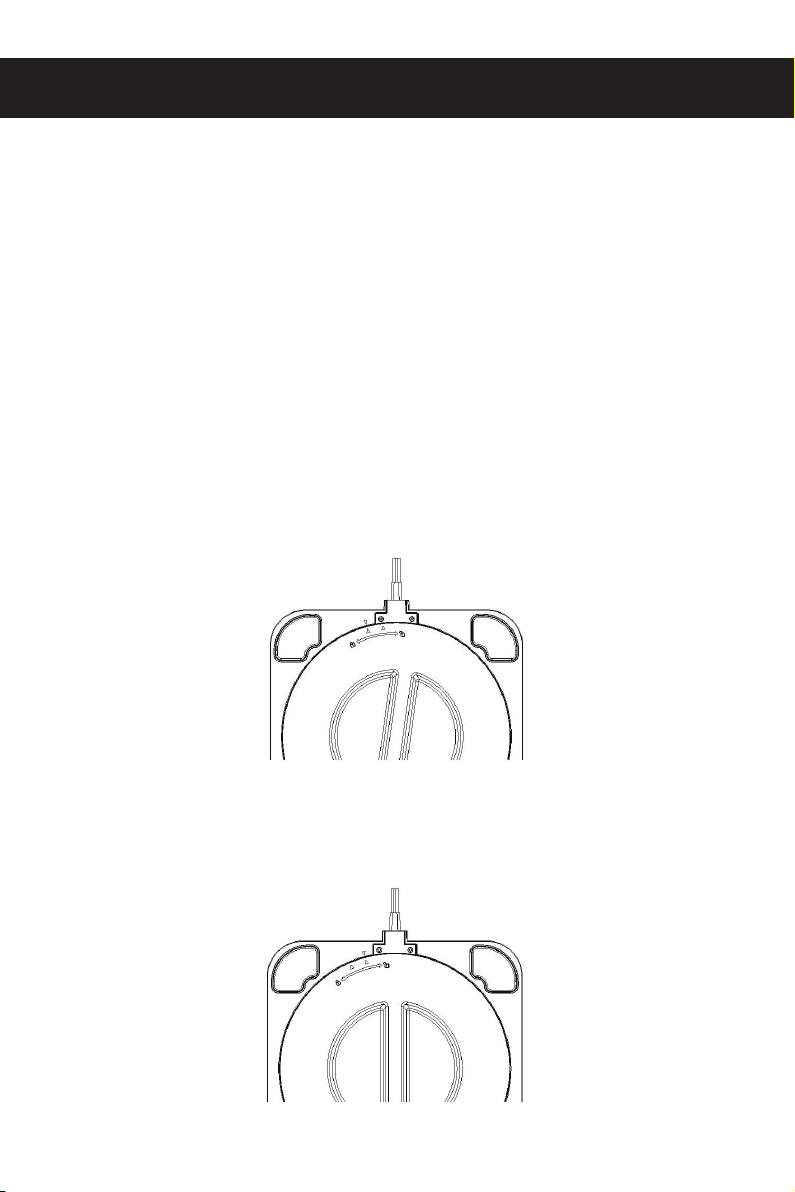
1. Hold the knob cover from the bottom of the product,
rotate clockwise in the direction (as shown below),
open the bottom cover, remove the filter. Remove
the bag on the new filter.
2. After the filter plastic bag is removed, put the filter
back into the product, and align the triangle of the
bottom cover with the triangle on the machine
counterclockwise and turn it in the direction of the
arrow, as shown in the figure:
06
QUESTIONS & ANSWERS
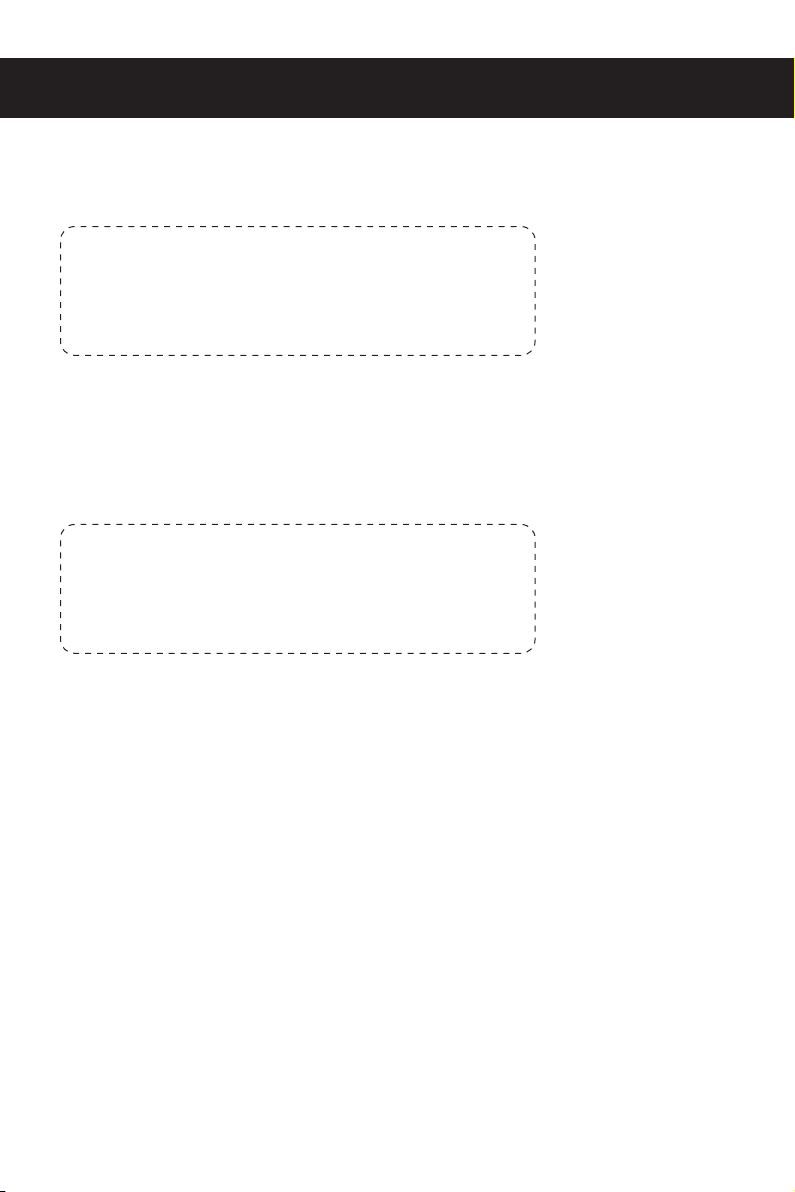
Q: Press the power button does not turn on
A: Check following conditions
Q: The sound is very noisy
A: Check following conditions
Is the power plug plugged in?
Is the fuse in your home broken?
Is there a power outage?
Is the front cover installed correctly or stuck in wrong place?
Please contact customer service for help.
Please contact customer service center for other abnormalities or
malfunctions.
Whether the machine is placed has deflection?
Uneven floor?
Whether the filter is blocked or needs to be replaced?
The air inlet is blocked?
Other questions:
There is burnt smell or the power cord, plug gets abnormal heat; high operating noise...
Please unplug the power cord from socket and contact the customer service.
07

WARRANTY
CUSTOMER CARE
WHAT IS NOT COVERED
The 1-year Limited Warranty is valid for products purchased from our MOOSOO only, starting from
the date of the original retail purchased. We will provide customer service for any defects in quality
or materials under normal, non-commercial use.
1. According to the requirements outlined in this instruction manual, the warranty is subject to
the following conditions and exclusions.
2. This warranty provides, at no extra cost to you all labor and parts necessary to ensure your
machine is in proper operating condition during the warranty period.
3. We provide the repair or replacement of your MOOSOO appliance if your MOOSOO
appliance is found to be defective due to faulty materials, workmanship function within 1 year
of purchase or delivery. ( If any part is no longer available or out of manufacture, we will
replace it with a functional replacement part).
1. Under your MOOSOO guarantee, MOOSOO shall not be liable for costs of repair or replacement
of a product incurred as a result of: Accidental damage, faults caused by negligent use or
care, misuse, neglect, careless operation or handling of the MOOSOO appliance which is not
in accordance with this MOOSOO Instruction Manual.
2. Machines purchased from an unauthorized dealer.
3. Use of parts and accessories other than those produced or recommended by MOOSOO.
4. Repairs or alterations carried out by unauthorized parties or agents.
5. Use of the machine other than for normal domestic.
08

09

安全上のご注意
この度は、弊社製品をお買い上げいただき、誠にありがとうございます。本製品をご使用いただく前
に、必ず取扱説明書をお読みください。
また、安全の為に以下の注意事項をよく読み、正しくお使い下さい。
本扱説明書必ず保管をして、必要に応じてご参照ください。
1.ご使用いただく前に必ず、本製品についている保護シートやビニール袋などを取り除いてくださ
い。
2.感電と火災の原因となりますので、本製品を濡れた場所で使用することや、製品に水を入れるこ
とはお控えください。
3.変形と故障の原因になるため、本製品の上に物を置かないでください。
4.使用しない時やメンテナンスをする前に、必ず電源コードを抜いてください。
5.本製品は室内でご使用いただき、日光や雨に当たる場所で使用はお控えください。
6.本製品は、8歳以下の方、身体・知能に疾患のある方はご使用いただけません。
ご使用する場合は、保護者様とご一緒にご使用下さい。
7.電源コードが破損又は劣化した場合には、カスタマーサービスにご相談ください。
8.吸気口と排気口を塞がないでください。製品は過熱又はダメージの恐れがあります。
9.火災の原因になるため本製品を熱源や可燃物の近くに置かないようご注意下さい。
10.感電や火災の原因になるため、本製品を解体しないでください。
10
各部の名称
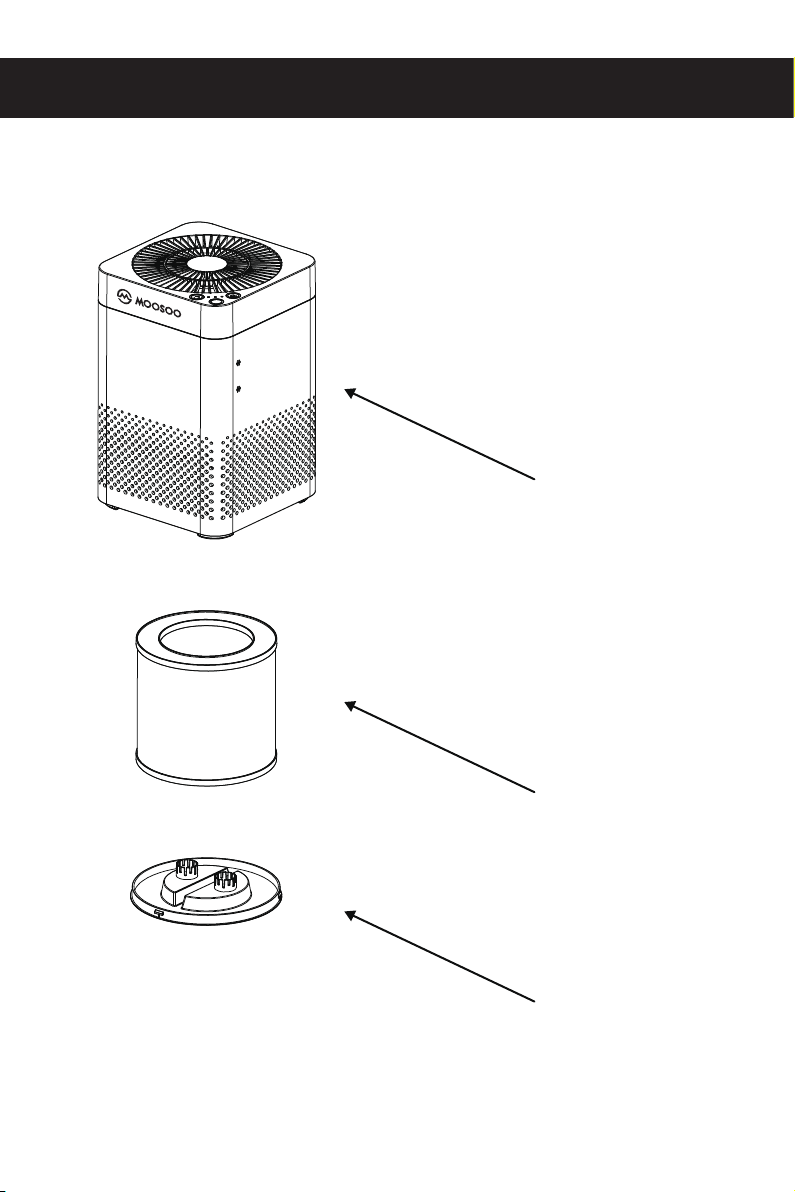
本体
フィルター底カバー
フィルター
11
使い方について
コントロールパネル
NO.
1
2
3
操作
電源ボタン
風量ボタン
フィルター交換ボタン
機能
本体の電源を「オン/オフ」にします。
「静音」→「中」→「高」の順に切り替わります。
5秒間長押して、フィルターのカウントがリ
セットされます。
12
仕様
電圧
定格電力
適用面積
運転音
製品質量
寸法
クリーンエア供給率
AC110V
30W
15-18㎡
50dB(A)
2.7KG
210*210*321mm
200㎥/h(H13フィルター)
13

製品の特徴と機能
1.準備
本製品を電源に、ブザーが鳴り、全てのインジケーターが点灯します。3秒後、準備モードに入り、電
源ボタンは赤く点灯します。
2.電源の入/切
電源ボタンを押すと、すべてのインジケーターが白く点灯します。
3.風量
風量調節ボタンで調節できます。
※静音→中→高の順に切り替わります。
4.フィルター交換
フィルター交換の時期は、製品の電源が入ると、カウントダウンします。運転時間の合計時間は2000時
間を超えると、フィルターの交換を知らせるため、インジケーターは点滅します。新しいフィルターを交
換した後、ビープ音が鳴るまでフィルター交換ボタンを5秒間長押しし、フィルター交換カウントがリセ
ットされます。尚、フィルター交換ボタンのランプは常にオンのまま点灯します。
14
フィルターの交換について
注意事項:
交換方法:
1.輸送中の衝撃からフィルターを保護するため、製品の下部に入れております。フィルターを取り付
ける際に、製品の下部をご確認ください。
2.フィルターを取り付ける際に、底にあるカバーを開き、フィルターについている保護フィルムを取
り外して下さい。
3.フィルターと部品に害を及ぼす恐れがあるため、本製品は湿度が90%以上の場所で使用しない
でください。
4.本製品を喫煙所または多煙環境で使用される場合、フィルターがタバコのタールや煤で汚れる
恐れがあります。清浄機の性能を維持するため、フィルターは定期的に(月に1回程)柔らかいブ
ラシで清掃してください。
1.製品の下部にあるノブを掴んで、時計回りの方向に回し(下図のように)、底カバーを開けて、フィ
ルターを取り外します。
2.新しいフィルターの保護フィルムを取り除き、製品にセットします。カバーの三角形印を製品の三
角形印と合わせるように、逆時計回りに、図の矢印の方向に沿って回します。
15
よくあるお問い合わせ
質問1:電源スイッチを入れても、電源が入らない。
質問2:運転音が大き過ぎる。
1.電源プラグが正しく差し込まれているか確認してください。
2.ヒューズは破損していませんか。
3.停電中ではありませんか。
4.底カバーは正しく装着していますか。
他に、焦げ臭いがする、電源コード、プラグが過熱するなど、商品の不具合が
ある場合は、電源プラグを抜いて、カスタマーサービスにご相談ください。
16
応答:
1.製品は凹凸不平の場所で使用していますか。
2.フィルターは破損した、もしくは交換が必要でしょうか。
3.吸気口は塞がれていますか。
応答:

保証について
保証対象となる場合
アフターサービス
1、一年保証は、MOOSOOの正規代理店から購入された製品に対してのみ有効です。また、お客様
が取扱説明書に記載される通りにご家庭でご使用頂いた上で、故障した場合に限ります。
2、お買い上げ日から一年以内のMOOSOO製品、部品または製品の一部に製造上の間題があると
認められる場合は、全ての部品の交換及び修理サ一ビスを無料で提供いたします。(尚、該当する
部品の生産が終了するなど部品の在庫がない場合は、代替となる別の部品に交換します。)
保証対象とならない場合
保証期間中においても、以下の場合には保証対象外となります。
1、災害や不慮の事故、不適切な操作、取扱説明書に従わないことにより製品を損害した場合。
2、MOOSOO正規代理店以外で本製品を購入した場合。
3、メーカー純正品以外の部品を使用した場合。
4、本製品を業務用或いはレンタルしたことにより故障した場合。
5、専門業者や正規代理店以外の者が本製品の修理を行った場合。
17