QUICK START
GUIDE
HAND HELD TEST TOOL
SEARCHZONE SONIK

This page intentionally left blank
3
Figure
1
Figure
2
Figure
Negative battery
terminal against
spring
4
Figure
5
Figure
6
Figure
7
Figure
3
Quick Start Guide
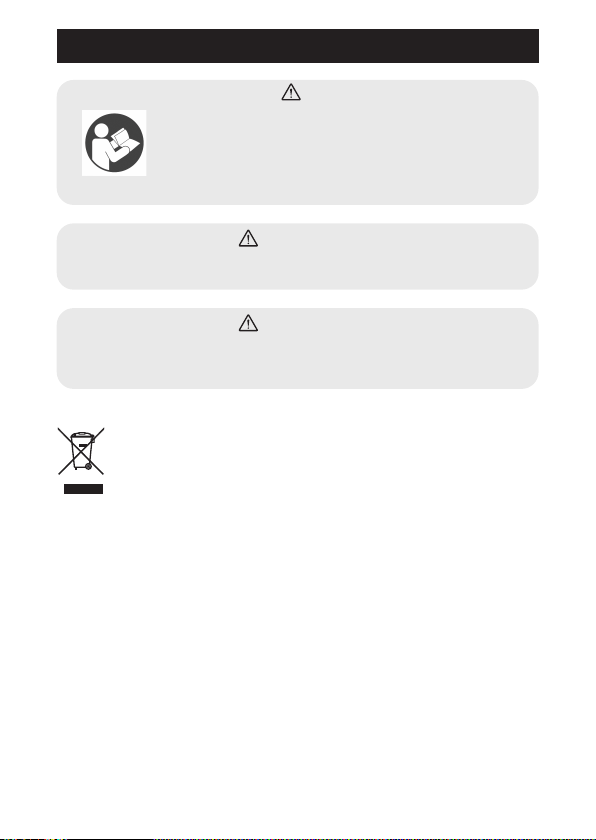
Waste Electrical and Electronic Equipment (WEEE)
This product complies with the Waste Electrical and Electronic
Equipment (WEEE) Directive 2012/19/EU. Components or
assemblies bearing this or similar symbols shall not be treated
as household or municipal waste. Waste electrical products (end of life)
shall be recovered and disposed of at specialist WEEE disposal facilities.
Contact your local authority, your distributor, or the manufacturer if you
require more information about recycling WEEE.
What's in the Box
1. Hand Held Test Tool
2. Set of 10 AAA batteries
3. Hexagon socket key size 6 mm
4. Hand Held Test Tool Quick Start Guide (this document)
WARNING
Read these user instructions carefully before using
this equipment. User instructions must always be
available to the user and are not to be removed
except by the user of this equipment. For proper
use, see supervisor, user instructions, or contact
the manufacturer.
WARNING
If the equipment is used in a manner not specified by the manufacturer,
the protection provided by the equipment may be impaired.
WARNING
Do not mix battery types. Replace the batteries only with the types listed
in Specifications. Use of batteries other than those specified in Specifica-
tions will invalidate the certification.

4
List of Markings
Warning
WEEE mark
UL certification mark
Explosive atmosphere class
European Economic Area certification mark
Environment Friendly Use Period
II 2 G
SEARCHZONE SONIK - TEST TOOL
2813
Part No.
Serial No.
Mod State:
1 2 3 4 5 6 7 8 9 10
2331B1000
XXXXXXXXX
465385
Intrinsically Safe - À Sécurité Intrinsèque
Cl. I, Div. 1, Grps. A,B,C,D, T4
Cl. I, Zn. 1, AEx ia IIC T4
Ex ia IIC T4
Ta -20°C to +50°C
Ex ia IIC T4 Gb
DEMKO20ATEX2247
IECEx UL20.0043
DNV 21.0027
IP66
Patent: www.hsmpats.com
WARNING
ATTENTION
ATENÇÃO
Read and understand manual before installation, operation or servicing. Substitution of components may impair intrinsic safety. Do not open or repl ace battery when an explosive atmosphere is
present. Use only DURACELL MN2400 AAA batteries or equivalent (refer to Quick Start Guide for allowed battery types). / Lire et comprendre le manuel avant d’installer, d’utiliser ou de réparer
l’équipement. La substitution des composants peut nuire à la sécurité intrinsèque. N’ouvrez pas l’équipement et ne remplace pas la betterie dans des atmosphères contenant des explosifs. Utilisez
uniquement des piles AAA DURACELL MN2400 ou équivalentes (reportez-vous au Guide de démarrage rapide pour les t ypes de piles autorisés). / Leia e compreenda o manual antes da instal ação,
operação ou manutenção. A substituição de componentes pode prejudicar a segurança intrínseca. Não substitua a bateria quando uma atmosfera explosiva estiver pre sente. Use apenas baterias
DURACELL MN2400 AAA ou equivalente (consulte o Guia de início rápido para os tipos de bateria permitidos).
Honeywell Analytics Ltd., Poole, Dorset, BH17 0RZ. Made in UK
Example certification label
Example warning label
Instructions
The Hand Held Test Tool is an ultrasound-generating device used for
functional verification of the Searchzone Sonik detector. It may be used in
combination with the Searchzone Sonik App running on a suitable mobile
device.
WARNING
While operating the Hand Held Test Tool, do not under any circum-
stances aim the tool towards your head, or any other person.
The Hand Held Test Tool generates two different test signals to check
the detector’s functionality:
1) First test signal is recognized by the detector as a ‘bump test’ and
is used to perform the local test. It is reported through a change in
detector’s LED ring status indicator, however the detector’s outputs will
NOT be activated. This local test is automatically logged.
5
2) Second test signal is used for END-toEND testing. It is reported
as an Alarm through detector’s LED ring status indicator, relays and
through the 420mA loop.
NOTE: When using the Hand Held Test Tool, ensure that it is operated at
least 1m from the Searchzone Sonik detector.
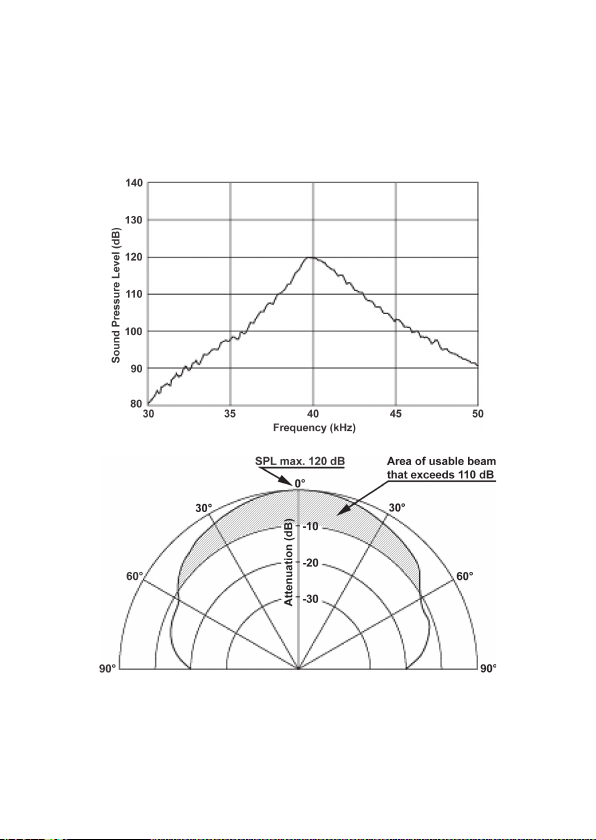
Sound pressure levels and usable beam

6
1. Performing LOCAL Test
WARNING
While operating the Hand Held Test Tool, do not under any circum-
stances aim the tool towards your head, or any other person.
1.1 Local test with Hand Held Test Tool alone
1. Ensure that Searchzone Sonik is powered and operational.
2. Aim the Hand Held Test Tool towards the face of Searchzone Sonik
detector. Keep the distance between the Searchzone Sonik detector and
the Hand Held Test Tool in the range of 1 to 10 m (3.3 to 33 ft.).
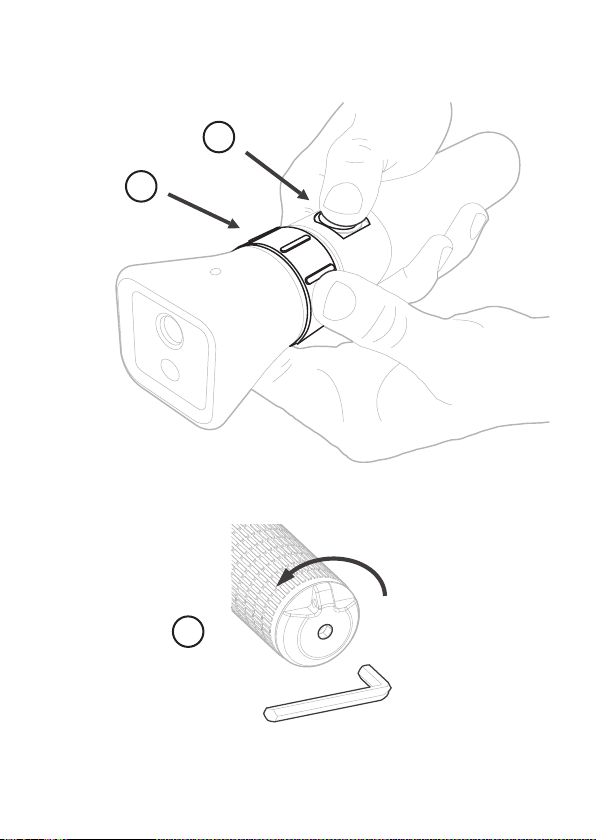
3. Press and hold the Test Button (Figure
). The Hand Held Test Tool
will produce audible beeps and show a red LED light to confirm that it is
emitting the test signal.
4. The detector will recognize the test signal and the LED status indicator
will flash red.
5. Release the Test Button. The LED status indicator will return to the
default state (green).
In this mode the outputs are NOT affected.
1.2 Local test with Searchzone Sonik App and Hand Held Test Tool
1. Login to the Searchzone Sonik App.
2. Connect the Searchzone Sonik App to the detector.
3. Navigate to the main menu and tap on Detector Overview. Then tap
on Proof Test.
4. Aim the Hand Held Test Tool to the face of the detector. Keep distance
between the Searchzone Sonik detector and the Test Tool in the range of
1 to 10 m (3.3 to 33 ft.).
5. Press the Test Button (Figure
) on the Hand Held Test Tool.
6. The detector will recognize the test signal and LED status indicator will
flash red.
7. While the Test Button is pressed the Searchzone Sonik App will indicate
the test signal as recognized. The test is automatically logged by the
Searchzone Sonik App.
8. Release the Test Button.
9. The LED status indicator will return to default state (green).
7
1.3 END-toEND Test
NOTE: If you are NOT using the Searchzone Sonik App, begin with Step 4.
1. Login to the Searchzone Sonik App.
2. Connect the Searchzone Sonik App to the detector.
3. Navigate to main menu and tap on Detector Overview. Then tap on
Proof Test.
4. Aim the Hand Held Test Tool to the face of the detector. Keep distance
in the range of 1 to 10 m (3.3 to 33 ft.).
5. Turn and hold the Rotating Collar (Figure
) to select Test Mode
2. Holding the collar in this position, press and hold the Test Button
(Figure
).
6. The detector will recognize the test signal and the visible status
indicator will flash red. The alarm relays will change state and the 420mA
loop will rise to indicate an Alarm condition.
7. While the Rotating Collar is rotated and Test Button pressed the
Searchzone Sonik App will indicate the test signal as recognized. The LED
status indicator will flash red.
8. Release the Test Button and the Rotating Collar on the Hand Held Test
Tool.
9. Detector LED status indicator, relays and 420mA loop will return to
default state.
1.4 Battery replacement
WARNING
Do not mix battery types. Replace the batteries only with the types
listed in Specifications. Use of batteries other than those listed in
Specifications will invalidate the certification.
1. Use a hexagon socket key size 6 mm and rotate it counter-clockwise to
loosen the end cap (Figure
).
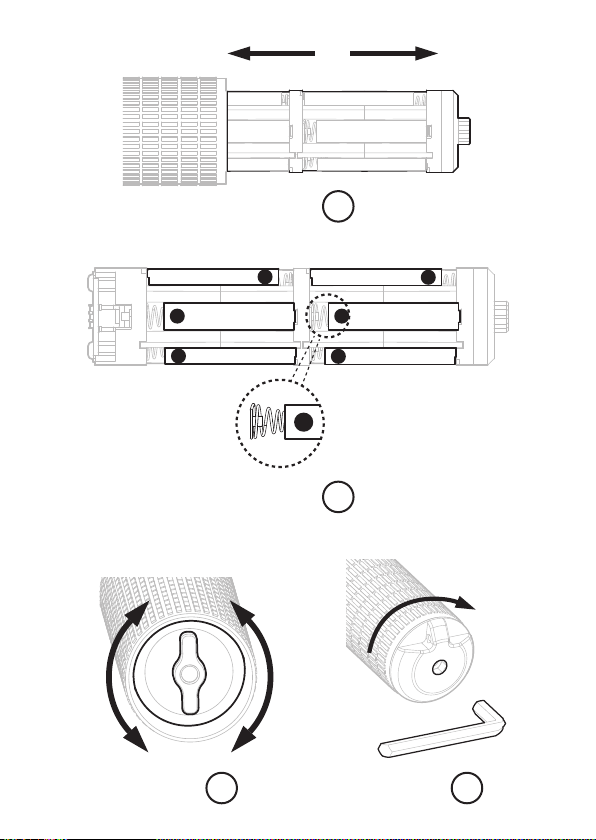
2. Slide the battery pack out of the Hand Held Test Tool (Figure
).
3. Replace batteries in the pack. Refer to the Specifications for acceptable
battery types. Position the negative battery terminals against the springs
(Figure
).
4. Slide the battery pack into the Hand Held Test Tool.
5. Gently rotate the battery pack clockwise/anticlockwise until it locates
in the guide grooves and slide it fully into position. Incorrect position of
the battery pack will not allow the end cap to be mounted back (Figure
).
6. Replace the end cap and rotate clockwise. Use a hexagon socket key
size 6 mm and tighten gently (Figure
).
8
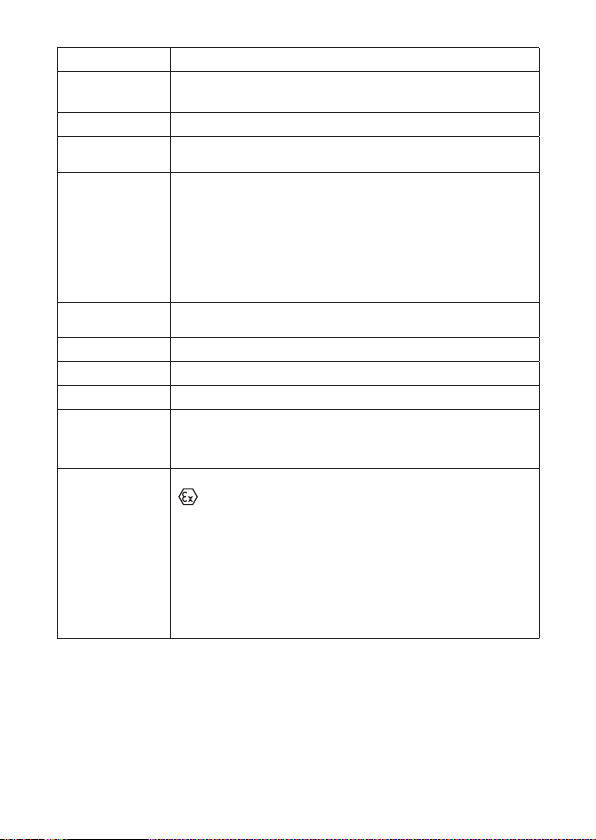
1.5 Specifications
Environmental 20°C to +50°C (4°F to +122°F); 0 % to 100 % RH condensing
Output Signals Test Signal 1 - 40 kHz , min. 96 dB SPL at 1 m
Test Signal 2 - 40 kHz , min. 96 dB SPL at 1 m
Signal Range max. 10 m
Storage
Temperature Range
+5°C to +30°C (+41°F to +86°F)
Internal Battery Cell AA A type, primary cells, following types allowed only:
• Duracell ID2400 Industrial AA A cell
• Duracell PC2400 Procell AA A cell
• Duracell MN2400 Deluxe A AA cell
• Duracell QU24 00 Quantum AA A cell
• Duracell MX2400 Ultrapower AA A cell
• Duracell MN2400 Pluspower AA A cell
Battery Life min. 100 tests per year for 5 years, starting with a new set of AA A primary
cells
Weight 668 g (1.47 lbs)
Dimensions 100 mm x 150 x 50 mm
Ingress Protection IP 66
Compliance to
Standards
EMC Directive
RoHS
China RoHS
Safety Approvals ATEX / IECEx – DEMKO20ATEX2247 / IECExUL20.0043
II 2 G
Ex ia IIC T4 Gb
Ta 20 °C to + 50 °C
cULus – E 465385
Cl I, Div 1 Grps A, B, C, D T4
Class I Zn. 1 AEx ia IIC T4
Ex ia IIC T4
Ta 20 °C to + 50 °C

9
This page intentionally left blank

2331M1305 Issue 2 ECO A05505
© 2021 Honeywell Analytics
Please Note:
While every effort has been made to ensure
accuracy in this publication, no responsibility
can be accepted for errors or omissions. Data
may change, as well as legislation and you are
strongly advised to obtain copies of the most
recently issued regulations, standards and
guidelines. This publication is not intended to
form the basis of a contract.
Find out more
www.sps.honeywell.com
Contact Honeywell Analytics:
Europe, Middle East, Africa, India
Life Safety Distribution GmbH
Javastrasse 2
8604 Hegnau
Switzerland
Tel: +41 (0)44 943 4300
Fax: +41 (0)44 943 4398
India Tel: +91 124 4752700
gasdetection@honeywell.com
Americas
Honeywell Analytics Inc.
405 Barclay Blvd.
Lincolnshire, IL 60069
USA
Tel: +1 847 955 8200
Toll free: +1 800 538 0363
Fax: +1 847 955 8210
detectgas@honeywell.com
Asia Pacific
Honeywell Analytics Asia Pacific
7F SangAm IT Tower
434 Worldcup Buk-ro,
Mapo-gu, Seoul 03922
Korea
Tel: +82269090300
Fax: +82269090328
analytics.ap@honeywell.com
Technical Services
EMEA: HAexpert@honeywell.com
US: HA.us.service@honeywell.com
