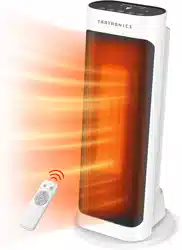
User manual Fan Heater
Product Diagram
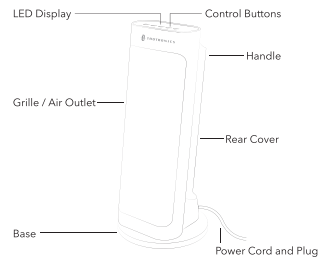
Operations and Functions
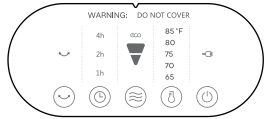
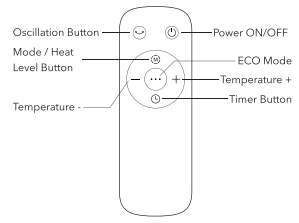
Remote Control
Note: For added convenience, the same control buttons can be found on the remote control.
Operations and Functions
Place the heater on a firm. level surface free from obstructions. and at least 3ft. (0.9m) away from any wall or combustible material. Plug into an appropriate voltage AC outlet. the unit will enter standby mode with a beep and  illuminated. Your heater is ready for use now.

Power ON/OFF
Press  on the heater / remote control once to turn the heater ON with default settings: temperature “85°F” & high heat level
  on LED display.
- If no operation is done in 60 seconds. the LED display will turn off automaticaly.
- Press once again to turn the heater OFF (standby mode).

Mode / Heat Level Setting
- When the unit is on. repeatedly press
 on the heater or
  on the remote control to cycle through High ->Low -> ECO -> High modes. eco

ECO Mode
- When the unit is on. repeatedly press on the heater or on the remote control to select ECO mode.
- Or press
 on the remote control to turn on/off ECO mode directly.
- When ECO mode is turned on. the heater will adjust the working mode (High or Low) automatically based on the ambient temperature
- Default temperature: 75°F.

Temperature Adjustment
- When the unit is on. repeatedly press
 on the heater or
  the remote control to cycle through 85°F -> 65°F -> 70°F > 75°F >
- 80°F -> BSF
- When the setting temperature is reached. the heater will stop working. When the room temperature is lower than the set one. the heater will start working again.

Timer Setting
- Auto Stop Timer: When the unit is ON. repeatedly press
 on the heater / remote control to set the number of hours (0~7h) you want the unit to run before it switches off. When time is up. the unit will automatically stop running.
- Auto Start Timer: When the unit is OFF (with the heater plugged into an electrical outlet). press
 on the heater / remote control to set the number of hours (0~7h) you want the unit to start running automatically. When time is up. the unit will automatically start running.
- To cancel Timer setting. adjust the timer setting to 0 or turn off the unit.

Oscillation Button
- When the unit is on. press
 on the heater / remote control to start oscillating.
- To stop oscillating. press it again.

Auto LED Display OFF
- Press and hold
 and
and  on the heater simultaneously for 3 seconds to tum on/off the Auto LED display off mode.
- When the unit is powered on for the first time. the Auto LED display off mode is turned on by default.
Other Features
Memory Function
- If power is not disconnected. the heater will always remember your last settings (temperature & working mode) once you turn it on again.
12-Hour Auto Shut Off
- When the heater has been working for 12 hours continuously without any other operation. it will shut off automatically.
Tip-Over Protection
- When the heater is tipped over. the heater will shut off automatically with 10 beeps.
- Place the heater back on a flat. level and stable surface and remain upright. Then turn it on again.
Overheat Protection
- When the ambient temperature is above 122°F. the heater will stop heating and the overheat alarm will be triggered with timer indicators (1h. 2h. 4h) flashing and 10 beeps.
- Please unplug it from the power source and power it on again when the ambient temperature drops below 122°F.
Temperature sensor open / short circuit
- Open circuit: Timer indicator “1h” flashes on the LED display with 10. beeps.
- Short circuit: Timer indicator “2h” flashes on the LED display with 10 beeps.
Temperature sensor open / short circuit
- Open circuit: Timer indicator “1h” flashes on the LED display with 10 beeps.
- Short circuit: Timer indicator "2h" flashes on the LED display with 10 beeps.
- Please unplug it from the power source and contact TaoTronics Customer Support.
Replacement of Batteries in Remote Control
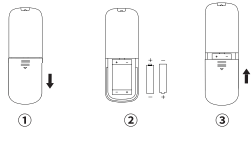
- Remove the battery box cover along the indicated arrow direction.
- Replace with two new #7 (AAA 1.5V) dry batteries. Make sure positions for "+" pole and "-" pole are correct
- Reinstall the battery box cover
CAUTION:
- Replace with new batteries of the same type when replacement is. required.
- When not using the remote control for a long time. please take out the batteries.
- Do not attempt to dismantle the batteries.
- Do not dispose the batteries in fire. batteries may explode or leak
Replacement of Batteries in Remote Control
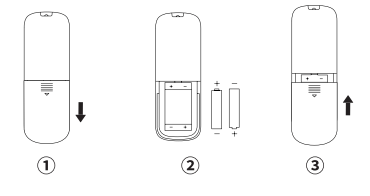
- Remove the battery box cover along the indicated arrow direction
- Replace with two new #7 (AAA 1.5V) dry batteries. Make sure positions for "+" pole and -" pole are correct
- Reinstall the battery box cover.
CAUTION:
- Replace with new batteries of the same type when replacement is required
- When not using the remote control for a long time, please take out the batteries.
- Do not attempt to dismantle the batteries.
- Do not dispose the batteries in fire, batteries may explode or leak.
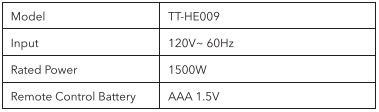
Specifications
Cleaning and Maintenance
It is recommended that the heater be cleaned at least one time during the operating season and before off-season storage in order to provide the optimum level of performance.
Always disconnect the appliance from the mains by switching it off and removing the plug from the power outlet before cleaning.
- Turn the heater "OFF" unplug it and wait for the heater to cool down.
- Use only a soft cloth to gently wipe the outer surfaces of the heater clean.
- Do not use any cleaning agents or detergents
- Never immerse the heater in water and never allow water to drip into the motor housing. Be sure not to wet the Heating Element and the switches.
- For storage. you may leave the heater covered to protect it from dust. Store it in a cool. dry location and arrange the cable away from traffic areas so that it will not be tripped over or damaged
Caution:
- Do not allow water to run into the interior of the heater as this could result in a fire or electric shock hazard.
- Any other servicing should be performed by an authorized service representative.
Troubleshooting
Heater does not start
- Power cord is not properly plugged
Connect the plug to a powered electrical outlet.
- Overheat Protection has been activated.
Turn the heater OFF. unplug it and allow it to cool
Check and remove any objects on or adjacent to the heater
Wait 5-10 minutes before plugging the unit back in.
- No powers passing through the unit.
Ensure that your circuit breaker or fuse is working properly.
Ensure your heater is placed on a flat and even surface.
- Setting temperature is lower than the
Make sure the thermostat is set at a higher temperature than the room temperature.
The heater suddenly stops during heating
- Ambient temperature reaches above 122°F
Unplug it from the power source and power it on again when the ambient temperature drops below 122°F
- The heater is tipped over.
Place it on a flat. level and stable surface and remain upright. Then turn it on again.