USER MANUAL
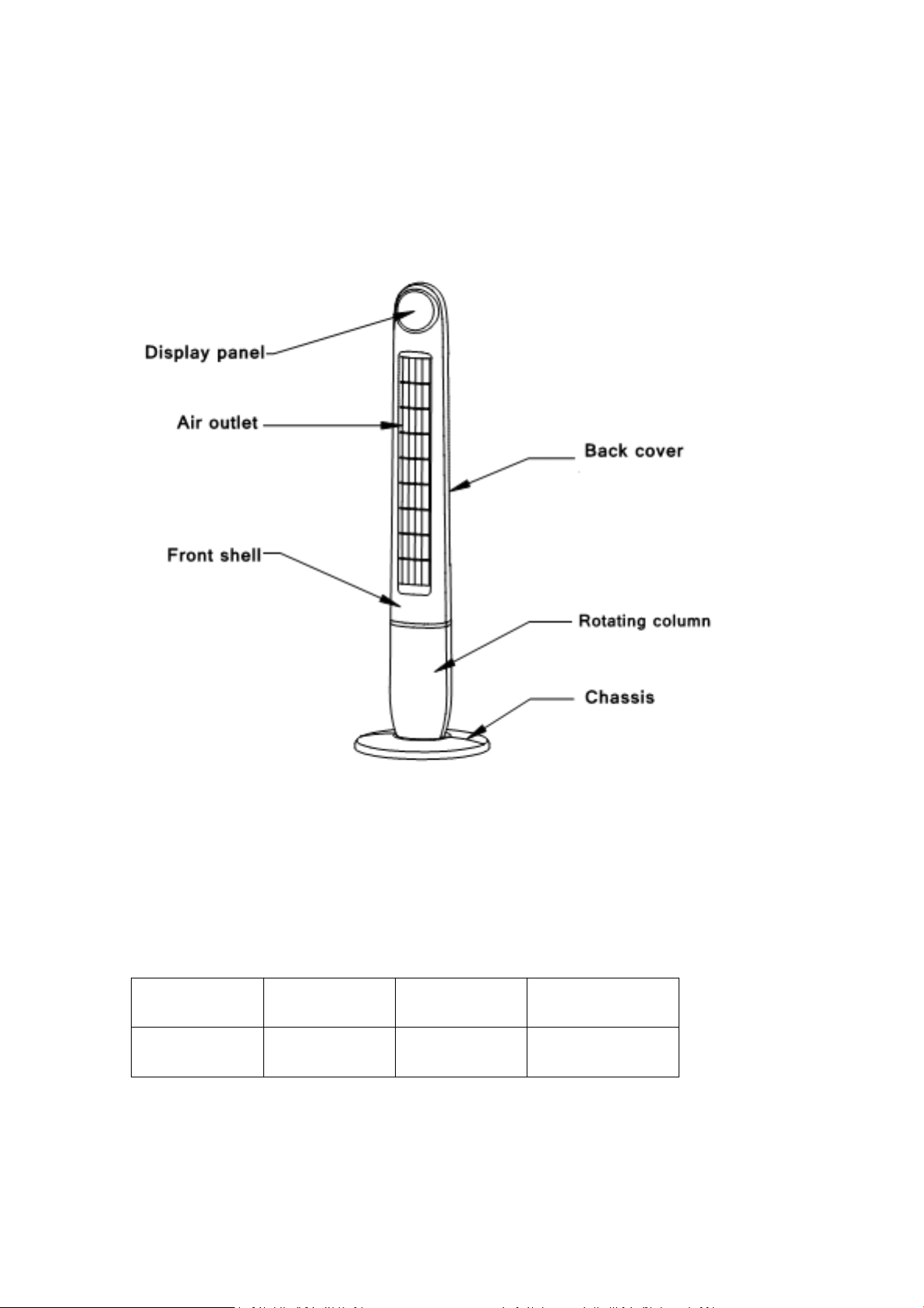
Installation method
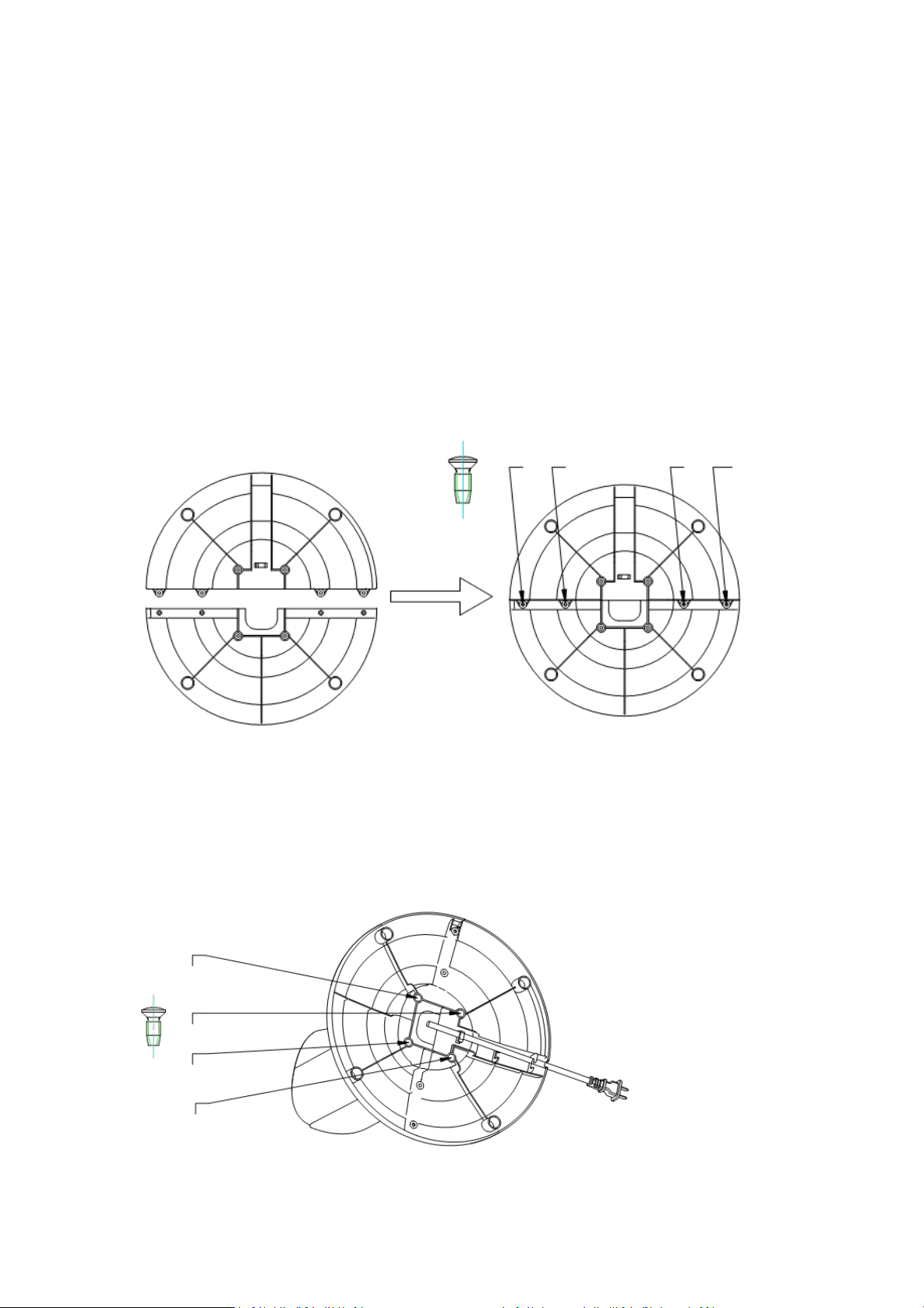
1. Open the packing box and place the product on a flat surface.
Check whether the goods in the box are in line with packing
list.
2. Assembling two bottom components correctly into a disk as
shown below. Screw two sides of the disk with four screws
3. Pass the power cord through the bottom panel.
4. Fix the main body of product on the base with four screws at
the position as shown below.
Usage
a. Plug it in. The buzzer emits a "di" and the digital screen
displays the ambient temperature. Product is standby.
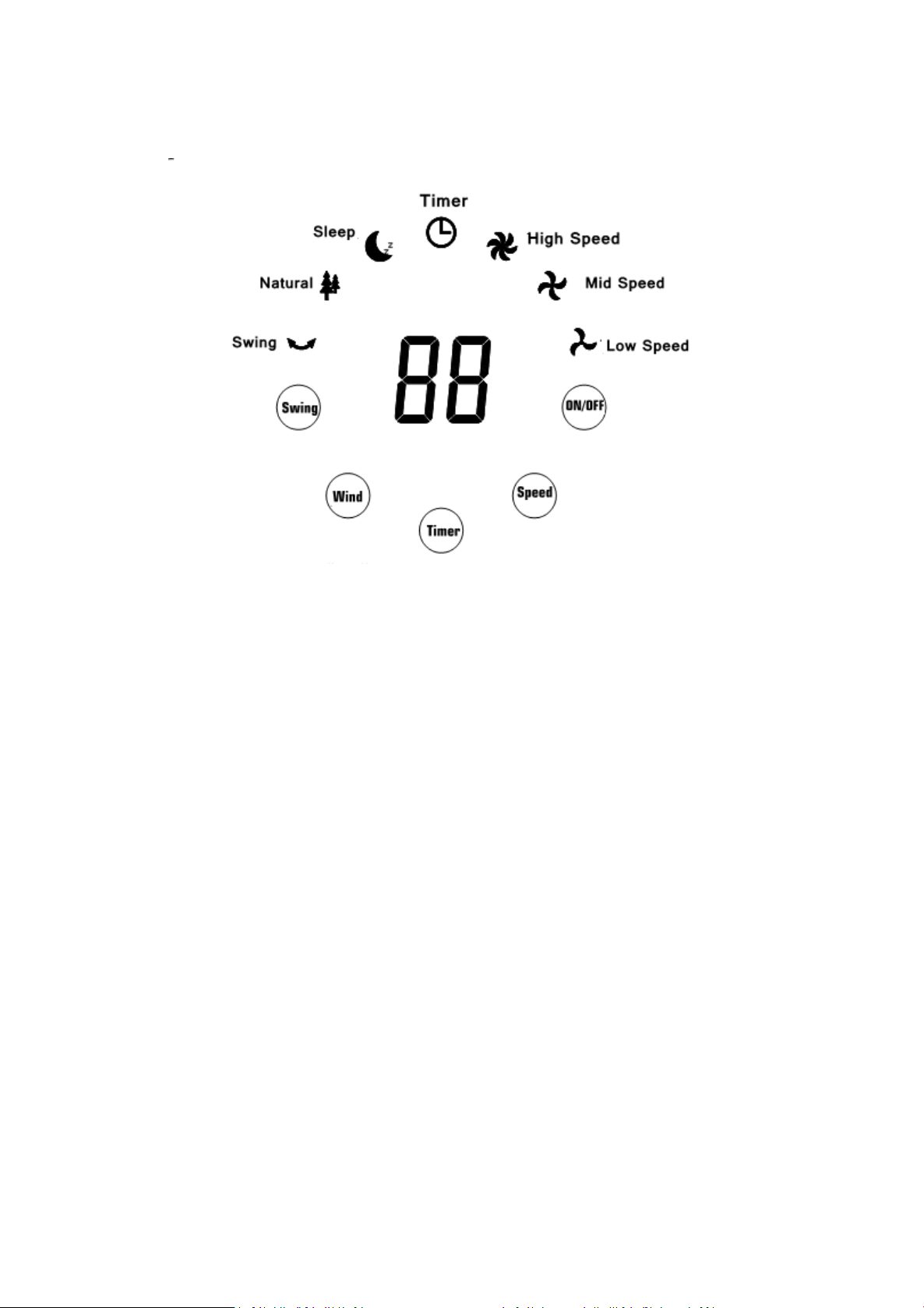
b. ON/OFF : Turn the fan on/off.
c. Speed: Press this button to choose an appropriate wind
speed from low, medium and high.
d. Wind: You can choose a blow mode from these modes:
Sleeping mode: Wind blow is the weakest and it will come
inconsistently.
Nature mode: Wind blow is stronger than that of sleeping
mode. The fan will work with circular ‘blow and rest’ in this
mode.
Normal: The fan will blow wind consecutively at the power you

chose.
e. Timer: Turn the fan off in 0-12hours by your setting.
f. Swing: The fan will oscillate when it blows wind.
g. Remote control: Please take out the diaphragm before use.
Attention
1. Remove the protective case and ensure that the product is
disconnected from the power supply.
2. Keep it away from the fire source.
3. It is forbidden to use in places where serious dust is found.
4. Products cannot work in the extremely high or low
temperature environment.
5. The wire and other external objects shall be prohibited to
insert into any pores of this product for avoiding electric shock
or damage to the product.
6. It is forbidden to immerse the product in water and spraying
water to the fan.
7. If any abnormality occurs during the use of this product,
please immediately shutdown and remove the power cord plug
Clean, maintain and store
1. Clean the shell

Unplug the power cord and gently wipe with a cloth.
Do not use alcohol, gasoline, banana water and other solvent
cleaning.
2. Product storage
Clean the product and store it in a carton, and place it in the
place where is dry and less sunshine.
Keep the fan away from water. To clean, unplug firstly, and wipe
with a moist cloth then dry it by dry cloth. The fan does not
require any lubrication and has no removable elements except
the bottom disc. You do not have to do any maintenance.
When in use, do not place the cord across water or damp areas.
When not in use, store the fan upright on an indoor stable
surface and in dry conditions. Coil the cord and place it beside
the fan.
The packing list
Name
Number
Baseboard
Mounting screw
Manual
Remote
TF-48R
1
2 set
8pcs
1pcs
1pcs

Contact Us
Thank you for choosing TRUSTECH product. If you have any question please
Warranty
TRUSTECH warrants this product against defects in materials and/or workmanship
under normal use for a period of ONE (1) YEAR from the date of purchase by the
original purchaser (“Warranty Period”). If a defect arises and a valid claim is received
within the Warranty Period, at its option, TRUSTECH will either 1)repair the defect at
no charge, using new or refurbished replacement parts, or 2) replace the product
with a new product that is at least functionally equivalent to the original product, or
provide a store credit in the amount of the purchase price of the original product. A
replacement product or part, including a user-installable part installed in accordance
with instructions provided by TRUSTECH, assumes the remaining warranty of the
original product. When a product or part is exchanged, any replacement item
becomes your property and the replaced item becomes TRUSTECH’s property. When
a store credit is given, the original product must be returned to TRUSTECH and
becomes TRUSTECH’s property. To obtain warranty service, e-mail TRUSTECH Limited
Warranty Service at support@trustechproducts.com. Please be prepared to describe
the product that needs service and the nature of the problem.
This warranty does not apply to: a) damage caused by failure to follow instructions
relating to product’s use or the installation of components; b) damage caused by
accident, abuse, misuse, fire, floods, earthquake or other external causes; c) damage
caused by service performed by anyone who is not a representative of TRUSTECH; d)
accessories used in conjunction with a covered product; e) a product or part that has
been modified to alter functionality or capability; f) items intended to be
periodically replaced by the purchaser during the normal life of the product
including, without limitation, batteries or light bulbs; g) any product sold “as is”
including, without limitation, floor demonstration models and refurbished items;
or h) a product that is used commercially or for a commercial purpose.