User manual
Product Diagram

In-1 True HEPA Filter
Improve your indoor air quality with our new Air Cleaning System. Multiple levels of cleaning include a combination of Pre-filter that traps big particles,
Activated Carbon Filter that reduces odour, and True HEPA filter that captures micro particles.
1. The Pre-filter filters out abrasive substances as a defence for the True HEPA filter.
2. The Activated Carbon Filter removes large dust particles, pet dander, and household odor.
3. True HEPA Filter eliminates 99.97% of pollutants as small as 0.3 μm or larger pollen and dust mites and filters air pollution of PM 2.5.
Before Operating the Air Purifier
1. Carefully remove your air purifier from the packaging box and plastic bag.
2. Place it on a firm, level and flat area.
- For proper air flow, locate the unit at least 1 foot / 30 cm away from any wall or furniture.
- Make sure none of the grilles are blocked.
3. Plug the power adapter into an appropriate voltage AC outlet.
IMPORTANT: When moving the air purifier, always lift the unit firmly by both hands.
Operating the Air Purifier

 Power / Filter Reset Button
Press to turn on / off the unit, the LED light and corresponding mode indicators will turn on / off. The FILTER RESET indicator will turn on red to remind you to change the filter, press and hold the POWER / FILTER RESET Button for 5 seconds to turn off the LED indicator. Change the filter, turn on the purifier again to start working normally.
Note: Refer to “Installing and Removing the Filter” part for more information about the filter reset function.
 Light Button
When the purifier is on, press to adjust 3 levels of the LED light brightness.
 Sleep Button
When the purifier is on, press to activate SLEEP mode.
Note: In Sleep mode, only the SLEEP button indicator will stay on, and the unit will run in low speed.
 Fan Speed Button
Press to adjust the fan speed when the unit is in operation and cycle through LOW I / MEDIUM II / HIGH III / TURBO settings.
Note:
- In turbo mode, all the three FAN SPEED LED indicators will turn on.
- When the unit is not in use, please switch it off and unplug from power.
Installing and Removing the Filter
Filter Reset Indicator
The flickering FILTER RESET LED indicates that it is time to replace the filter. Replace the filter according to the directions below, then press and hold the POWER / FILTER RESET button for 5 seconds to reset the light, and it will stop flickering.
Replace the filter every 3 to 6 months depending on the usage.
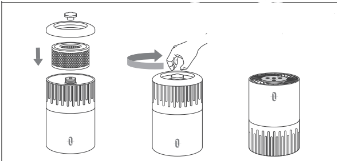
1. Lift the unit upside down.

2. Remove the base by unscrewing the screw cap.
3. Take out the dirty filter and replace with a new one.

4. Reattach the base to the unit and fasten it with the screw cap.
Cleaning and Maintenance
Clean the purifier at least once every month with a clean, dry, soft cloth. More frequent cleaning may be required depending on environmental conditions.
Note:
- Do NOT stick any foreign objects or your fingers inside of the unit.
- Do NOT use gasoline, benzene, and other abrasive or harsh cleaners, etc. on and/or in the unit while cleaning as they will damage the product.
- NEVER use alcohol or other solvents.
Maintaining the Filters
The True HEPA filter should be cleaned once each month by a vacuum cleaner.
Note:
- Filter should be replaced at least once each 3 to 6 months. More frequent cleaning and replacing may be required depending on environmental conditions.
- The air purifier works the best in a closed environment. Its performance may be compromised in a well-ventilated room.
- Air the filters under the sun for an hour before using it again if the purifier has not been used for a long time.
Warranty and Service
This product is covered with TaoTronics product and labor warranty for 12 months from the date of its original purchase.
If any problems occur, please contact the TaoTronics Customer Care Centre in your country via the contact information listed in this User Guide.
We can only provide after sales service for products that are sold by TaoTronics or TaoTronics authorized retailers and distributors. If you have purchased your unit from a different place, please contact your seller for return and warranty issues.