www.taotronics.com
TAOTRONICS ULTRASONIC HUMIDIFIER
User Guide
TT-AH015
EUROPE
E-mail:
support.uk@taotronics.com(UK)
support.de@taotronics.com(DE)
support.fr@taotronics.com(FR)
support.es@taotronics.com(ES)
support.it@taotronics.com(IT)
EU Importer: ZBT International Trading GmbH, Halstenbeker
Weg 98C, 25462 Rellingen, Deutschland
NORTH AMERICA
E-mail : support@taotronics.com(US)
support.ca@taotronics.com(CA)
Tel : 1-888-456-8468 (Monday-Friday: 9:00 – 17:00 PST)
Address: 46724 Lakeview Blvd, Fremont, CA 94538
ASIA PACIFIC
E-mail : support.jp@taotronics.com(JP)
JP Importer: 株式会社ニアバイダイレクトジャパン
www.taotronics.com
MANUFACTURER
Shenzhen NearbyExpress Technology Development Co., Ltd.
Address: 333 Bulong Road, Shenzhen, China, 518129
LearnmoreabouttheEUDeclarationofConformity:
https://www.taotronics.com/downloads-TT-AH015-CE-Cert.html
Humidity
Sleep
M
Water Level
1 2 3 4 5
%
H

CONTENTS
English
Deutsch
Français
Español
Italiano
01/07
08/14
14/21
22/28
29/36
Humidity
Sleep
M
Water Level
1 2 3 4 5
%
H
Humidity
Sleep
M
Water Level
1 2 3 4 5
%
H
①
②
③
④
⑤
⑥
⑦
排水方向
⑧
⑨
⑩
EN
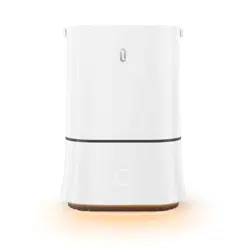
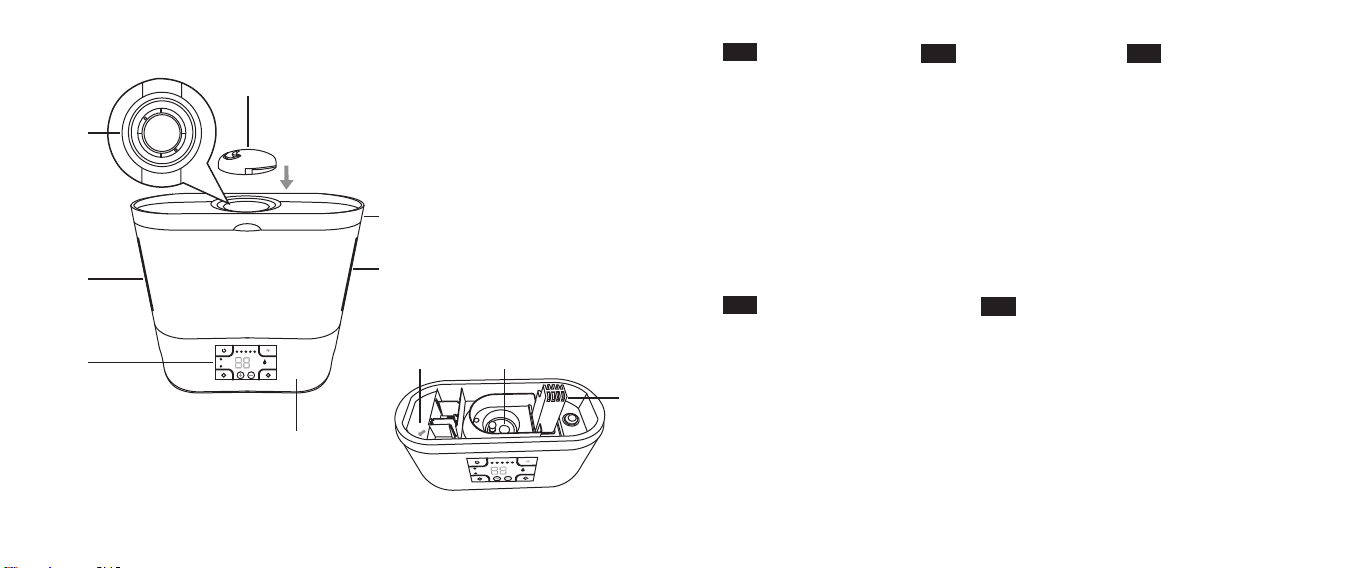
Product Diagram
1. Nozzle
2. Nozzle Base
3. Water Tank
4. Control Panel
5. Base
6. Max Water Level
7. Tank Lid
8. Drain Side
9. Transducer
10. Air Outlet
ES
Diagrama del Producto
1. Boquilla
2. Base de Boquilla
3. Tanque de Agua
4. Panel de Control
5. Base
6. Nivel Máximo de Agua
7. Tapa del Tanque
8. Lado de Dr
enaje
9. Transductor
10. Salida de Aire
DE
Produktabbildung
1. Zerstäuberdüse
2. Düsensockel
3. Wassertank
4. Bedienfeld
5. Basis
6. Maximaler Wasserstand
7. Tankdeckel
8. Seitenablauf
9. Wandler
10. Luftauslass
IT
Schema del Prodotto
1. Ugello
2. Base dell’Ugello
3. Serbatoio dell’Acqua
4. Pannello di Controllo
5. Base
6. Livello Massimo dell’Acqua
7. Coperchio del Serbatoio
8. Lato dello Scarico
9. Trasduttore
10. Uscita dell’Aria
FR
Schéma produit
1. Buse
2. Base de la buse
3. Réservoir d’eau
4. Panneau de commande
5. Base
6. Niveau d’eau maximal
7. Couvercle de réservoir
8. Côté de drainage
9. Transducteur
10. Sortie d’air

EN
www.taotronics.com
TAOTRONICS HUMIDIFIER
User Guide
Humidity
Sleep
M
Water Level
1 23 4 5
%
H
Parts
Package Contents
Usage
1 x Cleaning Brush
1 x Protection Cap
1 x Filter
1 x Thank you card
1 x User Guide
Clean the humidier
Prevent water entering the air outlet when
cleaning the product
Purify water
--
--
www.taotronics.com svip
THANK YOU FORCHOOSING US
Extend your warranty at
Warranty
Register for
Months
/
Specications
Model
Operating Voltage
Power
Water Tank Capacity
Mist Output
TT-AH015
AC 100 – 240V 50Hz / 60Hz
34W
4L / 1.06 Gallon
0.1L / 0.03 Gallons per hour (1st Level)
0.2L / 0.05 Gallons per hour (2nd Level)
0.3L / 0.08 Gallons per hour (3rd Level)
0.55L / 0.15 Gallons per hour (4th Level)
0.55L / 0.15 Gallons per hour (5th Level)
01/02
Humidity
Sleep
M
Water Level
1 2 3 4 5
%
H
⑩
①
②
③
④
⑤
⑦
⑥
⑧
⑨
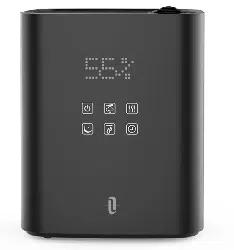
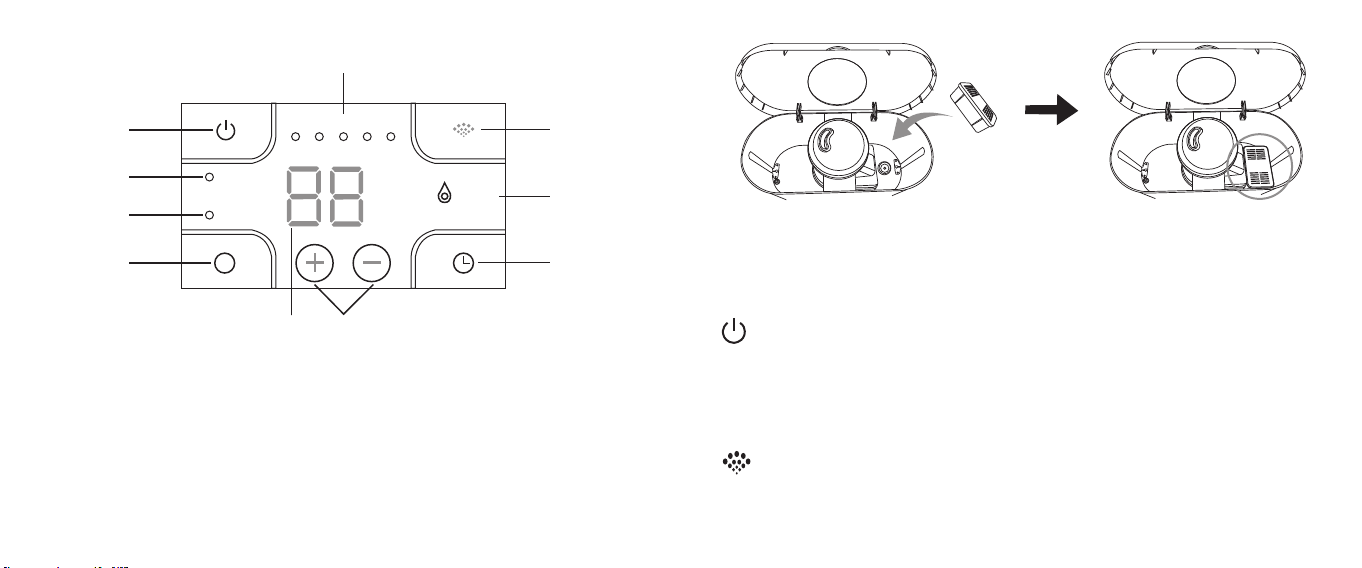
Control Panel
1. Power Button
2. Humidity Indicat
or
3.
Sleep Mode Indicator
4. Humidity / Sleep Mode Button
5. LED Display
6. Humidity / Timer Level Buttons
7. Timer Button
8. Water Level Indicator
9. Mist Button
10. Mist Level Indicator
How to Use
Open the tank lid, put the lter into the tank . Add an appropriate amount of water
into it, no higher than the max water level. Put the lid back on. Connect to a power
source, the device will enter standby mode with a beep sound. The LED display will
show the current RH.
Turn on / off the Mist
1. Tap the Power Button to start mist output (default: 3rd level) with a beep sound.
2. Tap again to stop output with a beep sound.
Note: The water level indicator will light up in red rst when you turn on the de
vice
and then turn gr
een in 30 seconds after water going down to the base from wat
er
t
ank.
Mist Adjustment
Tap the Mist Button to adjust the mist level, a beep sound will be heard with each
tap and the mist level indicator will light up accordingly.
03/04
Humidity Setting
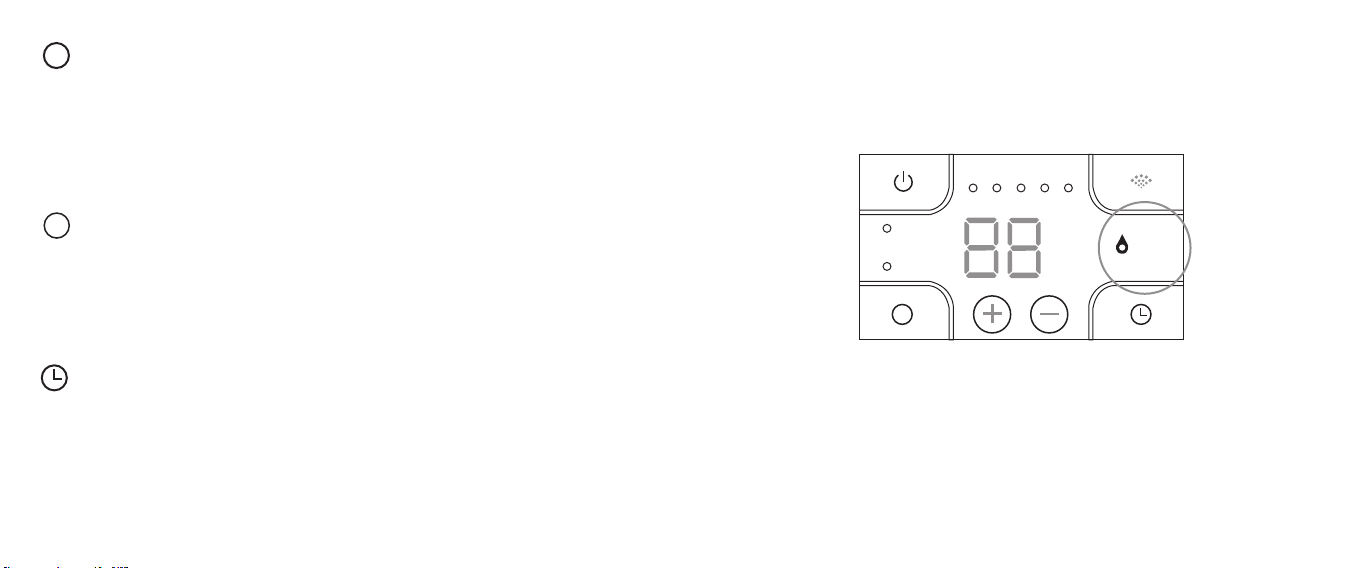
1. Tap the Humidity / Sleep Mode Button once to set the humidity, the humidity
indicator will light up accordingly, and the humidity level on the display will k
eep
ashing
, before the ash ends, tap the Humidity / Timer Level Buttons t
o adjust the
h
umidity from 30% to 95% with an increase / decrease of 5% by each tap.
Once
set,
the humidity level on the display will ash 3 times to conrm the setting.
2. Tap the Humidity / Sleep Mode Button again to exit the humidity setting, h
umidity
indicat
or will light off accordingly.
Sleep Mode
1. Tap and hold the Humidity / Sleep Mode Button for 1.5 seconds to enter sleep
mode
. The LED display and all the indicators except the sleep indicator will turn
off after 5 seconds. Tap any button to wake up the screen.
2. In sleep mode, all the buttons remain functional.
3. Tap and hold the Humidity / Sleep Mode Button for 1.5 seconds again to e
xit sleep
mode with the sleep indicat
or turning off.
M
M
Timer Setting
Tap the Timer Button once, the timer on the display will keep ashing, before the ash
ends, tap the Humidity / Timer Level Buttons to set the timer from 00 hour to 12 hours
with an increase / decrease of 1 hour by each tap. The timer on the display will ash
3 times to conrm the setting. Once set, the LED display will show the current RH and
the set timer alternately.
Low Water Protection
When all water inside the tank has been depleted, the humidier will turn off
automatically and the water level indicator will turn red.
Humidity
Sleep
M
Water Level
1 2 3 4 5
%
H
Cleaning and Maintenance
1. Fill the water tank half full, and add 100ml 5% white vinegar. Run the humidier for
5 - 10 minutes to allow the vinegar / water mixture to work thr
ough and loosen up
the gunk.
05/06
Humidity
Sleep
M
Water Level
1 2 3 4 5
%
H
Humidity
Sleep
M
Water Level
1 2 3 4 5
%
H
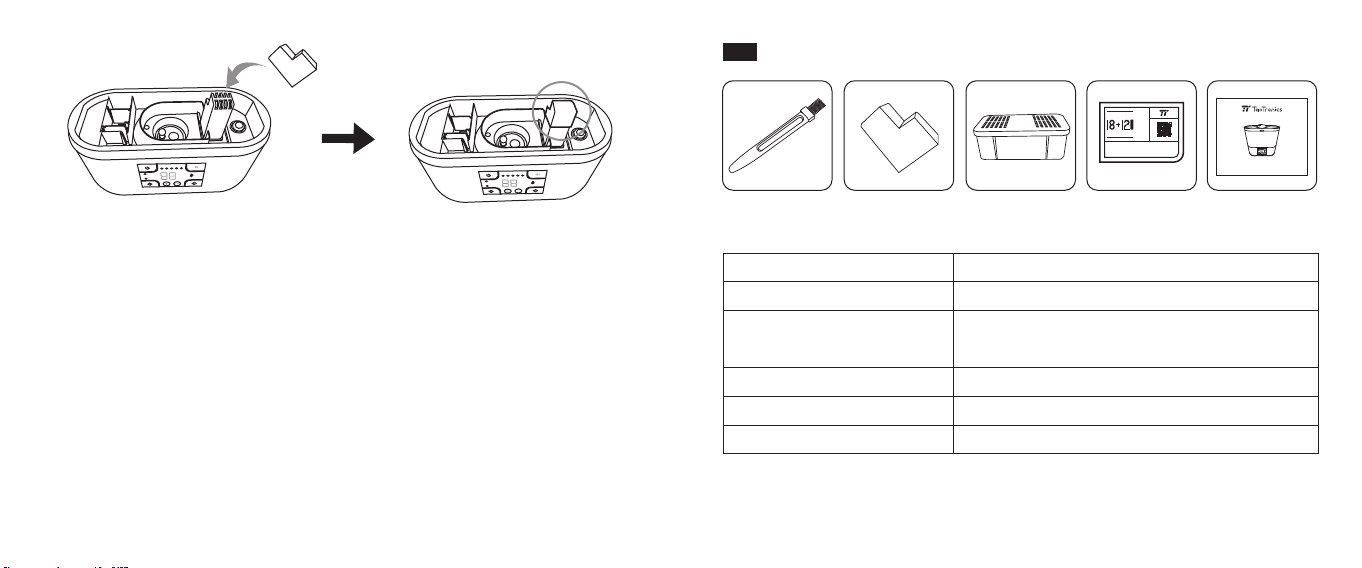
2. Turn off the humidier, unplug it, and drain the water. Cover the air outlet with the
protection cap, then sweep the inside of the tank with the included c
leaning
brush.
3. Use a drop of lemon essential oil on your brush or q-tip if you need to cut thr
ough
e
xtra grime. (Be extra careful when you drain water to avoid water getting int
o the
underside or mot
or area to ruin the product).
4. Use a soft cloth to wipe the outside of the unit to remove any ngerprints, smudges,
etc. The cloth can be dampened with water, or you may lightly spray it with a bit
of gentle cleaner or vinegar / water solution.
5. Clean the humidier once a week.
07/08
DE
www.taotronics.com
TAOTRONICS HUMIDIFIER
User Guide
Humidity
Sleep
M
Water Level
1 23 4 5
%
H
Teile
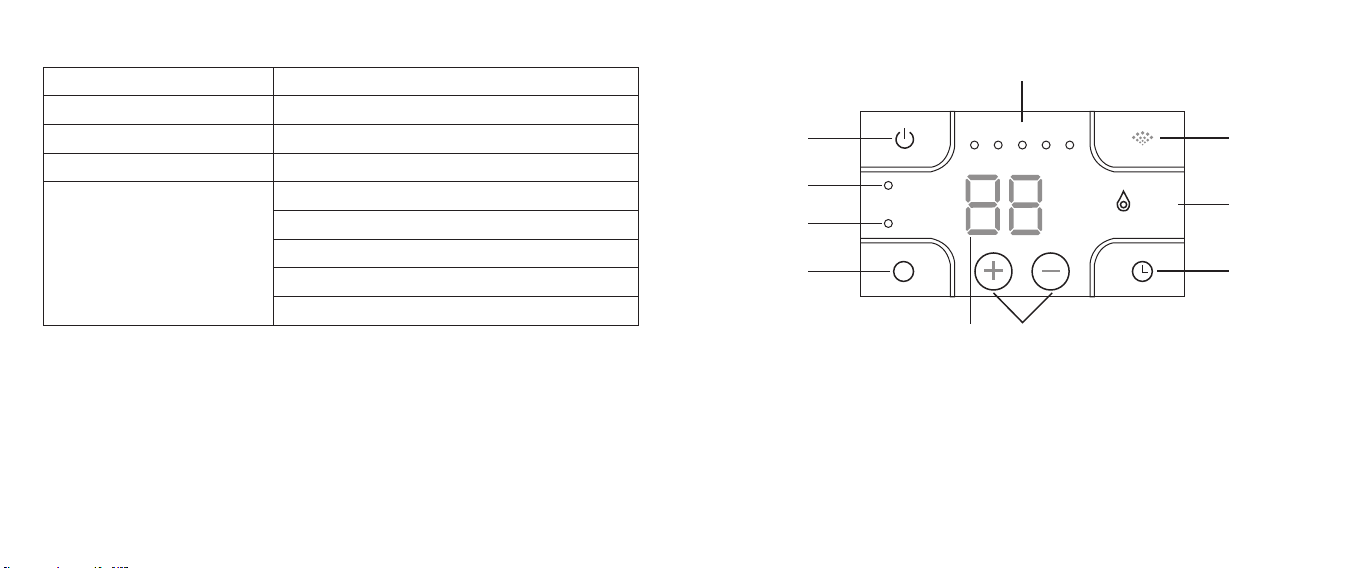
Im Lieferumfang enthalten
Verwendung
1 x Reinigungsbürste
1 x Schutzkappe
1 x Filter
1 x Dankeschön-Karte
1 x Bedienungsanleitung
Reinigen des Luftbefeuchters
Verhindert, dass Wasser in die Luftzufuhr eindringt,
wenn das Gerät gereinigt wird
Reinigt das Wasser
--
--
www.taotronics.com svip
THANK YOU FORCHOOSING US
Extend your warranty at
Warranty
Register for
Months
/
09/10
Spezikationen
Modell
Betriebsspannung
Leistung
Wassertank-Kapazität
Vernebelungsausstoß
TT-AH015
AC 100-240V 50Hz / 60Hz
34W
4L / 1.06 Gallonen
0.1L / 0.03 Gallons pro Stunde (1. Stufe)
0.2L / 0.05 Gallons pro Stunde (2. Stufe)
0.3L / 0.08 Gallons pro Stunde (3. Stufe)
0.4L / 0.11 Gallons pro Stunde (4. Stufe)
0.55L / 0.15 Gallons pro Stunde (5. Stufe)
Humidity
Sleep
M
Water Level
1 2 3 4 5
%
H
⑩
①
②
③
④
⑤
⑦
⑥
⑧
⑨
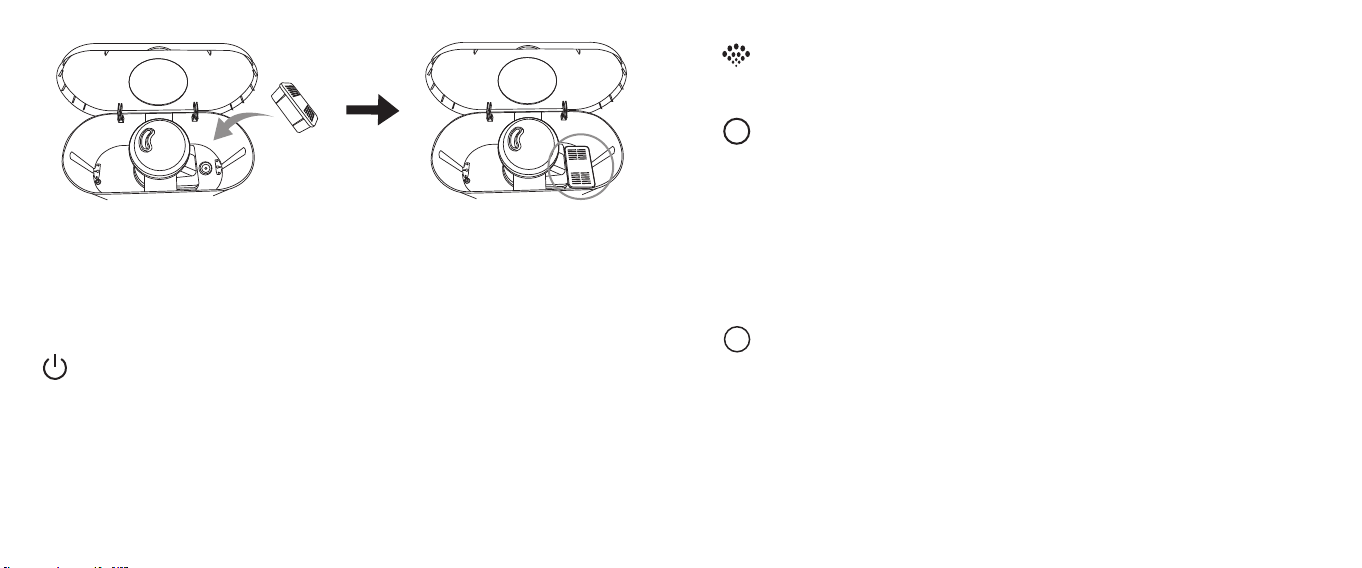
Bedienfeld
1. Power-Taste
2. Luftfeuchtigk
eitsanzeige
3.
Schlafmodusanzeige
4. Feuchtigkeits- / Schlafmodus-Taste
5. LED-Anzeige
6. Feuchtigkeits- / Timerstufen-Tasten
7. Timer-Taste
8. Wasserstandsanzeige
9. Vernebelungsknopf
10. Nebelstufenanzeige
11/12
Anleitung
Öffnen Sie den Tankdeckel und stecken Sie den Filter in den Tank. Füllen Sie eine
passende Menge Wasser ein, aber nicht mehr als bis zur maximalen
Wasserstandsmarkierung. Setzen Sie den Deckel wieder auf. Wird das Gerät an einer
Stromquelle angeschlossen, wechselt es mit einem Piepton in den Standby-Modus.
Die LED-Anzeige signalisiert die aktuelle RH (relative Luftfeuchtigkeit).
Vernebelung ein- / ausschalten
1. Tippen Sie die Power-Taste an, um die Vernebelung mit einem Piepton zu starten
(Standard: 3. Stufe).
2. Tippen Sie erneut, um sie mit einem Piepton zu beenden.
Anmerkung: Die Wasserstandsanzeige leuchtet zuerst rot auf, wenn Sie das Ger
ät
einsc
halten, und wechselt dann nach 30 Sekunden auf grün, wenn W
asser aus dem
W
assertank in die Basis gelangt.
Vernebelungseinstellung
Tippen Sie die Vernebelungstaste, um die Nebelstufe anzupassen. Bei jedem
Antippen ertönt ein Piepton und die Nebelstufenanzeige leuchtet entsprechend auf.
Feuchtigkeitseinstellung
1. Tippen Sie die Feuchtigkeits- / Schlafmodus-Taste einmal an, um die Feuchtigkeit
einzustellen. Die Feuchtigkeitsanzeige leuchtet entsprec
hend auf und die
F
euchtigkeitsgradanzeige auf dem Display blinkt. Tippen Sie die Feuchtigk
eits- /
Timerstufen-Tasten an, bevor das Blinken stoppt, um die Feuchtigkeit in 5%-Schritt
en
zwisc
hen 30% und 95% einzustellen. Sobald diese gesetzt ist,
blinkt die
F
euchtigkeitsanzeige auf dem Display 3 Mal, um die Einstellung zu bestätigen.
2. Tippen Sie die Feuchtigkeits- / Schlafmodus-Taste erneut an,
um die
F
euchtigkeitseinstellung zu verlassen; die Feuchtigk
eitsanzeige geht
dementspr
echend aus.
M
Schlafmodus
1. Halten Sie die Feuchtigkeits- / Schlafmodus-Taste 1,5 Sekunden lang gedrückt, um
in den Schlafmodus zu wechseln. Die LED-Anzeige und alle
Anzeigen außer der
Sc
hlafanzeige schalten sich nach 5 Sekunden ab. Tippen Sie irgendeine Taste an,
um die
Anzeigen wieder aufzuwecken.
2. Im Schlafmodus funktionieren alle Tasten weiterhin.
3. Halten Sie die Feuchtigkeits- / Schlafmodus-Taste 1,5 Sekunden lang gedrückt,
um
den Sc
hlafmodus zu verlassen und die Schlafanzeige auszuschalten.
M
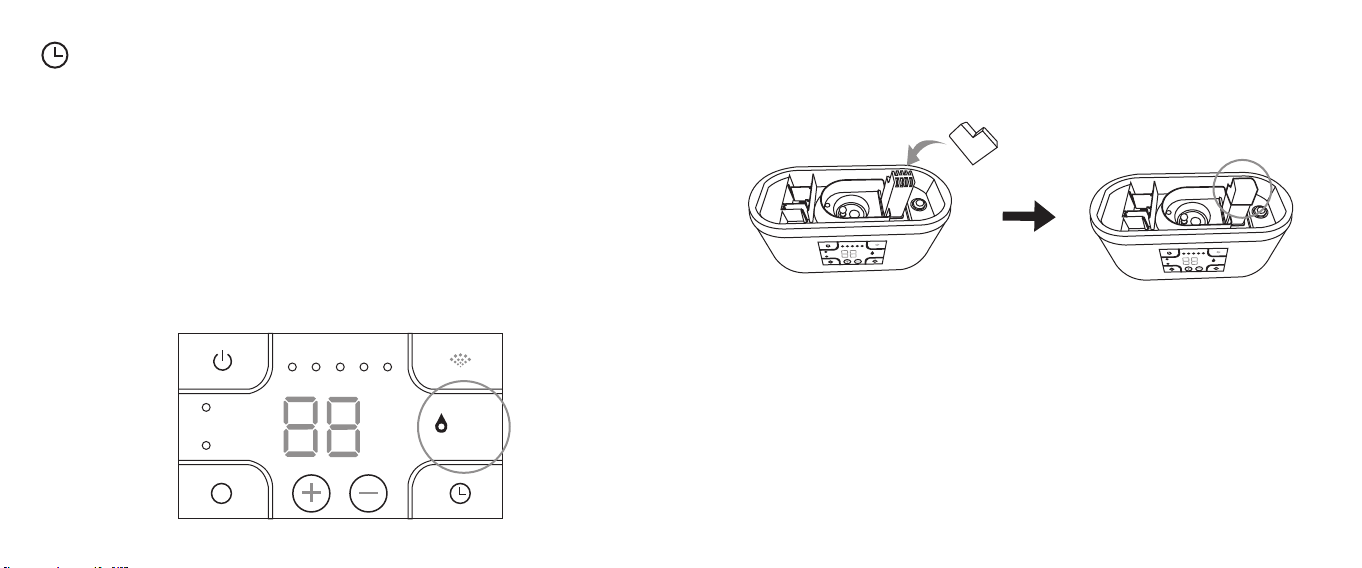
Timer-Einstellung
Tippen Sie die Timer-Taste einmal an; die Timeranzeige auf dem Display blinkt dann.
Tippen Sie die Feuchtigkeits- / Timerstufen-Tasten an, bevor das Blinken stoppt, um
den Timer in 1-Stunden-Schritten zwischen 00 Stunden und 12 Stunden einzustellen.
Der Timer auf dem Display blinkt 3 Mal, um die Einstellung zu bestätigen. Sobald die
Einstellung vorgenommen ist, zeigt die LED-Anzeige abwechselnd die aktuelle
relative Luftfeuchtigkeit und den eingestellten Timer an.
13/14
Trockengehschutz
Wenn das ganze Wasser im Tank aufgebraucht ist, schaltet sich der Luftbefeuchter
automatisch ab und die Wasserstandsanzeige leuchtet rot.
Humidity
Sleep
M
Water Level
1 2 3 4 5
%
H
Reinigung und Pege
1. Befüllen Sie den Wassertank zur Hälfte und geben Sie 100ml 5%igen weißen Essig
hinzu. Lassen Sie den Luftbefeuchter 5-10 Minuten lang laufen,
damit die
Essig-W
asser-Mixtur einwirken und Verschmutzungen lösen kann.
Humidity
Sleep
M
Water Level
1 2 3 4 5
%
H
Humidity
Sleep
M
Water Level
1 2 3 4 5
%
H
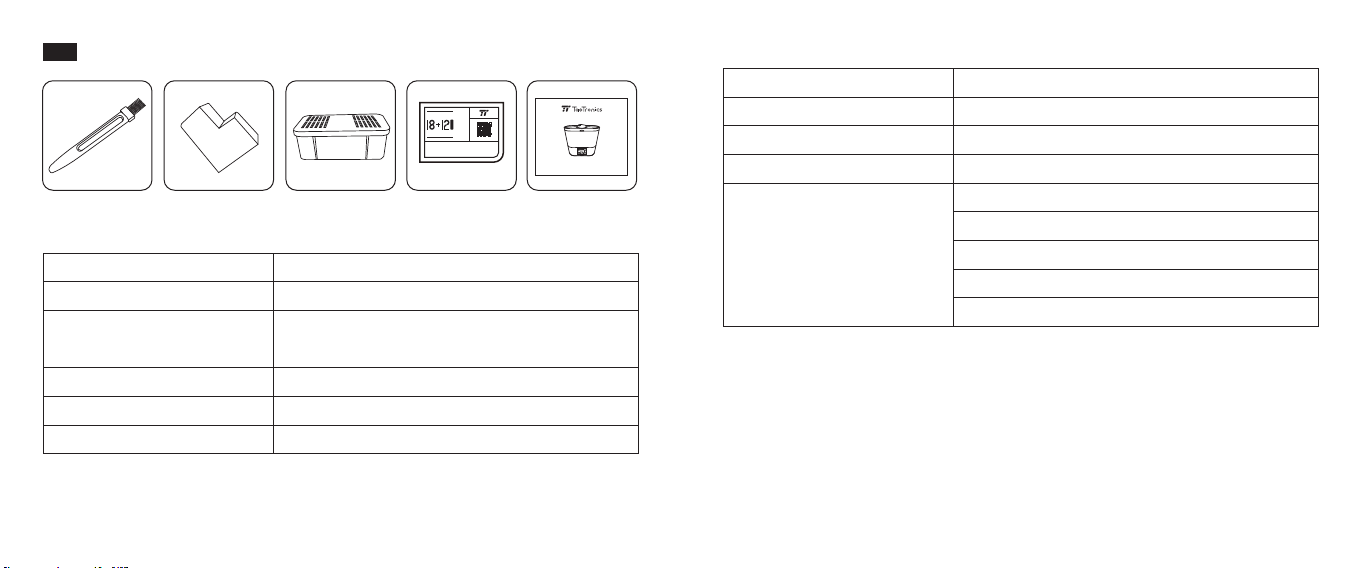
2. Schalten Sie den Luftbefeuchter dann aus, trennen Sie ihn vom Strom und leeren
Sie das Wasser aus. Bedecken Sie den Luftauslass mit der Schutzk
appe und
putzen Sie dann das Inner
e des Tanks mit der mitgelieferten Reinigungsbürste.
3. Sie können einen Tropfen ätherisches Zitronenöl auf Ihre Bürste oder Ihr
Wattestäbchen geben, wenn Sie besonders viel Schmutz beseitigen müssen.
(Seien Sie beim
Ausleeren von Wasser besonders vorsichtig, damit kein W
asser in
die Unt
erseite oder den Motorbereich gelangt, wodurch das Produkt k
aputtgehen
k
ann).
4. Verwenden Sie zum äußerlichen Abwischen des Geräts ein weiches Tuch, um
Fingerabdrücke, Schmutzecken etc. zu entfernen. Sie können das Tuch mit W
asser
bef
euchten oder etwas mildes Reinigungsmittel oder Essig-Wasser-Lösung dar
auf
sprühen.
5. Reinigen Sie den Luftbefeuchter einmal pro Woche.
FR
www.taotronics.com
TAOTRONICS HUMIDIFIER
User Guide
Humidity
Sleep
M
Water Level
1 23 4 5
%
H
Éléments
Contenu de la boîte
Utilisation
1 x Brosse de nettoyage
1 x Capuchon de protection
1 x Filtre
1 x Carton de remerciement
1 x Guide utilisateur
Nettoyer l’humidicateur
Empêche l’eau d’entrer dans la sortie d’air en
nettoyant l’appareil
Purier l’eau
--
--
www.taotronics.com svip
THANK YOU FORCHOOSING US
Extend your warranty at
Warranty
Register for
Months
/
Spécications
Modèle
Tension de fonctionnement
Puissance
Capacité du réservoir d’eau
Débit de brume
TT-AH015
AC 100 – 240V 50Hz / 60Hz
34W
4L / 1.06 Gallon
0.1L / 0.03 Gallons par heure (1er niveau)
0.2L / 0.05 Gallons par heure (2nd niveau)
0.3L / 0.08 Gallons par heure (3eme niveau)
0.4L / 0.11 Gallons par heure (4eme niveau)
0.55L / 0.15 Gallons par heure (5eme niveau)
15/16
Humidity
Sleep
M
Water Level
1 2 3 4 5
%
H
⑩
①
②
③
④
⑤
⑦
⑥
⑧
⑨
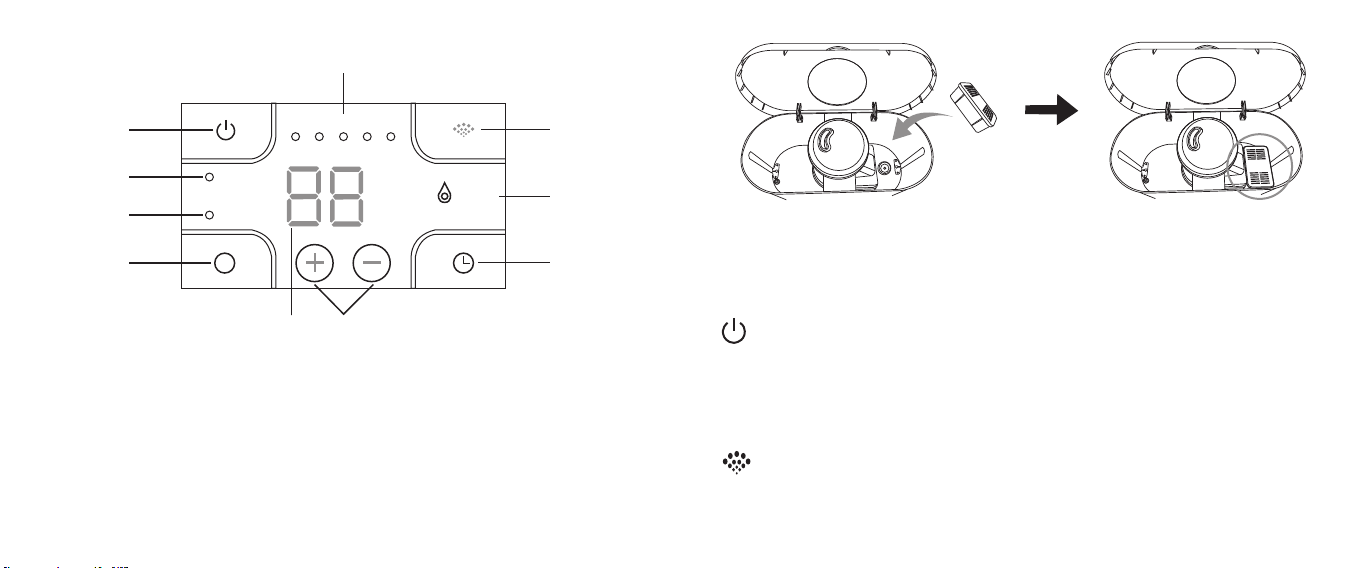
Panneau de commande
1. Bouton d’allumage
2. Indicateur d’humidité
3. Témoin de mode Sommeil
4. Bouton Humidité / Mode Sommeil
5. Afcheur LED
6. Boutons de réglage Humidit
é /
Min
uteur (+/-)
7. Bouton minuteur
8. Témoin de niveau d’eau
9. Bouton Brume
10. Indicateur de niveau de brume
Utilisation
Ouvrez le réservoir d’eau, placez le ltre dans le réservoir. Ajoutez une quantité d’eau
appropriée, sans dépasser le niveau d’eau maximal. Replacez le couvercle.
Branchez à une source d’alimentation, l’appareil se mettre en mode veille avec un
bip sonore. L’afchage LED montrera l’humidité relative (HR) environnante.
Activez / Désactivez la brume
1. Touchez le bouton d’allumage pour démarrer la diffusion de brume (par défaut:
niv
eau 3) avec un bip sonore.
2. Touchez à nouveau pour arrêter la diffusion avec un bip sonore.
Note: Le témoin de niveau d’eau s’allumera en rouge à l’allumage puis deviendr
a
v
ert après 30 secondes, après que l’eau soit passée du réservoir d’eau à la base.
Réglage de débit de brume
Touchez le bouton Brume pour régler le niveau de brume, un bip sonore sera
entendu à chaque pression et le témoin de niveau de brume s’allumera en fonction.
17/18
Réglage de l’humidité
1. Touchez le Bouton Humidité / Mode Sommeil une fois pour régler l’humidité,
l’indicat
eur d’humidité s’allumera en fonction, et le niveau d’humidité clignoter
a
sur l’af
cheur. Avant qu’il ne s’arrête de clignoter, touchez les Boutons de r
églage
Humidit
é / Minuteur (+/-) pour régler l’humidité de 30% à 95% par incr
éments de
5% à c
haque pression. Une fois réglé, le niveau d’humidité sur l’afcheur clignoter
a
3 f
ois pour conrmer le réglage.
2. Touchez le Bouton Humidité / Mode Sommeil à nouveau pour quitter le r
églage
d’h
umidité, le témoin d’humidité s’éteindra en fonction.
Mode Sommeil
1. Touchez et maintenez le Bouton Humidité / Mode Sommeil pendant 1,5 seconde
pour passer en mode sommeil. L’afcheur LED et tous les indicat
eurs sauf
l’indicat
eur de sommeil s’éteindront après 5 secondes. Touchez n’import
e quel
bout
on pour rallumer l’écran.
2. En mode Sommeil, tous les boutons restent fonctionnels.
3. Touchez et maintenez le Bouton Humidit
é / Mode Sommeil pendant 1,5 seconde
à nouv
eau pour quitter le mode sommeil avec le t
émoin du mode sommeil
qui s’ét
eint.
M
M
Réglage du minuteur
Touchez le Bouton Minuteur une fois, le minuteur à l’écran clignotera, avant qu’il
n’arrête de clignoter, touchez les Boutons de réglage Humidité / Minuteur (+/-) pour
régler le minuteur de 00 heure à 12 heures avec augmentation / diminution de 1
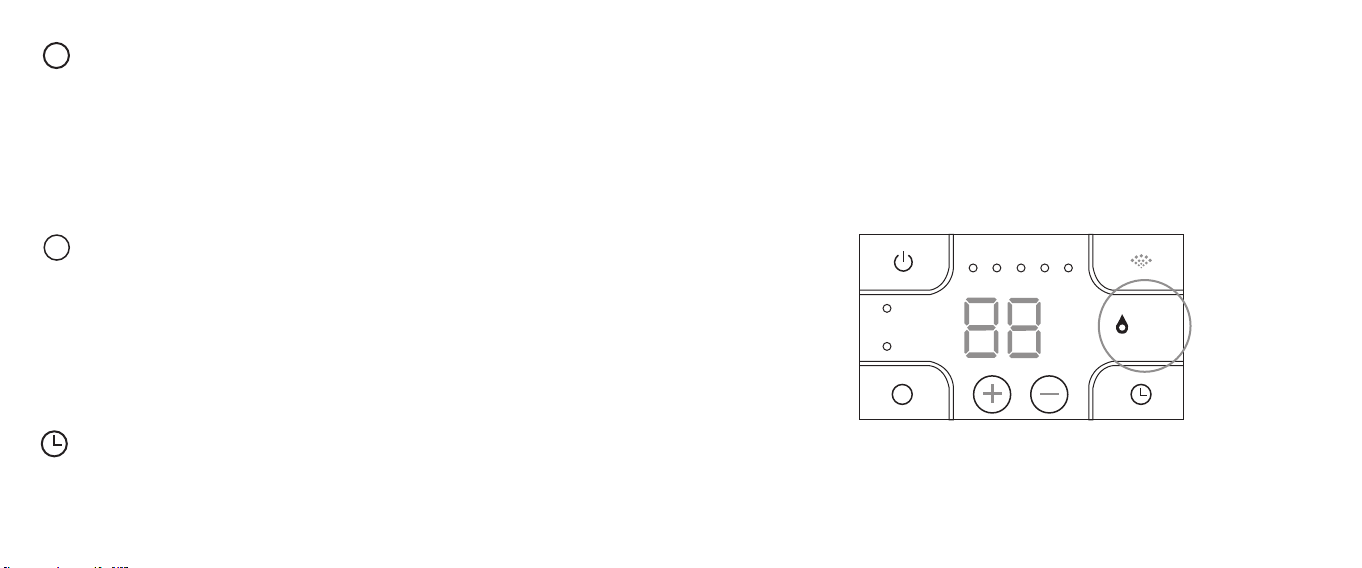
Protection de niveau d’eau faible
Lorsque toute l’eau dans le réservoir est consommée, l’humidicateur s’éteint
automatiquement et le témoin de niveau d’eau devient rouge.
Humidity
Sleep
M
Water Level
1 2 3 4 5
%
H
Nettoyage et Entretien
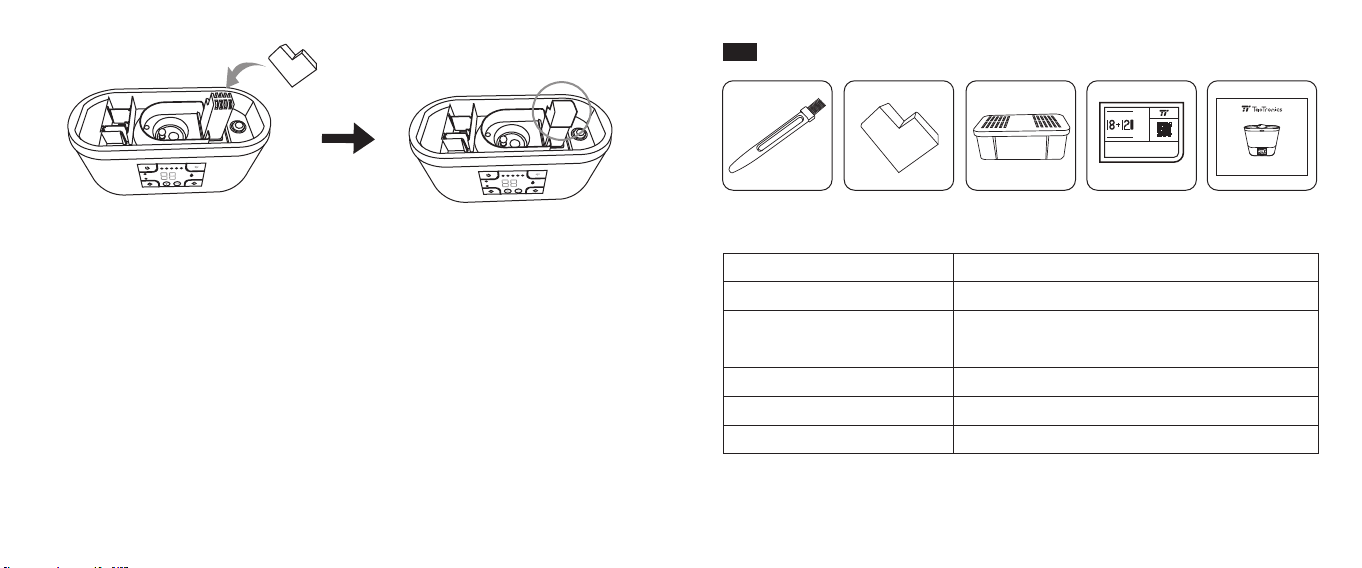
1. Remplissez le réservoir d’eau à moitié, et ajoutez 100mL de vinaigre blanc à 5%.
F
aites tourner l’humidicateur pendant 5-10 minutes pour permettre à la mixtur
e
d’eau vinaigr
ée de tourner dans le circuit et nettoyer la crasse.
19/20
heure à chaque pression. Le minuteur sur l’afcheur clignotera 3 fois pour conrmer
le réglage. Une fois réglé, l’écran LED afchera l’HR actuelle et le minuteur réglé
alternativement.
Humidity
Sleep
M
Water Level
1 2 3 4 5
%
H
Humidity
Sleep
M
Water Level
1 2 3 4 5
%
H
2. Éteignez l’humidicateur, débranchez-le et videz l’eau. Couvrez la sortie d’air avec
le capuchon de protection, puis frottez l’intérieur du réservoir avec la brosse de
nettoyage incluse.
3. Utilisez une goutte d’huile essentielle de citron sur votre brosse ou un coton-tige
pour vous débarrasser des saletés restantes. (Soyez très prudent en vidant l’eau
pour éviter que l’eau passe dessous ou dans l’emplacement du moteur au risque
de détériorer l’appareil).
4. Utilisez un chiffon doux pour nettoyer l’extérieur de l’appareil pour retirer toute
trace de doigts, tâches, etc. Le chiffon peut être humidié avec de l’eau, ou vous
pouvez asperger légèrement de nettoyant ou d’une solution d’eau vinaigrée.
5. Nettoyez l’humidicateur une fois par semaine.
21/22
ES
www.taotronics.com
TAOTRONICS HUMIDIFIER
User Guide
Humidity
Sleep
M
Water Level
1 23 4 5
%
H
Partes
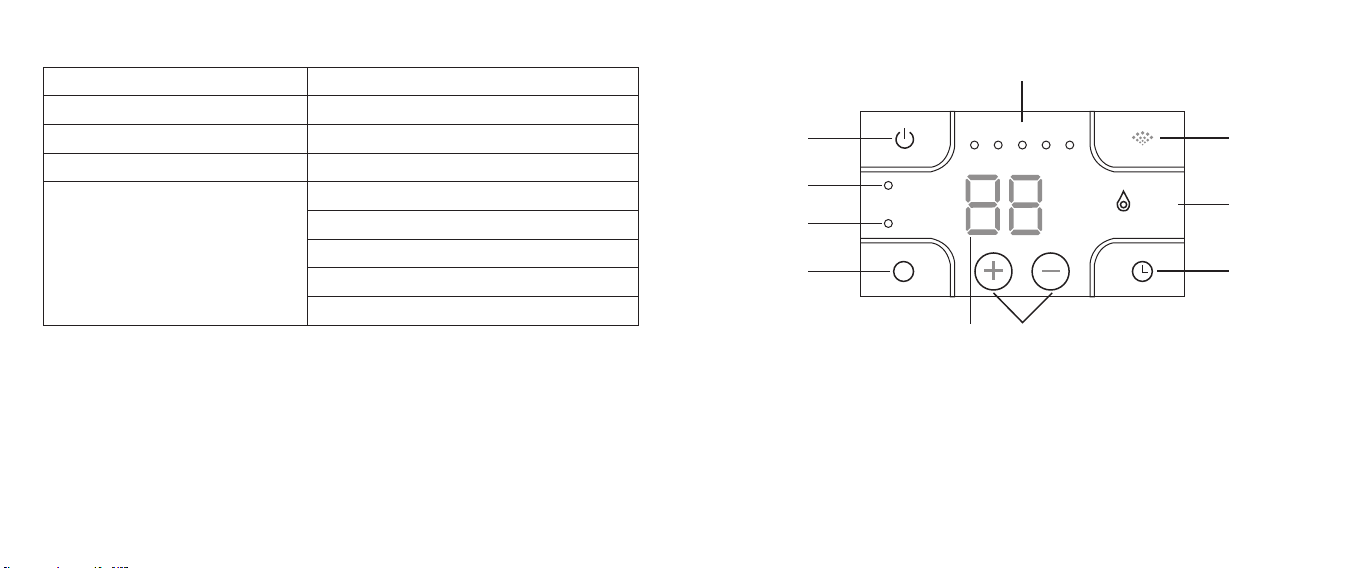
Contenido del Paquete
Uso
1 x Cepillo de Limpieza
1 x Tapa de Protección
1 x Filtro
1 x Tarjeta de Agradecimiento
1 x Guía del Usuario
Limpiar el humidicador
Evitar que se entre agua en la salida de aire
cuando se limpia el producto
Puricar agua
-
-
www.taotronics.com svip
THANK YOU FORCHOOSING US
Extend your warranty at
Warranty
Register for
Months
/
23/24
Especicaciones
Modelo
Voltaje de Funcionamiento
Potencia
Capacidad del Tanque de Agua
Salida de Neblina
TT-AH015
AC 100 - 240V 50Hz / 60Hz
34W
4L / 1,06 Galones
0.1L / 0.03 Gallons por hora (nivel 1)
0.2L / 0.05 Gallons por hora (nivel 2)
0.3L / 0.08 Gallons por hora (nivel 3)
0.4L / 0.11 Gallons por hora (nivel 4)
0.55L / 0.15 Gallons por hora (nivel 5)
Humidity
Sleep
M
Water Level
1 2 3 4 5
%
H
⑩
①
②
③
④
⑤
⑦
⑥
⑧
⑨
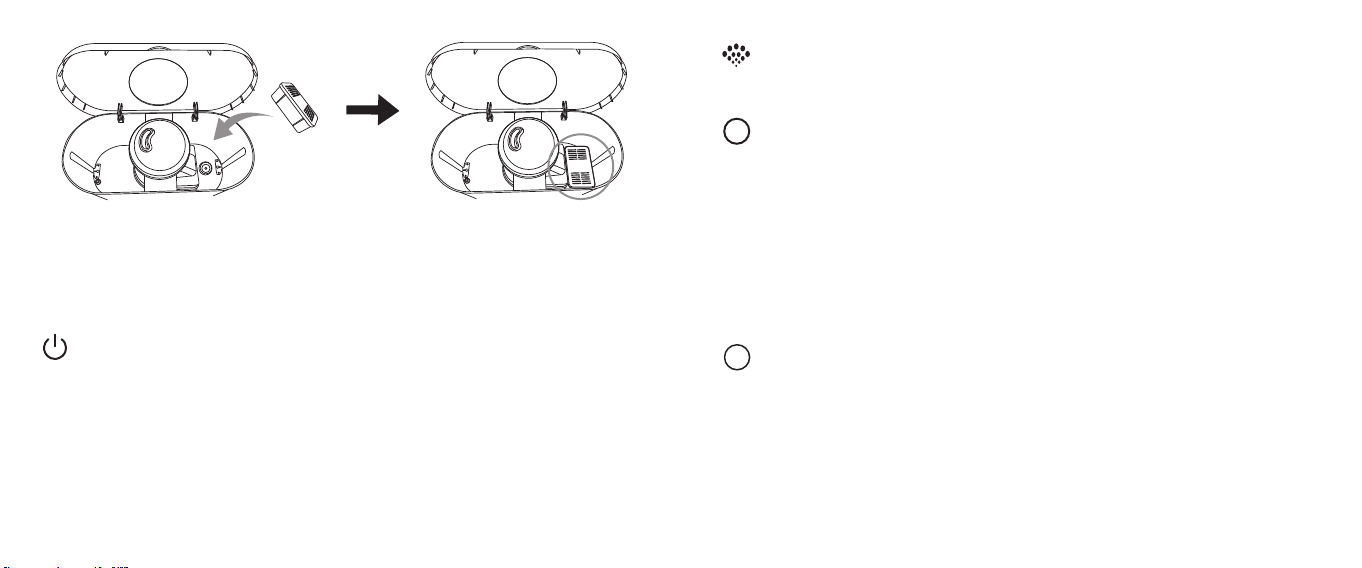
Panel de Control
1. Botón de Encendido
2. Indicador de Humedad
3.
Indicador de Modo de Sueño
4.
Botón de Humedad / Modo de Sueño
5. Pantalla LED
6. Botones de Niv
el de Humedad /
Temporizador
7. Botón del Temporizador
8. Indicador de Nivel de Agua
9. Bot
ón de Neblina
10.
Indicador de Nivel de Neblina
25/26
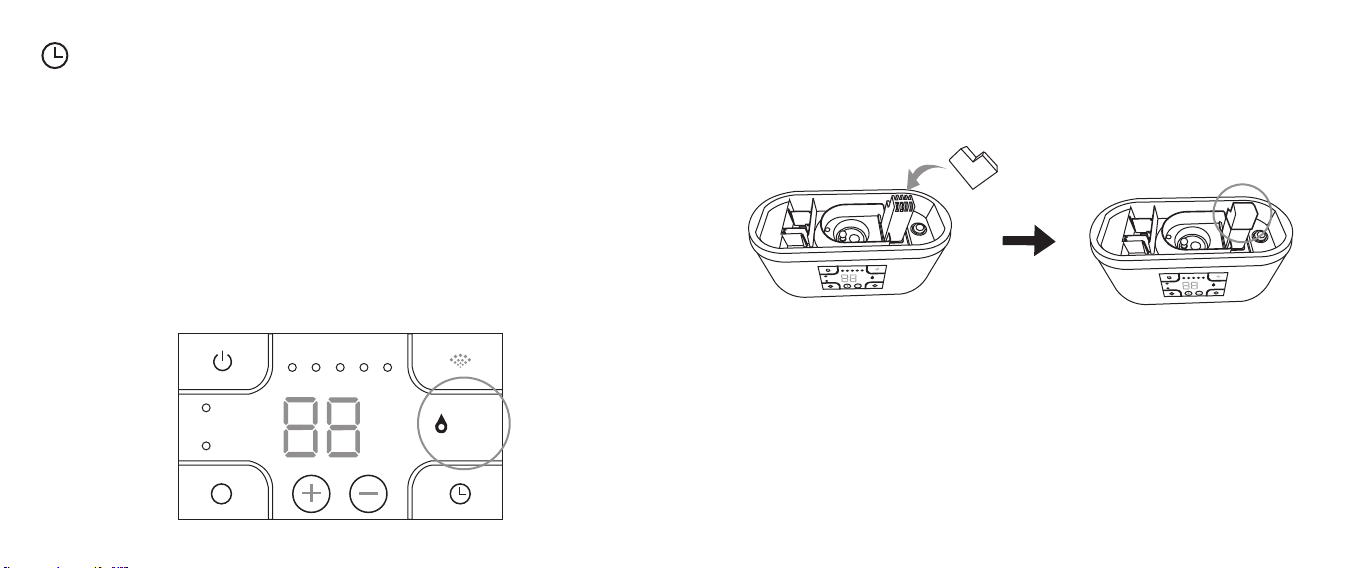
Cómo Utilizar
Abra la tapa del tanque, coloque el ltro en el tanque. Agregue una cantidad
apropiada de agua en él, no mayor que el nivel máximo de agua. Vuelve a poner
la tapa. Conecte a una fuente de alimentación, y el dispositivo entrará en el modo
de espera. La pantalla LED mostrará la humedad relativa actual.
Encender / Apagar la Neblina
1. Presione el Botón de Encendido para iniciar la salida de vapor (por defecto:
niv
el 3).
2. Presione nuevamente para detener la salida.
Nota: El indicador de nivel de agua se iluminará primero en r
ojo cuando encienda
el dispositiv
o y luego se pondrá ver
de en 30 segundos después de que el agua
baje a la base desde el t
anque de agua.
Ajuste de Neblina
Presione el Botón de Neblina para ajustar el nivel de neblina, un pitido se oirá y el
indicador de nivel de neblina se iluminará automáticamente.
Conguración de la Humedad
1. Presione el Botón de Modo de Humedad / Sueño una vez para congurar la
humedad, el indicador de humedad se iluminará en automáticamente, y el niv
el
de h
umedad en la pantalla seguirá parpadeando, ant
es de que el parpadeo
t
ermine, toque los botones de nivel de humedad / temporizador para ajust
ar la
h
umedad del 30% al 95% con un aumento / disminución del 5% por cada toque.
Una v
ez congurado, el nivel de humedad en la pantalla parpadeará 3 v
eces
par
a conrmar la conguración.
2. Presione de nuevo el Botón de Modo de Humedad / Sueño par
a salir de la
congur
ación de humedad, el indicador de humedad se iluminará en
aut
omáticamente.
M
Modo de Sueño
1. Presione y mantenga presionado el Botón Modo de Humedad / Sueño durante
1,5 segundos para ingresar al modo de Sueño. La pantalla LED y t
odos los
indicador
es excepto el indicador de apagado se apagar
án después de 5
segundos
. Toque cualquier botón para activar la pantalla.
2. En Modo de Sueño, todos los botones permanecen funcionales.
3. Presione y mantenga presionado el Bot
ón de Modo de Humedad / Sueño
dur
ante 1,5 segundos nuevamente par
a salir del modo de Sueño con el indicador
de sueño apagado
.
M
Ajuste del Temporizador
Presione el Botón del Temporizador una vez, el contador de tiempo en la pantalla
aparece parpadeando, antes de que termine el parpadeo, presione el Botón de
Nivel de Humedad / Temporizador para ajustar el temporizador de 00 a 12 horas
con un aumento / disminución de 1 hora con cada presión. El temporizador en la
pantalla parpadeará 3 veces para conrmar la conguración. Una vez congurado,
la pantalla LED mostrará la humedad relativa actual y el temporizador congurado
alternativamente.
27/28
Protección de Bajo Nivel de Agua
Cuando toda el agua en el tanque se haya agotado, el humidicador se apagará
automáticamente y el indicador de nivel de agua se iluminará rojo.
Humidity
Sleep
M
Water Level
1 2 3 4 5
%
H
Limpieza y Mantenimiento
1. Llene el tanque de agua hasta la mitad y agregue 100 ml de vinagre blanco a
una concentración de 5%. Encienda el humidicador durante 5 - 10 minutos par
a
permitir que la mezc
la del vinagre/ agua surja efecto y aoje la suciedad.
Humidity
Sleep
M
Water Level
1 2 3 4 5
%
H
Humidity
Sleep
M
Water Level
1 2 3 4 5
%
H
2. Apague el humidicador, desenchúfelo y drene el agua. Cubra la salida de aire
con la tapa de protección, y cepille el interior del t
anque con el cepillo de
limpieza inc
luido.
3. Use una gota de aceit
e esencial de limón en su cepillo o hisopo si tiene que
limpiar la suciedad adicional.
(Tenga mucho cuidado cuando dr
ene el agua
par
a evitar que se entre agua en la parte inferior o en el área del mot
or y arruine
el pr
oducto).
4. Use un paño suave para limpiar la parte ext
erior de la unidad y eliminar las
h
uellas dactilares, manchas, etc. Puede humedecer la tela con agua o rociarla
ligeramente con un poco de limpiador suave o solución de vinagre/ agua.
5. Limpie el humidicador una vez a la semana.
IT
www.taotronics.com
TAOTRONICS HUMIDIFIER
User Guide
Humidity
Sleep
M
Water Level
1 23 4 5
%
H
Componente
Contenuto della Confezione
Utilizzo
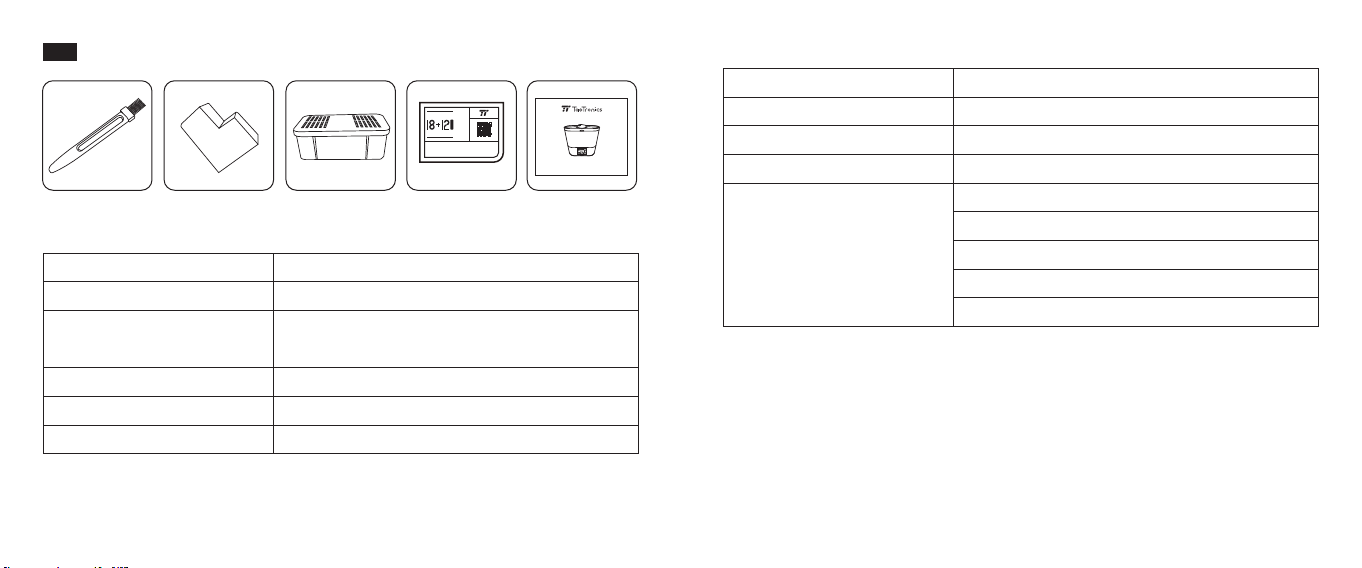
1 x Spazzola per la Pulizia
1 x Coperchio Protettivo
1 x Filtro
1 x Biglietto di ringraziamento
1 x Manuale Utente
Per pulire l’umidicatore
Per evitare che l’acqua entri nella presa d’aria
durante la pulizia del prodotto
Per puricare l’acqua
--
--
www.taotronics.com svip
THANK YOU FORCHOOSING US
Extend your warranty at
Warranty
Register for
Months
/
Speciche
Modello
Tensione di Esercizio
Potenza
Capacità del Serbatoio
Uscita Vapore
TT-AH015
100 – 240V AC 50Hz / 60Hz
34W
4L / 1.06 Galloni
0.1L / 0.03 Gallons all’ora (1° Livello)
0.2L / 0.05 Gallons all’ora (2° Livello)
0.3L / 0.08 Gallons all’ora (3° Livello)
0.4L / 0.11 Gallons all’ora (4° Livello)
0.55L / 0.15 Gallons all’ora (5° Livello)
29/30
Humidity
Sleep
M
Water Level
1 2 3 4 5
%
H
⑩
①
②
③
④
⑤
⑦
⑥
⑧
⑨
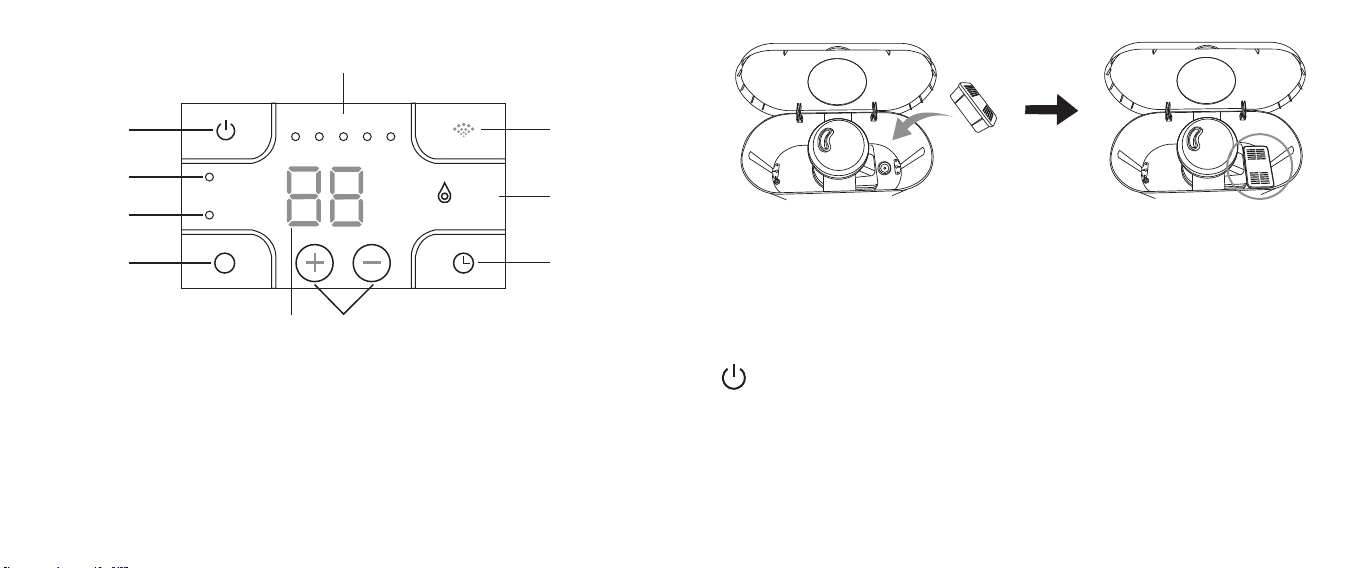
Pannello di Controllo
1. Pulsante di Accensione
2. Indicatore di Umidità
3. Indicatore Modalità Sonno
4. Pulsante Modalità Umidità / Sonno
5. Display LED
6. Pulsanti Livello Umidità / Timer
7. Pulsante Timer
8. Indicatore Livello dell’Acqua
9. Pulsante Vapore
10. Indicatore Livello del Vapore
Modalità di Utilizzo
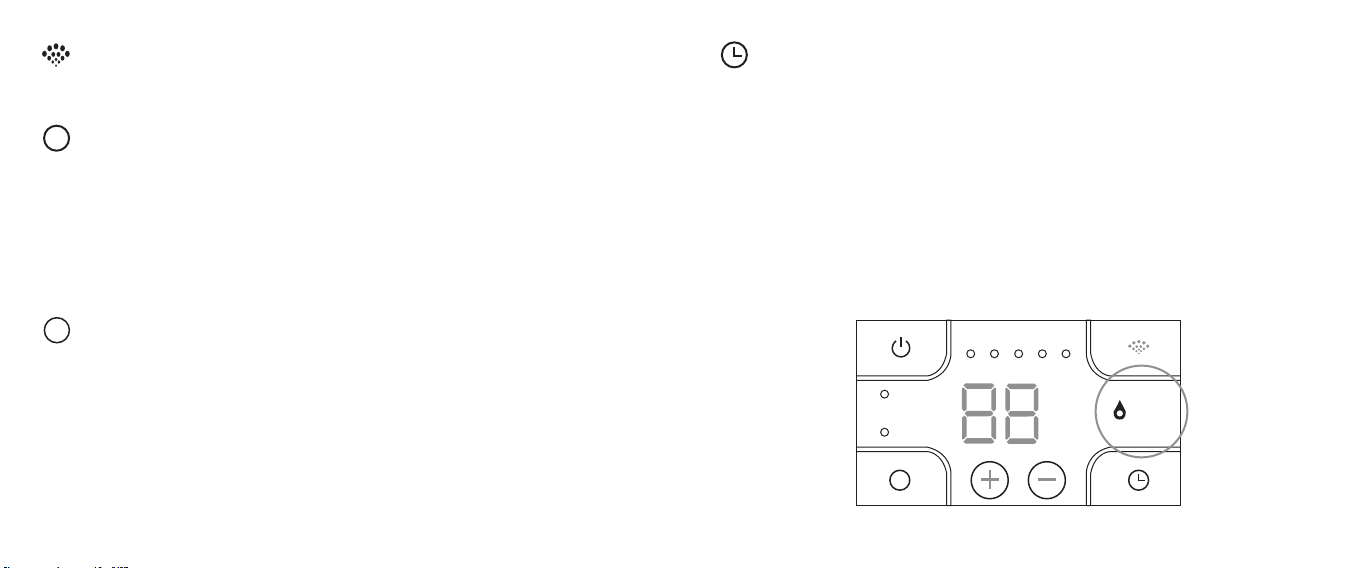
Aprire il coperchio del serbatoio e inserire il ltro nel serbatoio. Aggiungere una
quantità adeguata di acqua, senza superare il livello Massimo indicato. Rimettere il
coperchio. Collegare ad una fonte di alimentazione. Il dispositivo entrerà nella
modalità stand-by e si udirà un suono di bip. Il display LED mostrerà l’Umidità
Relativa attuale.
Accendere / Spegnere il Vapore
1. Premere il Pulsante di Accensione per attivare l’uscita del Vapore
(default: 3° livello). Si sentirà un suono di bip.
2. Premere nuovamente per fermare l’uscita del vapore. Si sentirà un suono di bip.
Nota: L’indicatore del livello dell’acqua diventerà rosso quando si accenderà il
dispositivo, poi diventerà verde dopo 30 secondi, dopo che l’acqua sarà scesa dalla
base al serbatoio.
31/32
Regolazione del Vapore
Premere il Pulsante Vapore per regolare il livello di vapore. Si sentirà un suono di bip
ad ogni pressione, e l’indicatore del livello si accenderà di conseguenza.
Impostazioni Umidità
1. Premere il Pulsante Modalità Umidità / Sonno una volta per impostare l’umidità.
L’indicatore di umidità si accenderà di conseguenza, e il livello di umidità sul
display continuerà a lampeggiare. Prima che smetta di lampeggiare, premere i
Pulsanti Livello Umidità / Timer per regolare l’umidità dal 30% al 95% con variazioni
del 5% ad ogni pressione. Una volta impostato, il livello di umidità lampeggerò sul
display 3 volte a conferma dell’impostazione selezionata.
2. Premere il Pulsante Modalità Umidità / Sonno nuovamente per uscire dalle
impostazioni dell’umidità. L’indicatore dell’umidità si spegnerà di conseguenza.
M
Modalità Sonno
1. Premere e tenere premuto il Pulsante Modalità Umidità / Sonno per 1,5 secondi
per attivare la modalità sonno. Il display LED e tutti gli indicatori tranne l’indicatore
sonno si spegneranno dopo 5 secondi. Premere qualsiasi pulsante per risvegliare
lo schermo.
2. In modalità sonno, tutti i pulsanti restano funzionali.
3. Premere e tenere premuto il Pulsante Modalità Umidità / Sonno per 1,5 secondi
ancora per uscire dalla modalità sonno, con il relativo indicatore che si spegnerà.
M
Impostazioni Timer
Premere il Pulsante Timer una volta. Il timer sul display inizierà a lampeggiare. Prima
che smetta di lampeggiare, premere i Pulsanti Livello Umidità / Timer per impostare
il timer da 00 ore a 12 ore con variazioni di 1 ora ad ogni pressione. Il timer sul
display lampeggerà per 3 volte a conferma dell’impostazione selezionata. Una volta
impostato, il display LED mostrerà alternatamente il tasso di umidità relativa attuale
e il timer impostato.
Protezione Acqua Bassa
Quando tutta l’acqua all’interno del serbatoio è esaurita, l’umidicatore si spegnerà
automaticamente e l’indicatore del livello dell’acqua diventerà rosso.
Humidity
Sleep
M
Water Level
1 2 3 4 5
%
H
33/34
Pulizia e Manutenzione
1. Riempire a metà il serbatoio e aggiungere 100ml di aceto bianco. Mettere in
funzione l’umidicatore per 5-10 minuti per permetter
e alla miscela di acqua e
acet
o di fare il suo effetto e di ammorbidire le incrostazioni.
Humidity
Sleep
M
Water Level
1 2 3 4 5
%
H
Humidity
Sleep
M
Water Level
1 2 3 4 5
%
H
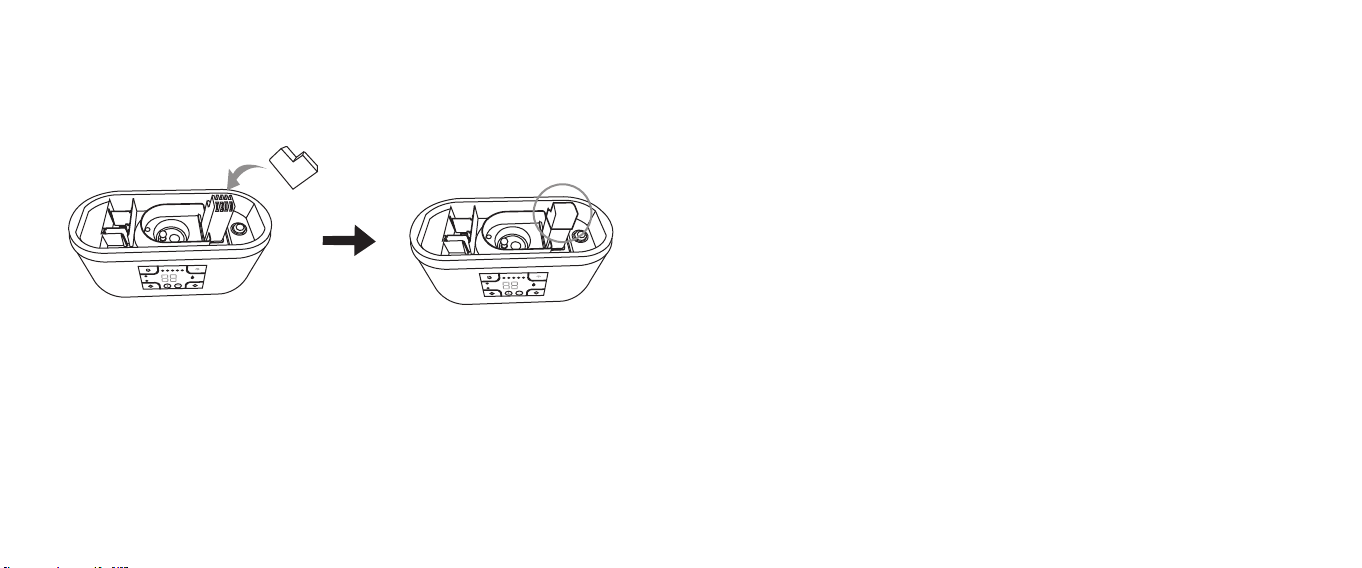
2. Spegnere l’umidicatore, disconnetterlo dalla corrente e svuotare l’acqua. Coprire
la presa d’aria con il tappo protettivo, quindi pulire l’interno del serbat
oio con lo
spazzolino per pulizia inc
luso.
3. Utilizzare una goccia di olio essenziale di limone sullo spazzolino o su un cott
on
oc se è necessario rim
uovere incrostazioni ostinate. (Si prega di prestar
e la
massima att
enzione mentre si svuota l’acqua per evitare che nisce nella part
e
inf
eriore o nella zona del motore rovinando il prodotto).
4. Utilizzare un panno morbido per pulire l’esterno dell’apparecchio per rimuover
e
impr
onte digitali, macchie, ecc. Il panno può essere inumidito con acqua, oppure
è possibile spruzzare un po’ di detergente neutro o una soluzione di acet
o e
acqua.
35/36
5. Pulire l’umidicatore una volta a settimana.

www.taotronics.com