TT-AH019_V2.6_EN
MADE IN CHINA
Manufacturer: Shenzhen NearbyExpress Technology Development Co.,Ltd.
Address: Floor 7, Building E, Galaxy World Phase II, Shenzhen, China
MANUFACTURER
Learn more about the EU Declaration of Conformity:
https://www.taotronics.com/pages/user-manual
Model: TT-AH019
E-mail :
www.taotronics.com
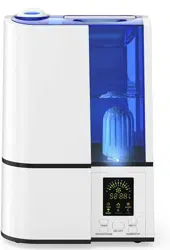
TaoTronics Ultrasonic Cool Mist Humidifier
User Guide

TT-AH019_V2.6_EN
MADE IN CHINA
Manufacturer: Shenzhen NearbyExpress Technology Development Co.,Ltd.
Address: Floor 7, Building E, Galaxy World Phase II, Shenzhen, China
MANUFACTURER
Learn more about the EU Declaration of Conformity:
https://www.taotronics.com/pages/user-manual
Model: TT-AH019
E-mail :
support@taotronics.com
www.taotronics.com
TaoTronics Ultrasonic Cool Mist Humidifier
User Guide

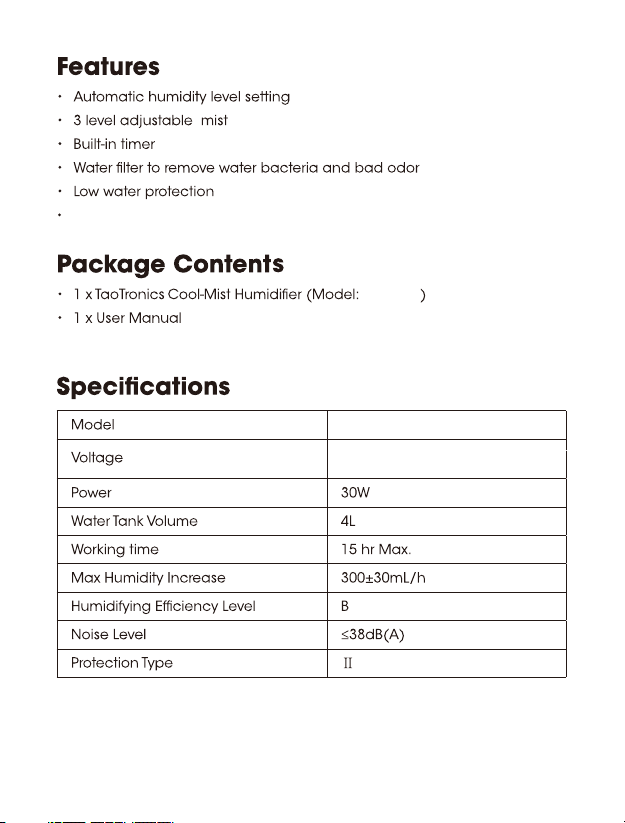
US/CA: AC 120V / 60Hz
UK: AC 230V / 50Hz
TT-AH019
TT-AH019
Voice control (must work with Alexa device) & App control
01
US/CA: AC 120V / 60Hz
UK: AC 230V / 50Hz
TT-AH019
TT-AH019
Voice control (must work with Alexa device) & App control
01
To prevent fog and mildew, please use distilled or purified water.
only
The unit starts to work with medium level mist output
4. In Sleep Mode, the unit will switch to low mist output. You can then
manually adjust the mist level
1.
2.
3.
5.
outputs
TT-AH019
On & Off / Wifi Button
On & Off / Wifi Button
02/03
To prevent fog and mildew, please use distilled or purified water.
only
The unit starts to work with medium level mist output
4. In Sleep Mode, the unit will switch to low mist output. You can then
manually adjust the mist level
1.
2.
3.
5.
outputs
TT-AH019
On & Off / Wifi Button
On & Off / Wifi Button
02/03
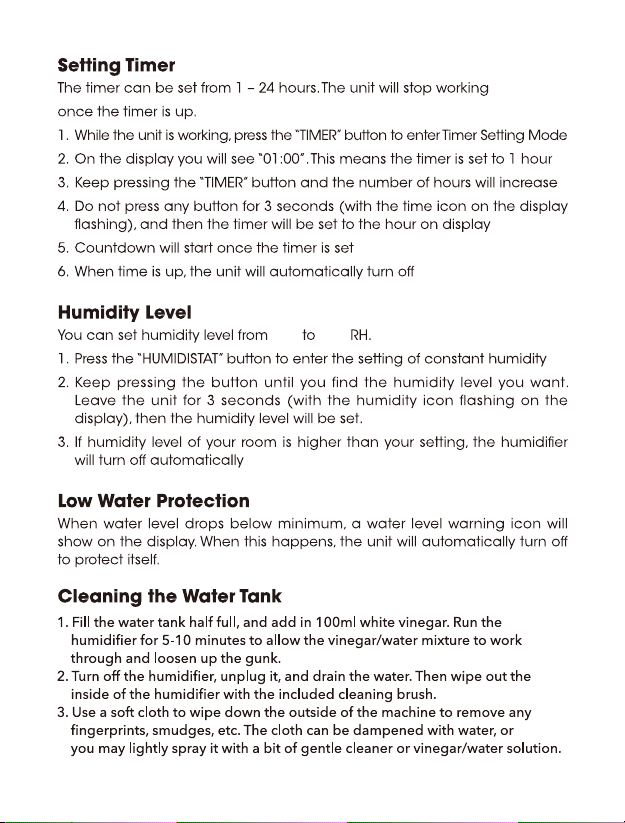
95%30%
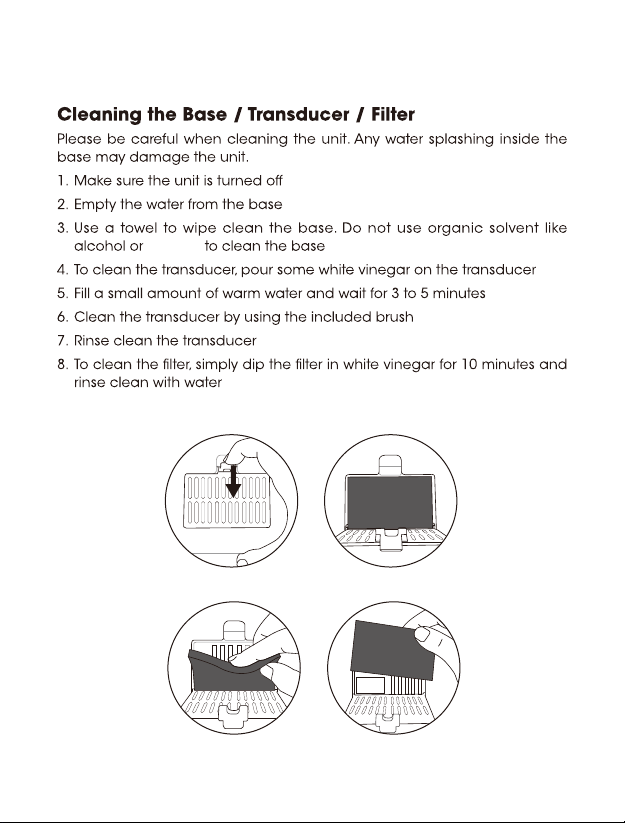
9. Clean the dustproof sponge once a month.
1 2
3 4
4. Clean the humidifier once a week.
vinegar
04/05
95%30%
9. Clean the dustproof sponge once a month.
1 2
3 4
4. Clean the humidifier once a week.
vinegar
04/05
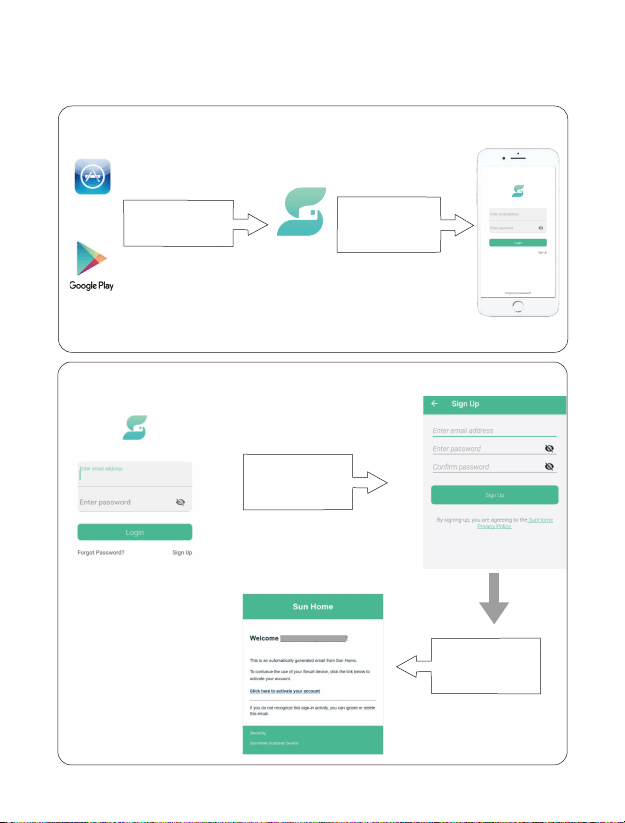
Smartphone App Control
How to use
1. Search and download “Sun Home” App
Search
“SunHome ” in the
app store .
Download to install,
open the app.
or
SunHome
App Store
2. Sign Up and Activate Your Account
Sign Up your
account.
Go to your email and
activate the account.
06/07
Smartphone App Control
How to use
1. Search and download “Sun Home” App
Search
“SunHome ” in the
app store .
Download to install,
open the app.
or
SunHome
App Store
2. Sign Up and Activate Your Account
Sign Up your
account.
Go to your email and
activate the account.
06/07
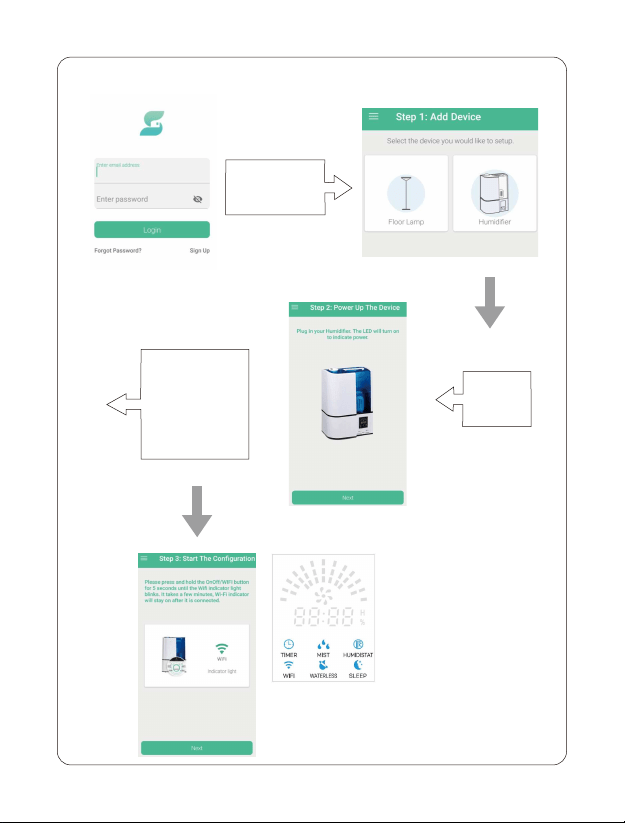
3. Login and Follow the Instructions to Connect
Choose
humidifier icon
Power Up
humidifier
Press and hold the
ON & OFF/WIFI
button for 5s in the
humidifier to start
configuration
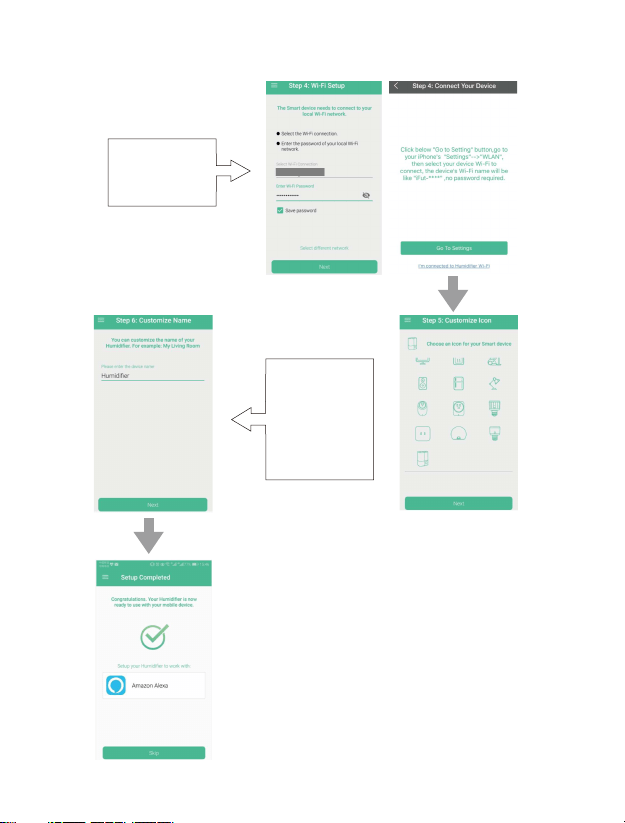
Open the Wifi and
enter your Wifi
account &
password
Android Version IOS Version
Name your
humidifier, please
use the same name
you set to the
humidifier when
you voice control it.
08/09
3. Login and Follow the Instructions to Connect
Choose
humidifier icon
Power Up
humidifier
Press and hold the
ON & OFF/WIFI
button for 5s in the
humidifier to start
configuration
Open the Wifi and
enter your Wifi
account &
password
Android Version IOS Version
Name your
humidifier, please
use the same name
you set to the
humidifier when
you voice control it.
08/09
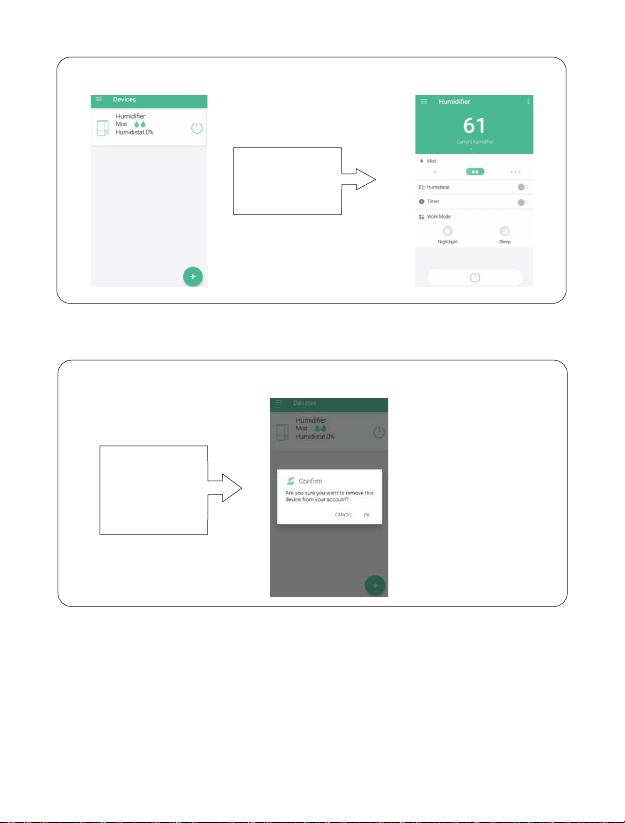
4. Enjoy to Control Your Humidifier by APP
Your can control
the connected
humidifier now.
5. Remove the Connected Device
Press and hold
the name of the
Humidifier
connected to
remove it
· Voice Control
Follow the Smartphone Control section above to configure the humidifier with the
WiFi router, then set up your Alexa/Google Home as below to command and use the
humidifier through voice control.
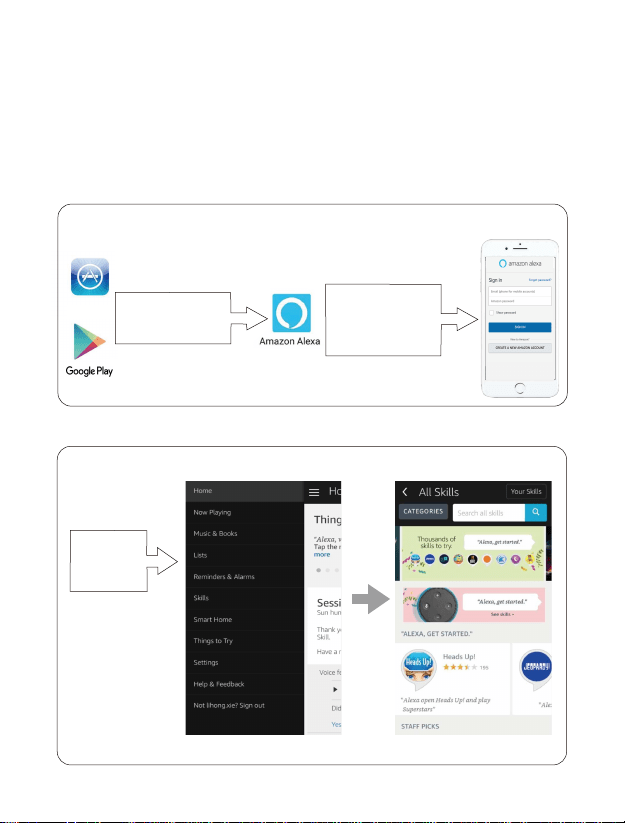
2. Search “Sun Humidifier” Skills and ENABLE.
Search “Sun
Humidifier”
Skills and
ENABLE.
App Store
Download and open
the app, register or
log in the Amazon
account.
Search ”Amazon
Alexa” in the app
store.
1. Download & Open “Amazon Alexa” App,Register & Login the
Amazon Account.
10/11
Voice Control by Alexa
4. Enjoy to Control Your Humidifier by APP
Your can control
the connected
humidifier now.
5. Remove the Connected Device
Press and hold
the name of the
Humidifier
connected to
remove it
· Voice Control
Follow the Smartphone Control section above to configure the humidifier with the
WiFi router, then set up your Alexa/Google Home as below to command and use the
humidifier through voice control.
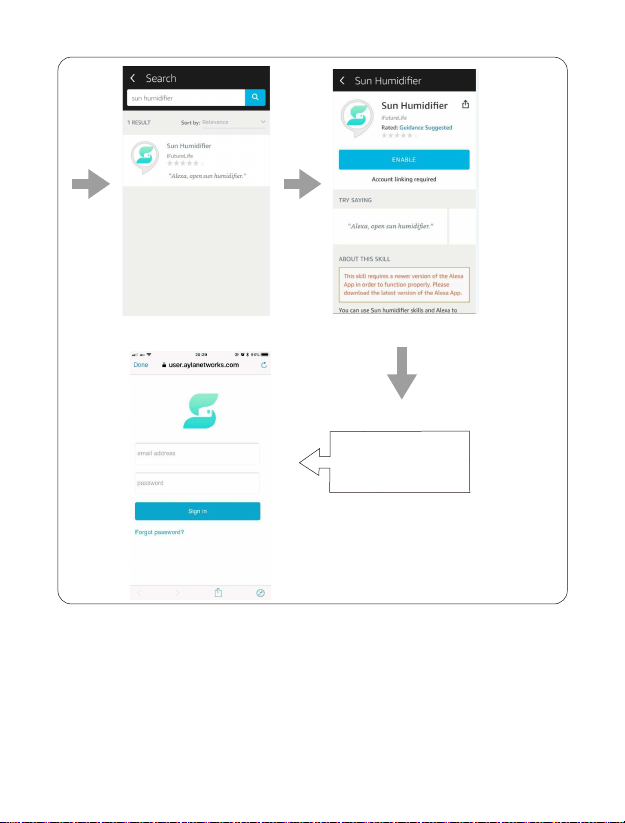
2. Search “Sun Humidifier” Skills and ENABLE.
Search “Sun
Humidifier”
Skills and
ENABLE.
App Store
Download and open
the app, register or
log in the Amazon
account.
Search ”Amazon
Alexa” in the app
store.
1. Download & Open “Amazon Alexa” App,Register & Login the
Amazon Account.
10/11
Voice Control by Alexa
Link to 'Sun Home' app account,then return to Amazon Alexa app and talk to Echo
"talk to sun humidifier".
Feedback from Echo
Welcome to the Sun Humidifier Skill. You
have # online devices , their name of
which are " + dev_name + ".
There is no available humidifier on your
account. Please confirm whether your
humidifier is online, and then open Sun
Humidifier skill.
You must have a Sun Home account to
use Sun Humidifier skill. Please use the
Alexa app to link your Amazon
account with your Sun Home Account.
Action
Choose the humidifier you want to
connect, then you can control it by
voice.
Please confirm whether your humidifier
is online, and then open Sun Humidifier
skill.
Please confirm if you already have a
Sun Home account.
12/13
Sign in your SunHome
app account so Alexa can
control your devices.

Link to 'Sun Home' app account,then return to Amazon Alexa app and talk to Echo
"talk to sun humidifier".
Feedback from Echo
Welcome to the Sun Humidifier Skill. You
have # online devices , their name of
which are " + dev_name + ".
There is no available humidifier on your
account. Please confirm whether your
humidifier is online, and then open Sun
Humidifier skill.
You must have a Sun Home account to
use Sun Humidifier skill. Please use the
Alexa app to link your Amazon
account with your Sun Home Account.
Action
Choose the humidifier you want to
connect, then you can control it by
voice.
Please confirm whether your humidifier
is online, and then open Sun Humidifier
skill.
Please confirm if you already have a
Sun Home account.
12/13
Sign in your SunHome
app account so Alexa can
control your devices.
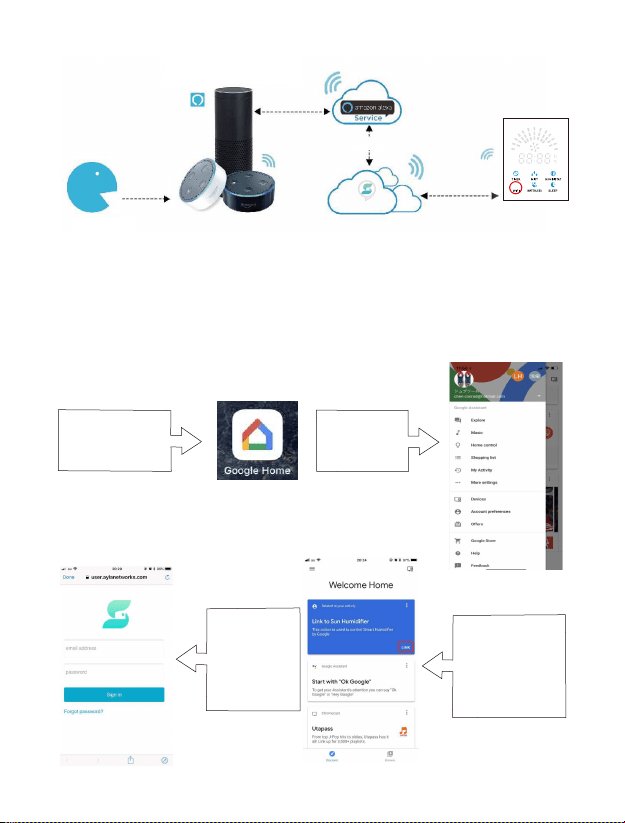
Send out the
voice command
Sun Humidifier Skill
Transmit the
control signal
Transmit the
control signal
SunHome
Amazon Echo Series and other
brand Alexa voice device
Follow the instructions in Amazon
Alexa app to use the Amazon Alexa Service
14/15
Voice Control by Google Home
Before you start, please make sure that:
1. Connect the humidifier to the SunHome app & give your humidifier a
descriptive name;
2. You have a Google assistant enabled device(i.e. Google Home) & setup
it well.
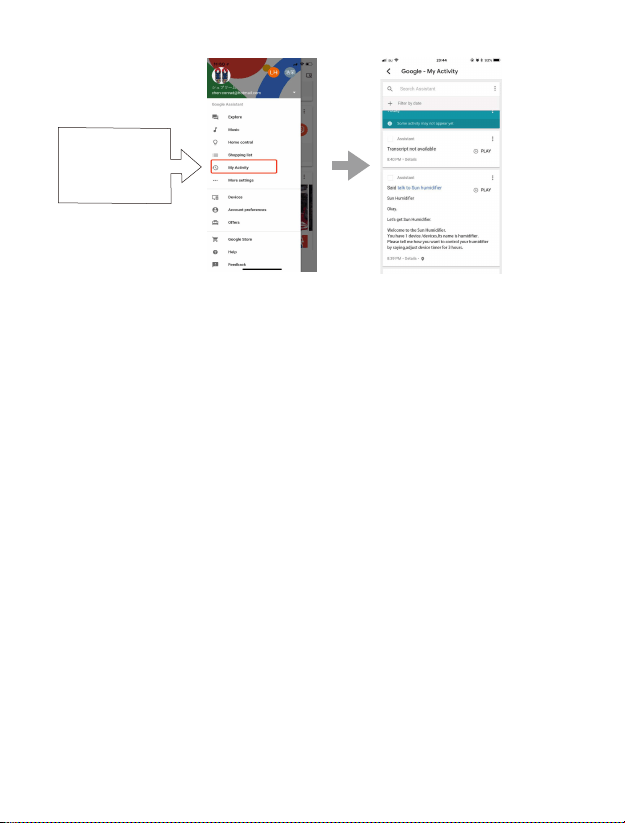
Download&install
Google Home app on
your smart phone
Create an
account and
sign in.
Please say to Google
home: “OK Google,
Talk to Sun
Humidifier”, then
open Google Home
APP and click on " link
".
Sign in your
SunHome app
account so
Google home can
control your
devices.
You can find all the
records & feedback
from Google Home
in “My Activity”
Send out the
voice command
Sun Humidifier Skill
Transmit the
control signal
Transmit the
control signal
SunHome
Amazon Echo Series and other
brand Alexa voice device
Follow the instructions in Amazon
Alexa app to use the Amazon Alexa Service
14/15
Voice Control by Google Home
Before you start, please make sure that:
1. Connect the humidifier to the SunHome app & give your humidifier a
descriptive name;
2. You have a Google assistant enabled device(i.e. Google Home) & setup
it well.
Download&install
Google Home app on
your smart phone
Create an
account and
sign in.
Please say to Google
home: “OK Google,
Talk to Sun
Humidifier”, then
open Google Home
APP and click on " link
".
Sign in your
SunHome app
account so
Google home can
control your
devices.
You can find all the
records & feedback
from Google Home
in “My Activity”

Voice Command to Control the Work with Alexa Device
You should have an Alexa speaker (Amazon Echo/Echo dot or like product, sold
separately), or you can use App like “Reverb” for voice command;
·In the third-party application, we have named this device. Such as
"apple".
·After linking a third-party application account to an Amazon account.
We can use voice command Device.
Control Power
command
Adjust Mist
command
Adjust Work
mode command
Alexa,turn on {device name}
Alexa,turn off {device name}
adjust {device name} to
maximum/high mist
adjust {device name} to
medium mist
adjust {device name} to
small/minimum/low mist
adjust {device} to normal
mode
adjust {device} to nightlight
mode
adjust {device} to sleep
mode
Alexa,turn {device name} on
Alexa,turn {device name} off
set {device name} to
maximum/high mist
set {device name} to
medium mist
set {device name} to
small/minimum/low mist
set {device} to normal mode
set {device} to nightlight
mode
set {device} to sleep mode
Note:
1. Press and hold the On & Off / Wifi Button for 5 seconds to enter wifi configuring
in standby or working mode. The wifi indicator will keep flashing when
configuring and stay solid on once configured successfully.
2. During wifi configuration, press and hold the On & Off / Wifi Button for another 5 seconds to
stop the configuration.
3. When successfully configured, press the On & Off / Wifi Button to turn off the
unit with wifi successfully connected.
4. The Wifi indicator will turn off when enter sleep mode after a successful wifi
configuration or during the configuring process without affecting the
configuring status.
5. Wifi configuration is disabled in sleep mode.
16/17

Voice Command to Control the Work with Alexa Device
You should have an Alexa speaker (Amazon Echo/Echo dot or like product, sold
separately), or you can use App like “Reverb” for voice command;
·In the third-party application, we have named this device. Such as
"apple".
·After linking a third-party application account to an Amazon account.
We can use voice command Device.
Control Power
command
Adjust Mist
command
Adjust Work
mode command
Alexa,turn on {device name}
Alexa,turn off {device name}
adjust {device name} to
maximum/high mist
adjust {device name} to
medium mist
adjust {device name} to
small/minimum/low mist
adjust {device} to normal
mode
adjust {device} to nightlight
mode
adjust {device} to sleep
mode
Alexa,turn {device name} on
Alexa,turn {device name} off
set {device name} to
maximum/high mist
set {device name} to
medium mist
set {device name} to
small/minimum/low mist
set {device} to normal mode
set {device} to nightlight
mode
set {device} to sleep mode
Note:
1. Press and hold the On & Off / Wifi Button for 5 seconds to enter wifi configuring
in standby or working mode. The wifi indicator will keep flashing when
configuring and stay solid on once configured successfully.
2. During wifi configuration, press and hold the On & Off / Wifi Button for another 5 seconds to
stop the configuration.
3. When successfully configured, press the On & Off / Wifi Button to turn off the
unit with wifi successfully connected.
4. The Wifi indicator will turn off when enter sleep mode after a successful wifi
configuration or during the configuring process without affecting the
configuring status.
5. Wifi configuration is disabled in sleep mode.
16/17
18/19
18/19
20
This device complies with Part 15 of the FCC Rules. Operation is
subject to the following two conditions: (1) this device may not
cause harmful interference, and (2) this device must accept any
interference received, including interference that may cause
undesired operation.
FCC Compliance
WEEE Compliance
Correct Disposal of This Product (Waste Electrical & Electronic
Equipment) (Applicable in countries with separate collection systems)
This marking on the product, accessories or literature indicates that
the product and its electronic accessories should not be disposed of
with other household waste at the end of their working life. To
prevent possible harm to the environment or human health from
uncontrolled waste disposal, please separate these items from other
types of waste and recycle them responsibly to promote the
sustainable reuse of material resources. Household users should
contact either the retailer where they purchased this product, or their
local government office, for details of where and how they can take
these items for environmentally safe recycling. Business users should
contact their supplier and check the terms and conditions of the
purchase contract. This product and its electronic accessories should
not be mixed with other commercial wastes for disposal.

20
This device complies with Part 15 of the FCC Rules. Operation is
subject to the following two conditions: (1) this device may not
cause harmful interference, and (2) this device must accept any
interference received, including interference that may cause
undesired operation.
FCC Compliance
WEEE Compliance
Correct Disposal of This Product (Waste Electrical & Electronic
Equipment) (Applicable in countries with separate collection systems)
This marking on the product, accessories or literature indicates that
the product and its electronic accessories should not be disposed of
with other household waste at the end of their working life. To
prevent possible harm to the environment or human health from
uncontrolled waste disposal, please separate these items from other
types of waste and recycle them responsibly to promote the
sustainable reuse of material resources. Household users should
contact either the retailer where they purchased this product, or their
local government office, for details of where and how they can take
these items for environmentally safe recycling. Business users should
contact their supplier and check the terms and conditions of the
purchase contract. This product and its electronic accessories should
not be mixed with other commercial wastes for disposal.