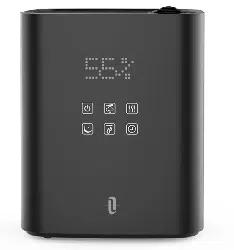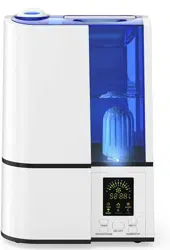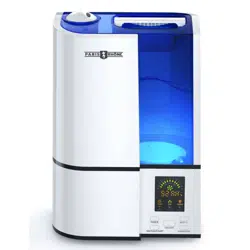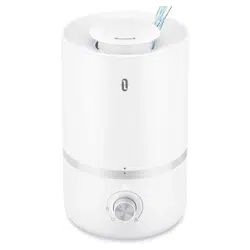

Model: TT-AH043
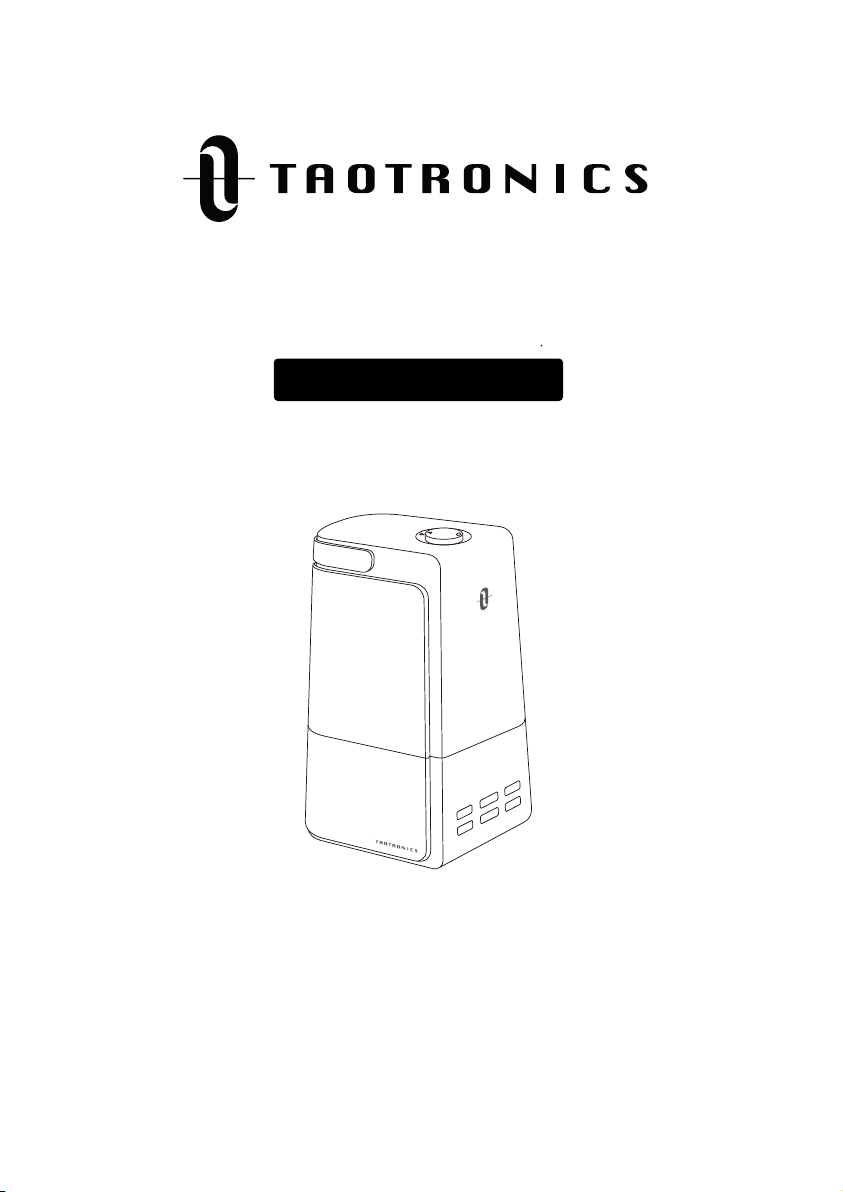
TaoTronics Ultrasonic Cool Mist Humidifier
User Guide
TT-AH043_V1.1_EN
E-mail:
support@taotronics.com
Manufacturer: Shenzhen NearbyExpress Technology Development Co.,Ltd.
Address: Floor 7, Building E, Galaxy World Phase II, Shenzhen, China
MANUFACTURER
www.taotronics.com
Extend your warranty to 18 months by
registering your product on our website
taotronics.com/warranty
support@taotronics.com
M
I
S
T
+/—
H
U
M
I
DI
STA
T
TI
ME
R
LI
G
HT
O
N
/O
FF
S
L
E
E
P
Model: TT-AH043
TaoTronics Ultrasonic Cool Mist Humidifier
User Guide
TT-AH043_V1.1_EN
E-mail:
support@taotronics.com
Manufacturer: Shenzhen NearbyExpress Technology Development Co.,Ltd.
Address: Floor 7, Building E, Galaxy World Phase II, Shenzhen, China
MANUFACTURER
www.taotronics.com
Extend your warranty to 18 months by
registering your product on our website
taotronics.com/warranty
support@taotronics.com
M
I
S
T
+/—
H
U
M
I
DI
STA
T
TI
ME
R
LI
G
HT
O
N
/O
FF
S
L
E
E
P

STATEMENT
SAFETY INSTRUCTIONS
IMPORTANT SAFETY INSTRUCTIONS
BEFORE USING THE HUMIDIFIER
WHEN USING THE HUMIDIFIER
AFTER USING THE HUMIDIFIER
PACKAGE CONTENTS
SPECIFICATIONS
PRODUCT DIAGRAM
OPERATIONS AND FUNCTIONS
Add water
Standby Mode
Power ON/OFF
Mist Adjustment
Humidity Setting
Timer Setting
Sleep Mode
Tank Light
Low Water Protection
Memory Function
CLEANING AND MAINTENANCE
Caution
Daily Maintenance
Weekly Maintenance
Scale Removal Instructions
Disinfecting Instructions
Clean the Dustproof Sponge
End-Of-Season Care and Storage
TROUBLESHOOTING GUIDE
WARRANTY
TAOTRONICS CUSTOMER CARE
CONTENTS
01
01
08
10
12
14/16
09
17
17
08
02
04
06
07
10
11
12
12
12
11
11
13
13
13
13
16
19
19
13
13
13
13
15
15
15
11
11
11
12

STATEMENT
SAFETY INSTRUCTIONS
IMPORTANT SAFETY INSTRUCTIONS
BEFORE USING THE HUMIDIFIER
WHEN USING THE HUMIDIFIER
AFTER USING THE HUMIDIFIER
PACKAGE CONTENTS
SPECIFICATIONS
PRODUCT DIAGRAM
OPERATIONS AND FUNCTIONS
Add water
Standby Mode
Power ON/OFF
Mist Adjustment
Humidity Setting
Timer Setting
Sleep Mode
Tank Light
Low Water Protection
Memory Function
CLEANING AND MAINTENANCE
Caution
Daily Maintenance
Weekly Maintenance
Scale Removal Instructions
Disinfecting Instructions
Clean the Dustproof Sponge
End-Of-Season Care and Storage
TROUBLESHOOTING GUIDE
WARRANTY
TAOTRONICS CUSTOMER CARE
CONTENTS
01
01
08
10
12
14/16
09
17
17
08
02
04
06
07
10
11
12
12
12
11
11
13
13
13
13
16
19
19
13
13
13
13
15
15
15
11
11
11
12

STATEMENT
Thank you for purchasing a TaoTronics product that has been tested to meet our stringent quality
standards. This product is covered with TaoTronics product and labor warranty for 12 months from
the date of its original purchase.
Please email us with your order ID and problem or issue via [email protected], we will
respond within 24 hours.
Please read the User Guide thoroughly. Clean and maintain the product as instructed. If any
abnormalities occur, please refer to the Troubleshooting Guide first.
This warranty is void if the defect is caused by accidental damage, misuse, abuse, neglect, improper
repair or alteration by unauthorized persons, or a failure to follow operating instructions provided
with the product including adding essential oils directly into the tank and base. This warranty does
not apply to normal wear and tear or commercial use.
In no event shall liability exceed the purchase price paid by the purchaser of the product. Under no
circumstances shall there be liability for any loss – direct, indirect or incidental – or consequential
damage arising out of, or in connection with the use of the product.
SAFETY INSTRUCTIONS
The humidifier was made with safe and environmental protection materials, it has been certified
and complied with the requirement of sale regions’ related regulations or laws.
IMPORTANT: Please READ AND SAVE THESE SAFETY INSTRUCTIONS before using the device.
Basic precautions should always be followed to reduce the risk of fire, electrical shock, and injury
to persons or damage to the product.
02
01
IMPORTANT SAFETY INSTRUCTIONS
BEFORE USING THIS APPLIANCE READ ALL INSTRUCTIONS AND CAUTIONARY MARKINGS IN
YOUR USER GUIDE AND ON THE APPLIANCE
When using an electrical appliance, basic precautions should always be followed, including the
following:
1. This is an electrical appliance and requires attention when in use. This appliance is not intended
for use by persons (including children) with reduced physical, sensory or mental capabilities or lack
of experience and knowledge, unless they have been given supervision or instruction concerning
use of the appliance by a person responsible for their safety. Children should always be supervised
to ensure that they do not play with the appliance.
2. WARNING: Do not attempt to refill humidifier without first unplugging the unit from its electrical
outlet. Failure to heed this warning may cause personal injury. Be sure to unplug the unit by pulling
on the plug and not the cord.
3. WARNING: Do not touch the water in the humidifier when the humidifier is connected into power
supplies. Always turn off and unplug the power cord before cleaning or maintenance.
4. WARNING: The best suitable working environment temperature for the humidifier is 5°C -40°C
(41°F -102°F),and the relative humidity shall NOT excess 80%RH. Run humidifier in an environment
out of this situation may cause damage to the humidifier and damage of properties.
5. When using the humidifier for the first time after being removed from its original box, it is
recommended to place the unit at room temperature for about 30 minutes before operation.
6. Do not use hot water, always use clean water with temperature no higher than 40°C (102°F) for this
humidifier.
7. Use this appliance only for intended household use as described in this manual. Any other use not
recommended by the manufacturer may cause fire, electric shock, or injury to persons. The use of
attachments not recommended or sold by the manufacturer may cause hazards.
8. DO NOT allow the Moisture Outlet to directly face the wall. Moisture could cause damage,
particularly to wall paper.
9. Do not use humidifier in an area where humidity level is in excess of 60%. A humidity level below
20% can be unhealthy and uncomfortable. The recommended humidity level is between 40%-60%.
Excessive humidity in a room can cause water condensation on windows and some furniture. If this

STATEMENT
Thank you for purchasing a TaoTronics product that has been tested to meet our stringent quality
standards. This product is covered with TaoTronics product and labor warranty for 12 months from
the date of its original purchase.
Please email us with your order ID and problem or issue via support@taotronics.com, we will
respond within 24 hours.
Please read the User Guide thoroughly. Clean and maintain the product as instructed. If any
abnormalities occur, please refer to the Troubleshooting Guide first.
This warranty is void if the defect is caused by accidental damage, misuse, abuse, neglect, improper
repair or alteration by unauthorized persons, or a failure to follow operating instructions provided
with the product including adding essential oils directly into the tank and base. This warranty does
not apply to normal wear and tear or commercial use.
In no event shall liability exceed the purchase price paid by the purchaser of the product. Under no
circumstances shall there be liability for any loss – direct, indirect or incidental – or consequential
damage arising out of, or in connection with the use of the product.
SAFETY INSTRUCTIONS
The humidifier was made with safe and environmental protection materials, it has been certified
and complied with the requirement of sale regions’ related regulations or laws.
IMPORTANT: Please READ AND SAVE THESE SAFETY INSTRUCTIONS before using the device.
Basic precautions should always be followed to reduce the risk of fire, electrical shock, and injury
to persons or damage to the product.
02
01
IMPORTANT SAFETY INSTRUCTIONS
BEFORE USING THIS APPLIANCE READ ALL INSTRUCTIONS AND CAUTIONARY MARKINGS IN
YOUR USER GUIDE AND ON THE APPLIANCE
When using an electrical appliance, basic precautions should always be followed, including the
following:
1. This is an electrical appliance and requires attention when in use. This appliance is not intended
for use by persons (including children) with reduced physical, sensory or mental capabilities or lack
of experience and knowledge, unless they have been given supervision or instruction concerning
use of the appliance by a person responsible for their safety. Children should always be supervised
to ensure that they do not play with the appliance.
2. WARNING: Do not attempt to refill humidifier without first unplugging the unit from its electrical
outlet. Failure to heed this warning may cause personal injury. Be sure to unplug the unit by pulling
on the plug and not the cord.
3. WARNING: Do not touch the water in the humidifier when the humidifier is connected into power
supplies. Always turn off and unplug the power cord before cleaning or maintenance.
4. WARNING: The best suitable working environment temperature for the humidifier is 5°C -40°C
(41°F -102°F),and the relative humidity shall NOT excess 80%RH. Run humidifier in an environment
out of this situation may cause damage to the humidifier and damage of properties.
5. When using the humidifier for the first time after being removed from its original box, it is
recommended to place the unit at room temperature for about 30 minutes before operation.
6. Do not use hot water, always use clean water with temperature no higher than 40°C (102°F) for this
humidifier.
7. Use this appliance only for intended household use as described in this manual. Any other use not
recommended by the manufacturer may cause fire, electric shock, or injury to persons. The use of
attachments not recommended or sold by the manufacturer may cause hazards.
8. DO NOT allow the Moisture Outlet to directly face the wall. Moisture could cause damage,
particularly to wall paper.
9. Do not use humidifier in an area where humidity level is in excess of 60%. A humidity level below
20% can be unhealthy and uncomfortable. The recommended humidity level is between 40%-60%.
Excessive humidity in a room can cause water condensation on windows and some furniture. If this

04
03
happens, turn the humidifier OFF.
10. NEVER use humidifier in a closed room, particularly where a child may be sleeping, resting, or
playing (a closed room may result in excessive humidity).
If moisture forms on the walls, floors or windows of the room, turn off the humidifier. The room
already has plenty of humidity and additional moisture may cause damage.
11. This humidifier requires daily maintenance and regular cleaning to prevent the growth of
bacteria. If you do not follow the recommended care and maintenance guidelines, micro-organ-
isms may be able to grow in the water within the water tank or the base reservoir. You must
routinely follow the cleaning procedures that follow in order to ensure proper, efficient operation
of your humidifier. Proper maintenance and cleaning is essential to the continued performance of
your unit and the avoidance of algae or bacteria build-up.
Refer to the CLEANING instructions provided. Never clean the humidifier in any manner other than
as instructed in this manual.
12. The humidifier should always be unplugged and emptied when not in operation or while being
serviced or cleaned.
13. DO NOT operate your humidifier without the water tank in place or if the unit is empty.
14. NEVER drop or insert any object into any openings of the humidifier.
READ AND SAVE THESE INSTRUCTIONS
M
I
ST
+
/
—
H
U
M
I
D
I
S
TA
T
T
I
ME
R
L
I
G
H
T
O
N
/
OF
F
S
LE
E
P
M
I
ST
+
/
—
H
U
M
I
D
I
S
T
A
T
T
I
ME
R
LI
GH
T
O
N
/
OF
F
S
LE
E
P
BEFORE USING THE HUMIDIFIER
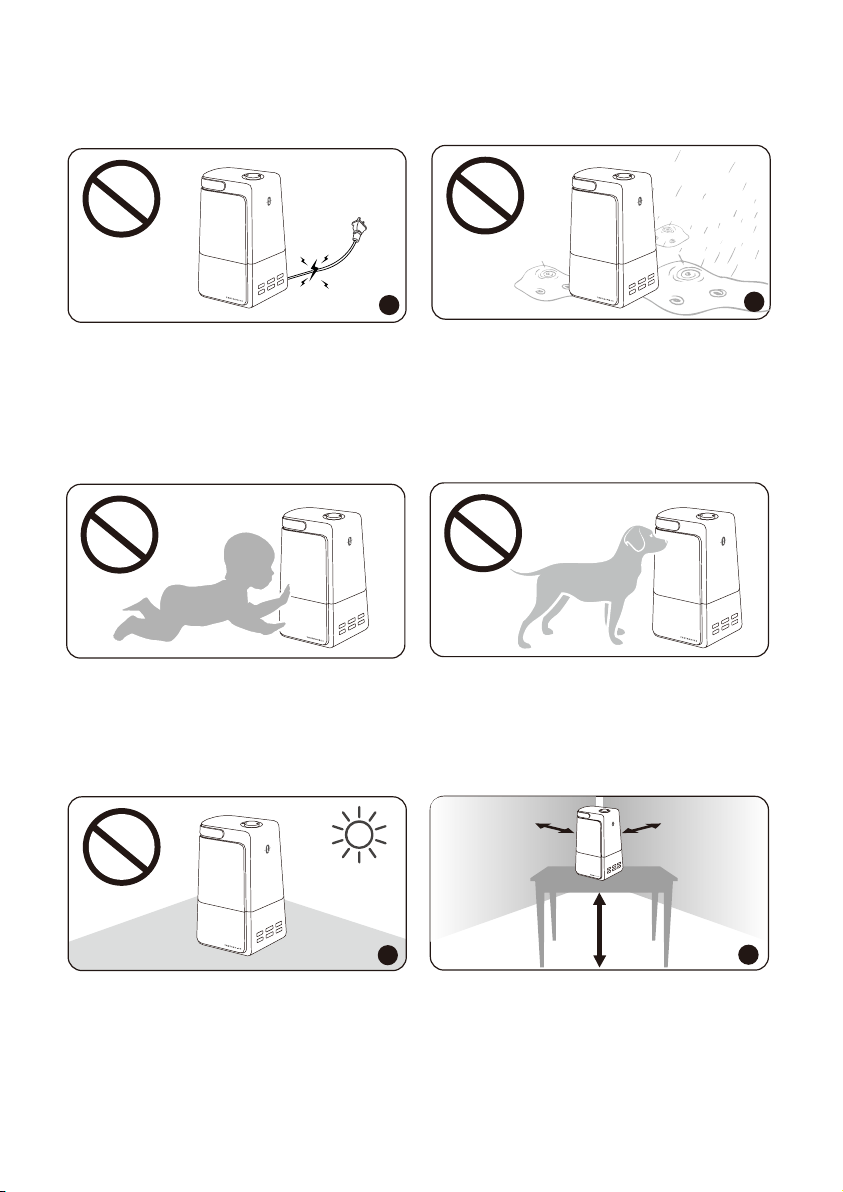
1. Please extend the cord and check any signs of damage. Do not use the humidifier if the cord
has been damaged.
2. DO NOT place this humidifier in wet environments.
Please always keep the humidifier out of reach of patients & children & pet.
1. Please always place the unit on a smooth, flat, lint-free, non-metallic, waterproof and level
surface and keep it away from direct sunlight.
2. Always place the unit 2 feet (60 cm) above the floor, 12 inches (30 cm) away from the wall,
other appliances or wooden furniture.
1
30 CM
60 CM
2
30 CM
1
2
M
I
ST
+
/
—
H
U
MI
D
I
S
T
A
T
T
I
ME
R
LI
G
H
T
O
N
/
OF
F
S
L
E
E
P
M
I
ST
+
/
—
H
U
MI
D
I
S
T
A
T
TI
ME
R
LI
G
H
T
O
N/
OF
F
SL
EE
P
M
I
S
T
+
/
—
H
U
MI
D
I
S
TA
T
T
I
ME
R
L
I
G
H
T
O
N
/
OF
F
S
LE
E
P
M
IS
T
+
/
—
H
U
M
I
DIS
T
A
T
T
I
ME
R
L
IGH
T
O
N
/
O
F
F
S
L
E
E
P
04
03
happens, turn the humidifier OFF.
10. NEVER use humidifier in a closed room, particularly where a child may be sleeping, resting, or
playing (a closed room may result in excessive humidity).
If moisture forms on the walls, floors or windows of the room, turn off the humidifier. The room
already has plenty of humidity and additional moisture may cause damage.
11. This humidifier requires daily maintenance and regular cleaning to prevent the growth of
bacteria. If you do not follow the recommended care and maintenance guidelines, micro-organ-
isms may be able to grow in the water within the water tank or the base reservoir. You must
routinely follow the cleaning procedures that follow in order to ensure proper, efficient operation
of your humidifier. Proper maintenance and cleaning is essential to the continued performance of
your unit and the avoidance of algae or bacteria build-up.
Refer to the CLEANING instructions provided. Never clean the humidifier in any manner other than
as instructed in this manual.
12. The humidifier should always be unplugged and emptied when not in operation or while being
serviced or cleaned.
13. DO NOT operate your humidifier without the water tank in place or if the unit is empty.
14. NEVER drop or insert any object into any openings of the humidifier.
READ AND SAVE THESE INSTRUCTIONS
M
I
ST
+
/
—
H
U
M
I
D
I
S
TA
T
T
I
ME
R
L
I
G
H
T
O
N
/
OF
F
S
LE
E
P
M
I
ST
+
/
—
H
U
M
I
D
I
S
T
A
T
T
I
ME
R
LI
GH
T
O
N
/
OF
F
S
LE
E
P
BEFORE USING THE HUMIDIFIER
1. Please extend the cord and check any signs of damage. Do not use the humidifier if the cord
has been damaged.
2. DO NOT place this humidifier in wet environments.
Please always keep the humidifier out of reach of patients & children & pet.
1. Please always place the unit on a smooth, flat, lint-free, non-metallic, waterproof and level
surface and keep it away from direct sunlight.
2. Always place the unit 2 feet (60 cm) above the floor, 12 inches (30 cm) away from the wall,
other appliances or wooden furniture.
1
30 CM
60 CM
2
30 CM
1
2
M
I
ST
+
/
—
H
U
MI
D
I
S
T
A
T
T
I
ME
R
LI
G
H
T
O
N
/
OF
F
S
L
E
E
P
M
I
ST
+
/
—
H
U
MI
D
I
S
T
A
T
TI
ME
R
LI
G
H
T
O
N/
OF
F
SL
EE
P
M
I
S
T
+
/
—
H
U
MI
D
I
S
TA
T
T
I
ME
R
L
I
G
H
T
O
N
/
OF
F
S
LE
E
P
M
IS
T
+
/
—
H
U
M
I
DIS
T
A
T
T
I
ME
R
L
IGH
T
O
N
/
O
F
F
S
L
E
E
P
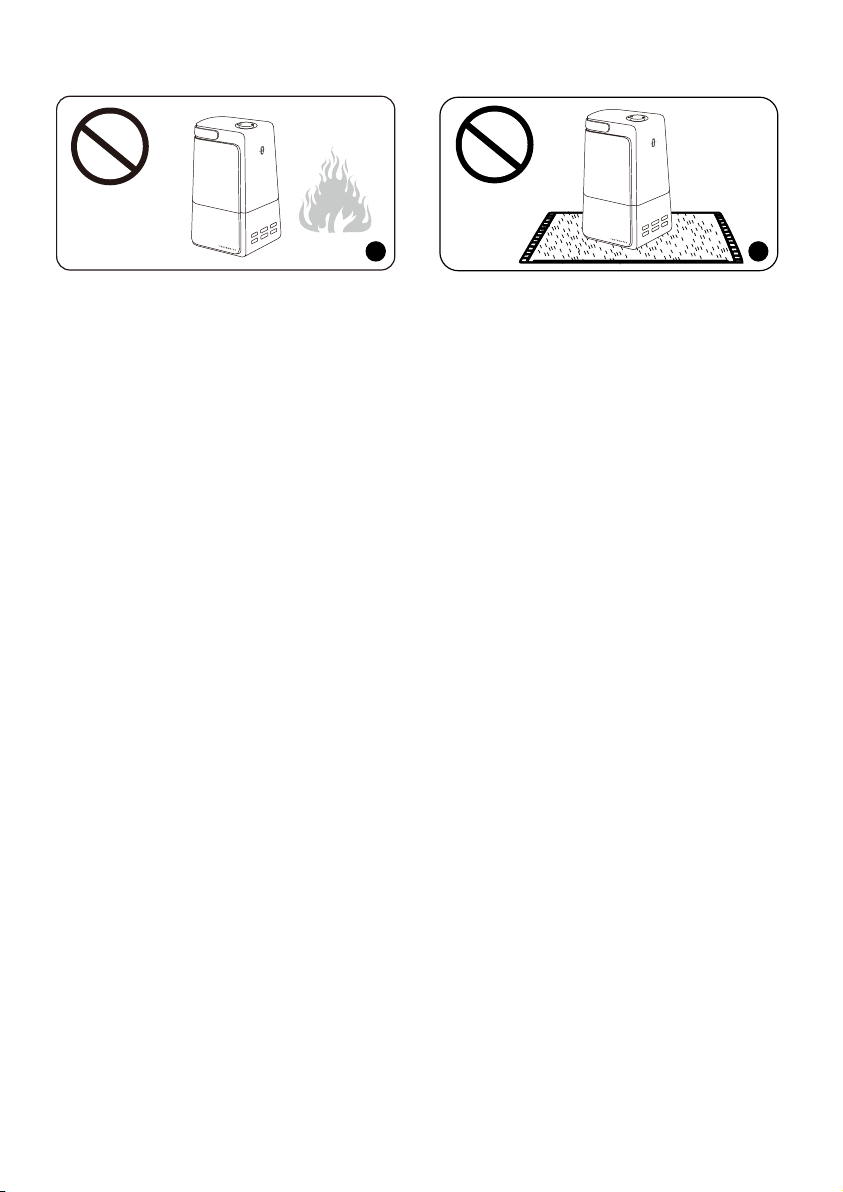
1. DO NOT place the humidifier near naked flames and heat sources, such as stove tops, ovens,
radiators or computers.
2. DO NOT run cord under carpeting. Do not cover cord with throw rugs, runners or the like. Do not
route cord under furniture or appliances. Arrange cord away from traffic area and where it will not
be tripped over.
WHEN USING THE HUMIDIFIER
1. DO NOT plug the unit with wet hands.
2. DO NOT use your hand or any other object to cover the nozzle while the unit is on to avoid
damaging the product or causing injury.
2
1. DO NOT move or tilt the humidifier while it is in operation.
2. DO NOT clean the unit while it is connected to a power source or while it is on.
The most comfortable environmental humidity
is between 40%-60%. Please adjust the mist as
needed.
2
1
M
I
S
T
+
/—
H
U
M
I
D
I
S
TA
T
T
I
ME
R
LI
G
H
T
O
N
/
OF
F
S
LE
E
P
06
05
Humidity
40% 60%
M
I
S
T
+
/
—
H
U
M
ID
I
S
TA
T
T
I
ME
R
LI
G
H
T
O
N
/
OF
F
S
LE
E
P
1
21
M
I
ST
+
/
—
H
U
M
I
D
I
ST
A
T
T
I
ME
R
LI
GH
T
O
N
/
O
F
F
S
LE
E
P
M
I
S
T
+/
—
H
U
M
I
D
I
S
T
A
T
T
I
ME
R
LI
G
H
T
O
N
/
O
F
F
S
LE
E
P
M
I
ST
+
/
—
H
U
MI
D
I
S
T
A
T
T
I
ME
R
LI
G
H
T
O
N
/O
F
F
S
LE
E
P
M
IST
+
/
—
H
U
MI
D
I
S
T
A
T
T
I
ME
R
L
I
G
H
T
O
N
/
OF
F
S
LE
E
P
M
I
S
T
+/
—
H
U
M
I
D
I
S
T
A
T
T
I
ME
R
L
I
G
H
T
O
N
/O
F
F
S
LE
E
P
1. DO NOT place the humidifier near naked flames and heat sources, such as stove tops, ovens,
radiators or computers.
2. DO NOT run cord under carpeting. Do not cover cord with throw rugs, runners or the like. Do not
route cord under furniture or appliances. Arrange cord away from traffic area and where it will not
be tripped over.
WHEN USING THE HUMIDIFIER
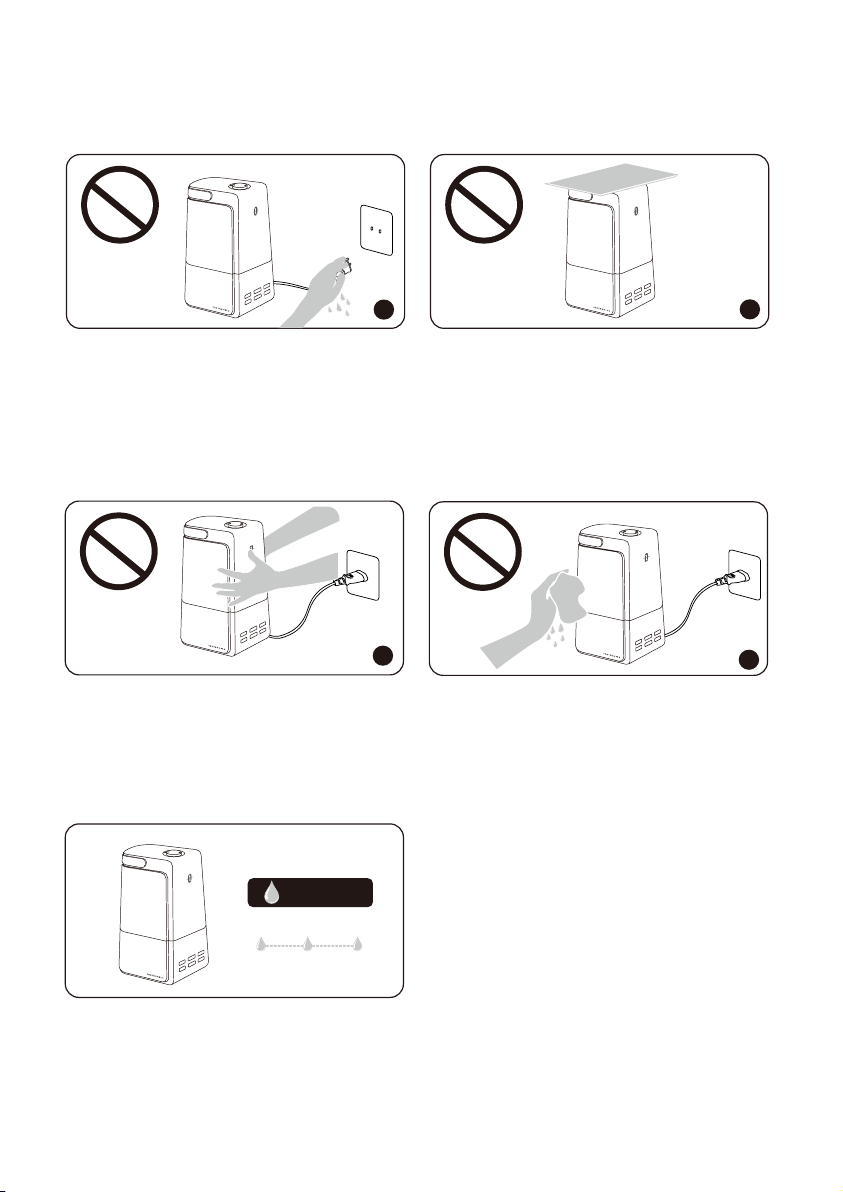
1. DO NOT plug the unit with wet hands.
2. DO NOT use your hand or any other object to cover the nozzle while the unit is on to avoid
damaging the product or causing injury.
2
1. DO NOT move or tilt the humidifier while it is in operation.
2. DO NOT clean the unit while it is connected to a power source or while it is on.
The most comfortable environmental humidity
is between 40%-60%. Please adjust the mist as
needed.
2
1
M
I
S
T
+
/—
H
U
M
I
D
I
S
TA
T
T
I
ME
R
LI
G
H
T
O
N
/
OF
F
S
LE
E
P
06
05
Humidity
40% 60%
M
I
S
T
+
/
—
H
U
M
ID
I
S
TA
T
T
I
ME
R
LI
G
H
T
O
N
/
OF
F
S
LE
E
P
1
21
M
I
ST
+
/
—
H
U
M
I
D
I
ST
A
T
T
I
ME
R
LI
GH
T
O
N
/
O
F
F
S
LE
E
P
M
I
S
T
+/
—
H
U
M
I
D
I
S
T
A
T
T
I
ME
R
LI
G
H
T
O
N
/
O
F
F
S
LE
E
P
M
I
ST
+
/
—
H
U
MI
D
I
S
T
A
T
T
I
ME
R
LI
G
H
T
O
N
/O
F
F
S
LE
E
P
M
IST
+
/
—
H
U
MI
D
I
S
T
A
T
T
I
ME
R
L
I
G
H
T
O
N
/
OF
F
S
LE
E
P
M
I
S
T
+/
—
H
U
M
I
D
I
S
T
A
T
T
I
ME
R
L
I
G
H
T
O
N
/O
F
F
S
LE
E
P
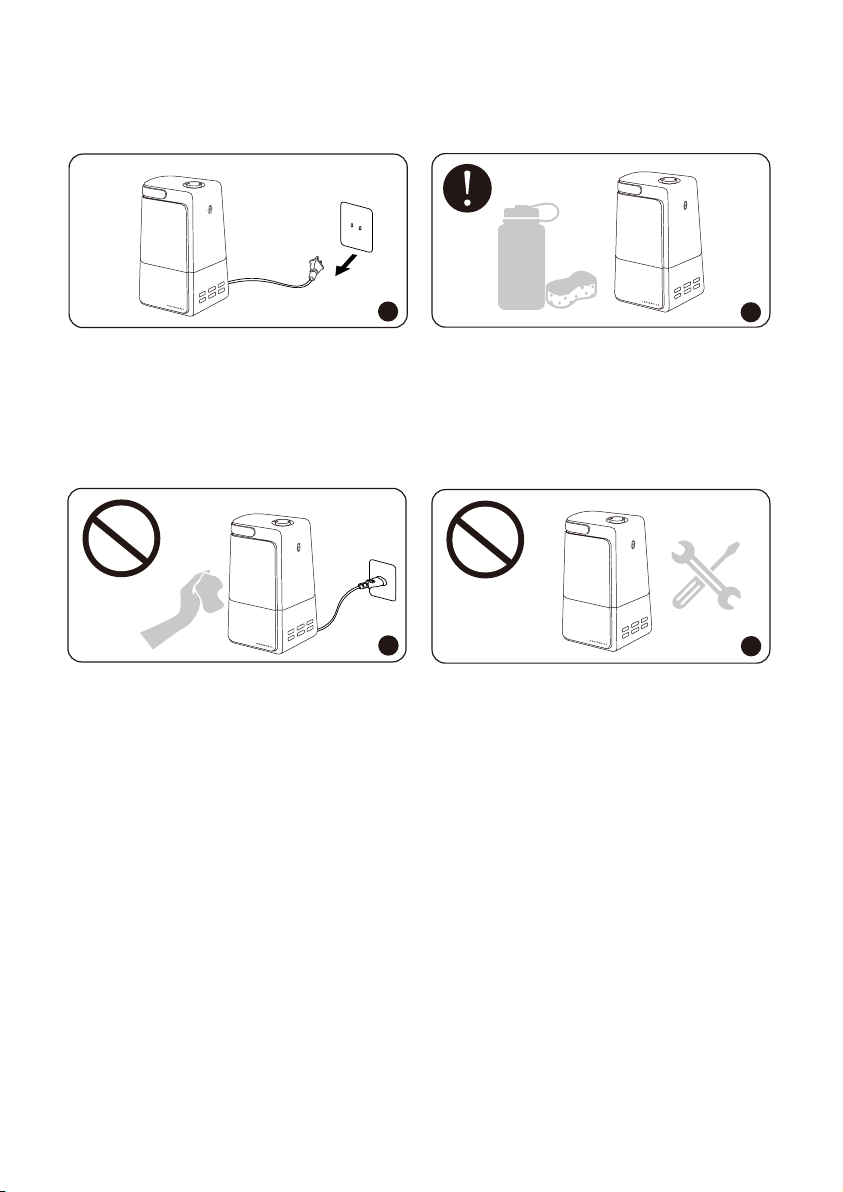
AFTER USING THE HUMIDIFIER
1. Always disconnect from a power source by pulling the plug when not in use.
2. Humidifier requires regular cleaning. Please refer to, and follow the Cleaning and
Maintenance instructions.
1. DO NOT clean the humidifier right after turning it off if the humidifier has been working for a
long time. Allow the humidifier to completely cool down before cleaning.
2. DO NOT attempt to repair or adjust any electrical or mechanical functions on this humidifier.
Doing so will void your warranty.
· 1 x TaoTronics Ultrasonic Cool Mist Humidifier (Model: TT-AH043)
· 1 x Cleaning Brush
· 2 x Dustproof Sponge (1 pre-installed)
· 1 x Thank You Card
· 1 x User Guide
PACKAGE CONTENTS
SPECIFICATIONS
1
2
1
2
08
07
Model
Operating Voltage
Rated Power
Water Tank Capacity
Mist Output
Working Time on a Full Tank
Recommended Room Size
Noise
TT-AH043
US/CA: 100-120V~ 50 / 60Hz
21W
4.0L / 1.06Gal
Min: 100ml/h Medium: 180ml/h
Max: 250ml/h
12~35h
10-30 m² / 108-323 ft²
≤28dB
M
I
S
T
+/
—
H
U
M
I
D
I
S
T
A
T
T
I
ME
R
LI
G
H
T
O
N/
O
F
F
S
LE
E
P
M
I
S
T
+
/
—
H
U
M
I
D
I
S
T
AT
T
I
ME
R
LI
G
H
T
O
N
/O
F
F
S
LE
E
P
M
I
S
T
+/
—
H
U
MI
D
I
S
T
A
T
T
I
ME
R
L
I
G
H
T
O
N
/
OF
F
S
LE
E
P
M
I
S
T
+
/
—
H
U
M
I
D
I
S
T
A
T
T
I
ME
R
L
I
GH
T
O
N
/O
FF
S
LE
E
P
AFTER USING THE HUMIDIFIER
1. Always disconnect from a power source by pulling the plug when not in use.
2. Humidifier requires regular cleaning. Please refer to, and follow the Cleaning and
Maintenance instructions.
1. DO NOT clean the humidifier right after turning it off if the humidifier has been working for a
long time. Allow the humidifier to completely cool down before cleaning.
2. DO NOT attempt to repair or adjust any electrical or mechanical functions on this humidifier.
Doing so will void your warranty.
· 1 x TaoTronics Ultrasonic Cool Mist Humidifier (Model: TT-AH043)
· 1 x Cleaning Brush
· 2 x Dustproof Sponge (1 pre-installed)
· 1 x Thank You Card
· 1 x User Guide
PACKAGE CONTENTS
SPECIFICATIONS
1
2
1
2
08
07
Model
Operating Voltage
Rated Power
Water Tank Capacity
Mist Output
Working Time on a Full Tank
Recommended Room Size
Noise
TT-AH043
US/CA: 100-120V~ 50 / 60Hz
21W
4.0L / 1.06Gal
Min: 100ml/h Medium: 180ml/h
Max: 250ml/h
12~35h
10-30 m² / 108-323 ft²
≤28dB
M
I
S
T
+/
—
H
U
M
I
D
I
S
T
A
T
T
I
ME
R
LI
G
H
T
O
N/
O
F
F
S
LE
E
P
M
I
S
T
+
/
—
H
U
M
I
D
I
S
T
AT
T
I
ME
R
LI
G
H
T
O
N
/O
F
F
S
LE
E
P
M
I
S
T
+/
—
H
U
MI
D
I
S
T
A
T
T
I
ME
R
L
I
G
H
T
O
N
/
OF
F
S
LE
E
P
M
I
S
T
+
/
—
H
U
M
I
D
I
S
T
A
T
T
I
ME
R
L
I
GH
T
O
N
/O
FF
S
LE
E
P
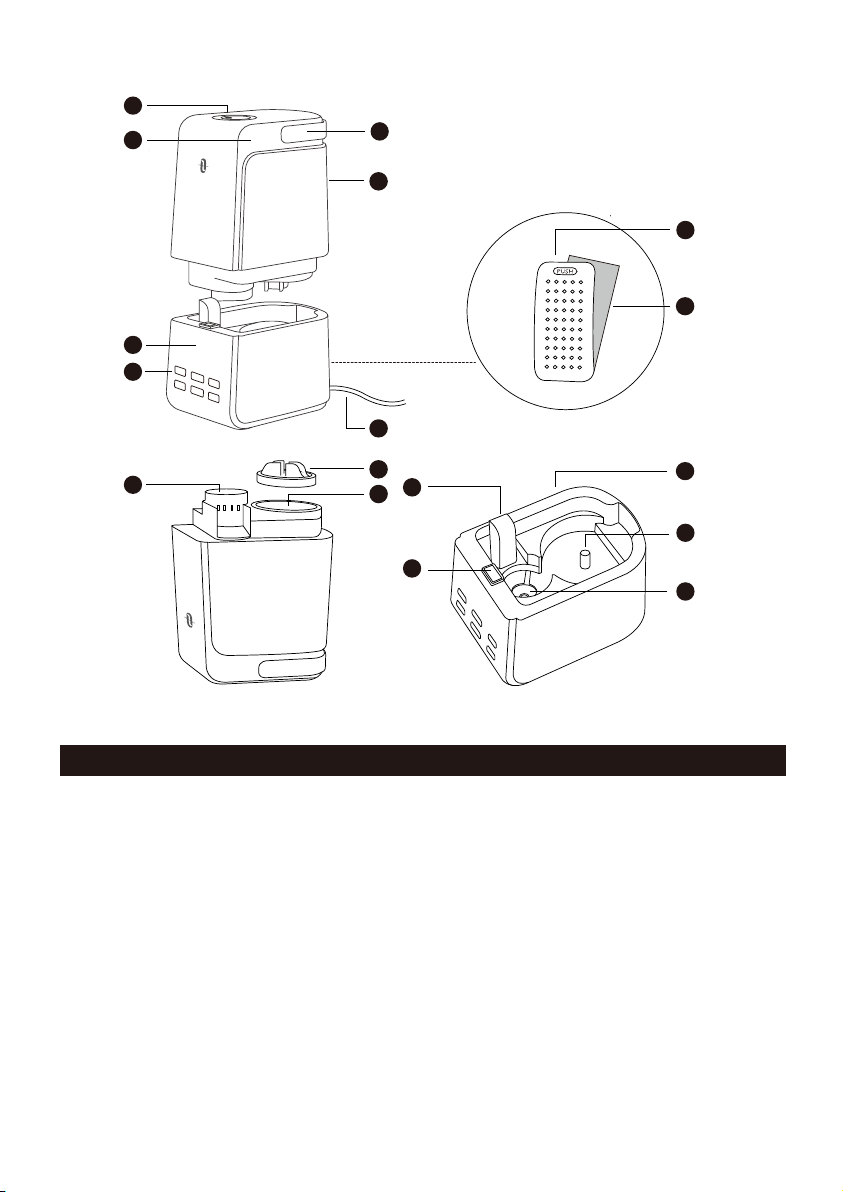
1. Nozzle
2. Handle
3. Water Level Window
4. Water Tank
5. LED Display
6. Control Buttons
7. Water Inlet
8. Tank Cap
9. Muffler
10. Water Reservoir
11. Atomizer
12. Air Outlet
13. Tank Light
14. Base
15. Dustproof Sponge
16. Air Inlet
17. Power Cord & Plug
OPERATIONS AND FUNCTIONS
1 2
3 4
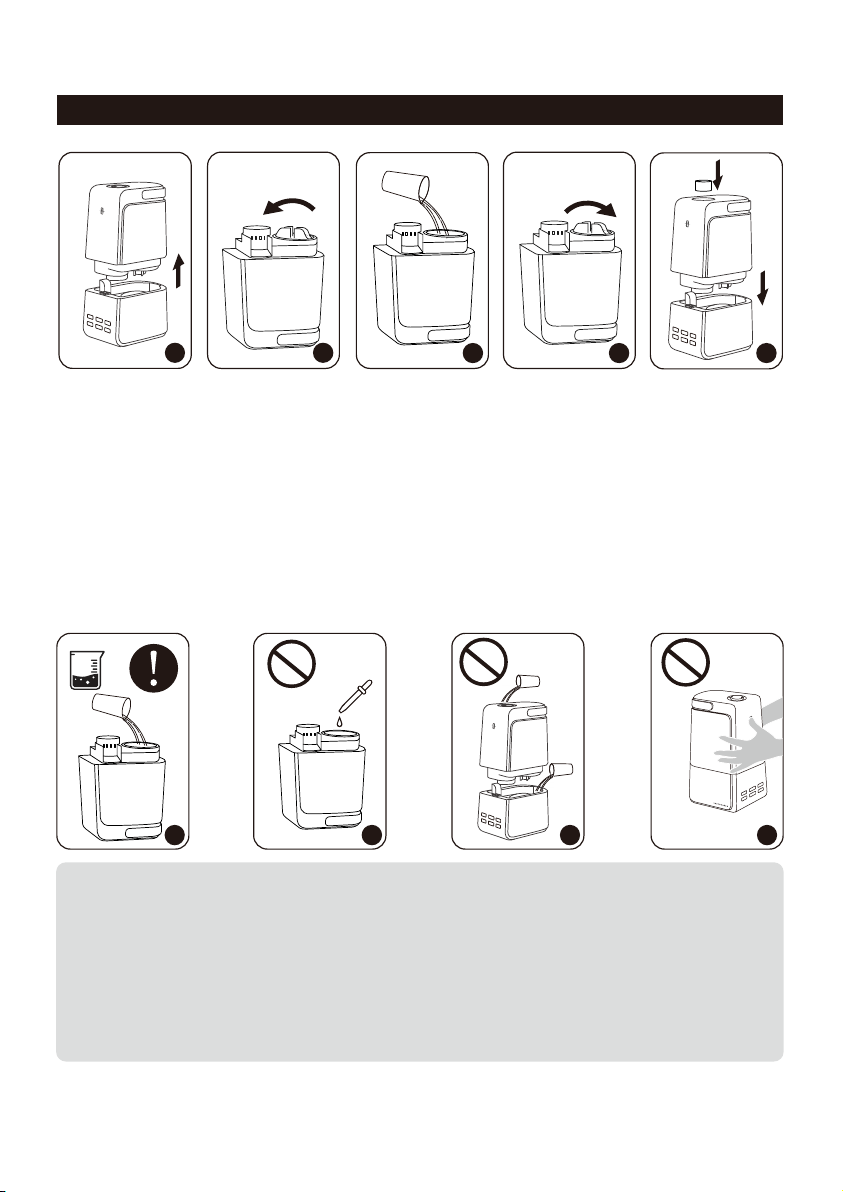
Add water
1. Lift the water tank and turn it upside down.
2. Remove the tank cap by unscrewing counterclockwise.
3. Fill the tank with filtered or purified cool water only.
4. Attach the tank cap back by screwing clockwise.
5. Place the water tank back onto the base. Make sure it fits together securely so that water can go
from the tank to the reservoir. Put the nozzle back on.
5
1 2 3
1. If tap water is too hard, it is recommended to use filtered or distilled water to avoid white
dust. DO NOT use hot water.
2. DO NOT add any essential oils or medicinal tablets into the water tank.
3. DO NOT add water into the base or through nozzle.
4. DO NOT move the humidifier while the water tank is full of water to avoid leakage or
base overfilling.
PRODUCT DIAGRAM
10
09
1
3
15
16
12
4
11
10
14
8
17
2
7
4
M
I
ST
+
/
—
H
U
M
I
D
I
STA
T
T
I
M
E
R
LI
G
H
T
O
N
/
OF
F
S
L
E
EP
M
I
S
T
+
/
—
H
U
M
I
DI
S
T
A
T
T
I
M
E
R
L
IG
H
T
O
N
/
O
F
F
S
LE
E
P
13
9
5
6
M
I
S
T
+/
—
H
UM
I
D
I
S
T
AT
T
I
M
E
R
L
I
GH
T
O
N/
O
F
F
S
L
E
E
P
M
I
S
T
+/
—
H
U
MI
D
I
S
T
A
T
T
I
M
E
R
L
I
GH
T
O
N/
O
F
F
S
L
E
E
P
M
I
S
T
+
/
—
H
U
M
I
D
I
S
T
A
T
T
I
M
E
R
L
I
G
H
T
O
N
/
O
F
F
S
L
E
E
P
1. Nozzle
2. Handle
3. Water Level Window
4. Water Tank
5. LED Display
6. Control Buttons
7. Water Inlet
8. Tank Cap
9. Muffler
10. Water Reservoir
11. Atomizer
12. Air Outlet
13. Tank Light
14. Base
15. Dustproof Sponge
16. Air Inlet
17. Power Cord & Plug
OPERATIONS AND FUNCTIONS
1 2
3 4
Add water
1. Lift the water tank and turn it upside down.
2. Remove the tank cap by unscrewing counterclockwise.
3. Fill the tank with filtered or purified cool water only.
4. Attach the tank cap back by screwing clockwise.
5. Place the water tank back onto the base. Make sure it fits together securely so that water can go
from the tank to the reservoir. Put the nozzle back on.
5
1 2 3
1. If tap water is too hard, it is recommended to use filtered or distilled water to avoid white
dust. DO NOT use hot water.
2. DO NOT add any essential oils or medicinal tablets into the water tank.
3. DO NOT add water into the base or through nozzle.
4. DO NOT move the humidifier while the water tank is full of water to avoid leakage or
base overfilling.
PRODUCT DIAGRAM
10
09
1
3
15
16
12
4
11
10
14
8
17
2
7
4
M
I
ST
+
/
—
H
U
M
I
D
I
STA
T
T
I
M
E
R
LI
G
H
T
O
N
/
OF
F
S
L
E
EP
M
I
S
T
+
/
—
H
U
M
I
DI
S
T
A
T
T
I
M
E
R
L
IG
H
T
O
N
/
O
F
F
S
LE
E
P
13
9
5
6
M
I
S
T
+/
—
H
UM
I
D
I
S
T
AT
T
I
M
E
R
L
I
GH
T
O
N/
O
F
F
S
L
E
E
P
M
I
S
T
+/
—
H
U
MI
D
I
S
T
A
T
T
I
M
E
R
L
I
GH
T
O
N/
O
F
F
S
L
E
E
P
M
I
S
T
+
/
—
H
U
M
I
D
I
S
T
A
T
T
I
M
E
R
L
I
G
H
T
O
N
/
O
F
F
S
L
E
E
P
12
11
CURRENT
DESIRED
MIS
T +/
—
H
UMID
IST
AT
TI
MER
LIGH
T
ON
/OF
F
S
LEEP
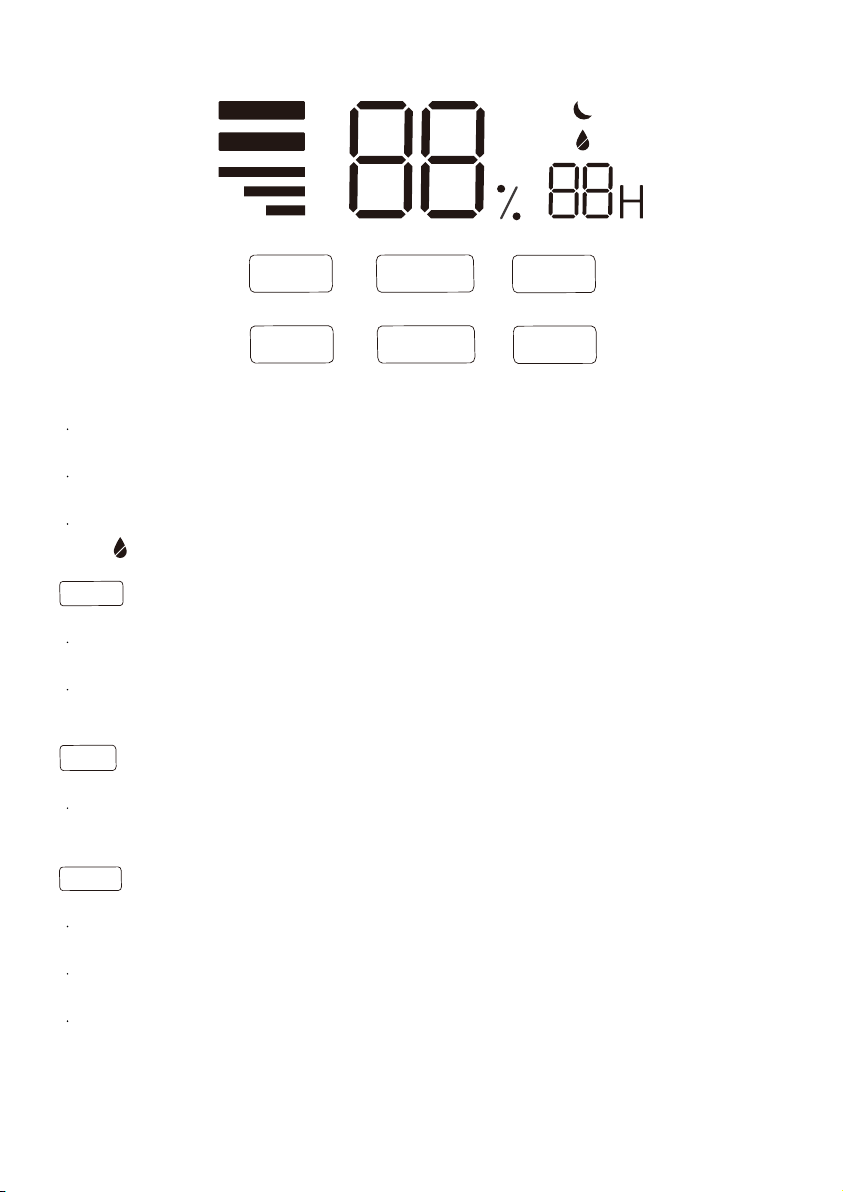
Standby Mode
Connect the humidifier to a power source, the unit is in Standby mode now: Current humidity &
CURRENT icon on LED display.
If no operation is done within 3 seconds under Standby mode, the LED display will turn off
automatically.
When there is not enough water inside the water reservoir, Low Water Protection will be activated
with on the display.
Power ON/OFF
Press the ON/OFF Button once to turn the humidifier ON with default settings: medium mist
(180ml/h, 2 lines) & tank light on.
Press it again to turn the humidifier OFF (mist off & tank light off). The fan will continue working for
3 minutes to dry the mist tube.
Mist Adjustment
When the unit is on, repeatedly press the Mist Button to cycle through Medium (2 lines) -> High (3
lines) -> Low (1 line) mist levels.
Humidity Setting
When the unit is on, repeatedly press the Humidistat Button to set the humidity level from 40% to
80% in 5% increments, the humidity level will flash three times to confirm your setting.
When the preset humidity level is reached, the unit will stop misting with the white DESIRED icon
turning green.
To cancel Humidity setting, press and hold the Humidistat Button for 1.5 seconds or set the
humidity level to 00.
The most comfortable environmental humidity is between 40%-60%. Please adjust the mist as needed.
Timer Setting
When the unit is on, repeatedly press the Timer Button to set the timer from 0 to 12 hours by 1 hour
increments, the timer will flash three times to confirm your setting.
Once set, the LED display will show the countdown timer and the current humidity level. When time
is up, the unit will automatically turn off.
To cancel Timer setting, press and hold the Timer Button for 1.5 seconds or set the timer to 0.
Sleep Mode
When the mist is on, press the Sleep Button once to turn on the Sleep mode. All the indicators on
the LED display will turn off except the Sleep indicator. If no operation is done within 3 seconds, the
sleep indicator will turn off automatically.
Press any button (except Light Button) to wake up Sleep Mode and LED display. If no operation is
done within 3 seconds, the sleep indicator will turn off automatically.
Press it again to exit Sleep mode. The sleep indicator will turn off and the LED display will remain
on.
When there is not enough water inside the water reservoir under Sleep Mode, the humidifier and
the LED display will turn off automatically.
When the Sleep mode is turned on under tank light on, all the indicators on the LED display and
the tank light will turn off except the Sleep indicator. You can press the Light Button again to turn
the light on.
Tank Light
When the mist is on, press the Light Button to turn off / on the tank light.
The tank light is separately controlled. You can turn on / off the light when the unit is connected to
power.
Low Water Protection
When there is not enough water inside the water reservoir, the humidifier will stop misting and Low
Water Protection will be activated with the icon lighting up on the display.
The humidifier cannot be started under low water status.
Memory Function
If power is not disconnected, the humidifier will always remember your last settings (mist level,
humidity & brightness) once you turn it on again.
ON
/
OFF
MI
ST
+/—
HU
MIDIS
TAT
TIM
E
R
SLE
EP
LIG
H
T

12
11
CURRENT
DESIRED
MIS
T +/
—
H
UMID
IST
AT
TI
MER
LIGH
T
ON
/OF
F
S
LEEP
Standby Mode
Connect the humidifier to a power source, the unit is in Standby mode now: Current humidity &
CURRENT icon on LED display.
If no operation is done within 3 seconds under Standby mode, the LED display will turn off
automatically.
When there is not enough water inside the water reservoir, Low Water Protection will be activated
with on the display.
Power ON/OFF
Press the ON/OFF Button once to turn the humidifier ON with default settings: medium mist
(180ml/h, 2 lines) & tank light on.
Press it again to turn the humidifier OFF (mist off & tank light off). The fan will continue working for
3 minutes to dry the mist tube.
Mist Adjustment
When the unit is on, repeatedly press the Mist Button to cycle through Medium (2 lines) -> High (3
lines) -> Low (1 line) mist levels.
Humidity Setting
When the unit is on, repeatedly press the Humidistat Button to set the humidity level from 40% to
80% in 5% increments, the humidity level will flash three times to confirm your setting.
When the preset humidity level is reached, the unit will stop misting with the white DESIRED icon
turning green.
To cancel Humidity setting, press and hold the Humidistat Button for 1.5 seconds or set the
humidity level to 00.
The most comfortable environmental humidity is between 40%-60%. Please adjust the mist as needed.
Timer Setting
When the unit is on, repeatedly press the Timer Button to set the timer from 0 to 12 hours by 1 hour
increments, the timer will flash three times to confirm your setting.
Once set, the LED display will show the countdown timer and the current humidity level. When time
is up, the unit will automatically turn off.
To cancel Timer setting, press and hold the Timer Button for 1.5 seconds or set the timer to 0.
Sleep Mode
When the mist is on, press the Sleep Button once to turn on the Sleep mode. All the indicators on
the LED display will turn off except the Sleep indicator. If no operation is done within 3 seconds, the
sleep indicator will turn off automatically.
Press any button (except Light Button) to wake up Sleep Mode and LED display. If no operation is
done within 3 seconds, the sleep indicator will turn off automatically.
Press it again to exit Sleep mode. The sleep indicator will turn off and the LED display will remain
on.
When there is not enough water inside the water reservoir under Sleep Mode, the humidifier and
the LED display will turn off automatically.
When the Sleep mode is turned on under tank light on, all the indicators on the LED display and
the tank light will turn off except the Sleep indicator. You can press the Light Button again to turn
the light on.
Tank Light
When the mist is on, press the Light Button to turn off / on the tank light.
The tank light is separately controlled. You can turn on / off the light when the unit is connected to
power.
Low Water Protection
When there is not enough water inside the water reservoir, the humidifier will stop misting and Low
Water Protection will be activated with the icon lighting up on the display.
The humidifier cannot be started under low water status.
Memory Function
If power is not disconnected, the humidifier will always remember your last settings (mist level,
humidity & brightness) once you turn it on again.
ON
/
OFF
MI
ST
+/—
HU
MIDIS
TAT
TIM
E
R
SLE
EP
LIG
H
T
3
15-20
minutes
4
5
6
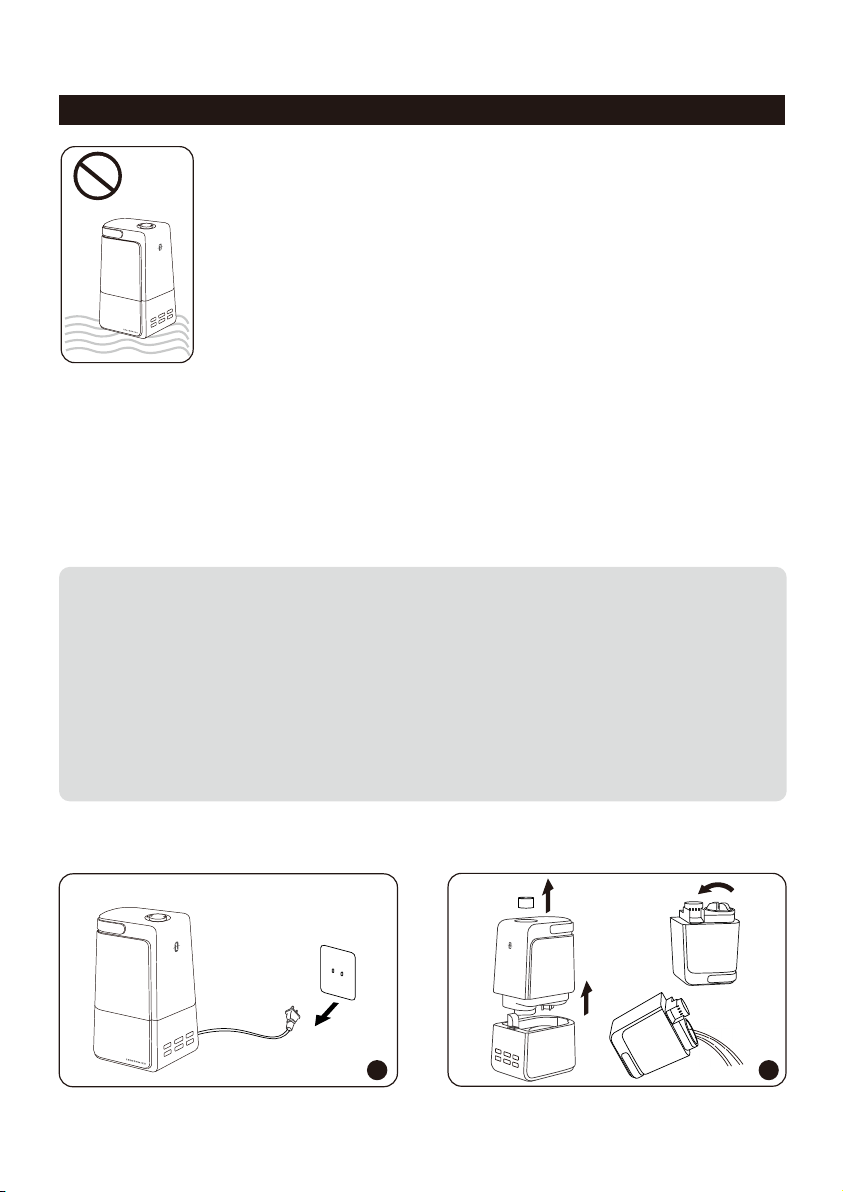
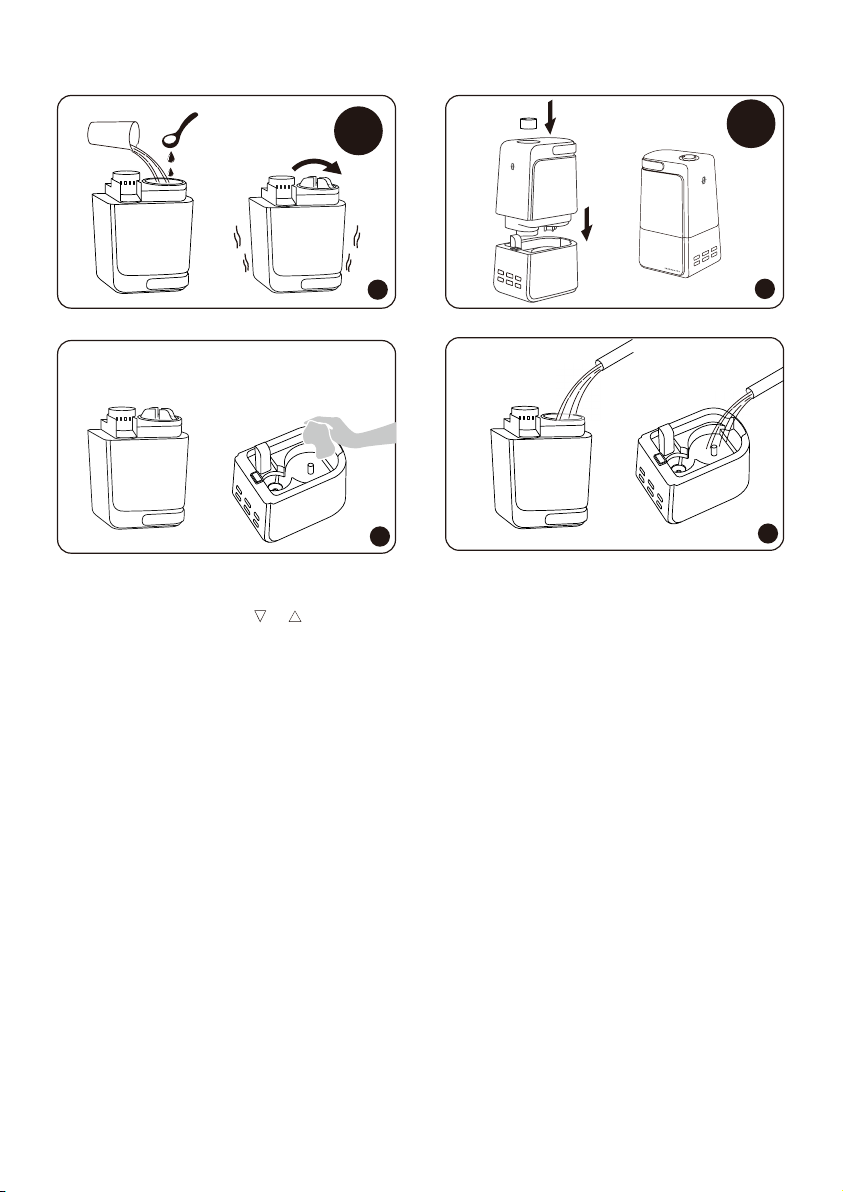
1. Turn off and unplug the humidifier.
2. Align the triangle marks ( & ) and remove the nozzle. Turn the water tank upside down.
Remove the tank cap. Make sure that the sealing ring does not come off. Drain water from the
water tank and base. Remove any accessories and set aside.
3. Fill the water tank half full. Add in 1 teaspoon of undiluted distilled white vinegar. Attach the tank
cap and shake for 15 seconds.
4. Place the tank onto the base. The vinegar solution will enter the water reservoir to loosen mineral
buildup (scale) on the atomizer, water floater and the bottom of the water tank. Set still for
15-20 minutes.
5. Uncap the tank cap and drain the solution. Wipe the atomizer and floater with a soft cloth to
remove loosened mineral deposits.
6. Rinse both the water reservoir and water tank until the smell of vinegar (for scale removal) or
bleach solution (for disinfecting, see below) is gone.
CLEANING AND MAINTENANCE
Caution
1. DO NOT submerge the base in water.
2. Make sure water does not enter the base through the air outlet, air inlet,
or the control buttons and LED display.
3. DO NOT wash any part of this humidifier in dish washer which will
damage the humidifier and void the warranty.
M
I
S
T
+
/
-
Daily Maintenance
Turn off the humidifier, unplug it from the power source. Drain water from the tank, reservoir
and base.
Weekly Maintenance
1. To properly clean your humidifier, we recommend you to remove scale and disinfect the
humidifier separately.
2. DO NOT mix vinegar and bleach solutions together. Do not use more than 1 tsp. of bleach per
gallon of water to avoid damaging your humidifier.
3. Please make sure the rubber ring & rubber cap & spring on the tank cap is installed properly
after cleaning to avoid water leakage. For more detailed information, please refer to the
Troubleshooting Guide.
1 2
Scale Removal Instructions
14
13
15S
M
I
ST
+
/
—
H
U
M
I
D
I
STA
T
TI
M
E
R
LI
G
H
T
O
N/
O
F
F
SL
EE
P
M
I
S
T
+/—
H
UM
ID
IS
T
A
T
T
I
M
E
R
LI
GH
T
O
N
/O
F
F
S
L
E
E
P
M
I
S
T
+
/
—
H
UM
I
D
I
S
T
A
T
T
I
M
E
R
L
I
GH
T
O
N
/
O
F
F
S
L
E
E
P
M
I
S
T
+
/
—
H
U
M
I
D
I
ST
A
T
T
I
M
E
R
L
I
GH
T
O
N/
O
F
F
S
L
E
E
P
M
I
ST
+
/
—
H
U
M
I
D
I
S
TA
T
T
I
M
E
R
LI
G
H
T
O
N
/O
F
F
S
LE
E
P
3
15-20
minutes
4
5
6
1. Turn off and unplug the humidifier.
2. Align the triangle marks ( & ) and remove the nozzle. Turn the water tank upside down.
Remove the tank cap. Make sure that the sealing ring does not come off. Drain water from the
water tank and base. Remove any accessories and set aside.
3. Fill the water tank half full. Add in 1 teaspoon of undiluted distilled white vinegar. Attach the tank
cap and shake for 15 seconds.
4. Place the tank onto the base. The vinegar solution will enter the water reservoir to loosen mineral
buildup (scale) on the atomizer, water floater and the bottom of the water tank. Set still for
15-20 minutes.
5. Uncap the tank cap and drain the solution. Wipe the atomizer and floater with a soft cloth to
remove loosened mineral deposits.
6. Rinse both the water reservoir and water tank until the smell of vinegar (for scale removal) or
bleach solution (for disinfecting, see below) is gone.
CLEANING AND MAINTENANCE
Caution
1. DO NOT submerge the base in water.
2. Make sure water does not enter the base through the air outlet, air inlet,
or the control buttons and LED display.
3. DO NOT wash any part of this humidifier in dish washer which will
damage the humidifier and void the warranty.
M
I
S
T
+
/
-
Daily Maintenance
Turn off the humidifier, unplug it from the power source. Drain water from the tank, reservoir
and base.
Weekly Maintenance
1. To properly clean your humidifier, we recommend you to remove scale and disinfect the
humidifier separately.
2. DO NOT mix vinegar and bleach solutions together. Do not use more than 1 tsp. of bleach per
gallon of water to avoid damaging your humidifier.
3. Please make sure the rubber ring & rubber cap & spring on the tank cap is installed properly
after cleaning to avoid water leakage. For more detailed information, please refer to the
Troubleshooting Guide.
1 2
Scale Removal Instructions
14
13
15S
M
I
ST
+
/
—
H
U
M
I
D
I
STA
T
TI
M
E
R
LI
G
H
T
O
N/
O
F
F
SL
EE
P
M
I
S
T
+/—
H
UM
ID
IS
T
A
T
T
I
M
E
R
LI
GH
T
O
N
/O
F
F
S
L
E
E
P
M
I
S
T
+
/
—
H
UM
I
D
I
S
T
A
T
T
I
M
E
R
L
I
GH
T
O
N
/
O
F
F
S
L
E
E
P
M
I
S
T
+
/
—
H
U
M
I
D
I
ST
A
T
T
I
M
E
R
L
I
GH
T
O
N/
O
F
F
S
L
E
E
P
M
I
ST
+
/
—
H
U
M
I
D
I
S
TA
T
T
I
M
E
R
LI
G
H
T
O
N
/O
F
F
S
LE
E
P
TROUBLESHOOTING GUIDE
1. If the information listed in the troubleshooting guide can’t solve your problem, please email
us for help.
2. Failure to keep this unit clean from mineral deposits may affect operation of this unit.
3. Customer failure to follow these instructions may void the warranty.
Problem Possible Cause Solution
Unit not plugged in
No power from power outlet
No water in the water
reservoir
Ensure unit is properly
plugged in
Try another power outlet
LED display won't light up
Ensure the spring is secured
properly to the tank allowing
water to pass through to
the base
Adjust the water floater to a
horizontal position and make
sure it can rise up with water
Water floater stuck
Waterless indicator is
constantly on
Disinfecting Instructions
1. Follow steps 1-2 of the previous section on scale removal.
2. Fill the water tank half full. Add in ½ tsp of bleach. Place the tank cap back on. Swish the
solution around in tank. Place the tank on the base. The bleach solution will enter and
disinfect the water reservoir as well as the other components. Set still for 15-20 minutes.
3. Follow steps 4-6 of the previous section on scale removal to complete disinfecting the
humidifier.
End-Of-Season Care and Storage
1. Follow the cleaning instructions when the humidifier will not be used for at least one week,
or at the end of the season. Remove any accessories used with the humidifier and allow the
humidifier and accessories to dry completely before storing.
2. DO NOT store with water inside the base, water reservoir, or tank.
3. Pack the unit safely and store in a cool, dry location.
Clean the Dustproof Sponge
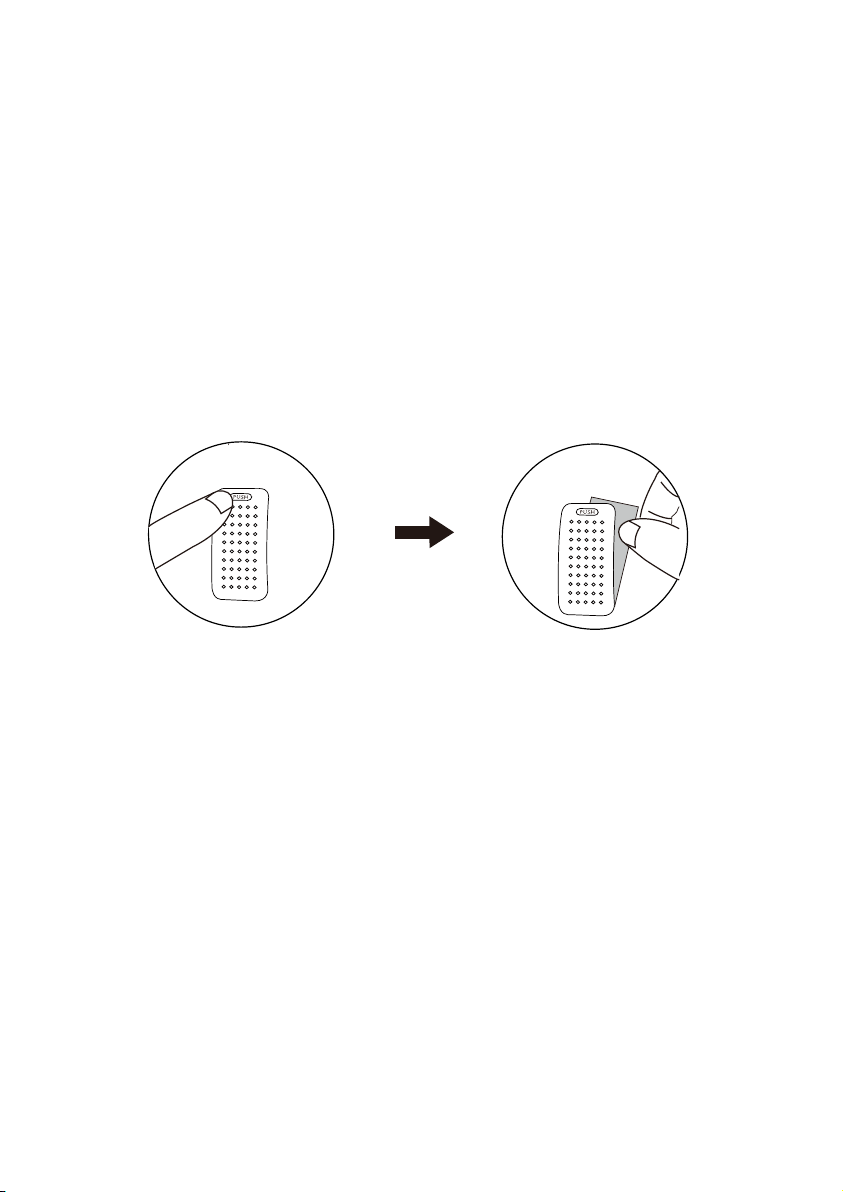
Clean the dustproof sponge (at the back of base) with water or detergent once a month. Put it back
in place after cleaning.
16
15

TROUBLESHOOTING GUIDE
1. If the information listed in the troubleshooting guide can’t solve your problem, please email
us for help.
2. Failure to keep this unit clean from mineral deposits may affect operation of this unit.
3. Customer failure to follow these instructions may void the warranty.
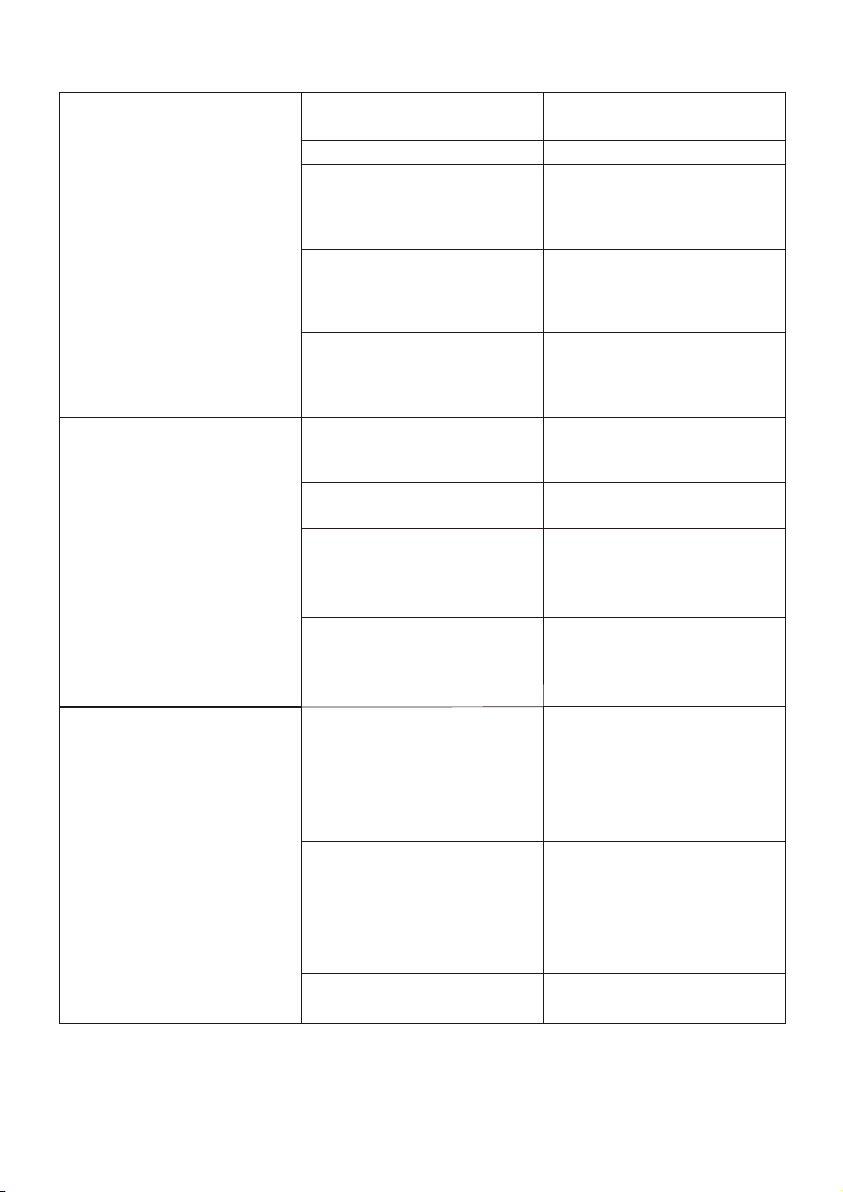
Problem Possible Cause Solution
Unit not plugged in
No power from power outlet
No water in the water
reservoir
Ensure unit is properly
plugged in
Try another power outlet
LED display won't light up
Ensure the spring is secured
properly to the tank allowing
water to pass through to
the base
Adjust the water floater to a
horizontal position and make
sure it can rise up with water
Water floater stuck
Waterless indicator is
constantly on
Disinfecting Instructions
1. Follow steps 1-2 of the previous section on scale removal.
2. Fill the water tank half full. Add in ½ tsp of bleach. Place the tank cap back on. Swish the
solution around in tank. Place the tank on the base. The bleach solution will enter and
disinfect the water reservoir as well as the other components. Set still for 15-20 minutes.
3. Follow steps 4-6 of the previous section on scale removal to complete disinfecting the
humidifier.
End-Of-Season Care and Storage
1. Follow the cleaning instructions when the humidifier will not be used for at least one week,
or at the end of the season. Remove any accessories used with the humidifier and allow the
humidifier and accessories to dry completely before storing.
2. DO NOT store with water inside the base, water reservoir, or tank.
3. Pack the unit safely and store in a cool, dry location.
Clean the Dustproof Sponge
Clean the dustproof sponge (at the back of base) with water or detergent once a month. Put it back
in place after cleaning.
16
15
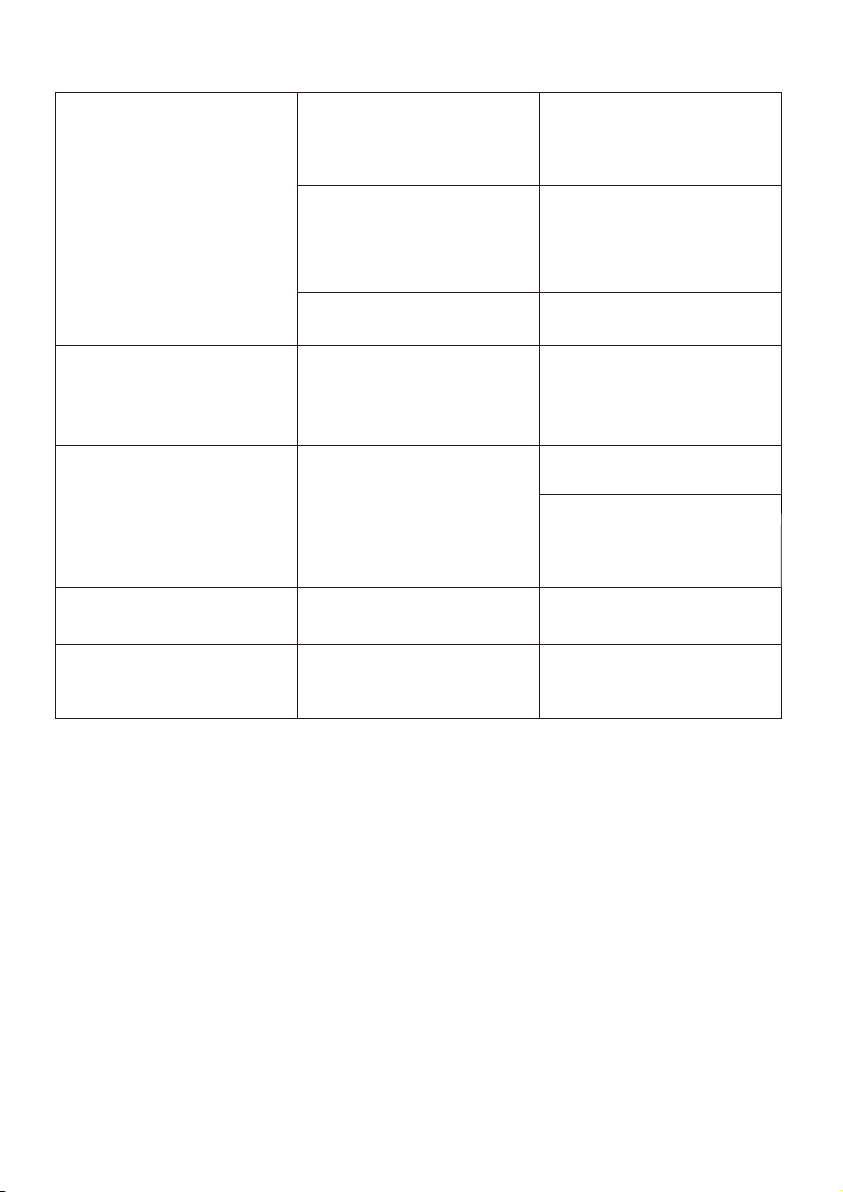
Ensure the spring is
secured properly to the
tank allowing water to pass
through to the base
Spring stuck
Rubber ring was not
installed on tank cap
18
17
LED display is on, no mist or
little mist is produced
Tank leakage
Mist height is low, damping
surrounding desk or floor.
Condensation forms around
humidifier or on windows
and walls
Poor humidification
Tap water may contain too
much minerals
Replace with filtered or
distilled water or use with a
TaoTronics Demineralization
Cartridge
White Dust Appears / Black
coating in the base flakes off
Unit needs to be cleanedStrange Odor
Water is going down to the
water reservoir
This is normal while it is
working
Strange water noise
Unit works for too long
Power off and place in a
well-ventilated place for 10
minutes
Humidifier is getting too hot
Not enough water inside the
tank
Refill and reinstall the water
tank
Adjust to maximum mist
Check if current humidity is
higher than preset humidity,
reset humidity to a higher
level
Remove the tank, empty
the base & replace the
filled tank on the empty
base
Feel if air comes out from
the the nozzle, if yes, then
clean water scale on the
atomizer as instructed
Mist level is set too low
Preset humidity is set too low
The base might be overfilled
Mineral buildup on atomizer
Check for possible cracks in
the tank, replace if
necessary
Tighten the tank cap
Check the tank cap for
rubber ring, rubber cap
and spring, contact us if
any is missing
Tank may be damaged
Tank cap is not tightened
securely
1. Check if the room is too
humid, adjust to lower
mist, 40%-60% works best
2. Open door and windows,
or change to a larger
room
Humidifier should be
placed on a hard flat
surface, 2 feet above the
floor, 12 inches away from
the wall. Point Mist Outlet
away from wall or window
Raise the room temperature
to 25°C/77°F
Mist level is set too high for
the room size
Air inlet is blocked
Low indoor temperature
leads to liquefaction
1-1. Adjust to maximum mist
1-2. Close door or windows to
reduce air ventilation, or
change to a smaller room
Humidifier should be
placed on a hard flat
surface, 2 feet above the
floor, 12 inches away from
the wall
Raise the room temperature
to 25°C/77°F
Mist level is set too low for the
room size
Air inlet is blocked
Low indoor temperature
leads to liquefaction
Clean the humidifier as
instructed
Leave the empty water tank
open in a cool place for 12
hours without the water
tank cap attached
Ensure the spring is
secured properly to the
tank allowing water to pass
through to the base
Spring stuck
Rubber ring was not
installed on tank cap
18
17
LED display is on, no mist or
little mist is produced
Tank leakage
Mist height is low, damping
surrounding desk or floor.
Condensation forms around
humidifier or on windows
and walls
Poor humidification
Tap water may contain too
much minerals
Replace with filtered or
distilled water or use with a
TaoTronics Demineralization
Cartridge
White Dust Appears / Black
coating in the base flakes off
Unit needs to be cleanedStrange Odor
Water is going down to the
water reservoir
This is normal while it is
working
Strange water noise
Unit works for too long
Power off and place in a
well-ventilated place for 10
minutes
Humidifier is getting too hot
Not enough water inside the
tank
Refill and reinstall the water
tank
Adjust to maximum mist
Check if current humidity is
higher than preset humidity,
reset humidity to a higher
level
Remove the tank, empty
the base & replace the
filled tank on the empty
base
Feel if air comes out from
the the nozzle, if yes, then
clean water scale on the
atomizer as instructed
Mist level is set too low
Preset humidity is set too low
The base might be overfilled
Mineral buildup on atomizer
Check for possible cracks in
the tank, replace if
necessary
Tighten the tank cap
Check the tank cap for
rubber ring, rubber cap
and spring, contact us if
any is missing
Tank may be damaged
Tank cap is not tightened
securely
1. Check if the room is too
humid, adjust to lower
mist, 40%-60% works best
2. Open door and windows,
or change to a larger
room
Humidifier should be
placed on a hard flat
surface, 2 feet above the
floor, 12 inches away from
the wall. Point Mist Outlet
away from wall or window
Raise the room temperature
to 25°C/77°F
Mist level is set too high for
the room size
Air inlet is blocked
Low indoor temperature
leads to liquefaction
1-1. Adjust to maximum mist
1-2. Close door or windows to
reduce air ventilation, or
change to a smaller room
Humidifier should be
placed on a hard flat
surface, 2 feet above the
floor, 12 inches away from
the wall
Raise the room temperature
to 25°C/77°F
Mist level is set too low for the
room size
Air inlet is blocked
Low indoor temperature
leads to liquefaction
Clean the humidifier as
instructed
Leave the empty water tank
open in a cool place for 12
hours without the water
tank cap attached

This product is covered with TaoTronics product and labor warranty for 12 months from the date of
its original purchase. You will be given a warranty extension of 18 months if the product is registered
on our website (www.taotronics.com).
Any defective part will be, at the discretion of SUNVALLEYTEK INTERNATIONAL INC. , repaired or
replaced at no charge if the appliance has not been tampered with and has been used according to
these printed directions.
If any problems occur, please contact TaoTronics support ([email protected]) immediately to
launch a warranty claim. Specify model number and your Amazon order number. Our Consumer
Service Representative will respond within 1 business day, advise you how to correct the problem
yourself, or instruct you on how to return the defective unit back to us for repair or replacement.
We can only provide after sales service for products that are sold by TaoTronics or TaoTronics
authorized retailers and distributors. If you have purchased your unit from a different place, please
contact your seller for return and warranty issues.
PLEASE CONTACT US BEFORE RETURNING THIS PRODUCT TO THE STORE. EMAIL TAOTRONICS
CUSTOMER CARE FOR PROBLEMS AND QUESTIONS. WE WILL RESPOND WITHIN 1 BUSINESS DAY.
WARRANTY
CONTACT / TAOTRONICS CUSTOMER CARE
E-mail: [email protected]
Website: www.taotronics.com
FCC Compliance
This device complies with Part 18 of the FCC Rules.
This equipment has been tested and found to comply with the limits for a Consumer ISM equipment,
pursuant to part 18 of the FCC Rules. These limits are designed to provide reasonable protection
against harmful interference in a residential installation. This equipment generates uses and can radiate
radio frequency energy and, if not installed and used in accordance with the instructions, may cause
harmful interference to radio communications. However, there is no guarantee that interference will not
occur in a particular installation.
If this equipment does cause harmful interference to radio or television reception, which can be
determined by turning the equipment off and on, the user is encouraged to try to correct the interfer-
ence by one or more of the following measures:
- Reorient or relocate the receiving antenna.
- Increase the separation between the equipment and receiver.
- Connect the equipment into an outlet on a circuit different from that to which the receiver is connected.
- Consult the dealer or an experienced radio/TV technician for help
Changes or modifications not expressly approved by the party responsible for compliance could void
the user's authority to operate the equipment.
19

This product is covered with TaoTronics product and labor warranty for 12 months from the date of
its original purchase. You will be given a warranty extension of 18 months if the product is registered
on our website (www.taotronics.com).
Any defective part will be, at the discretion of SUNVALLEYTEK INTERNATIONAL INC. , repaired or
replaced at no charge if the appliance has not been tampered with and has been used according to
these printed directions.
If any problems occur, please contact TaoTronics support (support@taotronics.com) immediately to
launch a warranty claim. Specify model number and your Amazon order number. Our Consumer
Service Representative will respond within 1 business day, advise you how to correct the problem
yourself, or instruct you on how to return the defective unit back to us for repair or replacement.
We can only provide after sales service for products that are sold by TaoTronics or TaoTronics
authorized retailers and distributors. If you have purchased your unit from a different place, please
contact your seller for return and warranty issues.
PLEASE CONTACT US BEFORE RETURNING THIS PRODUCT TO THE STORE. EMAIL TAOTRONICS
CUSTOMER CARE FOR PROBLEMS AND QUESTIONS. WE WILL RESPOND WITHIN 1 BUSINESS DAY.
WARRANTY
CONTACT / TAOTRONICS CUSTOMER CARE
E-mail: support@taotronics.com
Website: www.taotronics.com
FCC Compliance
This device complies with Part 18 of the FCC Rules.
This equipment has been tested and found to comply with the limits for a Consumer ISM equipment,
pursuant to part 18 of the FCC Rules. These limits are designed to provide reasonable protection
against harmful interference in a residential installation. This equipment generates uses and can radiate
radio frequency energy and, if not installed and used in accordance with the instructions, may cause
harmful interference to radio communications. However, there is no guarantee that interference will not
occur in a particular installation.
If this equipment does cause harmful interference to radio or television reception, which can be
determined by turning the equipment off and on, the user is encouraged to try to correct the interfer-
ence by one or more of the following measures:
- Reorient or relocate the receiving antenna.
- Increase the separation between the equipment and receiver.
- Connect the equipment into an outlet on a circuit different from that to which the receiver is connected.
- Consult the dealer or an experienced radio/TV technician for help
Changes or modifications not expressly approved by the party responsible for compliance could void
the user's authority to operate the equipment.
19

www.taotronics.com

www.taotronics.com