LOW BATTERY INDICATION
Low baery indicaon will appear on LCD screen when baery power is LOWER than 2.75V.
Please install the new baery as soon as possible.
MOUNTING METHODS
The clock Timer can be posioned in 3 ways (PREFERRED Mounng Methods - STAND and HOLE
A. STAND , Table or shelf - pull out the table stand bracket from the boom rear of the clock.
place on bench , table or desk as desired .
B. HOLE for wall Mounng
C. SUCTION CUP - STRONG DUAL LAYER SUCTION for USE ONLY On Glass, window, Mirror, Granite ,
stainless steel (and any NON-POROUS surface with glossy finish) .
Please be aware that there are certain TILES that are NOT EFFECTIVE With SUCTION CUP method.
This is due to the COMPOSITION Of the TILES. Only some ceramic Tiles are suitable.
Please try to AVOID Using SUCTION Cup method on TILES!
lf using TILES, you must TEST sucon by placing slightly above a vanity bench to see if the es are
appropriate for the sucon cup to hold. It is a
good idea to test sucon for up to 1week.
Therefore , if the les are not appropriate for the sucon cup method , then the clock Timer will
only fall slightly onto the vanity bench.
The sucon cup is very effecve but can be temperamental if not applied properly. The sucon
power relies on draining air out of the cup , So the surface MUST NOT be concave-convex OR
have any holes , liquid or anything else!
PROTECTIVE FILM COVER
Removed simply peel the protecve Film cover away from the from the edges of the clock face to
reveal a CRYSTAL CLEAR SPARKLY POLSHED Screen look.
TECHNICAL SUPPORT
Geevon provides 1-year limited warranty on this product against manufacturing
defects in materials and workmanship. If you have any queson, please kindly
contact us from your buying channel.
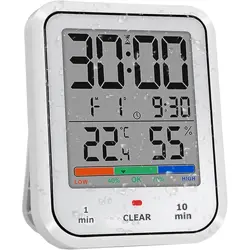
GEEVON SHOWER CLOCK WITH LED INDICATOR
USER MANUAL
MODEL:T230755
FEATURES:
• Indoor humidity comfort indicator
• Temperature detecon range: - 10~+50 °C (14~122 °F)
• Humidity detecon range: 20%~95%
• Countdown mode, maximum me 99 minutes with LED light
• Power supply:
Baery: 1.5V AAA baery*2
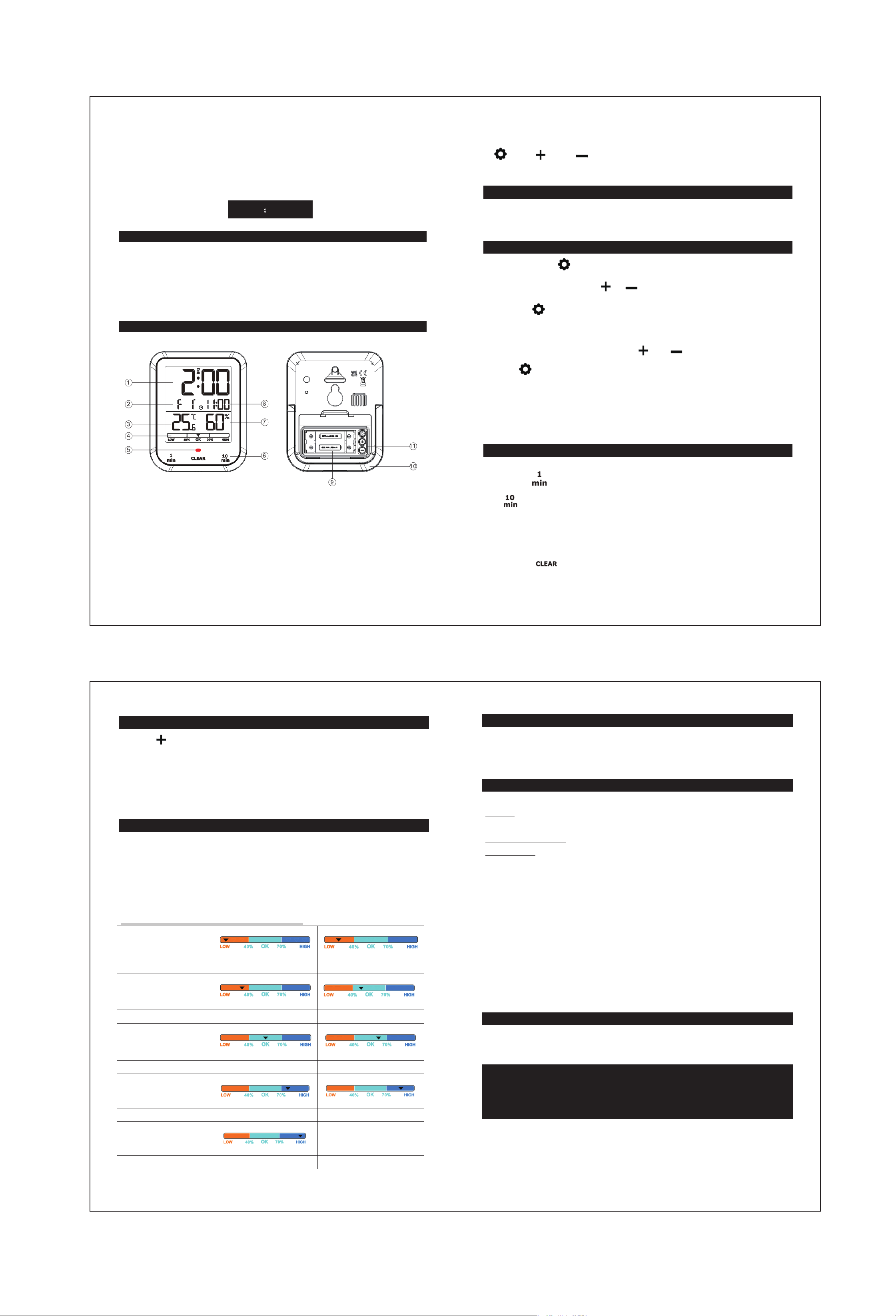
LCD SCREEN DISPLAY:
1.
Time
2. Date
3. Temperature
4. Indoor humidity comfort indicator
5. LED alert light
6. 1/10 min countdown touch key
7. Humidity
8. Time
9. Baery compartment cover
10. Bracket
11. SET, up and down Key
:SET :UP :DOWN
INITIAL OPERATION
• Open Producon baery compartment cover
• Insert 2 x AAA baeries observing polarity【 “+” and “ –“ marks】
TIME SETTING
• Press and hold the“ ”key for more than 2 seconds to enter the me seng mode. The
seng item will flash. Press the“ ”or “ ” key to select the value of the seng item
• Press the “ ” buon to confirm the item has been set and go to the next one, the sequence
of seng items is as follows:
Year → month → day → hour → minute
• When adjusng the value, press and hold the “ ” or “ ” buon to adjust quickly.
• Press“ ” buon to confirm the last item to end the se
ng procedures, then it will return to
the normal mode.
F.Y.I.:
• If there is no valid operaon within 15 seconds, it will automacally return to normal me mode
from the set mode.
COUNTDOWN SETTING
• Countdown can be set from 1 to 99 minutes
• Press the “ ” key to step for 1 minute, and press and hold for connuous increase; Press the
“ ” key to step for 10 minutes, and press and hold for connuous increase
• Aer the countdown is set for 3 seconds, it will start automacally, and the buzzer BI will sound
once when starng
• Aer the countdown me is set, the me display will turn to the following
• Timer alarm me 1 minute
• Press the “ ” key to cle
ar
TEMPERATURE SETTING
• Press buon in the baery compartment to switch the temperature unit from C to F.
• Temperature detecon range: - 10~+50 °C (14~122 °F).
• When the temperature is LOWER than - 10 °Cor 14 °F, it will display LL.L.
• When the temperature is HIGHER than 50 °C or 122 °F, it will display HH . H.
• For the inializaon process - Indoor Temperature will display accurately within 3-8 minutes
automacally aer setup.
HUMIDITY SETTING
• Hygrometer measures in RH Relave Humidity.
• Hygrometer Humidity range 20% to 95%
• when the humidity is lower than 20% , it will display LL.
• when the humidity is higher than 95% , it will display HH.
• For the inializaon process - Indoor Humidity will display accurately within 3 - 8 minutes
automacally aer setup.
Instrucons for indoor humidity comfort indicators
Indoor Comfort:
Humidity range: 1%~19% 20%-29%
Indoor Comfort:
Humidity range: 30%~39% 40%~49%
Indoor Comfort:
Humidity range: 50%~59% 60%~70%
Indoor Comfort:
Humidity range: 71%~79% 80%~89%
Indoor Comfort:
Humidity range: >90%
FJ755 User Manuals
front size:290x210mm
back size:290x210mm
