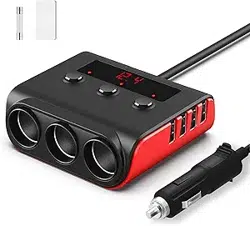
Model: C59 | Input: 12V/24V DC | Total Power: 180W (Max 192W)
Important Safety Notice: Read all instructions before use. This device is designed for use in 12V or 24V DC automotive electrical systems only. Do not use with household AC power.
Overview
The SONRU 7-in-1 Cigarette Lighter Splitter is a multi-port power adapter for vehicles. It expands a single vehicle cigarette lighter socket into three 12V/24V sockets and four USB charging ports, allowing simultaneous power and charging for multiple devices.

Package Contents
- 1x Cigarette Lighter Splitter (with integrated 3.7ft/1.13m cable)
- 2x Spare 15A Fuses
- 1x Velcro Strip (for cable management)
- 1x User Manual (this document)
Features & Specifications
Physical Ports & Controls
- Input: Standard male cigarette lighter plug (12V/24V DC).
- Output Sockets (x3): Standard female cigarette lighter sockets. Each is controlled by an independent on/off switch.
- USB Charging Ports (x4):
- USB-A1: 5V/2.4A (12W Standard charging)
- USB-A2: QC3.0 18W Fast Charging (when used alone). Shares a chip with USB-C2.
- USB-C1: PD up to 36W (Max 45W at 20V) Fast Charging.
- USB-C2: PD up to 36W Fast Charging. Shares a chip with USB-A2.
- Independent Switches (x3): One for each cigarette lighter socket. Toggle to control power to devices plugged into those sockets individually.
- LED Voltage Display: Digital screen that shows the vehicle's real-time operating voltage.
Technical Specifications
| Specification | Detail |
|---|---|
| Max Total Output Power | 180W (Peak 192W) |
| Input Voltage | 12V / 24V DC |
| Input Current | Up to 8A |
| Fuse Rating | 15A (Replaceable, includes spares) |
| Cable Length | 3.7 Feet (1.13 meters) |
| Construction | Aluminum Alloy + ABS Fireproof Material |
| Certifications | UL, CE, FCC, RoHS |
Power Sharing Notes
- USB-A2 and USB-C2 share a charging chip. If both are used simultaneously, the total shared output is 5V/3A (15W). For full fast charging capability, use only one of these two ports at a time.
- The power for a single cigarette lighter socket should not exceed 120W.
- The total combined load of all ports and sockets must not exceed 180W (192W max peak).
Use Guide
Installation
- Ensure your vehicle is turned off or in accessory mode.
- Insert the splitter's cigarette lighter plug firmly into your vehicle's 12V/24V power outlet (cigarette lighter socket).
- The LED voltage display will illuminate, showing your vehicle's current voltage (e.g., 12.6V, 24.2V).
- Use the provided Velcro strip to secure excess cable and manage wires neatly.
Using the Cigarette Lighter Sockets
- Plug your 12V/24V device (e.g., tire inflator, car vacuum, fridge) into one of the three female sockets.
- Press the corresponding independent switch next to the socket to turn the power on. The device will receive power.
- To turn the device off, press the switch again. This eliminates the need to unplug the device.
- Repeat for other sockets as needed. Each socket can be controlled independently.
Note: Always check the power requirements of your device. Do not plug a device that draws more than 120W into a single socket.
Using the USB Charging Ports
- Connect your USB device (phone, tablet, camera) to the appropriate port using a compatible cable.
- The built-in smart chip will automatically identify the device and deliver the optimal charging current.
- For the fastest charging:
- Use the USB-C1 port with a USB-C to USB-C cable for compatible laptops, tablets, or phones.
- Use the USB-A2 port alone for QC3.0 compatible devices.
- Use the USB-C2 port alone for PD compatible devices.
Understanding the LED Voltage Display
- The display shows the live voltage of your vehicle's electrical system.
- Normal Operation: A steady reading (e.g., ~12.5V when engine off, ~14.4V when engine running for a 12V system).
- Low Voltage Warning: If the voltage drops below 12V (for 12V systems), the display will flash. This indicates a potentially weak battery. Consider starting the engine to charge the battery.

Safety & Maintenance
Built-in Protections
The device includes multiple safety features:
- Overcurrent/Overload Protection: Automatically cuts power if the draw exceeds safe limits.
- Overvoltage/Short Circuit Protection: Protects both the adapter and your connected devices.
- Overheating Protection: Reduces output or shuts down if internal temperature is too high.
- Replaceable Fuse: A 15A fuse protects the main circuit. Two spare fuses are included.
Replacing the Fuse
- Unplug the splitter from the vehicle's power outlet.
- Locate the fuse compartment on the main body of the splitter.
- Open the compartment and remove the old fuse.
- Insert a new 15A fuse (included). Ensure it is seated properly.
- Close the compartment and re-test the device.
General Warnings
- Do not use with household AC power outlets (110V/220V). For automotive DC use only.
- Do not expose to water or excessive moisture.
- Do not cover the device during operation to allow for proper heat dissipation.
- Periodically check the plug, cable, and housing for damage. Do not use if damaged.
- Ensure the total power consumption of all connected devices does not exceed 180W.

Compatibility
Compatible Vehicles
All standard 12V or 24V DC vehicles with a cigarette lighter/power outlet, including:
- Cars, SUVs, Trucks
- Vans, MPVs, RVs
- Off-road Vehicles
Compatible Devices (Examples)
- Via Cigarette Lighter Sockets: Car refrigerators, tire inflators, air compressors, vacuum cleaners, portable fans, GPS units, dash cams, FM transmitters.
- Via USB Ports:
- Phones: iPhone, Samsung Galaxy, Google Pixel, Huawei, Xiaomi, LG, Sony, and most Android phones.
- Tablets & Laptops: iPad, MacBook, Windows laptops with USB-C charging.
- Other: Nintendo Switch, Kindle, Bluetooth headphones, action cameras, power banks.

Troubleshooting
| Problem | Possible Cause & Solution |
|---|---|
| No power to any port (LED display off). | Vehicle outlet may be dead. Try another outlet. Ensure the plug is fully inserted. Check and replace the main fuse if blown. |
| Specific cigarette lighter socket has no power. | Ensure the corresponding independent switch is turned ON. |
| USB device is charging slowly. | Ensure you are using a fast-charge compatible port and cable. Remember USB-A2 and USB-C2 share power if used together. |
| LED voltage display is flashing. | Vehicle battery voltage is low (below 12V for a 12V system). Start the engine to charge the battery. |
| Device powers off unexpectedly. | Total power draw may have exceeded 180W, triggering overload protection. Unplug some devices. The device may have overheated. Allow it to cool. |
| Fuse blows repeatedly. | The connected load is too high. Reduce the number or power rating of connected devices. Do not use a fuse with a higher amperage rating. |