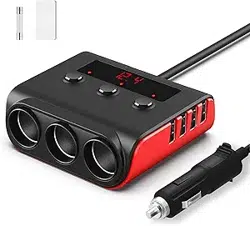
Model: C28
1. Overview

The LIHAN 7-in-1 Cigarette Lighter Splitter is a power adapter designed to expand your vehicle's single 12V/24V cigarette lighter socket into multiple power outlets. It provides three additional socket outlets and four USB charging ports for simultaneous power delivery to multiple devices.
Key capabilities include:
- Expanding one vehicle socket to three 12V/24V socket outlets
- Providing four USB charging ports with fast-charging technology
- Monitoring vehicle battery voltage via LED display
- Individual control of each power outlet
- Extended 3.3-foot power cord for flexible placement
2. Package Contents
- Cigarette Lighter Splitter × 1
- Adhesive Tape (Velcro strip) × 1
- Spare Fuses × 2
- User Manual × 1
3. Product Features
3.1 Physical Layout and Components

The main unit contains the following elements:
- Three 12V/24V Socket Outlets: Standard cigarette lighter-style sockets for powering various automotive accessories.
- Four USB Ports:
- 1 × USB-C port with PD30W fast charging
- 1 × USB-A port with QC3.0 fast charging
- 2 × Standard USB-A charging ports
- LED Voltage Display: Digital screen showing real-time vehicle battery voltage.
- Individual Power Switches: One switch for each of the three socket outlets.
- Master Power Switch: Located on the side of the unit to control all power simultaneously.
- 3.3-Foot Extension Cord: Flexible cable connecting the unit to your vehicle's cigarette lighter socket.
3.2 Technical Specifications
| Specification | Details |
|---|---|
| Input Voltage | 12V/24V DC (Vehicle Standard) |
| Total Output Power | 127W Maximum |
| Socket Outlet Power | 80W Total (Three sockets combined) |
| USB-C Port | PD30W Fast Charging |
| QC3.0 Port | Quick Charge 3.0 Compatible |
| Cable Length | 3.3 Feet (Approximately 1 meter) |
| Product Dimensions | 7.1 × 3.42 × 1.37 inches |
| Item Weight | 8.4 ounces |
3.3 Safety Features
- Smart chip protection circuits
- Built-in safe fuses
- Protection against overcurrent, overvoltage, overheating, overloading, over-charging, and short-circuiting
- Individual and master power switches for controlled operation
4. Installation and Use Guide
4.1 Initial Setup
- Ensure your vehicle is turned off or in accessory mode during installation.
- Insert the unit's plug firmly into your vehicle's cigarette lighter socket.
- The LED voltage display will illuminate, showing your vehicle's current battery voltage.
- Use the included adhesive tape (Velcro strip) to secure the unit in your desired location if needed.
4.2 Using the Socket Outlets

- Plug your device into one of the three socket outlets.
- Press the corresponding individual power switch to turn that specific outlet ON.
- The switch will illuminate when the outlet is active.
- To conserve power when not in use, turn off individual outlets using their switches.
Compatible devices include: Air purifiers, dash cams, tire inflators, car vacuums, portable refrigerators, humidifiers, air pumps, GPS units, and satellite navigation devices.
4.3 Using the USB Charging Ports
- Connect your USB device to the appropriate port:
- For fastest charging of compatible devices, use the USB-C PD30W port or USB-A QC3.0 port
- For standard charging, use either of the two regular USB-A ports
- USB ports are always active when the unit is plugged in and receiving power from the vehicle.
- The smart IC chip will automatically detect your device and deliver optimal charging current.
4.4 Understanding the Voltage Display
The LED display shows your vehicle's battery voltage in real-time:
- For 12V vehicles: Normal range is 11.5V to 14.9V
- For 24V vehicles: Normal range is 23.1V to 27.3V
Warning indications:
- If voltage drops below 11.5V (12V system) or 23.1V (24V system), your battery may be undercharged.
- If voltage rises above 14.9V (12V system) or 27.3V (24V system), your charging system may be overcharging.
- Consult your vehicle manual or a professional if readings are consistently outside normal ranges.
4.5 Power Management
- Individual Control: Each socket outlet has its own ON/OFF switch for independent operation.
- Master Control: The side-mounted master switch turns all power (sockets and USB ports) ON or OFF simultaneously.
- Use the master switch when parking overnight or leaving the vehicle unused for extended periods to prevent battery drain.
4.6 Cable Management
The 3.3-foot extension cord allows placement flexibility:
- Route the cord to provide power to backseat passengers
- Position the unit for easy access to all switches and ports
- Secure loose cables to prevent interference with vehicle controls
5. Safety Instructions
- This product is designed for use in 12V or 24V DC automotive electrical systems only.
- Do not exceed the total maximum output of 127W across all ports simultaneously.
- The three socket outlets have a combined maximum output of 80W.
- Do not use with devices that exceed the power rating of individual outlets.
- Regularly check the voltage display to monitor your vehicle's electrical system health.
- If the unit becomes hot to the touch, disconnect it immediately and allow to cool.
- Keep the unit away from water and excessive moisture.
- Do not attempt to disassemble or modify the unit.
- Use only the included spare fuses for replacement if needed.
- When not in use for extended periods, disconnect the unit from your vehicle's socket.
6. Troubleshooting
| Issue | Possible Cause | Solution |
|---|---|---|
| No power to any ports | Vehicle socket not providing power Blown fuse in vehicle Master switch turned OFF |
Check vehicle ignition is in accessory mode Check vehicle fuse box Ensure master switch is ON |
| Specific socket not working | Individual switch turned OFF Device power requirement too high Faulty device |
Check individual switch is ON Try a different device Test device in another outlet |
| USB ports not charging | Device not compatible Cable issue USB port overload |
Try different cable Try different USB port Disconnect some devices |
| Voltage display not working | Poor connection to vehicle socket Display malfunction |
Re-seat plug in vehicle socket Contact support if issue persists |
| Unit gets hot during use | Total power draw too high Poor ventilation Faulty device connected |
Disconnect some devices Relocate unit to better ventilated area Remove recently connected device |
6.1 Fuse Replacement
If the unit stops working completely and vehicle power is confirmed:
- Unplug the unit from your vehicle.
- Locate the fuse compartment (typically near the plug).
- Replace the blown fuse with one of the included spare fuses.
- Replug the unit and test operation.
Note: Repeated fuse failures indicate an overload condition. Reduce the number or power requirements of connected devices.
7. Compatibility
7.1 Vehicle Compatibility
- All 12V DC vehicles (most cars, SUVs, light trucks)
- All 24V DC vehicles (some trucks, RVs, commercial vehicles)
- Vehicles with standard cigarette lighter sockets
7.2 Device Compatibility
- USB-C PD30W Port: Compatible with phones, tablets, and laptops supporting Power Delivery fast charging
- QC3.0 Port: Compatible with Quick Charge 3.0 devices from Samsung, Motorola, LG, and others
- Standard USB Ports: Compatible with all USB-charged devices
- Socket Outlets: Compatible with standard 12V/24V automotive accessories with cigarette lighter plugs
8. Care and Maintenance
- Regularly wipe the unit with a dry, soft cloth to remove dust and debris.
- Do not use liquid cleaners or sprays directly on the unit.
- Periodically check all connections for secure fit.
- Store the unit in a cool, dry place when not in use for extended periods.
- Inspect the cable regularly for signs of wear or damage.
9. Warranty Information
This product includes a 12-month limited warranty from the date of purchase. The warranty covers defects in materials and workmanship under normal use.
Warranty does not cover:
- Damage from misuse, abuse, or neglect
- Damage from unauthorized modifications or repairs
- Damage from use with incompatible devices or power sources
- Normal wear and tear
- Consumable components (fuses)
For warranty service or support, contact the seller through your point of purchase.
10. Technical Support
For additional assistance:
- Refer to this manual for troubleshooting steps
- Contact the seller through your original point of purchase
- Have your product model number (C28) and purchase information available when contacting support
11. Specifications Reference
| Manufacturer | DongGuan DeRuiChen Electronics Co., Ltd. |
|---|---|
| Brand | LIHAN |
| Model Number | C28 |
| ASIN | B0BQRD41GH |
| Date First Available | December 21, 2022 |