Geevon 230342 Digital Atomic Alarm Clocks for Bedrooms, Color VA Display Atomic Clock with Indoor Temperature and Humidity

Product's Documents

Below are documents related to this product, you can read online or download:
230342 photo

Model: 230342 Color Atomic Clock

Overview

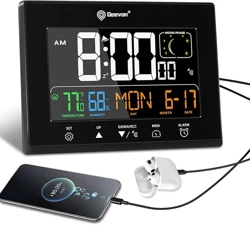
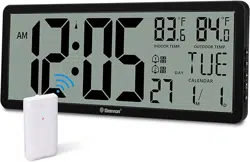
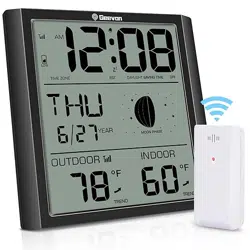
This Geevon Digital Atomic Alarm Clock features a large 6-inch Color VA display. It automatically synchronizes time via the WWVB radio signal and updates for Daylight Saving Time (DST). The clock displays time, date, weekday, indoor temperature, humidity, and moon phases. It includes an alarm with snooze, two USB charging ports, and a dimmable backlight.

Front view of the Geevon atomic alarm clock showing the color display with time, date, temperature, and humidity.

Features

Display and Timekeeping

  • 6-inch Color VA Display: Large, clear digits with wide viewing angles.
  • Atomic Time Synchronization (WWVB): Automatically receives the official time signal from the U.S. atomic clock. Sets the correct time and updates for Daylight Saving Time (DST).
  • 7 Time Zones: Supports AST, EST, CST, MST, PST, AKST, HST.
  • Display Information: Shows time (12/24 hour format), date, weekday, alarm time, indoor temperature (°F/°C), humidity, and moon phases.
Diagram illustrating the WWVB atomic time synchronization feature and time zone selection.

Alarm and Functions

  • Alarm with Snooze: Audible alarm with a snooze function.
  • Dimmable Backlight: Adjustable to 5 brightness levels (100%, 60%, 30%, 5%, Off).
  • 2 USB Charging Ports: For charging phones, tablets, and other devices.
  • Battery Backup: Requires 3 AAA batteries (not included) to maintain time and settings during a power outage. Features a low-battery warning.
Close-up of the clock's side or back, highlighting the two USB charging ports.

Environmental Monitoring

  • Indoor Temperature & Humidity Sensor: Displays current readings and a comfort indicator.
  • Moon Phase Display: Shows the current phase of the moon.
Display close-up showing the temperature, humidity readings, and moon phase graphic.

Use Guide

Initial Setup

  1. Power the Clock: Connect the included AC power adapter. For backup, install 3 AAA batteries in the compartment.
  2. Position the Clock: Place it on a desk using the built-in stand or hang it on a wall using the mounting hole. For best WWVB signal reception, position near a window overnight during initial setup.
  3. Set Time Zone and Preferences:
    • Press the SET button to enter setup mode.
    • Use the + or other navigation buttons to select your time zone (AST, EST, CST, MST, PST, AKST, HST).
    • Set the date format (MM/DD or DD/MM), time format (12/24 hour), temperature unit (°F/°C), and enable DST.
    • Press SET to confirm and exit.
  4. Atomic Sync: Leave the clock plugged in overnight. The "WWVB" icon will flash while searching for the signal. Once synchronized, the icon will stay solid, and the time will be correct.
Image showing the location of the battery compartment and the AC power input.

Setting the Alarm

  1. Press the ALARM button.
  2. Use the + or other buttons to set the desired alarm hour and minute.
  3. Press ALARM again to confirm. The alarm icon will appear on the display.
  4. To enable/disable the alarm, press and hold the ALARM button for a few seconds.
  5. When the alarm sounds, press the SNOOZE button for temporary silence.

Adjusting Backlight Brightness

Press the LIGHT or DIMMER button (often located on the top of the unit) to cycle through the 5 brightness levels (100%, 60%, 30%, 5%, Off).

Hand pressing the top of the clock to adjust the backlight brightness.

Using the USB Ports

Connect your device's USB cable to either of the two USB ports on the side or back of the clock. The ports provide power for charging only.

Display Icons and Indicators

  • WWVB: Flashes when searching for the atomic signal; solid when synchronized.
  • Alarm Bell: Indicates the alarm is enabled.
  • Low Battery: Appears when the backup batteries need replacement.
  • Comfort Indicator: A symbol (e.g., smiley face) next to the humidity reading indicates a comfortable range.

Specifications

Display TypeDigital, Color VA
Display Size6 inches
Product Dimensions6.3" W x 4.7" H
Power SourceAC Adapter (included) & 3 x AAA Battery Backup (not included)
FeaturesAtomic Time (WWVB), Alarm with Snooze, Indoor Temperature & Humidity, Moon Phase, Calendar, 2 USB Ports, Dimmable Backlight (5 levels)
Time ZonesAST, EST, CST, MST, PST, AKST, HST
MountingTabletop stand or wall mount (hole on back)
Indoor/Outdoor UsageIndoor

Troubleshooting

  • Clock not syncing to atomic time: Ensure the correct time zone is set and WWVB is enabled. Place the clock near a window overnight, away from major electronic interference.
  • Buttons do not work: The buttons are disabled while the clock is actively receiving the WWVB signal. Wait for the reception cycle to complete.
  • Incorrect time after power outage: The clock should revert to the correct time once power is restored and it can receive the WWVB signal. Ensure backup batteries are installed to maintain settings.
  • Display is too bright/dim: Press the light/dimmer button on top of the unit to adjust the brightness level.

Warranty and Support

The manufacturer offers a 12-month limited warranty, 30-day money-back guarantee, and lifetime consulting services. For support, contact the seller through your Amazon purchase history or the Geevon store page on Amazon.

Reference file: Geevon 230342 Digital Atomic Alarm Clocks for Bedrooms, Color VA Display Atomic Clock with Indoor Temperature and Humidity

Specifications

Geevon 230342 Questions and Answers

See other models: 86291 281A 24281 22151 228614