
1
Owner’s Manual

2
We take care of your air.
We started Windmill to help you feel more comfortable at home.
We’re a family-run small business, and your support means the world!
Any questions or issues? We’ll get you squared away.
windmillair.com/support
Thanks for trusting Windmill,
Mike & Team

3
1
2
3
4
5
Table of contents
Let’s chat safety
FCC statement
Get to know your air purifier
Cleaning and maintenance
Support and warranty
How it works
Connecting the Windmill Air Purifier to Wi-Fi
Using the controls
4
7
8
9
10
11
13
15
16
Changing and maintaining your filters
4
Let’s chat safety
READ THESE INSTRUCTIONS AND THE WHOLE
MANUAL BEFORE USING YOUR AIR PURIFIER
(You’ll probably learn something useful!)
AND SAVE IT PLEASE
(You might actually refer to it later…)
Thanks for joining the Windmill family! This manual provides operating instructions for your
Windmill Air Purifier. Use the product only as instructed in this manual. These instructions
are not meant to cover every possible condition and situation that may occur. Please practice
caution and common sense when installing, operating, and maintaining this or any product.
This unit has a polarized plug (one blade is wider than the other). To reduce the risk of electric
shock, this plug is intended to fit only one way in a polarized outlet. If the plug does not fit
fully in the outlet, reverse the plug. If it still does not fit, contact a qualified electrician. Do not
attempt to defeat this safety feature.
If the power cord or product does not work, unplug the purifier and immediately contact
Windmill Support at [email protected]. Do not attempt to replace any parts or service
the product yourself.
• Unplug the air purifier before
cleaning or maintenance so you
don’t get shocked.
• Don’t cover the air outlet vents on top
or the air intake vents in the back, or
you might break the air purifier.
• Use the air purifier only as
described in this manual.
Any other use could cause
fire, electrical shock, property
damage, or injury.
Some
important
highlights:

5
WARNING! Avoid fire hazard or electric shock.
Do not use an extension cord or an adaptor plug with this product.
Do not remove any prong from the power cord.
Do not touch or reach for this product
(or any appliance) if it has fallen into
water. Unplug the product immediately.
Always place the product at least 20
inches away from walls (and other
things that can block airflow) and
at least 3 feet from heat sources
(including but not limited to stoves,
radiators, or heaters).
Do not disassemble the air purifier.
Do not tilt or move the air purifier while
it is operating. To disconnect the air
purifier, first turn off all controls, then
remove the plug from the outlet.
To avoid electric shock and/or a fire
hazard, do not let water or any other
liquid enter the product.
Do not run the power cord under rugs,
carpeting, or similar coverings.
Do not use outdoors. For indoor,
household use only.
Always keep the air purifier on a firm,
level surface. Do not operate or use on a
soft surface (like a bed or couch).
Do not store or use gasoli
ne or other
flammable vapors and liquids in the vicinity
of this or any other appliance.
Only use the air purifier with a 120V power
supply. You can break the product if you
plug a 120V plug into a 220V power supply.
Do not touch the fan blade when removing
the filter. Always unplug the air purifier
before removing the filter or back panel.
Do not insert or allow foreign objects
to enter any vent or exhaust openings
as this may cause an electrical shock or
fire, or break the air purifier.
Keep the cord away from heated surfaces.
Keep this product dry and do not
operate in humid, moist, or wet
conditions (like a bathroom, laundry
room, or similar indoor location).
Always unplug the product from the
electrical outlet before cleaning it or
replacing the filters.
1
7
8
12
9
13
10
14
11
15
2
3
4
5
6

6
CHILDREN AND VULNERABLE PEOPLE SAFETY WARNING! Risk of suffocation, injury, or
permanent disability.
This air purifier is not intended for use by persons (including children) with reduced physical,
sensory or mental capabilities, or lack of experience and knowledge, unless they have been
given supervision or instruction concerning use of the product by a person responsible for
their safety. Children should be supervised to ensure that they do not play with the air purifier.
This product can be used by children aged 12 years and above, as well as persons with reduced
physical, sensory or mental capabilities or lack of experience and knowledge, only if they have
been given supervision or instruction concerning use of the air purifier in a safe way and
understand the hazards involved.
• Children should not play with the air purifier.
• Cleaning and maintenance should not be done by children without supervision.
• Children under 12 years of age should be kept away from the product unless continuously
supervised.
• Keep all packaging away from children.
7
FCC statement
Federal Communications Commission (FCC)
Interference Statement:
This equipment has been tested and found to
comply with the limits for a Class B digital device,
pursuant to part 15 of the FCC Rules. These limits are
designed to provide reasonable protection against
harmful interference in a residential environment.
This equipment generates, uses, and can radiate
radio frequency energy and, if not installed and
used in accordance with the instructions, may cause
harmful interference to radio communications.
However, there is no guarantee that interference
will not occur in a particular installation. If this
equipment does cause harmful interference to radio
or television reception, which can be determined by
tuning the device off and on, the user is encouraged
to try to correct the interference by one or more of
the following measures:
• Reorient or relocate the receiving antenna.
• Increase the separation between the device and
receiver.
• Connect the equipment into an outlet other than
the one used for the re
ceiver.
• Consult the dealer or an experienced radio/TV
technician for assistance.
This device complies with Part 15 of the
FCC Rules. Operation is subject to the following two
conditions: (1) This device may not cause harmful
interference, and (2) This device must accept any
interference received, including interference that
may cause undesired operation.
FCC Caution:
Any changes or modifications not expressly
approved by the party responsible for compliance
could void the user’s authority to operate the
equipment.
Host Device Labeling:
This device includes the following module.
Contains FCC ID: 2AC7Z-ESP32WROOM32E
RF Exposure Statement:
This equipment complies with FCC radiation
exposure limits set forth for an uncontrolled
environment. This equipment should be installed
and operated with a minimum of 20 cm between
the radiator and your body. This transmitter must
not be co-located or operated in conjunction
with any other antenna or transmitter unless
authorized to do so by the FCC.
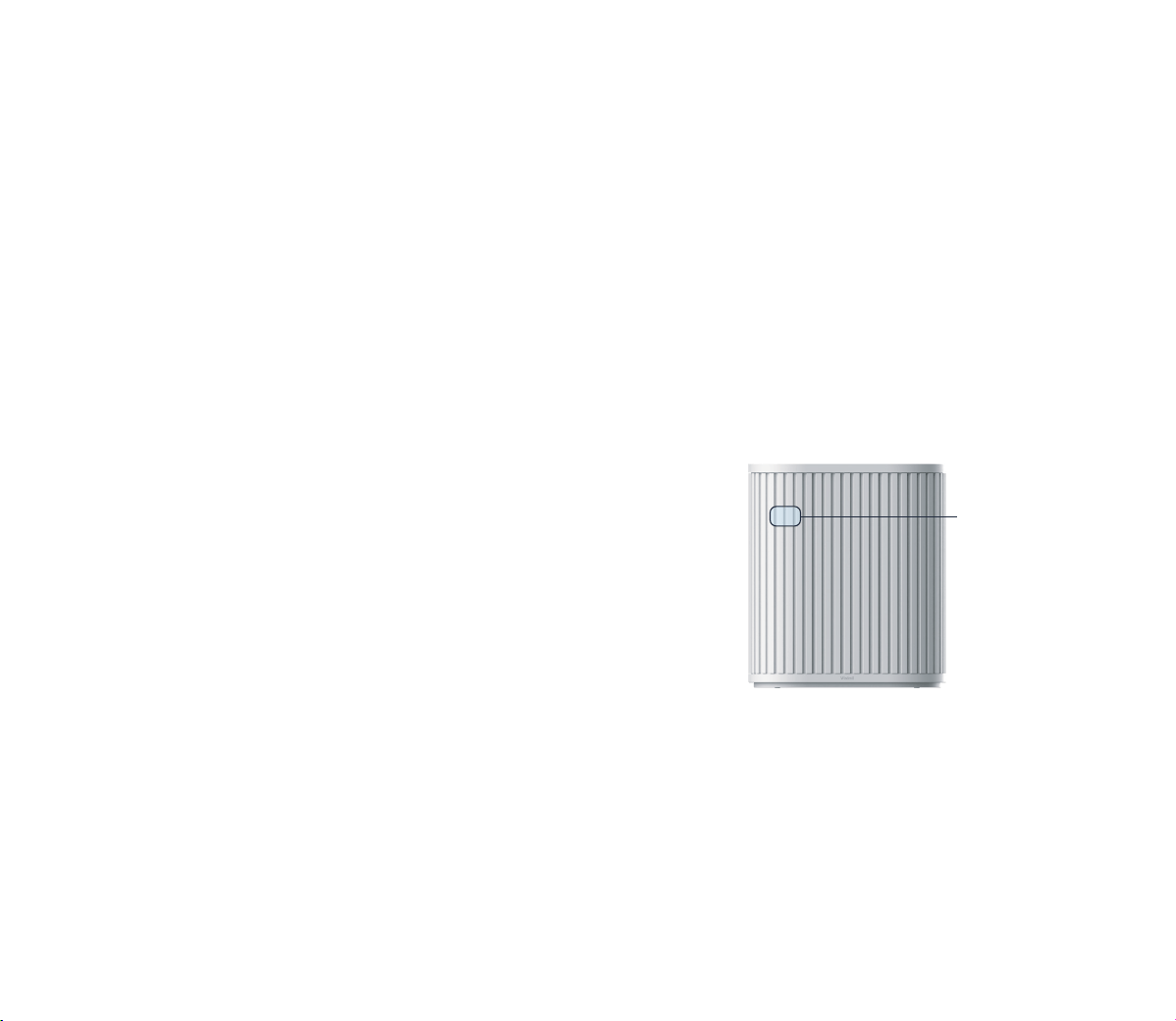
This is the location
of the module
8
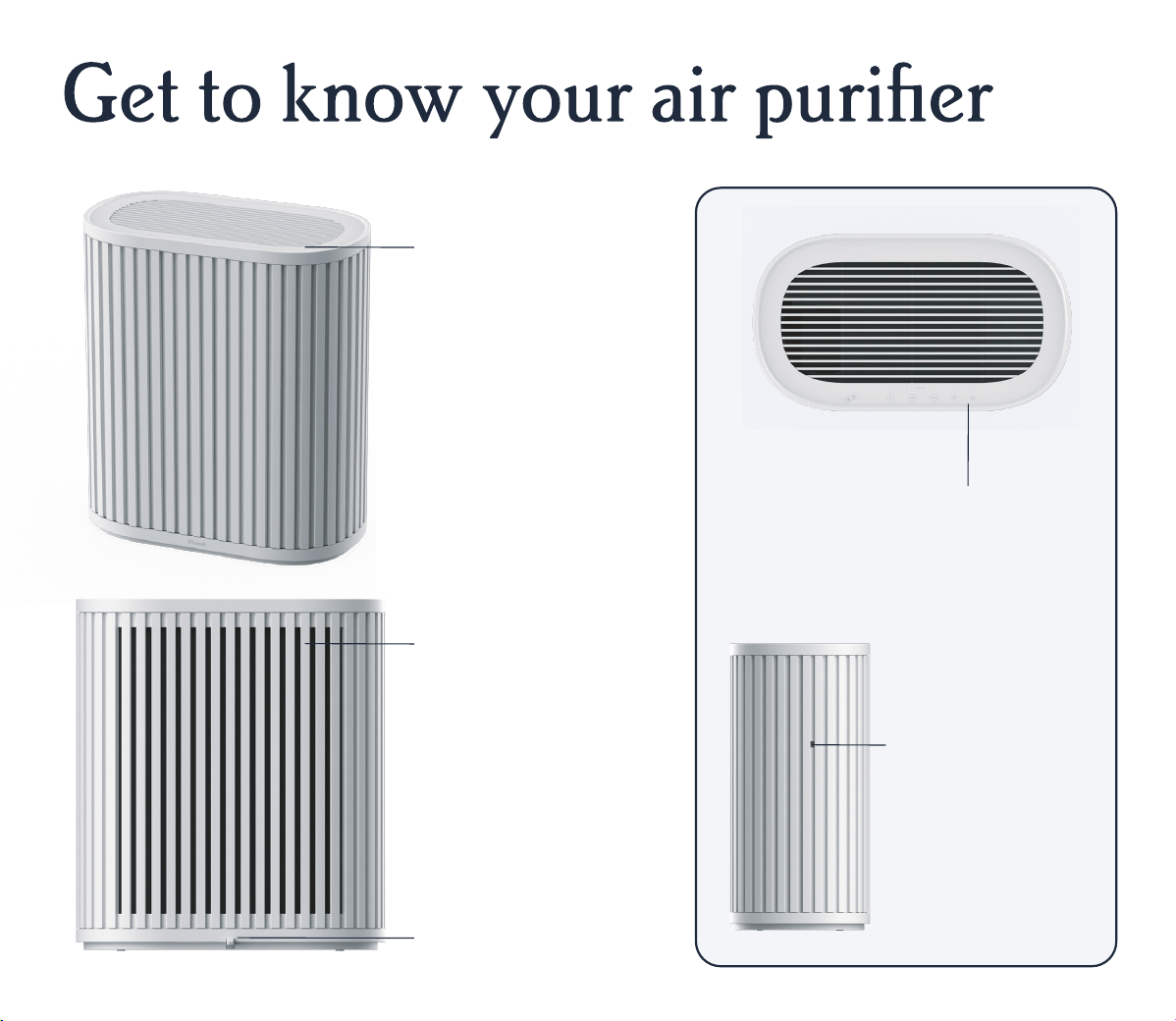
Back air intake & filter
This is where air flows into
the Windmill Air Purifier
to be cleaned by the 3-in-1
filter (which is behind the
removable back panel).
Make sure there is at least
20 inches of clearance
around the purifier and
that nothing is blocking
the airflow in the back.
Power cord
Use with a standard 120V
outlet only.
Air quality sensor
The Windmill Air
Purifier uses an
advanced, laser-
based particulate
matter (PM) sensor
(on the left side of
the air purifier). Do
not block the sensor
(maintai
n at least 20
inches of clearance),
and make sure the
area stays clean.
Top air outlet vents
This is where clean, healthy
air flows out! Do not place
anything on this area or
block it in any way.
Control panel
You can control your Windmill Air
Purifier either with the easy-to-use
buttons on the device or from the
Windmill Air app.
9
How it works
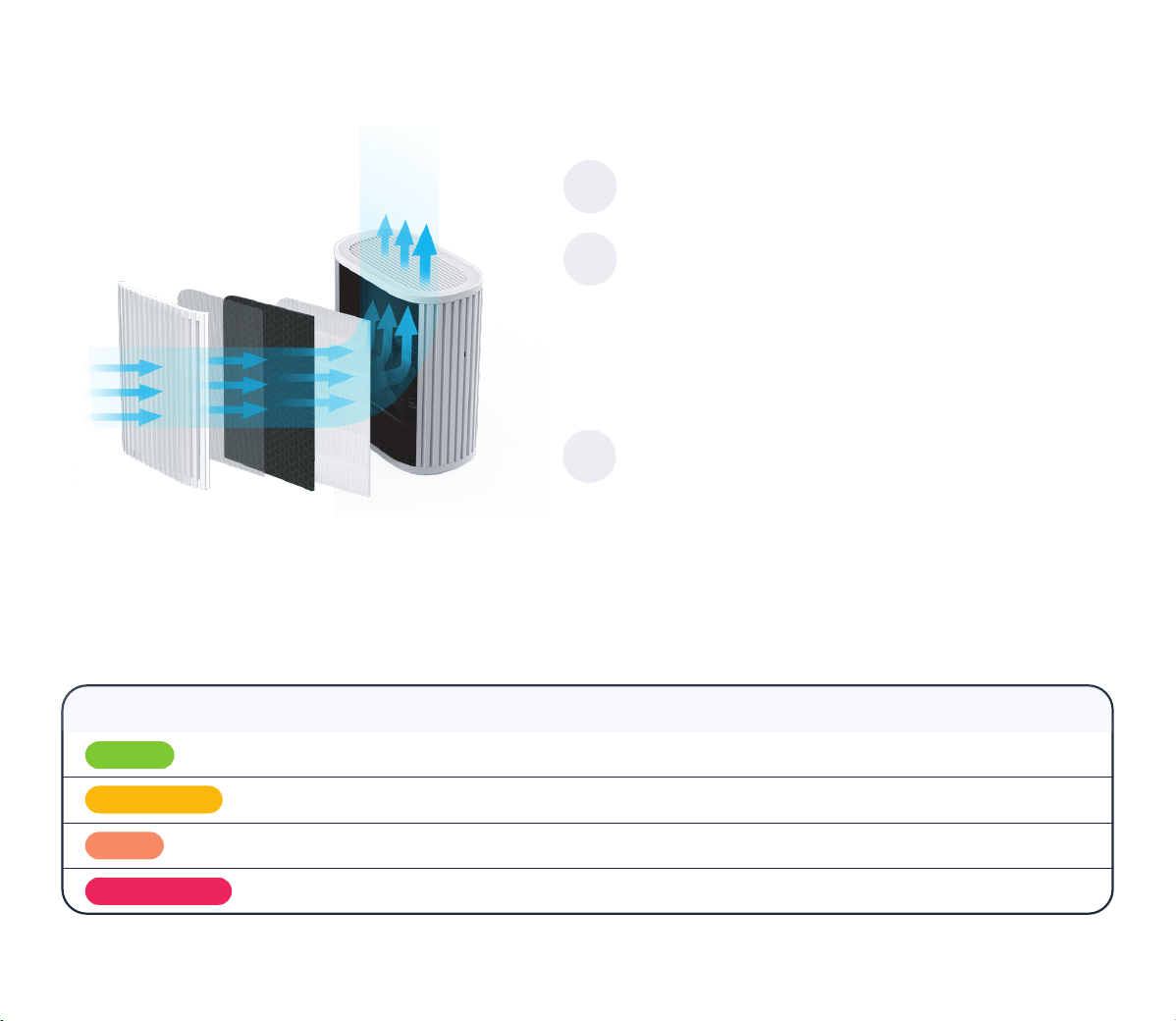
Fresh, clean air is smoothly sent back into your
room through the top air outlet vents.
Our advanced, laser-based sensor continuously monitors your air and lets you know what’s
happening in real time. As your air quality changes, the air quality indicator light on the top left
of your purifier changes color accordingly.
Here’s how to read it
The air then travels through three layers of
filtration: (1) Pre-Filter (to help filter dust,
hair, and other large particulates), (2) Activated
Carbon Filter (to help remove odors, harmful
gasses, smoke, and other volatile organic
compounds), and (3) True HEPA Filter (to help
filter other smaller airborne particles).
Your room air is pulled through the back panel
of the Windmill Air Purifier.
1
2
3
Air Quality Status AQI (Air Quality Index)*
Display Color
Good
Moderate
Bad
Unhealthy
0-50
51-100
101-150
151+
Green
Yellow
Orange
Red
*Download the Windmill Air app (Apple and Android) to see the exact AQI reading.
Note: The Windmill Air Purifier’s Air Quality Status & AQI reading is based on U.S. standards around the concentration of PM2.5 particulates.
10
Connecting the Windmill
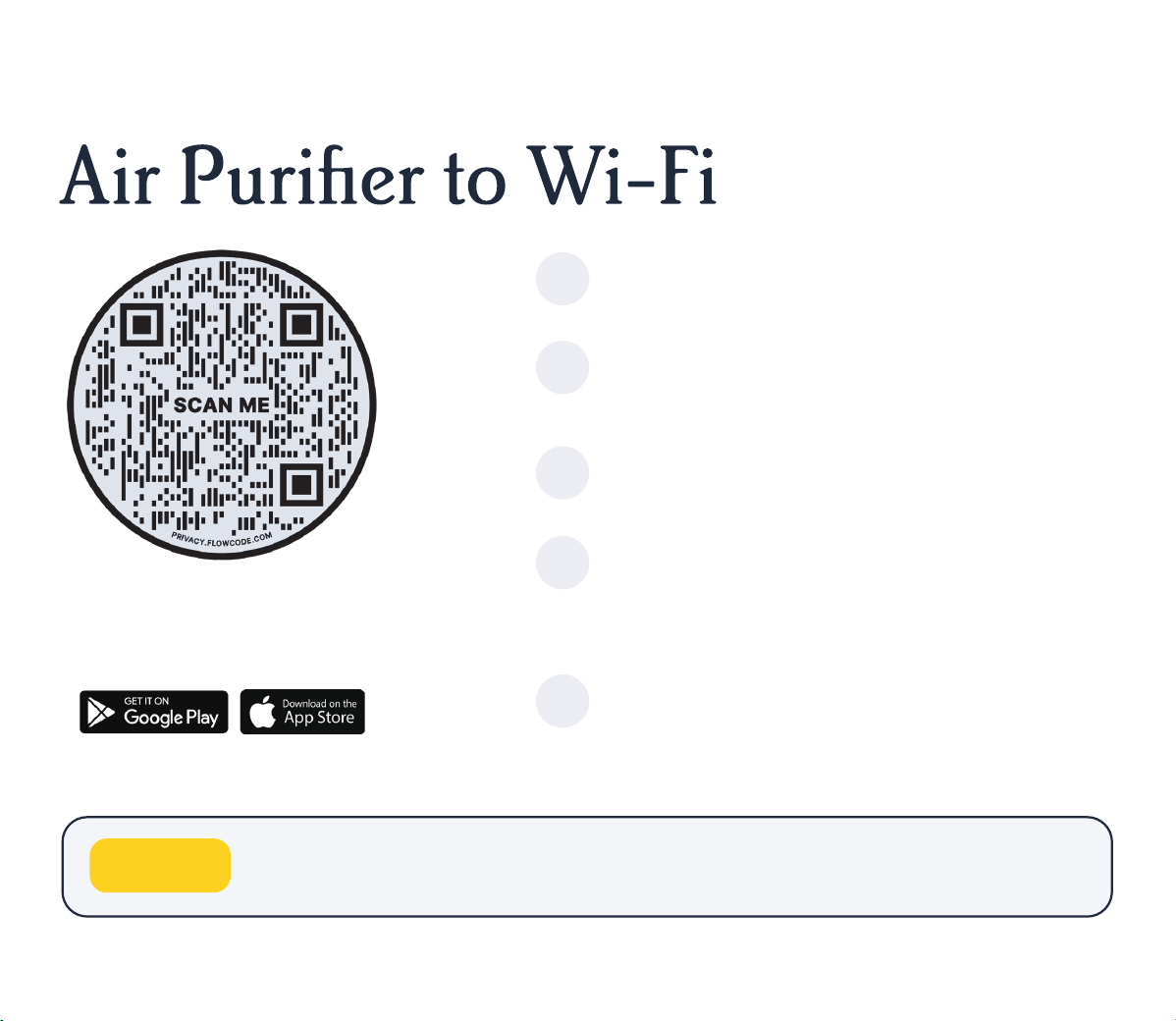
Download the Windmill Air app for iOS or
Android.
Follow the instructions to add the device.
When instructed, hold the Wi-Fi button
on the device for 5 seconds to make the
LED light blink.
When successfully paired, the Wi-Fi
indicator light (above the Wi-Fi button)
will remain on.
Tap the upper right corner of the app to
add a new device.
If you haven’t already, sign up in the app:
enter your email address and then check
your inbox for the activation link.
If you ever accidentally enter Wi-Fi pairing mode, don’t worry.
Just hold the button for another 5 seconds to exit.
1
2
3
4
5
Download the Windmill Air app to control
the air purifier from your phone. Scan the
QR code with your phone’s camera, or go to
the app store and search for “Windmill Air”.
Pro tip:
11
Using the controls
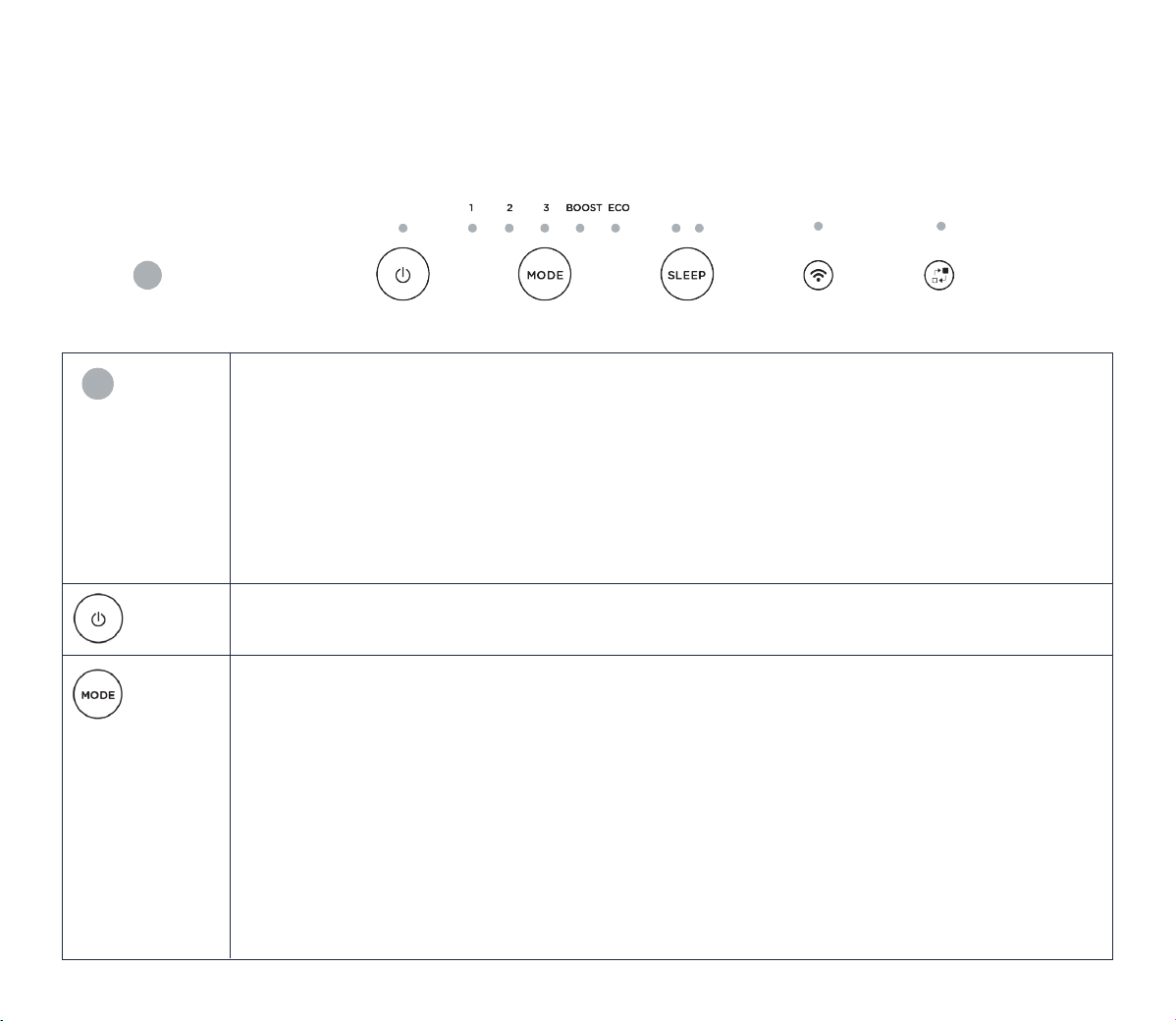
Air quality
indicator &
display light
toggle
(same button)
Power
Mode
Air quality indicator
Shows the room’s current air quality status (or AQI), from Unhealthy (red) to Good (green).
Display light toggle
The button also controls the purifier’s display lights (on/off). You can press this button to turn
the display off (for instance, if you want to run the purifier in the dark while you sleep). If the
display lights are off, press any button to wake them up, and then choose your new desired
setting. If display off is chosen, then the display lights will fade after 5 seconds.
Turns the Windmill Air Purifier on or off.
Sets how the air purifier operates. There are 4 manual settings: Low (1), Medium (2), High (3),
and Boost. The higher the fan speed, the faster the purifier will clean your air.
If you want the Windmill Air Purifier to work its magic (and do the thinking for you), choose
Eco mode (or as we like to call it, the never-worry-about-your-air-again mode). In Eco mode,
the fan speed automatically adjusts based on your room’s air quality. The worse the air quality,
the higher the fan speed. As the purifier cleans, and
your air quality improves, the fan speed
decreases accordingly. Once your air quality is “Good” and stable, the fan shuts off to conserve
power (note: your air quality is still being monitored, don’t worry!); if your air quality starts
worsening, the fan turns back on. In addition, the purifier turns on after 30 minutes have
passed to do a quick checkup.
12
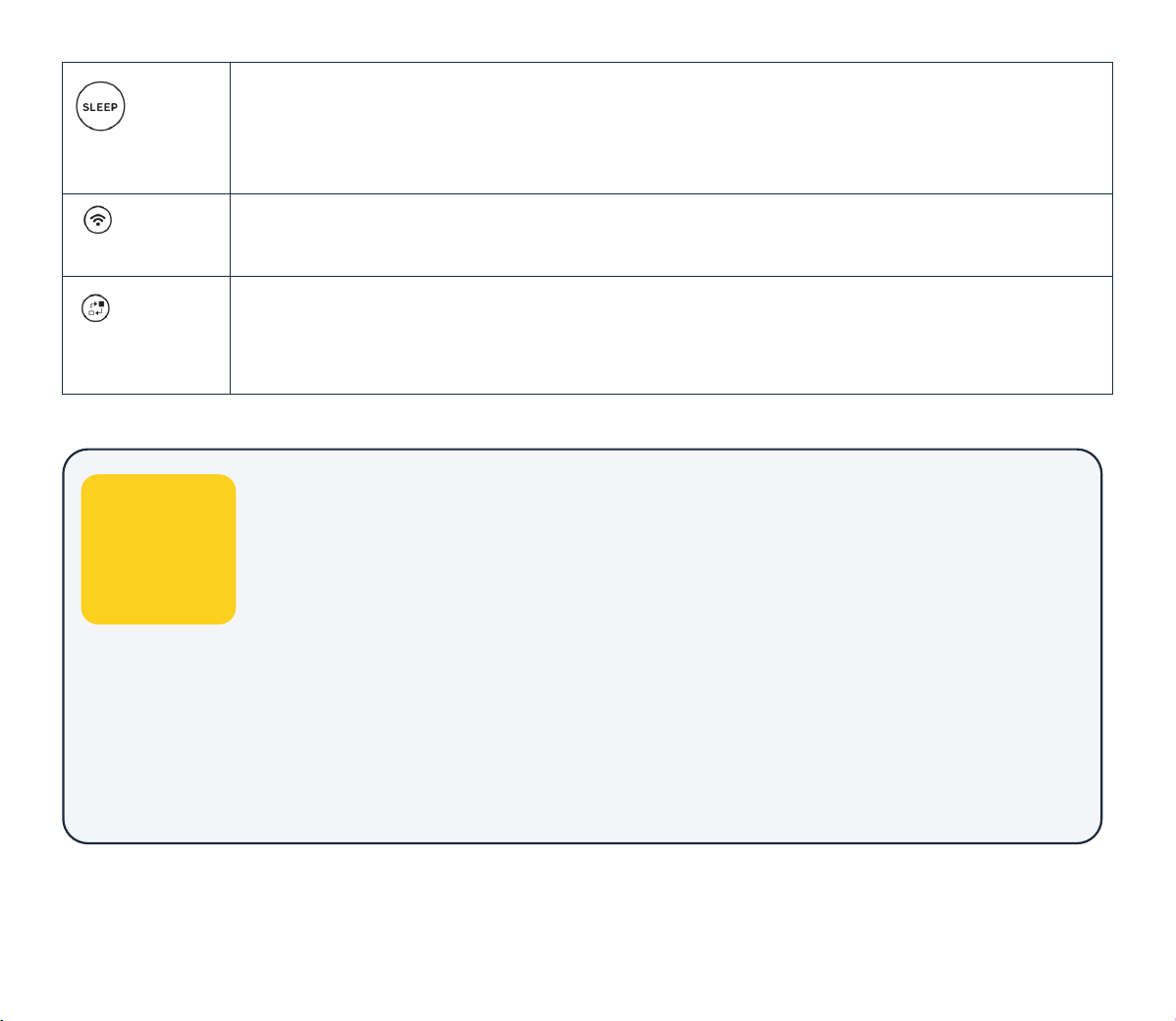
Change
filter
Wi-Fi
Pairs your device to the Windmill Air app for iOS or Android. Hold for 5 seconds to begin pairing.
If you accidentally enter pairing mode, hold for 5 seconds to exit.
Lights up when it’s time to change your air filter, which should be every 6 months in most
cases. Hold the button for 5 seconds after changing your air filter. You can also track your filter’s
remaining lifespan in the Windmill Air app (so you can have the new filter ready to go!).
• Child Lock
Available in the Windmill Air app. If Child Lock is enabled in the app, none
of the buttons on the air purifier will work, and all indicator lights will flash 3
times to remind you that Child Lock is on.
• Beeping noise
Beeping is off by default. If you want to enable beeping, hold the air quality
indicator / display button for 5 seconds. To turn beeping off, hold it down
again for 5 seconds.
• Timer, scheduling, and automations
Available in the Windmill Air app.
Sleep
Runs in the dark with 2 sleep-focused sound options: Whisper (1) or White Noise (2). Choose
whichever helps you or your loved ones get the best night’s sleep! After the display automatically
turns off in Sleep mode, press any button to wake up the display and then choose your desired
setting. The display will fade away again after 5 seconds if left in Sleep mode.
Other
useful
things
to know:
13
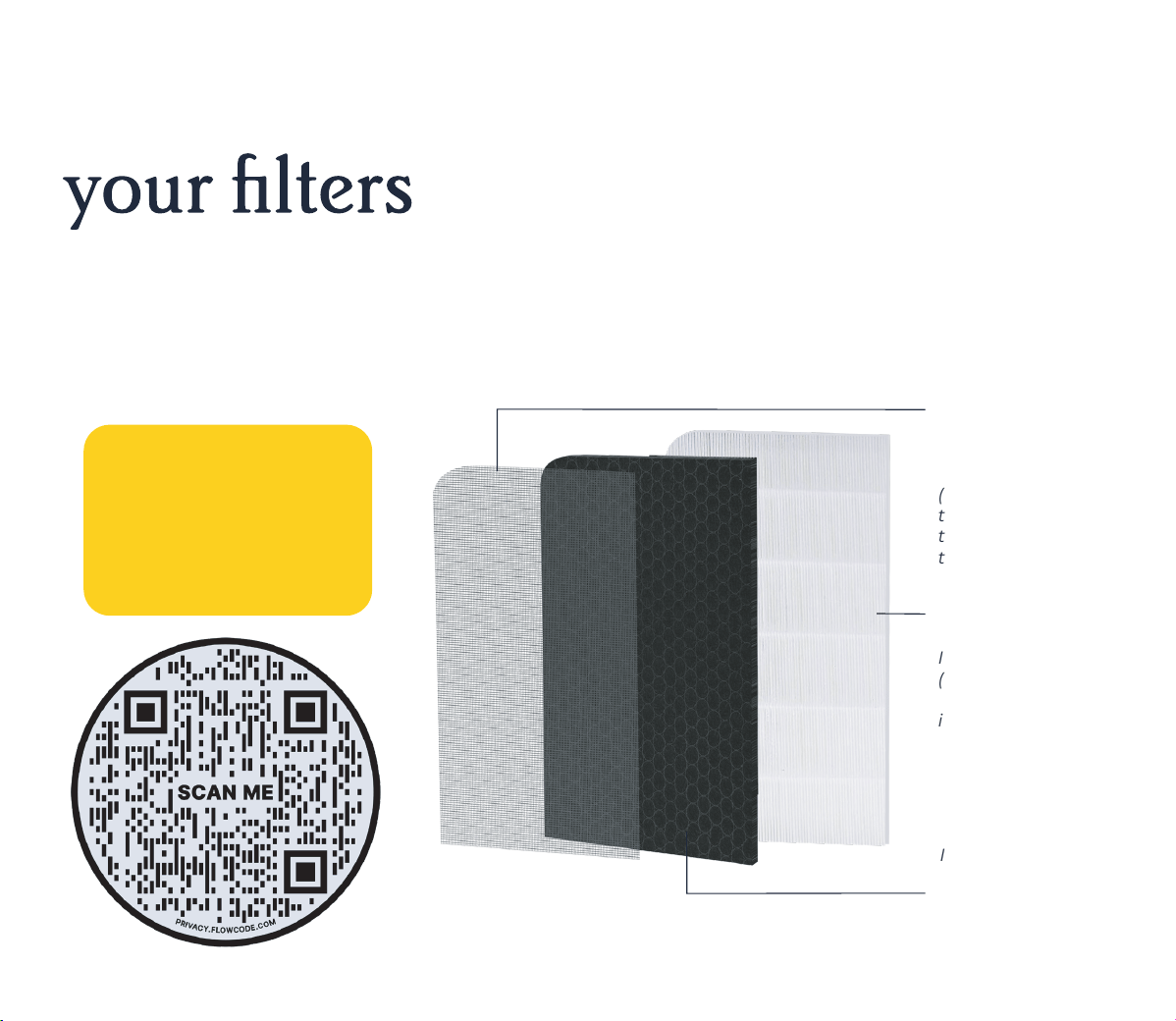
Changing and maintaining
Your Windmill 3-in-1 Filter has three layers of filtration: (1) Pre-Filter (to help filter dust, hair,
and other large particulates), (2) Activated Carbon Filter (to help remove odors, harmful gasses,
smoke, and other volatile organic compounds), and (3) True HEPA Filter (to help filter other
smaller airborne particles).
Pre-Filter
Facing you when
properly installed
(when you open
the back panel,
this is the first
thing you see)
Activated
Carbon Filter
In the middle,
between the
Pre-Filter and
True HEPA Filter
True HEPA Filter
Inner-most layer
(you won’t see it
when properly
installed)
Not subscribed
to auto-refills for
your Windmill
Filters?
Scan to save:
14
Filter maintenance schedule & instructions
Every month Every 6 months
Pre-Filter: Vacuum the pre-filter to remove dust,
hair, and other large particulates.
Instructions:
• Unplug the air purifier.
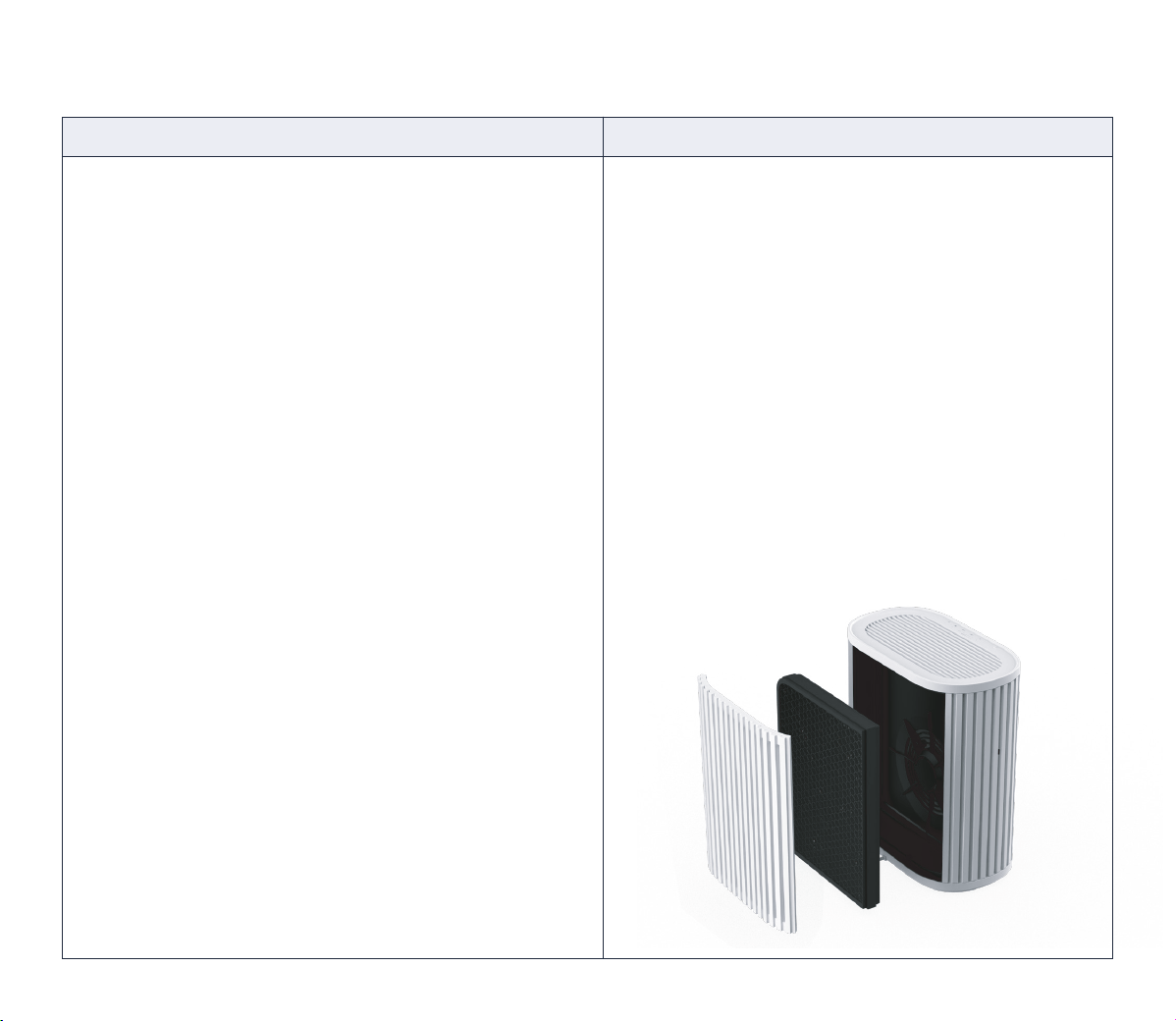
• Open the back panel and remove the entire filter.
• Thoroughly vacuum the pre-filter using the soft
brush attachment of your vacuum cleaner.
Other cleaning methods may damage the filter.
• Insert the filter into the back of the purifier.
The tag with the Windmill logo should be on
top and facing you, with the curve of the filter
on the top left.
• Close the back panel, plug in your purifier,
and turn it back on.
Air quality sensor filter: There is a small black
cotton filter protecting the laser-based air quality
sensor on the left side of the purifier. You’ll see a
small opening on the left side of the device. This
filter needs to be cleaned monthly to ensure the
sensor’s accur
acy.
Instructions:
• Gently brush the black air quality sensor filter
with a cotton swab.
• Important: If you apply too much force
while cleaning, the cotton filter will break.
Replace the entire filter every 6 months for
optimal air quality.
Instructions:
• Unplug the air purifier.
• Open the back panel and remove the filter.
• Dispose of the old, dirty, ineffective filter.
• Take the new filter out of its packaging
and insert it into the back of the purifier.
The tag with the Windmill logo should be
on top and facing you, with the curve of
the filter on the top left. See illustration.
• Close the back panel, plug in your purifier,
and turn it back on.
15
Cleaning and maintenance
Cleaning the device
Unplug the unit before cleaning.
Clean the outer plastic parts of the purifier with an oil-free, dry cloth or by using
a vacuum cleaner with a soft brush.
Do not use harsh cleaners, wax, or other chemicals when cleaning the purifier.
1
2
3
• If you’re not planning to use the purifier for a while, cover it with
plastic and return it to its packaging for safe keeping.
• Replacement filters should remain sealed in their original
packaging until they’re needed.
Pro tips:

16
Support and warranty
Having an issue? We’ve got your back! Try the troubleshooting steps below. If that still doesn’t
work, contact us at windmillair.com/support.
Potential Issue Solution
The purifier won’t turn on.
No air is blowing from
the top vents.
Make sure it’s properly plugged into a 120V standard outlet. Make sure the
house fuse is not blown or the circuit breaker is not tripped.
Clean the pre-filter and/or replace the entire filter if it is old. Air can’t flow
through the purifier if the filter is dirty and clogged.
Gently clean the air quality sensor filter on the left side of the purifier with
a cotton swab. See “Filter maintenance schedule & instructions.”
Clean the pre-filter and/or replace the entire filter. See “Filter maintenance
schedule & instructions.” Make sure there is no blockage to the air inlet or
outlet areas. Run on low fan speed for a quieter sound.
There may be a new plastic smell at first– that’s normal. It should go away
in a couple of days. If it doesn’t, unplug the purifier and contact
support@windmillair.com.
Clean the pre-filter and/or replace the entire filter if it is old. Air can’t flow
through the purifier if the filter is dirty and clogged. See “Filter maintenance
schedule & instructions.”
Contact support@windmillair.com and we
’ll get you set up.
The air quality reading isn’t
improving or is not accurate.
The purifier is loud or is
making a strange sound.
The device smells odd.
Airflow seems weak.
The app isn’t working.
Warranty
The Windmill Air Purifier comes with a limited warranty. For more information on the length
of the warranty or how to make a warranty claim, go to windmillair.com/support.

17
windmillair.com @windmillair
