Form No. 3472-302 Rev A
Flex-Force Power System
®
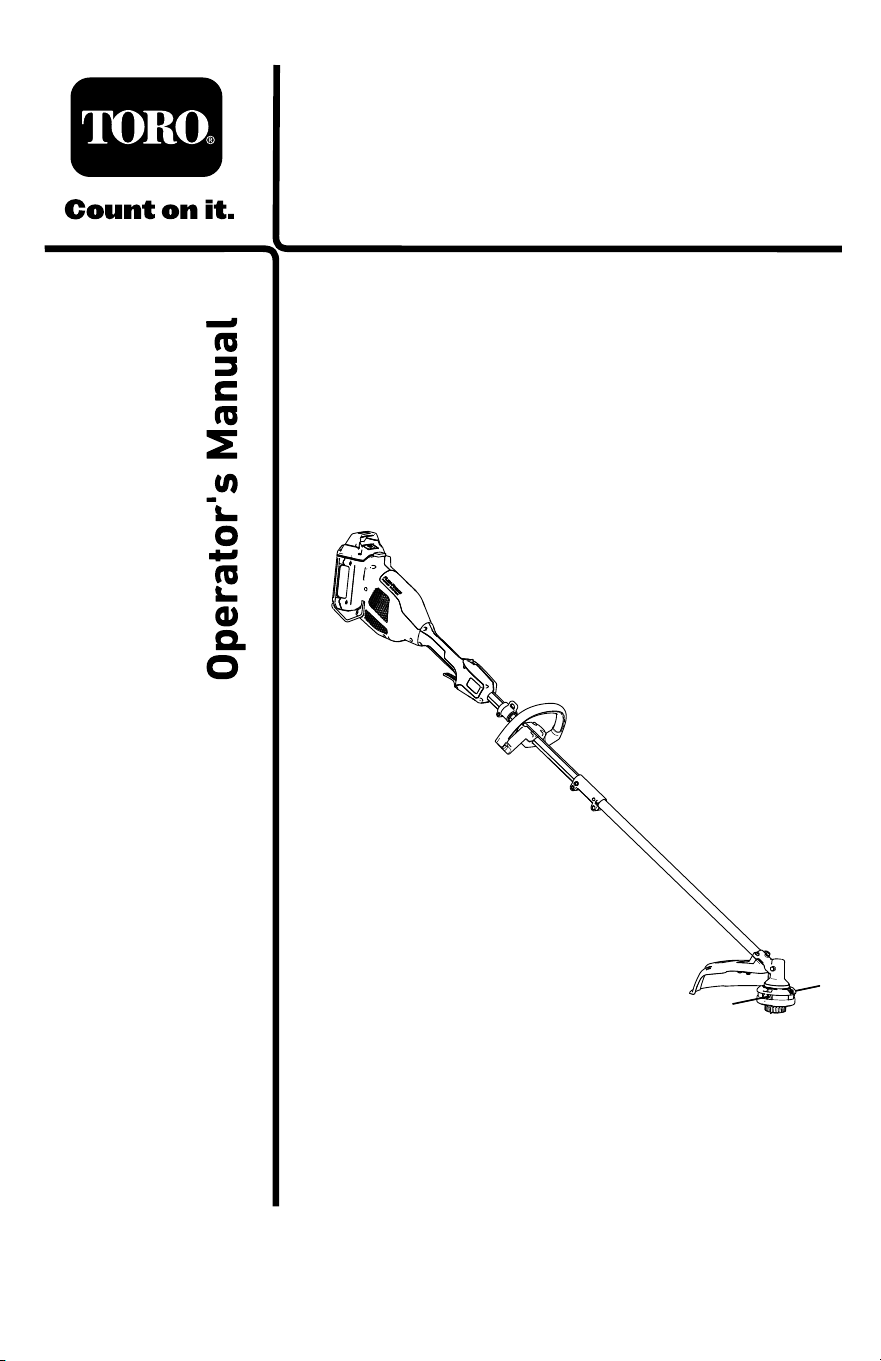
60V MAX String T rimmer
Model No. 51836 —Serial No. 325000000 and Up
Register at www .T oro.com.
Original Instructions (EN)
*3472-302*
For assistance, please see
www .T oro.com/support for
instructional resources or
contact your Authorized
Service Dealer before
returning this product.
W ARNING
CALIFORNIA
Proposition 65 W arning
The power cord on this product contains lead, a chemical
known to the State of California to cause birth defects or
other reproductive harm. W ash hands after handling.
Use of this product may cause exposure to chemicals
known to the State of California to cause cancer , birth
defects, or other reproductive harm.
Introduction
This trimmer is intended to be used by residential homeowners to trim
grass as needed outdoors. This power head is intended to be used
by residential homeowners to power attachment tools. It is designed to
be used only in combination with Flex-Force Power System
®
60V Max
attachments. It is designed to use Flex-Force ™ 60V lithium-ion battery
packs. These battery packs are designed to be charged only by Flex-Force
60V lithium-ion battery chargers. Using this product for purposes other
than its intended use could prove dangerous to you and bystanders.
Read this information carefully to learn how to operate and maintain
your product properly and to avoid injury and product damage. Y ou are
responsible for operating the product properly and safely .
V isit www .T oro.com for product safety and operation training materials,
accessory information, help nding a dealer , or to register your product.
© 2025—The T oro®
Company
81 1 1 L yndale A venue
South
Bloomington, MN
55420
Register at
www .T oro.com.
Original Instructions
(EN)
Printed in China
All Rights Reserved
*3472-302*
Whenever you need service, genuine the manufacturer parts, or additional
information, contact an Authorized Service Dealer or the manufacturer
Customer Service and have the model and serial numbers of your product
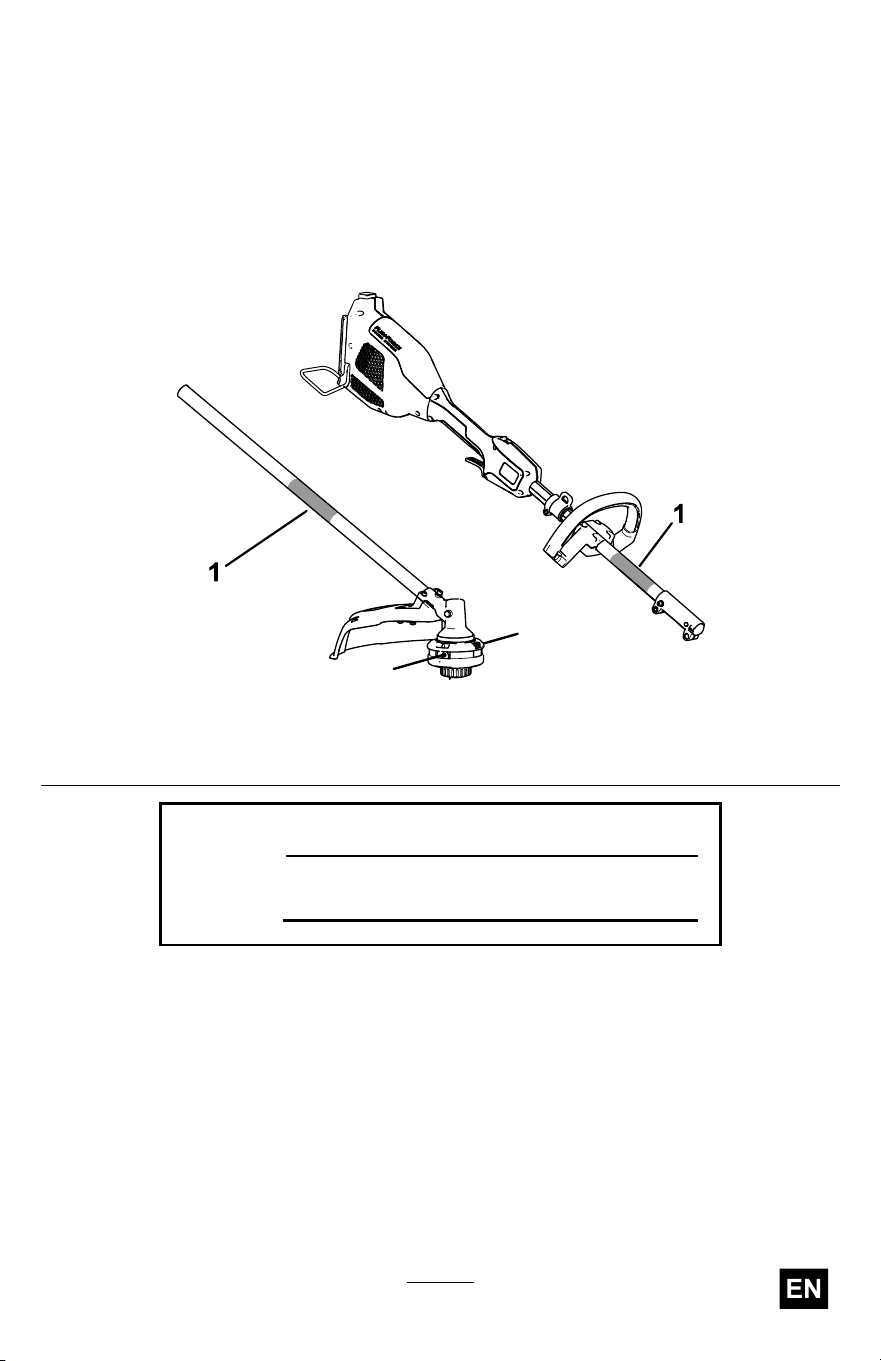
ready . Figure 1 identies the location of the model and serial numbers on
the product. W rite the numbers in the space provided.
Important: W ith your mobile device, you can scan the QR code on
the serial number decal (if equipped) to access warranty , parts, and
other product information.
g372937
Figure 1
1. Model and serial number locations
Model No.
Serial No.
3

Safety-Alert Symbol
The safety-alert symbol ( Figure 2 ) shown in this manual and on the
machine identies important safety messages that you must follow to
prevent accidents.
g000502
Figure 2
Safety-alert symbol
The safety-alert symbol appears above information that alerts you to
unsafe actions or situations and is followed by the word DANGER ,
W ARNING , or CAUTION .
DANGER indicates an imminently hazardous situation which, if not
avoided, will result in death or serious injury .
W ARNING indicates a potentially hazardous situation which, if not
avoided, could result in death or serious injury .
CAUTION indicates a potentially hazardous situation which, if not avoided,
may result in minor or moderate injury .
This manual uses two other words to highlight information. Important calls
attention to special mechanical information and Note emphasizes general
information worthy of special attention.
4
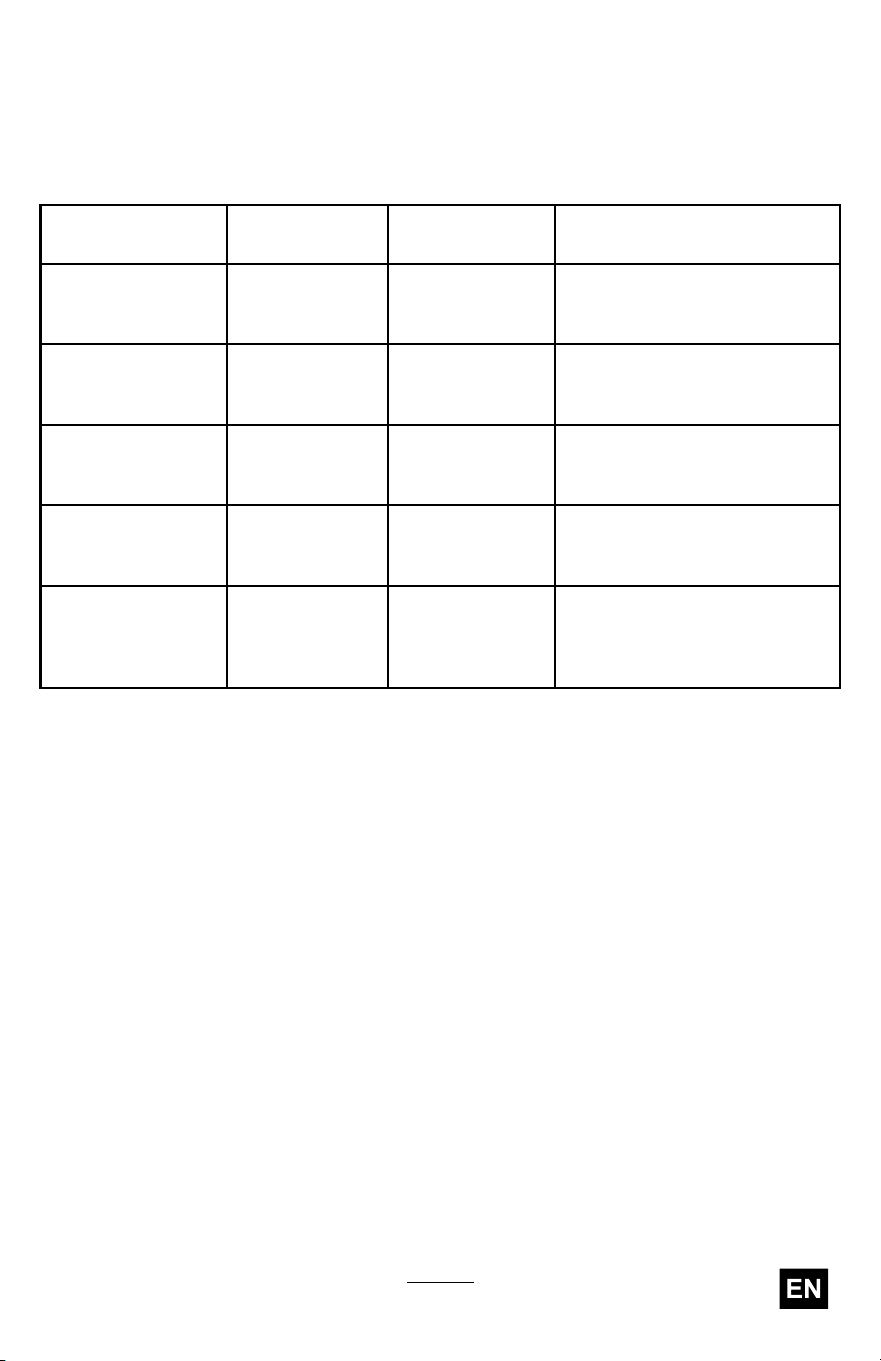
Model 51836 includes Model 51810T Power Head and the Model 88716
String T rimmer Attachment.
The Model 51810T Power Head is compatible with a variety of
T oro-approved attachments that, when combined, comply with specic
standards; see the following table for more detail.
Combination
Power Head
Model
Attachment
Model
Standard
String T rimmer
51810T 88716
Conforms to UL STD 82
Certied to CSA STD C22.2
No. 147
Edger 51810T 88710
Conforms to UL STD 82
Certied to CSA STD C22.2
No. 147
Pole Saw
51810T 88714
Conforms to UL STD 82
Certied to CSA STD C22.2
No. 147
Cultivator
51810T 88715
Conforms to UL STD 82
Certied to CSA STD C22.2
No. 147
Hedge T rimmer 51810T 88713
Conforms to UL
STD 62841-4-2
Certied to CSA STD C22.2
62841-4-2
5

Safety
IMPORT ANT SAFETY
INSTRUCTIONS
W ARNING
When using electric gardening appliances, always read and
follow basic safety warnings and instructions to reduce the
risk of re, electric shock, and personal injury , including the
following:
In addition to these instructions, always read and follow the
safety warnings and instructions included with your specic
attachment before operating the power head.
Read All Instructions
I. T raining
1. The operator of the appliance is responsible for any accidents or
hazards occurring to others or their property .
2. Do not allow children to use or play with the appliance, battery pack,
or the battery charger; local regulations may restrict the age of the
operator .
3. Do not allow children or untrained people to operate or service this
device. Allow only people who are responsible, trained, familiar with
the instructions, and physically capable to operate or service the
device.
4. Before using the appliance, battery pack, and battery charger , read
all the instructions and cautionary markings on these products.
5. Become familiar with the controls and proper use of the appliance,
battery pack, and battery charger .
II. Preparation
1. Keep bystanders and children away from the operating area.
2. Use only the battery pack specied by T oro. Using other accessories
and attachments may increase the risk of injury and re.
3. Plugging the battery charger into an outlet that is not 120 V can
cause a re or electric shock. Do not plug the battery charger into an
outlet other than 120 V . For a dif ferent style of connection, use an
6

attachment plug adapter of the proper conguration for the power
outlet if needed.
4. Do not use a damaged or modied battery pack or battery charger ,
which may exhibit unpredictable behavior that results in re,
explosion, or risk of injury .
5. If the supply cord to the battery charger is damaged, contact an
Authorized Service Dealer to replace it.
6. Charge the battery pack with only the battery charger specied by
T oro. A charger suitable for 1 type of battery pack may create a risk
of re when used with another battery pack.
7. Charge the battery pack in a well-ventilated area only .
8. Follow all charging instructions and do not charge the battery pack
outside of the temperature range specied in the instructions.
Otherwise, you may damage the battery pack and increase the risk
of re.
9. Do not operate the appliance without all guards and other safety
protective devices in place and functioning properly on the appliance.
10. Dress properly—W ear appropriate clothing, including eye protection;
long pants; substantial, slip-resistant footwear; rubber gloves; and
hearing protection. T ie back long hair and do not wear loose clothing
or loose jewelry that can get caught in moving parts. W ear a dust
mask in dusty operating conditions.
III. Operation
1. Do not operate the power head without an attachment installed.
2. A void dangerous environments—Do not use the appliance in rain or
in damp or wet locations.
3. Use the proper appliance for your application—Using the appliance
for purposes other an its intended use could prove dangerous to
you and bystanders.
4. Prevent unintentional starting—Ensure that the switch is in the O FF
position before connecting to the battery pack and handling the
appliance. Do not carry the appliance with your nger on the switch
or energize the appliance with the switch in the O N position.
5. Operate the appliance only in daylight or good articial light.
6. If the tool strikes an object or starts to vibrate, immediately shut of f
the tool, wait for all moving parts to stop, and disconnect the battery
before examining the tool for damage. Make all necessary repairs
before resuming operation
7

7. Remove the battery pack from the appliance before adjusting it or
changing accessories.
8. Keep your hands and feet away from the cutting area and all moving
parts.
9. Stop the appliance, remove the battery pack from the appliance, and
wait for all movement to stop before adjusting, servicing, cleaning,
or storing the appliance.
10. Remove the battery pack from the appliance whenever you leave
it unattended.
1 1. Do not force the appliance—Allow the appliance to do the job better
and safer at the rate for which it was designed.
12. Do not overreach—Keep proper footing and balance at all times,
especially on slopes. W alk, never run with the appliance.
13. Stay alert—W atch what you are doing and use common sense when
operating the appliance. Do not use the appliance while ill, tired, or
under the inuence of alcohol or drugs.
14. Ensure that the ventilation openings are kept clear of debris.
15. Under abusive conditions, the battery pack may eject liquid; avoid
contact. If you accidently come into contact with the liquid, ush with
water . If the liquid contacts your eyes, seek medical help. Liquid
ejected from the battery pack may cause irritation or burns.
16. Do not expose a battery pack or tool to re or excessive temperature.
Exposure to re or temperature above 130°C (265°F) may cause
explosion.
17. CAUTION—A mistreated battery pack may present a risk of re,
explosion, or chemical burn.
• Do not disassemble the battery pack.
• Replace the battery pack with a genuine T oro battery pack only;
using another type of battery pack may cause a re or risk of
injury .
• Keep battery packs out of the reach of children and in the original
packaging until you are ready to use them.
8

IV . Maintenance and Storage
1. Maintain the appliance with care—Keep it clean and in good repair
for best performance and to reduce the risk of injury . Follow the
instructions for lubricating and changing accessories. Keep handles
dry , clean, and free from oil and grease.
2. When the battery pack is not in use, keep it away from metal objects
such as paper clips, coins, keys, nails, and screws that can make a
connection from 1 terminal to another . Shorting the battery terminals
may cause burns or a re.
3. Keep your hands and feet away from moving parts.
4. Shut of f the appliance, remove the battery pack from the appliance,
and wait for all movement to stop before adjusting, servicing,
cleaning, or storing the appliance.
5. Check the appliance for damaged parts—If there are damaged
guards or other parts, determine whether it will operate properly .
Check for misaligned and binding moving parts, broken parts,
mounting, and any other condition that may af fect its operation.
Unless indicated in the instructions, have an Authorized Service
Dealer repair or replace a damaged guard or part.
6. Do not replace the existing non-metallic cutting means on the
appliance with a metallic cutting means.
7. Do not attempt to service or repair the appliance, battery pack,
or battery charger except as indicated in the instructions. Have
an Authorized Service Dealer perform service using identical
replacement parts to ensure that the product is safely maintained.
8. Store an idle appliance indoors in a place that is dry , secure, and out
of the reach of children.
9. Do not dispose of the battery in a re. The cell may explode. Check
with local codes for possible special disposal instructions.
SA VE THESE
INSTRUCTIONS
9
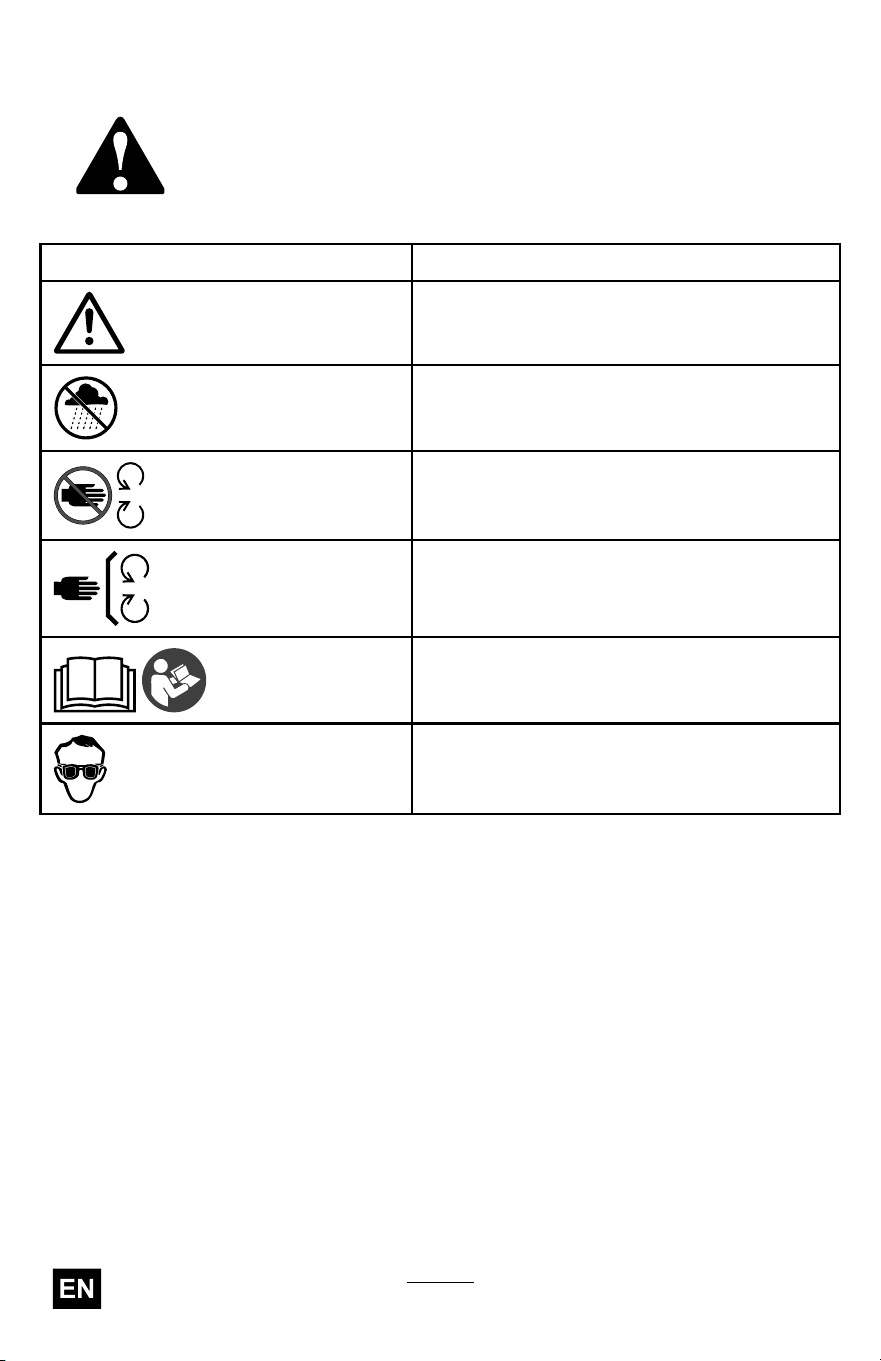
Decal Symbols
Safety decals and instructions are easily visible to the operator and
are located near any area of potential danger . Replace any decal
that is damaged or missing.
The following tables describe the safety and instructional symbols
that appear on the decals.
String T rimmer Decal Symbol
Explanation
W arning
Do not operate in wet conditions.
Stay away from moving parts.
Keep all guards in place.
Read the Operator ’ s Manual .
W ear eye protection.
10
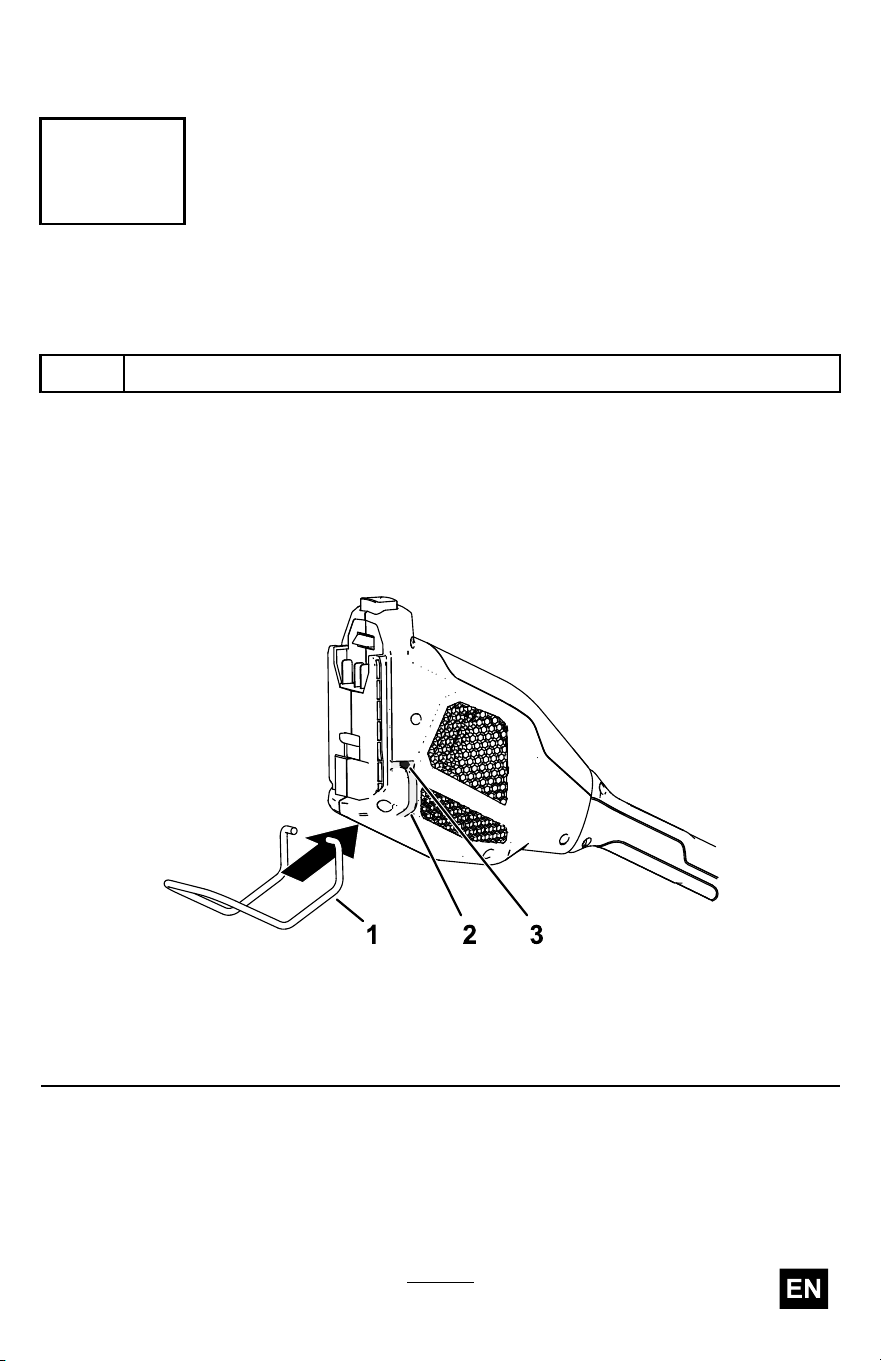
Setup
1
Installing the Battery Guard Rod
Parts needed for this procedure:
1 Battery guard rod
Procedure
1. Align the arms of the guard rod with the guide on the power head.
2. Lightly pull the arms of the guard rod so that they t around the
power head, and t the rod ends into the mounting holes.
g385364
Figure 3
1. Battery guard rod 3. Mounting hole
2. Rod guide
1 1
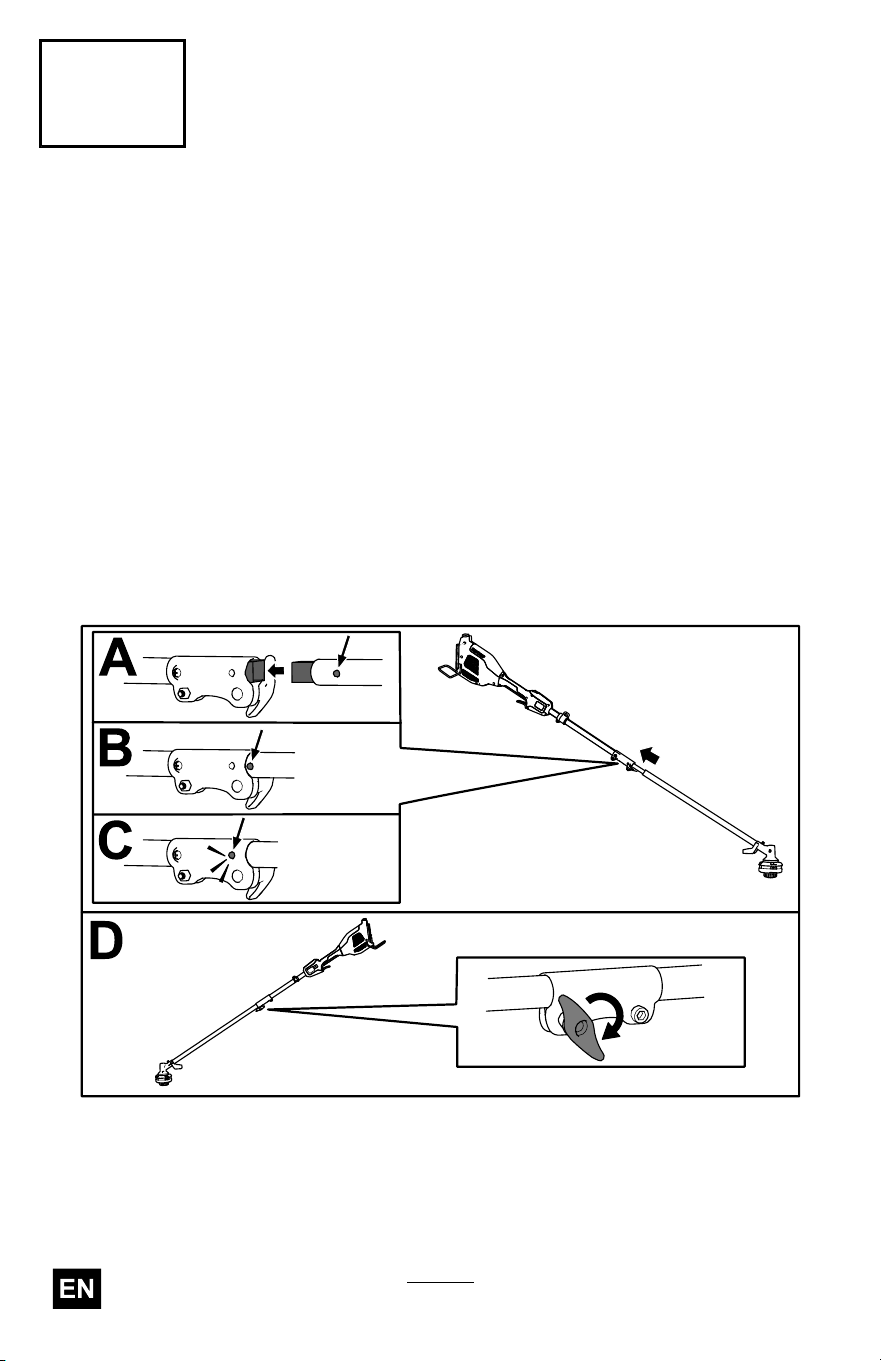
2
Installing the Attachment
No Parts Required
Procedure
1. Install the square shaft of the string trimmer attachment into the
square shaft of the power head (A of Figure 4 ).
2. Align the locking button on the lower shaft with the slotted hole on
the upper shaft and slide the 2 shafts together (B and C of Figure 4 ).
Note: The locking button clicks into the slotted hole when the shafts
are secured (C of Figure 4 ).
3. Using the screw-handle, tighten the screw on the shaft connector
until it is secure (D of Figure 4 ).
g528922
Figure 4
12
3
Installing the Auxiliary Handle
Parts needed for this procedure:
1 Auxiliary handle assembly
Procedure
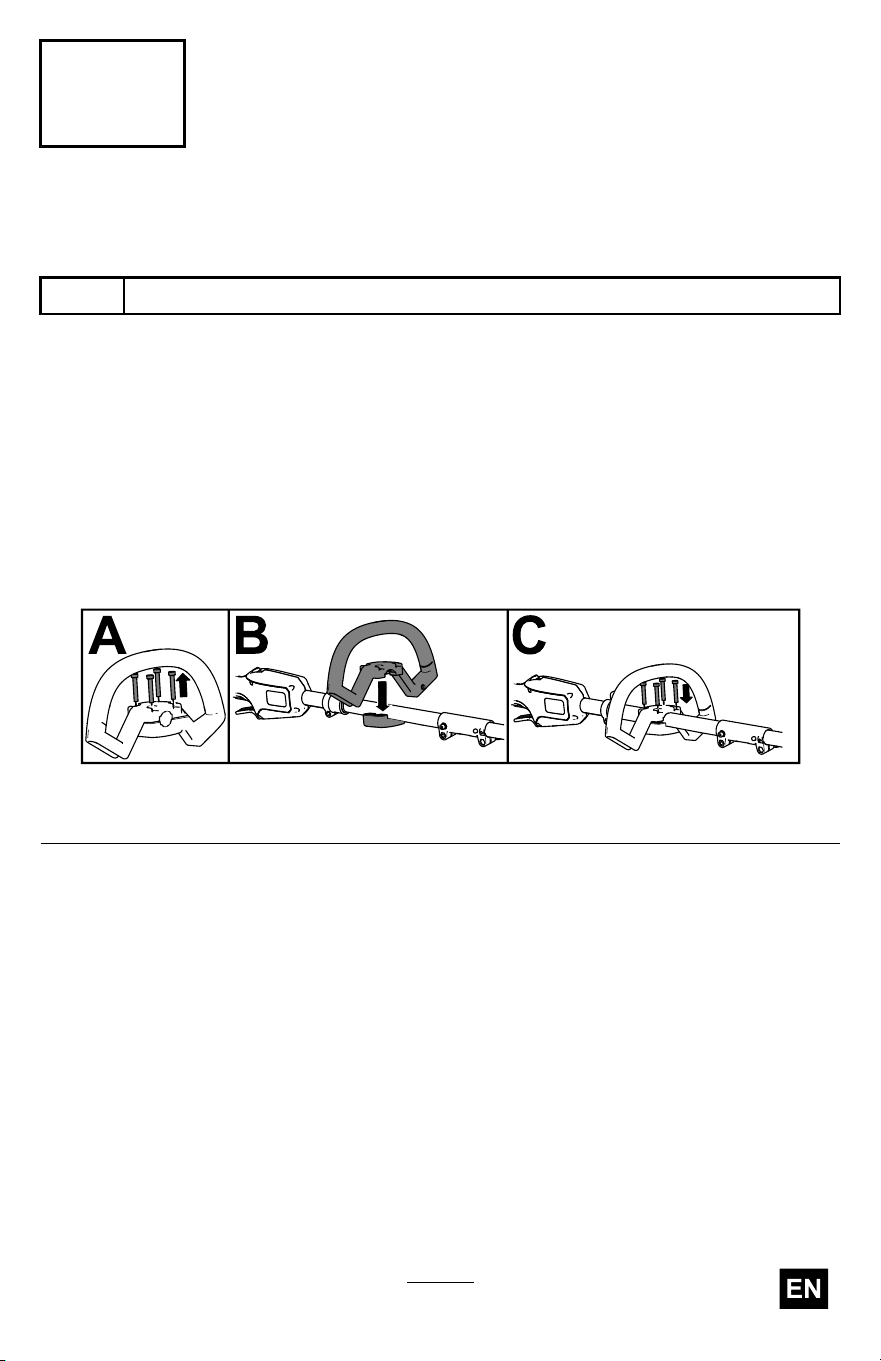
1. Separate the auxiliary handle from the handle plate by removing the 4
socket head screws using the provided Allen wrench (A of Figure 5 ).
2. Line up the auxiliary handle with auxiliary handle plate on the trimmer
handle (B of Figure 5 ).
3. Secure the auxiliary handle to the handle plate with the 4 socket
head screws previously removed (C of Figure 5 ).
g529124
Figure 5
13
4
Installing the Guard
Parts needed for this procedure:
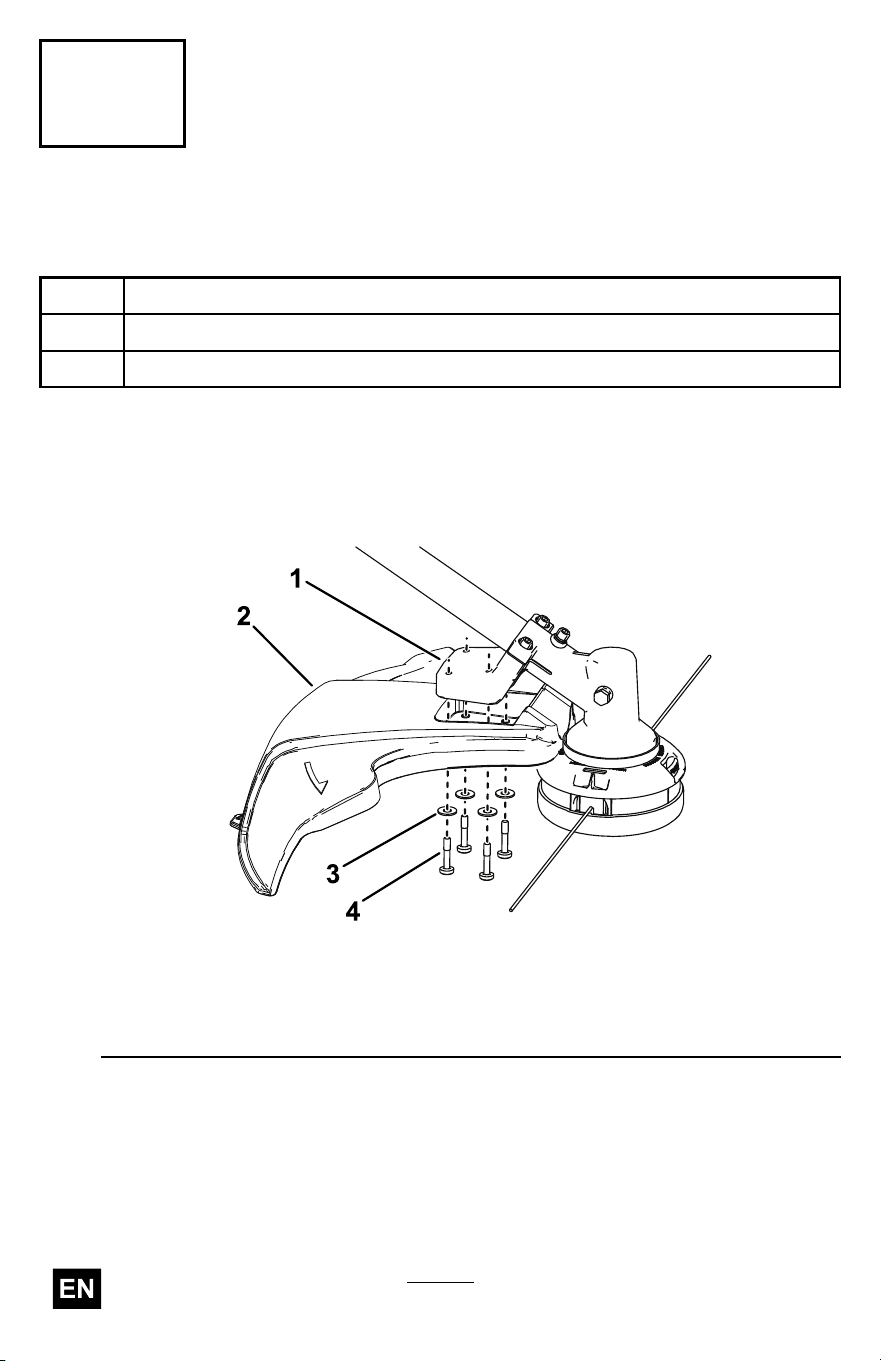
1
Guard
4 W asher
4 Bolt
Procedure
1. Align the trimmer guard beneath the guard mount as shown in Figure
6 .
g333216
Figure 6
1. Guard mount
3. W asher
2. T rimmer guard 4. Bolt
2. Secure the guard to the trimmer using the 4 washers and 4 bolts as
shown in Figure 6 .
14
Product Overview
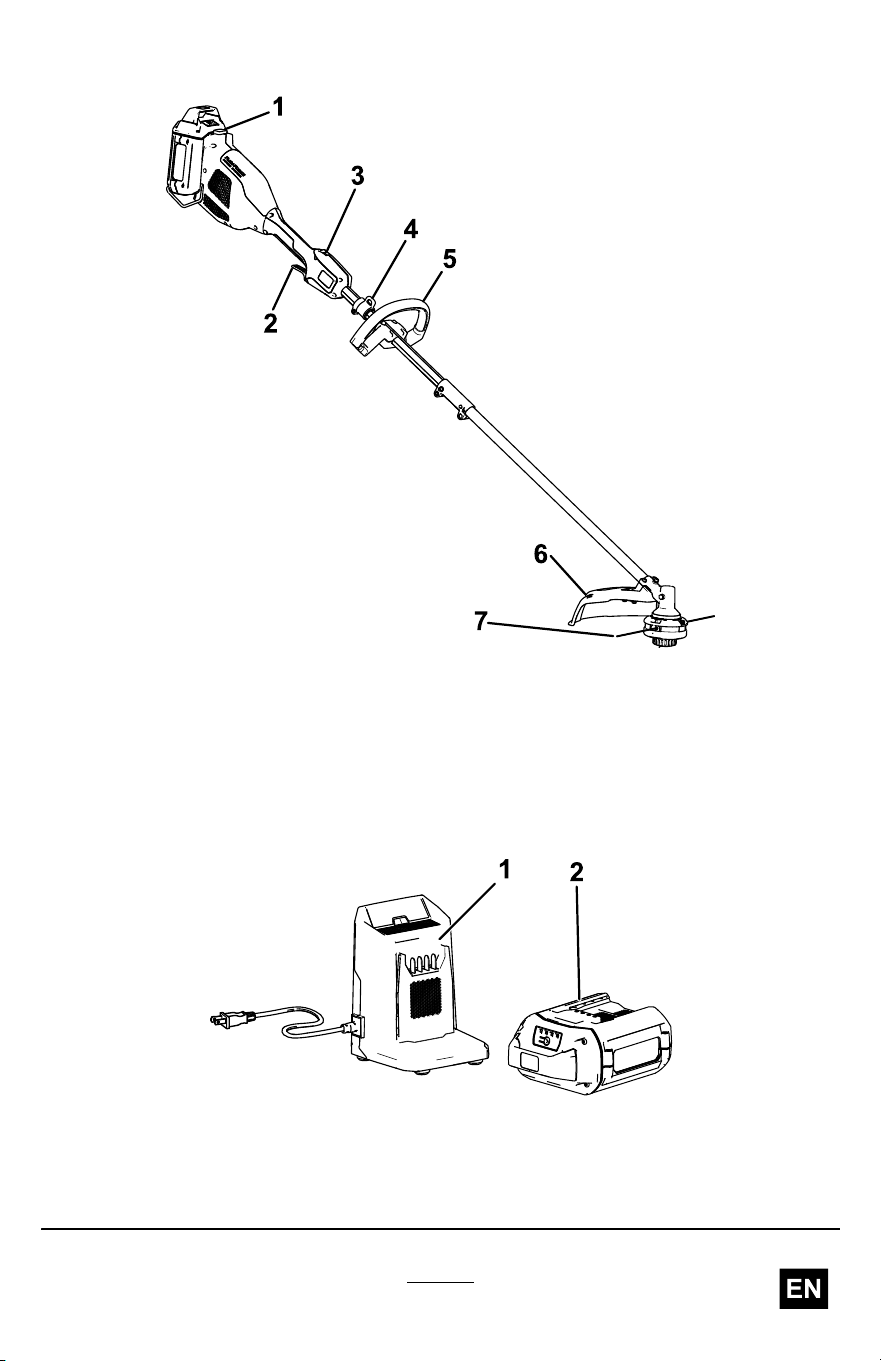
g357427
Figure 7
1. Battery latch 5. Auxiliary handle
2. Run trigger
6. Guard
3. Lockout button
7. String
4. Harness/strap collar (harness/strap
sold separately)
g362427
Figure 8
1. 2A battery charger (included with
Model 51836)
2. 2.5 Ah battery pack (included with
Model 51836)
15

Specications
Model 51836
Charger T ype
Flex-Force 60V lithium-ion chargers
Battery T ype Flex-Force 60V lithum-ion batteries
Appropriate T emperature Ranges
Charge/store the battery pack at 5°C (41°F) to 40°C (104°F)*
Use the battery pack at
-30°C (-22°F) to 49°C (120°F)
Use the trimmer at
0°C (32°F) to 49°C (120°F)
Store the trimmer at 0°C (32°F) to 49°C (120°F)*
*Charging time will increase if you do not charge the battery within this
range.
Store the tool, battery pack, and battery charger in an enclosed clean,
dry area.
Attachments/Accessories
A selection of T oro approved attachments and accessories is available for
use with the machine to enhance and expand its capabilities. Contact
your Authorized Service Dealer or authorized T oro distributor or go to
www .T oro.com for a list of all approved attachments and accessories.
T o ensure optimum performance and continued safety certication of the
machine, use only genuine T oro replacement parts and accessories.
Replacement parts and accessories made by other manufacturers could
be dangerous.
16
Operation
Starting the T rimmer
1. Make sure that the vents on the trimmer are clear of any dust and
debris.
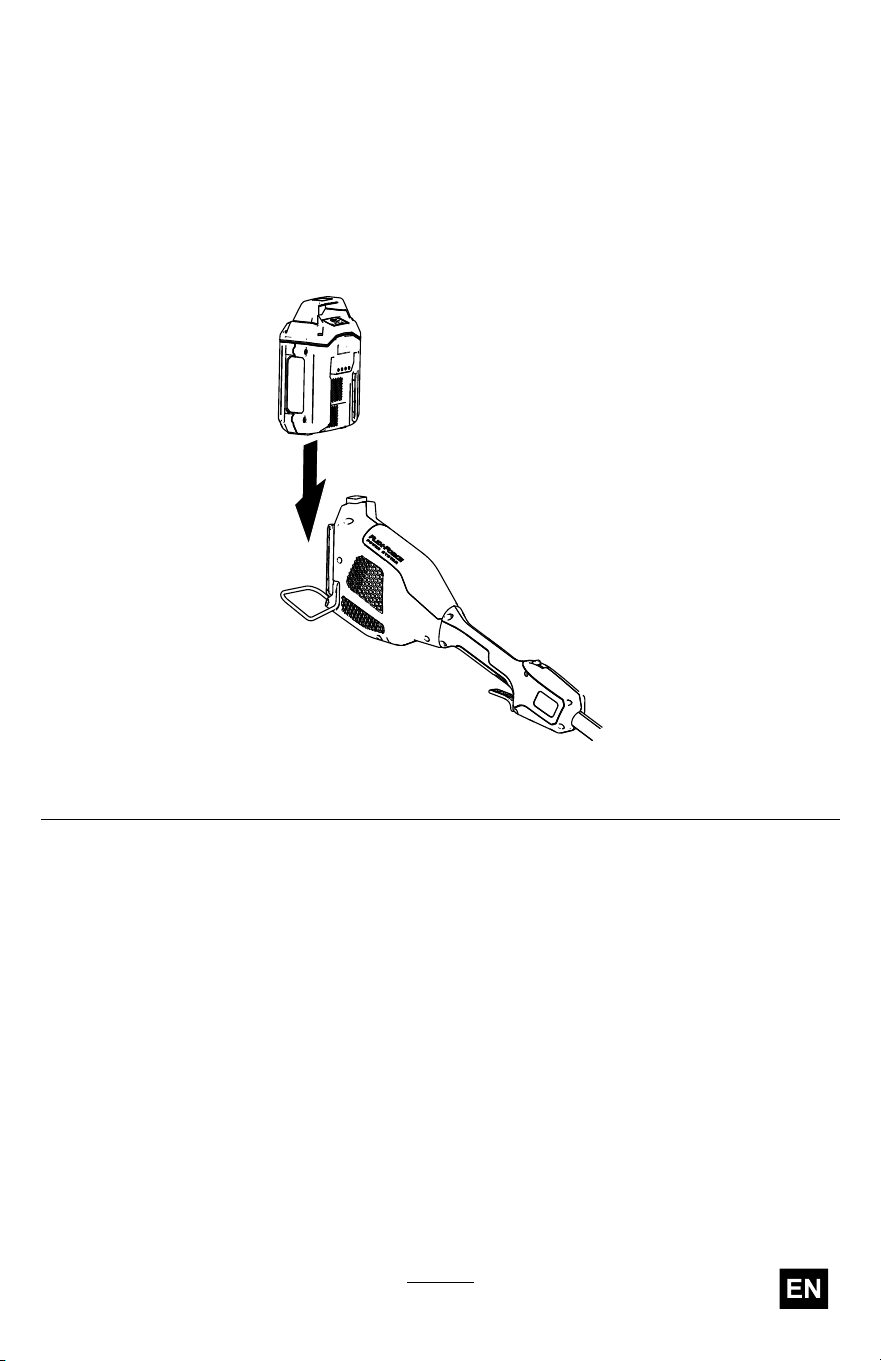
2. Align the cavity in the battery pack with the tongue on the handle
housing ( Figure 9 ).
g357444
Figure 9
3. Push the battery pack into the handle until the battery locks into the
latch.
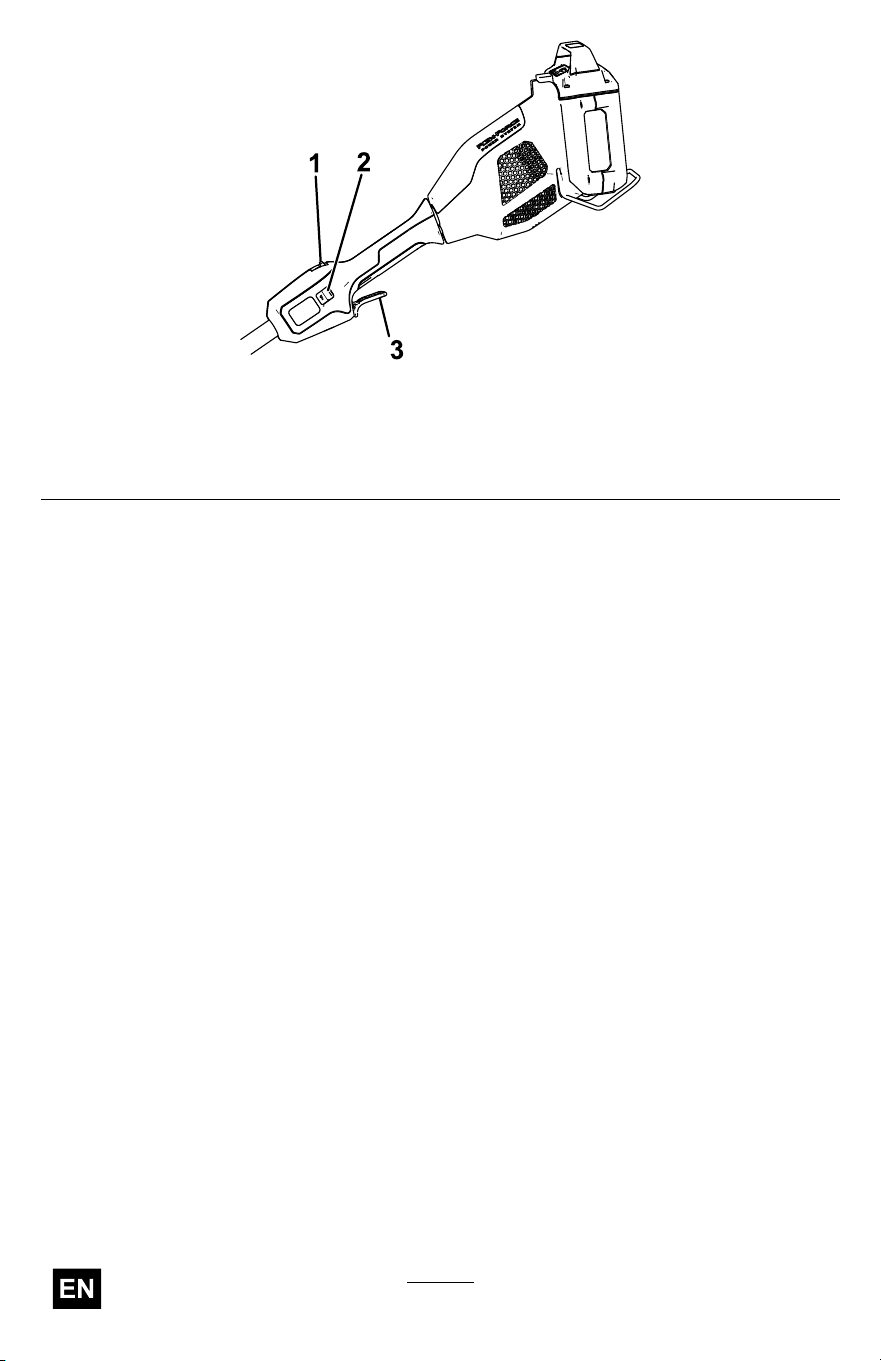
4. T o start the trimmer , press the lockout button, then squeeze the run
trigger ( Figure 10 ).
Note: Slide the 2-speed switch to change the speed of the trimmer .
17
g357456
Figure 10
1. Lockout button 3. Run trigger
2. 2-speed switch
18
Shutting Off the T rimmer
T o shut of f the trimmer , release the trigger .
Whenever you are not using the trimmer or are transporting the trimmer to
or from the work area, remove the battery pack.
Removing the Battery Pack from the T rimmer
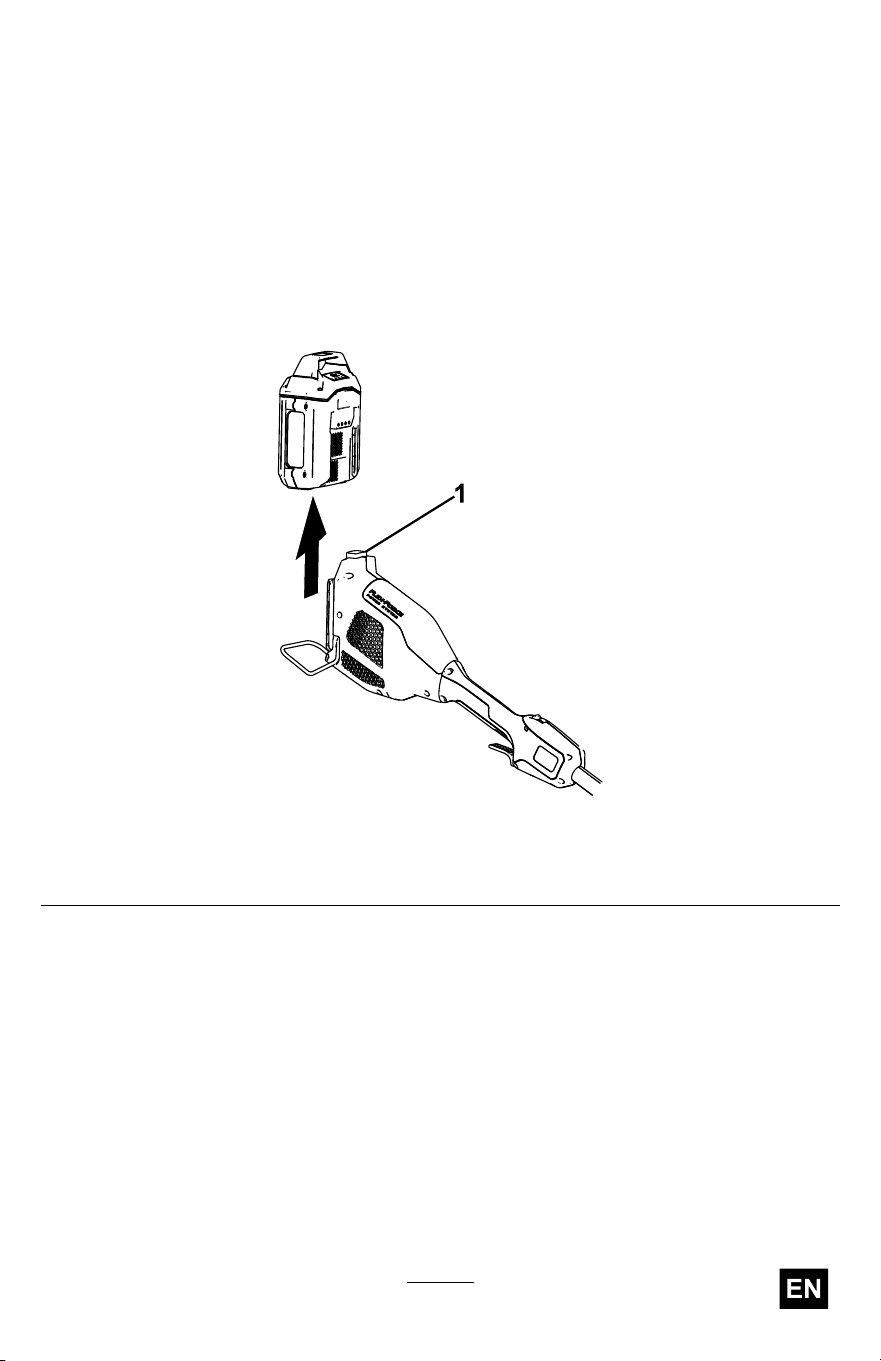
Press the battery latch on the machine to release the battery pack and
slide the battery pack out of the machine ( Figure 1 1 ).
g357457
Figure 1 1
1. Battery latch
19
Charging the Battery Pack
Important: The battery pack is not fully charged when you purchase
it. Before using the tool for the rst time, place the battery pack in
the charger and charge it until the LED display indicates the battery
pack is fully charged. Read all safety precautions.
Important: Charge the battery pack only in temperatures that are
within the appropriate range; refer to Specications ( page 16 ) .
Note: At any time, press the battery-charge-indicator button on the
battery pack to display the current charge (LED indicators).
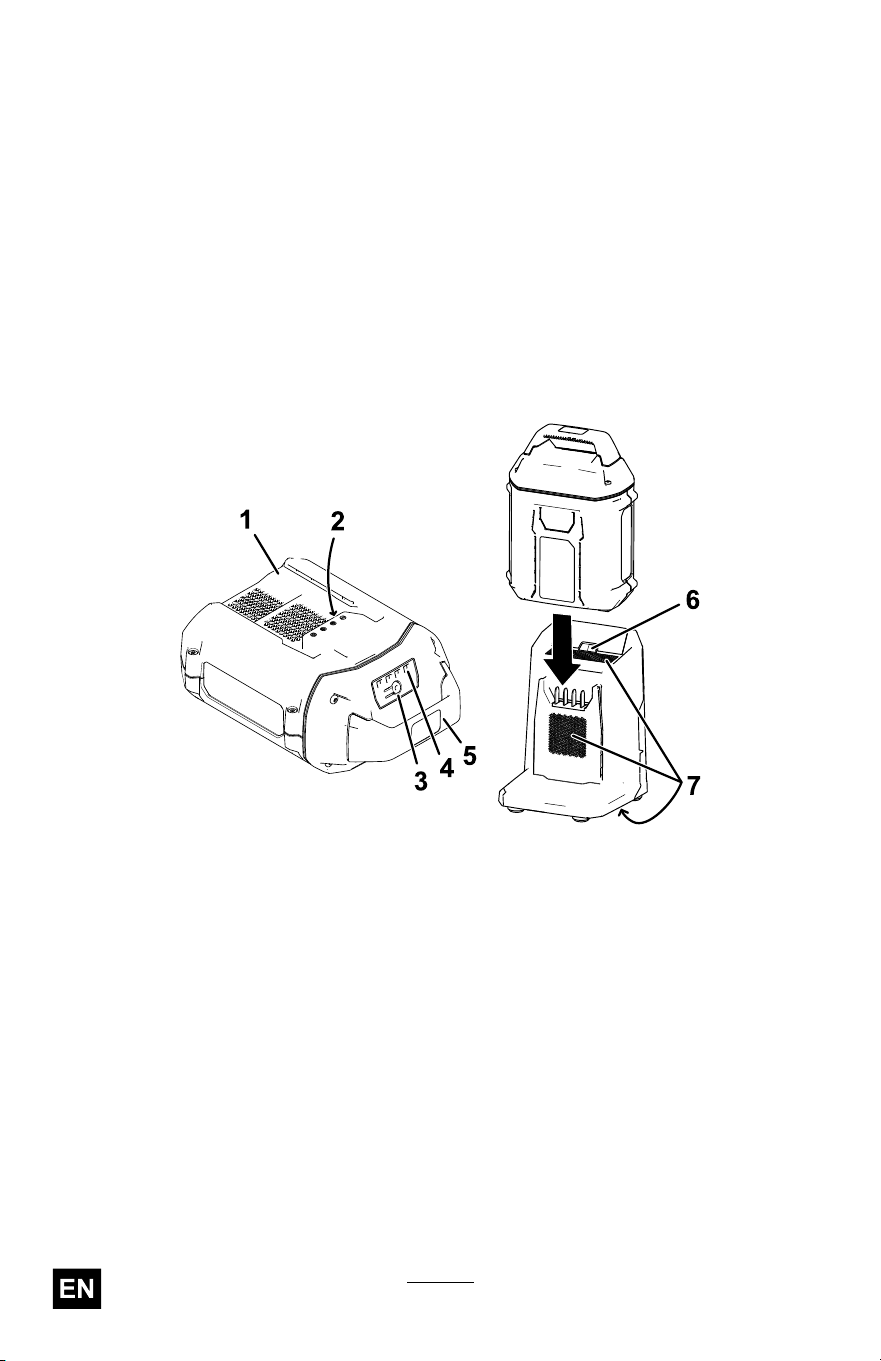
1. Ensure that the vents and charging terminals on the battery pack
and charger are clear of any dust and debris.
g473274
Figure 12
1. Battery-pack cavity 5. Handle
2. Battery-pack terminals
6. Charger LED indicator light
3. Battery-charge-indicator button
7. Charger venting areas
4. LED indicators (current charge)
2. Line up the cavity in the battery pack ( Figure 12 ) with the tongue
on the charger .
3. Slide the battery pack into the charger until it is fully seated ( Figure
12 ).
4. T o remove the battery pack, slide the battery backward out of the
charger .
20
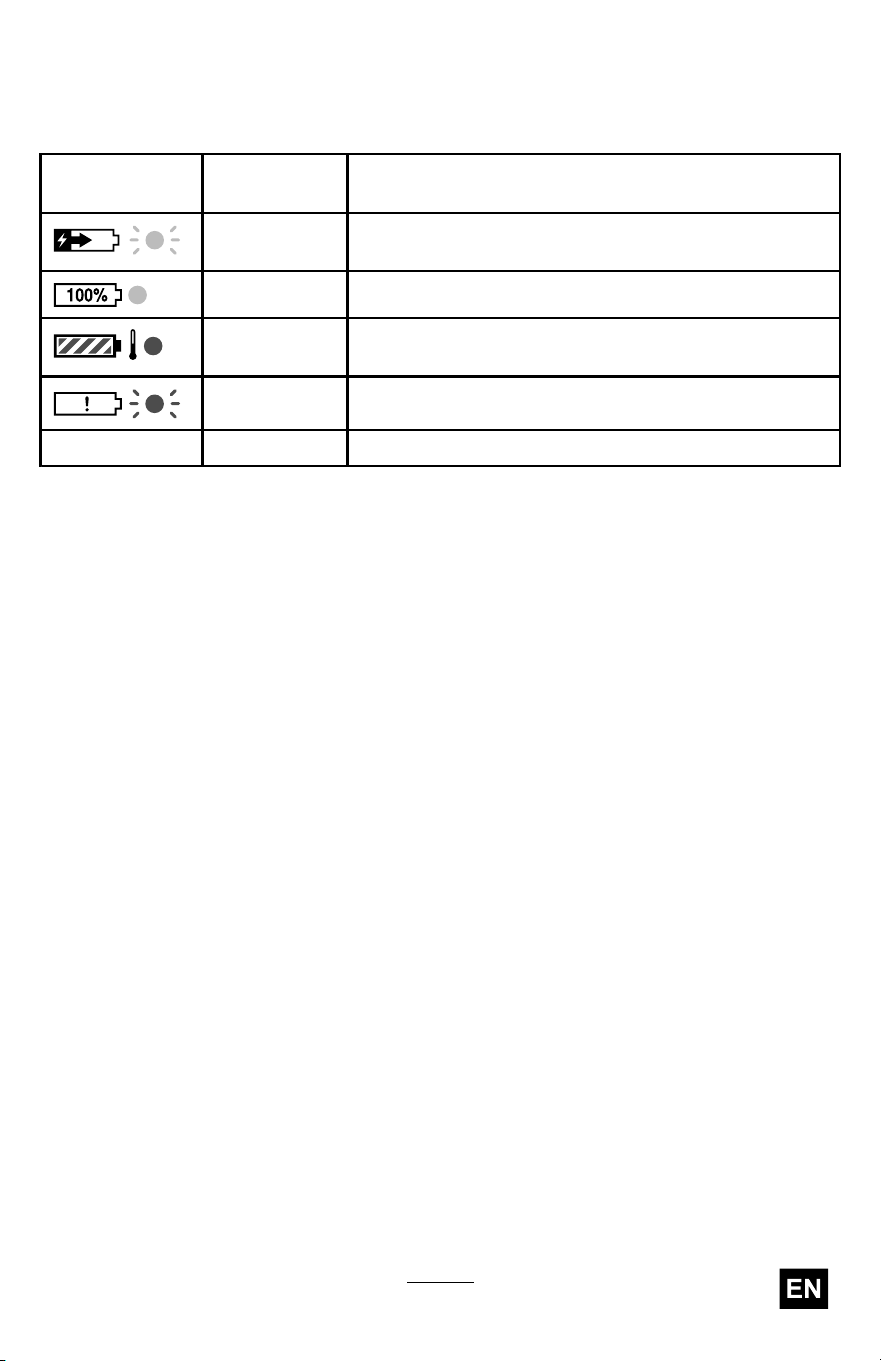
5. Refer to the following table to interpret the LED indicator light on
the battery charger .
Battery Charge Status
Charger
Symbol
Indicator
Light
Indicates
Green
blinking
Battery pack is charging
Green
Battery pack is charged
Red
Battery pack and/or battery charger is over or under
the appropriate temperature range
Red blinking
Battery pack charging fault*
Of f
No battery pack inserted
*Refer to T roubleshooting ( page 33 ) for more information.
Important: The battery pack can be left on the charger for short
periods between uses.
If the battery pack will not be used for longer periods, remove the
battery pack from the charger; refer to Storage ( page 31 ) .
21
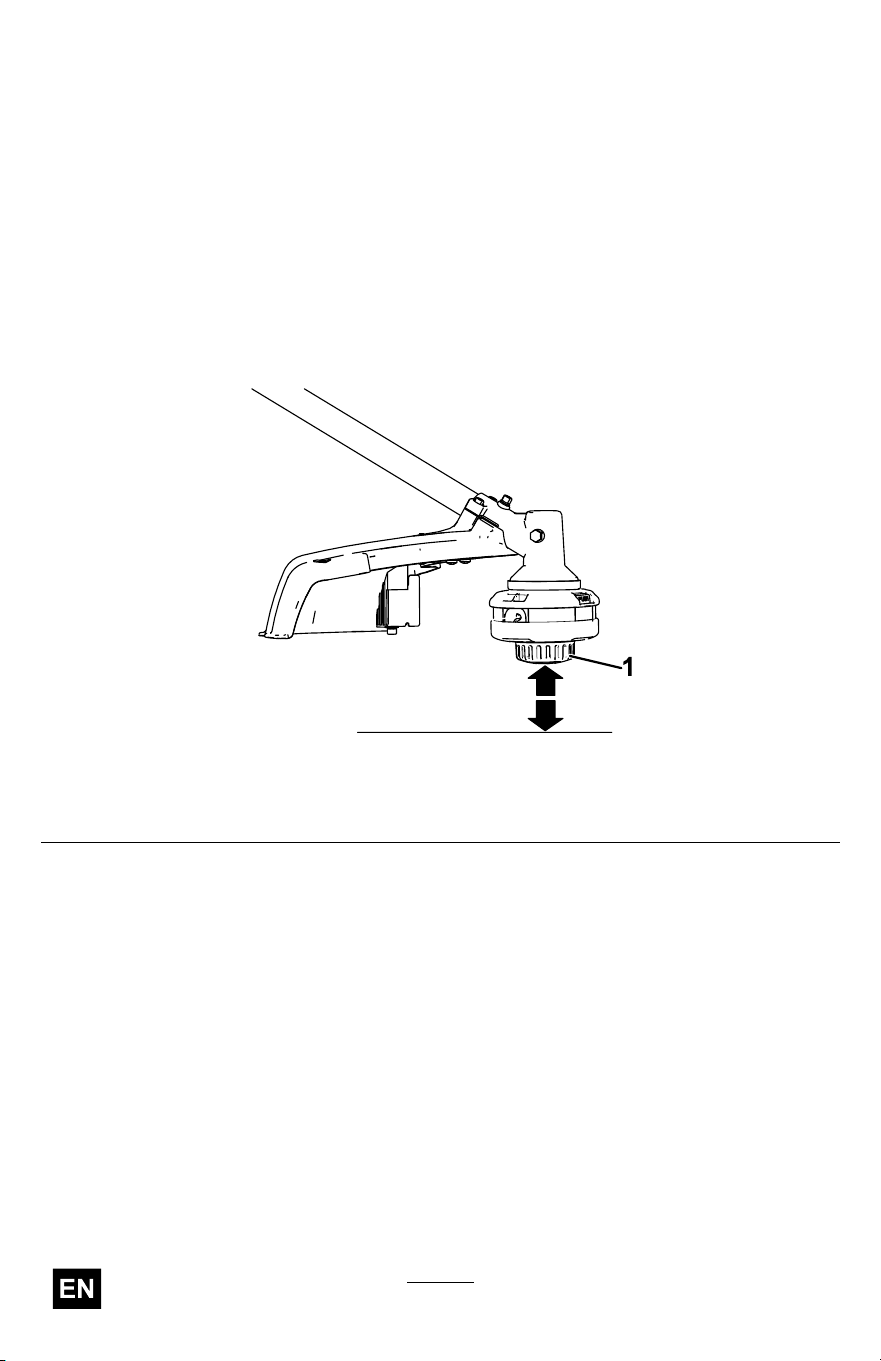
Advancing the Line Using the Bump Feed
1. Run the trimmer at full throttle.
2. T ap the bump button on the ground to advance the line. The line
advances each time the bump button is tapped. Do not hold the
bump button on the ground.
Note: The line trimming cut-of f blade on the grass deector cuts the
line to the correct length.
Note: If the line is worn too short, you may not be able to advance
the line by tapping it on the ground. If so, release the trigger and
refer to Advancing the Line Manually ( page 22 ) .
g331007
Figure 13
1. Bump button
Advancing the Line Manually
Remove the battery pack from the trimmer , then push the bump button at
the base of the spool retainer while pulling on the trimmer line to manually
advance the line.
22
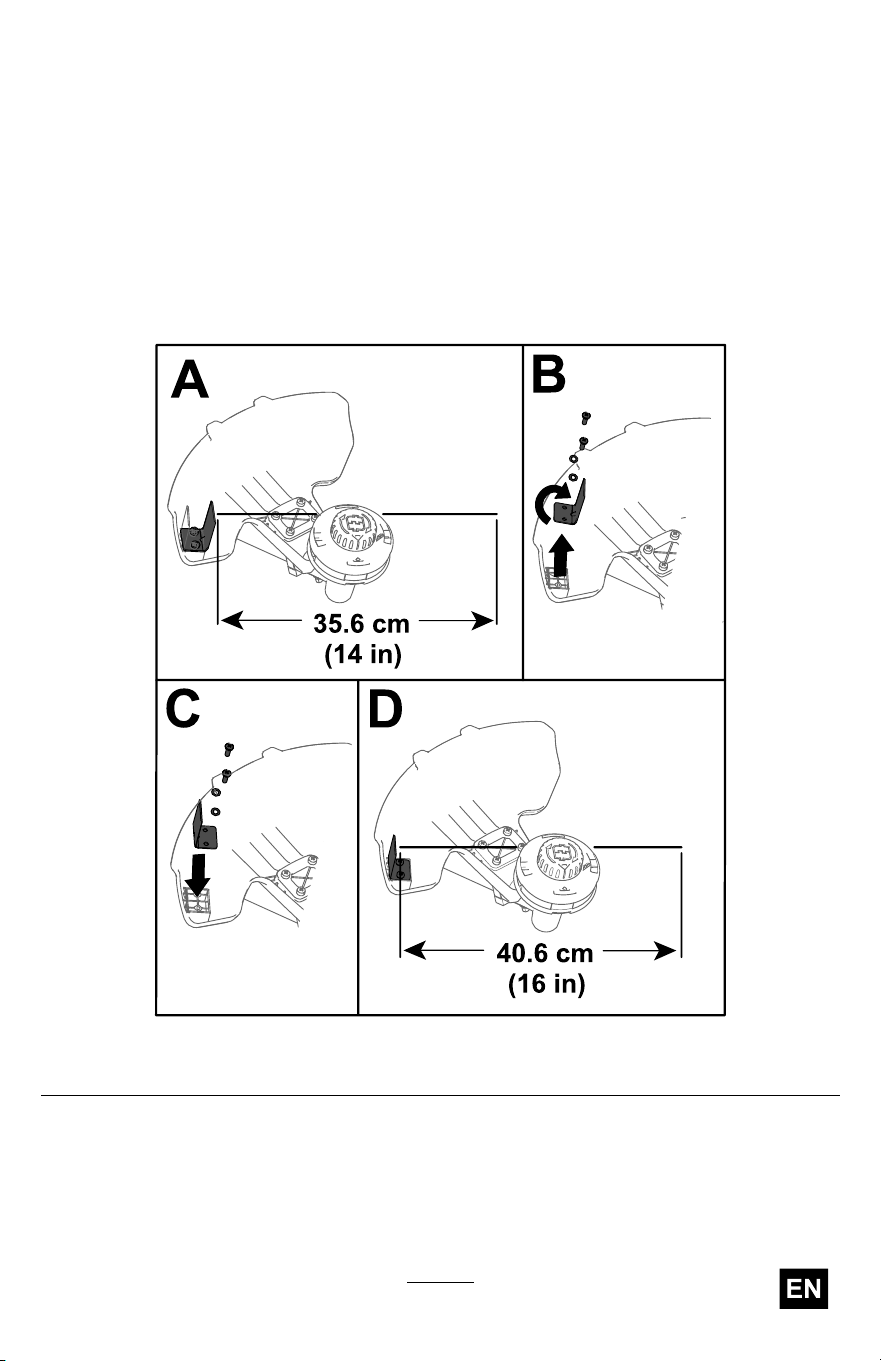
Adjusting the Cutting Swath
The trimmer comes from the factory with a cutting swath of 36.6 cm (14
inches) as shown in A of Figure 14 . Refer to the following instructions to
adjust the swath to 40.6 cm (16 inches) as shown in D of Figure 14 .
1. Remove the swath blade from the bottom of the guard by removing
the 2 screws holding it in place using the provided Allen wrench (B of
Figure 14 ) and rotate the swath blade 180°.
2. Once the swath blade is rotated, install it onto the guard using the 2
screws previously removed (C of Figure 14 ).
g524941
Figure 14
23
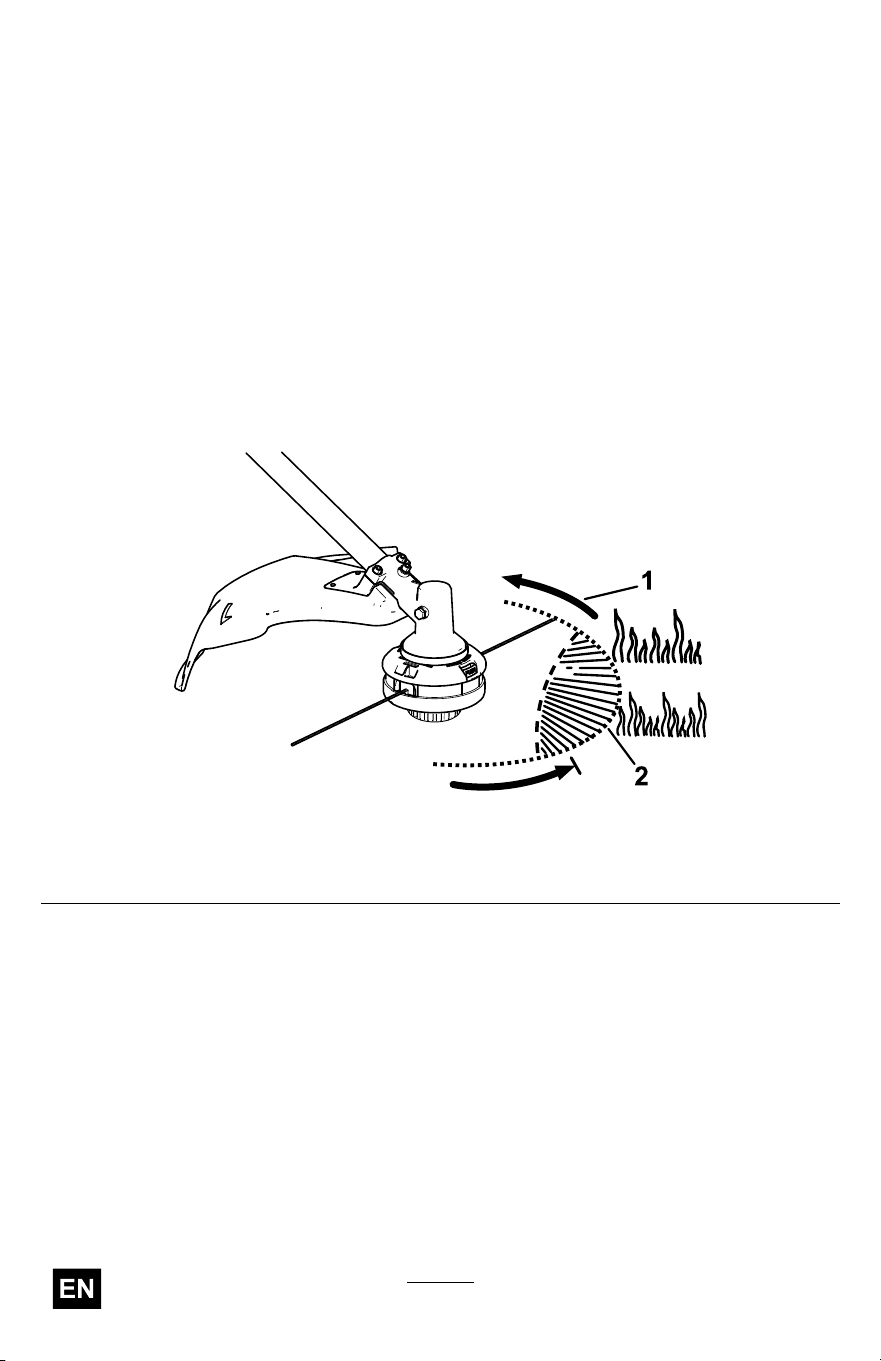
Operating T ips
• Keep the trimmer tilted toward the area being cut; this is the best
cutting area.
• The string trimmer cuts when you move it from right to left. This
prevents the trimmer from throwing debris at you.
• Use the tip of the string to do the cutting; do not force the string head
into uncut grass.
• Wire and picket fences can cause the string to wear rapidly and even
break. Stone and brick walls, curbs, and wood can also cause the
string to wear rapidly .
• A void trees and shrubs. The string can easily damage tree bark, wood
moldings, siding, and fence posts.
g330996
Figure 15
1. Direction of rotation 2. String path
24

Maintenance
After each use of the trimmer , complete the following:
1. Remove the battery from the trimmer .
2. Wipe the trimmer clean with a damp cloth. Do not hose the trimmer
down or submerge it in water .
CAUTION
The line cutoff blade on the deector is sharp and can cut
you.
Do not use your hands to clean the deector shield and
blade.
3. Wipe or scrape clean the cutting head area any time there is an
accumulation of debris.
4. Check and tighten all fasteners. If any part is damaged or lost, repair
or replace it.
5. Brush debris away from air intake vents and exhaust on motor
housing to prevent the motor from overheating.
25

Replacing the Cutting Line
Important: Use only 2.0 mm (0.080 inch) diameter monolament
cutting line or 2.4 mm (0.095 inch) diameter twisted monolament
cutting line from T oro.
1. Remove the battery pack and clean any debris from the trimmer
head.
2. Remove any old string on the spool by repetitively pressing the bump
button while pulling the line out equally from both sides of the trimmer .
3. Cut a piece of string according to the following specications.
• If you are using 2 mm (0.080 inch) string, cut one piece of line
approximately 4.9 m (16 ft).
• If you are using 2.4 mm (0.095 inch) twisted string, cut one piece
of line approximately 3 m (10 ft).
Important: Do not use any other gauge or type of string, and
do not exceed the recommended length as this could damage
the trimmer .
4. Press and turn the knob on the string head until arrow on the knob
aligns with arrow on the string head ( Figure 16 ).
5. Insert 1 end of the line at an angle into the LINE IN eyelet and push
the line through the string head track until it comes out through the
eyelet on the other side. Pull the line though the string head until the
line outside the string is evenly divided on each side.
Important: Do not disassemble the trimmer head.
6. Hold the string head in place with one hand. With your other hand,
rotate the knob in the direction shown by the arrows (clockwise).
7. Wind the line, leaving about 102 mm (4 inches) extending beyond
the eyelet on each side.
26
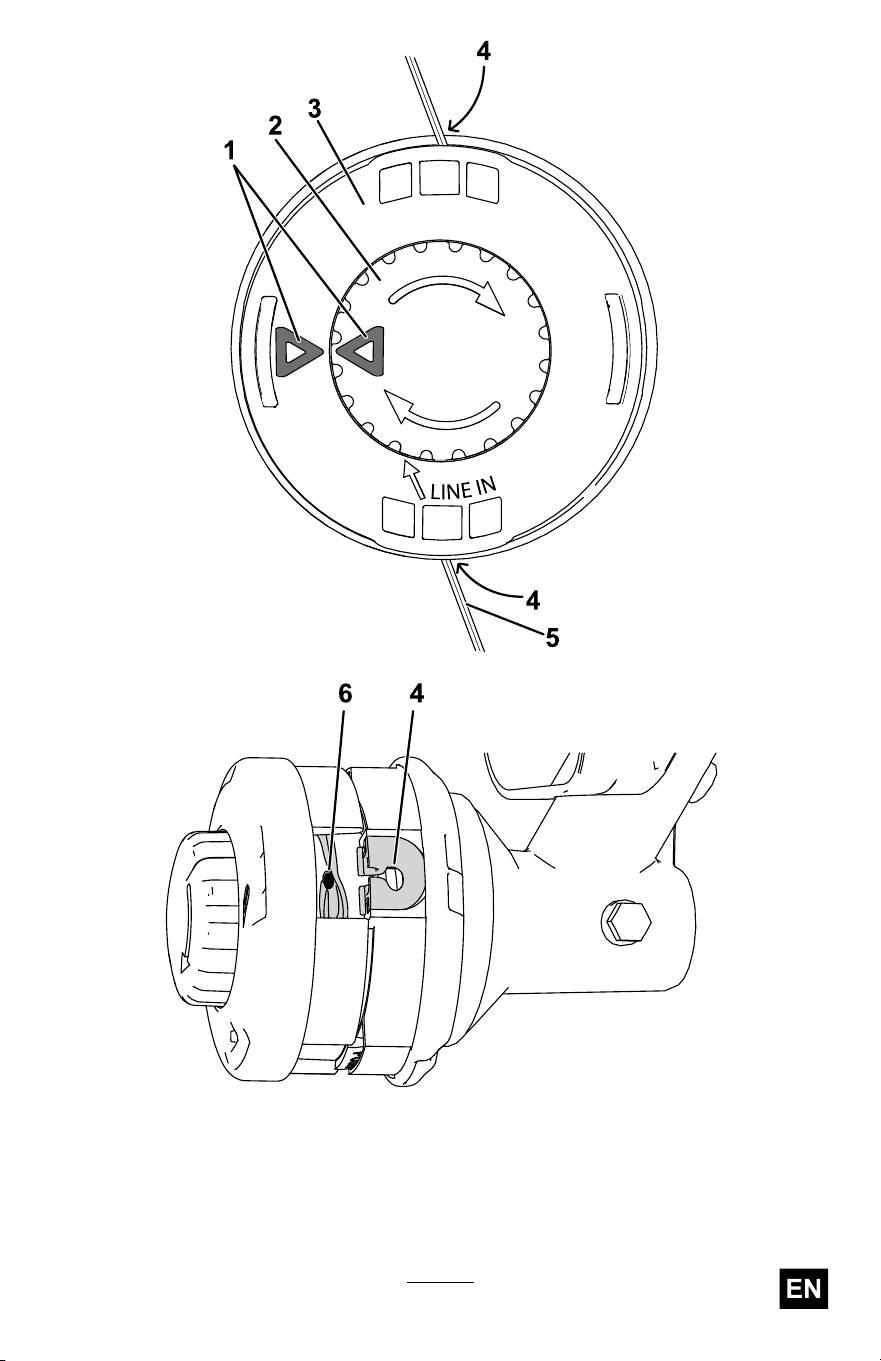
g330983
g330985
Figure 16
1. Arrows 4. Eyelet
2. Knob
5. String
3. String head
6. T rack
27
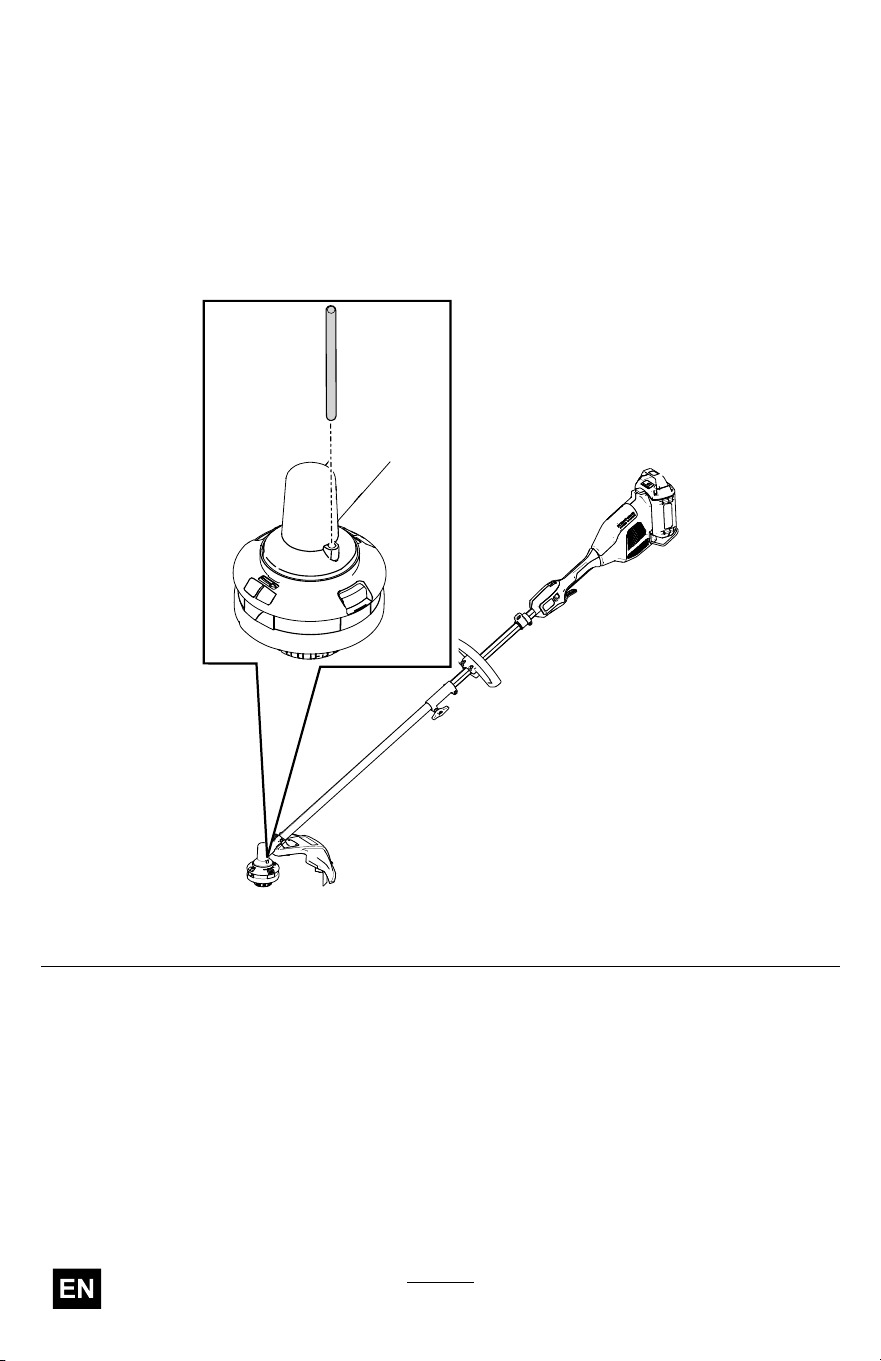
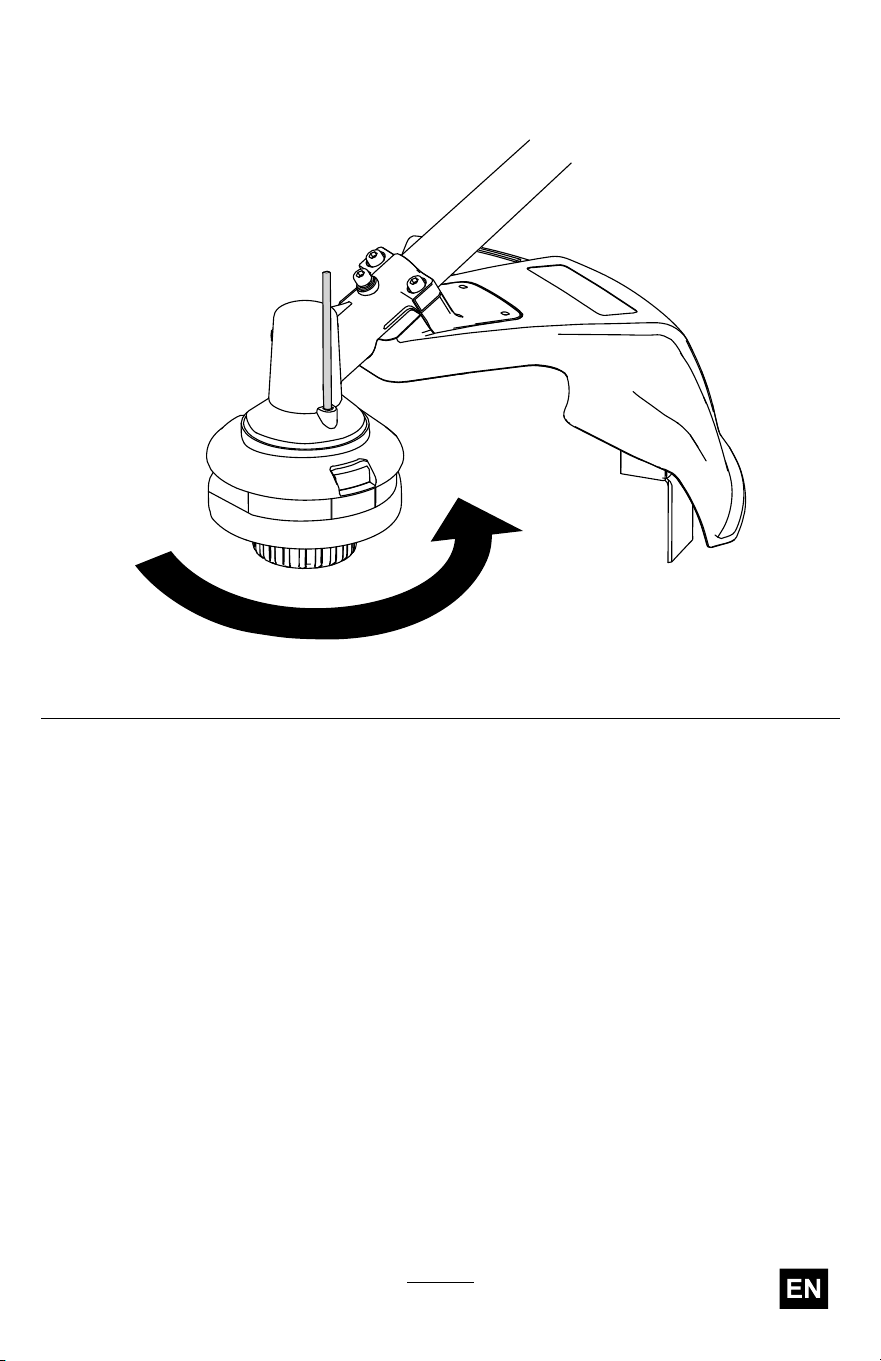
Replacing the T rimmer Head
1. Remove the battery pack from the trimmer .
2. Insert a small-diameter tool (such as a screwdriver) through the
motor housing and into the groove in the fan to secure the trimmer
head so it does not freely rotate ( Figure 17 ).
Note: With the tool inserted in the hole, rotate the trimmer head until
you feel the rod fall into the groove.
g572332
Figure 17
28
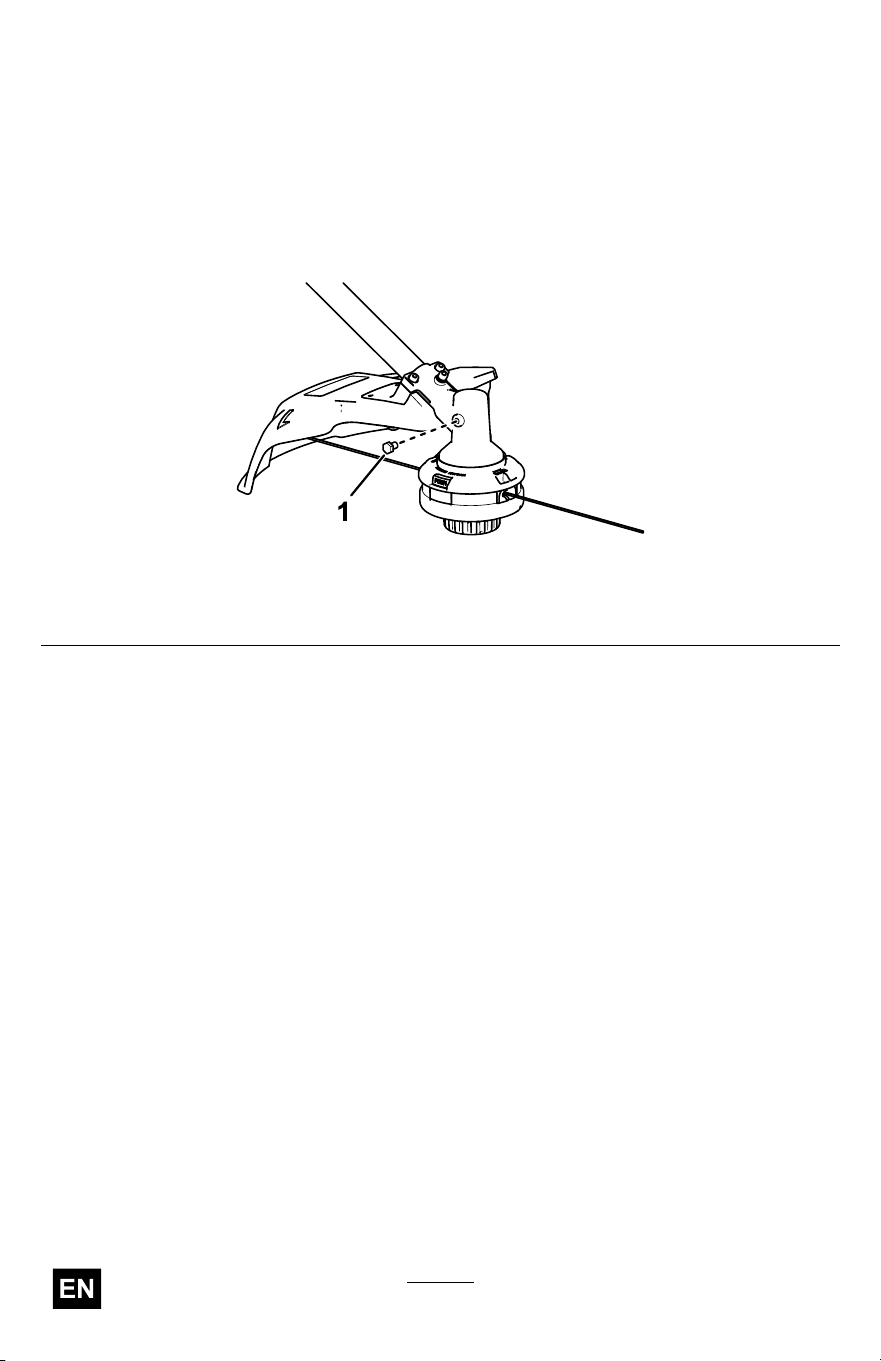
Lubricating the Gearbox
Service Interval : Every 25 hours or monthly , whichever comes rst
1. Shut of f the trimmer , remove the battery pack, and clean any debris
from the trimmer head.
2. Set the trimmer so the gearbox is upright.
3. Remove the plug from the side of the trimmer ( Figure 19 ).
g524953
Figure 19
1. Gearbox plug
4. Apply a small amount of grease into the gearbox using a grease gun.
Note: Use No. 2 lithium grease.
5. Install the gearbox plug.
30

Storage
Important: Store the machine, battery pack, and charger only
in temperatures that are within the appropriate range; refer to
Specications ( page 16 ) .
Important: If you are storing the machine for a year or longer ,
remove the battery pack from the machine and charge the battery
pack until 1 or 2 LED indicators turn green on the battery . Do not
store a fully charged or fully depleted battery . When you are ready to
use the machine again, charge the battery pack until the left indicator
light turns green on the charger or all 4 LED indicators turn green
on the battery .
• Disconnect the machine from the power supply (i.e., remove the
battery pack) and check for damage after use.
• Clean all foreign material from the machine.
• Do not store the machine or charger with the battery pack installed.
• When not in use, store the machine, battery pack, and battery charger
out of the reach of children.
• Keep the machine, battery pack, and battery charger away from
corrosive agents such as garden chemicals and de-icing salts.
• T o reduce the risk of serious personal injury , do not store the battery
pack outside or in vehicles.
• Store the machine, battery pack, and battery charger in an enclosed
clean, dry area.
31
Preparing the Battery Pack for Recycling
Important: Upon removal, cover the terminals of the battery
pack with heavy-duty adhesive tape. Do not attempt to destroy or
disassemble the battery pack or remove any of its components.
Contact your local municipality or your authorized Authorized
Service Dealer or distributor for more information on how to responsibly
recycle the battery .
Lithium-ion battery packs labeled with the Call2Recycle seal
can be recycled at any participating retailer or battery recycling
facility in the Call2Recycle program (US and Canada only). T o
locate a participating retailer or facility closest to you, please call
1-800-822-8837 or visit www .call2recycle.org.
Lithium-ion battery packs labeled with the High Energy Battery
(HEB) seal shown here, and any 60V Flex-Force batteries 6.0 Ah
or greater , can be recycled at any participating dealer or retailer
in the Call2Recycle HEB program. T o locate a participating
dealer or retailer closest to you, please visit www .hebattery .org.
If you cannot locate a participating retailer or facility nearby , or have
questions about which recycling program your battery pack may qualify
for , please visit the customer support site listed in the operator ’ s manual
for your tool/equipment for more information on how to responsibly recycle
the battery pack.
If you are located outside of the US and Canada, please contact your
Authorized Service Dealer or distributor for more information on how to
responsibly recycle the battery pack.
32
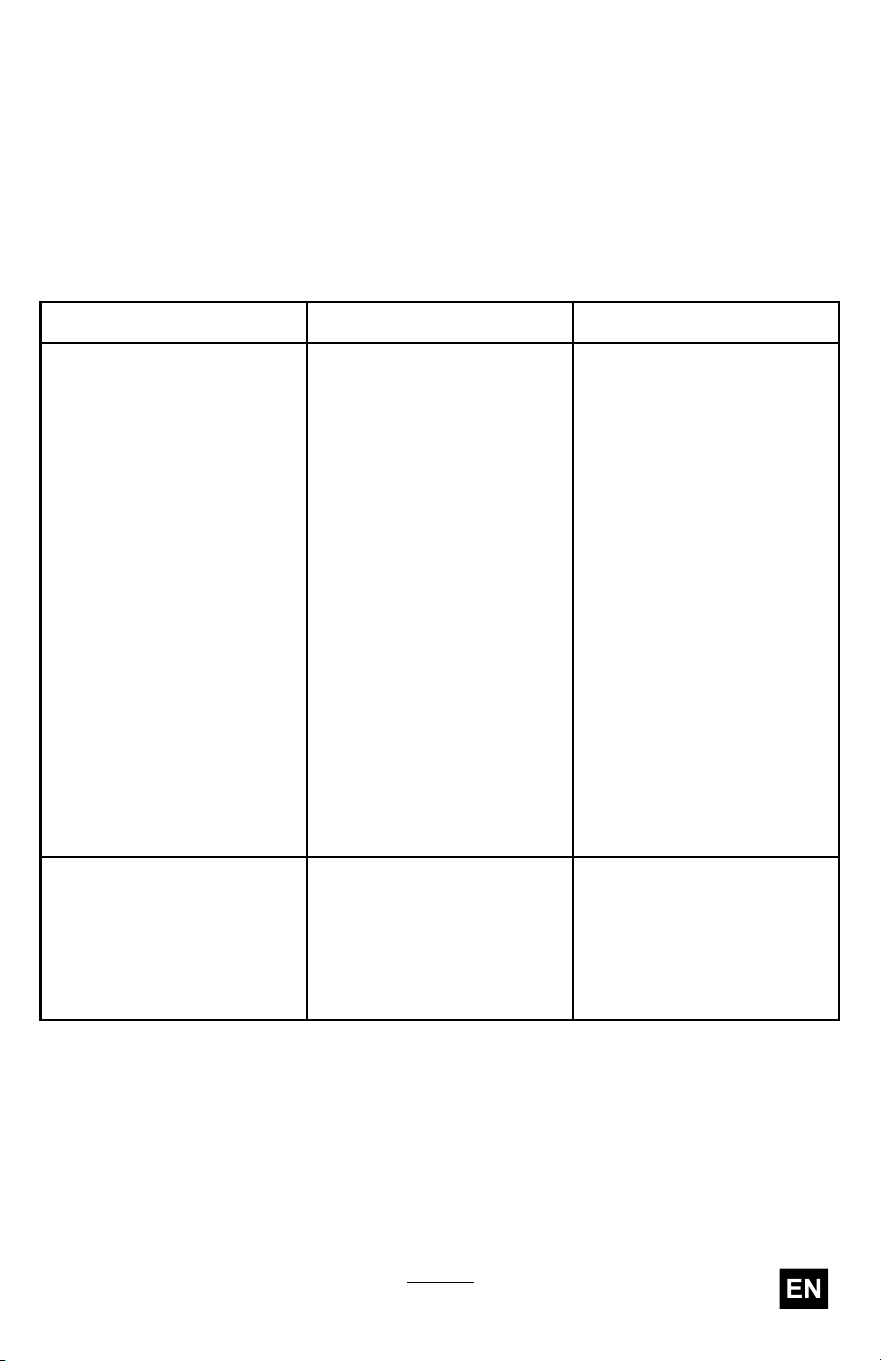
T roubleshooting
Perform only the steps described in these instructions. All further
inspection, maintenance, and repair work must be performed by an
authorized service center or a similarly qualied specialist if you cannot
solve the problem yourself.
Always remove the battery from the tool when troubleshooting, inspecting,
maintaining, or cleaning the tool.
Problem
Possible Cause Corrective Action
1. The battery is not fully
installed in the tool.
1. Remove and then
replace the battery into
the tool, making sure
that it is fully installed
and latched.
2. The battery pack is not
charged.
2. Remove the battery
pack from the tool and
charge it.
3. The battery pack is over
or under the appropriate
temperature range.
3. Move the battery pack
to a place where it is
dry and the temperature
is between 5°C (41°F)
and 40°C (104°F).
4. There is moisture on
the leads of the battery
pack.
4. Allow the battery pack
to dry or wipe it dry .
5. The battery pack is
damaged.
5. Replace the battery
pack.
The tool does not run or
does not run continuously .
6. There is another
electrical problem with
the tool.
6. Contact an Authorized
Service Dealer .
1. The battery pack charge
capacity is too low .
1. Remove the battery
pack from the tool and
fully charge the battery
pack.
The tool does not reach full
power or the motor housing
is getting hot.
2. The air vents are
blocked.
2. Clean the air vents.
33
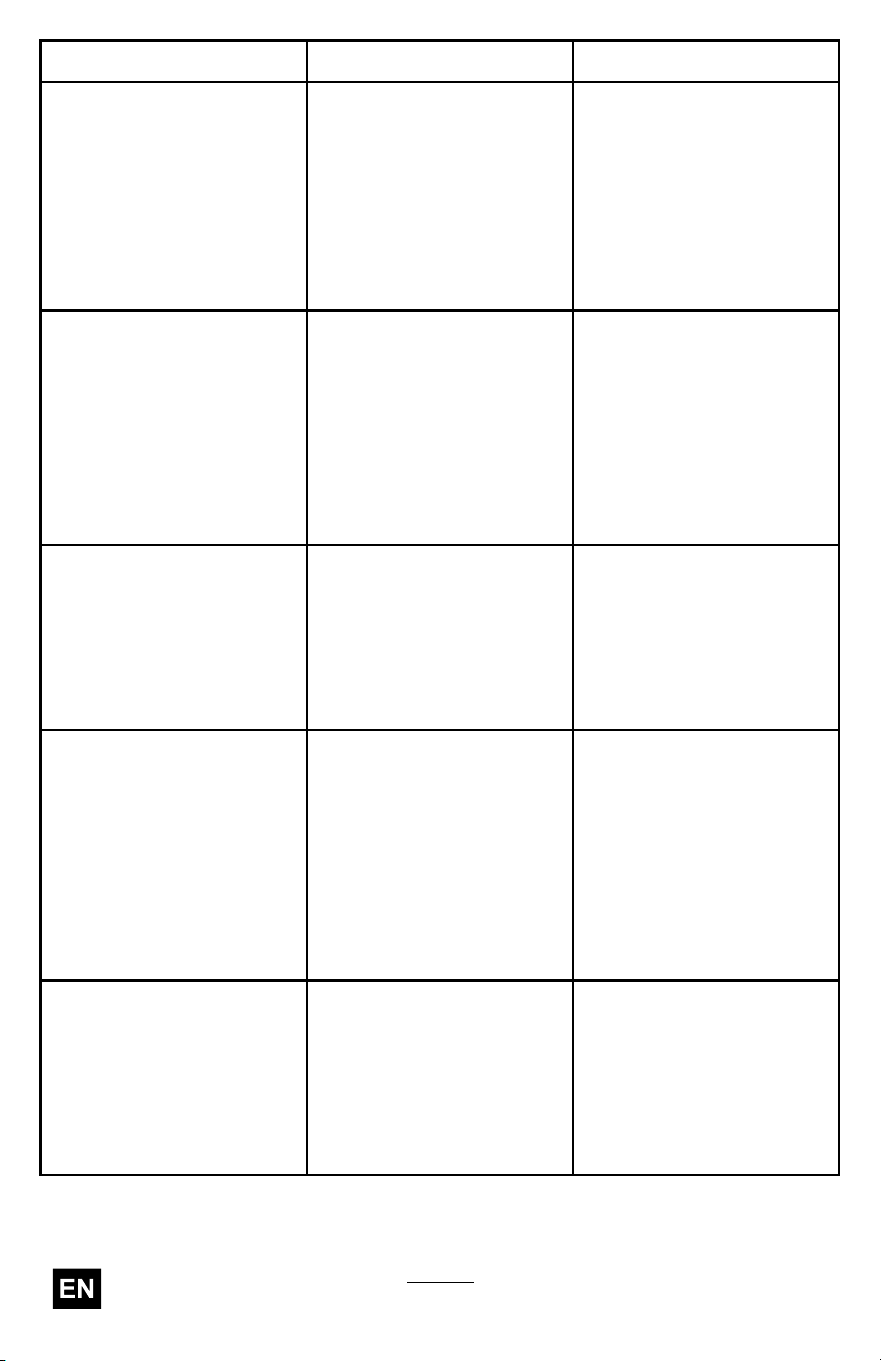
Problem
Possible Cause Corrective Action
1. There is debris under
the grass shield or in
the bump head housing
on the trimmer .
1. Clean any debris from
under the grass shield
or in the bump head
housing.
The tool is producing
excessive vibration or
noise.
2. The spool is not
properly wound.
2. Advance the line using
the bump head and/or
remove the line on the
spool and wind the
spool again.
1. The trimmer is out of
line.
1. Add more line to the
bump head.
2. The line is tangled in the
bump head housing.
2. Remove the bump head
cover and untangle the
line.
The bump head does not
advance the line.
3. There is debris under
the grass shield or in
the bump head housing
on the trimmer .
3. Clean any debris from
under the grass shield
or in the bump head
housing.
1. The battery pack is over
or under the appropriate
temperature range.
1. Move the battery pack
to a place where it is
dry and the temperature
is between 5°C (41°F)
and 40°C (104°F).
The battery pack loses
charge quickly .
2. The trimmer is
overloaded.
2. T rim at a slower pace.
1. The battery charger
is over or under
the appropriate
temperature range.
1. Unplug the battery
charger and move it to
a place where it is dry
and the temperature
is between 5°C (41°F)
and 40°C (104°F).
The battery charger is not
working.
2. The outlet that the
battery charger is
plugged into does not
have power .
2. Contact your licensed
electrician to repair the
outlet.
The LED indicator light on
the battery charger is red.
1. The battery charger
and/or battery pack
is over or under
the appropriate
temperature range.
1. Unplug the battery
charger and move the
battery charger and
battery pack to a place
where it is dry and the
temperature is between
5°C (41°F) and 40°C
(104°F).
34
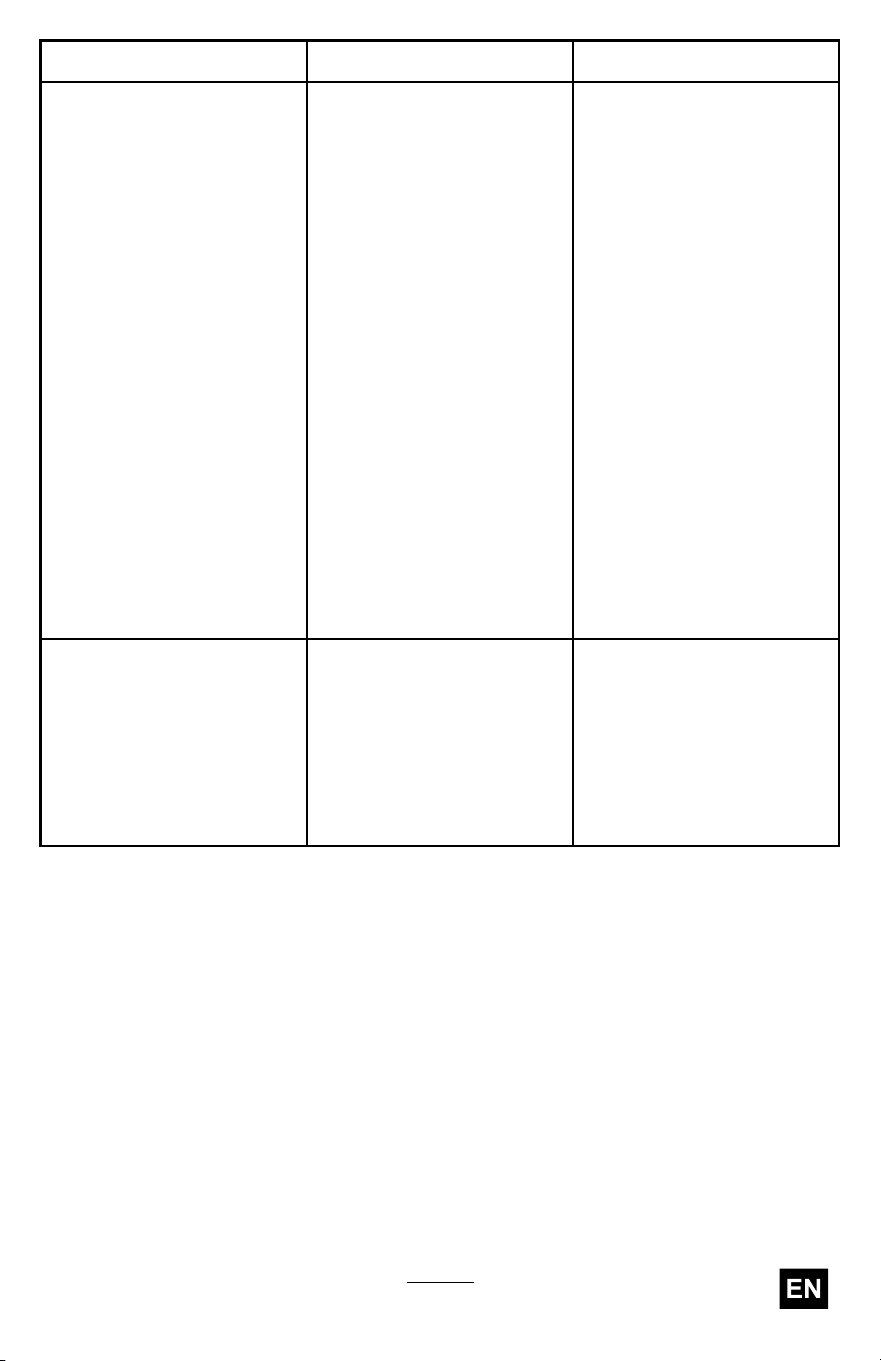
Problem
Possible Cause Corrective Action
1. There is an error in
the communication
between the battery
pack and the charger .
1. Remove the battery
pack from the battery
charger , unplug the
battery charger from
the outlet, and wait
10 seconds. Plug the
battery charger into the
outlet again and place
the battery pack on the
battery charger . If the
LED indicator light on
the battery charger is
still blinking red, repeat
this procedure again.
If the LED indicator
light on the battery
charger is still blinking
red after 2 attempts,
properly dispose of the
battery pack at a battery
recycling facility .
The LED indicator light
on the battery charger is
blinking red.
2. The battery pack is
weak.
2. Properly dispose of the
battery pack at a battery
recycling facility .
1. There is moisture on
the leads of the battery
pack.
1. Allow the battery pack
to dry or wipe it dry .
The tool does not run or
run continuously .
2. The battery is not fully
installed into the tool.
2. Remove and then
replace the battery into
the tool making sure
that it is fully installed
and latched.
35

California Proposition 65 W arning Information
What is this warning?
Y ou may see a product for sale that has a warning label like the following:
W ARNING: Cancer and Reproductive
Harm—www .p65W arnings.ca.gov .
What is Prop 65?
Prop 65 applies to any company operating in California, selling products in California, or manufacturing products
that may be sold in or brought into California. It mandates that the Governor of California maintain and publish a
list of chemicals known to cause cancer , birth defects, and/or other reproductive harm. The list, which is updated
annually , includes hundreds of chemicals found in many everyday items. The purpose of Prop 65 is to inform the
public about exposure to these chemicals.
Prop 65 does not ban the sale of products containing these chemicals but instead requires warnings on any product,
product packaging, or literature with the product. Moreover , a Prop 65 warning does not mean that a product is in
violation of any product safety standards or requirements. In fact, the California government has claried that
a Prop 65 warning “is not the same as a regulatory decision that a product is ‘safe’ or ‘unsafe.’” Many of these
chemicals have been used in everyday products for years without documented harm. For more information, go
to https://oag.ca.gov/prop65/faqs-view-all .
A Prop 65 warning means that a company has either (1) evaluated the exposure and has concluded that it exceeds
the “no signicant risk level”; or (2) has chosen to provide a warning based on its understanding about the presence
of a listed chemical without attempting to evaluate the exposure.
Does this law apply everywhere?
Prop 65 warnings are required under California law only . These warnings are seen throughout California in a wide
range of settings, including but not limited to restaurants, grocery stores, hotels, schools, and hospitals, and on a
wide variety of products. Additionally , some online and mail order retailers provide Prop 65 warnings on their
websites or in catalogs.
How do the California warnings compare to federal limits?
Prop 65 standards are often more stringent than federal and international standards. There are various substances
that require a Prop 65 warning at levels that are far lower than federal action limits. For example, the Prop 65
standard for warnings for lead is 0.5 μg/day , which is well below the federal and international standards.
Why don’t all similar products carry the warning?
• Products sold in California require Prop 65 labelling while similar products sold elsewhere do not.
• A company involved in a Prop 65 lawsuit reaching a settlement may be required to use Prop 65 warnings for its
products, but other companies making similar products may have no such requirement.
• The enforcement of Prop 65 is inconsistent.
• Companies may elect not to provide warnings because they conclude that they are not required to do so
under Prop 65; a lack of warnings for a product does not mean that the product is free of listed chemicals
at similar levels.
Why does T oro include this warning?
T oro has chosen to provide consumers with as much information as possible so that they can make informed
decisions about the products they buy and use. T oro provides warnings in certain cases based on its knowledge of
the presence of one or more listed chemicals without evaluating the level of exposure, as not all the listed chemicals
provide exposure limit requirements. While the exposure from T oro products may be negligible or well within the “no
signicant risk” range, out of an abundance of caution, T oro has elected to provide the Prop 65 warnings. Moreover , if
T oro does not provide these warnings, it could be sued by the State of California or by private parties seeking to
enforce Prop 65 and subject to substantial penalties.
Rev
