1
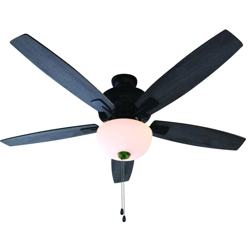
52” Hamilton
Ceiling Fan
Owner’s Manual
Model #25101
Item # 355-0132
SAFETY INSTRUCTIONS
1
WARNING:
• To avoid risk of electrical shock, be sure to shut off power at the main fuse or circuit breaker
panel box before installing or servicing this fixture. Turning off the electrical power by using the
light switch only is not sufficient to prevent electrical shock hazard.
• To reduce the risk of fire, electric shock, or personal injury, mount fan to an outlet box marked
“acceptable for fan support up to 35 lbs. (16 kg)” and use mounting screws provided with the
outlet box. The total weight of this fan is approximately 21 lbs. (9.5 kg).
• All wiring must be in accordance with the National Electrical Code ANSI/NFPA 70 and any
applicable local codes. Electrical installation should be performed by a qualified licensed
electrician.
• To reduce the risk of fire or electric shock, do not use this fan with any solid-state speed control
device.
• Do not bend the blade iron brackets when installing the brackets, balancing the blades, or
cleaning the fan. Do not insert foreign objects in between rotating fan blades.
CAUTION:
• To reduce the risk of injury, install the fan so that the blades are at least 7 feet (2.1 meters)
above the floor and at least 30 inches (0.76 meters) from the tip of the blades to the wall.
• Check and retighten all screws, nuts, and bolts to insure they are secured prior to operating the
fan.
• Be sure the outlet box is properly grounded and that a ground wire (green or bare) is present.
• When changing (reversing) the blade direction, turn off the fan and wait for the fan blades to
stop completely.
• To reduce the risk of serious bodily injury, do not use power tools to assemble any part of the
fan, including the blades.
• To reduce the risk of personal injury, use only parts provided with this fan. The use of parts
other than those provided with this fan will void the warranty.
• Do not use water or detergents when cleaning the fan or fan blades. A dry dust cloth or lightly
dampened cloth is recommended to prevent scratching and will be suitable for most cleaning.
• In case this fan needs to be returned to the factory for repairs, it must be shipped in its original
carton and foam inserts to insure proper protection against shipping damage that may exceed
the initial cause for return.
• Please read and understand these safety instructions and the installation guide before
attempting to assemble, install, or operate the fan.
2
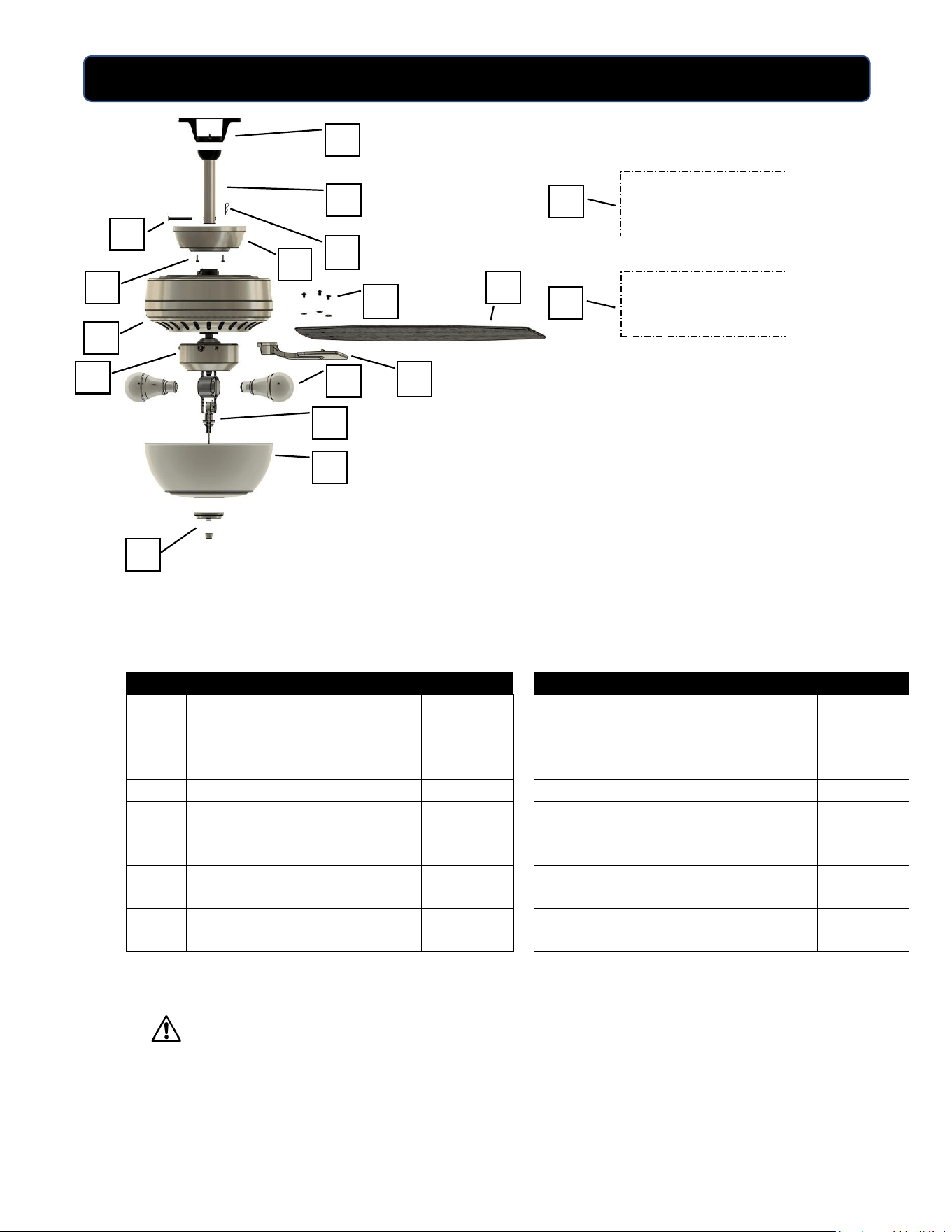
PACKAGE CONTENTS
PART
DESCRIPTION
QUANTITY
PART
DESCRIPTION
QUANTITY
A
Mounting Bracket
1
J
Blade Irons
5
B
Downrod and Downrod Ball
1
K
Light Kit Housing and Cover
with 3 Screws (pre-installed)
1
C
Downrod Pin (pre-installed)
1
L
Light Kit Post
1
D
Downrod Clip (pre-installed)
1
M
LED Light Bulbs
2
E
Canopy
1
N
Glass Bowl
1
F
Canopy Screws (pre-installed in
mounting bracket)
2
O
Cap and Finial
1 each
G
Motor Housing
1
P
Hardware Bag and Balancing
Kit
1
H
Blades
5
Q
Owner's Manual
1
I
Blade Screws and Washers
15 each
IMPORTANT REMINDER: You must use the parts provided
with this fan for proper installation and safety.
HARDWARE KIT
OWNER’S MANUAL
B
N
Q
E
P
M
A
D
D
D
O
C
L
H
J
B
G
F
I
D
D
K
3
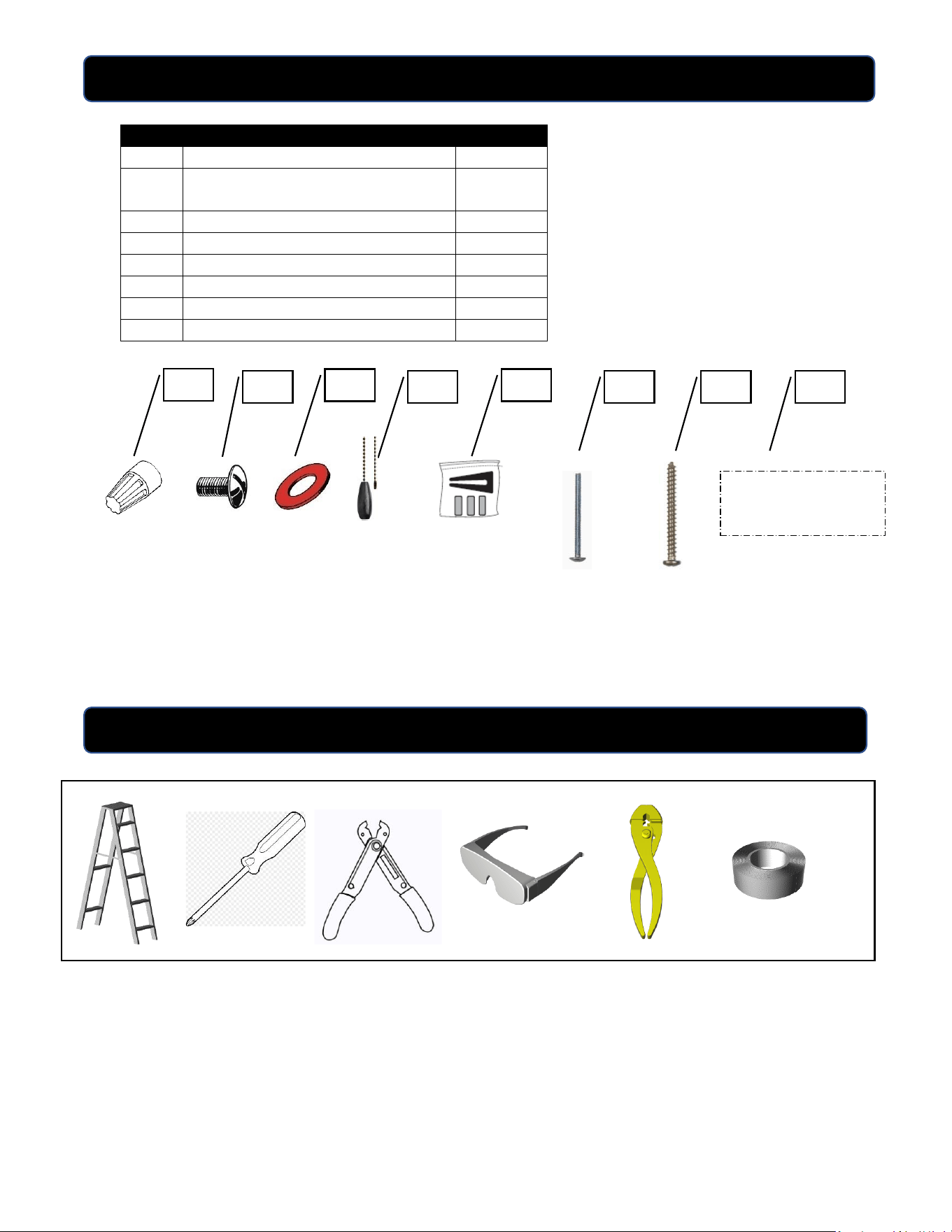
HARDWARE KIT CONTENTS
NOTE: For your convenience some extra hardware may be included. The quantity listed
above is the number required for installation.
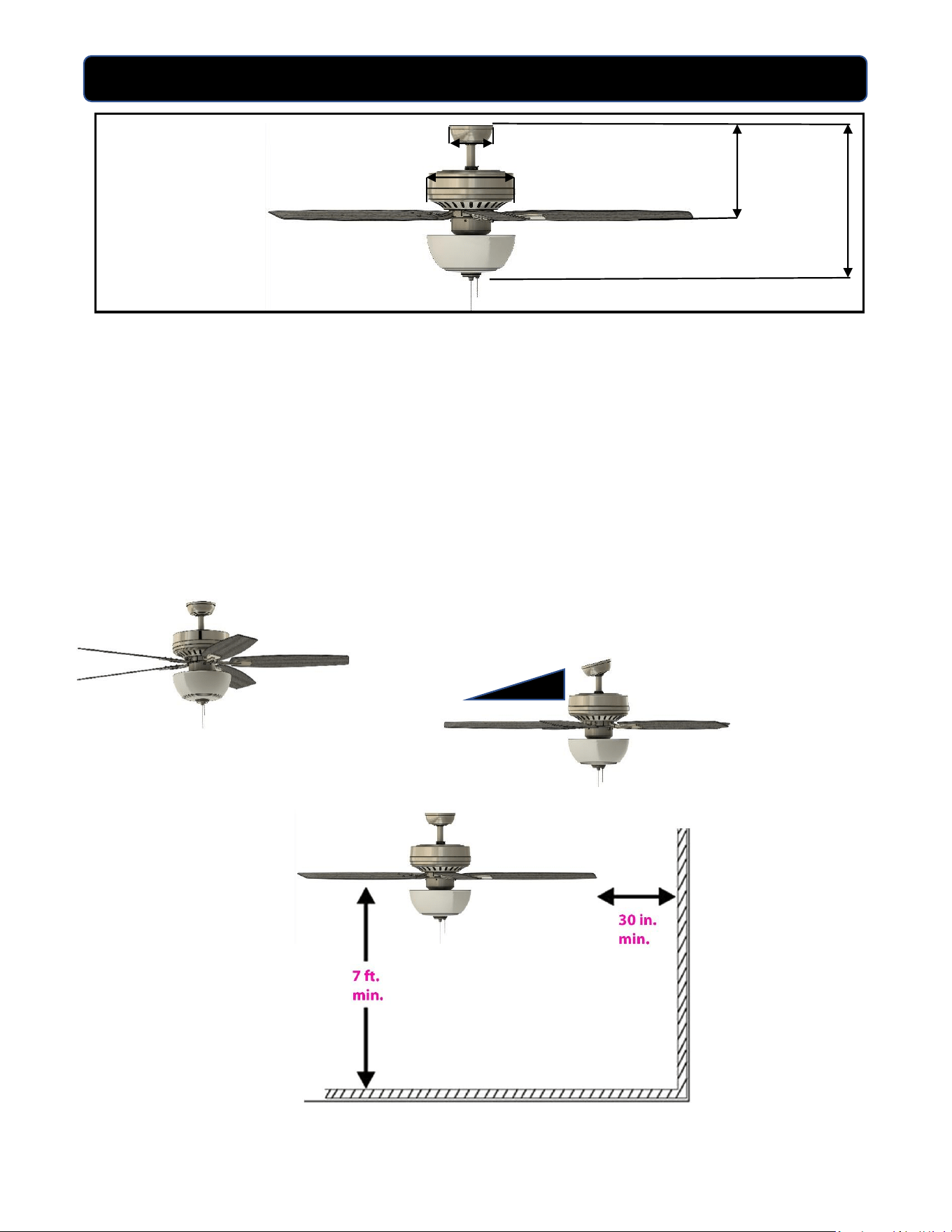
Tools required for assembly: Step Ladder, Phillips Screwdriver, Wire Strippers, Safety
Glasses, Pliers, and Electrical Tape.
Helpful Tools: AC Tester Light/Multimeter, Tape Measure, and Wiring Handbook
PART
DESCRIPTION
QUANTITY
AA
Wire Connectors
4
BB
Blade screws (10 in parts bag, 5 with
motor shipping blocks
15
CC
Fiber Blade Washers
15
DD
Pull chain extensions
2
EE
Balance Kit
1
FF
Machine Screws and Lock Washers
2 each
GG
Wood Screws and Washers
2 each
HH
Cap, Finial, Washers for light kit
1 set
TOOLS REQUIRED (not included)
AA
BB
CC
EE
DD
FF
GG
Cap, Finial, Washers
for light kit
HH
4
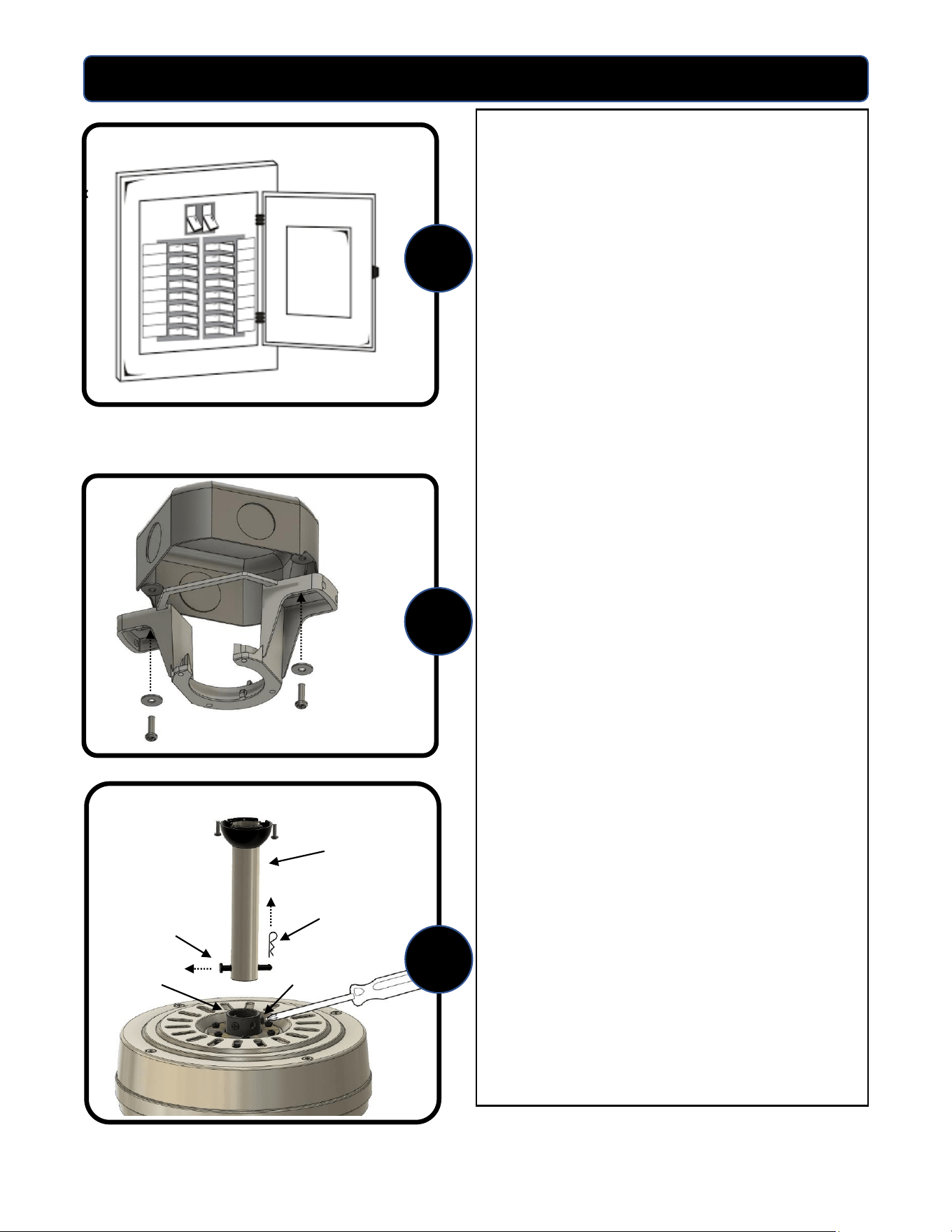
DIMENSION REFERENCE
Angled Mount
A: 17.9 in. B: 10.9 in. C: 10.2 in. D: 5.1 in.
Choose one of the following mounting options:
Downrod Mount is best suited for ceilings 8 ft. or higher. For taller ceilings you may
want to use a longer downrod (sold separately).
Angled Ceiling Mount is best suited for angled or vaulted ceilings. A longer downrod is
sometimes necessary to ensure proper blade clearance from the ceiling. If using the
angled mount, check to ensure that the ceiling angle is not steeper than 15 degrees.
NOTE: Make sure blades are at least 30 inches from any wall or obstruction and at least
7 feet above the floor.
A
B
N
C
Downrod Mount
D
15⁰ Max.
5
ASSEMBLY INSTRUCTIONS
c
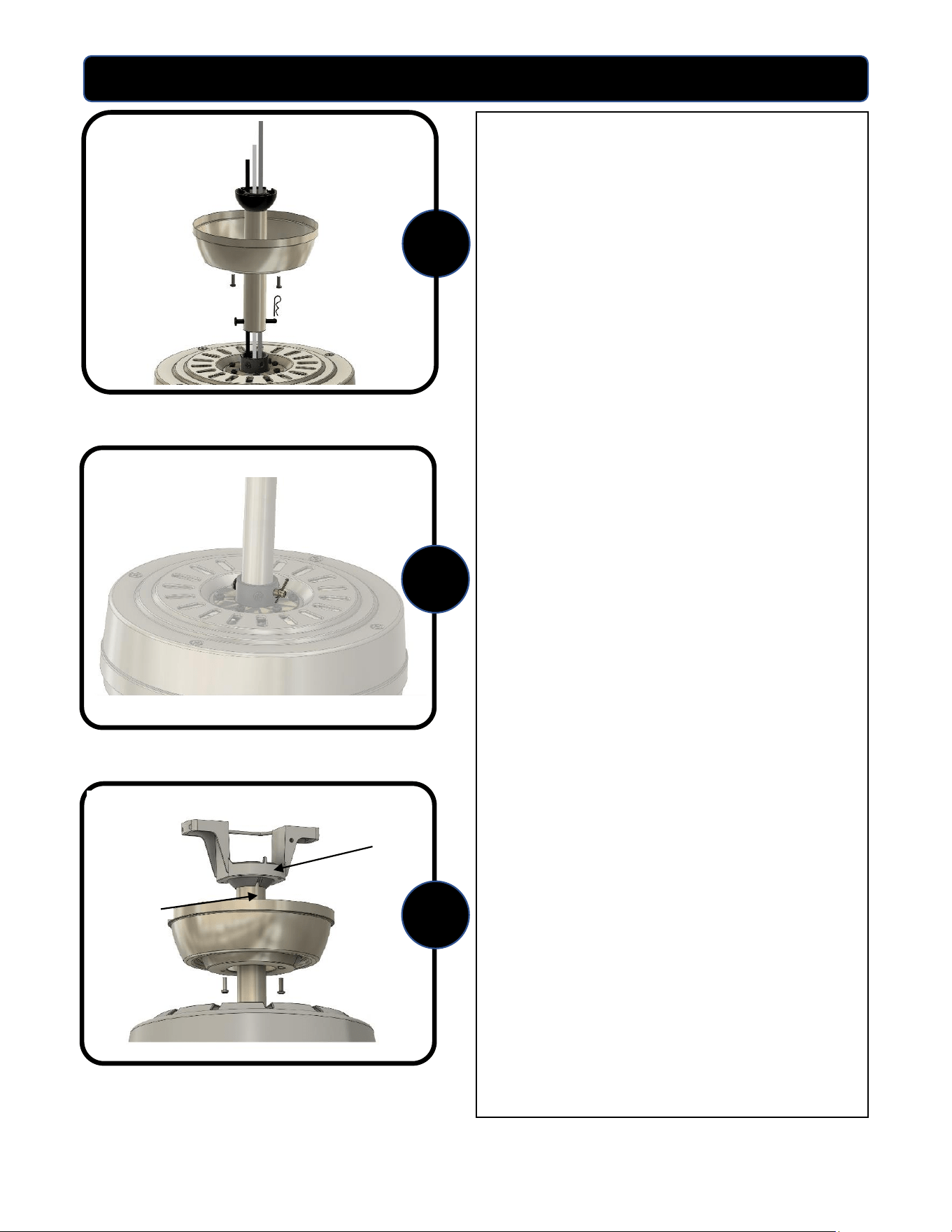
1. Turn OFF the electrical power at the
main fuse or circuit breakers.
NOTE: Before continuing installation,
confirm that the power is still turned off
at the main circuit breaker or by
removing the correct fuse. Turning the
power off using a wall switch is not
sufficient to prevent electrical shock.
2. Secure the mounting bracket to the
outlet box (not included) using the
screws and washers provided with the
outlet box.
WARNING: To reduce the risk of fire
electrical shock, or personal injury,
mount to the outlet box marked
“acceptable for fan support” using the
mounting screws and washers provided
with the outlet box.
3. DOWNROD MOUNT – Remove the
downrod pin and downrod clip from
the downrod. Then loosen but do not
remove the two set screws in the
yoke. Set screws need to be loosened
enough to fully insert the downrod.
1
2
3
Downrod Clip
Yoke
Downrod Pin
Downrod
Set Screw
6
ASSEMBLY INSTRUCTIONS
4. Slide the canopy onto the downrod
with the open end facing up toward
the ball. Feed the wires coming from
the yoke through the canopy and
downrod.
5. Insert the downrod into the yoke and
reinstall the downrod pin and
downrod clip. Then re-tighten the
two set screws.
NOTE: With wiring extending out of the
downrod, measure 8 inches of lead wire
and cut the excess wire with wire cutters.
Then strip ½” of insulation from the end
of each wire.
6. Lift the downrod into the mounting
bracket. Rotate the downrod until
the tab in the mounting bracket is
seated in the slot in the downrod ball.
WARNING: The fan and/or downrod
should not rotate in the mounting
bracket if installed correctly. Failure to
align the slot in the downrod ball with
the tab may result in fan falling causing
serious injury or death.
4
5
6
Slot
Tab
7
ASSEMBLY INSTRUCTIONS
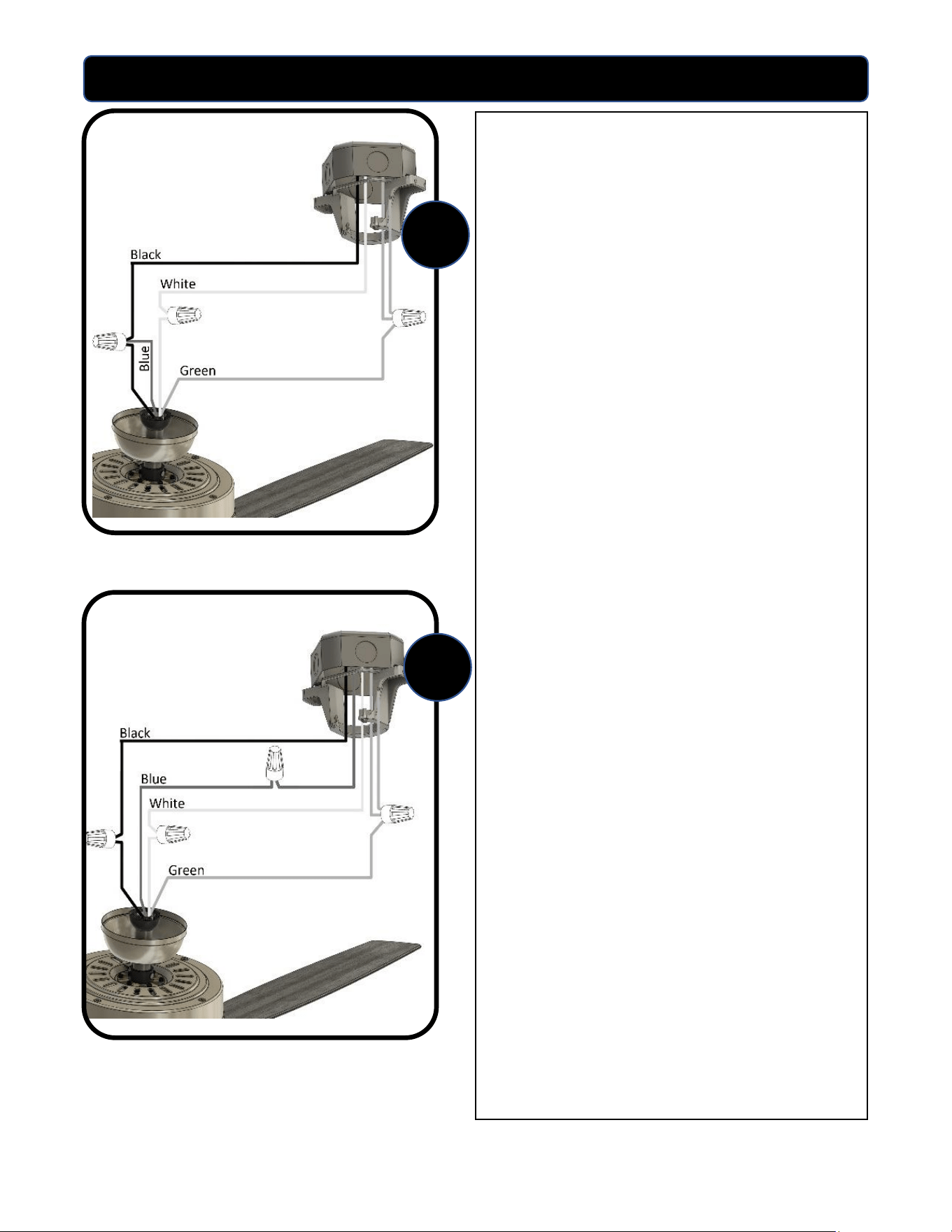
7. Use the supplied wire connectors to
connect the fan wires to the power
supply wires according to the wiring
diagram and following instructions:
If using a single wall switch:
1. Connect the three green grounding
wires coming from the ceiling,
downrod, and hanging bracket.
2. Connect the white wire from the
ceiling to the fan’s white wire.
3. Connect the black wire from the
ceiling to the black wire and blue
wire from the fan.
If using dual wall switches:
1. Connect the three green grounding
wires coming from the ceiling,
downrod, and hanging bracket.
2. Connect the white wire from the
ceiling to the fan’s white wire.
3. Connect the black wire from the
ceiling to the fan’s black wire.
4. Connect the blue wire from the
ceiling to the fan’s blue wire.
IMPORTANT: After the connections have
been made, make sure all connections are
secure and the wires do not come loose
from the wire nuts. Carefully turn the splices
upward through the hanger bracket and
push them back up into the outlet box. Place
the black and white wire connections on
opposite sides of the outlet box.
NOTE: If you are uncertain about wiring
connections please contact a qualified
electrician.
7A
7B
8
ASSEMBLY INSTRUCTIONS
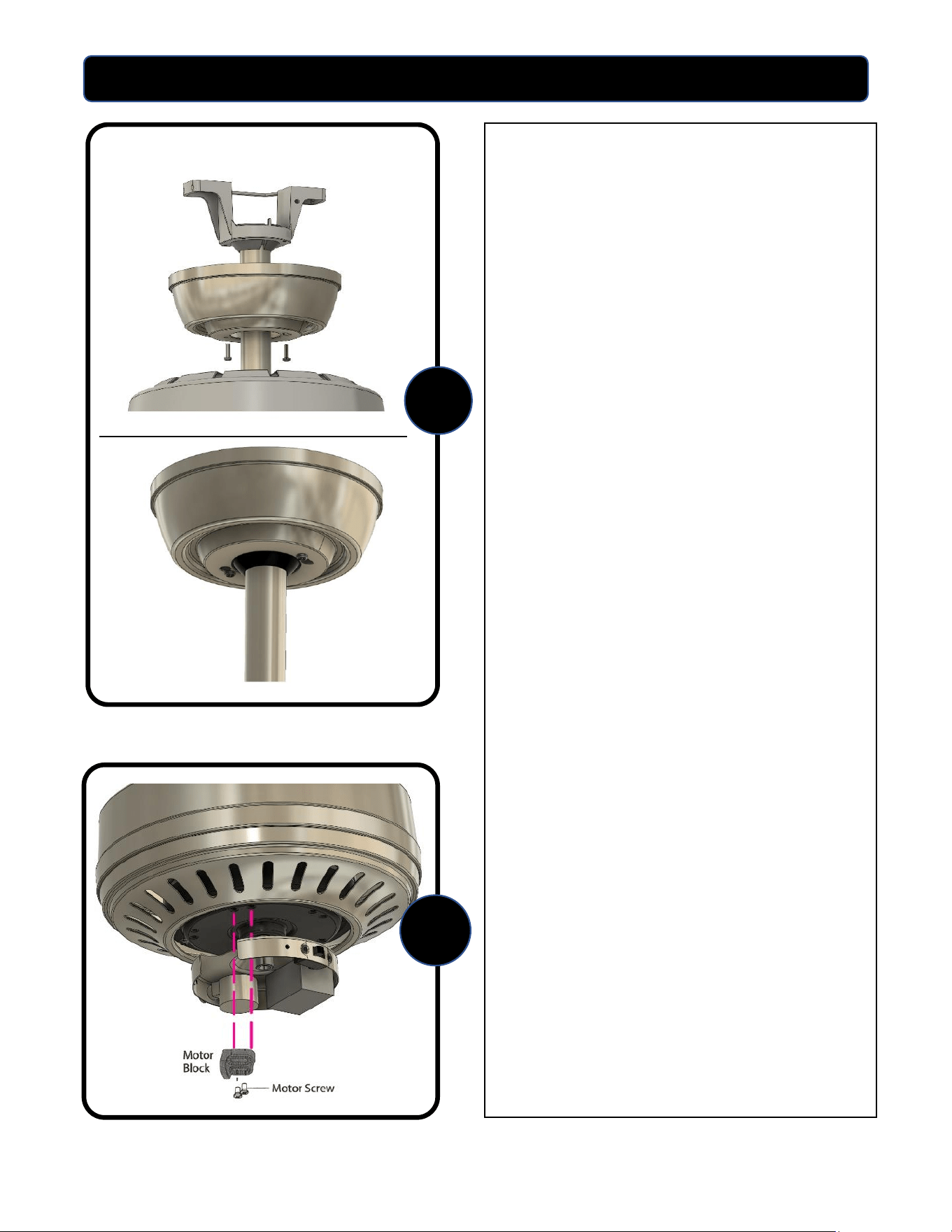
8. Locate the (2) screws on the
underside of hanging bracket and
loosen screws. Place rounded part of
slotted hole in canopy over the
loosened screws in hanging bracket
and push up. Twist canopy to lock.
Tighten screws securely.
9. Remove the five motor blocks and
five motor screws from the underside
of the motor. Discard the motor
blocks but keep the motor screws for
installation of the blade arms.
NOTE: Use the cut-out in the switch
housing plate for easy accessibility to
motor screws.
9
8
9
ASSEMBLY INSTRUCTIONS
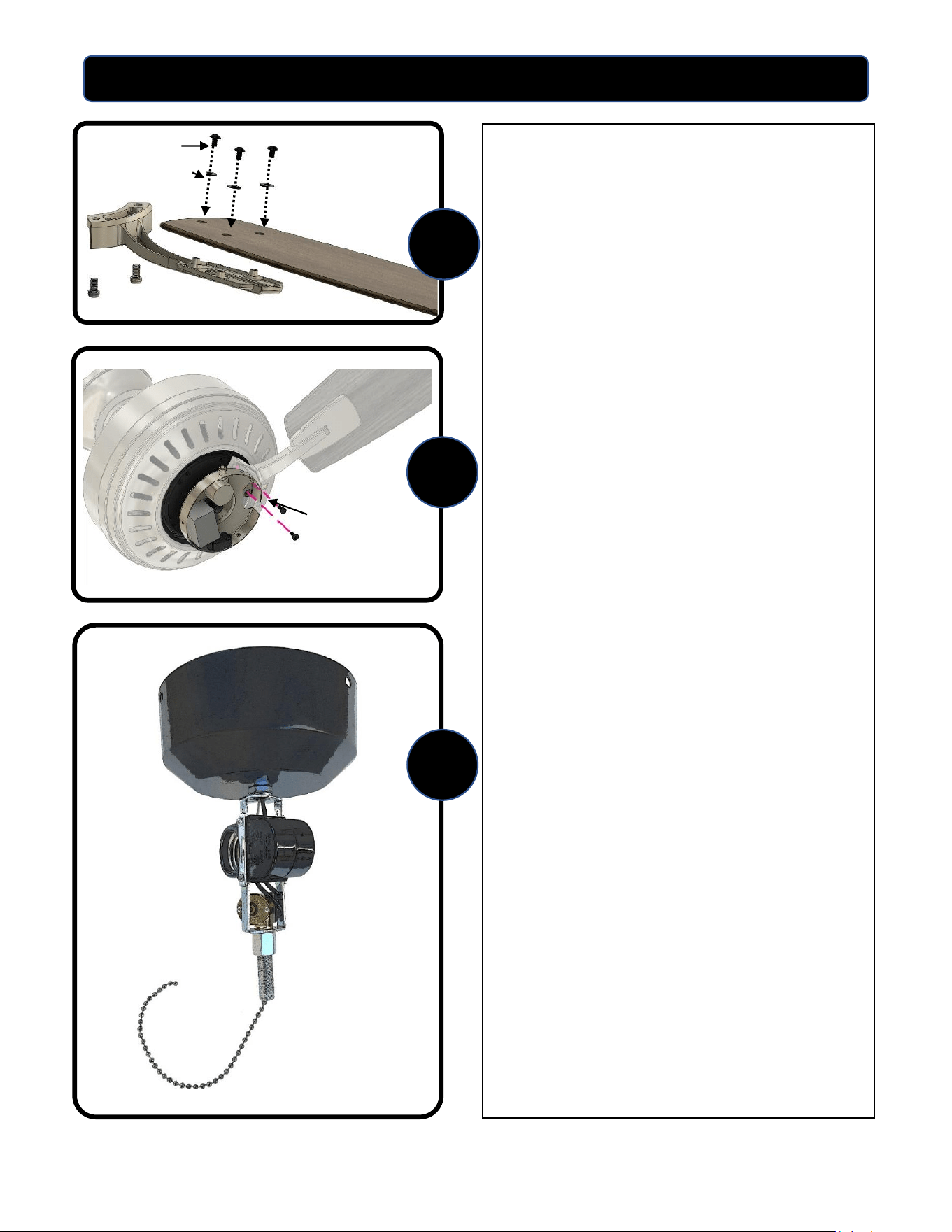
10.Partially insert three blade screws,
along with the blade washers,
through the blade and into the blade
arm, tighten each screw blade screw,
starting with the one in the middle.
Repeat this step for the remaining
blades and blade arms.
11.Secure the blade arm to the
underside of the motor using the
motor screws removed in Step 9.
Secure each blade arm to motor
before moving to the next.
NOTE: Use the cut-out in the switch
housing plate for easy accessibility to
motor screw holes.
12.Remove the center plug from the
switch housing cover by pushing it
through from the back. Take the light
kit post and thread the two wires
through the center hole up into the
switch housing cover. Feed the larger
connector through first, then the
smaller one and tighten until secure.
The light kit post assembly should
look like this (see figure A).
12
10
11
Blade Screw
Blade Washer
Motor Screw
Figure A
10
ASSEMBLY INSTRUCTIONS
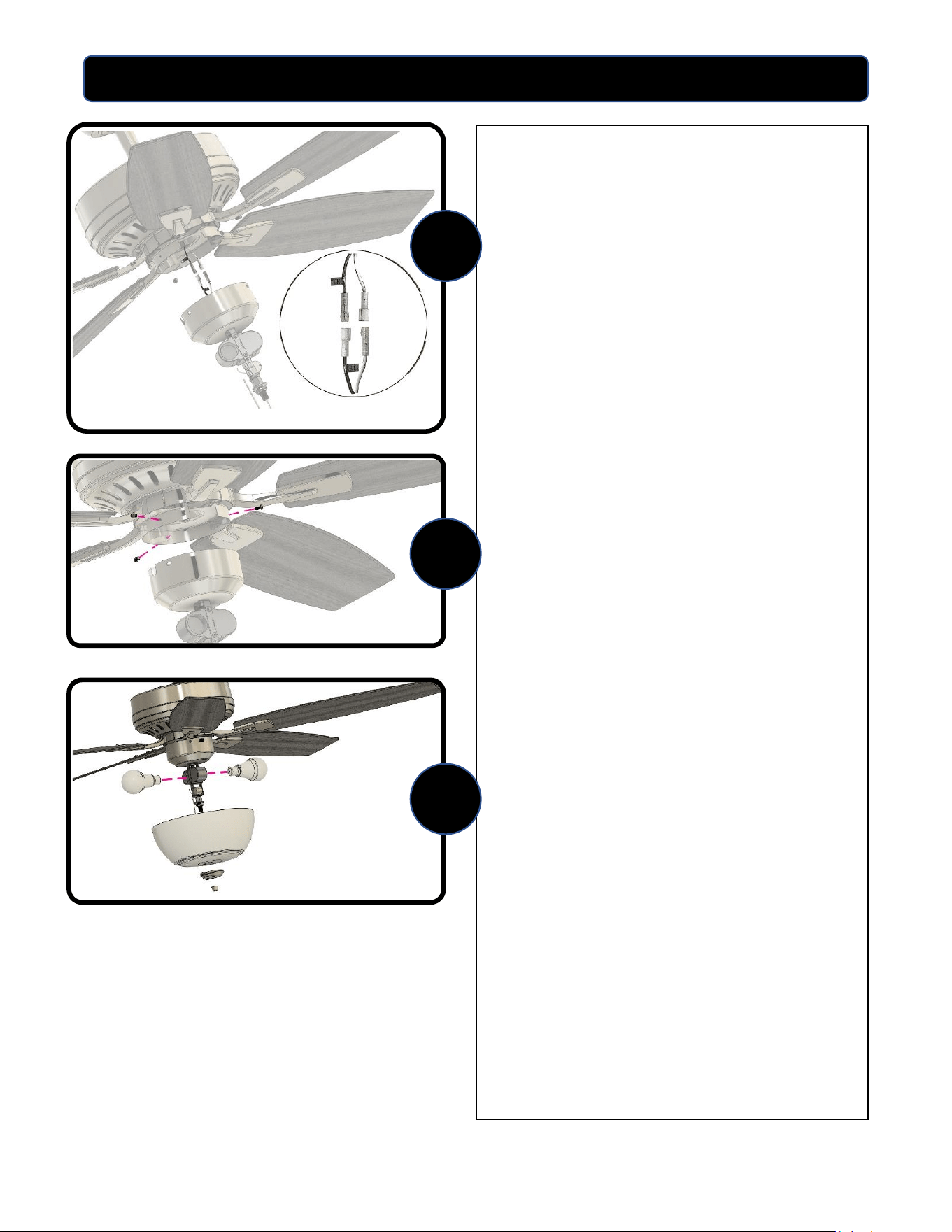
Figure B
13.Remove the 3 screws from the side of
the switch housing located on the
bottom of the motor. Connect the
light kit wires to the fan using the
push-in connectors: connect the
white wire from the light kit to the
white wire from the fan and connect
the black wire from the light kit to the
black wire from the fan. (see figure B).
Make sure the connections are seated
and secure.
14.Line up the screw holes and cut outs
on the side of the switch housing
cover and push into place onto the
switch housing. Secure and tighten
using the 3 screws.
15.Install the two (2) LED bulbs.
13
14
15
11
ASSEMBLY INSTRUCTIONS
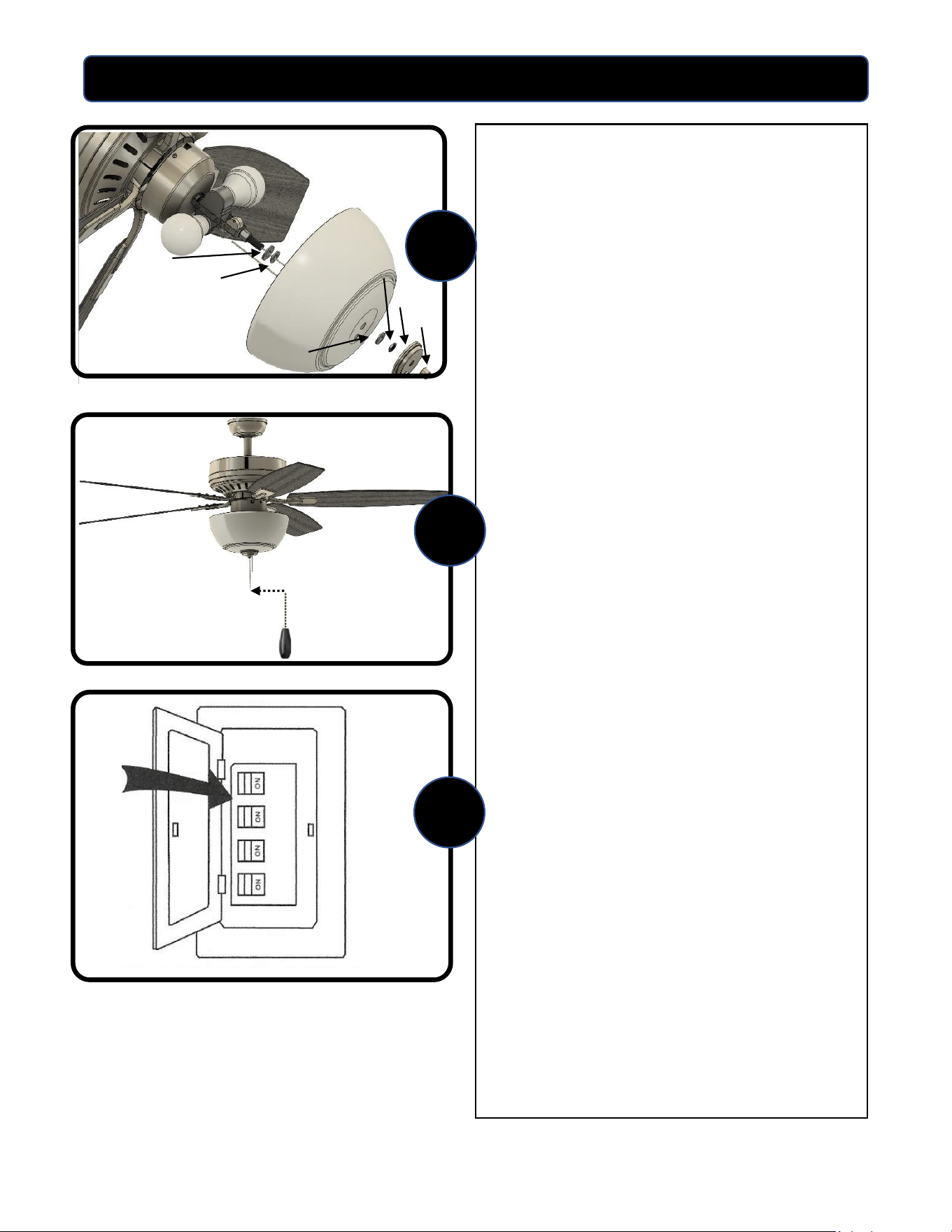
16.Attach the glass to the light kit past as
follows:
1. Thread a metal washer and plastic
washer onto the center post.
2. Feed the center pull chain through
the center hole of the glass and feed
the pull chain from the switch housing
through the smaller hole of the glass.
3. Carefully feed the glass onto the
center post.
4. Thread the plastic washer and
metal nut onto the post to secure the
glass in place. Hand tighten the metal
nut. DO NOT OVER TIGHTEN.
5. Line up the holes on the cap and
glass and feed the pull chains
through. Feed the center pull chain
through the finial and hand tighten
finial. DO NOT OVER TIGHTEN.
17.Attach the pull chain extensions to the
pull chains.
18.Restore the power to the main fuse or
circuit breaker.
16
Metal
Washer
Plastic
Washer
Cap
Finial
Metal
Nut
Plastic Washer
17
18
12
OPERATING INSTRUCTIONS
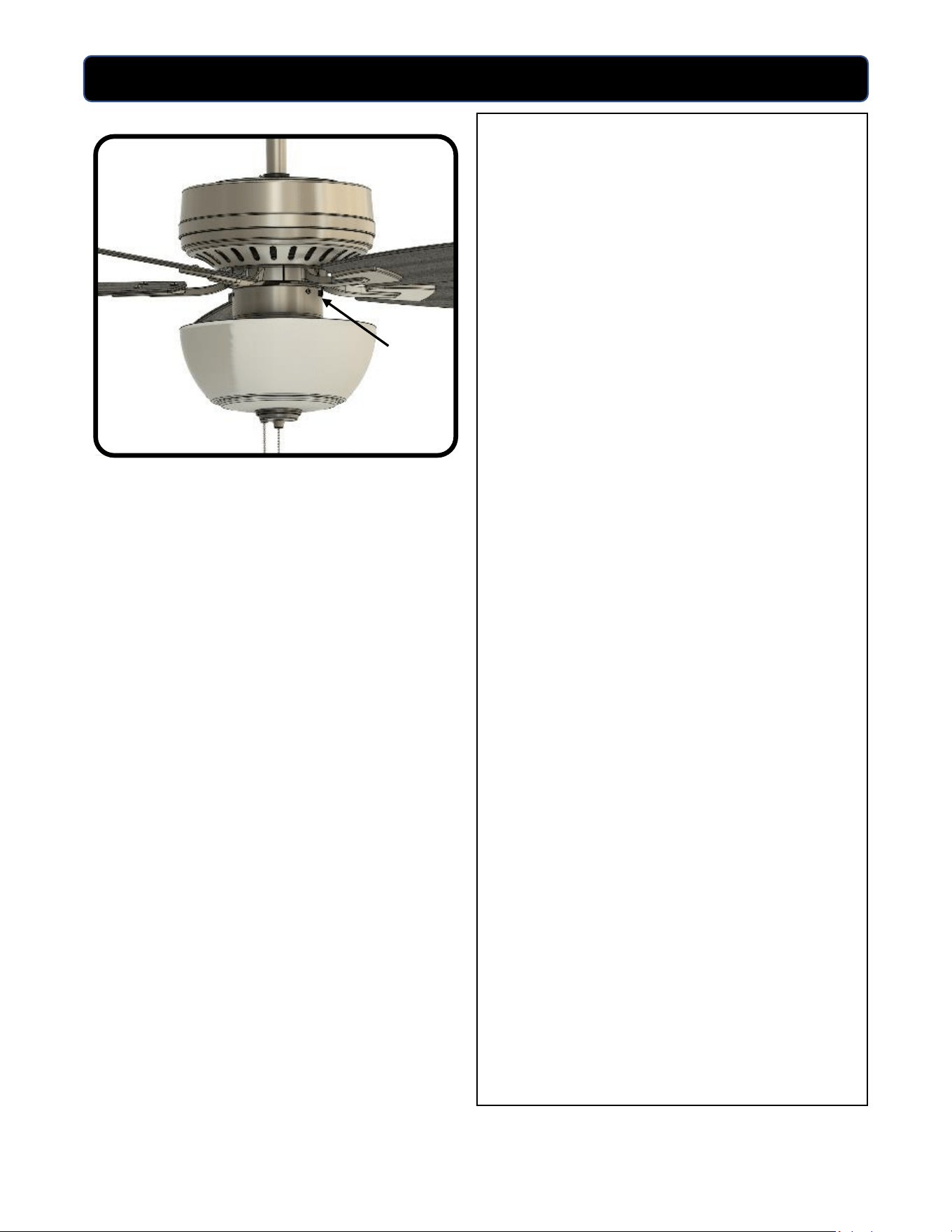
Use the fan reverse switch, located on
the switch housing to optimize your fan
for seasonal performance. Using a
ceiling fan will allow you to raise your
thermostat setting in summer and lower
your thermostat setting in winter
without feeling a difference in your
comfort.
In warmer weather, move the reverse
switch to the left which will result in
downward airflow creating a wind chill
effect.
In cooler weather, move the reverse
switch to the right which will result in
upward flow that can help move
stagnant, hot air off the ceiling area.
IMPORTANT: Wait for fan to stop before
moving the reverse switch. The reverse
switch must be set either completely to
the left or right for the fan to function
correctly. If the reverse switch is set in
the middle position, the fan will not
operate.
MOTOR SPEED AND LIGHT
Fan speed: The pull chain has four
positions to control fan speed. One pull
is high, two is medium, three is low, and
four is off.
Light: One pull is on, and two is off.
Reverse Switch

13
TROUBLESHOOTING
FAN DOES NOT START:
• Check the circuit breaker and confirm the power is ON.
• Make sure the wall switch is ON.
• Pull the pull chain to make sure it is on. Typical pull chain operation is 1
st
pull – high speed, 2
nd
pull – medium speed, 3
rd
pull – low speed, 4
th
pull OFF.
• Check that the motor reversing switch is correctly engaged and set to left or right position. Fan
will not run if switch is in the middle.
• Confirm that the blades spin freely and that there are no obstructions between the blades or
into the motor housing. Turn off power at circuit breaker and at wall switch, loosen the canopy,
and check that all wiring connections from the household supply wires to the fan wires are
secure.
FAN IS NOISY:
• Make sure all screws are snug and secure including blade screws into the blade irons, blade
irons onto the motor, and screws on canopy and switch housing cover.
• Make sure all blades and blade irons are properly installed.
• Some ceiling fan motors are sensitive to solid state variable speed controls. If the fan is
controlled by these types of controls remove the control and replace it with a control
specifically designed for use with ceiling fans.
FAN WOBBLES:
• Make sure the fan mounting bracket is securely tightened to the ceiling outlet box and the
ceiling box is securely fastened to the ceiling joist or other adequate support structure.
• Confirm that the hanger ball is properly seated in the mounting bracket. The tab in the
mounting bracket should be seated in the slot in the downrod ball.
• Make sure all blades are installed correctly and all screws are secure. Also confirm that the two
set screws in the downrod are tight in the yoke.
• Balance the fan blades using the blade balancing kit included with the fan.
WARNING: Before beginning any troubleshooting or maintenance work always shut off the
power supply to avoid electrical shock hazard.

LIMITED LIFETIME WARRANTY
Model Name: 52” Hamilton Ceiling Fan
Model No: 25101 (SKU 355-0132) Matte Black
14
The limited lifetime warranty covers this ceiling fan, for residential use by the original purchaser, against defects
in material or workmanship as follows:
If your Patriot Lighting Ceiling Fan motor fails at any time during the lifetime of the original purchaser due to
defects in material or workmanship, we will provide a replacement part free of charge.
If your fan motor fails at any time within one year after the original date of sale to the original purchaser due to
defects in material or workmanship, we will provide labor to repair the defect, with the exception of take
down/reinstallation, free of charge. The original purchaser will be responsible for all labor costs after this one-
year period.
If no replacement parts are provided for any part of your fan motor that fails at any time during your lifetime
due to defects in material or workmanship, we will refund the original purchase price of your fan.
If your fan blades, pull chain switch, reverse switch, or any accessory, except glass globes and light bulbs, fails at
any time within one year after the original date of purchase due to a defect in material and workmanship, we
will repair or, if we choose, replace the defective blades, switch, or accessory free of charge, with the exception
of take down/reinstallation services.
If the original purchaser ceases to own the fan, this warranty and any implied warranty, including but not limited
to any implied warranty of merchantability or fitness for a particular purpose, become void. This warranty and
any implied warranty, including but not limited to any implied warranty of merchantability or fitness for a
particular purpose, do not cover glass globes, light bulbs, or finish on any metal portions of the fan.
This warranty is in lieu of express warranties. The duration of any implied warranty of merchantability or fitness
for a particular purpose, with respect to any Patriot Lighting Ceiling Fan motor, blades, switch, or accessories, is
expressly limited to the period of the express warranty set forth above for such motor, blades, switch, or
accessories.
This warranty excludes defects, malfunctions, or failures of any Patriot Lighting Fan that are caused by repairs by
persons not authorized by us, use of parts or accessories not authorized by us, mishandling, improper
installation, modifications, or damage to the fan while in your possession, or unreasonable use, including failure
to provide necessary maintenance.
To obtain service, contact the service department. You will be responsible for all insurance and freight or other
transportation charges to our factory or service center. A copy of the sales receipt is required in order to obtain
service. We will return your fan freight prepaid. Your fan should be properly packed to avoid damage in transit,
for we will not be responsible for any such damages.
In no event shall Patriot Lighting Fan be liable for consequential or incidental damages.
Some states do not allow the exclusion or limitation of consequential or incidental damages, in which case the
above limitation or exclusion may not apply.
This warranty gives you specific legal rights and you may also have other rights which vary from state to state.
To obtain Service, please contact the Service Department: 1-877-459-3257, 8 a.m. – 5 p.m. Central Time

15
