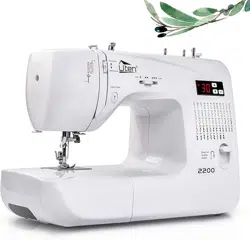
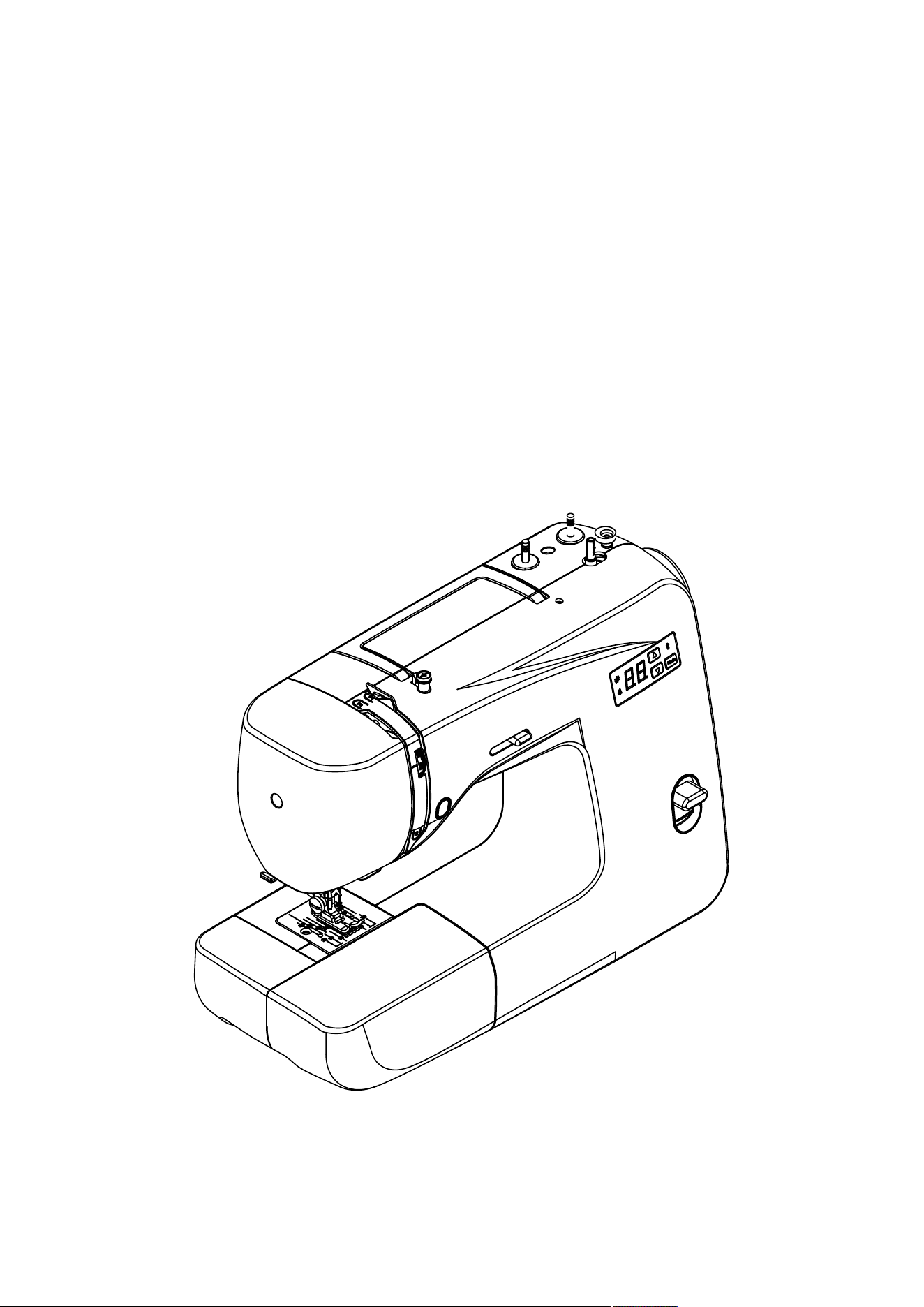
MODEL: 2200
INSTRUCTION MANUAL

IMPORTANT SAFETY INSTRUCTIONS
When using an electrical appliance, basic safety precautions should always be followed, including the
following.
Read all instructions before using this sewing machine.
DANGER--To reduce the risk of electric shock:
1. Do not allow to be used as a toy. Close attention is necessary when this sewing machine is used
by or near children.
2. This appliance can be used by children aged from 8 years and above and persons with reduced
physical, sensory or mental capabilities or lack of experience and knowledge if they have been
given supervision or instruction concerning use of the appliance in a safe way and understand the
hazards involved. Children shall not play with the appliance. Cleaning and user maintenance
shall not be made by children without supervision.
3. Use this sewing machine only for its intended use as described in this manual. Use only
attachments recommended by the manufacturer as contained in this manual.
4. Never operate this sewing machine if it has a damaged cord or plug, if it is not working properly, if
it has been dropped or damaged, or dropped into water. Return the sewing machine to the nearest
authorized dealer or service center for examination,repair, electrical or mechanical adjustment.
5. Never operate the sewing machine with any air openings blocked. Keep ventilation openings of
the sewing machine and foot control free from the accumulation of lint, dust, and loose cloth.
6. Never drop or insert any object into any opening.
7. Do not use outdoors.
8. Do not operate where aerosol (spray) products are being used or where oxygen is being
administered.
9. To disconnect, turn switch to the off (”O”) position, then remove plug from outlet.
10. Do not unplug by pulling on cord. To unplug, grasp the plug, not the cord.
11. Keep fingers away from all moving parts. Special care is required around the sewing machine
needle.
12. Never sew with a damaged needle plate as this can cause needle to break.
13. Do not use bent needles.
14. Do not pull or push fabric while stitching. It may deflect the needle causing it to break.
15. Switch the sewing machine off (”O”) when making any adjustments in the needle area, such as
threading needle, changing needle, threading bobbin, or changing presser foot, etc.
16. Always unplug sewing machine from the electrical outlet when removing covers, lubricating, or
when making any other user servicing adjustments mentioned in the instruction manual.
17. Attention the following to avoid injury:
--switch off or unplug the appliance when leaving it unattended;
--unplug the appliance before carrying out maintenance.
CAUTION–
Moving parts-To reduce risk of injury, switch off before servicing. Close
cover before operating machine.
SAVE THESE INSTRUCTIONS
This product is for household use, or equivalent.
This appliance complies with EMC Directive 2014/30/EU covering the
electromagnetic compatibility.
Please note that on disposal, this product must be safely recycled in accordance
with relevant National legislation relating to electrical/ electronic products. If in
doubt please contact your retailer for guidance.

CONTENTS
1. KNOWING YOUR SEWING MACHINE
1
Machine identification -------------------------------2
Main parts -----------------------------------------2
Needle and presser parts -----------------------2
Accessories --------------------------------------------3
Setting up your machine -----------------------------3
Power line cord/foot control --------------------3
Power/light switch --------------------------------3
Converting to free-arm sewing ---------------------4
Presser foot lifter -------------------------------------4
Reverse sewing lever --------------------------------4
Stitch length dial --------------------------------------4
Start/stop button --------------------------------------4
Sewing speed control---------------------------------5
Dropping the feed dogs-------------------------------5
Seam guide line ---------------------------------------5
Setting spool pins -------------------------------------5
Winding the bobbin -----------------------------------5
Removing or replace the bobbin case -------------6
Threading the bobbin case --------------------------6
Changing the presser foot ---------------------------6
Threading the machine ----------------------------7-8
Single needle --------------------------------------7
Twin needle ----------------------------------------7
Using automatic needle threader ----7-8 -------
Drawing up bobbin thread ---------------------------8
Balancing top thread tension -----------------------8
Needle, thread and fabric chart --------------------9
Changing the needle ---------------------------------9
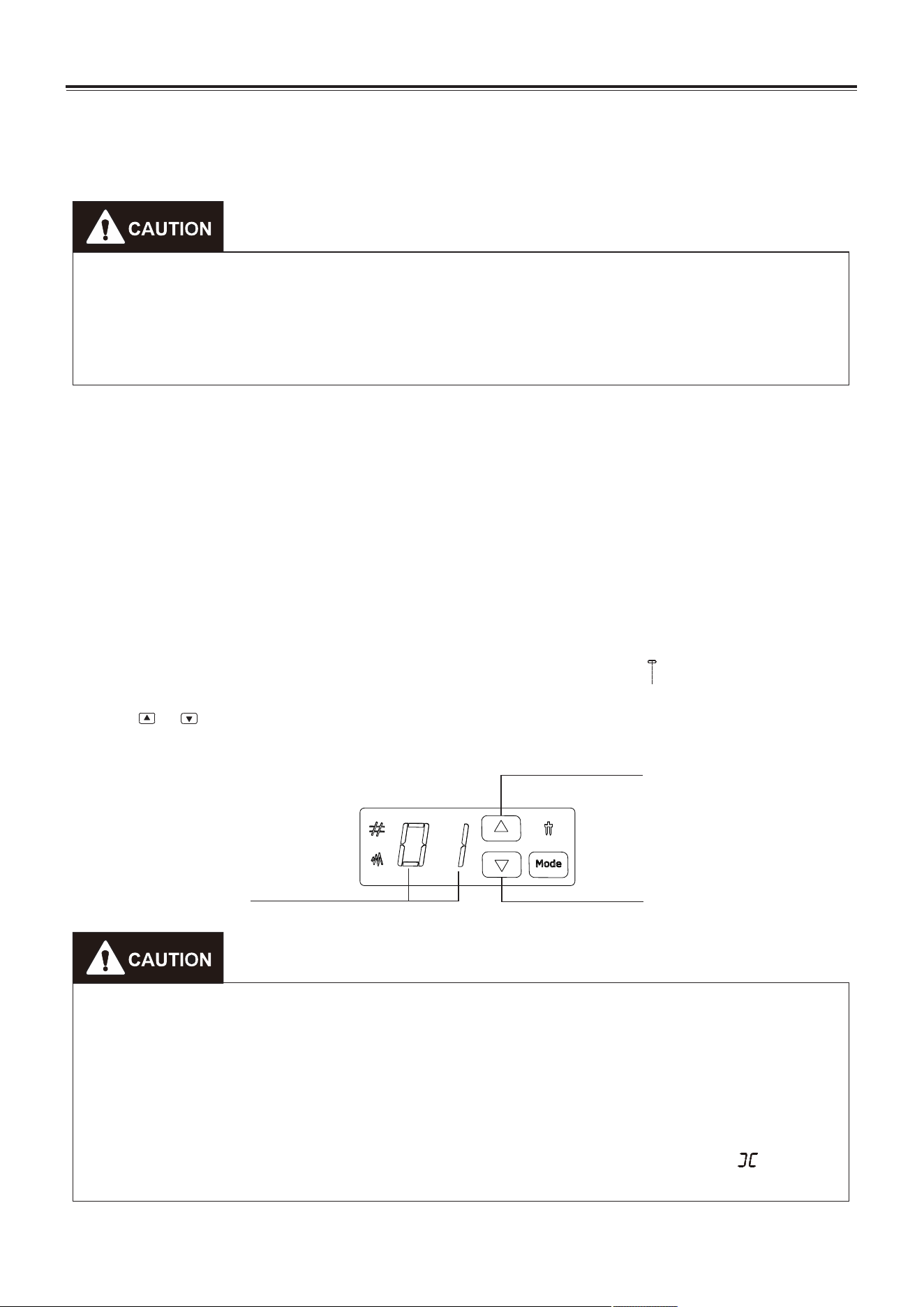
Functions of control panel -------------------------10
Pattern selection --------------------------------10
Stitch width selection ---------------------------10
Twin needle selection --------------------------10
Helpful messages ----------------------------------11
Sewing ------------------------------------------------12
Normal sewing steps ---------------------------12
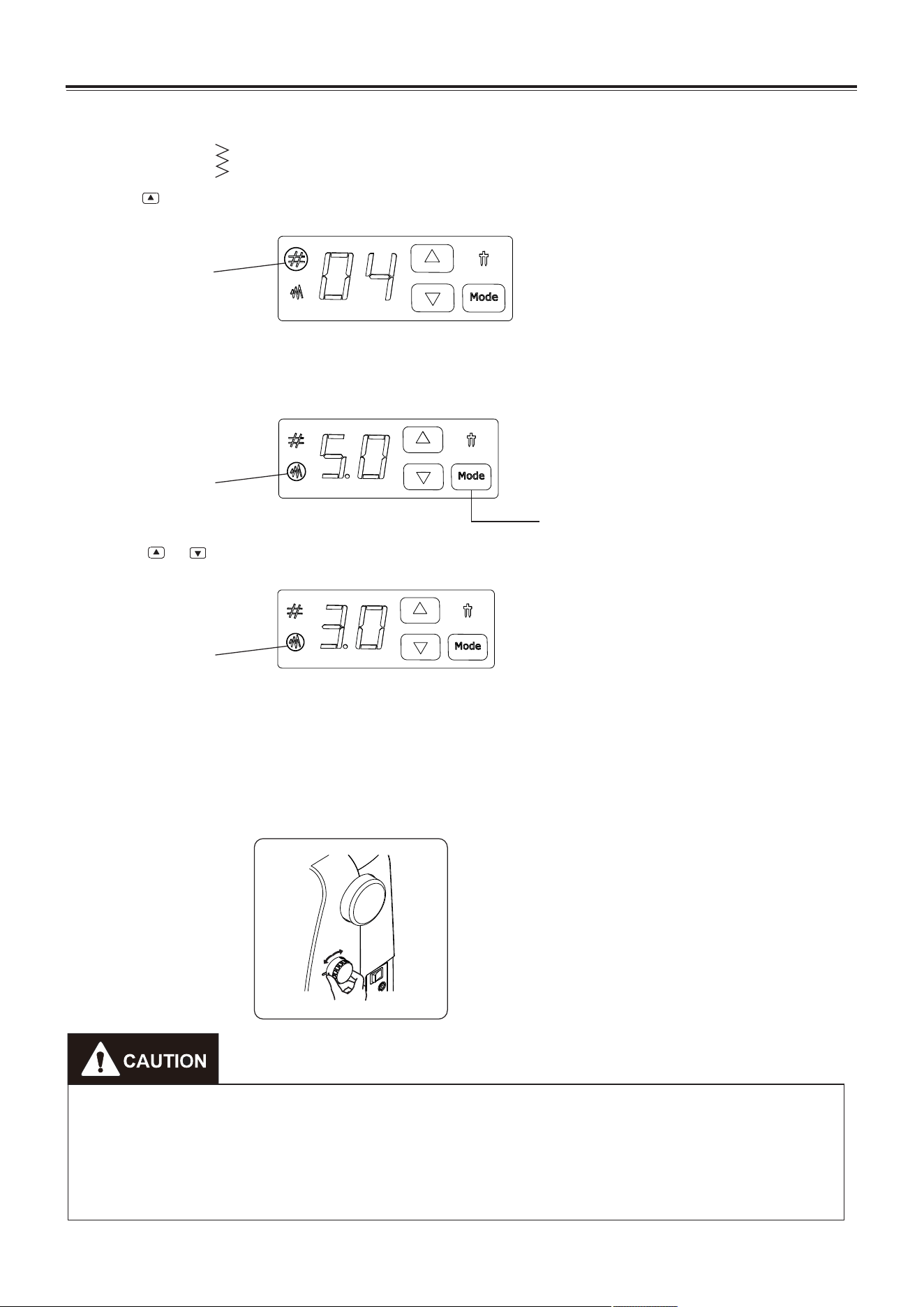
Select stitch --------------------------------------12
Example -----------------------------------------------13
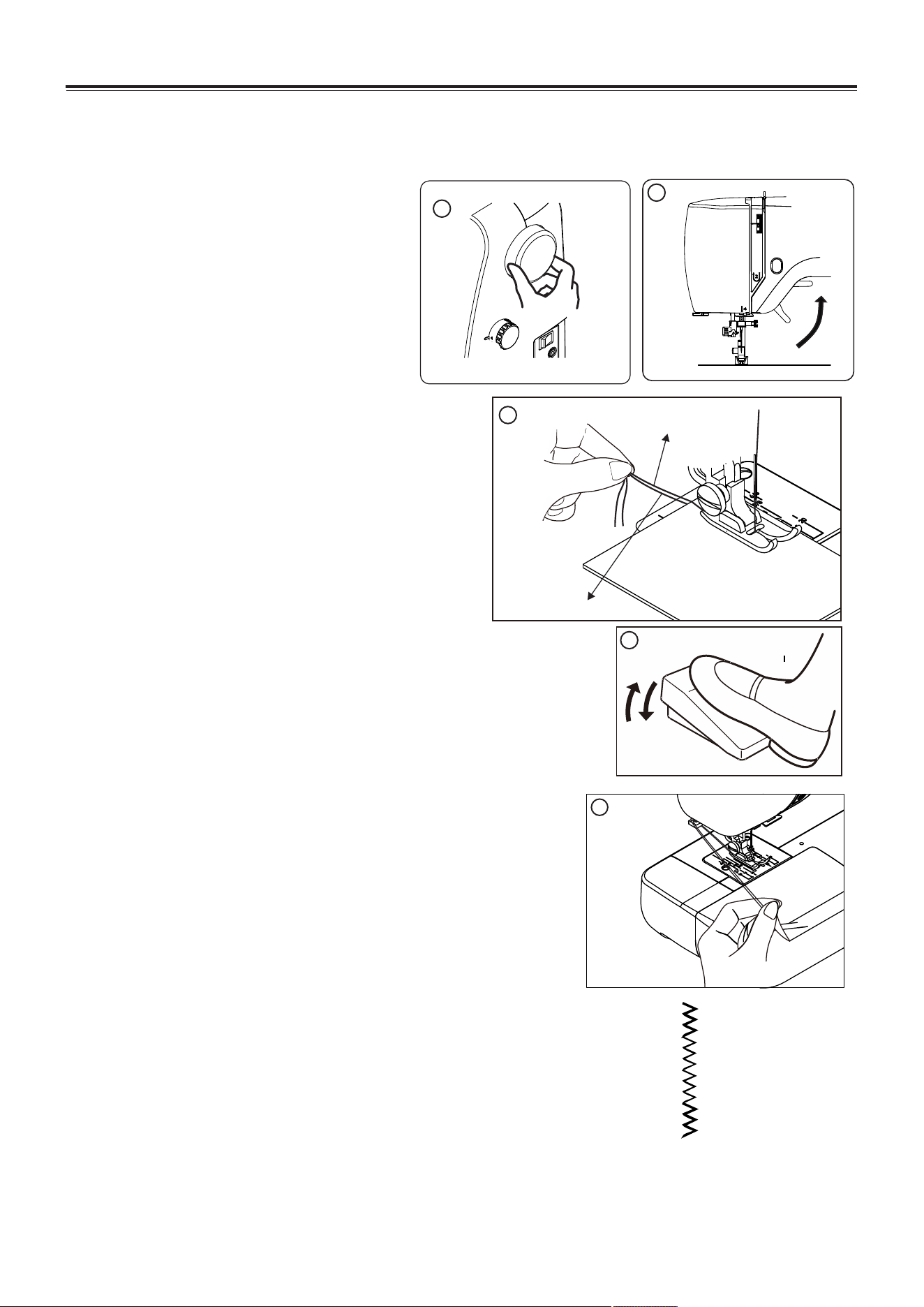
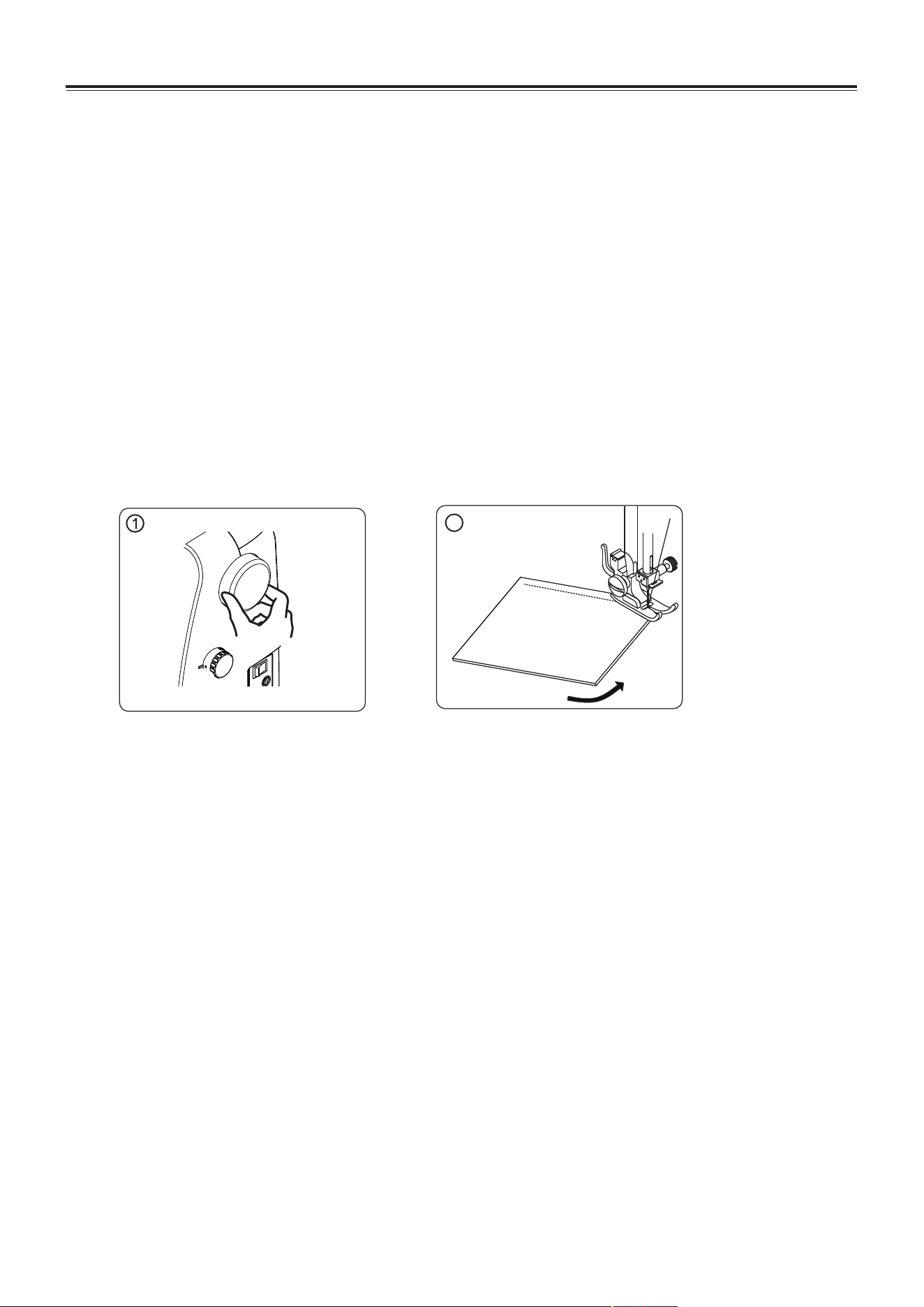
Start sewing ------------------------------------------14
Reverse sewing -------------------------------------14
Useful sewing tips -----------------------------------15
Straight stitch ----------------------------------------16
sewing ----------------------------------------------16
keep seam straight -------------------------------16
change the needle position ---------------------16
Zigzag stitch/overcasting stitch ------------------17
Blind hem stitch -------------------------------------18
Zipper insertion -------------------------------------19
Piping --------------------------------------------------19
Button sewing ---------------------------------------20
Buttonhole sewing ----------------------------------21
Free seam --------------------------------------------22
Decorative stitch --------------------------------23-25
Dismantling and assembling shuttle race ---26-27
To dismantling and oil the shuttle race --------26
To assembling the shuttle race -----------------27
Cleaning the feed dogs -----------------------------27
Oiling the needle bar --------------------------------28
Oiling the connecting rod --------------------------28
5.TROUBLESHOOTING ---------------------29
2. SEWING BASIC
3. UTILITY STITCHES
4. CARING FOR YOUR MACHINE
KNOWING YOUR SEWING MACHINE
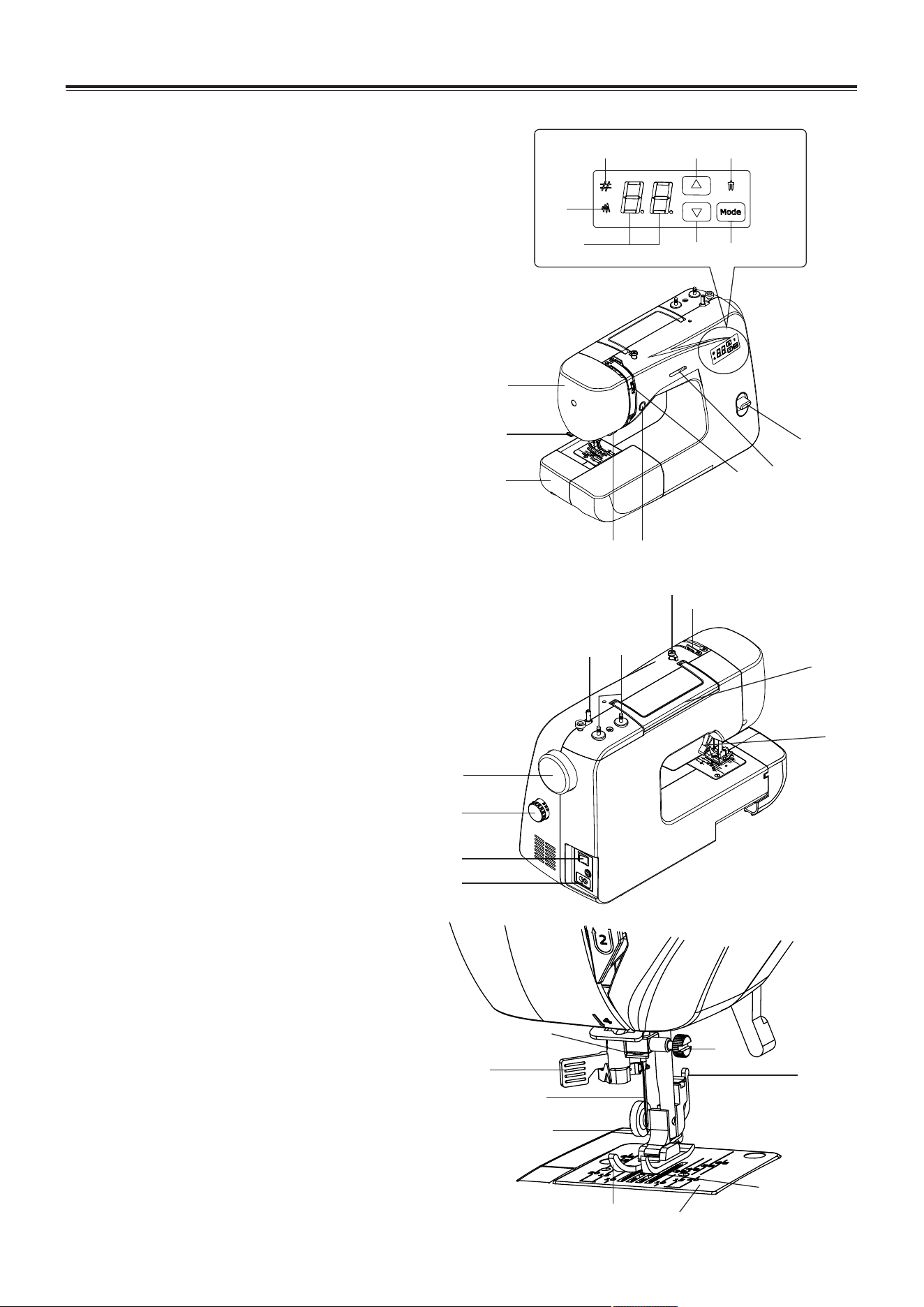
Main parts
1. Extension table (Accessories box)
2. Thread cutter
3. Face cover
4. LED display
5. Stitch width indicator LED
6. Pattern indicator LED
7. Twin needle indicator LED
8. Increase button
9. Decrease button
10. Mode selection button
11. Thread tension control dial
12. Sewing speed control
13. Reverse sewing lever
14. Start/stop button
15. Lower thread guide
16. Bobbin wider shaft
17. Spool pins
18. Bobbin wider thread guide
19. Top thread guide
20. Handle
21. Presser foot lifter
22. Cord socket
23. Power/light switch
24. Stitch length dial
25. Hand wheel
Needle and presser parts
26. Automatic needle threader
27. Needle
28. Needle bar thread guide
29. Needle clamp screw
30. Presser foot holder
31. Presser foot screw
32. Presser foot
33. Needle plate
34. Feed dogs
2
Machine identification
19
18
17
16
20
21
25
24
23
22
10
9
7
4
5
6
8
11
12
3
2
1
14
13
15
28
29
30
27
26
33
34
32
31
The foot that comes on your sewing
machine is called zigzag foot and
will be used for the majority of your
sewing.
Setting up your machine
Bu sure to wipe off any surplus oil from needle
plate area before using your machine the first
time.
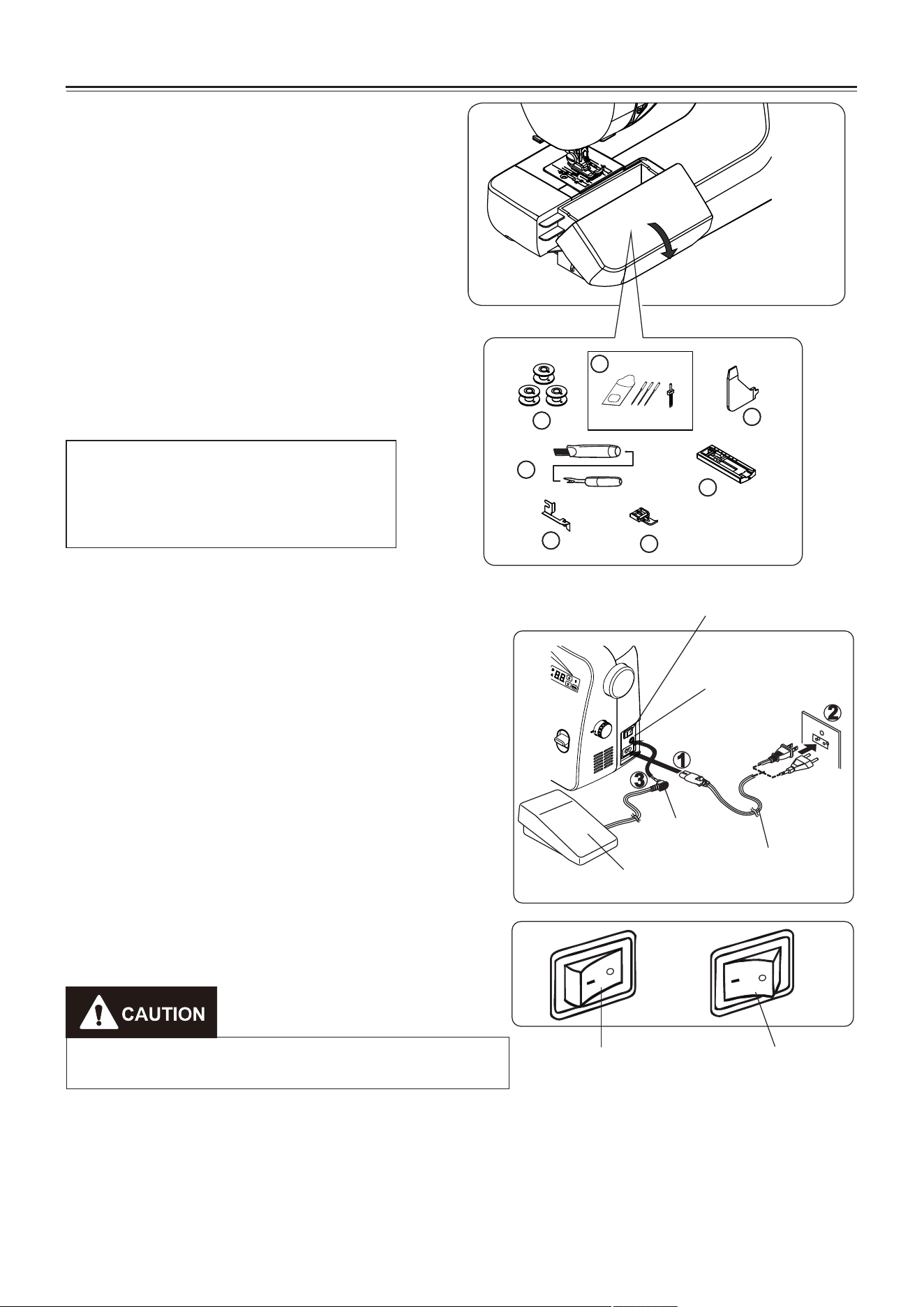
Power line cord/foot control
Make sure that the sewing machine is turned
off (the power switch is set to “O”), and then
connect the plug of the power line and into the
cord socket (1) and your wall outlet (2) as
illustrated. Connect the foot control plug (3)
into the machine socket.
Power/light switch
Your machine will not operate until the power/light switch is turned on. The same switch
controls both the power and the light.
When servicing the machine, or changing needles, etc., machine must be disconnected
from the power supply.
KNOWING YOUR SEWING MACHINE
Accessories
1. Bobbins (3pcs)
2. Needle 3 pcs and twin needle 1 pc
3. Multi-function screwdriver
4. Ripper/Brush
5. Buttonhole foot
6. Guide presser foot
7. Zipper foot
3
Always disconnect the machine from power
supply by removing the plug from the wall-outlet.
Pin plug
Foot control
Set power/light switch at "OFF"
Machine socket
Power line cord
Power/light
switch “OFF”
Power/light
switch “ON”
1
2
3
4
5
7
6
KNOWING YOUR SEWING MACHINE
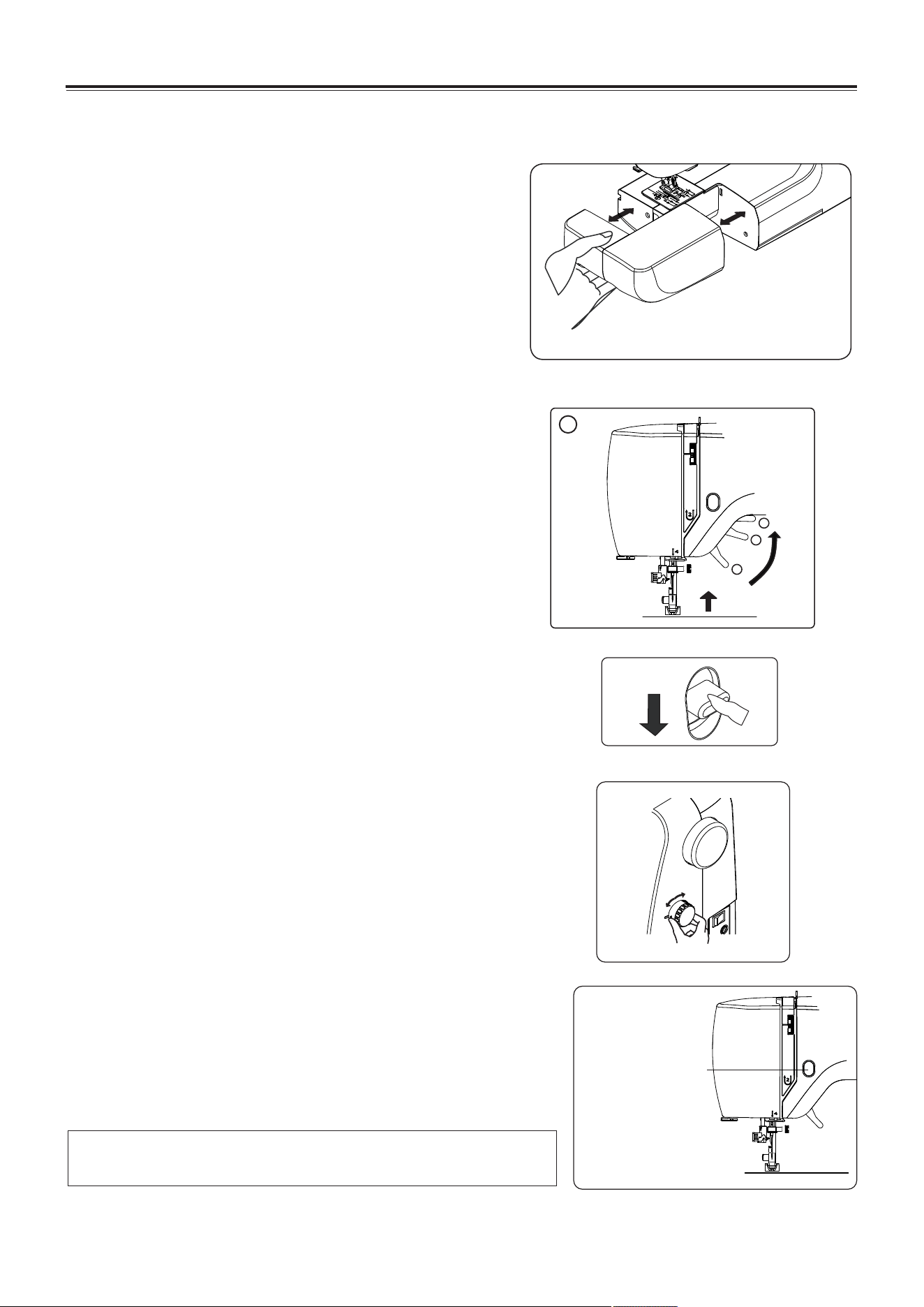
Converting to free-arm sewing
Your machine can be used either as a flat-bed or as a
free-arm model.
With the extension table in position, it provides a large
working surface as a standard flat-bed model.
To remove the extension table, hold it firmly with both
hands and pull it off to the left as shown. To replace,
slide the extension table back into place until it clicks.
With the extension table removed the machine
converts into a slim free-arm model for sewing
children’s clothes, cuffs, trouser legs, and other hard-
to-reach places.
Presser foot lifter
There are three positions for your presser foot.
1. Lower the presser foot to sew.
2. Raise the lifter to the middle position to insert or
remove fabric.
3. Lift it to its highest position to change the presser
foot or to remove thick fabric.
Reverse sewing lever
As long as you are pressing down this button while sewing,
the machine will to feed the fabric backwards.
Stitch length dial
1. Turn this dial to set stitch length. (Setting range: 0 to 4
mm.)
2. Turn this dial to (b1,b2,b3) position to set buttonhole step.
(refer to page 21.)
4
1
1
3
2
Start/Stop Button
Start/stop button
When sewing without having the foot controller connected,
the machine starts slowly when the start/stop button is
pushed. When it is pushed again, needle moves and stops
at its highest position.
NOTE: When foot control is connected, start/stop button
cannot be used.
KNOWING YOUR SEWING MACHINE
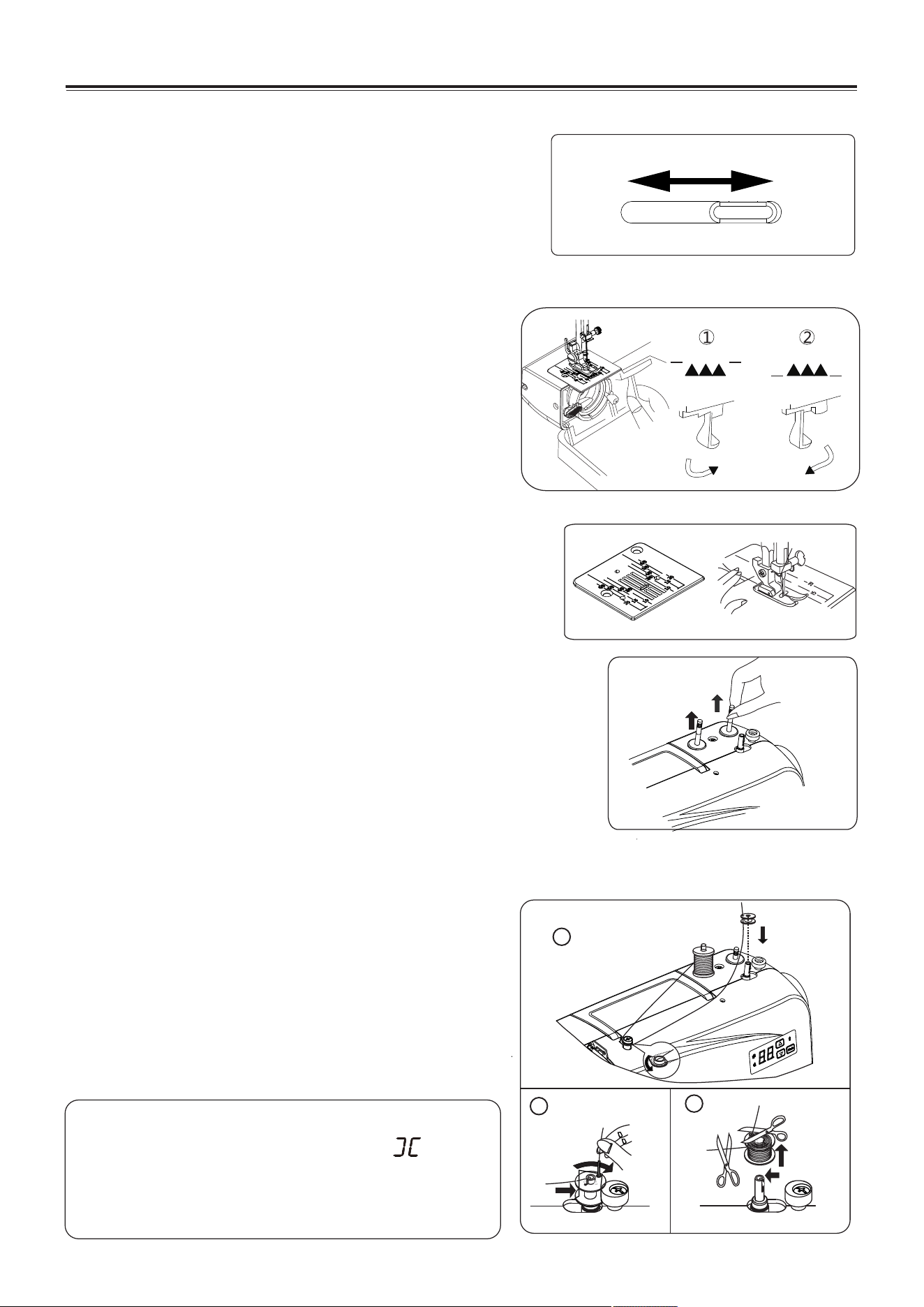
The numbers on the needle plate indicate the
distance between the center needle position and
the indicating line.
The numbers in the front indicate in Millimeters.
The numbers in the back indicate in inches.
Seam guide line
The spool pins are used for holding the spool of
thread in order to feed thread to the machine.
To use, pull up the spool pin. Push down for storage.
Setting spool pins
2. Push the bobbin wider shaft to far left position, if it
is not already there. Place bobbin onto the bobbin
wider shaft with end of thread coming from top of
bobbin. Push bobbin winder shaft to the right until it
clicks. Hold onto end of thread.
3. Start machine. Bobbin will automatically stop
turning when completely filled. Push shaft to the
left to remove bobbin and cut thread.
1. Place a spool of thread on the left spool pin. Pull the thread out from the spool and place it
through thread guide as shown in illustration. Put end of thread through the hole in bobbin
as shown.
Winding the bobbin
NOTE: When under bobbin winding
situation, there will be " "
displayed in LED display window.
There will be invalid and buzzer
sounds when press buttons.
5
Dropping the feed dogs
1. For dropping the feed dogs, press down lever and
move it to the direction of arrow as illustrated.
2. To raise the feed dogs, press down the lever and
move it to the direction or arrow as illustrated.
* Feed dogs must always be up for normal sewing.
* When working with the feed dog put down, please
be sure to turn the stitch length dial to "0".
Slow
Fast
Sewing speed control
Sewing speed is set by using the sewing speed control.
The sewing speed control is moved horizontally to
determine the amount of speed required.
Regardless of the setting, maximum speed may be limited
depending on which pattern has been selected.
1
2
3
KNOWING YOUR SEWING MACHINE
6
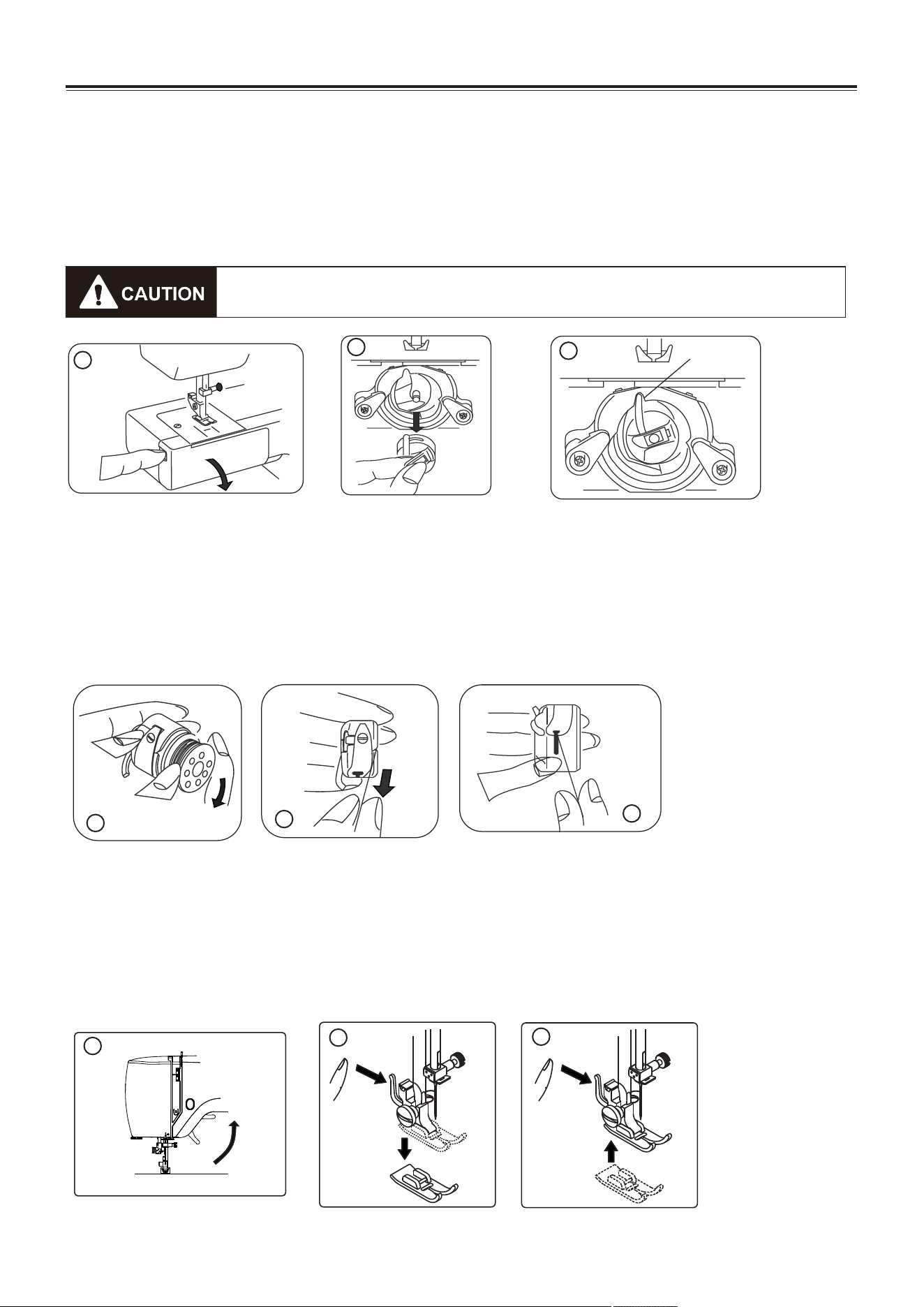
1. Refer to page 4 to remove the Extension table, raise the needle by turning the hand wheel
toward you, then open the shuttle cover.
2. Take out bobbin case holding the latch.
3. When installing the bobbin case, the pin on the case should fit into the gap of the shuttle race.
Removing or replace the bobbin case
1. Install the bobbin into bobbin case. Make sure the thread unwinds in the direction of arrow.
2. Pull the thread into the groove in the bobbin case slot.
3. Now pull the thread under the tension spring and into the delivery eye.
NOTE: Leave about 10cm (4 inches) of the thread hanging out of the bobbin case. When
you pull the thread, the bobbin should spin clockwise.
Threading the bobbin case
Changing the presser foot
1. Turn the hand wheel toward you to raise the needle to its highest position.
Raise the presser foot.
2. Press the lever on the back of the presser foot holder. The presser foot will drop off.
3. Place the presser foot so the pin on the foot lies just under the groove of the holder.
Lower the presser foot holder to lock the foot in place.
1
2
Gap
3
1
2
3
2
3
Be sure to disconnect the power supply before operating the machine.
1
KNOWING YOUR SEWING MACHINE
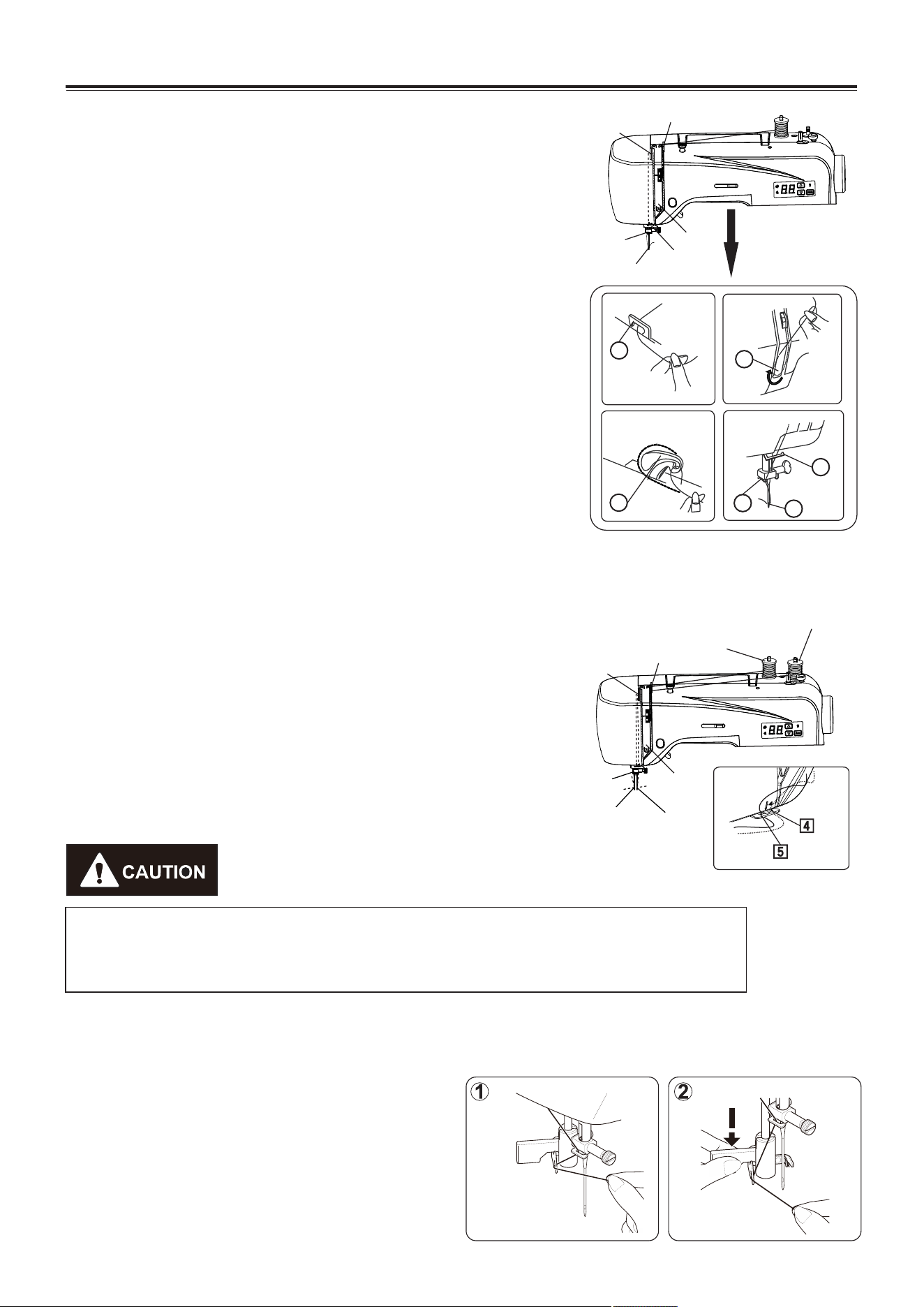
Threading the machine
Raise take-up lever to its highest position by turning hand
wheel toward you. Raise presser foot.
Place spool of thread on spool pin as shown, with thread
coming from the back of the spool.
1. Feed the thread into the top thread guide.
2. Pull the thread down through the tension control and pull it
around the tension control loop and upwards.
3. Slide the thread into the thread take-up lever from the right to
the left.
4. Pull the thread downwards and pass it behind the lower
thread guide.
5. Continue to pull the thread down and slide it into the needle
bar thread guide.
6. Thread the needle, from the front to the back.
NOTE: Cut the thread end with sharp scissors for easier
needle threading.
Twin needle
7
Single needle
1
2
3
4
5
6
Be sure to thread the left needle thread firstly then thread the right needle
thread. Put the thread spool on the spool pin, make sure that the left thread
will run anti-clockwise, the right thread will run clockwise.
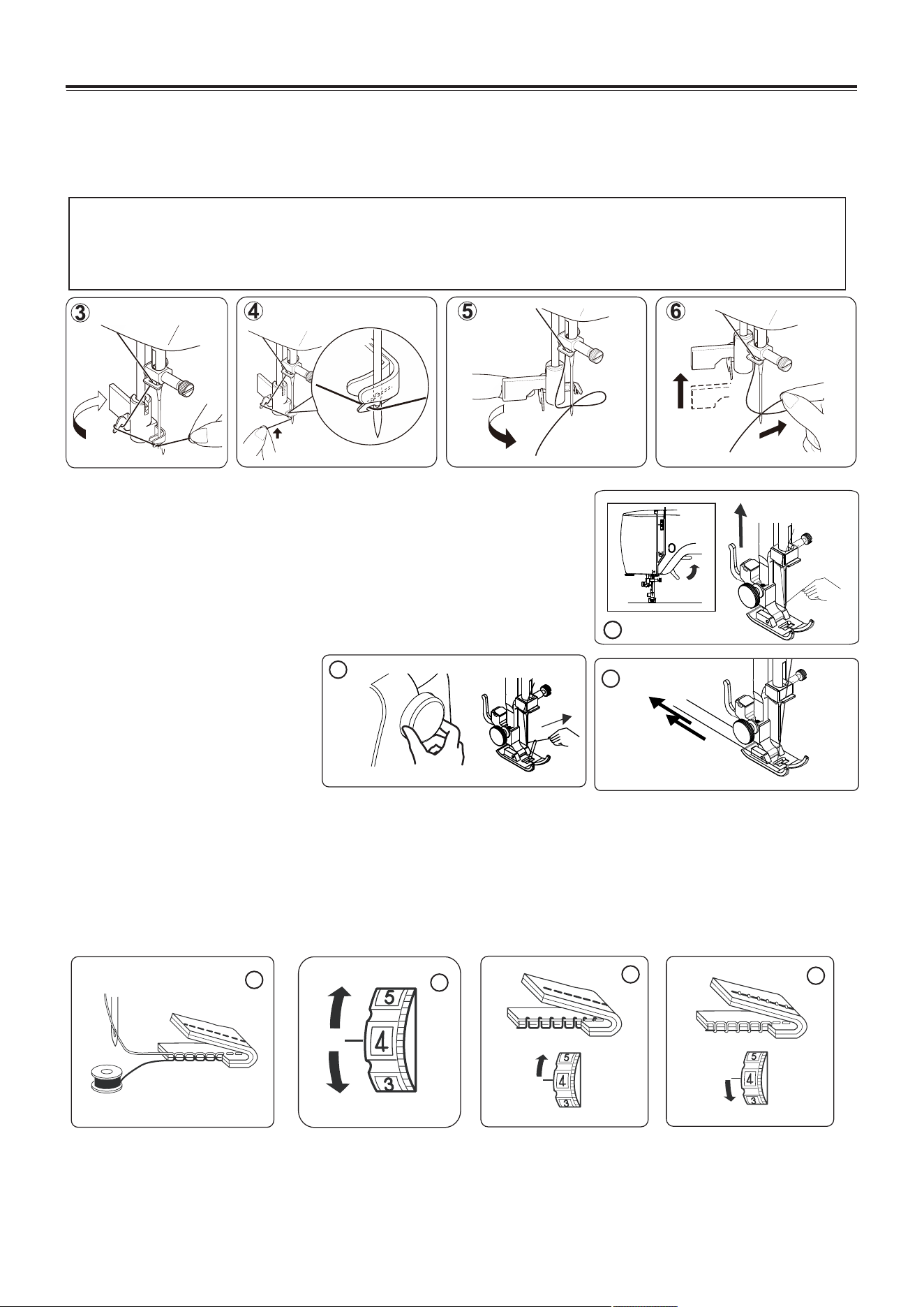
Raise the needle to its highest position by
rotating the hand wheel towards you.
1. Hook thread to thread guide as illustrated.
2. Pull down lever while holding the end of
thread.
Using automatic needle threader
How to thread the twin needle:
1. Thread the left needle according to the way of threading
single needle from step one to step four, then fix the thread
into the left hole of the thread guide 5. Draw thread down
and slip it into needle bar thread guide 6. Finally thread into
the left needle eye from front to back.
2. Thread the right needle according to the way of threading
single needle from step one to step seven.
1
3
2
4
5
6
1
3
2
Right needle
thread
Left needle thread
6
8
7
KNOWING YOUR SEWING MACHINE
Drawing up bobbin thread
1. Raise the presser foot and hold the needle thread lightly with
your left hand.
2. Turn the hand wheel slowly towards you with your right hand
until the needle goes down and continue turning the hand
wheel until the take-up lever is at its highest position.
Lightly draw up the needle thread forming a loop of the
bobbin thread.
3. Pull 15cm (6") of both
thread back and under the
presser foot.
Balancing top thread tension
1. The top thread and the bobbin thread should interlock in the center of two layers of fabric in straight
seams.
2. Set the desired number of the thread tension dial at setting mark.
3. loosen the needle thread tension by moving the dial to a lower number. If the tension is too tight,
4. If the tension is too loose, tighten the needle thread tension by moving the dial to a higher number.
NOTE: In order to obtain better zigzag stitches, the top thread tension should be
slightly weaker than the bobbin thread tension. That means, the top
thread should appear slightly on the reverse side of the fabric, but the
bobbin thread cannot appear on the top side of the fabric.
8
3
1
2
3
4
3. Rotate the lever to the rear of the machine.
4. Guide thread into hooked end and pull the thread upward.
5. Return the lever and needle will be threaded automatically.
6. Release the lever and pull thread away from you.
NOTE: For smooth threading it is recommended you select straight stitching when
using the needle threader.
Automatic needle threader is only applicable for presser foot.zigzag
Automatic needle threader cannot be used for double needle.
11
2
Flat side
Needle
Pin
Flat side toward the back
Needle, thread and fabric chart
Your fabric will determine the choice of a needle and thread. The following table is a practical
guide to needle and thread selection.
Always refer to it before a new sewing project. And be sure to use the same size and type of
thread in the bobbin as in the top thread supply.
Type
Fabric
Threads
Needle size
Light
Weight
Medium
Weight
Heavy
Weight
Crepe de chine, Voile
Lawn, Organdy,
Georgette, Tricot.
Linens, Cotton,
Pique, Serge,
Double knits, Percale.
Denim, Tweed,
Gabardine, Coating,
Drapery and
Upholstery Fabric.
Fine Silk.
Fine Cotton.
Fine Synthetic.
Fine Cotton Covered
Polyester.
50 silk.
50 ~ 80 cotton.
50 ~ 60 synthetic
Cotton Covered
Polyester.
50 silk.
40 ~ 50 cotton.
40 ~ 50 synthetic
Cotton Covered
Polyester.
9 or 11
11 or 14
14 of 16
KNOWING YOUR SEWING MACHINE
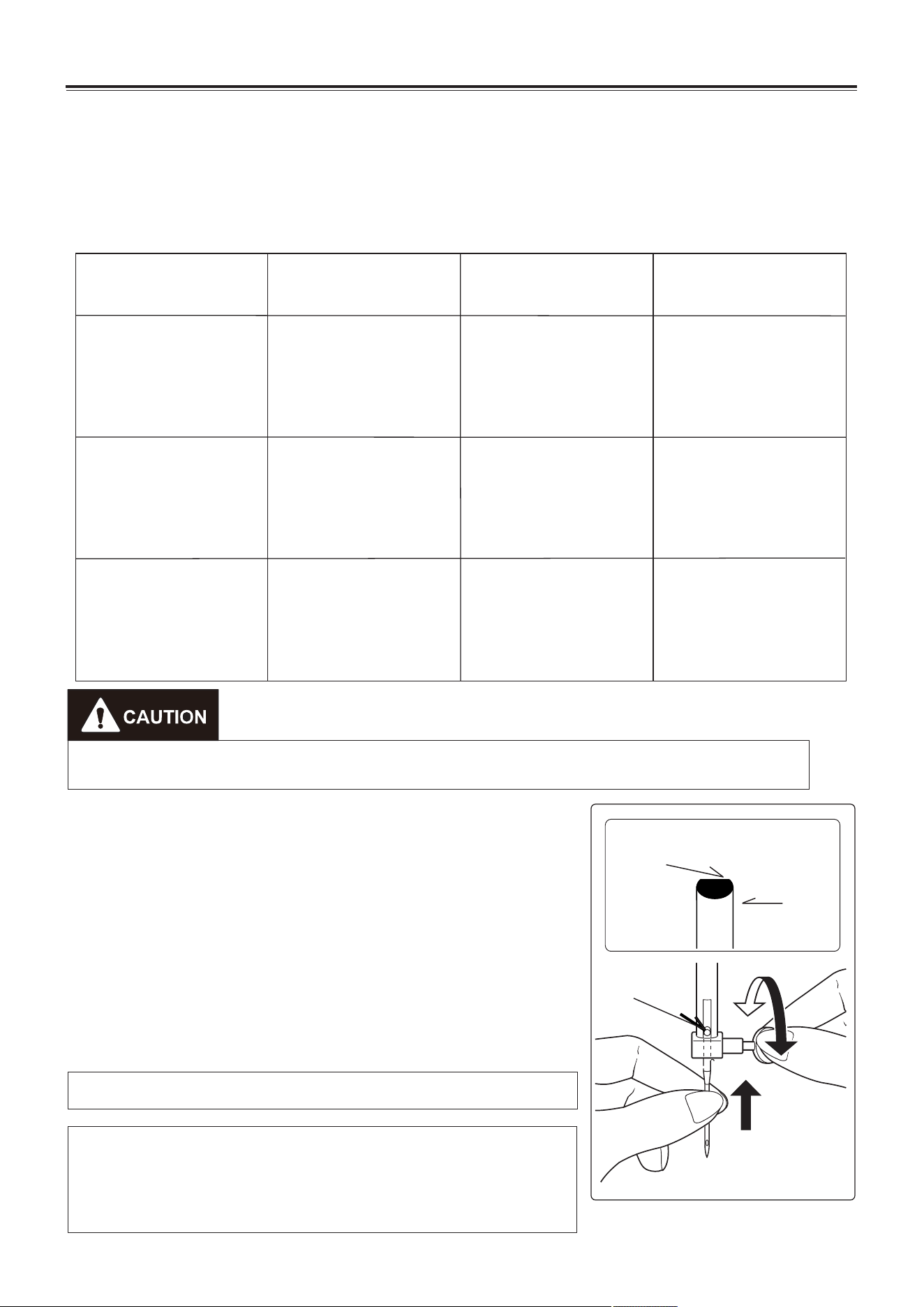
Changing the needle
1. Raise the needle bar to its highest position by turning the
hand wheel toward you.
2. Loosen the needle clamp screw by turning it toward you.
3. Remove the needle by pulling it downward.
4. Insert the new needle clamp with the flat side toward the
back.
5. Push the needle up as far as it can go.
6. Tighten the needle clamp screw with the screw driver.
NOTE: Tighten snugly, but do not over tighten.
Helpful Hint: Placing a scrap of fabric under the presser
foot and lowering the presser foot makes it easier to
change the needle and will preclude dropping the needle
into the needle plate slot.
9
Always disconnect the machine from power supply by removing the plug from the
wall-outlet.
Pattern number reference guide
Stitch width
indicator LED
Decrease button
Mode selection
button
Twin needle
indicator LED
Increase button
Pattern
indicator LED
LED display
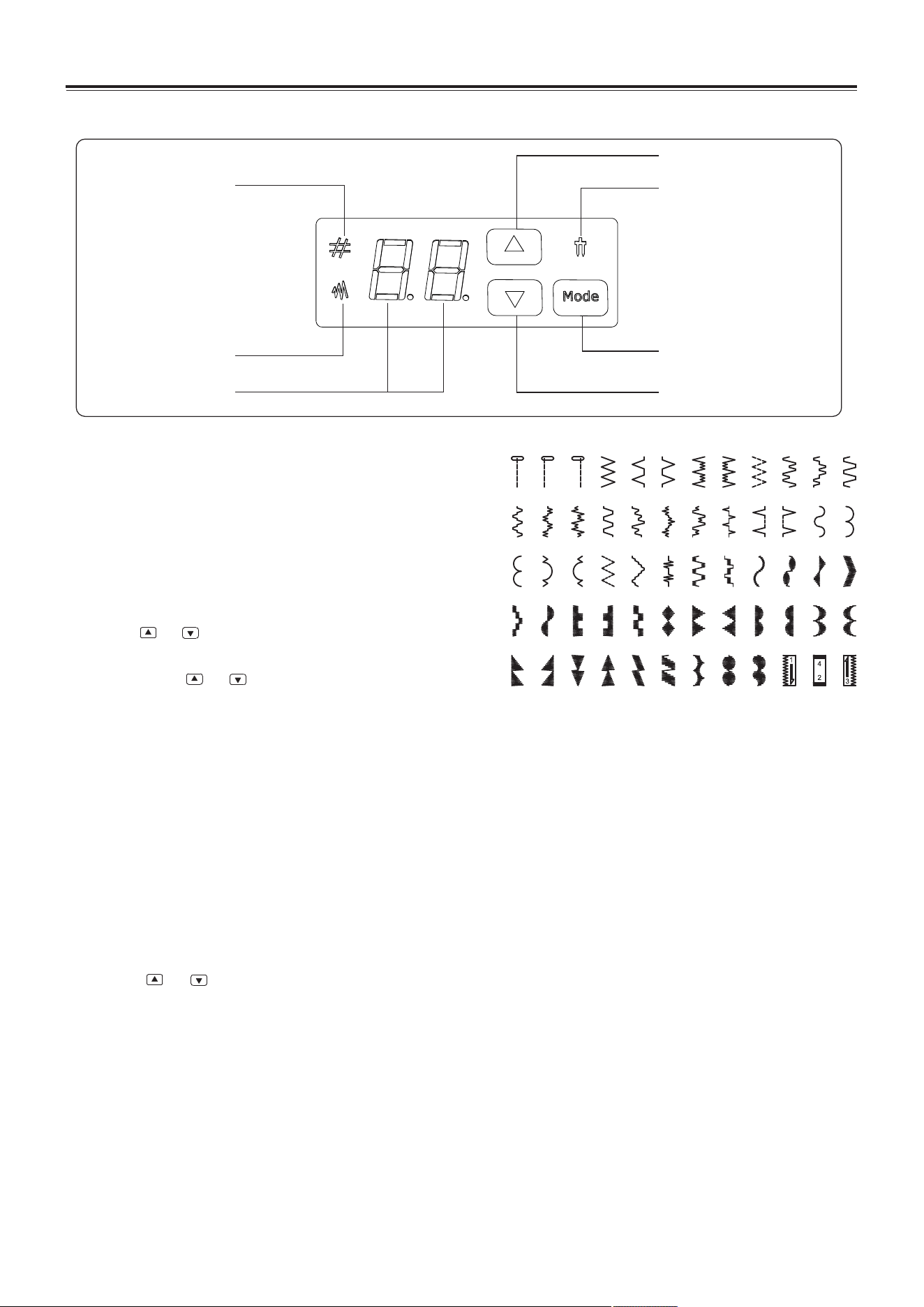
Functions of control panel
KNOWING YOUR SEWING MACHINE
Each time you press MODE button, you can realize
the following functions:
1. Pattern selection/stitch width mode.
2. Twin needle/ single needle mode.
Pattern selection:
1). Turn on the sewing machine, the pattern
indicator LED will be right on.
2). Press or button to increase or decrease the
pattern number one by one.
3). Long press or button to increase or
decrease the pattern number ten by ten.
NOTE: When the sewing machine is turned on,
the “pattern mode indicator LED” will light on
,and the LED display will show “01", if the LED
display is not show “01", refer to page 12.
10
Stitch width selection:
1). Press the MODE button once, the “stitch width mode indicator LED” will light on, and the
pattern indicator LED will light off.
Press the mode selection button again, the “stitch width mode indicator LED” will light off,
and the pattern indicator LED will light on.
2). Press or button to increase or decrease the stitch width by 0.5mm.
Twin needle selection:
Long press the MODE button, the “twin needle indicator LED” will light up.
Long press this button again, the “twin needle mode indicator LED” will light off.
NOTE: If select the twin needle mode, before whatever pattern you select, press mode
button to select twin needle mode. In this way, the stitch width can be
automatically reduced to prevent the twin needle touching the needle plate.
Otherwise the needle will be broken or the machine may be damaged.
b2b1
01 02 03 04 05 06 07 08 09 10
11
13
14
15 16
17
18 19 20
21 22
23
25 26
27
28 29 30 31 32 33 34 35
37 38 39 40
41 42
43
44
45
46
47
49 50 51 52 53
54
55 57
56
12
24
36
48
b3
Helpful messages
KNOWING YOUR SEWING MACHINE
11
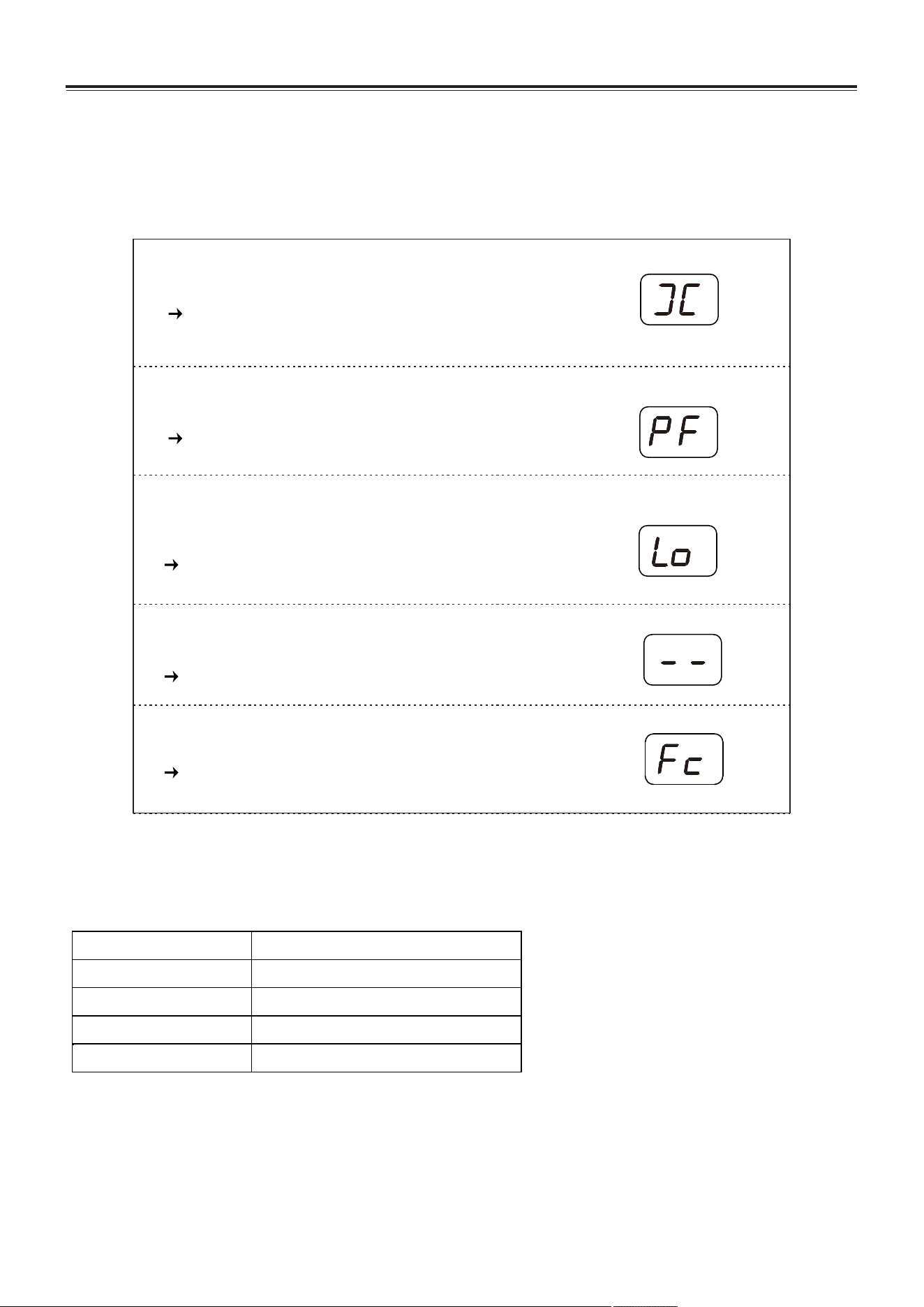
If an incorrect operation is made, a helpful message will be displayed. When a helpful message
is displayed, fix the problem following the instructions below.
Audible signal The buzzer sounds when
Pip Normal operation
Pip-pip Invalid operation
Pip-pip-pip Invalid machine setting
Pip-pip-pip-pip-pip The machine is jammed
The bobbin winder is moved to the right.
Move bobbin winder to left when it is not used.
Presser foot is raise up.
Put down the presser foot.
Machine is locked up due to thread entangled with
bobbin case or rotation interrupted forcibly.
Turn off power switch and eliminate the problem
that caused the machine to stop.
The stitch length dial is on neutral position.
Set the stitch length between range 0-4.
Remove the foot controller
The foot controller conflicts with the start/stop button.
Sewing
Basic sewing operation are described below.
Before operating the sewing machine, reading the following precautions.
SEWING BASICS
12
Normal sewing steps
The basic sewing procedure is shown below.
1. Select needle. (Select suitable needle type according to different fabric, see page 9.)
2. Turn on the sewing machine. (See page 3.)
3. Select stitches. (Select suitable stitch for the sewing position, see page 13.)
4. Attach presser foot. (Attach suitable presser foot, see page 6.)
5. Start to sew. (Put on fabric, start to sew, see page 14.)
Select stitch
Press on increase /decrease button to select suitable stitch.
1. When the sewing machine is turned on, the set stitch is straight stitch , and the LED
display will show “01”.
2. Press or button to select stitch.
3. If necessary adjust the stitch length and width.
For detail information about each utility stitch, please refer to the following page.
1. When the machine is in operation, keep your hands away from all moving parts such as
needle, hand wheel, etc. Otherwise injuries may occur.
2. Do not pull or push the fabric to hard when sewing, otherwise injuries may occur or the
needle may break.
3. Do not use bent needles. Bent needles can easily break, possibly resulting injuries.
When turn on sewing machine, there will be three possible conditions:
1. When the stitch length dial is on the position between “0-4", LED display will show “01",
and you can select 57 utility stitches under this condition.
2. When the stitch length dial is on the position of Buttonhole stitch, LED display will show
"b1 or b2 or b3", and you cannot select 57 utility stitches under this condition.
3. When the stitch length dial is on neutral position, LED display will show "--", under this
condition the machine cannot work.
4. When the bobbin winder is moved to the right position, LED display will show “ ”, under
this condition the machine cannot work.
Increase button
LED display Decrease button
SEWING BASICS
This indicating
light is with red
light on.
13
Example
1. Press to select stitch 04.
2. Stitch width adjusting.
1). Press MODE button to stitch width adjusting mode.
2). Press or to adjust stitch width.
This indicating
light is with green
light on.
Mode selection button
Note: Under the stitch width adjusting mode, green light means default
setting. Red light means custom setting.
3. Stitch length adjusting.
Turn the stitch length dial to adjust the stitch length.
1. After adjusting the stitch width, turn the hand wheel 2-3 circles towards you to check if the
needle will touch the presser foot or not. If the needle can touch the presser foot, the
needle will be bent or broken.
2. If the stitches are sewed together, please increase the stitch length before continuing to
sew, otherwise will cause needle bent or broken.
This indicating
light is with red
light on.
Select stitch .
SEWING BASICS
14
Bobbin thread
Top thread
3
4
Start sewing
1. Turn the hand wheel slowly towards
you with your right hand until the
needle goes down and continue
turning the hand wheel until the take-
up lever is at its highest position.
2. Lift up the presser foot.
3. Feed the fabric under the presser
foot. Pull the top thread and bobbin
thread towards the back of the
machine under the presser foot, until
they are about 15cm (6") long.
Reverse sewing
When press the reverse sewing lever, the machine will sew
reversely (feed the fabric backwards). (See page 4)
Reversestitch
6
4. Press the foot controller carefully and start
sewing.
5. When you have finished, remove your foot from
the foot controller, then the sewing machine will
stop.
6. Lift up the presser foot, pull the fabric and
threads about 15cm backwards, then cut
threads with the thread cutter from back to
front.
7. Observe the finished fabric carefully to check
the conditions of top thread and bobbin thread.
If the bobbin thread appears on top side of
fabric, please adjust the top thread tension (For
detail of how to adjust the top thread tension,
please refer to page 8).
2
1
SEWING BASICS
15
2
Useful sewing tips
Various ways to achieve better sewing results are described below.
Refer to these tips when sewing.
1. Trial sewing
Use different stitch width and length for trial sewing. When you have finished, select the best
looking stitch width and length for correct sewing.
For the trial sewing, use a piece of fabric and thread that are the same as those used for your
project, and check the thread tension and stitch length and width. Since the results differ
depending on the type of stitching and the number of fabric layers sewn, perform the trial
sewing under the same conditions that will be used with your project.
2. Changing the sewing direction
When stitching reaches a corner, stop the sewing machine.
1). Leave the needle lowered in the fabric (under the needle plate) by turn the hand wheel
slowly towards you with your right hand.
2). Raise the presser foot lever, and then turn the fabric by using the needles as a pivot.
3). Lower the presser foot lever and continue sewing.
3. Sewing curves
1). Stop sewing, and then slightly change the sewing direction to sew around the curve.
2). When sewing along a curve while using a zigzag stitch, select a shorter length in order to
obtain a finer stitch.
4. Sewing thick fabrics
If the fabric does not fit under the presser foot
Raise the presser foot even higher to bring the presser foot to its highest position. Then feed the
fabric under the presser foot. (See page 4 to Raise the presser foot.)
5. Sewing elastic fabric or the fabric that is easy to cause skipping
stitches
Use round head needle and bigger stitch length. If necessary, add one layer of lining cloth under
the fabric for better sewing.
6. Sewing thin fabric or silk
When sewing thin fabric or silk, the stitch may depart from correct direction or cannot feed the
fabric correctly. If so, add one layer of lining cloth under the fabric for better sewing.
7. Sewing stretch fabrics
First, baste the piece of fabric together, and then sew without stretching the fabric.
8. Free arm sewing
When sewing tube fabric or the part cannot reach, use the free arm sewing function (For detail,
refer to page 4).
UTILITY STITCHES
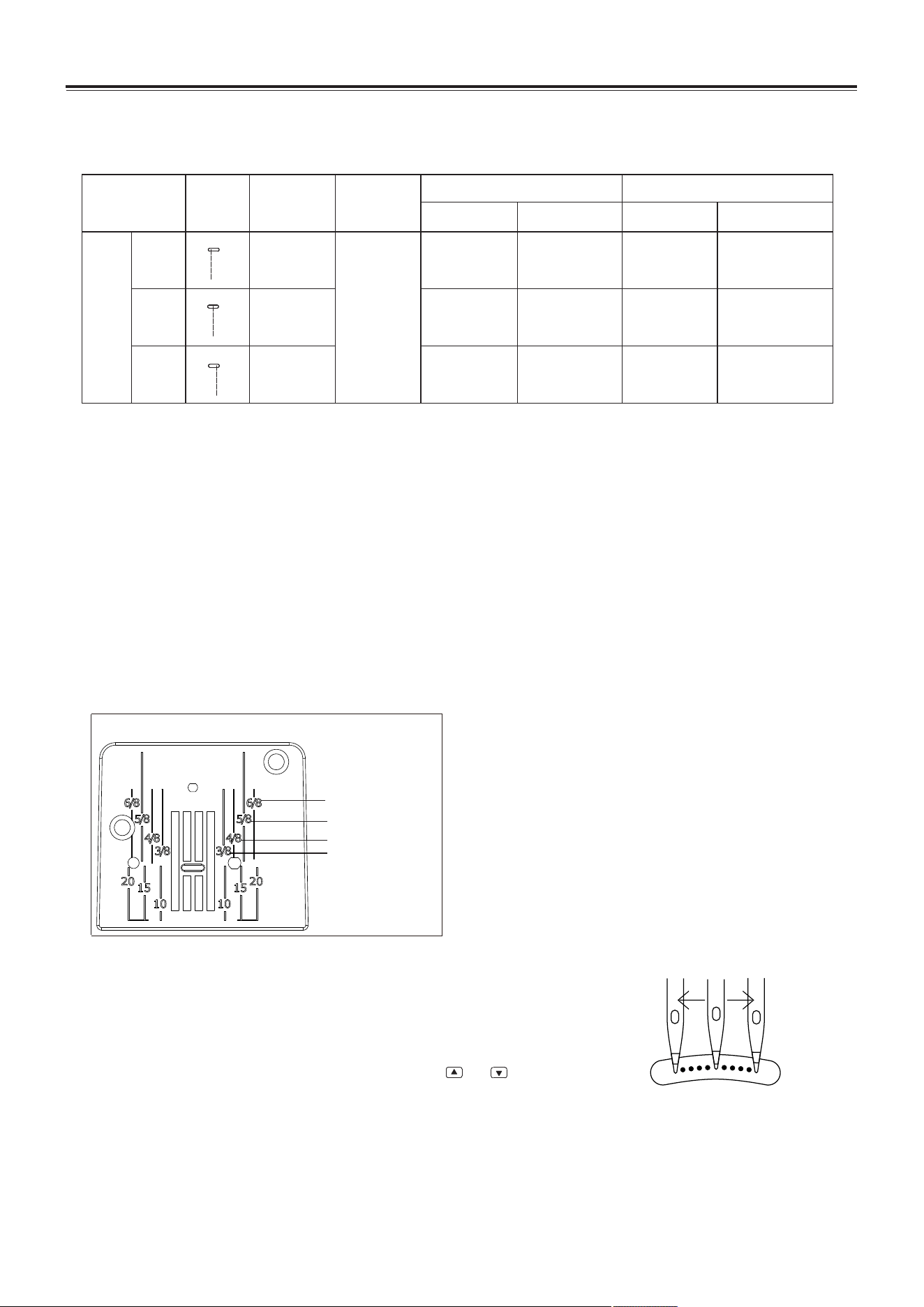
Straight stitch is used for sewing plain seams. Three stitches are available for basic stitching.
Can be adjusted to anyone of
11 different positions
16
Straight stitch
Sewing
1. Baste or pin together the fabric pieces.
2. Select presser foot and attach it to the machine (For detail, refer to page 6).
3. Select stitch number. If necessary, adjust the stitch length or stitch width (For detail, refer to
page 12).
4. Start sewing. (For detail, refer to page 14)
5. Finish sewing.
Keep seams straight
To keep the seam straight, use one of the numbered guide lines on the needle plate.
The numbers indicate distance from the needle at its center position.
Stitch name
Stitch
Presser foot
Stitch No.
02
01
Stitch width (mm)
Recommended
Adjustable range
Stitch length (mm)
03
Straight stitch
Recommended
Adjustable range
0.0
2.5
5.0
0.0-5.0
0.0-5.0
0.0-5.0
2.5
2.5
2.5
1-4
1-4
1-4
L
M
R
Straight stitch
Zigzag
foot
Change the needle position
There is no stitch width for straight stitch, so the straight stitch
width in above table means needle position. Needle position
can be adjusted.
Under the Stitch Width Adjusting Mode, press or to
adjust the needle position.
Note: For detail information of how to adjust stitch width,
please refer to page 13.
3/8"( 9mm)
1/2"(13mm)
5/8"(16mm)
3/4"(19mm)
UTILITY STITCHES
17
Zigzag stitch/overcasting stitch
Stitch name
Stitch
Presser foot
Stitch No.
Stitch width (mm)
Recommended
Adjustable range
Stitch length (mm)
5.0
4.5
5.0
0.0-5.0
1.5-4.5
1.0-5.0
Zigzag stitch
Three-point
zigzag stitch
1
0.5
1
0.5-4
0.5-4
0.5-4
Recommended
Adjustable range
04
09
06
Overcasting
stitch
Zigzag
foot
Sewing
1. Select a presser foot and attach it to the machine (For detail, refer to page 6).
2. Select stitch number. If necessary, adjust stitch length or width (For detail, refer to page 12).
3. Start sewing (For detail, refer to page 14).
4. Finish sewing.
Warm tip:
Due to different types of threads, fabrics, stitch patterns, and sewing speed, top thread
will appear on wrong side of fabric. But the bobbin thread will not appear on right side of
fabric. If the bobbin thread appear on right side of fabric or the fabric is wrinkled,
decrease top thread tension a little by turning the thread tension dial (For detail, refer to
page 8).
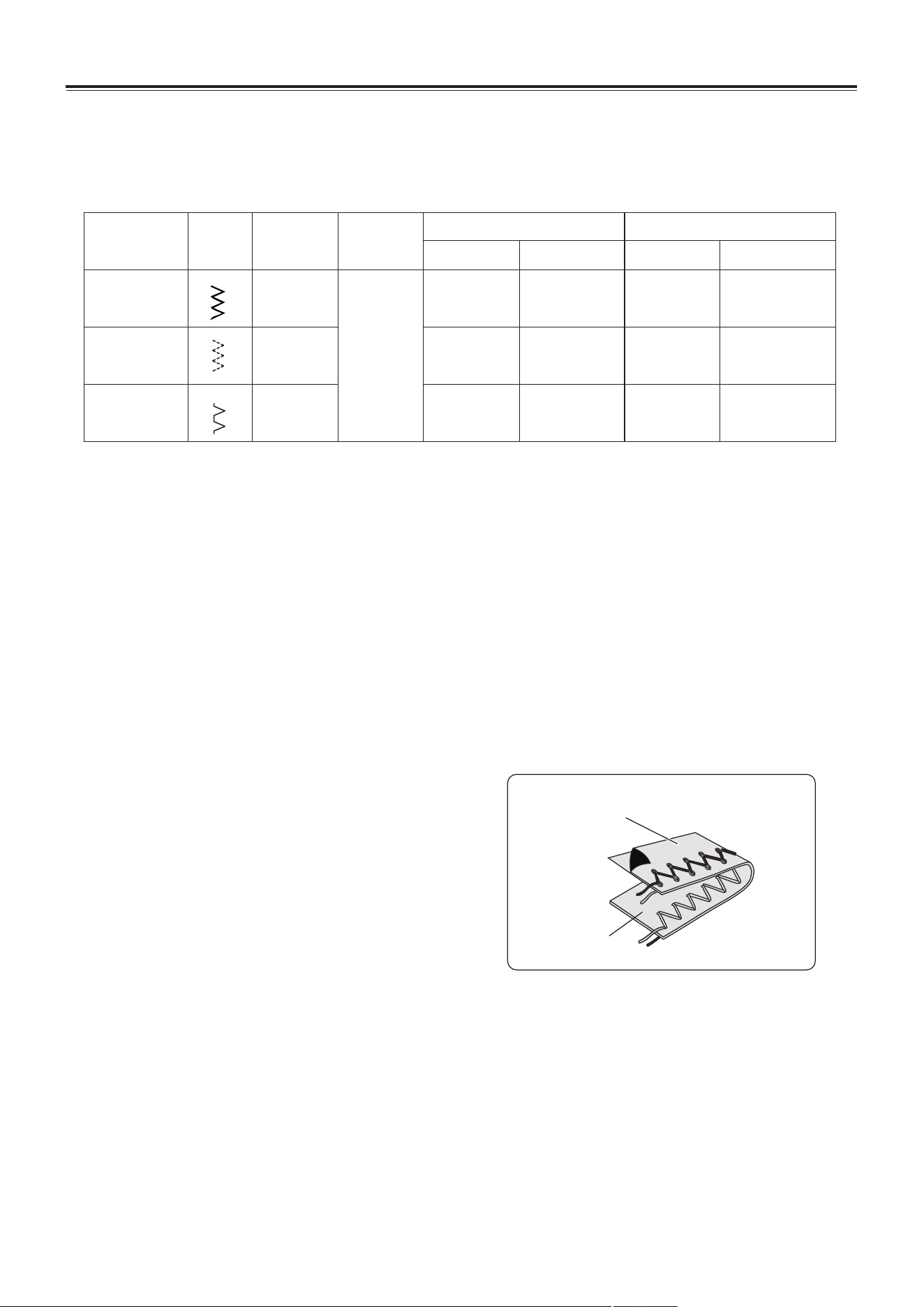
Use overcasting stitch to join fabrics and can finished once.
It is also useful for stretch fabrics.
Wrong side
Right side
UTILITY STITCHES
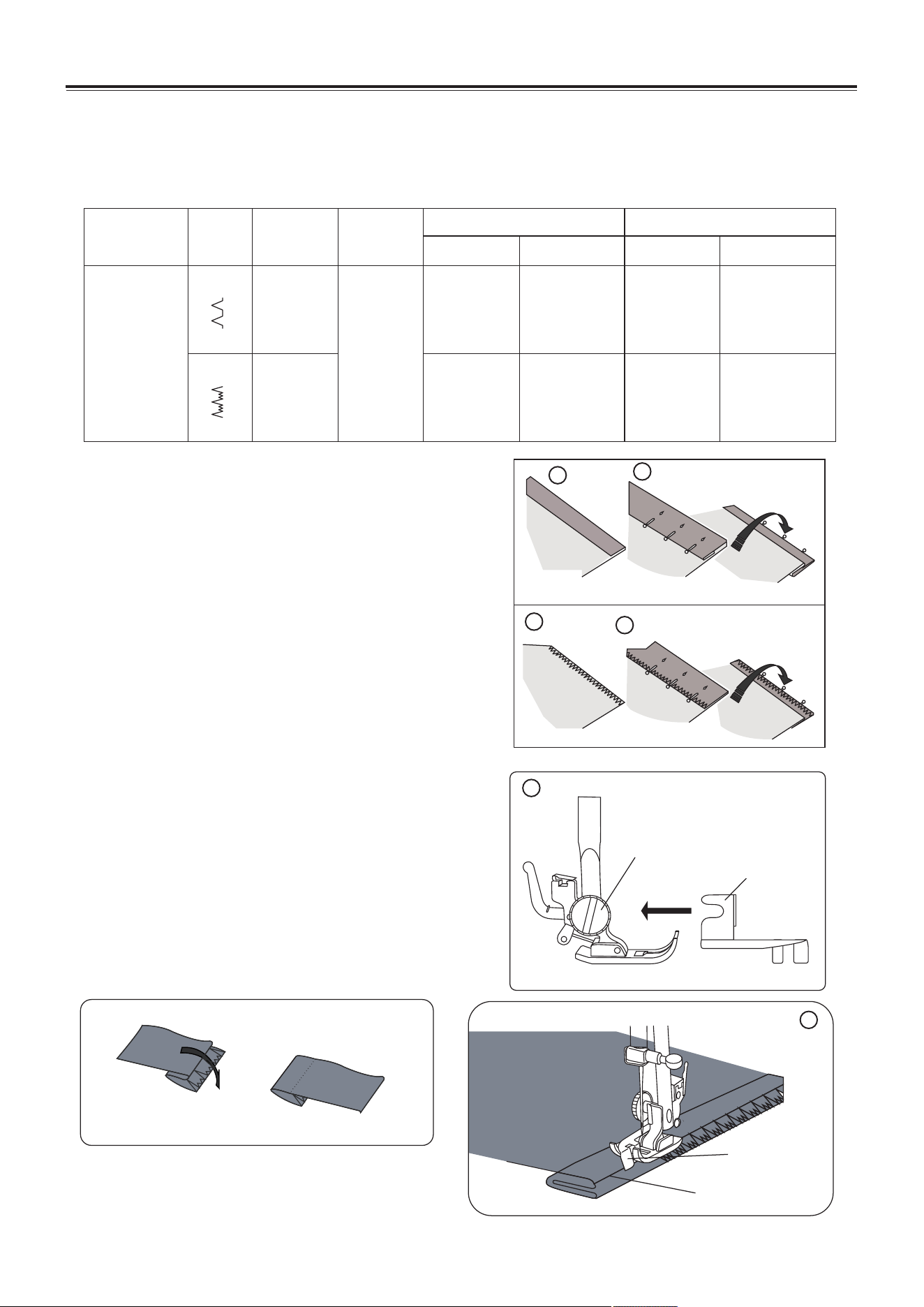
Use blind hem stitch to hem clothes' edges, such as edges of trousers, and not reveal any
stitch.
Turn the fabric to right, there will be
almost no stitch appeared on right side of
fabric.
18
Stitch name
Stitch
Presser foot
Stitch No.
Stitch width (mm)
Recommended
Adjustable range
Stitch length (mm)
5.0
5.0
1.0-5.0
2.0-5.0
1
2.5
1-4
2-4
Recommended
Adjustable range
Zigzag foot
+
Hem guide
foot
05
07
Blind hem
stitch
Blind hem stitch
light-weight fabric
Right
side
Wrong
side
Right
side
Wrong
side
Medium-weight fabric
1
2
1
2
Guide presser foot
Presser foot screw
3
Welt seam
Guide edge
4
Sewing
1. First, finish the raw edge. Do this by turning it
under on fine fabrics or overcasting it on medium
to heavyweight fabrics. Then turn the hem up to
the required depth, press and pin in place.
2. Now fold the fabric as illustrated with the wrong
side facing up.
3. Attach the hem guide foot.
1). Loose the presser foot screw, and put in the
hem guide foot.
2). Ensure the guide edge of the hem guide foot
to be in the middle of the presser foot.
3). Tighten the presser foot screw.
4. Position the fabric with the edge of the folded
hem against the guide of the presser foot, and
then lower the presser foot lever.
5. Start sewing (For detail, refer to page 14).
6. Finish sewing.
UTILITY STITCHES
Helpful hint:
During zipper inserting, ensure that the
needle do not touch the zipper. Otherwise
it will cause needle break or even injury.
Helpful tips:
Use the stitch width adjusting function to adjust
the needle position to be more close to the pipe.
19
Stitch name
Stitch
Presser foot
Stitch No.
Stitch width (mm)
Recommended
Adjustable range
Stitch length (mm)
2.5 N/A
Straight stitch
2.5 1-4
Recommended
Adjustable range
Zipper foot
01
Stitch name
Stitch
Presser foot
Stitch No.
Stitch width (mm)
Recommended
Adjustable range
Stitch length (mm)
2.5 No
Straight stitch
2.5 1-4
Recommended
Adjustable range
Zipper foot
01
Zipper insertion
Piping
Sewing
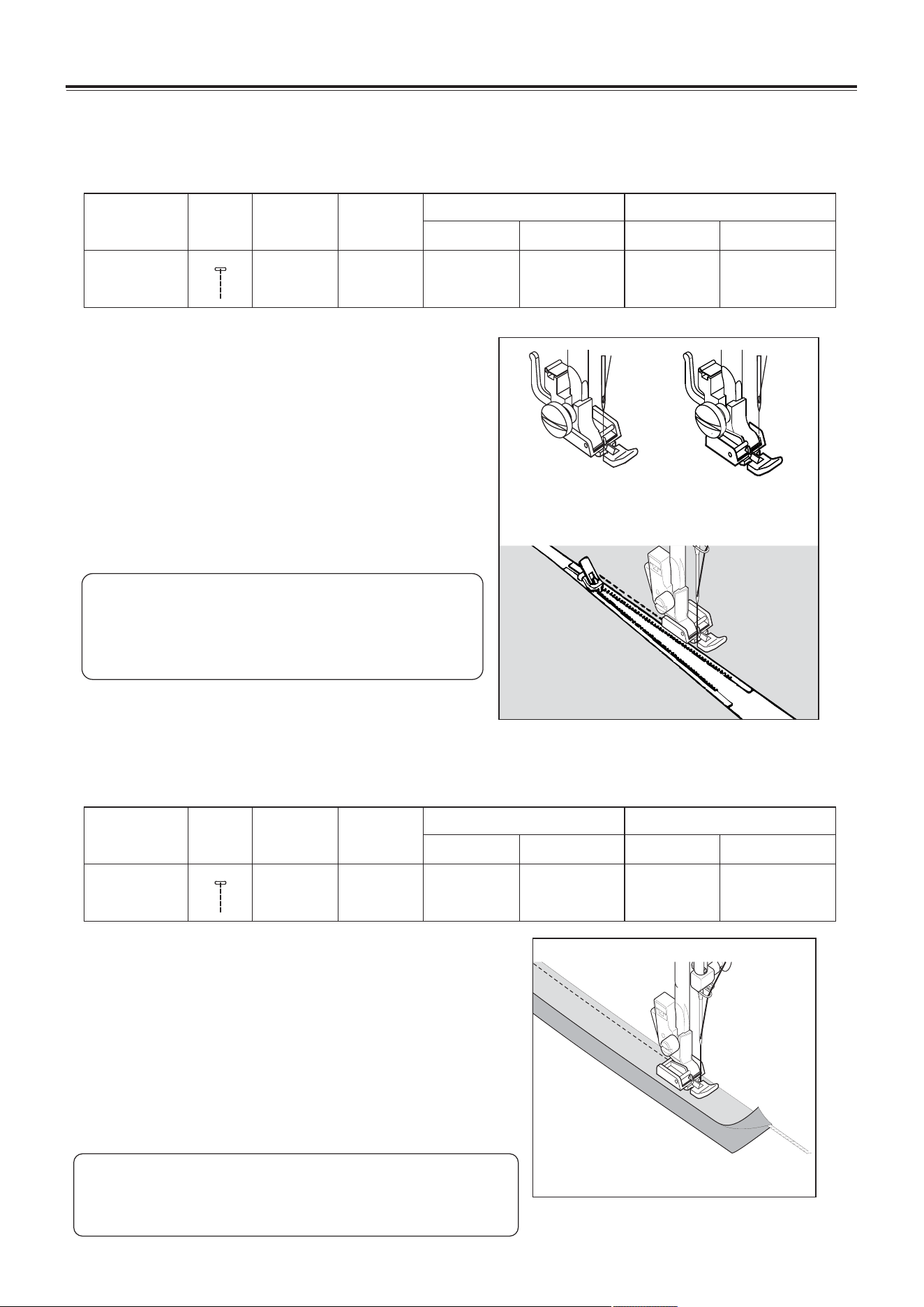
1. Select stitch (For detail, refer to page 12).
2. Attach the zipper foot (For detail refer to page 6).
When sewing the right side of the zipper, attach
the zipper foot as the illustration in right.
When sewing the left side of the zipper, attach
the zipper foot as the illustration in right.
3. Start sewing (For detail, refer to page 14).
4. Finish sewing.
Sewing
1. Select stitch (For detail, refer to page 12).
2. Change the zipper foot (For detail refer to page 6).
Attach right side of zipper foot to foot holder so that
needle passes through the opening on the right
side of the foot.
3. Start sewing (For detail, refer to page 14).
4. Finish sewing.
Zipper foot can be used for sewing all types of zippers, and it is easy to sew to the left or right of
the zipper.
To pipe soft furnishings, cover cord with a bias strip of fabric and pin or tack it to the main piece
of fabric.
Sew the right
side of the
zipper.
Sew the left
side of the
zipper.
UTILITY STITCHES
Shank lever
20
Stitch name
Stitch
Presser foot
Stitch No.
Stitch width (mm)
Recommended
Adjustable range
Stitch length (mm)
Button of
the distance
between
two holes
0.0-5.0
Zigzag stitch
0 0
Recommended
Adjustable range
Zigzag foot
04
Button sewing
2
Sewing
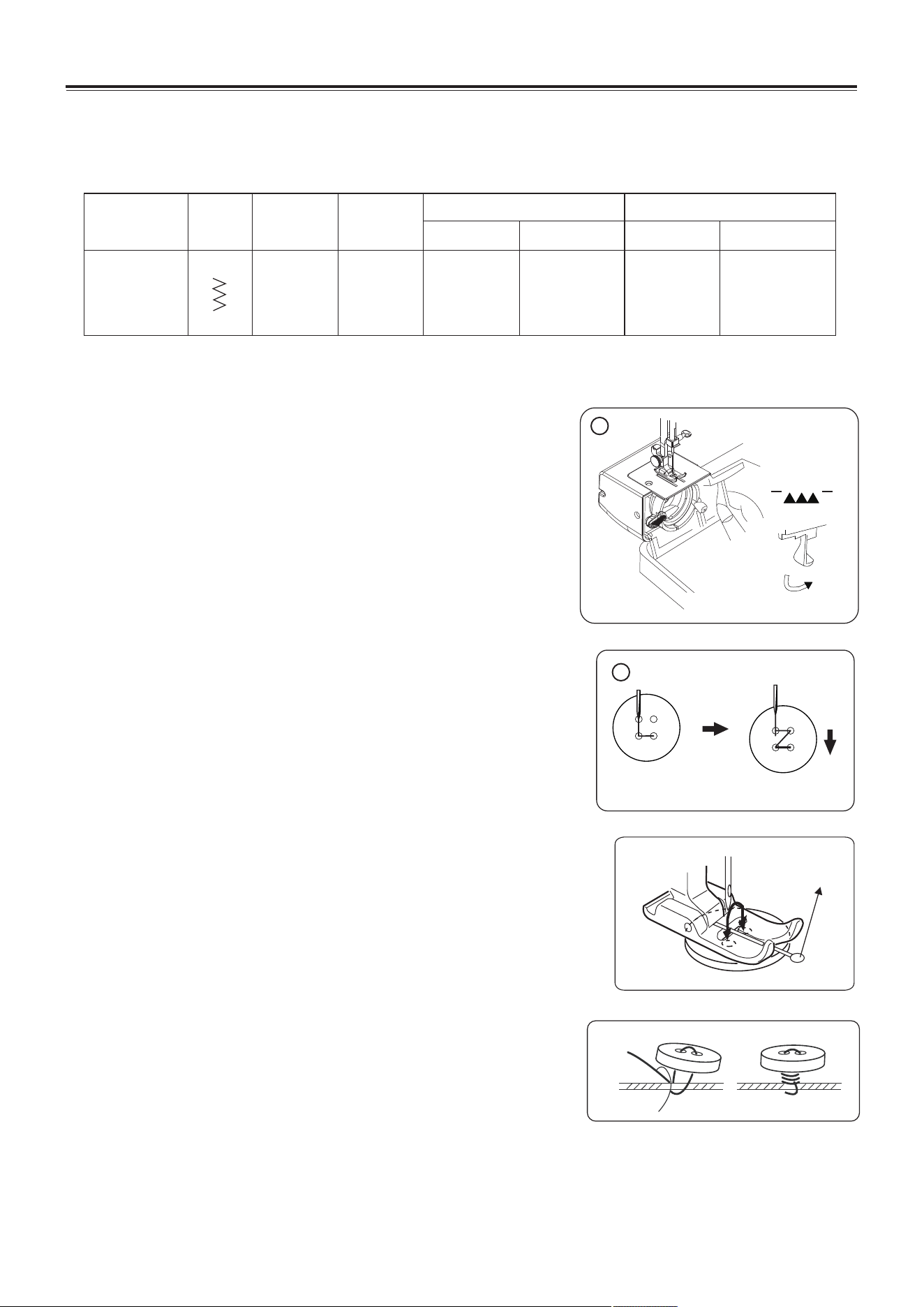
1.Drop the feed dog (Refer to page 5) .
NOTE: After you finish sewing, set the drop feed lever
to the original position.
2. Place the button between the presser foot and the
fabric.
NOTE: When sewing four-hole button, first sew the
two holes closest to you. Then, slide the
button so that the needle goes into the two
holes toward the rear of the sewing machine,
and then sew them in the same ways.
3. Select stitch (For detail, refer to page 12).
4. Adjust the stitch length by turning the stitch length dial
to “0".
5. Adjust the stitch width; ensure the needle correctly
goes into the left and right hole of the button.
NOTE: Turn the handwheel toward you
(counterclockwise) to check that the needle
correctly goes into the left and right hole of
the button.
6. Start sewing (For detail, refer to page 14).
7. Finish sewing.
Buttons with 2 or 4 holes can be sew.
Button sewing tips
1. Attach a shank lever on the presser foot to help
sewing.
2. To secure thread, cut the upper thread with
25cm of excess, wind it around the thread
between the button and the fabric, and then tie it
tightly.
1
UTILITY STITCHES
B C D E
F G
21
Buttonhole sewing
Use buttonhole foot can sewing buttonholes.
Buttonhole foot
Stitch name
Stitch
Presser foot
Stitch No.
b1
b2
Stitch width (mm)
Recommended
Adjustable range
Stitch length (mm)
b3
–
–
–
Buttonhole
stitch
Recommended
Adjustable range
–
–
–
–
–
–
–
–
–
A
Sewing
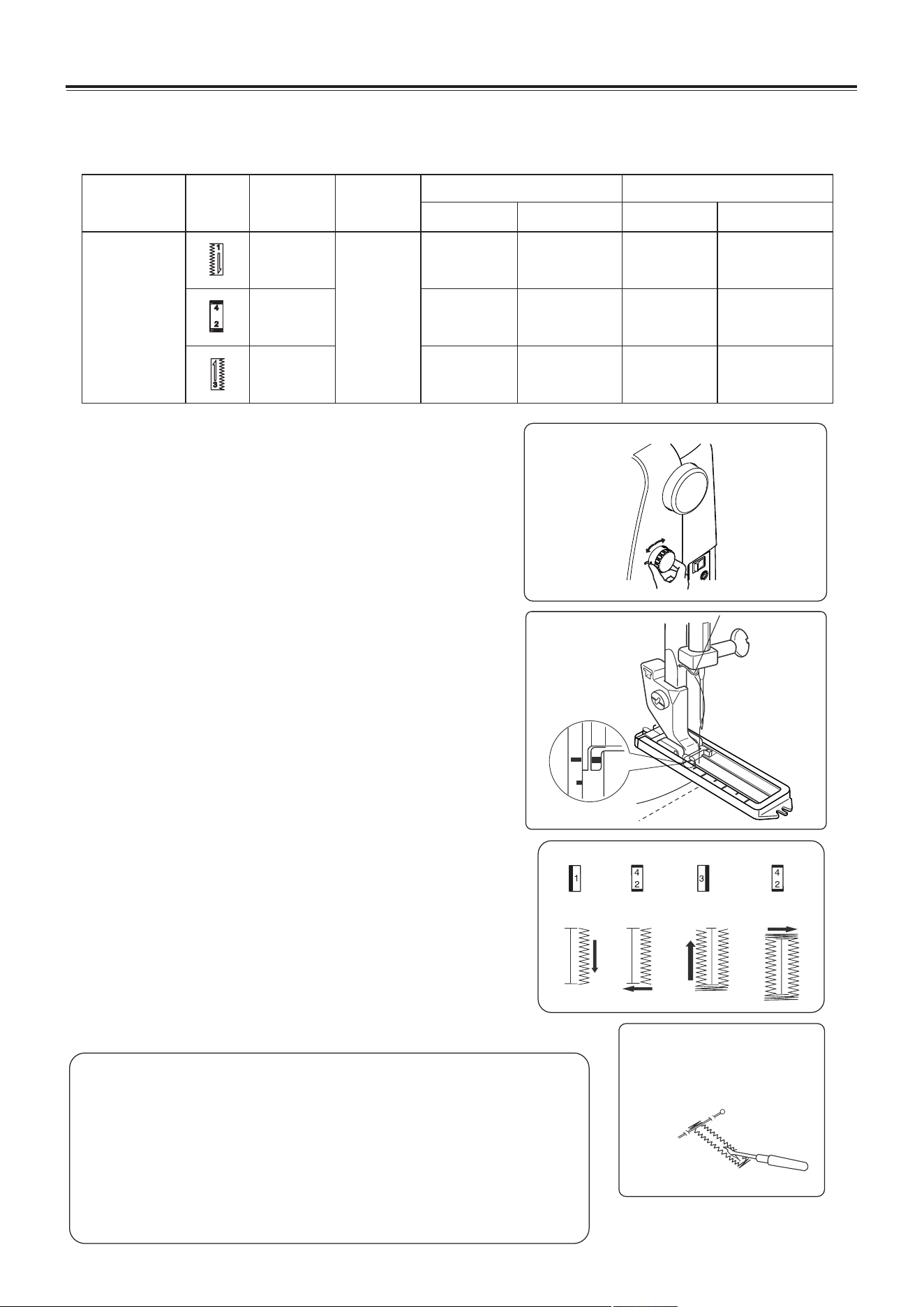
1. Attach the buttonhole presser foot. (Refer to
page 6.)
2. Start sewing.
A. Turn the stitch length dial to b1, pull the top
thread and the bobbin thread to the left under
the foot.
B. Lower the needle at the starting point. Then
lower buttonhole foot. Sew the needed length
on the left side of buttonhole ant stop the
machine.
C. Turn the stitch length dial to b2, sew 5-7 of the
bartack stitches, then stop.
D. Turn the stitch length dial to b3, sew the right
side of buttonhole the same length as the left
side and stop the machine.
E. Turn the stitch length dial to b2, sew 5-7 of the
bartack stitches, then stop.
F. Raise the presser foot and draw out the fabric,
cut both top thread and bobbin thread leaving
about 10cm of thread ends, and tie it on the
wrong side of the fabric.
G. Cut open the buttonhole with seam ripper.
3. Finish stitching.
Helpful hint:
1. Before buttonhole stitching, trial sewing on other cloth.
2. For thin fabric, add lining paper under the fabric.
3. Do not sew buttonhole on elastic fabric.
4. Please increase the density of the buttonhole by
repeating on the same area.
Sewing over the first buttonhole will give you a more
rigid buttonhole.
UTILITY STITCHES
Can sewing free-motion stitch with customer’s own style.
Sewing
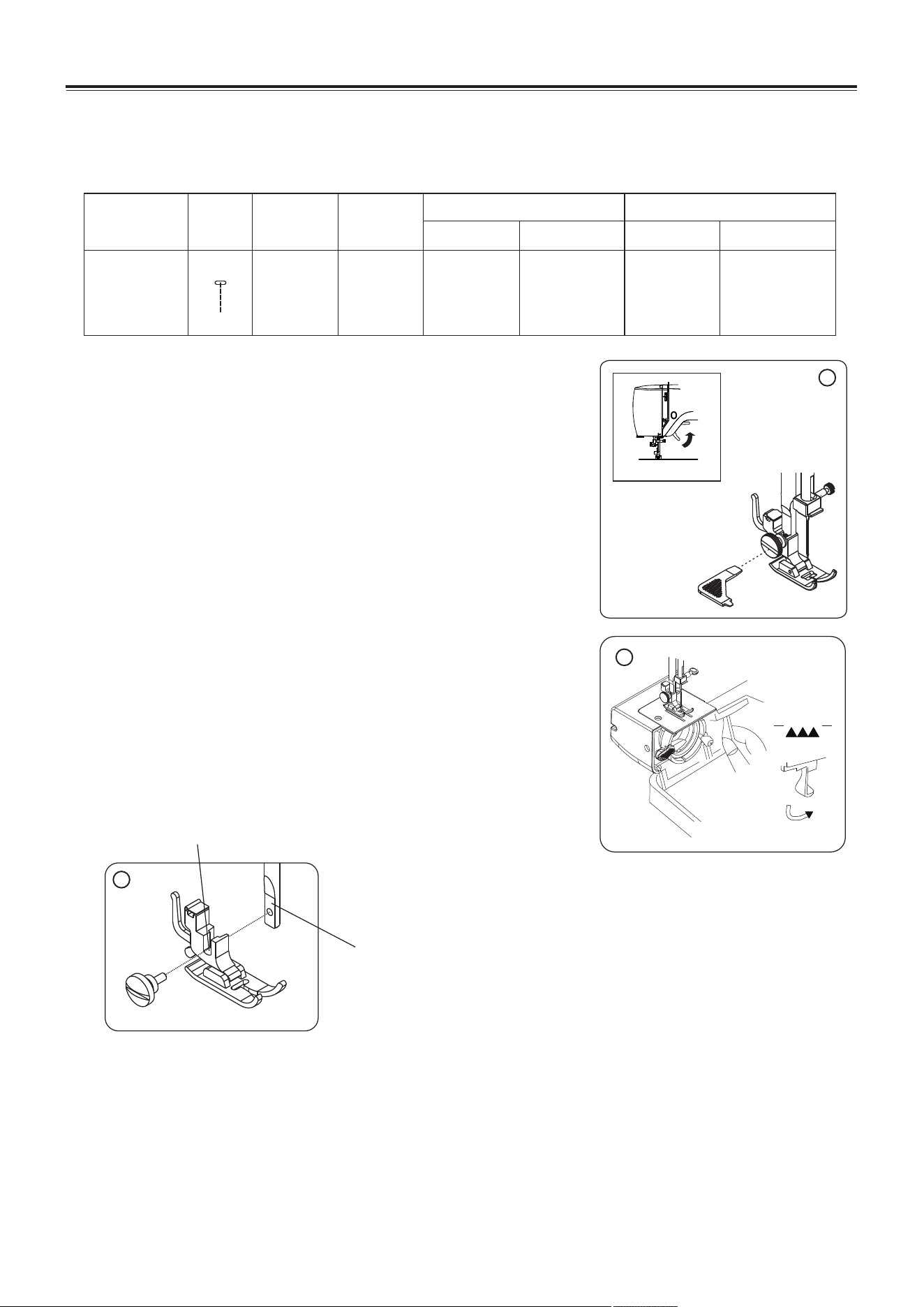
1. Detaching the presser foot holder.
a. Raise the presser foot lifter.
b. Loosen the presser foot screw by turning it
counterclockwise by using multi-function screwdriver,
the presser foot holder will auto drop down.
c. Remove the presser foot holder and the screw into the
accessories box to prevent lose.
2. Drop the feed dog (Refer to page 5) .
NOTE: After you finish sewing, set the drop feed lever
to the original position.
3. Select stitch (For detail, refer to page 12).
4. Start sewing (For detail, refer to page 14).
5. Finish sewing.
6. Attach the presser foot holder.
Raise the presser foot lifter, align the gap in the foot
holder with the presser bar, Tighten the screw by
turning it clockwise.
22
Stitch name
Stitch
Presser foot
Stitch No.
Stitch width (mm)
Recommended
Adjustable range
Stitch length (mm)
2.5 0.0-5.0
Straight stitch
0
0
Recommended
Adjustable range
Zigzag foot
01
Free seam
6
Gap
Presser bar
1
2
UTILITY STITCHES
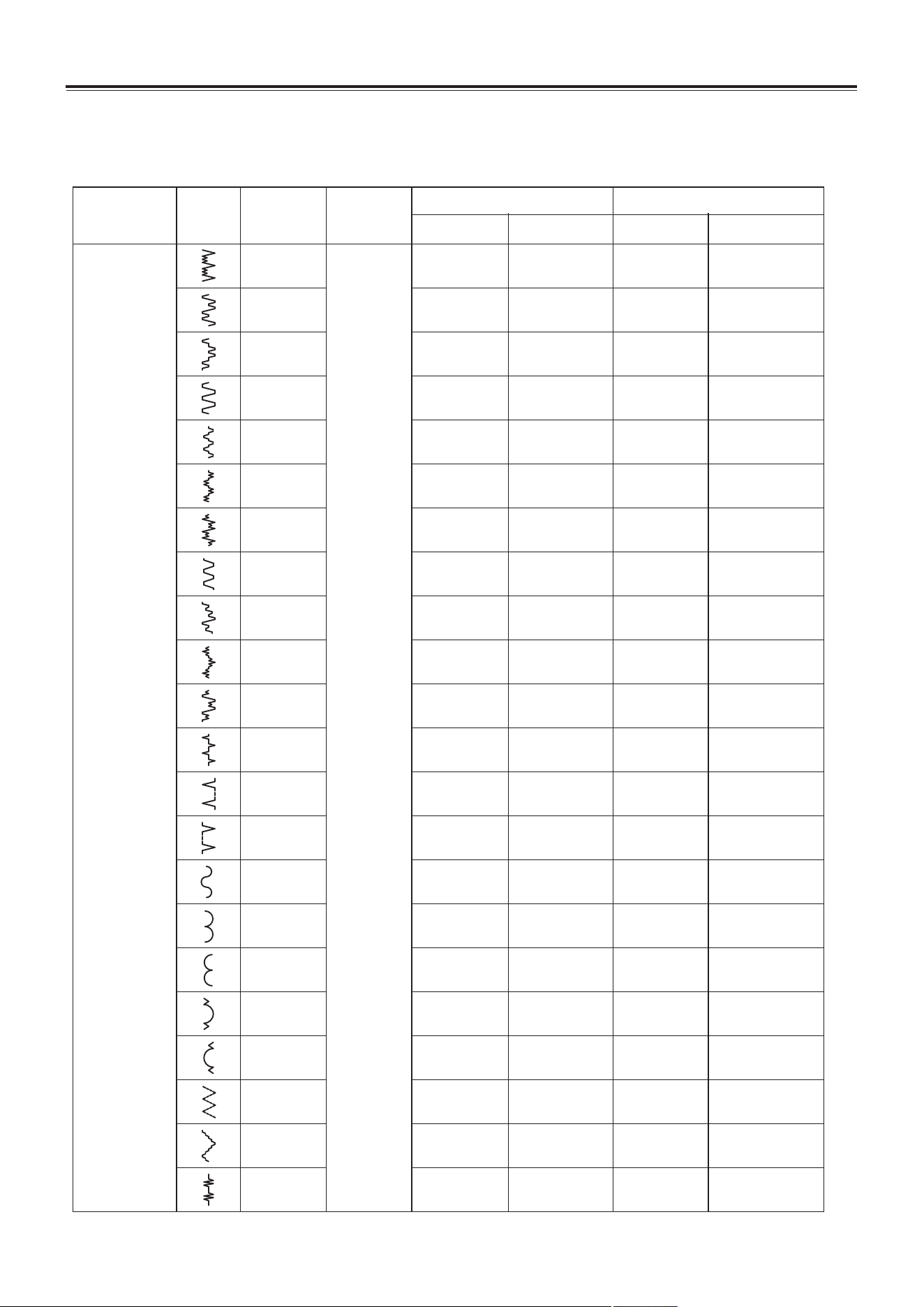
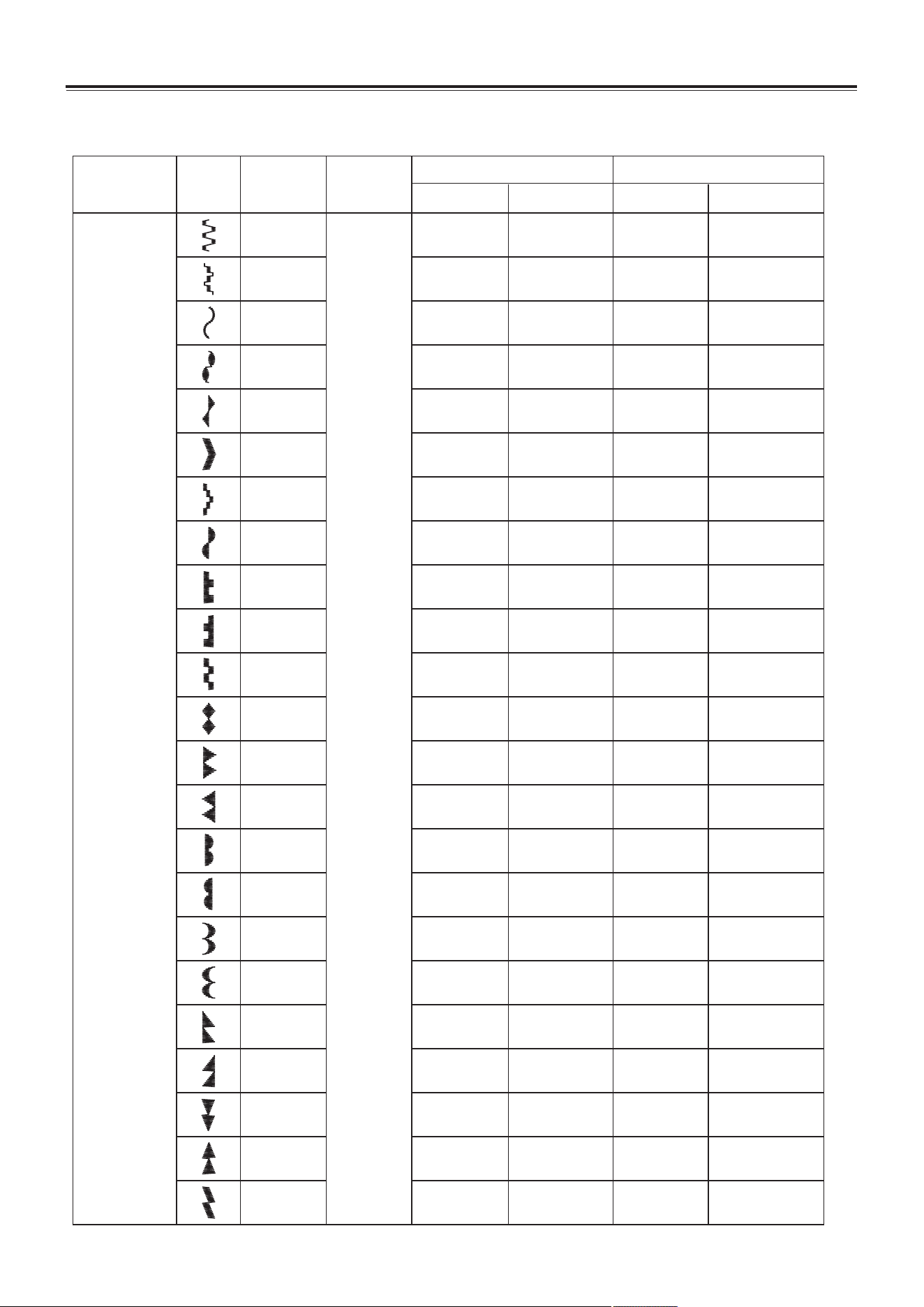
Can sew all kinds of decorative stitch as follow.
23
Decorative stitch
Stitch name
Stitch
Presser foot
Stitch No.
Stitch width (mm)
Recommended
Adjustable range
Stitch length (mm)
5.0
5.0
5.0
5.0
5.0
5.0
5.0
2.5
5.0
5.0
5.0
5.0
5.0
5.0
5.0
5.0
5.0
2.0-5.0
1.0-5.0
1.0-5.0
1.0-5.0
1.0-5.0
1.0-5.0
3.0-5.0
1.0-5.0
3.0-5.0
3.0-5.0
3.0-5.0
1.0-5.0
1.0-5.0
1.0-5.0
2.0-5.0
3.0-5.0
3.0-5.0
Decorative stitch
(thin)
0.5
0.5
0.5
0.5
0.5
0.5
0.5
0.5
0.5
0.5
0.5
0.5
0.5
0.5
0.5
0.5
0.5
0.5-4
0.5-4
0.5-4
0.5-4
0.5-4
0.5-4
0.5-4
0.5-4
0.5-4
0.5-4
0.5-4
0.5-4
0.5-4
0.5-4
0.5-4
0.5-4
0.5-4
Recommended
Adjustable range
08
10
11
12
13
14
15
16
17
18
19
20
21
22
23
24
25
Zigzag foot
26
27
28
29
30
5.0
5.0
5.0
5.0
5.0
3.0-5.0
3.0-5.0
3.0-5.0
3.0-5.0
1.0-5.0
0.5
0.5
0.5
0.5
0.5
0.5-4
0.5-4
0.5-4
0.5-4
0.5-4
UTILITY STITCHES
24
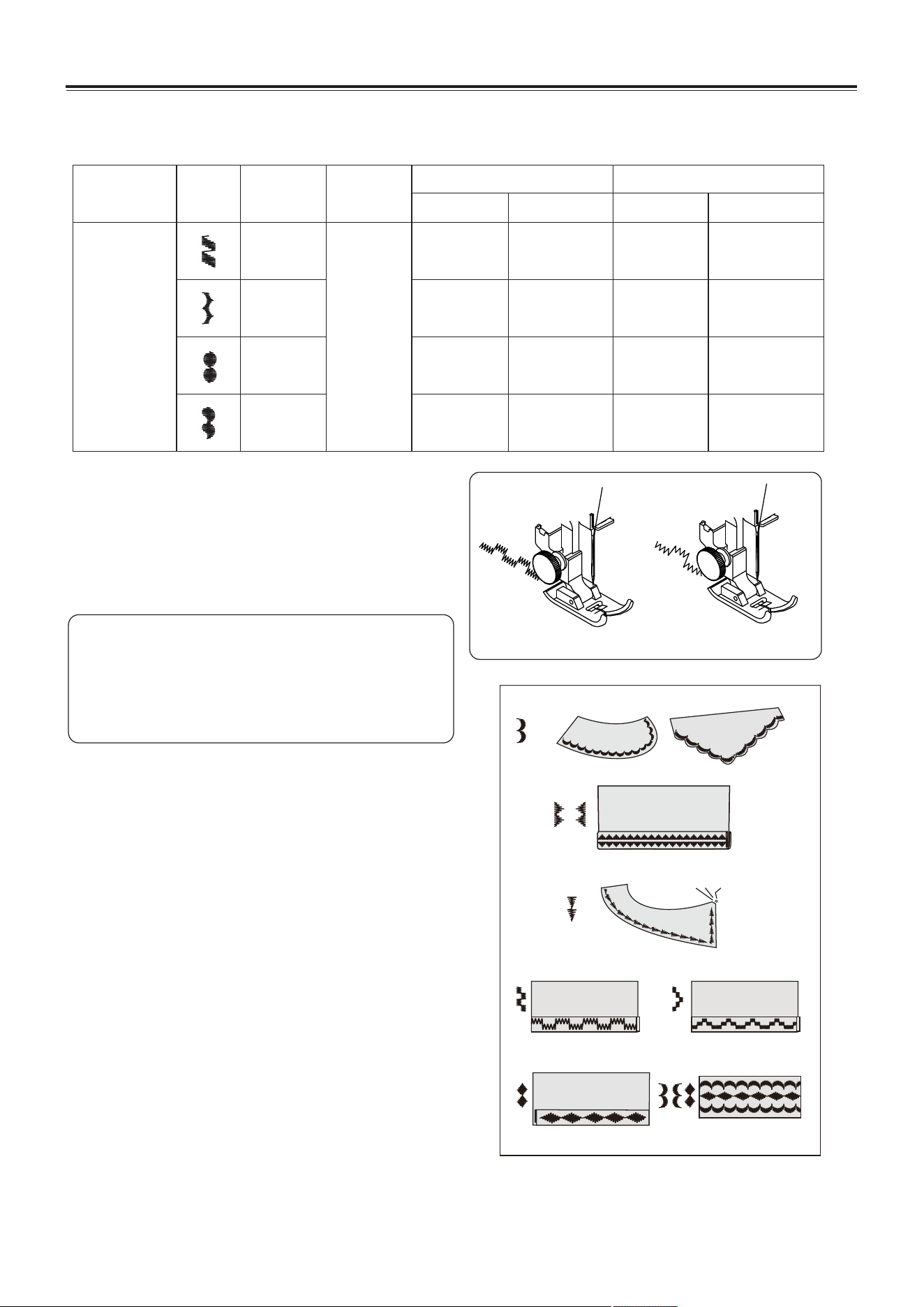
Decorative stitch
Can sew all kinds of decorative stitch as follow.
31
32
33
34
35
36
37
38
39
40
47
41
48
42
49
43
50
Stitch name
Stitch
Presser foot
Stitch No.
Stitch width (mm)
Recommended
Adjustable range
Stitch length (mm)
5.0
5.0
5.0
5.0
5.0
5.0
5.0
5.0
5.0
5.0
5.0
5.0
5.0
5.0
5.0
5.0
5.0
3.0-5.0
3.0-5.0
3.0-5.0
3.0-5.0
2.5-5.0
2.5-5.0
3.0-5.0
3.0-5.0
1.0-5.0
1.0-5.0
3.0-5.0
1.0-5.0
3.0-5.0
2.5-5.0
2.5-5.0
2.5-5.0
2.5-5.0
Decorative stitch
(thick)
0.5
0.5
0.5
0.5
0.5
0.5
0.5
0.5
0.5
0.5
0.5
0.5
0.5
0.5
0.5
0.5
0.5
0.5-4
0.5-4
0.5-4
0.5-4
0.5-4
0.5-4
0.5-4
0.5-4
0.5-4
0.5-4
0.5-4
0.5-4
0.5-4
0.5-4
0.5-4
0.5-4
0.5-4
Recommended
Adjustable range
Zigzag foot
44
51
45
52
5.0
5.0
5.0
5.0
5.0
5.0
2.5-5.0
3.0-5.0
3.0-5.0
3.0-5.0
3.0-5.0
2.5-5.0
46
53
0.5
0.5
0.5
0.5
0.5
0.5
0.5-4
0.5-4
0.5-4
0.5-4
0.5-4
0.5-4
UTILITY STITCHES
25
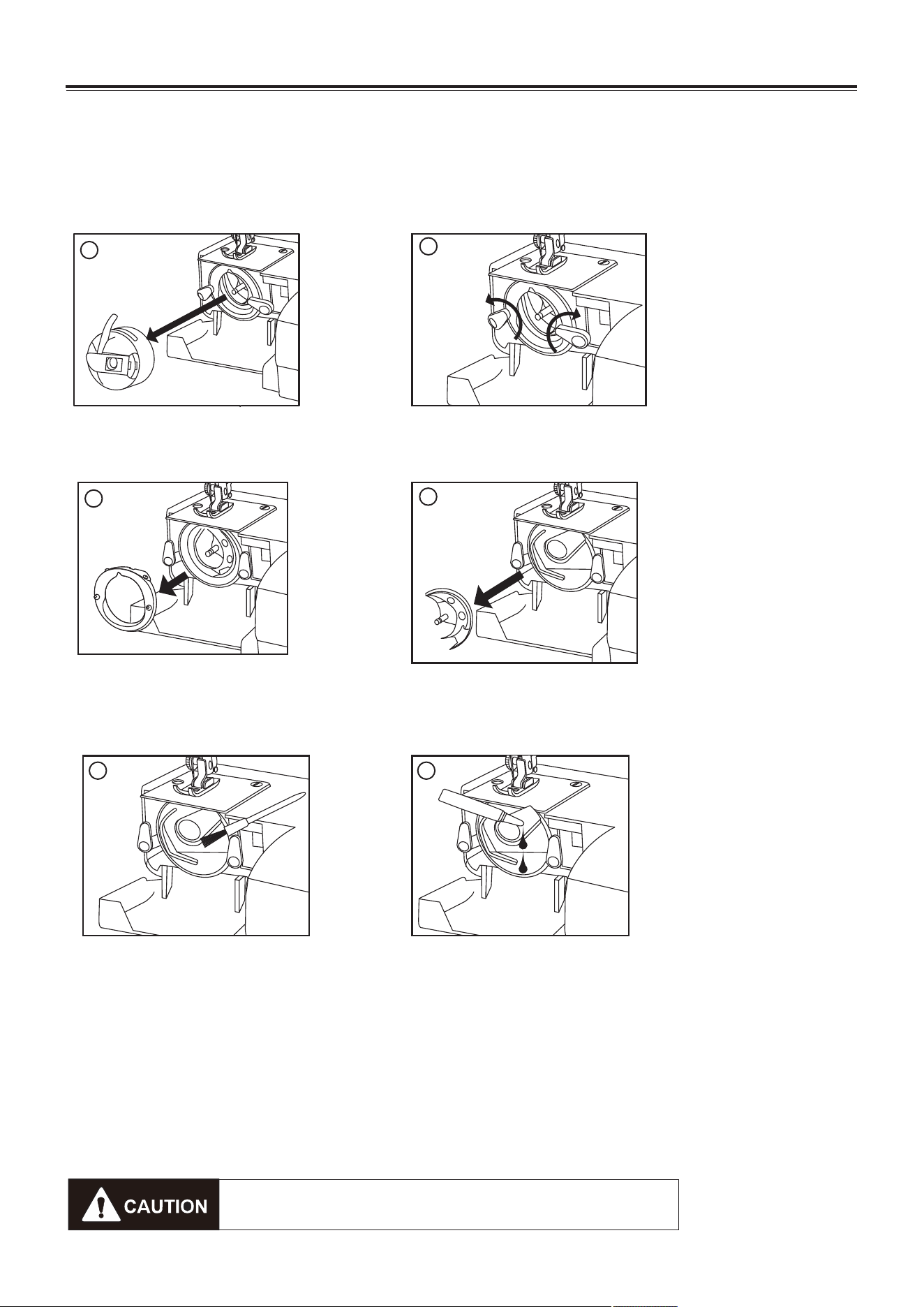
Decorative stitch
Can sew all kinds of decorative stitch as follow.
Sewing
1. Select stitch (For detail, refer to page 12).
2. Start sewing (For detail, refer to page 14).
3. Finish sewing.
Helpful hint:
When sewing, do not feed the fabric too
fast, and adjust suitable top and bobbin
thread tension, so that the top thread can
go down to the wrong side of the fabric.
Stitch name
Stitch
Presser foot
Stitch No.
54
55
Stitch width (mm)
Recommended
Adjustable range
Stitch length (mm)
56
5.0
5.0
5.0
5.0
3.0-5.0
3.0-5.0
3.0-5.0
3.0-5.0
57
Decorative stitch
(thick)
0.5
0.5
0.5
0.5
0.5-4
0.5-4
0.5-4
0.5-4
Recommended
Adjustable range
Zigzag
foot
CARING FOR YOUR MACHINE
Dismantling and assembling shuttle race
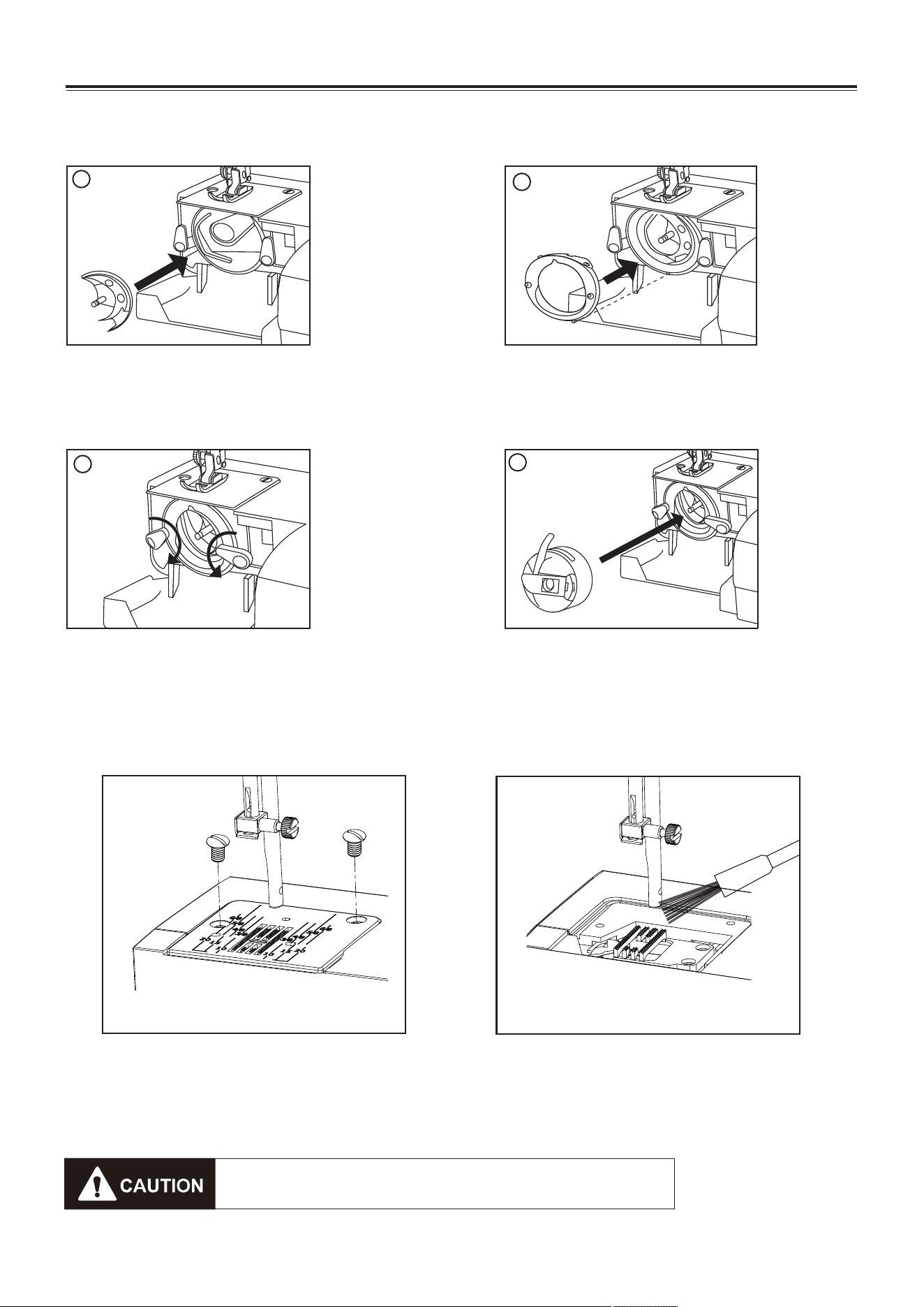
To dismantle and oil the shuttle race
Raise the needle to its highest position and open the shuttle cover.
1. Open the hinged latch of the bobbin case and take it out of the machine.
2. Open the shuttle race cover holders.
3. Remove the shuttle race cover.
4. Remove the shuttle.
5. Clean the shuttle race with a brush and soft dry cloth.
6. Before assembling the shuttle race, oil the shuttle race using a few drops of fine quality
sewing machine oil.
Note:
1. Use oil sparingly as over oiling will cause it to leak onto your fabric.
2. In case the machine does not work smoothly due to standing idle for some time, apply a
few drops of kerosene at the oiling point, and turn the machine rapidly for a minute.
3. When the machine is does working 4-8 hours or there is abnormal noise, apply 2-3 drops of
sewing machine oil at the oiling point.
26
1
2
4
5
6
3
Be sure to disconnect the power supply before
operating the machine.
CARING FOR YOUR MACHINE
Cleaning the feed dogs
Remove the needle and the presser foot.
Remove the needle plate set screws and
remove the needle plate.
With a brush, clean out dust and lint
clogging on the feed dog teeth. Reset
the needle plate.
To assemble the shuttle race
1. Hold the Shuttle by the center pin and fit it carefully back into the shuttle race,
forming a perfect circle with the shuttle driver.
2. Attach the shuttle race cover making sure that the bottom pin fits into the notch.
3. Lock the shuttle race cover holders by turning the holders back into position.
4. Insert the bobbin case.
27
1
2
3
4
Be sure to disconnect the power supply before
operating the machine.
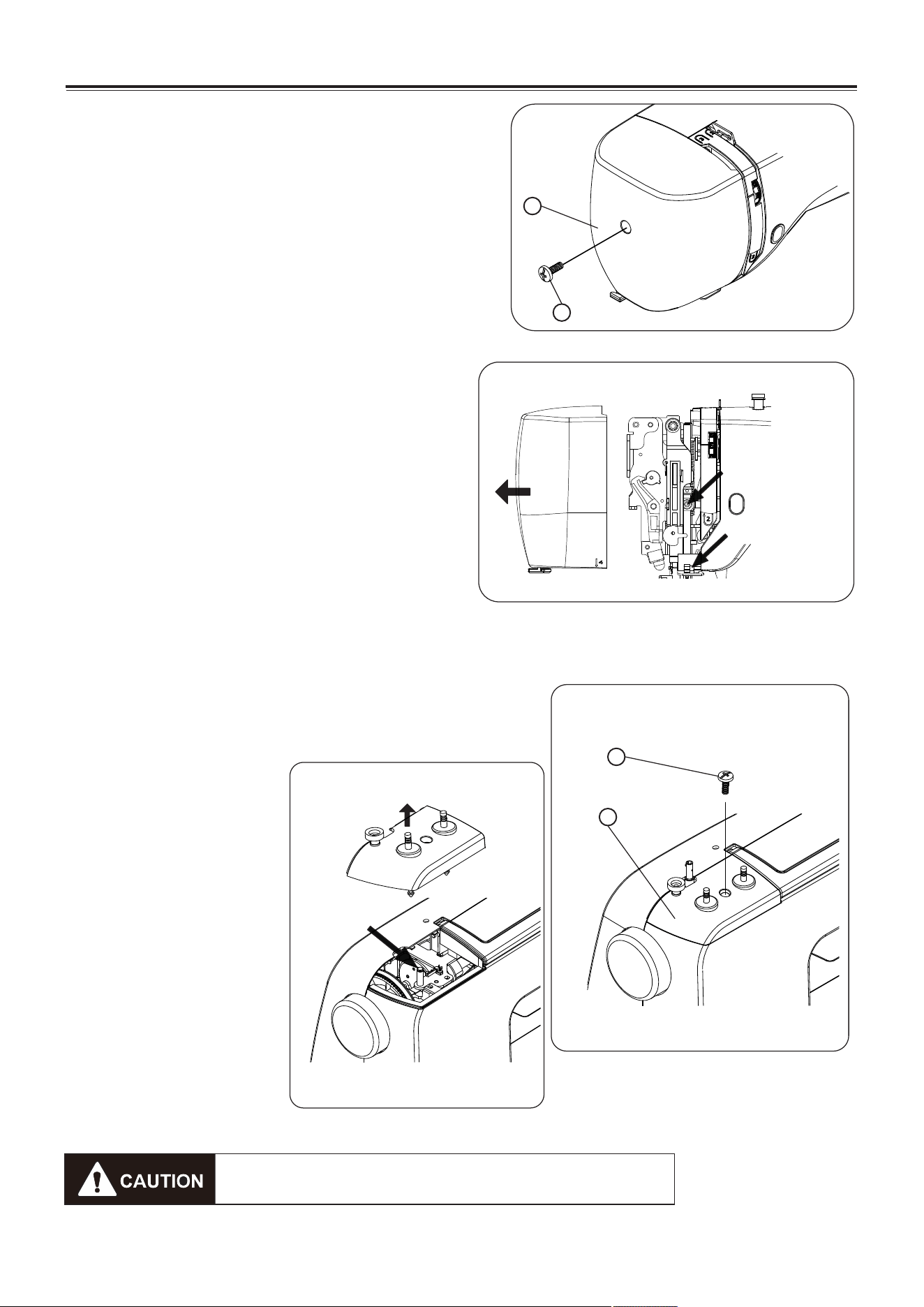
CARING FOR YOUR MACHINE
Oiling the needle bar
Remove the face cover
1. Face cover screw
2. Face cover
Apply a few drops of fine quality sewing
machine oil to the point indicated by the arrows
in the figures.
For machine in constant use, oil two or three
times a year.
In case the machine does not work smoothly
due to standing idle for some time, apply a few
drops of kerosene at the oiling point, and turn
the machine rapidly for a minute.
Before oiling, wipe off oiling points.
Oiling the connecting rod
1. Loosen the little top cover screw used the screwdriver.
2. Remove the little top cover.
Apply a few drops of fine
quality sewing machine oil
to the point indicated by the
arrows in the figures.
For machine in constant
use, oil two or three times a
year.
When there is abnormal
noise, apply a few drops of
sewing machine oil at the
oiling point.
28
Be sure to disconnect the power supply before
operating the machine.
1
2
Little top cover screw
Little top cover
1
2
Oil point
Oil point
Oil point
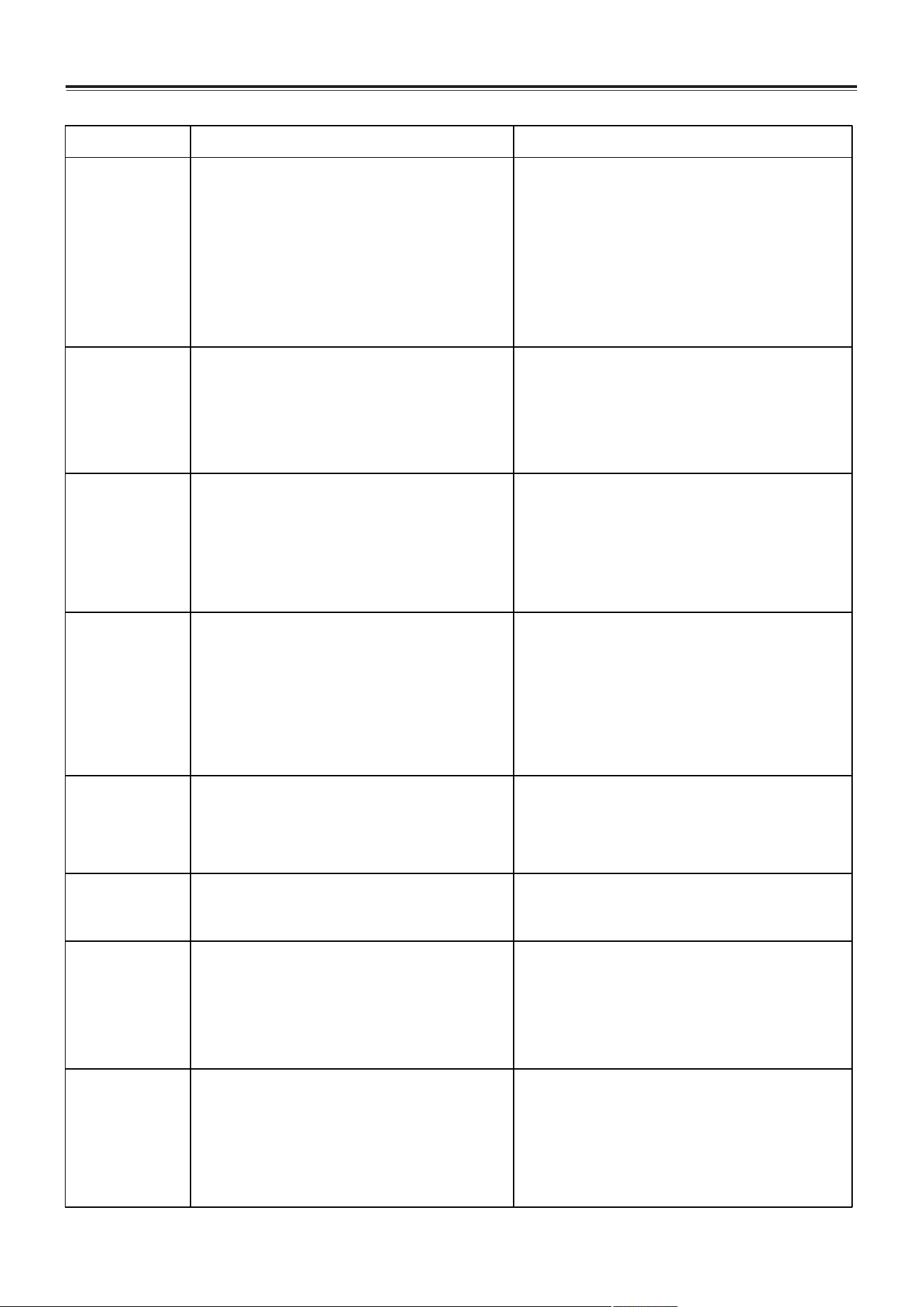
TROUBLESHOOTING
Troble
Top thread
broken
Causes Soultion
bobbin thread
broken
Needle broken
Skipping stitches
Seam puckering
Unsmooth feed
Not run of
machine
Thread jaming
1. Improper top threading.
2. Excessively tight top tension.
3. Blunt or bend needle.
4. Improper fixing of needle.
5. At start of sewing, top thread and bottom
thread are not correctly fixed beneath the
presser.
6. The thread is unsuitable
1. Threading the top thread again. (Refer to
page7.)
2. Adjust the top tension. (Refer to page 8.)
3. Replace the needle. (Refer to page 9.)
4. Reinstall the needle. (Refer to page 9.)
5. Proper operation. (Refer to page 8.)
6. Replace the proper thread. (Refer to page 9.)
1. The bobbin thread is not correctly threaded
into bobbin case.
2. Cotton flock collected on shuttle race.
3. The bobbin is damaged and impossible to
smoothly rotate.
1. Thread the bobbin thread again. (Refer to
page 6.)
2. Clean the shuttle race. (Refer to page 26.)
3. Replace the bobbin. (Refer to page 6)
1. Improper fixing of needle.
2. Blunt or bend needle.
3. The needle clamp screw is loosening.
4. Excessively tight top tension.
5. Too thin needle.
1. Reinstall the needle. (Refer to page 9.)
2. Replace the needle. (Refer to page 9.)
3. Tight the needle clamp screw.
4. Adjust the top tension. (Refer to page 8.)
5. Replace the proper needle. (Refer to page 9.)
1. Improper fixing of needle.
2. Blunt or bend needle.
3. The needle and (or) thread is unsuitable for
the used fabric.
4. Improper top threading.
5. The needle is unsuitable.
1. Reinstall the needle. (Refer to page 9.)
2. Replace the needle. (Refer to page 9.)
3. Replace the proper needle and thread. (Refer
to page 9.)
4. Threading the top thread again. (Refer to
page 7.)
5. Replace the proper needle. (Refer to page 9.)
1. Excessively tight top tension.
2. Improper top threading.
3. Excessively thick top thread for the used
fabric.
1. Adjust the top tension. (Refer to page 8.)
2. Threading the top thread again. (Refer to
page 7.)
3. Replace the proper thread. (Refer to page 9.)
1. Feed dog is wound by thread.
2. Thread jams.
1. Clean the feed dog. (Refer to page 27.)
2. Clean the clamping thread.
1. Not surely inserting power plug.
2. Clamping thread at shuttle race.
3. Failure to replace the bobbin winder shaft
at original position after winding bobbin.
1. Check the power connector. (Refer to page
3.)
2. Clean the clamping thread.
3. Push the bobbin winder shaft to original
position. (Refer to page 5.)
1. The presser foot lifter is not down lower
when sewing.
2. Improper top threading.
3. Improper bobbin threading.
1. Lower down the presser foot lifter. (Refer to
page 4.)
2. Threading the top thread again. (Refer to
page 7.)
3. Threading the bobbin thread again. (Refer to
page 6.)
29

Meaning of crossed - out wheeled dustbin:
Do not dispose of electrical appliances as unsorted municipal waste, use separate
collection facilities.
Contact you local government for information regarding the collection systems
available.
If electrical appliances are disposed of in landfills or dumps, hazardous substances can
leak into the groundwater and get into the food chain, damaging your health and well-
being.
When replacing old appliances with new ones, the retailer is legally obligated to take
back your old appliances for disposals at least free of charge.
Part No.: 21550
English: 04/2019
