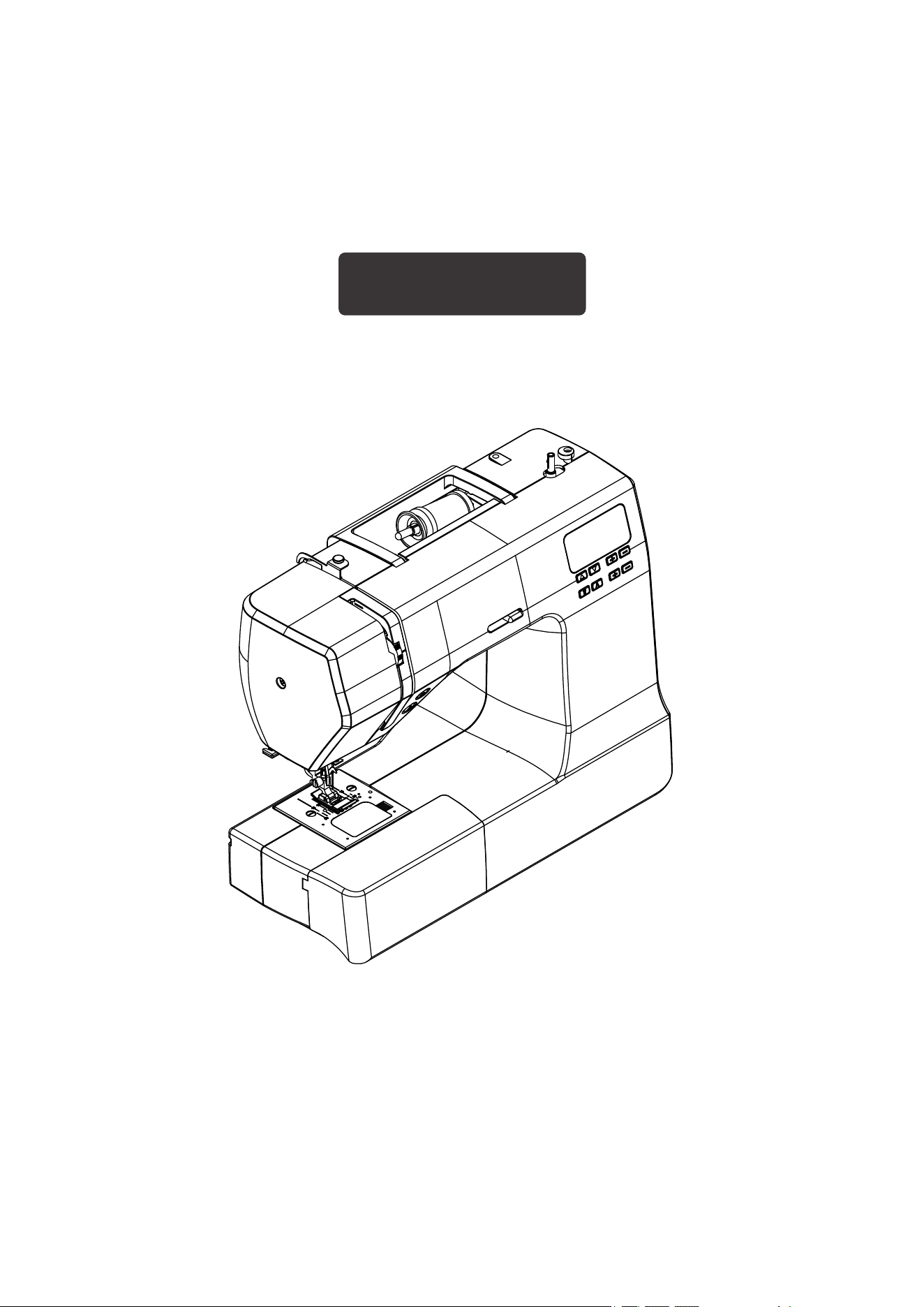
INSTRUCTION MANUAL
2685 SERIES
English
Please Read all instructions before using this sewing machine.

IMPORTANT SAFETY INSTRUCTIONS
1. Do not allow to be used as a toy. Close attention is necessary when this sewing machine is used
by or near children.
2. This appliance can be used by children aged from 8 years and above and persons with reduced
physical, sensory or mental capabilities or lack of experience and knowledge if they have been
given supervision or instruction concerning use of the appliance in a safe way and understand the
hazards involved. Children shall not play with the appliance. Cleaning and user maintenance
shall not be made by children without supervision.
3. Use this sewing machine only for its intended use as described in this manual. Use only
attachments recommended by the manufacturer as contained in this manual.
4. Never operate this sewing machine if it has a damaged cord or plug, if it is not working properly, if
it has been dropped or damaged, or dropped into water. Return the sewing machine to the nearest
authorized dealer or service center for examination,repair, electrical or mechanical adjustment.
5. Never operate the sewing machine with any air openings blocked. Keep ventilation openings of
the sewing machine and foot control free from the accumulation of lint, dust, and loose cloth.
6. Never drop or insert any object into any opening.
7. Do not use outdoors.
8. Do not operate where aerosol (spray) products are being used or where oxygen is being
administered.
9. To disconnect, turn switch to the off (”O”) position, then remove plug from outlet.
10. Do not unplug by pulling on cord. To unplug, grasp the plug, not the cord.
11. Keep fingers away from all moving parts. Special care is required around the sewing machine
needle.
12. Never sew with a damaged needle plate as this can cause needle to break.
13. Do not use bent needles.
14. Do not pull or push fabric while stitching. It may deflect the needle causing it to break.
15. Switch the sewing machine off (”O”) when making any adjustments in the needle area, such as
threading needle, changing needle, threading bobbin, or changing presser foot, etc.
16. Always unplug sewing machine from the electrical outlet when removing covers, lubricating, or
when making any other user servicing adjustments mentioned in the instruction manual.
17. Attention the following to avoid injury:
--switch off or unplug the appliance when leaving it unattended;
--unplug the appliance before carrying out maintenance.
This appliance complies with EMC Directive 2014/30/EU covering the
electromagnetic compatibility.
Please note that on disposal, this product must be safely recycled in accordance
with relevant National legislation relating to electrical/ electronic products. If in
doubt please contact your retailer for guidance.

1. KNOWING YOUR SEWING
MACHINE
Machine identification-------------------2
Accessories-------------------------------3
Setting up your machine-----------------3
Power line cord/foot control
Power/light switch
Spool pins----------------------------------4
Horizontal spool pin for normal
thread spool
Vertical spool pin for large thread
spool
Presser foot lifter-------------------------4
Feed dog control--------------------------4
Converting to free-arm sewing---------5
Winding the bobbin-----------------------5
Threading the bobbin thread ------------6
Threading the top thread----------------7
Using automatic needle threader ------8
Picking up bobbin thread ----------------9
Needle, thread and fabric chart -------10
Changing the needle-------------------10
Adjusting top thread tension----------11
Straight stitching
Zig zag and decorative sewing
Bobbin tension---------------------------11
Changing presser foot------------------11
Functions of control panel for 2685--12
Functions of control panel for 2685A
-----------------------------------------13-14
Operation buttons-----------------------15
Start/stop button
Dual purpose reverse stitch button
/Needle position button
Sewing speed control
Helpful messages-----------------------16
Useful sewing tips----------------------17
2. STARTING TO SEW
Straight stitching------------------------18
EN - 1
TABLE OF CONTENTS
Keeping seams straight----------------18
Inserting zippers and piping----------19
Hand-look quilt stitch-------------------19
Zigzag stitching-------------------------20
Adjusting stitch width and length
Satin stitch
Placement of patterns
Blindhem stitch--------------------------21
Multi-stitch zigzag----------------------22
Shell stitch-------------------------------22
Sewing on a button---------------------22
Decorative and stretch stitches--23-27
Straight stretch stitch,
Honeycomb stitch, Overedge stitch,
Feather stitch, Ric-rac stitch,
Double overlock stitch,
Criss-cross stitch,
Entredeux stitch, Ladder stitch,
Pin stitch, Blanket stitch,
Slant pin stitch,
Slant overedge stitch,
Crossed stitch, Greek key stitch,
Edge-joining stitch, Wizard stitch,
Thorn stitch, Fishbone stitch,
Chevron stitch
More decorative stitches--------------28
Buttonhole making------------------29-30
Automatic buttonhole
Corded buttonholes
Twin needle------------------------------31
Straight stitch needle position--------31
3. CARING FOR YOUR
MACHINE
Cleaning the feed dogs and shuttle
area---------------------------------------32
4. PERFORMANCE
CHECKLIST
---------------------------------------------33
EN - 2
KNOWING YOUR SEWING MACHINE
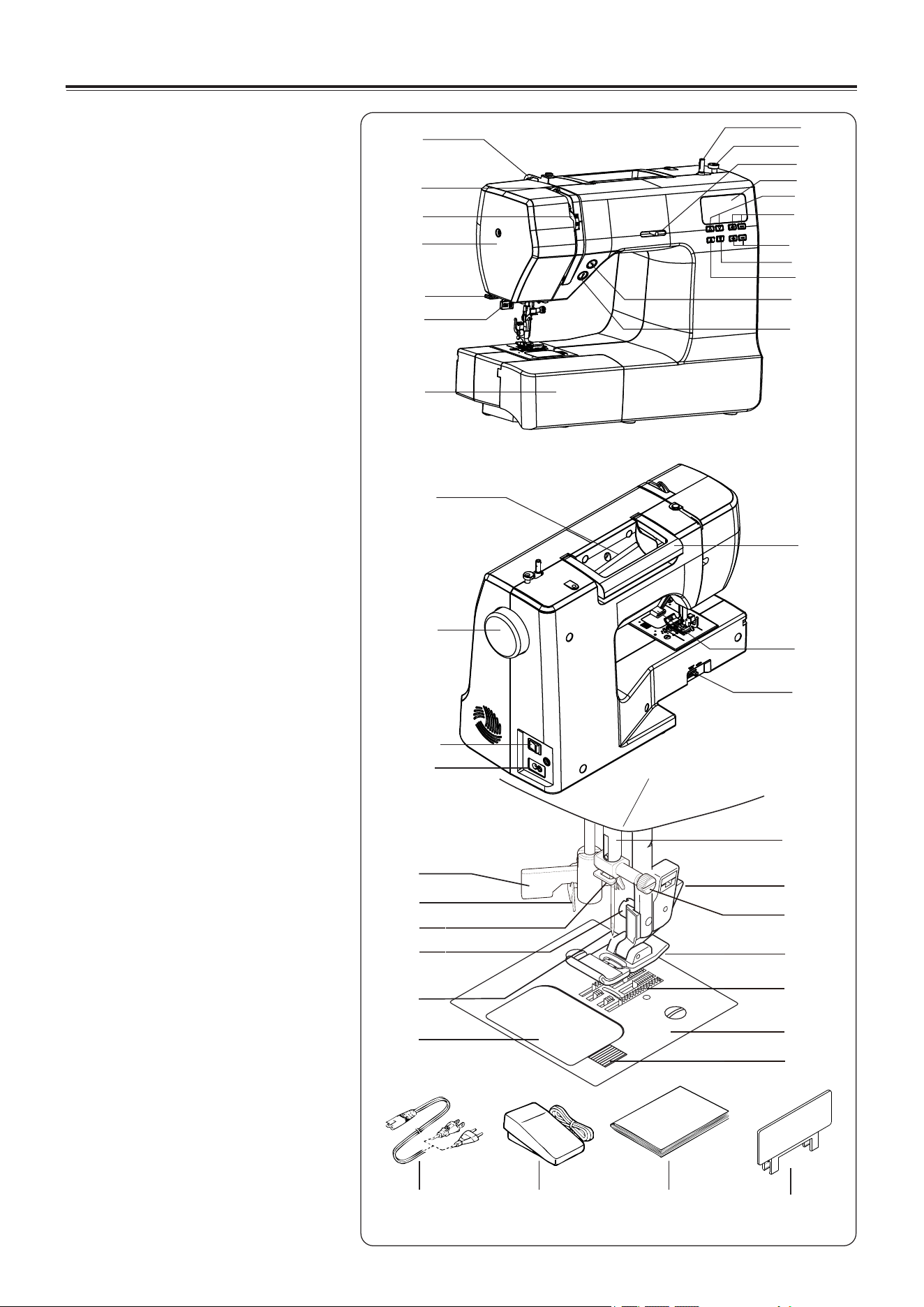
MACHINE
IDENTIFICATION
1. Thread guide
2. Thread take-up lever
3. Thread tension control
4. Face cover
5. Thread cutter
6. Buttonhole lever
7. Extension table (Accessory box)
8. Bobbin winder shaft
9. Bobbin winder stop
10. Sewing speed control
11. LCD display
12. Pattern selection button
13. Stitch length adjustment button
14. Stitch width adjustment button
15. Twin needle mode switch
16. BH selection button(2685)/
Letter mode switch(2685A)
17. Reverse stitch/Needle position
button
18. Start/Stop Button
19. Horizontal spool pin
20. Hand wheel
21. Power/light switch
22. Cord socket
23. Handle
24. Presser foot lifter
25. Feed dog control
26. Automatic needle threader
27. Needle threader Thread Guide
28. Thread guide
29. Presser foot screw
30. Needle
31. Bobbin cover plate
32. Needle bar
33. Foot release button
34. Needle clamp screw
35. Presser foot (J)
36. Feed dogs
37. Needle plate
38. Bobbin cover release button
39. Power line cord
40. Foot control
41. Instruction manual
42. Pattern plate(for 2685A)
26
27
28
29
30
31
32
33
34
35
36
37
38
19
20
21
22
23
24
25
39
40 41
42
1
2
3
4
5
6
7
8
9
10
11
12
13
14
15
16
17
18
EN - 3
The Satin Foot(Z) is another very useful foot and should be used for most decorative sewing.
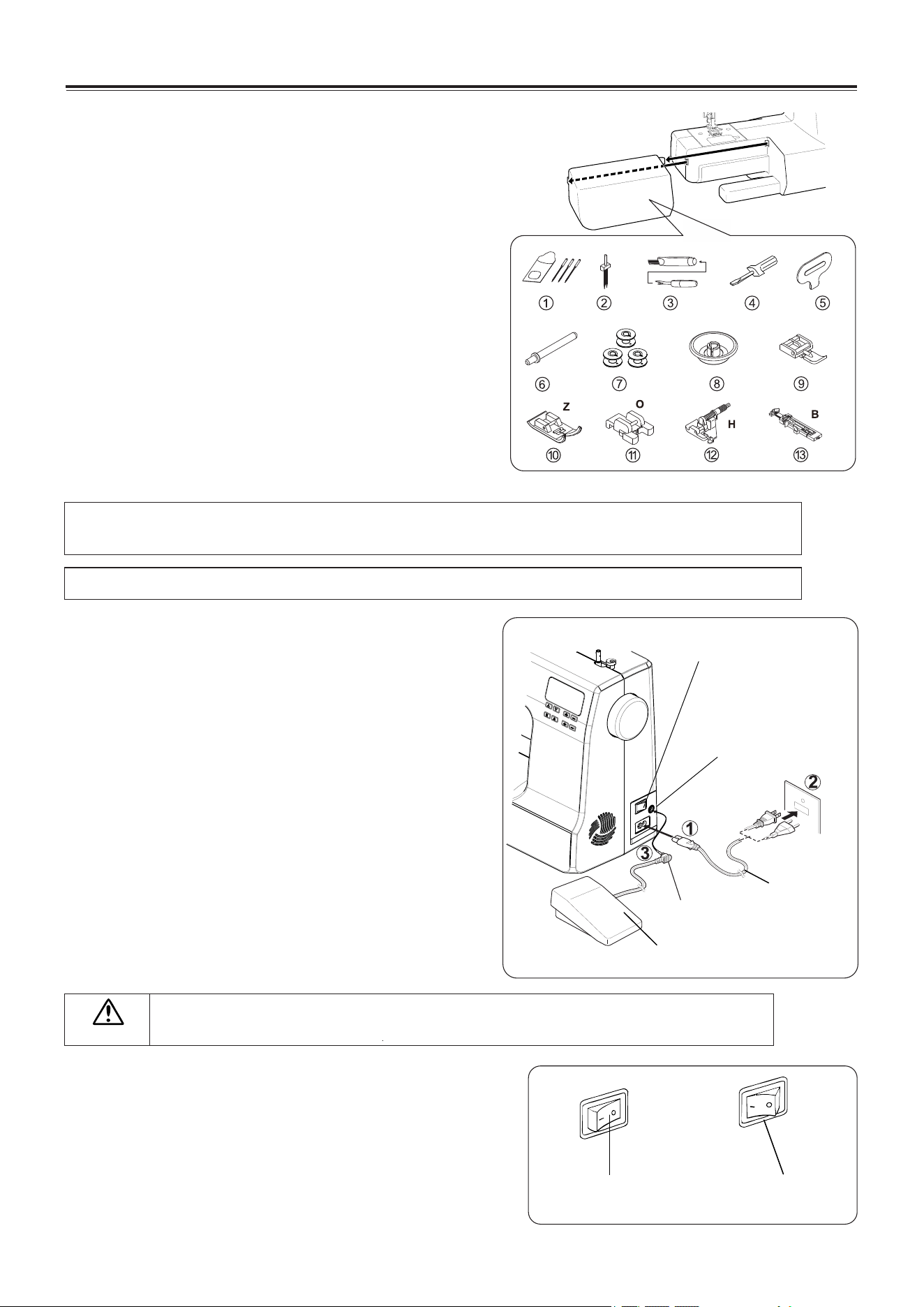
ACCESSORIES
1. Needles
2. Twin needle
3. Ripper/ Brush
4. Small screwdriver
5. Screwdriver for needle plate
6. Auxiliary spool pin
7. Bobbins (4 total - 1 in machine)
8. Spool pin cap
9. Zipper foot
10. Satin stitch foot(Z)
11. Button foot(O)
12. Blind stitch foot(H)
13. Buttonhole foot(B)
The Foot that comes on your Sewing machine is called the General purpose foot(J) and will be
used for the majority of your sewing.
SETTING UP YOUR MACHINE
Be sure to wipe off any surplus oil from needle plate
area before using your machine the first time.
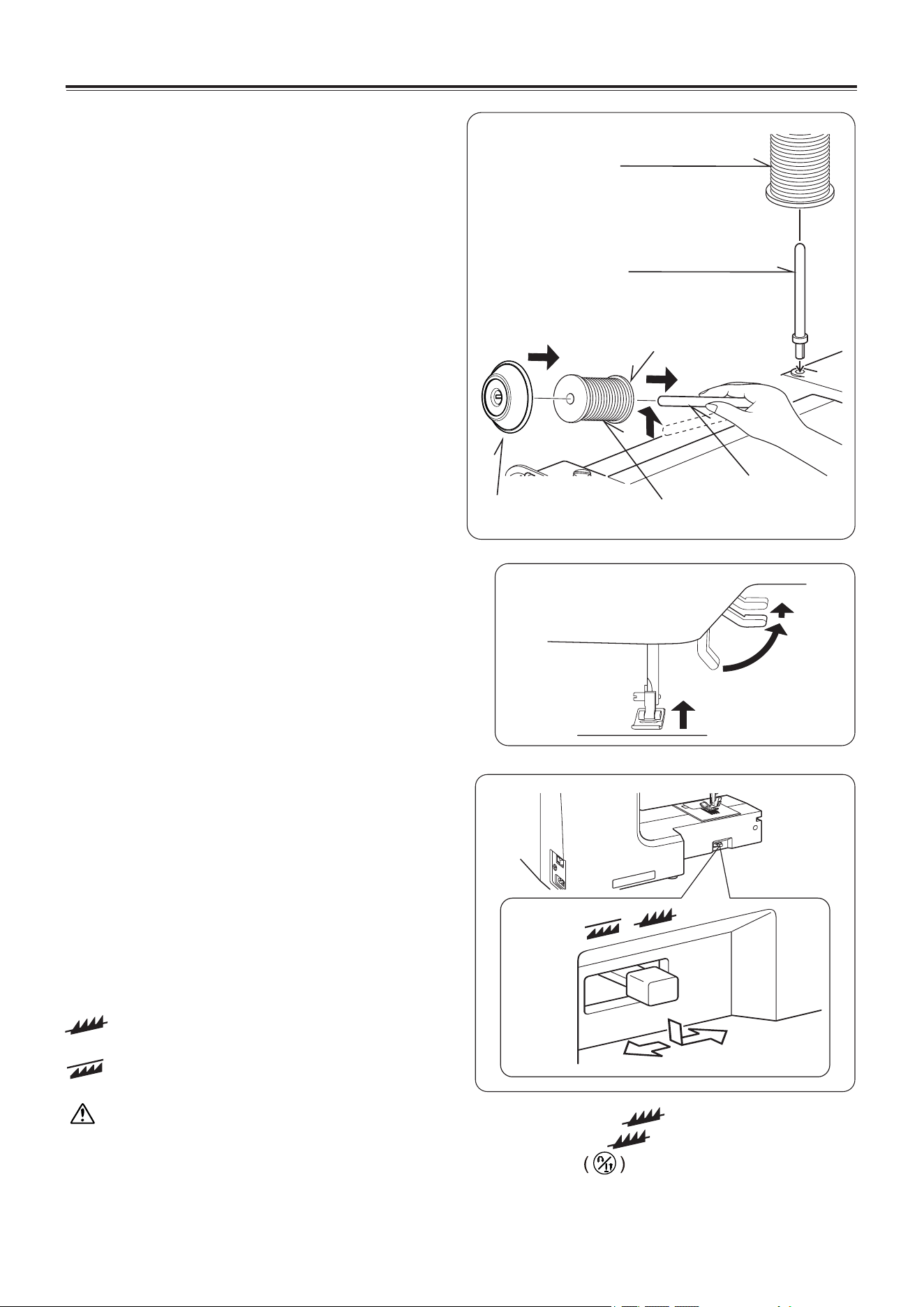
POWER LINE CORD/FOOT CONTROL
Make sure that the sewing machine is turned off (the
power switch is set to”O”),and then connect the plug
of the power line cord into the cord socket (1) and
your wall outlet (2) as illustrated.
Connect the foot control plug (3) into the machine
socket.
CAUTION
Always disconnect the machine from power supply by removing the plug from the
wall-outlet.
POWER/LIGHT SWITCH
Your machine will not operate until the power/
light switch is turned on. The same switch
controls both the power and the light.
When servicing the machine, or changing
needles, etc., machine must be disconnected
from the power supply.
Power/
light switch “OFF”
Power/
light switch “ON”
KNOWING YOUR SEWING MACHINE
Foot control
Pin plug
Power line cord
Machine socket
Set power/light switch at “OFF”
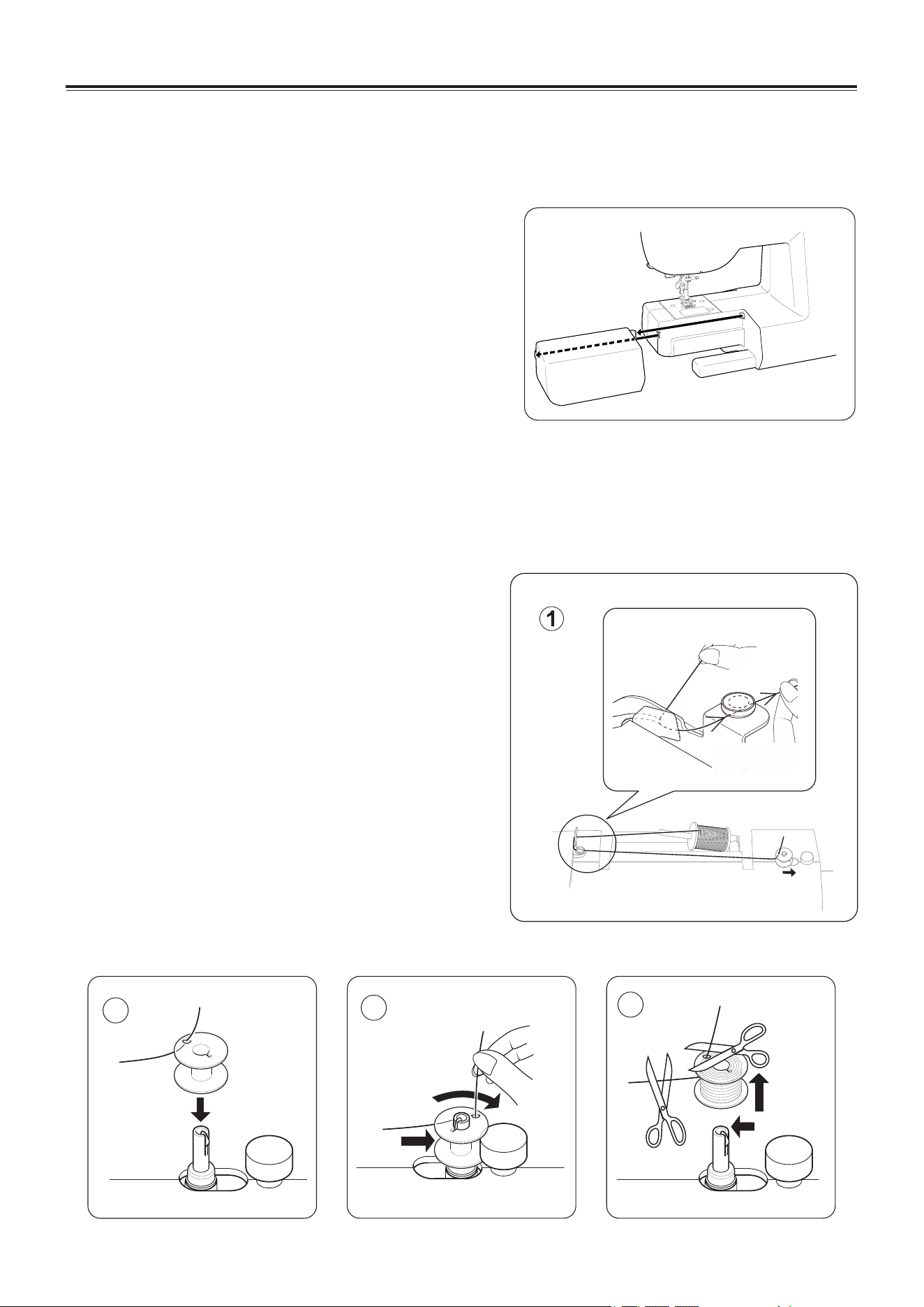
Spool
Vertical spool pin
Thread retaining slot
Spool pin
Spool
Spool pin cap
EN - 4
SPOOL PINS
HORIZONTAL SPOOL PIN for
normal thread spool
Place thread spool on the pin and secure with
a spool cap to ensure smooth flow of thread. If
the thread spool has a thread retaining slit, it
should be placed to the right.
VERTICAL SPOOL PIN for large
thread spool
Attach the spool pin. Place a spool of thread on
the spool pin.
PRESSER FOOT LIFTER
There are three positions for your presser foot.
1. Lower the presser foot to sew.
2. Raise the lifter to the middle position to insert
or remove fabric.
3. Lift it to its highest position to change the
presser foot or to remove thick fabric.
FEED DOG CONTROL
The feed dogs control the movement of the
fabric that is being sewn. They should be raised
for all general sewing purposes and lowered for
darning, freehand embroidery and
monogramming so that you, not the feed dogs,
are guiding the fabric.
KNOWING YOUR SEWING MACHINE
Use the feed dog position switch to raise or lower
the feed dogs
:The feed dogs are up and will help guide
the fabric.
:The feed dogs are down and will not help
guide the fabric.
: The feed dogs can not be raised only by sliding the drop feed lever to .
Raise the feed dogs as described below: (1).Slide the drop feed lever to . (2).Turn the handwheel
toward you (counterclockwise), or press the "Needle Position" button twice to re-engage the feed
dogs.
2
3
4
EN - 5
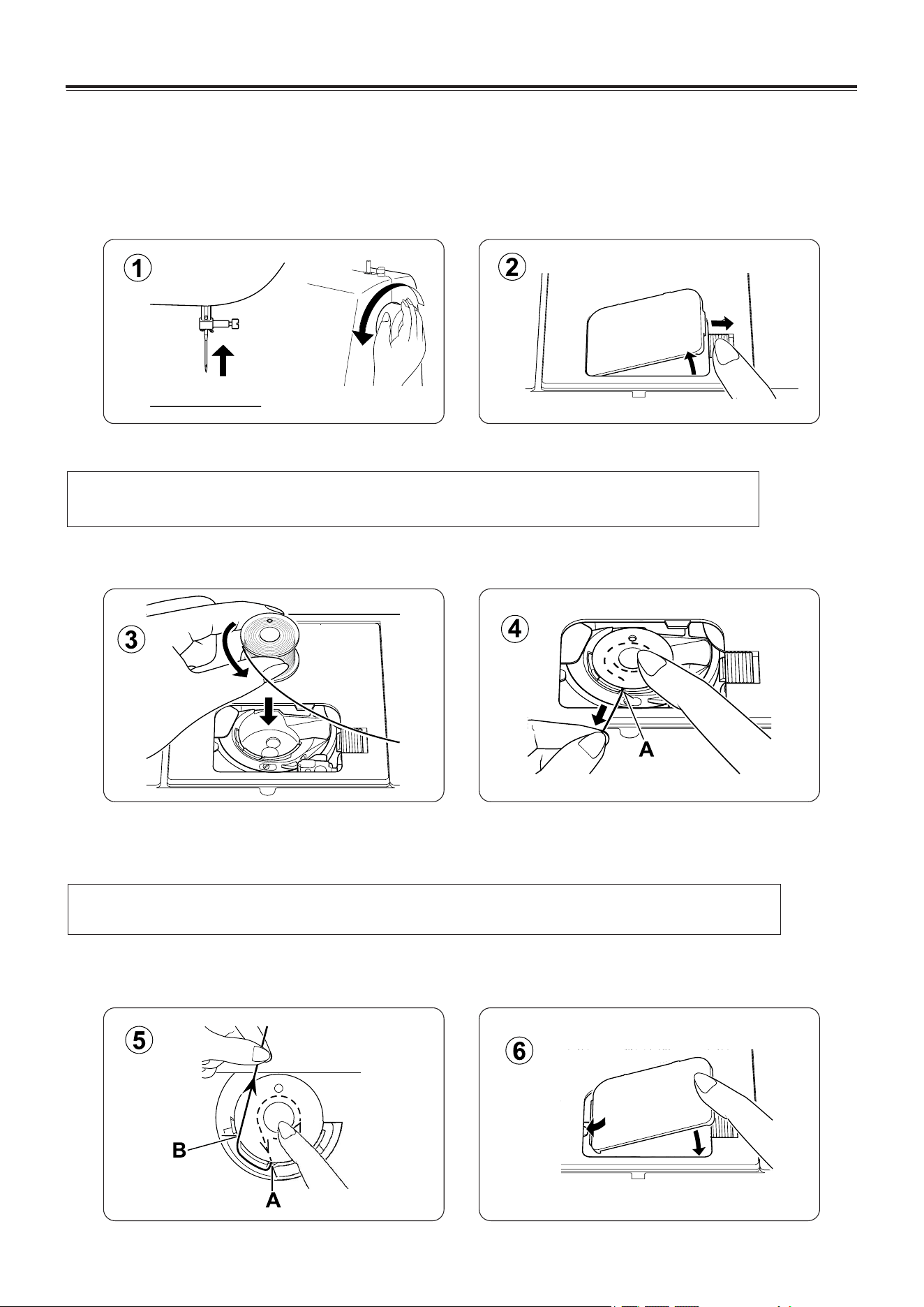
CONVERTING TO FREE-ARM
SEWING
Your machine can be used either as a flat- bed or as a
free-arm model.
With the extension table in position, it provides a
large working surface as a standard flat-bed model.
To remove the extension table, hold it firmly with both
hands and pull it off to the left as shown. To replace,
slide the extension table back into place until it clicks.
With the extension table removed the machine
converts into a slim free-arm model for sewing
children's clothes, cuffs, trouser legs, and other
awkward places.
WINDING THE BOBBIN
1. Place a spool of thread on the spool pin, and secure
it with the spool pin cap. Pull the thread out from the
spool and place it through thread guides as shown in
illustration.
2. Put end of thread through the hole in bobbin as
shown.
3. Push bobbin winder shaft to far left position, if it is
not already there. Place bobbin onto shaft with end
of thread coming from top of bobbin. Push bobbin
winder shaft to the right until it clicks. Hold onto end
of thread.
4. Start machine. Bobbin will automatically stop turning
when completely filled. Push shaft to the left to
remove bobbin and cut thread.
KNOWING YOUR SEWING MACHINE
EN - 6
THREADING THE BOBBIN THREAD
1. Raise the needle to its highest position by rotating the hand wheel toward you.
2. Remove the bobbin cover plate by pushing the release button to the right. Bobbin cover will pop
up sufficiently to allow you to remove the cover.
KNOWING YOUR SEWING MACHINE
3. Insert the bobbin making sure the bobbin rotates counter-clockwise when you pull the thread.
4. Pull thread through the slot (A) and then to the left.
NOTE: This is a very important step as the bobbin can become unthreaded and cause
sewing problems if it rotates clockwise.
5. With a finger held gently on top of the bobbin, pull the thread until it stops in slot (B). Then pull
about 6" (15 cm) of thread and lead it towards back of the machine under the presser foot.
6. Replace the bobbin cover plate onto the needle plate.
NOTE: This is also a very important step to assure the bobbin thread does not slip out of
position.
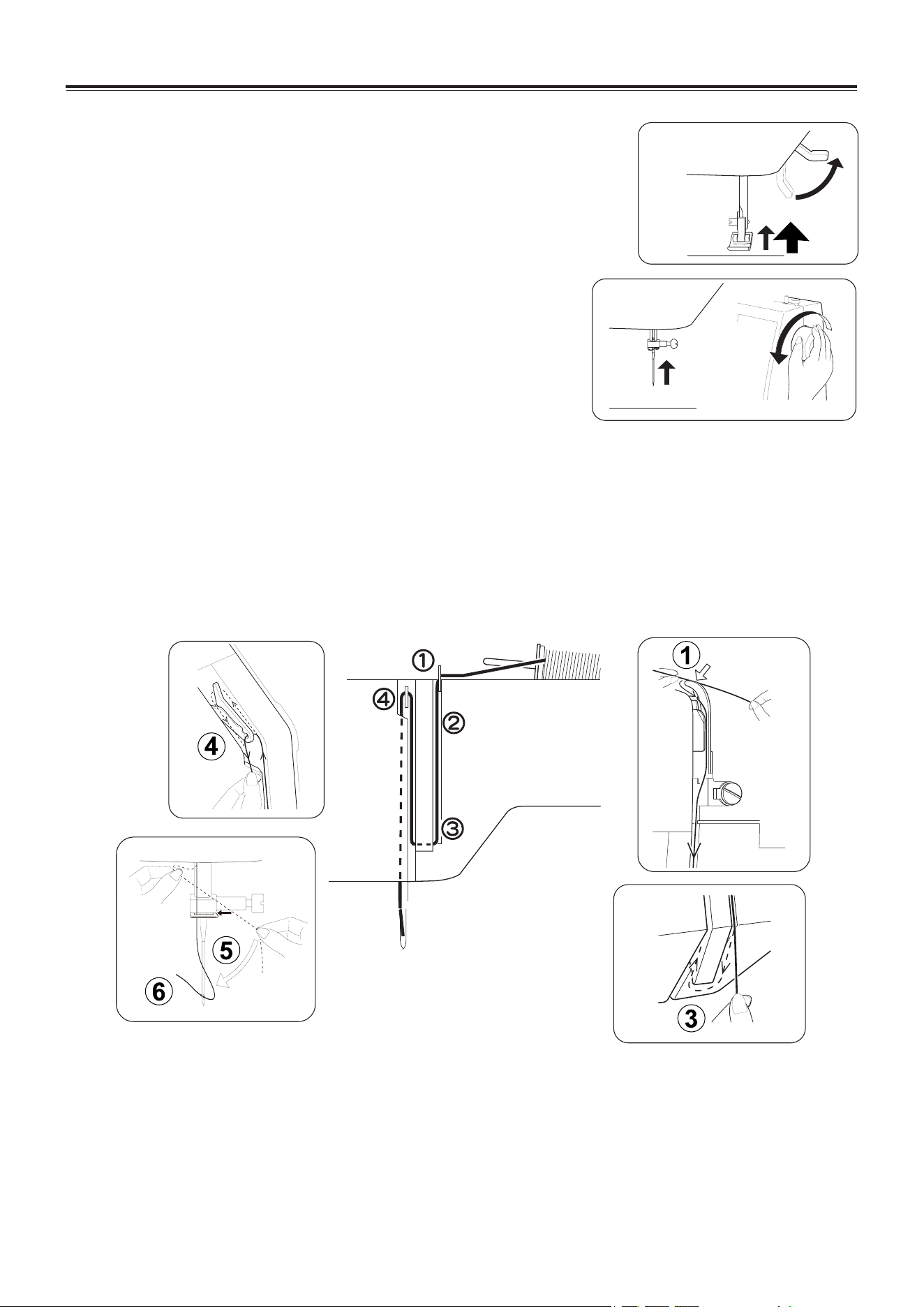
THREADING THE TOP THREAD
A. Raise the presser foot lifter. Always be sure to raise the presser
foot lifter before threading the top thread. (If the presser foot
lifter is not raised, correct thread tension cannot be obtained.)
B. Turn the hand wheel toward you until the needle is in its highest
position and the thread take-up is visible.
C. Thread the machine with your left hand while firmly gripping the
thread with your right hand in the following order as illustrated.
* Guide the thread through thread guide(1).
* Pull the thread into the tension discs(2) (which are located inside the machine).Then guide the thread
to the bottom of the groove.
* Do a U-turn around the inside of the tab (3).
* Pass the thread through the thread take-up (4) from right to left.
* Pull the thread into the inside of the take-up lever until it reaches the eye of the lever.
* Guide the thread into the thread guide (5).
* Pass the thread through the eye of the needle (6) from front to back. (See following page for
instructions on operation of the Automatic Needle Threader.)
IMPORTANT:
To verify that the machine is threaded properly in the tension discs, do this simple check:
1.) With the presser foot raised, pull the thread towards the back of the machine. You should
detect only a slight resistance and little or no deflection of the needle.
2.) Now lower the presser foot and again pull the thread towards the the back of the machine.
This time you should detect a considerable amount of resistance and much more
deflection of the needle. If you do not detect the resistance you have miss-threaded the
machine and need to re-thread it.
EN - 7
KNOWING YOUR SEWING MACHINE
EN - 9
KNOWING YOUR SEWING MACHINE
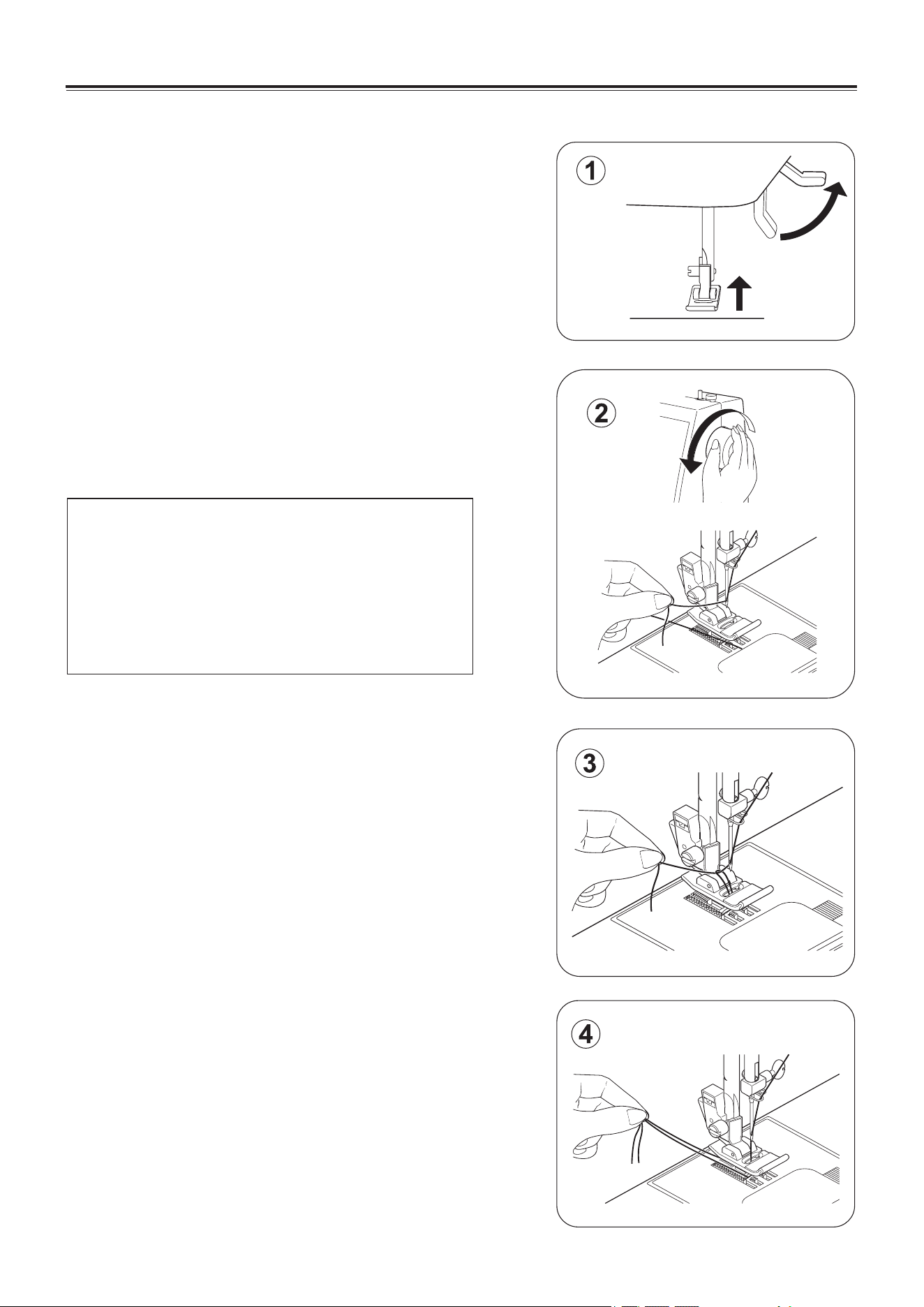
PICKING UP BOBBIN THREAD
1. Raise the presser foot lifter .
2. Holding needle thread loosely with your left hand,
turn hand wheel toward you with your right hand
first lowering the needle and continuing until the
needle comes to its highest position.
3. Lightly pull up the top thread, and pick up bobbin
thread, which will appear through the needle plate
slot.
4. Pull both top and bobbin threads together toward
the back of the machine under the presser foot,
leaving about 6"(15 cm) clear.
NOTE: A quick way to pick up the bobbin thread
is, with straight stitch selected, touch
and release the reverse button.
Your machine will perform one down-up
cycle and stop with the needle up.
Always stopping with the needle“fully
up” is one of the features of your
computer sewing machine.
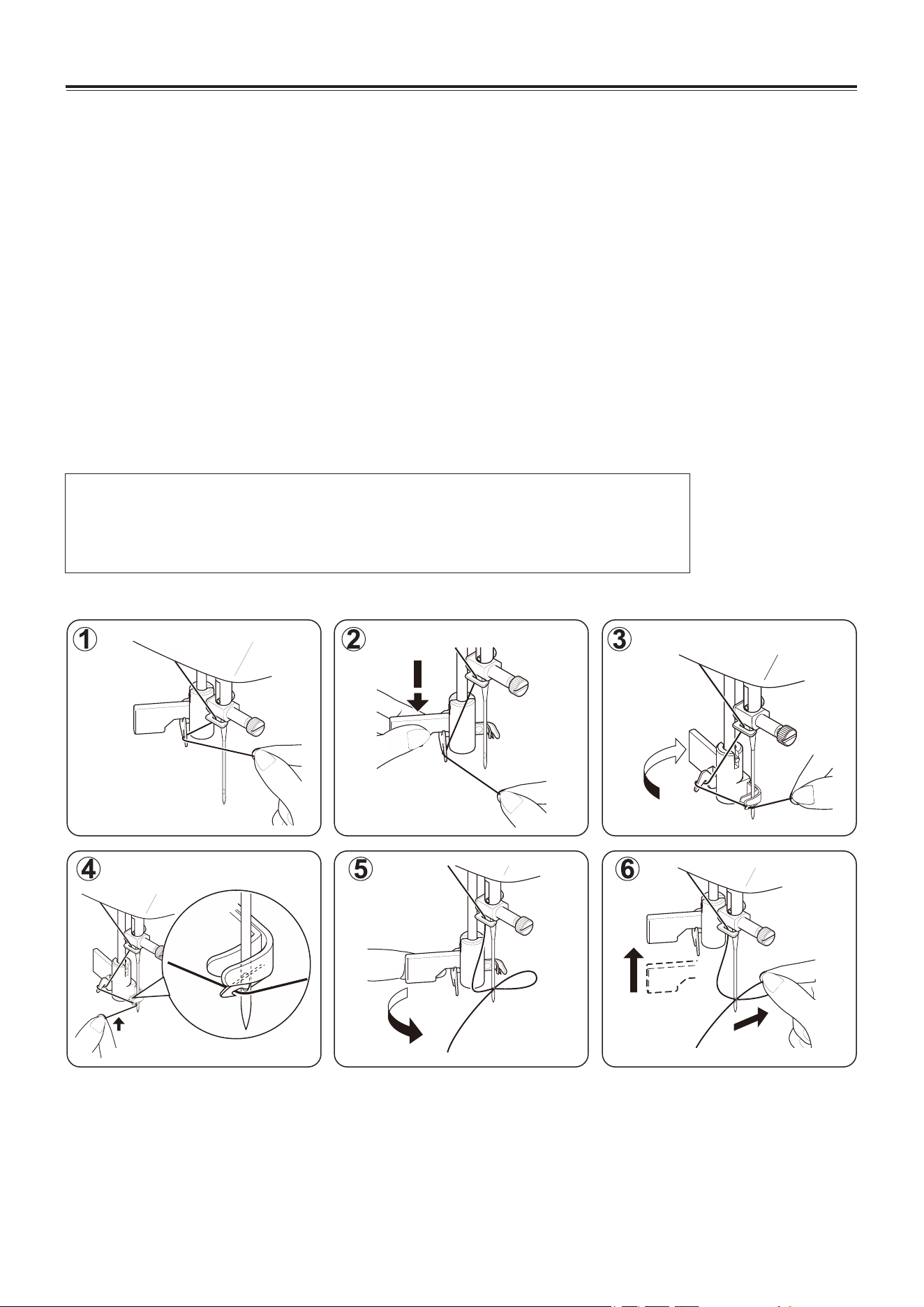
USING AUTOMATIC NEEDLE THREADER
Raise the needle to its highest position by rotating the hand wheel towards you.
1. Hook thread to thread guide as illustrated.
2. Pull down lever while holding the end of thread.
3. Rotate the lever to the rear of the machine.
4. Guide thread into hooked end and pull the thread upward.
5. Return the lever and needle will be threaded automatically.
6. Release the lever and pull thread away from you.
EN - 8
NOTE: For smooth threading it is recommended you select
straight stitching when using the needle threader.
Automatic needle threader is only applicable for zigzag presser foot.
Automatic needle threader cannot be used for double needle.
KNOWING YOUR SEWING MACHINE
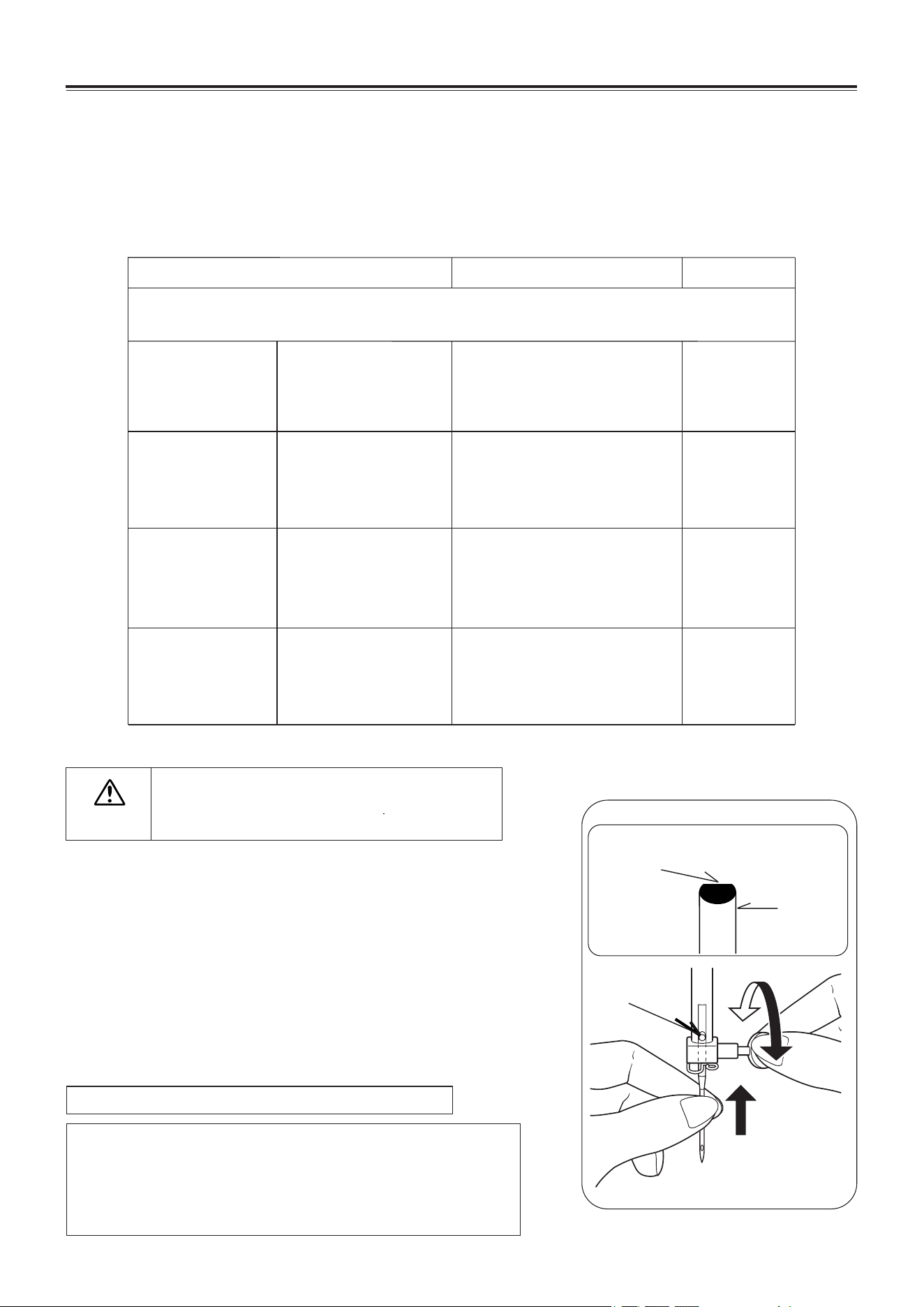
NEEDLE, THREAD AND FABRIC CHART
Your fabric will determine the choice of a needle and thread. The following table is a practical guide
to needle and thread selection.
Always refer to it before a new sewing project. And be sure to use the same size and type of thread
in the bobbin as in the top thread supply.
CHANGING THE NEEDLE
1. Raise the needle bar to its highest position by turning the hand
wheel toward you.
2. Loosen the needle clamp screw by turning it toward you.
3. Remove the needle by pulling it downward.
4. Insert the new needle into the needle clamp with the flat side
toward the back.
5. Push the needle up as far as it can go.
6. Tighten the needle clamp screw with the screw driver.
Helpful Hint: Placing a scrap of fabric under the
presser foot and lowering the presser foot
makes it easier to change the needle and
will preclude dropping the needle into the
needle plate slot.
NOTE: Tighten snugly, but do not over tighten.
Always disconnect the machine from power
supply by removing the plug from the wall-
outlet.
CAUTION
Flat side
Needle
Flat side toward the back
Pin
EN - 10
KNOWING YOUR SEWING MACHINE
* Do not use on stretch fabrics.
FABRICS
THREAD
NEEDLES
The fabrics below can be of any fiber: cotton, linen, silk, wool, synthetic, rayon,
blends. They are listed as examples of weight.
Light-Weight
Batiste
Chiffon
Crepe
Cotton-wrapped / Polyester
100% Polyester
* Mercerized Size 60
11/80
Medium-Weight
Corduroy / Flannel
Gabardine / Gingham
Linen / Muslin
Wool Crepe
Cotton-wrapped / Polyester
100% Polyester
* Mercerized Size 50
Nylon
14/90
Medium-Heavy
Bonded Wovens
Canvas / Coating
Denim / Duck
Sailcloth
Cotton-wrapped / Polyester
100% Polyester
* Mercerized Size 40
* "Heavy Duty”
16/100
18/110
Knits
Bonded Knits
Double Knit
Jersey / Tricot
Cotton-wrapped
Polyester
Polyester
Nylon
11/80
14/90
16/100
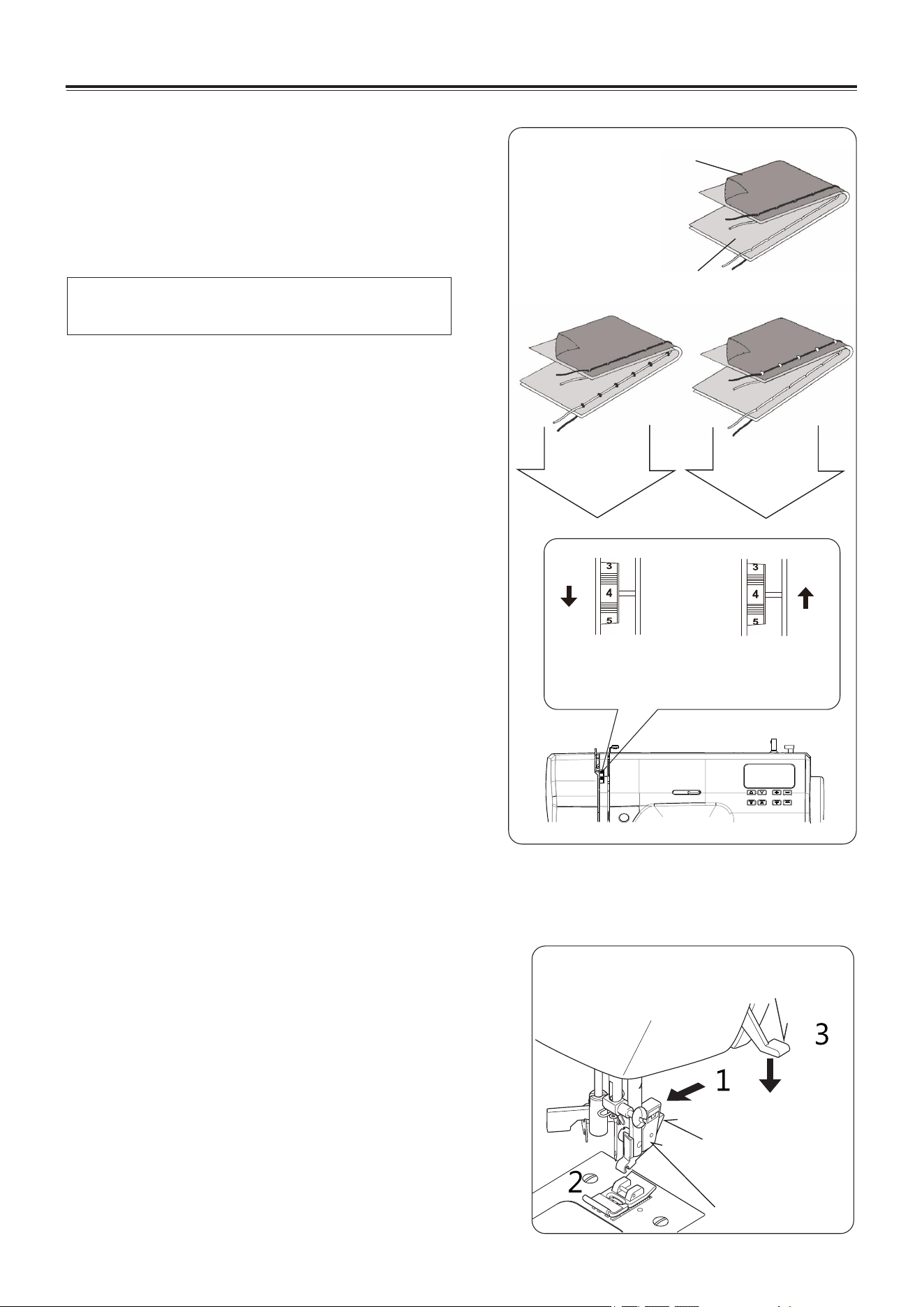
ADJUSTING TOP THREAD
TENSION
90% of your sewing will be done with the tension
control set at “4”.
Helpful Hint: A slight adjustment to a higher
number or a lower number may
improve sewing appearance.
STRAIGHT STITCHING
The good looking appearance of your stitching is
largely determined by the balanced tension of both
top and bobbin threads. The tension is well balanced
when these two threads 'lock' in the middle of layers
of the fabric you are sewing.
If, when you start to sew, you find that the stitching is
irregular, you will need to adjust the tension control.
Make any adjustments with presser foot 'down'.
A balanced tension (identical stitches both top and
bottom) is usually only desirable for straight stitch
sewing.
ZIG ZAG AND DECORATIVE SEWING
For zigzag sewing and decorative stitch functions,
thread tension should be less than for straight stitch
sewing.
You will always obtain a nicer stitch and less
puckering when the upper thread appears on the
bottom side of your fabric.
BOBBIN TENSION
The bobbin tension has been correctly set at the
factory, so you do not need to adjust it.
CHANGING PRESSER FOOT
Be sure needle is in the up position. Raise presser
foot lifter.
1. Push presser foot release button to remove the
foot.
2. Place the desired foot on the needle plate aligning
the presser foot pin with the foot holder.
3. Lower the presser foot lifter so that the foot holder
snaps on the foot.
Presser foot lifter
Foot release
Button
Foot holder
EN - 11
KNOWING YOUR SEWING MACHINE
Under side
Top side
Well balanced
Decrease tension
Top stitch
too loose
Increase tension
Top stitch
too tight
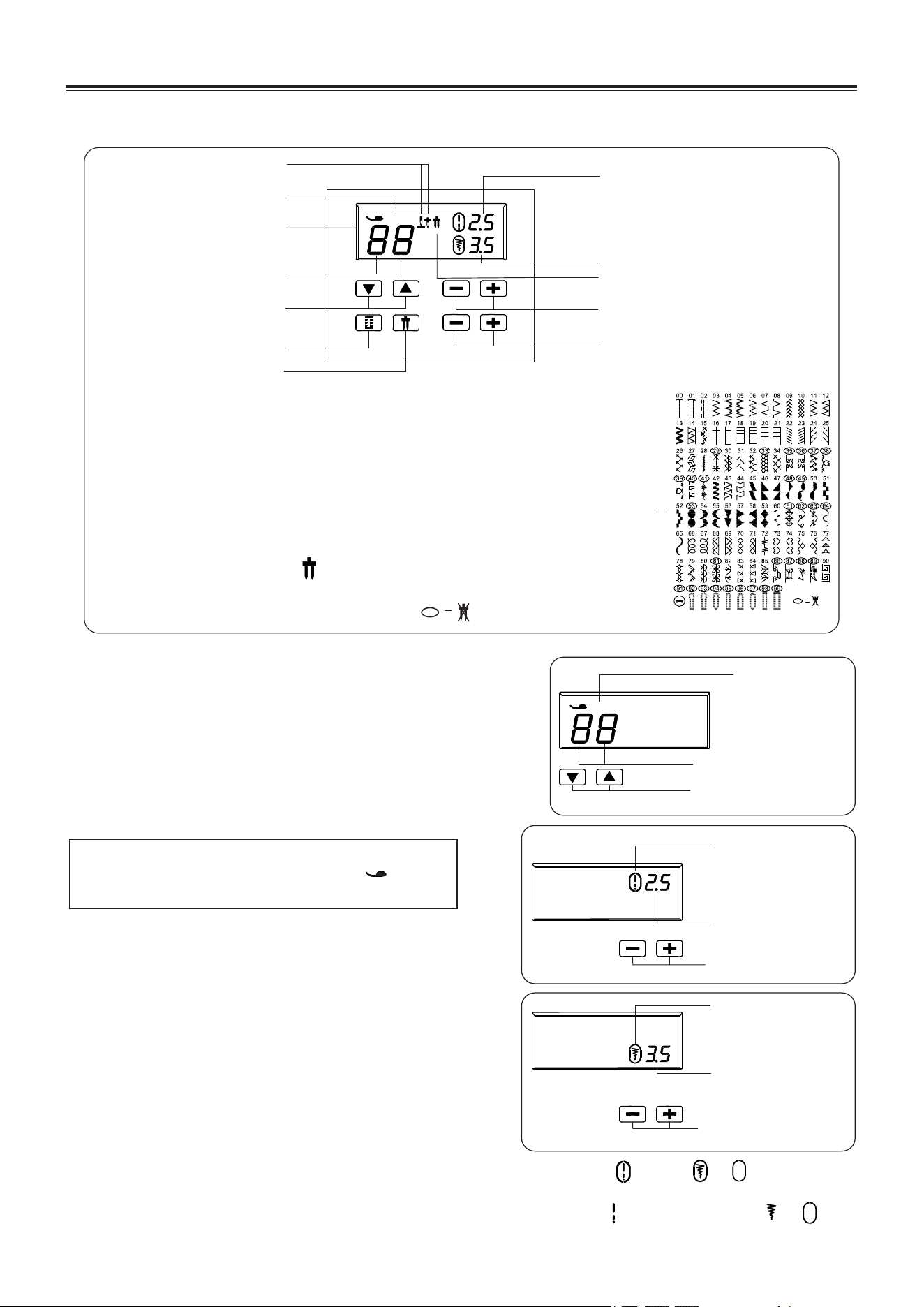
PATTERN NUMBER SELECTION BUTTONS
When the machine is turned on, straight stitch is selected
and pop-up screen for individual preference settings
appears on the LCD display.
Press the▲or▼side of to increase or reduce the number
by one. Long press the▲or▼side of to increase or reduce
the number by ten.
FUNCTIONS OF CONTROL PANEL FOR 2685
EN - 12
KNOWING YOUR SEWING MACHINE
Pattern number
reference guide
Twin needle mode
When using twin needles, push the twin needle mode
button regardless of the stitch you selected. Doing so will
reduce the stitch width automatically and save broken
needles and possible damage to your machine.
While the button is pushed, will be appeared on the LCD.
Patterns with circled numbers in the pattern reference guide
cannot be selected and a beep will sound.
NOTE: The presser foot to be used is indicated
by the letter (B,J, Z,H,O) right to the
right of the stitch number.
STITCH LENGTH AND STITCH
WIDTH/NEEDLE POSITION ADJUSTMENT
BUTTONS
Your sewing machine will produce your stitching
requirements at an Auto/Default stitch Length and
Width.
You can manually change the length, width or needle
position for straight stitch according to your preference
pushing manual adjustment buttons.
When the stitch length or stitch width is changed from the default setting, around or
disappears from the LCD.
When the stitch length or stitch width is reset back to the default setting, reappears around or
in the LCD.
BJZHO
Buttons for pattern
number selection
Presser foot
indicator
(B,J,Z,H,O)
Stitch pattern number
Default stitch width
indicator
Stitch width/needle
position of straight
stitch
Manual adjustment
buttons for stitch
width/needle position
Stitch length
Default stitch
length indicator
Manual adjustment
buttons for stitch length
BH Selection Button
Press on BH Selection Button, the number of stitch will skip to "99"
buttonhole stitch directly.
Stitch pattern number
Twin needle mode indicator
Presser foot indicator
Needle position indicator
Stitch length
LCD display
Stitch width
Pattern selection button
Stitch length adjustment button
BH direct select
Twin needle mode button
Stitch width adjustment button
BJZHO
EN - 13
KNOWING YOUR SEWING MACHINE
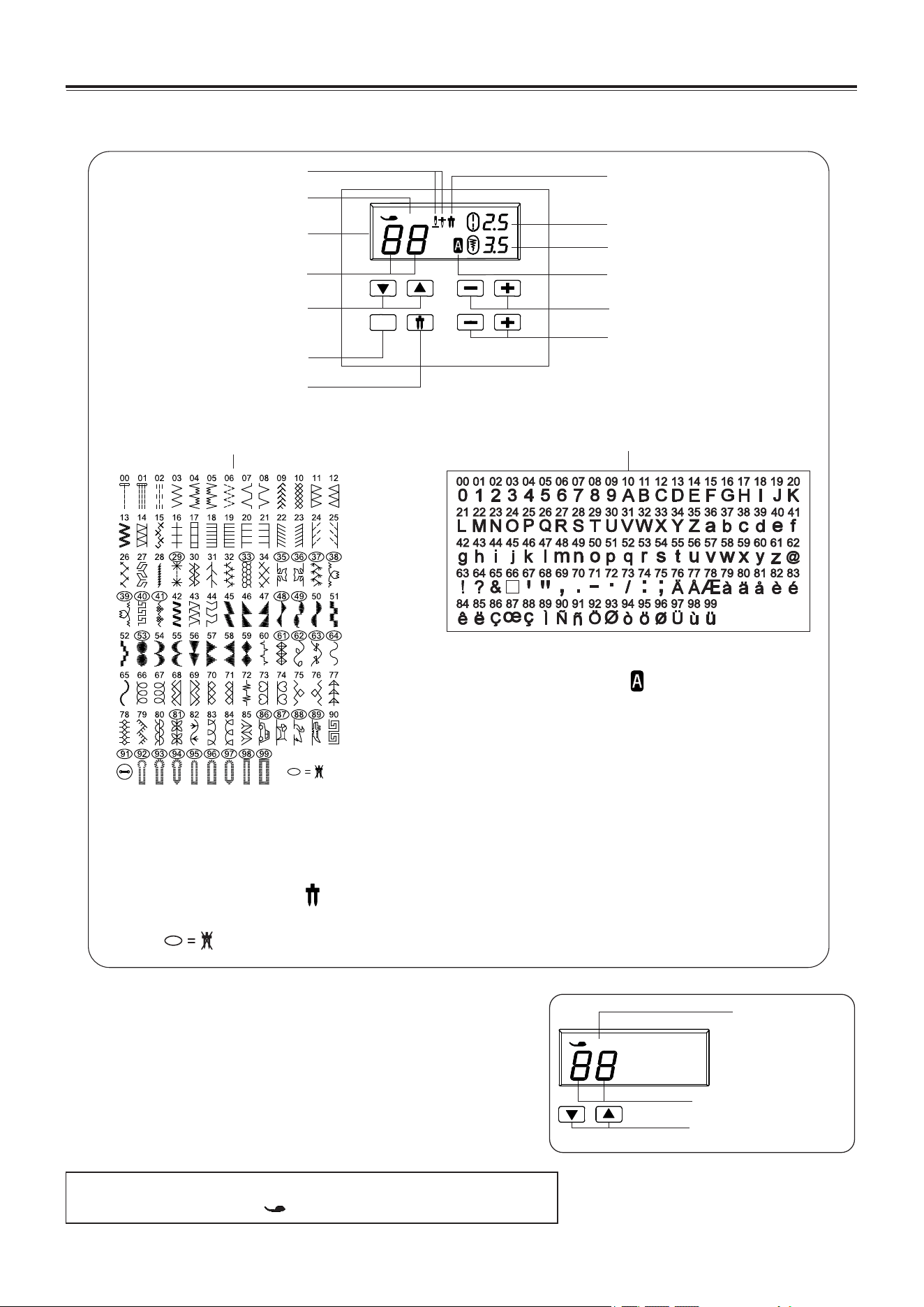
FUNCTIONS OF CONTROL PANEL FOR 2685A
PATTERN NUMBER SELECTION BUTTONS
When the machine is turned on, straight stitch is selected
and pop-up screen for individual preference settings
appears on the LCD display.
Press the▲or▼side of to increase or reduce the number
by one. Long press the▲or▼side of to increase or reduce
the number by ten.
NOTE: The presser foot to be used is indicated by the letter
(B,J, Z,H,O) right to the right of the stitch number.
A
Twin needle mode
When using twin needles, push the twin needle mode button regardless of the stitch you selected.
Doing so will reduce the stitch width automatically and save broken needles and possible damage
to your machine.
While the button is pushed, will be appeared on the LCD.
Patterns with circled numbers in the pattern reference guide cannot be selected and a beep will
sound.
Twin needle mode indicator
Stitch length adjustment button
Stitch width adjustment button
Needle position indicator
Presser foot indicator
LCD display
Stitch pattern number
Pattern selection button
Twin needle mode button
Stitch length
Stitch width
Letter pattern mode button
Letter stitch mode indicator
Pattern number reference guide
Letter pattern number
reference guide
Letter pattern mode
While the button is pushed, will be appeared on
the LCD.
Press the▲or▼.The number of the selected letter
number is displayed.
The machine sews automatically one complete cycle
of pattern string and stops.
BJZHO
Buttons for pattern
number selection
Presser foot
indicator
(B,J,Z,H,O)
Stitch pattern number
BJZHO
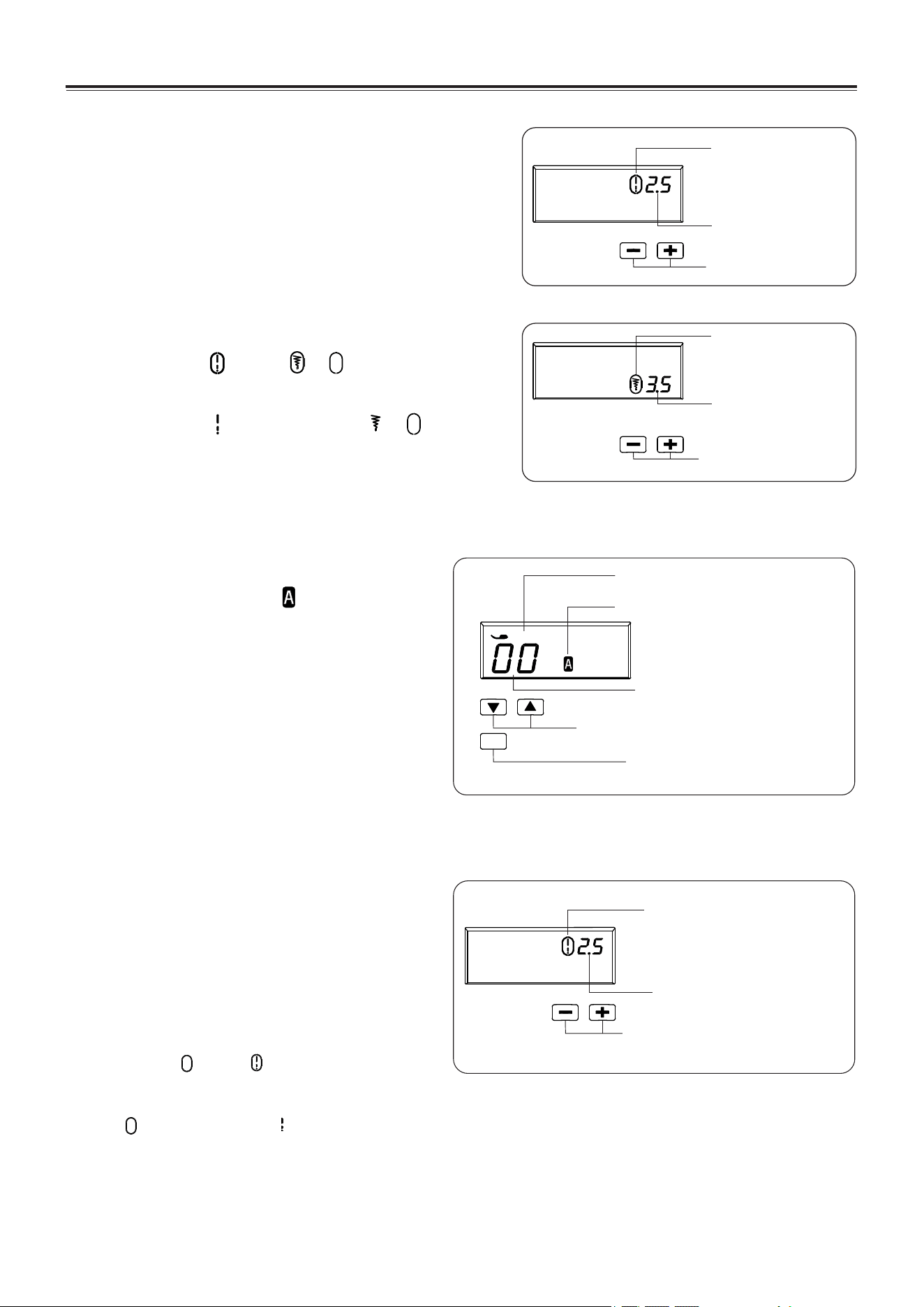
STITCH LENGTH AND STITCH
WIDTH/NEEDLE POSITION ADJUSTMENT
BUTTONS
Your sewing machine will produce your stitching
requirements at an Auto/Default stitch Length and
Width.
You can manually change the length, width or needle
position for straight stitch according to your preference
pushing manual adjustment buttons.
When the stitch length or stitch width is changed from
the default setting, around or disappears from
the LCD.
When the stitch length or stitch width is reset back to
the default setting, reappears around or in the
LCD.
Default stitch width
indicator
Stitch width/needle
position of straight
stitch
Manual adjustment
buttons for stitch
width/needle position
Stitch length
Default stitch
length indicator
Manual adjustment
buttons for stitch length
Spacing between letters
Default Spacing indicator
Manual adjustment buttons
for spacing between letters
KNOWING YOUR SEWING MACHINE
EN - 14
LETTER PATTERN NUMBER
SELECTION
While the button is pushed. will be
appeared on the LCD, pattern "0" is selected
and pop-up screen for individual preference
settings appears on the LCD display.
Press the▲or▼side of to increase or reduce
the number by one. Long press
the▲or▼side of to increase or reduce the
number by ten.
ADJUST THE SPACING
BETWEEN LETTERS
Your sewing machine will produce your
stitching requirements at an Auto/Default
stitch Length and Width.
You can manually change the spacing
between letters according to your preference
pushing manual adjustment buttons.
When the spacing is changed from the
default setting, around disappears from
the LCD.
When the spacing is reset back to the default
setting, reappears around in the LCD.
The machine sews automatically one
complete cycle of pattern string and stops.
A
Z
Letter pattern mode button
Letter pattern mode indicator
Buttons for pattern number selection
Presser foot indicator(Z)
Letter pattern number
KNOWING YOUR SEWING MACHINE
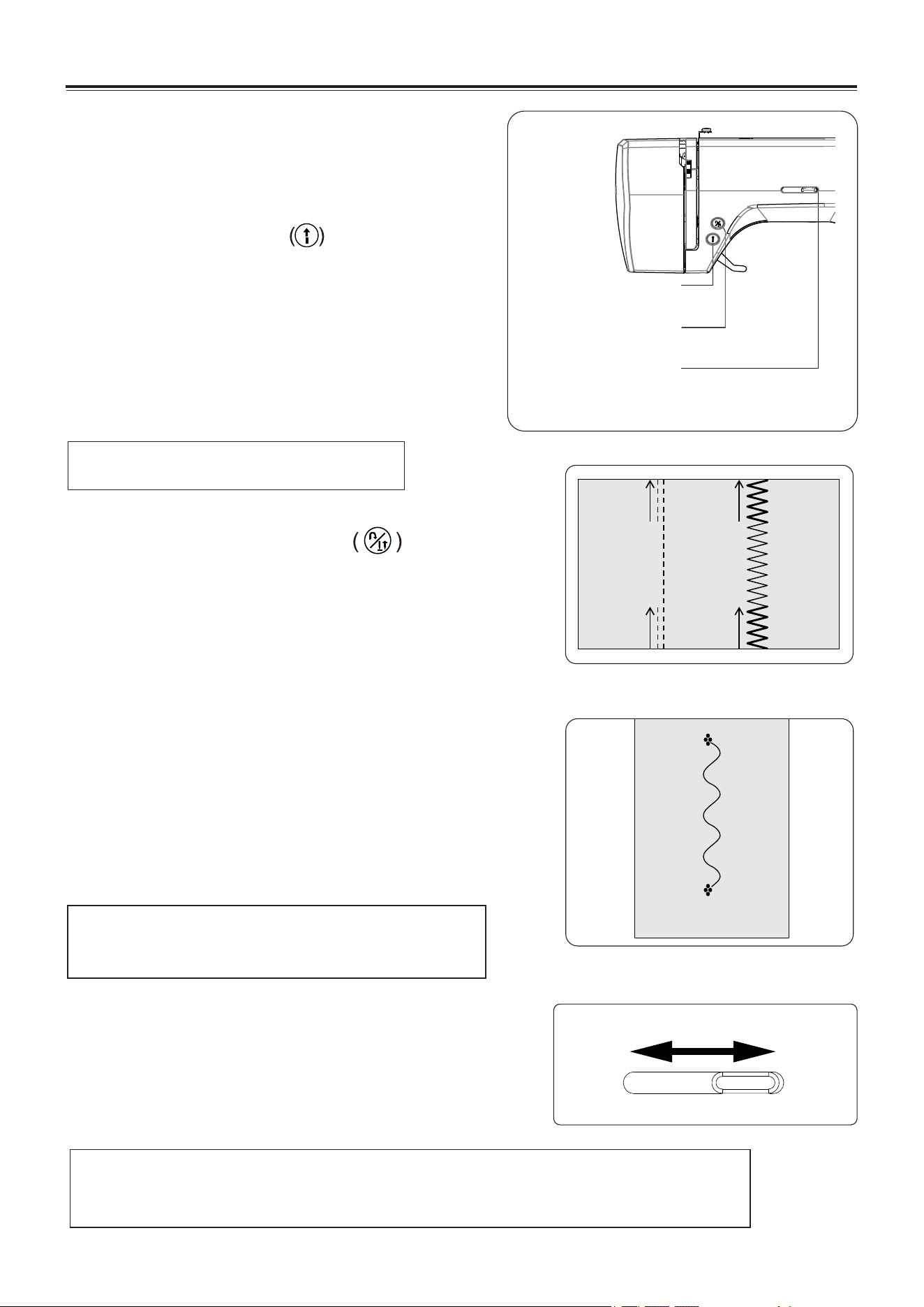
OPERATION BUTTONS
The operation buttons help you to easily perform various
basic sewing machine operations.
START/STOP BUTTON
When sewing without having the foot controller
connected, the machine starts slowly when the
start/stop button is pushed. When it is pushed again,
needle moves and stops at its highest position.
When using foot control, simply press foot pedal with
your foot until you reach a slow even speed. The harder
you push, the faster the machine will sew. Release
pressure on foot pedal to stop the machine.
NOTE: This function is very useful for tying off the
sewing pattern to avoid raveling at the
start and end of sewing.
DUAL PURPOSE REVERSE STITCH BUTTON
/NEEDLE POSITION BUTTON
Reverse stitch function for straight and zigzag stitches
Reverse sewing is carried out while the button is pushed.
The machine will continue to sew in reverse as long as the
button is pressed.
Tacking stitch function for tie-off of other stitches
The sewing machine makes 4 tiny tacking stitches to tie off the
sewing on all patterns except straight, zigzag and buttonhole
stitches. The position of the tacking stitches will be at the exact
spot in the pattern where the button is pushed.
Needle up/down function when machine no running status
When the machine is not on running situation, short press the
button to set up the needle up/down position
Press the button to raise or lower the needle.
Pressing the button twice sews one stitch.
NOTE: When foot control is connected,
start/stop button cannot be used.
Reverse stitch button
/Needle position button
Sewing speed control
Start/Stop Button
Slow
Fast
NOTE: When using the foot control, if the sewing speed control is set on the lower
setting, the machine will not sew faster than the speed at which the speed
control is set, even when the foot control is fully depressed.
SEWING SPEED CONTROL
Sewing speed is set by using the sewing speed control. The
sewing speed control is moved horizontally to determine the
amount of speed required.
Regardless of the setting, maximum speed may be limited
depending on which pattern has been selected.
EN - 15
KNOWING YOUR SEWING MACHINE
The bobbin winder is moved to the right.
→Move bobbin winder to left when it is not used.
Buttonhole lever is not lowered or raised.
→ Lower buttonhole lever when sewing buttonholes.
→ Raise buttonhole lever when sewing stitch patterns.
Machine is locked up due to thread entangled with bobbin case or
rotation interrupted forcibly.
→Turn off power switch and eliminate the problem that caused
the machine to stop.
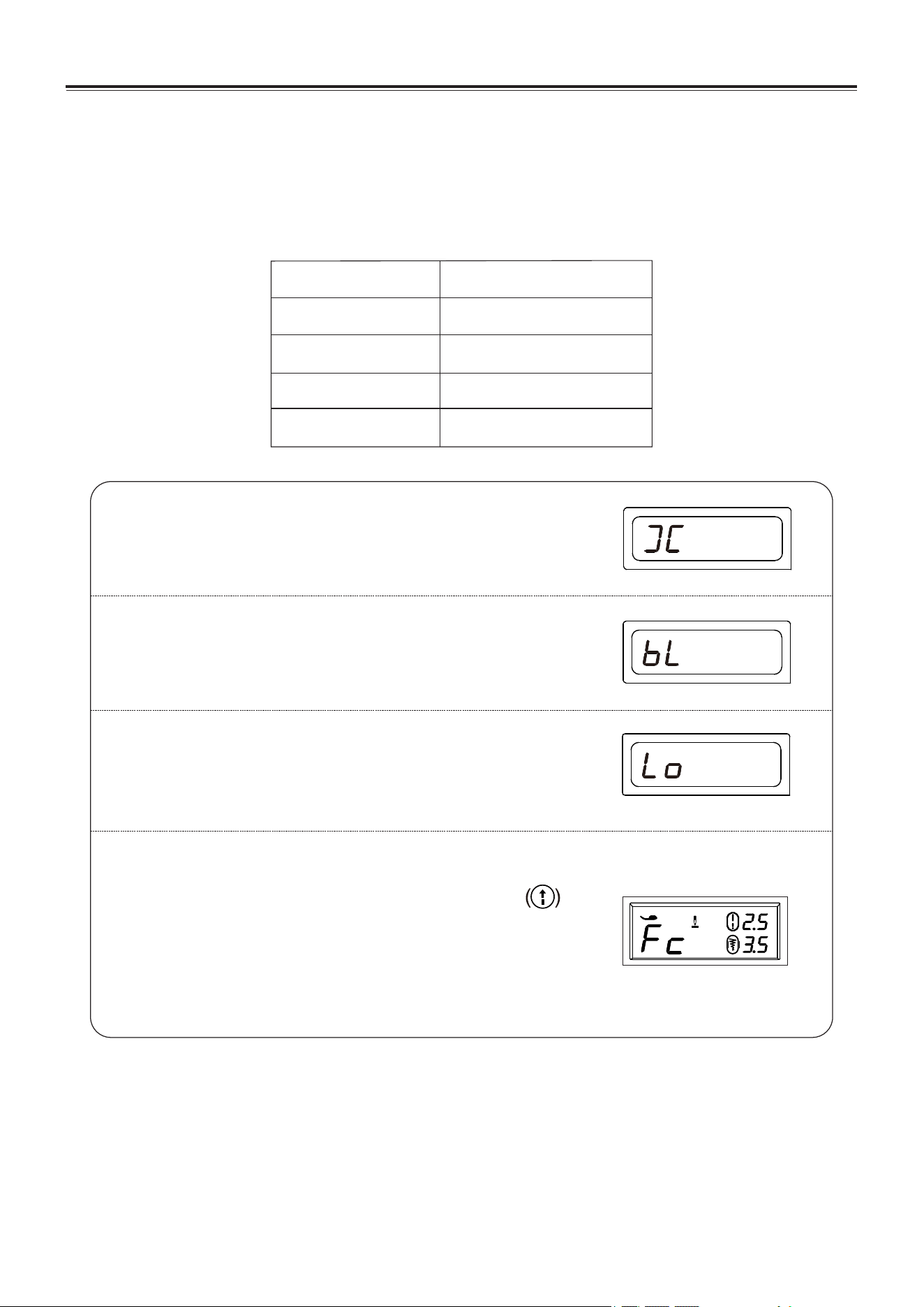
HELPFUL MESSAGES
If an incorrect operation is made, a helpful message will be displayed. When a
helpful message is displayed, fix the problem following the instructions below.
Pip
Audible signal
Pip-pip
Pip-pip-pip
Pip-pip-pip-pip-pip
Normal operation
The buzzer sounds when
Invalid operation
Invalid machine setting
The machine is jammed
EN - 16
Foot pedal sewing and automatic sewing cannot be used
simultaneously.
If the foot pedal is inserted, press the start/stop button to
use the automatic sewing function, the machine will display error
FC.
→→Pull out the plug of foot pedal. Press the Start/Stop button for
sewing . No need to use the foot control.
→Or just only use the foot control and not press the Start/Stop
button for automatic sewing.
J

KNOWING YOUR SEWING MACHINE
USEFUL SEWING TIPS
Various ways to achieve better sewing results are described below.
Refer to these tips when sewing.
1. Trial sewing
Use different stitch width and length for trial sewing. When you have finished, select the best looking
stitch width and length for correct sewing.
For the trial sewing, use a piece of fabric and thread that are the same as those used for your project,
and check the thread tension and stitch length and width. Since the results differ depending on the
type of stitching and the number of fabric layers sewn, perform the trial sewing under the same
conditions that will be used with your project.
2. Changing the sewing direction
When stitching reaches a corner, stop the sewing machine.
1). Leave the needle lowered in the fabric (under the needle plate) by pressing the needle position
button.
2). Raise the presser foot lever, and then turn the fabric by using the needles as a pivot.
3). Lower the presser foot lever and continue sewing.
3. Sewing curves
1). Stop sewing, and then slightly change the sewing direction to sew around the curve.
2). When sewing along a curve while using a zigzag stitch, select a shorter length in order to obtain a
finer stitch.
4. Sewing thick fabrics
* If the fabric does not fit under the presser foot
Raise the presser foot even higher to bring the presser foot to its highest position. Then feed the
fabric under the presser foot. (See page 4 to Raise the presser foot.)
5. Sewing elastic fabric or the fabric that is easy to cause skipping stitches
Use round head needle and bigger stitch length. If necessary, add one layer of lining cloth under the
fabric for better sewing.
6. Sewing thin fabric or silk
When sewing thin fabric or silk, the stitch may depart from correct direction or cannot feed the fabric
correctly. If so, add one layer of lining cloth under the fabric for better sewing.
7. Sewing stretch fabrics
First, baste the piece of fabric together, and then sew without stretching the fabric.
EN - 17
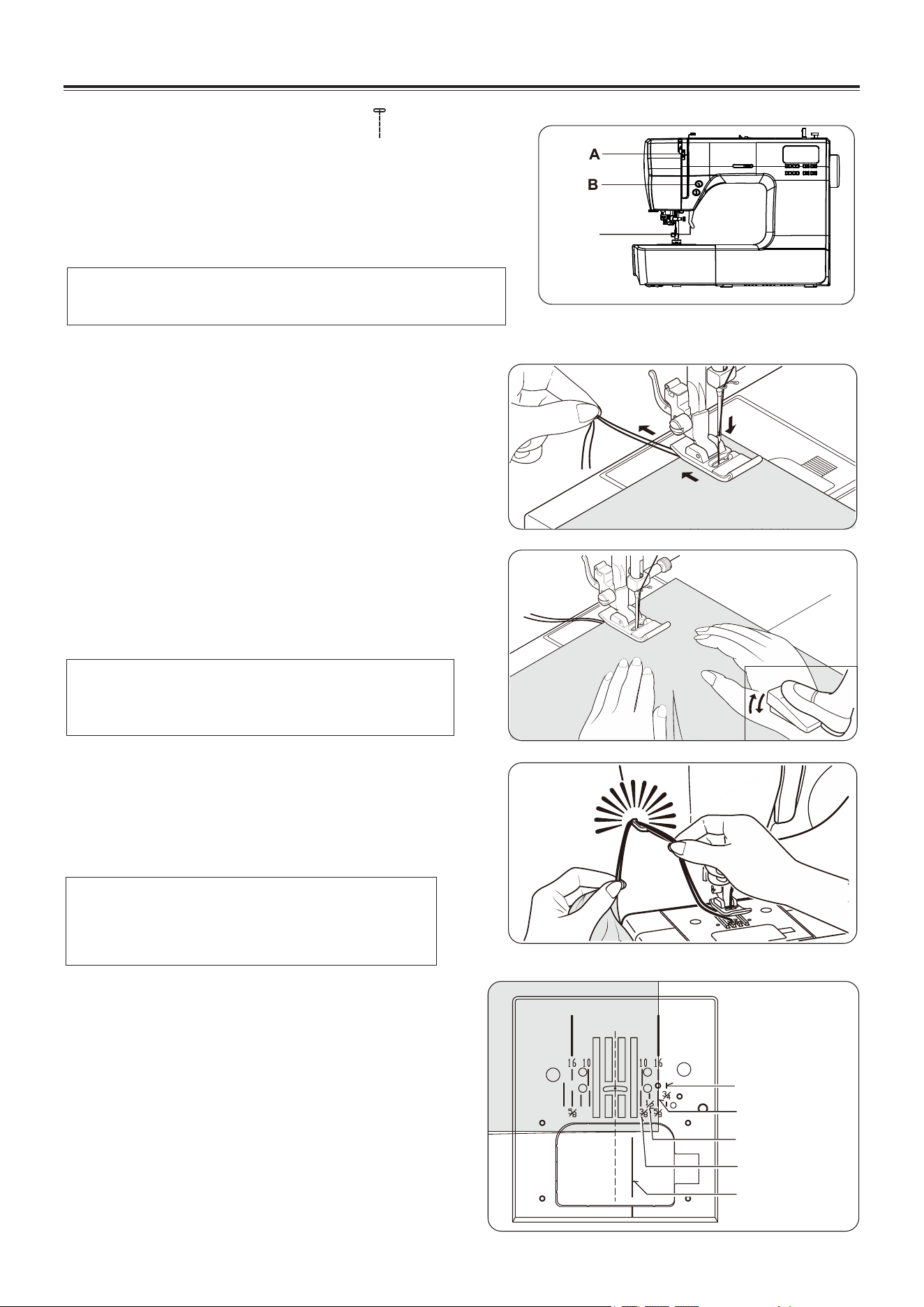
A. Thread tension control
B. Reverse stitch button/Needle position button
C. Presser foot lifter
2. Pull both threads under the presser foot toward the
back of the machine, leaving about 6"(15cm) clear.
3. Place the fabric under the presser foot and lower the
presser foot lifter.
4. Turn the hand wheel toward you until the needle enters
the fabric.
5. Start the machine. Guide the fabric gently with your
hands. When reaching the edge of the material, stop
the sewing machine.
6. First turn the handwheel toward you until the
needle is at its highest position, then raise the
presser foot, draw materials to the rear and cut off
excess thread with the thread cutter located on the
bottom of face cover as shown.
KEEPING SEAMS
STRAIGHT
To keep the seam straight, use one of the
numbered guide lines on the needle plate. The
numbers indicate distance from the needle at its
center position.
The guide line on the bobbin cover plate is
NOTE: Based upon the weight of the fabric, slight
“fine tuning” of the tension may be desired.
NOTE: The Needle Plate has both Metric and
Inch Markings as an aid for guiding
your fabric when sewing a seam.
STARTING TO SEW
2
3
4
5
6
3/4"(19mm)
5/8"(16mm)
1/2"(13mm)
3/8"(9mm)
1/4"(6mm)
NOTE: To secure the stitching and avoid
raveling, press the reverse stitch
switch and sew a few stitches at the
start and end of the seam.
STRAIGHT STITCHING
Straight stitch is most frequently used for every aspect of
sewing. Lets learn how to sew following the steps below.
1. SETTINGS: Presser foot - General Purpose Foot
:Thread tension control - 4
1
C
EN - 18
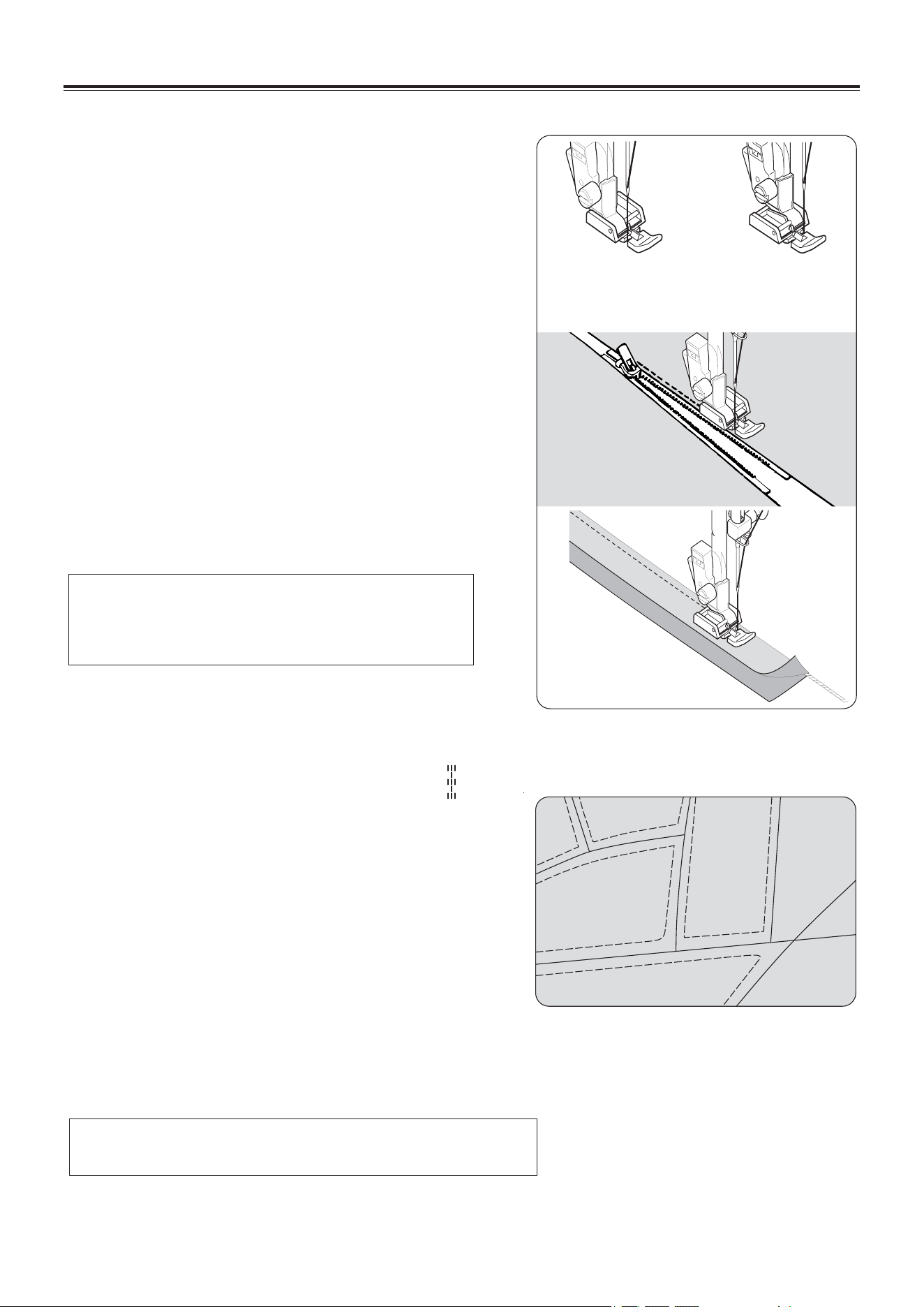
INSERTING ZIPPERS AND
PIPING
Use zipper foot to sew to the right or left of the zipper
or close to the cord.
INSERTING ZIPPERS
To sew down the right side, attach left side of zipper
foot to presser foot holder so that the needle passes
through the opening on the left side of the foot.
To sew down the left side, attach right side of foot to
foot holder.
PIPING
To pipe soft furnishings, cover cord with a bias strip of
fabric and pin or tack it to the main piece of fabric.
Attach right side of zipper foot to foot holder so that
needle passes through the opening on the right side
of the foot.
Helpful Hint: Slight adjusting of the needle
position to sew closer to the piping
may be accomplished with the
Stitch Width Control.
HAND-LOOK QUILT STITCH
This stitch is designed to look like hand sewing for
topstitching and quilting.
1. Thread bobbin with desired top stitching color.
When sewing the machine will pull this thread to
the top.
2. Thread machine with invisible or lightweight
thread the color that matches your fabric. This
thread should not show.
3. Increase thread tension a little bit at a time until
you achieve the desired appearance.
4. Start to sew.
NOTE: For a dramatic appearance, experiment with
different tension and stitch length combinations.
Needle to left of foot
Needle to
right of foot
STARTING TO SEW
EN - 19
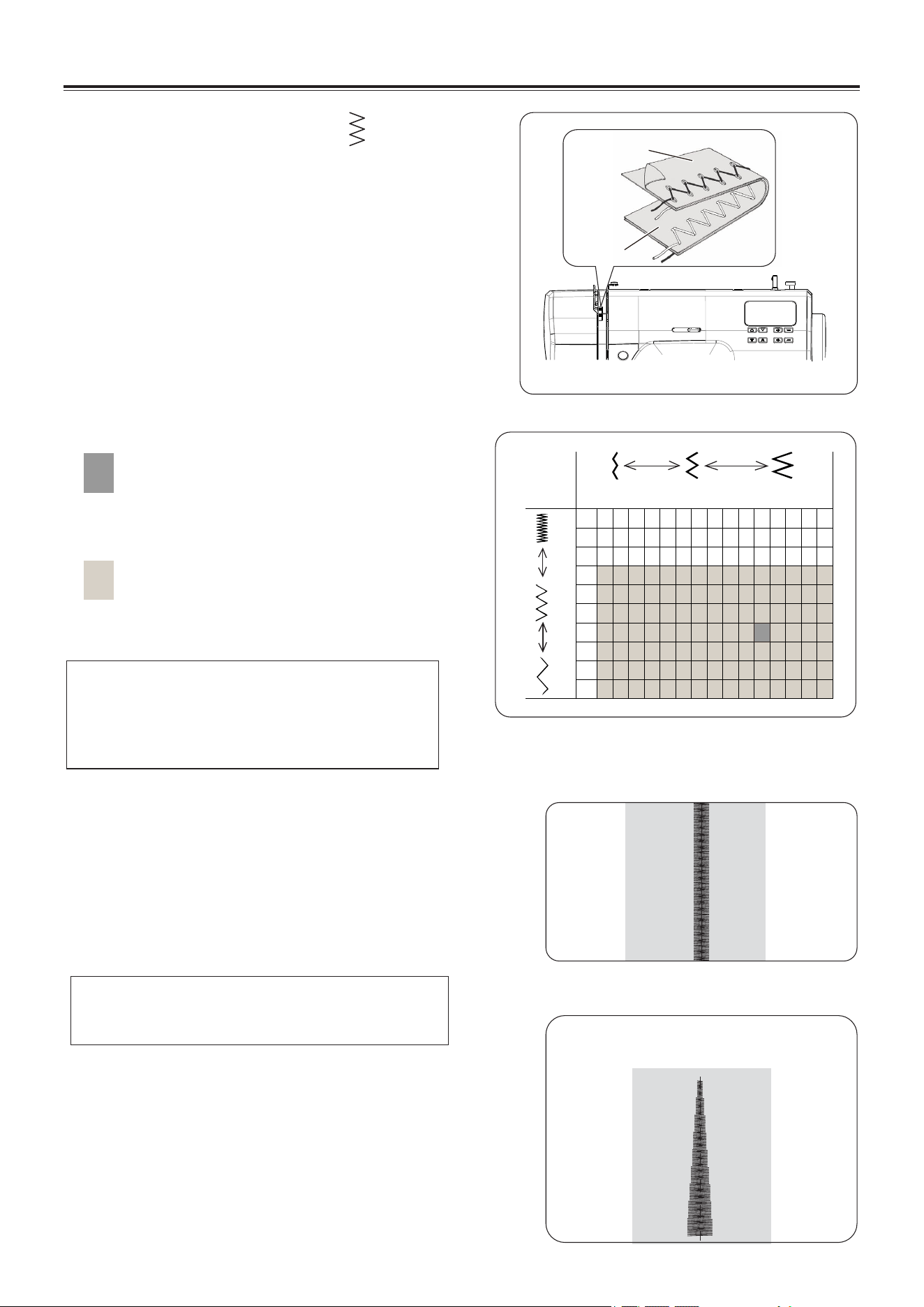
SATIN STITCH
This is a closely spaced attractive stitch for applique
bar- tacking, etc. Slightly loosen the top thread tension
and manually adjust the stitch length between 0.5 and
1.5 for satin stitching.
Use a backing of stabilizer or interfacing for sheer
materials to avoid puckering.
PLACEMENT OF PATTERNS
Stitch width of pattern increases from center needle
position as illustrated.
NOTE: The values shown in the chart are
actual sewing lengths and widths and
do not correspond to the scale and
number markings on the sewing
machine.
NOTE: When sewing a dense (closely
spaced) Satin Stitch, the Satin Stitch
Foot MUST be used.
mm
0
0.5
0
0.2
0.5
1.0
1.5
2.0
2.5
3.0
3.5
1.0 1.5 2.0 2.5 3.0 3.5 4.0 4.5 5.0 5.5 6.0
6.5
7.0
STITCH WIDTH
STITCH LENGTH
ZIGZAG STITCHING
SETTINGS: Presser foot - General Purpose Foot
: Thread tension control – 4
The top thread may appear on the bottom
depending on the thread, fabric, type of stitch and
sewing speed, but the bobbin thread must never
appear on the top of the fabric.
If bobbin thread is pulling to the top or you are
experiencing Puckering, slightly reduce the tension
with the Thread Tension Control.
ADJUSTING STITCH WIDTH AND
LENGTH
Dark grey box indicates the Auto/default
value set automatically when the pattern is
selected.
For the Zigzag Pattern the stitch length is 2
mm and the stitch width is 5 mm.
The light grey boxes indicate all the
possible personal preference options
available to set manual.
Center position
STARTING TO SEW
Under side
Top side
EN - 20
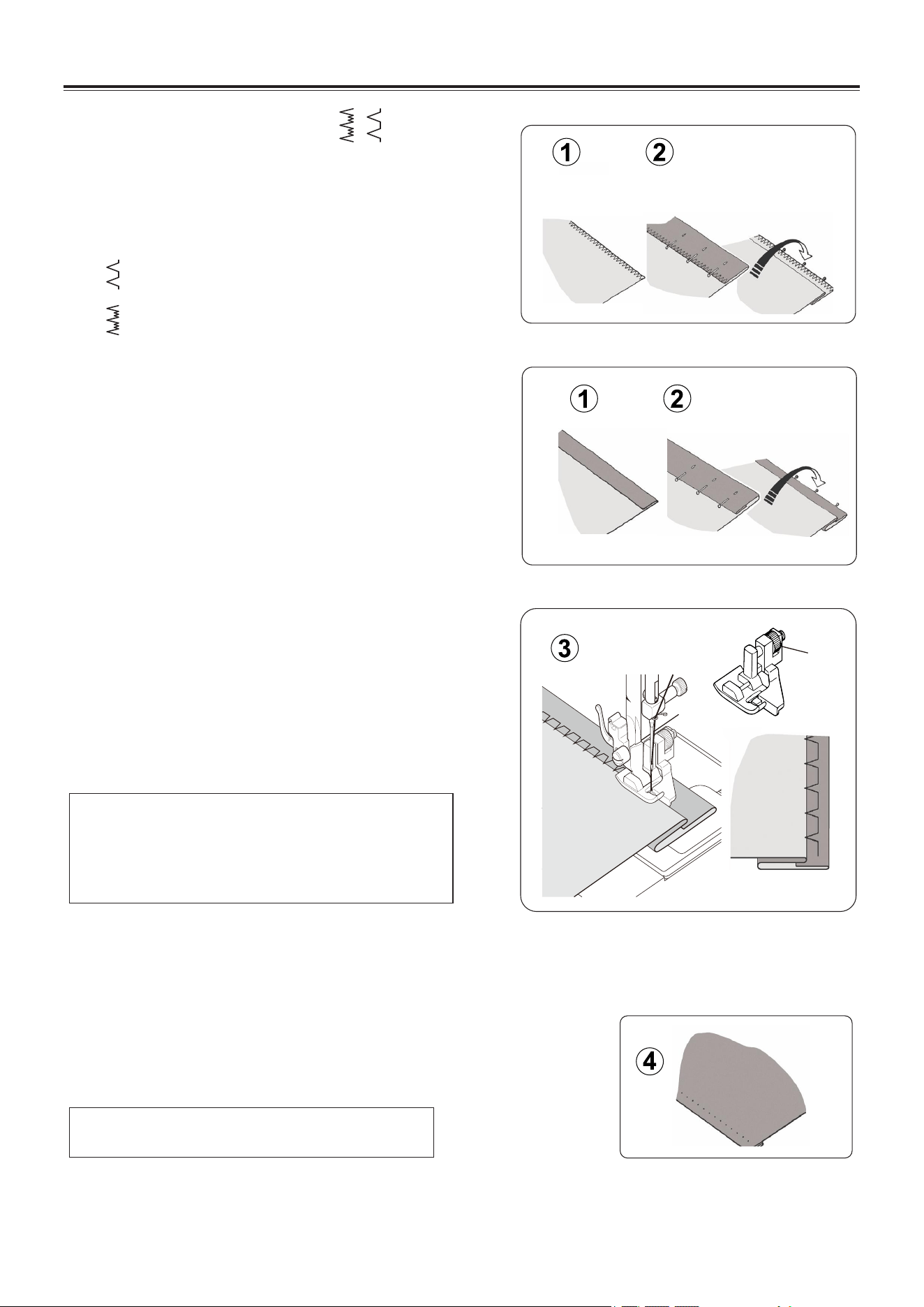
Sew slowly, guiding the fabric carefully along the edge of the
guide.
4. When completed, the stitching is almost invisible on the right
side of the fabric.
NOTE: For a narrower or wider blindhem,
first manually adjust the length and
width controls to your desired length
and width. Then adjust the guide on
the foot.
NOTE: It takes practice to sew blind hems.
Always make a sewing test first.
BLINDHEM STITCH
The blindhem stitch is primarily used for hemming
curtains, trousers, skirts, etc.
Settings: Presser foot - Blind stitch foot (H)
: Thread Tension Control: 4
— —Regular blind stitch for normal firm
fabrics
— —Elastic blind stitch for soft, stretchable
fabrics
1. First finish the raw edge. Do this by turning it
under on fine fabrics or overcasting it on medium
to heavyweight fabrics.
Then turn the hem up the required depth, press
and pin in place.
2. Now fold the fabric as illustrated with the wrong
side up.
3. Place the fabric under the foot. Turn the
handwheel towards you by hand until the needle
swings fully to the left. It should just pierce the
fold of the fabric. If it does not, adjust the guide
(B) on the Blindhem Foot (A) so that the needle
just pierces the fabric fold and the guide just rests
against the fold.
Under side
Under side
Medium to heavyweight fabric
A
B
Under side
Under side
Fine fabric
Top side
STARTING TO SEW
EN - 21
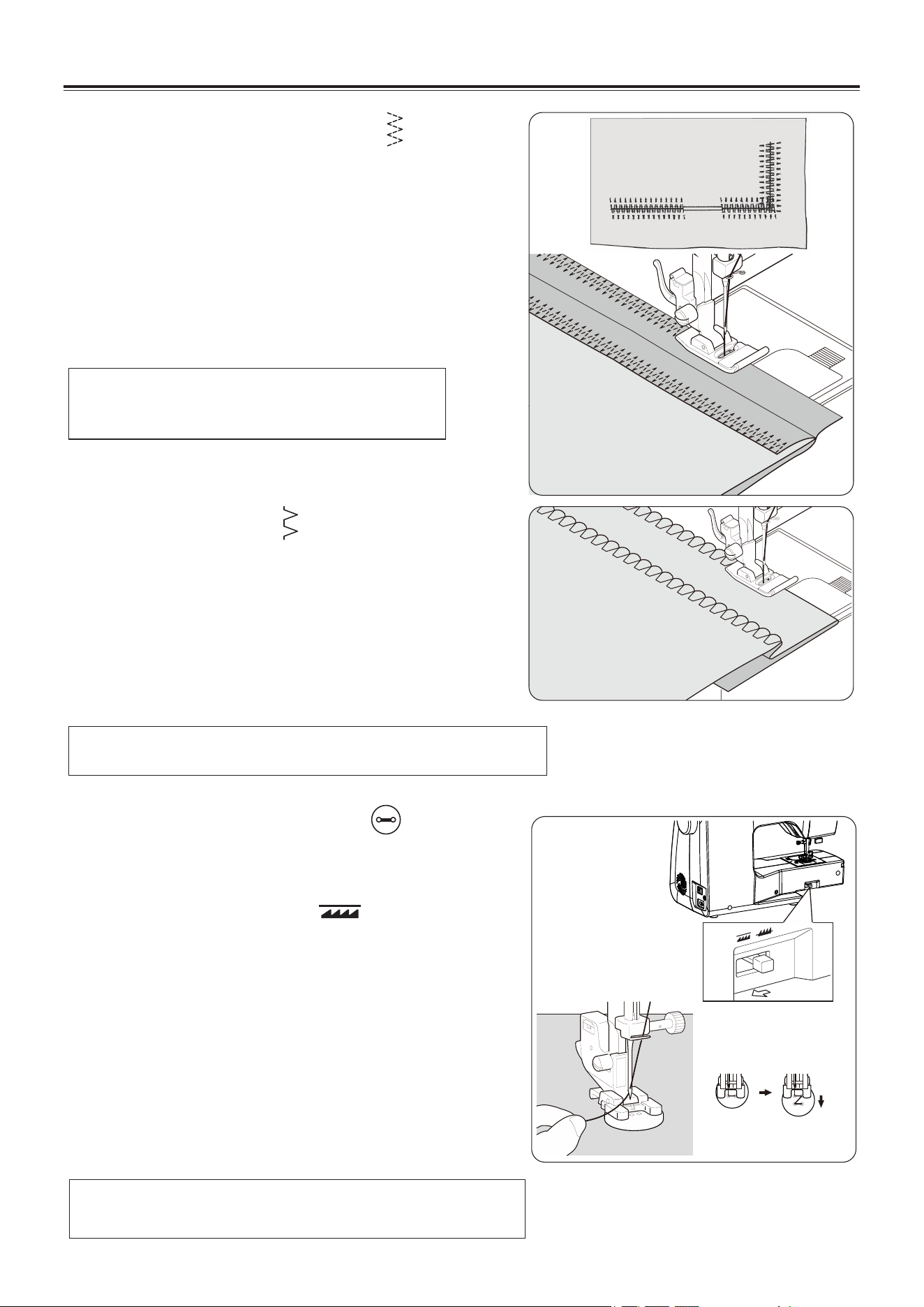
NOTE: Mending a tear or overedging as
shown in illustration requires manual
adjustment of the length control.
Helpful Hint: For a pleasing appearance experiment with
different width, length and tension settings.
Helpful Hint: To secure thread, pull both threads to the
backside of the fabric and tie together.
SHELL STITCH
SETTINGS : Presser foot - General Purpose Foot(J)
: Thread tension control - 4
Turn under the raw edge and press. Place the fabric
right side up so that the zigzag part of the stitch sews
just over the folded edge, pulling the fabric in to form a
shell hem. Trim away excess fabric close to the
stitching line.
MULTI-STITCH ZIGZAG
SETTINGS : Presser foot - General Purpose Foot(J)
: Thread tension control – 4
This is a strong stitch because as its name implies, it
makes three short stitches where the normal zig-zag
makes only one.
For this reason it is highly recommended for overcasting
all types of fabrics.
It is also ideal for bartacks, mending tears, patching,
sewing towelling, patch-work and attaching flat elastic.
SEWING ON A BUTTON
SETTINGS : Presser foot - Button fitting foot (O)
: Feed dog control –
Push the lever in the direction of the arrow to drop the
feed dog, Attach button fitting foot (O).
Position your fabric and button under the presser foot.
Lower presser foot. Turn the handwheel to make sure
needle clears both left and right openings of button.
Adjust width if required. Sew 10 stitches across.
When attaching four-hole buttons, first sew the two
holes closest to you. Then, slide the button so that the
needle goes into the two holes toward the rear of the
sewing machine, and then sew them in the same way.
STARTING TO SEW
EN - 22
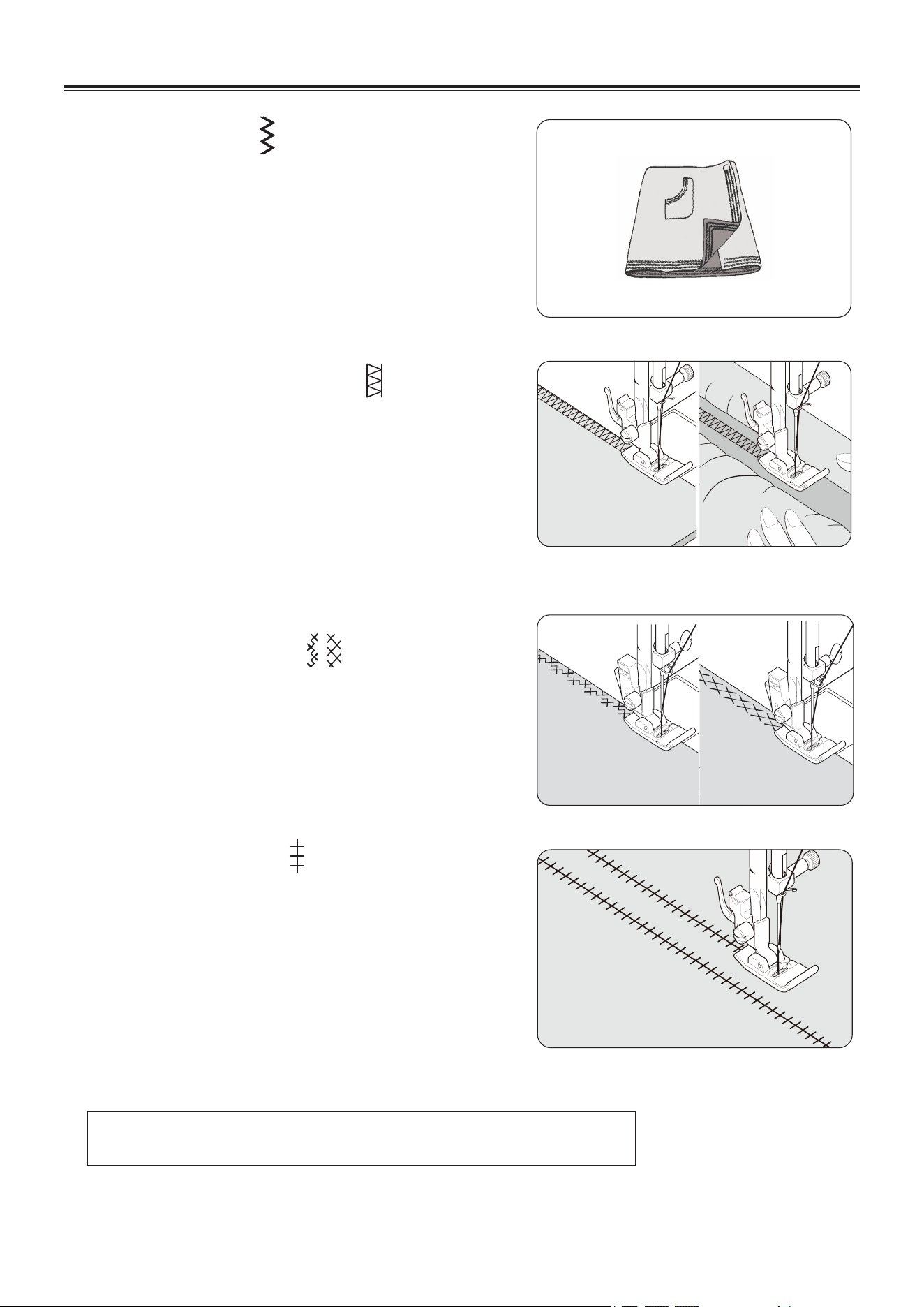
STRAIGHT STRETCH STITCH
Straight stretch stitch is far stronger than an ordinary
straight stitch because it locks three times -
forwards, backwards and forwards.
It is particularly suitable for reinforcing the seams of
sportswear in stretch and non-stretch fabrics, and for
curved seams which take a lot of strain.
Use this stitch also to top-stitch lapels, collars and
cuffs to give a professional finish to your garments.
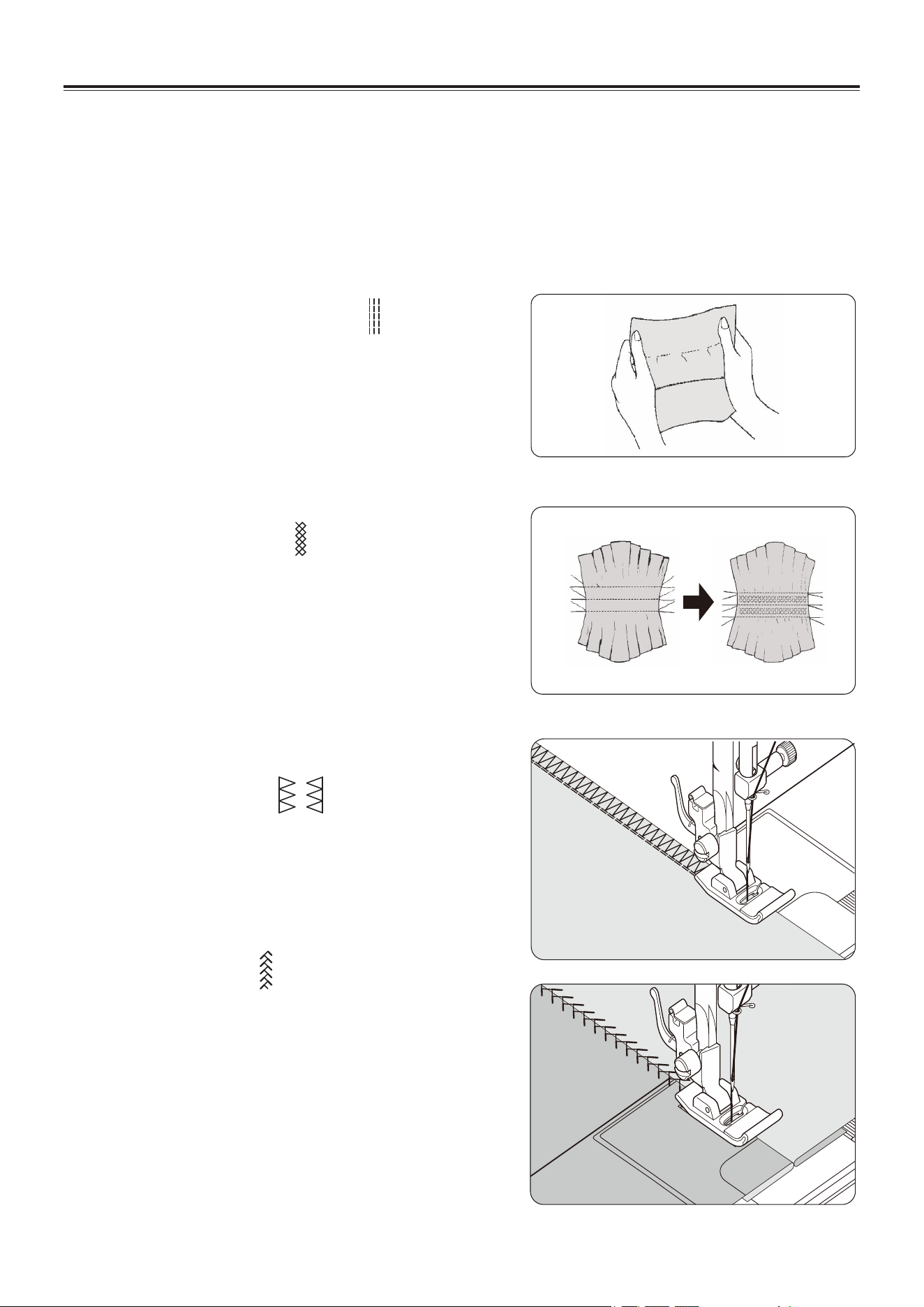
HONEYCOMB STITCH
The Honeycomb stitch is ideal for smocking and
useful for overcasting and attaching elastic and
stretch lace.
1. For smocking, first make several rows of gathers
across the fabric that you wish to smock.
2. Cut an underlay fabric (such as organdy) and
place it under the shirring.
3. Sew the honeycomb stitch over the gathered rows,
securing them in place.
OVEREDGE STITCH
This is the same type stitch used by the garment
industry in making sportswear - it forms and finishes
the seam in one operation.
It's very effective for use in repairing raw or worn
seams of garments.
FEATHER STITCH
The pleasing appearance of this stitch enables it to
be used for decorative topstitching or for attaching
laces and trims.
It is also ideal for quilting applications and edge-
joining.
STARTING TO SEW
DECORATIVE AND STRETCH STITCHES
SETTINGS :Presser foot - General Purpose Foot(J)
or Satin Stitch Foot (Z)
:Thread tension control – 4
Stretch stitches are mainly for use on knit, or stretchable fabrics, but can also be used on
woven materials.
EN - 23
Helpful Hint: A slight + adjustment of the tension will increase the
size of the hole when using a Wing Needle.
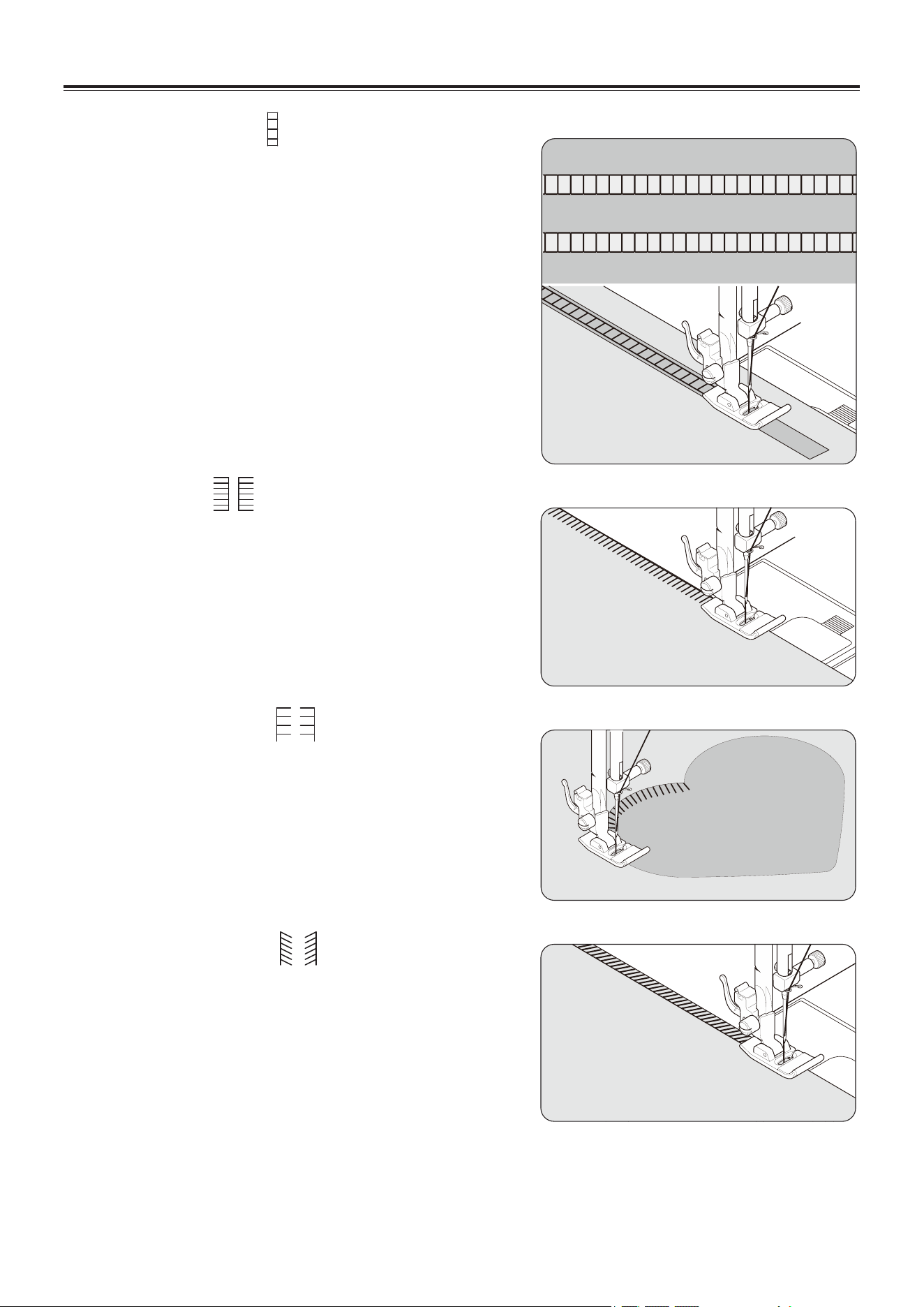
RIC-RAC STITCH
The Ric-rac stitch is primarily used for a decorative
topstitch. It is ideal for edging neck-bands,
armholes, sleeves and hems.
When manually adjusted to a very narrow width, it
also can be used for sewing high stress seams.
DOUBLE OVERLOCK STITCH
The Double overlock stitch has three main uses. It
is perfect for attaching flat elastic, for overcasting,
and for seaming and overcasting in one operation.
It is primarily used on slightly stretch fabrics and
non-stretch fabrics such as linen, tweed, and
medium to heavy-weight cotton.
CRISS-CROSS STITCH
Used to sew and finish stretch fabrics or for
decoration especially of borders.
ENTREDEUX STITCH
Useful for decorative stitching on borders and for
use in heirloom sewing. The Entredeux stitch is
most often sewn with a Wing Needle to create holes
in the stitch pattern.
STARTING TO SEW
EN - 24
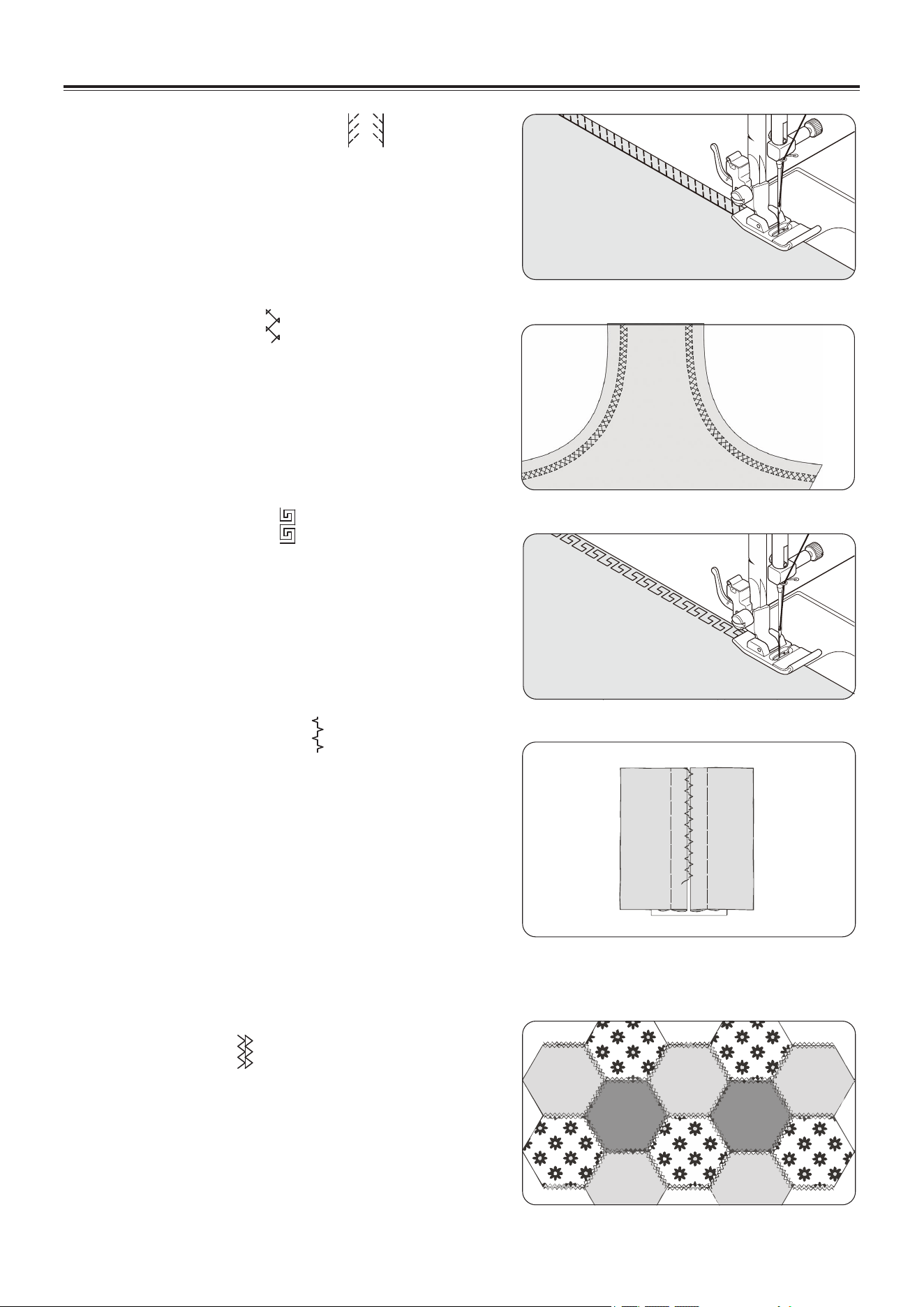
LADDER STITCH
The Ladder stitch is primarily used for drawn thread
hemstitching. It can also be used for sewing over thin
tape in a contrasting or same color. Place the stitch
in the center and a special effect will be obtained for
decoration.
Another use for the ladder stitch is couching over
narrow
ribbon, yarn or elastic.
For drawn thread work, choose a coarse linen type
fabric and after sewing draw the thread out within the
ladder for an open airy appearance.
PIN STITCH
The Pin stitch is a traditional stitch pattern used for
picot-like edges and for applique work.
BLANKET STITCH
The Blanket stitch is traditionally a hand sewn stitch
used to put bindings on blankets. This multi-purpose
stitch can also be used for couching, applique, drawn
thread hemstitching and creating fringe.
SLANT PIN STITCH
Excellent for hemstitching projects like table linens.
Picot-like stitch can also be made on sheer
materials. Sew along the raw edge of fabric and trim
close to the outside of the stitching.
STARTING TO SEW
EN - 25
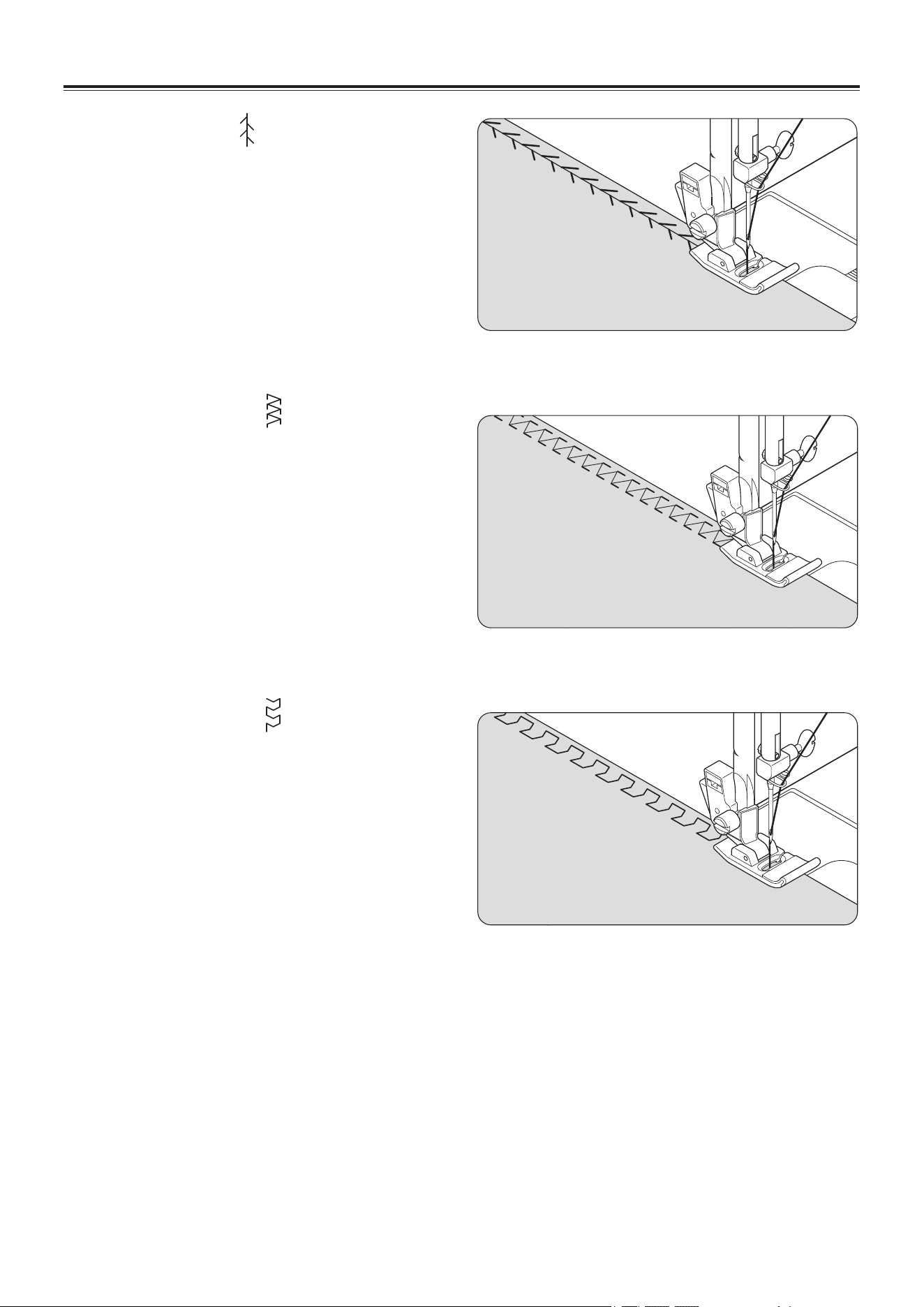
SLANT OVEREDGE STITCH
Seams and overcasts in one operation to produce a
narrow , supple seam, particularly suited to
swimwear, sportswear, T-shirts, babywear in stretch
nylon, jersey and cotton jersey.
CROSSED STITCH
Use to sew and finish elastic fabrics or for decorative
work.
GREEK KEY STITCH
A traditional pattern suited for decorative borders
and edge finishings.
EDGE-JOINING STITCH
This is a popular decorative stitch. It can also be
used for joining two separate pieces of fabric,
leaving a little space in between. To attach two
separate pieces of fabric together, leave a little
space in between. To prepare the fabric:
Fold under the seam allowances on the cut edges,
and press.
Baste folded edges to tissue paper with about 1/8"
(0.3 cm) space between. Stitch over the 1/8" (0.3
cm) allowance, just catching the fabric fold on both
sides with needle. Remove bastings and paper.
WIZARD STITCH
Used mainly for decorative machine stitching.
STARTING TO SEW
EN - 26
THORN STITCH
It is a versatile stitch used for joining fabric pieces
and as a decorative touch.
FISHBONE STITCH
Use to create decorative borders and for
embroidery.
CHEVRON STITCH
Use to create decorative borders and for
embroidery.
STARTING TO SEW
EN - 27
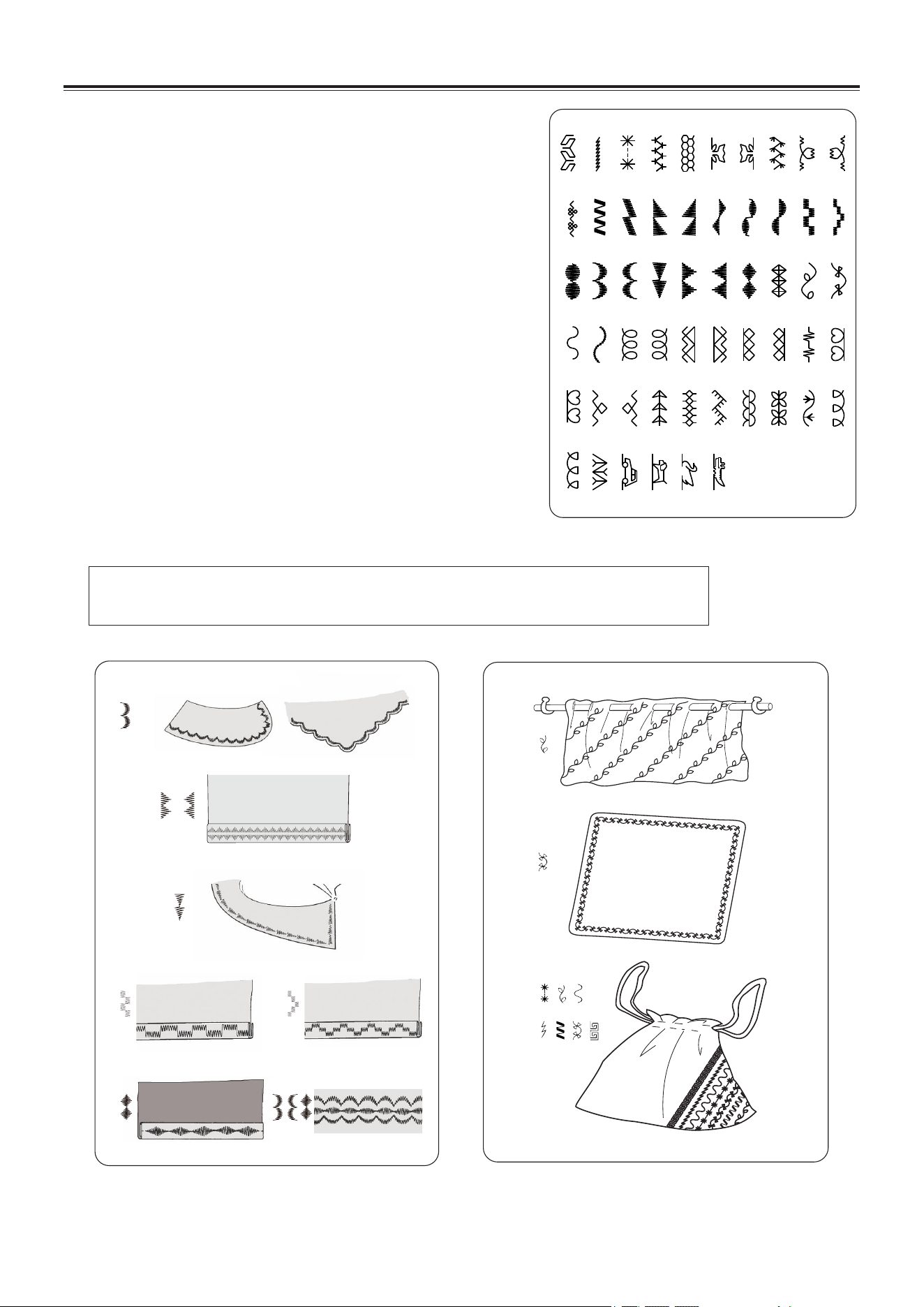
MORE DECORATIVE STITCHES
SETTINGS :Presser foot - General Purpose Foot(J)
or Satin Stitch Foot (Z)
:Thread tension control - 4 or 3
Following are examples of how to use and sew these
stitches. You can use some other decorative stitches in the
same way.
You should carry out a test sewing on an extra piece of the
fabric being sewn to check the decorative pattern to be
used.
Before starting to sew, check that there is enough thread
wound onto the bobbin to ensure that the thread will not
run out during sewing.
For best results, stabilize fabric with a tear-away or wash-
away stabilizer underneath when stitching.
Helpful Hint: Bobbin thread should not appear on the top side of the fabric,
so it may be necessary to slightly lower the tension setting.
STARTING TO SEW
EN - 28
BUTTONHOLE MAKING
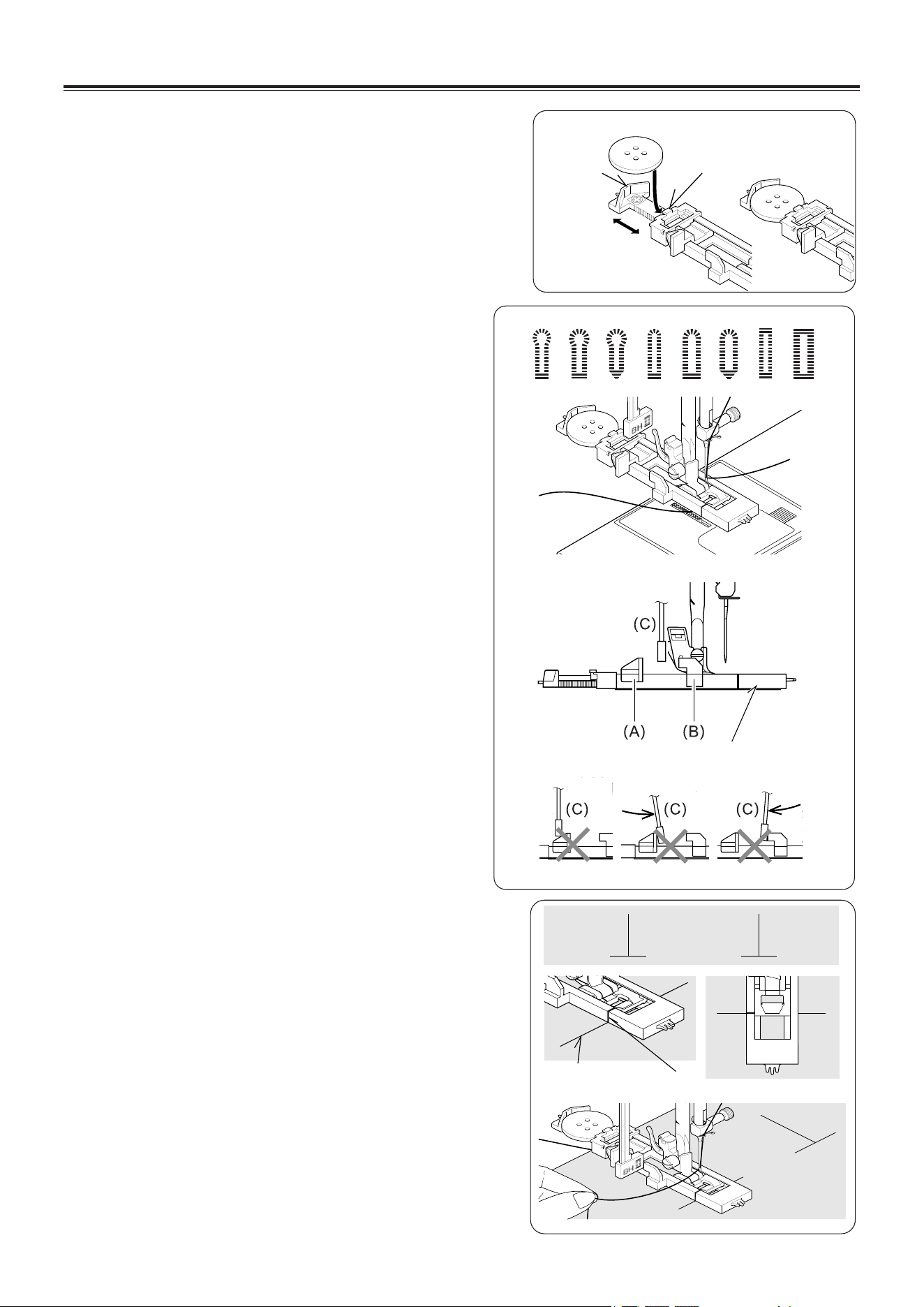
AUTOMATIC BUTTONHOLE
USING BUTTONHOLE FOOT
Your machine offers you two different widths of
bartack, keyhole and round end buttonholes sewn
by a system that measures the size of the button
and calculates the size of buttonhole required. All
of this is done in one easy step.
PROCEDURE
* Use an interfacing in the area of the garment
where buttonholes are placed. Stabilizer or
regular interfacing can be used.
* Make a practice buttonhole on a scrap of the
fabric you are using. Then try the buttonhole
with the selected button.
1. Select one of buttonhole patterns.
2. Replace the presser foot with the buttonhole
foot. (Refer to “Changing presser foot” on page
11.)
3. Insert the button into the buttonhole foot.
(Refer to “Using buttonhole foot” above.)
4. Lower the buttonhole lever (C) so that it drops
down vertically between the stoppers (A) and
(B).
5. Carefully mark the position of buttonhole on
your garment.
6. Place the fabric under the foot. Pull out the
bobbin thread underneath the fabric to a length
of about 4 inches to the rear.
7. Align the buttonhole mark on the fabric with the
mark on the buttonhole foot, and then lower the
buttonhole foot.
8. While holding the top thread, start the machine.
Tab A
Tab B
STARTING TO SEW
Buttonhole foot
Fabric marking
Mark
EN - 29
STARTING TO SEW
1 2 3 4 5 6 7
1 2 3 4 5 6 7 8
Buttonhole foot
alignment position
Fabric marking
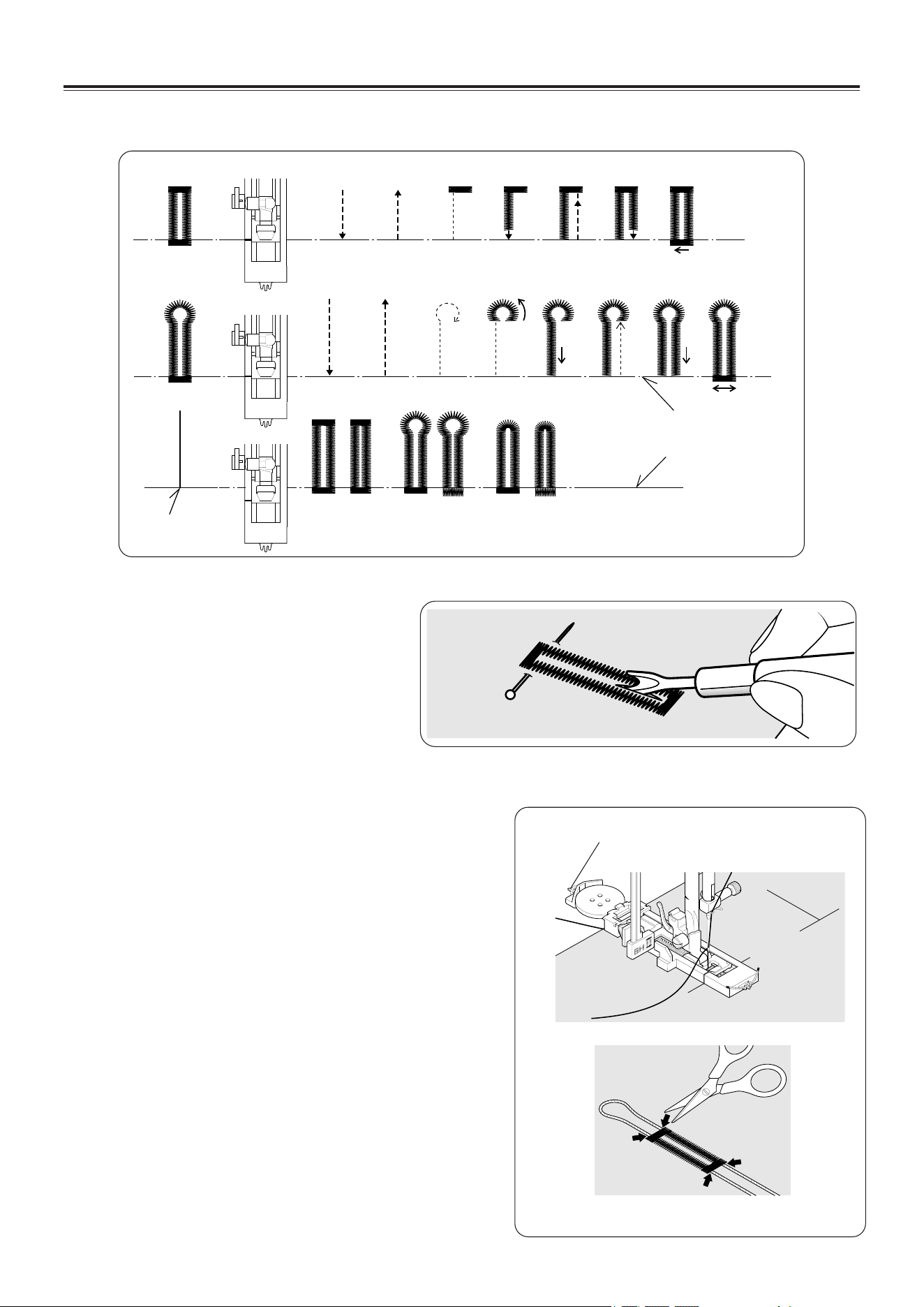
* Sewing will be completed automatically in the following order.
9. When sewing is finished, use a
buttonhole opener/seam ripper to
open up the fabric in the center of
the buttonhole. Be careful not to cut
any of the stitching.
Spur
CORDED BUTTONHOLES
Hook filler cord (such as crochet thread or
buttonhole twist) over the spur and pull both ends
of the cord forward under the foot and tie off the
cord as shown in the illustration.
Sew buttonhole so that zigzag stitches cover the
cord.
When completed, release the cord from foot and
snip off extra length.
EN - 30
STARTING TO SEW
STRAIGHT STITCH NEEDLE POSITION
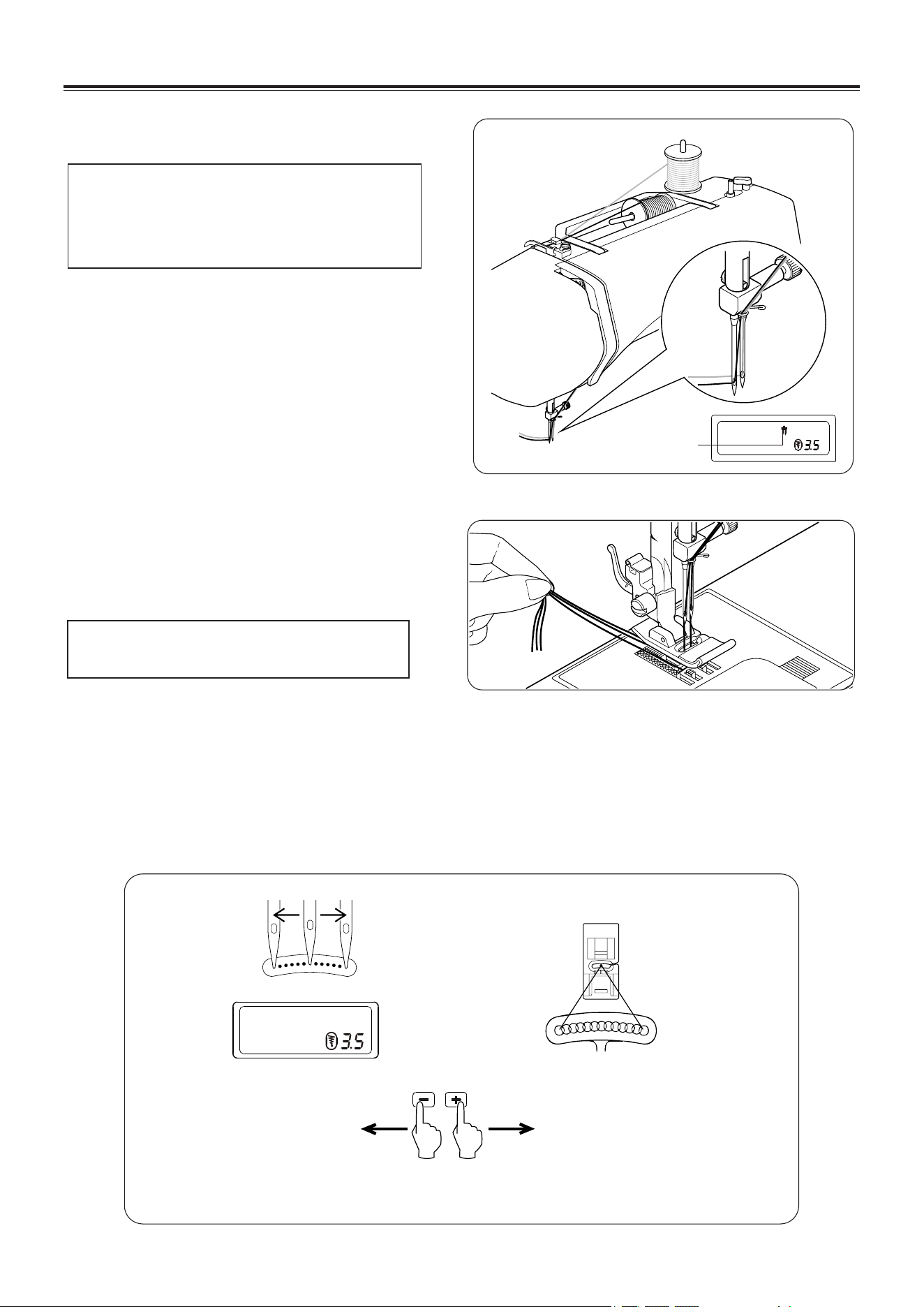
The position of the needle when sewing straight stitch may
be adjusted to anyone of 13 different positions with the Stitch
Width Control as illustrated:
Toward left
Toward right
Stitch width adjustment button
TWIN NEEDLE
IMPORTANT: When using a twin-needles,
set stitch width at 3.5 or
less, or otherwise needle
may be broken.
A twin-needle produces two rows of parallel
stitches for pin tucks, double top stitching and
decorative sewing.
1. Insert the second spool pin. Place a spool on
each spool pin. Thread the two threads as
one. Draw one thread through each needle
from front to back.
2. Pick up bobbin thread as for single needle
sewing. Pull the three threads together under
the presser foot to the back of the machine,
leaving about 6” (15 cm) of thread.
NOTE: Needle threader cannot be used
to thread the twin needle.
Twin needle
mode indicator
EN - 31
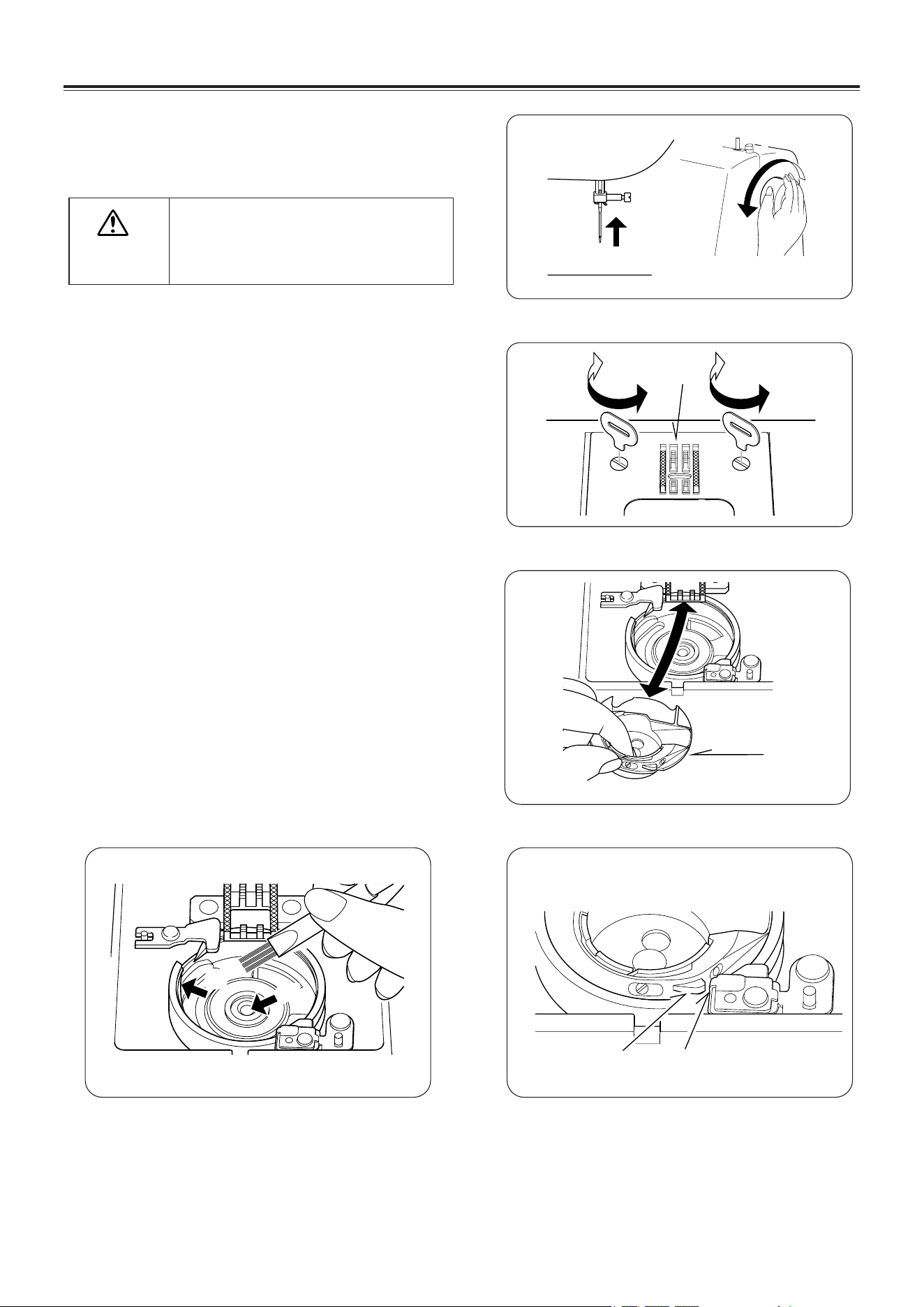
Always disconnect the machine
from power supply by removing
the plug from the wall-outlet.
CAUTION
CARING FOR YOUR MACHINE
1
2
(1)
3
(2)
5
(3)
(4)
4
(A)
(B)
CLEANING THE FEED DOGS
AND SHUTTLE AREA
To ensure the best possible operation of your
machine, it is necessary to keep the essential
parts clean at all times.
1. Raise the needle to its highest position.
2. Remove the needle plate (1).
3. Remove the bobbin case (2).
4. Clean the feed dogs and shuttle area with the
lint brush. Put one drop of sewing machine oil on
the shuttle race as indicated by the arrows(A,B).
5. Replace the bobbin case with the projection (3)
positioned against the spring (4). Replace the
needle plate.
EN - 32

GENERAL PROBLEMS
Machine does not sew.
* Power switch is turned off.- Turn on the switch.
* Buttonhole lever is not raised when sewing stitch patterns. – Raise the buttonhole lever.
* Buttonhole lever is not lowered when sewing buttonhole. – Lower the buttonhole lever.
* Bobbin winder is engaged. – Disengage the bobbin winder (see page 5).
Machine jams/knocks.
* Thread is caught in the bobbin case.- Clean the bobbin case (see page 32).
* Needle is damaged.- Replace the needle (see page 10).
Fabric does not move.
* Presser foot is not lowered - Lower the presser foot.
* Stitch length is too short - Lengthen stitch length.
STITCHING PROBLEMS
Machine skips stitches.
* Needle is not all the way up into needle clamp.- Replace the needle (see page 10).
* Needle is bent or blunt. - Replace the needle (see page 10).
* Machine is not threaded correctly. -Threading the thread again(see page 7).
* Thread is caught in the bobbin case.- Clean the bobbin case (see page 32).
Stitches are irregular.
* Needle size is not correct for thread and fabric. - Reinstall the needle (see page 10).
* Machine is not threaded correctly. -Threading the thread again(see page 7).
* Top thread tension is too loose.- Adjust the top tension (see page 11).
* Fabric is being pulled or pushed against machine feeding action. - Guide it gently.
* Bobbin has not been wound evenly. - Rewind the bobbin.
Needle breaks.
* Fabric is being pulled or pushed against machine feeding action. - Guide it gently.
* Needle size is not correct for thread and fabric. - Reinstall the needle (see page 10).
* Needle is not all the way up into the needle clamp. - Replace the needle (see page 10).
* Twin needle is being used but stitch width is set too wide.- Adjust the stitch width (see page 31).
* Too much thread appears on the underside of stitching.-Clean the unnecessary thread.
* Upper thread not correctly thread. -Threading the thread again(see page 7).
THREAD PROBLEMS
Thread bunches.
* Top and bobbin threads are not drawn back under presser foot before starting seam. - Draw both threads back
under presser foot about 6 inches (10 cm) and hold until a few stitches are formed.
Needle thread breaks.
* Machine is not threaded correctly.-Threading the thread again(see page 7 ).
* Top thread tension is too tight.- Adjust the top tension(see page 11).
* Needle is bent. - Replace needle (see page 10).
* Needle size is not correct for thread and fabric. - Reinstall the needle (see page 10).
Bobbin thread breaks.
* Bobbin case is not threaded correctly.- Threading the bobbin thread again(see page 6).
* Lint accumulates in the bobbin case or the shuttle race. - Remove lint (see page 32).
Fabric puckers.
* Top thread tension is too tight. - Adjust the thread tension (see page 11).
* Stitch length is too long for sheer or soft fabric. - Shorten stitch length.
PERFORMANCE CHECKLIST
EN - 33

After-sales service
This product enjoys two-year warranty. Within a limited warranty or two full years from purchase date,
clients can go to the specified service points (usually contact the distributor first) to claim maintenance
free service with purchase invoice or guarantee cards if there are damages caused by product’s quality.
The faults caused by accidental damage, unauthorized repair, improper storage and secondary sales of
the products are not included in the warranty.
Copyright
This publication, including all photographs, illustrations and introduction images, is protected under
international copyright laws, with all rights reserved. Neither this manual, nor any of the material
contained herein, may be reproduced without written consent of the author.
Trademark
UTEN, the UTEN logo and other UTEN marks are owned by RBU INTERNATIONAL LTD and may be
registered. All other trademarks are the property of their respective owners.
Disclaimer
The information in this document is subject to change without notice. The manufacturer makes no
representations or warranties with respect to the contents hereof and specifically disclaims any implied
warranties of merchantability or fitness for any particular purpose. The manufacturer reserves the right to
revise this publication and to make changes from time to time in the content hereof without obligation of
the manufacturer to notify any person of such revision or changes.
This product specification describes the composition and respectively the properties of our product to the
best of our knowledge. We make every effort to ensure that this User's Manual is accurate and disclaim
liability for any inaccuracies or omissions that may have occurred.
If you find information in this manual that is incorrect, misleading, or incomplete, we would appreciate
your comments and suggestions.
EN - 34