EN
...
01
23
...
ES
R
CETW645
Active Noise Cancelling TWS Earbuds
Auriculares TWS con cancelación activa de ruido
With Hi-Res LCD Touchscreen Case
Con Funda de Pantalla Táctil LCD de Alta Resolución
User Manual
Manual De Usuario
User Manual
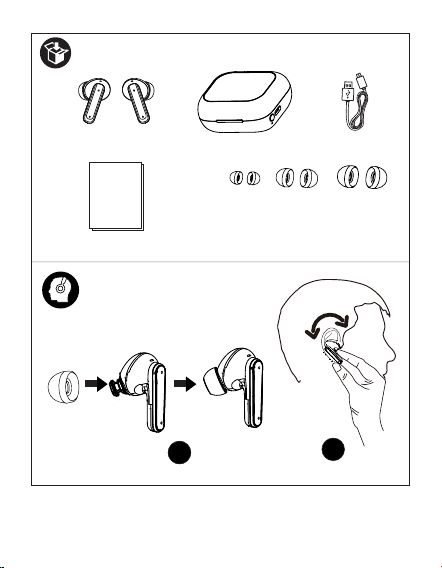
Earbud Tips (S/M size)
EN 1
S M L
11
2
?
Overview
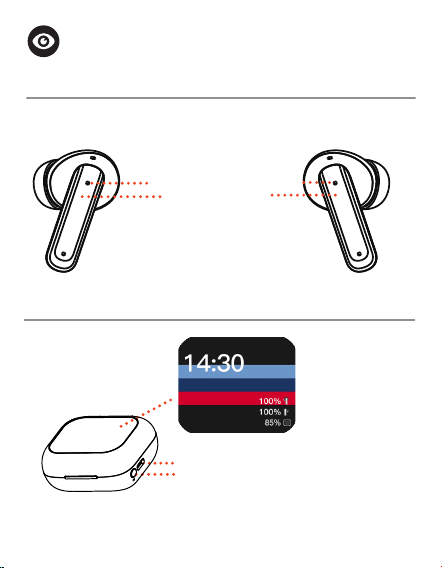
CETW645 True Wireless Stereo Earbuds
Status LED indicator
Left Earbud
Right Earbud
EartipEartip
CETW645 LCD Touchscreen Case
Screen on/off button
Type C charging port
Touch display
screen
EN 1
Touch Sensor
Home screen
Touch Operation
Screen is locked
Powering on/off
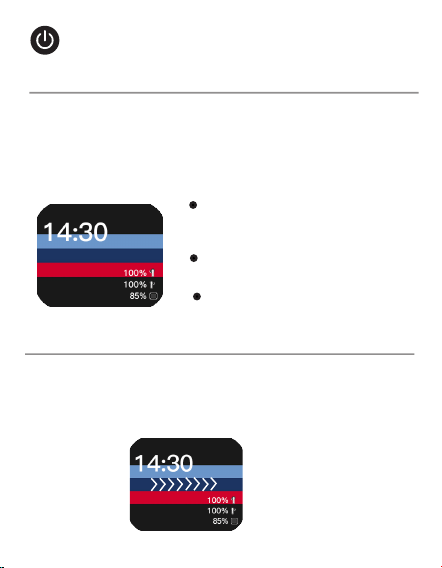
Press the Screen On/Off button once to turn on the
display. The Coby Logo will appear. Select the language,
then tap the icon < > to choose your desired wallpaper.
Tap on the selected wallpaper to conrm. It will then
take you to the home screen.
If there is no operation for more than 30 seconds on the
display screen, it will turn off and lock automatically. To
wake the display screen, press the Screen On/Off button
once or tap on the screen. Then, swipe right to unlock it.
Turning on the display
Waking/Unlocking the display screen
?
Swipe left and right on the
display screen to toggle the
app list.
On the App screen, swipe up
and down to select the items.
Tap the icon on the screen to
select the item.
EN 2 EN 3
Swipe left or right on the display screen to select the
‘Settings’ app. Then, swipe up and down to select
‘Shutdown’ to turn off the display.
Turning off the display
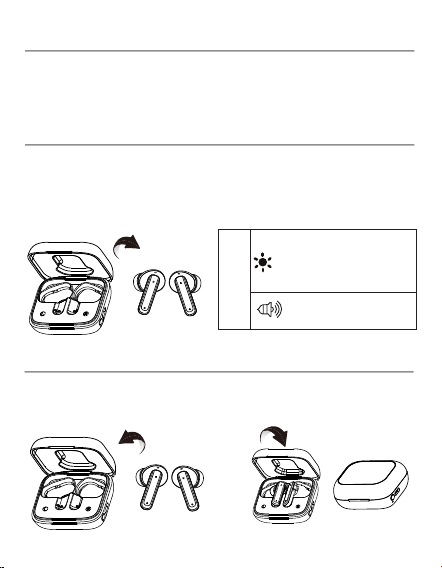
Your CETW645 earbuds will power on automatically
when taken out of the Touchscreen case. You can also
power them on manually by pressing and holding the
Touch Sensor on both earbuds for 7 seconds.
Turning on the earbuds
ON
Power on
tone notication
Alternately flashing
white and
blue on
both earbuds
Your CETW645 earbuds will power off automatically
when placed back into the Touchscreen case .
Turning off the earbuds
EN 3
?
Charging
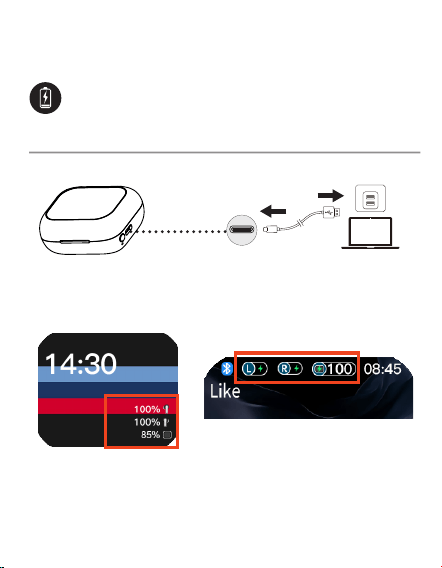
Charging the Touchscreen Case
The charging status and the power level for the Touchs-
ceen case will be shown on the display screen.
EN 4
Type C
charging port
USB Power Source
Status bar
EN 5
To power them off manually, press and hold the Touch
Sensor on a single earbud for 5 seconds.
Charging your earbuds
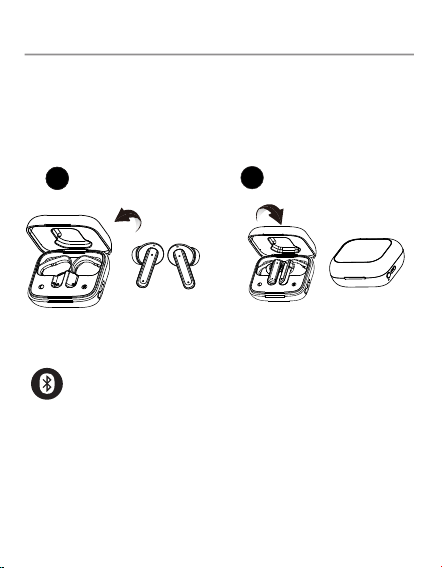
When your earbuds’ battery runs low, the earbud status
indicators will slowly flash white, and a notication tone
will play. Open the Touchscreen case’s lid, then place the
earbuds into the Touchscreen case and close the lid to
start recharging.
11
2
The charging status and the power level for the Touch-
screen case will be shown on the display screen.
EN 5
Pairing
1. True Wireless stereo connection
When the earbuds are turned on, they will automatically
enter True Wireless stereo pairing mode.
?
EN 6
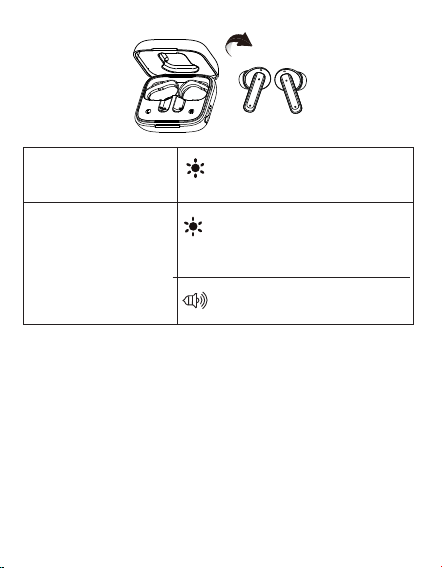
Connected tone notication
Enter True Wireless
stereo pairing mode
When True Wireless
Stereo connection is
successful (the right
and left earbuds are
connected)
After a successful True Wireless stereo connection, your
CETW645 will automatically enter Bluetooth pairing
mode to connect to your device.
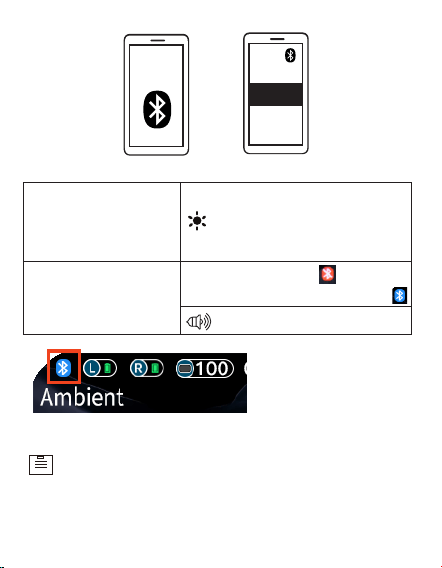
Turn on Bluetooth in your device’s settings and search
for “CETW645”, then tap “CETW645” to connect.
2. Connect the Earbuds & Touchscreen Case to
your device
Alternately flashing white and
blue on one earbud, the light
turns off on the other earbud.
Alternately flashing white
and
blue on both earbuds
EN 7
EN 7
ON
CETW645
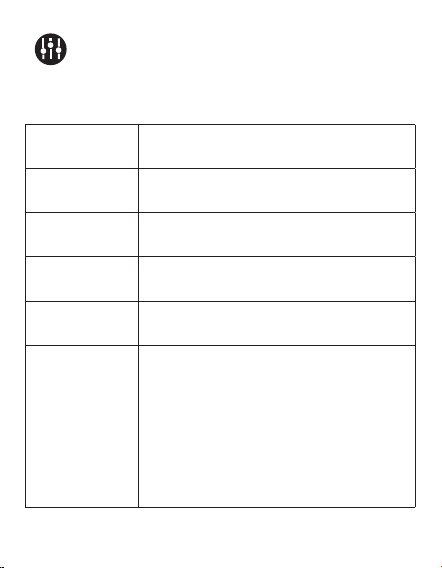
The Bluetooth icon on the
status bar changes to blue icon .
The CETW645 earbuds and touchscreen case
will automatically be paired with your last
sucessfully connected media device the next
time they are turned on.
Pairing
mode
Connected to a device
(Successfully paired)
Connected tone notication
Alternately flashing white
and blue on one earbud,
flashing blue on the other
earbud.
Status bar on the
touchscreen
Controls
1. Music mode
Quickly press the Touch Sensor three
times on the right earbud.
Quickly press the Touch Sensor three
times on the left earbud.
Press the Touch Sensor once on
either earbud.
Quickly press the Touch Sensor
twice on the right earbud.
Quickly press the Touch Sensor
twice on the left earbud.
Volume down
Volume up
Play/Pause
Next track
Previous
track
?
EN 8
• Button Control
EN 9
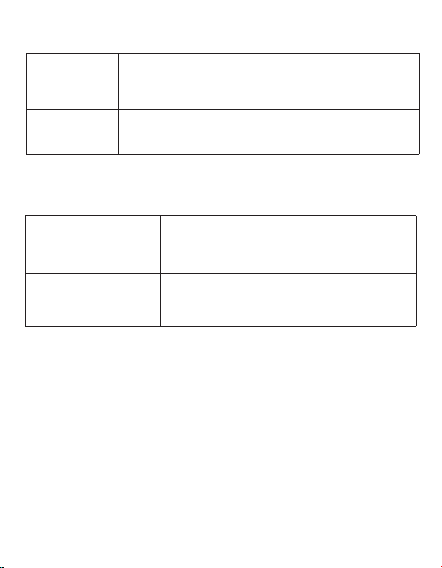
The default mode is Transparent
mode. Press and hold the Touch
Sensor for 2 seconds on the left
earbud, to toggle among Transpar-
ent mode, ANC On mode, and ANC
Off mode (Normal mode).
Transparent
mode/ANC
mode
2. Phone call mode
3. Voice Assistant mode
Quickly press the Touch Sensor twice on
either earbud.
Press and hold the Touch Sensor for 2
seconds on either earbud.
Press and hold the Touch Sensor
for 2 seconds on either earbud.
Press the Touch Sensor on either
earbud.
Answer
/End a call
Reject a
call
Exit voice
assistant
Activiate voice
assistant
EN 9
Previous track
Next track
Play/Pause
Volume up/down
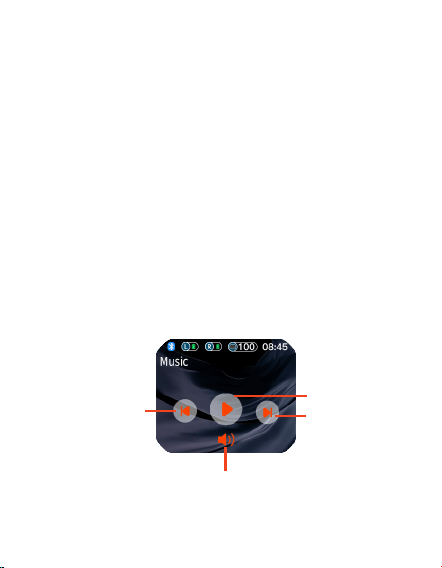
• Touch Control
The CETW645 earbuds features with a display screen
built-in the case for touch controls, allowing you to get
more controls for the earbuds (Note:
Make sure the
CETW645 is connected to your phone.).
1. Music Playback Control
• Swipe left and right on the display screen to toggle
the app list.
• On the App screen, swipe up and down to select
the items.
• Tap the icon on the screen to select the item.
• Swipe right to return to previous screen.
EN 10
EN 11
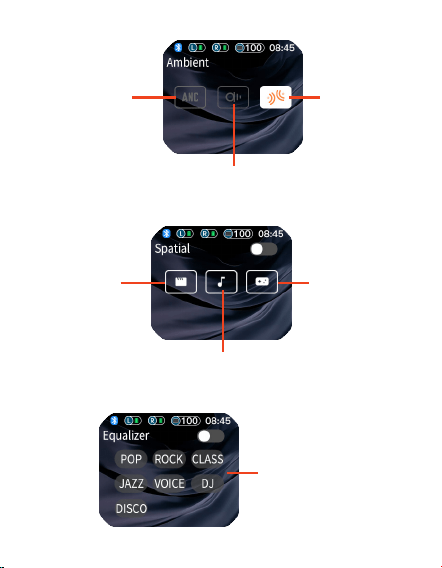
ANC On mode
Play/Pause
ANC Off mode
(Normal mode).
Transparent mode
2. Ambient Control
3. Spatial Sound Control
4. Sound Equalizer Control
Video mode
Music mode
Game mode
Tap to customize the
sound equalizer set-
tings for the earbuds
EN 11
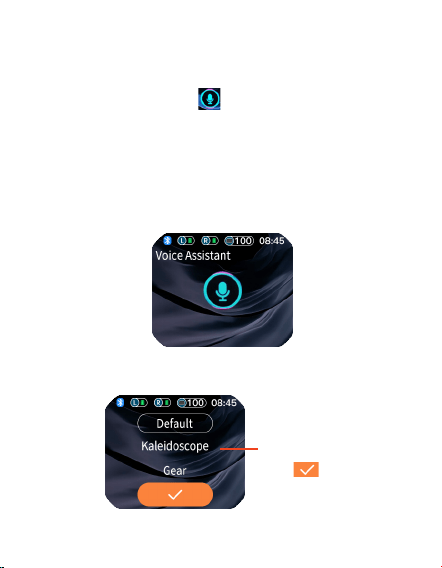
5. Voice Assistant
Make sure the CETW645 is connected to your phone.
From the App list, select and open the voice assistant
App, ta[ once on the icon to activate the voice
assistant, then you speak to the voice assistant in
the Touchscreen case
by a simple voice command. For
example, "how is the weather in New York today?", "what
is a rainbow?", and so on. After a few seconds of thinking,
the voice assistant will respond to you with its Voice
information.
EN 12
EN 13
Tap to customize the
menu display style,
tap to conrm.
6. Menu display style
EN 12
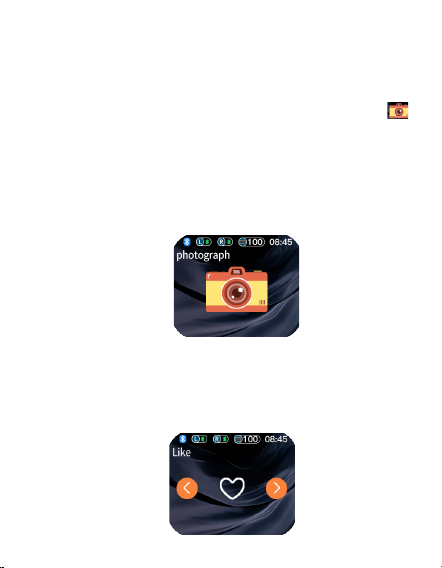
7.Bluetooth Camera
The Camera app in the watch allows you to remotely take
pictures through your phone’s camera.
1. Open the Camera app in your phone.
2. Open the Camera Control app, and tap on the icon
to start taking photos from your phone remotely. You can
view the photos on your phone.
Note: To use the Bluetooth camera, ensure that the
CETW645 has been successfully paired with your phone.
Also, make sure the earbuds are not in music playback
mode. Keep your phone on the camera app screen, then tap
to take photos.
8. “Like” App
When you watch a video on a video app, such as TikTok,
and you like it, you can open the Like App, and tap the
heart icon to engage with the content on the app. Tap
the </> button to switch onscreen viewing pages.
EN 13
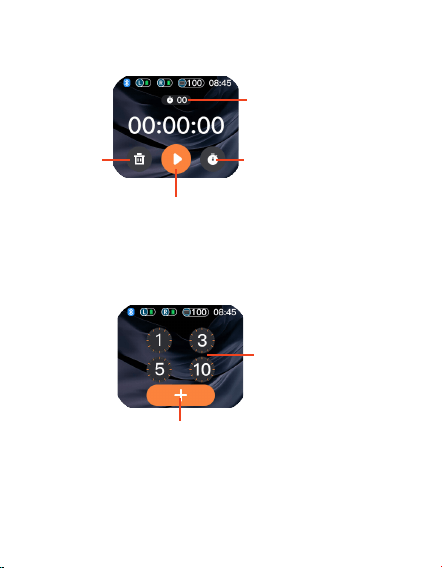
9. Stopwatch
10. Countdown timer
Start/Pause
Record
Countdown time
Set countdown time
Recorded timing list
Reset
EN 14
EN 15
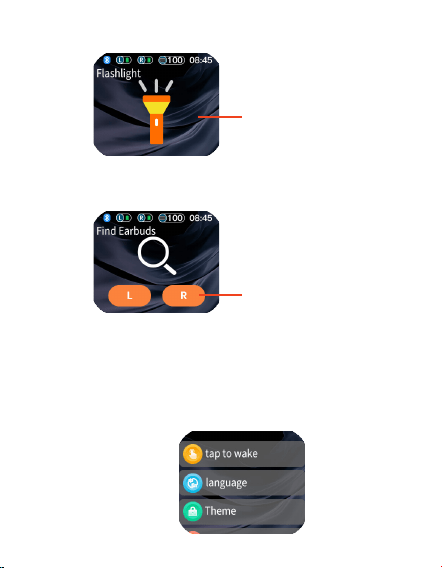
11. Flashlight
12. Find your earbuds
13. Settings
Open the
Settings app to adjust a wide variety of the
earbuds and touchscreen case's settings, including
language, wake operation, sound, restore to factory
settings and more.
Repeatedly tap on
the screen to switch
among white, red,
yellow and green
flashlight.
Tap to send the alert
to your earbuds. Your
earbud will play a
ringtone to alert you
of its location.
EN 14
EN 15
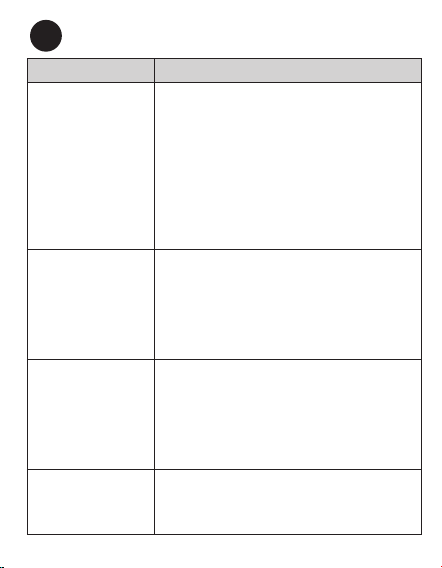
Troubleshooting
Problem Solution
Your left and right
earbuds aren’t
connected. The
LED indicators
on both earbuds
are alternating
between white and
blue lights.
First, reset the earbuds by taking out the
earbuds from the charging base and then
placing them back to check whether they
are connected to each other. If they are
not, open Bluetooth settings in your device
and tap “Forget device” on “CETW645”,
then turn off Bluetooth in your device to
manually initiate the True Wire stereo
connection. Please allow up to 30 seconds
to connect if you are in a public area with
interfering signals.
Your left and
right earbuds are
connected, but you
cannot connect
them to your
device.
Ensure the earbuds are not currently con-
nected to another device. If they are, open
Bluetooth settings on those devices and
tap “Forget device” on “CETW645”. Con-
rm the device you would like to pair with
is Bluetooth enabled, please refer to that
device’s user manual to conrm.
There is no
response from the
CETW645 earbuds.
Firstly, check whether the battery power in
earbuds are used up, if they are, charge the
earbuds. If they are not, reset the earbuds
by taking out the earbuds from the charging
base and then placing them back, or tap Set-
tings >Factory on the case touchscreen to
restore it to the factory settings.
You can only hear
sound on one
earbud.
Reset the earbuds by taking out the earbuds
from the charging base and then placing them
back. or tap Settings > Reset on the case
touchscreen to restore it to the factory settings.
?
EN 16
EN 17
EN 16
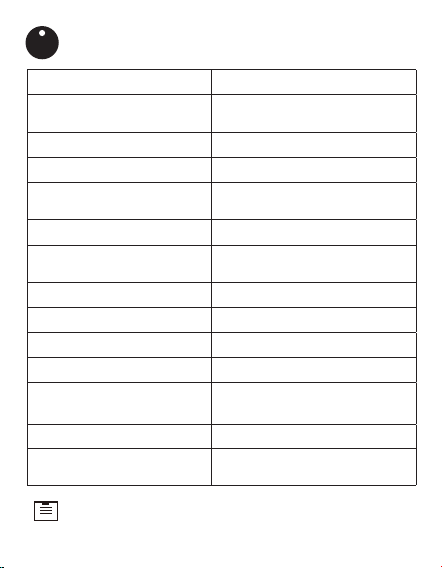
Model Number CETW645
Model Name
ANC TWS Earbuds With Hi-
Res Touchscreen Case
Power Input 5 V/1A(Touchscreen case )
Charging time (Earbuds) 1 hour
Charging time
(Touchscreen case )
1.5 hours
Playtime (Earbuds) Up to 5 hours
Playtime (With
Touchscreen case )
Up to 15 hours
Battery Type
Rechargeable Lithium-ion
Driver (full range) 13 mm × 2
Range 33 ft (10 m)
Bluetooth version V 5.4
Dimension
2.35" x 2.01" x 1.07"
59.7*51.1*27.2 mm
Weight (earbuds alone) 7.5 g / 0.26 oz
Weight (with Touchscreen
case )
52 g /1.83 oz
Specications
Specications are subject to change without notice.
I
EN 17

FCC Statement
FCC ID: 2AMSOETW004
This device complies with Part 15 of the FCC Rules. Operation is subject
to the following two conditions:
(1) this device may not cause harmful interference, and (2) this device
must accept any interference received, including interference that may
cause undesired operation.
Warning: Changes or modications not expressly approved by the party
responsible for compliance could void the user’s authority to operate the
equipment.
Note: This equipment has been tested and found to comply with the
limits for a Class B digital device, pursuant to Part 15 of the FCC Rules.
These limits are designed to provide reasonable protection against
harmful interference in a residential installation.
This equipment generates, uses and can radiate radio frequency energy
and, if not installed and used in accordance with the instructions, may
cause harmful interference to radio communications. However, there is
no guarantee that interference will not occur in a particular installation.
If this equipment does cause harmful interference to radio or television
reception, which can be determined by turning the equipment off and on,
the user is encouraged to try to correct the interference by one or more of
the following measures: (1) Reorient or relocate the receiving antenna. (2)
Increase the separation between the equipment and receiver. (3) Connect
the equipment into an outlet on a circuit different from that to which the
receiver is connected. (4) Consult the dealer or an experienced radio / TV
technician for help.
Notice
This symbol means the product must not be discarded as house-
hold waste, and should be delivered to an appropriate collection
facility for recycling.
Follow local rules and never dispose of the product and re-
chargeable batteries with normal household waste. Correct dis-
posal of old products and rechargeable batteries helps prevent
negative consequences for the environment and human health.
EN 18
EN 19

EN 18
Disclaimer
correct at the time of this publication. As the product goes under contin-
uous upgrades and changes, however, the nal device may have slight
differences. The contents of this manual are subject to change without
prior notice, and COBY will not be liable for any errors contained herein or
for incidental or consequential damages in connection with the furnishing
performance or use of this manual.
All information, design and specications contained in this manual were
EN 19
SUMMIT ELECTRONICS LLC One Year Limited Warranty
COBY COPYRIGHT© 2024, ALL RIGHTS RESERVED.
COBY IS A REGISTERED TRADEMARK OF CBY HOLDINGS, LLC. MANU-
FACTURED BY SUMMIT ELECTRONICS LLC. USED UNDER LICENSE. CBY
HOLDINGS, LLC DOES NOT MANUFACTURE THIS PRODUCT OR PROVIDE
ANY MANUFACTURER’S WARRANTY OR SUPPORT. THE BLUETOOTH®
WORD MARK AND LOGOS ARE REGISTERED TRADEMARKS OWNED BY
THE BLUETOOTH SIG, INC. AND ANY USE OF SUCH MARKS BY SUM-
MIT ELECTRONICS LLC IS UNDER LICENSE. OTHER TRADEMARKS AND
TRADE NAMES ARE PROPERTY OF THEIR RESPECTIVE OWNERS.
SUMMIT ELECTRONICS LLC LIMITED WARRANTY (“Warranty”) ― For
product Categories Listed in Chart Below (as applicable, “Product”) Be-
fore returning your Product for service under this Warranty, please (i) read
the instruction manual carefully. If you are still having trouble with your
Product, please contact Technical Support at [email protected].
Warni
ng: Some Products may contain components that are small enough
to be swallowed. Please keep out of reach of children.
Subject to the terms and conditions herein, SUMMIT ELECTRONICS LLC
(hereinafter called “SUMMIT ELECTRONICS LLC”) warrants to the original
purchaser of the Product (“Customer”) that for the applicable Warranty
Period listed below, the Product will be free from defects in material or
workmanship under normal, non-commercial use (“Defects”).

EN 20
Warranty Period encompasses, as listed below, separate “Coverage Peri-
ods” for Parts and Labor, each Coverage Period for one year, to begin from
the original date of Customer purchase. If Customer returns a defective
Product (or any component thereof) during the applicable Warranty Pe-
riod, SUMMIT ELECTRONICS LLC will, at its option, dur ing the specied
Coverage Periods for Parts and Labor (as applicable) either: (i) repair
the Product (or, as applicable, any component thereof) or (ii) replace the
Product (or, as applicable, any component thereof) with a new or refur-
bished Product (or, as applicable, any component thereof), in either case
free of charge to Customer for Parts and/ or Labor (as applicable) during
the specied Coverage Period only, and excluding applicable shipping
charges (noted below), for which the Customer is responsible. The fore-
going states the Customer’s exclusive remedy and SUMMIT ELECTRON-
ICS LLC’s sole liability for breach of the limited warranty contained herein.
This Warranty specically excludes any Product (or, as applicable, any
component thereof) that has been subject to or Defects resulting from:
(a) any neglect or misuse by a Customer, an accident, improper appli-
cation, violation of operating instructions for the product, any other
Customer-induced damage, or the alteration or removal of any product
serial number: (b) any modication or repair to Product (or, as applicable,
any component thereof) by any party other than SUMMIT ELECTRONICS
LLC or a party authorized in writing by SUMMIT ELECTRONICS LLC; (c)
any damage to Product (or, as applicable, any component thereof) due to
power surges, incorrect electrical voltage, misconnection 17 to any de-
vice, or malfunction of any device used with the Product (or, as applica-
ble, any component thereof); (d) cosmetic damage to the Product (or, as
applicable, any component thereof) caused by normal wear and tear; (e)
shipping damage that occurs while the Product is in transit; (f) damage
caused by heat sources, sunlight, electromagnetic conditions, or other
climatic conditions; or (g) any acts of God. Product is sold to Customer
for personal, non-commercial use only. Product is not warranted for Cus-
tomer’s commercial or rental use.
In addition, Product is not warranted against failure, and should not be
used by Customer for any application where (i) there is a risk that any
data stored on Product will be breached or otherwise compromised, or (ii)
the data stored on Product is relied upon for medical or lifesaving
EN 21

EN 20
applications. SUMMIT ELECTRONICS LLC disclaims any Warranty for
any of the foregoing uses to the fullest extent permitted by law. Cus-
tomer assumes any and all risks associated with such uses of Product
and agrees to indemnify SUMMIT ELECTRONICS LLC for any damages
claimed against SUMMIT ELECTRONICS LLC for such uses. EXCEPT
FOR EXPRESS WARRANTIES STATED ABOVE AND TO THE MAXIMUM
EXTENTPERMITTED BYLAW, THE PRODUCTS ARE PROVIDED “AS IS”,
AND SUMMIT ELECTRONICS LLC DISCLAIMS ALLOTHER WARRANTIES,
INCLUDING WITHOUT LIMITATION ANY IMPLIED WARRANTY(I) OF
MERCHANTABILITY, (II) OF FITNESS FOR APARTICULAR PURPOSE, OR
(III) OF NON-INFRINGEMENT OF THIRD-PARTY RIGHTS. TO THE MAX-
IMUM EXTENT PERMITTED BY APPLICABLE LAW, IN NO EVENT WILL
SUMMIT ELECTRO- NICS LLC BE LIABLE TO CUSTOMER OR ANY THIRD
PARTY FOR ANY INDIRECT, SPECIAL, INCIDENTAL, CONSEQUENTIAL,
EXEMPLARY OR PUNITIVE DAMAGES, INCLUDING, WITHOUT LIMITA-
TION, ANY LOST PROFITS OR REVENUES, LOSS OR INACCURACY OF
ANY DATA OR COST OF SUBSTITUTE GOODS, REGARDLESS OF THE
THEORY OF LIABILITY (INCLUDING NEGLIGENCE) AND EVEN IF SUMMIT
ELECTRONICS LLC HAS BEEN ADVISED OF THE POSSIBILITY OF SUCH
DAMAGES, SUMMIT ELECTRONICS LLC’S AGGREGATE LIABILITY TO
CUSTOMER FOR ACTUAL DIRECT DAMAGES FOR ANY CAUSE WHAT-
SOEVER SHALL BE LIMITED TO THE CUMULATIVE PRODUCT FEES PAID
BY THAT CUSTOMER FOR THE PRODUCT CAUSING THE DAMAGES,
IF ANY. This Warranty gives Customer specics rights, and Customer
may also have other rights that vary from jurisdiction to jurisdiction. To
obtain Warranty service, Customer must email SUMMIT ELECTRONICS
LLC Technical Support prior to making a Product return. Customer must
include with Product return the following items (failure to enclose any
of these items may result in a delay in the processing of your Warran-
ty claim): (i) a dated sales receipt that indicates the place of purchase,
model number of Product, and amount paid; (ii) a detailed description
of Customer’s problem with Product; (iii) Customer’s full name, phone
number, and return address, and; (iv) a money order made out to SUM-
MIT ELECTRONICS LLC Electronics Corporation to cover return shipping
charges to US destinations only, for the applicable dollar amount shown
for the Product in the table above. SUMMIT ELECTRONICS LLC will not
make return shipments to a P.O. Box. For shipping to international ad-
dresses, actual freight will be charged to Customer. Return
your Product
EN 21
You must email SUMMIT ELECTRONICS LLC Technical Support prior to making a
return.Please ask if you are unsure of which category your product falls under.
*US destinations only.
freight-prepaid in its original packaging, or packaging that affords an
equal measure of protection. Please allow 4 to 6 weeks for the processing
of your claim (6 to 8 weeks from November to February).
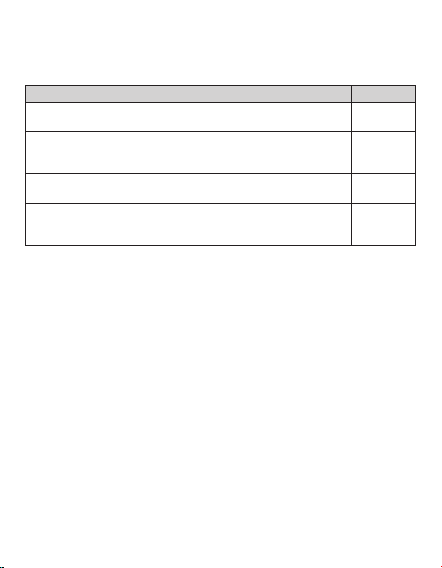
Product Category Shipping
Adapters, Converters, Chargers, Headphones, Microphones,
Cellular Accessories
$7.99
Alarm Clocks, Portable CD Players, Radios, Corded Tele-
phones, MP3 Players, Digital Photo Frames (screen size
less than 5”)
$7.99
Portable Stereo Systems, Speaker Systems, Cordless
Telephones, Home DVD Players
$14.99
Home Theater DVD Systems, Portable DVD Players,
Portable Media Players, Digital Photo Frames (screen sizes
5” to 11”)
$14.99
EN 22

Customer Service
Servicio al Cliente
To get the best after-sales service, access the
Contact webpage from the link:
https://summitcegroup.com/pages/contact.
Or email us at [email protected] for
return information and customer support!
Para obtener el mejor servicio postventa,
acceda a la página web de contacto desde el
enlace: https://summitcegroup.com/pages/
contact. ¡O envíenos un correo electrónico a
[email protected] para obtener
información sobre devoluciones y atención al
cliente!
For more information, please visit:
Para mayor información por favor visite:
https://cobyaudio.com
