BLVD
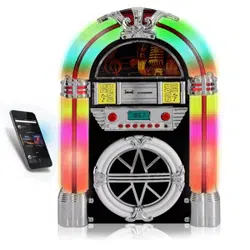
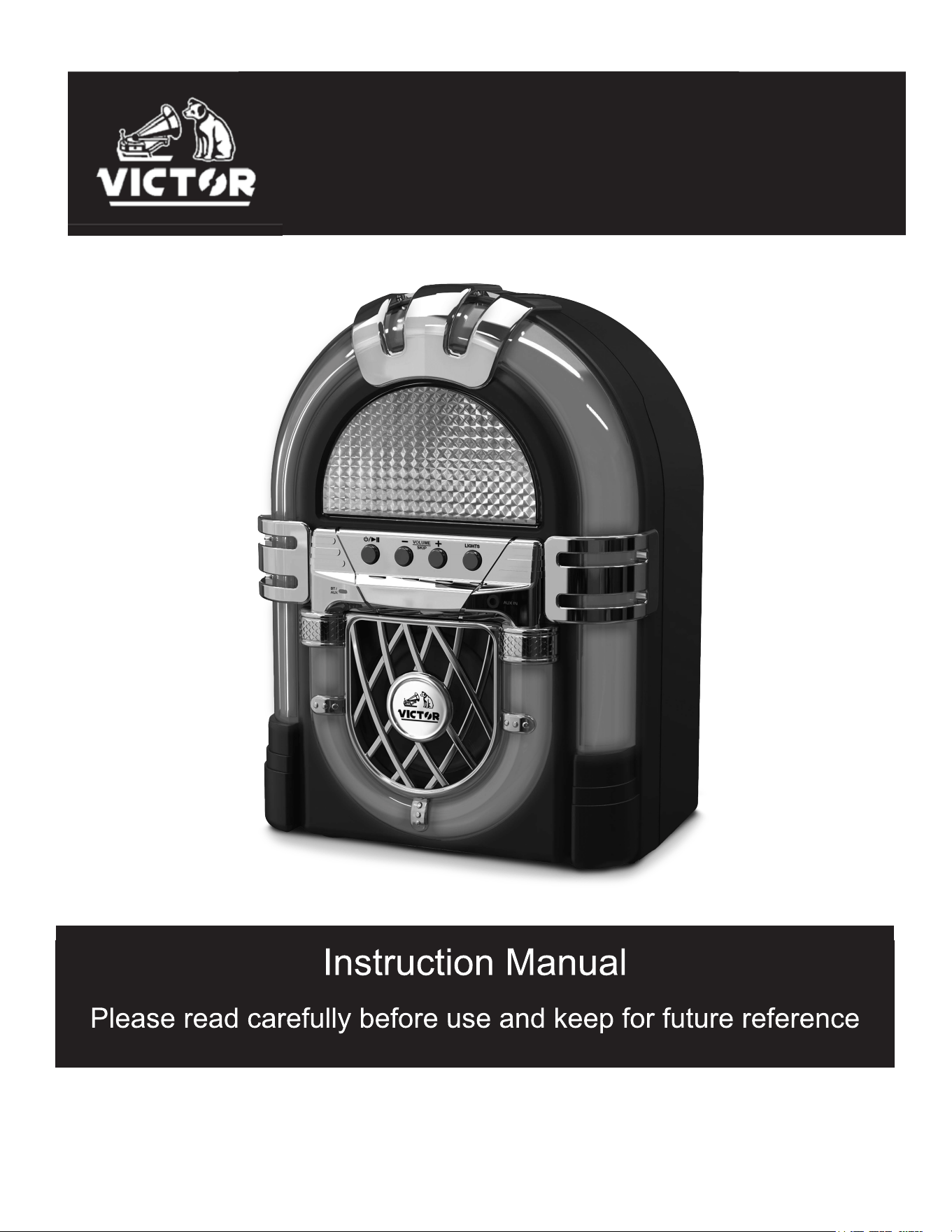
Mini Bluetooth
®
Jukebox
VDTJ-1000
-1-
WARNING
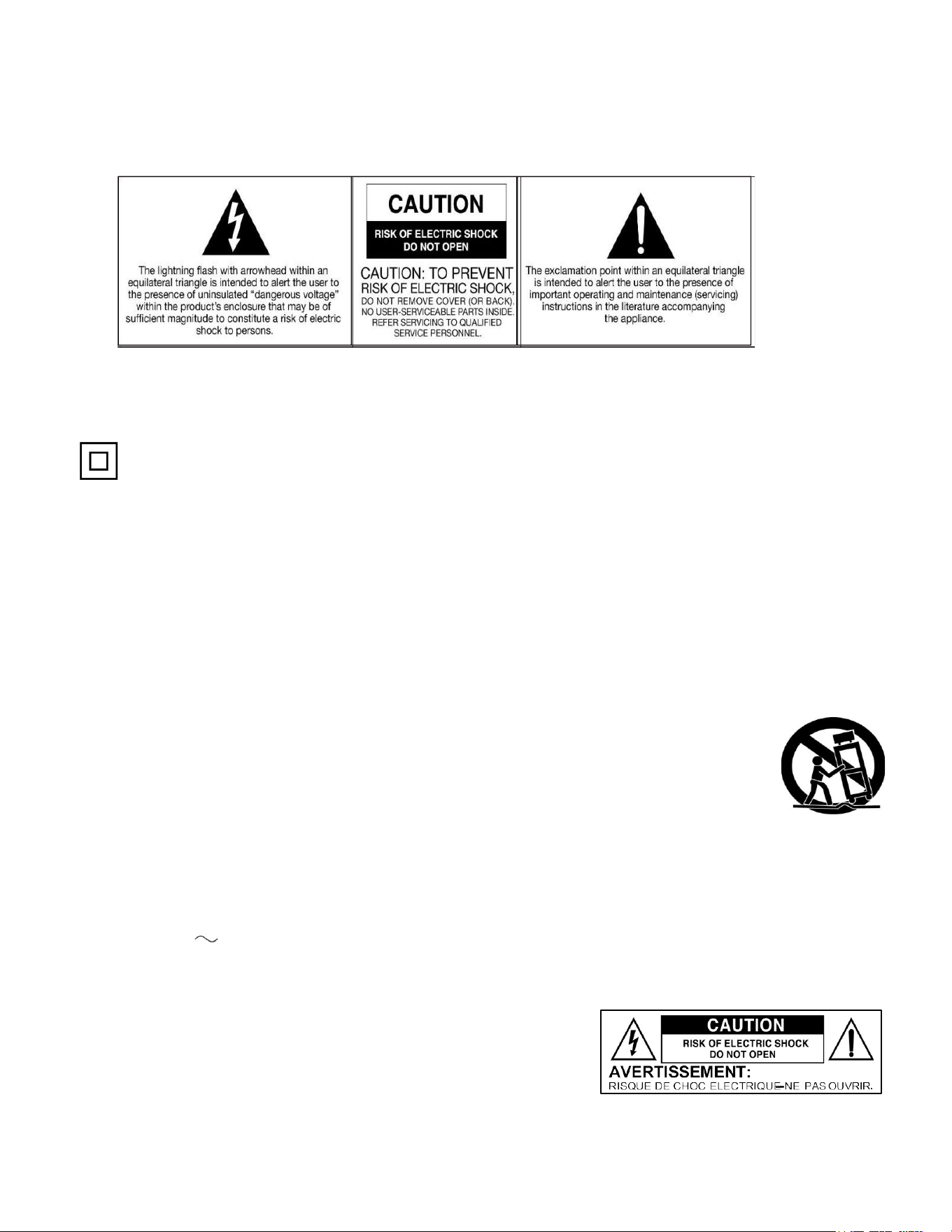
CAUTION: To reduce the risk of fire or electric shock, do not expose this appliance to rain or moisture.
This equipment is a Class II or double insulated electrical appliance. It has been designed in such a way that it does not
require a safety connection to electrical earth.
Important Safety Instructions
1.
Read these instructions -All the safety and operating instructions should be read before this product is operated.
2.
Keep these instructions - The safety and operating instructions should be retained for future reference.
3.
Heed all warnings - All warnings on the appliance and in the operating instructions should be adhered to.
4.
Follow all instructions - All operating and use instructions should be followed.
5.
Do not use this apparatus near water - The appliance should not be used near water or moisture - for example, in a wet basement
or near a swimming pool, and the like.
6.
Clean only with a dry cloth.
7.
Do not block any ventilation openings. Install in accordance with the manufacturer's instructions.
8.
Do not install near any heat sources such as radiators, heat registers, stoves, or other apparatus (including amplifiers) that produce
heat.
9.
Protect the power cord from being walked on or pinched particularly at the plugs, power outlets, and at the point where they exit
from the apparatus.
10.
Only use attachments/accessories specified by the manufacturer.
11.
Use only with the cart, stand, tripod, bracket, or table specified by the manufacturer, or sold with the
apparatus. When a cart or rack is used, use caution when moving the cart/apparatus combination to avoid
injury from tip-over.
12.
Unplug the apparatus during lighting storms or when unused for long periods of time.
13.
Refer all servicing to qualified personnel. Servicing is required when the apparatus has been damaged in any
way, such as power supply cord or plug is damaged, liquid has been spilled or objects have fallen into the
apparatus has been exposed to rain or moisture, does not operate normally, or has been dropped.
14.
The mains plug is used as disconnect device, the disconnect device shall remain readily operable.
15.
WARNING: To reduce the risk of fire or electric shock, do not expose this apparatus to rain or moisture. The apparatus shall not be
exposed to dripping or splashing and that no objects filled with liquids, such as vases, shall not be placed on apparatus.
16.
The use of the equipment in moderate climate.
17.
The ventilation should not be impeded by covering the ventilation openings with items, such as newspapers, tablecloths, curtains,
etc.
18.
Do not place open flame sources, such as lighted candles, on the apparatus.
19.
The symbol with indicates AC voltage.
20.
CAUTION, These servicing instructions are for use by qualified service personnel only. To reduce the risk of electric shock do not
perform any servicing other than that contained in the operating instructions unless you are qualified to do so. Caution: For
pluggable equipment, the socket-outlet shall be easily ACCESSIBLE
This lightning flash with arrowhead symbol within an equilateral triangle is intended
to alert the user to the presence of non-insulated "dangerous voltage" within the
product's enclosure that may be of sufficient magnitude to constitute a risk of
electric shock. Warning: To reduce the risk of electric shock, do not remove cover
(or back) as there are no user-serviceable parts inside. Refer servicing to qualified
personnel. The exclamation point within and equilateral triangle is intended to alert
the user to the presence of important operating and maintenance instructions in the
literature accompanying the appliance.

-2-
TABLE OF CONTENTS
FEATURES ............................................................................................................................................................ 3
SPECIFICATIONS ................................................................................................................................................ 3
PRODUCT OVERVIEW ....................................................................................................................................... 4
SETUP & BASIC OPERATION ........................................................................................................................... 5
LISTEN TO AUX DEVICE .................................................................................................................................... 6
LISTEN TO BLUETOOTH
®
DEVICE
................................................................................................... .............. 5
LIGHT OPERATION ............................................................................................................................................. 6
TROUBLESHOOTING GUIDE ............................................................................................................................ 7
FCC NOTICE ......................................................................................................................................................... 8
IC STATMENT ....................................................................................................................................................... 8
CAUTION ON MODIFICATION ............................................................................................................................ 9
SUPPORT ............................................................................................................................................................. ..9
-3-
FEATURES
The BLVD Mini Bluetooth
®
Jukebox features a Classic Jukebox Design in a convenient size.
Bluetooth® lets you stream music from your Smart Device through the built in speakers. And the
Multi-Mode Color Changing LED Lighting provides an eye-catching look.
•
Bluetooth® connectivity allows you to stream music from another source up to 33 feet.
•
Color Changing LED Lighting
• Classic Jukebox Styling
•
Built in Speaker for playback convenience.
SPECIFICATIONS
Product Name
BLVD (Mini Bluetooth
®
Jukebox)
Bluetooth
®
Version
V5.4
Bluetooth
®
Frequency
2.402 GHz - 2.480GHz
Bluetooth
®
Transmission Distance
Up to 33 Feet (10 Meters)*
Input
Aux In
Built-in Speaker
3" X 1
Speaker Output Power
3W
Power Source
Input: DC 5V/1A
Accessories Included
User Manual, Quick Set Up Guide, USB-C Cable
*Distance may vary depending on any objects or interference between devices.
SPECIFICATIONS AND ACCESSORIES ARE SUBJECT TO CHANGE WITHOUT NOTICE
Battery
Lithium 3.7V 1200mAh 4.44Wh
-4-
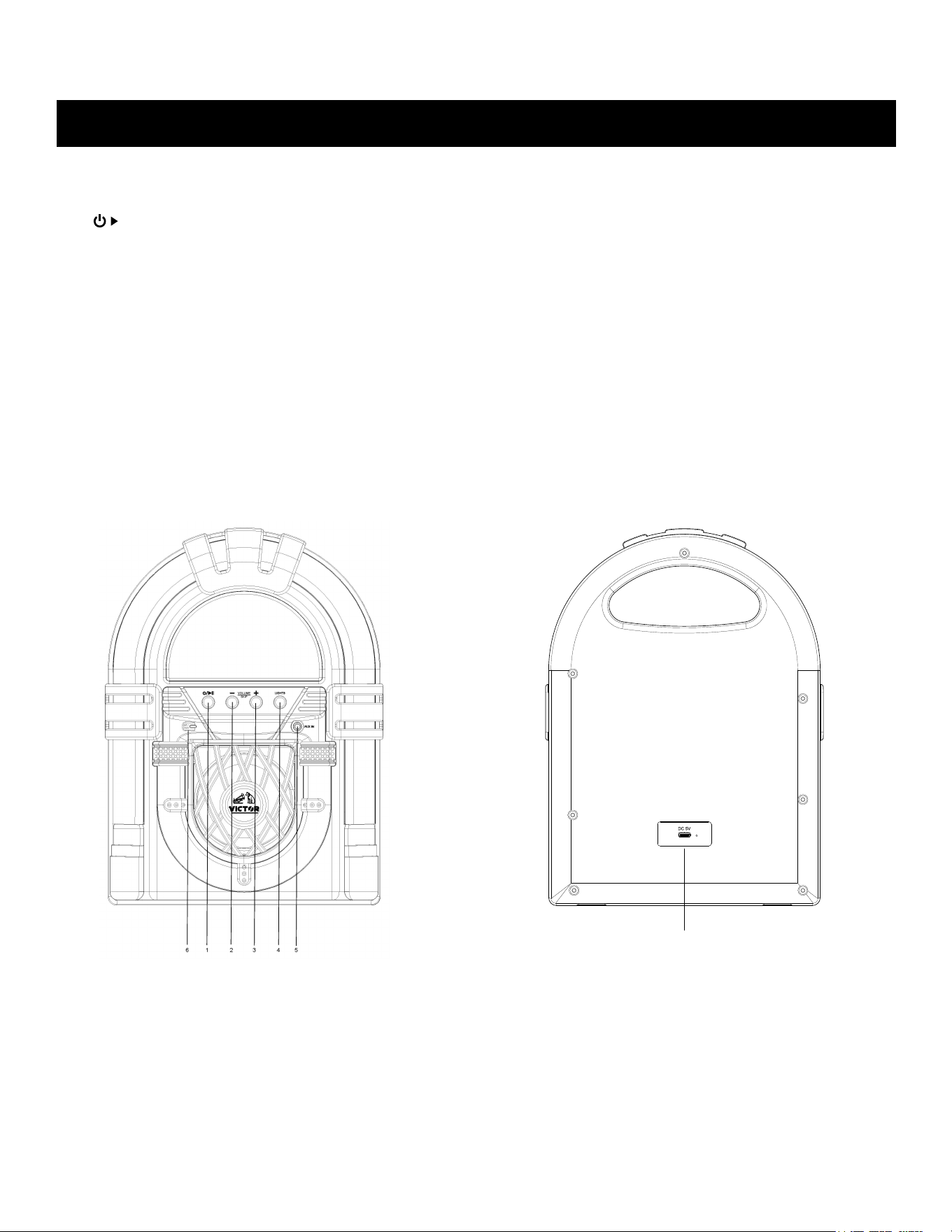
PRODUCT OVERVIEW
Front View
1.
/ II: Power ON/OFF / Play / Pause button
2.
VOLUME - / SKIP: Decrease volume / Reverse
3.
VOLUME + / SKIP: Increase volume / Forward
4.
LIGHT MODE: Press to turn on colorful LED lights. Long press to turn off LED lights.
5.
AUX IN: Aux in Input. Plug in external device
6.
BT/AUX IN INDICATOR: BT mode - Blue light, Aux-In mode - Green light
7.
USB-C Port: Connect USB Cable to charge device (USB Power Adapter not included)
Rear View
6

-5-
SETUP & BASIC OPERATION
SETUP
•
Connect the USB Cable and Charge the device for a minimum of 3 hours
BASIC OPERATION
1.
Press and hold the
button to turn the unit on.
2.
Press the Volume -/+
Buttons to adjust
to
the
desired
sound
level.
3.
Press the hold
button to turn the unit off.
LISTEN TO A BLUETOOTH
®
DEVICE
In Bluetooth
®
mode, this
unit can enjoy music from external devices which have a built-in
Bluetooth
®
feature.
GETTING CONNECTED USING BLUETOOTH
®
1.
The device will automatically enter into Bluetooth® pairing mode when the device is
turned on. The BT/AUX light will flash Blue.
2.
Turn on the external device and activate the Bluetooth® function.
3.
Search for and select "VICTOR VDTJ-1000" on the paired devices list. If prompted for a
password, enter "0000" and then press "OK" on your external device.
4.
After a few seconds your Bluetooth® connection will be complete. A rising tune will
indicate a successful connection has been made and the BT/AUX light will be a solid blue.
5.
Turn on the music player program on your external device and set it play.
Normally, you can control music playback with the Volume -/+ Skip Buttons on the
apparatus. However, some buttons may not work due to the variable music player program.
Now enjoy the fun!

-6-
LISTEN TO AN AUX DEVICE
In AUX (auxiliary) mode, this unit can play audio from an external audio source (iPod, MP3 Player,
Portable CD Player, etc.)
There is an
AUX IN
jack on the front of unit. When connecting a device that has a headphone
jack, use the cable with 3.5mm plugs on either end with the front AUX IN jack.
1.
Plug one end of the AUX IN cable (not included) into the AUX IN
jack. The device will
automatically enter AUX IN mode. Then BT/Aux indicator will turn Green
2.
Plug the other end of the cable into the headphone jack of the external audio source.
Note: All operations are only available on your external device.
3.
Press “Power/Play/Pause” key to mute/unmute, press +/- to increase or decrease the
volume
4.
When done, unplug the Aux in cable from the device, and the device will
automatically revert back to BT mode.
LIGHT OPERATION
You can control the LED light by using the LIGHTS button.
•
Press “LIGHTS” button to turn on light effect (Device must be on), press “LIGHTS”
button to change light mode (There are 10 different light modes)
•
Press and hold the button to turn off the LED lights.
-7-
GENERAL
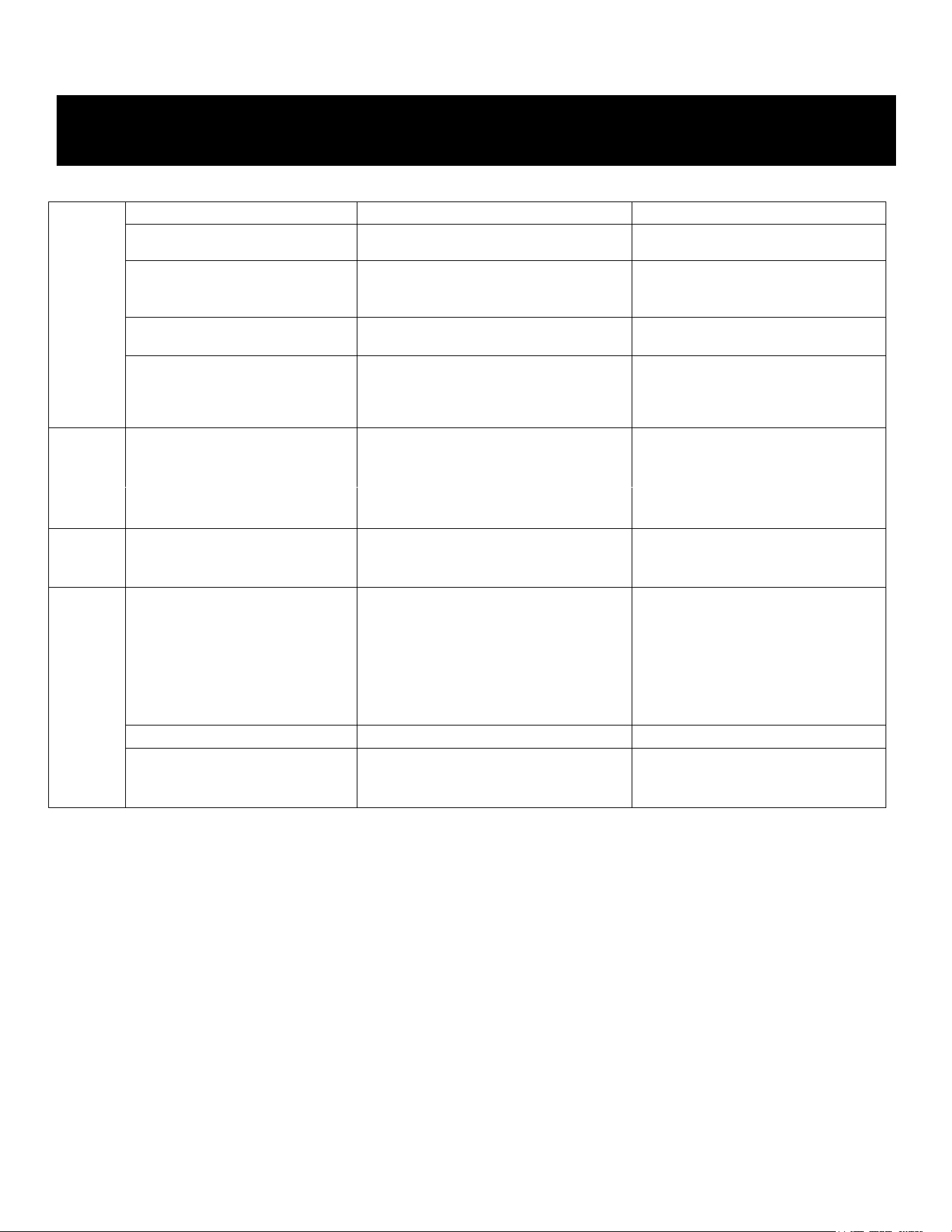
Symptom
Possible Cause
Solution
•Unit will not power on.
•Battery is not charged
•Charge the battery
•No sound output from speakers. •The volume level is set too low.
•The input selector does not match the
playback source.
•Adjust the volume.
•Select the correct input source.
•Noise/Distortion in sound output.
•The unit is too close to a TV set or
another
interfering device.
•Turn off the TV or other appliance and
relocate the unit.
•Unit fails to respond.
•It might result from external factors
such as ESD (Electro-static
discharge).
•Disconnect the power cord and
external
audio device. Re-plug the power
cord after one minute
AUX
•No sound output with external
audio device plugged into rear AUX
in jack.
•AUX in
jacks is unplugged
.
•
Plug the AUX in Jack.
BLUETOOTH
•No sound
•The unit is not switched to Bluetooth mode
•Your device's and/or the unit's volume
is not turn up.
•Your device is too far from the unit or
there're some obstacles between your
device and the unit.
•Ensure the unit is switched to BT
mode.
•Move your Bluetooth device closer to
unit
•Turn up the volume on your portable
device and/or the unit.
•Turn OFF your Bluetooth device and
unit. Then lower them both back ON
•Sound has a lot of static
•Your device is too far away
•
Bring your device closer to the unit
•Unable to pair with a Bluetooth
device
•Your device doesn't have Bluetooth
connectivity.
•The Bluetooth pairing is not successful
•Confirm that your device is
Bluetooth compatible.
•Re-pair the unit and device again.
TROUBLESHOOTING GUIDE

-8-
The device must not be colocated or operating in conjunction with any other antenna or transmitter.
To maintain compliance with the FCC's RF exposure guidelines, place the product at least 20cm from nearby persons.
IC STATEMENT
This device complies with Part 15 of the FCC Rules. Operation is subject to the following two conditions: (1) This
device may not cause harmful interference, and (2) this device must accept any interference received, including
interference that may cause undesired operation.
NOTE: This equipment has been tested and found to comply with the limits for a Class B digital device, pursuant to
Part 15 of the FCC Rules. These limits are designed to provide reasonable protection against harmful interference
in a residential installation. This equipment generates uses and can radiate radio frequency energy and, if not
installed and used in accordance with the instructions, may cause harmful interference to radio communications.
However, there is no guarantee that interference will not occur in a particular installation. If this equipment does
cause harmful interference to radio or television reception, which can be determined by turning the equipment off
and on, the user is encouraged to try to correct the interference by one of the following measures:
-
Reorient or relocate the receiving antenna.
- Increase the separation between the equipment and receiver.
- Connect the equipment into an outlet on a circuit different from that to which the receiver is connected.
- Consult the dealer or an experienced radio/TV technician for help.
WARNI
NG: Any changes or modifications not expressly approved by the party responsible for compliance could void
the user's authority to operate this equipment.
This device complies with RSS247 of Industry Canada. Cet appareil se conforme a RSS247 de Canada d'lndustrie. This
device complies with Industry Canada license-exempt RSS standard(s). Operation is subject to the following two conditions:
(1) this device may not cause interference, and (2) this device must accept any interference, including interference that may
cause undesired operation of the device. appareils radio exempts de licence.
Son fonct
ionnement est sujet aux deux conditions suivantes: (1) le dispositif ne doit pas produire de brouillage prejudiciable,
et (2) ce dispositif doit accepter tout brouillage recu, y compris un brouillage susceptible de provoquer un fonctionnement
indesirable.
The devi
ce must not be co-located or operating in conjunction with any other antenna or transmitter.
L'appareil ne doit pas etre localise ou fonctionner avec d'autres antennas ou transmetteurs.
This device complies with IC radiation exposure limits set forth for an uncontrolled environment.
Cet apparei
l est conforme aux limites d'exposition aux rayonnements de la IC etablies pour un incontrole environnement.
The device should be installed and operated with a minimum distance of 20cm between the radiator and your body.
L'appareil doit etre installe et utilise avec une distance minimale de 20 cm entre le radiate et votre corps.
FCC NOTICE
-9-
Any chang
es or modifications not expressly approved by the grantee of this device may void the
authority granted by the FCC to operate this equipment. Electric and electronic equipment contains
materials, components and substances that can be hazardous to your health and the environment, if
the waste material (discarded electric and electronic equipment) is not handled correctly. Electric
and electronic equipment is marked with the crossed-out trash can symbol, seen below. This symbol
signifies that electric and electronic equipment should not be disposed of with other household
waste but should be disposed of separately. All cities have established collection points, where
electric and electronic equipment can either be submitted free of charge at recycling stations and
other collection sites or be collected from the households. Additional information is available at the
technical department of your city.
SUPPORT
We do our best to offer high quality products to our customers. If you experience any issues or problems with your
product, please contact customer support as many issues can be quickly resolved.
If you
have problems with your device, please consult the instructions in this manual. Please also visit us on the web
at www.naxa.com
to get up to the minute news, alerts, and documentation for your device. For additional assistance,
please contact Naxa Technical Support.
Naxa Technical Support
2320 East 49
1h
St. Vernon, CA
90058
(866) 411-6292
http://www.naxa.com/supportcenter
*This product has been manufactured and sold under the responsibility of NAXA ELECTRONICS INC.
VICTOR and the DOG & GRAMOPHONE logo are trademarks used under license by NAXA ELECTRONICS
INC. Further information at www.victor-brand.com.
All other products, services, companies, trademarks, trade or product names and logos referenced herein are the
property of their respective owners.
CAUTION ON MODIFICATIONS