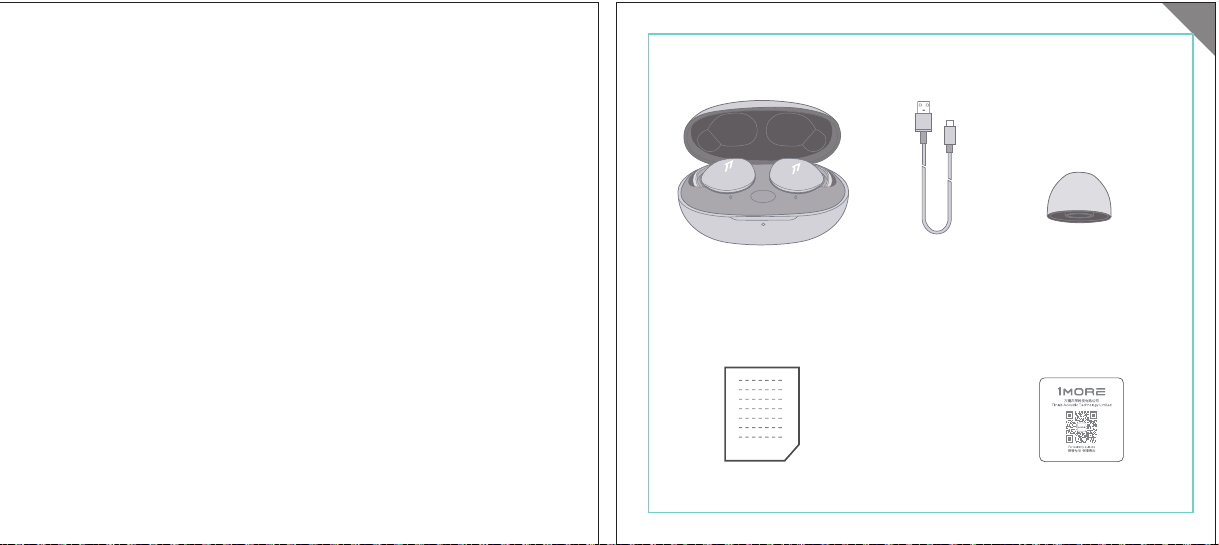
In The Box
材质:80G哑粉
尺寸:98*86mm
EH608
Manufacturer: Tiinlab Corporation
Address: No. 3333, Liuxian Avenue, Tower A, 35th Floor,
Tanglang City, Nanshan District, Shenzhen, China
Made in China
2ASDI-EH608 IC:24662-EH608
We know you will enjoy new 1MORE headphones as much as we do. At 1MORE, we value your
satisfaction. If you would like more details on this product or any of our other products, please visit
us online by scanning the QR code. Go to www.1more.com and sign up for VIP, and 1MORE will
treat you like one.
1MORE Inc., (“1MORE”) warrants to the original retail purchaser that this product is to be free
from defective materials and workmanship for a period of one year from the date of purchase if it
is properly used and maintained. If this product proves defective in either material or
workmanship, 1MORE, at its option, will (a) repair the product with new or refurbished parts, or
(b) replace the product with an equivalent new or refurbished product, at no charge for parts or
labor. If the product model is no longer available and cannot be repaired effectively or replaced
with an identical model, 1MORE at its sole option may replace the unit with a current model of
equal or greater value. In some cases, modication to the mounting surface may be required
where a new model is substituted. 1MORE assumes no responsibility or liability for such
modication. TO OBTAIN A REPAIR OR REPLACEMENT UNDER THE TERMS OF THIS
WARRANTY, PLEASE RETURN TO THE ORIGINAL DEALER FIRST AND THE ORIGINAL
DEALER SHALL REPAIR THE PRODUCT WITH NEW OR REFURBISHED PARTS OR REPLACE
THE PRODUCT WITH AN EQUIVALENT NEW OR REFURBISHED PRODUCT.
You will be required to submit a proof of purchasing details, including but not limited to a receipt
or sales invoice.
Return shipping for exchanges/repairs is the sole responsibility of the original retail purchaser.
Limitations:
• This limited warranty does not cover the failure of the product resulting from improper
installation, misuse, abuse, accident, neglect, mishandling, or wear from ordinary use or
environmental deterioration.
• This limited warranty does not cover cosmetic damage, including paint damage, or
consequential damage to other components or premises which may result for any reason from
the failure of the product.
• This limited warranty is null and void for products not used in accordance with 1MORE’s
instructions.
• This limited warranty is null and void for products with altered or missing serial numbers and for
products not purchased from an AUTHORIZED dealer.
• This limited warranty terminates if you sell or otherwise transfer this product to another party.
1. If the headphones cannot pair normally when powered on. Put both headphones back into
the case, triple click the pairing button and search for "1MORE Z30" in Bluetooth in your
devices to connect.
2. To unpair the device:
Put both headphones into the case, press and hold the pairing button on the case for 8
seconds to disconnect the headphones and the device.
3.OTA Firmware Update:
It can be synchronously upgraded via the 1MORE MUSIC APP while the Left and Right
earbuds are connected to each other with at least 50% battery.
* Functions of the 1MORE MUSIC APP may vary with different devices or operating systems.
For more details, please contact our customer service.
For the initial pairing, turn the headphones on to enter
pairing mode, the LEDs for headphone status will ash
in white. Headphones will power off if not paired to a
device within 3 minutes.
* After the rst successful pairing, headphones will
automatically connect to your device.
To pair with a new device, put headphones back into
the case, and triple click the pairing button when
powered on (no playback) to re-enter pairing mode.
Tips
Extra Functions
We Appreciate Your Business
1MORE (1) Year Limited Warranty
1. Please read this instruction manual carefully and retain for future reference.
2. Please fully charge the battery before rst use.
3. If the headphones have been unused for more than 3 months, we recommend that you charge
them. This will improve battery capacity.
4. Only use charging cables and adapters that are FCC (Federal Communications Commission)
approved.
5. In dry environments, static electricity may numb your ear. This is not related to the quality of the
product.
Safety Information
WEEE
FAQ
1. How to make sure the headphones have been fully charged?
Put the headphones into the charging case, if the headphone stutus LEDs are glowing this means
they have been fully charged.
2. Why won't headphones turn on?
Check if your headphones have enough battery life. If not, please charge them for at least 30 minutes.
3. Why won’t the headphones connect to my cellphone, or take a long time to connect?
Put both buds back into the charging case, then press and hold the pairing button for 3 seconds, click
the device name in your settings, they should now pair correctly to the phone.
4. Why won’t the headphones make phone calls?
The headphones are without microphones or phone call functions.
5. Why is the Bluetooth connection not stable and/or experiences some interruptions?
1) Try shortening the distance between your headphones and the device. Avoid solid barriers in
between you and the device.
2) Please keep away from strong interference sources, such as Wi-Fi and GPRS.
3) Please make sure the Bluetooth antenna of your device is not blocked.
6. Why can't the volume be adjusted by the cellphone buttons when playing soothing sounds in 1MORE
MUSIC APP?
The soothing sounds are stored in the ash of the headphone which can be adjusted only via the APP.
7. The headphones will be disconnected from the cellphone when out of wireless range. They cannot
restore the connection after returning back into the wireless range, how to solve it?
Click the device name in the cellphone pairing list to connect again.
8. I feel uncomfortable when wearing the headphones, how to solve it?
This is mainly because the sizes of ear tips and your canals are not snug, we suggest trying smaller ear
tips.
* For more detailed product FAQs, please visit the product support section under www.1more.com
CE
Headphones × 1 set
Charging Case × 1
Type-C Charging Cable × 1 Silicone Ear Tip (XS/S/L)
Product Overview
Fit
Replace
Placement
Headphones Pairing
Bluetooth Pairing To The Device
Charging
Controls
Soothing Sounds
Battery Notication
User Guide × 1
Silicone Ear Tip
Charging Pin
Charging Case
Pairing Button
Charging Case LED Indicator
LED Indicator for
Headphone Status
Headphone
Silicone Ear Tip
XS / S / M / L
Warranty Card × 1
The Left and Right headphones will automatically
pair with each other after the lid is open when
they are in the case (with charge).
* The above functions are available for either headphones in individual or Stereo mode.
To charge the case with Type-C cable.
To charge the headphones with the case.
* The above functions are available for either headphones in individual or Stereo mode.
Put headphones back into the case
ensuring they are magnetically attached
and close the lid to charge, a full charge
takes around 85 minutes.
Phone call function is not available on the headphones, and the playback controls can be
implemented on the connected device.
Please download the 1MORE MUSIC APP for soothing sounds.
Switch Listening Modes via APP
Enter the 1MORE Z30 home page in 1MORE MUSIC APP after pairing to your cellphone,
then you can switch listening modes between "Music" and "Soothing".
Click the "Soothing Sounds" to enter the playlist.
Click "+" to select the sound to be downloaded to your headphones for listening.
Click the timer icon on the song page to set the playtime.
The LED light of the charging case
will the different battery status: red
light indicates low battery, yellow light
indicates medium battery and green
light indicates full battery.
LED indicator for case battery status: when
the case battery is under 20%, the red
indicator stay lit for 3 seconds. When the
case battery is under 10%, the red indicator
will ash 10 times.
Power On:Take the headphones out of
the charging case (with charge), the
headphones will turn on automatically.
Power Off:Put the headphones
back into the charging case and
close the lid, they will automatically
turn off and start charging.
A full charge will take
around 90 minutes.
EN
* Playback and volume for the soothing sounds can only be adjusted via the APP.
スキャンして、1MOREのWechat公式アカウントをフォロー
「Soothing Sounds」ボタンを押すと、ヒーリング音楽の曲選択画面に入ります。
「+」をクリックしてヒーリング音楽をダウンロードすると、選択した曲がイヤホンに転送されます。
ヒーリング音楽再生画面の「タイマー」をクリックすると、ヒーリング音楽の再生時間を設定することができます。
ヒーリング音楽の再生/停止、音量調整などの操作は、APPでのみ対応します。
ヒーリング音楽
APPでEQモードを切り替えます
操作
その他の機能
梱包内容
イヤーピースの選択
イヤーピースの交換
左側/右側イヤホンのペアリング
イヤホンとBluetooth デバイスをペアリングするには
電池残量に関する注意充電
起動
イヤホン着用
製品外観
イヤホン本体 X 1セット
充電ケース X 1
Type-C充電ケーブル x 1
充電電極
イヤホン本体LEDインジケータ
ペアリングボタン
充電ケースLEDインジケータ
充電ケース
ヘッドホン
シリコン製イヤーピースセット
XS / S / M / L
シリコン製イヤーピースセット
(XS/S/L)
取扱説明書×1
一回のフル充電時間は約90 分です。
* 上記の機能は単独、両耳どちらのイヤホンでも適用されます。
* 上記の機能は単独、両耳どちらのイヤホンでも適用されます。
保証書×1
充電ケースが通電し、左/右側イヤホンをケースに
入っている状態で、ケースの蓋を開けると、左/右
のイヤホンが自動的にペアリングされます。
初めて使用する際、イヤホンの電源を入れてからデバイス
側で検索します。イヤホンは白色LEDが高速点滅します。も
しも 3 分たってもデバイスが見つからない場合、イヤホン本
体はすぐに電源が切れます。
・ すでに接続したことのあるイヤホンであれば、当該デバイ
スと自動でペアリングします。
新しいデバイスと接続する必要があれば、左/右イヤホンを
充電ケース内に戻して電源を入れ、ペアリングボタン3秒間
長押しすると、イヤホンは新しいデバイスとBluetoothのペア
リングがされます。
充電中:充電ケースのLEDインジケータ
は異なる色で電池容量を表示します。電
力が少ない場合赤色LED、電池容量が
半分ぐらいの場合黄色LED、充電が完
了している場合緑色LEDがそれぞれ点
灯します。
イヤホンを充電ケースに戻し
て、充電ケースの蓋を閉める
と充電が開始します。フル充
電時間は約85分です。
充電ケースの容量を確認する方法:充電ケ
ースの電池容量が20%以下になれば、充
電ケースの赤色LEDが3秒点灯します。充
電ケースの電池容量が10%以下になった
場合、充電ケースの赤色LEDのが10回点滅
します。
Type-C充電ケーブルを使用して充電ケースに充電する場合
充電ケースを使用してイヤホンに充電する場合
JP
River
- +
Time Setup
mins
River
OK
- +
60
30
90
River
Time Setup
mins
River
OK
- +
60
30
90
River
River
- +
Time Setup
mins
River
- +
60
30
90
River
1MORE SleepBuds Z30 User Guide
1MORE Наушники для сна Z30 Руководство пользователя
1MORE SleepBuds Z30 コードレスイヤホンユーザーガイド
Midre
Soothing Sounds
Allow adding 2 tracks
Volcano
Falls
River
Midre
Soothing Sounds
Allow adding 2 tracks
Volcano
Falls
River
1. Never disassemble the headphones. There are no user-serviceable parts inside.
2. Do not expose the headphones to temperatures below 32 °F (0 °C) or temperatures above 113 °F (45 °C).
3. Do not use the headphones in a thunderstorm storm. This could prevent the headphones from working
properly, and also increase your chance of being electrically shocked.
4. Do not use oil or any volatile liquid to clean this product.
5. Do not use the headphones in trafc. Do not use the headphones any time it would be dangerous to be
unaware of noises around you.
6. Adult supervision is required for children of age 6 and under.
7. If you don't feel comfortable after wearing the headphones, please refer to an aurist for advice on
whether in-ear headphones are suitable for you.
8. The headphones contain a lithium-ion battery, do not attempt to open, crush, or expose a charging case
to re or excessive temperature. Do not use it if the battery is swollen.
9. Please note that excessively high volumes and long listening times may cause hearing damage.
10. The symbol indicates DC voltage
All products bearing this symbol are waste electrical and electronic equipment (WEEE as in
directive 2012/19/EU) which should not be mixed with unsorted household waste. Instead,
you should protect human health and the environment by handing over your waste
equipment to a designated collection point for the recycling of waste electrical and
electronic equipment, appointed by the government or local authorities. Correct disposal
and recycling will help prevent potential negative consequences to the environment and
human health. Please contact the installer or local authorities for more information about the
location as well as terms and conditions of such collection points.
Home
Soothing Sounds
Listening Modes
1MORE Z30
OTA Firmware Upgrade
Quick Guide to Product
SoothingMusic
L 100% R 100% C 100%
The Bluetooth
®
word mark and logos are registered trademarks owned by Bluetooth SIG, Inc. and any
use of such marks by Tiinlab Corporation is under license. Other trademarks and trade names are the
property of their respective owners.
R
204-B00919
FCC
The SAR limit of USA (FCC) is 1.6 W/kg averaged over one gram of tissue. Device types EH608
(FCC ID: 2ASDI-EH608) has also been tested against this SAR limit.
This device complies with part 15 of the FCC rules. Operation is subject to the following two
conditions: (1) this device may not cause harmful interference, and (2) this device must accept any
interference received, including interference that may cause undesired operation.
NOTE: The manufacturer is not responsible for any radio or TV interference caused by unauthorized
modications or changesto this equipment. Such modications or changes could void the user’s authority
to operate the equipment.
NOTE: This equipment has been tested and found to comply with the limits for a Class B digital device,
pursuant to part 15 of the FCC Rules. These limits are designed to provide reasonable protection
against harmful interference in a residential installation. This equipment generates uses and can radiate
radio frequency energy and, if not installed and used in accordance with the instructions, may cause
harmful interference to radio communications. However, there is no guarantee that interference will not
occur in a particular installation. If this equipment does cause harmful interference to radio or television
reception, which can be determined by turning the equipment off and on, the user is encouraged to try
to correct the interference by one or more of the following measures:
-Reorient or relocate the receiving antenna.
-Increase the separation between the equipment and receiver.
-Connect the equipment into an outlet on a circuit different from that to which the receiver is
connected.
-Consult the dealer or an experienced radio/TV technician for help.
IC regulatory conformance
This device complies with CAN ICES-003 (B)/NMB-003(B).
This device complies with Industry Canada licence-exempt RSS standard(s). Operation is Subject to
the following two conditions: (1) this device may not cause interference, and (2) this device must accept
any interference, including interference that may cause undesired operation of the device.
Le présent appareil est conforme aux CNR d'Industrie Canada applicables aux appareils radio
exempts de licence. L'exploitation est autorisée aux deux conditions suivantes : (1) l'appareil ne doit
シリコン製イヤ
ーピースセット
Declaration of Conformity Hereby, Tiinlab Corporation declares that the radio equipment type
Wireless Earphones of EH608 is in compliance with Directive 2014/53/EU.
The full text of the EU declaration of conformity is available at the following internet address:
https://www.1more.com
RF exposure information: The device has been evaluated to meet general RF exposure requirement.
The device can be used in portable exposure condition without restriction. Radiation Exposure Statement
Power is so low that no RF exposure calculation is needed.
Declaration for EU Compliance
Operation Frequency/Max. EIRP: 2400-2483.5MHz, Max. EIRP is <10dBm.
В коробке
Мы знаем, что вы будете наслаждаться новыми наушниками 1MORE так же, как и мы. В
1MORE мы ценим ваше удовлетворение. Если вы хотите получить более подробную
информацию о данном продукте или о любых других наших продуктах, пожалуйста, посетите
нас онлайн, отсканировав QR-код. Перейдите по ссылке www.1more.com и
зарегистрируйтесь в VIP, и 1MORE будет относиться к вам как к одному из них.
Компания 1MORE Inc. (“1MORE”) гарантирует первоначальному розничному покупателю, что
данный продукт не будет содержать дефектов материалов и изготовления в течение одного года с
даты покупки, если он будет надлежащим образом использоваться и обслуживаться. Если в данном
продукте обнаружатся дефекты материала или изготовления, 1MORE, по своему усмотрению, (а)
отремонтирует продукт с использованием новых или восстановленных деталей или (б) заменит
продукт эквивалентным новым или восстановленным продуктом без оплаты запчастей или рабочей
силы. Если модель продукта больше недоступна и не может быть эффективно отремонтирована или
заменена идентичной моделью, компания 1MORE по своему усмотрению может заменить
устройство текущей моделью равной или большей стоимости. В некоторых случаях при замене
новой модели может потребоваться модификация монтажной поверхности. 1MORE не несет
никакой ответственности за такие изменения. ЧТОБЫ ПОЛУЧИТЬ РЕМОНТ ИЛИ ЗАМЕНУ В
СООТВЕТСТВИИ С УСЛОВИЯМИ ДАННОЙ ГАРАНТИИ, ПОЖАЛУЙСТА, СНАЧАЛА ОБРАТИТЕСЬ К
ПЕРВОНАЧАЛЬНОМУ ДИЛЕРУ, И ПЕРВОНАЧАЛЬНЫЙ ДИЛЕР ОТРЕМОНТИРУЕТ ПРОДУКТ НОВЫМИ
ИЛИ ВОССТАНОВЛЕННЫМИ ДЕТАЛЯМИ ИЛИ ЗАМЕНИТ ПРОДУКТ
ЭКВИВАЛЕНТНЫМ НОВЫМ ИЛИ
ВОССТАНОВЛЕННЫМ ПРОДУКТОМ.
От вас потребуется предоставить подтверждение покупки, включая, но не ограничиваясь этим,
квитанцию или счет-фактуру.
Ответственность за обратную доставку для обмена/ремонта несет исключительно первоначальный
розничный покупатель.
Ограничения:
• Данная ограниченная гарантия не распространяется на выход продукта из строя в результате
неправильной установки, неправильного использования, злоупотребления, несчастного случая,
1. Если наушники не могут нормально подключиться при включенном питании. Положите оба
наушника обратно в корпус, трижды нажмите кнопку сопряжения и найдите "1MORE Z30" в
Bluetooth на ваших устройствах для подключения.
2. Чтобы отключить сопряжение устройства:
Положите оба наушника в корпус, нажмите и удерживайте кнопку сопряжения на корпусе в
течение 8 секунд, чтобы отсоединить наушники от устройства.
3. Обновление прошивки OTA:
может выполняться синхронно с приложением 1MORE Music когда левый и правый наушники
сопряжены друг с другом через Bluetooth .
Для первоначального сопряжения включите
наушники, чтобы перейти в режим сопряжения,
светодиоды состояния наушников будут мигать
белым цветом. Наушники отключатся, если не
выполнить сопряжение с устройством в течение 3
минут.
* После первого успешного сопряжения наушники
автоматически подключатся к вашему устройству.
Чтобы выполнить сопряжение с новым устройством,
вставьте наушники обратно в корпус и трижды
нажмите кнопку сопряжения при включении
питания (воспроизведение отсутствует), чтобы
повторно войти в режим сопряжения.
Дополнительные функции
Мы ценим ваш бизнес
(1) годовая ограниченная гарантия 1MORE
Наушники × 1 набор
Зарядный корпус × 1
Зарядный кабель типа-С × 1Силиконовые вкладыши (XS/S/L)
Обзор продукта
Подгонка
Замена
Замена
Сопряжение наушников
Сопряжение Bluetooth с устройством
Зарядка
Управление
Успокаивающие звуки
Уведомление о батарее
Руководство пользователя × 1
Силиконовые
вкладыши
Зарядный штекер
Зарядный корпус
Кнопки сопряжения
Светодиодный индикатор зарядного корпуса
Наушники
Силиконовые вкладыши
XS / S / M / L
Гарантийный талон × 1
Левый и правый наушники автоматически
соединятся друг с другом после открытия
крышки, когда они будут находиться в корпусе
(с зарядкой).
* Вышеуказанные функции доступны как для наушников в индивидуальном, так и в стерео режиме.
Для зарядки корпуса используйте кабель Type-C.
Для зарядки наушников с корпусом.
* Вышеуказанные функции доступны как для наушников в индивидуальном, так и в стерео режиме.
Положите наушники обратно в корпус,
убедившись, что они надежно
закреплены магнитом, и закройте крышку
для зарядки, полная зарядка занимает
около 85 минут.
Функция телефонного звонка недоступна в наушниках, а управление воспроизведением
может быть реализовано на подключенном устройстве.
Пожалуйста, загрузите приложение 1MORE MUSIC для успокаивающих звуков.
Переключайте режимы прослушивания с помощью приложения
Зайдите на домашнюю страницу 1MORE Z30 в приложении 1MORE MUSIC после сопряжения с
вашим мобильным телефоном, затем вы сможете переключать режимы прослушивания между
"Музыка" и "Успокаивающий".
Нажмите "Soothing Sounds", чтобы войти в список воспроизведения.
Нажмите "+" чтобы выбрать звук, который будет загружен в ваши наушники для прослушивания.
Нажмите на значок таймера на странице песни,
чтобы установить время воспроизведения.
Светодиодный индикатор
зарядного устройства будет
отображать различное состояние
батареи: красный индикатор
указывает на низкий уровень
заряда батареи, желтый
индикатор указывает на средний
уровень заряда батареи и зеленый
индикатор указывает на полный
заряд батареи.
Светодиодный индикатор состояния
батареи корпуса: когда уровень заряда
батареи корпуса ниже 20%, красный
индикатор горит в течение 3 секунд. Когда
уровень заряда батареи корпуса ниже
10%, красный индикатор мигнет 10 раз.
Включение питания:Достаньте
наушники из зарядного корпуса (с
зарядкой), наушники включатся
автоматически.
Выключение питания:Положите
наушники обратно в зарядный
корпус и закройте крышку, они
автоматически выключатся и
начнут заряжаться.
Полная зарядка займет
около 90 минут.
RU
Midre
Soothing Sounds
Allow adding 2 tracks
Volcano
Falls
River
Midre River VolcanoFalls
River
Home
Soothing Sounds
Listening Modes
1MORE Z30
OTA Firmware Upgrade
Quick Guide to Product
SoothingMusic
L 100% R 100% C 100%
pas produire de brouillage, et (2) l'utilisateur de l'appareil doit accepter tout brouillage radioélectrique
subi, même si le brouillage est susceptible d'en compromettre le fonctionnement.
This device has been tested for compliance with IC SAR values at a typical operating near the
body. To ensure that RF exposure levels below the levels tested, use accessories with this
equipment to maintain a minimum separation distance of 0 mm between the body of the user and the
device. These accessories should not contain metallic components. It is possible that the accessories
used close to the body that do not meet these requirements are not consistent with the SAR limits and
it is advisable to avoid using them.
Ce dispositif a été testé pour la conformité avec les valeurs SAR à un fonctionnement typique près du
corps . Pour assurer que les niveaux d'exposition aux radiofréquences en deçà des niveaux testés ,
utiliser des accessoires avec cet équipement pour maintenir une distance de séparation minimale de 0
mm entre le corps de l'utilisateur et l'appareil. Ces accessoires ne doivent pas contenir des
composants métalliques . Il est possible que les accessoires utilisés près du corps quine répondent pas
à ces exigences ne sont pas compatibles avec les limites SAR et il est conseilléd'éviter de les utiliser.
Caution: Any changes or modications not expressly approved by the party responsible for compliance
could void the user's authority to operate this equipment.
充電ケースが通電している状態で、ケ
ースからイヤホンを取り出すと、イヤホ
ンは自動で起動します。
シャットダウン:イヤホンを充電ケースに
入れて蓋を閉めると、すぐにシャットダ
ウンし充電します。
本イヤホンに通話機能は付いていません、曲再生/停止、曲送り/曲戻し、及び音量調整などの再生機能は
スマートフォン側などで操作してください。
ヒーリング音楽などを再生するには1MORE MUSIC APPをダウンロードしてください。
1MORE MUSICアプリを使用しているときにスマホ端末がイヤホンと接続すると、「Music」 と 「Soothing」が選
べます。
1. 電源を入れても、左右のイヤホンが正常にペアリングできない場合、イヤホンを充電ケースに戻し、蓋を一
度閉めてから再度開けます。その後充電ケースのペアリングボタンを3秒間長押しすると、充電ケースのイ
ヤホンLEDインジケーターが白色に点滅し、再びペアリングモードに入ります。
2. 左右イヤホンのペアリング記録をクリアする方法:
両イヤホンを充電ケースに入れ、充電ケースのペアリングボタンを約3秒間長押しします。
3. OTAファームウェアのアップデートを行う場合:
ヘッドホン左右のバッテリーが50%以上で接続されている状態であれば、「1MORE MUSIC APP」を介して
同期的にアップデートすることができます。
* 1MORE MUSIC APPは接続機器によって機能が異なる場合がございます。詳細については、お気軽にカス
タマサポートまでにご連絡ください。
1MORE コミュニティ bbs.1more.com へのアクセスをお待ちしております。
www.1more.com にアクセスし、1MORE 会員に新規登録いただけると、素晴らしい情報を提供いたします。
Bluetooth®のマークとロゴはBluetooth® Technology Allianceの登録商標です。本製品で使用されているこ
れらのマークは万魔声学股份有限公司にてライセンス契約に基づき表示するものとします。その他商標及
び商品名称はそれぞれの所有者に帰属するものとします。
Светодиодный
индикатор для
состояния наушников
* Воспроизведение и громкость успокаивающих звуков можно регулировать только с помощью
приложения.
Словесный знак и логотипы Bluetooth® являются зарегистрированными товарными знаками,
принадлежащими Bluetooth SIG, Inc., и любое использование таких знаков корпорацией Tiinlab
осуществляется по лицензии. Другие товарные знаки и торговые наименования являются
собственностью их соответствующих владельцев.
* Функции приложения 1MORE MUSIC могут отличаться в зависимости от различных устройств или
операционных систем. Для получения более подробной информации, пожалуйста, свяжитесь с
нашей службой поддержки клиентов.
небрежности, неправильного обращения или износа в результате обычного использования или
ухудшения состояния окружающей среды.
• Данная ограниченная гарантия не распространяется на косметические повреждения, включая
повреждение краски, или косвенный ущерб другим компонентам или поверхностям, которые
могут возникнуть по любой причине в результате выхода продукта из строя.
• Данная ограниченная гарантия недействительна для продуктов, используемых не в соответствии с
инструкциями 1MORE.
• Данная ограниченная гарантия недействительна для продуктов с измененными или
отсутствующими серийными номерами, а также для продуктов, приобретенных не у
ОФИЦИАЛЬНОГО дилера.
• Действие данной ограниченной гарантии прекращается, если вы продаете или иным образом
передаете данный продукт другой стороне.
Home
Soothing Sounds
Listening Modes
1MORE Z30
OTA Firmware Upgrade
Quick Guide to Product
SoothingMusic
L 100% R 100% C 100%
River
Home
Soothing Sounds
Listening Modes
1MORE Z30
OTA Firmware Upgrade
Quick Guide to Product
Soothing
Music
L 100% R 100% C 100%
Home
Soothing Sounds
Listening Modes
1MORE Z30
OTA Firmware Upgrade
Quick Guide to Product
SoothingMusic
L 100% R 100% C 100%
Home
Soothing Sounds
Listening Modes
1MORE Z30
OTA Firmware Upgrade
Quick Guide to Product
Soothing
Music
L 100% R 100% C 100%
Home
Soothing Sounds
Listening Modes
1MORE Z30
OTA Firmware Upgrade
Quick Guide to Product
SoothingMusic
L 100% R 100% C 100%
Home
Soothing Sounds
Listening Modes
1MORE Z30
OTA Firmware Upgrade
Quick Guide to Product
Soothing
Music
L 100% R 100% C 100%
Midre River VolcanoFalls
River
Home
Soothing Sounds
Listening Modes
1MORE Z30
OTA Firmware Upgrade
Quick Guide to Product
SoothingMusic
L 100% R 100% C 100%
Home
Soothing Sounds
Listening Modes
1MORE Z30
OTA Firmware Upgrade
Quick Guide to Product
SoothingMusic
L 100% R 100% C 100%
Midre River VolcanoFalls
River
Home
Soothing Sounds
Listening Modes
1MORE Z30
OTA Firmware Upgrade
Quick Guide to Product
SoothingMusic
L 100% R 100% C 100%
Home
Soothing Sounds
Listening Modes
1MORE Z30
OTA Firmware Upgrade
Quick Guide to Product
SoothingMusic
L 100% R 100% C 100%
C:0/M:85/Y:95/K:0C
In The Box
材质:80G哑粉
尺寸:98*86mm
EH608
Manufacturer: Tiinlab Corporation
Address: No. 3333, Liuxian Avenue, Tower A, 35th Floor,
Tanglang City, Nanshan District, Shenzhen, China
Made in China
2ASDI-EH608 IC:24662-EH608
We know you will enjoy new 1MORE headphones as much as we do. At 1MORE, we value your
satisfaction. If you would like more details on this product or any of our other products, please visit
us online by scanning the QR code. Go to www.1more.com and sign up for VIP, and 1MORE will
treat you like one.
1MORE Inc., (“1MORE”) warrants to the original retail purchaser that this product is to be free
from defective materials and workmanship for a period of one year from the date of purchase if it
is properly used and maintained. If this product proves defective in either material or
workmanship, 1MORE, at its option, will (a) repair the product with new or refurbished parts, or
(b) replace the product with an equivalent new or refurbished product, at no charge for parts or
labor. If the product model is no longer available and cannot be repaired effectively or replaced
with an identical model, 1MORE at its sole option may replace the unit with a current model of
equal or greater value. In some cases, modication to the mounting surface may be required
where a new model is substituted. 1MORE assumes no responsibility or liability for such
modication. TO OBTAIN A REPAIR OR REPLACEMENT UNDER THE TERMS OF THIS
WARRANTY, PLEASE RETURN TO THE ORIGINAL DEALER FIRST AND THE ORIGINAL
DEALER SHALL REPAIR THE PRODUCT WITH NEW OR REFURBISHED PARTS OR REPLACE
THE PRODUCT WITH AN EQUIVALENT NEW OR REFURBISHED PRODUCT.
You will be required to submit a proof of purchasing details, including but not limited to a receipt
or sales invoice.
Return shipping for exchanges/repairs is the sole responsibility of the original retail purchaser.
Limitations:
• This limited warranty does not cover the failure of the product resulting from improper
installation, misuse, abuse, accident, neglect, mishandling, or wear from ordinary use or
environmental deterioration.
• This limited warranty does not cover cosmetic damage, including paint damage, or
consequential damage to other components or premises which may result for any reason from
the failure of the product.
• This limited warranty is null and void for products not used in accordance with 1MORE’s
instructions.
• This limited warranty is null and void for products with altered or missing serial numbers and for
products not purchased from an AUTHORIZED dealer.
• This limited warranty terminates if you sell or otherwise transfer this product to another party.
1. If the headphones cannot pair normally when powered on. Put both headphones back into
the case, triple click the pairing button and search for "1MORE Z30" in Bluetooth in your
devices to connect.
2. To unpair the device:
Put both headphones into the case, press and hold the pairing button on the case for 8
seconds to disconnect the headphones and the device.
3.OTA Firmware Update:
It can be synchronously upgraded via the 1MORE MUSIC APP while the Left and Right
earbuds are connected to each other with at least 50% battery.
* Functions of the 1MORE MUSIC APP may vary with different devices or operating systems.
For more details, please contact our customer service.
For the initial pairing, turn the headphones on to enter
pairing mode, the LEDs for headphone status will ash
in white. Headphones will power off if not paired to a
device within 3 minutes.
* After the rst successful pairing, headphones will
automatically connect to your device.
To pair with a new device, put headphones back into
the case, and triple click the pairing button when
powered on (no playback) to re-enter pairing mode.
Tips
Extra Functions
We Appreciate Your Business
1MORE (1) Year Limited Warranty
1. Please read this instruction manual carefully and retain for future reference.
2. Please fully charge the battery before rst use.
3. If the headphones have been unused for more than 3 months, we recommend that you charge
them. This will improve battery capacity.
4. Only use charging cables and adapters that are FCC (Federal Communications Commission)
approved.
5. In dry environments, static electricity may numb your ear. This is not related to the quality of the
product.
Safety Information
WEEE
FAQ
1. How to make sure the headphones have been fully charged?
Put the headphones into the charging case, if the headphone stutus LEDs are glowing this means
they have been fully charged.
2. Why won't headphones turn on?
Check if your headphones have enough battery life. If not, please charge them for at least 30 minutes.
3. Why won’t the headphones connect to my cellphone, or take a long time to connect?
Put both buds back into the charging case, then press and hold the pairing button for 3 seconds, click
the device name in your settings, they should now pair correctly to the phone.
4. Why won’t the headphones make phone calls?
The headphones are without microphones or phone call functions.
5. Why is the Bluetooth connection not stable and/or experiences some interruptions?
1) Try shortening the distance between your headphones and the device. Avoid solid barriers in
between you and the device.
2) Please keep away from strong interference sources, such as Wi-Fi and GPRS.
3) Please make sure the Bluetooth antenna of your device is not blocked.
6. Why can't the volume be adjusted by the cellphone buttons when playing soothing sounds in 1MORE
MUSIC APP?
The soothing sounds are stored in the ash of the headphone which can be adjusted only via the APP.
7. The headphones will be disconnected from the cellphone when out of wireless range. They cannot
restore the connection after returning back into the wireless range, how to solve it?
Click the device name in the cellphone pairing list to connect again.
8. I feel uncomfortable when wearing the headphones, how to solve it?
This is mainly because the sizes of ear tips and your canals are not snug, we suggest trying smaller ear
tips.
* For more detailed product FAQs, please visit the product support section under www.1more.com
CE
Headphones × 1 set
Charging Case × 1
Type-C Charging Cable × 1 Silicone Ear Tip (XS/S/L)
Product Overview
Fit
Replace
Placement
Headphones Pairing
Bluetooth Pairing To The Device
Charging
Controls
Soothing Sounds
Battery Notication
User Guide × 1
Silicone Ear Tip
Charging Pin
Charging Case
Pairing Button
Charging Case LED Indicator
LED Indicator for
Headphone Status
Headphone
Silicone Ear Tip
XS / S / M / L
Warranty Card × 1
The Left and Right headphones will automatically
pair with each other after the lid is open when
they are in the case (with charge).
* The above functions are available for either headphones in individual or Stereo mode.
To charge the case with Type-C cable.
To charge the headphones with the case.
* The above functions are available for either headphones in individual or Stereo mode.
Put headphones back into the case
ensuring they are magnetically attached
and close the lid to charge, a full charge
takes around 85 minutes.
Phone call function is not available on the headphones, and the playback controls can be
implemented on the connected device.
Please download the 1MORE MUSIC APP for soothing sounds.
Switch Listening Modes via APP
Enter the 1MORE Z30 home page in 1MORE MUSIC APP after pairing to your cellphone,
then you can switch listening modes between "Music" and "Soothing".
Click the "Soothing Sounds" to enter the playlist.
Click "+" to select the sound to be downloaded to your headphones for listening.
Click the timer icon on the song page to set the playtime.
The LED light of the charging case
will the different battery status: red
light indicates low battery, yellow light
indicates medium battery and green
light indicates full battery.
LED indicator for case battery status: when
the case battery is under 20%, the red
indicator stay lit for 3 seconds. When the
case battery is under 10%, the red indicator
will ash 10 times.
Power On:Take the headphones out of
the charging case (with charge), the
headphones will turn on automatically.
Power Off:Put the headphones
back into the charging case and
close the lid, they will automatically
turn off and start charging.
A full charge will take
around 90 minutes.
EN
* Playback and volume for the soothing sounds can only be adjusted via the APP.
スキャンして、1MOREのWechat公式アカウントをフォロー
「Soothing Sounds」ボタンを押すと、ヒーリング音楽の曲選択画面に入ります。
「+」をクリックしてヒーリング音楽をダウンロードすると、選択した曲がイヤホンに転送されます。
ヒーリング音楽再生画面の「タイマー」をクリックすると、ヒーリング音楽の再生時間を設定することができます。
ヒーリング音楽の再生/停止、音量調整などの操作は、APPでのみ対応します。
ヒーリング音楽
APPでEQモードを切り替えます
操作
その他の機能
梱包内容
イヤーピースの選択
イヤーピースの交換
左側/右側イヤホンのペアリング
イヤホンとBluetooth デバイスをペアリングするには
電池残量に関する注意充電
起動
イヤホン着用
製品外観
イヤホン本体 X 1セット
充電ケース X 1
Type-C充電ケーブル x 1
充電電極
イヤホン本体LEDインジケータ
ペアリングボタン
充電ケースLEDインジケータ
充電ケース
ヘッドホン
シリコン製イヤーピースセット
XS / S / M / L
シリコン製イヤーピースセット
(XS/S/L)
取扱説明書×1
一回のフル充電時間は約90 分です。
* 上記の機能は単独、両耳どちらのイヤホンでも適用されます。
* 上記の機能は単独、両耳どちらのイヤホンでも適用されます。
保証書×1
充電ケースが通電し、左/右側イヤホンをケースに
入っている状態で、ケースの蓋を開けると、左/右
のイヤホンが自動的にペアリングされます。
初めて使用する際、イヤホンの電源を入れてからデバイス
側で検索します。イヤホンは白色LEDが高速点滅します。も
しも 3 分たってもデバイスが見つからない場合、イヤホン本
体はすぐに電源が切れます。
・ すでに接続したことのあるイヤホンであれば、当該デバイ
スと自動でペアリングします。
新しいデバイスと接続する必要があれば、左/右イヤホンを
充電ケース内に戻して電源を入れ、ペアリングボタン3秒間
長押しすると、イヤホンは新しいデバイスとBluetoothのペア
リングがされます。
充電中:充電ケースのLEDインジケータ
は異なる色で電池容量を表示します。電
力が少ない場合赤色LED、電池容量が
半分ぐらいの場合黄色LED、充電が完
了している場合緑色LEDがそれぞれ点
灯します。
イヤホンを充電ケースに戻し
て、充電ケースの蓋を閉める
と充電が開始します。フル充
電時間は約85分です。
充電ケースの容量を確認する方法:充電ケ
ースの電池容量が20%以下になれば、充
電ケースの赤色LEDが3秒点灯します。充
電ケースの電池容量が10%以下になった
場合、充電ケースの赤色LEDのが10回点滅
します。
Type-C充電ケーブルを使用して充電ケースに充電する場合
充電ケースを使用してイヤホンに充電する場合
JP
River
- +
Time Setup
mins
River
OK
- +
60
30
90
River
Time Setup
mins
River
OK
- +
60
30
90
River
River
- +
Time Setup
mins
River
- +
60
30
90
River
1MORE SleepBuds Z30 User Guide
1MORE Наушники для сна Z30 Руководство пользователя
1MORE SleepBuds Z30 コードレスイヤホンユーザーガイド
Midre
Soothing Sounds
Allow adding 2 tracks
Volcano
Falls
River
Midre
Soothing Sounds
Allow adding 2 tracks
Volcano
Falls
River
1. Never disassemble the headphones. There are no user-serviceable parts inside.
2. Do not expose the headphones to temperatures below 32 °F (0 °C) or temperatures above 113 °F (45 °C).
3. Do not use the headphones in a thunderstorm storm. This could prevent the headphones from working
properly, and also increase your chance of being electrically shocked.
4. Do not use oil or any volatile liquid to clean this product.
5. Do not use the headphones in trafc. Do not use the headphones any time it would be dangerous to be
unaware of noises around you.
6. Adult supervision is required for children of age 6 and under.
7. If you don't feel comfortable after wearing the headphones, please refer to an aurist for advice on
whether in-ear headphones are suitable for you.
8. The headphones contain a lithium-ion battery, do not attempt to open, crush, or expose a charging case
to re or excessive temperature. Do not use it if the battery is swollen.
9. Please note that excessively high volumes and long listening times may cause hearing damage.
10. The symbol indicates DC voltage
All products bearing this symbol are waste electrical and electronic equipment (WEEE as in
directive 2012/19/EU) which should not be mixed with unsorted household waste. Instead,
you should protect human health and the environment by handing over your waste
equipment to a designated collection point for the recycling of waste electrical and
electronic equipment, appointed by the government or local authorities. Correct disposal
and recycling will help prevent potential negative consequences to the environment and
human health. Please contact the installer or local authorities for more information about the
location as well as terms and conditions of such collection points.
Home
Soothing Sounds
Listening Modes
1MORE Z30
OTA Firmware Upgrade
Quick Guide to Product
SoothingMusic
L 100% R 100% C 100%
The Bluetooth
®
word mark and logos are registered trademarks owned by Bluetooth SIG, Inc. and any
use of such marks by Tiinlab Corporation is under license. Other trademarks and trade names are the
property of their respective owners.
R
204-B00919
FCC
The SAR limit of USA (FCC) is 1.6 W/kg averaged over one gram of tissue. Device types EH608
(FCC ID: 2ASDI-EH608) has also been tested against this SAR limit.
This device complies with part 15 of the FCC rules. Operation is subject to the following two
conditions: (1) this device may not cause harmful interference, and (2) this device must accept any
interference received, including interference that may cause undesired operation.
NOTE: The manufacturer is not responsible for any radio or TV interference caused by unauthorized
modications or changesto this equipment. Such modications or changes could void the user’s authority
to operate the equipment.
NOTE: This equipment has been tested and found to comply with the limits for a Class B digital device,
pursuant to part 15 of the FCC Rules. These limits are designed to provide reasonable protection
against harmful interference in a residential installation. This equipment generates uses and can radiate
radio frequency energy and, if not installed and used in accordance with the instructions, may cause
harmful interference to radio communications. However, there is no guarantee that interference will not
occur in a particular installation. If this equipment does cause harmful interference to radio or television
reception, which can be determined by turning the equipment off and on, the user is encouraged to try
to correct the interference by one or more of the following measures:
-Reorient or relocate the receiving antenna.
-Increase the separation between the equipment and receiver.
-Connect the equipment into an outlet on a circuit different from that to which the receiver is
connected.
-Consult the dealer or an experienced radio/TV technician for help.
IC regulatory conformance
This device complies with CAN ICES-003 (B)/NMB-003(B).
This device complies with Industry Canada licence-exempt RSS standard(s). Operation is Subject to
the following two conditions: (1) this device may not cause interference, and (2) this device must accept
any interference, including interference that may cause undesired operation of the device.
Le présent appareil est conforme aux CNR d'Industrie Canada applicables aux appareils radio
exempts de licence. L'exploitation est autorisée aux deux conditions suivantes : (1) l'appareil ne doit
シリコン製イヤ
ーピースセット
Declaration of Conformity Hereby, Tiinlab Corporation declares that the radio equipment type
Wireless Earphones of EH608 is in compliance with Directive 2014/53/EU.
The full text of the EU declaration of conformity is available at the following internet address:
https://www.1more.com
RF exposure information: The device has been evaluated to meet general RF exposure requirement.
The device can be used in portable exposure condition without restriction. Radiation Exposure Statement
Power is so low that no RF exposure calculation is needed.
Declaration for EU Compliance
Operation Frequency/Max. EIRP: 2400-2483.5MHz, Max. EIRP is <10dBm.
В коробке
Мы знаем, что вы будете наслаждаться новыми наушниками 1MORE так же, как и мы. В
1MORE мы ценим ваше удовлетворение. Если вы хотите получить более подробную
информацию о данном продукте или о любых других наших продуктах, пожалуйста, посетите
нас онлайн, отсканировав QR-код. Перейдите по ссылке www.1more.com и
зарегистрируйтесь в VIP, и 1MORE будет относиться к вам как к одному из них.
Компания 1MORE Inc. (“1MORE”) гарантирует первоначальному розничному покупателю, что
данный продукт не будет содержать дефектов материалов и изготовления в течение одного года с
даты покупки, если он будет надлежащим образом использоваться и обслуживаться. Если в данном
продукте обнаружатся дефекты материала или изготовления, 1MORE, по своему усмотрению, (а)
отремонтирует продукт с использованием новых или восстановленных деталей или (б) заменит
продукт эквивалентным новым или восстановленным продуктом без оплаты запчастей или рабочей
силы. Если модель продукта больше недоступна и не может быть эффективно отремонтирована или
заменена идентичной моделью, компания 1MORE по своему усмотрению может заменить
устройство текущей моделью равной или большей стоимости. В некоторых случаях при замене
новой модели может потребоваться модификация монтажной поверхности. 1MORE не несет
никакой ответственности за такие изменения. ЧТОБЫ ПОЛУЧИТЬ РЕМОНТ ИЛИ ЗАМЕНУ В
СООТВЕТСТВИИ С УСЛОВИЯМИ ДАННОЙ ГАРАНТИИ, ПОЖАЛУЙСТА, СНАЧАЛА ОБРАТИТЕСЬ К
ПЕРВОНАЧАЛЬНОМУ ДИЛЕРУ, И ПЕРВОНАЧАЛЬНЫЙ ДИЛЕР ОТРЕМОНТИРУЕТ ПРОДУКТ НОВЫМИ
ИЛИ ВОССТАНОВЛЕННЫМИ ДЕТАЛЯМИ ИЛИ ЗАМЕНИТ ПРОДУКТ
ЭКВИВАЛЕНТНЫМ НОВЫМ ИЛИ
ВОССТАНОВЛЕННЫМ ПРОДУКТОМ.
От вас потребуется предоставить подтверждение покупки, включая, но не ограничиваясь этим,
квитанцию или счет-фактуру.
Ответственность за обратную доставку для обмена/ремонта несет исключительно первоначальный
розничный покупатель.
Ограничения:
• Данная ограниченная гарантия не распространяется на выход продукта из строя в результате
неправильной установки, неправильного использования, злоупотребления, несчастного случая,
1. Если наушники не могут нормально подключиться при включенном питании. Положите оба
наушника обратно в корпус, трижды нажмите кнопку сопряжения и найдите "1MORE Z30" в
Bluetooth на ваших устройствах для подключения.
2. Чтобы отключить сопряжение устройства:
Положите оба наушника в корпус, нажмите и удерживайте кнопку сопряжения на корпусе в
течение 8 секунд, чтобы отсоединить наушники от устройства.
3. Обновление прошивки OTA:
может выполняться синхронно с приложением 1MORE Music когда левый и правый наушники
сопряжены друг с другом через Bluetooth .
Для первоначального сопряжения включите
наушники, чтобы перейти в режим сопряжения,
светодиоды состояния наушников будут мигать
белым цветом. Наушники отключатся, если не
выполнить сопряжение с устройством в течение 3
минут.
* После первого успешного сопряжения наушники
автоматически подключатся к вашему устройству.
Чтобы выполнить сопряжение с новым устройством,
вставьте наушники обратно в корпус и трижды
нажмите кнопку сопряжения при включении
питания (воспроизведение отсутствует), чтобы
повторно войти в режим сопряжения.
Дополнительные функции
Мы ценим ваш бизнес
(1) годовая ограниченная гарантия 1MORE
Наушники × 1 набор
Зарядный корпус × 1
Зарядный кабель типа-С × 1Силиконовые вкладыши (XS/S/L)
Обзор продукта
Подгонка
Замена
Замена
Сопряжение наушников
Сопряжение Bluetooth с устройством
Зарядка
Управление
Успокаивающие звуки
Уведомление о батарее
Руководство пользователя × 1
Силиконовые
вкладыши
Зарядный штекер
Зарядный корпус
Кнопки сопряжения
Светодиодный индикатор зарядного корпуса
Наушники
Силиконовые вкладыши
XS / S / M / L
Гарантийный талон × 1
Левый и правый наушники автоматически
соединятся друг с другом после открытия
крышки, когда они будут находиться в корпусе
(с зарядкой).
* Вышеуказанные функции доступны как для наушников в индивидуальном, так и в стерео режиме.
Для зарядки корпуса используйте кабель Type-C.
Для зарядки наушников с корпусом.
* Вышеуказанные функции доступны как для наушников в индивидуальном, так и в стерео режиме.
Положите наушники обратно в корпус,
убедившись, что они надежно
закреплены магнитом, и закройте крышку
для зарядки, полная зарядка занимает
около 85 минут.
Функция телефонного звонка недоступна в наушниках, а управление воспроизведением
может быть реализовано на подключенном устройстве.
Пожалуйста, загрузите приложение 1MORE MUSIC для успокаивающих звуков.
Переключайте режимы прослушивания с помощью приложения
Зайдите на домашнюю страницу 1MORE Z30 в приложении 1MORE MUSIC после сопряжения с
вашим мобильным телефоном, затем вы сможете переключать режимы прослушивания между
"Музыка" и "Успокаивающий".
Нажмите "Soothing Sounds", чтобы войти в список воспроизведения.
Нажмите "+" чтобы выбрать звук, который будет загружен в ваши наушники для прослушивания.
Нажмите на значок таймера на странице песни,
чтобы установить время воспроизведения.
Светодиодный индикатор
зарядного устройства будет
отображать различное состояние
батареи: красный индикатор
указывает на низкий уровень
заряда батареи, желтый
индикатор указывает на средний
уровень заряда батареи и зеленый
индикатор указывает на полный
заряд батареи.
Светодиодный индикатор состояния
батареи корпуса: когда уровень заряда
батареи корпуса ниже 20%, красный
индикатор горит в течение 3 секунд. Когда
уровень заряда батареи корпуса ниже
10%, красный индикатор мигнет 10 раз.
Включение питания:Достаньте
наушники из зарядного корпуса (с
зарядкой), наушники включатся
автоматически.
Выключение питания:Положите
наушники обратно в зарядный
корпус и закройте крышку, они
автоматически выключатся и
начнут заряжаться.
Полная зарядка займет
около 90 минут.
RU
Midre
Soothing Sounds
Allow adding 2 tracks
Volcano
Falls
River
Midre River VolcanoFalls
River
Home
Soothing Sounds
Listening Modes
1MORE Z30
OTA Firmware Upgrade
Quick Guide to Product
SoothingMusic
L 100% R 100% C 100%
pas produire de brouillage, et (2) l'utilisateur de l'appareil doit accepter tout brouillage radioélectrique
subi, même si le brouillage est susceptible d'en compromettre le fonctionnement.
This device has been tested for compliance with IC SAR values at a typical operating near the
body. To ensure that RF exposure levels below the levels tested, use accessories with this
equipment to maintain a minimum separation distance of 0 mm between the body of the user and the
device. These accessories should not contain metallic components. It is possible that the accessories
used close to the body that do not meet these requirements are not consistent with the SAR limits and
it is advisable to avoid using them.
Ce dispositif a été testé pour la conformité avec les valeurs SAR à un fonctionnement typique près du
corps . Pour assurer que les niveaux d'exposition aux radiofréquences en deçà des niveaux testés ,
utiliser des accessoires avec cet équipement pour maintenir une distance de séparation minimale de 0
mm entre le corps de l'utilisateur et l'appareil. Ces accessoires ne doivent pas contenir des
composants métalliques . Il est possible que les accessoires utilisés près du corps quine répondent pas
à ces exigences ne sont pas compatibles avec les limites SAR et il est conseilléd'éviter de les utiliser.
Caution: Any changes or modications not expressly approved by the party responsible for compliance
could void the user's authority to operate this equipment.
充電ケースが通電している状態で、ケ
ースからイヤホンを取り出すと、イヤホ
ンは自動で起動します。
シャットダウン:イヤホンを充電ケースに
入れて蓋を閉めると、すぐにシャットダ
ウンし充電します。
本イヤホンに通話機能は付いていません、曲再生/停止、曲送り/曲戻し、及び音量調整などの再生機能は
スマートフォン側などで操作してください。
ヒーリング音楽などを再生するには1MORE MUSIC APPをダウンロードしてください。
1MORE MUSICアプリを使用しているときにスマホ端末がイヤホンと接続すると、「Music」 と 「Soothing」が選
べます。
1. 電源を入れても、左右のイヤホンが正常にペアリングできない場合、イヤホンを充電ケースに戻し、蓋を一
度閉めてから再度開けます。その後充電ケースのペアリングボタンを3秒間長押しすると、充電ケースのイ
ヤホンLEDインジケーターが白色に点滅し、再びペアリングモードに入ります。
2. 左右イヤホンのペアリング記録をクリアする方法:
両イヤホンを充電ケースに入れ、充電ケースのペアリングボタンを約3秒間長押しします。
3. OTAファームウェアのアップデートを行う場合:
ヘッドホン左右のバッテリーが50%以上で接続されている状態であれば、「1MORE MUSIC APP」を介して
同期的にアップデートすることができます。
* 1MORE MUSIC APPは接続機器によって機能が異なる場合がございます。詳細については、お気軽にカス
タマサポートまでにご連絡ください。
1MORE コミュニティ bbs.1more.com へのアクセスをお待ちしております。
www.1more.com にアクセスし、1MORE 会員に新規登録いただけると、素晴らしい情報を提供いたします。
Bluetooth®のマークとロゴはBluetooth® Technology Allianceの登録商標です。本製品で使用されているこ
れらのマークは万魔声学股份有限公司にてライセンス契約に基づき表示するものとします。その他商標及
び商品名称はそれぞれの所有者に帰属するものとします。
Светодиодный
индикатор для
состояния наушников
* Воспроизведение и громкость успокаивающих звуков можно регулировать только с помощью
приложения.
Словесный знак и логотипы Bluetooth® являются зарегистрированными товарными знаками,
принадлежащими Bluetooth SIG, Inc., и любое использование таких знаков корпорацией Tiinlab
осуществляется по лицензии. Другие товарные знаки и торговые наименования являются
собственностью их соответствующих владельцев.
* Функции приложения 1MORE MUSIC могут отличаться в зависимости от различных устройств или
операционных систем. Для получения более подробной информации, пожалуйста, свяжитесь с
нашей службой поддержки клиентов.
небрежности, неправильного обращения или износа в результате обычного использования или
ухудшения состояния окружающей среды.
• Данная ограниченная гарантия не распространяется на косметические повреждения, включая
повреждение краски, или косвенный ущерб другим компонентам или поверхностям, которые
могут возникнуть по любой причине в результате выхода продукта из строя.
• Данная ограниченная гарантия недействительна для продуктов, используемых не в соответствии с
инструкциями 1MORE.
• Данная ограниченная гарантия недействительна для продуктов с измененными или
отсутствующими серийными номерами, а также для продуктов, приобретенных не у
ОФИЦИАЛЬНОГО дилера.
• Действие данной ограниченной гарантии прекращается, если вы продаете или иным образом
передаете данный продукт другой стороне.
Home
Soothing Sounds
Listening Modes
1MORE Z30
OTA Firmware Upgrade
Quick Guide to Product
SoothingMusic
L 100% R 100% C 100%
River
Home
Soothing Sounds
Listening Modes
1MORE Z30
OTA Firmware Upgrade
Quick Guide to Product
Soothing
Music
L 100% R 100% C 100%
Home
Soothing Sounds
Listening Modes
1MORE Z30
OTA Firmware Upgrade
Quick Guide to Product
SoothingMusic
L 100% R 100% C 100%
Home
Soothing Sounds
Listening Modes
1MORE Z30
OTA Firmware Upgrade
Quick Guide to Product
Soothing
Music
L 100% R 100% C 100%
Home
Soothing Sounds
Listening Modes
1MORE Z30
OTA Firmware Upgrade
Quick Guide to Product
SoothingMusic
L 100% R 100% C 100%
Home
Soothing Sounds
Listening Modes
1MORE Z30
OTA Firmware Upgrade
Quick Guide to Product
Soothing
Music
L 100% R 100% C 100%
Midre River VolcanoFalls
River
Home
Soothing Sounds
Listening Modes
1MORE Z30
OTA Firmware Upgrade
Quick Guide to Product
SoothingMusic
L 100% R 100% C 100%
Home
Soothing Sounds
Listening Modes
1MORE Z30
OTA Firmware Upgrade
Quick Guide to Product
SoothingMusic
L 100% R 100% C 100%
Midre River VolcanoFalls
River
Home
Soothing Sounds
Listening Modes
1MORE Z30
OTA Firmware Upgrade
Quick Guide to Product
SoothingMusic
L 100% R 100% C 100%
Home
Soothing Sounds
Listening Modes
1MORE Z30
OTA Firmware Upgrade
Quick Guide to Product
SoothingMusic
L 100% R 100% C 100%
C:0/M:85/Y:95/K:0C
In The Box
材质:80G哑粉
尺寸:98*86mm
EH608
Manufacturer: Tiinlab Corporation
Address: No. 3333, Liuxian Avenue, Tower A, 35th Floor,
Tanglang City, Nanshan District, Shenzhen, China
Made in China
2ASDI-EH608 IC:24662-EH608
We know you will enjoy new 1MORE headphones as much as we do. At 1MORE, we value your
satisfaction. If you would like more details on this product or any of our other products, please visit
us online by scanning the QR code. Go to www.1more.com and sign up for VIP, and 1MORE will
treat you like one.
1MORE Inc., (“1MORE”) warrants to the original retail purchaser that this product is to be free
from defective materials and workmanship for a period of one year from the date of purchase if it
is properly used and maintained. If this product proves defective in either material or
workmanship, 1MORE, at its option, will (a) repair the product with new or refurbished parts, or
(b) replace the product with an equivalent new or refurbished product, at no charge for parts or
labor. If the product model is no longer available and cannot be repaired effectively or replaced
with an identical model, 1MORE at its sole option may replace the unit with a current model of
equal or greater value. In some cases, modication to the mounting surface may be required
where a new model is substituted. 1MORE assumes no responsibility or liability for such
modication. TO OBTAIN A REPAIR OR REPLACEMENT UNDER THE TERMS OF THIS
WARRANTY, PLEASE RETURN TO THE ORIGINAL DEALER FIRST AND THE ORIGINAL
DEALER SHALL REPAIR THE PRODUCT WITH NEW OR REFURBISHED PARTS OR REPLACE
THE PRODUCT WITH AN EQUIVALENT NEW OR REFURBISHED PRODUCT.
You will be required to submit a proof of purchasing details, including but not limited to a receipt
or sales invoice.
Return shipping for exchanges/repairs is the sole responsibility of the original retail purchaser.
Limitations:
• This limited warranty does not cover the failure of the product resulting from improper
installation, misuse, abuse, accident, neglect, mishandling, or wear from ordinary use or
environmental deterioration.
• This limited warranty does not cover cosmetic damage, including paint damage, or
consequential damage to other components or premises which may result for any reason from
the failure of the product.
• This limited warranty is null and void for products not used in accordance with 1MORE’s
instructions.
• This limited warranty is null and void for products with altered or missing serial numbers and for
products not purchased from an AUTHORIZED dealer.
• This limited warranty terminates if you sell or otherwise transfer this product to another party.
1. If the headphones cannot pair normally when powered on. Put both headphones back into
the case, triple click the pairing button and search for "1MORE Z30" in Bluetooth in your
devices to connect.
2. To unpair the device:
Put both headphones into the case, press and hold the pairing button on the case for 8
seconds to disconnect the headphones and the device.
3.OTA Firmware Update:
It can be synchronously upgraded via the 1MORE MUSIC APP while the Left and Right
earbuds are connected to each other with at least 50% battery.
* Functions of the 1MORE MUSIC APP may vary with different devices or operating systems.
For more details, please contact our customer service.
For the initial pairing, turn the headphones on to enter
pairing mode, the LEDs for headphone status will ash
in white. Headphones will power off if not paired to a
device within 3 minutes.
* After the rst successful pairing, headphones will
automatically connect to your device.
To pair with a new device, put headphones back into
the case, and triple click the pairing button when
powered on (no playback) to re-enter pairing mode.
Tips
Extra Functions
We Appreciate Your Business
1MORE (1) Year Limited Warranty
1. Please read this instruction manual carefully and retain for future reference.
2. Please fully charge the battery before rst use.
3. If the headphones have been unused for more than 3 months, we recommend that you charge
them. This will improve battery capacity.
4. Only use charging cables and adapters that are FCC (Federal Communications Commission)
approved.
5. In dry environments, static electricity may numb your ear. This is not related to the quality of the
product.
Safety Information
WEEE
FAQ
1. How to make sure the headphones have been fully charged?
Put the headphones into the charging case, if the headphone stutus LEDs are glowing this means
they have been fully charged.
2. Why won't headphones turn on?
Check if your headphones have enough battery life. If not, please charge them for at least 30 minutes.
3. Why won’t the headphones connect to my cellphone, or take a long time to connect?
Put both buds back into the charging case, then press and hold the pairing button for 3 seconds, click
the device name in your settings, they should now pair correctly to the phone.
4. Why won’t the headphones make phone calls?
The headphones are without microphones or phone call functions.
5. Why is the Bluetooth connection not stable and/or experiences some interruptions?
1) Try shortening the distance between your headphones and the device. Avoid solid barriers in
between you and the device.
2) Please keep away from strong interference sources, such as Wi-Fi and GPRS.
3) Please make sure the Bluetooth antenna of your device is not blocked.
6. Why can't the volume be adjusted by the cellphone buttons when playing soothing sounds in 1MORE
MUSIC APP?
The soothing sounds are stored in the ash of the headphone which can be adjusted only via the APP.
7. The headphones will be disconnected from the cellphone when out of wireless range. They cannot
restore the connection after returning back into the wireless range, how to solve it?
Click the device name in the cellphone pairing list to connect again.
8. I feel uncomfortable when wearing the headphones, how to solve it?
This is mainly because the sizes of ear tips and your canals are not snug, we suggest trying smaller ear
tips.
* For more detailed product FAQs, please visit the product support section under www.1more.com
CE
Headphones × 1 set
Charging Case × 1
Type-C Charging Cable × 1 Silicone Ear Tip (XS/S/L)
Product Overview
Fit
Replace
Placement
Headphones Pairing
Bluetooth Pairing To The Device
Charging
Controls
Soothing Sounds
Battery Notication
User Guide × 1
Silicone Ear Tip
Charging Pin
Charging Case
Pairing Button
Charging Case LED Indicator
LED Indicator for
Headphone Status
Headphone
Silicone Ear Tip
XS / S / M / L
Warranty Card × 1
The Left and Right headphones will automatically
pair with each other after the lid is open when
they are in the case (with charge).
* The above functions are available for either headphones in individual or Stereo mode.
To charge the case with Type-C cable.
To charge the headphones with the case.
* The above functions are available for either headphones in individual or Stereo mode.
Put headphones back into the case
ensuring they are magnetically attached
and close the lid to charge, a full charge
takes around 85 minutes.
Phone call function is not available on the headphones, and the playback controls can be
implemented on the connected device.
Please download the 1MORE MUSIC APP for soothing sounds.
Switch Listening Modes via APP
Enter the 1MORE Z30 home page in 1MORE MUSIC APP after pairing to your cellphone,
then you can switch listening modes between "Music" and "Soothing".
Click the "Soothing Sounds" to enter the playlist.
Click "+" to select the sound to be downloaded to your headphones for listening.
Click the timer icon on the song page to set the playtime.
The LED light of the charging case
will the different battery status: red
light indicates low battery, yellow light
indicates medium battery and green
light indicates full battery.
LED indicator for case battery status: when
the case battery is under 20%, the red
indicator stay lit for 3 seconds. When the
case battery is under 10%, the red indicator
will ash 10 times.
Power On:Take the headphones out of
the charging case (with charge), the
headphones will turn on automatically.
Power Off:Put the headphones
back into the charging case and
close the lid, they will automatically
turn off and start charging.
A full charge will take
around 90 minutes.
EN
* Playback and volume for the soothing sounds can only be adjusted via the APP.
スキャンして、1MOREのWechat公式アカウントをフォロー
「Soothing Sounds」ボタンを押すと、ヒーリング音楽の曲選択画面に入ります。
「+」をクリックしてヒーリング音楽をダウンロードすると、選択した曲がイヤホンに転送されます。
ヒーリング音楽再生画面の「タイマー」をクリックすると、ヒーリング音楽の再生時間を設定することができます。
ヒーリング音楽の再生/停止、音量調整などの操作は、APPでのみ対応します。
ヒーリング音楽
APPでEQモードを切り替えます
操作
その他の機能
梱包内容
イヤーピースの選択
イヤーピースの交換
左側/右側イヤホンのペアリング
イヤホンとBluetooth デバイスをペアリングするには
電池残量に関する注意充電
起動
イヤホン着用
製品外観
イヤホン本体 X 1セット
充電ケース X 1
Type-C充電ケーブル x 1
充電電極
イヤホン本体LEDインジケータ
ペアリングボタン
充電ケースLEDインジケータ
充電ケース
ヘッドホン
シリコン製イヤーピースセット
XS / S / M / L
シリコン製イヤーピースセット
(XS/S/L)
取扱説明書×1
一回のフル充電時間は約90 分です。
* 上記の機能は単独、両耳どちらのイヤホンでも適用されます。
* 上記の機能は単独、両耳どちらのイヤホンでも適用されます。
保証書×1
充電ケースが通電し、左/右側イヤホンをケースに
入っている状態で、ケースの蓋を開けると、左/右
のイヤホンが自動的にペアリングされます。
初めて使用する際、イヤホンの電源を入れてからデバイス
側で検索します。イヤホンは白色LEDが高速点滅します。も
しも 3 分たってもデバイスが見つからない場合、イヤホン本
体はすぐに電源が切れます。
・ すでに接続したことのあるイヤホンであれば、当該デバイ
スと自動でペアリングします。
新しいデバイスと接続する必要があれば、左/右イヤホンを
充電ケース内に戻して電源を入れ、ペアリングボタン3秒間
長押しすると、イヤホンは新しいデバイスとBluetoothのペア
リングがされます。
充電中:充電ケースのLEDインジケータ
は異なる色で電池容量を表示します。電
力が少ない場合赤色LED、電池容量が
半分ぐらいの場合黄色LED、充電が完
了している場合緑色LEDがそれぞれ点
灯します。
イヤホンを充電ケースに戻し
て、充電ケースの蓋を閉める
と充電が開始します。フル充
電時間は約85分です。
充電ケースの容量を確認する方法:充電ケ
ースの電池容量が20%以下になれば、充
電ケースの赤色LEDが3秒点灯します。充
電ケースの電池容量が10%以下になった
場合、充電ケースの赤色LEDのが10回点滅
します。
Type-C充電ケーブルを使用して充電ケースに充電する場合
充電ケースを使用してイヤホンに充電する場合
JP
River
- +
Time Setup
mins
River
OK
- +
60
30
90
River
Time Setup
mins
River
OK
- +
60
30
90
River
River
- +
Time Setup
mins
River
- +
60
30
90
River
1MORE SleepBuds Z30 User Guide
1MORE Наушники для сна Z30 Руководство пользователя
1MORE SleepBuds Z30 コードレスイヤホンユーザーガイド
Midre
Soothing Sounds
Allow adding 2 tracks
Volcano
Falls
River
Midre
Soothing Sounds
Allow adding 2 tracks
Volcano
Falls
River
1. Never disassemble the headphones. There are no user-serviceable parts inside.
2. Do not expose the headphones to temperatures below 32 °F (0 °C) or temperatures above 113 °F (45 °C).
3. Do not use the headphones in a thunderstorm storm. This could prevent the headphones from working
properly, and also increase your chance of being electrically shocked.
4. Do not use oil or any volatile liquid to clean this product.
5. Do not use the headphones in trafc. Do not use the headphones any time it would be dangerous to be
unaware of noises around you.
6. Adult supervision is required for children of age 6 and under.
7. If you don't feel comfortable after wearing the headphones, please refer to an aurist for advice on
whether in-ear headphones are suitable for you.
8. The headphones contain a lithium-ion battery, do not attempt to open, crush, or expose a charging case
to re or excessive temperature. Do not use it if the battery is swollen.
9. Please note that excessively high volumes and long listening times may cause hearing damage.
10. The symbol indicates DC voltage
All products bearing this symbol are waste electrical and electronic equipment (WEEE as in
directive 2012/19/EU) which should not be mixed with unsorted household waste. Instead,
you should protect human health and the environment by handing over your waste
equipment to a designated collection point for the recycling of waste electrical and
electronic equipment, appointed by the government or local authorities. Correct disposal
and recycling will help prevent potential negative consequences to the environment and
human health. Please contact the installer or local authorities for more information about the
location as well as terms and conditions of such collection points.
Home
Soothing Sounds
Listening Modes
1MORE Z30
OTA Firmware Upgrade
Quick Guide to Product
SoothingMusic
L 100% R 100% C 100%
The Bluetooth
®
word mark and logos are registered trademarks owned by Bluetooth SIG, Inc. and any
use of such marks by Tiinlab Corporation is under license. Other trademarks and trade names are the
property of their respective owners.
R
204-B00919
FCC
The SAR limit of USA (FCC) is 1.6 W/kg averaged over one gram of tissue. Device types EH608
(FCC ID: 2ASDI-EH608) has also been tested against this SAR limit.
This device complies with part 15 of the FCC rules. Operation is subject to the following two
conditions: (1) this device may not cause harmful interference, and (2) this device must accept any
interference received, including interference that may cause undesired operation.
NOTE: The manufacturer is not responsible for any radio or TV interference caused by unauthorized
modications or changesto this equipment. Such modications or changes could void the user’s authority
to operate the equipment.
NOTE: This equipment has been tested and found to comply with the limits for a Class B digital device,
pursuant to part 15 of the FCC Rules. These limits are designed to provide reasonable protection
against harmful interference in a residential installation. This equipment generates uses and can radiate
radio frequency energy and, if not installed and used in accordance with the instructions, may cause
harmful interference to radio communications. However, there is no guarantee that interference will not
occur in a particular installation. If this equipment does cause harmful interference to radio or television
reception, which can be determined by turning the equipment off and on, the user is encouraged to try
to correct the interference by one or more of the following measures:
-Reorient or relocate the receiving antenna.
-Increase the separation between the equipment and receiver.
-Connect the equipment into an outlet on a circuit different from that to which the receiver is
connected.
-Consult the dealer or an experienced radio/TV technician for help.
IC regulatory conformance
This device complies with CAN ICES-003 (B)/NMB-003(B).
This device complies with Industry Canada licence-exempt RSS standard(s). Operation is Subject to
the following two conditions: (1) this device may not cause interference, and (2) this device must accept
any interference, including interference that may cause undesired operation of the device.
Le présent appareil est conforme aux CNR d'Industrie Canada applicables aux appareils radio
exempts de licence. L'exploitation est autorisée aux deux conditions suivantes : (1) l'appareil ne doit
シリコン製イヤ
ーピースセット
Declaration of Conformity Hereby, Tiinlab Corporation declares that the radio equipment type
Wireless Earphones of EH608 is in compliance with Directive 2014/53/EU.
The full text of the EU declaration of conformity is available at the following internet address:
https://www.1more.com
RF exposure information: The device has been evaluated to meet general RF exposure requirement.
The device can be used in portable exposure condition without restriction. Radiation Exposure Statement
Power is so low that no RF exposure calculation is needed.
Declaration for EU Compliance
Operation Frequency/Max. EIRP: 2400-2483.5MHz, Max. EIRP is <10dBm.
В коробке
Мы знаем, что вы будете наслаждаться новыми наушниками 1MORE так же, как и мы. В
1MORE мы ценим ваше удовлетворение. Если вы хотите получить более подробную
информацию о данном продукте или о любых других наших продуктах, пожалуйста, посетите
нас онлайн, отсканировав QR-код. Перейдите по ссылке www.1more.com и
зарегистрируйтесь в VIP, и 1MORE будет относиться к вам как к одному из них.
Компания 1MORE Inc. (“1MORE”) гарантирует первоначальному розничному покупателю, что
данный продукт не будет содержать дефектов материалов и изготовления в течение одного года с
даты покупки, если он будет надлежащим образом использоваться и обслуживаться. Если в данном
продукте обнаружатся дефекты материала или изготовления, 1MORE, по своему усмотрению, (а)
отремонтирует продукт с использованием новых или восстановленных деталей или (б) заменит
продукт эквивалентным новым или восстановленным продуктом без оплаты запчастей или рабочей
силы. Если модель продукта больше недоступна и не может быть эффективно отремонтирована или
заменена идентичной моделью, компания 1MORE по своему усмотрению может заменить
устройство текущей моделью равной или большей стоимости. В некоторых случаях при замене
новой модели может потребоваться модификация монтажной поверхности. 1MORE не несет
никакой ответственности за такие изменения. ЧТОБЫ ПОЛУЧИТЬ РЕМОНТ ИЛИ ЗАМЕНУ В
СООТВЕТСТВИИ С УСЛОВИЯМИ ДАННОЙ ГАРАНТИИ, ПОЖАЛУЙСТА, СНАЧАЛА ОБРАТИТЕСЬ К
ПЕРВОНАЧАЛЬНОМУ ДИЛЕРУ, И ПЕРВОНАЧАЛЬНЫЙ ДИЛЕР ОТРЕМОНТИРУЕТ ПРОДУКТ НОВЫМИ
ИЛИ ВОССТАНОВЛЕННЫМИ ДЕТАЛЯМИ ИЛИ ЗАМЕНИТ ПРОДУКТ
ЭКВИВАЛЕНТНЫМ НОВЫМ ИЛИ
ВОССТАНОВЛЕННЫМ ПРОДУКТОМ.
От вас потребуется предоставить подтверждение покупки, включая, но не ограничиваясь этим,
квитанцию или счет-фактуру.
Ответственность за обратную доставку для обмена/ремонта несет исключительно первоначальный
розничный покупатель.
Ограничения:
• Данная ограниченная гарантия не распространяется на выход продукта из строя в результате
неправильной установки, неправильного использования, злоупотребления, несчастного случая,
1. Если наушники не могут нормально подключиться при включенном питании. Положите оба
наушника обратно в корпус, трижды нажмите кнопку сопряжения и найдите "1MORE Z30" в
Bluetooth на ваших устройствах для подключения.
2. Чтобы отключить сопряжение устройства:
Положите оба наушника в корпус, нажмите и удерживайте кнопку сопряжения на корпусе в
течение 8 секунд, чтобы отсоединить наушники от устройства.
3. Обновление прошивки OTA:
может выполняться синхронно с приложением 1MORE Music когда левый и правый наушники
сопряжены друг с другом через Bluetooth .
Для первоначального сопряжения включите
наушники, чтобы перейти в режим сопряжения,
светодиоды состояния наушников будут мигать
белым цветом. Наушники отключатся, если не
выполнить сопряжение с устройством в течение 3
минут.
* После первого успешного сопряжения наушники
автоматически подключатся к вашему устройству.
Чтобы выполнить сопряжение с новым устройством,
вставьте наушники обратно в корпус и трижды
нажмите кнопку сопряжения при включении
питания (воспроизведение отсутствует), чтобы
повторно войти в режим сопряжения.
Дополнительные функции
Мы ценим ваш бизнес
(1) годовая ограниченная гарантия 1MORE
Наушники × 1 набор
Зарядный корпус × 1
Зарядный кабель типа-С × 1Силиконовые вкладыши (XS/S/L)
Обзор продукта
Подгонка
Замена
Замена
Сопряжение наушников
Сопряжение Bluetooth с устройством
Зарядка
Управление
Успокаивающие звуки
Уведомление о батарее
Руководство пользователя × 1
Силиконовые
вкладыши
Зарядный штекер
Зарядный корпус
Кнопки сопряжения
Светодиодный индикатор зарядного корпуса
Наушники
Силиконовые вкладыши
XS / S / M / L
Гарантийный талон × 1
Левый и правый наушники автоматически
соединятся друг с другом после открытия
крышки, когда они будут находиться в корпусе
(с зарядкой).
* Вышеуказанные функции доступны как для наушников в индивидуальном, так и в стерео режиме.
Для зарядки корпуса используйте кабель Type-C.
Для зарядки наушников с корпусом.
* Вышеуказанные функции доступны как для наушников в индивидуальном, так и в стерео режиме.
Положите наушники обратно в корпус,
убедившись, что они надежно
закреплены магнитом, и закройте крышку
для зарядки, полная зарядка занимает
около 85 минут.
Функция телефонного звонка недоступна в наушниках, а управление воспроизведением
может быть реализовано на подключенном устройстве.
Пожалуйста, загрузите приложение 1MORE MUSIC для успокаивающих звуков.
Переключайте режимы прослушивания с помощью приложения
Зайдите на домашнюю страницу 1MORE Z30 в приложении 1MORE MUSIC после сопряжения с
вашим мобильным телефоном, затем вы сможете переключать режимы прослушивания между
"Музыка" и "Успокаивающий".
Нажмите "Soothing Sounds", чтобы войти в список воспроизведения.
Нажмите "+" чтобы выбрать звук, который будет загружен в ваши наушники для прослушивания.
Нажмите на значок таймера на странице песни,
чтобы установить время воспроизведения.
Светодиодный индикатор
зарядного устройства будет
отображать различное состояние
батареи: красный индикатор
указывает на низкий уровень
заряда батареи, желтый
индикатор указывает на средний
уровень заряда батареи и зеленый
индикатор указывает на полный
заряд батареи.
Светодиодный индикатор состояния
батареи корпуса: когда уровень заряда
батареи корпуса ниже 20%, красный
индикатор горит в течение 3 секунд. Когда
уровень заряда батареи корпуса ниже
10%, красный индикатор мигнет 10 раз.
Включение питания:Достаньте
наушники из зарядного корпуса (с
зарядкой), наушники включатся
автоматически.
Выключение питания:Положите
наушники обратно в зарядный
корпус и закройте крышку, они
автоматически выключатся и
начнут заряжаться.
Полная зарядка займет
около 90 минут.
RU
Midre
Soothing Sounds
Allow adding 2 tracks
Volcano
Falls
River
Midre River VolcanoFalls
River
Home
Soothing Sounds
Listening Modes
1MORE Z30
OTA Firmware Upgrade
Quick Guide to Product
SoothingMusic
L 100% R 100% C 100%
pas produire de brouillage, et (2) l'utilisateur de l'appareil doit accepter tout brouillage radioélectrique
subi, même si le brouillage est susceptible d'en compromettre le fonctionnement.
This device has been tested for compliance with IC SAR values at a typical operating near the
body. To ensure that RF exposure levels below the levels tested, use accessories with this
equipment to maintain a minimum separation distance of 0 mm between the body of the user and the
device. These accessories should not contain metallic components. It is possible that the accessories
used close to the body that do not meet these requirements are not consistent with the SAR limits and
it is advisable to avoid using them.
Ce dispositif a été testé pour la conformité avec les valeurs SAR à un fonctionnement typique près du
corps . Pour assurer que les niveaux d'exposition aux radiofréquences en deçà des niveaux testés ,
utiliser des accessoires avec cet équipement pour maintenir une distance de séparation minimale de 0
mm entre le corps de l'utilisateur et l'appareil. Ces accessoires ne doivent pas contenir des
composants métalliques . Il est possible que les accessoires utilisés près du corps quine répondent pas
à ces exigences ne sont pas compatibles avec les limites SAR et il est conseilléd'éviter de les utiliser.
Caution: Any changes or modications not expressly approved by the party responsible for compliance
could void the user's authority to operate this equipment.
充電ケースが通電している状態で、ケ
ースからイヤホンを取り出すと、イヤホ
ンは自動で起動します。
シャットダウン:イヤホンを充電ケースに
入れて蓋を閉めると、すぐにシャットダ
ウンし充電します。
本イヤホンに通話機能は付いていません、曲再生/停止、曲送り/曲戻し、及び音量調整などの再生機能は
スマートフォン側などで操作してください。
ヒーリング音楽などを再生するには1MORE MUSIC APPをダウンロードしてください。
1MORE MUSICアプリを使用しているときにスマホ端末がイヤホンと接続すると、「Music」 と 「Soothing」が選
べます。
1. 電源を入れても、左右のイヤホンが正常にペアリングできない場合、イヤホンを充電ケースに戻し、蓋を一
度閉めてから再度開けます。その後充電ケースのペアリングボタンを3秒間長押しすると、充電ケースのイ
ヤホンLEDインジケーターが白色に点滅し、再びペアリングモードに入ります。
2. 左右イヤホンのペアリング記録をクリアする方法:
両イヤホンを充電ケースに入れ、充電ケースのペアリングボタンを約3秒間長押しします。
3. OTAファームウェアのアップデートを行う場合:
ヘッドホン左右のバッテリーが50%以上で接続されている状態であれば、「1MORE MUSIC APP」を介して
同期的にアップデートすることができます。
* 1MORE MUSIC APPは接続機器によって機能が異なる場合がございます。詳細については、お気軽にカス
タマサポートまでにご連絡ください。
1MORE コミュニティ bbs.1more.com へのアクセスをお待ちしております。
www.1more.com にアクセスし、1MORE 会員に新規登録いただけると、素晴らしい情報を提供いたします。
Bluetooth®のマークとロゴはBluetooth® Technology Allianceの登録商標です。本製品で使用されているこ
れらのマークは万魔声学股份有限公司にてライセンス契約に基づき表示するものとします。その他商標及
び商品名称はそれぞれの所有者に帰属するものとします。
Светодиодный
индикатор для
состояния наушников
* Воспроизведение и громкость успокаивающих звуков можно регулировать только с помощью
приложения.
Словесный знак и логотипы Bluetooth® являются зарегистрированными товарными знаками,
принадлежащими Bluetooth SIG, Inc., и любое использование таких знаков корпорацией Tiinlab
осуществляется по лицензии. Другие товарные знаки и торговые наименования являются
собственностью их соответствующих владельцев.
* Функции приложения 1MORE MUSIC могут отличаться в зависимости от различных устройств или
операционных систем. Для получения более подробной информации, пожалуйста, свяжитесь с
нашей службой поддержки клиентов.
небрежности, неправильного обращения или износа в результате обычного использования или
ухудшения состояния окружающей среды.
• Данная ограниченная гарантия не распространяется на косметические повреждения, включая
повреждение краски, или косвенный ущерб другим компонентам или поверхностям, которые
могут возникнуть по любой причине в результате выхода продукта из строя.
• Данная ограниченная гарантия недействительна для продуктов, используемых не в соответствии с
инструкциями 1MORE.
• Данная ограниченная гарантия недействительна для продуктов с измененными или
отсутствующими серийными номерами, а также для продуктов, приобретенных не у
ОФИЦИАЛЬНОГО дилера.
• Действие данной ограниченной гарантии прекращается, если вы продаете или иным образом
передаете данный продукт другой стороне.
Home
Soothing Sounds
Listening Modes
1MORE Z30
OTA Firmware Upgrade
Quick Guide to Product
SoothingMusic
L 100% R 100% C 100%
River
Home
Soothing Sounds
Listening Modes
1MORE Z30
OTA Firmware Upgrade
Quick Guide to Product
Soothing
Music
L 100% R 100% C 100%
Home
Soothing Sounds
Listening Modes
1MORE Z30
OTA Firmware Upgrade
Quick Guide to Product
SoothingMusic
L 100% R 100% C 100%
Home
Soothing Sounds
Listening Modes
1MORE Z30
OTA Firmware Upgrade
Quick Guide to Product
Soothing
Music
L 100% R 100% C 100%
Home
Soothing Sounds
Listening Modes
1MORE Z30
OTA Firmware Upgrade
Quick Guide to Product
SoothingMusic
L 100% R 100% C 100%
Home
Soothing Sounds
Listening Modes
1MORE Z30
OTA Firmware Upgrade
Quick Guide to Product
Soothing
Music
L 100% R 100% C 100%
Midre River VolcanoFalls
River
Home
Soothing Sounds
Listening Modes
1MORE Z30
OTA Firmware Upgrade
Quick Guide to Product
SoothingMusic
L 100% R 100% C 100%
Home
Soothing Sounds
Listening Modes
1MORE Z30
OTA Firmware Upgrade
Quick Guide to Product
SoothingMusic
L 100% R 100% C 100%
Midre River VolcanoFalls
River
Home
Soothing Sounds
Listening Modes
1MORE Z30
OTA Firmware Upgrade
Quick Guide to Product
SoothingMusic
L 100% R 100% C 100%
Home
Soothing Sounds
Listening Modes
1MORE Z30
OTA Firmware Upgrade
Quick Guide to Product
SoothingMusic
L 100% R 100% C 100%
C:0/M:85/Y:95/K:0C
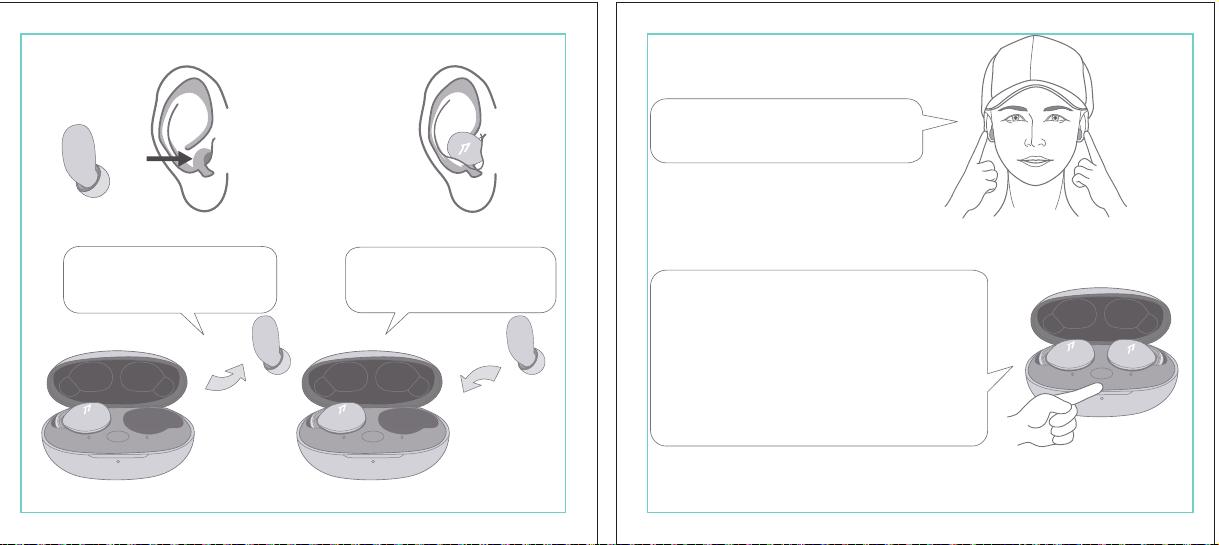
In The Box
材质:80G哑粉
尺寸:98*86mm
EH608
Manufacturer: Tiinlab Corporation
Address: No. 3333, Liuxian Avenue, Tower A, 35th Floor,
Tanglang City, Nanshan District, Shenzhen, China
Made in China
2ASDI-EH608 IC:24662-EH608
We know you will enjoy new 1MORE headphones as much as we do. At 1MORE, we value your
satisfaction. If you would like more details on this product or any of our other products, please visit
us online by scanning the QR code. Go to www.1more.com and sign up for VIP, and 1MORE will
treat you like one.
1MORE Inc., (“1MORE”) warrants to the original retail purchaser that this product is to be free
from defective materials and workmanship for a period of one year from the date of purchase if it
is properly used and maintained. If this product proves defective in either material or
workmanship, 1MORE, at its option, will (a) repair the product with new or refurbished parts, or
(b) replace the product with an equivalent new or refurbished product, at no charge for parts or
labor. If the product model is no longer available and cannot be repaired effectively or replaced
with an identical model, 1MORE at its sole option may replace the unit with a current model of
equal or greater value. In some cases, modication to the mounting surface may be required
where a new model is substituted. 1MORE assumes no responsibility or liability for such
modication. TO OBTAIN A REPAIR OR REPLACEMENT UNDER THE TERMS OF THIS
WARRANTY, PLEASE RETURN TO THE ORIGINAL DEALER FIRST AND THE ORIGINAL
DEALER SHALL REPAIR THE PRODUCT WITH NEW OR REFURBISHED PARTS OR REPLACE
THE PRODUCT WITH AN EQUIVALENT NEW OR REFURBISHED PRODUCT.
You will be required to submit a proof of purchasing details, including but not limited to a receipt
or sales invoice.
Return shipping for exchanges/repairs is the sole responsibility of the original retail purchaser.
Limitations:
• This limited warranty does not cover the failure of the product resulting from improper
installation, misuse, abuse, accident, neglect, mishandling, or wear from ordinary use or
environmental deterioration.
• This limited warranty does not cover cosmetic damage, including paint damage, or
consequential damage to other components or premises which may result for any reason from
the failure of the product.
• This limited warranty is null and void for products not used in accordance with 1MORE’s
instructions.
• This limited warranty is null and void for products with altered or missing serial numbers and for
products not purchased from an AUTHORIZED dealer.
• This limited warranty terminates if you sell or otherwise transfer this product to another party.
1. If the headphones cannot pair normally when powered on. Put both headphones back into
the case, triple click the pairing button and search for "1MORE Z30" in Bluetooth in your
devices to connect.
2. To unpair the device:
Put both headphones into the case, press and hold the pairing button on the case for 8
seconds to disconnect the headphones and the device.
3.OTA Firmware Update:
It can be synchronously upgraded via the 1MORE MUSIC APP while the Left and Right
earbuds are connected to each other with at least 50% battery.
* Functions of the 1MORE MUSIC APP may vary with different devices or operating systems.
For more details, please contact our customer service.
For the initial pairing, turn the headphones on to enter
pairing mode, the LEDs for headphone status will ash
in white. Headphones will power off if not paired to a
device within 3 minutes.
* After the rst successful pairing, headphones will
automatically connect to your device.
To pair with a new device, put headphones back into
the case, and triple click the pairing button when
powered on (no playback) to re-enter pairing mode.
Tips
Extra Functions
We Appreciate Your Business
1MORE (1) Year Limited Warranty
1. Please read this instruction manual carefully and retain for future reference.
2. Please fully charge the battery before rst use.
3. If the headphones have been unused for more than 3 months, we recommend that you charge
them. This will improve battery capacity.
4. Only use charging cables and adapters that are FCC (Federal Communications Commission)
approved.
5. In dry environments, static electricity may numb your ear. This is not related to the quality of the
product.
Safety Information
WEEE
FAQ
1. How to make sure the headphones have been fully charged?
Put the headphones into the charging case, if the headphone stutus LEDs are glowing this means
they have been fully charged.
2. Why won't headphones turn on?
Check if your headphones have enough battery life. If not, please charge them for at least 30 minutes.
3. Why won’t the headphones connect to my cellphone, or take a long time to connect?
Put both buds back into the charging case, then press and hold the pairing button for 3 seconds, click
the device name in your settings, they should now pair correctly to the phone.
4. Why won’t the headphones make phone calls?
The headphones are without microphones or phone call functions.
5. Why is the Bluetooth connection not stable and/or experiences some interruptions?
1) Try shortening the distance between your headphones and the device. Avoid solid barriers in
between you and the device.
2) Please keep away from strong interference sources, such as Wi-Fi and GPRS.
3) Please make sure the Bluetooth antenna of your device is not blocked.
6. Why can't the volume be adjusted by the cellphone buttons when playing soothing sounds in 1MORE
MUSIC APP?
The soothing sounds are stored in the ash of the headphone which can be adjusted only via the APP.
7. The headphones will be disconnected from the cellphone when out of wireless range. They cannot
restore the connection after returning back into the wireless range, how to solve it?
Click the device name in the cellphone pairing list to connect again.
8. I feel uncomfortable when wearing the headphones, how to solve it?
This is mainly because the sizes of ear tips and your canals are not snug, we suggest trying smaller ear
tips.
* For more detailed product FAQs, please visit the product support section under www.1more.com
CE
Headphones × 1 set
Charging Case × 1
Type-C Charging Cable × 1 Silicone Ear Tip (XS/S/L)
Product Overview
Fit
Replace
Placement
Headphones Pairing
Bluetooth Pairing To The Device
Charging
Controls
Soothing Sounds
Battery Notication
User Guide × 1
Silicone Ear Tip
Charging Pin
Charging Case
Pairing Button
Charging Case LED Indicator
LED Indicator for
Headphone Status
Headphone
Silicone Ear Tip
XS / S / M / L
Warranty Card × 1
The Left and Right headphones will automatically
pair with each other after the lid is open when
they are in the case (with charge).
* The above functions are available for either headphones in individual or Stereo mode.
To charge the case with Type-C cable.
To charge the headphones with the case.
* The above functions are available for either headphones in individual or Stereo mode.
Put headphones back into the case
ensuring they are magnetically attached
and close the lid to charge, a full charge
takes around 85 minutes.
Phone call function is not available on the headphones, and the playback controls can be
implemented on the connected device.
Please download the 1MORE MUSIC APP for soothing sounds.
Switch Listening Modes via APP
Enter the 1MORE Z30 home page in 1MORE MUSIC APP after pairing to your cellphone,
then you can switch listening modes between "Music" and "Soothing".
Click the "Soothing Sounds" to enter the playlist.
Click "+" to select the sound to be downloaded to your headphones for listening.
Click the timer icon on the song page to set the playtime.
The LED light of the charging case
will the different battery status: red
light indicates low battery, yellow light
indicates medium battery and green
light indicates full battery.
LED indicator for case battery status: when
the case battery is under 20%, the red
indicator stay lit for 3 seconds. When the
case battery is under 10%, the red indicator
will ash 10 times.
Power On:Take the headphones out of
the charging case (with charge), the
headphones will turn on automatically.
Power Off:Put the headphones
back into the charging case and
close the lid, they will automatically
turn off and start charging.
A full charge will take
around 90 minutes.
EN
* Playback and volume for the soothing sounds can only be adjusted via the APP.
スキャンして、1MOREのWechat公式アカウントをフォロー
「Soothing Sounds」ボタンを押すと、ヒーリング音楽の曲選択画面に入ります。
「+」をクリックしてヒーリング音楽をダウンロードすると、選択した曲がイヤホンに転送されます。
ヒーリング音楽再生画面の「タイマー」をクリックすると、ヒーリング音楽の再生時間を設定することができます。
ヒーリング音楽の再生/停止、音量調整などの操作は、APPでのみ対応します。
ヒーリング音楽
APPでEQモードを切り替えます
操作
その他の機能
梱包内容
イヤーピースの選択
イヤーピースの交換
左側/右側イヤホンのペアリング
イヤホンとBluetooth デバイスをペアリングするには
電池残量に関する注意充電
起動
イヤホン着用
製品外観
イヤホン本体 X 1セット
充電ケース X 1
Type-C充電ケーブル x 1
充電電極
イヤホン本体LEDインジケータ
ペアリングボタン
充電ケースLEDインジケータ
充電ケース
ヘッドホン
シリコン製イヤーピースセット
XS / S / M / L
シリコン製イヤーピースセット
(XS/S/L)
取扱説明書×1
一回のフル充電時間は約90 分です。
* 上記の機能は単独、両耳どちらのイヤホンでも適用されます。
* 上記の機能は単独、両耳どちらのイヤホンでも適用されます。
保証書×1
充電ケースが通電し、左/右側イヤホンをケースに
入っている状態で、ケースの蓋を開けると、左/右
のイヤホンが自動的にペアリングされます。
初めて使用する際、イヤホンの電源を入れてからデバイス
側で検索します。イヤホンは白色LEDが高速点滅します。も
しも 3 分たってもデバイスが見つからない場合、イヤホン本
体はすぐに電源が切れます。
・ すでに接続したことのあるイヤホンであれば、当該デバイ
スと自動でペアリングします。
新しいデバイスと接続する必要があれば、左/右イヤホンを
充電ケース内に戻して電源を入れ、ペアリングボタン3秒間
長押しすると、イヤホンは新しいデバイスとBluetoothのペア
リングがされます。
充電中:充電ケースのLEDインジケータ
は異なる色で電池容量を表示します。電
力が少ない場合赤色LED、電池容量が
半分ぐらいの場合黄色LED、充電が完
了している場合緑色LEDがそれぞれ点
灯します。
イヤホンを充電ケースに戻し
て、充電ケースの蓋を閉める
と充電が開始します。フル充
電時間は約85分です。
充電ケースの容量を確認する方法:充電ケ
ースの電池容量が20%以下になれば、充
電ケースの赤色LEDが3秒点灯します。充
電ケースの電池容量が10%以下になった
場合、充電ケースの赤色LEDのが10回点滅
します。
Type-C充電ケーブルを使用して充電ケースに充電する場合
充電ケースを使用してイヤホンに充電する場合
JP
River
- +
Time Setup
mins
River
OK
- +
60
30
90
River
Time Setup
mins
River
OK
- +
60
30
90
River
River
- +
Time Setup
mins
River
- +
60
30
90
River
1MORE SleepBuds Z30 User Guide
1MORE Наушники для сна Z30 Руководство пользователя
1MORE SleepBuds Z30 コードレスイヤホンユーザーガイド
Midre
Soothing Sounds
Allow adding 2 tracks
Volcano
Falls
River
Midre
Soothing Sounds
Allow adding 2 tracks
Volcano
Falls
River
1. Never disassemble the headphones. There are no user-serviceable parts inside.
2. Do not expose the headphones to temperatures below 32 °F (0 °C) or temperatures above 113 °F (45 °C).
3. Do not use the headphones in a thunderstorm storm. This could prevent the headphones from working
properly, and also increase your chance of being electrically shocked.
4. Do not use oil or any volatile liquid to clean this product.
5. Do not use the headphones in trafc. Do not use the headphones any time it would be dangerous to be
unaware of noises around you.
6. Adult supervision is required for children of age 6 and under.
7. If you don't feel comfortable after wearing the headphones, please refer to an aurist for advice on
whether in-ear headphones are suitable for you.
8. The headphones contain a lithium-ion battery, do not attempt to open, crush, or expose a charging case
to re or excessive temperature. Do not use it if the battery is swollen.
9. Please note that excessively high volumes and long listening times may cause hearing damage.
10. The symbol indicates DC voltage
All products bearing this symbol are waste electrical and electronic equipment (WEEE as in
directive 2012/19/EU) which should not be mixed with unsorted household waste. Instead,
you should protect human health and the environment by handing over your waste
equipment to a designated collection point for the recycling of waste electrical and
electronic equipment, appointed by the government or local authorities. Correct disposal
and recycling will help prevent potential negative consequences to the environment and
human health. Please contact the installer or local authorities for more information about the
location as well as terms and conditions of such collection points.
Home
Soothing Sounds
Listening Modes
1MORE Z30
OTA Firmware Upgrade
Quick Guide to Product
SoothingMusic
L 100% R 100% C 100%
The Bluetooth
®
word mark and logos are registered trademarks owned by Bluetooth SIG, Inc. and any
use of such marks by Tiinlab Corporation is under license. Other trademarks and trade names are the
property of their respective owners.
R
204-B00919
FCC
The SAR limit of USA (FCC) is 1.6 W/kg averaged over one gram of tissue. Device types EH608
(FCC ID: 2ASDI-EH608) has also been tested against this SAR limit.
This device complies with part 15 of the FCC rules. Operation is subject to the following two
conditions: (1) this device may not cause harmful interference, and (2) this device must accept any
interference received, including interference that may cause undesired operation.
NOTE: The manufacturer is not responsible for any radio or TV interference caused by unauthorized
modications or changesto this equipment. Such modications or changes could void the user’s authority
to operate the equipment.
NOTE: This equipment has been tested and found to comply with the limits for a Class B digital device,
pursuant to part 15 of the FCC Rules. These limits are designed to provide reasonable protection
against harmful interference in a residential installation. This equipment generates uses and can radiate
radio frequency energy and, if not installed and used in accordance with the instructions, may cause
harmful interference to radio communications. However, there is no guarantee that interference will not
occur in a particular installation. If this equipment does cause harmful interference to radio or television
reception, which can be determined by turning the equipment off and on, the user is encouraged to try
to correct the interference by one or more of the following measures:
-Reorient or relocate the receiving antenna.
-Increase the separation between the equipment and receiver.
-Connect the equipment into an outlet on a circuit different from that to which the receiver is
connected.
-Consult the dealer or an experienced radio/TV technician for help.
IC regulatory conformance
This device complies with CAN ICES-003 (B)/NMB-003(B).
This device complies with Industry Canada licence-exempt RSS standard(s). Operation is Subject to
the following two conditions: (1) this device may not cause interference, and (2) this device must accept
any interference, including interference that may cause undesired operation of the device.
Le présent appareil est conforme aux CNR d'Industrie Canada applicables aux appareils radio
exempts de licence. L'exploitation est autorisée aux deux conditions suivantes : (1) l'appareil ne doit
シリコン製イヤ
ーピースセット
Declaration of Conformity Hereby, Tiinlab Corporation declares that the radio equipment type
Wireless Earphones of EH608 is in compliance with Directive 2014/53/EU.
The full text of the EU declaration of conformity is available at the following internet address:
https://www.1more.com
RF exposure information: The device has been evaluated to meet general RF exposure requirement.
The device can be used in portable exposure condition without restriction. Radiation Exposure Statement
Power is so low that no RF exposure calculation is needed.
Declaration for EU Compliance
Operation Frequency/Max. EIRP: 2400-2483.5MHz, Max. EIRP is <10dBm.
В коробке
Мы знаем, что вы будете наслаждаться новыми наушниками 1MORE так же, как и мы. В
1MORE мы ценим ваше удовлетворение. Если вы хотите получить более подробную
информацию о данном продукте или о любых других наших продуктах, пожалуйста, посетите
нас онлайн, отсканировав QR-код. Перейдите по ссылке www.1more.com и
зарегистрируйтесь в VIP, и 1MORE будет относиться к вам как к одному из них.
Компания 1MORE Inc. (“1MORE”) гарантирует первоначальному розничному покупателю, что
данный продукт не будет содержать дефектов материалов и изготовления в течение одного года с
даты покупки, если он будет надлежащим образом использоваться и обслуживаться. Если в данном
продукте обнаружатся дефекты материала или изготовления, 1MORE, по своему усмотрению, (а)
отремонтирует продукт с использованием новых или восстановленных деталей или (б) заменит
продукт эквивалентным новым или восстановленным продуктом без оплаты запчастей или рабочей
силы. Если модель продукта больше недоступна и не может быть эффективно отремонтирована или
заменена идентичной моделью, компания 1MORE по своему усмотрению может заменить
устройство текущей моделью равной или большей стоимости. В некоторых случаях при замене
новой модели может потребоваться модификация монтажной поверхности. 1MORE не несет
никакой ответственности за такие изменения. ЧТОБЫ ПОЛУЧИТЬ РЕМОНТ ИЛИ ЗАМЕНУ В
СООТВЕТСТВИИ С УСЛОВИЯМИ ДАННОЙ ГАРАНТИИ, ПОЖАЛУЙСТА, СНАЧАЛА ОБРАТИТЕСЬ К
ПЕРВОНАЧАЛЬНОМУ ДИЛЕРУ, И ПЕРВОНАЧАЛЬНЫЙ ДИЛЕР ОТРЕМОНТИРУЕТ ПРОДУКТ НОВЫМИ
ИЛИ ВОССТАНОВЛЕННЫМИ ДЕТАЛЯМИ ИЛИ ЗАМЕНИТ ПРОДУКТ
ЭКВИВАЛЕНТНЫМ НОВЫМ ИЛИ
ВОССТАНОВЛЕННЫМ ПРОДУКТОМ.
От вас потребуется предоставить подтверждение покупки, включая, но не ограничиваясь этим,
квитанцию или счет-фактуру.
Ответственность за обратную доставку для обмена/ремонта несет исключительно первоначальный
розничный покупатель.
Ограничения:
• Данная ограниченная гарантия не распространяется на выход продукта из строя в результате
неправильной установки, неправильного использования, злоупотребления, несчастного случая,
1. Если наушники не могут нормально подключиться при включенном питании. Положите оба
наушника обратно в корпус, трижды нажмите кнопку сопряжения и найдите "1MORE Z30" в
Bluetooth на ваших устройствах для подключения.
2. Чтобы отключить сопряжение устройства:
Положите оба наушника в корпус, нажмите и удерживайте кнопку сопряжения на корпусе в
течение 8 секунд, чтобы отсоединить наушники от устройства.
3. Обновление прошивки OTA:
может выполняться синхронно с приложением 1MORE Music когда левый и правый наушники
сопряжены друг с другом через Bluetooth .
Для первоначального сопряжения включите
наушники, чтобы перейти в режим сопряжения,
светодиоды состояния наушников будут мигать
белым цветом. Наушники отключатся, если не
выполнить сопряжение с устройством в течение 3
минут.
* После первого успешного сопряжения наушники
автоматически подключатся к вашему устройству.
Чтобы выполнить сопряжение с новым устройством,
вставьте наушники обратно в корпус и трижды
нажмите кнопку сопряжения при включении
питания (воспроизведение отсутствует), чтобы
повторно войти в режим сопряжения.
Дополнительные функции
Мы ценим ваш бизнес
(1) годовая ограниченная гарантия 1MORE
Наушники × 1 набор
Зарядный корпус × 1
Зарядный кабель типа-С × 1Силиконовые вкладыши (XS/S/L)
Обзор продукта
Подгонка
Замена
Замена
Сопряжение наушников
Сопряжение Bluetooth с устройством
Зарядка
Управление
Успокаивающие звуки
Уведомление о батарее
Руководство пользователя × 1
Силиконовые
вкладыши
Зарядный штекер
Зарядный корпус
Кнопки сопряжения
Светодиодный индикатор зарядного корпуса
Наушники
Силиконовые вкладыши
XS / S / M / L
Гарантийный талон × 1
Левый и правый наушники автоматически
соединятся друг с другом после открытия
крышки, когда они будут находиться в корпусе
(с зарядкой).
* Вышеуказанные функции доступны как для наушников в индивидуальном, так и в стерео режиме.
Для зарядки корпуса используйте кабель Type-C.
Для зарядки наушников с корпусом.
* Вышеуказанные функции доступны как для наушников в индивидуальном, так и в стерео режиме.
Положите наушники обратно в корпус,
убедившись, что они надежно
закреплены магнитом, и закройте крышку
для зарядки, полная зарядка занимает
около 85 минут.
Функция телефонного звонка недоступна в наушниках, а управление воспроизведением
может быть реализовано на подключенном устройстве.
Пожалуйста, загрузите приложение 1MORE MUSIC для успокаивающих звуков.
Переключайте режимы прослушивания с помощью приложения
Зайдите на домашнюю страницу 1MORE Z30 в приложении 1MORE MUSIC после сопряжения с
вашим мобильным телефоном, затем вы сможете переключать режимы прослушивания между
"Музыка" и "Успокаивающий".
Нажмите "Soothing Sounds", чтобы войти в список воспроизведения.
Нажмите "+" чтобы выбрать звук, который будет загружен в ваши наушники для прослушивания.
Нажмите на значок таймера на странице песни,
чтобы установить время воспроизведения.
Светодиодный индикатор
зарядного устройства будет
отображать различное состояние
батареи: красный индикатор
указывает на низкий уровень
заряда батареи, желтый
индикатор указывает на средний
уровень заряда батареи и зеленый
индикатор указывает на полный
заряд батареи.
Светодиодный индикатор состояния
батареи корпуса: когда уровень заряда
батареи корпуса ниже 20%, красный
индикатор горит в течение 3 секунд. Когда
уровень заряда батареи корпуса ниже
10%, красный индикатор мигнет 10 раз.
Включение питания:Достаньте
наушники из зарядного корпуса (с
зарядкой), наушники включатся
автоматически.
Выключение питания:Положите
наушники обратно в зарядный
корпус и закройте крышку, они
автоматически выключатся и
начнут заряжаться.
Полная зарядка займет
около 90 минут.
RU
Midre
Soothing Sounds
Allow adding 2 tracks
Volcano
Falls
River
Midre River VolcanoFalls
River
Home
Soothing Sounds
Listening Modes
1MORE Z30
OTA Firmware Upgrade
Quick Guide to Product
SoothingMusic
L 100% R 100% C 100%
pas produire de brouillage, et (2) l'utilisateur de l'appareil doit accepter tout brouillage radioélectrique
subi, même si le brouillage est susceptible d'en compromettre le fonctionnement.
This device has been tested for compliance with IC SAR values at a typical operating near the
body. To ensure that RF exposure levels below the levels tested, use accessories with this
equipment to maintain a minimum separation distance of 0 mm between the body of the user and the
device. These accessories should not contain metallic components. It is possible that the accessories
used close to the body that do not meet these requirements are not consistent with the SAR limits and
it is advisable to avoid using them.
Ce dispositif a été testé pour la conformité avec les valeurs SAR à un fonctionnement typique près du
corps . Pour assurer que les niveaux d'exposition aux radiofréquences en deçà des niveaux testés ,
utiliser des accessoires avec cet équipement pour maintenir une distance de séparation minimale de 0
mm entre le corps de l'utilisateur et l'appareil. Ces accessoires ne doivent pas contenir des
composants métalliques . Il est possible que les accessoires utilisés près du corps quine répondent pas
à ces exigences ne sont pas compatibles avec les limites SAR et il est conseilléd'éviter de les utiliser.
Caution: Any changes or modications not expressly approved by the party responsible for compliance
could void the user's authority to operate this equipment.
充電ケースが通電している状態で、ケ
ースからイヤホンを取り出すと、イヤホ
ンは自動で起動します。
シャットダウン:イヤホンを充電ケースに
入れて蓋を閉めると、すぐにシャットダ
ウンし充電します。
本イヤホンに通話機能は付いていません、曲再生/停止、曲送り/曲戻し、及び音量調整などの再生機能は
スマートフォン側などで操作してください。
ヒーリング音楽などを再生するには1MORE MUSIC APPをダウンロードしてください。
1MORE MUSICアプリを使用しているときにスマホ端末がイヤホンと接続すると、「Music」 と 「Soothing」が選
べます。
1. 電源を入れても、左右のイヤホンが正常にペアリングできない場合、イヤホンを充電ケースに戻し、蓋を一
度閉めてから再度開けます。その後充電ケースのペアリングボタンを3秒間長押しすると、充電ケースのイ
ヤホンLEDインジケーターが白色に点滅し、再びペアリングモードに入ります。
2. 左右イヤホンのペアリング記録をクリアする方法:
両イヤホンを充電ケースに入れ、充電ケースのペアリングボタンを約3秒間長押しします。
3. OTAファームウェアのアップデートを行う場合:
ヘッドホン左右のバッテリーが50%以上で接続されている状態であれば、「1MORE MUSIC APP」を介して
同期的にアップデートすることができます。
* 1MORE MUSIC APPは接続機器によって機能が異なる場合がございます。詳細については、お気軽にカス
タマサポートまでにご連絡ください。
1MORE コミュニティ bbs.1more.com へのアクセスをお待ちしております。
www.1more.com にアクセスし、1MORE 会員に新規登録いただけると、素晴らしい情報を提供いたします。
Bluetooth®のマークとロゴはBluetooth® Technology Allianceの登録商標です。本製品で使用されているこ
れらのマークは万魔声学股份有限公司にてライセンス契約に基づき表示するものとします。その他商標及
び商品名称はそれぞれの所有者に帰属するものとします。
Светодиодный
индикатор для
состояния наушников
* Воспроизведение и громкость успокаивающих звуков можно регулировать только с помощью
приложения.
Словесный знак и логотипы Bluetooth® являются зарегистрированными товарными знаками,
принадлежащими Bluetooth SIG, Inc., и любое использование таких знаков корпорацией Tiinlab
осуществляется по лицензии. Другие товарные знаки и торговые наименования являются
собственностью их соответствующих владельцев.
* Функции приложения 1MORE MUSIC могут отличаться в зависимости от различных устройств или
операционных систем. Для получения более подробной информации, пожалуйста, свяжитесь с
нашей службой поддержки клиентов.
небрежности, неправильного обращения или износа в результате обычного использования или
ухудшения состояния окружающей среды.
• Данная ограниченная гарантия не распространяется на косметические повреждения, включая
повреждение краски, или косвенный ущерб другим компонентам или поверхностям, которые
могут возникнуть по любой причине в результате выхода продукта из строя.
• Данная ограниченная гарантия недействительна для продуктов, используемых не в соответствии с
инструкциями 1MORE.
• Данная ограниченная гарантия недействительна для продуктов с измененными или
отсутствующими серийными номерами, а также для продуктов, приобретенных не у
ОФИЦИАЛЬНОГО дилера.
• Действие данной ограниченной гарантии прекращается, если вы продаете или иным образом
передаете данный продукт другой стороне.
Home
Soothing Sounds
Listening Modes
1MORE Z30
OTA Firmware Upgrade
Quick Guide to Product
SoothingMusic
L 100% R 100% C 100%
River
Home
Soothing Sounds
Listening Modes
1MORE Z30
OTA Firmware Upgrade
Quick Guide to Product
Soothing
Music
L 100% R 100% C 100%
Home
Soothing Sounds
Listening Modes
1MORE Z30
OTA Firmware Upgrade
Quick Guide to Product
SoothingMusic
L 100% R 100% C 100%
Home
Soothing Sounds
Listening Modes
1MORE Z30
OTA Firmware Upgrade
Quick Guide to Product
Soothing
Music
L 100% R 100% C 100%
Home
Soothing Sounds
Listening Modes
1MORE Z30
OTA Firmware Upgrade
Quick Guide to Product
SoothingMusic
L 100% R 100% C 100%
Home
Soothing Sounds
Listening Modes
1MORE Z30
OTA Firmware Upgrade
Quick Guide to Product
Soothing
Music
L 100% R 100% C 100%
Midre River VolcanoFalls
River
Home
Soothing Sounds
Listening Modes
1MORE Z30
OTA Firmware Upgrade
Quick Guide to Product
SoothingMusic
L 100% R 100% C 100%
Home
Soothing Sounds
Listening Modes
1MORE Z30
OTA Firmware Upgrade
Quick Guide to Product
SoothingMusic
L 100% R 100% C 100%
Midre River VolcanoFalls
River
Home
Soothing Sounds
Listening Modes
1MORE Z30
OTA Firmware Upgrade
Quick Guide to Product
SoothingMusic
L 100% R 100% C 100%
Home
Soothing Sounds
Listening Modes
1MORE Z30
OTA Firmware Upgrade
Quick Guide to Product
SoothingMusic
L 100% R 100% C 100%
C:0/M:85/Y:95/K:0C
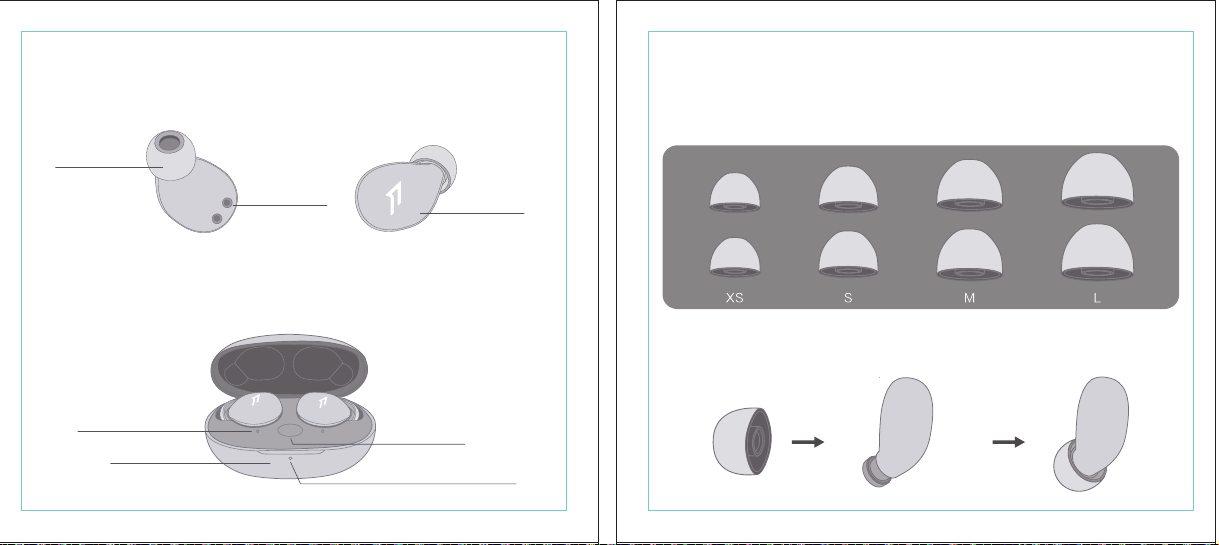
In The Box
材质:80G哑粉
尺寸:98*86mm
EH608
Manufacturer: Tiinlab Corporation
Address: No. 3333, Liuxian Avenue, Tower A, 35th Floor,
Tanglang City, Nanshan District, Shenzhen, China
Made in China
2ASDI-EH608 IC:24662-EH608
We know you will enjoy new 1MORE headphones as much as we do. At 1MORE, we value your
satisfaction. If you would like more details on this product or any of our other products, please visit
us online by scanning the QR code. Go to www.1more.com and sign up for VIP, and 1MORE will
treat you like one.
1MORE Inc., (“1MORE”) warrants to the original retail purchaser that this product is to be free
from defective materials and workmanship for a period of one year from the date of purchase if it
is properly used and maintained. If this product proves defective in either material or
workmanship, 1MORE, at its option, will (a) repair the product with new or refurbished parts, or
(b) replace the product with an equivalent new or refurbished product, at no charge for parts or
labor. If the product model is no longer available and cannot be repaired effectively or replaced
with an identical model, 1MORE at its sole option may replace the unit with a current model of
equal or greater value. In some cases, modication to the mounting surface may be required
where a new model is substituted. 1MORE assumes no responsibility or liability for such
modication. TO OBTAIN A REPAIR OR REPLACEMENT UNDER THE TERMS OF THIS
WARRANTY, PLEASE RETURN TO THE ORIGINAL DEALER FIRST AND THE ORIGINAL
DEALER SHALL REPAIR THE PRODUCT WITH NEW OR REFURBISHED PARTS OR REPLACE
THE PRODUCT WITH AN EQUIVALENT NEW OR REFURBISHED PRODUCT.
You will be required to submit a proof of purchasing details, including but not limited to a receipt
or sales invoice.
Return shipping for exchanges/repairs is the sole responsibility of the original retail purchaser.
Limitations:
• This limited warranty does not cover the failure of the product resulting from improper
installation, misuse, abuse, accident, neglect, mishandling, or wear from ordinary use or
environmental deterioration.
• This limited warranty does not cover cosmetic damage, including paint damage, or
consequential damage to other components or premises which may result for any reason from
the failure of the product.
• This limited warranty is null and void for products not used in accordance with 1MORE’s
instructions.
• This limited warranty is null and void for products with altered or missing serial numbers and for
products not purchased from an AUTHORIZED dealer.
• This limited warranty terminates if you sell or otherwise transfer this product to another party.
1. If the headphones cannot pair normally when powered on. Put both headphones back into
the case, triple click the pairing button and search for "1MORE Z30" in Bluetooth in your
devices to connect.
2. To unpair the device:
Put both headphones into the case, press and hold the pairing button on the case for 8
seconds to disconnect the headphones and the device.
3.OTA Firmware Update:
It can be synchronously upgraded via the 1MORE MUSIC APP while the Left and Right
earbuds are connected to each other with at least 50% battery.
* Functions of the 1MORE MUSIC APP may vary with different devices or operating systems.
For more details, please contact our customer service.
For the initial pairing, turn the headphones on to enter
pairing mode, the LEDs for headphone status will ash
in white. Headphones will power off if not paired to a
device within 3 minutes.
* After the rst successful pairing, headphones will
automatically connect to your device.
To pair with a new device, put headphones back into
the case, and triple click the pairing button when
powered on (no playback) to re-enter pairing mode.
Tips
Extra Functions
We Appreciate Your Business
1MORE (1) Year Limited Warranty
1. Please read this instruction manual carefully and retain for future reference.
2. Please fully charge the battery before rst use.
3. If the headphones have been unused for more than 3 months, we recommend that you charge
them. This will improve battery capacity.
4. Only use charging cables and adapters that are FCC (Federal Communications Commission)
approved.
5. In dry environments, static electricity may numb your ear. This is not related to the quality of the
product.
Safety Information
WEEE
FAQ
1. How to make sure the headphones have been fully charged?
Put the headphones into the charging case, if the headphone stutus LEDs are glowing this means
they have been fully charged.
2. Why won't headphones turn on?
Check if your headphones have enough battery life. If not, please charge them for at least 30 minutes.
3. Why won’t the headphones connect to my cellphone, or take a long time to connect?
Put both buds back into the charging case, then press and hold the pairing button for 3 seconds, click
the device name in your settings, they should now pair correctly to the phone.
4. Why won’t the headphones make phone calls?
The headphones are without microphones or phone call functions.
5. Why is the Bluetooth connection not stable and/or experiences some interruptions?
1) Try shortening the distance between your headphones and the device. Avoid solid barriers in
between you and the device.
2) Please keep away from strong interference sources, such as Wi-Fi and GPRS.
3) Please make sure the Bluetooth antenna of your device is not blocked.
6. Why can't the volume be adjusted by the cellphone buttons when playing soothing sounds in 1MORE
MUSIC APP?
The soothing sounds are stored in the ash of the headphone which can be adjusted only via the APP.
7. The headphones will be disconnected from the cellphone when out of wireless range. They cannot
restore the connection after returning back into the wireless range, how to solve it?
Click the device name in the cellphone pairing list to connect again.
8. I feel uncomfortable when wearing the headphones, how to solve it?
This is mainly because the sizes of ear tips and your canals are not snug, we suggest trying smaller ear
tips.
* For more detailed product FAQs, please visit the product support section under www.1more.com
CE
Headphones × 1 set
Charging Case × 1
Type-C Charging Cable × 1 Silicone Ear Tip (XS/S/L)
Product Overview
Fit
Replace
Placement
Headphones Pairing
Bluetooth Pairing To The Device
Charging
Controls
Soothing Sounds
Battery Notication
User Guide × 1
Silicone Ear Tip
Charging Pin
Charging Case
Pairing Button
Charging Case LED Indicator
LED Indicator for
Headphone Status
Headphone
Silicone Ear Tip
XS / S / M / L
Warranty Card × 1
The Left and Right headphones will automatically
pair with each other after the lid is open when
they are in the case (with charge).
* The above functions are available for either headphones in individual or Stereo mode.
To charge the case with Type-C cable.
To charge the headphones with the case.
* The above functions are available for either headphones in individual or Stereo mode.
Put headphones back into the case
ensuring they are magnetically attached
and close the lid to charge, a full charge
takes around 85 minutes.
Phone call function is not available on the headphones, and the playback controls can be
implemented on the connected device.
Please download the 1MORE MUSIC APP for soothing sounds.
Switch Listening Modes via APP
Enter the 1MORE Z30 home page in 1MORE MUSIC APP after pairing to your cellphone,
then you can switch listening modes between "Music" and "Soothing".
Click the "Soothing Sounds" to enter the playlist.
Click "+" to select the sound to be downloaded to your headphones for listening.
Click the timer icon on the song page to set the playtime.
The LED light of the charging case
will the different battery status: red
light indicates low battery, yellow light
indicates medium battery and green
light indicates full battery.
LED indicator for case battery status: when
the case battery is under 20%, the red
indicator stay lit for 3 seconds. When the
case battery is under 10%, the red indicator
will ash 10 times.
Power On:Take the headphones out of
the charging case (with charge), the
headphones will turn on automatically.
Power Off:Put the headphones
back into the charging case and
close the lid, they will automatically
turn off and start charging.
A full charge will take
around 90 minutes.
EN
* Playback and volume for the soothing sounds can only be adjusted via the APP.
スキャンして、1MOREのWechat公式アカウントをフォロー
「Soothing Sounds」ボタンを押すと、ヒーリング音楽の曲選択画面に入ります。
「+」をクリックしてヒーリング音楽をダウンロードすると、選択した曲がイヤホンに転送されます。
ヒーリング音楽再生画面の「タイマー」をクリックすると、ヒーリング音楽の再生時間を設定することができます。
ヒーリング音楽の再生/停止、音量調整などの操作は、APPでのみ対応します。
ヒーリング音楽
APPでEQモードを切り替えます
操作
その他の機能
梱包内容
イヤーピースの選択
イヤーピースの交換
左側/右側イヤホンのペアリング
イヤホンとBluetooth デバイスをペアリングするには
電池残量に関する注意充電
起動
イヤホン着用
製品外観
イヤホン本体 X 1セット
充電ケース X 1
Type-C充電ケーブル x 1
充電電極
イヤホン本体LEDインジケータ
ペアリングボタン
充電ケースLEDインジケータ
充電ケース
ヘッドホン
シリコン製イヤーピースセット
XS / S / M / L
シリコン製イヤーピースセット
(XS/S/L)
取扱説明書×1
一回のフル充電時間は約90 分です。
* 上記の機能は単独、両耳どちらのイヤホンでも適用されます。
* 上記の機能は単独、両耳どちらのイヤホンでも適用されます。
保証書×1
充電ケースが通電し、左/右側イヤホンをケースに
入っている状態で、ケースの蓋を開けると、左/右
のイヤホンが自動的にペアリングされます。
初めて使用する際、イヤホンの電源を入れてからデバイス
側で検索します。イヤホンは白色LEDが高速点滅します。も
しも 3 分たってもデバイスが見つからない場合、イヤホン本
体はすぐに電源が切れます。
・ すでに接続したことのあるイヤホンであれば、当該デバイ
スと自動でペアリングします。
新しいデバイスと接続する必要があれば、左/右イヤホンを
充電ケース内に戻して電源を入れ、ペアリングボタン3秒間
長押しすると、イヤホンは新しいデバイスとBluetoothのペア
リングがされます。
充電中:充電ケースのLEDインジケータ
は異なる色で電池容量を表示します。電
力が少ない場合赤色LED、電池容量が
半分ぐらいの場合黄色LED、充電が完
了している場合緑色LEDがそれぞれ点
灯します。
イヤホンを充電ケースに戻し
て、充電ケースの蓋を閉める
と充電が開始します。フル充
電時間は約85分です。
充電ケースの容量を確認する方法:充電ケ
ースの電池容量が20%以下になれば、充
電ケースの赤色LEDが3秒点灯します。充
電ケースの電池容量が10%以下になった
場合、充電ケースの赤色LEDのが10回点滅
します。
Type-C充電ケーブルを使用して充電ケースに充電する場合
充電ケースを使用してイヤホンに充電する場合
JP
River
- +
Time Setup
mins
River
OK
- +
60
30
90
River
Time Setup
mins
River
OK
- +
60
30
90
River
River
- +
Time Setup
mins
River
- +
60
30
90
River
1MORE SleepBuds Z30 User Guide
1MORE Наушники для сна Z30 Руководство пользователя
1MORE SleepBuds Z30 コードレスイヤホンユーザーガイド
Midre
Soothing Sounds
Allow adding 2 tracks
Volcano
Falls
River
Midre
Soothing Sounds
Allow adding 2 tracks
Volcano
Falls
River
1. Never disassemble the headphones. There are no user-serviceable parts inside.
2. Do not expose the headphones to temperatures below 32 °F (0 °C) or temperatures above 113 °F (45 °C).
3. Do not use the headphones in a thunderstorm storm. This could prevent the headphones from working
properly, and also increase your chance of being electrically shocked.
4. Do not use oil or any volatile liquid to clean this product.
5. Do not use the headphones in trafc. Do not use the headphones any time it would be dangerous to be
unaware of noises around you.
6. Adult supervision is required for children of age 6 and under.
7. If you don't feel comfortable after wearing the headphones, please refer to an aurist for advice on
whether in-ear headphones are suitable for you.
8. The headphones contain a lithium-ion battery, do not attempt to open, crush, or expose a charging case
to re or excessive temperature. Do not use it if the battery is swollen.
9. Please note that excessively high volumes and long listening times may cause hearing damage.
10. The symbol indicates DC voltage
All products bearing this symbol are waste electrical and electronic equipment (WEEE as in
directive 2012/19/EU) which should not be mixed with unsorted household waste. Instead,
you should protect human health and the environment by handing over your waste
equipment to a designated collection point for the recycling of waste electrical and
electronic equipment, appointed by the government or local authorities. Correct disposal
and recycling will help prevent potential negative consequences to the environment and
human health. Please contact the installer or local authorities for more information about the
location as well as terms and conditions of such collection points.
Home
Soothing Sounds
Listening Modes
1MORE Z30
OTA Firmware Upgrade
Quick Guide to Product
SoothingMusic
L 100% R 100% C 100%
The Bluetooth
®
word mark and logos are registered trademarks owned by Bluetooth SIG, Inc. and any
use of such marks by Tiinlab Corporation is under license. Other trademarks and trade names are the
property of their respective owners.
R
204-B00919
FCC
The SAR limit of USA (FCC) is 1.6 W/kg averaged over one gram of tissue. Device types EH608
(FCC ID: 2ASDI-EH608) has also been tested against this SAR limit.
This device complies with part 15 of the FCC rules. Operation is subject to the following two
conditions: (1) this device may not cause harmful interference, and (2) this device must accept any
interference received, including interference that may cause undesired operation.
NOTE: The manufacturer is not responsible for any radio or TV interference caused by unauthorized
modications or changesto this equipment. Such modications or changes could void the user’s authority
to operate the equipment.
NOTE: This equipment has been tested and found to comply with the limits for a Class B digital device,
pursuant to part 15 of the FCC Rules. These limits are designed to provide reasonable protection
against harmful interference in a residential installation. This equipment generates uses and can radiate
radio frequency energy and, if not installed and used in accordance with the instructions, may cause
harmful interference to radio communications. However, there is no guarantee that interference will not
occur in a particular installation. If this equipment does cause harmful interference to radio or television
reception, which can be determined by turning the equipment off and on, the user is encouraged to try
to correct the interference by one or more of the following measures:
-Reorient or relocate the receiving antenna.
-Increase the separation between the equipment and receiver.
-Connect the equipment into an outlet on a circuit different from that to which the receiver is
connected.
-Consult the dealer or an experienced radio/TV technician for help.
IC regulatory conformance
This device complies with CAN ICES-003 (B)/NMB-003(B).
This device complies with Industry Canada licence-exempt RSS standard(s). Operation is Subject to
the following two conditions: (1) this device may not cause interference, and (2) this device must accept
any interference, including interference that may cause undesired operation of the device.
Le présent appareil est conforme aux CNR d'Industrie Canada applicables aux appareils radio
exempts de licence. L'exploitation est autorisée aux deux conditions suivantes : (1) l'appareil ne doit
シリコン製イヤ
ーピースセット
Declaration of Conformity Hereby, Tiinlab Corporation declares that the radio equipment type
Wireless Earphones of EH608 is in compliance with Directive 2014/53/EU.
The full text of the EU declaration of conformity is available at the following internet address:
https://www.1more.com
RF exposure information: The device has been evaluated to meet general RF exposure requirement.
The device can be used in portable exposure condition without restriction. Radiation Exposure Statement
Power is so low that no RF exposure calculation is needed.
Declaration for EU Compliance
Operation Frequency/Max. EIRP: 2400-2483.5MHz, Max. EIRP is <10dBm.
В коробке
Мы знаем, что вы будете наслаждаться новыми наушниками 1MORE так же, как и мы. В
1MORE мы ценим ваше удовлетворение. Если вы хотите получить более подробную
информацию о данном продукте или о любых других наших продуктах, пожалуйста, посетите
нас онлайн, отсканировав QR-код. Перейдите по ссылке www.1more.com и
зарегистрируйтесь в VIP, и 1MORE будет относиться к вам как к одному из них.
Компания 1MORE Inc. (“1MORE”) гарантирует первоначальному розничному покупателю, что
данный продукт не будет содержать дефектов материалов и изготовления в течение одного года с
даты покупки, если он будет надлежащим образом использоваться и обслуживаться. Если в данном
продукте обнаружатся дефекты материала или изготовления, 1MORE, по своему усмотрению, (а)
отремонтирует продукт с использованием новых или восстановленных деталей или (б) заменит
продукт эквивалентным новым или восстановленным продуктом без оплаты запчастей или рабочей
силы. Если модель продукта больше недоступна и не может быть эффективно отремонтирована или
заменена идентичной моделью, компания 1MORE по своему усмотрению может заменить
устройство текущей моделью равной или большей стоимости. В некоторых случаях при замене
новой модели может потребоваться модификация монтажной поверхности. 1MORE не несет
никакой ответственности за такие изменения. ЧТОБЫ ПОЛУЧИТЬ РЕМОНТ ИЛИ ЗАМЕНУ В
СООТВЕТСТВИИ С УСЛОВИЯМИ ДАННОЙ ГАРАНТИИ, ПОЖАЛУЙСТА, СНАЧАЛА ОБРАТИТЕСЬ К
ПЕРВОНАЧАЛЬНОМУ ДИЛЕРУ, И ПЕРВОНАЧАЛЬНЫЙ ДИЛЕР ОТРЕМОНТИРУЕТ ПРОДУКТ НОВЫМИ
ИЛИ ВОССТАНОВЛЕННЫМИ ДЕТАЛЯМИ ИЛИ ЗАМЕНИТ ПРОДУКТ
ЭКВИВАЛЕНТНЫМ НОВЫМ ИЛИ
ВОССТАНОВЛЕННЫМ ПРОДУКТОМ.
От вас потребуется предоставить подтверждение покупки, включая, но не ограничиваясь этим,
квитанцию или счет-фактуру.
Ответственность за обратную доставку для обмена/ремонта несет исключительно первоначальный
розничный покупатель.
Ограничения:
• Данная ограниченная гарантия не распространяется на выход продукта из строя в результате
неправильной установки, неправильного использования, злоупотребления, несчастного случая,
1. Если наушники не могут нормально подключиться при включенном питании. Положите оба
наушника обратно в корпус, трижды нажмите кнопку сопряжения и найдите "1MORE Z30" в
Bluetooth на ваших устройствах для подключения.
2. Чтобы отключить сопряжение устройства:
Положите оба наушника в корпус, нажмите и удерживайте кнопку сопряжения на корпусе в
течение 8 секунд, чтобы отсоединить наушники от устройства.
3. Обновление прошивки OTA:
может выполняться синхронно с приложением 1MORE Music когда левый и правый наушники
сопряжены друг с другом через Bluetooth .
Для первоначального сопряжения включите
наушники, чтобы перейти в режим сопряжения,
светодиоды состояния наушников будут мигать
белым цветом. Наушники отключатся, если не
выполнить сопряжение с устройством в течение 3
минут.
* После первого успешного сопряжения наушники
автоматически подключатся к вашему устройству.
Чтобы выполнить сопряжение с новым устройством,
вставьте наушники обратно в корпус и трижды
нажмите кнопку сопряжения при включении
питания (воспроизведение отсутствует), чтобы
повторно войти в режим сопряжения.
Дополнительные функции
Мы ценим ваш бизнес
(1) годовая ограниченная гарантия 1MORE
Наушники × 1 набор
Зарядный корпус × 1
Зарядный кабель типа-С × 1Силиконовые вкладыши (XS/S/L)
Обзор продукта
Подгонка
Замена
Замена
Сопряжение наушников
Сопряжение Bluetooth с устройством
Зарядка
Управление
Успокаивающие звуки
Уведомление о батарее
Руководство пользователя × 1
Силиконовые
вкладыши
Зарядный штекер
Зарядный корпус
Кнопки сопряжения
Светодиодный индикатор зарядного корпуса
Наушники
Силиконовые вкладыши
XS / S / M / L
Гарантийный талон × 1
Левый и правый наушники автоматически
соединятся друг с другом после открытия
крышки, когда они будут находиться в корпусе
(с зарядкой).
* Вышеуказанные функции доступны как для наушников в индивидуальном, так и в стерео режиме.
Для зарядки корпуса используйте кабель Type-C.
Для зарядки наушников с корпусом.
* Вышеуказанные функции доступны как для наушников в индивидуальном, так и в стерео режиме.
Положите наушники обратно в корпус,
убедившись, что они надежно
закреплены магнитом, и закройте крышку
для зарядки, полная зарядка занимает
около 85 минут.
Функция телефонного звонка недоступна в наушниках, а управление воспроизведением
может быть реализовано на подключенном устройстве.
Пожалуйста, загрузите приложение 1MORE MUSIC для успокаивающих звуков.
Переключайте режимы прослушивания с помощью приложения
Зайдите на домашнюю страницу 1MORE Z30 в приложении 1MORE MUSIC после сопряжения с
вашим мобильным телефоном, затем вы сможете переключать режимы прослушивания между
"Музыка" и "Успокаивающий".
Нажмите "Soothing Sounds", чтобы войти в список воспроизведения.
Нажмите "+" чтобы выбрать звук, который будет загружен в ваши наушники для прослушивания.
Нажмите на значок таймера на странице песни,
чтобы установить время воспроизведения.
Светодиодный индикатор
зарядного устройства будет
отображать различное состояние
батареи: красный индикатор
указывает на низкий уровень
заряда батареи, желтый
индикатор указывает на средний
уровень заряда батареи и зеленый
индикатор указывает на полный
заряд батареи.
Светодиодный индикатор состояния
батареи корпуса: когда уровень заряда
батареи корпуса ниже 20%, красный
индикатор горит в течение 3 секунд. Когда
уровень заряда батареи корпуса ниже
10%, красный индикатор мигнет 10 раз.
Включение питания:Достаньте
наушники из зарядного корпуса (с
зарядкой), наушники включатся
автоматически.
Выключение питания:Положите
наушники обратно в зарядный
корпус и закройте крышку, они
автоматически выключатся и
начнут заряжаться.
Полная зарядка займет
около 90 минут.
RU
Midre
Soothing Sounds
Allow adding 2 tracks
Volcano
Falls
River
Midre River VolcanoFalls
River
Home
Soothing Sounds
Listening Modes
1MORE Z30
OTA Firmware Upgrade
Quick Guide to Product
SoothingMusic
L 100% R 100% C 100%
pas produire de brouillage, et (2) l'utilisateur de l'appareil doit accepter tout brouillage radioélectrique
subi, même si le brouillage est susceptible d'en compromettre le fonctionnement.
This device has been tested for compliance with IC SAR values at a typical operating near the
body. To ensure that RF exposure levels below the levels tested, use accessories with this
equipment to maintain a minimum separation distance of 0 mm between the body of the user and the
device. These accessories should not contain metallic components. It is possible that the accessories
used close to the body that do not meet these requirements are not consistent with the SAR limits and
it is advisable to avoid using them.
Ce dispositif a été testé pour la conformité avec les valeurs SAR à un fonctionnement typique près du
corps . Pour assurer que les niveaux d'exposition aux radiofréquences en deçà des niveaux testés ,
utiliser des accessoires avec cet équipement pour maintenir une distance de séparation minimale de 0
mm entre le corps de l'utilisateur et l'appareil. Ces accessoires ne doivent pas contenir des
composants métalliques . Il est possible que les accessoires utilisés près du corps quine répondent pas
à ces exigences ne sont pas compatibles avec les limites SAR et il est conseilléd'éviter de les utiliser.
Caution: Any changes or modications not expressly approved by the party responsible for compliance
could void the user's authority to operate this equipment.
充電ケースが通電している状態で、ケ
ースからイヤホンを取り出すと、イヤホ
ンは自動で起動します。
シャットダウン:イヤホンを充電ケースに
入れて蓋を閉めると、すぐにシャットダ
ウンし充電します。
本イヤホンに通話機能は付いていません、曲再生/停止、曲送り/曲戻し、及び音量調整などの再生機能は
スマートフォン側などで操作してください。
ヒーリング音楽などを再生するには1MORE MUSIC APPをダウンロードしてください。
1MORE MUSICアプリを使用しているときにスマホ端末がイヤホンと接続すると、「Music」 と 「Soothing」が選
べます。
1. 電源を入れても、左右のイヤホンが正常にペアリングできない場合、イヤホンを充電ケースに戻し、蓋を一
度閉めてから再度開けます。その後充電ケースのペアリングボタンを3秒間長押しすると、充電ケースのイ
ヤホンLEDインジケーターが白色に点滅し、再びペアリングモードに入ります。
2. 左右イヤホンのペアリング記録をクリアする方法:
両イヤホンを充電ケースに入れ、充電ケースのペアリングボタンを約3秒間長押しします。
3. OTAファームウェアのアップデートを行う場合:
ヘッドホン左右のバッテリーが50%以上で接続されている状態であれば、「1MORE MUSIC APP」を介して
同期的にアップデートすることができます。
* 1MORE MUSIC APPは接続機器によって機能が異なる場合がございます。詳細については、お気軽にカス
タマサポートまでにご連絡ください。
1MORE コミュニティ bbs.1more.com へのアクセスをお待ちしております。
www.1more.com にアクセスし、1MORE 会員に新規登録いただけると、素晴らしい情報を提供いたします。
Bluetooth®のマークとロゴはBluetooth® Technology Allianceの登録商標です。本製品で使用されているこ
れらのマークは万魔声学股份有限公司にてライセンス契約に基づき表示するものとします。その他商標及
び商品名称はそれぞれの所有者に帰属するものとします。
Светодиодный
индикатор для
состояния наушников
* Воспроизведение и громкость успокаивающих звуков можно регулировать только с помощью
приложения.
Словесный знак и логотипы Bluetooth® являются зарегистрированными товарными знаками,
принадлежащими Bluetooth SIG, Inc., и любое использование таких знаков корпорацией Tiinlab
осуществляется по лицензии. Другие товарные знаки и торговые наименования являются
собственностью их соответствующих владельцев.
* Функции приложения 1MORE MUSIC могут отличаться в зависимости от различных устройств или
операционных систем. Для получения более подробной информации, пожалуйста, свяжитесь с
нашей службой поддержки клиентов.
небрежности, неправильного обращения или износа в результате обычного использования или
ухудшения состояния окружающей среды.
• Данная ограниченная гарантия не распространяется на косметические повреждения, включая
повреждение краски, или косвенный ущерб другим компонентам или поверхностям, которые
могут возникнуть по любой причине в результате выхода продукта из строя.
• Данная ограниченная гарантия недействительна для продуктов, используемых не в соответствии с
инструкциями 1MORE.
• Данная ограниченная гарантия недействительна для продуктов с измененными или
отсутствующими серийными номерами, а также для продуктов, приобретенных не у
ОФИЦИАЛЬНОГО дилера.
• Действие данной ограниченной гарантии прекращается, если вы продаете или иным образом
передаете данный продукт другой стороне.
Home
Soothing Sounds
Listening Modes
1MORE Z30
OTA Firmware Upgrade
Quick Guide to Product
SoothingMusic
L 100% R 100% C 100%
River
Home
Soothing Sounds
Listening Modes
1MORE Z30
OTA Firmware Upgrade
Quick Guide to Product
Soothing
Music
L 100% R 100% C 100%
Home
Soothing Sounds
Listening Modes
1MORE Z30
OTA Firmware Upgrade
Quick Guide to Product
SoothingMusic
L 100% R 100% C 100%
Home
Soothing Sounds
Listening Modes
1MORE Z30
OTA Firmware Upgrade
Quick Guide to Product
Soothing
Music
L 100% R 100% C 100%
Home
Soothing Sounds
Listening Modes
1MORE Z30
OTA Firmware Upgrade
Quick Guide to Product
SoothingMusic
L 100% R 100% C 100%
Home
Soothing Sounds
Listening Modes
1MORE Z30
OTA Firmware Upgrade
Quick Guide to Product
Soothing
Music
L 100% R 100% C 100%
Midre River VolcanoFalls
River
Home
Soothing Sounds
Listening Modes
1MORE Z30
OTA Firmware Upgrade
Quick Guide to Product
SoothingMusic
L 100% R 100% C 100%
Home
Soothing Sounds
Listening Modes
1MORE Z30
OTA Firmware Upgrade
Quick Guide to Product
SoothingMusic
L 100% R 100% C 100%
Midre River VolcanoFalls
River
Home
Soothing Sounds
Listening Modes
1MORE Z30
OTA Firmware Upgrade
Quick Guide to Product
SoothingMusic
L 100% R 100% C 100%
Home
Soothing Sounds
Listening Modes
1MORE Z30
OTA Firmware Upgrade
Quick Guide to Product
SoothingMusic
L 100% R 100% C 100%
C:0/M:85/Y:95/K:0C
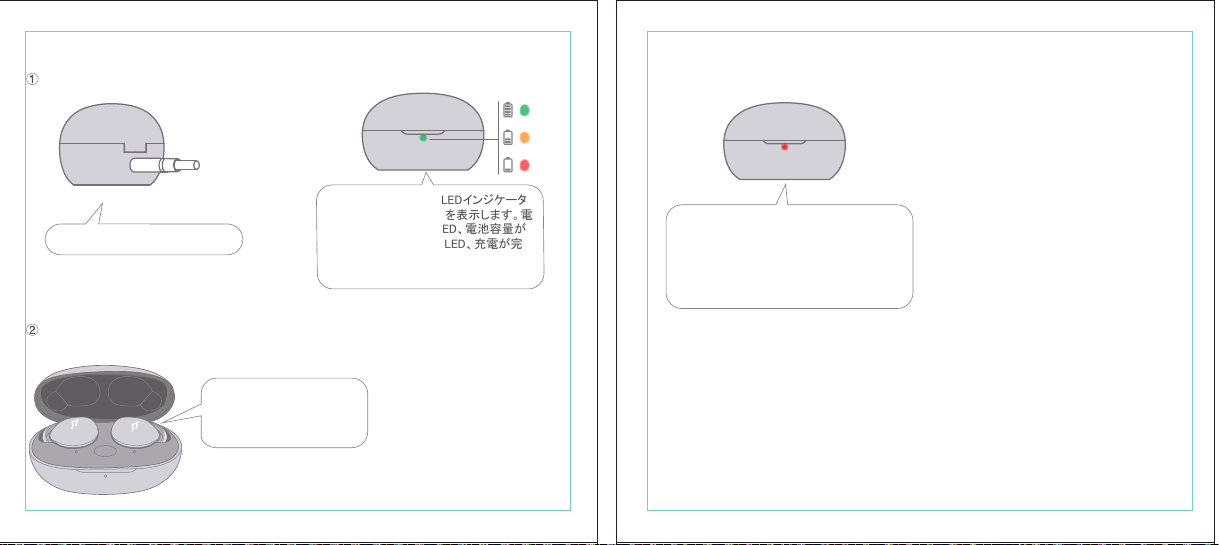
In The Box
材质:80G哑粉
尺寸:98*86mm
EH608
Manufacturer: Tiinlab Corporation
Address: No. 3333, Liuxian Avenue, Tower A, 35th Floor,
Tanglang City, Nanshan District, Shenzhen, China
Made in China
2ASDI-EH608 IC:24662-EH608
We know you will enjoy new 1MORE headphones as much as we do. At 1MORE, we value your
satisfaction. If you would like more details on this product or any of our other products, please visit
us online by scanning the QR code. Go to www.1more.com and sign up for VIP, and 1MORE will
treat you like one.
1MORE Inc., (“1MORE”) warrants to the original retail purchaser that this product is to be free
from defective materials and workmanship for a period of one year from the date of purchase if it
is properly used and maintained. If this product proves defective in either material or
workmanship, 1MORE, at its option, will (a) repair the product with new or refurbished parts, or
(b) replace the product with an equivalent new or refurbished product, at no charge for parts or
labor. If the product model is no longer available and cannot be repaired effectively or replaced
with an identical model, 1MORE at its sole option may replace the unit with a current model of
equal or greater value. In some cases, modication to the mounting surface may be required
where a new model is substituted. 1MORE assumes no responsibility or liability for such
modication. TO OBTAIN A REPAIR OR REPLACEMENT UNDER THE TERMS OF THIS
WARRANTY, PLEASE RETURN TO THE ORIGINAL DEALER FIRST AND THE ORIGINAL
DEALER SHALL REPAIR THE PRODUCT WITH NEW OR REFURBISHED PARTS OR REPLACE
THE PRODUCT WITH AN EQUIVALENT NEW OR REFURBISHED PRODUCT.
You will be required to submit a proof of purchasing details, including but not limited to a receipt
or sales invoice.
Return shipping for exchanges/repairs is the sole responsibility of the original retail purchaser.
Limitations:
• This limited warranty does not cover the failure of the product resulting from improper
installation, misuse, abuse, accident, neglect, mishandling, or wear from ordinary use or
environmental deterioration.
• This limited warranty does not cover cosmetic damage, including paint damage, or
consequential damage to other components or premises which may result for any reason from
the failure of the product.
• This limited warranty is null and void for products not used in accordance with 1MORE’s
instructions.
• This limited warranty is null and void for products with altered or missing serial numbers and for
products not purchased from an AUTHORIZED dealer.
• This limited warranty terminates if you sell or otherwise transfer this product to another party.
1. If the headphones cannot pair normally when powered on. Put both headphones back into
the case, triple click the pairing button and search for "1MORE Z30" in Bluetooth in your
devices to connect.
2. To unpair the device:
Put both headphones into the case, press and hold the pairing button on the case for 8
seconds to disconnect the headphones and the device.
3.OTA Firmware Update:
It can be synchronously upgraded via the 1MORE MUSIC APP while the Left and Right
earbuds are connected to each other with at least 50% battery.
* Functions of the 1MORE MUSIC APP may vary with different devices or operating systems.
For more details, please contact our customer service.
For the initial pairing, turn the headphones on to enter
pairing mode, the LEDs for headphone status will ash
in white. Headphones will power off if not paired to a
device within 3 minutes.
* After the rst successful pairing, headphones will
automatically connect to your device.
To pair with a new device, put headphones back into
the case, and triple click the pairing button when
powered on (no playback) to re-enter pairing mode.
Tips
Extra Functions
We Appreciate Your Business
1MORE (1) Year Limited Warranty
1. Please read this instruction manual carefully and retain for future reference.
2. Please fully charge the battery before rst use.
3. If the headphones have been unused for more than 3 months, we recommend that you charge
them. This will improve battery capacity.
4. Only use charging cables and adapters that are FCC (Federal Communications Commission)
approved.
5. In dry environments, static electricity may numb your ear. This is not related to the quality of the
product.
Safety Information
WEEE
FAQ
1. How to make sure the headphones have been fully charged?
Put the headphones into the charging case, if the headphone stutus LEDs are glowing this means
they have been fully charged.
2. Why won't headphones turn on?
Check if your headphones have enough battery life. If not, please charge them for at least 30 minutes.
3. Why won’t the headphones connect to my cellphone, or take a long time to connect?
Put both buds back into the charging case, then press and hold the pairing button for 3 seconds, click
the device name in your settings, they should now pair correctly to the phone.
4. Why won’t the headphones make phone calls?
The headphones are without microphones or phone call functions.
5. Why is the Bluetooth connection not stable and/or experiences some interruptions?
1) Try shortening the distance between your headphones and the device. Avoid solid barriers in
between you and the device.
2) Please keep away from strong interference sources, such as Wi-Fi and GPRS.
3) Please make sure the Bluetooth antenna of your device is not blocked.
6. Why can't the volume be adjusted by the cellphone buttons when playing soothing sounds in 1MORE
MUSIC APP?
The soothing sounds are stored in the ash of the headphone which can be adjusted only via the APP.
7. The headphones will be disconnected from the cellphone when out of wireless range. They cannot
restore the connection after returning back into the wireless range, how to solve it?
Click the device name in the cellphone pairing list to connect again.
8. I feel uncomfortable when wearing the headphones, how to solve it?
This is mainly because the sizes of ear tips and your canals are not snug, we suggest trying smaller ear
tips.
* For more detailed product FAQs, please visit the product support section under www.1more.com
CE
Headphones × 1 set
Charging Case × 1
Type-C Charging Cable × 1 Silicone Ear Tip (XS/S/L)
Product Overview
Fit
Replace
Placement
Headphones Pairing
Bluetooth Pairing To The Device
Charging
Controls
Soothing Sounds
Battery Notication
User Guide × 1
Silicone Ear Tip
Charging Pin
Charging Case
Pairing Button
Charging Case LED Indicator
LED Indicator for
Headphone Status
Headphone
Silicone Ear Tip
XS / S / M / L
Warranty Card × 1
The Left and Right headphones will automatically
pair with each other after the lid is open when
they are in the case (with charge).
* The above functions are available for either headphones in individual or Stereo mode.
To charge the case with Type-C cable.
To charge the headphones with the case.
* The above functions are available for either headphones in individual or Stereo mode.
Put headphones back into the case
ensuring they are magnetically attached
and close the lid to charge, a full charge
takes around 85 minutes.
Phone call function is not available on the headphones, and the playback controls can be
implemented on the connected device.
Please download the 1MORE MUSIC APP for soothing sounds.
Switch Listening Modes via APP
Enter the 1MORE Z30 home page in 1MORE MUSIC APP after pairing to your cellphone,
then you can switch listening modes between "Music" and "Soothing".
Click the "Soothing Sounds" to enter the playlist.
Click "+" to select the sound to be downloaded to your headphones for listening.
Click the timer icon on the song page to set the playtime.
The LED light of the charging case
will the different battery status: red
light indicates low battery, yellow light
indicates medium battery and green
light indicates full battery.
LED indicator for case battery status: when
the case battery is under 20%, the red
indicator stay lit for 3 seconds. When the
case battery is under 10%, the red indicator
will ash 10 times.
Power On:Take the headphones out of
the charging case (with charge), the
headphones will turn on automatically.
Power Off:Put the headphones
back into the charging case and
close the lid, they will automatically
turn off and start charging.
A full charge will take
around 90 minutes.
EN
* Playback and volume for the soothing sounds can only be adjusted via the APP.
スキャンして、1MOREのWechat公式アカウントをフォロー
「Soothing Sounds」ボタンを押すと、ヒーリング音楽の曲選択画面に入ります。
「+」をクリックしてヒーリング音楽をダウンロードすると、選択した曲がイヤホンに転送されます。
ヒーリング音楽再生画面の「タイマー」をクリックすると、ヒーリング音楽の再生時間を設定することができます。
ヒーリング音楽の再生/停止、音量調整などの操作は、APPでのみ対応します。
ヒーリング音楽
APPでEQモードを切り替えます
操作
その他の機能
梱包内容
イヤーピースの選択
イヤーピースの交換
左側/右側イヤホンのペアリング
イヤホンとBluetooth デバイスをペアリングするには
電池残量に関する注意充電
起動
イヤホン着用
製品外観
イヤホン本体 X 1セット
充電ケース X 1
Type-C充電ケーブル x 1
充電電極
イヤホン本体LEDインジケータ
ペアリングボタン
充電ケースLEDインジケータ
充電ケース
ヘッドホン
シリコン製イヤーピースセット
XS / S / M / L
シリコン製イヤーピースセット
(XS/S/L)
取扱説明書×1
一回のフル充電時間は約90 分です。
* 上記の機能は単独、両耳どちらのイヤホンでも適用されます。
* 上記の機能は単独、両耳どちらのイヤホンでも適用されます。
保証書×1
充電ケースが通電し、左/右側イヤホンをケースに
入っている状態で、ケースの蓋を開けると、左/右
のイヤホンが自動的にペアリングされます。
初めて使用する際、イヤホンの電源を入れてからデバイス
側で検索します。イヤホンは白色LEDが高速点滅します。も
しも 3 分たってもデバイスが見つからない場合、イヤホン本
体はすぐに電源が切れます。
・ すでに接続したことのあるイヤホンであれば、当該デバイ
スと自動でペアリングします。
新しいデバイスと接続する必要があれば、左/右イヤホンを
充電ケース内に戻して電源を入れ、ペアリングボタン3秒間
長押しすると、イヤホンは新しいデバイスとBluetoothのペア
リングがされます。
充電中:充電ケースのLEDインジケータ
は異なる色で電池容量を表示します。電
力が少ない場合赤色LED、電池容量が
半分ぐらいの場合黄色LED、充電が完
了している場合緑色LEDがそれぞれ点
灯します。
イヤホンを充電ケースに戻し
て、充電ケースの蓋を閉める
と充電が開始します。フル充
電時間は約85分です。
充電ケースの容量を確認する方法:充電ケ
ースの電池容量が20%以下になれば、充
電ケースの赤色LEDが3秒点灯します。充
電ケースの電池容量が10%以下になった
場合、充電ケースの赤色LEDのが10回点滅
します。
Type-C充電ケーブルを使用して充電ケースに充電する場合
充電ケースを使用してイヤホンに充電する場合
JP
River
- +
Time Setup
mins
River
OK
- +
60
30
90
River
Time Setup
mins
River
OK
- +
60
30
90
River
River
- +
Time Setup
mins
River
- +
60
30
90
River
1MORE SleepBuds Z30 User Guide
1MORE Наушники для сна Z30 Руководство пользователя
1MORE SleepBuds Z30 コードレスイヤホンユーザーガイド
Midre
Soothing Sounds
Allow adding 2 tracks
Volcano
Falls
River
Midre
Soothing Sounds
Allow adding 2 tracks
Volcano
Falls
River
1. Never disassemble the headphones. There are no user-serviceable parts inside.
2. Do not expose the headphones to temperatures below 32 °F (0 °C) or temperatures above 113 °F (45 °C).
3. Do not use the headphones in a thunderstorm storm. This could prevent the headphones from working
properly, and also increase your chance of being electrically shocked.
4. Do not use oil or any volatile liquid to clean this product.
5. Do not use the headphones in trafc. Do not use the headphones any time it would be dangerous to be
unaware of noises around you.
6. Adult supervision is required for children of age 6 and under.
7. If you don't feel comfortable after wearing the headphones, please refer to an aurist for advice on
whether in-ear headphones are suitable for you.
8. The headphones contain a lithium-ion battery, do not attempt to open, crush, or expose a charging case
to re or excessive temperature. Do not use it if the battery is swollen.
9. Please note that excessively high volumes and long listening times may cause hearing damage.
10. The symbol indicates DC voltage
All products bearing this symbol are waste electrical and electronic equipment (WEEE as in
directive 2012/19/EU) which should not be mixed with unsorted household waste. Instead,
you should protect human health and the environment by handing over your waste
equipment to a designated collection point for the recycling of waste electrical and
electronic equipment, appointed by the government or local authorities. Correct disposal
and recycling will help prevent potential negative consequences to the environment and
human health. Please contact the installer or local authorities for more information about the
location as well as terms and conditions of such collection points.
Home
Soothing Sounds
Listening Modes
1MORE Z30
OTA Firmware Upgrade
Quick Guide to Product
SoothingMusic
L 100% R 100% C 100%
The Bluetooth
®
word mark and logos are registered trademarks owned by Bluetooth SIG, Inc. and any
use of such marks by Tiinlab Corporation is under license. Other trademarks and trade names are the
property of their respective owners.
R
204-B00919
FCC
The SAR limit of USA (FCC) is 1.6 W/kg averaged over one gram of tissue. Device types EH608
(FCC ID: 2ASDI-EH608) has also been tested against this SAR limit.
This device complies with part 15 of the FCC rules. Operation is subject to the following two
conditions: (1) this device may not cause harmful interference, and (2) this device must accept any
interference received, including interference that may cause undesired operation.
NOTE: The manufacturer is not responsible for any radio or TV interference caused by unauthorized
modications or changesto this equipment. Such modications or changes could void the user’s authority
to operate the equipment.
NOTE: This equipment has been tested and found to comply with the limits for a Class B digital device,
pursuant to part 15 of the FCC Rules. These limits are designed to provide reasonable protection
against harmful interference in a residential installation. This equipment generates uses and can radiate
radio frequency energy and, if not installed and used in accordance with the instructions, may cause
harmful interference to radio communications. However, there is no guarantee that interference will not
occur in a particular installation. If this equipment does cause harmful interference to radio or television
reception, which can be determined by turning the equipment off and on, the user is encouraged to try
to correct the interference by one or more of the following measures:
-Reorient or relocate the receiving antenna.
-Increase the separation between the equipment and receiver.
-Connect the equipment into an outlet on a circuit different from that to which the receiver is
connected.
-Consult the dealer or an experienced radio/TV technician for help.
IC regulatory conformance
This device complies with CAN ICES-003 (B)/NMB-003(B).
This device complies with Industry Canada licence-exempt RSS standard(s). Operation is Subject to
the following two conditions: (1) this device may not cause interference, and (2) this device must accept
any interference, including interference that may cause undesired operation of the device.
Le présent appareil est conforme aux CNR d'Industrie Canada applicables aux appareils radio
exempts de licence. L'exploitation est autorisée aux deux conditions suivantes : (1) l'appareil ne doit
シリコン製イヤ
ーピースセット
Declaration of Conformity Hereby, Tiinlab Corporation declares that the radio equipment type
Wireless Earphones of EH608 is in compliance with Directive 2014/53/EU.
The full text of the EU declaration of conformity is available at the following internet address:
https://www.1more.com
RF exposure information: The device has been evaluated to meet general RF exposure requirement.
The device can be used in portable exposure condition without restriction. Radiation Exposure Statement
Power is so low that no RF exposure calculation is needed.
Declaration for EU Compliance
Operation Frequency/Max. EIRP: 2400-2483.5MHz, Max. EIRP is <10dBm.
В коробке
Мы знаем, что вы будете наслаждаться новыми наушниками 1MORE так же, как и мы. В
1MORE мы ценим ваше удовлетворение. Если вы хотите получить более подробную
информацию о данном продукте или о любых других наших продуктах, пожалуйста, посетите
нас онлайн, отсканировав QR-код. Перейдите по ссылке www.1more.com и
зарегистрируйтесь в VIP, и 1MORE будет относиться к вам как к одному из них.
Компания 1MORE Inc. (“1MORE”) гарантирует первоначальному розничному покупателю, что
данный продукт не будет содержать дефектов материалов и изготовления в течение одного года с
даты покупки, если он будет надлежащим образом использоваться и обслуживаться. Если в данном
продукте обнаружатся дефекты материала или изготовления, 1MORE, по своему усмотрению, (а)
отремонтирует продукт с использованием новых или восстановленных деталей или (б) заменит
продукт эквивалентным новым или восстановленным продуктом без оплаты запчастей или рабочей
силы. Если модель продукта больше недоступна и не может быть эффективно отремонтирована или
заменена идентичной моделью, компания 1MORE по своему усмотрению может заменить
устройство текущей моделью равной или большей стоимости. В некоторых случаях при замене
новой модели может потребоваться модификация монтажной поверхности. 1MORE не несет
никакой ответственности за такие изменения. ЧТОБЫ ПОЛУЧИТЬ РЕМОНТ ИЛИ ЗАМЕНУ В
СООТВЕТСТВИИ С УСЛОВИЯМИ ДАННОЙ ГАРАНТИИ, ПОЖАЛУЙСТА, СНАЧАЛА ОБРАТИТЕСЬ К
ПЕРВОНАЧАЛЬНОМУ ДИЛЕРУ, И ПЕРВОНАЧАЛЬНЫЙ ДИЛЕР ОТРЕМОНТИРУЕТ ПРОДУКТ НОВЫМИ
ИЛИ ВОССТАНОВЛЕННЫМИ ДЕТАЛЯМИ ИЛИ ЗАМЕНИТ ПРОДУКТ
ЭКВИВАЛЕНТНЫМ НОВЫМ ИЛИ
ВОССТАНОВЛЕННЫМ ПРОДУКТОМ.
От вас потребуется предоставить подтверждение покупки, включая, но не ограничиваясь этим,
квитанцию или счет-фактуру.
Ответственность за обратную доставку для обмена/ремонта несет исключительно первоначальный
розничный покупатель.
Ограничения:
• Данная ограниченная гарантия не распространяется на выход продукта из строя в результате
неправильной установки, неправильного использования, злоупотребления, несчастного случая,
1. Если наушники не могут нормально подключиться при включенном питании. Положите оба
наушника обратно в корпус, трижды нажмите кнопку сопряжения и найдите "1MORE Z30" в
Bluetooth на ваших устройствах для подключения.
2. Чтобы отключить сопряжение устройства:
Положите оба наушника в корпус, нажмите и удерживайте кнопку сопряжения на корпусе в
течение 8 секунд, чтобы отсоединить наушники от устройства.
3. Обновление прошивки OTA:
может выполняться синхронно с приложением 1MORE Music когда левый и правый наушники
сопряжены друг с другом через Bluetooth .
Для первоначального сопряжения включите
наушники, чтобы перейти в режим сопряжения,
светодиоды состояния наушников будут мигать
белым цветом. Наушники отключатся, если не
выполнить сопряжение с устройством в течение 3
минут.
* После первого успешного сопряжения наушники
автоматически подключатся к вашему устройству.
Чтобы выполнить сопряжение с новым устройством,
вставьте наушники обратно в корпус и трижды
нажмите кнопку сопряжения при включении
питания (воспроизведение отсутствует), чтобы
повторно войти в режим сопряжения.
Дополнительные функции
Мы ценим ваш бизнес
(1) годовая ограниченная гарантия 1MORE
Наушники × 1 набор
Зарядный корпус × 1
Зарядный кабель типа-С × 1Силиконовые вкладыши (XS/S/L)
Обзор продукта
Подгонка
Замена
Замена
Сопряжение наушников
Сопряжение Bluetooth с устройством
Зарядка
Управление
Успокаивающие звуки
Уведомление о батарее
Руководство пользователя × 1
Силиконовые
вкладыши
Зарядный штекер
Зарядный корпус
Кнопки сопряжения
Светодиодный индикатор зарядного корпуса
Наушники
Силиконовые вкладыши
XS / S / M / L
Гарантийный талон × 1
Левый и правый наушники автоматически
соединятся друг с другом после открытия
крышки, когда они будут находиться в корпусе
(с зарядкой).
* Вышеуказанные функции доступны как для наушников в индивидуальном, так и в стерео режиме.
Для зарядки корпуса используйте кабель Type-C.
Для зарядки наушников с корпусом.
* Вышеуказанные функции доступны как для наушников в индивидуальном, так и в стерео режиме.
Положите наушники обратно в корпус,
убедившись, что они надежно
закреплены магнитом, и закройте крышку
для зарядки, полная зарядка занимает
около 85 минут.
Функция телефонного звонка недоступна в наушниках, а управление воспроизведением
может быть реализовано на подключенном устройстве.
Пожалуйста, загрузите приложение 1MORE MUSIC для успокаивающих звуков.
Переключайте режимы прослушивания с помощью приложения
Зайдите на домашнюю страницу 1MORE Z30 в приложении 1MORE MUSIC после сопряжения с
вашим мобильным телефоном, затем вы сможете переключать режимы прослушивания между
"Музыка" и "Успокаивающий".
Нажмите "Soothing Sounds", чтобы войти в список воспроизведения.
Нажмите "+" чтобы выбрать звук, который будет загружен в ваши наушники для прослушивания.
Нажмите на значок таймера на странице песни,
чтобы установить время воспроизведения.
Светодиодный индикатор
зарядного устройства будет
отображать различное состояние
батареи: красный индикатор
указывает на низкий уровень
заряда батареи, желтый
индикатор указывает на средний
уровень заряда батареи и зеленый
индикатор указывает на полный
заряд батареи.
Светодиодный индикатор состояния
батареи корпуса: когда уровень заряда
батареи корпуса ниже 20%, красный
индикатор горит в течение 3 секунд. Когда
уровень заряда батареи корпуса ниже
10%, красный индикатор мигнет 10 раз.
Включение питания:Достаньте
наушники из зарядного корпуса (с
зарядкой), наушники включатся
автоматически.
Выключение питания:Положите
наушники обратно в зарядный
корпус и закройте крышку, они
автоматически выключатся и
начнут заряжаться.
Полная зарядка займет
около 90 минут.
RU
Midre
Soothing Sounds
Allow adding 2 tracks
Volcano
Falls
River
Midre River VolcanoFalls
River
Home
Soothing Sounds
Listening Modes
1MORE Z30
OTA Firmware Upgrade
Quick Guide to Product
SoothingMusic
L 100% R 100% C 100%
pas produire de brouillage, et (2) l'utilisateur de l'appareil doit accepter tout brouillage radioélectrique
subi, même si le brouillage est susceptible d'en compromettre le fonctionnement.
This device has been tested for compliance with IC SAR values at a typical operating near the
body. To ensure that RF exposure levels below the levels tested, use accessories with this
equipment to maintain a minimum separation distance of 0 mm between the body of the user and the
device. These accessories should not contain metallic components. It is possible that the accessories
used close to the body that do not meet these requirements are not consistent with the SAR limits and
it is advisable to avoid using them.
Ce dispositif a été testé pour la conformité avec les valeurs SAR à un fonctionnement typique près du
corps . Pour assurer que les niveaux d'exposition aux radiofréquences en deçà des niveaux testés ,
utiliser des accessoires avec cet équipement pour maintenir une distance de séparation minimale de 0
mm entre le corps de l'utilisateur et l'appareil. Ces accessoires ne doivent pas contenir des
composants métalliques . Il est possible que les accessoires utilisés près du corps quine répondent pas
à ces exigences ne sont pas compatibles avec les limites SAR et il est conseilléd'éviter de les utiliser.
Caution: Any changes or modications not expressly approved by the party responsible for compliance
could void the user's authority to operate this equipment.
充電ケースが通電している状態で、ケ
ースからイヤホンを取り出すと、イヤホ
ンは自動で起動します。
シャットダウン:イヤホンを充電ケースに
入れて蓋を閉めると、すぐにシャットダ
ウンし充電します。
本イヤホンに通話機能は付いていません、曲再生/停止、曲送り/曲戻し、及び音量調整などの再生機能は
スマートフォン側などで操作してください。
ヒーリング音楽などを再生するには1MORE MUSIC APPをダウンロードしてください。
1MORE MUSICアプリを使用しているときにスマホ端末がイヤホンと接続すると、「Music」 と 「Soothing」が選
べます。
1. 電源を入れても、左右のイヤホンが正常にペアリングできない場合、イヤホンを充電ケースに戻し、蓋を一
度閉めてから再度開けます。その後充電ケースのペアリングボタンを3秒間長押しすると、充電ケースのイ
ヤホンLEDインジケーターが白色に点滅し、再びペアリングモードに入ります。
2. 左右イヤホンのペアリング記録をクリアする方法:
両イヤホンを充電ケースに入れ、充電ケースのペアリングボタンを約3秒間長押しします。
3. OTAファームウェアのアップデートを行う場合:
ヘッドホン左右のバッテリーが50%以上で接続されている状態であれば、「1MORE MUSIC APP」を介して
同期的にアップデートすることができます。
* 1MORE MUSIC APPは接続機器によって機能が異なる場合がございます。詳細については、お気軽にカス
タマサポートまでにご連絡ください。
1MORE コミュニティ bbs.1more.com へのアクセスをお待ちしております。
www.1more.com にアクセスし、1MORE 会員に新規登録いただけると、素晴らしい情報を提供いたします。
Bluetooth®のマークとロゴはBluetooth® Technology Allianceの登録商標です。本製品で使用されているこ
れらのマークは万魔声学股份有限公司にてライセンス契約に基づき表示するものとします。その他商標及
び商品名称はそれぞれの所有者に帰属するものとします。
Светодиодный
индикатор для
состояния наушников
* Воспроизведение и громкость успокаивающих звуков можно регулировать только с помощью
приложения.
Словесный знак и логотипы Bluetooth® являются зарегистрированными товарными знаками,
принадлежащими Bluetooth SIG, Inc., и любое использование таких знаков корпорацией Tiinlab
осуществляется по лицензии. Другие товарные знаки и торговые наименования являются
собственностью их соответствующих владельцев.
* Функции приложения 1MORE MUSIC могут отличаться в зависимости от различных устройств или
операционных систем. Для получения более подробной информации, пожалуйста, свяжитесь с
нашей службой поддержки клиентов.
небрежности, неправильного обращения или износа в результате обычного использования или
ухудшения состояния окружающей среды.
• Данная ограниченная гарантия не распространяется на косметические повреждения, включая
повреждение краски, или косвенный ущерб другим компонентам или поверхностям, которые
могут возникнуть по любой причине в результате выхода продукта из строя.
• Данная ограниченная гарантия недействительна для продуктов, используемых не в соответствии с
инструкциями 1MORE.
• Данная ограниченная гарантия недействительна для продуктов с измененными или
отсутствующими серийными номерами, а также для продуктов, приобретенных не у
ОФИЦИАЛЬНОГО дилера.
• Действие данной ограниченной гарантии прекращается, если вы продаете или иным образом
передаете данный продукт другой стороне.
Home
Soothing Sounds
Listening Modes
1MORE Z30
OTA Firmware Upgrade
Quick Guide to Product
SoothingMusic
L 100% R 100% C 100%
River
Home
Soothing Sounds
Listening Modes
1MORE Z30
OTA Firmware Upgrade
Quick Guide to Product
Soothing
Music
L 100% R 100% C 100%
Home
Soothing Sounds
Listening Modes
1MORE Z30
OTA Firmware Upgrade
Quick Guide to Product
SoothingMusic
L 100% R 100% C 100%
Home
Soothing Sounds
Listening Modes
1MORE Z30
OTA Firmware Upgrade
Quick Guide to Product
Soothing
Music
L 100% R 100% C 100%
Home
Soothing Sounds
Listening Modes
1MORE Z30
OTA Firmware Upgrade
Quick Guide to Product
SoothingMusic
L 100% R 100% C 100%
Home
Soothing Sounds
Listening Modes
1MORE Z30
OTA Firmware Upgrade
Quick Guide to Product
Soothing
Music
L 100% R 100% C 100%
Midre River VolcanoFalls
River
Home
Soothing Sounds
Listening Modes
1MORE Z30
OTA Firmware Upgrade
Quick Guide to Product
SoothingMusic
L 100% R 100% C 100%
Home
Soothing Sounds
Listening Modes
1MORE Z30
OTA Firmware Upgrade
Quick Guide to Product
SoothingMusic
L 100% R 100% C 100%
Midre River VolcanoFalls
River
Home
Soothing Sounds
Listening Modes
1MORE Z30
OTA Firmware Upgrade
Quick Guide to Product
SoothingMusic
L 100% R 100% C 100%
Home
Soothing Sounds
Listening Modes
1MORE Z30
OTA Firmware Upgrade
Quick Guide to Product
SoothingMusic
L 100% R 100% C 100%
C:0/M:85/Y:95/K:0C
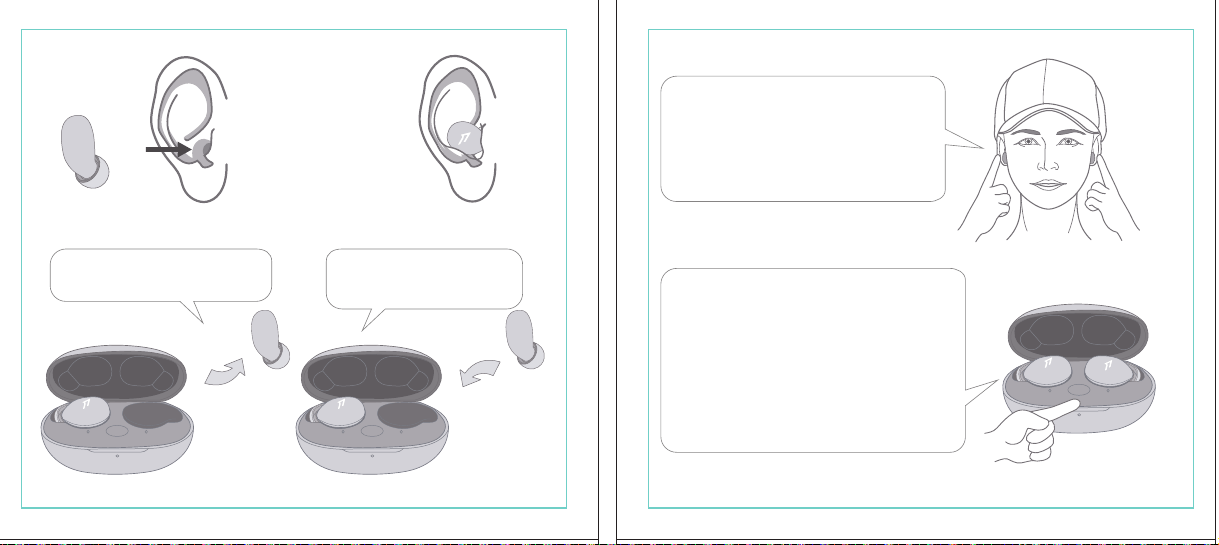
In The Box
材质:80G哑粉
尺寸:98*86mm
EH608
Manufacturer: Tiinlab Corporation
Address: No. 3333, Liuxian Avenue, Tower A, 35th Floor,
Tanglang City, Nanshan District, Shenzhen, China
Made in China
2ASDI-EH608 IC:24662-EH608
We know you will enjoy new 1MORE headphones as much as we do. At 1MORE, we value your
satisfaction. If you would like more details on this product or any of our other products, please visit
us online by scanning the QR code. Go to www.1more.com and sign up for VIP, and 1MORE will
treat you like one.
1MORE Inc., (“1MORE”) warrants to the original retail purchaser that this product is to be free
from defective materials and workmanship for a period of one year from the date of purchase if it
is properly used and maintained. If this product proves defective in either material or
workmanship, 1MORE, at its option, will (a) repair the product with new or refurbished parts, or
(b) replace the product with an equivalent new or refurbished product, at no charge for parts or
labor. If the product model is no longer available and cannot be repaired effectively or replaced
with an identical model, 1MORE at its sole option may replace the unit with a current model of
equal or greater value. In some cases, modication to the mounting surface may be required
where a new model is substituted. 1MORE assumes no responsibility or liability for such
modication. TO OBTAIN A REPAIR OR REPLACEMENT UNDER THE TERMS OF THIS
WARRANTY, PLEASE RETURN TO THE ORIGINAL DEALER FIRST AND THE ORIGINAL
DEALER SHALL REPAIR THE PRODUCT WITH NEW OR REFURBISHED PARTS OR REPLACE
THE PRODUCT WITH AN EQUIVALENT NEW OR REFURBISHED PRODUCT.
You will be required to submit a proof of purchasing details, including but not limited to a receipt
or sales invoice.
Return shipping for exchanges/repairs is the sole responsibility of the original retail purchaser.
Limitations:
• This limited warranty does not cover the failure of the product resulting from improper
installation, misuse, abuse, accident, neglect, mishandling, or wear from ordinary use or
environmental deterioration.
• This limited warranty does not cover cosmetic damage, including paint damage, or
consequential damage to other components or premises which may result for any reason from
the failure of the product.
• This limited warranty is null and void for products not used in accordance with 1MORE’s
instructions.
• This limited warranty is null and void for products with altered or missing serial numbers and for
products not purchased from an AUTHORIZED dealer.
• This limited warranty terminates if you sell or otherwise transfer this product to another party.
1. If the headphones cannot pair normally when powered on. Put both headphones back into
the case, triple click the pairing button and search for "1MORE Z30" in Bluetooth in your
devices to connect.
2. To unpair the device:
Put both headphones into the case, press and hold the pairing button on the case for 8
seconds to disconnect the headphones and the device.
3.OTA Firmware Update:
It can be synchronously upgraded via the 1MORE MUSIC APP while the Left and Right
earbuds are connected to each other with at least 50% battery.
* Functions of the 1MORE MUSIC APP may vary with different devices or operating systems.
For more details, please contact our customer service.
For the initial pairing, turn the headphones on to enter
pairing mode, the LEDs for headphone status will ash
in white. Headphones will power off if not paired to a
device within 3 minutes.
* After the rst successful pairing, headphones will
automatically connect to your device.
To pair with a new device, put headphones back into
the case, and triple click the pairing button when
powered on (no playback) to re-enter pairing mode.
Tips
Extra Functions
We Appreciate Your Business
1MORE (1) Year Limited Warranty
1. Please read this instruction manual carefully and retain for future reference.
2. Please fully charge the battery before rst use.
3. If the headphones have been unused for more than 3 months, we recommend that you charge
them. This will improve battery capacity.
4. Only use charging cables and adapters that are FCC (Federal Communications Commission)
approved.
5. In dry environments, static electricity may numb your ear. This is not related to the quality of the
product.
Safety Information
WEEE
FAQ
1. How to make sure the headphones have been fully charged?
Put the headphones into the charging case, if the headphone stutus LEDs are glowing this means
they have been fully charged.
2. Why won't headphones turn on?
Check if your headphones have enough battery life. If not, please charge them for at least 30 minutes.
3. Why won’t the headphones connect to my cellphone, or take a long time to connect?
Put both buds back into the charging case, then press and hold the pairing button for 3 seconds, click
the device name in your settings, they should now pair correctly to the phone.
4. Why won’t the headphones make phone calls?
The headphones are without microphones or phone call functions.
5. Why is the Bluetooth connection not stable and/or experiences some interruptions?
1) Try shortening the distance between your headphones and the device. Avoid solid barriers in
between you and the device.
2) Please keep away from strong interference sources, such as Wi-Fi and GPRS.
3) Please make sure the Bluetooth antenna of your device is not blocked.
6. Why can't the volume be adjusted by the cellphone buttons when playing soothing sounds in 1MORE
MUSIC APP?
The soothing sounds are stored in the ash of the headphone which can be adjusted only via the APP.
7. The headphones will be disconnected from the cellphone when out of wireless range. They cannot
restore the connection after returning back into the wireless range, how to solve it?
Click the device name in the cellphone pairing list to connect again.
8. I feel uncomfortable when wearing the headphones, how to solve it?
This is mainly because the sizes of ear tips and your canals are not snug, we suggest trying smaller ear
tips.
* For more detailed product FAQs, please visit the product support section under www.1more.com
CE
Headphones × 1 set
Charging Case × 1
Type-C Charging Cable × 1 Silicone Ear Tip (XS/S/L)
Product Overview
Fit
Replace
Placement
Headphones Pairing
Bluetooth Pairing To The Device
Charging
Controls
Soothing Sounds
Battery Notication
User Guide × 1
Silicone Ear Tip
Charging Pin
Charging Case
Pairing Button
Charging Case LED Indicator
LED Indicator for
Headphone Status
Headphone
Silicone Ear Tip
XS / S / M / L
Warranty Card × 1
The Left and Right headphones will automatically
pair with each other after the lid is open when
they are in the case (with charge).
* The above functions are available for either headphones in individual or Stereo mode.
To charge the case with Type-C cable.
To charge the headphones with the case.
* The above functions are available for either headphones in individual or Stereo mode.
Put headphones back into the case
ensuring they are magnetically attached
and close the lid to charge, a full charge
takes around 85 minutes.
Phone call function is not available on the headphones, and the playback controls can be
implemented on the connected device.
Please download the 1MORE MUSIC APP for soothing sounds.
Switch Listening Modes via APP
Enter the 1MORE Z30 home page in 1MORE MUSIC APP after pairing to your cellphone,
then you can switch listening modes between "Music" and "Soothing".
Click the "Soothing Sounds" to enter the playlist.
Click "+" to select the sound to be downloaded to your headphones for listening.
Click the timer icon on the song page to set the playtime.
The LED light of the charging case
will the different battery status: red
light indicates low battery, yellow light
indicates medium battery and green
light indicates full battery.
LED indicator for case battery status: when
the case battery is under 20%, the red
indicator stay lit for 3 seconds. When the
case battery is under 10%, the red indicator
will ash 10 times.
Power On:Take the headphones out of
the charging case (with charge), the
headphones will turn on automatically.
Power Off:Put the headphones
back into the charging case and
close the lid, they will automatically
turn off and start charging.
A full charge will take
around 90 minutes.
EN
* Playback and volume for the soothing sounds can only be adjusted via the APP.
スキャンして、1MOREのWechat公式アカウントをフォロー
「Soothing Sounds」ボタンを押すと、ヒーリング音楽の曲選択画面に入ります。
「+」をクリックしてヒーリング音楽をダウンロードすると、選択した曲がイヤホンに転送されます。
ヒーリング音楽再生画面の「タイマー」をクリックすると、ヒーリング音楽の再生時間を設定することができます。
ヒーリング音楽の再生/停止、音量調整などの操作は、APPでのみ対応します。
ヒーリング音楽
APPでEQモードを切り替えます
操作
その他の機能
梱包内容
イヤーピースの選択
イヤーピースの交換
左側/右側イヤホンのペアリング
イヤホンとBluetooth デバイスをペアリングするには
電池残量に関する注意充電
起動
イヤホン着用
製品外観
イヤホン本体 X 1セット
充電ケース X 1
Type-C充電ケーブル x 1
充電電極
イヤホン本体LEDインジケータ
ペアリングボタン
充電ケースLEDインジケータ
充電ケース
ヘッドホン
シリコン製イヤーピースセット
XS / S / M / L
シリコン製イヤーピースセット
(XS/S/L)
取扱説明書×1
一回のフル充電時間は約90 分です。
* 上記の機能は単独、両耳どちらのイヤホンでも適用されます。
* 上記の機能は単独、両耳どちらのイヤホンでも適用されます。
保証書×1
充電ケースが通電し、左/右側イヤホンをケースに
入っている状態で、ケースの蓋を開けると、左/右
のイヤホンが自動的にペアリングされます。
初めて使用する際、イヤホンの電源を入れてからデバイス
側で検索します。イヤホンは白色LEDが高速点滅します。も
しも 3 分たってもデバイスが見つからない場合、イヤホン本
体はすぐに電源が切れます。
・ すでに接続したことのあるイヤホンであれば、当該デバイ
スと自動でペアリングします。
新しいデバイスと接続する必要があれば、左/右イヤホンを
充電ケース内に戻して電源を入れ、ペアリングボタン3秒間
長押しすると、イヤホンは新しいデバイスとBluetoothのペア
リングがされます。
充電中:充電ケースのLEDインジケータ
は異なる色で電池容量を表示します。電
力が少ない場合赤色LED、電池容量が
半分ぐらいの場合黄色LED、充電が完
了している場合緑色LEDがそれぞれ点
灯します。
イヤホンを充電ケースに戻し
て、充電ケースの蓋を閉める
と充電が開始します。フル充
電時間は約85分です。
充電ケースの容量を確認する方法:充電ケ
ースの電池容量が20%以下になれば、充
電ケースの赤色LEDが3秒点灯します。充
電ケースの電池容量が10%以下になった
場合、充電ケースの赤色LEDのが10回点滅
します。
Type-C充電ケーブルを使用して充電ケースに充電する場合
充電ケースを使用してイヤホンに充電する場合
JP
River
- +
Time Setup
mins
River
OK
- +
60
30
90
River
Time Setup
mins
River
OK
- +
60
30
90
River
River
- +
Time Setup
mins
River
- +
60
30
90
River
1MORE SleepBuds Z30 User Guide
1MORE Наушники для сна Z30 Руководство пользователя
1MORE SleepBuds Z30 コードレスイヤホンユーザーガイド
Midre
Soothing Sounds
Allow adding 2 tracks
Volcano
Falls
River
Midre
Soothing Sounds
Allow adding 2 tracks
Volcano
Falls
River
1. Never disassemble the headphones. There are no user-serviceable parts inside.
2. Do not expose the headphones to temperatures below 32 °F (0 °C) or temperatures above 113 °F (45 °C).
3. Do not use the headphones in a thunderstorm storm. This could prevent the headphones from working
properly, and also increase your chance of being electrically shocked.
4. Do not use oil or any volatile liquid to clean this product.
5. Do not use the headphones in trafc. Do not use the headphones any time it would be dangerous to be
unaware of noises around you.
6. Adult supervision is required for children of age 6 and under.
7. If you don't feel comfortable after wearing the headphones, please refer to an aurist for advice on
whether in-ear headphones are suitable for you.
8. The headphones contain a lithium-ion battery, do not attempt to open, crush, or expose a charging case
to re or excessive temperature. Do not use it if the battery is swollen.
9. Please note that excessively high volumes and long listening times may cause hearing damage.
10. The symbol indicates DC voltage
All products bearing this symbol are waste electrical and electronic equipment (WEEE as in
directive 2012/19/EU) which should not be mixed with unsorted household waste. Instead,
you should protect human health and the environment by handing over your waste
equipment to a designated collection point for the recycling of waste electrical and
electronic equipment, appointed by the government or local authorities. Correct disposal
and recycling will help prevent potential negative consequences to the environment and
human health. Please contact the installer or local authorities for more information about the
location as well as terms and conditions of such collection points.
Home
Soothing Sounds
Listening Modes
1MORE Z30
OTA Firmware Upgrade
Quick Guide to Product
SoothingMusic
L 100% R 100% C 100%
The Bluetooth
®
word mark and logos are registered trademarks owned by Bluetooth SIG, Inc. and any
use of such marks by Tiinlab Corporation is under license. Other trademarks and trade names are the
property of their respective owners.
R
204-B00919
FCC
The SAR limit of USA (FCC) is 1.6 W/kg averaged over one gram of tissue. Device types EH608
(FCC ID: 2ASDI-EH608) has also been tested against this SAR limit.
This device complies with part 15 of the FCC rules. Operation is subject to the following two
conditions: (1) this device may not cause harmful interference, and (2) this device must accept any
interference received, including interference that may cause undesired operation.
NOTE: The manufacturer is not responsible for any radio or TV interference caused by unauthorized
modications or changesto this equipment. Such modications or changes could void the user’s authority
to operate the equipment.
NOTE: This equipment has been tested and found to comply with the limits for a Class B digital device,
pursuant to part 15 of the FCC Rules. These limits are designed to provide reasonable protection
against harmful interference in a residential installation. This equipment generates uses and can radiate
radio frequency energy and, if not installed and used in accordance with the instructions, may cause
harmful interference to radio communications. However, there is no guarantee that interference will not
occur in a particular installation. If this equipment does cause harmful interference to radio or television
reception, which can be determined by turning the equipment off and on, the user is encouraged to try
to correct the interference by one or more of the following measures:
-Reorient or relocate the receiving antenna.
-Increase the separation between the equipment and receiver.
-Connect the equipment into an outlet on a circuit different from that to which the receiver is
connected.
-Consult the dealer or an experienced radio/TV technician for help.
IC regulatory conformance
This device complies with CAN ICES-003 (B)/NMB-003(B).
This device complies with Industry Canada licence-exempt RSS standard(s). Operation is Subject to
the following two conditions: (1) this device may not cause interference, and (2) this device must accept
any interference, including interference that may cause undesired operation of the device.
Le présent appareil est conforme aux CNR d'Industrie Canada applicables aux appareils radio
exempts de licence. L'exploitation est autorisée aux deux conditions suivantes : (1) l'appareil ne doit
シリコン製イヤ
ーピースセット
Declaration of Conformity Hereby, Tiinlab Corporation declares that the radio equipment type
Wireless Earphones of EH608 is in compliance with Directive 2014/53/EU.
The full text of the EU declaration of conformity is available at the following internet address:
https://www.1more.com
RF exposure information: The device has been evaluated to meet general RF exposure requirement.
The device can be used in portable exposure condition without restriction. Radiation Exposure Statement
Power is so low that no RF exposure calculation is needed.
Declaration for EU Compliance
Operation Frequency/Max. EIRP: 2400-2483.5MHz, Max. EIRP is <10dBm.
В коробке
Мы знаем, что вы будете наслаждаться новыми наушниками 1MORE так же, как и мы. В
1MORE мы ценим ваше удовлетворение. Если вы хотите получить более подробную
информацию о данном продукте или о любых других наших продуктах, пожалуйста, посетите
нас онлайн, отсканировав QR-код. Перейдите по ссылке www.1more.com и
зарегистрируйтесь в VIP, и 1MORE будет относиться к вам как к одному из них.
Компания 1MORE Inc. (“1MORE”) гарантирует первоначальному розничному покупателю, что
данный продукт не будет содержать дефектов материалов и изготовления в течение одного года с
даты покупки, если он будет надлежащим образом использоваться и обслуживаться. Если в данном
продукте обнаружатся дефекты материала или изготовления, 1MORE, по своему усмотрению, (а)
отремонтирует продукт с использованием новых или восстановленных деталей или (б) заменит
продукт эквивалентным новым или восстановленным продуктом без оплаты запчастей или рабочей
силы. Если модель продукта больше недоступна и не может быть эффективно отремонтирована или
заменена идентичной моделью, компания 1MORE по своему усмотрению может заменить
устройство текущей моделью равной или большей стоимости. В некоторых случаях при замене
новой модели может потребоваться модификация монтажной поверхности. 1MORE не несет
никакой ответственности за такие изменения. ЧТОБЫ ПОЛУЧИТЬ РЕМОНТ ИЛИ ЗАМЕНУ В
СООТВЕТСТВИИ С УСЛОВИЯМИ ДАННОЙ ГАРАНТИИ, ПОЖАЛУЙСТА, СНАЧАЛА ОБРАТИТЕСЬ К
ПЕРВОНАЧАЛЬНОМУ ДИЛЕРУ, И ПЕРВОНАЧАЛЬНЫЙ ДИЛЕР ОТРЕМОНТИРУЕТ ПРОДУКТ НОВЫМИ
ИЛИ ВОССТАНОВЛЕННЫМИ ДЕТАЛЯМИ ИЛИ ЗАМЕНИТ ПРОДУКТ
ЭКВИВАЛЕНТНЫМ НОВЫМ ИЛИ
ВОССТАНОВЛЕННЫМ ПРОДУКТОМ.
От вас потребуется предоставить подтверждение покупки, включая, но не ограничиваясь этим,
квитанцию или счет-фактуру.
Ответственность за обратную доставку для обмена/ремонта несет исключительно первоначальный
розничный покупатель.
Ограничения:
• Данная ограниченная гарантия не распространяется на выход продукта из строя в результате
неправильной установки, неправильного использования, злоупотребления, несчастного случая,
1. Если наушники не могут нормально подключиться при включенном питании. Положите оба
наушника обратно в корпус, трижды нажмите кнопку сопряжения и найдите "1MORE Z30" в
Bluetooth на ваших устройствах для подключения.
2. Чтобы отключить сопряжение устройства:
Положите оба наушника в корпус, нажмите и удерживайте кнопку сопряжения на корпусе в
течение 8 секунд, чтобы отсоединить наушники от устройства.
3. Обновление прошивки OTA:
может выполняться синхронно с приложением 1MORE Music когда левый и правый наушники
сопряжены друг с другом через Bluetooth .
Для первоначального сопряжения включите
наушники, чтобы перейти в режим сопряжения,
светодиоды состояния наушников будут мигать
белым цветом. Наушники отключатся, если не
выполнить сопряжение с устройством в течение 3
минут.
* После первого успешного сопряжения наушники
автоматически подключатся к вашему устройству.
Чтобы выполнить сопряжение с новым устройством,
вставьте наушники обратно в корпус и трижды
нажмите кнопку сопряжения при включении
питания (воспроизведение отсутствует), чтобы
повторно войти в режим сопряжения.
Дополнительные функции
Мы ценим ваш бизнес
(1) годовая ограниченная гарантия 1MORE
Наушники × 1 набор
Зарядный корпус × 1
Зарядный кабель типа-С × 1Силиконовые вкладыши (XS/S/L)
Обзор продукта
Подгонка
Замена
Замена
Сопряжение наушников
Сопряжение Bluetooth с устройством
Зарядка
Управление
Успокаивающие звуки
Уведомление о батарее
Руководство пользователя × 1
Силиконовые
вкладыши
Зарядный штекер
Зарядный корпус
Кнопки сопряжения
Светодиодный индикатор зарядного корпуса
Наушники
Силиконовые вкладыши
XS / S / M / L
Гарантийный талон × 1
Левый и правый наушники автоматически
соединятся друг с другом после открытия
крышки, когда они будут находиться в корпусе
(с зарядкой).
* Вышеуказанные функции доступны как для наушников в индивидуальном, так и в стерео режиме.
Для зарядки корпуса используйте кабель Type-C.
Для зарядки наушников с корпусом.
* Вышеуказанные функции доступны как для наушников в индивидуальном, так и в стерео режиме.
Положите наушники обратно в корпус,
убедившись, что они надежно
закреплены магнитом, и закройте крышку
для зарядки, полная зарядка занимает
около 85 минут.
Функция телефонного звонка недоступна в наушниках, а управление воспроизведением
может быть реализовано на подключенном устройстве.
Пожалуйста, загрузите приложение 1MORE MUSIC для успокаивающих звуков.
Переключайте режимы прослушивания с помощью приложения
Зайдите на домашнюю страницу 1MORE Z30 в приложении 1MORE MUSIC после сопряжения с
вашим мобильным телефоном, затем вы сможете переключать режимы прослушивания между
"Музыка" и "Успокаивающий".
Нажмите "Soothing Sounds", чтобы войти в список воспроизведения.
Нажмите "+" чтобы выбрать звук, который будет загружен в ваши наушники для прослушивания.
Нажмите на значок таймера на странице песни,
чтобы установить время воспроизведения.
Светодиодный индикатор
зарядного устройства будет
отображать различное состояние
батареи: красный индикатор
указывает на низкий уровень
заряда батареи, желтый
индикатор указывает на средний
уровень заряда батареи и зеленый
индикатор указывает на полный
заряд батареи.
Светодиодный индикатор состояния
батареи корпуса: когда уровень заряда
батареи корпуса ниже 20%, красный
индикатор горит в течение 3 секунд. Когда
уровень заряда батареи корпуса ниже
10%, красный индикатор мигнет 10 раз.
Включение питания:Достаньте
наушники из зарядного корпуса (с
зарядкой), наушники включатся
автоматически.
Выключение питания:Положите
наушники обратно в зарядный
корпус и закройте крышку, они
автоматически выключатся и
начнут заряжаться.
Полная зарядка займет
около 90 минут.
RU
Midre
Soothing Sounds
Allow adding 2 tracks
Volcano
Falls
River
Midre River VolcanoFalls
River
Home
Soothing Sounds
Listening Modes
1MORE Z30
OTA Firmware Upgrade
Quick Guide to Product
SoothingMusic
L 100% R 100% C 100%
pas produire de brouillage, et (2) l'utilisateur de l'appareil doit accepter tout brouillage radioélectrique
subi, même si le brouillage est susceptible d'en compromettre le fonctionnement.
This device has been tested for compliance with IC SAR values at a typical operating near the
body. To ensure that RF exposure levels below the levels tested, use accessories with this
equipment to maintain a minimum separation distance of 0 mm between the body of the user and the
device. These accessories should not contain metallic components. It is possible that the accessories
used close to the body that do not meet these requirements are not consistent with the SAR limits and
it is advisable to avoid using them.
Ce dispositif a été testé pour la conformité avec les valeurs SAR à un fonctionnement typique près du
corps . Pour assurer que les niveaux d'exposition aux radiofréquences en deçà des niveaux testés ,
utiliser des accessoires avec cet équipement pour maintenir une distance de séparation minimale de 0
mm entre le corps de l'utilisateur et l'appareil. Ces accessoires ne doivent pas contenir des
composants métalliques . Il est possible que les accessoires utilisés près du corps quine répondent pas
à ces exigences ne sont pas compatibles avec les limites SAR et il est conseilléd'éviter de les utiliser.
Caution: Any changes or modications not expressly approved by the party responsible for compliance
could void the user's authority to operate this equipment.
充電ケースが通電している状態で、ケ
ースからイヤホンを取り出すと、イヤホ
ンは自動で起動します。
シャットダウン:イヤホンを充電ケースに
入れて蓋を閉めると、すぐにシャットダ
ウンし充電します。
本イヤホンに通話機能は付いていません、曲再生/停止、曲送り/曲戻し、及び音量調整などの再生機能は
スマートフォン側などで操作してください。
ヒーリング音楽などを再生するには1MORE MUSIC APPをダウンロードしてください。
1MORE MUSICアプリを使用しているときにスマホ端末がイヤホンと接続すると、「Music」 と 「Soothing」が選
べます。
1. 電源を入れても、左右のイヤホンが正常にペアリングできない場合、イヤホンを充電ケースに戻し、蓋を一
度閉めてから再度開けます。その後充電ケースのペアリングボタンを3秒間長押しすると、充電ケースのイ
ヤホンLEDインジケーターが白色に点滅し、再びペアリングモードに入ります。
2. 左右イヤホンのペアリング記録をクリアする方法:
両イヤホンを充電ケースに入れ、充電ケースのペアリングボタンを約3秒間長押しします。
3. OTAファームウェアのアップデートを行う場合:
ヘッドホン左右のバッテリーが50%以上で接続されている状態であれば、「1MORE MUSIC APP」を介して
同期的にアップデートすることができます。
* 1MORE MUSIC APPは接続機器によって機能が異なる場合がございます。詳細については、お気軽にカス
タマサポートまでにご連絡ください。
1MORE コミュニティ bbs.1more.com へのアクセスをお待ちしております。
www.1more.com にアクセスし、1MORE 会員に新規登録いただけると、素晴らしい情報を提供いたします。
Bluetooth®のマークとロゴはBluetooth® Technology Allianceの登録商標です。本製品で使用されているこ
れらのマークは万魔声学股份有限公司にてライセンス契約に基づき表示するものとします。その他商標及
び商品名称はそれぞれの所有者に帰属するものとします。
Светодиодный
индикатор для
состояния наушников
* Воспроизведение и громкость успокаивающих звуков можно регулировать только с помощью
приложения.
Словесный знак и логотипы Bluetooth® являются зарегистрированными товарными знаками,
принадлежащими Bluetooth SIG, Inc., и любое использование таких знаков корпорацией Tiinlab
осуществляется по лицензии. Другие товарные знаки и торговые наименования являются
собственностью их соответствующих владельцев.
* Функции приложения 1MORE MUSIC могут отличаться в зависимости от различных устройств или
операционных систем. Для получения более подробной информации, пожалуйста, свяжитесь с
нашей службой поддержки клиентов.
небрежности, неправильного обращения или износа в результате обычного использования или
ухудшения состояния окружающей среды.
• Данная ограниченная гарантия не распространяется на косметические повреждения, включая
повреждение краски, или косвенный ущерб другим компонентам или поверхностям, которые
могут возникнуть по любой причине в результате выхода продукта из строя.
• Данная ограниченная гарантия недействительна для продуктов, используемых не в соответствии с
инструкциями 1MORE.
• Данная ограниченная гарантия недействительна для продуктов с измененными или
отсутствующими серийными номерами, а также для продуктов, приобретенных не у
ОФИЦИАЛЬНОГО дилера.
• Действие данной ограниченной гарантии прекращается, если вы продаете или иным образом
передаете данный продукт другой стороне.
Home
Soothing Sounds
Listening Modes
1MORE Z30
OTA Firmware Upgrade
Quick Guide to Product
SoothingMusic
L 100% R 100% C 100%
River
Home
Soothing Sounds
Listening Modes
1MORE Z30
OTA Firmware Upgrade
Quick Guide to Product
Soothing
Music
L 100% R 100% C 100%
Home
Soothing Sounds
Listening Modes
1MORE Z30
OTA Firmware Upgrade
Quick Guide to Product
SoothingMusic
L 100% R 100% C 100%
Home
Soothing Sounds
Listening Modes
1MORE Z30
OTA Firmware Upgrade
Quick Guide to Product
Soothing
Music
L 100% R 100% C 100%
Home
Soothing Sounds
Listening Modes
1MORE Z30
OTA Firmware Upgrade
Quick Guide to Product
SoothingMusic
L 100% R 100% C 100%
Home
Soothing Sounds
Listening Modes
1MORE Z30
OTA Firmware Upgrade
Quick Guide to Product
Soothing
Music
L 100% R 100% C 100%
Midre River VolcanoFalls
River
Home
Soothing Sounds
Listening Modes
1MORE Z30
OTA Firmware Upgrade
Quick Guide to Product
SoothingMusic
L 100% R 100% C 100%
Home
Soothing Sounds
Listening Modes
1MORE Z30
OTA Firmware Upgrade
Quick Guide to Product
SoothingMusic
L 100% R 100% C 100%
Midre River VolcanoFalls
River
Home
Soothing Sounds
Listening Modes
1MORE Z30
OTA Firmware Upgrade
Quick Guide to Product
SoothingMusic
L 100% R 100% C 100%
Home
Soothing Sounds
Listening Modes
1MORE Z30
OTA Firmware Upgrade
Quick Guide to Product
SoothingMusic
L 100% R 100% C 100%
C:0/M:85/Y:95/K:0C
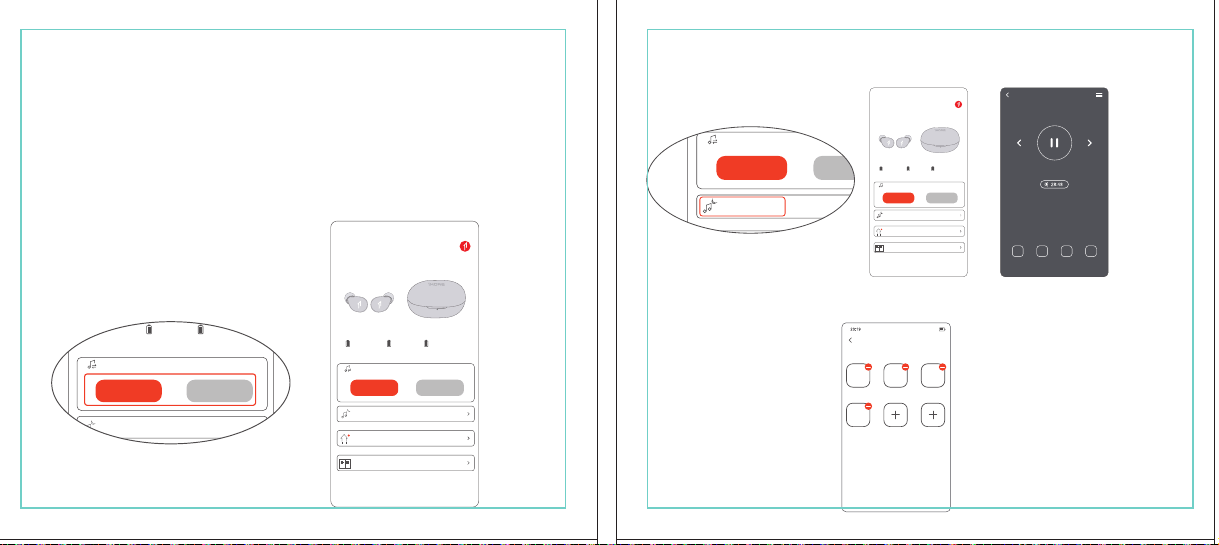
In The Box
材质:80G哑粉
尺寸:98*86mm
EH608
Manufacturer: Tiinlab Corporation
Address: No. 3333, Liuxian Avenue, Tower A, 35th Floor,
Tanglang City, Nanshan District, Shenzhen, China
Made in China
2ASDI-EH608 IC:24662-EH608
We know you will enjoy new 1MORE headphones as much as we do. At 1MORE, we value your
satisfaction. If you would like more details on this product or any of our other products, please visit
us online by scanning the QR code. Go to www.1more.com and sign up for VIP, and 1MORE will
treat you like one.
1MORE Inc., (“1MORE”) warrants to the original retail purchaser that this product is to be free
from defective materials and workmanship for a period of one year from the date of purchase if it
is properly used and maintained. If this product proves defective in either material or
workmanship, 1MORE, at its option, will (a) repair the product with new or refurbished parts, or
(b) replace the product with an equivalent new or refurbished product, at no charge for parts or
labor. If the product model is no longer available and cannot be repaired effectively or replaced
with an identical model, 1MORE at its sole option may replace the unit with a current model of
equal or greater value. In some cases, modication to the mounting surface may be required
where a new model is substituted. 1MORE assumes no responsibility or liability for such
modication. TO OBTAIN A REPAIR OR REPLACEMENT UNDER THE TERMS OF THIS
WARRANTY, PLEASE RETURN TO THE ORIGINAL DEALER FIRST AND THE ORIGINAL
DEALER SHALL REPAIR THE PRODUCT WITH NEW OR REFURBISHED PARTS OR REPLACE
THE PRODUCT WITH AN EQUIVALENT NEW OR REFURBISHED PRODUCT.
You will be required to submit a proof of purchasing details, including but not limited to a receipt
or sales invoice.
Return shipping for exchanges/repairs is the sole responsibility of the original retail purchaser.
Limitations:
• This limited warranty does not cover the failure of the product resulting from improper
installation, misuse, abuse, accident, neglect, mishandling, or wear from ordinary use or
environmental deterioration.
• This limited warranty does not cover cosmetic damage, including paint damage, or
consequential damage to other components or premises which may result for any reason from
the failure of the product.
• This limited warranty is null and void for products not used in accordance with 1MORE’s
instructions.
• This limited warranty is null and void for products with altered or missing serial numbers and for
products not purchased from an AUTHORIZED dealer.
• This limited warranty terminates if you sell or otherwise transfer this product to another party.
1. If the headphones cannot pair normally when powered on. Put both headphones back into
the case, triple click the pairing button and search for "1MORE Z30" in Bluetooth in your
devices to connect.
2. To unpair the device:
Put both headphones into the case, press and hold the pairing button on the case for 8
seconds to disconnect the headphones and the device.
3.OTA Firmware Update:
It can be synchronously upgraded via the 1MORE MUSIC APP while the Left and Right
earbuds are connected to each other with at least 50% battery.
* Functions of the 1MORE MUSIC APP may vary with different devices or operating systems.
For more details, please contact our customer service.
For the initial pairing, turn the headphones on to enter
pairing mode, the LEDs for headphone status will ash
in white. Headphones will power off if not paired to a
device within 3 minutes.
* After the rst successful pairing, headphones will
automatically connect to your device.
To pair with a new device, put headphones back into
the case, and triple click the pairing button when
powered on (no playback) to re-enter pairing mode.
Tips
Extra Functions
We Appreciate Your Business
1MORE (1) Year Limited Warranty
1. Please read this instruction manual carefully and retain for future reference.
2. Please fully charge the battery before rst use.
3. If the headphones have been unused for more than 3 months, we recommend that you charge
them. This will improve battery capacity.
4. Only use charging cables and adapters that are FCC (Federal Communications Commission)
approved.
5. In dry environments, static electricity may numb your ear. This is not related to the quality of the
product.
Safety Information
WEEE
FAQ
1. How to make sure the headphones have been fully charged?
Put the headphones into the charging case, if the headphone stutus LEDs are glowing this means
they have been fully charged.
2. Why won't headphones turn on?
Check if your headphones have enough battery life. If not, please charge them for at least 30 minutes.
3. Why won’t the headphones connect to my cellphone, or take a long time to connect?
Put both buds back into the charging case, then press and hold the pairing button for 3 seconds, click
the device name in your settings, they should now pair correctly to the phone.
4. Why won’t the headphones make phone calls?
The headphones are without microphones or phone call functions.
5. Why is the Bluetooth connection not stable and/or experiences some interruptions?
1) Try shortening the distance between your headphones and the device. Avoid solid barriers in
between you and the device.
2) Please keep away from strong interference sources, such as Wi-Fi and GPRS.
3) Please make sure the Bluetooth antenna of your device is not blocked.
6. Why can't the volume be adjusted by the cellphone buttons when playing soothing sounds in 1MORE
MUSIC APP?
The soothing sounds are stored in the ash of the headphone which can be adjusted only via the APP.
7. The headphones will be disconnected from the cellphone when out of wireless range. They cannot
restore the connection after returning back into the wireless range, how to solve it?
Click the device name in the cellphone pairing list to connect again.
8. I feel uncomfortable when wearing the headphones, how to solve it?
This is mainly because the sizes of ear tips and your canals are not snug, we suggest trying smaller ear
tips.
* For more detailed product FAQs, please visit the product support section under www.1more.com
CE
Headphones × 1 set
Charging Case × 1
Type-C Charging Cable × 1 Silicone Ear Tip (XS/S/L)
Product Overview
Fit
Replace
Placement
Headphones Pairing
Bluetooth Pairing To The Device
Charging
Controls
Soothing Sounds
Battery Notication
User Guide × 1
Silicone Ear Tip
Charging Pin
Charging Case
Pairing Button
Charging Case LED Indicator
LED Indicator for
Headphone Status
Headphone
Silicone Ear Tip
XS / S / M / L
Warranty Card × 1
The Left and Right headphones will automatically
pair with each other after the lid is open when
they are in the case (with charge).
* The above functions are available for either headphones in individual or Stereo mode.
To charge the case with Type-C cable.
To charge the headphones with the case.
* The above functions are available for either headphones in individual or Stereo mode.
Put headphones back into the case
ensuring they are magnetically attached
and close the lid to charge, a full charge
takes around 85 minutes.
Phone call function is not available on the headphones, and the playback controls can be
implemented on the connected device.
Please download the 1MORE MUSIC APP for soothing sounds.
Switch Listening Modes via APP
Enter the 1MORE Z30 home page in 1MORE MUSIC APP after pairing to your cellphone,
then you can switch listening modes between "Music" and "Soothing".
Click the "Soothing Sounds" to enter the playlist.
Click "+" to select the sound to be downloaded to your headphones for listening.
Click the timer icon on the song page to set the playtime.
The LED light of the charging case
will the different battery status: red
light indicates low battery, yellow light
indicates medium battery and green
light indicates full battery.
LED indicator for case battery status: when
the case battery is under 20%, the red
indicator stay lit for 3 seconds. When the
case battery is under 10%, the red indicator
will ash 10 times.
Power On:Take the headphones out of
the charging case (with charge), the
headphones will turn on automatically.
Power Off:Put the headphones
back into the charging case and
close the lid, they will automatically
turn off and start charging.
A full charge will take
around 90 minutes.
EN
* Playback and volume for the soothing sounds can only be adjusted via the APP.
スキャンして、1MOREのWechat公式アカウントをフォロー
「Soothing Sounds」ボタンを押すと、ヒーリング音楽の曲選択画面に入ります。
「+」をクリックしてヒーリング音楽をダウンロードすると、選択した曲がイヤホンに転送されます。
ヒーリング音楽再生画面の「タイマー」をクリックすると、ヒーリング音楽の再生時間を設定することができます。
ヒーリング音楽の再生/停止、音量調整などの操作は、APPでのみ対応します。
ヒーリング音楽
APPでEQモードを切り替えます
操作
その他の機能
梱包内容
イヤーピースの選択
イヤーピースの交換
左側/右側イヤホンのペアリング
イヤホンとBluetooth デバイスをペアリングするには
電池残量に関する注意充電
起動
イヤホン着用
製品外観
イヤホン本体 X 1セット
充電ケース X 1
Type-C充電ケーブル x 1
充電電極
イヤホン本体LEDインジケータ
ペアリングボタン
充電ケースLEDインジケータ
充電ケース
ヘッドホン
シリコン製イヤーピースセット
XS / S / M / L
シリコン製イヤーピースセット
(XS/S/L)
取扱説明書×1
一回のフル充電時間は約90 分です。
* 上記の機能は単独、両耳どちらのイヤホンでも適用されます。
* 上記の機能は単独、両耳どちらのイヤホンでも適用されます。
保証書×1
充電ケースが通電し、左/右側イヤホンをケースに
入っている状態で、ケースの蓋を開けると、左/右
のイヤホンが自動的にペアリングされます。
初めて使用する際、イヤホンの電源を入れてからデバイス
側で検索します。イヤホンは白色LEDが高速点滅します。も
しも 3 分たってもデバイスが見つからない場合、イヤホン本
体はすぐに電源が切れます。
・ すでに接続したことのあるイヤホンであれば、当該デバイ
スと自動でペアリングします。
新しいデバイスと接続する必要があれば、左/右イヤホンを
充電ケース内に戻して電源を入れ、ペアリングボタン3秒間
長押しすると、イヤホンは新しいデバイスとBluetoothのペア
リングがされます。
充電中:充電ケースのLEDインジケータ
は異なる色で電池容量を表示します。電
力が少ない場合赤色LED、電池容量が
半分ぐらいの場合黄色LED、充電が完
了している場合緑色LEDがそれぞれ点
灯します。
イヤホンを充電ケースに戻し
て、充電ケースの蓋を閉める
と充電が開始します。フル充
電時間は約85分です。
充電ケースの容量を確認する方法:充電ケ
ースの電池容量が20%以下になれば、充
電ケースの赤色LEDが3秒点灯します。充
電ケースの電池容量が10%以下になった
場合、充電ケースの赤色LEDのが10回点滅
します。
Type-C充電ケーブルを使用して充電ケースに充電する場合
充電ケースを使用してイヤホンに充電する場合
JP
River
- +
Time Setup
mins
River
OK
- +
60
30
90
River
Time Setup
mins
River
OK
- +
60
30
90
River
River
- +
Time Setup
mins
River
- +
60
30
90
River
1MORE SleepBuds Z30 User Guide
1MORE Наушники для сна Z30 Руководство пользователя
1MORE SleepBuds Z30 コードレスイヤホンユーザーガイド
Midre
Soothing Sounds
Allow adding 2 tracks
Volcano
Falls
River
Midre
Soothing Sounds
Allow adding 2 tracks
Volcano
Falls
River
1. Never disassemble the headphones. There are no user-serviceable parts inside.
2. Do not expose the headphones to temperatures below 32 °F (0 °C) or temperatures above 113 °F (45 °C).
3. Do not use the headphones in a thunderstorm storm. This could prevent the headphones from working
properly, and also increase your chance of being electrically shocked.
4. Do not use oil or any volatile liquid to clean this product.
5. Do not use the headphones in trafc. Do not use the headphones any time it would be dangerous to be
unaware of noises around you.
6. Adult supervision is required for children of age 6 and under.
7. If you don't feel comfortable after wearing the headphones, please refer to an aurist for advice on
whether in-ear headphones are suitable for you.
8. The headphones contain a lithium-ion battery, do not attempt to open, crush, or expose a charging case
to re or excessive temperature. Do not use it if the battery is swollen.
9. Please note that excessively high volumes and long listening times may cause hearing damage.
10. The symbol indicates DC voltage
All products bearing this symbol are waste electrical and electronic equipment (WEEE as in
directive 2012/19/EU) which should not be mixed with unsorted household waste. Instead,
you should protect human health and the environment by handing over your waste
equipment to a designated collection point for the recycling of waste electrical and
electronic equipment, appointed by the government or local authorities. Correct disposal
and recycling will help prevent potential negative consequences to the environment and
human health. Please contact the installer or local authorities for more information about the
location as well as terms and conditions of such collection points.
Home
Soothing Sounds
Listening Modes
1MORE Z30
OTA Firmware Upgrade
Quick Guide to Product
SoothingMusic
L 100% R 100% C 100%
The Bluetooth
®
word mark and logos are registered trademarks owned by Bluetooth SIG, Inc. and any
use of such marks by Tiinlab Corporation is under license. Other trademarks and trade names are the
property of their respective owners.
R
204-B00919
FCC
The SAR limit of USA (FCC) is 1.6 W/kg averaged over one gram of tissue. Device types EH608
(FCC ID: 2ASDI-EH608) has also been tested against this SAR limit.
This device complies with part 15 of the FCC rules. Operation is subject to the following two
conditions: (1) this device may not cause harmful interference, and (2) this device must accept any
interference received, including interference that may cause undesired operation.
NOTE: The manufacturer is not responsible for any radio or TV interference caused by unauthorized
modications or changesto this equipment. Such modications or changes could void the user’s authority
to operate the equipment.
NOTE: This equipment has been tested and found to comply with the limits for a Class B digital device,
pursuant to part 15 of the FCC Rules. These limits are designed to provide reasonable protection
against harmful interference in a residential installation. This equipment generates uses and can radiate
radio frequency energy and, if not installed and used in accordance with the instructions, may cause
harmful interference to radio communications. However, there is no guarantee that interference will not
occur in a particular installation. If this equipment does cause harmful interference to radio or television
reception, which can be determined by turning the equipment off and on, the user is encouraged to try
to correct the interference by one or more of the following measures:
-Reorient or relocate the receiving antenna.
-Increase the separation between the equipment and receiver.
-Connect the equipment into an outlet on a circuit different from that to which the receiver is
connected.
-Consult the dealer or an experienced radio/TV technician for help.
IC regulatory conformance
This device complies with CAN ICES-003 (B)/NMB-003(B).
This device complies with Industry Canada licence-exempt RSS standard(s). Operation is Subject to
the following two conditions: (1) this device may not cause interference, and (2) this device must accept
any interference, including interference that may cause undesired operation of the device.
Le présent appareil est conforme aux CNR d'Industrie Canada applicables aux appareils radio
exempts de licence. L'exploitation est autorisée aux deux conditions suivantes : (1) l'appareil ne doit
シリコン製イヤ
ーピースセット
Declaration of Conformity Hereby, Tiinlab Corporation declares that the radio equipment type
Wireless Earphones of EH608 is in compliance with Directive 2014/53/EU.
The full text of the EU declaration of conformity is available at the following internet address:
https://www.1more.com
RF exposure information: The device has been evaluated to meet general RF exposure requirement.
The device can be used in portable exposure condition without restriction. Radiation Exposure Statement
Power is so low that no RF exposure calculation is needed.
Declaration for EU Compliance
Operation Frequency/Max. EIRP: 2400-2483.5MHz, Max. EIRP is <10dBm.
В коробке
Мы знаем, что вы будете наслаждаться новыми наушниками 1MORE так же, как и мы. В
1MORE мы ценим ваше удовлетворение. Если вы хотите получить более подробную
информацию о данном продукте или о любых других наших продуктах, пожалуйста, посетите
нас онлайн, отсканировав QR-код. Перейдите по ссылке www.1more.com и
зарегистрируйтесь в VIP, и 1MORE будет относиться к вам как к одному из них.
Компания 1MORE Inc. (“1MORE”) гарантирует первоначальному розничному покупателю, что
данный продукт не будет содержать дефектов материалов и изготовления в течение одного года с
даты покупки, если он будет надлежащим образом использоваться и обслуживаться. Если в данном
продукте обнаружатся дефекты материала или изготовления, 1MORE, по своему усмотрению, (а)
отремонтирует продукт с использованием новых или восстановленных деталей или (б) заменит
продукт эквивалентным новым или восстановленным продуктом без оплаты запчастей или рабочей
силы. Если модель продукта больше недоступна и не может быть эффективно отремонтирована или
заменена идентичной моделью, компания 1MORE по своему усмотрению может заменить
устройство текущей моделью равной или большей стоимости. В некоторых случаях при замене
новой модели может потребоваться модификация монтажной поверхности. 1MORE не несет
никакой ответственности за такие изменения. ЧТОБЫ ПОЛУЧИТЬ РЕМОНТ ИЛИ ЗАМЕНУ В
СООТВЕТСТВИИ С УСЛОВИЯМИ ДАННОЙ ГАРАНТИИ, ПОЖАЛУЙСТА, СНАЧАЛА ОБРАТИТЕСЬ К
ПЕРВОНАЧАЛЬНОМУ ДИЛЕРУ, И ПЕРВОНАЧАЛЬНЫЙ ДИЛЕР ОТРЕМОНТИРУЕТ ПРОДУКТ НОВЫМИ
ИЛИ ВОССТАНОВЛЕННЫМИ ДЕТАЛЯМИ ИЛИ ЗАМЕНИТ ПРОДУКТ
ЭКВИВАЛЕНТНЫМ НОВЫМ ИЛИ
ВОССТАНОВЛЕННЫМ ПРОДУКТОМ.
От вас потребуется предоставить подтверждение покупки, включая, но не ограничиваясь этим,
квитанцию или счет-фактуру.
Ответственность за обратную доставку для обмена/ремонта несет исключительно первоначальный
розничный покупатель.
Ограничения:
• Данная ограниченная гарантия не распространяется на выход продукта из строя в результате
неправильной установки, неправильного использования, злоупотребления, несчастного случая,
1. Если наушники не могут нормально подключиться при включенном питании. Положите оба
наушника обратно в корпус, трижды нажмите кнопку сопряжения и найдите "1MORE Z30" в
Bluetooth на ваших устройствах для подключения.
2. Чтобы отключить сопряжение устройства:
Положите оба наушника в корпус, нажмите и удерживайте кнопку сопряжения на корпусе в
течение 8 секунд, чтобы отсоединить наушники от устройства.
3. Обновление прошивки OTA:
может выполняться синхронно с приложением 1MORE Music когда левый и правый наушники
сопряжены друг с другом через Bluetooth .
Для первоначального сопряжения включите
наушники, чтобы перейти в режим сопряжения,
светодиоды состояния наушников будут мигать
белым цветом. Наушники отключатся, если не
выполнить сопряжение с устройством в течение 3
минут.
* После первого успешного сопряжения наушники
автоматически подключатся к вашему устройству.
Чтобы выполнить сопряжение с новым устройством,
вставьте наушники обратно в корпус и трижды
нажмите кнопку сопряжения при включении
питания (воспроизведение отсутствует), чтобы
повторно войти в режим сопряжения.
Дополнительные функции
Мы ценим ваш бизнес
(1) годовая ограниченная гарантия 1MORE
Наушники × 1 набор
Зарядный корпус × 1
Зарядный кабель типа-С × 1Силиконовые вкладыши (XS/S/L)
Обзор продукта
Подгонка
Замена
Замена
Сопряжение наушников
Сопряжение Bluetooth с устройством
Зарядка
Управление
Успокаивающие звуки
Уведомление о батарее
Руководство пользователя × 1
Силиконовые
вкладыши
Зарядный штекер
Зарядный корпус
Кнопки сопряжения
Светодиодный индикатор зарядного корпуса
Наушники
Силиконовые вкладыши
XS / S / M / L
Гарантийный талон × 1
Левый и правый наушники автоматически
соединятся друг с другом после открытия
крышки, когда они будут находиться в корпусе
(с зарядкой).
* Вышеуказанные функции доступны как для наушников в индивидуальном, так и в стерео режиме.
Для зарядки корпуса используйте кабель Type-C.
Для зарядки наушников с корпусом.
* Вышеуказанные функции доступны как для наушников в индивидуальном, так и в стерео режиме.
Положите наушники обратно в корпус,
убедившись, что они надежно
закреплены магнитом, и закройте крышку
для зарядки, полная зарядка занимает
около 85 минут.
Функция телефонного звонка недоступна в наушниках, а управление воспроизведением
может быть реализовано на подключенном устройстве.
Пожалуйста, загрузите приложение 1MORE MUSIC для успокаивающих звуков.
Переключайте режимы прослушивания с помощью приложения
Зайдите на домашнюю страницу 1MORE Z30 в приложении 1MORE MUSIC после сопряжения с
вашим мобильным телефоном, затем вы сможете переключать режимы прослушивания между
"Музыка" и "Успокаивающий".
Нажмите "Soothing Sounds", чтобы войти в список воспроизведения.
Нажмите "+" чтобы выбрать звук, который будет загружен в ваши наушники для прослушивания.
Нажмите на значок таймера на странице песни,
чтобы установить время воспроизведения.
Светодиодный индикатор
зарядного устройства будет
отображать различное состояние
батареи: красный индикатор
указывает на низкий уровень
заряда батареи, желтый
индикатор указывает на средний
уровень заряда батареи и зеленый
индикатор указывает на полный
заряд батареи.
Светодиодный индикатор состояния
батареи корпуса: когда уровень заряда
батареи корпуса ниже 20%, красный
индикатор горит в течение 3 секунд. Когда
уровень заряда батареи корпуса ниже
10%, красный индикатор мигнет 10 раз.
Включение питания:Достаньте
наушники из зарядного корпуса (с
зарядкой), наушники включатся
автоматически.
Выключение питания:Положите
наушники обратно в зарядный
корпус и закройте крышку, они
автоматически выключатся и
начнут заряжаться.
Полная зарядка займет
около 90 минут.
RU
Midre
Soothing Sounds
Allow adding 2 tracks
Volcano
Falls
River
Midre River VolcanoFalls
River
Home
Soothing Sounds
Listening Modes
1MORE Z30
OTA Firmware Upgrade
Quick Guide to Product
SoothingMusic
L 100% R 100% C 100%
pas produire de brouillage, et (2) l'utilisateur de l'appareil doit accepter tout brouillage radioélectrique
subi, même si le brouillage est susceptible d'en compromettre le fonctionnement.
This device has been tested for compliance with IC SAR values at a typical operating near the
body. To ensure that RF exposure levels below the levels tested, use accessories with this
equipment to maintain a minimum separation distance of 0 mm between the body of the user and the
device. These accessories should not contain metallic components. It is possible that the accessories
used close to the body that do not meet these requirements are not consistent with the SAR limits and
it is advisable to avoid using them.
Ce dispositif a été testé pour la conformité avec les valeurs SAR à un fonctionnement typique près du
corps . Pour assurer que les niveaux d'exposition aux radiofréquences en deçà des niveaux testés ,
utiliser des accessoires avec cet équipement pour maintenir une distance de séparation minimale de 0
mm entre le corps de l'utilisateur et l'appareil. Ces accessoires ne doivent pas contenir des
composants métalliques . Il est possible que les accessoires utilisés près du corps quine répondent pas
à ces exigences ne sont pas compatibles avec les limites SAR et il est conseilléd'éviter de les utiliser.
Caution: Any changes or modications not expressly approved by the party responsible for compliance
could void the user's authority to operate this equipment.
充電ケースが通電している状態で、ケ
ースからイヤホンを取り出すと、イヤホ
ンは自動で起動します。
シャットダウン:イヤホンを充電ケースに
入れて蓋を閉めると、すぐにシャットダ
ウンし充電します。
本イヤホンに通話機能は付いていません、曲再生/停止、曲送り/曲戻し、及び音量調整などの再生機能は
スマートフォン側などで操作してください。
ヒーリング音楽などを再生するには1MORE MUSIC APPをダウンロードしてください。
1MORE MUSICアプリを使用しているときにスマホ端末がイヤホンと接続すると、「Music」 と 「Soothing」が選
べます。
1. 電源を入れても、左右のイヤホンが正常にペアリングできない場合、イヤホンを充電ケースに戻し、蓋を一
度閉めてから再度開けます。その後充電ケースのペアリングボタンを3秒間長押しすると、充電ケースのイ
ヤホンLEDインジケーターが白色に点滅し、再びペアリングモードに入ります。
2. 左右イヤホンのペアリング記録をクリアする方法:
両イヤホンを充電ケースに入れ、充電ケースのペアリングボタンを約3秒間長押しします。
3. OTAファームウェアのアップデートを行う場合:
ヘッドホン左右のバッテリーが50%以上で接続されている状態であれば、「1MORE MUSIC APP」を介して
同期的にアップデートすることができます。
* 1MORE MUSIC APPは接続機器によって機能が異なる場合がございます。詳細については、お気軽にカス
タマサポートまでにご連絡ください。
1MORE コミュニティ bbs.1more.com へのアクセスをお待ちしております。
www.1more.com にアクセスし、1MORE 会員に新規登録いただけると、素晴らしい情報を提供いたします。
Bluetooth®のマークとロゴはBluetooth® Technology Allianceの登録商標です。本製品で使用されているこ
れらのマークは万魔声学股份有限公司にてライセンス契約に基づき表示するものとします。その他商標及
び商品名称はそれぞれの所有者に帰属するものとします。
Светодиодный
индикатор для
состояния наушников
* Воспроизведение и громкость успокаивающих звуков можно регулировать только с помощью
приложения.
Словесный знак и логотипы Bluetooth® являются зарегистрированными товарными знаками,
принадлежащими Bluetooth SIG, Inc., и любое использование таких знаков корпорацией Tiinlab
осуществляется по лицензии. Другие товарные знаки и торговые наименования являются
собственностью их соответствующих владельцев.
* Функции приложения 1MORE MUSIC могут отличаться в зависимости от различных устройств или
операционных систем. Для получения более подробной информации, пожалуйста, свяжитесь с
нашей службой поддержки клиентов.
небрежности, неправильного обращения или износа в результате обычного использования или
ухудшения состояния окружающей среды.
• Данная ограниченная гарантия не распространяется на косметические повреждения, включая
повреждение краски, или косвенный ущерб другим компонентам или поверхностям, которые
могут возникнуть по любой причине в результате выхода продукта из строя.
• Данная ограниченная гарантия недействительна для продуктов, используемых не в соответствии с
инструкциями 1MORE.
• Данная ограниченная гарантия недействительна для продуктов с измененными или
отсутствующими серийными номерами, а также для продуктов, приобретенных не у
ОФИЦИАЛЬНОГО дилера.
• Действие данной ограниченной гарантии прекращается, если вы продаете или иным образом
передаете данный продукт другой стороне.
Home
Soothing Sounds
Listening Modes
1MORE Z30
OTA Firmware Upgrade
Quick Guide to Product
SoothingMusic
L 100% R 100% C 100%
River
Home
Soothing Sounds
Listening Modes
1MORE Z30
OTA Firmware Upgrade
Quick Guide to Product
Soothing
Music
L 100% R 100% C 100%
Home
Soothing Sounds
Listening Modes
1MORE Z30
OTA Firmware Upgrade
Quick Guide to Product
SoothingMusic
L 100% R 100% C 100%
Home
Soothing Sounds
Listening Modes
1MORE Z30
OTA Firmware Upgrade
Quick Guide to Product
Soothing
Music
L 100% R 100% C 100%
Home
Soothing Sounds
Listening Modes
1MORE Z30
OTA Firmware Upgrade
Quick Guide to Product
SoothingMusic
L 100% R 100% C 100%
Home
Soothing Sounds
Listening Modes
1MORE Z30
OTA Firmware Upgrade
Quick Guide to Product
Soothing
Music
L 100% R 100% C 100%
Midre River VolcanoFalls
River
Home
Soothing Sounds
Listening Modes
1MORE Z30
OTA Firmware Upgrade
Quick Guide to Product
SoothingMusic
L 100% R 100% C 100%
Home
Soothing Sounds
Listening Modes
1MORE Z30
OTA Firmware Upgrade
Quick Guide to Product
SoothingMusic
L 100% R 100% C 100%
Midre River VolcanoFalls
River
Home
Soothing Sounds
Listening Modes
1MORE Z30
OTA Firmware Upgrade
Quick Guide to Product
SoothingMusic
L 100% R 100% C 100%
Home
Soothing Sounds
Listening Modes
1MORE Z30
OTA Firmware Upgrade
Quick Guide to Product
SoothingMusic
L 100% R 100% C 100%
C:0/M:85/Y:95/K:0C
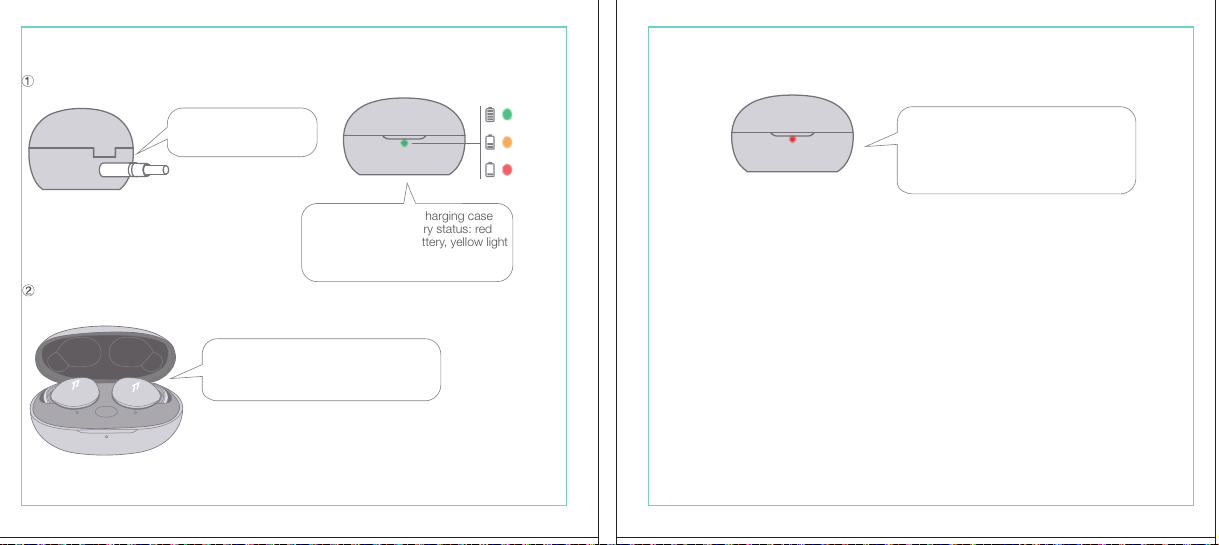
In The Box
材质:80G哑粉
尺寸:98*86mm
EH608
Manufacturer: Tiinlab Corporation
Address: No. 3333, Liuxian Avenue, Tower A, 35th Floor,
Tanglang City, Nanshan District, Shenzhen, China
Made in China
2ASDI-EH608 IC:24662-EH608
We know you will enjoy new 1MORE headphones as much as we do. At 1MORE, we value your
satisfaction. If you would like more details on this product or any of our other products, please visit
us online by scanning the QR code. Go to www.1more.com and sign up for VIP, and 1MORE will
treat you like one.
1MORE Inc., (“1MORE”) warrants to the original retail purchaser that this product is to be free
from defective materials and workmanship for a period of one year from the date of purchase if it
is properly used and maintained. If this product proves defective in either material or
workmanship, 1MORE, at its option, will (a) repair the product with new or refurbished parts, or
(b) replace the product with an equivalent new or refurbished product, at no charge for parts or
labor. If the product model is no longer available and cannot be repaired effectively or replaced
with an identical model, 1MORE at its sole option may replace the unit with a current model of
equal or greater value. In some cases, modication to the mounting surface may be required
where a new model is substituted. 1MORE assumes no responsibility or liability for such
modication. TO OBTAIN A REPAIR OR REPLACEMENT UNDER THE TERMS OF THIS
WARRANTY, PLEASE RETURN TO THE ORIGINAL DEALER FIRST AND THE ORIGINAL
DEALER SHALL REPAIR THE PRODUCT WITH NEW OR REFURBISHED PARTS OR REPLACE
THE PRODUCT WITH AN EQUIVALENT NEW OR REFURBISHED PRODUCT.
You will be required to submit a proof of purchasing details, including but not limited to a receipt
or sales invoice.
Return shipping for exchanges/repairs is the sole responsibility of the original retail purchaser.
Limitations:
• This limited warranty does not cover the failure of the product resulting from improper
installation, misuse, abuse, accident, neglect, mishandling, or wear from ordinary use or
environmental deterioration.
• This limited warranty does not cover cosmetic damage, including paint damage, or
consequential damage to other components or premises which may result for any reason from
the failure of the product.
• This limited warranty is null and void for products not used in accordance with 1MORE’s
instructions.
• This limited warranty is null and void for products with altered or missing serial numbers and for
products not purchased from an AUTHORIZED dealer.
• This limited warranty terminates if you sell or otherwise transfer this product to another party.
1. If the headphones cannot pair normally when powered on. Put both headphones back into
the case, triple click the pairing button and search for "1MORE Z30" in Bluetooth in your
devices to connect.
2. To unpair the device:
Put both headphones into the case, press and hold the pairing button on the case for 8
seconds to disconnect the headphones and the device.
3.OTA Firmware Update:
It can be synchronously upgraded via the 1MORE MUSIC APP while the Left and Right
earbuds are connected to each other with at least 50% battery.
* Functions of the 1MORE MUSIC APP may vary with different devices or operating systems.
For more details, please contact our customer service.
For the initial pairing, turn the headphones on to enter
pairing mode, the LEDs for headphone status will ash
in white. Headphones will power off if not paired to a
device within 3 minutes.
* After the rst successful pairing, headphones will
automatically connect to your device.
To pair with a new device, put headphones back into
the case, and triple click the pairing button when
powered on (no playback) to re-enter pairing mode.
Tips
Extra Functions
We Appreciate Your Business
1MORE (1) Year Limited Warranty
1. Please read this instruction manual carefully and retain for future reference.
2. Please fully charge the battery before rst use.
3. If the headphones have been unused for more than 3 months, we recommend that you charge
them. This will improve battery capacity.
4. Only use charging cables and adapters that are FCC (Federal Communications Commission)
approved.
5. In dry environments, static electricity may numb your ear. This is not related to the quality of the
product.
Safety Information
WEEE
FAQ
1. How to make sure the headphones have been fully charged?
Put the headphones into the charging case, if the headphone stutus LEDs are glowing this means
they have been fully charged.
2. Why won't headphones turn on?
Check if your headphones have enough battery life. If not, please charge them for at least 30 minutes.
3. Why won’t the headphones connect to my cellphone, or take a long time to connect?
Put both buds back into the charging case, then press and hold the pairing button for 3 seconds, click
the device name in your settings, they should now pair correctly to the phone.
4. Why won’t the headphones make phone calls?
The headphones are without microphones or phone call functions.
5. Why is the Bluetooth connection not stable and/or experiences some interruptions?
1) Try shortening the distance between your headphones and the device. Avoid solid barriers in
between you and the device.
2) Please keep away from strong interference sources, such as Wi-Fi and GPRS.
3) Please make sure the Bluetooth antenna of your device is not blocked.
6. Why can't the volume be adjusted by the cellphone buttons when playing soothing sounds in 1MORE
MUSIC APP?
The soothing sounds are stored in the ash of the headphone which can be adjusted only via the APP.
7. The headphones will be disconnected from the cellphone when out of wireless range. They cannot
restore the connection after returning back into the wireless range, how to solve it?
Click the device name in the cellphone pairing list to connect again.
8. I feel uncomfortable when wearing the headphones, how to solve it?
This is mainly because the sizes of ear tips and your canals are not snug, we suggest trying smaller ear
tips.
* For more detailed product FAQs, please visit the product support section under www.1more.com
CE
Headphones × 1 set
Charging Case × 1
Type-C Charging Cable × 1 Silicone Ear Tip (XS/S/L)
Product Overview
Fit
Replace
Placement
Headphones Pairing
Bluetooth Pairing To The Device
Charging
Controls
Soothing Sounds
Battery Notication
User Guide × 1
Silicone Ear Tip
Charging Pin
Charging Case
Pairing Button
Charging Case LED Indicator
LED Indicator for
Headphone Status
Headphone
Silicone Ear Tip
XS / S / M / L
Warranty Card × 1
The Left and Right headphones will automatically
pair with each other after the lid is open when
they are in the case (with charge).
* The above functions are available for either headphones in individual or Stereo mode.
To charge the case with Type-C cable.
To charge the headphones with the case.
* The above functions are available for either headphones in individual or Stereo mode.
Put headphones back into the case
ensuring they are magnetically attached
and close the lid to charge, a full charge
takes around 85 minutes.
Phone call function is not available on the headphones, and the playback controls can be
implemented on the connected device.
Please download the 1MORE MUSIC APP for soothing sounds.
Switch Listening Modes via APP
Enter the 1MORE Z30 home page in 1MORE MUSIC APP after pairing to your cellphone,
then you can switch listening modes between "Music" and "Soothing".
Click the "Soothing Sounds" to enter the playlist.
Click "+" to select the sound to be downloaded to your headphones for listening.
Click the timer icon on the song page to set the playtime.
The LED light of the charging case
will the different battery status: red
light indicates low battery, yellow light
indicates medium battery and green
light indicates full battery.
LED indicator for case battery status: when
the case battery is under 20%, the red
indicator stay lit for 3 seconds. When the
case battery is under 10%, the red indicator
will ash 10 times.
Power On:Take the headphones out of
the charging case (with charge), the
headphones will turn on automatically.
Power Off:Put the headphones
back into the charging case and
close the lid, they will automatically
turn off and start charging.
A full charge will take
around 90 minutes.
EN
* Playback and volume for the soothing sounds can only be adjusted via the APP.
スキャンして、1MOREのWechat公式アカウントをフォロー
「Soothing Sounds」ボタンを押すと、ヒーリング音楽の曲選択画面に入ります。
「+」をクリックしてヒーリング音楽をダウンロードすると、選択した曲がイヤホンに転送されます。
ヒーリング音楽再生画面の「タイマー」をクリックすると、ヒーリング音楽の再生時間を設定することができます。
ヒーリング音楽の再生/停止、音量調整などの操作は、APPでのみ対応します。
ヒーリング音楽
APPでEQモードを切り替えます
操作
その他の機能
梱包内容
イヤーピースの選択
イヤーピースの交換
左側/右側イヤホンのペアリング
イヤホンとBluetooth デバイスをペアリングするには
電池残量に関する注意充電
起動
イヤホン着用
製品外観
イヤホン本体 X 1セット
充電ケース X 1
Type-C充電ケーブル x 1
充電電極
イヤホン本体LEDインジケータ
ペアリングボタン
充電ケースLEDインジケータ
充電ケース
ヘッドホン
シリコン製イヤーピースセット
XS / S / M / L
シリコン製イヤーピースセット
(XS/S/L)
取扱説明書×1
一回のフル充電時間は約90 分です。
* 上記の機能は単独、両耳どちらのイヤホンでも適用されます。
* 上記の機能は単独、両耳どちらのイヤホンでも適用されます。
保証書×1
充電ケースが通電し、左/右側イヤホンをケースに
入っている状態で、ケースの蓋を開けると、左/右
のイヤホンが自動的にペアリングされます。
初めて使用する際、イヤホンの電源を入れてからデバイス
側で検索します。イヤホンは白色LEDが高速点滅します。も
しも 3 分たってもデバイスが見つからない場合、イヤホン本
体はすぐに電源が切れます。
・ すでに接続したことのあるイヤホンであれば、当該デバイ
スと自動でペアリングします。
新しいデバイスと接続する必要があれば、左/右イヤホンを
充電ケース内に戻して電源を入れ、ペアリングボタン3秒間
長押しすると、イヤホンは新しいデバイスとBluetoothのペア
リングがされます。
充電中:充電ケースのLEDインジケータ
は異なる色で電池容量を表示します。電
力が少ない場合赤色LED、電池容量が
半分ぐらいの場合黄色LED、充電が完
了している場合緑色LEDがそれぞれ点
灯します。
イヤホンを充電ケースに戻し
て、充電ケースの蓋を閉める
と充電が開始します。フル充
電時間は約85分です。
充電ケースの容量を確認する方法:充電ケ
ースの電池容量が20%以下になれば、充
電ケースの赤色LEDが3秒点灯します。充
電ケースの電池容量が10%以下になった
場合、充電ケースの赤色LEDのが10回点滅
します。
Type-C充電ケーブルを使用して充電ケースに充電する場合
充電ケースを使用してイヤホンに充電する場合
JP
River
- +
Time Setup
mins
River
OK
- +
60
30
90
River
Time Setup
mins
River
OK
- +
60
30
90
River
River
- +
Time Setup
mins
River
- +
60
30
90
River
1MORE SleepBuds Z30 User Guide
1MORE Наушники для сна Z30 Руководство пользователя
1MORE SleepBuds Z30 コードレスイヤホンユーザーガイド
Midre
Soothing Sounds
Allow adding 2 tracks
Volcano
Falls
River
Midre
Soothing Sounds
Allow adding 2 tracks
Volcano
Falls
River
1. Never disassemble the headphones. There are no user-serviceable parts inside.
2. Do not expose the headphones to temperatures below 32 °F (0 °C) or temperatures above 113 °F (45 °C).
3. Do not use the headphones in a thunderstorm storm. This could prevent the headphones from working
properly, and also increase your chance of being electrically shocked.
4. Do not use oil or any volatile liquid to clean this product.
5. Do not use the headphones in trafc. Do not use the headphones any time it would be dangerous to be
unaware of noises around you.
6. Adult supervision is required for children of age 6 and under.
7. If you don't feel comfortable after wearing the headphones, please refer to an aurist for advice on
whether in-ear headphones are suitable for you.
8. The headphones contain a lithium-ion battery, do not attempt to open, crush, or expose a charging case
to re or excessive temperature. Do not use it if the battery is swollen.
9. Please note that excessively high volumes and long listening times may cause hearing damage.
10. The symbol indicates DC voltage
All products bearing this symbol are waste electrical and electronic equipment (WEEE as in
directive 2012/19/EU) which should not be mixed with unsorted household waste. Instead,
you should protect human health and the environment by handing over your waste
equipment to a designated collection point for the recycling of waste electrical and
electronic equipment, appointed by the government or local authorities. Correct disposal
and recycling will help prevent potential negative consequences to the environment and
human health. Please contact the installer or local authorities for more information about the
location as well as terms and conditions of such collection points.
Home
Soothing Sounds
Listening Modes
1MORE Z30
OTA Firmware Upgrade
Quick Guide to Product
SoothingMusic
L 100% R 100% C 100%
The Bluetooth
®
word mark and logos are registered trademarks owned by Bluetooth SIG, Inc. and any
use of such marks by Tiinlab Corporation is under license. Other trademarks and trade names are the
property of their respective owners.
R
204-B00919
FCC
The SAR limit of USA (FCC) is 1.6 W/kg averaged over one gram of tissue. Device types EH608
(FCC ID: 2ASDI-EH608) has also been tested against this SAR limit.
This device complies with part 15 of the FCC rules. Operation is subject to the following two
conditions: (1) this device may not cause harmful interference, and (2) this device must accept any
interference received, including interference that may cause undesired operation.
NOTE: The manufacturer is not responsible for any radio or TV interference caused by unauthorized
modications or changesto this equipment. Such modications or changes could void the user’s authority
to operate the equipment.
NOTE: This equipment has been tested and found to comply with the limits for a Class B digital device,
pursuant to part 15 of the FCC Rules. These limits are designed to provide reasonable protection
against harmful interference in a residential installation. This equipment generates uses and can radiate
radio frequency energy and, if not installed and used in accordance with the instructions, may cause
harmful interference to radio communications. However, there is no guarantee that interference will not
occur in a particular installation. If this equipment does cause harmful interference to radio or television
reception, which can be determined by turning the equipment off and on, the user is encouraged to try
to correct the interference by one or more of the following measures:
-Reorient or relocate the receiving antenna.
-Increase the separation between the equipment and receiver.
-Connect the equipment into an outlet on a circuit different from that to which the receiver is
connected.
-Consult the dealer or an experienced radio/TV technician for help.
IC regulatory conformance
This device complies with CAN ICES-003 (B)/NMB-003(B).
This device complies with Industry Canada licence-exempt RSS standard(s). Operation is Subject to
the following two conditions: (1) this device may not cause interference, and (2) this device must accept
any interference, including interference that may cause undesired operation of the device.
Le présent appareil est conforme aux CNR d'Industrie Canada applicables aux appareils radio
exempts de licence. L'exploitation est autorisée aux deux conditions suivantes : (1) l'appareil ne doit
シリコン製イヤ
ーピースセット
Declaration of Conformity Hereby, Tiinlab Corporation declares that the radio equipment type
Wireless Earphones of EH608 is in compliance with Directive 2014/53/EU.
The full text of the EU declaration of conformity is available at the following internet address:
https://www.1more.com
RF exposure information: The device has been evaluated to meet general RF exposure requirement.
The device can be used in portable exposure condition without restriction. Radiation Exposure Statement
Power is so low that no RF exposure calculation is needed.
Declaration for EU Compliance
Operation Frequency/Max. EIRP: 2400-2483.5MHz, Max. EIRP is <10dBm.
В коробке
Мы знаем, что вы будете наслаждаться новыми наушниками 1MORE так же, как и мы. В
1MORE мы ценим ваше удовлетворение. Если вы хотите получить более подробную
информацию о данном продукте или о любых других наших продуктах, пожалуйста, посетите
нас онлайн, отсканировав QR-код. Перейдите по ссылке www.1more.com и
зарегистрируйтесь в VIP, и 1MORE будет относиться к вам как к одному из них.
Компания 1MORE Inc. (“1MORE”) гарантирует первоначальному розничному покупателю, что
данный продукт не будет содержать дефектов материалов и изготовления в течение одного года с
даты покупки, если он будет надлежащим образом использоваться и обслуживаться. Если в данном
продукте обнаружатся дефекты материала или изготовления, 1MORE, по своему усмотрению, (а)
отремонтирует продукт с использованием новых или восстановленных деталей или (б) заменит
продукт эквивалентным новым или восстановленным продуктом без оплаты запчастей или рабочей
силы. Если модель продукта больше недоступна и не может быть эффективно отремонтирована или
заменена идентичной моделью, компания 1MORE по своему усмотрению может заменить
устройство текущей моделью равной или большей стоимости. В некоторых случаях при замене
новой модели может потребоваться модификация монтажной поверхности. 1MORE не несет
никакой ответственности за такие изменения. ЧТОБЫ ПОЛУЧИТЬ РЕМОНТ ИЛИ ЗАМЕНУ В
СООТВЕТСТВИИ С УСЛОВИЯМИ ДАННОЙ ГАРАНТИИ, ПОЖАЛУЙСТА, СНАЧАЛА ОБРАТИТЕСЬ К
ПЕРВОНАЧАЛЬНОМУ ДИЛЕРУ, И ПЕРВОНАЧАЛЬНЫЙ ДИЛЕР ОТРЕМОНТИРУЕТ ПРОДУКТ НОВЫМИ
ИЛИ ВОССТАНОВЛЕННЫМИ ДЕТАЛЯМИ ИЛИ ЗАМЕНИТ ПРОДУКТ
ЭКВИВАЛЕНТНЫМ НОВЫМ ИЛИ
ВОССТАНОВЛЕННЫМ ПРОДУКТОМ.
От вас потребуется предоставить подтверждение покупки, включая, но не ограничиваясь этим,
квитанцию или счет-фактуру.
Ответственность за обратную доставку для обмена/ремонта несет исключительно первоначальный
розничный покупатель.
Ограничения:
• Данная ограниченная гарантия не распространяется на выход продукта из строя в результате
неправильной установки, неправильного использования, злоупотребления, несчастного случая,
1. Если наушники не могут нормально подключиться при включенном питании. Положите оба
наушника обратно в корпус, трижды нажмите кнопку сопряжения и найдите "1MORE Z30" в
Bluetooth на ваших устройствах для подключения.
2. Чтобы отключить сопряжение устройства:
Положите оба наушника в корпус, нажмите и удерживайте кнопку сопряжения на корпусе в
течение 8 секунд, чтобы отсоединить наушники от устройства.
3. Обновление прошивки OTA:
может выполняться синхронно с приложением 1MORE Music когда левый и правый наушники
сопряжены друг с другом через Bluetooth .
Для первоначального сопряжения включите
наушники, чтобы перейти в режим сопряжения,
светодиоды состояния наушников будут мигать
белым цветом. Наушники отключатся, если не
выполнить сопряжение с устройством в течение 3
минут.
* После первого успешного сопряжения наушники
автоматически подключатся к вашему устройству.
Чтобы выполнить сопряжение с новым устройством,
вставьте наушники обратно в корпус и трижды
нажмите кнопку сопряжения при включении
питания (воспроизведение отсутствует), чтобы
повторно войти в режим сопряжения.
Дополнительные функции
Мы ценим ваш бизнес
(1) годовая ограниченная гарантия 1MORE
Наушники × 1 набор
Зарядный корпус × 1
Зарядный кабель типа-С × 1Силиконовые вкладыши (XS/S/L)
Обзор продукта
Подгонка
Замена
Замена
Сопряжение наушников
Сопряжение Bluetooth с устройством
Зарядка
Управление
Успокаивающие звуки
Уведомление о батарее
Руководство пользователя × 1
Силиконовые
вкладыши
Зарядный штекер
Зарядный корпус
Кнопки сопряжения
Светодиодный индикатор зарядного корпуса
Наушники
Силиконовые вкладыши
XS / S / M / L
Гарантийный талон × 1
Левый и правый наушники автоматически
соединятся друг с другом после открытия
крышки, когда они будут находиться в корпусе
(с зарядкой).
* Вышеуказанные функции доступны как для наушников в индивидуальном, так и в стерео режиме.
Для зарядки корпуса используйте кабель Type-C.
Для зарядки наушников с корпусом.
* Вышеуказанные функции доступны как для наушников в индивидуальном, так и в стерео режиме.
Положите наушники обратно в корпус,
убедившись, что они надежно
закреплены магнитом, и закройте крышку
для зарядки, полная зарядка занимает
около 85 минут.
Функция телефонного звонка недоступна в наушниках, а управление воспроизведением
может быть реализовано на подключенном устройстве.
Пожалуйста, загрузите приложение 1MORE MUSIC для успокаивающих звуков.
Переключайте режимы прослушивания с помощью приложения
Зайдите на домашнюю страницу 1MORE Z30 в приложении 1MORE MUSIC после сопряжения с
вашим мобильным телефоном, затем вы сможете переключать режимы прослушивания между
"Музыка" и "Успокаивающий".
Нажмите "Soothing Sounds", чтобы войти в список воспроизведения.
Нажмите "+" чтобы выбрать звук, который будет загружен в ваши наушники для прослушивания.
Нажмите на значок таймера на странице песни,
чтобы установить время воспроизведения.
Светодиодный индикатор
зарядного устройства будет
отображать различное состояние
батареи: красный индикатор
указывает на низкий уровень
заряда батареи, желтый
индикатор указывает на средний
уровень заряда батареи и зеленый
индикатор указывает на полный
заряд батареи.
Светодиодный индикатор состояния
батареи корпуса: когда уровень заряда
батареи корпуса ниже 20%, красный
индикатор горит в течение 3 секунд. Когда
уровень заряда батареи корпуса ниже
10%, красный индикатор мигнет 10 раз.
Включение питания:Достаньте
наушники из зарядного корпуса (с
зарядкой), наушники включатся
автоматически.
Выключение питания:Положите
наушники обратно в зарядный
корпус и закройте крышку, они
автоматически выключатся и
начнут заряжаться.
Полная зарядка займет
около 90 минут.
RU
Midre
Soothing Sounds
Allow adding 2 tracks
Volcano
Falls
River
Midre River VolcanoFalls
River
Home
Soothing Sounds
Listening Modes
1MORE Z30
OTA Firmware Upgrade
Quick Guide to Product
SoothingMusic
L 100% R 100% C 100%
pas produire de brouillage, et (2) l'utilisateur de l'appareil doit accepter tout brouillage radioélectrique
subi, même si le brouillage est susceptible d'en compromettre le fonctionnement.
This device has been tested for compliance with IC SAR values at a typical operating near the
body. To ensure that RF exposure levels below the levels tested, use accessories with this
equipment to maintain a minimum separation distance of 0 mm between the body of the user and the
device. These accessories should not contain metallic components. It is possible that the accessories
used close to the body that do not meet these requirements are not consistent with the SAR limits and
it is advisable to avoid using them.
Ce dispositif a été testé pour la conformité avec les valeurs SAR à un fonctionnement typique près du
corps . Pour assurer que les niveaux d'exposition aux radiofréquences en deçà des niveaux testés ,
utiliser des accessoires avec cet équipement pour maintenir une distance de séparation minimale de 0
mm entre le corps de l'utilisateur et l'appareil. Ces accessoires ne doivent pas contenir des
composants métalliques . Il est possible que les accessoires utilisés près du corps quine répondent pas
à ces exigences ne sont pas compatibles avec les limites SAR et il est conseilléd'éviter de les utiliser.
Caution: Any changes or modications not expressly approved by the party responsible for compliance
could void the user's authority to operate this equipment.
充電ケースが通電している状態で、ケ
ースからイヤホンを取り出すと、イヤホ
ンは自動で起動します。
シャットダウン:イヤホンを充電ケースに
入れて蓋を閉めると、すぐにシャットダ
ウンし充電します。
本イヤホンに通話機能は付いていません、曲再生/停止、曲送り/曲戻し、及び音量調整などの再生機能は
スマートフォン側などで操作してください。
ヒーリング音楽などを再生するには1MORE MUSIC APPをダウンロードしてください。
1MORE MUSICアプリを使用しているときにスマホ端末がイヤホンと接続すると、「Music」 と 「Soothing」が選
べます。
1. 電源を入れても、左右のイヤホンが正常にペアリングできない場合、イヤホンを充電ケースに戻し、蓋を一
度閉めてから再度開けます。その後充電ケースのペアリングボタンを3秒間長押しすると、充電ケースのイ
ヤホンLEDインジケーターが白色に点滅し、再びペアリングモードに入ります。
2. 左右イヤホンのペアリング記録をクリアする方法:
両イヤホンを充電ケースに入れ、充電ケースのペアリングボタンを約3秒間長押しします。
3. OTAファームウェアのアップデートを行う場合:
ヘッドホン左右のバッテリーが50%以上で接続されている状態であれば、「1MORE MUSIC APP」を介して
同期的にアップデートすることができます。
* 1MORE MUSIC APPは接続機器によって機能が異なる場合がございます。詳細については、お気軽にカス
タマサポートまでにご連絡ください。
1MORE コミュニティ bbs.1more.com へのアクセスをお待ちしております。
www.1more.com にアクセスし、1MORE 会員に新規登録いただけると、素晴らしい情報を提供いたします。
Bluetooth®のマークとロゴはBluetooth® Technology Allianceの登録商標です。本製品で使用されているこ
れらのマークは万魔声学股份有限公司にてライセンス契約に基づき表示するものとします。その他商標及
び商品名称はそれぞれの所有者に帰属するものとします。
Светодиодный
индикатор для
состояния наушников
* Воспроизведение и громкость успокаивающих звуков можно регулировать только с помощью
приложения.
Словесный знак и логотипы Bluetooth® являются зарегистрированными товарными знаками,
принадлежащими Bluetooth SIG, Inc., и любое использование таких знаков корпорацией Tiinlab
осуществляется по лицензии. Другие товарные знаки и торговые наименования являются
собственностью их соответствующих владельцев.
* Функции приложения 1MORE MUSIC могут отличаться в зависимости от различных устройств или
операционных систем. Для получения более подробной информации, пожалуйста, свяжитесь с
нашей службой поддержки клиентов.
небрежности, неправильного обращения или износа в результате обычного использования или
ухудшения состояния окружающей среды.
• Данная ограниченная гарантия не распространяется на косметические повреждения, включая
повреждение краски, или косвенный ущерб другим компонентам или поверхностям, которые
могут возникнуть по любой причине в результате выхода продукта из строя.
• Данная ограниченная гарантия недействительна для продуктов, используемых не в соответствии с
инструкциями 1MORE.
• Данная ограниченная гарантия недействительна для продуктов с измененными или
отсутствующими серийными номерами, а также для продуктов, приобретенных не у
ОФИЦИАЛЬНОГО дилера.
• Действие данной ограниченной гарантии прекращается, если вы продаете или иным образом
передаете данный продукт другой стороне.
Home
Soothing Sounds
Listening Modes
1MORE Z30
OTA Firmware Upgrade
Quick Guide to Product
SoothingMusic
L 100% R 100% C 100%
River
Home
Soothing Sounds
Listening Modes
1MORE Z30
OTA Firmware Upgrade
Quick Guide to Product
Soothing
Music
L 100% R 100% C 100%
Home
Soothing Sounds
Listening Modes
1MORE Z30
OTA Firmware Upgrade
Quick Guide to Product
SoothingMusic
L 100% R 100% C 100%
Home
Soothing Sounds
Listening Modes
1MORE Z30
OTA Firmware Upgrade
Quick Guide to Product
Soothing
Music
L 100% R 100% C 100%
Home
Soothing Sounds
Listening Modes
1MORE Z30
OTA Firmware Upgrade
Quick Guide to Product
SoothingMusic
L 100% R 100% C 100%
Home
Soothing Sounds
Listening Modes
1MORE Z30
OTA Firmware Upgrade
Quick Guide to Product
Soothing
Music
L 100% R 100% C 100%
Midre River VolcanoFalls
River
Home
Soothing Sounds
Listening Modes
1MORE Z30
OTA Firmware Upgrade
Quick Guide to Product
SoothingMusic
L 100% R 100% C 100%
Home
Soothing Sounds
Listening Modes
1MORE Z30
OTA Firmware Upgrade
Quick Guide to Product
SoothingMusic
L 100% R 100% C 100%
Midre River VolcanoFalls
River
Home
Soothing Sounds
Listening Modes
1MORE Z30
OTA Firmware Upgrade
Quick Guide to Product
SoothingMusic
L 100% R 100% C 100%
Home
Soothing Sounds
Listening Modes
1MORE Z30
OTA Firmware Upgrade
Quick Guide to Product
SoothingMusic
L 100% R 100% C 100%
C:0/M:85/Y:95/K:0C
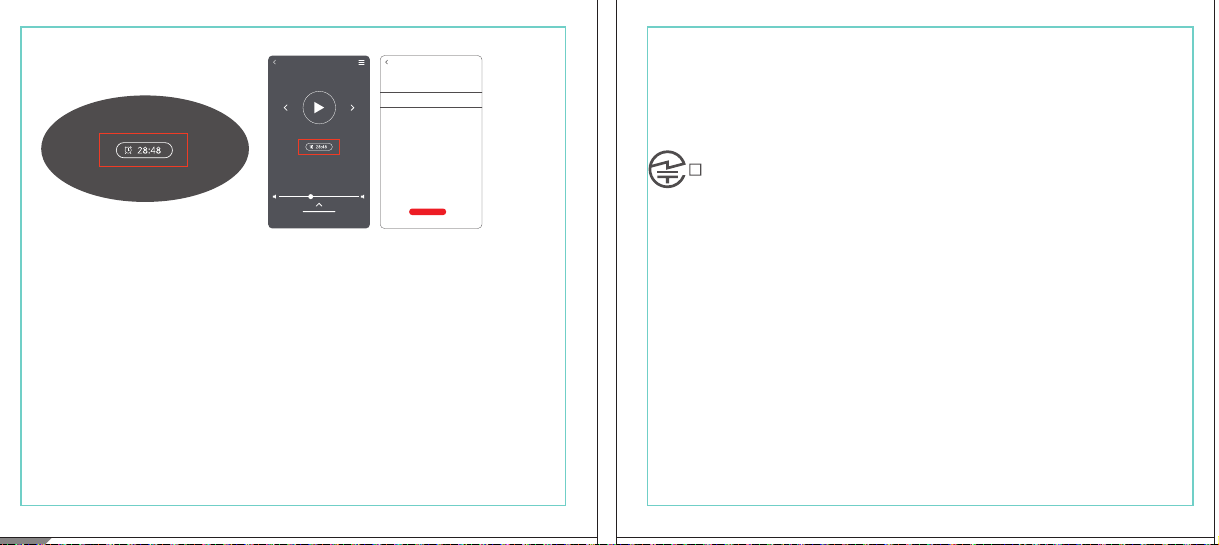
In The Box
材质:80G哑粉
尺寸:98*86mm
EH608
Manufacturer: Tiinlab Corporation
Address: No. 3333, Liuxian Avenue, Tower A, 35th Floor,
Tanglang City, Nanshan District, Shenzhen, China
Made in China
2ASDI-EH608 IC:24662-EH608
We know you will enjoy new 1MORE headphones as much as we do. At 1MORE, we value your
satisfaction. If you would like more details on this product or any of our other products, please visit
us online by scanning the QR code. Go to www.1more.com and sign up for VIP, and 1MORE will
treat you like one.
1MORE Inc., (“1MORE”) warrants to the original retail purchaser that this product is to be free
from defective materials and workmanship for a period of one year from the date of purchase if it
is properly used and maintained. If this product proves defective in either material or
workmanship, 1MORE, at its option, will (a) repair the product with new or refurbished parts, or
(b) replace the product with an equivalent new or refurbished product, at no charge for parts or
labor. If the product model is no longer available and cannot be repaired effectively or replaced
with an identical model, 1MORE at its sole option may replace the unit with a current model of
equal or greater value. In some cases, modication to the mounting surface may be required
where a new model is substituted. 1MORE assumes no responsibility or liability for such
modication. TO OBTAIN A REPAIR OR REPLACEMENT UNDER THE TERMS OF THIS
WARRANTY, PLEASE RETURN TO THE ORIGINAL DEALER FIRST AND THE ORIGINAL
DEALER SHALL REPAIR THE PRODUCT WITH NEW OR REFURBISHED PARTS OR REPLACE
THE PRODUCT WITH AN EQUIVALENT NEW OR REFURBISHED PRODUCT.
You will be required to submit a proof of purchasing details, including but not limited to a receipt
or sales invoice.
Return shipping for exchanges/repairs is the sole responsibility of the original retail purchaser.
Limitations:
• This limited warranty does not cover the failure of the product resulting from improper
installation, misuse, abuse, accident, neglect, mishandling, or wear from ordinary use or
environmental deterioration.
• This limited warranty does not cover cosmetic damage, including paint damage, or
consequential damage to other components or premises which may result for any reason from
the failure of the product.
• This limited warranty is null and void for products not used in accordance with 1MORE’s
instructions.
• This limited warranty is null and void for products with altered or missing serial numbers and for
products not purchased from an AUTHORIZED dealer.
• This limited warranty terminates if you sell or otherwise transfer this product to another party.
1. If the headphones cannot pair normally when powered on. Put both headphones back into
the case, triple click the pairing button and search for "1MORE Z30" in Bluetooth in your
devices to connect.
2. To unpair the device:
Put both headphones into the case, press and hold the pairing button on the case for 8
seconds to disconnect the headphones and the device.
3.OTA Firmware Update:
It can be synchronously upgraded via the 1MORE MUSIC APP while the Left and Right
earbuds are connected to each other with at least 50% battery.
* Functions of the 1MORE MUSIC APP may vary with different devices or operating systems.
For more details, please contact our customer service.
For the initial pairing, turn the headphones on to enter
pairing mode, the LEDs for headphone status will ash
in white. Headphones will power off if not paired to a
device within 3 minutes.
* After the rst successful pairing, headphones will
automatically connect to your device.
To pair with a new device, put headphones back into
the case, and triple click the pairing button when
powered on (no playback) to re-enter pairing mode.
Tips
Extra Functions
We Appreciate Your Business
1MORE (1) Year Limited Warranty
1. Please read this instruction manual carefully and retain for future reference.
2. Please fully charge the battery before rst use.
3. If the headphones have been unused for more than 3 months, we recommend that you charge
them. This will improve battery capacity.
4. Only use charging cables and adapters that are FCC (Federal Communications Commission)
approved.
5. In dry environments, static electricity may numb your ear. This is not related to the quality of the
product.
Safety Information
WEEE
FAQ
1. How to make sure the headphones have been fully charged?
Put the headphones into the charging case, if the headphone stutus LEDs are glowing this means
they have been fully charged.
2. Why won't headphones turn on?
Check if your headphones have enough battery life. If not, please charge them for at least 30 minutes.
3. Why won’t the headphones connect to my cellphone, or take a long time to connect?
Put both buds back into the charging case, then press and hold the pairing button for 3 seconds, click
the device name in your settings, they should now pair correctly to the phone.
4. Why won’t the headphones make phone calls?
The headphones are without microphones or phone call functions.
5. Why is the Bluetooth connection not stable and/or experiences some interruptions?
1) Try shortening the distance between your headphones and the device. Avoid solid barriers in
between you and the device.
2) Please keep away from strong interference sources, such as Wi-Fi and GPRS.
3) Please make sure the Bluetooth antenna of your device is not blocked.
6. Why can't the volume be adjusted by the cellphone buttons when playing soothing sounds in 1MORE
MUSIC APP?
The soothing sounds are stored in the ash of the headphone which can be adjusted only via the APP.
7. The headphones will be disconnected from the cellphone when out of wireless range. They cannot
restore the connection after returning back into the wireless range, how to solve it?
Click the device name in the cellphone pairing list to connect again.
8. I feel uncomfortable when wearing the headphones, how to solve it?
This is mainly because the sizes of ear tips and your canals are not snug, we suggest trying smaller ear
tips.
* For more detailed product FAQs, please visit the product support section under www.1more.com
CE
Headphones × 1 set
Charging Case × 1
Type-C Charging Cable × 1 Silicone Ear Tip (XS/S/L)
Product Overview
Fit
Replace
Placement
Headphones Pairing
Bluetooth Pairing To The Device
Charging
Controls
Soothing Sounds
Battery Notication
User Guide × 1
Silicone Ear Tip
Charging Pin
Charging Case
Pairing Button
Charging Case LED Indicator
LED Indicator for
Headphone Status
Headphone
Silicone Ear Tip
XS / S / M / L
Warranty Card × 1
The Left and Right headphones will automatically
pair with each other after the lid is open when
they are in the case (with charge).
* The above functions are available for either headphones in individual or Stereo mode.
To charge the case with Type-C cable.
To charge the headphones with the case.
* The above functions are available for either headphones in individual or Stereo mode.
Put headphones back into the case
ensuring they are magnetically attached
and close the lid to charge, a full charge
takes around 85 minutes.
Phone call function is not available on the headphones, and the playback controls can be
implemented on the connected device.
Please download the 1MORE MUSIC APP for soothing sounds.
Switch Listening Modes via APP
Enter the 1MORE Z30 home page in 1MORE MUSIC APP after pairing to your cellphone,
then you can switch listening modes between "Music" and "Soothing".
Click the "Soothing Sounds" to enter the playlist.
Click "+" to select the sound to be downloaded to your headphones for listening.
Click the timer icon on the song page to set the playtime.
The LED light of the charging case
will the different battery status: red
light indicates low battery, yellow light
indicates medium battery and green
light indicates full battery.
LED indicator for case battery status: when
the case battery is under 20%, the red
indicator stay lit for 3 seconds. When the
case battery is under 10%, the red indicator
will ash 10 times.
Power On:Take the headphones out of
the charging case (with charge), the
headphones will turn on automatically.
Power Off:Put the headphones
back into the charging case and
close the lid, they will automatically
turn off and start charging.
A full charge will take
around 90 minutes.
EN
* Playback and volume for the soothing sounds can only be adjusted via the APP.
スキャンして、1MOREのWechat公式アカウントをフォロー
「Soothing Sounds」ボタンを押すと、ヒーリング音楽の曲選択画面に入ります。
「+」をクリックしてヒーリング音楽をダウンロードすると、選択した曲がイヤホンに転送されます。
ヒーリング音楽再生画面の「タイマー」をクリックすると、ヒーリング音楽の再生時間を設定することができます。
ヒーリング音楽の再生/停止、音量調整などの操作は、APPでのみ対応します。
ヒーリング音楽
APPでEQモードを切り替えます
操作
その他の機能
梱包内容
イヤーピースの選択
イヤーピースの交換
左側/右側イヤホンのペアリング
イヤホンとBluetooth デバイスをペアリングするには
電池残量に関する注意充電
起動
イヤホン着用
製品外観
イヤホン本体 X 1セット
充電ケース X 1
Type-C充電ケーブル x 1
充電電極
イヤホン本体LEDインジケータ
ペアリングボタン
充電ケースLEDインジケータ
充電ケース
ヘッドホン
シリコン製イヤーピースセット
XS / S / M / L
シリコン製イヤーピースセット
(XS/S/L)
取扱説明書×1
一回のフル充電時間は約90 分です。
* 上記の機能は単独、両耳どちらのイヤホンでも適用されます。
* 上記の機能は単独、両耳どちらのイヤホンでも適用されます。
保証書×1
充電ケースが通電し、左/右側イヤホンをケースに
入っている状態で、ケースの蓋を開けると、左/右
のイヤホンが自動的にペアリングされます。
初めて使用する際、イヤホンの電源を入れてからデバイス
側で検索します。イヤホンは白色LEDが高速点滅します。も
しも 3 分たってもデバイスが見つからない場合、イヤホン本
体はすぐに電源が切れます。
・ すでに接続したことのあるイヤホンであれば、当該デバイ
スと自動でペアリングします。
新しいデバイスと接続する必要があれば、左/右イヤホンを
充電ケース内に戻して電源を入れ、ペアリングボタン3秒間
長押しすると、イヤホンは新しいデバイスとBluetoothのペア
リングがされます。
充電中:充電ケースのLEDインジケータ
は異なる色で電池容量を表示します。電
力が少ない場合赤色LED、電池容量が
半分ぐらいの場合黄色LED、充電が完
了している場合緑色LEDがそれぞれ点
灯します。
イヤホンを充電ケースに戻し
て、充電ケースの蓋を閉める
と充電が開始します。フル充
電時間は約85分です。
充電ケースの容量を確認する方法:充電ケ
ースの電池容量が20%以下になれば、充
電ケースの赤色LEDが3秒点灯します。充
電ケースの電池容量が10%以下になった
場合、充電ケースの赤色LEDのが10回点滅
します。
Type-C充電ケーブルを使用して充電ケースに充電する場合
充電ケースを使用してイヤホンに充電する場合
JP
River
- +
Time Setup
mins
River
OK
- +
60
30
90
River
Time Setup
mins
River
OK
- +
60
30
90
River
River
- +
Time Setup
mins
River
- +
60
30
90
River
1MORE SleepBuds Z30 User Guide
1MORE Наушники для сна Z30 Руководство пользователя
1MORE SleepBuds Z30 コードレスイヤホンユーザーガイド
Midre
Soothing Sounds
Allow adding 2 tracks
Volcano
Falls
River
Midre
Soothing Sounds
Allow adding 2 tracks
Volcano
Falls
River
1. Never disassemble the headphones. There are no user-serviceable parts inside.
2. Do not expose the headphones to temperatures below 32 °F (0 °C) or temperatures above 113 °F (45 °C).
3. Do not use the headphones in a thunderstorm storm. This could prevent the headphones from working
properly, and also increase your chance of being electrically shocked.
4. Do not use oil or any volatile liquid to clean this product.
5. Do not use the headphones in trafc. Do not use the headphones any time it would be dangerous to be
unaware of noises around you.
6. Adult supervision is required for children of age 6 and under.
7. If you don't feel comfortable after wearing the headphones, please refer to an aurist for advice on
whether in-ear headphones are suitable for you.
8. The headphones contain a lithium-ion battery, do not attempt to open, crush, or expose a charging case
to re or excessive temperature. Do not use it if the battery is swollen.
9. Please note that excessively high volumes and long listening times may cause hearing damage.
10. The symbol indicates DC voltage
All products bearing this symbol are waste electrical and electronic equipment (WEEE as in
directive 2012/19/EU) which should not be mixed with unsorted household waste. Instead,
you should protect human health and the environment by handing over your waste
equipment to a designated collection point for the recycling of waste electrical and
electronic equipment, appointed by the government or local authorities. Correct disposal
and recycling will help prevent potential negative consequences to the environment and
human health. Please contact the installer or local authorities for more information about the
location as well as terms and conditions of such collection points.
Home
Soothing Sounds
Listening Modes
1MORE Z30
OTA Firmware Upgrade
Quick Guide to Product
SoothingMusic
L 100% R 100% C 100%
The Bluetooth
®
word mark and logos are registered trademarks owned by Bluetooth SIG, Inc. and any
use of such marks by Tiinlab Corporation is under license. Other trademarks and trade names are the
property of their respective owners.
R
204-B00919
FCC
The SAR limit of USA (FCC) is 1.6 W/kg averaged over one gram of tissue. Device types EH608
(FCC ID: 2ASDI-EH608) has also been tested against this SAR limit.
This device complies with part 15 of the FCC rules. Operation is subject to the following two
conditions: (1) this device may not cause harmful interference, and (2) this device must accept any
interference received, including interference that may cause undesired operation.
NOTE: The manufacturer is not responsible for any radio or TV interference caused by unauthorized
modications or changesto this equipment. Such modications or changes could void the user’s authority
to operate the equipment.
NOTE: This equipment has been tested and found to comply with the limits for a Class B digital device,
pursuant to part 15 of the FCC Rules. These limits are designed to provide reasonable protection
against harmful interference in a residential installation. This equipment generates uses and can radiate
radio frequency energy and, if not installed and used in accordance with the instructions, may cause
harmful interference to radio communications. However, there is no guarantee that interference will not
occur in a particular installation. If this equipment does cause harmful interference to radio or television
reception, which can be determined by turning the equipment off and on, the user is encouraged to try
to correct the interference by one or more of the following measures:
-Reorient or relocate the receiving antenna.
-Increase the separation between the equipment and receiver.
-Connect the equipment into an outlet on a circuit different from that to which the receiver is
connected.
-Consult the dealer or an experienced radio/TV technician for help.
IC regulatory conformance
This device complies with CAN ICES-003 (B)/NMB-003(B).
This device complies with Industry Canada licence-exempt RSS standard(s). Operation is Subject to
the following two conditions: (1) this device may not cause interference, and (2) this device must accept
any interference, including interference that may cause undesired operation of the device.
Le présent appareil est conforme aux CNR d'Industrie Canada applicables aux appareils radio
exempts de licence. L'exploitation est autorisée aux deux conditions suivantes : (1) l'appareil ne doit
シリコン製イヤ
ーピースセット
Declaration of Conformity Hereby, Tiinlab Corporation declares that the radio equipment type
Wireless Earphones of EH608 is in compliance with Directive 2014/53/EU.
The full text of the EU declaration of conformity is available at the following internet address:
https://www.1more.com
RF exposure information: The device has been evaluated to meet general RF exposure requirement.
The device can be used in portable exposure condition without restriction. Radiation Exposure Statement
Power is so low that no RF exposure calculation is needed.
Declaration for EU Compliance
Operation Frequency/Max. EIRP: 2400-2483.5MHz, Max. EIRP is <10dBm.
В коробке
Мы знаем, что вы будете наслаждаться новыми наушниками 1MORE так же, как и мы. В
1MORE мы ценим ваше удовлетворение. Если вы хотите получить более подробную
информацию о данном продукте или о любых других наших продуктах, пожалуйста, посетите
нас онлайн, отсканировав QR-код. Перейдите по ссылке www.1more.com и
зарегистрируйтесь в VIP, и 1MORE будет относиться к вам как к одному из них.
Компания 1MORE Inc. (“1MORE”) гарантирует первоначальному розничному покупателю, что
данный продукт не будет содержать дефектов материалов и изготовления в течение одного года с
даты покупки, если он будет надлежащим образом использоваться и обслуживаться. Если в данном
продукте обнаружатся дефекты материала или изготовления, 1MORE, по своему усмотрению, (а)
отремонтирует продукт с использованием новых или восстановленных деталей или (б) заменит
продукт эквивалентным новым или восстановленным продуктом без оплаты запчастей или рабочей
силы. Если модель продукта больше недоступна и не может быть эффективно отремонтирована или
заменена идентичной моделью, компания 1MORE по своему усмотрению может заменить
устройство текущей моделью равной или большей стоимости. В некоторых случаях при замене
новой модели может потребоваться модификация монтажной поверхности. 1MORE не несет
никакой ответственности за такие изменения. ЧТОБЫ ПОЛУЧИТЬ РЕМОНТ ИЛИ ЗАМЕНУ В
СООТВЕТСТВИИ С УСЛОВИЯМИ ДАННОЙ ГАРАНТИИ, ПОЖАЛУЙСТА, СНАЧАЛА ОБРАТИТЕСЬ К
ПЕРВОНАЧАЛЬНОМУ ДИЛЕРУ, И ПЕРВОНАЧАЛЬНЫЙ ДИЛЕР ОТРЕМОНТИРУЕТ ПРОДУКТ НОВЫМИ
ИЛИ ВОССТАНОВЛЕННЫМИ ДЕТАЛЯМИ ИЛИ ЗАМЕНИТ ПРОДУКТ
ЭКВИВАЛЕНТНЫМ НОВЫМ ИЛИ
ВОССТАНОВЛЕННЫМ ПРОДУКТОМ.
От вас потребуется предоставить подтверждение покупки, включая, но не ограничиваясь этим,
квитанцию или счет-фактуру.
Ответственность за обратную доставку для обмена/ремонта несет исключительно первоначальный
розничный покупатель.
Ограничения:
• Данная ограниченная гарантия не распространяется на выход продукта из строя в результате
неправильной установки, неправильного использования, злоупотребления, несчастного случая,
1. Если наушники не могут нормально подключиться при включенном питании. Положите оба
наушника обратно в корпус, трижды нажмите кнопку сопряжения и найдите "1MORE Z30" в
Bluetooth на ваших устройствах для подключения.
2. Чтобы отключить сопряжение устройства:
Положите оба наушника в корпус, нажмите и удерживайте кнопку сопряжения на корпусе в
течение 8 секунд, чтобы отсоединить наушники от устройства.
3. Обновление прошивки OTA:
может выполняться синхронно с приложением 1MORE Music когда левый и правый наушники
сопряжены друг с другом через Bluetooth .
Для первоначального сопряжения включите
наушники, чтобы перейти в режим сопряжения,
светодиоды состояния наушников будут мигать
белым цветом. Наушники отключатся, если не
выполнить сопряжение с устройством в течение 3
минут.
* После первого успешного сопряжения наушники
автоматически подключатся к вашему устройству.
Чтобы выполнить сопряжение с новым устройством,
вставьте наушники обратно в корпус и трижды
нажмите кнопку сопряжения при включении
питания (воспроизведение отсутствует), чтобы
повторно войти в режим сопряжения.
Дополнительные функции
Мы ценим ваш бизнес
(1) годовая ограниченная гарантия 1MORE
Наушники × 1 набор
Зарядный корпус × 1
Зарядный кабель типа-С × 1Силиконовые вкладыши (XS/S/L)
Обзор продукта
Подгонка
Замена
Замена
Сопряжение наушников
Сопряжение Bluetooth с устройством
Зарядка
Управление
Успокаивающие звуки
Уведомление о батарее
Руководство пользователя × 1
Силиконовые
вкладыши
Зарядный штекер
Зарядный корпус
Кнопки сопряжения
Светодиодный индикатор зарядного корпуса
Наушники
Силиконовые вкладыши
XS / S / M / L
Гарантийный талон × 1
Левый и правый наушники автоматически
соединятся друг с другом после открытия
крышки, когда они будут находиться в корпусе
(с зарядкой).
* Вышеуказанные функции доступны как для наушников в индивидуальном, так и в стерео режиме.
Для зарядки корпуса используйте кабель Type-C.
Для зарядки наушников с корпусом.
* Вышеуказанные функции доступны как для наушников в индивидуальном, так и в стерео режиме.
Положите наушники обратно в корпус,
убедившись, что они надежно
закреплены магнитом, и закройте крышку
для зарядки, полная зарядка занимает
около 85 минут.
Функция телефонного звонка недоступна в наушниках, а управление воспроизведением
может быть реализовано на подключенном устройстве.
Пожалуйста, загрузите приложение 1MORE MUSIC для успокаивающих звуков.
Переключайте режимы прослушивания с помощью приложения
Зайдите на домашнюю страницу 1MORE Z30 в приложении 1MORE MUSIC после сопряжения с
вашим мобильным телефоном, затем вы сможете переключать режимы прослушивания между
"Музыка" и "Успокаивающий".
Нажмите "Soothing Sounds", чтобы войти в список воспроизведения.
Нажмите "+" чтобы выбрать звук, который будет загружен в ваши наушники для прослушивания.
Нажмите на значок таймера на странице песни,
чтобы установить время воспроизведения.
Светодиодный индикатор
зарядного устройства будет
отображать различное состояние
батареи: красный индикатор
указывает на низкий уровень
заряда батареи, желтый
индикатор указывает на средний
уровень заряда батареи и зеленый
индикатор указывает на полный
заряд батареи.
Светодиодный индикатор состояния
батареи корпуса: когда уровень заряда
батареи корпуса ниже 20%, красный
индикатор горит в течение 3 секунд. Когда
уровень заряда батареи корпуса ниже
10%, красный индикатор мигнет 10 раз.
Включение питания:Достаньте
наушники из зарядного корпуса (с
зарядкой), наушники включатся
автоматически.
Выключение питания:Положите
наушники обратно в зарядный
корпус и закройте крышку, они
автоматически выключатся и
начнут заряжаться.
Полная зарядка займет
около 90 минут.
RU
Midre
Soothing Sounds
Allow adding 2 tracks
Volcano
Falls
River
Midre River VolcanoFalls
River
Home
Soothing Sounds
Listening Modes
1MORE Z30
OTA Firmware Upgrade
Quick Guide to Product
SoothingMusic
L 100% R 100% C 100%
pas produire de brouillage, et (2) l'utilisateur de l'appareil doit accepter tout brouillage radioélectrique
subi, même si le brouillage est susceptible d'en compromettre le fonctionnement.
This device has been tested for compliance with IC SAR values at a typical operating near the
body. To ensure that RF exposure levels below the levels tested, use accessories with this
equipment to maintain a minimum separation distance of 0 mm between the body of the user and the
device. These accessories should not contain metallic components. It is possible that the accessories
used close to the body that do not meet these requirements are not consistent with the SAR limits and
it is advisable to avoid using them.
Ce dispositif a été testé pour la conformité avec les valeurs SAR à un fonctionnement typique près du
corps . Pour assurer que les niveaux d'exposition aux radiofréquences en deçà des niveaux testés ,
utiliser des accessoires avec cet équipement pour maintenir une distance de séparation minimale de 0
mm entre le corps de l'utilisateur et l'appareil. Ces accessoires ne doivent pas contenir des
composants métalliques . Il est possible que les accessoires utilisés près du corps quine répondent pas
à ces exigences ne sont pas compatibles avec les limites SAR et il est conseilléd'éviter de les utiliser.
Caution: Any changes or modications not expressly approved by the party responsible for compliance
could void the user's authority to operate this equipment.
充電ケースが通電している状態で、ケ
ースからイヤホンを取り出すと、イヤホ
ンは自動で起動します。
シャットダウン:イヤホンを充電ケースに
入れて蓋を閉めると、すぐにシャットダ
ウンし充電します。
本イヤホンに通話機能は付いていません、曲再生/停止、曲送り/曲戻し、及び音量調整などの再生機能は
スマートフォン側などで操作してください。
ヒーリング音楽などを再生するには1MORE MUSIC APPをダウンロードしてください。
1MORE MUSICアプリを使用しているときにスマホ端末がイヤホンと接続すると、「Music」 と 「Soothing」が選
べます。
1. 電源を入れても、左右のイヤホンが正常にペアリングできない場合、イヤホンを充電ケースに戻し、蓋を一
度閉めてから再度開けます。その後充電ケースのペアリングボタンを3秒間長押しすると、充電ケースのイ
ヤホンLEDインジケーターが白色に点滅し、再びペアリングモードに入ります。
2. 左右イヤホンのペアリング記録をクリアする方法:
両イヤホンを充電ケースに入れ、充電ケースのペアリングボタンを約3秒間長押しします。
3. OTAファームウェアのアップデートを行う場合:
ヘッドホン左右のバッテリーが50%以上で接続されている状態であれば、「1MORE MUSIC APP」を介して
同期的にアップデートすることができます。
* 1MORE MUSIC APPは接続機器によって機能が異なる場合がございます。詳細については、お気軽にカス
タマサポートまでにご連絡ください。
1MORE コミュニティ bbs.1more.com へのアクセスをお待ちしております。
www.1more.com にアクセスし、1MORE 会員に新規登録いただけると、素晴らしい情報を提供いたします。
Bluetooth®のマークとロゴはBluetooth® Technology Allianceの登録商標です。本製品で使用されているこ
れらのマークは万魔声学股份有限公司にてライセンス契約に基づき表示するものとします。その他商標及
び商品名称はそれぞれの所有者に帰属するものとします。
Светодиодный
индикатор для
состояния наушников
* Воспроизведение и громкость успокаивающих звуков можно регулировать только с помощью
приложения.
Словесный знак и логотипы Bluetooth® являются зарегистрированными товарными знаками,
принадлежащими Bluetooth SIG, Inc., и любое использование таких знаков корпорацией Tiinlab
осуществляется по лицензии. Другие товарные знаки и торговые наименования являются
собственностью их соответствующих владельцев.
* Функции приложения 1MORE MUSIC могут отличаться в зависимости от различных устройств или
операционных систем. Для получения более подробной информации, пожалуйста, свяжитесь с
нашей службой поддержки клиентов.
небрежности, неправильного обращения или износа в результате обычного использования или
ухудшения состояния окружающей среды.
• Данная ограниченная гарантия не распространяется на косметические повреждения, включая
повреждение краски, или косвенный ущерб другим компонентам или поверхностям, которые
могут возникнуть по любой причине в результате выхода продукта из строя.
• Данная ограниченная гарантия недействительна для продуктов, используемых не в соответствии с
инструкциями 1MORE.
• Данная ограниченная гарантия недействительна для продуктов с измененными или
отсутствующими серийными номерами, а также для продуктов, приобретенных не у
ОФИЦИАЛЬНОГО дилера.
• Действие данной ограниченной гарантии прекращается, если вы продаете или иным образом
передаете данный продукт другой стороне.
Home
Soothing Sounds
Listening Modes
1MORE Z30
OTA Firmware Upgrade
Quick Guide to Product
SoothingMusic
L 100% R 100% C 100%
River
Home
Soothing Sounds
Listening Modes
1MORE Z30
OTA Firmware Upgrade
Quick Guide to Product
Soothing
Music
L 100% R 100% C 100%
Home
Soothing Sounds
Listening Modes
1MORE Z30
OTA Firmware Upgrade
Quick Guide to Product
SoothingMusic
L 100% R 100% C 100%
Home
Soothing Sounds
Listening Modes
1MORE Z30
OTA Firmware Upgrade
Quick Guide to Product
Soothing
Music
L 100% R 100% C 100%
Home
Soothing Sounds
Listening Modes
1MORE Z30
OTA Firmware Upgrade
Quick Guide to Product
SoothingMusic
L 100% R 100% C 100%
Home
Soothing Sounds
Listening Modes
1MORE Z30
OTA Firmware Upgrade
Quick Guide to Product
Soothing
Music
L 100% R 100% C 100%
Midre River VolcanoFalls
River
Home
Soothing Sounds
Listening Modes
1MORE Z30
OTA Firmware Upgrade
Quick Guide to Product
SoothingMusic
L 100% R 100% C 100%
Home
Soothing Sounds
Listening Modes
1MORE Z30
OTA Firmware Upgrade
Quick Guide to Product
SoothingMusic
L 100% R 100% C 100%
Midre River VolcanoFalls
River
Home
Soothing Sounds
Listening Modes
1MORE Z30
OTA Firmware Upgrade
Quick Guide to Product
SoothingMusic
L 100% R 100% C 100%
Home
Soothing Sounds
Listening Modes
1MORE Z30
OTA Firmware Upgrade
Quick Guide to Product
SoothingMusic
L 100% R 100% C 100%
C:0/M:85/Y:95/K:0C
In The Box
材质:80G哑粉
尺寸:98*86mm
EH608
Manufacturer: Tiinlab Corporation
Address: No. 3333, Liuxian Avenue, Tower A, 35th Floor,
Tanglang City, Nanshan District, Shenzhen, China
Made in China
2ASDI-EH608 IC:24662-EH608
We know you will enjoy new 1MORE headphones as much as we do. At 1MORE, we value your
satisfaction. If you would like more details on this product or any of our other products, please visit
us online by scanning the QR code. Go to www.1more.com and sign up for VIP, and 1MORE will
treat you like one.
1MORE Inc., (“1MORE”) warrants to the original retail purchaser that this product is to be free
from defective materials and workmanship for a period of one year from the date of purchase if it
is properly used and maintained. If this product proves defective in either material or
workmanship, 1MORE, at its option, will (a) repair the product with new or refurbished parts, or
(b) replace the product with an equivalent new or refurbished product, at no charge for parts or
labor. If the product model is no longer available and cannot be repaired effectively or replaced
with an identical model, 1MORE at its sole option may replace the unit with a current model of
equal or greater value. In some cases, modication to the mounting surface may be required
where a new model is substituted. 1MORE assumes no responsibility or liability for such
modication. TO OBTAIN A REPAIR OR REPLACEMENT UNDER THE TERMS OF THIS
WARRANTY, PLEASE RETURN TO THE ORIGINAL DEALER FIRST AND THE ORIGINAL
DEALER SHALL REPAIR THE PRODUCT WITH NEW OR REFURBISHED PARTS OR REPLACE
THE PRODUCT WITH AN EQUIVALENT NEW OR REFURBISHED PRODUCT.
You will be required to submit a proof of purchasing details, including but not limited to a receipt
or sales invoice.
Return shipping for exchanges/repairs is the sole responsibility of the original retail purchaser.
Limitations:
• This limited warranty does not cover the failure of the product resulting from improper
installation, misuse, abuse, accident, neglect, mishandling, or wear from ordinary use or
environmental deterioration.
• This limited warranty does not cover cosmetic damage, including paint damage, or
consequential damage to other components or premises which may result for any reason from
the failure of the product.
• This limited warranty is null and void for products not used in accordance with 1MORE’s
instructions.
• This limited warranty is null and void for products with altered or missing serial numbers and for
products not purchased from an AUTHORIZED dealer.
• This limited warranty terminates if you sell or otherwise transfer this product to another party.
1. If the headphones cannot pair normally when powered on. Put both headphones back into
the case, triple click the pairing button and search for "1MORE Z30" in Bluetooth in your
devices to connect.
2. To unpair the device:
Put both headphones into the case, press and hold the pairing button on the case for 8
seconds to disconnect the headphones and the device.
3.OTA Firmware Update:
It can be synchronously upgraded via the 1MORE MUSIC APP while the Left and Right
earbuds are connected to each other with at least 50% battery.
* Functions of the 1MORE MUSIC APP may vary with different devices or operating systems.
For more details, please contact our customer service.
For the initial pairing, turn the headphones on to enter
pairing mode, the LEDs for headphone status will ash
in white. Headphones will power off if not paired to a
device within 3 minutes.
* After the rst successful pairing, headphones will
automatically connect to your device.
To pair with a new device, put headphones back into
the case, and triple click the pairing button when
powered on (no playback) to re-enter pairing mode.
Tips
Extra Functions
We Appreciate Your Business
1MORE (1) Year Limited Warranty
1. Please read this instruction manual carefully and retain for future reference.
2. Please fully charge the battery before rst use.
3. If the headphones have been unused for more than 3 months, we recommend that you charge
them. This will improve battery capacity.
4. Only use charging cables and adapters that are FCC (Federal Communications Commission)
approved.
5. In dry environments, static electricity may numb your ear. This is not related to the quality of the
product.
Safety Information
WEEE
FAQ
1. How to make sure the headphones have been fully charged?
Put the headphones into the charging case, if the headphone stutus LEDs are glowing this means
they have been fully charged.
2. Why won't headphones turn on?
Check if your headphones have enough battery life. If not, please charge them for at least 30 minutes.
3. Why won’t the headphones connect to my cellphone, or take a long time to connect?
Put both buds back into the charging case, then press and hold the pairing button for 3 seconds, click
the device name in your settings, they should now pair correctly to the phone.
4. Why won’t the headphones make phone calls?
The headphones are without microphones or phone call functions.
5. Why is the Bluetooth connection not stable and/or experiences some interruptions?
1) Try shortening the distance between your headphones and the device. Avoid solid barriers in
between you and the device.
2) Please keep away from strong interference sources, such as Wi-Fi and GPRS.
3) Please make sure the Bluetooth antenna of your device is not blocked.
6. Why can't the volume be adjusted by the cellphone buttons when playing soothing sounds in 1MORE
MUSIC APP?
The soothing sounds are stored in the ash of the headphone which can be adjusted only via the APP.
7. The headphones will be disconnected from the cellphone when out of wireless range. They cannot
restore the connection after returning back into the wireless range, how to solve it?
Click the device name in the cellphone pairing list to connect again.
8. I feel uncomfortable when wearing the headphones, how to solve it?
This is mainly because the sizes of ear tips and your canals are not snug, we suggest trying smaller ear
tips.
* For more detailed product FAQs, please visit the product support section under www.1more.com
CE
Headphones × 1 set
Charging Case × 1
Type-C Charging Cable × 1 Silicone Ear Tip (XS/S/L)
Product Overview
Fit
Replace
Placement
Headphones Pairing
Bluetooth Pairing To The Device
Charging
Controls
Soothing Sounds
Battery Notication
User Guide × 1
Silicone Ear Tip
Charging Pin
Charging Case
Pairing Button
Charging Case LED Indicator
LED Indicator for
Headphone Status
Headphone
Silicone Ear Tip
XS / S / M / L
Warranty Card × 1
The Left and Right headphones will automatically
pair with each other after the lid is open when
they are in the case (with charge).
* The above functions are available for either headphones in individual or Stereo mode.
To charge the case with Type-C cable.
To charge the headphones with the case.
* The above functions are available for either headphones in individual or Stereo mode.
Put headphones back into the case
ensuring they are magnetically attached
and close the lid to charge, a full charge
takes around 85 minutes.
Phone call function is not available on the headphones, and the playback controls can be
implemented on the connected device.
Please download the 1MORE MUSIC APP for soothing sounds.
Switch Listening Modes via APP
Enter the 1MORE Z30 home page in 1MORE MUSIC APP after pairing to your cellphone,
then you can switch listening modes between "Music" and "Soothing".
Click the "Soothing Sounds" to enter the playlist.
Click "+" to select the sound to be downloaded to your headphones for listening.
Click the timer icon on the song page to set the playtime.
The LED light of the charging case
will the different battery status: red
light indicates low battery, yellow light
indicates medium battery and green
light indicates full battery.
LED indicator for case battery status: when
the case battery is under 20%, the red
indicator stay lit for 3 seconds. When the
case battery is under 10%, the red indicator
will ash 10 times.
Power On:Take the headphones out of
the charging case (with charge), the
headphones will turn on automatically.
Power Off:Put the headphones
back into the charging case and
close the lid, they will automatically
turn off and start charging.
A full charge will take
around 90 minutes.
EN
* Playback and volume for the soothing sounds can only be adjusted via the APP.
スキャンして、1MOREのWechat公式アカウントをフォロー
「Soothing Sounds」ボタンを押すと、ヒーリング音楽の曲選択画面に入ります。
「+」をクリックしてヒーリング音楽をダウンロードすると、選択した曲がイヤホンに転送されます。
ヒーリング音楽再生画面の「タイマー」をクリックすると、ヒーリング音楽の再生時間を設定することができます。
ヒーリング音楽の再生/停止、音量調整などの操作は、APPでのみ対応します。
ヒーリング音楽
APPでEQモードを切り替えます
操作
その他の機能
梱包内容
イヤーピースの選択
イヤーピースの交換
左側/右側イヤホンのペアリング
イヤホンとBluetooth デバイスをペアリングするには
電池残量に関する注意充電
起動
イヤホン着用
製品外観
イヤホン本体 X 1セット
充電ケース X 1
Type-C充電ケーブル x 1
充電電極
イヤホン本体LEDインジケータ
ペアリングボタン
充電ケースLEDインジケータ
充電ケース
ヘッドホン
シリコン製イヤーピースセット
XS / S / M / L
シリコン製イヤーピースセット
(XS/S/L)
取扱説明書×1
一回のフル充電時間は約90 分です。
* 上記の機能は単独、両耳どちらのイヤホンでも適用されます。
* 上記の機能は単独、両耳どちらのイヤホンでも適用されます。
保証書×1
充電ケースが通電し、左/右側イヤホンをケースに
入っている状態で、ケースの蓋を開けると、左/右
のイヤホンが自動的にペアリングされます。
初めて使用する際、イヤホンの電源を入れてからデバイス
側で検索します。イヤホンは白色LEDが高速点滅します。も
しも 3 分たってもデバイスが見つからない場合、イヤホン本
体はすぐに電源が切れます。
・ すでに接続したことのあるイヤホンであれば、当該デバイ
スと自動でペアリングします。
新しいデバイスと接続する必要があれば、左/右イヤホンを
充電ケース内に戻して電源を入れ、ペアリングボタン3秒間
長押しすると、イヤホンは新しいデバイスとBluetoothのペア
リングがされます。
充電中:充電ケースのLEDインジケータ
は異なる色で電池容量を表示します。電
力が少ない場合赤色LED、電池容量が
半分ぐらいの場合黄色LED、充電が完
了している場合緑色LEDがそれぞれ点
灯します。
イヤホンを充電ケースに戻し
て、充電ケースの蓋を閉める
と充電が開始します。フル充
電時間は約85分です。
充電ケースの容量を確認する方法:充電ケ
ースの電池容量が20%以下になれば、充
電ケースの赤色LEDが3秒点灯します。充
電ケースの電池容量が10%以下になった
場合、充電ケースの赤色LEDのが10回点滅
します。
Type-C充電ケーブルを使用して充電ケースに充電する場合
充電ケースを使用してイヤホンに充電する場合
JP
River
- +
Time Setup
mins
River
OK
- +
60
30
90
River
Time Setup
mins
River
OK
- +
60
30
90
River
River
- +
Time Setup
mins
River
- +
60
30
90
River
1MORE SleepBuds Z30 User Guide
1MORE Наушники для сна Z30 Руководство пользователя
1MORE SleepBuds Z30 コードレスイヤホンユーザーガイド
Midre
Soothing Sounds
Allow adding 2 tracks
Volcano
Falls
River
Midre
Soothing Sounds
Allow adding 2 tracks
Volcano
Falls
River
1. Never disassemble the headphones. There are no user-serviceable parts inside.
2. Do not expose the headphones to temperatures below 32 °F (0 °C) or temperatures above 113 °F (45 °C).
3. Do not use the headphones in a thunderstorm storm. This could prevent the headphones from working
properly, and also increase your chance of being electrically shocked.
4. Do not use oil or any volatile liquid to clean this product.
5. Do not use the headphones in trafc. Do not use the headphones any time it would be dangerous to be
unaware of noises around you.
6. Adult supervision is required for children of age 6 and under.
7. If you don't feel comfortable after wearing the headphones, please refer to an aurist for advice on
whether in-ear headphones are suitable for you.
8. The headphones contain a lithium-ion battery, do not attempt to open, crush, or expose a charging case
to re or excessive temperature. Do not use it if the battery is swollen.
9. Please note that excessively high volumes and long listening times may cause hearing damage.
10. The symbol indicates DC voltage
All products bearing this symbol are waste electrical and electronic equipment (WEEE as in
directive 2012/19/EU) which should not be mixed with unsorted household waste. Instead,
you should protect human health and the environment by handing over your waste
equipment to a designated collection point for the recycling of waste electrical and
electronic equipment, appointed by the government or local authorities. Correct disposal
and recycling will help prevent potential negative consequences to the environment and
human health. Please contact the installer or local authorities for more information about the
location as well as terms and conditions of such collection points.
Home
Soothing Sounds
Listening Modes
1MORE Z30
OTA Firmware Upgrade
Quick Guide to Product
SoothingMusic
L 100% R 100% C 100%
The Bluetooth
®
word mark and logos are registered trademarks owned by Bluetooth SIG, Inc. and any
use of such marks by Tiinlab Corporation is under license. Other trademarks and trade names are the
property of their respective owners.
R
204-B00919
FCC
The SAR limit of USA (FCC) is 1.6 W/kg averaged over one gram of tissue. Device types EH608
(FCC ID: 2ASDI-EH608) has also been tested against this SAR limit.
This device complies with part 15 of the FCC rules. Operation is subject to the following two
conditions: (1) this device may not cause harmful interference, and (2) this device must accept any
interference received, including interference that may cause undesired operation.
NOTE: The manufacturer is not responsible for any radio or TV interference caused by unauthorized
modications or changesto this equipment. Such modications or changes could void the user’s authority
to operate the equipment.
NOTE: This equipment has been tested and found to comply with the limits for a Class B digital device,
pursuant to part 15 of the FCC Rules. These limits are designed to provide reasonable protection
against harmful interference in a residential installation. This equipment generates uses and can radiate
radio frequency energy and, if not installed and used in accordance with the instructions, may cause
harmful interference to radio communications. However, there is no guarantee that interference will not
occur in a particular installation. If this equipment does cause harmful interference to radio or television
reception, which can be determined by turning the equipment off and on, the user is encouraged to try
to correct the interference by one or more of the following measures:
-Reorient or relocate the receiving antenna.
-Increase the separation between the equipment and receiver.
-Connect the equipment into an outlet on a circuit different from that to which the receiver is
connected.
-Consult the dealer or an experienced radio/TV technician for help.
IC regulatory conformance
This device complies with CAN ICES-003 (B)/NMB-003(B).
This device complies with Industry Canada licence-exempt RSS standard(s). Operation is Subject to
the following two conditions: (1) this device may not cause interference, and (2) this device must accept
any interference, including interference that may cause undesired operation of the device.
Le présent appareil est conforme aux CNR d'Industrie Canada applicables aux appareils radio
exempts de licence. L'exploitation est autorisée aux deux conditions suivantes : (1) l'appareil ne doit
シリコン製イヤ
ーピースセット
Declaration of Conformity Hereby, Tiinlab Corporation declares that the radio equipment type
Wireless Earphones of EH608 is in compliance with Directive 2014/53/EU.
The full text of the EU declaration of conformity is available at the following internet address:
https://www.1more.com
RF exposure information: The device has been evaluated to meet general RF exposure requirement.
The device can be used in portable exposure condition without restriction. Radiation Exposure Statement
Power is so low that no RF exposure calculation is needed.
Declaration for EU Compliance
Operation Frequency/Max. EIRP: 2400-2483.5MHz, Max. EIRP is <10dBm.
В коробке
Мы знаем, что вы будете наслаждаться новыми наушниками 1MORE так же, как и мы. В
1MORE мы ценим ваше удовлетворение. Если вы хотите получить более подробную
информацию о данном продукте или о любых других наших продуктах, пожалуйста, посетите
нас онлайн, отсканировав QR-код. Перейдите по ссылке www.1more.com и
зарегистрируйтесь в VIP, и 1MORE будет относиться к вам как к одному из них.
Компания 1MORE Inc. (“1MORE”) гарантирует первоначальному розничному покупателю, что
данный продукт не будет содержать дефектов материалов и изготовления в течение одного года с
даты покупки, если он будет надлежащим образом использоваться и обслуживаться. Если в данном
продукте обнаружатся дефекты материала или изготовления, 1MORE, по своему усмотрению, (а)
отремонтирует продукт с использованием новых или восстановленных деталей или (б) заменит
продукт эквивалентным новым или восстановленным продуктом без оплаты запчастей или рабочей
силы. Если модель продукта больше недоступна и не может быть эффективно отремонтирована или
заменена идентичной моделью, компания 1MORE по своему усмотрению может заменить
устройство текущей моделью равной или большей стоимости. В некоторых случаях при замене
новой модели может потребоваться модификация монтажной поверхности. 1MORE не несет
никакой ответственности за такие изменения. ЧТОБЫ ПОЛУЧИТЬ РЕМОНТ ИЛИ ЗАМЕНУ В
СООТВЕТСТВИИ С УСЛОВИЯМИ ДАННОЙ ГАРАНТИИ, ПОЖАЛУЙСТА, СНАЧАЛА ОБРАТИТЕСЬ К
ПЕРВОНАЧАЛЬНОМУ ДИЛЕРУ, И ПЕРВОНАЧАЛЬНЫЙ ДИЛЕР ОТРЕМОНТИРУЕТ ПРОДУКТ НОВЫМИ
ИЛИ ВОССТАНОВЛЕННЫМИ ДЕТАЛЯМИ ИЛИ ЗАМЕНИТ ПРОДУКТ
ЭКВИВАЛЕНТНЫМ НОВЫМ ИЛИ
ВОССТАНОВЛЕННЫМ ПРОДУКТОМ.
От вас потребуется предоставить подтверждение покупки, включая, но не ограничиваясь этим,
квитанцию или счет-фактуру.
Ответственность за обратную доставку для обмена/ремонта несет исключительно первоначальный
розничный покупатель.
Ограничения:
• Данная ограниченная гарантия не распространяется на выход продукта из строя в результате
неправильной установки, неправильного использования, злоупотребления, несчастного случая,
1. Если наушники не могут нормально подключиться при включенном питании. Положите оба
наушника обратно в корпус, трижды нажмите кнопку сопряжения и найдите "1MORE Z30" в
Bluetooth на ваших устройствах для подключения.
2. Чтобы отключить сопряжение устройства:
Положите оба наушника в корпус, нажмите и удерживайте кнопку сопряжения на корпусе в
течение 8 секунд, чтобы отсоединить наушники от устройства.
3. Обновление прошивки OTA:
может выполняться синхронно с приложением 1MORE Music когда левый и правый наушники
сопряжены друг с другом через Bluetooth .
Для первоначального сопряжения включите
наушники, чтобы перейти в режим сопряжения,
светодиоды состояния наушников будут мигать
белым цветом. Наушники отключатся, если не
выполнить сопряжение с устройством в течение 3
минут.
* После первого успешного сопряжения наушники
автоматически подключатся к вашему устройству.
Чтобы выполнить сопряжение с новым устройством,
вставьте наушники обратно в корпус и трижды
нажмите кнопку сопряжения при включении
питания (воспроизведение отсутствует), чтобы
повторно войти в режим сопряжения.
Дополнительные функции
Мы ценим ваш бизнес
(1) годовая ограниченная гарантия 1MORE
Наушники × 1 набор
Зарядный корпус × 1
Зарядный кабель типа-С × 1Силиконовые вкладыши (XS/S/L)
Обзор продукта
Подгонка
Замена
Замена
Сопряжение наушников
Сопряжение Bluetooth с устройством
Зарядка
Управление
Успокаивающие звуки
Уведомление о батарее
Руководство пользователя × 1
Силиконовые
вкладыши
Зарядный штекер
Зарядный корпус
Кнопки сопряжения
Светодиодный индикатор зарядного корпуса
Наушники
Силиконовые вкладыши
XS / S / M / L
Гарантийный талон × 1
Левый и правый наушники автоматически
соединятся друг с другом после открытия
крышки, когда они будут находиться в корпусе
(с зарядкой).
* Вышеуказанные функции доступны как для наушников в индивидуальном, так и в стерео режиме.
Для зарядки корпуса используйте кабель Type-C.
Для зарядки наушников с корпусом.
* Вышеуказанные функции доступны как для наушников в индивидуальном, так и в стерео режиме.
Положите наушники обратно в корпус,
убедившись, что они надежно
закреплены магнитом, и закройте крышку
для зарядки, полная зарядка занимает
около 85 минут.
Функция телефонного звонка недоступна в наушниках, а управление воспроизведением
может быть реализовано на подключенном устройстве.
Пожалуйста, загрузите приложение 1MORE MUSIC для успокаивающих звуков.
Переключайте режимы прослушивания с помощью приложения
Зайдите на домашнюю страницу 1MORE Z30 в приложении 1MORE MUSIC после сопряжения с
вашим мобильным телефоном, затем вы сможете переключать режимы прослушивания между
"Музыка" и "Успокаивающий".
Нажмите "Soothing Sounds", чтобы войти в список воспроизведения.
Нажмите "+" чтобы выбрать звук, который будет загружен в ваши наушники для прослушивания.
Нажмите на значок таймера на странице песни,
чтобы установить время воспроизведения.
Светодиодный индикатор
зарядного устройства будет
отображать различное состояние
батареи: красный индикатор
указывает на низкий уровень
заряда батареи, желтый
индикатор указывает на средний
уровень заряда батареи и зеленый
индикатор указывает на полный
заряд батареи.
Светодиодный индикатор состояния
батареи корпуса: когда уровень заряда
батареи корпуса ниже 20%, красный
индикатор горит в течение 3 секунд. Когда
уровень заряда батареи корпуса ниже
10%, красный индикатор мигнет 10 раз.
Включение питания:Достаньте
наушники из зарядного корпуса (с
зарядкой), наушники включатся
автоматически.
Выключение питания:Положите
наушники обратно в зарядный
корпус и закройте крышку, они
автоматически выключатся и
начнут заряжаться.
Полная зарядка займет
около 90 минут.
RU
Midre
Soothing Sounds
Allow adding 2 tracks
Volcano
Falls
River
Midre River VolcanoFalls
River
Home
Soothing Sounds
Listening Modes
1MORE Z30
OTA Firmware Upgrade
Quick Guide to Product
SoothingMusic
L 100% R 100% C 100%
pas produire de brouillage, et (2) l'utilisateur de l'appareil doit accepter tout brouillage radioélectrique
subi, même si le brouillage est susceptible d'en compromettre le fonctionnement.
This device has been tested for compliance with IC SAR values at a typical operating near the
body. To ensure that RF exposure levels below the levels tested, use accessories with this
equipment to maintain a minimum separation distance of 0 mm between the body of the user and the
device. These accessories should not contain metallic components. It is possible that the accessories
used close to the body that do not meet these requirements are not consistent with the SAR limits and
it is advisable to avoid using them.
Ce dispositif a été testé pour la conformité avec les valeurs SAR à un fonctionnement typique près du
corps . Pour assurer que les niveaux d'exposition aux radiofréquences en deçà des niveaux testés ,
utiliser des accessoires avec cet équipement pour maintenir une distance de séparation minimale de 0
mm entre le corps de l'utilisateur et l'appareil. Ces accessoires ne doivent pas contenir des
composants métalliques . Il est possible que les accessoires utilisés près du corps quine répondent pas
à ces exigences ne sont pas compatibles avec les limites SAR et il est conseilléd'éviter de les utiliser.
Caution: Any changes or modications not expressly approved by the party responsible for compliance
could void the user's authority to operate this equipment.
充電ケースが通電している状態で、ケ
ースからイヤホンを取り出すと、イヤホ
ンは自動で起動します。
シャットダウン:イヤホンを充電ケースに
入れて蓋を閉めると、すぐにシャットダ
ウンし充電します。
本イヤホンに通話機能は付いていません、曲再生/停止、曲送り/曲戻し、及び音量調整などの再生機能は
スマートフォン側などで操作してください。
ヒーリング音楽などを再生するには1MORE MUSIC APPをダウンロードしてください。
1MORE MUSICアプリを使用しているときにスマホ端末がイヤホンと接続すると、「Music」 と 「Soothing」が選
べます。
1. 電源を入れても、左右のイヤホンが正常にペアリングできない場合、イヤホンを充電ケースに戻し、蓋を一
度閉めてから再度開けます。その後充電ケースのペアリングボタンを3秒間長押しすると、充電ケースのイ
ヤホンLEDインジケーターが白色に点滅し、再びペアリングモードに入ります。
2. 左右イヤホンのペアリング記録をクリアする方法:
両イヤホンを充電ケースに入れ、充電ケースのペアリングボタンを約3秒間長押しします。
3. OTAファームウェアのアップデートを行う場合:
ヘッドホン左右のバッテリーが50%以上で接続されている状態であれば、「1MORE MUSIC APP」を介して
同期的にアップデートすることができます。
* 1MORE MUSIC APPは接続機器によって機能が異なる場合がございます。詳細については、お気軽にカス
タマサポートまでにご連絡ください。
1MORE コミュニティ bbs.1more.com へのアクセスをお待ちしております。
www.1more.com にアクセスし、1MORE 会員に新規登録いただけると、素晴らしい情報を提供いたします。
Bluetooth®のマークとロゴはBluetooth® Technology Allianceの登録商標です。本製品で使用されているこ
れらのマークは万魔声学股份有限公司にてライセンス契約に基づき表示するものとします。その他商標及
び商品名称はそれぞれの所有者に帰属するものとします。
Светодиодный
индикатор для
состояния наушников
* Воспроизведение и громкость успокаивающих звуков можно регулировать только с помощью
приложения.
Словесный знак и логотипы Bluetooth® являются зарегистрированными товарными знаками,
принадлежащими Bluetooth SIG, Inc., и любое использование таких знаков корпорацией Tiinlab
осуществляется по лицензии. Другие товарные знаки и торговые наименования являются
собственностью их соответствующих владельцев.
* Функции приложения 1MORE MUSIC могут отличаться в зависимости от различных устройств или
операционных систем. Для получения более подробной информации, пожалуйста, свяжитесь с
нашей службой поддержки клиентов.
небрежности, неправильного обращения или износа в результате обычного использования или
ухудшения состояния окружающей среды.
• Данная ограниченная гарантия не распространяется на косметические повреждения, включая
повреждение краски, или косвенный ущерб другим компонентам или поверхностям, которые
могут возникнуть по любой причине в результате выхода продукта из строя.
• Данная ограниченная гарантия недействительна для продуктов, используемых не в соответствии с
инструкциями 1MORE.
• Данная ограниченная гарантия недействительна для продуктов с измененными или
отсутствующими серийными номерами, а также для продуктов, приобретенных не у
ОФИЦИАЛЬНОГО дилера.
• Действие данной ограниченной гарантии прекращается, если вы продаете или иным образом
передаете данный продукт другой стороне.
Home
Soothing Sounds
Listening Modes
1MORE Z30
OTA Firmware Upgrade
Quick Guide to Product
SoothingMusic
L 100% R 100% C 100%
River
Home
Soothing Sounds
Listening Modes
1MORE Z30
OTA Firmware Upgrade
Quick Guide to Product
Soothing
Music
L 100% R 100% C 100%
Home
Soothing Sounds
Listening Modes
1MORE Z30
OTA Firmware Upgrade
Quick Guide to Product
SoothingMusic
L 100% R 100% C 100%
Home
Soothing Sounds
Listening Modes
1MORE Z30
OTA Firmware Upgrade
Quick Guide to Product
Soothing
Music
L 100% R 100% C 100%
Home
Soothing Sounds
Listening Modes
1MORE Z30
OTA Firmware Upgrade
Quick Guide to Product
SoothingMusic
L 100% R 100% C 100%
Home
Soothing Sounds
Listening Modes
1MORE Z30
OTA Firmware Upgrade
Quick Guide to Product
Soothing
Music
L 100% R 100% C 100%
Midre River VolcanoFalls
River
Home
Soothing Sounds
Listening Modes
1MORE Z30
OTA Firmware Upgrade
Quick Guide to Product
SoothingMusic
L 100% R 100% C 100%
Home
Soothing Sounds
Listening Modes
1MORE Z30
OTA Firmware Upgrade
Quick Guide to Product
SoothingMusic
L 100% R 100% C 100%
Midre River VolcanoFalls
River
Home
Soothing Sounds
Listening Modes
1MORE Z30
OTA Firmware Upgrade
Quick Guide to Product
SoothingMusic
L 100% R 100% C 100%
Home
Soothing Sounds
Listening Modes
1MORE Z30
OTA Firmware Upgrade
Quick Guide to Product
SoothingMusic
L 100% R 100% C 100%
C:0/M:85/Y:95/K:0C
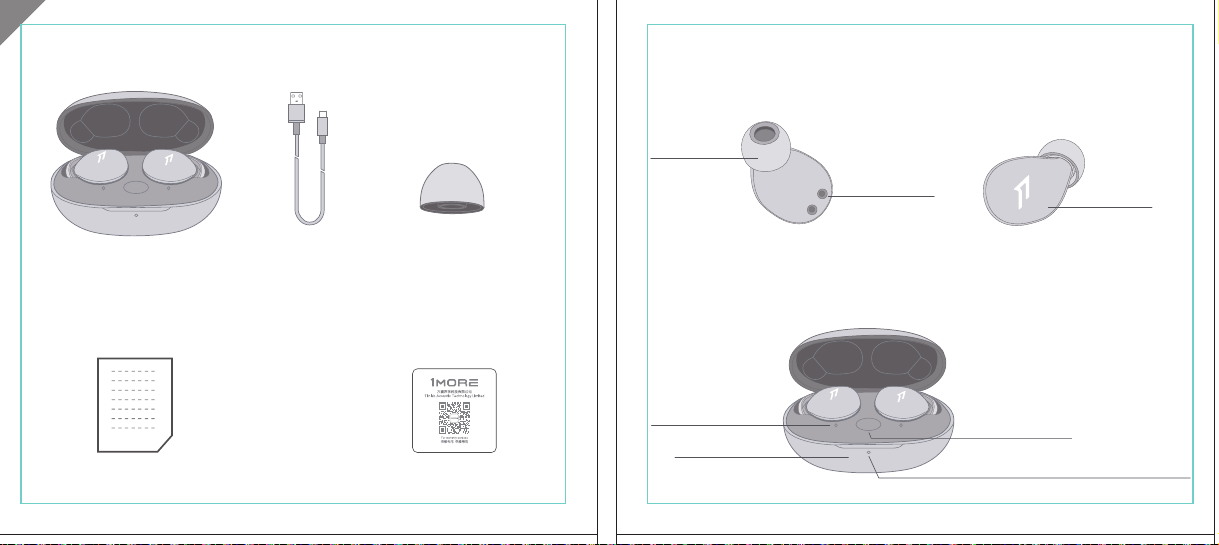
In The Box
材质:80G哑粉
尺寸:98*86mm
EH608
Manufacturer: Tiinlab Corporation
Address: No. 3333, Liuxian Avenue, Tower A, 35th Floor,
Tanglang City, Nanshan District, Shenzhen, China
Made in China
2ASDI-EH608 IC:24662-EH608
We know you will enjoy new 1MORE headphones as much as we do. At 1MORE, we value your
satisfaction. If you would like more details on this product or any of our other products, please visit
us online by scanning the QR code. Go to www.1more.com and sign up for VIP, and 1MORE will
treat you like one.
1MORE Inc., (“1MORE”) warrants to the original retail purchaser that this product is to be free
from defective materials and workmanship for a period of one year from the date of purchase if it
is properly used and maintained. If this product proves defective in either material or
workmanship, 1MORE, at its option, will (a) repair the product with new or refurbished parts, or
(b) replace the product with an equivalent new or refurbished product, at no charge for parts or
labor. If the product model is no longer available and cannot be repaired effectively or replaced
with an identical model, 1MORE at its sole option may replace the unit with a current model of
equal or greater value. In some cases, modication to the mounting surface may be required
where a new model is substituted. 1MORE assumes no responsibility or liability for such
modication. TO OBTAIN A REPAIR OR REPLACEMENT UNDER THE TERMS OF THIS
WARRANTY, PLEASE RETURN TO THE ORIGINAL DEALER FIRST AND THE ORIGINAL
DEALER SHALL REPAIR THE PRODUCT WITH NEW OR REFURBISHED PARTS OR REPLACE
THE PRODUCT WITH AN EQUIVALENT NEW OR REFURBISHED PRODUCT.
You will be required to submit a proof of purchasing details, including but not limited to a receipt
or sales invoice.
Return shipping for exchanges/repairs is the sole responsibility of the original retail purchaser.
Limitations:
• This limited warranty does not cover the failure of the product resulting from improper
installation, misuse, abuse, accident, neglect, mishandling, or wear from ordinary use or
environmental deterioration.
• This limited warranty does not cover cosmetic damage, including paint damage, or
consequential damage to other components or premises which may result for any reason from
the failure of the product.
• This limited warranty is null and void for products not used in accordance with 1MORE’s
instructions.
• This limited warranty is null and void for products with altered or missing serial numbers and for
products not purchased from an AUTHORIZED dealer.
• This limited warranty terminates if you sell or otherwise transfer this product to another party.
1. If the headphones cannot pair normally when powered on. Put both headphones back into
the case, triple click the pairing button and search for "1MORE Z30" in Bluetooth in your
devices to connect.
2. To unpair the device:
Put both headphones into the case, press and hold the pairing button on the case for 8
seconds to disconnect the headphones and the device.
3.OTA Firmware Update:
It can be synchronously upgraded via the 1MORE MUSIC APP while the Left and Right
earbuds are connected to each other with at least 50% battery.
* Functions of the 1MORE MUSIC APP may vary with different devices or operating systems.
For more details, please contact our customer service.
For the initial pairing, turn the headphones on to enter
pairing mode, the LEDs for headphone status will ash
in white. Headphones will power off if not paired to a
device within 3 minutes.
* After the rst successful pairing, headphones will
automatically connect to your device.
To pair with a new device, put headphones back into
the case, and triple click the pairing button when
powered on (no playback) to re-enter pairing mode.
Tips
Extra Functions
We Appreciate Your Business
1MORE (1) Year Limited Warranty
1. Please read this instruction manual carefully and retain for future reference.
2. Please fully charge the battery before rst use.
3. If the headphones have been unused for more than 3 months, we recommend that you charge
them. This will improve battery capacity.
4. Only use charging cables and adapters that are FCC (Federal Communications Commission)
approved.
5. In dry environments, static electricity may numb your ear. This is not related to the quality of the
product.
Safety Information
WEEE
FAQ
1. How to make sure the headphones have been fully charged?
Put the headphones into the charging case, if the headphone stutus LEDs are glowing this means
they have been fully charged.
2. Why won't headphones turn on?
Check if your headphones have enough battery life. If not, please charge them for at least 30 minutes.
3. Why won’t the headphones connect to my cellphone, or take a long time to connect?
Put both buds back into the charging case, then press and hold the pairing button for 3 seconds, click
the device name in your settings, they should now pair correctly to the phone.
4. Why won’t the headphones make phone calls?
The headphones are without microphones or phone call functions.
5. Why is the Bluetooth connection not stable and/or experiences some interruptions?
1) Try shortening the distance between your headphones and the device. Avoid solid barriers in
between you and the device.
2) Please keep away from strong interference sources, such as Wi-Fi and GPRS.
3) Please make sure the Bluetooth antenna of your device is not blocked.
6. Why can't the volume be adjusted by the cellphone buttons when playing soothing sounds in 1MORE
MUSIC APP?
The soothing sounds are stored in the ash of the headphone which can be adjusted only via the APP.
7. The headphones will be disconnected from the cellphone when out of wireless range. They cannot
restore the connection after returning back into the wireless range, how to solve it?
Click the device name in the cellphone pairing list to connect again.
8. I feel uncomfortable when wearing the headphones, how to solve it?
This is mainly because the sizes of ear tips and your canals are not snug, we suggest trying smaller ear
tips.
* For more detailed product FAQs, please visit the product support section under www.1more.com
CE
Headphones × 1 set
Charging Case × 1
Type-C Charging Cable × 1 Silicone Ear Tip (XS/S/L)
Product Overview
Fit
Replace
Placement
Headphones Pairing
Bluetooth Pairing To The Device
Charging
Controls
Soothing Sounds
Battery Notication
User Guide × 1
Silicone Ear Tip
Charging Pin
Charging Case
Pairing Button
Charging Case LED Indicator
LED Indicator for
Headphone Status
Headphone
Silicone Ear Tip
XS / S / M / L
Warranty Card × 1
The Left and Right headphones will automatically
pair with each other after the lid is open when
they are in the case (with charge).
* The above functions are available for either headphones in individual or Stereo mode.
To charge the case with Type-C cable.
To charge the headphones with the case.
* The above functions are available for either headphones in individual or Stereo mode.
Put headphones back into the case
ensuring they are magnetically attached
and close the lid to charge, a full charge
takes around 85 minutes.
Phone call function is not available on the headphones, and the playback controls can be
implemented on the connected device.
Please download the 1MORE MUSIC APP for soothing sounds.
Switch Listening Modes via APP
Enter the 1MORE Z30 home page in 1MORE MUSIC APP after pairing to your cellphone,
then you can switch listening modes between "Music" and "Soothing".
Click the "Soothing Sounds" to enter the playlist.
Click "+" to select the sound to be downloaded to your headphones for listening.
Click the timer icon on the song page to set the playtime.
The LED light of the charging case
will the different battery status: red
light indicates low battery, yellow light
indicates medium battery and green
light indicates full battery.
LED indicator for case battery status: when
the case battery is under 20%, the red
indicator stay lit for 3 seconds. When the
case battery is under 10%, the red indicator
will ash 10 times.
Power On:Take the headphones out of
the charging case (with charge), the
headphones will turn on automatically.
Power Off:Put the headphones
back into the charging case and
close the lid, they will automatically
turn off and start charging.
A full charge will take
around 90 minutes.
EN
* Playback and volume for the soothing sounds can only be adjusted via the APP.
スキャンして、1MOREのWechat公式アカウントをフォロー
「Soothing Sounds」ボタンを押すと、ヒーリング音楽の曲選択画面に入ります。
「+」をクリックしてヒーリング音楽をダウンロードすると、選択した曲がイヤホンに転送されます。
ヒーリング音楽再生画面の「タイマー」をクリックすると、ヒーリング音楽の再生時間を設定することができます。
ヒーリング音楽の再生/停止、音量調整などの操作は、APPでのみ対応します。
ヒーリング音楽
APPでEQモードを切り替えます
操作
その他の機能
梱包内容
イヤーピースの選択
イヤーピースの交換
左側/右側イヤホンのペアリング
イヤホンとBluetooth デバイスをペアリングするには
電池残量に関する注意充電
起動
イヤホン着用
製品外観
イヤホン本体 X 1セット
充電ケース X 1
Type-C充電ケーブル x 1
充電電極
イヤホン本体LEDインジケータ
ペアリングボタン
充電ケースLEDインジケータ
充電ケース
ヘッドホン
シリコン製イヤーピースセット
XS / S / M / L
シリコン製イヤーピースセット
(XS/S/L)
取扱説明書×1
一回のフル充電時間は約90 分です。
* 上記の機能は単独、両耳どちらのイヤホンでも適用されます。
* 上記の機能は単独、両耳どちらのイヤホンでも適用されます。
保証書×1
充電ケースが通電し、左/右側イヤホンをケースに
入っている状態で、ケースの蓋を開けると、左/右
のイヤホンが自動的にペアリングされます。
初めて使用する際、イヤホンの電源を入れてからデバイス
側で検索します。イヤホンは白色LEDが高速点滅します。も
しも 3 分たってもデバイスが見つからない場合、イヤホン本
体はすぐに電源が切れます。
・ すでに接続したことのあるイヤホンであれば、当該デバイ
スと自動でペアリングします。
新しいデバイスと接続する必要があれば、左/右イヤホンを
充電ケース内に戻して電源を入れ、ペアリングボタン3秒間
長押しすると、イヤホンは新しいデバイスとBluetoothのペア
リングがされます。
充電中:充電ケースのLEDインジケータ
は異なる色で電池容量を表示します。電
力が少ない場合赤色LED、電池容量が
半分ぐらいの場合黄色LED、充電が完
了している場合緑色LEDがそれぞれ点
灯します。
イヤホンを充電ケースに戻し
て、充電ケースの蓋を閉める
と充電が開始します。フル充
電時間は約85分です。
充電ケースの容量を確認する方法:充電ケ
ースの電池容量が20%以下になれば、充
電ケースの赤色LEDが3秒点灯します。充
電ケースの電池容量が10%以下になった
場合、充電ケースの赤色LEDのが10回点滅
します。
Type-C充電ケーブルを使用して充電ケースに充電する場合
充電ケースを使用してイヤホンに充電する場合
JP
River
- +
Time Setup
mins
River
OK
- +
60
30
90
River
Time Setup
mins
River
OK
- +
60
30
90
River
River
- +
Time Setup
mins
River
- +
60
30
90
River
1MORE SleepBuds Z30 User Guide
1MORE Наушники для сна Z30 Руководство пользователя
1MORE SleepBuds Z30 コードレスイヤホンユーザーガイド
Midre
Soothing Sounds
Allow adding 2 tracks
Volcano
Falls
River
Midre
Soothing Sounds
Allow adding 2 tracks
Volcano
Falls
River
1. Never disassemble the headphones. There are no user-serviceable parts inside.
2. Do not expose the headphones to temperatures below 32 °F (0 °C) or temperatures above 113 °F (45 °C).
3. Do not use the headphones in a thunderstorm storm. This could prevent the headphones from working
properly, and also increase your chance of being electrically shocked.
4. Do not use oil or any volatile liquid to clean this product.
5. Do not use the headphones in trafc. Do not use the headphones any time it would be dangerous to be
unaware of noises around you.
6. Adult supervision is required for children of age 6 and under.
7. If you don't feel comfortable after wearing the headphones, please refer to an aurist for advice on
whether in-ear headphones are suitable for you.
8. The headphones contain a lithium-ion battery, do not attempt to open, crush, or expose a charging case
to re or excessive temperature. Do not use it if the battery is swollen.
9. Please note that excessively high volumes and long listening times may cause hearing damage.
10. The symbol indicates DC voltage
All products bearing this symbol are waste electrical and electronic equipment (WEEE as in
directive 2012/19/EU) which should not be mixed with unsorted household waste. Instead,
you should protect human health and the environment by handing over your waste
equipment to a designated collection point for the recycling of waste electrical and
electronic equipment, appointed by the government or local authorities. Correct disposal
and recycling will help prevent potential negative consequences to the environment and
human health. Please contact the installer or local authorities for more information about the
location as well as terms and conditions of such collection points.
Home
Soothing Sounds
Listening Modes
1MORE Z30
OTA Firmware Upgrade
Quick Guide to Product
SoothingMusic
L 100% R 100% C 100%
The Bluetooth
®
word mark and logos are registered trademarks owned by Bluetooth SIG, Inc. and any
use of such marks by Tiinlab Corporation is under license. Other trademarks and trade names are the
property of their respective owners.
R
204-B00919
FCC
The SAR limit of USA (FCC) is 1.6 W/kg averaged over one gram of tissue. Device types EH608
(FCC ID: 2ASDI-EH608) has also been tested against this SAR limit.
This device complies with part 15 of the FCC rules. Operation is subject to the following two
conditions: (1) this device may not cause harmful interference, and (2) this device must accept any
interference received, including interference that may cause undesired operation.
NOTE: The manufacturer is not responsible for any radio or TV interference caused by unauthorized
modications or changesto this equipment. Such modications or changes could void the user’s authority
to operate the equipment.
NOTE: This equipment has been tested and found to comply with the limits for a Class B digital device,
pursuant to part 15 of the FCC Rules. These limits are designed to provide reasonable protection
against harmful interference in a residential installation. This equipment generates uses and can radiate
radio frequency energy and, if not installed and used in accordance with the instructions, may cause
harmful interference to radio communications. However, there is no guarantee that interference will not
occur in a particular installation. If this equipment does cause harmful interference to radio or television
reception, which can be determined by turning the equipment off and on, the user is encouraged to try
to correct the interference by one or more of the following measures:
-Reorient or relocate the receiving antenna.
-Increase the separation between the equipment and receiver.
-Connect the equipment into an outlet on a circuit different from that to which the receiver is
connected.
-Consult the dealer or an experienced radio/TV technician for help.
IC regulatory conformance
This device complies with CAN ICES-003 (B)/NMB-003(B).
This device complies with Industry Canada licence-exempt RSS standard(s). Operation is Subject to
the following two conditions: (1) this device may not cause interference, and (2) this device must accept
any interference, including interference that may cause undesired operation of the device.
Le présent appareil est conforme aux CNR d'Industrie Canada applicables aux appareils radio
exempts de licence. L'exploitation est autorisée aux deux conditions suivantes : (1) l'appareil ne doit
シリコン製イヤ
ーピースセット
Declaration of Conformity Hereby, Tiinlab Corporation declares that the radio equipment type
Wireless Earphones of EH608 is in compliance with Directive 2014/53/EU.
The full text of the EU declaration of conformity is available at the following internet address:
https://www.1more.com
RF exposure information: The device has been evaluated to meet general RF exposure requirement.
The device can be used in portable exposure condition without restriction. Radiation Exposure Statement
Power is so low that no RF exposure calculation is needed.
Declaration for EU Compliance
Operation Frequency/Max. EIRP: 2400-2483.5MHz, Max. EIRP is <10dBm.
В коробке
Мы знаем, что вы будете наслаждаться новыми наушниками 1MORE так же, как и мы. В
1MORE мы ценим ваше удовлетворение. Если вы хотите получить более подробную
информацию о данном продукте или о любых других наших продуктах, пожалуйста, посетите
нас онлайн, отсканировав QR-код. Перейдите по ссылке www.1more.com и
зарегистрируйтесь в VIP, и 1MORE будет относиться к вам как к одному из них.
Компания 1MORE Inc. (“1MORE”) гарантирует первоначальному розничному покупателю, что
данный продукт не будет содержать дефектов материалов и изготовления в течение одного года с
даты покупки, если он будет надлежащим образом использоваться и обслуживаться. Если в данном
продукте обнаружатся дефекты материала или изготовления, 1MORE, по своему усмотрению, (а)
отремонтирует продукт с использованием новых или восстановленных деталей или (б) заменит
продукт эквивалентным новым или восстановленным продуктом без оплаты запчастей или рабочей
силы. Если модель продукта больше недоступна и не может быть эффективно отремонтирована или
заменена идентичной моделью, компания 1MORE по своему усмотрению может заменить
устройство текущей моделью равной или большей стоимости. В некоторых случаях при замене
новой модели может потребоваться модификация монтажной поверхности. 1MORE не несет
никакой ответственности за такие изменения. ЧТОБЫ ПОЛУЧИТЬ РЕМОНТ ИЛИ ЗАМЕНУ В
СООТВЕТСТВИИ С УСЛОВИЯМИ ДАННОЙ ГАРАНТИИ, ПОЖАЛУЙСТА, СНАЧАЛА ОБРАТИТЕСЬ К
ПЕРВОНАЧАЛЬНОМУ ДИЛЕРУ, И ПЕРВОНАЧАЛЬНЫЙ ДИЛЕР ОТРЕМОНТИРУЕТ ПРОДУКТ НОВЫМИ
ИЛИ ВОССТАНОВЛЕННЫМИ ДЕТАЛЯМИ ИЛИ ЗАМЕНИТ ПРОДУКТ
ЭКВИВАЛЕНТНЫМ НОВЫМ ИЛИ
ВОССТАНОВЛЕННЫМ ПРОДУКТОМ.
От вас потребуется предоставить подтверждение покупки, включая, но не ограничиваясь этим,
квитанцию или счет-фактуру.
Ответственность за обратную доставку для обмена/ремонта несет исключительно первоначальный
розничный покупатель.
Ограничения:
• Данная ограниченная гарантия не распространяется на выход продукта из строя в результате
неправильной установки, неправильного использования, злоупотребления, несчастного случая,
1. Если наушники не могут нормально подключиться при включенном питании. Положите оба
наушника обратно в корпус, трижды нажмите кнопку сопряжения и найдите "1MORE Z30" в
Bluetooth на ваших устройствах для подключения.
2. Чтобы отключить сопряжение устройства:
Положите оба наушника в корпус, нажмите и удерживайте кнопку сопряжения на корпусе в
течение 8 секунд, чтобы отсоединить наушники от устройства.
3. Обновление прошивки OTA:
может выполняться синхронно с приложением 1MORE Music когда левый и правый наушники
сопряжены друг с другом через Bluetooth .
Для первоначального сопряжения включите
наушники, чтобы перейти в режим сопряжения,
светодиоды состояния наушников будут мигать
белым цветом. Наушники отключатся, если не
выполнить сопряжение с устройством в течение 3
минут.
* После первого успешного сопряжения наушники
автоматически подключатся к вашему устройству.
Чтобы выполнить сопряжение с новым устройством,
вставьте наушники обратно в корпус и трижды
нажмите кнопку сопряжения при включении
питания (воспроизведение отсутствует), чтобы
повторно войти в режим сопряжения.
Дополнительные функции
Мы ценим ваш бизнес
(1) годовая ограниченная гарантия 1MORE
Наушники × 1 набор
Зарядный корпус × 1
Зарядный кабель типа-С × 1Силиконовые вкладыши (XS/S/L)
Обзор продукта
Подгонка
Замена
Замена
Сопряжение наушников
Сопряжение Bluetooth с устройством
Зарядка
Управление
Успокаивающие звуки
Уведомление о батарее
Руководство пользователя × 1
Силиконовые
вкладыши
Зарядный штекер
Зарядный корпус
Кнопки сопряжения
Светодиодный индикатор зарядного корпуса
Наушники
Силиконовые вкладыши
XS / S / M / L
Гарантийный талон × 1
Левый и правый наушники автоматически
соединятся друг с другом после открытия
крышки, когда они будут находиться в корпусе
(с зарядкой).
* Вышеуказанные функции доступны как для наушников в индивидуальном, так и в стерео режиме.
Для зарядки корпуса используйте кабель Type-C.
Для зарядки наушников с корпусом.
* Вышеуказанные функции доступны как для наушников в индивидуальном, так и в стерео режиме.
Положите наушники обратно в корпус,
убедившись, что они надежно
закреплены магнитом, и закройте крышку
для зарядки, полная зарядка занимает
около 85 минут.
Функция телефонного звонка недоступна в наушниках, а управление воспроизведением
может быть реализовано на подключенном устройстве.
Пожалуйста, загрузите приложение 1MORE MUSIC для успокаивающих звуков.
Переключайте режимы прослушивания с помощью приложения
Зайдите на домашнюю страницу 1MORE Z30 в приложении 1MORE MUSIC после сопряжения с
вашим мобильным телефоном, затем вы сможете переключать режимы прослушивания между
"Музыка" и "Успокаивающий".
Нажмите "Soothing Sounds", чтобы войти в список воспроизведения.
Нажмите "+" чтобы выбрать звук, который будет загружен в ваши наушники для прослушивания.
Нажмите на значок таймера на странице песни,
чтобы установить время воспроизведения.
Светодиодный индикатор
зарядного устройства будет
отображать различное состояние
батареи: красный индикатор
указывает на низкий уровень
заряда батареи, желтый
индикатор указывает на средний
уровень заряда батареи и зеленый
индикатор указывает на полный
заряд батареи.
Светодиодный индикатор состояния
батареи корпуса: когда уровень заряда
батареи корпуса ниже 20%, красный
индикатор горит в течение 3 секунд. Когда
уровень заряда батареи корпуса ниже
10%, красный индикатор мигнет 10 раз.
Включение питания:Достаньте
наушники из зарядного корпуса (с
зарядкой), наушники включатся
автоматически.
Выключение питания:Положите
наушники обратно в зарядный
корпус и закройте крышку, они
автоматически выключатся и
начнут заряжаться.
Полная зарядка займет
около 90 минут.
RU
Midre
Soothing Sounds
Allow adding 2 tracks
Volcano
Falls
River
Midre River VolcanoFalls
River
Home
Soothing Sounds
Listening Modes
1MORE Z30
OTA Firmware Upgrade
Quick Guide to Product
SoothingMusic
L 100% R 100% C 100%
pas produire de brouillage, et (2) l'utilisateur de l'appareil doit accepter tout brouillage radioélectrique
subi, même si le brouillage est susceptible d'en compromettre le fonctionnement.
This device has been tested for compliance with IC SAR values at a typical operating near the
body. To ensure that RF exposure levels below the levels tested, use accessories with this
equipment to maintain a minimum separation distance of 0 mm between the body of the user and the
device. These accessories should not contain metallic components. It is possible that the accessories
used close to the body that do not meet these requirements are not consistent with the SAR limits and
it is advisable to avoid using them.
Ce dispositif a été testé pour la conformité avec les valeurs SAR à un fonctionnement typique près du
corps . Pour assurer que les niveaux d'exposition aux radiofréquences en deçà des niveaux testés ,
utiliser des accessoires avec cet équipement pour maintenir une distance de séparation minimale de 0
mm entre le corps de l'utilisateur et l'appareil. Ces accessoires ne doivent pas contenir des
composants métalliques . Il est possible que les accessoires utilisés près du corps quine répondent pas
à ces exigences ne sont pas compatibles avec les limites SAR et il est conseilléd'éviter de les utiliser.
Caution: Any changes or modications not expressly approved by the party responsible for compliance
could void the user's authority to operate this equipment.
充電ケースが通電している状態で、ケ
ースからイヤホンを取り出すと、イヤホ
ンは自動で起動します。
シャットダウン:イヤホンを充電ケースに
入れて蓋を閉めると、すぐにシャットダ
ウンし充電します。
本イヤホンに通話機能は付いていません、曲再生/停止、曲送り/曲戻し、及び音量調整などの再生機能は
スマートフォン側などで操作してください。
ヒーリング音楽などを再生するには1MORE MUSIC APPをダウンロードしてください。
1MORE MUSICアプリを使用しているときにスマホ端末がイヤホンと接続すると、「Music」 と 「Soothing」が選
べます。
1. 電源を入れても、左右のイヤホンが正常にペアリングできない場合、イヤホンを充電ケースに戻し、蓋を一
度閉めてから再度開けます。その後充電ケースのペアリングボタンを3秒間長押しすると、充電ケースのイ
ヤホンLEDインジケーターが白色に点滅し、再びペアリングモードに入ります。
2. 左右イヤホンのペアリング記録をクリアする方法:
両イヤホンを充電ケースに入れ、充電ケースのペアリングボタンを約3秒間長押しします。
3. OTAファームウェアのアップデートを行う場合:
ヘッドホン左右のバッテリーが50%以上で接続されている状態であれば、「1MORE MUSIC APP」を介して
同期的にアップデートすることができます。
* 1MORE MUSIC APPは接続機器によって機能が異なる場合がございます。詳細については、お気軽にカス
タマサポートまでにご連絡ください。
1MORE コミュニティ bbs.1more.com へのアクセスをお待ちしております。
www.1more.com にアクセスし、1MORE 会員に新規登録いただけると、素晴らしい情報を提供いたします。
Bluetooth®のマークとロゴはBluetooth® Technology Allianceの登録商標です。本製品で使用されているこ
れらのマークは万魔声学股份有限公司にてライセンス契約に基づき表示するものとします。その他商標及
び商品名称はそれぞれの所有者に帰属するものとします。
Светодиодный
индикатор для
состояния наушников
* Воспроизведение и громкость успокаивающих звуков можно регулировать только с помощью
приложения.
Словесный знак и логотипы Bluetooth® являются зарегистрированными товарными знаками,
принадлежащими Bluetooth SIG, Inc., и любое использование таких знаков корпорацией Tiinlab
осуществляется по лицензии. Другие товарные знаки и торговые наименования являются
собственностью их соответствующих владельцев.
* Функции приложения 1MORE MUSIC могут отличаться в зависимости от различных устройств или
операционных систем. Для получения более подробной информации, пожалуйста, свяжитесь с
нашей службой поддержки клиентов.
небрежности, неправильного обращения или износа в результате обычного использования или
ухудшения состояния окружающей среды.
• Данная ограниченная гарантия не распространяется на косметические повреждения, включая
повреждение краски, или косвенный ущерб другим компонентам или поверхностям, которые
могут возникнуть по любой причине в результате выхода продукта из строя.
• Данная ограниченная гарантия недействительна для продуктов, используемых не в соответствии с
инструкциями 1MORE.
• Данная ограниченная гарантия недействительна для продуктов с измененными или
отсутствующими серийными номерами, а также для продуктов, приобретенных не у
ОФИЦИАЛЬНОГО дилера.
• Действие данной ограниченной гарантии прекращается, если вы продаете или иным образом
передаете данный продукт другой стороне.
Home
Soothing Sounds
Listening Modes
1MORE Z30
OTA Firmware Upgrade
Quick Guide to Product
SoothingMusic
L 100% R 100% C 100%
River
Home
Soothing Sounds
Listening Modes
1MORE Z30
OTA Firmware Upgrade
Quick Guide to Product
Soothing
Music
L 100% R 100% C 100%
Home
Soothing Sounds
Listening Modes
1MORE Z30
OTA Firmware Upgrade
Quick Guide to Product
SoothingMusic
L 100% R 100% C 100%
Home
Soothing Sounds
Listening Modes
1MORE Z30
OTA Firmware Upgrade
Quick Guide to Product
Soothing
Music
L 100% R 100% C 100%
Home
Soothing Sounds
Listening Modes
1MORE Z30
OTA Firmware Upgrade
Quick Guide to Product
SoothingMusic
L 100% R 100% C 100%
Home
Soothing Sounds
Listening Modes
1MORE Z30
OTA Firmware Upgrade
Quick Guide to Product
Soothing
Music
L 100% R 100% C 100%
Midre River VolcanoFalls
River
Home
Soothing Sounds
Listening Modes
1MORE Z30
OTA Firmware Upgrade
Quick Guide to Product
SoothingMusic
L 100% R 100% C 100%
Home
Soothing Sounds
Listening Modes
1MORE Z30
OTA Firmware Upgrade
Quick Guide to Product
SoothingMusic
L 100% R 100% C 100%
Midre River VolcanoFalls
River
Home
Soothing Sounds
Listening Modes
1MORE Z30
OTA Firmware Upgrade
Quick Guide to Product
SoothingMusic
L 100% R 100% C 100%
Home
Soothing Sounds
Listening Modes
1MORE Z30
OTA Firmware Upgrade
Quick Guide to Product
SoothingMusic
L 100% R 100% C 100%
C:0/M:85/Y:95/K:0C
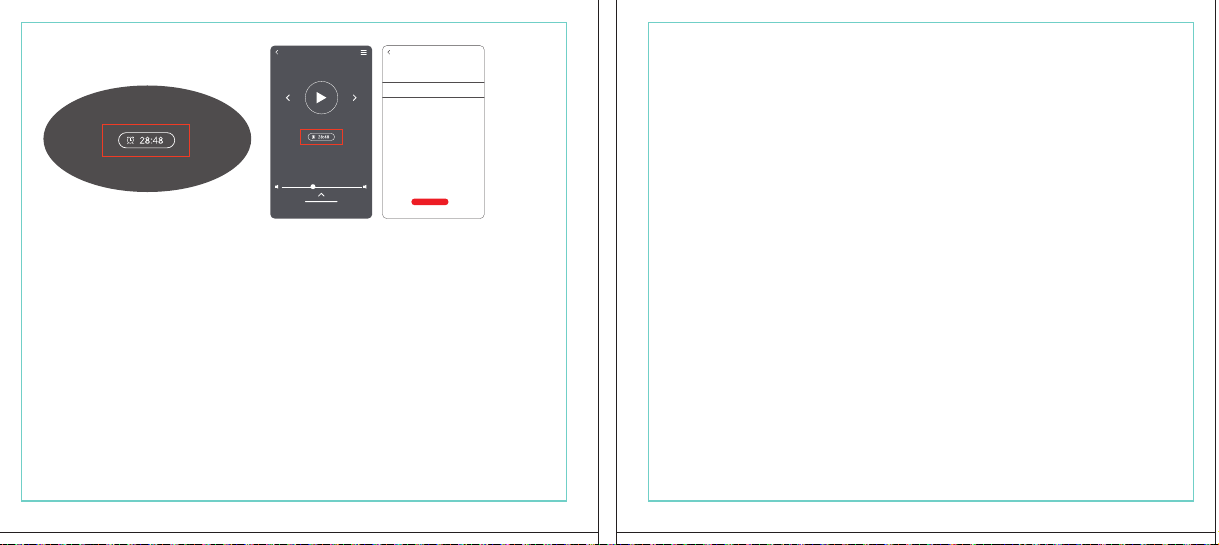
In The Box
材质:80G哑粉
尺寸:98*86mm
EH608
Manufacturer: Tiinlab Corporation
Address: No. 3333, Liuxian Avenue, Tower A, 35th Floor,
Tanglang City, Nanshan District, Shenzhen, China
Made in China
2ASDI-EH608 IC:24662-EH608
We know you will enjoy new 1MORE headphones as much as we do. At 1MORE, we value your
satisfaction. If you would like more details on this product or any of our other products, please visit
us online by scanning the QR code. Go to www.1more.com and sign up for VIP, and 1MORE will
treat you like one.
1MORE Inc., (“1MORE”) warrants to the original retail purchaser that this product is to be free
from defective materials and workmanship for a period of one year from the date of purchase if it
is properly used and maintained. If this product proves defective in either material or
workmanship, 1MORE, at its option, will (a) repair the product with new or refurbished parts, or
(b) replace the product with an equivalent new or refurbished product, at no charge for parts or
labor. If the product model is no longer available and cannot be repaired effectively or replaced
with an identical model, 1MORE at its sole option may replace the unit with a current model of
equal or greater value. In some cases, modication to the mounting surface may be required
where a new model is substituted. 1MORE assumes no responsibility or liability for such
modication. TO OBTAIN A REPAIR OR REPLACEMENT UNDER THE TERMS OF THIS
WARRANTY, PLEASE RETURN TO THE ORIGINAL DEALER FIRST AND THE ORIGINAL
DEALER SHALL REPAIR THE PRODUCT WITH NEW OR REFURBISHED PARTS OR REPLACE
THE PRODUCT WITH AN EQUIVALENT NEW OR REFURBISHED PRODUCT.
You will be required to submit a proof of purchasing details, including but not limited to a receipt
or sales invoice.
Return shipping for exchanges/repairs is the sole responsibility of the original retail purchaser.
Limitations:
• This limited warranty does not cover the failure of the product resulting from improper
installation, misuse, abuse, accident, neglect, mishandling, or wear from ordinary use or
environmental deterioration.
• This limited warranty does not cover cosmetic damage, including paint damage, or
consequential damage to other components or premises which may result for any reason from
the failure of the product.
• This limited warranty is null and void for products not used in accordance with 1MORE’s
instructions.
• This limited warranty is null and void for products with altered or missing serial numbers and for
products not purchased from an AUTHORIZED dealer.
• This limited warranty terminates if you sell or otherwise transfer this product to another party.
1. If the headphones cannot pair normally when powered on. Put both headphones back into
the case, triple click the pairing button and search for "1MORE Z30" in Bluetooth in your
devices to connect.
2. To unpair the device:
Put both headphones into the case, press and hold the pairing button on the case for 8
seconds to disconnect the headphones and the device.
3.OTA Firmware Update:
It can be synchronously upgraded via the 1MORE MUSIC APP while the Left and Right
earbuds are connected to each other with at least 50% battery.
* Functions of the 1MORE MUSIC APP may vary with different devices or operating systems.
For more details, please contact our customer service.
For the initial pairing, turn the headphones on to enter
pairing mode, the LEDs for headphone status will ash
in white. Headphones will power off if not paired to a
device within 3 minutes.
* After the rst successful pairing, headphones will
automatically connect to your device.
To pair with a new device, put headphones back into
the case, and triple click the pairing button when
powered on (no playback) to re-enter pairing mode.
Tips
Extra Functions
We Appreciate Your Business
1MORE (1) Year Limited Warranty
1. Please read this instruction manual carefully and retain for future reference.
2. Please fully charge the battery before rst use.
3. If the headphones have been unused for more than 3 months, we recommend that you charge
them. This will improve battery capacity.
4. Only use charging cables and adapters that are FCC (Federal Communications Commission)
approved.
5. In dry environments, static electricity may numb your ear. This is not related to the quality of the
product.
Safety Information
WEEE
FAQ
1. How to make sure the headphones have been fully charged?
Put the headphones into the charging case, if the headphone stutus LEDs are glowing this means
they have been fully charged.
2. Why won't headphones turn on?
Check if your headphones have enough battery life. If not, please charge them for at least 30 minutes.
3. Why won’t the headphones connect to my cellphone, or take a long time to connect?
Put both buds back into the charging case, then press and hold the pairing button for 3 seconds, click
the device name in your settings, they should now pair correctly to the phone.
4. Why won’t the headphones make phone calls?
The headphones are without microphones or phone call functions.
5. Why is the Bluetooth connection not stable and/or experiences some interruptions?
1) Try shortening the distance between your headphones and the device. Avoid solid barriers in
between you and the device.
2) Please keep away from strong interference sources, such as Wi-Fi and GPRS.
3) Please make sure the Bluetooth antenna of your device is not blocked.
6. Why can't the volume be adjusted by the cellphone buttons when playing soothing sounds in 1MORE
MUSIC APP?
The soothing sounds are stored in the ash of the headphone which can be adjusted only via the APP.
7. The headphones will be disconnected from the cellphone when out of wireless range. They cannot
restore the connection after returning back into the wireless range, how to solve it?
Click the device name in the cellphone pairing list to connect again.
8. I feel uncomfortable when wearing the headphones, how to solve it?
This is mainly because the sizes of ear tips and your canals are not snug, we suggest trying smaller ear
tips.
* For more detailed product FAQs, please visit the product support section under www.1more.com
CE
Headphones × 1 set
Charging Case × 1
Type-C Charging Cable × 1 Silicone Ear Tip (XS/S/L)
Product Overview
Fit
Replace
Placement
Headphones Pairing
Bluetooth Pairing To The Device
Charging
Controls
Soothing Sounds
Battery Notication
User Guide × 1
Silicone Ear Tip
Charging Pin
Charging Case
Pairing Button
Charging Case LED Indicator
LED Indicator for
Headphone Status
Headphone
Silicone Ear Tip
XS / S / M / L
Warranty Card × 1
The Left and Right headphones will automatically
pair with each other after the lid is open when
they are in the case (with charge).
* The above functions are available for either headphones in individual or Stereo mode.
To charge the case with Type-C cable.
To charge the headphones with the case.
* The above functions are available for either headphones in individual or Stereo mode.
Put headphones back into the case
ensuring they are magnetically attached
and close the lid to charge, a full charge
takes around 85 minutes.
Phone call function is not available on the headphones, and the playback controls can be
implemented on the connected device.
Please download the 1MORE MUSIC APP for soothing sounds.
Switch Listening Modes via APP
Enter the 1MORE Z30 home page in 1MORE MUSIC APP after pairing to your cellphone,
then you can switch listening modes between "Music" and "Soothing".
Click the "Soothing Sounds" to enter the playlist.
Click "+" to select the sound to be downloaded to your headphones for listening.
Click the timer icon on the song page to set the playtime.
The LED light of the charging case
will the different battery status: red
light indicates low battery, yellow light
indicates medium battery and green
light indicates full battery.
LED indicator for case battery status: when
the case battery is under 20%, the red
indicator stay lit for 3 seconds. When the
case battery is under 10%, the red indicator
will ash 10 times.
Power On:Take the headphones out of
the charging case (with charge), the
headphones will turn on automatically.
Power Off:Put the headphones
back into the charging case and
close the lid, they will automatically
turn off and start charging.
A full charge will take
around 90 minutes.
EN
* Playback and volume for the soothing sounds can only be adjusted via the APP.
スキャンして、1MOREのWechat公式アカウントをフォロー
「Soothing Sounds」ボタンを押すと、ヒーリング音楽の曲選択画面に入ります。
「+」をクリックしてヒーリング音楽をダウンロードすると、選択した曲がイヤホンに転送されます。
ヒーリング音楽再生画面の「タイマー」をクリックすると、ヒーリング音楽の再生時間を設定することができます。
ヒーリング音楽の再生/停止、音量調整などの操作は、APPでのみ対応します。
ヒーリング音楽
APPでEQモードを切り替えます
操作
その他の機能
梱包内容
イヤーピースの選択
イヤーピースの交換
左側/右側イヤホンのペアリング
イヤホンとBluetooth デバイスをペアリングするには
電池残量に関する注意充電
起動
イヤホン着用
製品外観
イヤホン本体 X 1セット
充電ケース X 1
Type-C充電ケーブル x 1
充電電極
イヤホン本体LEDインジケータ
ペアリングボタン
充電ケースLEDインジケータ
充電ケース
ヘッドホン
シリコン製イヤーピースセット
XS / S / M / L
シリコン製イヤーピースセット
(XS/S/L)
取扱説明書×1
一回のフル充電時間は約90 分です。
* 上記の機能は単独、両耳どちらのイヤホンでも適用されます。
* 上記の機能は単独、両耳どちらのイヤホンでも適用されます。
保証書×1
充電ケースが通電し、左/右側イヤホンをケースに
入っている状態で、ケースの蓋を開けると、左/右
のイヤホンが自動的にペアリングされます。
初めて使用する際、イヤホンの電源を入れてからデバイス
側で検索します。イヤホンは白色LEDが高速点滅します。も
しも 3 分たってもデバイスが見つからない場合、イヤホン本
体はすぐに電源が切れます。
・ すでに接続したことのあるイヤホンであれば、当該デバイ
スと自動でペアリングします。
新しいデバイスと接続する必要があれば、左/右イヤホンを
充電ケース内に戻して電源を入れ、ペアリングボタン3秒間
長押しすると、イヤホンは新しいデバイスとBluetoothのペア
リングがされます。
充電中:充電ケースのLEDインジケータ
は異なる色で電池容量を表示します。電
力が少ない場合赤色LED、電池容量が
半分ぐらいの場合黄色LED、充電が完
了している場合緑色LEDがそれぞれ点
灯します。
イヤホンを充電ケースに戻し
て、充電ケースの蓋を閉める
と充電が開始します。フル充
電時間は約85分です。
充電ケースの容量を確認する方法:充電ケ
ースの電池容量が20%以下になれば、充
電ケースの赤色LEDが3秒点灯します。充
電ケースの電池容量が10%以下になった
場合、充電ケースの赤色LEDのが10回点滅
します。
Type-C充電ケーブルを使用して充電ケースに充電する場合
充電ケースを使用してイヤホンに充電する場合
JP
River
- +
Time Setup
mins
River
OK
- +
60
30
90
River
Time Setup
mins
River
OK
- +
60
30
90
River
River
- +
Time Setup
mins
River
- +
60
30
90
River
1MORE SleepBuds Z30 User Guide
1MORE Наушники для сна Z30 Руководство пользователя
1MORE SleepBuds Z30 コードレスイヤホンユーザーガイド
Midre
Soothing Sounds
Allow adding 2 tracks
Volcano
Falls
River
Midre
Soothing Sounds
Allow adding 2 tracks
Volcano
Falls
River
1. Never disassemble the headphones. There are no user-serviceable parts inside.
2. Do not expose the headphones to temperatures below 32 °F (0 °C) or temperatures above 113 °F (45 °C).
3. Do not use the headphones in a thunderstorm storm. This could prevent the headphones from working
properly, and also increase your chance of being electrically shocked.
4. Do not use oil or any volatile liquid to clean this product.
5. Do not use the headphones in trafc. Do not use the headphones any time it would be dangerous to be
unaware of noises around you.
6. Adult supervision is required for children of age 6 and under.
7. If you don't feel comfortable after wearing the headphones, please refer to an aurist for advice on
whether in-ear headphones are suitable for you.
8. The headphones contain a lithium-ion battery, do not attempt to open, crush, or expose a charging case
to re or excessive temperature. Do not use it if the battery is swollen.
9. Please note that excessively high volumes and long listening times may cause hearing damage.
10. The symbol indicates DC voltage
All products bearing this symbol are waste electrical and electronic equipment (WEEE as in
directive 2012/19/EU) which should not be mixed with unsorted household waste. Instead,
you should protect human health and the environment by handing over your waste
equipment to a designated collection point for the recycling of waste electrical and
electronic equipment, appointed by the government or local authorities. Correct disposal
and recycling will help prevent potential negative consequences to the environment and
human health. Please contact the installer or local authorities for more information about the
location as well as terms and conditions of such collection points.
Home
Soothing Sounds
Listening Modes
1MORE Z30
OTA Firmware Upgrade
Quick Guide to Product
SoothingMusic
L 100% R 100% C 100%
The Bluetooth
®
word mark and logos are registered trademarks owned by Bluetooth SIG, Inc. and any
use of such marks by Tiinlab Corporation is under license. Other trademarks and trade names are the
property of their respective owners.
R
204-B00919
FCC
The SAR limit of USA (FCC) is 1.6 W/kg averaged over one gram of tissue. Device types EH608
(FCC ID: 2ASDI-EH608) has also been tested against this SAR limit.
This device complies with part 15 of the FCC rules. Operation is subject to the following two
conditions: (1) this device may not cause harmful interference, and (2) this device must accept any
interference received, including interference that may cause undesired operation.
NOTE: The manufacturer is not responsible for any radio or TV interference caused by unauthorized
modications or changesto this equipment. Such modications or changes could void the user’s authority
to operate the equipment.
NOTE: This equipment has been tested and found to comply with the limits for a Class B digital device,
pursuant to part 15 of the FCC Rules. These limits are designed to provide reasonable protection
against harmful interference in a residential installation. This equipment generates uses and can radiate
radio frequency energy and, if not installed and used in accordance with the instructions, may cause
harmful interference to radio communications. However, there is no guarantee that interference will not
occur in a particular installation. If this equipment does cause harmful interference to radio or television
reception, which can be determined by turning the equipment off and on, the user is encouraged to try
to correct the interference by one or more of the following measures:
-Reorient or relocate the receiving antenna.
-Increase the separation between the equipment and receiver.
-Connect the equipment into an outlet on a circuit different from that to which the receiver is
connected.
-Consult the dealer or an experienced radio/TV technician for help.
IC regulatory conformance
This device complies with CAN ICES-003 (B)/NMB-003(B).
This device complies with Industry Canada licence-exempt RSS standard(s). Operation is Subject to
the following two conditions: (1) this device may not cause interference, and (2) this device must accept
any interference, including interference that may cause undesired operation of the device.
Le présent appareil est conforme aux CNR d'Industrie Canada applicables aux appareils radio
exempts de licence. L'exploitation est autorisée aux deux conditions suivantes : (1) l'appareil ne doit
シリコン製イヤ
ーピースセット
Declaration of Conformity Hereby, Tiinlab Corporation declares that the radio equipment type
Wireless Earphones of EH608 is in compliance with Directive 2014/53/EU.
The full text of the EU declaration of conformity is available at the following internet address:
https://www.1more.com
RF exposure information: The device has been evaluated to meet general RF exposure requirement.
The device can be used in portable exposure condition without restriction. Radiation Exposure Statement
Power is so low that no RF exposure calculation is needed.
Declaration for EU Compliance
Operation Frequency/Max. EIRP: 2400-2483.5MHz, Max. EIRP is <10dBm.
В коробке
Мы знаем, что вы будете наслаждаться новыми наушниками 1MORE так же, как и мы. В
1MORE мы ценим ваше удовлетворение. Если вы хотите получить более подробную
информацию о данном продукте или о любых других наших продуктах, пожалуйста, посетите
нас онлайн, отсканировав QR-код. Перейдите по ссылке www.1more.com и
зарегистрируйтесь в VIP, и 1MORE будет относиться к вам как к одному из них.
Компания 1MORE Inc. (“1MORE”) гарантирует первоначальному розничному покупателю, что
данный продукт не будет содержать дефектов материалов и изготовления в течение одного года с
даты покупки, если он будет надлежащим образом использоваться и обслуживаться. Если в данном
продукте обнаружатся дефекты материала или изготовления, 1MORE, по своему усмотрению, (а)
отремонтирует продукт с использованием новых или восстановленных деталей или (б) заменит
продукт эквивалентным новым или восстановленным продуктом без оплаты запчастей или рабочей
силы. Если модель продукта больше недоступна и не может быть эффективно отремонтирована или
заменена идентичной моделью, компания 1MORE по своему усмотрению может заменить
устройство текущей моделью равной или большей стоимости. В некоторых случаях при замене
новой модели может потребоваться модификация монтажной поверхности. 1MORE не несет
никакой ответственности за такие изменения. ЧТОБЫ ПОЛУЧИТЬ РЕМОНТ ИЛИ ЗАМЕНУ В
СООТВЕТСТВИИ С УСЛОВИЯМИ ДАННОЙ ГАРАНТИИ, ПОЖАЛУЙСТА, СНАЧАЛА ОБРАТИТЕСЬ К
ПЕРВОНАЧАЛЬНОМУ ДИЛЕРУ, И ПЕРВОНАЧАЛЬНЫЙ ДИЛЕР ОТРЕМОНТИРУЕТ ПРОДУКТ НОВЫМИ
ИЛИ ВОССТАНОВЛЕННЫМИ ДЕТАЛЯМИ ИЛИ ЗАМЕНИТ ПРОДУКТ
ЭКВИВАЛЕНТНЫМ НОВЫМ ИЛИ
ВОССТАНОВЛЕННЫМ ПРОДУКТОМ.
От вас потребуется предоставить подтверждение покупки, включая, но не ограничиваясь этим,
квитанцию или счет-фактуру.
Ответственность за обратную доставку для обмена/ремонта несет исключительно первоначальный
розничный покупатель.
Ограничения:
• Данная ограниченная гарантия не распространяется на выход продукта из строя в результате
неправильной установки, неправильного использования, злоупотребления, несчастного случая,
1. Если наушники не могут нормально подключиться при включенном питании. Положите оба
наушника обратно в корпус, трижды нажмите кнопку сопряжения и найдите "1MORE Z30" в
Bluetooth на ваших устройствах для подключения.
2. Чтобы отключить сопряжение устройства:
Положите оба наушника в корпус, нажмите и удерживайте кнопку сопряжения на корпусе в
течение 8 секунд, чтобы отсоединить наушники от устройства.
3. Обновление прошивки OTA:
может выполняться синхронно с приложением 1MORE Music когда левый и правый наушники
сопряжены друг с другом через Bluetooth .
Для первоначального сопряжения включите
наушники, чтобы перейти в режим сопряжения,
светодиоды состояния наушников будут мигать
белым цветом. Наушники отключатся, если не
выполнить сопряжение с устройством в течение 3
минут.
* После первого успешного сопряжения наушники
автоматически подключатся к вашему устройству.
Чтобы выполнить сопряжение с новым устройством,
вставьте наушники обратно в корпус и трижды
нажмите кнопку сопряжения при включении
питания (воспроизведение отсутствует), чтобы
повторно войти в режим сопряжения.
Дополнительные функции
Мы ценим ваш бизнес
(1) годовая ограниченная гарантия 1MORE
Наушники × 1 набор
Зарядный корпус × 1
Зарядный кабель типа-С × 1Силиконовые вкладыши (XS/S/L)
Обзор продукта
Подгонка
Замена
Замена
Сопряжение наушников
Сопряжение Bluetooth с устройством
Зарядка
Управление
Успокаивающие звуки
Уведомление о батарее
Руководство пользователя × 1
Силиконовые
вкладыши
Зарядный штекер
Зарядный корпус
Кнопки сопряжения
Светодиодный индикатор зарядного корпуса
Наушники
Силиконовые вкладыши
XS / S / M / L
Гарантийный талон × 1
Левый и правый наушники автоматически
соединятся друг с другом после открытия
крышки, когда они будут находиться в корпусе
(с зарядкой).
* Вышеуказанные функции доступны как для наушников в индивидуальном, так и в стерео режиме.
Для зарядки корпуса используйте кабель Type-C.
Для зарядки наушников с корпусом.
* Вышеуказанные функции доступны как для наушников в индивидуальном, так и в стерео режиме.
Положите наушники обратно в корпус,
убедившись, что они надежно
закреплены магнитом, и закройте крышку
для зарядки, полная зарядка занимает
около 85 минут.
Функция телефонного звонка недоступна в наушниках, а управление воспроизведением
может быть реализовано на подключенном устройстве.
Пожалуйста, загрузите приложение 1MORE MUSIC для успокаивающих звуков.
Переключайте режимы прослушивания с помощью приложения
Зайдите на домашнюю страницу 1MORE Z30 в приложении 1MORE MUSIC после сопряжения с
вашим мобильным телефоном, затем вы сможете переключать режимы прослушивания между
"Музыка" и "Успокаивающий".
Нажмите "Soothing Sounds", чтобы войти в список воспроизведения.
Нажмите "+" чтобы выбрать звук, который будет загружен в ваши наушники для прослушивания.
Нажмите на значок таймера на странице песни,
чтобы установить время воспроизведения.
Светодиодный индикатор
зарядного устройства будет
отображать различное состояние
батареи: красный индикатор
указывает на низкий уровень
заряда батареи, желтый
индикатор указывает на средний
уровень заряда батареи и зеленый
индикатор указывает на полный
заряд батареи.
Светодиодный индикатор состояния
батареи корпуса: когда уровень заряда
батареи корпуса ниже 20%, красный
индикатор горит в течение 3 секунд. Когда
уровень заряда батареи корпуса ниже
10%, красный индикатор мигнет 10 раз.
Включение питания:Достаньте
наушники из зарядного корпуса (с
зарядкой), наушники включатся
автоматически.
Выключение питания:Положите
наушники обратно в зарядный
корпус и закройте крышку, они
автоматически выключатся и
начнут заряжаться.
Полная зарядка займет
около 90 минут.
RU
Midre
Soothing Sounds
Allow adding 2 tracks
Volcano
Falls
River
Midre River VolcanoFalls
River
Home
Soothing Sounds
Listening Modes
1MORE Z30
OTA Firmware Upgrade
Quick Guide to Product
SoothingMusic
L 100% R 100% C 100%
pas produire de brouillage, et (2) l'utilisateur de l'appareil doit accepter tout brouillage radioélectrique
subi, même si le brouillage est susceptible d'en compromettre le fonctionnement.
This device has been tested for compliance with IC SAR values at a typical operating near the
body. To ensure that RF exposure levels below the levels tested, use accessories with this
equipment to maintain a minimum separation distance of 0 mm between the body of the user and the
device. These accessories should not contain metallic components. It is possible that the accessories
used close to the body that do not meet these requirements are not consistent with the SAR limits and
it is advisable to avoid using them.
Ce dispositif a été testé pour la conformité avec les valeurs SAR à un fonctionnement typique près du
corps . Pour assurer que les niveaux d'exposition aux radiofréquences en deçà des niveaux testés ,
utiliser des accessoires avec cet équipement pour maintenir une distance de séparation minimale de 0
mm entre le corps de l'utilisateur et l'appareil. Ces accessoires ne doivent pas contenir des
composants métalliques . Il est possible que les accessoires utilisés près du corps quine répondent pas
à ces exigences ne sont pas compatibles avec les limites SAR et il est conseilléd'éviter de les utiliser.
Caution: Any changes or modications not expressly approved by the party responsible for compliance
could void the user's authority to operate this equipment.
充電ケースが通電している状態で、ケ
ースからイヤホンを取り出すと、イヤホ
ンは自動で起動します。
シャットダウン:イヤホンを充電ケースに
入れて蓋を閉めると、すぐにシャットダ
ウンし充電します。
本イヤホンに通話機能は付いていません、曲再生/停止、曲送り/曲戻し、及び音量調整などの再生機能は
スマートフォン側などで操作してください。
ヒーリング音楽などを再生するには1MORE MUSIC APPをダウンロードしてください。
1MORE MUSICアプリを使用しているときにスマホ端末がイヤホンと接続すると、「Music」 と 「Soothing」が選
べます。
1. 電源を入れても、左右のイヤホンが正常にペアリングできない場合、イヤホンを充電ケースに戻し、蓋を一
度閉めてから再度開けます。その後充電ケースのペアリングボタンを3秒間長押しすると、充電ケースのイ
ヤホンLEDインジケーターが白色に点滅し、再びペアリングモードに入ります。
2. 左右イヤホンのペアリング記録をクリアする方法:
両イヤホンを充電ケースに入れ、充電ケースのペアリングボタンを約3秒間長押しします。
3. OTAファームウェアのアップデートを行う場合:
ヘッドホン左右のバッテリーが50%以上で接続されている状態であれば、「1MORE MUSIC APP」を介して
同期的にアップデートすることができます。
* 1MORE MUSIC APPは接続機器によって機能が異なる場合がございます。詳細については、お気軽にカス
タマサポートまでにご連絡ください。
1MORE コミュニティ bbs.1more.com へのアクセスをお待ちしております。
www.1more.com にアクセスし、1MORE 会員に新規登録いただけると、素晴らしい情報を提供いたします。
Bluetooth®のマークとロゴはBluetooth® Technology Allianceの登録商標です。本製品で使用されているこ
れらのマークは万魔声学股份有限公司にてライセンス契約に基づき表示するものとします。その他商標及
び商品名称はそれぞれの所有者に帰属するものとします。
Светодиодный
индикатор для
состояния наушников
* Воспроизведение и громкость успокаивающих звуков можно регулировать только с помощью
приложения.
Словесный знак и логотипы Bluetooth® являются зарегистрированными товарными знаками,
принадлежащими Bluetooth SIG, Inc., и любое использование таких знаков корпорацией Tiinlab
осуществляется по лицензии. Другие товарные знаки и торговые наименования являются
собственностью их соответствующих владельцев.
* Функции приложения 1MORE MUSIC могут отличаться в зависимости от различных устройств или
операционных систем. Для получения более подробной информации, пожалуйста, свяжитесь с
нашей службой поддержки клиентов.
небрежности, неправильного обращения или износа в результате обычного использования или
ухудшения состояния окружающей среды.
• Данная ограниченная гарантия не распространяется на косметические повреждения, включая
повреждение краски, или косвенный ущерб другим компонентам или поверхностям, которые
могут возникнуть по любой причине в результате выхода продукта из строя.
• Данная ограниченная гарантия недействительна для продуктов, используемых не в соответствии с
инструкциями 1MORE.
• Данная ограниченная гарантия недействительна для продуктов с измененными или
отсутствующими серийными номерами, а также для продуктов, приобретенных не у
ОФИЦИАЛЬНОГО дилера.
• Действие данной ограниченной гарантии прекращается, если вы продаете или иным образом
передаете данный продукт другой стороне.
Home
Soothing Sounds
Listening Modes
1MORE Z30
OTA Firmware Upgrade
Quick Guide to Product
SoothingMusic
L 100% R 100% C 100%
River
Home
Soothing Sounds
Listening Modes
1MORE Z30
OTA Firmware Upgrade
Quick Guide to Product
Soothing
Music
L 100% R 100% C 100%
Home
Soothing Sounds
Listening Modes
1MORE Z30
OTA Firmware Upgrade
Quick Guide to Product
SoothingMusic
L 100% R 100% C 100%
Home
Soothing Sounds
Listening Modes
1MORE Z30
OTA Firmware Upgrade
Quick Guide to Product
Soothing
Music
L 100% R 100% C 100%
Home
Soothing Sounds
Listening Modes
1MORE Z30
OTA Firmware Upgrade
Quick Guide to Product
SoothingMusic
L 100% R 100% C 100%
Home
Soothing Sounds
Listening Modes
1MORE Z30
OTA Firmware Upgrade
Quick Guide to Product
Soothing
Music
L 100% R 100% C 100%
Midre River VolcanoFalls
River
Home
Soothing Sounds
Listening Modes
1MORE Z30
OTA Firmware Upgrade
Quick Guide to Product
SoothingMusic
L 100% R 100% C 100%
Home
Soothing Sounds
Listening Modes
1MORE Z30
OTA Firmware Upgrade
Quick Guide to Product
SoothingMusic
L 100% R 100% C 100%
Midre River VolcanoFalls
River
Home
Soothing Sounds
Listening Modes
1MORE Z30
OTA Firmware Upgrade
Quick Guide to Product
SoothingMusic
L 100% R 100% C 100%
Home
Soothing Sounds
Listening Modes
1MORE Z30
OTA Firmware Upgrade
Quick Guide to Product
SoothingMusic
L 100% R 100% C 100%
C:0/M:85/Y:95/K:0C
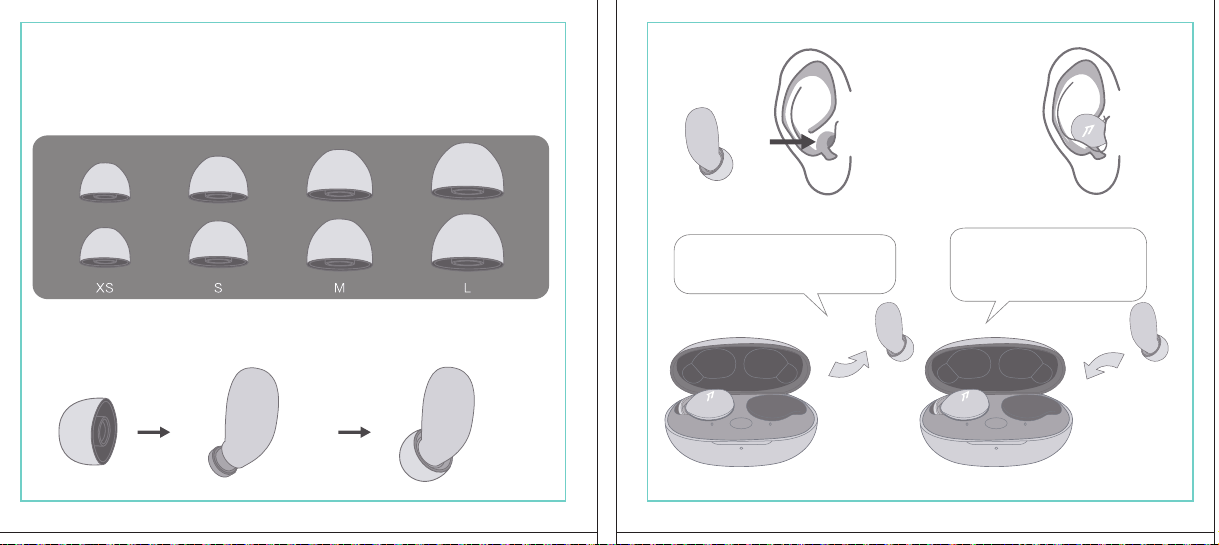
In The Box
材质:80G哑粉
尺寸:98*86mm
EH608
Manufacturer: Tiinlab Corporation
Address: No. 3333, Liuxian Avenue, Tower A, 35th Floor,
Tanglang City, Nanshan District, Shenzhen, China
Made in China
2ASDI-EH608 IC:24662-EH608
We know you will enjoy new 1MORE headphones as much as we do. At 1MORE, we value your
satisfaction. If you would like more details on this product or any of our other products, please visit
us online by scanning the QR code. Go to www.1more.com and sign up for VIP, and 1MORE will
treat you like one.
1MORE Inc., (“1MORE”) warrants to the original retail purchaser that this product is to be free
from defective materials and workmanship for a period of one year from the date of purchase if it
is properly used and maintained. If this product proves defective in either material or
workmanship, 1MORE, at its option, will (a) repair the product with new or refurbished parts, or
(b) replace the product with an equivalent new or refurbished product, at no charge for parts or
labor. If the product model is no longer available and cannot be repaired effectively or replaced
with an identical model, 1MORE at its sole option may replace the unit with a current model of
equal or greater value. In some cases, modication to the mounting surface may be required
where a new model is substituted. 1MORE assumes no responsibility or liability for such
modication. TO OBTAIN A REPAIR OR REPLACEMENT UNDER THE TERMS OF THIS
WARRANTY, PLEASE RETURN TO THE ORIGINAL DEALER FIRST AND THE ORIGINAL
DEALER SHALL REPAIR THE PRODUCT WITH NEW OR REFURBISHED PARTS OR REPLACE
THE PRODUCT WITH AN EQUIVALENT NEW OR REFURBISHED PRODUCT.
You will be required to submit a proof of purchasing details, including but not limited to a receipt
or sales invoice.
Return shipping for exchanges/repairs is the sole responsibility of the original retail purchaser.
Limitations:
• This limited warranty does not cover the failure of the product resulting from improper
installation, misuse, abuse, accident, neglect, mishandling, or wear from ordinary use or
environmental deterioration.
• This limited warranty does not cover cosmetic damage, including paint damage, or
consequential damage to other components or premises which may result for any reason from
the failure of the product.
• This limited warranty is null and void for products not used in accordance with 1MORE’s
instructions.
• This limited warranty is null and void for products with altered or missing serial numbers and for
products not purchased from an AUTHORIZED dealer.
• This limited warranty terminates if you sell or otherwise transfer this product to another party.
1. If the headphones cannot pair normally when powered on. Put both headphones back into
the case, triple click the pairing button and search for "1MORE Z30" in Bluetooth in your
devices to connect.
2. To unpair the device:
Put both headphones into the case, press and hold the pairing button on the case for 8
seconds to disconnect the headphones and the device.
3.OTA Firmware Update:
It can be synchronously upgraded via the 1MORE MUSIC APP while the Left and Right
earbuds are connected to each other with at least 50% battery.
* Functions of the 1MORE MUSIC APP may vary with different devices or operating systems.
For more details, please contact our customer service.
For the initial pairing, turn the headphones on to enter
pairing mode, the LEDs for headphone status will ash
in white. Headphones will power off if not paired to a
device within 3 minutes.
* After the rst successful pairing, headphones will
automatically connect to your device.
To pair with a new device, put headphones back into
the case, and triple click the pairing button when
powered on (no playback) to re-enter pairing mode.
Tips
Extra Functions
We Appreciate Your Business
1MORE (1) Year Limited Warranty
1. Please read this instruction manual carefully and retain for future reference.
2. Please fully charge the battery before rst use.
3. If the headphones have been unused for more than 3 months, we recommend that you charge
them. This will improve battery capacity.
4. Only use charging cables and adapters that are FCC (Federal Communications Commission)
approved.
5. In dry environments, static electricity may numb your ear. This is not related to the quality of the
product.
Safety Information
WEEE
FAQ
1. How to make sure the headphones have been fully charged?
Put the headphones into the charging case, if the headphone stutus LEDs are glowing this means
they have been fully charged.
2. Why won't headphones turn on?
Check if your headphones have enough battery life. If not, please charge them for at least 30 minutes.
3. Why won’t the headphones connect to my cellphone, or take a long time to connect?
Put both buds back into the charging case, then press and hold the pairing button for 3 seconds, click
the device name in your settings, they should now pair correctly to the phone.
4. Why won’t the headphones make phone calls?
The headphones are without microphones or phone call functions.
5. Why is the Bluetooth connection not stable and/or experiences some interruptions?
1) Try shortening the distance between your headphones and the device. Avoid solid barriers in
between you and the device.
2) Please keep away from strong interference sources, such as Wi-Fi and GPRS.
3) Please make sure the Bluetooth antenna of your device is not blocked.
6. Why can't the volume be adjusted by the cellphone buttons when playing soothing sounds in 1MORE
MUSIC APP?
The soothing sounds are stored in the ash of the headphone which can be adjusted only via the APP.
7. The headphones will be disconnected from the cellphone when out of wireless range. They cannot
restore the connection after returning back into the wireless range, how to solve it?
Click the device name in the cellphone pairing list to connect again.
8. I feel uncomfortable when wearing the headphones, how to solve it?
This is mainly because the sizes of ear tips and your canals are not snug, we suggest trying smaller ear
tips.
* For more detailed product FAQs, please visit the product support section under www.1more.com
CE
Headphones × 1 set
Charging Case × 1
Type-C Charging Cable × 1 Silicone Ear Tip (XS/S/L)
Product Overview
Fit
Replace
Placement
Headphones Pairing
Bluetooth Pairing To The Device
Charging
Controls
Soothing Sounds
Battery Notication
User Guide × 1
Silicone Ear Tip
Charging Pin
Charging Case
Pairing Button
Charging Case LED Indicator
LED Indicator for
Headphone Status
Headphone
Silicone Ear Tip
XS / S / M / L
Warranty Card × 1
The Left and Right headphones will automatically
pair with each other after the lid is open when
they are in the case (with charge).
* The above functions are available for either headphones in individual or Stereo mode.
To charge the case with Type-C cable.
To charge the headphones with the case.
* The above functions are available for either headphones in individual or Stereo mode.
Put headphones back into the case
ensuring they are magnetically attached
and close the lid to charge, a full charge
takes around 85 minutes.
Phone call function is not available on the headphones, and the playback controls can be
implemented on the connected device.
Please download the 1MORE MUSIC APP for soothing sounds.
Switch Listening Modes via APP
Enter the 1MORE Z30 home page in 1MORE MUSIC APP after pairing to your cellphone,
then you can switch listening modes between "Music" and "Soothing".
Click the "Soothing Sounds" to enter the playlist.
Click "+" to select the sound to be downloaded to your headphones for listening.
Click the timer icon on the song page to set the playtime.
The LED light of the charging case
will the different battery status: red
light indicates low battery, yellow light
indicates medium battery and green
light indicates full battery.
LED indicator for case battery status: when
the case battery is under 20%, the red
indicator stay lit for 3 seconds. When the
case battery is under 10%, the red indicator
will ash 10 times.
Power On:Take the headphones out of
the charging case (with charge), the
headphones will turn on automatically.
Power Off:Put the headphones
back into the charging case and
close the lid, they will automatically
turn off and start charging.
A full charge will take
around 90 minutes.
EN
* Playback and volume for the soothing sounds can only be adjusted via the APP.
スキャンして、1MOREのWechat公式アカウントをフォロー
「Soothing Sounds」ボタンを押すと、ヒーリング音楽の曲選択画面に入ります。
「+」をクリックしてヒーリング音楽をダウンロードすると、選択した曲がイヤホンに転送されます。
ヒーリング音楽再生画面の「タイマー」をクリックすると、ヒーリング音楽の再生時間を設定することができます。
ヒーリング音楽の再生/停止、音量調整などの操作は、APPでのみ対応します。
ヒーリング音楽
APPでEQモードを切り替えます
操作
その他の機能
梱包内容
イヤーピースの選択
イヤーピースの交換
左側/右側イヤホンのペアリング
イヤホンとBluetooth デバイスをペアリングするには
電池残量に関する注意充電
起動
イヤホン着用
製品外観
イヤホン本体 X 1セット
充電ケース X 1
Type-C充電ケーブル x 1
充電電極
イヤホン本体LEDインジケータ
ペアリングボタン
充電ケースLEDインジケータ
充電ケース
ヘッドホン
シリコン製イヤーピースセット
XS / S / M / L
シリコン製イヤーピースセット
(XS/S/L)
取扱説明書×1
一回のフル充電時間は約90 分です。
* 上記の機能は単独、両耳どちらのイヤホンでも適用されます。
* 上記の機能は単独、両耳どちらのイヤホンでも適用されます。
保証書×1
充電ケースが通電し、左/右側イヤホンをケースに
入っている状態で、ケースの蓋を開けると、左/右
のイヤホンが自動的にペアリングされます。
初めて使用する際、イヤホンの電源を入れてからデバイス
側で検索します。イヤホンは白色LEDが高速点滅します。も
しも 3 分たってもデバイスが見つからない場合、イヤホン本
体はすぐに電源が切れます。
・ すでに接続したことのあるイヤホンであれば、当該デバイ
スと自動でペアリングします。
新しいデバイスと接続する必要があれば、左/右イヤホンを
充電ケース内に戻して電源を入れ、ペアリングボタン3秒間
長押しすると、イヤホンは新しいデバイスとBluetoothのペア
リングがされます。
充電中:充電ケースのLEDインジケータ
は異なる色で電池容量を表示します。電
力が少ない場合赤色LED、電池容量が
半分ぐらいの場合黄色LED、充電が完
了している場合緑色LEDがそれぞれ点
灯します。
イヤホンを充電ケースに戻し
て、充電ケースの蓋を閉める
と充電が開始します。フル充
電時間は約85分です。
充電ケースの容量を確認する方法:充電ケ
ースの電池容量が20%以下になれば、充
電ケースの赤色LEDが3秒点灯します。充
電ケースの電池容量が10%以下になった
場合、充電ケースの赤色LEDのが10回点滅
します。
Type-C充電ケーブルを使用して充電ケースに充電する場合
充電ケースを使用してイヤホンに充電する場合
JP
River
- +
Time Setup
mins
River
OK
- +
60
30
90
River
Time Setup
mins
River
OK
- +
60
30
90
River
River
- +
Time Setup
mins
River
- +
60
30
90
River
1MORE SleepBuds Z30 User Guide
1MORE Наушники для сна Z30 Руководство пользователя
1MORE SleepBuds Z30 コードレスイヤホンユーザーガイド
Midre
Soothing Sounds
Allow adding 2 tracks
Volcano
Falls
River
Midre
Soothing Sounds
Allow adding 2 tracks
Volcano
Falls
River
1. Never disassemble the headphones. There are no user-serviceable parts inside.
2. Do not expose the headphones to temperatures below 32 °F (0 °C) or temperatures above 113 °F (45 °C).
3. Do not use the headphones in a thunderstorm storm. This could prevent the headphones from working
properly, and also increase your chance of being electrically shocked.
4. Do not use oil or any volatile liquid to clean this product.
5. Do not use the headphones in trafc. Do not use the headphones any time it would be dangerous to be
unaware of noises around you.
6. Adult supervision is required for children of age 6 and under.
7. If you don't feel comfortable after wearing the headphones, please refer to an aurist for advice on
whether in-ear headphones are suitable for you.
8. The headphones contain a lithium-ion battery, do not attempt to open, crush, or expose a charging case
to re or excessive temperature. Do not use it if the battery is swollen.
9. Please note that excessively high volumes and long listening times may cause hearing damage.
10. The symbol indicates DC voltage
All products bearing this symbol are waste electrical and electronic equipment (WEEE as in
directive 2012/19/EU) which should not be mixed with unsorted household waste. Instead,
you should protect human health and the environment by handing over your waste
equipment to a designated collection point for the recycling of waste electrical and
electronic equipment, appointed by the government or local authorities. Correct disposal
and recycling will help prevent potential negative consequences to the environment and
human health. Please contact the installer or local authorities for more information about the
location as well as terms and conditions of such collection points.
Home
Soothing Sounds
Listening Modes
1MORE Z30
OTA Firmware Upgrade
Quick Guide to Product
SoothingMusic
L 100% R 100% C 100%
The Bluetooth
®
word mark and logos are registered trademarks owned by Bluetooth SIG, Inc. and any
use of such marks by Tiinlab Corporation is under license. Other trademarks and trade names are the
property of their respective owners.
R
204-B00919
FCC
The SAR limit of USA (FCC) is 1.6 W/kg averaged over one gram of tissue. Device types EH608
(FCC ID: 2ASDI-EH608) has also been tested against this SAR limit.
This device complies with part 15 of the FCC rules. Operation is subject to the following two
conditions: (1) this device may not cause harmful interference, and (2) this device must accept any
interference received, including interference that may cause undesired operation.
NOTE: The manufacturer is not responsible for any radio or TV interference caused by unauthorized
modications or changesto this equipment. Such modications or changes could void the user’s authority
to operate the equipment.
NOTE: This equipment has been tested and found to comply with the limits for a Class B digital device,
pursuant to part 15 of the FCC Rules. These limits are designed to provide reasonable protection
against harmful interference in a residential installation. This equipment generates uses and can radiate
radio frequency energy and, if not installed and used in accordance with the instructions, may cause
harmful interference to radio communications. However, there is no guarantee that interference will not
occur in a particular installation. If this equipment does cause harmful interference to radio or television
reception, which can be determined by turning the equipment off and on, the user is encouraged to try
to correct the interference by one or more of the following measures:
-Reorient or relocate the receiving antenna.
-Increase the separation between the equipment and receiver.
-Connect the equipment into an outlet on a circuit different from that to which the receiver is
connected.
-Consult the dealer or an experienced radio/TV technician for help.
IC regulatory conformance
This device complies with CAN ICES-003 (B)/NMB-003(B).
This device complies with Industry Canada licence-exempt RSS standard(s). Operation is Subject to
the following two conditions: (1) this device may not cause interference, and (2) this device must accept
any interference, including interference that may cause undesired operation of the device.
Le présent appareil est conforme aux CNR d'Industrie Canada applicables aux appareils radio
exempts de licence. L'exploitation est autorisée aux deux conditions suivantes : (1) l'appareil ne doit
シリコン製イヤ
ーピースセット
Declaration of Conformity Hereby, Tiinlab Corporation declares that the radio equipment type
Wireless Earphones of EH608 is in compliance with Directive 2014/53/EU.
The full text of the EU declaration of conformity is available at the following internet address:
https://www.1more.com
RF exposure information: The device has been evaluated to meet general RF exposure requirement.
The device can be used in portable exposure condition without restriction. Radiation Exposure Statement
Power is so low that no RF exposure calculation is needed.
Declaration for EU Compliance
Operation Frequency/Max. EIRP: 2400-2483.5MHz, Max. EIRP is <10dBm.
В коробке
Мы знаем, что вы будете наслаждаться новыми наушниками 1MORE так же, как и мы. В
1MORE мы ценим ваше удовлетворение. Если вы хотите получить более подробную
информацию о данном продукте или о любых других наших продуктах, пожалуйста, посетите
нас онлайн, отсканировав QR-код. Перейдите по ссылке www.1more.com и
зарегистрируйтесь в VIP, и 1MORE будет относиться к вам как к одному из них.
Компания 1MORE Inc. (“1MORE”) гарантирует первоначальному розничному покупателю, что
данный продукт не будет содержать дефектов материалов и изготовления в течение одного года с
даты покупки, если он будет надлежащим образом использоваться и обслуживаться. Если в данном
продукте обнаружатся дефекты материала или изготовления, 1MORE, по своему усмотрению, (а)
отремонтирует продукт с использованием новых или восстановленных деталей или (б) заменит
продукт эквивалентным новым или восстановленным продуктом без оплаты запчастей или рабочей
силы. Если модель продукта больше недоступна и не может быть эффективно отремонтирована или
заменена идентичной моделью, компания 1MORE по своему усмотрению может заменить
устройство текущей моделью равной или большей стоимости. В некоторых случаях при замене
новой модели может потребоваться модификация монтажной поверхности. 1MORE не несет
никакой ответственности за такие изменения. ЧТОБЫ ПОЛУЧИТЬ РЕМОНТ ИЛИ ЗАМЕНУ В
СООТВЕТСТВИИ С УСЛОВИЯМИ ДАННОЙ ГАРАНТИИ, ПОЖАЛУЙСТА, СНАЧАЛА ОБРАТИТЕСЬ К
ПЕРВОНАЧАЛЬНОМУ ДИЛЕРУ, И ПЕРВОНАЧАЛЬНЫЙ ДИЛЕР ОТРЕМОНТИРУЕТ ПРОДУКТ НОВЫМИ
ИЛИ ВОССТАНОВЛЕННЫМИ ДЕТАЛЯМИ ИЛИ ЗАМЕНИТ ПРОДУКТ
ЭКВИВАЛЕНТНЫМ НОВЫМ ИЛИ
ВОССТАНОВЛЕННЫМ ПРОДУКТОМ.
От вас потребуется предоставить подтверждение покупки, включая, но не ограничиваясь этим,
квитанцию или счет-фактуру.
Ответственность за обратную доставку для обмена/ремонта несет исключительно первоначальный
розничный покупатель.
Ограничения:
• Данная ограниченная гарантия не распространяется на выход продукта из строя в результате
неправильной установки, неправильного использования, злоупотребления, несчастного случая,
1. Если наушники не могут нормально подключиться при включенном питании. Положите оба
наушника обратно в корпус, трижды нажмите кнопку сопряжения и найдите "1MORE Z30" в
Bluetooth на ваших устройствах для подключения.
2. Чтобы отключить сопряжение устройства:
Положите оба наушника в корпус, нажмите и удерживайте кнопку сопряжения на корпусе в
течение 8 секунд, чтобы отсоединить наушники от устройства.
3. Обновление прошивки OTA:
может выполняться синхронно с приложением 1MORE Music когда левый и правый наушники
сопряжены друг с другом через Bluetooth .
Для первоначального сопряжения включите
наушники, чтобы перейти в режим сопряжения,
светодиоды состояния наушников будут мигать
белым цветом. Наушники отключатся, если не
выполнить сопряжение с устройством в течение 3
минут.
* После первого успешного сопряжения наушники
автоматически подключатся к вашему устройству.
Чтобы выполнить сопряжение с новым устройством,
вставьте наушники обратно в корпус и трижды
нажмите кнопку сопряжения при включении
питания (воспроизведение отсутствует), чтобы
повторно войти в режим сопряжения.
Дополнительные функции
Мы ценим ваш бизнес
(1) годовая ограниченная гарантия 1MORE
Наушники × 1 набор
Зарядный корпус × 1
Зарядный кабель типа-С × 1Силиконовые вкладыши (XS/S/L)
Обзор продукта
Подгонка
Замена
Замена
Сопряжение наушников
Сопряжение Bluetooth с устройством
Зарядка
Управление
Успокаивающие звуки
Уведомление о батарее
Руководство пользователя × 1
Силиконовые
вкладыши
Зарядный штекер
Зарядный корпус
Кнопки сопряжения
Светодиодный индикатор зарядного корпуса
Наушники
Силиконовые вкладыши
XS / S / M / L
Гарантийный талон × 1
Левый и правый наушники автоматически
соединятся друг с другом после открытия
крышки, когда они будут находиться в корпусе
(с зарядкой).
* Вышеуказанные функции доступны как для наушников в индивидуальном, так и в стерео режиме.
Для зарядки корпуса используйте кабель Type-C.
Для зарядки наушников с корпусом.
* Вышеуказанные функции доступны как для наушников в индивидуальном, так и в стерео режиме.
Положите наушники обратно в корпус,
убедившись, что они надежно
закреплены магнитом, и закройте крышку
для зарядки, полная зарядка занимает
около 85 минут.
Функция телефонного звонка недоступна в наушниках, а управление воспроизведением
может быть реализовано на подключенном устройстве.
Пожалуйста, загрузите приложение 1MORE MUSIC для успокаивающих звуков.
Переключайте режимы прослушивания с помощью приложения
Зайдите на домашнюю страницу 1MORE Z30 в приложении 1MORE MUSIC после сопряжения с
вашим мобильным телефоном, затем вы сможете переключать режимы прослушивания между
"Музыка" и "Успокаивающий".
Нажмите "Soothing Sounds", чтобы войти в список воспроизведения.
Нажмите "+" чтобы выбрать звук, который будет загружен в ваши наушники для прослушивания.
Нажмите на значок таймера на странице песни,
чтобы установить время воспроизведения.
Светодиодный индикатор
зарядного устройства будет
отображать различное состояние
батареи: красный индикатор
указывает на низкий уровень
заряда батареи, желтый
индикатор указывает на средний
уровень заряда батареи и зеленый
индикатор указывает на полный
заряд батареи.
Светодиодный индикатор состояния
батареи корпуса: когда уровень заряда
батареи корпуса ниже 20%, красный
индикатор горит в течение 3 секунд. Когда
уровень заряда батареи корпуса ниже
10%, красный индикатор мигнет 10 раз.
Включение питания:Достаньте
наушники из зарядного корпуса (с
зарядкой), наушники включатся
автоматически.
Выключение питания:Положите
наушники обратно в зарядный
корпус и закройте крышку, они
автоматически выключатся и
начнут заряжаться.
Полная зарядка займет
около 90 минут.
RU
Midre
Soothing Sounds
Allow adding 2 tracks
Volcano
Falls
River
Midre River VolcanoFalls
River
Home
Soothing Sounds
Listening Modes
1MORE Z30
OTA Firmware Upgrade
Quick Guide to Product
SoothingMusic
L 100% R 100% C 100%
pas produire de brouillage, et (2) l'utilisateur de l'appareil doit accepter tout brouillage radioélectrique
subi, même si le brouillage est susceptible d'en compromettre le fonctionnement.
This device has been tested for compliance with IC SAR values at a typical operating near the
body. To ensure that RF exposure levels below the levels tested, use accessories with this
equipment to maintain a minimum separation distance of 0 mm between the body of the user and the
device. These accessories should not contain metallic components. It is possible that the accessories
used close to the body that do not meet these requirements are not consistent with the SAR limits and
it is advisable to avoid using them.
Ce dispositif a été testé pour la conformité avec les valeurs SAR à un fonctionnement typique près du
corps . Pour assurer que les niveaux d'exposition aux radiofréquences en deçà des niveaux testés ,
utiliser des accessoires avec cet équipement pour maintenir une distance de séparation minimale de 0
mm entre le corps de l'utilisateur et l'appareil. Ces accessoires ne doivent pas contenir des
composants métalliques . Il est possible que les accessoires utilisés près du corps quine répondent pas
à ces exigences ne sont pas compatibles avec les limites SAR et il est conseilléd'éviter de les utiliser.
Caution: Any changes or modications not expressly approved by the party responsible for compliance
could void the user's authority to operate this equipment.
充電ケースが通電している状態で、ケ
ースからイヤホンを取り出すと、イヤホ
ンは自動で起動します。
シャットダウン:イヤホンを充電ケースに
入れて蓋を閉めると、すぐにシャットダ
ウンし充電します。
本イヤホンに通話機能は付いていません、曲再生/停止、曲送り/曲戻し、及び音量調整などの再生機能は
スマートフォン側などで操作してください。
ヒーリング音楽などを再生するには1MORE MUSIC APPをダウンロードしてください。
1MORE MUSICアプリを使用しているときにスマホ端末がイヤホンと接続すると、「Music」 と 「Soothing」が選
べます。
1. 電源を入れても、左右のイヤホンが正常にペアリングできない場合、イヤホンを充電ケースに戻し、蓋を一
度閉めてから再度開けます。その後充電ケースのペアリングボタンを3秒間長押しすると、充電ケースのイ
ヤホンLEDインジケーターが白色に点滅し、再びペアリングモードに入ります。
2. 左右イヤホンのペアリング記録をクリアする方法:
両イヤホンを充電ケースに入れ、充電ケースのペアリングボタンを約3秒間長押しします。
3. OTAファームウェアのアップデートを行う場合:
ヘッドホン左右のバッテリーが50%以上で接続されている状態であれば、「1MORE MUSIC APP」を介して
同期的にアップデートすることができます。
* 1MORE MUSIC APPは接続機器によって機能が異なる場合がございます。詳細については、お気軽にカス
タマサポートまでにご連絡ください。
1MORE コミュニティ bbs.1more.com へのアクセスをお待ちしております。
www.1more.com にアクセスし、1MORE 会員に新規登録いただけると、素晴らしい情報を提供いたします。
Bluetooth®のマークとロゴはBluetooth® Technology Allianceの登録商標です。本製品で使用されているこ
れらのマークは万魔声学股份有限公司にてライセンス契約に基づき表示するものとします。その他商標及
び商品名称はそれぞれの所有者に帰属するものとします。
Светодиодный
индикатор для
состояния наушников
* Воспроизведение и громкость успокаивающих звуков можно регулировать только с помощью
приложения.
Словесный знак и логотипы Bluetooth® являются зарегистрированными товарными знаками,
принадлежащими Bluetooth SIG, Inc., и любое использование таких знаков корпорацией Tiinlab
осуществляется по лицензии. Другие товарные знаки и торговые наименования являются
собственностью их соответствующих владельцев.
* Функции приложения 1MORE MUSIC могут отличаться в зависимости от различных устройств или
операционных систем. Для получения более подробной информации, пожалуйста, свяжитесь с
нашей службой поддержки клиентов.
небрежности, неправильного обращения или износа в результате обычного использования или
ухудшения состояния окружающей среды.
• Данная ограниченная гарантия не распространяется на косметические повреждения, включая
повреждение краски, или косвенный ущерб другим компонентам или поверхностям, которые
могут возникнуть по любой причине в результате выхода продукта из строя.
• Данная ограниченная гарантия недействительна для продуктов, используемых не в соответствии с
инструкциями 1MORE.
• Данная ограниченная гарантия недействительна для продуктов с измененными или
отсутствующими серийными номерами, а также для продуктов, приобретенных не у
ОФИЦИАЛЬНОГО дилера.
• Действие данной ограниченной гарантии прекращается, если вы продаете или иным образом
передаете данный продукт другой стороне.
Home
Soothing Sounds
Listening Modes
1MORE Z30
OTA Firmware Upgrade
Quick Guide to Product
SoothingMusic
L 100% R 100% C 100%
River
Home
Soothing Sounds
Listening Modes
1MORE Z30
OTA Firmware Upgrade
Quick Guide to Product
Soothing
Music
L 100% R 100% C 100%
Home
Soothing Sounds
Listening Modes
1MORE Z30
OTA Firmware Upgrade
Quick Guide to Product
SoothingMusic
L 100% R 100% C 100%
Home
Soothing Sounds
Listening Modes
1MORE Z30
OTA Firmware Upgrade
Quick Guide to Product
Soothing
Music
L 100% R 100% C 100%
Home
Soothing Sounds
Listening Modes
1MORE Z30
OTA Firmware Upgrade
Quick Guide to Product
SoothingMusic
L 100% R 100% C 100%
Home
Soothing Sounds
Listening Modes
1MORE Z30
OTA Firmware Upgrade
Quick Guide to Product
Soothing
Music
L 100% R 100% C 100%
Midre River VolcanoFalls
River
Home
Soothing Sounds
Listening Modes
1MORE Z30
OTA Firmware Upgrade
Quick Guide to Product
SoothingMusic
L 100% R 100% C 100%
Home
Soothing Sounds
Listening Modes
1MORE Z30
OTA Firmware Upgrade
Quick Guide to Product
SoothingMusic
L 100% R 100% C 100%
Midre River VolcanoFalls
River
Home
Soothing Sounds
Listening Modes
1MORE Z30
OTA Firmware Upgrade
Quick Guide to Product
SoothingMusic
L 100% R 100% C 100%
Home
Soothing Sounds
Listening Modes
1MORE Z30
OTA Firmware Upgrade
Quick Guide to Product
SoothingMusic
L 100% R 100% C 100%
C:0/M:85/Y:95/K:0C

In The Box
材质:80G哑粉
尺寸:98*86mm
EH608
Manufacturer: Tiinlab Corporation
Address: No. 3333, Liuxian Avenue, Tower A, 35th Floor,
Tanglang City, Nanshan District, Shenzhen, China
Made in China
2ASDI-EH608 IC:24662-EH608
We know you will enjoy new 1MORE headphones as much as we do. At 1MORE, we value your
satisfaction. If you would like more details on this product or any of our other products, please visit
us online by scanning the QR code. Go to www.1more.com and sign up for VIP, and 1MORE will
treat you like one.
1MORE Inc., (“1MORE”) warrants to the original retail purchaser that this product is to be free
from defective materials and workmanship for a period of one year from the date of purchase if it
is properly used and maintained. If this product proves defective in either material or
workmanship, 1MORE, at its option, will (a) repair the product with new or refurbished parts, or
(b) replace the product with an equivalent new or refurbished product, at no charge for parts or
labor. If the product model is no longer available and cannot be repaired effectively or replaced
with an identical model, 1MORE at its sole option may replace the unit with a current model of
equal or greater value. In some cases, modication to the mounting surface may be required
where a new model is substituted. 1MORE assumes no responsibility or liability for such
modication. TO OBTAIN A REPAIR OR REPLACEMENT UNDER THE TERMS OF THIS
WARRANTY, PLEASE RETURN TO THE ORIGINAL DEALER FIRST AND THE ORIGINAL
DEALER SHALL REPAIR THE PRODUCT WITH NEW OR REFURBISHED PARTS OR REPLACE
THE PRODUCT WITH AN EQUIVALENT NEW OR REFURBISHED PRODUCT.
You will be required to submit a proof of purchasing details, including but not limited to a receipt
or sales invoice.
Return shipping for exchanges/repairs is the sole responsibility of the original retail purchaser.
Limitations:
• This limited warranty does not cover the failure of the product resulting from improper
installation, misuse, abuse, accident, neglect, mishandling, or wear from ordinary use or
environmental deterioration.
• This limited warranty does not cover cosmetic damage, including paint damage, or
consequential damage to other components or premises which may result for any reason from
the failure of the product.
• This limited warranty is null and void for products not used in accordance with 1MORE’s
instructions.
• This limited warranty is null and void for products with altered or missing serial numbers and for
products not purchased from an AUTHORIZED dealer.
• This limited warranty terminates if you sell or otherwise transfer this product to another party.
1. If the headphones cannot pair normally when powered on. Put both headphones back into
the case, triple click the pairing button and search for "1MORE Z30" in Bluetooth in your
devices to connect.
2. To unpair the device:
Put both headphones into the case, press and hold the pairing button on the case for 8
seconds to disconnect the headphones and the device.
3.OTA Firmware Update:
It can be synchronously upgraded via the 1MORE MUSIC APP while the Left and Right
earbuds are connected to each other with at least 50% battery.
* Functions of the 1MORE MUSIC APP may vary with different devices or operating systems.
For more details, please contact our customer service.
For the initial pairing, turn the headphones on to enter
pairing mode, the LEDs for headphone status will ash
in white. Headphones will power off if not paired to a
device within 3 minutes.
* After the rst successful pairing, headphones will
automatically connect to your device.
To pair with a new device, put headphones back into
the case, and triple click the pairing button when
powered on (no playback) to re-enter pairing mode.
Tips
Extra Functions
We Appreciate Your Business
1MORE (1) Year Limited Warranty
1. Please read this instruction manual carefully and retain for future reference.
2. Please fully charge the battery before rst use.
3. If the headphones have been unused for more than 3 months, we recommend that you charge
them. This will improve battery capacity.
4. Only use charging cables and adapters that are FCC (Federal Communications Commission)
approved.
5. In dry environments, static electricity may numb your ear. This is not related to the quality of the
product.
Safety Information
WEEE
FAQ
1. How to make sure the headphones have been fully charged?
Put the headphones into the charging case, if the headphone stutus LEDs are glowing this means
they have been fully charged.
2. Why won't headphones turn on?
Check if your headphones have enough battery life. If not, please charge them for at least 30 minutes.
3. Why won’t the headphones connect to my cellphone, or take a long time to connect?
Put both buds back into the charging case, then press and hold the pairing button for 3 seconds, click
the device name in your settings, they should now pair correctly to the phone.
4. Why won’t the headphones make phone calls?
The headphones are without microphones or phone call functions.
5. Why is the Bluetooth connection not stable and/or experiences some interruptions?
1) Try shortening the distance between your headphones and the device. Avoid solid barriers in
between you and the device.
2) Please keep away from strong interference sources, such as Wi-Fi and GPRS.
3) Please make sure the Bluetooth antenna of your device is not blocked.
6. Why can't the volume be adjusted by the cellphone buttons when playing soothing sounds in 1MORE
MUSIC APP?
The soothing sounds are stored in the ash of the headphone which can be adjusted only via the APP.
7. The headphones will be disconnected from the cellphone when out of wireless range. They cannot
restore the connection after returning back into the wireless range, how to solve it?
Click the device name in the cellphone pairing list to connect again.
8. I feel uncomfortable when wearing the headphones, how to solve it?
This is mainly because the sizes of ear tips and your canals are not snug, we suggest trying smaller ear
tips.
* For more detailed product FAQs, please visit the product support section under www.1more.com
CE
Headphones × 1 set
Charging Case × 1
Type-C Charging Cable × 1 Silicone Ear Tip (XS/S/L)
Product Overview
Fit
Replace
Placement
Headphones Pairing
Bluetooth Pairing To The Device
Charging
Controls
Soothing Sounds
Battery Notication
User Guide × 1
Silicone Ear Tip
Charging Pin
Charging Case
Pairing Button
Charging Case LED Indicator
LED Indicator for
Headphone Status
Headphone
Silicone Ear Tip
XS / S / M / L
Warranty Card × 1
The Left and Right headphones will automatically
pair with each other after the lid is open when
they are in the case (with charge).
* The above functions are available for either headphones in individual or Stereo mode.
To charge the case with Type-C cable.
To charge the headphones with the case.
* The above functions are available for either headphones in individual or Stereo mode.
Put headphones back into the case
ensuring they are magnetically attached
and close the lid to charge, a full charge
takes around 85 minutes.
Phone call function is not available on the headphones, and the playback controls can be
implemented on the connected device.
Please download the 1MORE MUSIC APP for soothing sounds.
Switch Listening Modes via APP
Enter the 1MORE Z30 home page in 1MORE MUSIC APP after pairing to your cellphone,
then you can switch listening modes between "Music" and "Soothing".
Click the "Soothing Sounds" to enter the playlist.
Click "+" to select the sound to be downloaded to your headphones for listening.
Click the timer icon on the song page to set the playtime.
The LED light of the charging case
will the different battery status: red
light indicates low battery, yellow light
indicates medium battery and green
light indicates full battery.
LED indicator for case battery status: when
the case battery is under 20%, the red
indicator stay lit for 3 seconds. When the
case battery is under 10%, the red indicator
will ash 10 times.
Power On:Take the headphones out of
the charging case (with charge), the
headphones will turn on automatically.
Power Off:Put the headphones
back into the charging case and
close the lid, they will automatically
turn off and start charging.
A full charge will take
around 90 minutes.
EN
* Playback and volume for the soothing sounds can only be adjusted via the APP.
スキャンして、1MOREのWechat公式アカウントをフォロー
「Soothing Sounds」ボタンを押すと、ヒーリング音楽の曲選択画面に入ります。
「+」をクリックしてヒーリング音楽をダウンロードすると、選択した曲がイヤホンに転送されます。
ヒーリング音楽再生画面の「タイマー」をクリックすると、ヒーリング音楽の再生時間を設定することができます。
ヒーリング音楽の再生/停止、音量調整などの操作は、APPでのみ対応します。
ヒーリング音楽
APPでEQモードを切り替えます
操作
その他の機能
梱包内容
イヤーピースの選択
イヤーピースの交換
左側/右側イヤホンのペアリング
イヤホンとBluetooth デバイスをペアリングするには
電池残量に関する注意充電
起動
イヤホン着用
製品外観
イヤホン本体 X 1セット
充電ケース X 1
Type-C充電ケーブル x 1
充電電極
イヤホン本体LEDインジケータ
ペアリングボタン
充電ケースLEDインジケータ
充電ケース
ヘッドホン
シリコン製イヤーピースセット
XS / S / M / L
シリコン製イヤーピースセット
(XS/S/L)
取扱説明書×1
一回のフル充電時間は約90 分です。
* 上記の機能は単独、両耳どちらのイヤホンでも適用されます。
* 上記の機能は単独、両耳どちらのイヤホンでも適用されます。
保証書×1
充電ケースが通電し、左/右側イヤホンをケースに
入っている状態で、ケースの蓋を開けると、左/右
のイヤホンが自動的にペアリングされます。
初めて使用する際、イヤホンの電源を入れてからデバイス
側で検索します。イヤホンは白色LEDが高速点滅します。も
しも 3 分たってもデバイスが見つからない場合、イヤホン本
体はすぐに電源が切れます。
・ すでに接続したことのあるイヤホンであれば、当該デバイ
スと自動でペアリングします。
新しいデバイスと接続する必要があれば、左/右イヤホンを
充電ケース内に戻して電源を入れ、ペアリングボタン3秒間
長押しすると、イヤホンは新しいデバイスとBluetoothのペア
リングがされます。
充電中:充電ケースのLEDインジケータ
は異なる色で電池容量を表示します。電
力が少ない場合赤色LED、電池容量が
半分ぐらいの場合黄色LED、充電が完
了している場合緑色LEDがそれぞれ点
灯します。
イヤホンを充電ケースに戻し
て、充電ケースの蓋を閉める
と充電が開始します。フル充
電時間は約85分です。
充電ケースの容量を確認する方法:充電ケ
ースの電池容量が20%以下になれば、充
電ケースの赤色LEDが3秒点灯します。充
電ケースの電池容量が10%以下になった
場合、充電ケースの赤色LEDのが10回点滅
します。
Type-C充電ケーブルを使用して充電ケースに充電する場合
充電ケースを使用してイヤホンに充電する場合
JP
River
- +
Time Setup
mins
River
OK
- +
60
30
90
River
Time Setup
mins
River
OK
- +
60
30
90
River
River
- +
Time Setup
mins
River
- +
60
30
90
River
1MORE SleepBuds Z30 User Guide
1MORE Наушники для сна Z30 Руководство пользователя
1MORE SleepBuds Z30 コードレスイヤホンユーザーガイド
Midre
Soothing Sounds
Allow adding 2 tracks
Volcano
Falls
River
Midre
Soothing Sounds
Allow adding 2 tracks
Volcano
Falls
River
1. Never disassemble the headphones. There are no user-serviceable parts inside.
2. Do not expose the headphones to temperatures below 32 °F (0 °C) or temperatures above 113 °F (45 °C).
3. Do not use the headphones in a thunderstorm storm. This could prevent the headphones from working
properly, and also increase your chance of being electrically shocked.
4. Do not use oil or any volatile liquid to clean this product.
5. Do not use the headphones in trafc. Do not use the headphones any time it would be dangerous to be
unaware of noises around you.
6. Adult supervision is required for children of age 6 and under.
7. If you don't feel comfortable after wearing the headphones, please refer to an aurist for advice on
whether in-ear headphones are suitable for you.
8. The headphones contain a lithium-ion battery, do not attempt to open, crush, or expose a charging case
to re or excessive temperature. Do not use it if the battery is swollen.
9. Please note that excessively high volumes and long listening times may cause hearing damage.
10. The symbol indicates DC voltage
All products bearing this symbol are waste electrical and electronic equipment (WEEE as in
directive 2012/19/EU) which should not be mixed with unsorted household waste. Instead,
you should protect human health and the environment by handing over your waste
equipment to a designated collection point for the recycling of waste electrical and
electronic equipment, appointed by the government or local authorities. Correct disposal
and recycling will help prevent potential negative consequences to the environment and
human health. Please contact the installer or local authorities for more information about the
location as well as terms and conditions of such collection points.
Home
Soothing Sounds
Listening Modes
1MORE Z30
OTA Firmware Upgrade
Quick Guide to Product
SoothingMusic
L 100% R 100% C 100%
The Bluetooth
®
word mark and logos are registered trademarks owned by Bluetooth SIG, Inc. and any
use of such marks by Tiinlab Corporation is under license. Other trademarks and trade names are the
property of their respective owners.
R
204-B00919
FCC
The SAR limit of USA (FCC) is 1.6 W/kg averaged over one gram of tissue. Device types EH608
(FCC ID: 2ASDI-EH608) has also been tested against this SAR limit.
This device complies with part 15 of the FCC rules. Operation is subject to the following two
conditions: (1) this device may not cause harmful interference, and (2) this device must accept any
interference received, including interference that may cause undesired operation.
NOTE: The manufacturer is not responsible for any radio or TV interference caused by unauthorized
modications or changesto this equipment. Such modications or changes could void the user’s authority
to operate the equipment.
NOTE: This equipment has been tested and found to comply with the limits for a Class B digital device,
pursuant to part 15 of the FCC Rules. These limits are designed to provide reasonable protection
against harmful interference in a residential installation. This equipment generates uses and can radiate
radio frequency energy and, if not installed and used in accordance with the instructions, may cause
harmful interference to radio communications. However, there is no guarantee that interference will not
occur in a particular installation. If this equipment does cause harmful interference to radio or television
reception, which can be determined by turning the equipment off and on, the user is encouraged to try
to correct the interference by one or more of the following measures:
-Reorient or relocate the receiving antenna.
-Increase the separation between the equipment and receiver.
-Connect the equipment into an outlet on a circuit different from that to which the receiver is
connected.
-Consult the dealer or an experienced radio/TV technician for help.
IC regulatory conformance
This device complies with CAN ICES-003 (B)/NMB-003(B).
This device complies with Industry Canada licence-exempt RSS standard(s). Operation is Subject to
the following two conditions: (1) this device may not cause interference, and (2) this device must accept
any interference, including interference that may cause undesired operation of the device.
Le présent appareil est conforme aux CNR d'Industrie Canada applicables aux appareils radio
exempts de licence. L'exploitation est autorisée aux deux conditions suivantes : (1) l'appareil ne doit
シリコン製イヤ
ーピースセット
Declaration of Conformity Hereby, Tiinlab Corporation declares that the radio equipment type
Wireless Earphones of EH608 is in compliance with Directive 2014/53/EU.
The full text of the EU declaration of conformity is available at the following internet address:
https://www.1more.com
RF exposure information: The device has been evaluated to meet general RF exposure requirement.
The device can be used in portable exposure condition without restriction. Radiation Exposure Statement
Power is so low that no RF exposure calculation is needed.
Declaration for EU Compliance
Operation Frequency/Max. EIRP: 2400-2483.5MHz, Max. EIRP is <10dBm.
В коробке
Мы знаем, что вы будете наслаждаться новыми наушниками 1MORE так же, как и мы. В
1MORE мы ценим ваше удовлетворение. Если вы хотите получить более подробную
информацию о данном продукте или о любых других наших продуктах, пожалуйста, посетите
нас онлайн, отсканировав QR-код. Перейдите по ссылке www.1more.com и
зарегистрируйтесь в VIP, и 1MORE будет относиться к вам как к одному из них.
Компания 1MORE Inc. (“1MORE”) гарантирует первоначальному розничному покупателю, что
данный продукт не будет содержать дефектов материалов и изготовления в течение одного года с
даты покупки, если он будет надлежащим образом использоваться и обслуживаться. Если в данном
продукте обнаружатся дефекты материала или изготовления, 1MORE, по своему усмотрению, (а)
отремонтирует продукт с использованием новых или восстановленных деталей или (б) заменит
продукт эквивалентным новым или восстановленным продуктом без оплаты запчастей или рабочей
силы. Если модель продукта больше недоступна и не может быть эффективно отремонтирована или
заменена идентичной моделью, компания 1MORE по своему усмотрению может заменить
устройство текущей моделью равной или большей стоимости. В некоторых случаях при замене
новой модели может потребоваться модификация монтажной поверхности. 1MORE не несет
никакой ответственности за такие изменения. ЧТОБЫ ПОЛУЧИТЬ РЕМОНТ ИЛИ ЗАМЕНУ В
СООТВЕТСТВИИ С УСЛОВИЯМИ ДАННОЙ ГАРАНТИИ, ПОЖАЛУЙСТА, СНАЧАЛА ОБРАТИТЕСЬ К
ПЕРВОНАЧАЛЬНОМУ ДИЛЕРУ, И ПЕРВОНАЧАЛЬНЫЙ ДИЛЕР ОТРЕМОНТИРУЕТ ПРОДУКТ НОВЫМИ
ИЛИ ВОССТАНОВЛЕННЫМИ ДЕТАЛЯМИ ИЛИ ЗАМЕНИТ ПРОДУКТ
ЭКВИВАЛЕНТНЫМ НОВЫМ ИЛИ
ВОССТАНОВЛЕННЫМ ПРОДУКТОМ.
От вас потребуется предоставить подтверждение покупки, включая, но не ограничиваясь этим,
квитанцию или счет-фактуру.
Ответственность за обратную доставку для обмена/ремонта несет исключительно первоначальный
розничный покупатель.
Ограничения:
• Данная ограниченная гарантия не распространяется на выход продукта из строя в результате
неправильной установки, неправильного использования, злоупотребления, несчастного случая,
1. Если наушники не могут нормально подключиться при включенном питании. Положите оба
наушника обратно в корпус, трижды нажмите кнопку сопряжения и найдите "1MORE Z30" в
Bluetooth на ваших устройствах для подключения.
2. Чтобы отключить сопряжение устройства:
Положите оба наушника в корпус, нажмите и удерживайте кнопку сопряжения на корпусе в
течение 8 секунд, чтобы отсоединить наушники от устройства.
3. Обновление прошивки OTA:
может выполняться синхронно с приложением 1MORE Music когда левый и правый наушники
сопряжены друг с другом через Bluetooth .
Для первоначального сопряжения включите
наушники, чтобы перейти в режим сопряжения,
светодиоды состояния наушников будут мигать
белым цветом. Наушники отключатся, если не
выполнить сопряжение с устройством в течение 3
минут.
* После первого успешного сопряжения наушники
автоматически подключатся к вашему устройству.
Чтобы выполнить сопряжение с новым устройством,
вставьте наушники обратно в корпус и трижды
нажмите кнопку сопряжения при включении
питания (воспроизведение отсутствует), чтобы
повторно войти в режим сопряжения.
Дополнительные функции
Мы ценим ваш бизнес
(1) годовая ограниченная гарантия 1MORE
Наушники × 1 набор
Зарядный корпус × 1
Зарядный кабель типа-С × 1Силиконовые вкладыши (XS/S/L)
Обзор продукта
Подгонка
Замена
Замена
Сопряжение наушников
Сопряжение Bluetooth с устройством
Зарядка
Управление
Успокаивающие звуки
Уведомление о батарее
Руководство пользователя × 1
Силиконовые
вкладыши
Зарядный штекер
Зарядный корпус
Кнопки сопряжения
Светодиодный индикатор зарядного корпуса
Наушники
Силиконовые вкладыши
XS / S / M / L
Гарантийный талон × 1
Левый и правый наушники автоматически
соединятся друг с другом после открытия
крышки, когда они будут находиться в корпусе
(с зарядкой).
* Вышеуказанные функции доступны как для наушников в индивидуальном, так и в стерео режиме.
Для зарядки корпуса используйте кабель Type-C.
Для зарядки наушников с корпусом.
* Вышеуказанные функции доступны как для наушников в индивидуальном, так и в стерео режиме.
Положите наушники обратно в корпус,
убедившись, что они надежно
закреплены магнитом, и закройте крышку
для зарядки, полная зарядка занимает
около 85 минут.
Функция телефонного звонка недоступна в наушниках, а управление воспроизведением
может быть реализовано на подключенном устройстве.
Пожалуйста, загрузите приложение 1MORE MUSIC для успокаивающих звуков.
Переключайте режимы прослушивания с помощью приложения
Зайдите на домашнюю страницу 1MORE Z30 в приложении 1MORE MUSIC после сопряжения с
вашим мобильным телефоном, затем вы сможете переключать режимы прослушивания между
"Музыка" и "Успокаивающий".
Нажмите "Soothing Sounds", чтобы войти в список воспроизведения.
Нажмите "+" чтобы выбрать звук, который будет загружен в ваши наушники для прослушивания.
Нажмите на значок таймера на странице песни,
чтобы установить время воспроизведения.
Светодиодный индикатор
зарядного устройства будет
отображать различное состояние
батареи: красный индикатор
указывает на низкий уровень
заряда батареи, желтый
индикатор указывает на средний
уровень заряда батареи и зеленый
индикатор указывает на полный
заряд батареи.
Светодиодный индикатор состояния
батареи корпуса: когда уровень заряда
батареи корпуса ниже 20%, красный
индикатор горит в течение 3 секунд. Когда
уровень заряда батареи корпуса ниже
10%, красный индикатор мигнет 10 раз.
Включение питания:Достаньте
наушники из зарядного корпуса (с
зарядкой), наушники включатся
автоматически.
Выключение питания:Положите
наушники обратно в зарядный
корпус и закройте крышку, они
автоматически выключатся и
начнут заряжаться.
Полная зарядка займет
около 90 минут.
RU
Midre
Soothing Sounds
Allow adding 2 tracks
Volcano
Falls
River
Midre River VolcanoFalls
River
Home
Soothing Sounds
Listening Modes
1MORE Z30
OTA Firmware Upgrade
Quick Guide to Product
SoothingMusic
L 100% R 100% C 100%
pas produire de brouillage, et (2) l'utilisateur de l'appareil doit accepter tout brouillage radioélectrique
subi, même si le brouillage est susceptible d'en compromettre le fonctionnement.
This device has been tested for compliance with IC SAR values at a typical operating near the
body. To ensure that RF exposure levels below the levels tested, use accessories with this
equipment to maintain a minimum separation distance of 0 mm between the body of the user and the
device. These accessories should not contain metallic components. It is possible that the accessories
used close to the body that do not meet these requirements are not consistent with the SAR limits and
it is advisable to avoid using them.
Ce dispositif a été testé pour la conformité avec les valeurs SAR à un fonctionnement typique près du
corps . Pour assurer que les niveaux d'exposition aux radiofréquences en deçà des niveaux testés ,
utiliser des accessoires avec cet équipement pour maintenir une distance de séparation minimale de 0
mm entre le corps de l'utilisateur et l'appareil. Ces accessoires ne doivent pas contenir des
composants métalliques . Il est possible que les accessoires utilisés près du corps quine répondent pas
à ces exigences ne sont pas compatibles avec les limites SAR et il est conseilléd'éviter de les utiliser.
Caution: Any changes or modications not expressly approved by the party responsible for compliance
could void the user's authority to operate this equipment.
充電ケースが通電している状態で、ケ
ースからイヤホンを取り出すと、イヤホ
ンは自動で起動します。
シャットダウン:イヤホンを充電ケースに
入れて蓋を閉めると、すぐにシャットダ
ウンし充電します。
本イヤホンに通話機能は付いていません、曲再生/停止、曲送り/曲戻し、及び音量調整などの再生機能は
スマートフォン側などで操作してください。
ヒーリング音楽などを再生するには1MORE MUSIC APPをダウンロードしてください。
1MORE MUSICアプリを使用しているときにスマホ端末がイヤホンと接続すると、「Music」 と 「Soothing」が選
べます。
1. 電源を入れても、左右のイヤホンが正常にペアリングできない場合、イヤホンを充電ケースに戻し、蓋を一
度閉めてから再度開けます。その後充電ケースのペアリングボタンを3秒間長押しすると、充電ケースのイ
ヤホンLEDインジケーターが白色に点滅し、再びペアリングモードに入ります。
2. 左右イヤホンのペアリング記録をクリアする方法:
両イヤホンを充電ケースに入れ、充電ケースのペアリングボタンを約3秒間長押しします。
3. OTAファームウェアのアップデートを行う場合:
ヘッドホン左右のバッテリーが50%以上で接続されている状態であれば、「1MORE MUSIC APP」を介して
同期的にアップデートすることができます。
* 1MORE MUSIC APPは接続機器によって機能が異なる場合がございます。詳細については、お気軽にカス
タマサポートまでにご連絡ください。
1MORE コミュニティ bbs.1more.com へのアクセスをお待ちしております。
www.1more.com にアクセスし、1MORE 会員に新規登録いただけると、素晴らしい情報を提供いたします。
Bluetooth®のマークとロゴはBluetooth® Technology Allianceの登録商標です。本製品で使用されているこ
れらのマークは万魔声学股份有限公司にてライセンス契約に基づき表示するものとします。その他商標及
び商品名称はそれぞれの所有者に帰属するものとします。
Светодиодный
индикатор для
состояния наушников
* Воспроизведение и громкость успокаивающих звуков можно регулировать только с помощью
приложения.
Словесный знак и логотипы Bluetooth® являются зарегистрированными товарными знаками,
принадлежащими Bluetooth SIG, Inc., и любое использование таких знаков корпорацией Tiinlab
осуществляется по лицензии. Другие товарные знаки и торговые наименования являются
собственностью их соответствующих владельцев.
* Функции приложения 1MORE MUSIC могут отличаться в зависимости от различных устройств или
операционных систем. Для получения более подробной информации, пожалуйста, свяжитесь с
нашей службой поддержки клиентов.
небрежности, неправильного обращения или износа в результате обычного использования или
ухудшения состояния окружающей среды.
• Данная ограниченная гарантия не распространяется на косметические повреждения, включая
повреждение краски, или косвенный ущерб другим компонентам или поверхностям, которые
могут возникнуть по любой причине в результате выхода продукта из строя.
• Данная ограниченная гарантия недействительна для продуктов, используемых не в соответствии с
инструкциями 1MORE.
• Данная ограниченная гарантия недействительна для продуктов с измененными или
отсутствующими серийными номерами, а также для продуктов, приобретенных не у
ОФИЦИАЛЬНОГО дилера.
• Действие данной ограниченной гарантии прекращается, если вы продаете или иным образом
передаете данный продукт другой стороне.
Home
Soothing Sounds
Listening Modes
1MORE Z30
OTA Firmware Upgrade
Quick Guide to Product
SoothingMusic
L 100% R 100% C 100%
River
Home
Soothing Sounds
Listening Modes
1MORE Z30
OTA Firmware Upgrade
Quick Guide to Product
Soothing
Music
L 100% R 100% C 100%
Home
Soothing Sounds
Listening Modes
1MORE Z30
OTA Firmware Upgrade
Quick Guide to Product
SoothingMusic
L 100% R 100% C 100%
Home
Soothing Sounds
Listening Modes
1MORE Z30
OTA Firmware Upgrade
Quick Guide to Product
Soothing
Music
L 100% R 100% C 100%
Home
Soothing Sounds
Listening Modes
1MORE Z30
OTA Firmware Upgrade
Quick Guide to Product
SoothingMusic
L 100% R 100% C 100%
Home
Soothing Sounds
Listening Modes
1MORE Z30
OTA Firmware Upgrade
Quick Guide to Product
Soothing
Music
L 100% R 100% C 100%
Midre River VolcanoFalls
River
Home
Soothing Sounds
Listening Modes
1MORE Z30
OTA Firmware Upgrade
Quick Guide to Product
SoothingMusic
L 100% R 100% C 100%
Home
Soothing Sounds
Listening Modes
1MORE Z30
OTA Firmware Upgrade
Quick Guide to Product
SoothingMusic
L 100% R 100% C 100%
Midre River VolcanoFalls
River
Home
Soothing Sounds
Listening Modes
1MORE Z30
OTA Firmware Upgrade
Quick Guide to Product
SoothingMusic
L 100% R 100% C 100%
Home
Soothing Sounds
Listening Modes
1MORE Z30
OTA Firmware Upgrade
Quick Guide to Product
SoothingMusic
L 100% R 100% C 100%
C:0/M:85/Y:95/K:0C
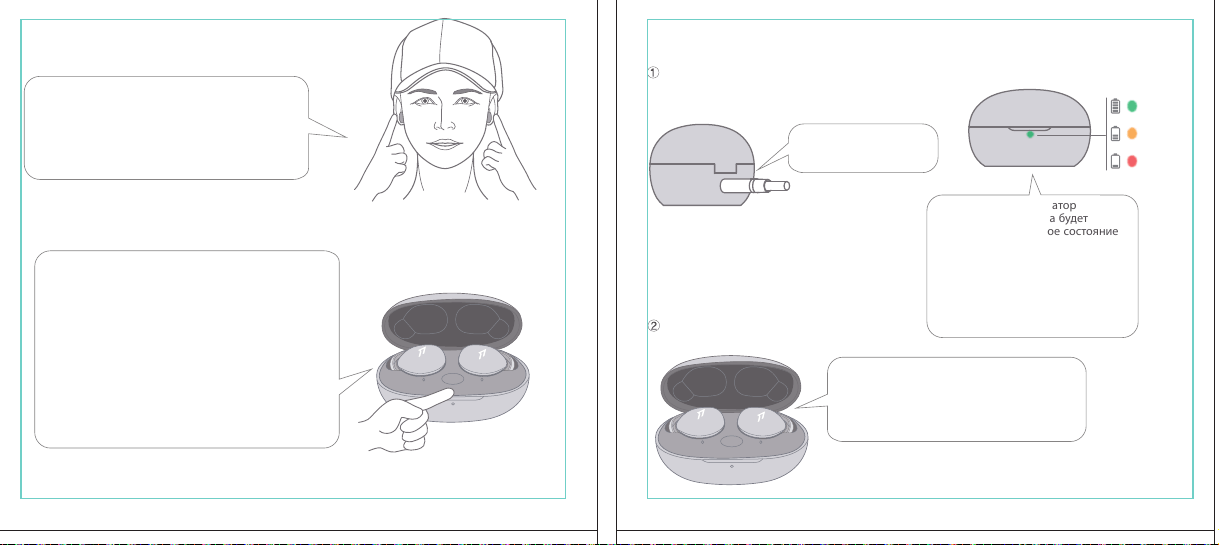
In The Box
材质:80G哑粉
尺寸:98*86mm
EH608
Manufacturer: Tiinlab Corporation
Address: No. 3333, Liuxian Avenue, Tower A, 35th Floor,
Tanglang City, Nanshan District, Shenzhen, China
Made in China
2ASDI-EH608 IC:24662-EH608
We know you will enjoy new 1MORE headphones as much as we do. At 1MORE, we value your
satisfaction. If you would like more details on this product or any of our other products, please visit
us online by scanning the QR code. Go to www.1more.com and sign up for VIP, and 1MORE will
treat you like one.
1MORE Inc., (“1MORE”) warrants to the original retail purchaser that this product is to be free
from defective materials and workmanship for a period of one year from the date of purchase if it
is properly used and maintained. If this product proves defective in either material or
workmanship, 1MORE, at its option, will (a) repair the product with new or refurbished parts, or
(b) replace the product with an equivalent new or refurbished product, at no charge for parts or
labor. If the product model is no longer available and cannot be repaired effectively or replaced
with an identical model, 1MORE at its sole option may replace the unit with a current model of
equal or greater value. In some cases, modication to the mounting surface may be required
where a new model is substituted. 1MORE assumes no responsibility or liability for such
modication. TO OBTAIN A REPAIR OR REPLACEMENT UNDER THE TERMS OF THIS
WARRANTY, PLEASE RETURN TO THE ORIGINAL DEALER FIRST AND THE ORIGINAL
DEALER SHALL REPAIR THE PRODUCT WITH NEW OR REFURBISHED PARTS OR REPLACE
THE PRODUCT WITH AN EQUIVALENT NEW OR REFURBISHED PRODUCT.
You will be required to submit a proof of purchasing details, including but not limited to a receipt
or sales invoice.
Return shipping for exchanges/repairs is the sole responsibility of the original retail purchaser.
Limitations:
• This limited warranty does not cover the failure of the product resulting from improper
installation, misuse, abuse, accident, neglect, mishandling, or wear from ordinary use or
environmental deterioration.
• This limited warranty does not cover cosmetic damage, including paint damage, or
consequential damage to other components or premises which may result for any reason from
the failure of the product.
• This limited warranty is null and void for products not used in accordance with 1MORE’s
instructions.
• This limited warranty is null and void for products with altered or missing serial numbers and for
products not purchased from an AUTHORIZED dealer.
• This limited warranty terminates if you sell or otherwise transfer this product to another party.
1. If the headphones cannot pair normally when powered on. Put both headphones back into
the case, triple click the pairing button and search for "1MORE Z30" in Bluetooth in your
devices to connect.
2. To unpair the device:
Put both headphones into the case, press and hold the pairing button on the case for 8
seconds to disconnect the headphones and the device.
3.OTA Firmware Update:
It can be synchronously upgraded via the 1MORE MUSIC APP while the Left and Right
earbuds are connected to each other with at least 50% battery.
* Functions of the 1MORE MUSIC APP may vary with different devices or operating systems.
For more details, please contact our customer service.
For the initial pairing, turn the headphones on to enter
pairing mode, the LEDs for headphone status will ash
in white. Headphones will power off if not paired to a
device within 3 minutes.
* After the rst successful pairing, headphones will
automatically connect to your device.
To pair with a new device, put headphones back into
the case, and triple click the pairing button when
powered on (no playback) to re-enter pairing mode.
Tips
Extra Functions
We Appreciate Your Business
1MORE (1) Year Limited Warranty
1. Please read this instruction manual carefully and retain for future reference.
2. Please fully charge the battery before rst use.
3. If the headphones have been unused for more than 3 months, we recommend that you charge
them. This will improve battery capacity.
4. Only use charging cables and adapters that are FCC (Federal Communications Commission)
approved.
5. In dry environments, static electricity may numb your ear. This is not related to the quality of the
product.
Safety Information
WEEE
FAQ
1. How to make sure the headphones have been fully charged?
Put the headphones into the charging case, if the headphone stutus LEDs are glowing this means
they have been fully charged.
2. Why won't headphones turn on?
Check if your headphones have enough battery life. If not, please charge them for at least 30 minutes.
3. Why won’t the headphones connect to my cellphone, or take a long time to connect?
Put both buds back into the charging case, then press and hold the pairing button for 3 seconds, click
the device name in your settings, they should now pair correctly to the phone.
4. Why won’t the headphones make phone calls?
The headphones are without microphones or phone call functions.
5. Why is the Bluetooth connection not stable and/or experiences some interruptions?
1) Try shortening the distance between your headphones and the device. Avoid solid barriers in
between you and the device.
2) Please keep away from strong interference sources, such as Wi-Fi and GPRS.
3) Please make sure the Bluetooth antenna of your device is not blocked.
6. Why can't the volume be adjusted by the cellphone buttons when playing soothing sounds in 1MORE
MUSIC APP?
The soothing sounds are stored in the ash of the headphone which can be adjusted only via the APP.
7. The headphones will be disconnected from the cellphone when out of wireless range. They cannot
restore the connection after returning back into the wireless range, how to solve it?
Click the device name in the cellphone pairing list to connect again.
8. I feel uncomfortable when wearing the headphones, how to solve it?
This is mainly because the sizes of ear tips and your canals are not snug, we suggest trying smaller ear
tips.
* For more detailed product FAQs, please visit the product support section under www.1more.com
CE
Headphones × 1 set
Charging Case × 1
Type-C Charging Cable × 1 Silicone Ear Tip (XS/S/L)
Product Overview
Fit
Replace
Placement
Headphones Pairing
Bluetooth Pairing To The Device
Charging
Controls
Soothing Sounds
Battery Notication
User Guide × 1
Silicone Ear Tip
Charging Pin
Charging Case
Pairing Button
Charging Case LED Indicator
LED Indicator for
Headphone Status
Headphone
Silicone Ear Tip
XS / S / M / L
Warranty Card × 1
The Left and Right headphones will automatically
pair with each other after the lid is open when
they are in the case (with charge).
* The above functions are available for either headphones in individual or Stereo mode.
To charge the case with Type-C cable.
To charge the headphones with the case.
* The above functions are available for either headphones in individual or Stereo mode.
Put headphones back into the case
ensuring they are magnetically attached
and close the lid to charge, a full charge
takes around 85 minutes.
Phone call function is not available on the headphones, and the playback controls can be
implemented on the connected device.
Please download the 1MORE MUSIC APP for soothing sounds.
Switch Listening Modes via APP
Enter the 1MORE Z30 home page in 1MORE MUSIC APP after pairing to your cellphone,
then you can switch listening modes between "Music" and "Soothing".
Click the "Soothing Sounds" to enter the playlist.
Click "+" to select the sound to be downloaded to your headphones for listening.
Click the timer icon on the song page to set the playtime.
The LED light of the charging case
will the different battery status: red
light indicates low battery, yellow light
indicates medium battery and green
light indicates full battery.
LED indicator for case battery status: when
the case battery is under 20%, the red
indicator stay lit for 3 seconds. When the
case battery is under 10%, the red indicator
will ash 10 times.
Power On:Take the headphones out of
the charging case (with charge), the
headphones will turn on automatically.
Power Off:Put the headphones
back into the charging case and
close the lid, they will automatically
turn off and start charging.
A full charge will take
around 90 minutes.
EN
* Playback and volume for the soothing sounds can only be adjusted via the APP.
スキャンして、1MOREのWechat公式アカウントをフォロー
「Soothing Sounds」ボタンを押すと、ヒーリング音楽の曲選択画面に入ります。
「+」をクリックしてヒーリング音楽をダウンロードすると、選択した曲がイヤホンに転送されます。
ヒーリング音楽再生画面の「タイマー」をクリックすると、ヒーリング音楽の再生時間を設定することができます。
ヒーリング音楽の再生/停止、音量調整などの操作は、APPでのみ対応します。
ヒーリング音楽
APPでEQモードを切り替えます
操作
その他の機能
梱包内容
イヤーピースの選択
イヤーピースの交換
左側/右側イヤホンのペアリング
イヤホンとBluetooth デバイスをペアリングするには
電池残量に関する注意充電
起動
イヤホン着用
製品外観
イヤホン本体 X 1セット
充電ケース X 1
Type-C充電ケーブル x 1
充電電極
イヤホン本体LEDインジケータ
ペアリングボタン
充電ケースLEDインジケータ
充電ケース
ヘッドホン
シリコン製イヤーピースセット
XS / S / M / L
シリコン製イヤーピースセット
(XS/S/L)
取扱説明書×1
一回のフル充電時間は約90 分です。
* 上記の機能は単独、両耳どちらのイヤホンでも適用されます。
* 上記の機能は単独、両耳どちらのイヤホンでも適用されます。
保証書×1
充電ケースが通電し、左/右側イヤホンをケースに
入っている状態で、ケースの蓋を開けると、左/右
のイヤホンが自動的にペアリングされます。
初めて使用する際、イヤホンの電源を入れてからデバイス
側で検索します。イヤホンは白色LEDが高速点滅します。も
しも 3 分たってもデバイスが見つからない場合、イヤホン本
体はすぐに電源が切れます。
・ すでに接続したことのあるイヤホンであれば、当該デバイ
スと自動でペアリングします。
新しいデバイスと接続する必要があれば、左/右イヤホンを
充電ケース内に戻して電源を入れ、ペアリングボタン3秒間
長押しすると、イヤホンは新しいデバイスとBluetoothのペア
リングがされます。
充電中:充電ケースのLEDインジケータ
は異なる色で電池容量を表示します。電
力が少ない場合赤色LED、電池容量が
半分ぐらいの場合黄色LED、充電が完
了している場合緑色LEDがそれぞれ点
灯します。
イヤホンを充電ケースに戻し
て、充電ケースの蓋を閉める
と充電が開始します。フル充
電時間は約85分です。
充電ケースの容量を確認する方法:充電ケ
ースの電池容量が20%以下になれば、充
電ケースの赤色LEDが3秒点灯します。充
電ケースの電池容量が10%以下になった
場合、充電ケースの赤色LEDのが10回点滅
します。
Type-C充電ケーブルを使用して充電ケースに充電する場合
充電ケースを使用してイヤホンに充電する場合
JP
River
- +
Time Setup
mins
River
OK
- +
60
30
90
River
Time Setup
mins
River
OK
- +
60
30
90
River
River
- +
Time Setup
mins
River
- +
60
30
90
River
1MORE SleepBuds Z30 User Guide
1MORE Наушники для сна Z30 Руководство пользователя
1MORE SleepBuds Z30 コードレスイヤホンユーザーガイド
Midre
Soothing Sounds
Allow adding 2 tracks
Volcano
Falls
River
Midre
Soothing Sounds
Allow adding 2 tracks
Volcano
Falls
River
1. Never disassemble the headphones. There are no user-serviceable parts inside.
2. Do not expose the headphones to temperatures below 32 °F (0 °C) or temperatures above 113 °F (45 °C).
3. Do not use the headphones in a thunderstorm storm. This could prevent the headphones from working
properly, and also increase your chance of being electrically shocked.
4. Do not use oil or any volatile liquid to clean this product.
5. Do not use the headphones in trafc. Do not use the headphones any time it would be dangerous to be
unaware of noises around you.
6. Adult supervision is required for children of age 6 and under.
7. If you don't feel comfortable after wearing the headphones, please refer to an aurist for advice on
whether in-ear headphones are suitable for you.
8. The headphones contain a lithium-ion battery, do not attempt to open, crush, or expose a charging case
to re or excessive temperature. Do not use it if the battery is swollen.
9. Please note that excessively high volumes and long listening times may cause hearing damage.
10. The symbol indicates DC voltage
All products bearing this symbol are waste electrical and electronic equipment (WEEE as in
directive 2012/19/EU) which should not be mixed with unsorted household waste. Instead,
you should protect human health and the environment by handing over your waste
equipment to a designated collection point for the recycling of waste electrical and
electronic equipment, appointed by the government or local authorities. Correct disposal
and recycling will help prevent potential negative consequences to the environment and
human health. Please contact the installer or local authorities for more information about the
location as well as terms and conditions of such collection points.
Home
Soothing Sounds
Listening Modes
1MORE Z30
OTA Firmware Upgrade
Quick Guide to Product
SoothingMusic
L 100% R 100% C 100%
The Bluetooth
®
word mark and logos are registered trademarks owned by Bluetooth SIG, Inc. and any
use of such marks by Tiinlab Corporation is under license. Other trademarks and trade names are the
property of their respective owners.
R
204-B00919
FCC
The SAR limit of USA (FCC) is 1.6 W/kg averaged over one gram of tissue. Device types EH608
(FCC ID: 2ASDI-EH608) has also been tested against this SAR limit.
This device complies with part 15 of the FCC rules. Operation is subject to the following two
conditions: (1) this device may not cause harmful interference, and (2) this device must accept any
interference received, including interference that may cause undesired operation.
NOTE: The manufacturer is not responsible for any radio or TV interference caused by unauthorized
modications or changesto this equipment. Such modications or changes could void the user’s authority
to operate the equipment.
NOTE: This equipment has been tested and found to comply with the limits for a Class B digital device,
pursuant to part 15 of the FCC Rules. These limits are designed to provide reasonable protection
against harmful interference in a residential installation. This equipment generates uses and can radiate
radio frequency energy and, if not installed and used in accordance with the instructions, may cause
harmful interference to radio communications. However, there is no guarantee that interference will not
occur in a particular installation. If this equipment does cause harmful interference to radio or television
reception, which can be determined by turning the equipment off and on, the user is encouraged to try
to correct the interference by one or more of the following measures:
-Reorient or relocate the receiving antenna.
-Increase the separation between the equipment and receiver.
-Connect the equipment into an outlet on a circuit different from that to which the receiver is
connected.
-Consult the dealer or an experienced radio/TV technician for help.
IC regulatory conformance
This device complies with CAN ICES-003 (B)/NMB-003(B).
This device complies with Industry Canada licence-exempt RSS standard(s). Operation is Subject to
the following two conditions: (1) this device may not cause interference, and (2) this device must accept
any interference, including interference that may cause undesired operation of the device.
Le présent appareil est conforme aux CNR d'Industrie Canada applicables aux appareils radio
exempts de licence. L'exploitation est autorisée aux deux conditions suivantes : (1) l'appareil ne doit
シリコン製イヤ
ーピースセット
Declaration of Conformity Hereby, Tiinlab Corporation declares that the radio equipment type
Wireless Earphones of EH608 is in compliance with Directive 2014/53/EU.
The full text of the EU declaration of conformity is available at the following internet address:
https://www.1more.com
RF exposure information: The device has been evaluated to meet general RF exposure requirement.
The device can be used in portable exposure condition without restriction. Radiation Exposure Statement
Power is so low that no RF exposure calculation is needed.
Declaration for EU Compliance
Operation Frequency/Max. EIRP: 2400-2483.5MHz, Max. EIRP is <10dBm.
В коробке
Мы знаем, что вы будете наслаждаться новыми наушниками 1MORE так же, как и мы. В
1MORE мы ценим ваше удовлетворение. Если вы хотите получить более подробную
информацию о данном продукте или о любых других наших продуктах, пожалуйста, посетите
нас онлайн, отсканировав QR-код. Перейдите по ссылке www.1more.com и
зарегистрируйтесь в VIP, и 1MORE будет относиться к вам как к одному из них.
Компания 1MORE Inc. (“1MORE”) гарантирует первоначальному розничному покупателю, что
данный продукт не будет содержать дефектов материалов и изготовления в течение одного года с
даты покупки, если он будет надлежащим образом использоваться и обслуживаться. Если в данном
продукте обнаружатся дефекты материала или изготовления, 1MORE, по своему усмотрению, (а)
отремонтирует продукт с использованием новых или восстановленных деталей или (б) заменит
продукт эквивалентным новым или восстановленным продуктом без оплаты запчастей или рабочей
силы. Если модель продукта больше недоступна и не может быть эффективно отремонтирована или
заменена идентичной моделью, компания 1MORE по своему усмотрению может заменить
устройство текущей моделью равной или большей стоимости. В некоторых случаях при замене
новой модели может потребоваться модификация монтажной поверхности. 1MORE не несет
никакой ответственности за такие изменения. ЧТОБЫ ПОЛУЧИТЬ РЕМОНТ ИЛИ ЗАМЕНУ В
СООТВЕТСТВИИ С УСЛОВИЯМИ ДАННОЙ ГАРАНТИИ, ПОЖАЛУЙСТА, СНАЧАЛА ОБРАТИТЕСЬ К
ПЕРВОНАЧАЛЬНОМУ ДИЛЕРУ, И ПЕРВОНАЧАЛЬНЫЙ ДИЛЕР ОТРЕМОНТИРУЕТ ПРОДУКТ НОВЫМИ
ИЛИ ВОССТАНОВЛЕННЫМИ ДЕТАЛЯМИ ИЛИ ЗАМЕНИТ ПРОДУКТ
ЭКВИВАЛЕНТНЫМ НОВЫМ ИЛИ
ВОССТАНОВЛЕННЫМ ПРОДУКТОМ.
От вас потребуется предоставить подтверждение покупки, включая, но не ограничиваясь этим,
квитанцию или счет-фактуру.
Ответственность за обратную доставку для обмена/ремонта несет исключительно первоначальный
розничный покупатель.
Ограничения:
• Данная ограниченная гарантия не распространяется на выход продукта из строя в результате
неправильной установки, неправильного использования, злоупотребления, несчастного случая,
1. Если наушники не могут нормально подключиться при включенном питании. Положите оба
наушника обратно в корпус, трижды нажмите кнопку сопряжения и найдите "1MORE Z30" в
Bluetooth на ваших устройствах для подключения.
2. Чтобы отключить сопряжение устройства:
Положите оба наушника в корпус, нажмите и удерживайте кнопку сопряжения на корпусе в
течение 8 секунд, чтобы отсоединить наушники от устройства.
3. Обновление прошивки OTA:
может выполняться синхронно с приложением 1MORE Music когда левый и правый наушники
сопряжены друг с другом через Bluetooth .
Для первоначального сопряжения включите
наушники, чтобы перейти в режим сопряжения,
светодиоды состояния наушников будут мигать
белым цветом. Наушники отключатся, если не
выполнить сопряжение с устройством в течение 3
минут.
* После первого успешного сопряжения наушники
автоматически подключатся к вашему устройству.
Чтобы выполнить сопряжение с новым устройством,
вставьте наушники обратно в корпус и трижды
нажмите кнопку сопряжения при включении
питания (воспроизведение отсутствует), чтобы
повторно войти в режим сопряжения.
Дополнительные функции
Мы ценим ваш бизнес
(1) годовая ограниченная гарантия 1MORE
Наушники × 1 набор
Зарядный корпус × 1
Зарядный кабель типа-С × 1Силиконовые вкладыши (XS/S/L)
Обзор продукта
Подгонка
Замена
Замена
Сопряжение наушников
Сопряжение Bluetooth с устройством
Зарядка
Управление
Успокаивающие звуки
Уведомление о батарее
Руководство пользователя × 1
Силиконовые
вкладыши
Зарядный штекер
Зарядный корпус
Кнопки сопряжения
Светодиодный индикатор зарядного корпуса
Наушники
Силиконовые вкладыши
XS / S / M / L
Гарантийный талон × 1
Левый и правый наушники автоматически
соединятся друг с другом после открытия
крышки, когда они будут находиться в корпусе
(с зарядкой).
* Вышеуказанные функции доступны как для наушников в индивидуальном, так и в стерео режиме.
Для зарядки корпуса используйте кабель Type-C.
Для зарядки наушников с корпусом.
* Вышеуказанные функции доступны как для наушников в индивидуальном, так и в стерео режиме.
Положите наушники обратно в корпус,
убедившись, что они надежно
закреплены магнитом, и закройте крышку
для зарядки, полная зарядка занимает
около 85 минут.
Функция телефонного звонка недоступна в наушниках, а управление воспроизведением
может быть реализовано на подключенном устройстве.
Пожалуйста, загрузите приложение 1MORE MUSIC для успокаивающих звуков.
Переключайте режимы прослушивания с помощью приложения
Зайдите на домашнюю страницу 1MORE Z30 в приложении 1MORE MUSIC после сопряжения с
вашим мобильным телефоном, затем вы сможете переключать режимы прослушивания между
"Музыка" и "Успокаивающий".
Нажмите "Soothing Sounds", чтобы войти в список воспроизведения.
Нажмите "+" чтобы выбрать звук, который будет загружен в ваши наушники для прослушивания.
Нажмите на значок таймера на странице песни,
чтобы установить время воспроизведения.
Светодиодный индикатор
зарядного устройства будет
отображать различное состояние
батареи: красный индикатор
указывает на низкий уровень
заряда батареи, желтый
индикатор указывает на средний
уровень заряда батареи и зеленый
индикатор указывает на полный
заряд батареи.
Светодиодный индикатор состояния
батареи корпуса: когда уровень заряда
батареи корпуса ниже 20%, красный
индикатор горит в течение 3 секунд. Когда
уровень заряда батареи корпуса ниже
10%, красный индикатор мигнет 10 раз.
Включение питания:Достаньте
наушники из зарядного корпуса (с
зарядкой), наушники включатся
автоматически.
Выключение питания:Положите
наушники обратно в зарядный
корпус и закройте крышку, они
автоматически выключатся и
начнут заряжаться.
Полная зарядка займет
около 90 минут.
RU
Midre
Soothing Sounds
Allow adding 2 tracks
Volcano
Falls
River
Midre River VolcanoFalls
River
Home
Soothing Sounds
Listening Modes
1MORE Z30
OTA Firmware Upgrade
Quick Guide to Product
SoothingMusic
L 100% R 100% C 100%
pas produire de brouillage, et (2) l'utilisateur de l'appareil doit accepter tout brouillage radioélectrique
subi, même si le brouillage est susceptible d'en compromettre le fonctionnement.
This device has been tested for compliance with IC SAR values at a typical operating near the
body. To ensure that RF exposure levels below the levels tested, use accessories with this
equipment to maintain a minimum separation distance of 0 mm between the body of the user and the
device. These accessories should not contain metallic components. It is possible that the accessories
used close to the body that do not meet these requirements are not consistent with the SAR limits and
it is advisable to avoid using them.
Ce dispositif a été testé pour la conformité avec les valeurs SAR à un fonctionnement typique près du
corps . Pour assurer que les niveaux d'exposition aux radiofréquences en deçà des niveaux testés ,
utiliser des accessoires avec cet équipement pour maintenir une distance de séparation minimale de 0
mm entre le corps de l'utilisateur et l'appareil. Ces accessoires ne doivent pas contenir des
composants métalliques . Il est possible que les accessoires utilisés près du corps quine répondent pas
à ces exigences ne sont pas compatibles avec les limites SAR et il est conseilléd'éviter de les utiliser.
Caution: Any changes or modications not expressly approved by the party responsible for compliance
could void the user's authority to operate this equipment.
充電ケースが通電している状態で、ケ
ースからイヤホンを取り出すと、イヤホ
ンは自動で起動します。
シャットダウン:イヤホンを充電ケースに
入れて蓋を閉めると、すぐにシャットダ
ウンし充電します。
本イヤホンに通話機能は付いていません、曲再生/停止、曲送り/曲戻し、及び音量調整などの再生機能は
スマートフォン側などで操作してください。
ヒーリング音楽などを再生するには1MORE MUSIC APPをダウンロードしてください。
1MORE MUSICアプリを使用しているときにスマホ端末がイヤホンと接続すると、「Music」 と 「Soothing」が選
べます。
1. 電源を入れても、左右のイヤホンが正常にペアリングできない場合、イヤホンを充電ケースに戻し、蓋を一
度閉めてから再度開けます。その後充電ケースのペアリングボタンを3秒間長押しすると、充電ケースのイ
ヤホンLEDインジケーターが白色に点滅し、再びペアリングモードに入ります。
2. 左右イヤホンのペアリング記録をクリアする方法:
両イヤホンを充電ケースに入れ、充電ケースのペアリングボタンを約3秒間長押しします。
3. OTAファームウェアのアップデートを行う場合:
ヘッドホン左右のバッテリーが50%以上で接続されている状態であれば、「1MORE MUSIC APP」を介して
同期的にアップデートすることができます。
* 1MORE MUSIC APPは接続機器によって機能が異なる場合がございます。詳細については、お気軽にカス
タマサポートまでにご連絡ください。
1MORE コミュニティ bbs.1more.com へのアクセスをお待ちしております。
www.1more.com にアクセスし、1MORE 会員に新規登録いただけると、素晴らしい情報を提供いたします。
Bluetooth®のマークとロゴはBluetooth® Technology Allianceの登録商標です。本製品で使用されているこ
れらのマークは万魔声学股份有限公司にてライセンス契約に基づき表示するものとします。その他商標及
び商品名称はそれぞれの所有者に帰属するものとします。
Светодиодный
индикатор для
состояния наушников
* Воспроизведение и громкость успокаивающих звуков можно регулировать только с помощью
приложения.
Словесный знак и логотипы Bluetooth® являются зарегистрированными товарными знаками,
принадлежащими Bluetooth SIG, Inc., и любое использование таких знаков корпорацией Tiinlab
осуществляется по лицензии. Другие товарные знаки и торговые наименования являются
собственностью их соответствующих владельцев.
* Функции приложения 1MORE MUSIC могут отличаться в зависимости от различных устройств или
операционных систем. Для получения более подробной информации, пожалуйста, свяжитесь с
нашей службой поддержки клиентов.
небрежности, неправильного обращения или износа в результате обычного использования или
ухудшения состояния окружающей среды.
• Данная ограниченная гарантия не распространяется на косметические повреждения, включая
повреждение краски, или косвенный ущерб другим компонентам или поверхностям, которые
могут возникнуть по любой причине в результате выхода продукта из строя.
• Данная ограниченная гарантия недействительна для продуктов, используемых не в соответствии с
инструкциями 1MORE.
• Данная ограниченная гарантия недействительна для продуктов с измененными или
отсутствующими серийными номерами, а также для продуктов, приобретенных не у
ОФИЦИАЛЬНОГО дилера.
• Действие данной ограниченной гарантии прекращается, если вы продаете или иным образом
передаете данный продукт другой стороне.
Home
Soothing Sounds
Listening Modes
1MORE Z30
OTA Firmware Upgrade
Quick Guide to Product
SoothingMusic
L 100% R 100% C 100%
River
Home
Soothing Sounds
Listening Modes
1MORE Z30
OTA Firmware Upgrade
Quick Guide to Product
Soothing
Music
L 100% R 100% C 100%
Home
Soothing Sounds
Listening Modes
1MORE Z30
OTA Firmware Upgrade
Quick Guide to Product
SoothingMusic
L 100% R 100% C 100%
Home
Soothing Sounds
Listening Modes
1MORE Z30
OTA Firmware Upgrade
Quick Guide to Product
Soothing
Music
L 100% R 100% C 100%
Home
Soothing Sounds
Listening Modes
1MORE Z30
OTA Firmware Upgrade
Quick Guide to Product
SoothingMusic
L 100% R 100% C 100%
Home
Soothing Sounds
Listening Modes
1MORE Z30
OTA Firmware Upgrade
Quick Guide to Product
Soothing
Music
L 100% R 100% C 100%
Midre River VolcanoFalls
River
Home
Soothing Sounds
Listening Modes
1MORE Z30
OTA Firmware Upgrade
Quick Guide to Product
SoothingMusic
L 100% R 100% C 100%
Home
Soothing Sounds
Listening Modes
1MORE Z30
OTA Firmware Upgrade
Quick Guide to Product
SoothingMusic
L 100% R 100% C 100%
Midre River VolcanoFalls
River
Home
Soothing Sounds
Listening Modes
1MORE Z30
OTA Firmware Upgrade
Quick Guide to Product
SoothingMusic
L 100% R 100% C 100%
Home
Soothing Sounds
Listening Modes
1MORE Z30
OTA Firmware Upgrade
Quick Guide to Product
SoothingMusic
L 100% R 100% C 100%
C:0/M:85/Y:95/K:0C
In The Box
材质:80G哑粉
尺寸:98*86mm
EH608
Manufacturer: Tiinlab Corporation
Address: No. 3333, Liuxian Avenue, Tower A, 35th Floor,
Tanglang City, Nanshan District, Shenzhen, China
Made in China
2ASDI-EH608 IC:24662-EH608
We know you will enjoy new 1MORE headphones as much as we do. At 1MORE, we value your
satisfaction. If you would like more details on this product or any of our other products, please visit
us online by scanning the QR code. Go to www.1more.com and sign up for VIP, and 1MORE will
treat you like one.
1MORE Inc., (“1MORE”) warrants to the original retail purchaser that this product is to be free
from defective materials and workmanship for a period of one year from the date of purchase if it
is properly used and maintained. If this product proves defective in either material or
workmanship, 1MORE, at its option, will (a) repair the product with new or refurbished parts, or
(b) replace the product with an equivalent new or refurbished product, at no charge for parts or
labor. If the product model is no longer available and cannot be repaired effectively or replaced
with an identical model, 1MORE at its sole option may replace the unit with a current model of
equal or greater value. In some cases, modication to the mounting surface may be required
where a new model is substituted. 1MORE assumes no responsibility or liability for such
modication. TO OBTAIN A REPAIR OR REPLACEMENT UNDER THE TERMS OF THIS
WARRANTY, PLEASE RETURN TO THE ORIGINAL DEALER FIRST AND THE ORIGINAL
DEALER SHALL REPAIR THE PRODUCT WITH NEW OR REFURBISHED PARTS OR REPLACE
THE PRODUCT WITH AN EQUIVALENT NEW OR REFURBISHED PRODUCT.
You will be required to submit a proof of purchasing details, including but not limited to a receipt
or sales invoice.
Return shipping for exchanges/repairs is the sole responsibility of the original retail purchaser.
Limitations:
• This limited warranty does not cover the failure of the product resulting from improper
installation, misuse, abuse, accident, neglect, mishandling, or wear from ordinary use or
environmental deterioration.
• This limited warranty does not cover cosmetic damage, including paint damage, or
consequential damage to other components or premises which may result for any reason from
the failure of the product.
• This limited warranty is null and void for products not used in accordance with 1MORE’s
instructions.
• This limited warranty is null and void for products with altered or missing serial numbers and for
products not purchased from an AUTHORIZED dealer.
• This limited warranty terminates if you sell or otherwise transfer this product to another party.
1. If the headphones cannot pair normally when powered on. Put both headphones back into
the case, triple click the pairing button and search for "1MORE Z30" in Bluetooth in your
devices to connect.
2. To unpair the device:
Put both headphones into the case, press and hold the pairing button on the case for 8
seconds to disconnect the headphones and the device.
3.OTA Firmware Update:
It can be synchronously upgraded via the 1MORE MUSIC APP while the Left and Right
earbuds are connected to each other with at least 50% battery.
* Functions of the 1MORE MUSIC APP may vary with different devices or operating systems.
For more details, please contact our customer service.
For the initial pairing, turn the headphones on to enter
pairing mode, the LEDs for headphone status will ash
in white. Headphones will power off if not paired to a
device within 3 minutes.
* After the rst successful pairing, headphones will
automatically connect to your device.
To pair with a new device, put headphones back into
the case, and triple click the pairing button when
powered on (no playback) to re-enter pairing mode.
Tips
Extra Functions
We Appreciate Your Business
1MORE (1) Year Limited Warranty
1. Please read this instruction manual carefully and retain for future reference.
2. Please fully charge the battery before rst use.
3. If the headphones have been unused for more than 3 months, we recommend that you charge
them. This will improve battery capacity.
4. Only use charging cables and adapters that are FCC (Federal Communications Commission)
approved.
5. In dry environments, static electricity may numb your ear. This is not related to the quality of the
product.
Safety Information
WEEE
FAQ
1. How to make sure the headphones have been fully charged?
Put the headphones into the charging case, if the headphone stutus LEDs are glowing this means
they have been fully charged.
2. Why won't headphones turn on?
Check if your headphones have enough battery life. If not, please charge them for at least 30 minutes.
3. Why won’t the headphones connect to my cellphone, or take a long time to connect?
Put both buds back into the charging case, then press and hold the pairing button for 3 seconds, click
the device name in your settings, they should now pair correctly to the phone.
4. Why won’t the headphones make phone calls?
The headphones are without microphones or phone call functions.
5. Why is the Bluetooth connection not stable and/or experiences some interruptions?
1) Try shortening the distance between your headphones and the device. Avoid solid barriers in
between you and the device.
2) Please keep away from strong interference sources, such as Wi-Fi and GPRS.
3) Please make sure the Bluetooth antenna of your device is not blocked.
6. Why can't the volume be adjusted by the cellphone buttons when playing soothing sounds in 1MORE
MUSIC APP?
The soothing sounds are stored in the ash of the headphone which can be adjusted only via the APP.
7. The headphones will be disconnected from the cellphone when out of wireless range. They cannot
restore the connection after returning back into the wireless range, how to solve it?
Click the device name in the cellphone pairing list to connect again.
8. I feel uncomfortable when wearing the headphones, how to solve it?
This is mainly because the sizes of ear tips and your canals are not snug, we suggest trying smaller ear
tips.
* For more detailed product FAQs, please visit the product support section under www.1more.com
CE
Headphones × 1 set
Charging Case × 1
Type-C Charging Cable × 1 Silicone Ear Tip (XS/S/L)
Product Overview
Fit
Replace
Placement
Headphones Pairing
Bluetooth Pairing To The Device
Charging
Controls
Soothing Sounds
Battery Notication
User Guide × 1
Silicone Ear Tip
Charging Pin
Charging Case
Pairing Button
Charging Case LED Indicator
LED Indicator for
Headphone Status
Headphone
Silicone Ear Tip
XS / S / M / L
Warranty Card × 1
The Left and Right headphones will automatically
pair with each other after the lid is open when
they are in the case (with charge).
* The above functions are available for either headphones in individual or Stereo mode.
To charge the case with Type-C cable.
To charge the headphones with the case.
* The above functions are available for either headphones in individual or Stereo mode.
Put headphones back into the case
ensuring they are magnetically attached
and close the lid to charge, a full charge
takes around 85 minutes.
Phone call function is not available on the headphones, and the playback controls can be
implemented on the connected device.
Please download the 1MORE MUSIC APP for soothing sounds.
Switch Listening Modes via APP
Enter the 1MORE Z30 home page in 1MORE MUSIC APP after pairing to your cellphone,
then you can switch listening modes between "Music" and "Soothing".
Click the "Soothing Sounds" to enter the playlist.
Click "+" to select the sound to be downloaded to your headphones for listening.
Click the timer icon on the song page to set the playtime.
The LED light of the charging case
will the different battery status: red
light indicates low battery, yellow light
indicates medium battery and green
light indicates full battery.
LED indicator for case battery status: when
the case battery is under 20%, the red
indicator stay lit for 3 seconds. When the
case battery is under 10%, the red indicator
will ash 10 times.
Power On:Take the headphones out of
the charging case (with charge), the
headphones will turn on automatically.
Power Off:Put the headphones
back into the charging case and
close the lid, they will automatically
turn off and start charging.
A full charge will take
around 90 minutes.
EN
* Playback and volume for the soothing sounds can only be adjusted via the APP.
スキャンして、1MOREのWechat公式アカウントをフォロー
「Soothing Sounds」ボタンを押すと、ヒーリング音楽の曲選択画面に入ります。
「+」をクリックしてヒーリング音楽をダウンロードすると、選択した曲がイヤホンに転送されます。
ヒーリング音楽再生画面の「タイマー」をクリックすると、ヒーリング音楽の再生時間を設定することができます。
ヒーリング音楽の再生/停止、音量調整などの操作は、APPでのみ対応します。
ヒーリング音楽
APPでEQモードを切り替えます
操作
その他の機能
梱包内容
イヤーピースの選択
イヤーピースの交換
左側/右側イヤホンのペアリング
イヤホンとBluetooth デバイスをペアリングするには
電池残量に関する注意充電
起動
イヤホン着用
製品外観
イヤホン本体 X 1セット
充電ケース X 1
Type-C充電ケーブル x 1
充電電極
イヤホン本体LEDインジケータ
ペアリングボタン
充電ケースLEDインジケータ
充電ケース
ヘッドホン
シリコン製イヤーピースセット
XS / S / M / L
シリコン製イヤーピースセット
(XS/S/L)
取扱説明書×1
一回のフル充電時間は約90 分です。
* 上記の機能は単独、両耳どちらのイヤホンでも適用されます。
* 上記の機能は単独、両耳どちらのイヤホンでも適用されます。
保証書×1
充電ケースが通電し、左/右側イヤホンをケースに
入っている状態で、ケースの蓋を開けると、左/右
のイヤホンが自動的にペアリングされます。
初めて使用する際、イヤホンの電源を入れてからデバイス
側で検索します。イヤホンは白色LEDが高速点滅します。も
しも 3 分たってもデバイスが見つからない場合、イヤホン本
体はすぐに電源が切れます。
・ すでに接続したことのあるイヤホンであれば、当該デバイ
スと自動でペアリングします。
新しいデバイスと接続する必要があれば、左/右イヤホンを
充電ケース内に戻して電源を入れ、ペアリングボタン3秒間
長押しすると、イヤホンは新しいデバイスとBluetoothのペア
リングがされます。
充電中:充電ケースのLEDインジケータ
は異なる色で電池容量を表示します。電
力が少ない場合赤色LED、電池容量が
半分ぐらいの場合黄色LED、充電が完
了している場合緑色LEDがそれぞれ点
灯します。
イヤホンを充電ケースに戻し
て、充電ケースの蓋を閉める
と充電が開始します。フル充
電時間は約85分です。
充電ケースの容量を確認する方法:充電ケ
ースの電池容量が20%以下になれば、充
電ケースの赤色LEDが3秒点灯します。充
電ケースの電池容量が10%以下になった
場合、充電ケースの赤色LEDのが10回点滅
します。
Type-C充電ケーブルを使用して充電ケースに充電する場合
充電ケースを使用してイヤホンに充電する場合
JP
River
- +
Time Setup
mins
River
OK
- +
60
30
90
River
Time Setup
mins
River
OK
- +
60
30
90
River
River
- +
Time Setup
mins
River
- +
60
30
90
River
1MORE SleepBuds Z30 User Guide
1MORE Наушники для сна Z30 Руководство пользователя
1MORE SleepBuds Z30 コードレスイヤホンユーザーガイド
Midre
Soothing Sounds
Allow adding 2 tracks
Volcano
Falls
River
Midre
Soothing Sounds
Allow adding 2 tracks
Volcano
Falls
River
1. Never disassemble the headphones. There are no user-serviceable parts inside.
2. Do not expose the headphones to temperatures below 32 °F (0 °C) or temperatures above 113 °F (45 °C).
3. Do not use the headphones in a thunderstorm storm. This could prevent the headphones from working
properly, and also increase your chance of being electrically shocked.
4. Do not use oil or any volatile liquid to clean this product.
5. Do not use the headphones in trafc. Do not use the headphones any time it would be dangerous to be
unaware of noises around you.
6. Adult supervision is required for children of age 6 and under.
7. If you don't feel comfortable after wearing the headphones, please refer to an aurist for advice on
whether in-ear headphones are suitable for you.
8. The headphones contain a lithium-ion battery, do not attempt to open, crush, or expose a charging case
to re or excessive temperature. Do not use it if the battery is swollen.
9. Please note that excessively high volumes and long listening times may cause hearing damage.
10. The symbol indicates DC voltage
All products bearing this symbol are waste electrical and electronic equipment (WEEE as in
directive 2012/19/EU) which should not be mixed with unsorted household waste. Instead,
you should protect human health and the environment by handing over your waste
equipment to a designated collection point for the recycling of waste electrical and
electronic equipment, appointed by the government or local authorities. Correct disposal
and recycling will help prevent potential negative consequences to the environment and
human health. Please contact the installer or local authorities for more information about the
location as well as terms and conditions of such collection points.
Home
Soothing Sounds
Listening Modes
1MORE Z30
OTA Firmware Upgrade
Quick Guide to Product
SoothingMusic
L 100% R 100% C 100%
The Bluetooth
®
word mark and logos are registered trademarks owned by Bluetooth SIG, Inc. and any
use of such marks by Tiinlab Corporation is under license. Other trademarks and trade names are the
property of their respective owners.
R
204-B00919
FCC
The SAR limit of USA (FCC) is 1.6 W/kg averaged over one gram of tissue. Device types EH608
(FCC ID: 2ASDI-EH608) has also been tested against this SAR limit.
This device complies with part 15 of the FCC rules. Operation is subject to the following two
conditions: (1) this device may not cause harmful interference, and (2) this device must accept any
interference received, including interference that may cause undesired operation.
NOTE: The manufacturer is not responsible for any radio or TV interference caused by unauthorized
modications or changesto this equipment. Such modications or changes could void the user’s authority
to operate the equipment.
NOTE: This equipment has been tested and found to comply with the limits for a Class B digital device,
pursuant to part 15 of the FCC Rules. These limits are designed to provide reasonable protection
against harmful interference in a residential installation. This equipment generates uses and can radiate
radio frequency energy and, if not installed and used in accordance with the instructions, may cause
harmful interference to radio communications. However, there is no guarantee that interference will not
occur in a particular installation. If this equipment does cause harmful interference to radio or television
reception, which can be determined by turning the equipment off and on, the user is encouraged to try
to correct the interference by one or more of the following measures:
-Reorient or relocate the receiving antenna.
-Increase the separation between the equipment and receiver.
-Connect the equipment into an outlet on a circuit different from that to which the receiver is
connected.
-Consult the dealer or an experienced radio/TV technician for help.
IC regulatory conformance
This device complies with CAN ICES-003 (B)/NMB-003(B).
This device complies with Industry Canada licence-exempt RSS standard(s). Operation is Subject to
the following two conditions: (1) this device may not cause interference, and (2) this device must accept
any interference, including interference that may cause undesired operation of the device.
Le présent appareil est conforme aux CNR d'Industrie Canada applicables aux appareils radio
exempts de licence. L'exploitation est autorisée aux deux conditions suivantes : (1) l'appareil ne doit
シリコン製イヤ
ーピースセット
Declaration of Conformity Hereby, Tiinlab Corporation declares that the radio equipment type
Wireless Earphones of EH608 is in compliance with Directive 2014/53/EU.
The full text of the EU declaration of conformity is available at the following internet address:
https://www.1more.com
RF exposure information: The device has been evaluated to meet general RF exposure requirement.
The device can be used in portable exposure condition without restriction. Radiation Exposure Statement
Power is so low that no RF exposure calculation is needed.
Declaration for EU Compliance
Operation Frequency/Max. EIRP: 2400-2483.5MHz, Max. EIRP is <10dBm.
В коробке
Мы знаем, что вы будете наслаждаться новыми наушниками 1MORE так же, как и мы. В
1MORE мы ценим ваше удовлетворение. Если вы хотите получить более подробную
информацию о данном продукте или о любых других наших продуктах, пожалуйста, посетите
нас онлайн, отсканировав QR-код. Перейдите по ссылке www.1more.com и
зарегистрируйтесь в VIP, и 1MORE будет относиться к вам как к одному из них.
Компания 1MORE Inc. (“1MORE”) гарантирует первоначальному розничному покупателю, что
данный продукт не будет содержать дефектов материалов и изготовления в течение одного года с
даты покупки, если он будет надлежащим образом использоваться и обслуживаться. Если в данном
продукте обнаружатся дефекты материала или изготовления, 1MORE, по своему усмотрению, (а)
отремонтирует продукт с использованием новых или восстановленных деталей или (б) заменит
продукт эквивалентным новым или восстановленным продуктом без оплаты запчастей или рабочей
силы. Если модель продукта больше недоступна и не может быть эффективно отремонтирована или
заменена идентичной моделью, компания 1MORE по своему усмотрению может заменить
устройство текущей моделью равной или большей стоимости. В некоторых случаях при замене
новой модели может потребоваться модификация монтажной поверхности. 1MORE не несет
никакой ответственности за такие изменения. ЧТОБЫ ПОЛУЧИТЬ РЕМОНТ ИЛИ ЗАМЕНУ В
СООТВЕТСТВИИ С УСЛОВИЯМИ ДАННОЙ ГАРАНТИИ, ПОЖАЛУЙСТА, СНАЧАЛА ОБРАТИТЕСЬ К
ПЕРВОНАЧАЛЬНОМУ ДИЛЕРУ, И ПЕРВОНАЧАЛЬНЫЙ ДИЛЕР ОТРЕМОНТИРУЕТ ПРОДУКТ НОВЫМИ
ИЛИ ВОССТАНОВЛЕННЫМИ ДЕТАЛЯМИ ИЛИ ЗАМЕНИТ ПРОДУКТ
ЭКВИВАЛЕНТНЫМ НОВЫМ ИЛИ
ВОССТАНОВЛЕННЫМ ПРОДУКТОМ.
От вас потребуется предоставить подтверждение покупки, включая, но не ограничиваясь этим,
квитанцию или счет-фактуру.
Ответственность за обратную доставку для обмена/ремонта несет исключительно первоначальный
розничный покупатель.
Ограничения:
• Данная ограниченная гарантия не распространяется на выход продукта из строя в результате
неправильной установки, неправильного использования, злоупотребления, несчастного случая,
1. Если наушники не могут нормально подключиться при включенном питании. Положите оба
наушника обратно в корпус, трижды нажмите кнопку сопряжения и найдите "1MORE Z30" в
Bluetooth на ваших устройствах для подключения.
2. Чтобы отключить сопряжение устройства:
Положите оба наушника в корпус, нажмите и удерживайте кнопку сопряжения на корпусе в
течение 8 секунд, чтобы отсоединить наушники от устройства.
3. Обновление прошивки OTA:
может выполняться синхронно с приложением 1MORE Music когда левый и правый наушники
сопряжены друг с другом через Bluetooth .
Для первоначального сопряжения включите
наушники, чтобы перейти в режим сопряжения,
светодиоды состояния наушников будут мигать
белым цветом. Наушники отключатся, если не
выполнить сопряжение с устройством в течение 3
минут.
* После первого успешного сопряжения наушники
автоматически подключатся к вашему устройству.
Чтобы выполнить сопряжение с новым устройством,
вставьте наушники обратно в корпус и трижды
нажмите кнопку сопряжения при включении
питания (воспроизведение отсутствует), чтобы
повторно войти в режим сопряжения.
Дополнительные функции
Мы ценим ваш бизнес
(1) годовая ограниченная гарантия 1MORE
Наушники × 1 набор
Зарядный корпус × 1
Зарядный кабель типа-С × 1Силиконовые вкладыши (XS/S/L)
Обзор продукта
Подгонка
Замена
Замена
Сопряжение наушников
Сопряжение Bluetooth с устройством
Зарядка
Управление
Успокаивающие звуки
Уведомление о батарее
Руководство пользователя × 1
Силиконовые
вкладыши
Зарядный штекер
Зарядный корпус
Кнопки сопряжения
Светодиодный индикатор зарядного корпуса
Наушники
Силиконовые вкладыши
XS / S / M / L
Гарантийный талон × 1
Левый и правый наушники автоматически
соединятся друг с другом после открытия
крышки, когда они будут находиться в корпусе
(с зарядкой).
* Вышеуказанные функции доступны как для наушников в индивидуальном, так и в стерео режиме.
Для зарядки корпуса используйте кабель Type-C.
Для зарядки наушников с корпусом.
* Вышеуказанные функции доступны как для наушников в индивидуальном, так и в стерео режиме.
Положите наушники обратно в корпус,
убедившись, что они надежно
закреплены магнитом, и закройте крышку
для зарядки, полная зарядка занимает
около 85 минут.
Функция телефонного звонка недоступна в наушниках, а управление воспроизведением
может быть реализовано на подключенном устройстве.
Пожалуйста, загрузите приложение 1MORE MUSIC для успокаивающих звуков.
Переключайте режимы прослушивания с помощью приложения
Зайдите на домашнюю страницу 1MORE Z30 в приложении 1MORE MUSIC после сопряжения с
вашим мобильным телефоном, затем вы сможете переключать режимы прослушивания между
"Музыка" и "Успокаивающий".
Нажмите "Soothing Sounds", чтобы войти в список воспроизведения.
Нажмите "+" чтобы выбрать звук, который будет загружен в ваши наушники для прослушивания.
Нажмите на значок таймера на странице песни,
чтобы установить время воспроизведения.
Светодиодный индикатор
зарядного устройства будет
отображать различное состояние
батареи: красный индикатор
указывает на низкий уровень
заряда батареи, желтый
индикатор указывает на средний
уровень заряда батареи и зеленый
индикатор указывает на полный
заряд батареи.
Светодиодный индикатор состояния
батареи корпуса: когда уровень заряда
батареи корпуса ниже 20%, красный
индикатор горит в течение 3 секунд. Когда
уровень заряда батареи корпуса ниже
10%, красный индикатор мигнет 10 раз.
Включение питания:Достаньте
наушники из зарядного корпуса (с
зарядкой), наушники включатся
автоматически.
Выключение питания:Положите
наушники обратно в зарядный
корпус и закройте крышку, они
автоматически выключатся и
начнут заряжаться.
Полная зарядка займет
около 90 минут.
RU
Midre
Soothing Sounds
Allow adding 2 tracks
Volcano
Falls
River
Midre River VolcanoFalls
River
Home
Soothing Sounds
Listening Modes
1MORE Z30
OTA Firmware Upgrade
Quick Guide to Product
SoothingMusic
L 100% R 100% C 100%
pas produire de brouillage, et (2) l'utilisateur de l'appareil doit accepter tout brouillage radioélectrique
subi, même si le brouillage est susceptible d'en compromettre le fonctionnement.
This device has been tested for compliance with IC SAR values at a typical operating near the
body. To ensure that RF exposure levels below the levels tested, use accessories with this
equipment to maintain a minimum separation distance of 0 mm between the body of the user and the
device. These accessories should not contain metallic components. It is possible that the accessories
used close to the body that do not meet these requirements are not consistent with the SAR limits and
it is advisable to avoid using them.
Ce dispositif a été testé pour la conformité avec les valeurs SAR à un fonctionnement typique près du
corps . Pour assurer que les niveaux d'exposition aux radiofréquences en deçà des niveaux testés ,
utiliser des accessoires avec cet équipement pour maintenir une distance de séparation minimale de 0
mm entre le corps de l'utilisateur et l'appareil. Ces accessoires ne doivent pas contenir des
composants métalliques . Il est possible que les accessoires utilisés près du corps quine répondent pas
à ces exigences ne sont pas compatibles avec les limites SAR et il est conseilléd'éviter de les utiliser.
Caution: Any changes or modications not expressly approved by the party responsible for compliance
could void the user's authority to operate this equipment.
充電ケースが通電している状態で、ケ
ースからイヤホンを取り出すと、イヤホ
ンは自動で起動します。
シャットダウン:イヤホンを充電ケースに
入れて蓋を閉めると、すぐにシャットダ
ウンし充電します。
本イヤホンに通話機能は付いていません、曲再生/停止、曲送り/曲戻し、及び音量調整などの再生機能は
スマートフォン側などで操作してください。
ヒーリング音楽などを再生するには1MORE MUSIC APPをダウンロードしてください。
1MORE MUSICアプリを使用しているときにスマホ端末がイヤホンと接続すると、「Music」 と 「Soothing」が選
べます。
1. 電源を入れても、左右のイヤホンが正常にペアリングできない場合、イヤホンを充電ケースに戻し、蓋を一
度閉めてから再度開けます。その後充電ケースのペアリングボタンを3秒間長押しすると、充電ケースのイ
ヤホンLEDインジケーターが白色に点滅し、再びペアリングモードに入ります。
2. 左右イヤホンのペアリング記録をクリアする方法:
両イヤホンを充電ケースに入れ、充電ケースのペアリングボタンを約3秒間長押しします。
3. OTAファームウェアのアップデートを行う場合:
ヘッドホン左右のバッテリーが50%以上で接続されている状態であれば、「1MORE MUSIC APP」を介して
同期的にアップデートすることができます。
* 1MORE MUSIC APPは接続機器によって機能が異なる場合がございます。詳細については、お気軽にカス
タマサポートまでにご連絡ください。
1MORE コミュニティ bbs.1more.com へのアクセスをお待ちしております。
www.1more.com にアクセスし、1MORE 会員に新規登録いただけると、素晴らしい情報を提供いたします。
Bluetooth®のマークとロゴはBluetooth® Technology Allianceの登録商標です。本製品で使用されているこ
れらのマークは万魔声学股份有限公司にてライセンス契約に基づき表示するものとします。その他商標及
び商品名称はそれぞれの所有者に帰属するものとします。
Светодиодный
индикатор для
состояния наушников
* Воспроизведение и громкость успокаивающих звуков можно регулировать только с помощью
приложения.
Словесный знак и логотипы Bluetooth® являются зарегистрированными товарными знаками,
принадлежащими Bluetooth SIG, Inc., и любое использование таких знаков корпорацией Tiinlab
осуществляется по лицензии. Другие товарные знаки и торговые наименования являются
собственностью их соответствующих владельцев.
* Функции приложения 1MORE MUSIC могут отличаться в зависимости от различных устройств или
операционных систем. Для получения более подробной информации, пожалуйста, свяжитесь с
нашей службой поддержки клиентов.
небрежности, неправильного обращения или износа в результате обычного использования или
ухудшения состояния окружающей среды.
• Данная ограниченная гарантия не распространяется на косметические повреждения, включая
повреждение краски, или косвенный ущерб другим компонентам или поверхностям, которые
могут возникнуть по любой причине в результате выхода продукта из строя.
• Данная ограниченная гарантия недействительна для продуктов, используемых не в соответствии с
инструкциями 1MORE.
• Данная ограниченная гарантия недействительна для продуктов с измененными или
отсутствующими серийными номерами, а также для продуктов, приобретенных не у
ОФИЦИАЛЬНОГО дилера.
• Действие данной ограниченной гарантии прекращается, если вы продаете или иным образом
передаете данный продукт другой стороне.
Home
Soothing Sounds
Listening Modes
1MORE Z30
OTA Firmware Upgrade
Quick Guide to Product
SoothingMusic
L 100% R 100% C 100%
River
Home
Soothing Sounds
Listening Modes
1MORE Z30
OTA Firmware Upgrade
Quick Guide to Product
Soothing
Music
L 100% R 100% C 100%
Home
Soothing Sounds
Listening Modes
1MORE Z30
OTA Firmware Upgrade
Quick Guide to Product
SoothingMusic
L 100% R 100% C 100%
Home
Soothing Sounds
Listening Modes
1MORE Z30
OTA Firmware Upgrade
Quick Guide to Product
Soothing
Music
L 100% R 100% C 100%
Home
Soothing Sounds
Listening Modes
1MORE Z30
OTA Firmware Upgrade
Quick Guide to Product
SoothingMusic
L 100% R 100% C 100%
Home
Soothing Sounds
Listening Modes
1MORE Z30
OTA Firmware Upgrade
Quick Guide to Product
Soothing
Music
L 100% R 100% C 100%
Midre River VolcanoFalls
River
Home
Soothing Sounds
Listening Modes
1MORE Z30
OTA Firmware Upgrade
Quick Guide to Product
SoothingMusic
L 100% R 100% C 100%
Home
Soothing Sounds
Listening Modes
1MORE Z30
OTA Firmware Upgrade
Quick Guide to Product
SoothingMusic
L 100% R 100% C 100%
Midre River VolcanoFalls
River
Home
Soothing Sounds
Listening Modes
1MORE Z30
OTA Firmware Upgrade
Quick Guide to Product
SoothingMusic
L 100% R 100% C 100%
Home
Soothing Sounds
Listening Modes
1MORE Z30
OTA Firmware Upgrade
Quick Guide to Product
SoothingMusic
L 100% R 100% C 100%
C:0/M:85/Y:95/K:0C
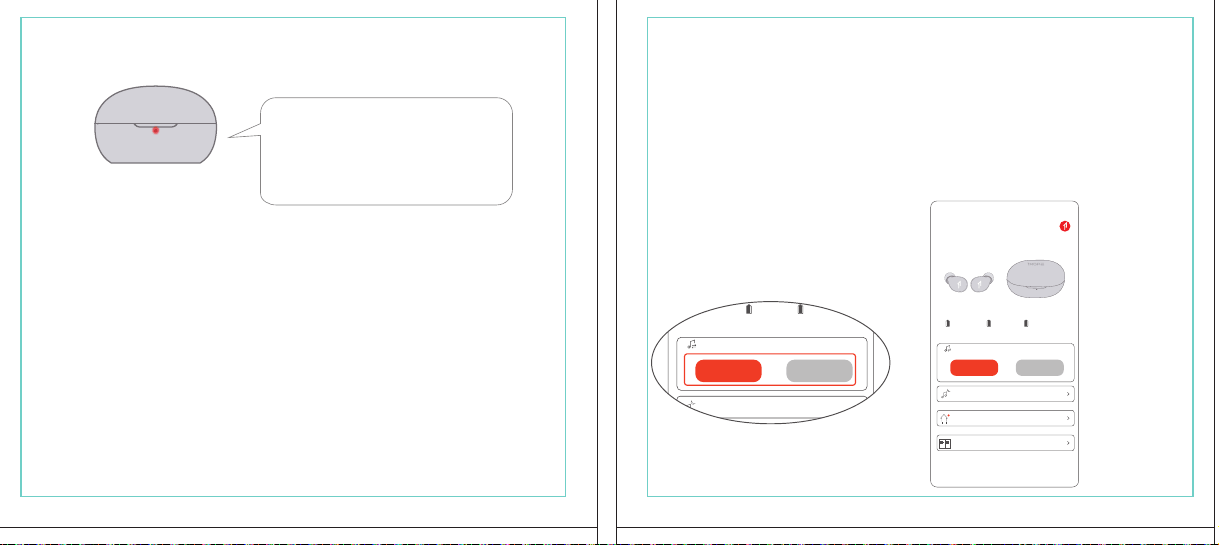
In The Box
材质:80G哑粉
尺寸:98*86mm
EH608
Manufacturer: Tiinlab Corporation
Address: No. 3333, Liuxian Avenue, Tower A, 35th Floor,
Tanglang City, Nanshan District, Shenzhen, China
Made in China
2ASDI-EH608 IC:24662-EH608
We know you will enjoy new 1MORE headphones as much as we do. At 1MORE, we value your
satisfaction. If you would like more details on this product or any of our other products, please visit
us online by scanning the QR code. Go to www.1more.com and sign up for VIP, and 1MORE will
treat you like one.
1MORE Inc., (“1MORE”) warrants to the original retail purchaser that this product is to be free
from defective materials and workmanship for a period of one year from the date of purchase if it
is properly used and maintained. If this product proves defective in either material or
workmanship, 1MORE, at its option, will (a) repair the product with new or refurbished parts, or
(b) replace the product with an equivalent new or refurbished product, at no charge for parts or
labor. If the product model is no longer available and cannot be repaired effectively or replaced
with an identical model, 1MORE at its sole option may replace the unit with a current model of
equal or greater value. In some cases, modication to the mounting surface may be required
where a new model is substituted. 1MORE assumes no responsibility or liability for such
modication. TO OBTAIN A REPAIR OR REPLACEMENT UNDER THE TERMS OF THIS
WARRANTY, PLEASE RETURN TO THE ORIGINAL DEALER FIRST AND THE ORIGINAL
DEALER SHALL REPAIR THE PRODUCT WITH NEW OR REFURBISHED PARTS OR REPLACE
THE PRODUCT WITH AN EQUIVALENT NEW OR REFURBISHED PRODUCT.
You will be required to submit a proof of purchasing details, including but not limited to a receipt
or sales invoice.
Return shipping for exchanges/repairs is the sole responsibility of the original retail purchaser.
Limitations:
• This limited warranty does not cover the failure of the product resulting from improper
installation, misuse, abuse, accident, neglect, mishandling, or wear from ordinary use or
environmental deterioration.
• This limited warranty does not cover cosmetic damage, including paint damage, or
consequential damage to other components or premises which may result for any reason from
the failure of the product.
• This limited warranty is null and void for products not used in accordance with 1MORE’s
instructions.
• This limited warranty is null and void for products with altered or missing serial numbers and for
products not purchased from an AUTHORIZED dealer.
• This limited warranty terminates if you sell or otherwise transfer this product to another party.
1. If the headphones cannot pair normally when powered on. Put both headphones back into
the case, triple click the pairing button and search for "1MORE Z30" in Bluetooth in your
devices to connect.
2. To unpair the device:
Put both headphones into the case, press and hold the pairing button on the case for 8
seconds to disconnect the headphones and the device.
3.OTA Firmware Update:
It can be synchronously upgraded via the 1MORE MUSIC APP while the Left and Right
earbuds are connected to each other with at least 50% battery.
* Functions of the 1MORE MUSIC APP may vary with different devices or operating systems.
For more details, please contact our customer service.
For the initial pairing, turn the headphones on to enter
pairing mode, the LEDs for headphone status will ash
in white. Headphones will power off if not paired to a
device within 3 minutes.
* After the rst successful pairing, headphones will
automatically connect to your device.
To pair with a new device, put headphones back into
the case, and triple click the pairing button when
powered on (no playback) to re-enter pairing mode.
Tips
Extra Functions
We Appreciate Your Business
1MORE (1) Year Limited Warranty
1. Please read this instruction manual carefully and retain for future reference.
2. Please fully charge the battery before rst use.
3. If the headphones have been unused for more than 3 months, we recommend that you charge
them. This will improve battery capacity.
4. Only use charging cables and adapters that are FCC (Federal Communications Commission)
approved.
5. In dry environments, static electricity may numb your ear. This is not related to the quality of the
product.
Safety Information
WEEE
FAQ
1. How to make sure the headphones have been fully charged?
Put the headphones into the charging case, if the headphone stutus LEDs are glowing this means
they have been fully charged.
2. Why won't headphones turn on?
Check if your headphones have enough battery life. If not, please charge them for at least 30 minutes.
3. Why won’t the headphones connect to my cellphone, or take a long time to connect?
Put both buds back into the charging case, then press and hold the pairing button for 3 seconds, click
the device name in your settings, they should now pair correctly to the phone.
4. Why won’t the headphones make phone calls?
The headphones are without microphones or phone call functions.
5. Why is the Bluetooth connection not stable and/or experiences some interruptions?
1) Try shortening the distance between your headphones and the device. Avoid solid barriers in
between you and the device.
2) Please keep away from strong interference sources, such as Wi-Fi and GPRS.
3) Please make sure the Bluetooth antenna of your device is not blocked.
6. Why can't the volume be adjusted by the cellphone buttons when playing soothing sounds in 1MORE
MUSIC APP?
The soothing sounds are stored in the ash of the headphone which can be adjusted only via the APP.
7. The headphones will be disconnected from the cellphone when out of wireless range. They cannot
restore the connection after returning back into the wireless range, how to solve it?
Click the device name in the cellphone pairing list to connect again.
8. I feel uncomfortable when wearing the headphones, how to solve it?
This is mainly because the sizes of ear tips and your canals are not snug, we suggest trying smaller ear
tips.
* For more detailed product FAQs, please visit the product support section under www.1more.com
CE
Headphones × 1 set
Charging Case × 1
Type-C Charging Cable × 1 Silicone Ear Tip (XS/S/L)
Product Overview
Fit
Replace
Placement
Headphones Pairing
Bluetooth Pairing To The Device
Charging
Controls
Soothing Sounds
Battery Notication
User Guide × 1
Silicone Ear Tip
Charging Pin
Charging Case
Pairing Button
Charging Case LED Indicator
LED Indicator for
Headphone Status
Headphone
Silicone Ear Tip
XS / S / M / L
Warranty Card × 1
The Left and Right headphones will automatically
pair with each other after the lid is open when
they are in the case (with charge).
* The above functions are available for either headphones in individual or Stereo mode.
To charge the case with Type-C cable.
To charge the headphones with the case.
* The above functions are available for either headphones in individual or Stereo mode.
Put headphones back into the case
ensuring they are magnetically attached
and close the lid to charge, a full charge
takes around 85 minutes.
Phone call function is not available on the headphones, and the playback controls can be
implemented on the connected device.
Please download the 1MORE MUSIC APP for soothing sounds.
Switch Listening Modes via APP
Enter the 1MORE Z30 home page in 1MORE MUSIC APP after pairing to your cellphone,
then you can switch listening modes between "Music" and "Soothing".
Click the "Soothing Sounds" to enter the playlist.
Click "+" to select the sound to be downloaded to your headphones for listening.
Click the timer icon on the song page to set the playtime.
The LED light of the charging case
will the different battery status: red
light indicates low battery, yellow light
indicates medium battery and green
light indicates full battery.
LED indicator for case battery status: when
the case battery is under 20%, the red
indicator stay lit for 3 seconds. When the
case battery is under 10%, the red indicator
will ash 10 times.
Power On:Take the headphones out of
the charging case (with charge), the
headphones will turn on automatically.
Power Off:Put the headphones
back into the charging case and
close the lid, they will automatically
turn off and start charging.
A full charge will take
around 90 minutes.
EN
* Playback and volume for the soothing sounds can only be adjusted via the APP.
スキャンして、1MOREのWechat公式アカウントをフォロー
「Soothing Sounds」ボタンを押すと、ヒーリング音楽の曲選択画面に入ります。
「+」をクリックしてヒーリング音楽をダウンロードすると、選択した曲がイヤホンに転送されます。
ヒーリング音楽再生画面の「タイマー」をクリックすると、ヒーリング音楽の再生時間を設定することができます。
ヒーリング音楽の再生/停止、音量調整などの操作は、APPでのみ対応します。
ヒーリング音楽
APPでEQモードを切り替えます
操作
その他の機能
梱包内容
イヤーピースの選択
イヤーピースの交換
左側/右側イヤホンのペアリング
イヤホンとBluetooth デバイスをペアリングするには
電池残量に関する注意充電
起動
イヤホン着用
製品外観
イヤホン本体 X 1セット
充電ケース X 1
Type-C充電ケーブル x 1
充電電極
イヤホン本体LEDインジケータ
ペアリングボタン
充電ケースLEDインジケータ
充電ケース
ヘッドホン
シリコン製イヤーピースセット
XS / S / M / L
シリコン製イヤーピースセット
(XS/S/L)
取扱説明書×1
一回のフル充電時間は約90 分です。
* 上記の機能は単独、両耳どちらのイヤホンでも適用されます。
* 上記の機能は単独、両耳どちらのイヤホンでも適用されます。
保証書×1
充電ケースが通電し、左/右側イヤホンをケースに
入っている状態で、ケースの蓋を開けると、左/右
のイヤホンが自動的にペアリングされます。
初めて使用する際、イヤホンの電源を入れてからデバイス
側で検索します。イヤホンは白色LEDが高速点滅します。も
しも 3 分たってもデバイスが見つからない場合、イヤホン本
体はすぐに電源が切れます。
・ すでに接続したことのあるイヤホンであれば、当該デバイ
スと自動でペアリングします。
新しいデバイスと接続する必要があれば、左/右イヤホンを
充電ケース内に戻して電源を入れ、ペアリングボタン3秒間
長押しすると、イヤホンは新しいデバイスとBluetoothのペア
リングがされます。
充電中:充電ケースのLEDインジケータ
は異なる色で電池容量を表示します。電
力が少ない場合赤色LED、電池容量が
半分ぐらいの場合黄色LED、充電が完
了している場合緑色LEDがそれぞれ点
灯します。
イヤホンを充電ケースに戻し
て、充電ケースの蓋を閉める
と充電が開始します。フル充
電時間は約85分です。
充電ケースの容量を確認する方法:充電ケ
ースの電池容量が20%以下になれば、充
電ケースの赤色LEDが3秒点灯します。充
電ケースの電池容量が10%以下になった
場合、充電ケースの赤色LEDのが10回点滅
します。
Type-C充電ケーブルを使用して充電ケースに充電する場合
充電ケースを使用してイヤホンに充電する場合
JP
River
- +
Time Setup
mins
River
OK
- +
60
30
90
River
Time Setup
mins
River
OK
- +
60
30
90
River
River
- +
Time Setup
mins
River
- +
60
30
90
River
1MORE SleepBuds Z30 User Guide
1MORE Наушники для сна Z30 Руководство пользователя
1MORE SleepBuds Z30 コードレスイヤホンユーザーガイド
Midre
Soothing Sounds
Allow adding 2 tracks
Volcano
Falls
River
Midre
Soothing Sounds
Allow adding 2 tracks
Volcano
Falls
River
1. Never disassemble the headphones. There are no user-serviceable parts inside.
2. Do not expose the headphones to temperatures below 32 °F (0 °C) or temperatures above 113 °F (45 °C).
3. Do not use the headphones in a thunderstorm storm. This could prevent the headphones from working
properly, and also increase your chance of being electrically shocked.
4. Do not use oil or any volatile liquid to clean this product.
5. Do not use the headphones in trafc. Do not use the headphones any time it would be dangerous to be
unaware of noises around you.
6. Adult supervision is required for children of age 6 and under.
7. If you don't feel comfortable after wearing the headphones, please refer to an aurist for advice on
whether in-ear headphones are suitable for you.
8. The headphones contain a lithium-ion battery, do not attempt to open, crush, or expose a charging case
to re or excessive temperature. Do not use it if the battery is swollen.
9. Please note that excessively high volumes and long listening times may cause hearing damage.
10. The symbol indicates DC voltage
All products bearing this symbol are waste electrical and electronic equipment (WEEE as in
directive 2012/19/EU) which should not be mixed with unsorted household waste. Instead,
you should protect human health and the environment by handing over your waste
equipment to a designated collection point for the recycling of waste electrical and
electronic equipment, appointed by the government or local authorities. Correct disposal
and recycling will help prevent potential negative consequences to the environment and
human health. Please contact the installer or local authorities for more information about the
location as well as terms and conditions of such collection points.
Home
Soothing Sounds
Listening Modes
1MORE Z30
OTA Firmware Upgrade
Quick Guide to Product
SoothingMusic
L 100% R 100% C 100%
The Bluetooth
®
word mark and logos are registered trademarks owned by Bluetooth SIG, Inc. and any
use of such marks by Tiinlab Corporation is under license. Other trademarks and trade names are the
property of their respective owners.
R
204-B00919
FCC
The SAR limit of USA (FCC) is 1.6 W/kg averaged over one gram of tissue. Device types EH608
(FCC ID: 2ASDI-EH608) has also been tested against this SAR limit.
This device complies with part 15 of the FCC rules. Operation is subject to the following two
conditions: (1) this device may not cause harmful interference, and (2) this device must accept any
interference received, including interference that may cause undesired operation.
NOTE: The manufacturer is not responsible for any radio or TV interference caused by unauthorized
modications or changesto this equipment. Such modications or changes could void the user’s authority
to operate the equipment.
NOTE: This equipment has been tested and found to comply with the limits for a Class B digital device,
pursuant to part 15 of the FCC Rules. These limits are designed to provide reasonable protection
against harmful interference in a residential installation. This equipment generates uses and can radiate
radio frequency energy and, if not installed and used in accordance with the instructions, may cause
harmful interference to radio communications. However, there is no guarantee that interference will not
occur in a particular installation. If this equipment does cause harmful interference to radio or television
reception, which can be determined by turning the equipment off and on, the user is encouraged to try
to correct the interference by one or more of the following measures:
-Reorient or relocate the receiving antenna.
-Increase the separation between the equipment and receiver.
-Connect the equipment into an outlet on a circuit different from that to which the receiver is
connected.
-Consult the dealer or an experienced radio/TV technician for help.
IC regulatory conformance
This device complies with CAN ICES-003 (B)/NMB-003(B).
This device complies with Industry Canada licence-exempt RSS standard(s). Operation is Subject to
the following two conditions: (1) this device may not cause interference, and (2) this device must accept
any interference, including interference that may cause undesired operation of the device.
Le présent appareil est conforme aux CNR d'Industrie Canada applicables aux appareils radio
exempts de licence. L'exploitation est autorisée aux deux conditions suivantes : (1) l'appareil ne doit
シリコン製イヤ
ーピースセット
Declaration of Conformity Hereby, Tiinlab Corporation declares that the radio equipment type
Wireless Earphones of EH608 is in compliance with Directive 2014/53/EU.
The full text of the EU declaration of conformity is available at the following internet address:
https://www.1more.com
RF exposure information: The device has been evaluated to meet general RF exposure requirement.
The device can be used in portable exposure condition without restriction. Radiation Exposure Statement
Power is so low that no RF exposure calculation is needed.
Declaration for EU Compliance
Operation Frequency/Max. EIRP: 2400-2483.5MHz, Max. EIRP is <10dBm.
В коробке
Мы знаем, что вы будете наслаждаться новыми наушниками 1MORE так же, как и мы. В
1MORE мы ценим ваше удовлетворение. Если вы хотите получить более подробную
информацию о данном продукте или о любых других наших продуктах, пожалуйста, посетите
нас онлайн, отсканировав QR-код. Перейдите по ссылке www.1more.com и
зарегистрируйтесь в VIP, и 1MORE будет относиться к вам как к одному из них.
Компания 1MORE Inc. (“1MORE”) гарантирует первоначальному розничному покупателю, что
данный продукт не будет содержать дефектов материалов и изготовления в течение одного года с
даты покупки, если он будет надлежащим образом использоваться и обслуживаться. Если в данном
продукте обнаружатся дефекты материала или изготовления, 1MORE, по своему усмотрению, (а)
отремонтирует продукт с использованием новых или восстановленных деталей или (б) заменит
продукт эквивалентным новым или восстановленным продуктом без оплаты запчастей или рабочей
силы. Если модель продукта больше недоступна и не может быть эффективно отремонтирована или
заменена идентичной моделью, компания 1MORE по своему усмотрению может заменить
устройство текущей моделью равной или большей стоимости. В некоторых случаях при замене
новой модели может потребоваться модификация монтажной поверхности. 1MORE не несет
никакой ответственности за такие изменения. ЧТОБЫ ПОЛУЧИТЬ РЕМОНТ ИЛИ ЗАМЕНУ В
СООТВЕТСТВИИ С УСЛОВИЯМИ ДАННОЙ ГАРАНТИИ, ПОЖАЛУЙСТА, СНАЧАЛА ОБРАТИТЕСЬ К
ПЕРВОНАЧАЛЬНОМУ ДИЛЕРУ, И ПЕРВОНАЧАЛЬНЫЙ ДИЛЕР ОТРЕМОНТИРУЕТ ПРОДУКТ НОВЫМИ
ИЛИ ВОССТАНОВЛЕННЫМИ ДЕТАЛЯМИ ИЛИ ЗАМЕНИТ ПРОДУКТ
ЭКВИВАЛЕНТНЫМ НОВЫМ ИЛИ
ВОССТАНОВЛЕННЫМ ПРОДУКТОМ.
От вас потребуется предоставить подтверждение покупки, включая, но не ограничиваясь этим,
квитанцию или счет-фактуру.
Ответственность за обратную доставку для обмена/ремонта несет исключительно первоначальный
розничный покупатель.
Ограничения:
• Данная ограниченная гарантия не распространяется на выход продукта из строя в результате
неправильной установки, неправильного использования, злоупотребления, несчастного случая,
1. Если наушники не могут нормально подключиться при включенном питании. Положите оба
наушника обратно в корпус, трижды нажмите кнопку сопряжения и найдите "1MORE Z30" в
Bluetooth на ваших устройствах для подключения.
2. Чтобы отключить сопряжение устройства:
Положите оба наушника в корпус, нажмите и удерживайте кнопку сопряжения на корпусе в
течение 8 секунд, чтобы отсоединить наушники от устройства.
3. Обновление прошивки OTA:
может выполняться синхронно с приложением 1MORE Music когда левый и правый наушники
сопряжены друг с другом через Bluetooth .
Для первоначального сопряжения включите
наушники, чтобы перейти в режим сопряжения,
светодиоды состояния наушников будут мигать
белым цветом. Наушники отключатся, если не
выполнить сопряжение с устройством в течение 3
минут.
* После первого успешного сопряжения наушники
автоматически подключатся к вашему устройству.
Чтобы выполнить сопряжение с новым устройством,
вставьте наушники обратно в корпус и трижды
нажмите кнопку сопряжения при включении
питания (воспроизведение отсутствует), чтобы
повторно войти в режим сопряжения.
Дополнительные функции
Мы ценим ваш бизнес
(1) годовая ограниченная гарантия 1MORE
Наушники × 1 набор
Зарядный корпус × 1
Зарядный кабель типа-С × 1Силиконовые вкладыши (XS/S/L)
Обзор продукта
Подгонка
Замена
Замена
Сопряжение наушников
Сопряжение Bluetooth с устройством
Зарядка
Управление
Успокаивающие звуки
Уведомление о батарее
Руководство пользователя × 1
Силиконовые
вкладыши
Зарядный штекер
Зарядный корпус
Кнопки сопряжения
Светодиодный индикатор зарядного корпуса
Наушники
Силиконовые вкладыши
XS / S / M / L
Гарантийный талон × 1
Левый и правый наушники автоматически
соединятся друг с другом после открытия
крышки, когда они будут находиться в корпусе
(с зарядкой).
* Вышеуказанные функции доступны как для наушников в индивидуальном, так и в стерео режиме.
Для зарядки корпуса используйте кабель Type-C.
Для зарядки наушников с корпусом.
* Вышеуказанные функции доступны как для наушников в индивидуальном, так и в стерео режиме.
Положите наушники обратно в корпус,
убедившись, что они надежно
закреплены магнитом, и закройте крышку
для зарядки, полная зарядка занимает
около 85 минут.
Функция телефонного звонка недоступна в наушниках, а управление воспроизведением
может быть реализовано на подключенном устройстве.
Пожалуйста, загрузите приложение 1MORE MUSIC для успокаивающих звуков.
Переключайте режимы прослушивания с помощью приложения
Зайдите на домашнюю страницу 1MORE Z30 в приложении 1MORE MUSIC после сопряжения с
вашим мобильным телефоном, затем вы сможете переключать режимы прослушивания между
"Музыка" и "Успокаивающий".
Нажмите "Soothing Sounds", чтобы войти в список воспроизведения.
Нажмите "+" чтобы выбрать звук, который будет загружен в ваши наушники для прослушивания.
Нажмите на значок таймера на странице песни,
чтобы установить время воспроизведения.
Светодиодный индикатор
зарядного устройства будет
отображать различное состояние
батареи: красный индикатор
указывает на низкий уровень
заряда батареи, желтый
индикатор указывает на средний
уровень заряда батареи и зеленый
индикатор указывает на полный
заряд батареи.
Светодиодный индикатор состояния
батареи корпуса: когда уровень заряда
батареи корпуса ниже 20%, красный
индикатор горит в течение 3 секунд. Когда
уровень заряда батареи корпуса ниже
10%, красный индикатор мигнет 10 раз.
Включение питания:Достаньте
наушники из зарядного корпуса (с
зарядкой), наушники включатся
автоматически.
Выключение питания:Положите
наушники обратно в зарядный
корпус и закройте крышку, они
автоматически выключатся и
начнут заряжаться.
Полная зарядка займет
около 90 минут.
RU
Midre
Soothing Sounds
Allow adding 2 tracks
Volcano
Falls
River
Midre River VolcanoFalls
River
Home
Soothing Sounds
Listening Modes
1MORE Z30
OTA Firmware Upgrade
Quick Guide to Product
SoothingMusic
L 100% R 100% C 100%
pas produire de brouillage, et (2) l'utilisateur de l'appareil doit accepter tout brouillage radioélectrique
subi, même si le brouillage est susceptible d'en compromettre le fonctionnement.
This device has been tested for compliance with IC SAR values at a typical operating near the
body. To ensure that RF exposure levels below the levels tested, use accessories with this
equipment to maintain a minimum separation distance of 0 mm between the body of the user and the
device. These accessories should not contain metallic components. It is possible that the accessories
used close to the body that do not meet these requirements are not consistent with the SAR limits and
it is advisable to avoid using them.
Ce dispositif a été testé pour la conformité avec les valeurs SAR à un fonctionnement typique près du
corps . Pour assurer que les niveaux d'exposition aux radiofréquences en deçà des niveaux testés ,
utiliser des accessoires avec cet équipement pour maintenir une distance de séparation minimale de 0
mm entre le corps de l'utilisateur et l'appareil. Ces accessoires ne doivent pas contenir des
composants métalliques . Il est possible que les accessoires utilisés près du corps quine répondent pas
à ces exigences ne sont pas compatibles avec les limites SAR et il est conseilléd'éviter de les utiliser.
Caution: Any changes or modications not expressly approved by the party responsible for compliance
could void the user's authority to operate this equipment.
充電ケースが通電している状態で、ケ
ースからイヤホンを取り出すと、イヤホ
ンは自動で起動します。
シャットダウン:イヤホンを充電ケースに
入れて蓋を閉めると、すぐにシャットダ
ウンし充電します。
本イヤホンに通話機能は付いていません、曲再生/停止、曲送り/曲戻し、及び音量調整などの再生機能は
スマートフォン側などで操作してください。
ヒーリング音楽などを再生するには1MORE MUSIC APPをダウンロードしてください。
1MORE MUSICアプリを使用しているときにスマホ端末がイヤホンと接続すると、「Music」 と 「Soothing」が選
べます。
1. 電源を入れても、左右のイヤホンが正常にペアリングできない場合、イヤホンを充電ケースに戻し、蓋を一
度閉めてから再度開けます。その後充電ケースのペアリングボタンを3秒間長押しすると、充電ケースのイ
ヤホンLEDインジケーターが白色に点滅し、再びペアリングモードに入ります。
2. 左右イヤホンのペアリング記録をクリアする方法:
両イヤホンを充電ケースに入れ、充電ケースのペアリングボタンを約3秒間長押しします。
3. OTAファームウェアのアップデートを行う場合:
ヘッドホン左右のバッテリーが50%以上で接続されている状態であれば、「1MORE MUSIC APP」を介して
同期的にアップデートすることができます。
* 1MORE MUSIC APPは接続機器によって機能が異なる場合がございます。詳細については、お気軽にカス
タマサポートまでにご連絡ください。
1MORE コミュニティ bbs.1more.com へのアクセスをお待ちしております。
www.1more.com にアクセスし、1MORE 会員に新規登録いただけると、素晴らしい情報を提供いたします。
Bluetooth®のマークとロゴはBluetooth® Technology Allianceの登録商標です。本製品で使用されているこ
れらのマークは万魔声学股份有限公司にてライセンス契約に基づき表示するものとします。その他商標及
び商品名称はそれぞれの所有者に帰属するものとします。
Светодиодный
индикатор для
состояния наушников
* Воспроизведение и громкость успокаивающих звуков можно регулировать только с помощью
приложения.
Словесный знак и логотипы Bluetooth® являются зарегистрированными товарными знаками,
принадлежащими Bluetooth SIG, Inc., и любое использование таких знаков корпорацией Tiinlab
осуществляется по лицензии. Другие товарные знаки и торговые наименования являются
собственностью их соответствующих владельцев.
* Функции приложения 1MORE MUSIC могут отличаться в зависимости от различных устройств или
операционных систем. Для получения более подробной информации, пожалуйста, свяжитесь с
нашей службой поддержки клиентов.
небрежности, неправильного обращения или износа в результате обычного использования или
ухудшения состояния окружающей среды.
• Данная ограниченная гарантия не распространяется на косметические повреждения, включая
повреждение краски, или косвенный ущерб другим компонентам или поверхностям, которые
могут возникнуть по любой причине в результате выхода продукта из строя.
• Данная ограниченная гарантия недействительна для продуктов, используемых не в соответствии с
инструкциями 1MORE.
• Данная ограниченная гарантия недействительна для продуктов с измененными или
отсутствующими серийными номерами, а также для продуктов, приобретенных не у
ОФИЦИАЛЬНОГО дилера.
• Действие данной ограниченной гарантии прекращается, если вы продаете или иным образом
передаете данный продукт другой стороне.
Home
Soothing Sounds
Listening Modes
1MORE Z30
OTA Firmware Upgrade
Quick Guide to Product
SoothingMusic
L 100% R 100% C 100%
River
Home
Soothing Sounds
Listening Modes
1MORE Z30
OTA Firmware Upgrade
Quick Guide to Product
Soothing
Music
L 100% R 100% C 100%
Home
Soothing Sounds
Listening Modes
1MORE Z30
OTA Firmware Upgrade
Quick Guide to Product
SoothingMusic
L 100% R 100% C 100%
Home
Soothing Sounds
Listening Modes
1MORE Z30
OTA Firmware Upgrade
Quick Guide to Product
Soothing
Music
L 100% R 100% C 100%
Home
Soothing Sounds
Listening Modes
1MORE Z30
OTA Firmware Upgrade
Quick Guide to Product
SoothingMusic
L 100% R 100% C 100%
Home
Soothing Sounds
Listening Modes
1MORE Z30
OTA Firmware Upgrade
Quick Guide to Product
Soothing
Music
L 100% R 100% C 100%
Midre River VolcanoFalls
River
Home
Soothing Sounds
Listening Modes
1MORE Z30
OTA Firmware Upgrade
Quick Guide to Product
SoothingMusic
L 100% R 100% C 100%
Home
Soothing Sounds
Listening Modes
1MORE Z30
OTA Firmware Upgrade
Quick Guide to Product
SoothingMusic
L 100% R 100% C 100%
Midre River VolcanoFalls
River
Home
Soothing Sounds
Listening Modes
1MORE Z30
OTA Firmware Upgrade
Quick Guide to Product
SoothingMusic
L 100% R 100% C 100%
Home
Soothing Sounds
Listening Modes
1MORE Z30
OTA Firmware Upgrade
Quick Guide to Product
SoothingMusic
L 100% R 100% C 100%
C:0/M:85/Y:95/K:0C
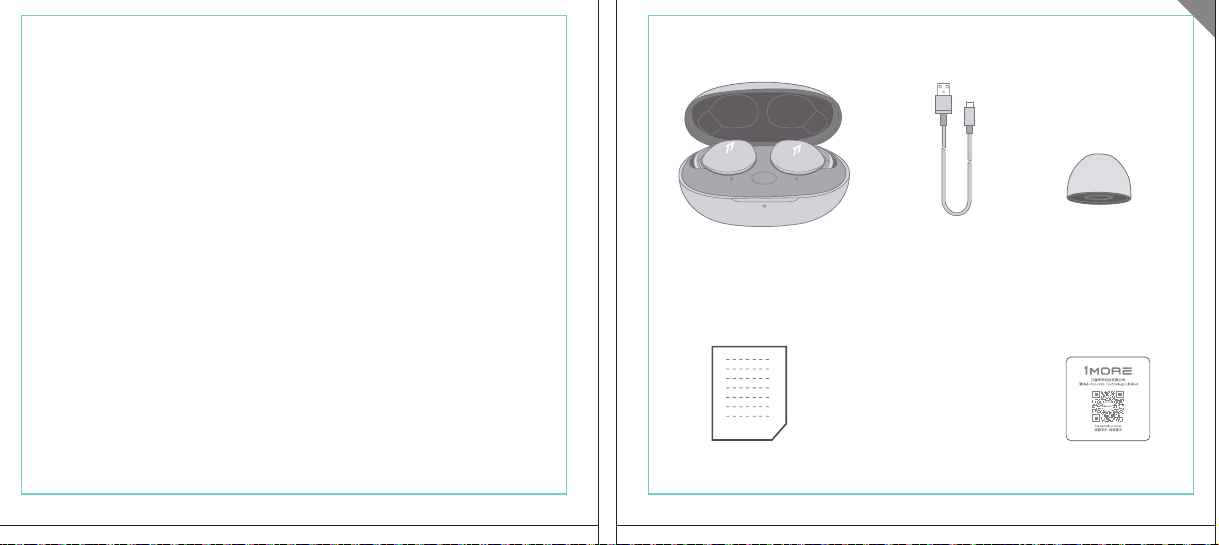
In The Box
材质:80G哑粉
尺寸:98*86mm
EH608
Manufacturer: Tiinlab Corporation
Address: No. 3333, Liuxian Avenue, Tower A, 35th Floor,
Tanglang City, Nanshan District, Shenzhen, China
Made in China
2ASDI-EH608 IC:24662-EH608
We know you will enjoy new 1MORE headphones as much as we do. At 1MORE, we value your
satisfaction. If you would like more details on this product or any of our other products, please visit
us online by scanning the QR code. Go to www.1more.com and sign up for VIP, and 1MORE will
treat you like one.
1MORE Inc., (“1MORE”) warrants to the original retail purchaser that this product is to be free
from defective materials and workmanship for a period of one year from the date of purchase if it
is properly used and maintained. If this product proves defective in either material or
workmanship, 1MORE, at its option, will (a) repair the product with new or refurbished parts, or
(b) replace the product with an equivalent new or refurbished product, at no charge for parts or
labor. If the product model is no longer available and cannot be repaired effectively or replaced
with an identical model, 1MORE at its sole option may replace the unit with a current model of
equal or greater value. In some cases, modication to the mounting surface may be required
where a new model is substituted. 1MORE assumes no responsibility or liability for such
modication. TO OBTAIN A REPAIR OR REPLACEMENT UNDER THE TERMS OF THIS
WARRANTY, PLEASE RETURN TO THE ORIGINAL DEALER FIRST AND THE ORIGINAL
DEALER SHALL REPAIR THE PRODUCT WITH NEW OR REFURBISHED PARTS OR REPLACE
THE PRODUCT WITH AN EQUIVALENT NEW OR REFURBISHED PRODUCT.
You will be required to submit a proof of purchasing details, including but not limited to a receipt
or sales invoice.
Return shipping for exchanges/repairs is the sole responsibility of the original retail purchaser.
Limitations:
• This limited warranty does not cover the failure of the product resulting from improper
installation, misuse, abuse, accident, neglect, mishandling, or wear from ordinary use or
environmental deterioration.
• This limited warranty does not cover cosmetic damage, including paint damage, or
consequential damage to other components or premises which may result for any reason from
the failure of the product.
• This limited warranty is null and void for products not used in accordance with 1MORE’s
instructions.
• This limited warranty is null and void for products with altered or missing serial numbers and for
products not purchased from an AUTHORIZED dealer.
• This limited warranty terminates if you sell or otherwise transfer this product to another party.
1. If the headphones cannot pair normally when powered on. Put both headphones back into
the case, triple click the pairing button and search for "1MORE Z30" in Bluetooth in your
devices to connect.
2. To unpair the device:
Put both headphones into the case, press and hold the pairing button on the case for 8
seconds to disconnect the headphones and the device.
3.OTA Firmware Update:
It can be synchronously upgraded via the 1MORE MUSIC APP while the Left and Right
earbuds are connected to each other with at least 50% battery.
* Functions of the 1MORE MUSIC APP may vary with different devices or operating systems.
For more details, please contact our customer service.
For the initial pairing, turn the headphones on to enter
pairing mode, the LEDs for headphone status will ash
in white. Headphones will power off if not paired to a
device within 3 minutes.
* After the rst successful pairing, headphones will
automatically connect to your device.
To pair with a new device, put headphones back into
the case, and triple click the pairing button when
powered on (no playback) to re-enter pairing mode.
Tips
Extra Functions
We Appreciate Your Business
1MORE (1) Year Limited Warranty
1. Please read this instruction manual carefully and retain for future reference.
2. Please fully charge the battery before rst use.
3. If the headphones have been unused for more than 3 months, we recommend that you charge
them. This will improve battery capacity.
4. Only use charging cables and adapters that are FCC (Federal Communications Commission)
approved.
5. In dry environments, static electricity may numb your ear. This is not related to the quality of the
product.
Safety Information
WEEE
FAQ
1. How to make sure the headphones have been fully charged?
Put the headphones into the charging case, if the headphone stutus LEDs are glowing this means
they have been fully charged.
2. Why won't headphones turn on?
Check if your headphones have enough battery life. If not, please charge them for at least 30 minutes.
3. Why won’t the headphones connect to my cellphone, or take a long time to connect?
Put both buds back into the charging case, then press and hold the pairing button for 3 seconds, click
the device name in your settings, they should now pair correctly to the phone.
4. Why won’t the headphones make phone calls?
The headphones are without microphones or phone call functions.
5. Why is the Bluetooth connection not stable and/or experiences some interruptions?
1) Try shortening the distance between your headphones and the device. Avoid solid barriers in
between you and the device.
2) Please keep away from strong interference sources, such as Wi-Fi and GPRS.
3) Please make sure the Bluetooth antenna of your device is not blocked.
6. Why can't the volume be adjusted by the cellphone buttons when playing soothing sounds in 1MORE
MUSIC APP?
The soothing sounds are stored in the ash of the headphone which can be adjusted only via the APP.
7. The headphones will be disconnected from the cellphone when out of wireless range. They cannot
restore the connection after returning back into the wireless range, how to solve it?
Click the device name in the cellphone pairing list to connect again.
8. I feel uncomfortable when wearing the headphones, how to solve it?
This is mainly because the sizes of ear tips and your canals are not snug, we suggest trying smaller ear
tips.
* For more detailed product FAQs, please visit the product support section under www.1more.com
CE
Headphones × 1 set
Charging Case × 1
Type-C Charging Cable × 1 Silicone Ear Tip (XS/S/L)
Product Overview
Fit
Replace
Placement
Headphones Pairing
Bluetooth Pairing To The Device
Charging
Controls
Soothing Sounds
Battery Notication
User Guide × 1
Silicone Ear Tip
Charging Pin
Charging Case
Pairing Button
Charging Case LED Indicator
LED Indicator for
Headphone Status
Headphone
Silicone Ear Tip
XS / S / M / L
Warranty Card × 1
The Left and Right headphones will automatically
pair with each other after the lid is open when
they are in the case (with charge).
* The above functions are available for either headphones in individual or Stereo mode.
To charge the case with Type-C cable.
To charge the headphones with the case.
* The above functions are available for either headphones in individual or Stereo mode.
Put headphones back into the case
ensuring they are magnetically attached
and close the lid to charge, a full charge
takes around 85 minutes.
Phone call function is not available on the headphones, and the playback controls can be
implemented on the connected device.
Please download the 1MORE MUSIC APP for soothing sounds.
Switch Listening Modes via APP
Enter the 1MORE Z30 home page in 1MORE MUSIC APP after pairing to your cellphone,
then you can switch listening modes between "Music" and "Soothing".
Click the "Soothing Sounds" to enter the playlist.
Click "+" to select the sound to be downloaded to your headphones for listening.
Click the timer icon on the song page to set the playtime.
The LED light of the charging case
will the different battery status: red
light indicates low battery, yellow light
indicates medium battery and green
light indicates full battery.
LED indicator for case battery status: when
the case battery is under 20%, the red
indicator stay lit for 3 seconds. When the
case battery is under 10%, the red indicator
will ash 10 times.
Power On:Take the headphones out of
the charging case (with charge), the
headphones will turn on automatically.
Power Off:Put the headphones
back into the charging case and
close the lid, they will automatically
turn off and start charging.
A full charge will take
around 90 minutes.
EN
* Playback and volume for the soothing sounds can only be adjusted via the APP.
スキャンして、1MOREのWechat公式アカウントをフォロー
「Soothing Sounds」ボタンを押すと、ヒーリング音楽の曲選択画面に入ります。
「+」をクリックしてヒーリング音楽をダウンロードすると、選択した曲がイヤホンに転送されます。
ヒーリング音楽再生画面の「タイマー」をクリックすると、ヒーリング音楽の再生時間を設定することができます。
ヒーリング音楽の再生/停止、音量調整などの操作は、APPでのみ対応します。
ヒーリング音楽
APPでEQモードを切り替えます
操作
その他の機能
梱包内容
イヤーピースの選択
イヤーピースの交換
左側/右側イヤホンのペアリング
イヤホンとBluetooth デバイスをペアリングするには
電池残量に関する注意充電
起動
イヤホン着用
製品外観
イヤホン本体 X 1セット
充電ケース X 1
Type-C充電ケーブル x 1
充電電極
イヤホン本体LEDインジケータ
ペアリングボタン
充電ケースLEDインジケータ
充電ケース
ヘッドホン
シリコン製イヤーピースセット
XS / S / M / L
シリコン製イヤーピースセット
(XS/S/L)
取扱説明書×1
一回のフル充電時間は約90 分です。
* 上記の機能は単独、両耳どちらのイヤホンでも適用されます。
* 上記の機能は単独、両耳どちらのイヤホンでも適用されます。
保証書×1
充電ケースが通電し、左/右側イヤホンをケースに
入っている状態で、ケースの蓋を開けると、左/右
のイヤホンが自動的にペアリングされます。
初めて使用する際、イヤホンの電源を入れてからデバイス
側で検索します。イヤホンは白色LEDが高速点滅します。も
しも 3 分たってもデバイスが見つからない場合、イヤホン本
体はすぐに電源が切れます。
・ すでに接続したことのあるイヤホンであれば、当該デバイ
スと自動でペアリングします。
新しいデバイスと接続する必要があれば、左/右イヤホンを
充電ケース内に戻して電源を入れ、ペアリングボタン3秒間
長押しすると、イヤホンは新しいデバイスとBluetoothのペア
リングがされます。
充電中:充電ケースのLEDインジケータ
は異なる色で電池容量を表示します。電
力が少ない場合赤色LED、電池容量が
半分ぐらいの場合黄色LED、充電が完
了している場合緑色LEDがそれぞれ点
灯します。
イヤホンを充電ケースに戻し
て、充電ケースの蓋を閉める
と充電が開始します。フル充
電時間は約85分です。
充電ケースの容量を確認する方法:充電ケ
ースの電池容量が20%以下になれば、充
電ケースの赤色LEDが3秒点灯します。充
電ケースの電池容量が10%以下になった
場合、充電ケースの赤色LEDのが10回点滅
します。
Type-C充電ケーブルを使用して充電ケースに充電する場合
充電ケースを使用してイヤホンに充電する場合
JP
River
- +
Time Setup
mins
River
OK
- +
60
30
90
River
Time Setup
mins
River
OK
- +
60
30
90
River
River
- +
Time Setup
mins
River
- +
60
30
90
River
1MORE SleepBuds Z30 User Guide
1MORE Наушники для сна Z30 Руководство пользователя
1MORE SleepBuds Z30 コードレスイヤホンユーザーガイド
Midre
Soothing Sounds
Allow adding 2 tracks
Volcano
Falls
River
Midre
Soothing Sounds
Allow adding 2 tracks
Volcano
Falls
River
1. Never disassemble the headphones. There are no user-serviceable parts inside.
2. Do not expose the headphones to temperatures below 32 °F (0 °C) or temperatures above 113 °F (45 °C).
3. Do not use the headphones in a thunderstorm storm. This could prevent the headphones from working
properly, and also increase your chance of being electrically shocked.
4. Do not use oil or any volatile liquid to clean this product.
5. Do not use the headphones in trafc. Do not use the headphones any time it would be dangerous to be
unaware of noises around you.
6. Adult supervision is required for children of age 6 and under.
7. If you don't feel comfortable after wearing the headphones, please refer to an aurist for advice on
whether in-ear headphones are suitable for you.
8. The headphones contain a lithium-ion battery, do not attempt to open, crush, or expose a charging case
to re or excessive temperature. Do not use it if the battery is swollen.
9. Please note that excessively high volumes and long listening times may cause hearing damage.
10. The symbol indicates DC voltage
All products bearing this symbol are waste electrical and electronic equipment (WEEE as in
directive 2012/19/EU) which should not be mixed with unsorted household waste. Instead,
you should protect human health and the environment by handing over your waste
equipment to a designated collection point for the recycling of waste electrical and
electronic equipment, appointed by the government or local authorities. Correct disposal
and recycling will help prevent potential negative consequences to the environment and
human health. Please contact the installer or local authorities for more information about the
location as well as terms and conditions of such collection points.
Home
Soothing Sounds
Listening Modes
1MORE Z30
OTA Firmware Upgrade
Quick Guide to Product
SoothingMusic
L 100% R 100% C 100%
The Bluetooth
®
word mark and logos are registered trademarks owned by Bluetooth SIG, Inc. and any
use of such marks by Tiinlab Corporation is under license. Other trademarks and trade names are the
property of their respective owners.
R
204-B00919
FCC
The SAR limit of USA (FCC) is 1.6 W/kg averaged over one gram of tissue. Device types EH608
(FCC ID: 2ASDI-EH608) has also been tested against this SAR limit.
This device complies with part 15 of the FCC rules. Operation is subject to the following two
conditions: (1) this device may not cause harmful interference, and (2) this device must accept any
interference received, including interference that may cause undesired operation.
NOTE: The manufacturer is not responsible for any radio or TV interference caused by unauthorized
modications or changesto this equipment. Such modications or changes could void the user’s authority
to operate the equipment.
NOTE: This equipment has been tested and found to comply with the limits for a Class B digital device,
pursuant to part 15 of the FCC Rules. These limits are designed to provide reasonable protection
against harmful interference in a residential installation. This equipment generates uses and can radiate
radio frequency energy and, if not installed and used in accordance with the instructions, may cause
harmful interference to radio communications. However, there is no guarantee that interference will not
occur in a particular installation. If this equipment does cause harmful interference to radio or television
reception, which can be determined by turning the equipment off and on, the user is encouraged to try
to correct the interference by one or more of the following measures:
-Reorient or relocate the receiving antenna.
-Increase the separation between the equipment and receiver.
-Connect the equipment into an outlet on a circuit different from that to which the receiver is
connected.
-Consult the dealer or an experienced radio/TV technician for help.
IC regulatory conformance
This device complies with CAN ICES-003 (B)/NMB-003(B).
This device complies with Industry Canada licence-exempt RSS standard(s). Operation is Subject to
the following two conditions: (1) this device may not cause interference, and (2) this device must accept
any interference, including interference that may cause undesired operation of the device.
Le présent appareil est conforme aux CNR d'Industrie Canada applicables aux appareils radio
exempts de licence. L'exploitation est autorisée aux deux conditions suivantes : (1) l'appareil ne doit
シリコン製イヤ
ーピースセット
Declaration of Conformity Hereby, Tiinlab Corporation declares that the radio equipment type
Wireless Earphones of EH608 is in compliance with Directive 2014/53/EU.
The full text of the EU declaration of conformity is available at the following internet address:
https://www.1more.com
RF exposure information: The device has been evaluated to meet general RF exposure requirement.
The device can be used in portable exposure condition without restriction. Radiation Exposure Statement
Power is so low that no RF exposure calculation is needed.
Declaration for EU Compliance
Operation Frequency/Max. EIRP: 2400-2483.5MHz, Max. EIRP is <10dBm.
В коробке
Мы знаем, что вы будете наслаждаться новыми наушниками 1MORE так же, как и мы. В
1MORE мы ценим ваше удовлетворение. Если вы хотите получить более подробную
информацию о данном продукте или о любых других наших продуктах, пожалуйста, посетите
нас онлайн, отсканировав QR-код. Перейдите по ссылке www.1more.com и
зарегистрируйтесь в VIP, и 1MORE будет относиться к вам как к одному из них.
Компания 1MORE Inc. (“1MORE”) гарантирует первоначальному розничному покупателю, что
данный продукт не будет содержать дефектов материалов и изготовления в течение одного года с
даты покупки, если он будет надлежащим образом использоваться и обслуживаться. Если в данном
продукте обнаружатся дефекты материала или изготовления, 1MORE, по своему усмотрению, (а)
отремонтирует продукт с использованием новых или восстановленных деталей или (б) заменит
продукт эквивалентным новым или восстановленным продуктом без оплаты запчастей или рабочей
силы. Если модель продукта больше недоступна и не может быть эффективно отремонтирована или
заменена идентичной моделью, компания 1MORE по своему усмотрению может заменить
устройство текущей моделью равной или большей стоимости. В некоторых случаях при замене
новой модели может потребоваться модификация монтажной поверхности. 1MORE не несет
никакой ответственности за такие изменения. ЧТОБЫ ПОЛУЧИТЬ РЕМОНТ ИЛИ ЗАМЕНУ В
СООТВЕТСТВИИ С УСЛОВИЯМИ ДАННОЙ ГАРАНТИИ, ПОЖАЛУЙСТА, СНАЧАЛА ОБРАТИТЕСЬ К
ПЕРВОНАЧАЛЬНОМУ ДИЛЕРУ, И ПЕРВОНАЧАЛЬНЫЙ ДИЛЕР ОТРЕМОНТИРУЕТ ПРОДУКТ НОВЫМИ
ИЛИ ВОССТАНОВЛЕННЫМИ ДЕТАЛЯМИ ИЛИ ЗАМЕНИТ ПРОДУКТ
ЭКВИВАЛЕНТНЫМ НОВЫМ ИЛИ
ВОССТАНОВЛЕННЫМ ПРОДУКТОМ.
От вас потребуется предоставить подтверждение покупки, включая, но не ограничиваясь этим,
квитанцию или счет-фактуру.
Ответственность за обратную доставку для обмена/ремонта несет исключительно первоначальный
розничный покупатель.
Ограничения:
• Данная ограниченная гарантия не распространяется на выход продукта из строя в результате
неправильной установки, неправильного использования, злоупотребления, несчастного случая,
1. Если наушники не могут нормально подключиться при включенном питании. Положите оба
наушника обратно в корпус, трижды нажмите кнопку сопряжения и найдите "1MORE Z30" в
Bluetooth на ваших устройствах для подключения.
2. Чтобы отключить сопряжение устройства:
Положите оба наушника в корпус, нажмите и удерживайте кнопку сопряжения на корпусе в
течение 8 секунд, чтобы отсоединить наушники от устройства.
3. Обновление прошивки OTA:
может выполняться синхронно с приложением 1MORE Music когда левый и правый наушники
сопряжены друг с другом через Bluetooth .
Для первоначального сопряжения включите
наушники, чтобы перейти в режим сопряжения,
светодиоды состояния наушников будут мигать
белым цветом. Наушники отключатся, если не
выполнить сопряжение с устройством в течение 3
минут.
* После первого успешного сопряжения наушники
автоматически подключатся к вашему устройству.
Чтобы выполнить сопряжение с новым устройством,
вставьте наушники обратно в корпус и трижды
нажмите кнопку сопряжения при включении
питания (воспроизведение отсутствует), чтобы
повторно войти в режим сопряжения.
Дополнительные функции
Мы ценим ваш бизнес
(1) годовая ограниченная гарантия 1MORE
Наушники × 1 набор
Зарядный корпус × 1
Зарядный кабель типа-С × 1Силиконовые вкладыши (XS/S/L)
Обзор продукта
Подгонка
Замена
Замена
Сопряжение наушников
Сопряжение Bluetooth с устройством
Зарядка
Управление
Успокаивающие звуки
Уведомление о батарее
Руководство пользователя × 1
Силиконовые
вкладыши
Зарядный штекер
Зарядный корпус
Кнопки сопряжения
Светодиодный индикатор зарядного корпуса
Наушники
Силиконовые вкладыши
XS / S / M / L
Гарантийный талон × 1
Левый и правый наушники автоматически
соединятся друг с другом после открытия
крышки, когда они будут находиться в корпусе
(с зарядкой).
* Вышеуказанные функции доступны как для наушников в индивидуальном, так и в стерео режиме.
Для зарядки корпуса используйте кабель Type-C.
Для зарядки наушников с корпусом.
* Вышеуказанные функции доступны как для наушников в индивидуальном, так и в стерео режиме.
Положите наушники обратно в корпус,
убедившись, что они надежно
закреплены магнитом, и закройте крышку
для зарядки, полная зарядка занимает
около 85 минут.
Функция телефонного звонка недоступна в наушниках, а управление воспроизведением
может быть реализовано на подключенном устройстве.
Пожалуйста, загрузите приложение 1MORE MUSIC для успокаивающих звуков.
Переключайте режимы прослушивания с помощью приложения
Зайдите на домашнюю страницу 1MORE Z30 в приложении 1MORE MUSIC после сопряжения с
вашим мобильным телефоном, затем вы сможете переключать режимы прослушивания между
"Музыка" и "Успокаивающий".
Нажмите "Soothing Sounds", чтобы войти в список воспроизведения.
Нажмите "+" чтобы выбрать звук, который будет загружен в ваши наушники для прослушивания.
Нажмите на значок таймера на странице песни,
чтобы установить время воспроизведения.
Светодиодный индикатор
зарядного устройства будет
отображать различное состояние
батареи: красный индикатор
указывает на низкий уровень
заряда батареи, желтый
индикатор указывает на средний
уровень заряда батареи и зеленый
индикатор указывает на полный
заряд батареи.
Светодиодный индикатор состояния
батареи корпуса: когда уровень заряда
батареи корпуса ниже 20%, красный
индикатор горит в течение 3 секунд. Когда
уровень заряда батареи корпуса ниже
10%, красный индикатор мигнет 10 раз.
Включение питания:Достаньте
наушники из зарядного корпуса (с
зарядкой), наушники включатся
автоматически.
Выключение питания:Положите
наушники обратно в зарядный
корпус и закройте крышку, они
автоматически выключатся и
начнут заряжаться.
Полная зарядка займет
около 90 минут.
RU
Midre
Soothing Sounds
Allow adding 2 tracks
Volcano
Falls
River
Midre River VolcanoFalls
River
Home
Soothing Sounds
Listening Modes
1MORE Z30
OTA Firmware Upgrade
Quick Guide to Product
SoothingMusic
L 100% R 100% C 100%
pas produire de brouillage, et (2) l'utilisateur de l'appareil doit accepter tout brouillage radioélectrique
subi, même si le brouillage est susceptible d'en compromettre le fonctionnement.
This device has been tested for compliance with IC SAR values at a typical operating near the
body. To ensure that RF exposure levels below the levels tested, use accessories with this
equipment to maintain a minimum separation distance of 0 mm between the body of the user and the
device. These accessories should not contain metallic components. It is possible that the accessories
used close to the body that do not meet these requirements are not consistent with the SAR limits and
it is advisable to avoid using them.
Ce dispositif a été testé pour la conformité avec les valeurs SAR à un fonctionnement typique près du
corps . Pour assurer que les niveaux d'exposition aux radiofréquences en deçà des niveaux testés ,
utiliser des accessoires avec cet équipement pour maintenir une distance de séparation minimale de 0
mm entre le corps de l'utilisateur et l'appareil. Ces accessoires ne doivent pas contenir des
composants métalliques . Il est possible que les accessoires utilisés près du corps quine répondent pas
à ces exigences ne sont pas compatibles avec les limites SAR et il est conseilléd'éviter de les utiliser.
Caution: Any changes or modications not expressly approved by the party responsible for compliance
could void the user's authority to operate this equipment.
充電ケースが通電している状態で、ケ
ースからイヤホンを取り出すと、イヤホ
ンは自動で起動します。
シャットダウン:イヤホンを充電ケースに
入れて蓋を閉めると、すぐにシャットダ
ウンし充電します。
本イヤホンに通話機能は付いていません、曲再生/停止、曲送り/曲戻し、及び音量調整などの再生機能は
スマートフォン側などで操作してください。
ヒーリング音楽などを再生するには1MORE MUSIC APPをダウンロードしてください。
1MORE MUSICアプリを使用しているときにスマホ端末がイヤホンと接続すると、「Music」 と 「Soothing」が選
べます。
1. 電源を入れても、左右のイヤホンが正常にペアリングできない場合、イヤホンを充電ケースに戻し、蓋を一
度閉めてから再度開けます。その後充電ケースのペアリングボタンを3秒間長押しすると、充電ケースのイ
ヤホンLEDインジケーターが白色に点滅し、再びペアリングモードに入ります。
2. 左右イヤホンのペアリング記録をクリアする方法:
両イヤホンを充電ケースに入れ、充電ケースのペアリングボタンを約3秒間長押しします。
3. OTAファームウェアのアップデートを行う場合:
ヘッドホン左右のバッテリーが50%以上で接続されている状態であれば、「1MORE MUSIC APP」を介して
同期的にアップデートすることができます。
* 1MORE MUSIC APPは接続機器によって機能が異なる場合がございます。詳細については、お気軽にカス
タマサポートまでにご連絡ください。
1MORE コミュニティ bbs.1more.com へのアクセスをお待ちしております。
www.1more.com にアクセスし、1MORE 会員に新規登録いただけると、素晴らしい情報を提供いたします。
Bluetooth®のマークとロゴはBluetooth® Technology Allianceの登録商標です。本製品で使用されているこ
れらのマークは万魔声学股份有限公司にてライセンス契約に基づき表示するものとします。その他商標及
び商品名称はそれぞれの所有者に帰属するものとします。
Светодиодный
индикатор для
состояния наушников
* Воспроизведение и громкость успокаивающих звуков можно регулировать только с помощью
приложения.
Словесный знак и логотипы Bluetooth® являются зарегистрированными товарными знаками,
принадлежащими Bluetooth SIG, Inc., и любое использование таких знаков корпорацией Tiinlab
осуществляется по лицензии. Другие товарные знаки и торговые наименования являются
собственностью их соответствующих владельцев.
* Функции приложения 1MORE MUSIC могут отличаться в зависимости от различных устройств или
операционных систем. Для получения более подробной информации, пожалуйста, свяжитесь с
нашей службой поддержки клиентов.
небрежности, неправильного обращения или износа в результате обычного использования или
ухудшения состояния окружающей среды.
• Данная ограниченная гарантия не распространяется на косметические повреждения, включая
повреждение краски, или косвенный ущерб другим компонентам или поверхностям, которые
могут возникнуть по любой причине в результате выхода продукта из строя.
• Данная ограниченная гарантия недействительна для продуктов, используемых не в соответствии с
инструкциями 1MORE.
• Данная ограниченная гарантия недействительна для продуктов с измененными или
отсутствующими серийными номерами, а также для продуктов, приобретенных не у
ОФИЦИАЛЬНОГО дилера.
• Действие данной ограниченной гарантии прекращается, если вы продаете или иным образом
передаете данный продукт другой стороне.
Home
Soothing Sounds
Listening Modes
1MORE Z30
OTA Firmware Upgrade
Quick Guide to Product
SoothingMusic
L 100% R 100% C 100%
River
Home
Soothing Sounds
Listening Modes
1MORE Z30
OTA Firmware Upgrade
Quick Guide to Product
Soothing
Music
L 100% R 100% C 100%
Home
Soothing Sounds
Listening Modes
1MORE Z30
OTA Firmware Upgrade
Quick Guide to Product
SoothingMusic
L 100% R 100% C 100%
Home
Soothing Sounds
Listening Modes
1MORE Z30
OTA Firmware Upgrade
Quick Guide to Product
Soothing
Music
L 100% R 100% C 100%
Home
Soothing Sounds
Listening Modes
1MORE Z30
OTA Firmware Upgrade
Quick Guide to Product
SoothingMusic
L 100% R 100% C 100%
Home
Soothing Sounds
Listening Modes
1MORE Z30
OTA Firmware Upgrade
Quick Guide to Product
Soothing
Music
L 100% R 100% C 100%
Midre River VolcanoFalls
River
Home
Soothing Sounds
Listening Modes
1MORE Z30
OTA Firmware Upgrade
Quick Guide to Product
SoothingMusic
L 100% R 100% C 100%
Home
Soothing Sounds
Listening Modes
1MORE Z30
OTA Firmware Upgrade
Quick Guide to Product
SoothingMusic
L 100% R 100% C 100%
Midre River VolcanoFalls
River
Home
Soothing Sounds
Listening Modes
1MORE Z30
OTA Firmware Upgrade
Quick Guide to Product
SoothingMusic
L 100% R 100% C 100%
Home
Soothing Sounds
Listening Modes
1MORE Z30
OTA Firmware Upgrade
Quick Guide to Product
SoothingMusic
L 100% R 100% C 100%
C:0/M:85/Y:95/K:0C
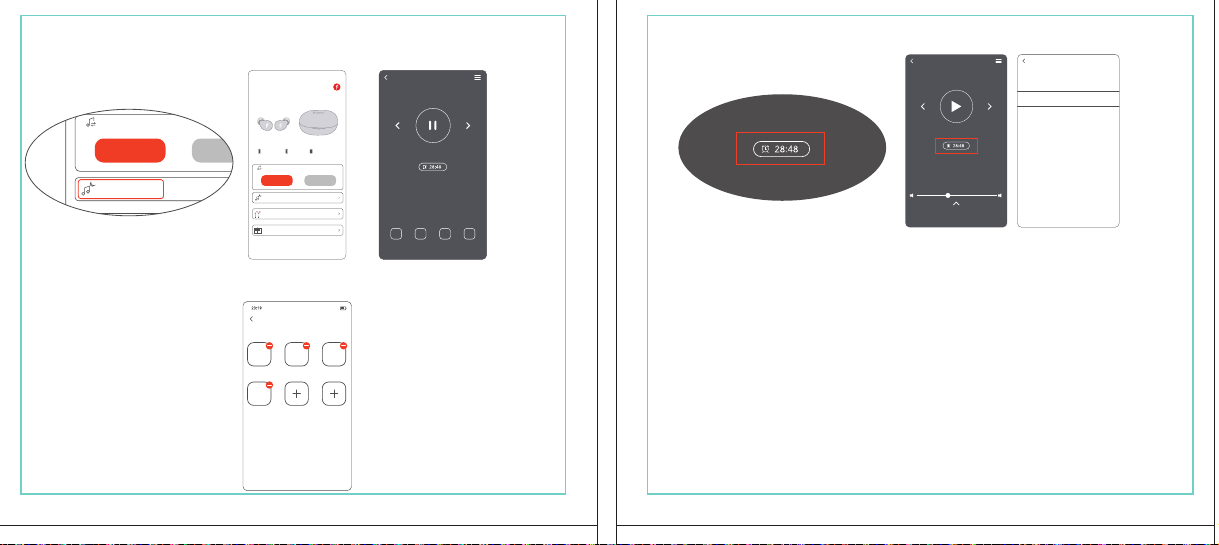
In The Box
材质:80G哑粉
尺寸:98*86mm
EH608
Manufacturer: Tiinlab Corporation
Address: No. 3333, Liuxian Avenue, Tower A, 35th Floor,
Tanglang City, Nanshan District, Shenzhen, China
Made in China
2ASDI-EH608 IC:24662-EH608
We know you will enjoy new 1MORE headphones as much as we do. At 1MORE, we value your
satisfaction. If you would like more details on this product or any of our other products, please visit
us online by scanning the QR code. Go to www.1more.com and sign up for VIP, and 1MORE will
treat you like one.
1MORE Inc., (“1MORE”) warrants to the original retail purchaser that this product is to be free
from defective materials and workmanship for a period of one year from the date of purchase if it
is properly used and maintained. If this product proves defective in either material or
workmanship, 1MORE, at its option, will (a) repair the product with new or refurbished parts, or
(b) replace the product with an equivalent new or refurbished product, at no charge for parts or
labor. If the product model is no longer available and cannot be repaired effectively or replaced
with an identical model, 1MORE at its sole option may replace the unit with a current model of
equal or greater value. In some cases, modication to the mounting surface may be required
where a new model is substituted. 1MORE assumes no responsibility or liability for such
modication. TO OBTAIN A REPAIR OR REPLACEMENT UNDER THE TERMS OF THIS
WARRANTY, PLEASE RETURN TO THE ORIGINAL DEALER FIRST AND THE ORIGINAL
DEALER SHALL REPAIR THE PRODUCT WITH NEW OR REFURBISHED PARTS OR REPLACE
THE PRODUCT WITH AN EQUIVALENT NEW OR REFURBISHED PRODUCT.
You will be required to submit a proof of purchasing details, including but not limited to a receipt
or sales invoice.
Return shipping for exchanges/repairs is the sole responsibility of the original retail purchaser.
Limitations:
• This limited warranty does not cover the failure of the product resulting from improper
installation, misuse, abuse, accident, neglect, mishandling, or wear from ordinary use or
environmental deterioration.
• This limited warranty does not cover cosmetic damage, including paint damage, or
consequential damage to other components or premises which may result for any reason from
the failure of the product.
• This limited warranty is null and void for products not used in accordance with 1MORE’s
instructions.
• This limited warranty is null and void for products with altered or missing serial numbers and for
products not purchased from an AUTHORIZED dealer.
• This limited warranty terminates if you sell or otherwise transfer this product to another party.
1. If the headphones cannot pair normally when powered on. Put both headphones back into
the case, triple click the pairing button and search for "1MORE Z30" in Bluetooth in your
devices to connect.
2. To unpair the device:
Put both headphones into the case, press and hold the pairing button on the case for 8
seconds to disconnect the headphones and the device.
3.OTA Firmware Update:
It can be synchronously upgraded via the 1MORE MUSIC APP while the Left and Right
earbuds are connected to each other with at least 50% battery.
* Functions of the 1MORE MUSIC APP may vary with different devices or operating systems.
For more details, please contact our customer service.
For the initial pairing, turn the headphones on to enter
pairing mode, the LEDs for headphone status will ash
in white. Headphones will power off if not paired to a
device within 3 minutes.
* After the rst successful pairing, headphones will
automatically connect to your device.
To pair with a new device, put headphones back into
the case, and triple click the pairing button when
powered on (no playback) to re-enter pairing mode.
Tips
Extra Functions
We Appreciate Your Business
1MORE (1) Year Limited Warranty
1. Please read this instruction manual carefully and retain for future reference.
2. Please fully charge the battery before rst use.
3. If the headphones have been unused for more than 3 months, we recommend that you charge
them. This will improve battery capacity.
4. Only use charging cables and adapters that are FCC (Federal Communications Commission)
approved.
5. In dry environments, static electricity may numb your ear. This is not related to the quality of the
product.
Safety Information
WEEE
FAQ
1. How to make sure the headphones have been fully charged?
Put the headphones into the charging case, if the headphone stutus LEDs are glowing this means
they have been fully charged.
2. Why won't headphones turn on?
Check if your headphones have enough battery life. If not, please charge them for at least 30 minutes.
3. Why won’t the headphones connect to my cellphone, or take a long time to connect?
Put both buds back into the charging case, then press and hold the pairing button for 3 seconds, click
the device name in your settings, they should now pair correctly to the phone.
4. Why won’t the headphones make phone calls?
The headphones are without microphones or phone call functions.
5. Why is the Bluetooth connection not stable and/or experiences some interruptions?
1) Try shortening the distance between your headphones and the device. Avoid solid barriers in
between you and the device.
2) Please keep away from strong interference sources, such as Wi-Fi and GPRS.
3) Please make sure the Bluetooth antenna of your device is not blocked.
6. Why can't the volume be adjusted by the cellphone buttons when playing soothing sounds in 1MORE
MUSIC APP?
The soothing sounds are stored in the ash of the headphone which can be adjusted only via the APP.
7. The headphones will be disconnected from the cellphone when out of wireless range. They cannot
restore the connection after returning back into the wireless range, how to solve it?
Click the device name in the cellphone pairing list to connect again.
8. I feel uncomfortable when wearing the headphones, how to solve it?
This is mainly because the sizes of ear tips and your canals are not snug, we suggest trying smaller ear
tips.
* For more detailed product FAQs, please visit the product support section under www.1more.com
CE
Headphones × 1 set
Charging Case × 1
Type-C Charging Cable × 1 Silicone Ear Tip (XS/S/L)
Product Overview
Fit
Replace
Placement
Headphones Pairing
Bluetooth Pairing To The Device
Charging
Controls
Soothing Sounds
Battery Notication
User Guide × 1
Silicone Ear Tip
Charging Pin
Charging Case
Pairing Button
Charging Case LED Indicator
LED Indicator for
Headphone Status
Headphone
Silicone Ear Tip
XS / S / M / L
Warranty Card × 1
The Left and Right headphones will automatically
pair with each other after the lid is open when
they are in the case (with charge).
* The above functions are available for either headphones in individual or Stereo mode.
To charge the case with Type-C cable.
To charge the headphones with the case.
* The above functions are available for either headphones in individual or Stereo mode.
Put headphones back into the case
ensuring they are magnetically attached
and close the lid to charge, a full charge
takes around 85 minutes.
Phone call function is not available on the headphones, and the playback controls can be
implemented on the connected device.
Please download the 1MORE MUSIC APP for soothing sounds.
Switch Listening Modes via APP
Enter the 1MORE Z30 home page in 1MORE MUSIC APP after pairing to your cellphone,
then you can switch listening modes between "Music" and "Soothing".
Click the "Soothing Sounds" to enter the playlist.
Click "+" to select the sound to be downloaded to your headphones for listening.
Click the timer icon on the song page to set the playtime.
The LED light of the charging case
will the different battery status: red
light indicates low battery, yellow light
indicates medium battery and green
light indicates full battery.
LED indicator for case battery status: when
the case battery is under 20%, the red
indicator stay lit for 3 seconds. When the
case battery is under 10%, the red indicator
will ash 10 times.
Power On:Take the headphones out of
the charging case (with charge), the
headphones will turn on automatically.
Power Off:Put the headphones
back into the charging case and
close the lid, they will automatically
turn off and start charging.
A full charge will take
around 90 minutes.
EN
* Playback and volume for the soothing sounds can only be adjusted via the APP.
スキャンして、1MOREのWechat公式アカウントをフォロー
「Soothing Sounds」ボタンを押すと、ヒーリング音楽の曲選択画面に入ります。
「+」をクリックしてヒーリング音楽をダウンロードすると、選択した曲がイヤホンに転送されます。
ヒーリング音楽再生画面の「タイマー」をクリックすると、ヒーリング音楽の再生時間を設定することができます。
ヒーリング音楽の再生/停止、音量調整などの操作は、APPでのみ対応します。
ヒーリング音楽
APPでEQモードを切り替えます
操作
その他の機能
梱包内容
イヤーピースの選択
イヤーピースの交換
左側/右側イヤホンのペアリング
イヤホンとBluetooth デバイスをペアリングするには
電池残量に関する注意充電
起動
イヤホン着用
製品外観
イヤホン本体 X 1セット
充電ケース X 1
Type-C充電ケーブル x 1
充電電極
イヤホン本体LEDインジケータ
ペアリングボタン
充電ケースLEDインジケータ
充電ケース
ヘッドホン
シリコン製イヤーピースセット
XS / S / M / L
シリコン製イヤーピースセット
(XS/S/L)
取扱説明書×1
一回のフル充電時間は約90 分です。
* 上記の機能は単独、両耳どちらのイヤホンでも適用されます。
* 上記の機能は単独、両耳どちらのイヤホンでも適用されます。
保証書×1
充電ケースが通電し、左/右側イヤホンをケースに
入っている状態で、ケースの蓋を開けると、左/右
のイヤホンが自動的にペアリングされます。
初めて使用する際、イヤホンの電源を入れてからデバイス
側で検索します。イヤホンは白色LEDが高速点滅します。も
しも 3 分たってもデバイスが見つからない場合、イヤホン本
体はすぐに電源が切れます。
・ すでに接続したことのあるイヤホンであれば、当該デバイ
スと自動でペアリングします。
新しいデバイスと接続する必要があれば、左/右イヤホンを
充電ケース内に戻して電源を入れ、ペアリングボタン3秒間
長押しすると、イヤホンは新しいデバイスとBluetoothのペア
リングがされます。
充電中:充電ケースのLEDインジケータ
は異なる色で電池容量を表示します。電
力が少ない場合赤色LED、電池容量が
半分ぐらいの場合黄色LED、充電が完
了している場合緑色LEDがそれぞれ点
灯します。
イヤホンを充電ケースに戻し
て、充電ケースの蓋を閉める
と充電が開始します。フル充
電時間は約85分です。
充電ケースの容量を確認する方法:充電ケ
ースの電池容量が20%以下になれば、充
電ケースの赤色LEDが3秒点灯します。充
電ケースの電池容量が10%以下になった
場合、充電ケースの赤色LEDのが10回点滅
します。
Type-C充電ケーブルを使用して充電ケースに充電する場合
充電ケースを使用してイヤホンに充電する場合
JP
River
- +
Time Setup
mins
River
OK
- +
60
30
90
River
Time Setup
mins
River
OK
- +
60
30
90
River
River
- +
Time Setup
mins
River
- +
60
30
90
River
1MORE SleepBuds Z30 User Guide
1MORE Наушники для сна Z30 Руководство пользователя
1MORE SleepBuds Z30 コードレスイヤホンユーザーガイド
Midre
Soothing Sounds
Allow adding 2 tracks
Volcano
Falls
River
Midre
Soothing Sounds
Allow adding 2 tracks
Volcano
Falls
River
1. Never disassemble the headphones. There are no user-serviceable parts inside.
2. Do not expose the headphones to temperatures below 32 °F (0 °C) or temperatures above 113 °F (45 °C).
3. Do not use the headphones in a thunderstorm storm. This could prevent the headphones from working
properly, and also increase your chance of being electrically shocked.
4. Do not use oil or any volatile liquid to clean this product.
5. Do not use the headphones in trafc. Do not use the headphones any time it would be dangerous to be
unaware of noises around you.
6. Adult supervision is required for children of age 6 and under.
7. If you don't feel comfortable after wearing the headphones, please refer to an aurist for advice on
whether in-ear headphones are suitable for you.
8. The headphones contain a lithium-ion battery, do not attempt to open, crush, or expose a charging case
to re or excessive temperature. Do not use it if the battery is swollen.
9. Please note that excessively high volumes and long listening times may cause hearing damage.
10. The symbol indicates DC voltage
All products bearing this symbol are waste electrical and electronic equipment (WEEE as in
directive 2012/19/EU) which should not be mixed with unsorted household waste. Instead,
you should protect human health and the environment by handing over your waste
equipment to a designated collection point for the recycling of waste electrical and
electronic equipment, appointed by the government or local authorities. Correct disposal
and recycling will help prevent potential negative consequences to the environment and
human health. Please contact the installer or local authorities for more information about the
location as well as terms and conditions of such collection points.
Home
Soothing Sounds
Listening Modes
1MORE Z30
OTA Firmware Upgrade
Quick Guide to Product
SoothingMusic
L 100% R 100% C 100%
The Bluetooth
®
word mark and logos are registered trademarks owned by Bluetooth SIG, Inc. and any
use of such marks by Tiinlab Corporation is under license. Other trademarks and trade names are the
property of their respective owners.
R
204-B00919
FCC
The SAR limit of USA (FCC) is 1.6 W/kg averaged over one gram of tissue. Device types EH608
(FCC ID: 2ASDI-EH608) has also been tested against this SAR limit.
This device complies with part 15 of the FCC rules. Operation is subject to the following two
conditions: (1) this device may not cause harmful interference, and (2) this device must accept any
interference received, including interference that may cause undesired operation.
NOTE: The manufacturer is not responsible for any radio or TV interference caused by unauthorized
modications or changesto this equipment. Such modications or changes could void the user’s authority
to operate the equipment.
NOTE: This equipment has been tested and found to comply with the limits for a Class B digital device,
pursuant to part 15 of the FCC Rules. These limits are designed to provide reasonable protection
against harmful interference in a residential installation. This equipment generates uses and can radiate
radio frequency energy and, if not installed and used in accordance with the instructions, may cause
harmful interference to radio communications. However, there is no guarantee that interference will not
occur in a particular installation. If this equipment does cause harmful interference to radio or television
reception, which can be determined by turning the equipment off and on, the user is encouraged to try
to correct the interference by one or more of the following measures:
-Reorient or relocate the receiving antenna.
-Increase the separation between the equipment and receiver.
-Connect the equipment into an outlet on a circuit different from that to which the receiver is
connected.
-Consult the dealer or an experienced radio/TV technician for help.
IC regulatory conformance
This device complies with CAN ICES-003 (B)/NMB-003(B).
This device complies with Industry Canada licence-exempt RSS standard(s). Operation is Subject to
the following two conditions: (1) this device may not cause interference, and (2) this device must accept
any interference, including interference that may cause undesired operation of the device.
Le présent appareil est conforme aux CNR d'Industrie Canada applicables aux appareils radio
exempts de licence. L'exploitation est autorisée aux deux conditions suivantes : (1) l'appareil ne doit
シリコン製イヤ
ーピースセット
Declaration of Conformity Hereby, Tiinlab Corporation declares that the radio equipment type
Wireless Earphones of EH608 is in compliance with Directive 2014/53/EU.
The full text of the EU declaration of conformity is available at the following internet address:
https://www.1more.com
RF exposure information: The device has been evaluated to meet general RF exposure requirement.
The device can be used in portable exposure condition without restriction. Radiation Exposure Statement
Power is so low that no RF exposure calculation is needed.
Declaration for EU Compliance
Operation Frequency/Max. EIRP: 2400-2483.5MHz, Max. EIRP is <10dBm.
В коробке
Мы знаем, что вы будете наслаждаться новыми наушниками 1MORE так же, как и мы. В
1MORE мы ценим ваше удовлетворение. Если вы хотите получить более подробную
информацию о данном продукте или о любых других наших продуктах, пожалуйста, посетите
нас онлайн, отсканировав QR-код. Перейдите по ссылке www.1more.com и
зарегистрируйтесь в VIP, и 1MORE будет относиться к вам как к одному из них.
Компания 1MORE Inc. (“1MORE”) гарантирует первоначальному розничному покупателю, что
данный продукт не будет содержать дефектов материалов и изготовления в течение одного года с
даты покупки, если он будет надлежащим образом использоваться и обслуживаться. Если в данном
продукте обнаружатся дефекты материала или изготовления, 1MORE, по своему усмотрению, (а)
отремонтирует продукт с использованием новых или восстановленных деталей или (б) заменит
продукт эквивалентным новым или восстановленным продуктом без оплаты запчастей или рабочей
силы. Если модель продукта больше недоступна и не может быть эффективно отремонтирована или
заменена идентичной моделью, компания 1MORE по своему усмотрению может заменить
устройство текущей моделью равной или большей стоимости. В некоторых случаях при замене
новой модели может потребоваться модификация монтажной поверхности. 1MORE не несет
никакой ответственности за такие изменения. ЧТОБЫ ПОЛУЧИТЬ РЕМОНТ ИЛИ ЗАМЕНУ В
СООТВЕТСТВИИ С УСЛОВИЯМИ ДАННОЙ ГАРАНТИИ, ПОЖАЛУЙСТА, СНАЧАЛА ОБРАТИТЕСЬ К
ПЕРВОНАЧАЛЬНОМУ ДИЛЕРУ, И ПЕРВОНАЧАЛЬНЫЙ ДИЛЕР ОТРЕМОНТИРУЕТ ПРОДУКТ НОВЫМИ
ИЛИ ВОССТАНОВЛЕННЫМИ ДЕТАЛЯМИ ИЛИ ЗАМЕНИТ ПРОДУКТ
ЭКВИВАЛЕНТНЫМ НОВЫМ ИЛИ
ВОССТАНОВЛЕННЫМ ПРОДУКТОМ.
От вас потребуется предоставить подтверждение покупки, включая, но не ограничиваясь этим,
квитанцию или счет-фактуру.
Ответственность за обратную доставку для обмена/ремонта несет исключительно первоначальный
розничный покупатель.
Ограничения:
• Данная ограниченная гарантия не распространяется на выход продукта из строя в результате
неправильной установки, неправильного использования, злоупотребления, несчастного случая,
1. Если наушники не могут нормально подключиться при включенном питании. Положите оба
наушника обратно в корпус, трижды нажмите кнопку сопряжения и найдите "1MORE Z30" в
Bluetooth на ваших устройствах для подключения.
2. Чтобы отключить сопряжение устройства:
Положите оба наушника в корпус, нажмите и удерживайте кнопку сопряжения на корпусе в
течение 8 секунд, чтобы отсоединить наушники от устройства.
3. Обновление прошивки OTA:
может выполняться синхронно с приложением 1MORE Music когда левый и правый наушники
сопряжены друг с другом через Bluetooth .
Для первоначального сопряжения включите
наушники, чтобы перейти в режим сопряжения,
светодиоды состояния наушников будут мигать
белым цветом. Наушники отключатся, если не
выполнить сопряжение с устройством в течение 3
минут.
* После первого успешного сопряжения наушники
автоматически подключатся к вашему устройству.
Чтобы выполнить сопряжение с новым устройством,
вставьте наушники обратно в корпус и трижды
нажмите кнопку сопряжения при включении
питания (воспроизведение отсутствует), чтобы
повторно войти в режим сопряжения.
Дополнительные функции
Мы ценим ваш бизнес
(1) годовая ограниченная гарантия 1MORE
Наушники × 1 набор
Зарядный корпус × 1
Зарядный кабель типа-С × 1Силиконовые вкладыши (XS/S/L)
Обзор продукта
Подгонка
Замена
Замена
Сопряжение наушников
Сопряжение Bluetooth с устройством
Зарядка
Управление
Успокаивающие звуки
Уведомление о батарее
Руководство пользователя × 1
Силиконовые
вкладыши
Зарядный штекер
Зарядный корпус
Кнопки сопряжения
Светодиодный индикатор зарядного корпуса
Наушники
Силиконовые вкладыши
XS / S / M / L
Гарантийный талон × 1
Левый и правый наушники автоматически
соединятся друг с другом после открытия
крышки, когда они будут находиться в корпусе
(с зарядкой).
* Вышеуказанные функции доступны как для наушников в индивидуальном, так и в стерео режиме.
Для зарядки корпуса используйте кабель Type-C.
Для зарядки наушников с корпусом.
* Вышеуказанные функции доступны как для наушников в индивидуальном, так и в стерео режиме.
Положите наушники обратно в корпус,
убедившись, что они надежно
закреплены магнитом, и закройте крышку
для зарядки, полная зарядка занимает
около 85 минут.
Функция телефонного звонка недоступна в наушниках, а управление воспроизведением
может быть реализовано на подключенном устройстве.
Пожалуйста, загрузите приложение 1MORE MUSIC для успокаивающих звуков.
Переключайте режимы прослушивания с помощью приложения
Зайдите на домашнюю страницу 1MORE Z30 в приложении 1MORE MUSIC после сопряжения с
вашим мобильным телефоном, затем вы сможете переключать режимы прослушивания между
"Музыка" и "Успокаивающий".
Нажмите "Soothing Sounds", чтобы войти в список воспроизведения.
Нажмите "+" чтобы выбрать звук, который будет загружен в ваши наушники для прослушивания.
Нажмите на значок таймера на странице песни,
чтобы установить время воспроизведения.
Светодиодный индикатор
зарядного устройства будет
отображать различное состояние
батареи: красный индикатор
указывает на низкий уровень
заряда батареи, желтый
индикатор указывает на средний
уровень заряда батареи и зеленый
индикатор указывает на полный
заряд батареи.
Светодиодный индикатор состояния
батареи корпуса: когда уровень заряда
батареи корпуса ниже 20%, красный
индикатор горит в течение 3 секунд. Когда
уровень заряда батареи корпуса ниже
10%, красный индикатор мигнет 10 раз.
Включение питания:Достаньте
наушники из зарядного корпуса (с
зарядкой), наушники включатся
автоматически.
Выключение питания:Положите
наушники обратно в зарядный
корпус и закройте крышку, они
автоматически выключатся и
начнут заряжаться.
Полная зарядка займет
около 90 минут.
RU
Midre
Soothing Sounds
Allow adding 2 tracks
Volcano
Falls
River
Midre River VolcanoFalls
River
Home
Soothing Sounds
Listening Modes
1MORE Z30
OTA Firmware Upgrade
Quick Guide to Product
SoothingMusic
L 100% R 100% C 100%
pas produire de brouillage, et (2) l'utilisateur de l'appareil doit accepter tout brouillage radioélectrique
subi, même si le brouillage est susceptible d'en compromettre le fonctionnement.
This device has been tested for compliance with IC SAR values at a typical operating near the
body. To ensure that RF exposure levels below the levels tested, use accessories with this
equipment to maintain a minimum separation distance of 0 mm between the body of the user and the
device. These accessories should not contain metallic components. It is possible that the accessories
used close to the body that do not meet these requirements are not consistent with the SAR limits and
it is advisable to avoid using them.
Ce dispositif a été testé pour la conformité avec les valeurs SAR à un fonctionnement typique près du
corps . Pour assurer que les niveaux d'exposition aux radiofréquences en deçà des niveaux testés ,
utiliser des accessoires avec cet équipement pour maintenir une distance de séparation minimale de 0
mm entre le corps de l'utilisateur et l'appareil. Ces accessoires ne doivent pas contenir des
composants métalliques . Il est possible que les accessoires utilisés près du corps quine répondent pas
à ces exigences ne sont pas compatibles avec les limites SAR et il est conseilléd'éviter de les utiliser.
Caution: Any changes or modications not expressly approved by the party responsible for compliance
could void the user's authority to operate this equipment.
充電ケースが通電している状態で、ケ
ースからイヤホンを取り出すと、イヤホ
ンは自動で起動します。
シャットダウン:イヤホンを充電ケースに
入れて蓋を閉めると、すぐにシャットダ
ウンし充電します。
本イヤホンに通話機能は付いていません、曲再生/停止、曲送り/曲戻し、及び音量調整などの再生機能は
スマートフォン側などで操作してください。
ヒーリング音楽などを再生するには1MORE MUSIC APPをダウンロードしてください。
1MORE MUSICアプリを使用しているときにスマホ端末がイヤホンと接続すると、「Music」 と 「Soothing」が選
べます。
1. 電源を入れても、左右のイヤホンが正常にペアリングできない場合、イヤホンを充電ケースに戻し、蓋を一
度閉めてから再度開けます。その後充電ケースのペアリングボタンを3秒間長押しすると、充電ケースのイ
ヤホンLEDインジケーターが白色に点滅し、再びペアリングモードに入ります。
2. 左右イヤホンのペアリング記録をクリアする方法:
両イヤホンを充電ケースに入れ、充電ケースのペアリングボタンを約3秒間長押しします。
3. OTAファームウェアのアップデートを行う場合:
ヘッドホン左右のバッテリーが50%以上で接続されている状態であれば、「1MORE MUSIC APP」を介して
同期的にアップデートすることができます。
* 1MORE MUSIC APPは接続機器によって機能が異なる場合がございます。詳細については、お気軽にカス
タマサポートまでにご連絡ください。
1MORE コミュニティ bbs.1more.com へのアクセスをお待ちしております。
www.1more.com にアクセスし、1MORE 会員に新規登録いただけると、素晴らしい情報を提供いたします。
Bluetooth®のマークとロゴはBluetooth® Technology Allianceの登録商標です。本製品で使用されているこ
れらのマークは万魔声学股份有限公司にてライセンス契約に基づき表示するものとします。その他商標及
び商品名称はそれぞれの所有者に帰属するものとします。
Светодиодный
индикатор для
состояния наушников
* Воспроизведение и громкость успокаивающих звуков можно регулировать только с помощью
приложения.
Словесный знак и логотипы Bluetooth® являются зарегистрированными товарными знаками,
принадлежащими Bluetooth SIG, Inc., и любое использование таких знаков корпорацией Tiinlab
осуществляется по лицензии. Другие товарные знаки и торговые наименования являются
собственностью их соответствующих владельцев.
* Функции приложения 1MORE MUSIC могут отличаться в зависимости от различных устройств или
операционных систем. Для получения более подробной информации, пожалуйста, свяжитесь с
нашей службой поддержки клиентов.
небрежности, неправильного обращения или износа в результате обычного использования или
ухудшения состояния окружающей среды.
• Данная ограниченная гарантия не распространяется на косметические повреждения, включая
повреждение краски, или косвенный ущерб другим компонентам или поверхностям, которые
могут возникнуть по любой причине в результате выхода продукта из строя.
• Данная ограниченная гарантия недействительна для продуктов, используемых не в соответствии с
инструкциями 1MORE.
• Данная ограниченная гарантия недействительна для продуктов с измененными или
отсутствующими серийными номерами, а также для продуктов, приобретенных не у
ОФИЦИАЛЬНОГО дилера.
• Действие данной ограниченной гарантии прекращается, если вы продаете или иным образом
передаете данный продукт другой стороне.
Home
Soothing Sounds
Listening Modes
1MORE Z30
OTA Firmware Upgrade
Quick Guide to Product
SoothingMusic
L 100% R 100% C 100%
River
Home
Soothing Sounds
Listening Modes
1MORE Z30
OTA Firmware Upgrade
Quick Guide to Product
Soothing
Music
L 100% R 100% C 100%
Home
Soothing Sounds
Listening Modes
1MORE Z30
OTA Firmware Upgrade
Quick Guide to Product
SoothingMusic
L 100% R 100% C 100%
Home
Soothing Sounds
Listening Modes
1MORE Z30
OTA Firmware Upgrade
Quick Guide to Product
Soothing
Music
L 100% R 100% C 100%
Home
Soothing Sounds
Listening Modes
1MORE Z30
OTA Firmware Upgrade
Quick Guide to Product
SoothingMusic
L 100% R 100% C 100%
Home
Soothing Sounds
Listening Modes
1MORE Z30
OTA Firmware Upgrade
Quick Guide to Product
Soothing
Music
L 100% R 100% C 100%
Midre River VolcanoFalls
River
Home
Soothing Sounds
Listening Modes
1MORE Z30
OTA Firmware Upgrade
Quick Guide to Product
SoothingMusic
L 100% R 100% C 100%
Home
Soothing Sounds
Listening Modes
1MORE Z30
OTA Firmware Upgrade
Quick Guide to Product
SoothingMusic
L 100% R 100% C 100%
Midre River VolcanoFalls
River
Home
Soothing Sounds
Listening Modes
1MORE Z30
OTA Firmware Upgrade
Quick Guide to Product
SoothingMusic
L 100% R 100% C 100%
Home
Soothing Sounds
Listening Modes
1MORE Z30
OTA Firmware Upgrade
Quick Guide to Product
SoothingMusic
L 100% R 100% C 100%
C:0/M:85/Y:95/K:0C
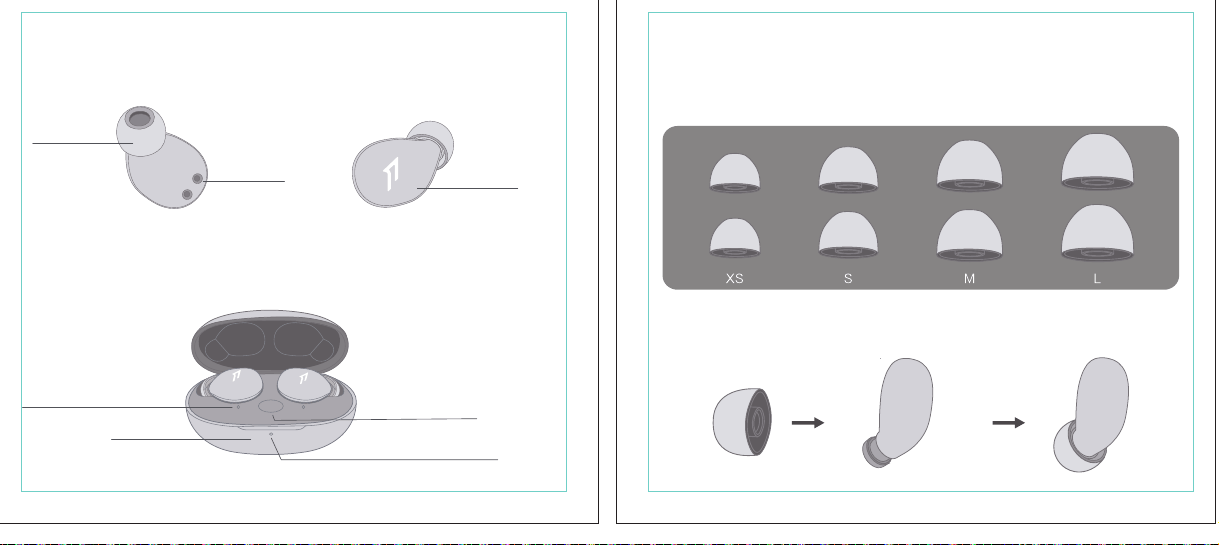
In The Box
材质:80G哑粉
尺寸:98*86mm
EH608
Manufacturer: Tiinlab Corporation
Address: No. 3333, Liuxian Avenue, Tower A, 35th Floor,
Tanglang City, Nanshan District, Shenzhen, China
Made in China
2ASDI-EH608 IC:24662-EH608
We know you will enjoy new 1MORE headphones as much as we do. At 1MORE, we value your
satisfaction. If you would like more details on this product or any of our other products, please visit
us online by scanning the QR code. Go to www.1more.com and sign up for VIP, and 1MORE will
treat you like one.
1MORE Inc., (“1MORE”) warrants to the original retail purchaser that this product is to be free
from defective materials and workmanship for a period of one year from the date of purchase if it
is properly used and maintained. If this product proves defective in either material or
workmanship, 1MORE, at its option, will (a) repair the product with new or refurbished parts, or
(b) replace the product with an equivalent new or refurbished product, at no charge for parts or
labor. If the product model is no longer available and cannot be repaired effectively or replaced
with an identical model, 1MORE at its sole option may replace the unit with a current model of
equal or greater value. In some cases, modication to the mounting surface may be required
where a new model is substituted. 1MORE assumes no responsibility or liability for such
modication. TO OBTAIN A REPAIR OR REPLACEMENT UNDER THE TERMS OF THIS
WARRANTY, PLEASE RETURN TO THE ORIGINAL DEALER FIRST AND THE ORIGINAL
DEALER SHALL REPAIR THE PRODUCT WITH NEW OR REFURBISHED PARTS OR REPLACE
THE PRODUCT WITH AN EQUIVALENT NEW OR REFURBISHED PRODUCT.
You will be required to submit a proof of purchasing details, including but not limited to a receipt
or sales invoice.
Return shipping for exchanges/repairs is the sole responsibility of the original retail purchaser.
Limitations:
• This limited warranty does not cover the failure of the product resulting from improper
installation, misuse, abuse, accident, neglect, mishandling, or wear from ordinary use or
environmental deterioration.
• This limited warranty does not cover cosmetic damage, including paint damage, or
consequential damage to other components or premises which may result for any reason from
the failure of the product.
• This limited warranty is null and void for products not used in accordance with 1MORE’s
instructions.
• This limited warranty is null and void for products with altered or missing serial numbers and for
products not purchased from an AUTHORIZED dealer.
• This limited warranty terminates if you sell or otherwise transfer this product to another party.
1. If the headphones cannot pair normally when powered on. Put both headphones back into
the case, triple click the pairing button and search for "1MORE Z30" in Bluetooth in your
devices to connect.
2. To unpair the device:
Put both headphones into the case, press and hold the pairing button on the case for 8
seconds to disconnect the headphones and the device.
3.OTA Firmware Update:
It can be synchronously upgraded via the 1MORE MUSIC APP while the Left and Right
earbuds are connected to each other with at least 50% battery.
* Functions of the 1MORE MUSIC APP may vary with different devices or operating systems.
For more details, please contact our customer service.
For the initial pairing, turn the headphones on to enter
pairing mode, the LEDs for headphone status will ash
in white. Headphones will power off if not paired to a
device within 3 minutes.
* After the rst successful pairing, headphones will
automatically connect to your device.
To pair with a new device, put headphones back into
the case, and triple click the pairing button when
powered on (no playback) to re-enter pairing mode.
Tips
Extra Functions
We Appreciate Your Business
1MORE (1) Year Limited Warranty
1. Please read this instruction manual carefully and retain for future reference.
2. Please fully charge the battery before rst use.
3. If the headphones have been unused for more than 3 months, we recommend that you charge
them. This will improve battery capacity.
4. Only use charging cables and adapters that are FCC (Federal Communications Commission)
approved.
5. In dry environments, static electricity may numb your ear. This is not related to the quality of the
product.
Safety Information
WEEE
FAQ
1. How to make sure the headphones have been fully charged?
Put the headphones into the charging case, if the headphone stutus LEDs are glowing this means
they have been fully charged.
2. Why won't headphones turn on?
Check if your headphones have enough battery life. If not, please charge them for at least 30 minutes.
3. Why won’t the headphones connect to my cellphone, or take a long time to connect?
Put both buds back into the charging case, then press and hold the pairing button for 3 seconds, click
the device name in your settings, they should now pair correctly to the phone.
4. Why won’t the headphones make phone calls?
The headphones are without microphones or phone call functions.
5. Why is the Bluetooth connection not stable and/or experiences some interruptions?
1) Try shortening the distance between your headphones and the device. Avoid solid barriers in
between you and the device.
2) Please keep away from strong interference sources, such as Wi-Fi and GPRS.
3) Please make sure the Bluetooth antenna of your device is not blocked.
6. Why can't the volume be adjusted by the cellphone buttons when playing soothing sounds in 1MORE
MUSIC APP?
The soothing sounds are stored in the ash of the headphone which can be adjusted only via the APP.
7. The headphones will be disconnected from the cellphone when out of wireless range. They cannot
restore the connection after returning back into the wireless range, how to solve it?
Click the device name in the cellphone pairing list to connect again.
8. I feel uncomfortable when wearing the headphones, how to solve it?
This is mainly because the sizes of ear tips and your canals are not snug, we suggest trying smaller ear
tips.
* For more detailed product FAQs, please visit the product support section under www.1more.com
CE
Headphones × 1 set
Charging Case × 1
Type-C Charging Cable × 1 Silicone Ear Tip (XS/S/L)
Product Overview
Fit
Replace
Placement
Headphones Pairing
Bluetooth Pairing To The Device
Charging
Controls
Soothing Sounds
Battery Notication
User Guide × 1
Silicone Ear Tip
Charging Pin
Charging Case
Pairing Button
Charging Case LED Indicator
LED Indicator for
Headphone Status
Headphone
Silicone Ear Tip
XS / S / M / L
Warranty Card × 1
The Left and Right headphones will automatically
pair with each other after the lid is open when
they are in the case (with charge).
* The above functions are available for either headphones in individual or Stereo mode.
To charge the case with Type-C cable.
To charge the headphones with the case.
* The above functions are available for either headphones in individual or Stereo mode.
Put headphones back into the case
ensuring they are magnetically attached
and close the lid to charge, a full charge
takes around 85 minutes.
Phone call function is not available on the headphones, and the playback controls can be
implemented on the connected device.
Please download the 1MORE MUSIC APP for soothing sounds.
Switch Listening Modes via APP
Enter the 1MORE Z30 home page in 1MORE MUSIC APP after pairing to your cellphone,
then you can switch listening modes between "Music" and "Soothing".
Click the "Soothing Sounds" to enter the playlist.
Click "+" to select the sound to be downloaded to your headphones for listening.
Click the timer icon on the song page to set the playtime.
The LED light of the charging case
will the different battery status: red
light indicates low battery, yellow light
indicates medium battery and green
light indicates full battery.
LED indicator for case battery status: when
the case battery is under 20%, the red
indicator stay lit for 3 seconds. When the
case battery is under 10%, the red indicator
will ash 10 times.
Power On:Take the headphones out of
the charging case (with charge), the
headphones will turn on automatically.
Power Off:Put the headphones
back into the charging case and
close the lid, they will automatically
turn off and start charging.
A full charge will take
around 90 minutes.
EN
* Playback and volume for the soothing sounds can only be adjusted via the APP.
スキャンして、1MOREのWechat公式アカウントをフォロー
「Soothing Sounds」ボタンを押すと、ヒーリング音楽の曲選択画面に入ります。
「+」をクリックしてヒーリング音楽をダウンロードすると、選択した曲がイヤホンに転送されます。
ヒーリング音楽再生画面の「タイマー」をクリックすると、ヒーリング音楽の再生時間を設定することができます。
ヒーリング音楽の再生/停止、音量調整などの操作は、APPでのみ対応します。
ヒーリング音楽
APPでEQモードを切り替えます
操作
その他の機能
梱包内容
イヤーピースの選択
イヤーピースの交換
左側/右側イヤホンのペアリング
イヤホンとBluetooth デバイスをペアリングするには
電池残量に関する注意充電
起動
イヤホン着用
製品外観
イヤホン本体 X 1セット
充電ケース X 1
Type-C充電ケーブル x 1
充電電極
イヤホン本体LEDインジケータ
ペアリングボタン
充電ケースLEDインジケータ
充電ケース
ヘッドホン
シリコン製イヤーピースセット
XS / S / M / L
シリコン製イヤーピースセット
(XS/S/L)
取扱説明書×1
一回のフル充電時間は約90 分です。
* 上記の機能は単独、両耳どちらのイヤホンでも適用されます。
* 上記の機能は単独、両耳どちらのイヤホンでも適用されます。
保証書×1
充電ケースが通電し、左/右側イヤホンをケースに
入っている状態で、ケースの蓋を開けると、左/右
のイヤホンが自動的にペアリングされます。
初めて使用する際、イヤホンの電源を入れてからデバイス
側で検索します。イヤホンは白色LEDが高速点滅します。も
しも 3 分たってもデバイスが見つからない場合、イヤホン本
体はすぐに電源が切れます。
・ すでに接続したことのあるイヤホンであれば、当該デバイ
スと自動でペアリングします。
新しいデバイスと接続する必要があれば、左/右イヤホンを
充電ケース内に戻して電源を入れ、ペアリングボタン3秒間
長押しすると、イヤホンは新しいデバイスとBluetoothのペア
リングがされます。
充電中:充電ケースのLEDインジケータ
は異なる色で電池容量を表示します。電
力が少ない場合赤色LED、電池容量が
半分ぐらいの場合黄色LED、充電が完
了している場合緑色LEDがそれぞれ点
灯します。
イヤホンを充電ケースに戻し
て、充電ケースの蓋を閉める
と充電が開始します。フル充
電時間は約85分です。
充電ケースの容量を確認する方法:充電ケ
ースの電池容量が20%以下になれば、充
電ケースの赤色LEDが3秒点灯します。充
電ケースの電池容量が10%以下になった
場合、充電ケースの赤色LEDのが10回点滅
します。
Type-C充電ケーブルを使用して充電ケースに充電する場合
充電ケースを使用してイヤホンに充電する場合
JP
River
- +
Time Setup
mins
River
OK
- +
60
30
90
River
Time Setup
mins
River
OK
- +
60
30
90
River
River
- +
Time Setup
mins
River
- +
60
30
90
River
1MORE SleepBuds Z30 User Guide
1MORE Наушники для сна Z30 Руководство пользователя
1MORE SleepBuds Z30 コードレスイヤホンユーザーガイド
Midre
Soothing Sounds
Allow adding 2 tracks
Volcano
Falls
River
Midre
Soothing Sounds
Allow adding 2 tracks
Volcano
Falls
River
1. Never disassemble the headphones. There are no user-serviceable parts inside.
2. Do not expose the headphones to temperatures below 32 °F (0 °C) or temperatures above 113 °F (45 °C).
3. Do not use the headphones in a thunderstorm storm. This could prevent the headphones from working
properly, and also increase your chance of being electrically shocked.
4. Do not use oil or any volatile liquid to clean this product.
5. Do not use the headphones in trafc. Do not use the headphones any time it would be dangerous to be
unaware of noises around you.
6. Adult supervision is required for children of age 6 and under.
7. If you don't feel comfortable after wearing the headphones, please refer to an aurist for advice on
whether in-ear headphones are suitable for you.
8. The headphones contain a lithium-ion battery, do not attempt to open, crush, or expose a charging case
to re or excessive temperature. Do not use it if the battery is swollen.
9. Please note that excessively high volumes and long listening times may cause hearing damage.
10. The symbol indicates DC voltage
All products bearing this symbol are waste electrical and electronic equipment (WEEE as in
directive 2012/19/EU) which should not be mixed with unsorted household waste. Instead,
you should protect human health and the environment by handing over your waste
equipment to a designated collection point for the recycling of waste electrical and
electronic equipment, appointed by the government or local authorities. Correct disposal
and recycling will help prevent potential negative consequences to the environment and
human health. Please contact the installer or local authorities for more information about the
location as well as terms and conditions of such collection points.
Home
Soothing Sounds
Listening Modes
1MORE Z30
OTA Firmware Upgrade
Quick Guide to Product
SoothingMusic
L 100% R 100% C 100%
The Bluetooth
®
word mark and logos are registered trademarks owned by Bluetooth SIG, Inc. and any
use of such marks by Tiinlab Corporation is under license. Other trademarks and trade names are the
property of their respective owners.
R
204-B00919
FCC
The SAR limit of USA (FCC) is 1.6 W/kg averaged over one gram of tissue. Device types EH608
(FCC ID: 2ASDI-EH608) has also been tested against this SAR limit.
This device complies with part 15 of the FCC rules. Operation is subject to the following two
conditions: (1) this device may not cause harmful interference, and (2) this device must accept any
interference received, including interference that may cause undesired operation.
NOTE: The manufacturer is not responsible for any radio or TV interference caused by unauthorized
modications or changesto this equipment. Such modications or changes could void the user’s authority
to operate the equipment.
NOTE: This equipment has been tested and found to comply with the limits for a Class B digital device,
pursuant to part 15 of the FCC Rules. These limits are designed to provide reasonable protection
against harmful interference in a residential installation. This equipment generates uses and can radiate
radio frequency energy and, if not installed and used in accordance with the instructions, may cause
harmful interference to radio communications. However, there is no guarantee that interference will not
occur in a particular installation. If this equipment does cause harmful interference to radio or television
reception, which can be determined by turning the equipment off and on, the user is encouraged to try
to correct the interference by one or more of the following measures:
-Reorient or relocate the receiving antenna.
-Increase the separation between the equipment and receiver.
-Connect the equipment into an outlet on a circuit different from that to which the receiver is
connected.
-Consult the dealer or an experienced radio/TV technician for help.
IC regulatory conformance
This device complies with CAN ICES-003 (B)/NMB-003(B).
This device complies with Industry Canada licence-exempt RSS standard(s). Operation is Subject to
the following two conditions: (1) this device may not cause interference, and (2) this device must accept
any interference, including interference that may cause undesired operation of the device.
Le présent appareil est conforme aux CNR d'Industrie Canada applicables aux appareils radio
exempts de licence. L'exploitation est autorisée aux deux conditions suivantes : (1) l'appareil ne doit
シリコン製イヤ
ーピースセット
Declaration of Conformity Hereby, Tiinlab Corporation declares that the radio equipment type
Wireless Earphones of EH608 is in compliance with Directive 2014/53/EU.
The full text of the EU declaration of conformity is available at the following internet address:
https://www.1more.com
RF exposure information: The device has been evaluated to meet general RF exposure requirement.
The device can be used in portable exposure condition without restriction. Radiation Exposure Statement
Power is so low that no RF exposure calculation is needed.
Declaration for EU Compliance
Operation Frequency/Max. EIRP: 2400-2483.5MHz, Max. EIRP is <10dBm.
В коробке
Мы знаем, что вы будете наслаждаться новыми наушниками 1MORE так же, как и мы. В
1MORE мы ценим ваше удовлетворение. Если вы хотите получить более подробную
информацию о данном продукте или о любых других наших продуктах, пожалуйста, посетите
нас онлайн, отсканировав QR-код. Перейдите по ссылке www.1more.com и
зарегистрируйтесь в VIP, и 1MORE будет относиться к вам как к одному из них.
Компания 1MORE Inc. (“1MORE”) гарантирует первоначальному розничному покупателю, что
данный продукт не будет содержать дефектов материалов и изготовления в течение одного года с
даты покупки, если он будет надлежащим образом использоваться и обслуживаться. Если в данном
продукте обнаружатся дефекты материала или изготовления, 1MORE, по своему усмотрению, (а)
отремонтирует продукт с использованием новых или восстановленных деталей или (б) заменит
продукт эквивалентным новым или восстановленным продуктом без оплаты запчастей или рабочей
силы. Если модель продукта больше недоступна и не может быть эффективно отремонтирована или
заменена идентичной моделью, компания 1MORE по своему усмотрению может заменить
устройство текущей моделью равной или большей стоимости. В некоторых случаях при замене
новой модели может потребоваться модификация монтажной поверхности. 1MORE не несет
никакой ответственности за такие изменения. ЧТОБЫ ПОЛУЧИТЬ РЕМОНТ ИЛИ ЗАМЕНУ В
СООТВЕТСТВИИ С УСЛОВИЯМИ ДАННОЙ ГАРАНТИИ, ПОЖАЛУЙСТА, СНАЧАЛА ОБРАТИТЕСЬ К
ПЕРВОНАЧАЛЬНОМУ ДИЛЕРУ, И ПЕРВОНАЧАЛЬНЫЙ ДИЛЕР ОТРЕМОНТИРУЕТ ПРОДУКТ НОВЫМИ
ИЛИ ВОССТАНОВЛЕННЫМИ ДЕТАЛЯМИ ИЛИ ЗАМЕНИТ ПРОДУКТ
ЭКВИВАЛЕНТНЫМ НОВЫМ ИЛИ
ВОССТАНОВЛЕННЫМ ПРОДУКТОМ.
От вас потребуется предоставить подтверждение покупки, включая, но не ограничиваясь этим,
квитанцию или счет-фактуру.
Ответственность за обратную доставку для обмена/ремонта несет исключительно первоначальный
розничный покупатель.
Ограничения:
• Данная ограниченная гарантия не распространяется на выход продукта из строя в результате
неправильной установки, неправильного использования, злоупотребления, несчастного случая,
1. Если наушники не могут нормально подключиться при включенном питании. Положите оба
наушника обратно в корпус, трижды нажмите кнопку сопряжения и найдите "1MORE Z30" в
Bluetooth на ваших устройствах для подключения.
2. Чтобы отключить сопряжение устройства:
Положите оба наушника в корпус, нажмите и удерживайте кнопку сопряжения на корпусе в
течение 8 секунд, чтобы отсоединить наушники от устройства.
3. Обновление прошивки OTA:
может выполняться синхронно с приложением 1MORE Music когда левый и правый наушники
сопряжены друг с другом через Bluetooth .
Для первоначального сопряжения включите
наушники, чтобы перейти в режим сопряжения,
светодиоды состояния наушников будут мигать
белым цветом. Наушники отключатся, если не
выполнить сопряжение с устройством в течение 3
минут.
* После первого успешного сопряжения наушники
автоматически подключатся к вашему устройству.
Чтобы выполнить сопряжение с новым устройством,
вставьте наушники обратно в корпус и трижды
нажмите кнопку сопряжения при включении
питания (воспроизведение отсутствует), чтобы
повторно войти в режим сопряжения.
Дополнительные функции
Мы ценим ваш бизнес
(1) годовая ограниченная гарантия 1MORE
Наушники × 1 набор
Зарядный корпус × 1
Зарядный кабель типа-С × 1Силиконовые вкладыши (XS/S/L)
Обзор продукта
Подгонка
Замена
Замена
Сопряжение наушников
Сопряжение Bluetooth с устройством
Зарядка
Управление
Успокаивающие звуки
Уведомление о батарее
Руководство пользователя × 1
Силиконовые
вкладыши
Зарядный штекер
Зарядный корпус
Кнопки сопряжения
Светодиодный индикатор зарядного корпуса
Наушники
Силиконовые вкладыши
XS / S / M / L
Гарантийный талон × 1
Левый и правый наушники автоматически
соединятся друг с другом после открытия
крышки, когда они будут находиться в корпусе
(с зарядкой).
* Вышеуказанные функции доступны как для наушников в индивидуальном, так и в стерео режиме.
Для зарядки корпуса используйте кабель Type-C.
Для зарядки наушников с корпусом.
* Вышеуказанные функции доступны как для наушников в индивидуальном, так и в стерео режиме.
Положите наушники обратно в корпус,
убедившись, что они надежно
закреплены магнитом, и закройте крышку
для зарядки, полная зарядка занимает
около 85 минут.
Функция телефонного звонка недоступна в наушниках, а управление воспроизведением
может быть реализовано на подключенном устройстве.
Пожалуйста, загрузите приложение 1MORE MUSIC для успокаивающих звуков.
Переключайте режимы прослушивания с помощью приложения
Зайдите на домашнюю страницу 1MORE Z30 в приложении 1MORE MUSIC после сопряжения с
вашим мобильным телефоном, затем вы сможете переключать режимы прослушивания между
"Музыка" и "Успокаивающий".
Нажмите "Soothing Sounds", чтобы войти в список воспроизведения.
Нажмите "+" чтобы выбрать звук, который будет загружен в ваши наушники для прослушивания.
Нажмите на значок таймера на странице песни,
чтобы установить время воспроизведения.
Светодиодный индикатор
зарядного устройства будет
отображать различное состояние
батареи: красный индикатор
указывает на низкий уровень
заряда батареи, желтый
индикатор указывает на средний
уровень заряда батареи и зеленый
индикатор указывает на полный
заряд батареи.
Светодиодный индикатор состояния
батареи корпуса: когда уровень заряда
батареи корпуса ниже 20%, красный
индикатор горит в течение 3 секунд. Когда
уровень заряда батареи корпуса ниже
10%, красный индикатор мигнет 10 раз.
Включение питания:Достаньте
наушники из зарядного корпуса (с
зарядкой), наушники включатся
автоматически.
Выключение питания:Положите
наушники обратно в зарядный
корпус и закройте крышку, они
автоматически выключатся и
начнут заряжаться.
Полная зарядка займет
около 90 минут.
RU
Midre
Soothing Sounds
Allow adding 2 tracks
Volcano
Falls
River
Midre River VolcanoFalls
River
Home
Soothing Sounds
Listening Modes
1MORE Z30
OTA Firmware Upgrade
Quick Guide to Product
SoothingMusic
L 100% R 100% C 100%
pas produire de brouillage, et (2) l'utilisateur de l'appareil doit accepter tout brouillage radioélectrique
subi, même si le brouillage est susceptible d'en compromettre le fonctionnement.
This device has been tested for compliance with IC SAR values at a typical operating near the
body. To ensure that RF exposure levels below the levels tested, use accessories with this
equipment to maintain a minimum separation distance of 0 mm between the body of the user and the
device. These accessories should not contain metallic components. It is possible that the accessories
used close to the body that do not meet these requirements are not consistent with the SAR limits and
it is advisable to avoid using them.
Ce dispositif a été testé pour la conformité avec les valeurs SAR à un fonctionnement typique près du
corps . Pour assurer que les niveaux d'exposition aux radiofréquences en deçà des niveaux testés ,
utiliser des accessoires avec cet équipement pour maintenir une distance de séparation minimale de 0
mm entre le corps de l'utilisateur et l'appareil. Ces accessoires ne doivent pas contenir des
composants métalliques . Il est possible que les accessoires utilisés près du corps quine répondent pas
à ces exigences ne sont pas compatibles avec les limites SAR et il est conseilléd'éviter de les utiliser.
Caution: Any changes or modications not expressly approved by the party responsible for compliance
could void the user's authority to operate this equipment.
充電ケースが通電している状態で、ケ
ースからイヤホンを取り出すと、イヤホ
ンは自動で起動します。
シャットダウン:イヤホンを充電ケースに
入れて蓋を閉めると、すぐにシャットダ
ウンし充電します。
本イヤホンに通話機能は付いていません、曲再生/停止、曲送り/曲戻し、及び音量調整などの再生機能は
スマートフォン側などで操作してください。
ヒーリング音楽などを再生するには1MORE MUSIC APPをダウンロードしてください。
1MORE MUSICアプリを使用しているときにスマホ端末がイヤホンと接続すると、「Music」 と 「Soothing」が選
べます。
1. 電源を入れても、左右のイヤホンが正常にペアリングできない場合、イヤホンを充電ケースに戻し、蓋を一
度閉めてから再度開けます。その後充電ケースのペアリングボタンを3秒間長押しすると、充電ケースのイ
ヤホンLEDインジケーターが白色に点滅し、再びペアリングモードに入ります。
2. 左右イヤホンのペアリング記録をクリアする方法:
両イヤホンを充電ケースに入れ、充電ケースのペアリングボタンを約3秒間長押しします。
3. OTAファームウェアのアップデートを行う場合:
ヘッドホン左右のバッテリーが50%以上で接続されている状態であれば、「1MORE MUSIC APP」を介して
同期的にアップデートすることができます。
* 1MORE MUSIC APPは接続機器によって機能が異なる場合がございます。詳細については、お気軽にカス
タマサポートまでにご連絡ください。
1MORE コミュニティ bbs.1more.com へのアクセスをお待ちしております。
www.1more.com にアクセスし、1MORE 会員に新規登録いただけると、素晴らしい情報を提供いたします。
Bluetooth®のマークとロゴはBluetooth® Technology Allianceの登録商標です。本製品で使用されているこ
れらのマークは万魔声学股份有限公司にてライセンス契約に基づき表示するものとします。その他商標及
び商品名称はそれぞれの所有者に帰属するものとします。
Светодиодный
индикатор для
состояния наушников
* Воспроизведение и громкость успокаивающих звуков можно регулировать только с помощью
приложения.
Словесный знак и логотипы Bluetooth® являются зарегистрированными товарными знаками,
принадлежащими Bluetooth SIG, Inc., и любое использование таких знаков корпорацией Tiinlab
осуществляется по лицензии. Другие товарные знаки и торговые наименования являются
собственностью их соответствующих владельцев.
* Функции приложения 1MORE MUSIC могут отличаться в зависимости от различных устройств или
операционных систем. Для получения более подробной информации, пожалуйста, свяжитесь с
нашей службой поддержки клиентов.
небрежности, неправильного обращения или износа в результате обычного использования или
ухудшения состояния окружающей среды.
• Данная ограниченная гарантия не распространяется на косметические повреждения, включая
повреждение краски, или косвенный ущерб другим компонентам или поверхностям, которые
могут возникнуть по любой причине в результате выхода продукта из строя.
• Данная ограниченная гарантия недействительна для продуктов, используемых не в соответствии с
инструкциями 1MORE.
• Данная ограниченная гарантия недействительна для продуктов с измененными или
отсутствующими серийными номерами, а также для продуктов, приобретенных не у
ОФИЦИАЛЬНОГО дилера.
• Действие данной ограниченной гарантии прекращается, если вы продаете или иным образом
передаете данный продукт другой стороне.
Home
Soothing Sounds
Listening Modes
1MORE Z30
OTA Firmware Upgrade
Quick Guide to Product
SoothingMusic
L 100% R 100% C 100%
River
Home
Soothing Sounds
Listening Modes
1MORE Z30
OTA Firmware Upgrade
Quick Guide to Product
Soothing
Music
L 100% R 100% C 100%
Home
Soothing Sounds
Listening Modes
1MORE Z30
OTA Firmware Upgrade
Quick Guide to Product
SoothingMusic
L 100% R 100% C 100%
Home
Soothing Sounds
Listening Modes
1MORE Z30
OTA Firmware Upgrade
Quick Guide to Product
Soothing
Music
L 100% R 100% C 100%
Home
Soothing Sounds
Listening Modes
1MORE Z30
OTA Firmware Upgrade
Quick Guide to Product
SoothingMusic
L 100% R 100% C 100%
Home
Soothing Sounds
Listening Modes
1MORE Z30
OTA Firmware Upgrade
Quick Guide to Product
Soothing
Music
L 100% R 100% C 100%
Midre River VolcanoFalls
River
Home
Soothing Sounds
Listening Modes
1MORE Z30
OTA Firmware Upgrade
Quick Guide to Product
SoothingMusic
L 100% R 100% C 100%
Home
Soothing Sounds
Listening Modes
1MORE Z30
OTA Firmware Upgrade
Quick Guide to Product
SoothingMusic
L 100% R 100% C 100%
Midre River VolcanoFalls
River
Home
Soothing Sounds
Listening Modes
1MORE Z30
OTA Firmware Upgrade
Quick Guide to Product
SoothingMusic
L 100% R 100% C 100%
Home
Soothing Sounds
Listening Modes
1MORE Z30
OTA Firmware Upgrade
Quick Guide to Product
SoothingMusic
L 100% R 100% C 100%
C:0/M:85/Y:95/K:0C

In The Box
材质:80G哑粉
尺寸:98*86mm
EH608
Manufacturer: Tiinlab Corporation
Address: No. 3333, Liuxian Avenue, Tower A, 35th Floor,
Tanglang City, Nanshan District, Shenzhen, China
Made in China
2ASDI-EH608 IC:24662-EH608
We know you will enjoy new 1MORE headphones as much as we do. At 1MORE, we value your
satisfaction. If you would like more details on this product or any of our other products, please visit
us online by scanning the QR code. Go to www.1more.com and sign up for VIP, and 1MORE will
treat you like one.
1MORE Inc., (“1MORE”) warrants to the original retail purchaser that this product is to be free
from defective materials and workmanship for a period of one year from the date of purchase if it
is properly used and maintained. If this product proves defective in either material or
workmanship, 1MORE, at its option, will (a) repair the product with new or refurbished parts, or
(b) replace the product with an equivalent new or refurbished product, at no charge for parts or
labor. If the product model is no longer available and cannot be repaired effectively or replaced
with an identical model, 1MORE at its sole option may replace the unit with a current model of
equal or greater value. In some cases, modication to the mounting surface may be required
where a new model is substituted. 1MORE assumes no responsibility or liability for such
modication. TO OBTAIN A REPAIR OR REPLACEMENT UNDER THE TERMS OF THIS
WARRANTY, PLEASE RETURN TO THE ORIGINAL DEALER FIRST AND THE ORIGINAL
DEALER SHALL REPAIR THE PRODUCT WITH NEW OR REFURBISHED PARTS OR REPLACE
THE PRODUCT WITH AN EQUIVALENT NEW OR REFURBISHED PRODUCT.
You will be required to submit a proof of purchasing details, including but not limited to a receipt
or sales invoice.
Return shipping for exchanges/repairs is the sole responsibility of the original retail purchaser.
Limitations:
• This limited warranty does not cover the failure of the product resulting from improper
installation, misuse, abuse, accident, neglect, mishandling, or wear from ordinary use or
environmental deterioration.
• This limited warranty does not cover cosmetic damage, including paint damage, or
consequential damage to other components or premises which may result for any reason from
the failure of the product.
• This limited warranty is null and void for products not used in accordance with 1MORE’s
instructions.
• This limited warranty is null and void for products with altered or missing serial numbers and for
products not purchased from an AUTHORIZED dealer.
• This limited warranty terminates if you sell or otherwise transfer this product to another party.
1. If the headphones cannot pair normally when powered on. Put both headphones back into
the case, triple click the pairing button and search for "1MORE Z30" in Bluetooth in your
devices to connect.
2. To unpair the device:
Put both headphones into the case, press and hold the pairing button on the case for 8
seconds to disconnect the headphones and the device.
3.OTA Firmware Update:
It can be synchronously upgraded via the 1MORE MUSIC APP while the Left and Right
earbuds are connected to each other with at least 50% battery.
* Functions of the 1MORE MUSIC APP may vary with different devices or operating systems.
For more details, please contact our customer service.
For the initial pairing, turn the headphones on to enter
pairing mode, the LEDs for headphone status will ash
in white. Headphones will power off if not paired to a
device within 3 minutes.
* After the rst successful pairing, headphones will
automatically connect to your device.
To pair with a new device, put headphones back into
the case, and triple click the pairing button when
powered on (no playback) to re-enter pairing mode.
Tips
Extra Functions
We Appreciate Your Business
1MORE (1) Year Limited Warranty
1. Please read this instruction manual carefully and retain for future reference.
2. Please fully charge the battery before rst use.
3. If the headphones have been unused for more than 3 months, we recommend that you charge
them. This will improve battery capacity.
4. Only use charging cables and adapters that are FCC (Federal Communications Commission)
approved.
5. In dry environments, static electricity may numb your ear. This is not related to the quality of the
product.
Safety Information
WEEE
FAQ
1. How to make sure the headphones have been fully charged?
Put the headphones into the charging case, if the headphone stutus LEDs are glowing this means
they have been fully charged.
2. Why won't headphones turn on?
Check if your headphones have enough battery life. If not, please charge them for at least 30 minutes.
3. Why won’t the headphones connect to my cellphone, or take a long time to connect?
Put both buds back into the charging case, then press and hold the pairing button for 3 seconds, click
the device name in your settings, they should now pair correctly to the phone.
4. Why won’t the headphones make phone calls?
The headphones are without microphones or phone call functions.
5. Why is the Bluetooth connection not stable and/or experiences some interruptions?
1) Try shortening the distance between your headphones and the device. Avoid solid barriers in
between you and the device.
2) Please keep away from strong interference sources, such as Wi-Fi and GPRS.
3) Please make sure the Bluetooth antenna of your device is not blocked.
6. Why can't the volume be adjusted by the cellphone buttons when playing soothing sounds in 1MORE
MUSIC APP?
The soothing sounds are stored in the ash of the headphone which can be adjusted only via the APP.
7. The headphones will be disconnected from the cellphone when out of wireless range. They cannot
restore the connection after returning back into the wireless range, how to solve it?
Click the device name in the cellphone pairing list to connect again.
8. I feel uncomfortable when wearing the headphones, how to solve it?
This is mainly because the sizes of ear tips and your canals are not snug, we suggest trying smaller ear
tips.
* For more detailed product FAQs, please visit the product support section under www.1more.com
CE
Headphones × 1 set
Charging Case × 1
Type-C Charging Cable × 1 Silicone Ear Tip (XS/S/L)
Product Overview
Fit
Replace
Placement
Headphones Pairing
Bluetooth Pairing To The Device
Charging
Controls
Soothing Sounds
Battery Notication
User Guide × 1
Silicone Ear Tip
Charging Pin
Charging Case
Pairing Button
Charging Case LED Indicator
LED Indicator for
Headphone Status
Headphone
Silicone Ear Tip
XS / S / M / L
Warranty Card × 1
The Left and Right headphones will automatically
pair with each other after the lid is open when
they are in the case (with charge).
* The above functions are available for either headphones in individual or Stereo mode.
To charge the case with Type-C cable.
To charge the headphones with the case.
* The above functions are available for either headphones in individual or Stereo mode.
Put headphones back into the case
ensuring they are magnetically attached
and close the lid to charge, a full charge
takes around 85 minutes.
Phone call function is not available on the headphones, and the playback controls can be
implemented on the connected device.
Please download the 1MORE MUSIC APP for soothing sounds.
Switch Listening Modes via APP
Enter the 1MORE Z30 home page in 1MORE MUSIC APP after pairing to your cellphone,
then you can switch listening modes between "Music" and "Soothing".
Click the "Soothing Sounds" to enter the playlist.
Click "+" to select the sound to be downloaded to your headphones for listening.
Click the timer icon on the song page to set the playtime.
The LED light of the charging case
will the different battery status: red
light indicates low battery, yellow light
indicates medium battery and green
light indicates full battery.
LED indicator for case battery status: when
the case battery is under 20%, the red
indicator stay lit for 3 seconds. When the
case battery is under 10%, the red indicator
will ash 10 times.
Power On:Take the headphones out of
the charging case (with charge), the
headphones will turn on automatically.
Power Off:Put the headphones
back into the charging case and
close the lid, they will automatically
turn off and start charging.
A full charge will take
around 90 minutes.
EN
* Playback and volume for the soothing sounds can only be adjusted via the APP.
スキャンして、1MOREのWechat公式アカウントをフォロー
「Soothing Sounds」ボタンを押すと、ヒーリング音楽の曲選択画面に入ります。
「+」をクリックしてヒーリング音楽をダウンロードすると、選択した曲がイヤホンに転送されます。
ヒーリング音楽再生画面の「タイマー」をクリックすると、ヒーリング音楽の再生時間を設定することができます。
ヒーリング音楽の再生/停止、音量調整などの操作は、APPでのみ対応します。
ヒーリング音楽
APPでEQモードを切り替えます
操作
その他の機能
梱包内容
イヤーピースの選択
イヤーピースの交換
左側/右側イヤホンのペアリング
イヤホンとBluetooth デバイスをペアリングするには
電池残量に関する注意充電
起動
イヤホン着用
製品外観
イヤホン本体 X 1セット
充電ケース X 1
Type-C充電ケーブル x 1
充電電極
イヤホン本体LEDインジケータ
ペアリングボタン
充電ケースLEDインジケータ
充電ケース
ヘッドホン
シリコン製イヤーピースセット
XS / S / M / L
シリコン製イヤーピースセット
(XS/S/L)
取扱説明書×1
一回のフル充電時間は約90 分です。
* 上記の機能は単独、両耳どちらのイヤホンでも適用されます。
* 上記の機能は単独、両耳どちらのイヤホンでも適用されます。
保証書×1
充電ケースが通電し、左/右側イヤホンをケースに
入っている状態で、ケースの蓋を開けると、左/右
のイヤホンが自動的にペアリングされます。
初めて使用する際、イヤホンの電源を入れてからデバイス
側で検索します。イヤホンは白色LEDが高速点滅します。も
しも 3 分たってもデバイスが見つからない場合、イヤホン本
体はすぐに電源が切れます。
・ すでに接続したことのあるイヤホンであれば、当該デバイ
スと自動でペアリングします。
新しいデバイスと接続する必要があれば、左/右イヤホンを
充電ケース内に戻して電源を入れ、ペアリングボタン3秒間
長押しすると、イヤホンは新しいデバイスとBluetoothのペア
リングがされます。
充電中:充電ケースのLEDインジケータ
は異なる色で電池容量を表示します。電
力が少ない場合赤色LED、電池容量が
半分ぐらいの場合黄色LED、充電が完
了している場合緑色LEDがそれぞれ点
灯します。
イヤホンを充電ケースに戻し
て、充電ケースの蓋を閉める
と充電が開始します。フル充
電時間は約85分です。
充電ケースの容量を確認する方法:充電ケ
ースの電池容量が20%以下になれば、充
電ケースの赤色LEDが3秒点灯します。充
電ケースの電池容量が10%以下になった
場合、充電ケースの赤色LEDのが10回点滅
します。
Type-C充電ケーブルを使用して充電ケースに充電する場合
充電ケースを使用してイヤホンに充電する場合
JP
River
- +
Time Setup
mins
River
OK
- +
60
30
90
River
Time Setup
mins
River
OK
- +
60
30
90
River
River
- +
Time Setup
mins
River
- +
60
30
90
River
1MORE SleepBuds Z30 User Guide
1MORE Наушники для сна Z30 Руководство пользователя
1MORE SleepBuds Z30 コードレスイヤホンユーザーガイド
Midre
Soothing Sounds
Allow adding 2 tracks
Volcano
Falls
River
Midre
Soothing Sounds
Allow adding 2 tracks
Volcano
Falls
River
1. Never disassemble the headphones. There are no user-serviceable parts inside.
2. Do not expose the headphones to temperatures below 32 °F (0 °C) or temperatures above 113 °F (45 °C).
3. Do not use the headphones in a thunderstorm storm. This could prevent the headphones from working
properly, and also increase your chance of being electrically shocked.
4. Do not use oil or any volatile liquid to clean this product.
5. Do not use the headphones in trafc. Do not use the headphones any time it would be dangerous to be
unaware of noises around you.
6. Adult supervision is required for children of age 6 and under.
7. If you don't feel comfortable after wearing the headphones, please refer to an aurist for advice on
whether in-ear headphones are suitable for you.
8. The headphones contain a lithium-ion battery, do not attempt to open, crush, or expose a charging case
to re or excessive temperature. Do not use it if the battery is swollen.
9. Please note that excessively high volumes and long listening times may cause hearing damage.
10. The symbol indicates DC voltage
All products bearing this symbol are waste electrical and electronic equipment (WEEE as in
directive 2012/19/EU) which should not be mixed with unsorted household waste. Instead,
you should protect human health and the environment by handing over your waste
equipment to a designated collection point for the recycling of waste electrical and
electronic equipment, appointed by the government or local authorities. Correct disposal
and recycling will help prevent potential negative consequences to the environment and
human health. Please contact the installer or local authorities for more information about the
location as well as terms and conditions of such collection points.
Home
Soothing Sounds
Listening Modes
1MORE Z30
OTA Firmware Upgrade
Quick Guide to Product
SoothingMusic
L 100% R 100% C 100%
The Bluetooth
®
word mark and logos are registered trademarks owned by Bluetooth SIG, Inc. and any
use of such marks by Tiinlab Corporation is under license. Other trademarks and trade names are the
property of their respective owners.
R
204-B00919
FCC
The SAR limit of USA (FCC) is 1.6 W/kg averaged over one gram of tissue. Device types EH608
(FCC ID: 2ASDI-EH608) has also been tested against this SAR limit.
This device complies with part 15 of the FCC rules. Operation is subject to the following two
conditions: (1) this device may not cause harmful interference, and (2) this device must accept any
interference received, including interference that may cause undesired operation.
NOTE: The manufacturer is not responsible for any radio or TV interference caused by unauthorized
modications or changesto this equipment. Such modications or changes could void the user’s authority
to operate the equipment.
NOTE: This equipment has been tested and found to comply with the limits for a Class B digital device,
pursuant to part 15 of the FCC Rules. These limits are designed to provide reasonable protection
against harmful interference in a residential installation. This equipment generates uses and can radiate
radio frequency energy and, if not installed and used in accordance with the instructions, may cause
harmful interference to radio communications. However, there is no guarantee that interference will not
occur in a particular installation. If this equipment does cause harmful interference to radio or television
reception, which can be determined by turning the equipment off and on, the user is encouraged to try
to correct the interference by one or more of the following measures:
-Reorient or relocate the receiving antenna.
-Increase the separation between the equipment and receiver.
-Connect the equipment into an outlet on a circuit different from that to which the receiver is
connected.
-Consult the dealer or an experienced radio/TV technician for help.
IC regulatory conformance
This device complies with CAN ICES-003 (B)/NMB-003(B).
This device complies with Industry Canada licence-exempt RSS standard(s). Operation is Subject to
the following two conditions: (1) this device may not cause interference, and (2) this device must accept
any interference, including interference that may cause undesired operation of the device.
Le présent appareil est conforme aux CNR d'Industrie Canada applicables aux appareils radio
exempts de licence. L'exploitation est autorisée aux deux conditions suivantes : (1) l'appareil ne doit
シリコン製イヤ
ーピースセット
Declaration of Conformity Hereby, Tiinlab Corporation declares that the radio equipment type
Wireless Earphones of EH608 is in compliance with Directive 2014/53/EU.
The full text of the EU declaration of conformity is available at the following internet address:
https://www.1more.com
RF exposure information: The device has been evaluated to meet general RF exposure requirement.
The device can be used in portable exposure condition without restriction. Radiation Exposure Statement
Power is so low that no RF exposure calculation is needed.
Declaration for EU Compliance
Operation Frequency/Max. EIRP: 2400-2483.5MHz, Max. EIRP is <10dBm.
В коробке
Мы знаем, что вы будете наслаждаться новыми наушниками 1MORE так же, как и мы. В
1MORE мы ценим ваше удовлетворение. Если вы хотите получить более подробную
информацию о данном продукте или о любых других наших продуктах, пожалуйста, посетите
нас онлайн, отсканировав QR-код. Перейдите по ссылке www.1more.com и
зарегистрируйтесь в VIP, и 1MORE будет относиться к вам как к одному из них.
Компания 1MORE Inc. (“1MORE”) гарантирует первоначальному розничному покупателю, что
данный продукт не будет содержать дефектов материалов и изготовления в течение одного года с
даты покупки, если он будет надлежащим образом использоваться и обслуживаться. Если в данном
продукте обнаружатся дефекты материала или изготовления, 1MORE, по своему усмотрению, (а)
отремонтирует продукт с использованием новых или восстановленных деталей или (б) заменит
продукт эквивалентным новым или восстановленным продуктом без оплаты запчастей или рабочей
силы. Если модель продукта больше недоступна и не может быть эффективно отремонтирована или
заменена идентичной моделью, компания 1MORE по своему усмотрению может заменить
устройство текущей моделью равной или большей стоимости. В некоторых случаях при замене
новой модели может потребоваться модификация монтажной поверхности. 1MORE не несет
никакой ответственности за такие изменения. ЧТОБЫ ПОЛУЧИТЬ РЕМОНТ ИЛИ ЗАМЕНУ В
СООТВЕТСТВИИ С УСЛОВИЯМИ ДАННОЙ ГАРАНТИИ, ПОЖАЛУЙСТА, СНАЧАЛА ОБРАТИТЕСЬ К
ПЕРВОНАЧАЛЬНОМУ ДИЛЕРУ, И ПЕРВОНАЧАЛЬНЫЙ ДИЛЕР ОТРЕМОНТИРУЕТ ПРОДУКТ НОВЫМИ
ИЛИ ВОССТАНОВЛЕННЫМИ ДЕТАЛЯМИ ИЛИ ЗАМЕНИТ ПРОДУКТ
ЭКВИВАЛЕНТНЫМ НОВЫМ ИЛИ
ВОССТАНОВЛЕННЫМ ПРОДУКТОМ.
От вас потребуется предоставить подтверждение покупки, включая, но не ограничиваясь этим,
квитанцию или счет-фактуру.
Ответственность за обратную доставку для обмена/ремонта несет исключительно первоначальный
розничный покупатель.
Ограничения:
• Данная ограниченная гарантия не распространяется на выход продукта из строя в результате
неправильной установки, неправильного использования, злоупотребления, несчастного случая,
1. Если наушники не могут нормально подключиться при включенном питании. Положите оба
наушника обратно в корпус, трижды нажмите кнопку сопряжения и найдите "1MORE Z30" в
Bluetooth на ваших устройствах для подключения.
2. Чтобы отключить сопряжение устройства:
Положите оба наушника в корпус, нажмите и удерживайте кнопку сопряжения на корпусе в
течение 8 секунд, чтобы отсоединить наушники от устройства.
3. Обновление прошивки OTA:
может выполняться синхронно с приложением 1MORE Music когда левый и правый наушники
сопряжены друг с другом через Bluetooth .
Для первоначального сопряжения включите
наушники, чтобы перейти в режим сопряжения,
светодиоды состояния наушников будут мигать
белым цветом. Наушники отключатся, если не
выполнить сопряжение с устройством в течение 3
минут.
* После первого успешного сопряжения наушники
автоматически подключатся к вашему устройству.
Чтобы выполнить сопряжение с новым устройством,
вставьте наушники обратно в корпус и трижды
нажмите кнопку сопряжения при включении
питания (воспроизведение отсутствует), чтобы
повторно войти в режим сопряжения.
Дополнительные функции
Мы ценим ваш бизнес
(1) годовая ограниченная гарантия 1MORE
Наушники × 1 набор
Зарядный корпус × 1
Зарядный кабель типа-С × 1Силиконовые вкладыши (XS/S/L)
Обзор продукта
Подгонка
Замена
Замена
Сопряжение наушников
Сопряжение Bluetooth с устройством
Зарядка
Управление
Успокаивающие звуки
Уведомление о батарее
Руководство пользователя × 1
Силиконовые
вкладыши
Зарядный штекер
Зарядный корпус
Кнопки сопряжения
Светодиодный индикатор зарядного корпуса
Наушники
Силиконовые вкладыши
XS / S / M / L
Гарантийный талон × 1
Левый и правый наушники автоматически
соединятся друг с другом после открытия
крышки, когда они будут находиться в корпусе
(с зарядкой).
* Вышеуказанные функции доступны как для наушников в индивидуальном, так и в стерео режиме.
Для зарядки корпуса используйте кабель Type-C.
Для зарядки наушников с корпусом.
* Вышеуказанные функции доступны как для наушников в индивидуальном, так и в стерео режиме.
Положите наушники обратно в корпус,
убедившись, что они надежно
закреплены магнитом, и закройте крышку
для зарядки, полная зарядка занимает
около 85 минут.
Функция телефонного звонка недоступна в наушниках, а управление воспроизведением
может быть реализовано на подключенном устройстве.
Пожалуйста, загрузите приложение 1MORE MUSIC для успокаивающих звуков.
Переключайте режимы прослушивания с помощью приложения
Зайдите на домашнюю страницу 1MORE Z30 в приложении 1MORE MUSIC после сопряжения с
вашим мобильным телефоном, затем вы сможете переключать режимы прослушивания между
"Музыка" и "Успокаивающий".
Нажмите "Soothing Sounds", чтобы войти в список воспроизведения.
Нажмите "+" чтобы выбрать звук, который будет загружен в ваши наушники для прослушивания.
Нажмите на значок таймера на странице песни,
чтобы установить время воспроизведения.
Светодиодный индикатор
зарядного устройства будет
отображать различное состояние
батареи: красный индикатор
указывает на низкий уровень
заряда батареи, желтый
индикатор указывает на средний
уровень заряда батареи и зеленый
индикатор указывает на полный
заряд батареи.
Светодиодный индикатор состояния
батареи корпуса: когда уровень заряда
батареи корпуса ниже 20%, красный
индикатор горит в течение 3 секунд. Когда
уровень заряда батареи корпуса ниже
10%, красный индикатор мигнет 10 раз.
Включение питания:Достаньте
наушники из зарядного корпуса (с
зарядкой), наушники включатся
автоматически.
Выключение питания:Положите
наушники обратно в зарядный
корпус и закройте крышку, они
автоматически выключатся и
начнут заряжаться.
Полная зарядка займет
около 90 минут.
RU
Midre
Soothing Sounds
Allow adding 2 tracks
Volcano
Falls
River
Midre River VolcanoFalls
River
Home
Soothing Sounds
Listening Modes
1MORE Z30
OTA Firmware Upgrade
Quick Guide to Product
SoothingMusic
L 100% R 100% C 100%
pas produire de brouillage, et (2) l'utilisateur de l'appareil doit accepter tout brouillage radioélectrique
subi, même si le brouillage est susceptible d'en compromettre le fonctionnement.
This device has been tested for compliance with IC SAR values at a typical operating near the
body. To ensure that RF exposure levels below the levels tested, use accessories with this
equipment to maintain a minimum separation distance of 0 mm between the body of the user and the
device. These accessories should not contain metallic components. It is possible that the accessories
used close to the body that do not meet these requirements are not consistent with the SAR limits and
it is advisable to avoid using them.
Ce dispositif a été testé pour la conformité avec les valeurs SAR à un fonctionnement typique près du
corps . Pour assurer que les niveaux d'exposition aux radiofréquences en deçà des niveaux testés ,
utiliser des accessoires avec cet équipement pour maintenir une distance de séparation minimale de 0
mm entre le corps de l'utilisateur et l'appareil. Ces accessoires ne doivent pas contenir des
composants métalliques . Il est possible que les accessoires utilisés près du corps quine répondent pas
à ces exigences ne sont pas compatibles avec les limites SAR et il est conseilléd'éviter de les utiliser.
Caution: Any changes or modications not expressly approved by the party responsible for compliance
could void the user's authority to operate this equipment.
充電ケースが通電している状態で、ケ
ースからイヤホンを取り出すと、イヤホ
ンは自動で起動します。
シャットダウン:イヤホンを充電ケースに
入れて蓋を閉めると、すぐにシャットダ
ウンし充電します。
本イヤホンに通話機能は付いていません、曲再生/停止、曲送り/曲戻し、及び音量調整などの再生機能は
スマートフォン側などで操作してください。
ヒーリング音楽などを再生するには1MORE MUSIC APPをダウンロードしてください。
1MORE MUSICアプリを使用しているときにスマホ端末がイヤホンと接続すると、「Music」 と 「Soothing」が選
べます。
1. 電源を入れても、左右のイヤホンが正常にペアリングできない場合、イヤホンを充電ケースに戻し、蓋を一
度閉めてから再度開けます。その後充電ケースのペアリングボタンを3秒間長押しすると、充電ケースのイ
ヤホンLEDインジケーターが白色に点滅し、再びペアリングモードに入ります。
2. 左右イヤホンのペアリング記録をクリアする方法:
両イヤホンを充電ケースに入れ、充電ケースのペアリングボタンを約3秒間長押しします。
3. OTAファームウェアのアップデートを行う場合:
ヘッドホン左右のバッテリーが50%以上で接続されている状態であれば、「1MORE MUSIC APP」を介して
同期的にアップデートすることができます。
* 1MORE MUSIC APPは接続機器によって機能が異なる場合がございます。詳細については、お気軽にカス
タマサポートまでにご連絡ください。
1MORE コミュニティ bbs.1more.com へのアクセスをお待ちしております。
www.1more.com にアクセスし、1MORE 会員に新規登録いただけると、素晴らしい情報を提供いたします。
Bluetooth®のマークとロゴはBluetooth® Technology Allianceの登録商標です。本製品で使用されているこ
れらのマークは万魔声学股份有限公司にてライセンス契約に基づき表示するものとします。その他商標及
び商品名称はそれぞれの所有者に帰属するものとします。
Светодиодный
индикатор для
состояния наушников
* Воспроизведение и громкость успокаивающих звуков можно регулировать только с помощью
приложения.
Словесный знак и логотипы Bluetooth® являются зарегистрированными товарными знаками,
принадлежащими Bluetooth SIG, Inc., и любое использование таких знаков корпорацией Tiinlab
осуществляется по лицензии. Другие товарные знаки и торговые наименования являются
собственностью их соответствующих владельцев.
* Функции приложения 1MORE MUSIC могут отличаться в зависимости от различных устройств или
операционных систем. Для получения более подробной информации, пожалуйста, свяжитесь с
нашей службой поддержки клиентов.
небрежности, неправильного обращения или износа в результате обычного использования или
ухудшения состояния окружающей среды.
• Данная ограниченная гарантия не распространяется на косметические повреждения, включая
повреждение краски, или косвенный ущерб другим компонентам или поверхностям, которые
могут возникнуть по любой причине в результате выхода продукта из строя.
• Данная ограниченная гарантия недействительна для продуктов, используемых не в соответствии с
инструкциями 1MORE.
• Данная ограниченная гарантия недействительна для продуктов с измененными или
отсутствующими серийными номерами, а также для продуктов, приобретенных не у
ОФИЦИАЛЬНОГО дилера.
• Действие данной ограниченной гарантии прекращается, если вы продаете или иным образом
передаете данный продукт другой стороне.
Home
Soothing Sounds
Listening Modes
1MORE Z30
OTA Firmware Upgrade
Quick Guide to Product
SoothingMusic
L 100% R 100% C 100%
River
Home
Soothing Sounds
Listening Modes
1MORE Z30
OTA Firmware Upgrade
Quick Guide to Product
Soothing
Music
L 100% R 100% C 100%
Home
Soothing Sounds
Listening Modes
1MORE Z30
OTA Firmware Upgrade
Quick Guide to Product
SoothingMusic
L 100% R 100% C 100%
Home
Soothing Sounds
Listening Modes
1MORE Z30
OTA Firmware Upgrade
Quick Guide to Product
Soothing
Music
L 100% R 100% C 100%
Home
Soothing Sounds
Listening Modes
1MORE Z30
OTA Firmware Upgrade
Quick Guide to Product
SoothingMusic
L 100% R 100% C 100%
Home
Soothing Sounds
Listening Modes
1MORE Z30
OTA Firmware Upgrade
Quick Guide to Product
Soothing
Music
L 100% R 100% C 100%
Midre River VolcanoFalls
River
Home
Soothing Sounds
Listening Modes
1MORE Z30
OTA Firmware Upgrade
Quick Guide to Product
SoothingMusic
L 100% R 100% C 100%
Home
Soothing Sounds
Listening Modes
1MORE Z30
OTA Firmware Upgrade
Quick Guide to Product
SoothingMusic
L 100% R 100% C 100%
Midre River VolcanoFalls
River
Home
Soothing Sounds
Listening Modes
1MORE Z30
OTA Firmware Upgrade
Quick Guide to Product
SoothingMusic
L 100% R 100% C 100%
Home
Soothing Sounds
Listening Modes
1MORE Z30
OTA Firmware Upgrade
Quick Guide to Product
SoothingMusic
L 100% R 100% C 100%
C:0/M:85/Y:95/K:0C
