Instruction Manual
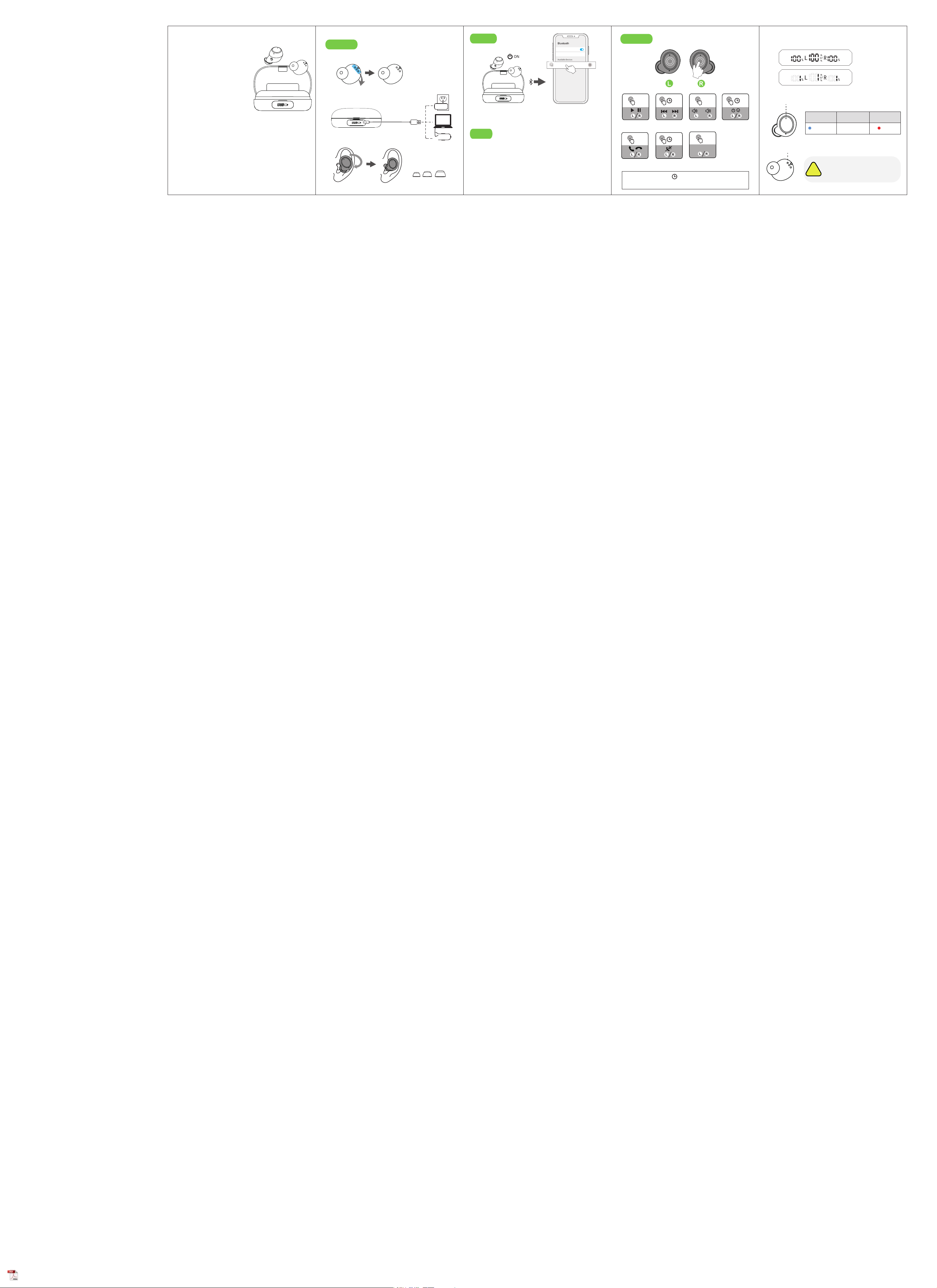
Indicator Light
Charging Contacts
Battery Indicator
Connect
Before Use
Reset
Please read the instructions before use
Wipe and dry charging contacts
if earbuds can’t be charge.
!
�. Remove the protective film before charging.
�. Fully charge the earbuds and charging case.
�.
Choose the right angle and eartips.
SML
�. After open the phone
Bluetooth, Click the <S��>
to Pairing
�. Take out the earbuds
(Earbuds auto power on)
Bluetooth
Device name
K�� >
If earbuds has any connection or function problems,
please reset the earbuds
�. Delete the BT pairing information on the phone.
�. Take the earbuds into the charging case to charge.
�. Take out the earbuds and wait for �� seconds.
(If the above operation does not work, please try again)
Operation
�S
Switch SongAdjust Volume
X�
X�: Click Once
X�: Click � times
Play /Pause
-
+
Bluetooth
Device name
Available Devices
S��
Nova� >
PairingCharging
FlashingNo LightRed
Connected
X�
X�
Answer/Hang up
Power on/off
(When no conected)
�S
�S: Press and hold for � seconds
�S
Reject Call
X�
Voice Assistant
Siri
Full Power
No Power
Warning: Changes or modifications to
this unit not expressly approved by the
party responsible for compliance could
void the user’s authority to operate the
equipment.
NOTE: This device complies with part
15 of the FCC Rules. Operation is
subject to the following two conditions:
(1) This device may not cause harmful
interference, and (2) this device must
accept any interference received,
including interference that may cause
undesired operation.
FCC Statement: This equipment has been tested and found to comply with the
limits for a Class B digital device, pursuant to part 15 of the FCC Rules. These
limits are designed to provide reasonable protection against harmful
interference in a residential installation. This equipment generates, uses and can
radiate radio frequency energy and, if not installed and used in accordance with
the instructions, may cause harmful interference to radio communications.
However, there is no guarantee that interference will not occur in a particular
installation. If this equipment does cause harmful interference to radio or
television reception, which can be determined by turning the equipment off and
on, the user is encouraged to try to correct the interference by one or more of
the following measures:
—Reorient or relocate the receiving antenna.
—Increase the separation between the equipment and receiver.
—Connect the equipment into an outlet on a circuit different from that to
which the receiver is connected.
—Consult the dealer or an experienced radio/TV technician for help.
