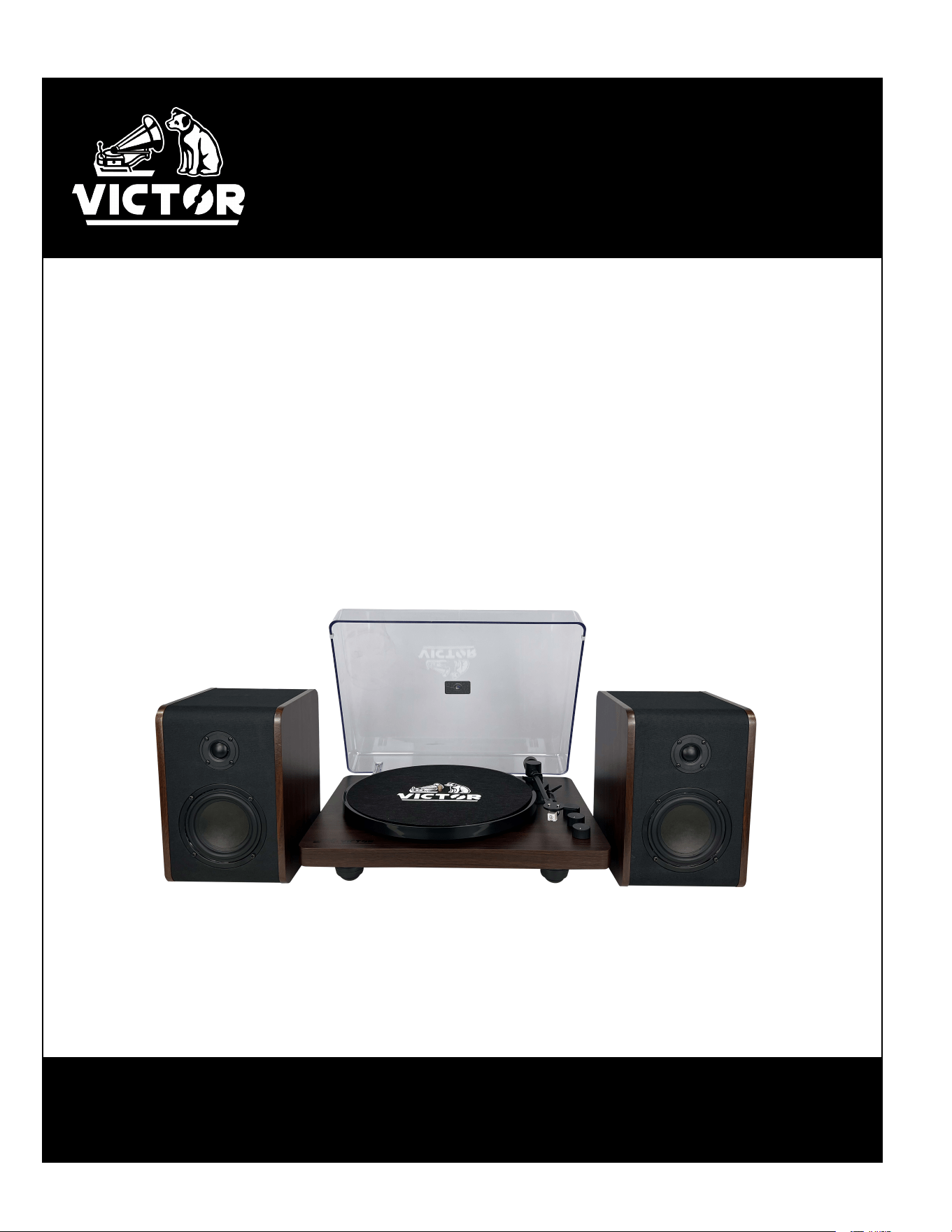
LINCOLN
Dual Bluetooth
®
Turntable
with Detached Stereo Speakers
VWRP-1600
Instruction Manual
Please read carefully before use and keep for future reference
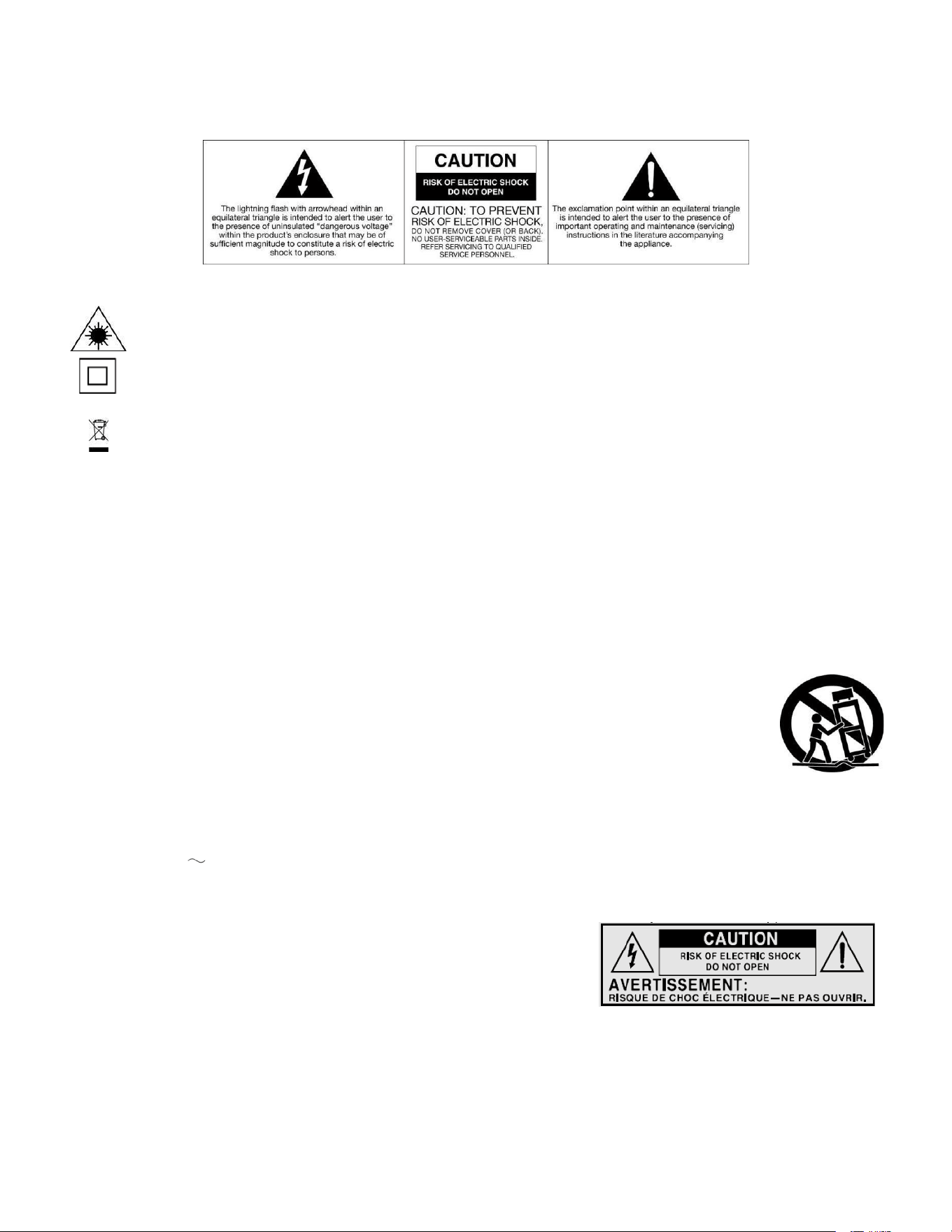
WARNING
CAUTION: To reduce the risk of fire or electric shock, do not expose this appliance to rain or moisture.
WARNING: Invisible laser radiation when open and interlock failed or defeated. Avoid direct exposure to laser beam.
This equipment is a Class II or double insulated electrical appliance. It has been designed in such a way that it does not
require a safety connection to electrical earth.
Correct Disposal of this product. This marking indicates that this product should not be disposed with other household
wastes throughout the EU. To prevent possible harm to the environment or human health from uncontrolled waste
disposal, recycle it responsibly to promote the sustainable reuse of material resources. To return your used device, please
use the return and collection systems or contact the retailer where the product was purchased. They can take this product
for environmental safe recycling.
Important Safety Instructions
1. Read these instructions – All the safety and operating instructions should be read before this product is operated.
2. Keep these instructions – The safety and operating instructions should be retained for future reference.
3. Heed all warnings – All warnings on the appliance and in the operating instructions should be adhered to.
4. Follow all instructions – All operating and use instructions should be followed.
5. Do not use this apparatus near water – The appliance should not be used near water or moisture – for example, in a wet basement
or near a swimming pool, and the like.
6. Clean only with a dry cloth.
7. Do not block any ventilation openings. Install in accordance with the manufacturer’s instructions.
8. Do not install near any heat sources such as radiators, heat registers, stoves, or other apparatus (including amplifiers) that produce
heat.
9. Protect the power cord from being walked on or pinched particularly at the plugs, power outlets, and at the point where they exit
from the apparatus.
10. Only use attachments/accessories specified by the manufacturer.
11. Use only with the cart, stand, tripod, bracket, or table specified by the manufacturer, or sold with the
apparatus. When a cart or rack is used, use caution when moving the cart/apparatus combination to avoid
injury from tip-over.
12. Unplug the apparatus during lighting storms or when unused for long periods of time.
13. Refer all servicing to qualified personnel. Servicing is required when the apparatus has been damaged in any
way, such as power supply cord or plug is damaged, liquid has been spilled or objects have fallen into the
apparatus has been exposed to rain or moisture, does not operate normally, or has been dropped.
14. The mains plug is used as disconnect device, the disconnect device shall remain readily operable.
15. WARNING: To reduce the risk of fire or electric shock, do not expose this apparatus to rain or moisture. The apparatus shall not be
exposed to dripping or splashing and that no objects filled with liquids, such as vases, shall not be placed on apparatus.
16. The use of the equipment in moderate climate.
17. The ventilation should not be impeded by covering the ventilation openings with items, such as newspapers, tablecloths, curtains,
etc.
18. Do not place open flame sources, such as lighted candles, on the apparatus.
19. The symbol with indicates AC voltage.
20. CAUTION, These servicing instructions are for use by qualified service personnel only. To reduce the risk of electric shock do not
perform any servicing other than that contained in the operating instructions unless you are qualified to do so.
This lightning flash with arrowhead symbol within an equilateral triangle is intended
to alert the user to the presence of non-insulated “dangerous voltage” within the
product’s enclosure that may be of sufficient magnitude to constitute a risk of electric
shock. Warning: To reduce the risk of electric shock, do not remove cover (or back)
as there are no user-serviceable parts inside. Refer servicing to qualified personnel.
The exclamation point within and equilateral triangle is intended to alert the user to
the presence of important operating and maintenance instructions in the literature
accompanying the appliance.
-1-
FEATURES
● 3-SPEED TURNTABLE -- 3-Speed Record Player will play all your favorite 33 1/3, 45, 78 RPM Vinyl
Records in a Classic Retro Design.
● BLUETOOTH IN -- Allows you to stream music, audiobooks, podcasts, and more from your Phone or
another Smart Device. Enjoy the wireless connection with your device up to 33 feet away.
● VERSATILE CONNECTIVITY -- 3.5mm LINE Input and LINE Output for additional connectivity.
● DETACHED SPEAKERS -- two external wired stereo speakers
● AUDIO CONTROLS -- with independent Main, Treble, Bass, and Volume Control
● HINGED DUST COVER -- Included to protect your Device and Vinyl during Playback and Storage.
SPECIFICATIONS
Product Name
Lincoln
Turntable Speed
33 1/3, 45, 78 RPM
Bluetooth® Version
Bluetooth
®
V5.3
Bluetooth® Frequency
2.40 GHz
Bluetooth® Operating Distance
Up to 33 Feet (10 Meters)*
Input
Aux In
Output
Line Out
Speaker Output Power
2
0W x 2
Power Source
AC/DC 100-240V 50/60Hz 15V 2A
Accessories Included
45RPM Adapter, User Manual, Slip Mat, UL/ETL
Approved Power Adapter, Quick Setup Guide
*Distance may vary depending on any objects or interference between devices.
SPECIFICATIONS AND ACCESSORIES ARE SUBJECT TO CHANGE WITHOUT NOTICE
-2-
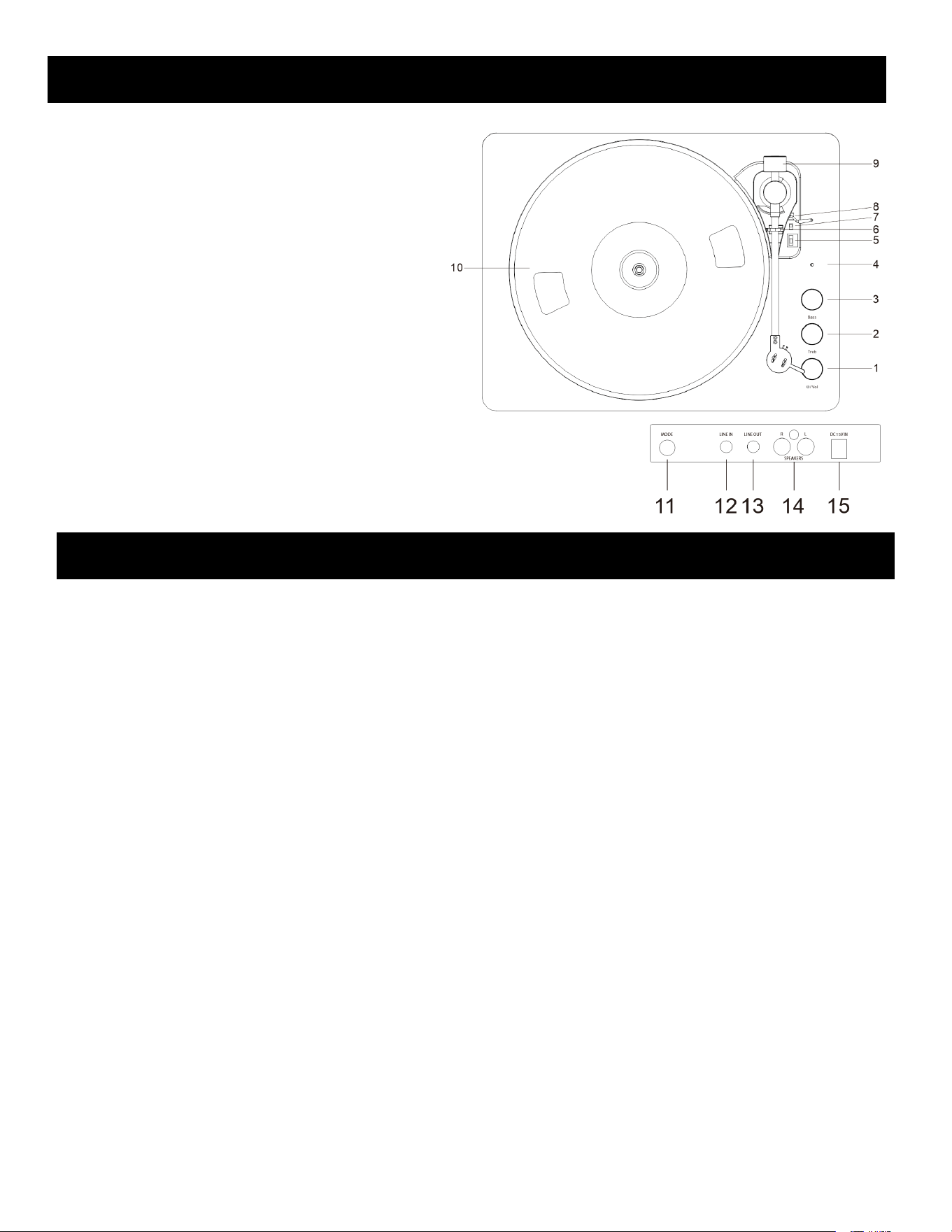
PRODUCT OVERVIEW
1. Power/Volume Control
Knob
2. Treble Control Knob
3. Bass Control Knob
4. Indicator
5. Speed Switch
6. Hold down clip
7. Auto Stop Switch
8. Tonearm Lever
9. Counterweight
10. Platter
11. Mode Button
12. LINE IN Jack
13. LINE Out Jack
14. Speaker L/R Jack
15. Power Jack
-3-
SET UP & BASIC OPERATION
Essential Setup
1. Place the speakers on a flat and level surface. The selected location should be stable and free from vibration.
2. Connect the external speaker cable from the speakers to the main unit’s L/R jack.
3. Plug the power cord into the unit first, then plug the adapter into a wall power outlet.
4. Press the Power button on the unit to turn it on and off.
Connect a Bluetooth Device to the turntable.
1. Press the Mode button to enter Bluetooth-In mode. The mode indicator will be blue and quick flashing.
2. Turn on the Bluetooth feature of your audio device, search for “VICTOR VWRP-1600,” and pair.
3. Once your device is successfully connected with the speakers, you will hear a short confirmation sound from
the speakers, and the function indicator will be solid blue.
4. Play and stream music from your device to the speaker.
Connect the turntable to an external Bluetooth speaker.
1. Press the Mode button to the Bluetooth Out mode. The mode indicator will be blue and slowly flashing. The LED
flashes indicate the device is searching for an available Bluetooth speaker.
2. The LED light stays lit When the turntable connects to the Bluetooth speaker. After the speaker is paired
successfully, a turntable audio signal can be transmitted. (Remark: Place the Bluetooth receiver device within 1m of the
unit to connect correctly.)
3. Under Bluetooth Out mode, Only the main volume knob can control the volume of the external Bluetooth speaker.
But the treble/bass knob on the unit cannot control the volume of the external Bluetooth speaker.

SET UP & BASIC OPERATION
Turntable Operation
1. Press the mode button to the Phono mode. The mode indicator will be green.
2. Select the desired speed(331/3, 45, 78) and place the record on the platter.
(Remark: When playing a 45 RPM record, please use the 45 RPM adapter.)
3. Remove the stylus protector from the stylus. Release the tone arm from the tone arm clip.
4. Use the tonearm lever to raise the tonearm. Move the tonearm gently to the desired position over the record.
Push the lift lever again to slowly descend the tonearm onto the desired position on the record to start playing.
5. When the record is finished playback, push the tonearm lever again to lift the tonearm. And return the tonearm to
the armrest. Use the tonearm lever to descend the tonearm.
Remark:
1. When the Auto-stop switch is “ON,” the record will stop automatically when finished. When the Auto-stop switch is
“OFF,” the record will not stop automatically when finished.
2. Do not touch the stylus tip with your fingers.
LINE IN
Press the mode button to LINE IN mode. The mode indicator will be cyan. Connect one end of a 3.5 mm audio cable (not
included) to the speaker’s LINE IN jack, then connect the other end to the output jack of your audio device(such as a
Mobile phone or MP3 Player).
LINE OUT
You can connect the unit to an external stereo or speaker system by connecting a device to the LINE Out jack on the back
of the unit. The LINE Out jack is not meant to be connected directly to passive/un-powered speakers.
-4-
TROUBLESHOOTING
There is no power
-Power cord is not properly connected.
-No power at the power outlet.
There is no sound from the speakers
-The speaker jack is not properly connected.
The speakers could not be connected to my Bluetooth device
-The device’s Bluetooth function is not turned on.
-
The speakers are actively connected to another Bluetooth device.
The turntable speaker stop before the record is finished.
-Adjust the Auto-stop switch to “OFF” position.

FCC NOTICE
This device complies with Part 15 of the FCC Rules. Operation is subject to the following two conditions: (1)
this device may not cause harmful interference, and (2) this device must accept any interference received,
including that may cause undesired operation.
NOTE: This equipment has been tested and found to comply with the limits for a Class B digital device,
pursuant to Part 15 of the FCC Rules. These limits are designed to provide reasonable protection against
harmful interference in a residential installation. This equipment generates, uses, and can radiate radio
frequency energy and, if not installed and used in accordance with the instructions, may cause harmful
interference to radio communications. However, there is no guarantee that interference will not occur in a
particular installation. If this equipment does cause harmful interference to radio or television reception, which
can be determined by turning the equipment on and off, the user is encouraged to try to correct the
interference by one or more of the following measures:
● Reorient or relocate the receiving antenna.
● Increase the separation between the equipment and receiver.
● Connect the equipment into an outlet on a circuit different from that to which the receiver is connected.
● Consult the dealer or an experienced radio/TV technician for help.
WARNING: Any changes or modifications not expressly approved by the party responsible for compliance
could void the user's authority to operate this equipment.
The
device must not be colocated or operating in conjunction with any other antenna or transmitter.
To maintain compliance with the FCC’s RF exposure guidelines, place the product at least 20cm from nearby
persons.
-5-

SUPPORT
We do our best to offer high quality products to our customers. If you experience any issues or
problems with your product, please contact customer support as many issues can be quickly
resolved.
If you have problems with your device, please consult the instructions in this manual. Please also
visit us on the web at
www.naxa.com to get up to the minute news, alerts, and documentation for
your device. For additional assistance, please contact Naxa Technical Support.
Naxa T
echnical Support
2320 East 49
th
St.
Vernon, CA 90058
(866) 41
1-6292
http://www.naxa.com/supportcenter
Made in China
*This product has been manufactured and sold under the responsibility of NAXA ELECTRONICS INC.
VICTOR and the DOG & GRAMOPHONE logo are trademarks used under license by NAXA ELECTRONICS INC.
Further information at www.victor-brand.com.
All other products, services, companies, trademarks, trade or product names and logos referenced herein are the property of
their respective owners.
-6-