Operator's Manual
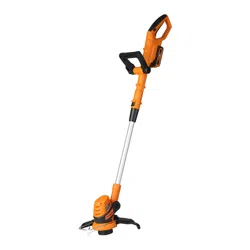
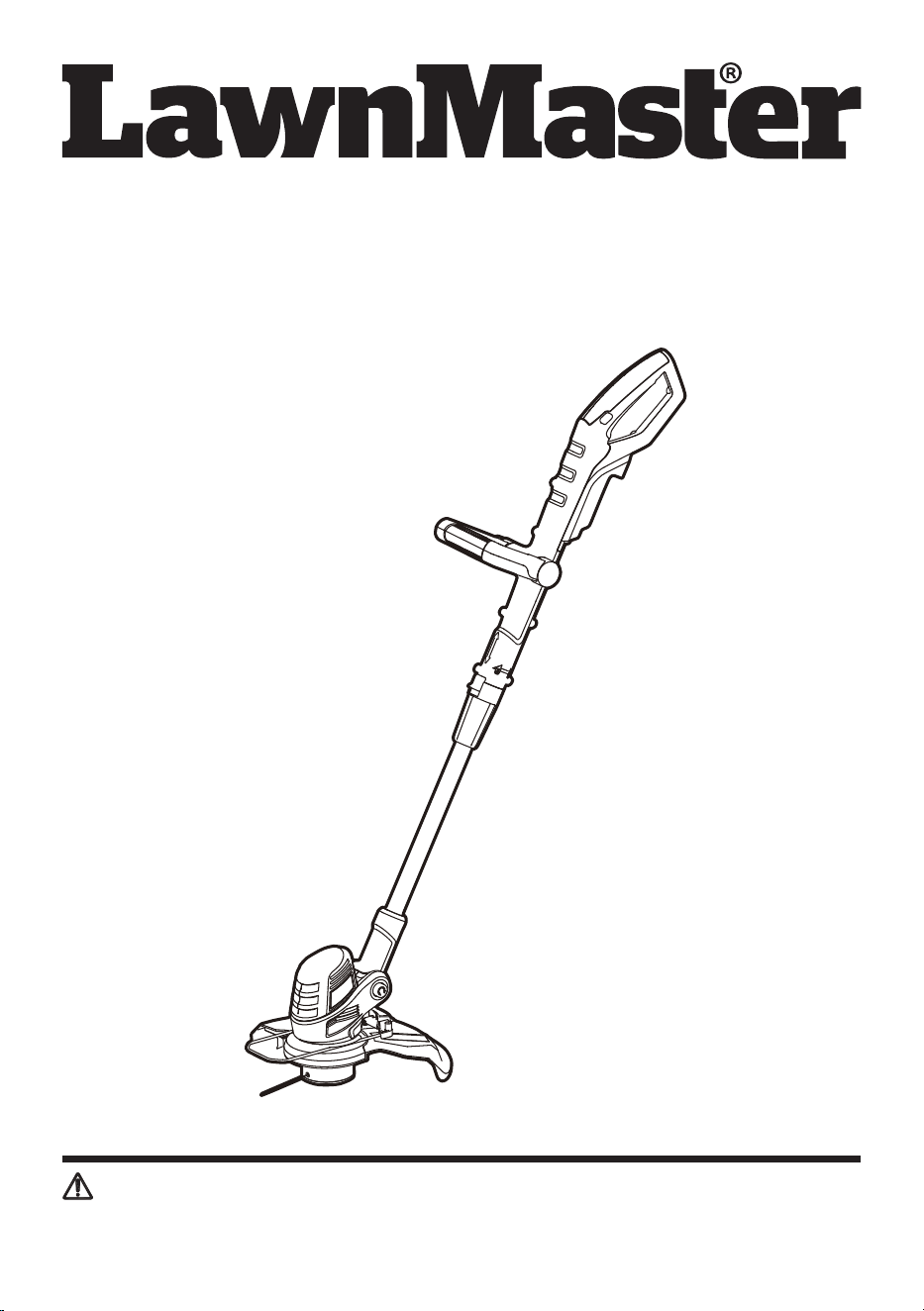
10" 24V MAX* Lithium-ion Cordless Grass Trimmer CLGT2410H
Save this manual for future reference
* Maximum initial battery workload voltage (measured without a workload) is 24 volts.
Nominal voltage is 21.6 volts.
Read all safety rules and instructions carefully before operating this tool.
Distributed By: Suzhou Cleva Electric Appliance Co., Ltd.
NO.8 Ting Rong Street 215122 Suzhou - China
Battery Model Number is 24LB4005-C
Charger Model Number is 24LFC14-ETL

2
Section Page
TABLE OF CONTENTS
TABLE OF CONTENTS 2
SPECIFICATIONS 3
IMPORTANT SAFETY INSTRUCTIONS 4-6
SYMBOLS 7-8
KNOW YOUR GRASS TRIMMER 9-10
ASSEMBLY 11-14
BATTERY PACK AND CHARGER 15-17
OPERATION 18-23
MAINTENANCE 24-26
ENVIRONMENTALLY SAFE BATTERY DISPOSAL 27
TROUBLESHOOTING 28-29
LAWNMASTER
®
WARRANTY 30
EXPLODED VIEW 31
PARTS LIST 32
NOTES 33-34

3
SPECIFICATIONS
Type Cordless, Battery-powered
No-load Speed 9200 RPM
Line Diameter 0.065" (1.6 mm)
Cutting Width 10" (250 mm)
Unit Weight (With 4.0Ah Battery) 5.28 lbs (2.4 kg)
24V MAX* CORDLESS GRASS TRIMMER
Model Number 24LB4005-C
Rated Voltage of Battery 24 V Max* D.C
Capacity of Battery 4.0 Ah
Battery Type Lithium-ion
BATTERY PACK
Model Number 24LFC14-ETL
Charger Input 120 V ~ 60 Hz 70 W
Charger Output 24 V D.C. 2.5 A
Charging Time 100 minutes (For 24LB4005-C)
* Maximum initial battery workload voltage (measured without a workload) is 24 volts.
Nominal voltage is 21.6 volts.
BATTERY CHARGER

4
IMPORTANT SAFETY INSTRUCTIONS
Read and understand all instructions before using this product.
Failure to follow all instructions listed below may result in electric shock, fire, and / or serious personal
injury.
WARNING
■ Avoid operating the tool in a dangerous environment. Do not use the tool in damp or wet locations.
■ Do not use in the rain.
■ Keep children away. All visitors should be kept at a distance from the work area.
■ Dress properly. Do not wear loose clothing or jewelry. They can be caught in moving parts. Use of
rubber gloves and substantial footwear is recommended when working outdoors. Wear protective
hair covering to contain long hair.
■ Use safety glasses. Always use face or dust mask if operation is dusty
■ Use the tool correctly. Do not use the tool for any job except that for which it is intended.
■ Do not force the tool. It will do the job better and with less likelihood of a risk of injury at the rate for
which it was designed.
■ Do not overreach. Keep proper footing and balance at all times.
■ Stay alert. Watch what you are doing. Use common sense. Do not operate the tool when you are
tired.
■ Disconnect the tool. Disconnect the battery from the trimmer when not in use; before servicing,
when changing accessories such as cutting line, and so on.
■ Store idle tools indoors. When not in use, tools should be stored indoors in a dry, and high or
locked-up place, out of reach of children.
■ Maintain the tool with care. Keep cutting edge sharp and clean for best performance and to reduce
the risk of injury. Follow instructions for lubricating and changing accessories. Inspect the cord
periodically, and if damaged, have it repaired by an authorized service center. Inspect extension
cords periodically and replace if damaged. Keep handles dry, clean, and free from oil and grease.
■ Check for damaged parts. Before further use of the tool, a guard or other part that is damaged
should be carefully checked to determine that it will operate properly and perform its intended
function. Check for alignment of moving parts, binding of moving parts, breakage of parts, mounting,
and any other condition that may affect its operation. A guard or other part that is damaged should
be properly repaired or replaced by an authorized service center unless indicated elsewhere in this
manual.
■ To reduce risk of injury to persons, remove battery pack when not in use.
■ Keep guards in place and in working order.
■ Keep hands and feet away from cutting area.
■ Prevent unintentional starting. Ensure the switch is in the off position before inserting the battery
pack, picking up or carrying the tool. Carrying the tool with your finger on the switch or energizing
the tool that has the switch on, invites accidents.
■ Use the tool only with specifically designated battery packs. Use of any other battery packs may
create a risk of injury and fire.
■ Do not use a battery pack or tool that is damaged or modified. Damaged or modified batteries may
exhibit unpredictable behavior resulting in fire, explosion, or risk of injury.
■ Do not operate the tool in explosive atmospheres, such as in the presence of flammable liquids,
gases, or dust. Power tools create sparks which may ignite the dust or fumes.

5
IMPORTANT SAFETY INSTRUCTIONS
■ Do not handle plug or tool with wet hands.
■ Never allow children to operate the equipment. Never allow adults to operate the equipment without
proper instruction.
■ Do not operate in poor lighting.
■ Do not use tool if the switch does not turn it on or off. Any tool that cannot be controlled with the
switch is dangerous and must be repaired.
■ Keep all parts of your body away from any moving parts and all hot surfaces of the unit.
■ Do not put any object into openings. Do not use with any opening blocked; keep openings free of
dust, lint, hair, and anything that may reduce air flow.
■ Check the work area before each use. Remove all objects such as rocks, broken glass, nails, wire,
or line which can be thrown or become entangled in the tool.
■ For residential use only.
BATTERY PACK
■ The battery pack is only compatible with 24LFC14-ETL, 24LFC02-ETL or 24LSC01-ETL chargers.
■ Recharge only with the charger specified by the manufacturer and listed in this manual. A charger
that is suitable for one type of battery pack may create a risk of fire when used with another battery
pack.
■ Do not charge battery in a damp or wet location. Following this rule will reduce the risk of electric
shock.
■ Do not place battery powered trimmers or their batteries near fire or heat. This will reduce the risk of
explosion and possibly injury.
■ Do not open or mutilate the battery. Released electrolyte is corrosive and may cause damage to the
eyes or skin. It may be toxic if swallowed.
■ Do not dispose of battery packs in fire. They will explode or leak and cause injury. Liquid ejected
from the battery may cause irritation or burns.
■ Do not crush, drop, or damage the battery pack. Do not use a battery pack or charger that has been
dropped or received a sharp blow. A damaged battery is subject to explosion. Properly dispose of a
dropped or damaged battery immediately.
■ Batteries can explode in the presence of a source of ignition, such as a pilot light. To reduce the
risk of serious personal injury, never use any cordless product in the presence of open flame. An
exploded battery can propel debris and chemicals. If exposed, flush with water immediately.
■ Under extreme usage or temperature conditions, battery leakage may occur. If liquid comes in
contact with your skin, wash immediately with soap and water. If liquid gets into your eyes, flush
them with clean water for at least 10 minutes, then seek immediate medical attention. Following this
rule will reduce the risk of serious personal injury.
■ When the battery pack is not in use, keep it away from other metal objects, like paper clips, coins,
keys, nails, screws, or other small metal objects, that can make a connection from one terminal to
another. Shorting the battery terminals together may cause burns or a fire.
■ Do not expose a battery pack or grass trimmer to fire or excessive temperature. Exposure to fire or
temperature above 265°F (130°C) may cause an explosion.
■ Do not modify or attempt to repair the grass trimmer or the battery pack (as applicable) except as
indicated in the instructions for use and care.
■ Follow all charging instructions and do not charge the battery pack or grass trimmer outside of the
temperature range specified in the instructions. Charging improperly or at temperatures outside of
the specified range may damage the battery and increase the risk of fire.
■ All tool services should be performed by a qualified repair person using only identical replacement
parts. This will ensure that the safety of the product is maintained.

6
IMPORTANT SAFETY INSTRUCTIONS
BATTERY CHARGER
■ This charger is only compatible with 24LB4005-C, 24LB1304, 24LB2004, 24LB2605, or 24LB4005
lithium-ion batteries.
■ To reduce the risk of injury, charge only the specified lithium-ion rechargeable batteries. Other types
of batteries may burst, causing personal injury or damage.
■ Keep cord and charger away from heat to prevent damage to housing or internal parts.
■ Do not operate charger with a damaged cord or plug, which could cause shorting and electric shock.
If damaged, immediately discontinue use. Replace the charger with the identical unit as listed in the
Parts List of this manual.
■ Do not use a charger that has been dropped or received a sharp blow.
■ Do not disassemble charger. Take it to a qualified service center for check or replacement. Incorrect
reassembly may result in a risk of electric shock or fire.
■ Do not abuse the charger cord. Never use the cord for carrying, pulling, or unplugging.
■ Keep cord away from heat, oil, sharp edges or moving parts. Damaged or entangled cords increase
the risk of electric shock. If the charger cord is damaged, replace the charger with an identical
model as listed in this manual.
■ A charger that is suitable for one type of battery pack may create a risk of fire when used with
another battery pack.
■ Charge the battery at the normal charging temperature between 40°F (4°C) and 100°F (38°C).
FCC COMPLIANCE
■ This device complies with Part 15 of the FCC Rules. Operation is subject to the following two
conditions:
- This device may not cause harmful interference, and
- This device must accept any interference received, including interference that may cause
undesired operation.
■ NOTE: This equipment has been tested and found to comply with the limits for a Class B digital
device, pursuant to Part 15 of the FCC Rules. These limits are designed to provide reasonable
protection against harmful interference in a residential installation.
■ This equipment generates, uses, and can radiate radio frequency energy and, if not installed and
used in accordance with the instructions, may cause harmful interference to radio communications.
However, there is no guarantee that interference will not occur in a particular installation. If
this equipment does cause harmful interference to radio or television reception, which can be
determined by turning the equipment off and on, the user is encouraged to try to correct the
interference by one or more of the following measures:
- Reorient or relocate the receiving antenna.
- Increase the separation between the equipment and receiver.
- Connect the equipment into an outlet on a circuit different from that of the receiver.
- Consult the dealer or an experienced radio/ TV technician for help.
SAVE THESE INSTRUCTIONS
Refer to them frequently and use them to instruct others who may use this tool. If you loan someone this
tool, loan them these instructions also.
7
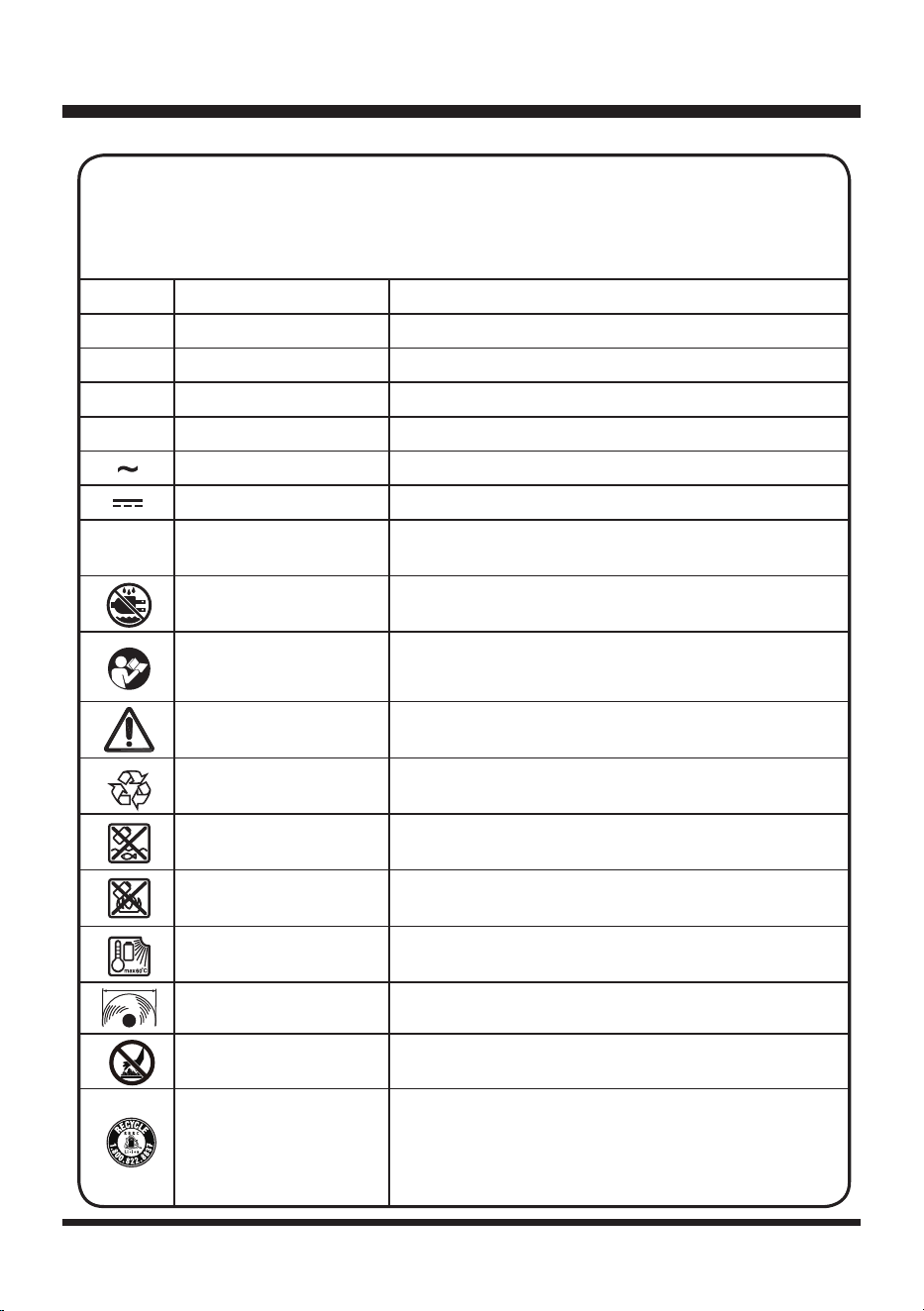
SYMBOLS
SYMBOL NAME DESIGNATION/EXPLANATION
V Volts Voltage
A Amperes Current
Hz Hertz Frequency(cycles per second)
W Watts Power
min Minutes Time
Alternating Current Type of current
Direct Current Type or a characteristic of current.
…/min Per Minute
Revolutions, strokes, surface speed, orbits, etc., per
minute.
Wet Conditions Alert Do not expose to rain or use in damp locations.
Read the Operator’s
Manual
To reduce the risk of injury, user must read and
understand Operator’s Manual before using this
product.
Safety Alert Precautions that involve your safety.
Lithium-ion Battery
Recycling
Designates that this tool is in compliance with
lithium-ion battery recycling program requirements.
Keep Away From Water
Do not dispose of battery packs in rivers or immerse
in water.
Keep Away From Fire
Do not dispose of battery packs in explode or leak
and cause injury.
Heat Alert
Do not expose battery packs to heat in excess of
60ºC (140ºF).
Cutting Width Cutting diameter.
Hot Surface
To reduce the risk of injury or damage, avoid contact
with any hot surface.
Recycle Symbol
This product uses lithium-ion batteries. Local, state
or federal laws may prohibit disposal of batteries in
ordinary trash. Consult your local waste authority
for information regarding available recycling and/or
disposal options.
Some of the following symbols may be used on this product. Please study them and
learn their meaning. Proper interpretation of these symbols will allow you to operate
the product better and safer.
8
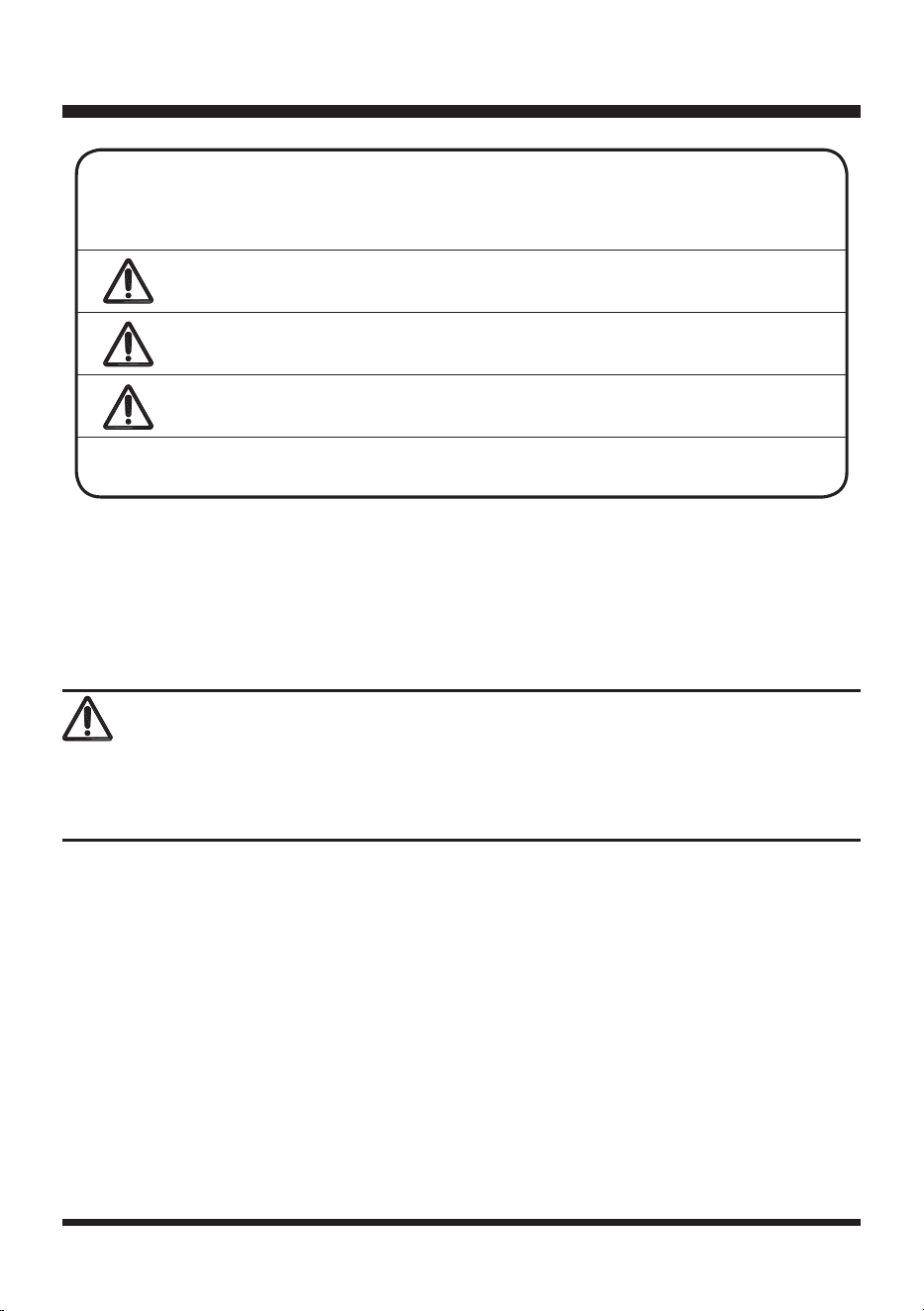
SYMBOL SIGNAL MEANING
DANGER
Indicates an imminently hazardous situation, which, if not
avoided, will result in death or serious injury.
WARNING
Indicates a potentially hazardous situation, which, if not
avoided, could result in death or serious injury.
CAUTION
Indicates a potentially hazardous situation, which, if not
avoided, may result in minor or moderate injury.
NOTICE
(Without Safety Alert Symbol) Indicates a situation that may
result in property damage.
The following signal words and meanings are intended to explain the levels of risk
associated with this product.
SERVICE
Service requires extreme care and knowledge and should be performed only by a qualified service
technician. When servicing, use only identical replacement parts.
For troubleshooting or replacement, please call Customer Service for assistance (Toll free number
866-384-8432).
To avoid serious personal injury, do not attempt to use this product until you read thoroughly and
understand completely the Operator’s Manual.
If you do not understand the warnings and instructions in the Operator’s Manual, do not use this
product. Call Customer Service for assistance (Toll free number 866-384-8432).
WARNING
SYMBOLS
9
KNOW YOUR GRASS TRIMMER
8
9
10
11
12
13
14
16
17
18
3
4
5
6
7
1
2
15

10
KNOW YOUR GRASS TRIMMER
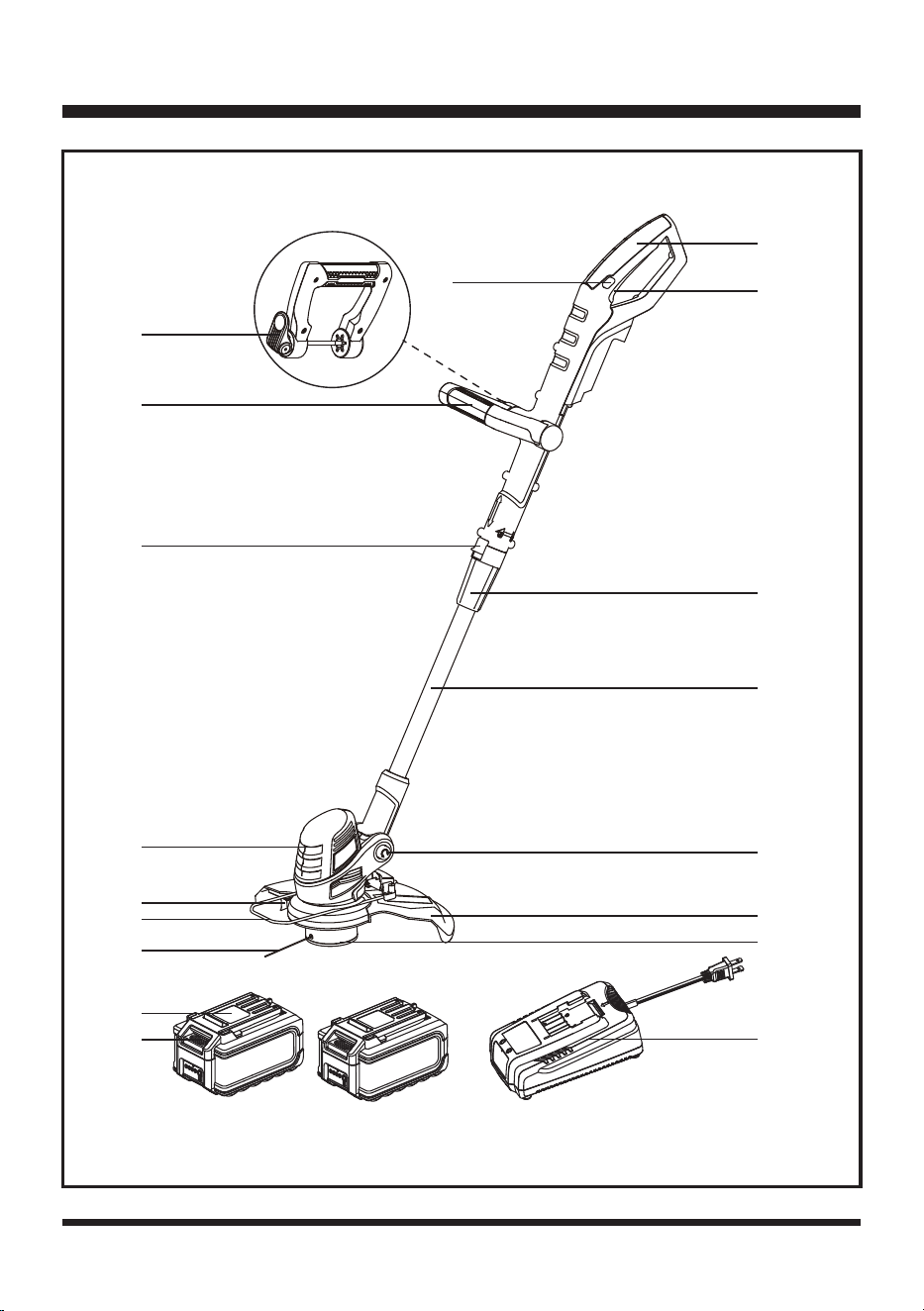
Components
1.Main Handle
2.On/Off Switch
3.Locking Collar
4.Shaft
5.Pivot Button
6.Debris Guard
7.Trimmer Head
8.Trimming Line
9.Flower Guard
10.Trimming Line Cut-Off Blade
11.Motor Housing
12.Shaft Rotating Button
13.Auxiliary Handle
14.Auxiliary Handle Quick-release Knob
15.Lock-off Switch
16.Battery Pack (X2)
17.Battery Release
Button
18.Battery Charger
KNOW YOUR PRODUCT
The safe use of this product requires an understanding of the information on the product and in this Operator’s
Manual as well as a knowledge of the project you are attempting. Before use of this product, familiarize
yourself with all operating features and safety rules.
11
Before assembly, make sure that the grass trimmer is switched off and the battery is removed. If any
parts are damaged or missing, do not operate this product until the parts are replaced. Failure to heed
this warning so could result in serious personal injury.
Do not attempt to modify this product or create accessories not recommended for use with this
product.
Any such alteration or modification is misuse and could result in a hazardous condition leading to
possible serious personal injury. Always remove battery pack from your tool when you are assembling
parts, making adjustments, cleaning, or when not in use. Removing battery pack will prevent accidental
starting that could cause serious personal injury.
Never operate without the proper safety devices in place and working. Never operate with damaged
safety devices. Failure to heed this warning can result in serious personal injury.
ASSEMBLY
UNPACKING
This product requires assembly.
■ Carefully remove the product and any accessories from the box. Make sure that all items listed in
the packing list are included.
■ Inspect the product carefully to make sure no breakage or damage occurred during shipping.
■ Do not discard the packing material until you have carefully inspected and satisfactorily operated
the product.
■ If any parts are damaged or missing, please call Customer Service (Toll free number 866-384-
8432).
YOU WILL NEED (ITEMS NOT SUPPLIED)
■ Phillips Head Screwdriver
■ Suitable Personal Protective Equipment
PACKING LIST
(1) Main Handle
(1) Shaft (with trimmer head and line spool installed)
(1) Debris Guard
(1) Flower Guard
(1) Auxiliary Handle
(1) Operator's Manual
(2) 24V 4.0Ah Lithium-ion Battery Packs (shared with mower)
(1) 24V 2.5A Battery Charger (shared with mower)
WARNING
12
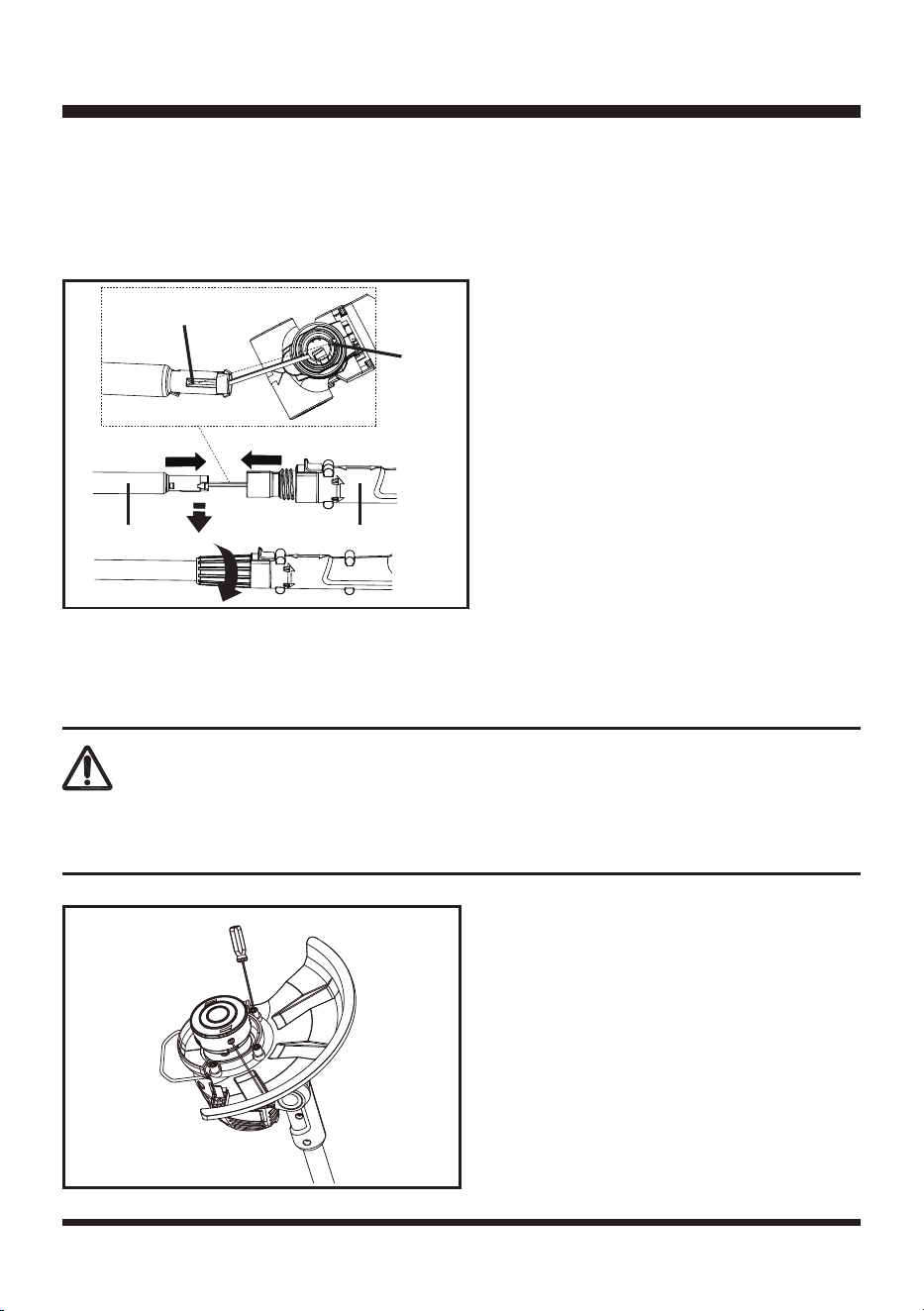
CONNECTING THE MAIN HANDLE AND SHAFT
1. Align the shaft with the main handle. Make sure that the protrusion on the shaft aligns with the
notch inside the handle as shown in Fig. 1.
2. Assemble the shaft into the main handle and ensure it is fully engaged.
3. Fix the handle into position by tightening the locking collar (Fig. 1).
FITTING THE DEBRIS GUARD
1. Align the debris guard with the trimmer head.
2. Secure the debris guard by tightening the 3 mounting screws with a screwdriver (Fig. 2).
ASSEMBLY
Fig. 1
The trimming line cut-off blade on the debris guard is sharp. When fitting the guard avoid contact with
the blade. Failure to avoid contact can result in serious personal injury.
WARNING
Fig. 2
Protrusion
Notch
Shaft Handle
13
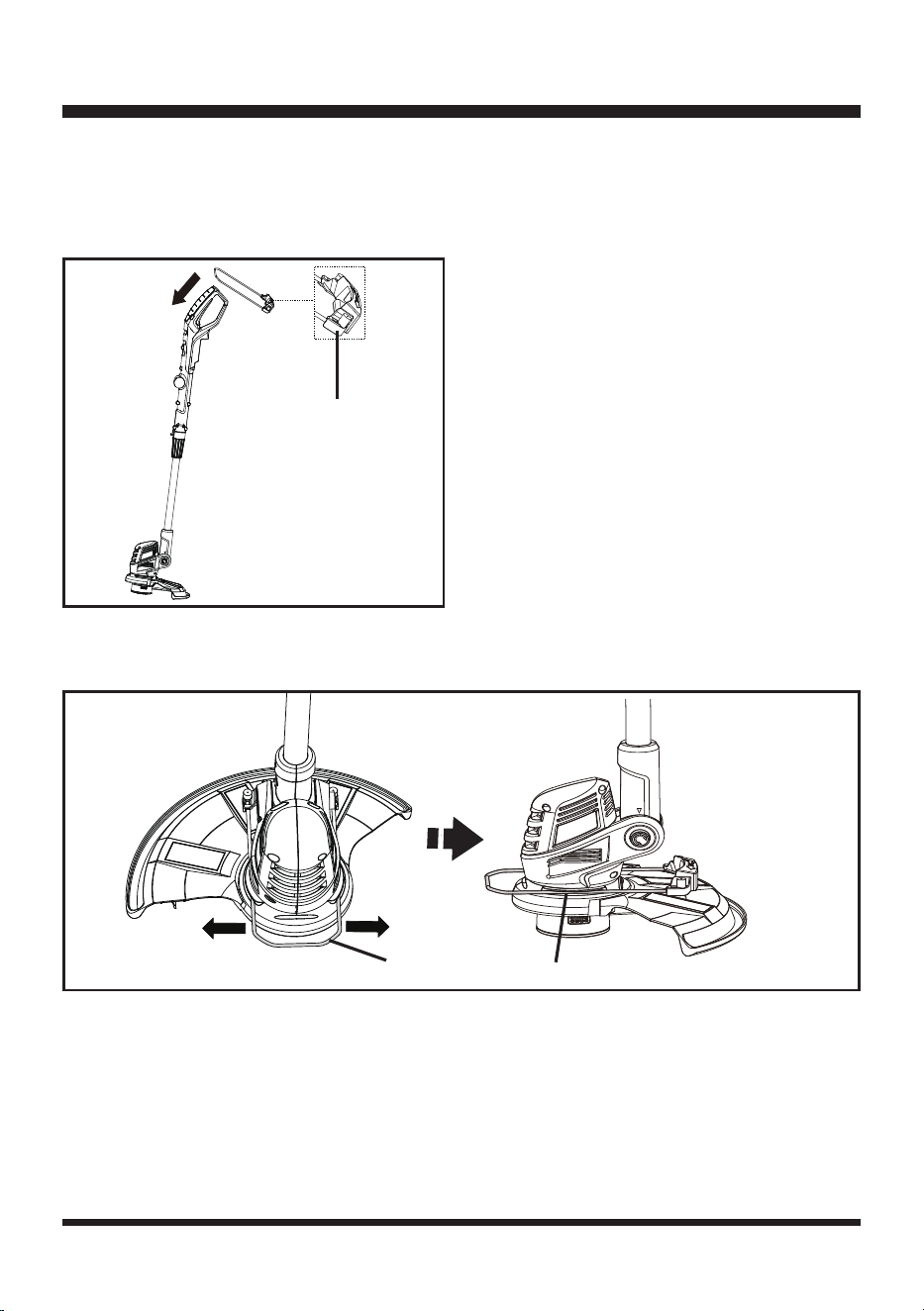
ATTACHING THE FLOWER GUARD
NOTE: Attach the flower guard before attaching the auxiliary handle.
1. Put the flower guard over the top of the main handle. Then slide the flower guard all the way down
to the motor housing area. Make sure that the plastic toe pad is facing upwards as shown (Fig. 3).
2. Pull the steel flower guard rails apart and place it over the motor housing. Align and seat the guard
rails into the 2 recessed channels on either side of the motor housing (Fig. 4)
ATTACHING THE AUXILIARY HANDLE
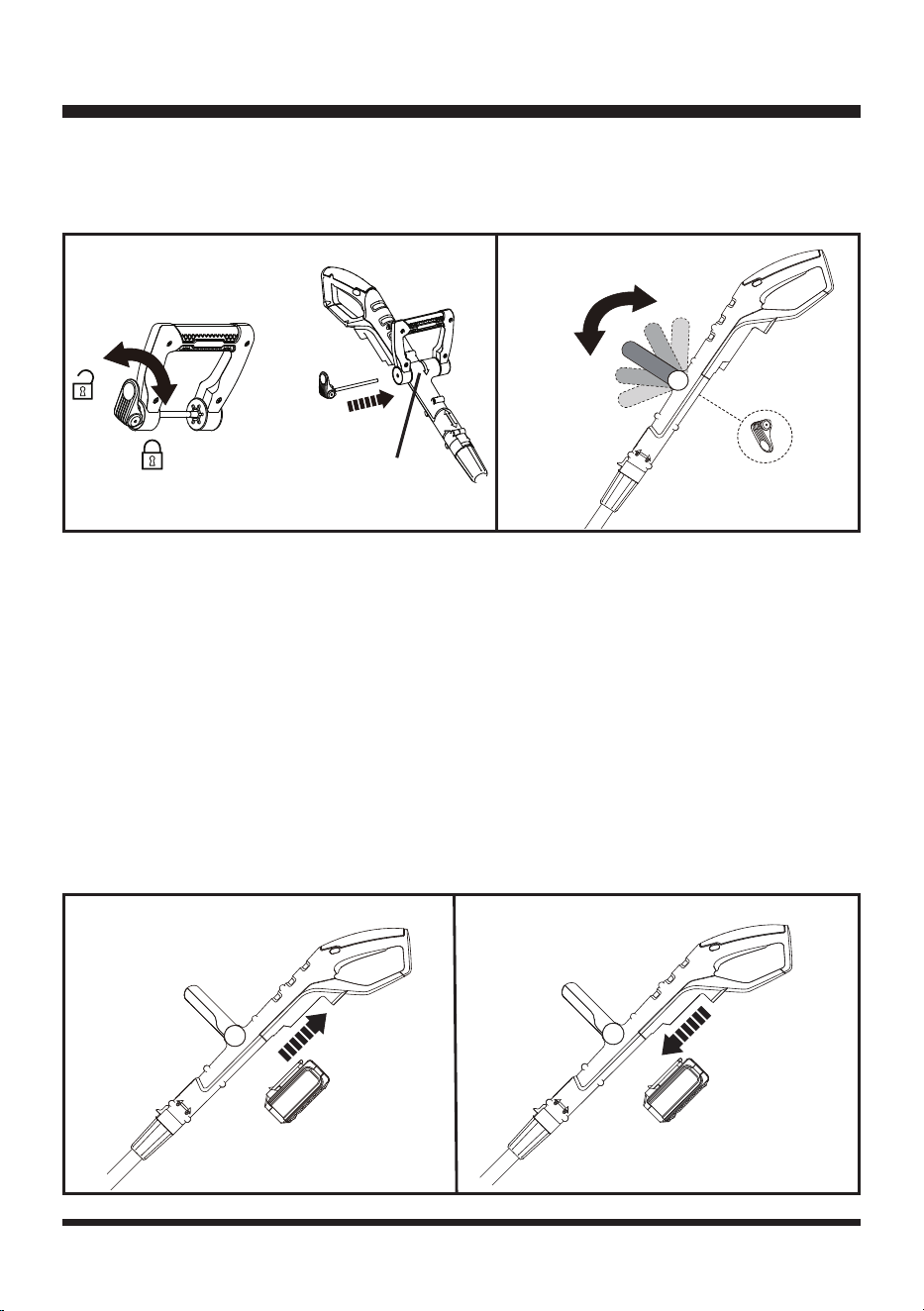
1. Loosen the quick-release knob counter-clockwise and remove it from the auxiliary handle (Fig. 5).
2. Align the auxiliary handle with the handle support.
3. Insert the quick-release knob through the auxiliary handle and partially tighten the knob clockwise
by hand (Fig. 5).
4. Adjust the auxiliary handle to desired position (Fig. 6).
ASSEMBLY
Fig. 3
Fig. 4
Plastic Toe Pad
Steel Rails
Housing Channel
14
INSTALLING / REMOVING THE BATTERY PACK
To install the battery pack:
1. Make sure the battery is fully charged.
2. Align the battery pack with the battery slot on the underside of the main handle, and then insert the
battery pack into the handle (Fig. 7).
3. Push the battery pack until you hear a “click”.
NOTE: Make sure that battery pack firmly snaps into place and is secured to the trimmer handle
before starting operation
To remove the battery pack:
1. Stop the grass trimmer.
2. Press the release button on the battery pack. Grasp the trimmer firmly and pull the battery pack out
of the handle (Fig. 8).
5. Tighten the quick-release knob clockwise to lock the auxiliary handle in place, and then fold the
knob inwards using moderate force. If it feels too tight when folding in, turn it counter-clockwise to
loosen. Do not use excessive force.
ASSEMBLY
Fig. 7
Fig. 8
Handle Support
Fig. 5 Fig. 6
15
BATTERY PACK AND CHARGER
BATTERY CHARGING
1. Use only with 24V LawnMaster
®
battery chargers. The battery charger supplied is specifically
designed for the lithium-ion battery used in this tool.
2. Check the power voltage! Battery chargers operate on 120V.
3. The battery is charged between 40°F (4°C) and 104°F (40°C). This ensures an optimum battery
service life.
4. Protect the battery from heat, from continuous exposure to sun, and keep away from radiation or
other heat sources. Do not leave the battery in the tool in direct sunlight over long periods.
5. The battery is supplied partially charged. To ensure full capacity of the battery, charge the battery
before using the tool for the first time. The lithium-ion battery can be charged at any time without
reducing its service life. Interrupting the charging procedure does not affect the battery.
LED CHARGER STATUS
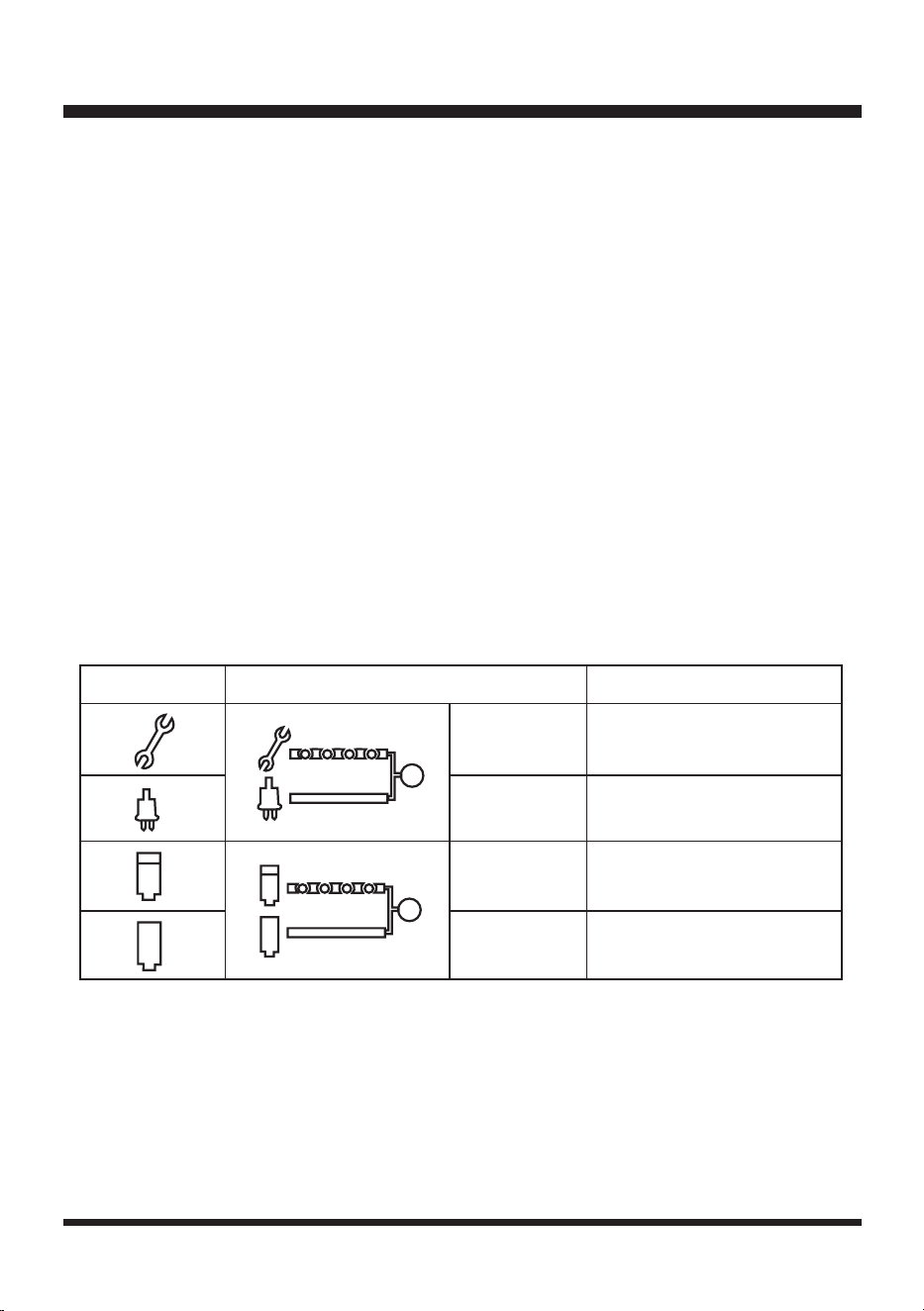
1. If the battery is not inserted into the charger, a continuous red LED light indicates that the charger is
plugged into a power supply socket and is now ready to begin charging.
2. Charging: A ashing green LED on the charger indicates that the battery is charging normally.
3. Charged: Continuous green LED on the charger indicates that the battery is ready for use.
The indicator lights on the charger show the charger status:
4. The intelligent charger ensures maximum battery life, because it measures the existing charge level of the
battery and then charges with the required current and voltage. Charge battery fully before storage.
5. Technical Issue: A ashing red LED light on the charger indicates that battery pack has a charging
problem or might be defective.
a) One possible condition is the battery temperature is not within the charging temperature range of 40°F
(4°C) and 104°F (40°C). As soon as the permitted temperature is reached, the battery charger will
automatically switch to charging.
SYMBOL INDICATOR LIGHTS STATUS
Red, blinking
Charging paused. See
Technical Issue.
Red, continuous Connected to power supply.
Green, blinking Charging.
Green,
continuous
Fully charged.
16
BATTERY PACK AND CHARGER
b) If the temperature range is correct and flashing red LED light continues, then remove and reinstall
the battery pack. If the LED status repeats a second time, try to charge another identical battery. If
the battery charges normally, dispose of the defective battery pack (see Environmental Safe Battery
Disposal section).
c) If the flashing red light continues after installing the second battery (ensure the battery temperature is
normal), the charger may be defective. Replace with a new one.
6. After continuous or repeated charging cycles without interruption, the charger may warm up. This is normal
and does not indicate a technical defect of the battery charger.
BATTERY LED PANEL
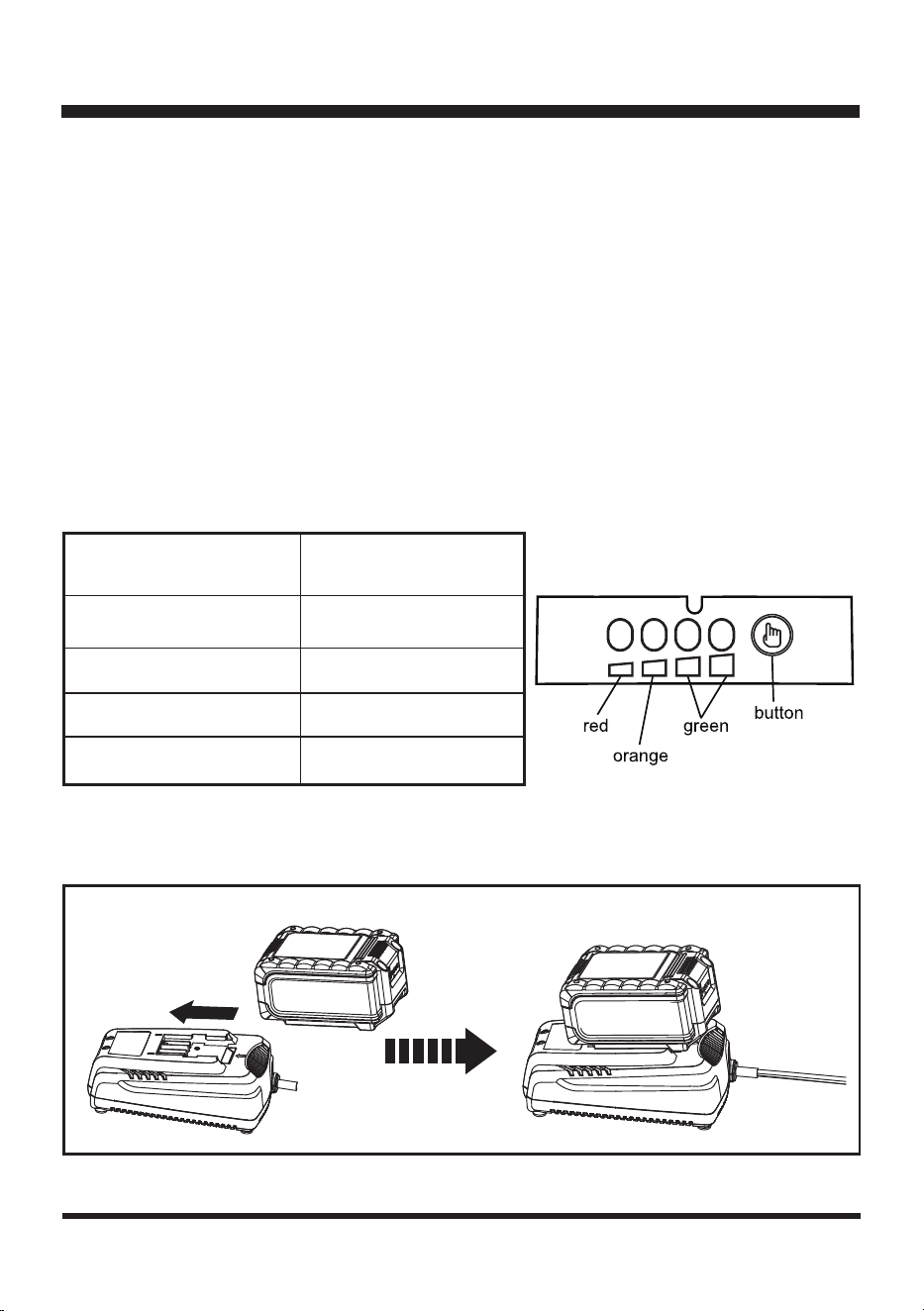
1. The panel consists of 4 LEDs on the battery. Press and hold the button, then release it, the LEDs will show
you the charge levels.
2. The battery’s charge level can be checked either when the battery is attached on the machine or removed
from the machine.
CHARGING THE BATTERY PACK
LEDs on Battery
(Continuous lighting)
Battery Capacity
4 LEDs (inc 2 green) Fully charged
3 LEDs (inc 1 green)
≥
50%
2 LEDs (orange & red)
≥
25%
1 LED (red only)
<25% (Recharge required).
Fig. 9
Indicator Lights

17
BATTERY PACK AND CHARGER
1. Align the slot of the battery pack with the rail on the charger. Slide the battery onto the rail until the
battery pack secures into place (Fig. 9).
2. Connect the charger to the power supply.
3. Allow sufficient charging time (see Specifications), and then disconnect the charger from the power
supply.
4. Press the release button on the battery pack and remove it from the charger.
NOTE: It is normal for the battery pack and the charger to become warm (but not hot) during charging
process. If the battery does not charge properly, check to make sure the electrical outlet is operational.
Always charge the battery before storage!
WARNING
If any part of the charger is missing or damaged, do not operate it! Replace the charger with a new
one. Failure to heed this warning could result in possible serious injury.
Check the voltage! The voltage must comply with the information on the rating label.
18
OPERATION
INTENDED USE
This trimmer is intended for cutting weed, grass or similar soft vegetation in areas that are hard to
reach, e.g. under bushes, on slopes and edges. It must not be used to work on unusual thick, dry or
wet grass, e.g. pasture grass, or to shred leaves.
This product is intended for private domestic use only, not for any commercial trade use. It must not be
used for any purposes other than those described.
SWITCHING ON/OFF
1. Make sure that the battery pack is installed properly.
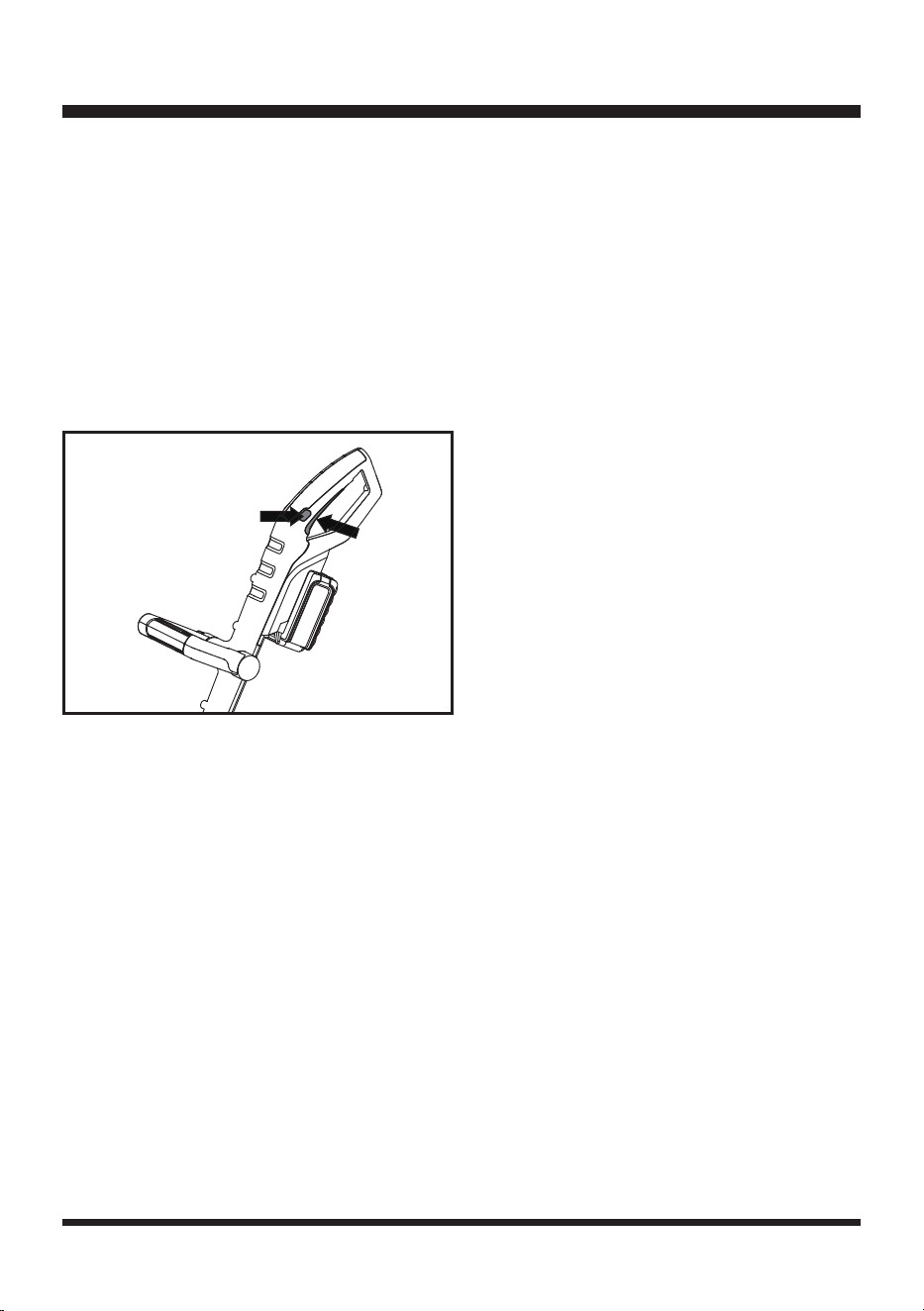
2. Press the lock-off switch on either side and hold it in position. Press the on/off switch to switch the
trimmer on (Fig. 10). Once started release the lock-off switch.
3. Release the on/off switch to switch the trimmer off.
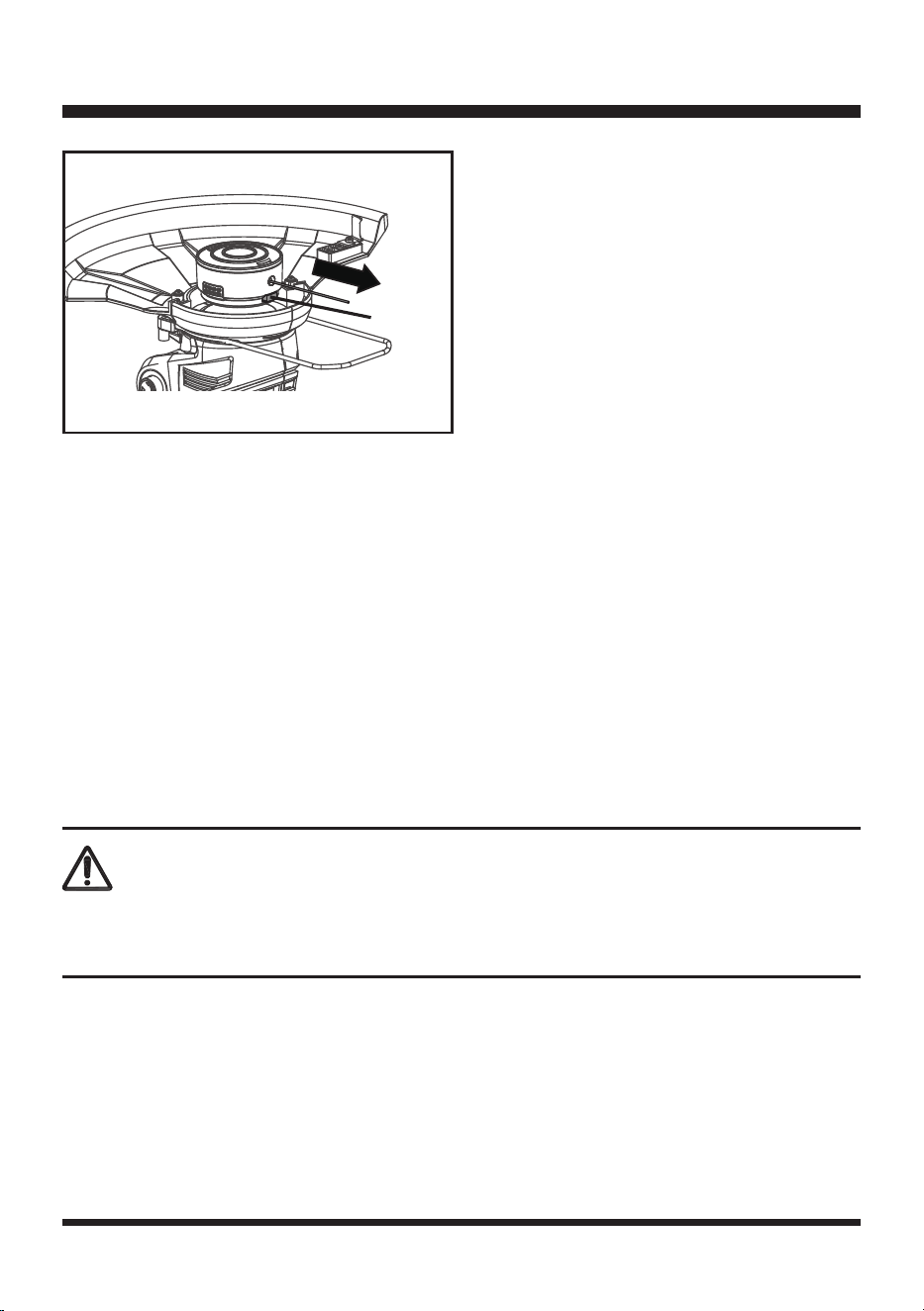
ADVANCING THE TRIMMING LINE
The trimmer features a fully automatic single line system. The line will automatically elongate every
time you turn on the trimmer.
NOTE: Bumping the head to try to advance the line will damage the trimmer and void the warranty.
1. With the trimmer running but NOT trimming, release the on/off switch.
2. Wait 2 seconds and press the on/off switch. The line will extend with each stop and start of the on/
off switch until the line reaches the length of the trimming line cut-off blade.
3. Resume trimming.
Adjusting the line length manually:
1. Switch off the trimmer and remove the battery.
2. Push the advance button located on the trimmer head while pulling on trimming line to manually
advance the line. The line will advance and stop. Push the button again to advance more line
(Fig. 11).
3. Push the button and pull the line out as many times as it takes to reach the line cut-off blade.
Fig. 10
1
2
19
OPERATION
When no line end is visible:
Replace the spool line (see Line Replacement instructions in the Maintenance section).
SAFETY GUARD
1. The safety guard protects the operator against thrown objects during operation.
2. The safety guard is equipped with a trimming line cut-off blade that cuts excess trimming line.
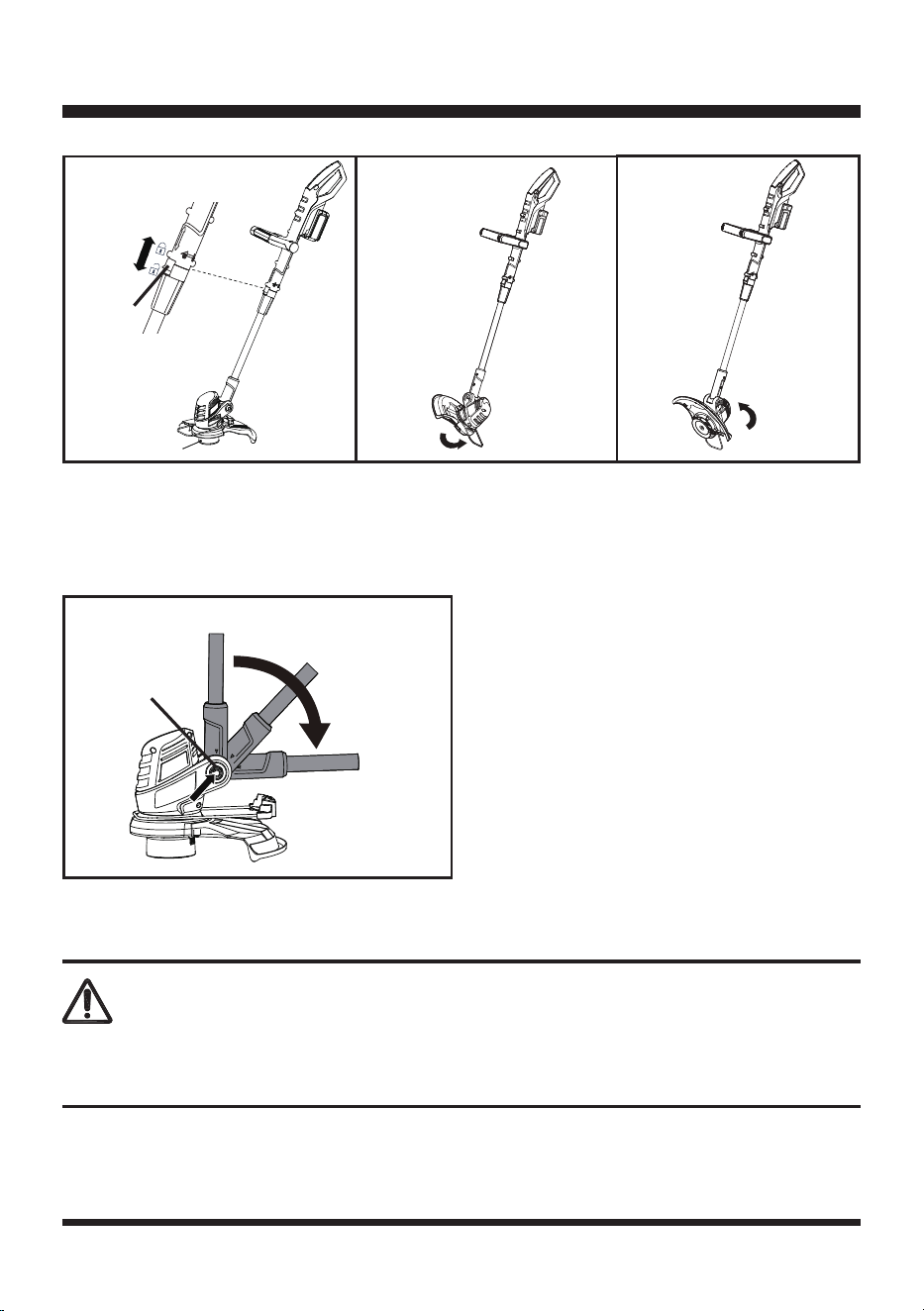
TRIMMER HEAD ANGLE
Adjust the angle of the trimmer head according to the intended operation.
1. Push the shaft rotating button forward and hold it in position (Fig. 12).
2. Turn the handle section to adjust to desired angle. Adjust to 0° when trimming grass on flat ground
(Fig. 12). Adjust to 90° or 180° when trimming near edges and walls (Fig. 13 & 14).
3. Ensure that the shaft rotating button snaps into place.
WARNING
Always ensure that the shaft rotating button snaps into place! Only adjust to angles of 0°, 90° and
180°. Never adjust to any other intermediate position!
Fig. 11
Advance
Button
20
OPERATION
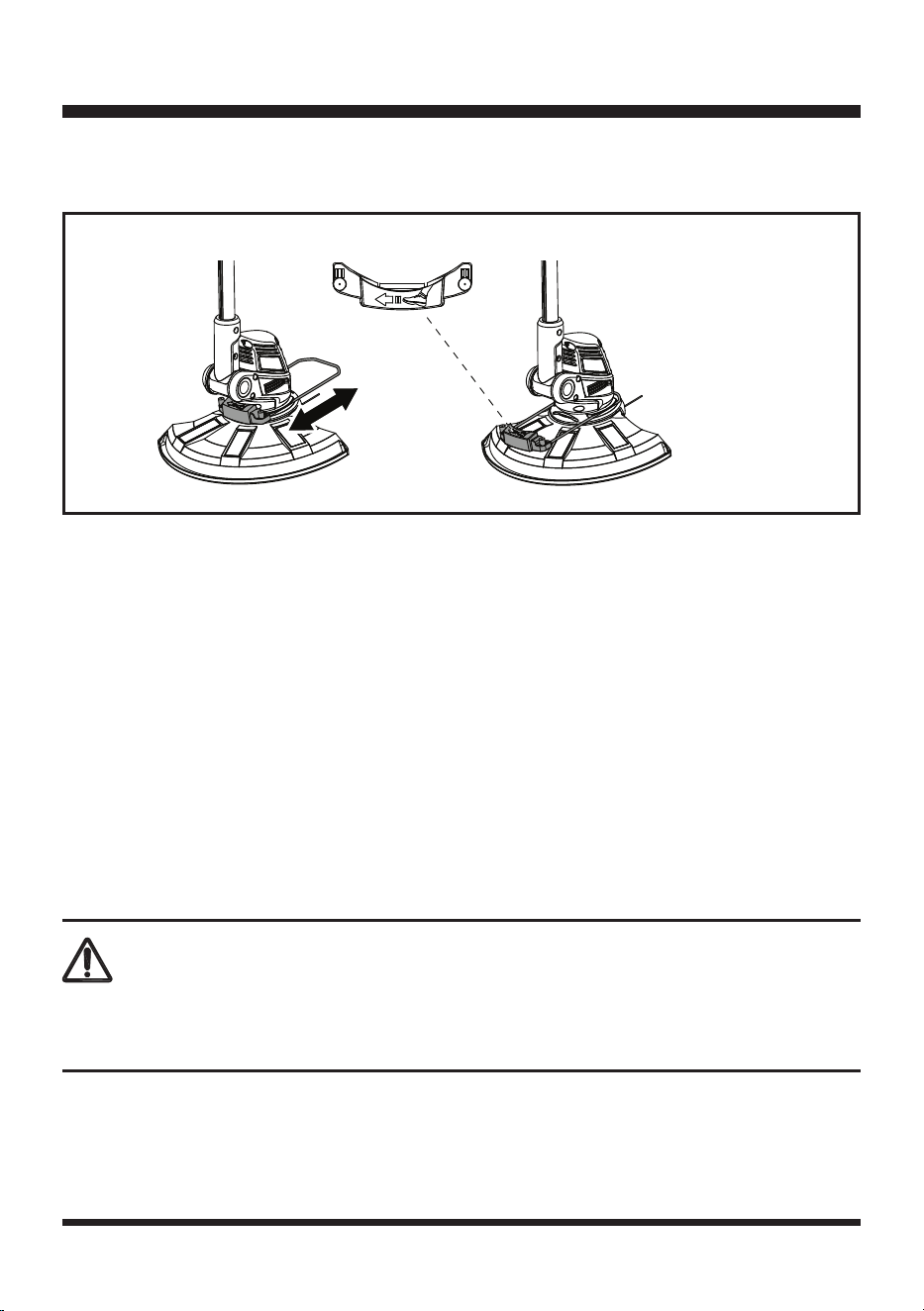
PIVOTING HEAD
1. To pivot the head, push the pivot button and adjust the shaft to any of the 7 positions (Fig. 15).
2. Adjust the angle of the trimmer head according to the intended operation.
3. Release the button, make sure the shaft locks into place.
FLOWER GUARD
Use the flower guard to keep a safe distance to plants like flowers, trees or other objects that could be
hit by the cutting device.
WARNING
Only adjust the flower guard position after the product is switched off and the battery is removed from
the trimmer. Ensure that the trimmer head is at a complete stop.
Fig. 14
Fig. 13
Fig. 12
Initial
position 0°
Shaft
Rotating
Button
90°
180°
90
°
15
30
45
60
75
0
°
°
°
°
°
°
Fig. 15
Pivot Button
21
OPERATION
1. Push the flower guard to its outer position for operation until it snaps into place (Fig. 16).
2. Push the flower guard to its inner position after operation and when storing (Fig. 16).
GENERAL OPERATION
1. Check the product, its battery pack, and charger as well as accessories for damage before each
use. Do not use the product if it is damaged or shows wear.
2. Double check that accessories and the spool are properly fixed.
3. Always hold the product firmly by its handles. Keep the handles dry to ensure safe support. Ensure
you keep your balance with your feet apart.
4. Ensure that the air vents are always unobstructed and clear. Clean them if necessary with a soft
brush. Blocked air vents may lead to overheating and damage the product.
5. Switch the product off immediately if someone enters the work area. Always let the product come to
a complete stop before putting it down.
6. Do not overwork yourself. Take regular breaks to ensure you can concentrate on the work and have
full control over the product.
TRIMMING
1. Do not cut wet grass because it tends to stick to the trimmer head and guard, preventing proper
discharge of grass clippings, and could cause you to slip and fall.
2. Wait until the product has come to a standstill before placing it down.
3. Regularly remove clippings and dirt around the trimmer head with the battery removed from the
product.
WARNING
Ensure the protective tape on the trimming line cut-off blade is removed before use and the safety
guard is always fitted to the trimmer.
Fig. 16
Outer Position Inner Position
22
4. Pay attention when operating the tool close to trees and bushes. The cutting device can damage
softer bark and fence posts.
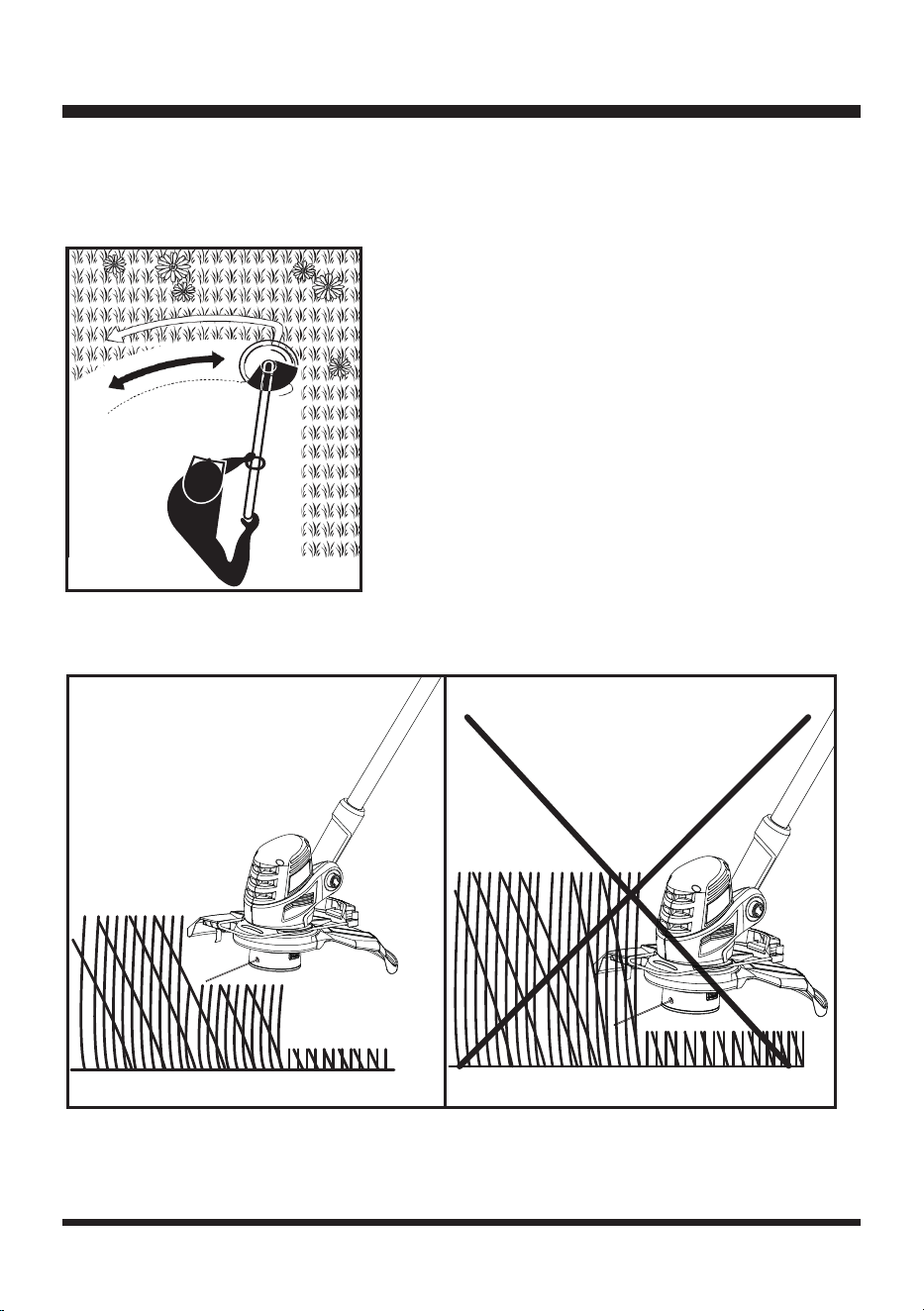
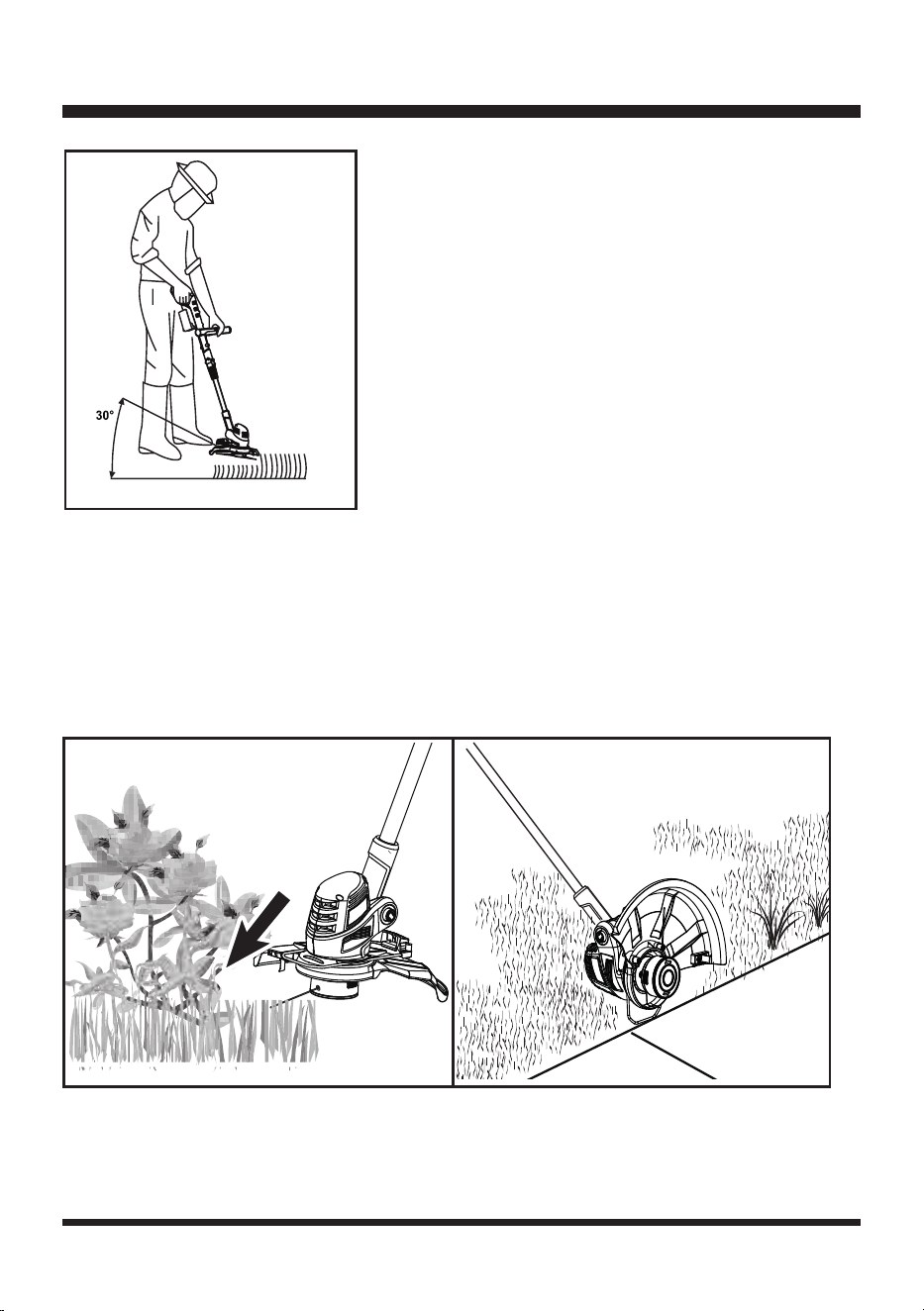
5. Work rhythmically. Stand firmly with your feet apart. Cut from right to left so clippings are thrown
away from the trimmer head (Fig. 17).
6. Do not move the product too fast as this will result in ineffective cutting and possible damage.
7. Cut in layers if the grass is tall, starting with the top layers and then the bottom (Fig. 18 & 19).
8. Keep the trimmer head at an angle of about 30° to the ground when trimming. Avoid pressing it
against the ground as this can ruin the lawn and damage the product (Fig. 20).
OPERATION
Fig. 17
Fig. 18 Fig. 19
23
NOTE: Let the cutting device do the work. Let it work at its own pace, never force it into the
area to be cut.
9. Carefully maneuver the tool around objects, such as trees and bushes, ensuring it does not come
into contact with them. Use the flower guard to ensure that the cutting device does not come into
contact with fragile plants (Fig. 21).
10. Adjust the trimmer head angle when trimming on edges and near walls.
11. Use the flower guard to avoid bringing the cutting device into contact with hard objects such as
walls and curbs (Fig. 22).
AFTER USE
1. Switch the product off, remove the battery pack and let it cool down.
2. Check, clean and store the product as described below.
Fig. 21 Fig. 22
OPERATION
Fig. 20
24
MAINTENANCE
CLEANING
1. Clean the product with a dry cloth. Use a brush for areas that hard to reach.
2. In particular clean the air vents after every use with a cloth and brush. Keep the air vents free of
obstructions, sawdust, and wood chips. Do not spray, wash, or immerse the air vents in water.
3. Remove stubborn dust with high pressure air (max. 3 bar).
NOTE: Do not use chemical, alkaline, abrasive or other aggressive detergents or disinfectants
to clean this product as they might be harmful to its surfaces.
4. Check for worn or damaged parts. Replace worn parts as necessary or contact an authorized
service center for repair before using the product again.
5. Keep the safety guard clean and free of debris. Remove trimmings. Replace the guard with a one
of the same type when it’s worn or shows damage
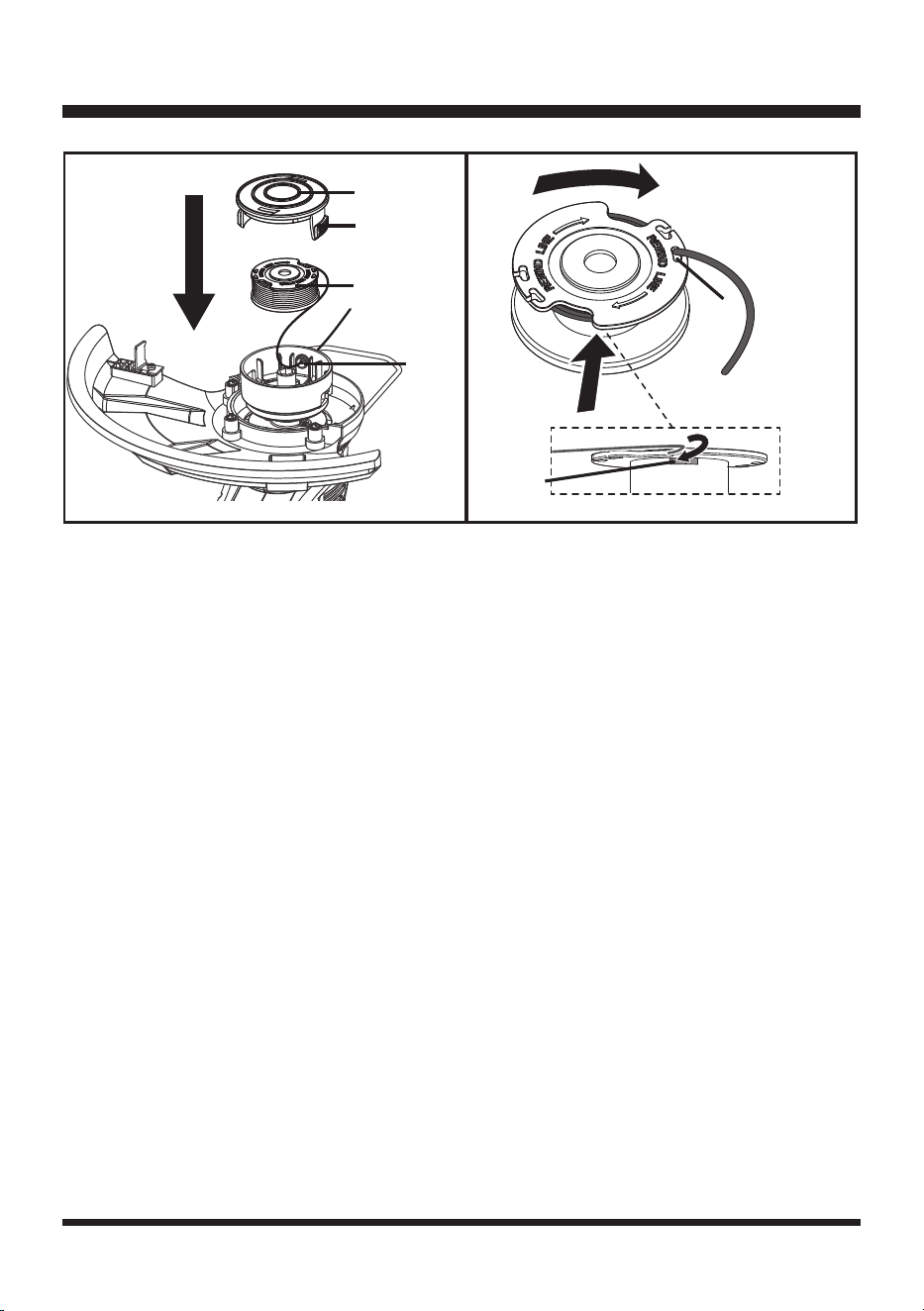
SPOOL REPLACEMENT (FIG. 23)
1. Use only 0.065 in. (1.6 mm) diameter round monofilament line. Use original manufacturer’s
replacement line for best performance.
2. Remove the battery pack.
3. Push in tabs on both sides of the spool cover.
4. Pull the spool cover up to remove.
5. Remove the spool.
NOTE: Always clean the spool cover and spool base before reassembling the trimmer head.
6. Check the spool cover, spool, and spool base for wear. If necessary, replace the worn parts.
7. To install the new spool, make sure the line is captured in the spool slot on the new spool. Make
sure the end of the line is extended approximately 6 in. (152 mm) beyond the slot (Fig. 24).
8. Install the new spool so that the line and slot are aligned with the eyelet in the line head. Thread the
line into the eyelet.
9. Pull the line extending from the eyelet so the line releases from the slot in the spool.
10. Reinstall the spool cover by depressing tabs into slot in the trimmer head and pushing down until
spool cover clicks into place.
NOTE: Use LawnMaster
®
spool model # 221007116 for replacement.
WARNING
In order to avoid personal injury and the risk of fire and electric shock, remove the battery pack before
adjusting, inspecting, or cleaning the grass trimmer.
WARNING
Always remove the battery prior to replacing the line spool. Failure to do so, can cause serious injury!
25
LINE REPLACEMENT
1. Remove the battery pack.
2. Remove the spool from the trimmer head. Remove any old line remaining on the spool.
NOTE: Use only 0.065 in. (1.6 mm) diameter round monolament line.
3. Cut a piece of line approximately 16.4 ft. (5 m) long.
4. Insert the line into one of the two anchor holes found on the upper part of the spool. Wind the line
around the upper part of the spool clockwise as shown by the arrows on the spool (Fig. 24).
5. Place line in the slot on upper spool flange, leaving about 6 in. (152 mm) extended beyond the slot.
Do not overfill. After winding the line, there should be at least 1/4 in. (6 mm) between the wound line
and the outside edge of the spool.
6. Check the spool cover, spool, and spool base for wear. If necessary, replace the worn parts.
7. Install the spool in the trimmer head and replace the spool cover as described in Spool
Replacement section.
STORAGE
1. Remove the battery pack from the trimmer before storing.
2. Clean the product as described above.
3. Store the product and its accessories in a dry, frost-free place.
4. Always store the product in a place that is inaccessible to children. The ideal storage temperature is
between 50°F (10°C) and 86°F (30°C).
5. We recommend using the original package for storage or covering the product with a suitable cloth
to protect it against dust.
MAINTENANCE
Fig. 23
Spool Cover
Tabs
Spool
Eyelet
Fig. 24
Slot
Anchor
Hole

26
MAINTENANCE
TRANSPORTATION
1. Switch the product off and remove the battery pack before transporting it anywhere.
2. Attach transportation guards, if applicable.
3. Always carry the product by its handles.
4. Protect the product from any heavy impact or strong vibrations which may occur during
transportation in vehicles.
5. Secure the product to prevent it from slipping or falling over.
BATTERY PACK MAINTENANCE
1. Fully charge the battery before placing in storage.
2. Recharge the battery pack whenever there is a noticeable reduction in the performance. Do not
allow the battery pack to become completely discharged.
3. Do not recharge a battery pack that is already fully charged. Overcharging shortens battery life.
4. Once the battery pack is fully charged, remove the battery from the charger and disconnect charger
from the outlet.
5. Do not store the battery pack on the tool or on the charger.
6. If the battery pack is hot, allow it to cool down before recharging.
CHARGER MAINTENANCE
1. Keep the charger clean and clear of debris. Do not allow foreign material into the recessed cavity or
on the contacts. Wipe with a dry cloth. Do not use solvents, water, or place in wet conditions.
2. Always unplug the charger when the battery pack is not installed on the charger.
3. Do not store the charger in excessive heat. Do not use in direct sunlight.
4. Disconnect the charger from the AC power outlet when not in use and once battery has reached a
full charge.
27
ENVIRONMENTAL SAFE BATTERY DISPOSAL
The following toxic and corrosive materials are in the batteries used in this battery pack:
lithium-ion, a toxic material.
WARNING
All toxic materials must be disposed of in a specific manner to prevent contamination of the
environment. Before disposing of damaged or worn-out lithium-ion battery packs, contact your local
waste disposal agency, or the local Environment Protection Agency for information and specific
instructions.
WARNING
If the battery pack cracks or breaks, with or without leaks, do not recharge it and do not use it. Dispose
of it and replace with a new battery pack.
DO NOT ATTEMPT TO REPAIR IT!
To avoid injury and risk of re, explosion, or electric shock, and to avoid
damage to the environment:
• Cover the battery terminals with heavy-duty adhesive tape.
• DO NOT attempt to remove or destroy any of the battery pack components.
• DO NOT attempt to open the battery pack.
• If a leak develops, the released electrolytes are corrosive and toxic. DO NOT get the solution in
eyes or on skin, and do not swallow it.
• DO NOT place damaged or defective batteries in your regular household trash.
• DO NOT incinerate.
• DO NOT place batteries where they will become part of any waste landfill or municipal solid waste
stream.
• Take batteries to a certified recycling or disposal center.
28
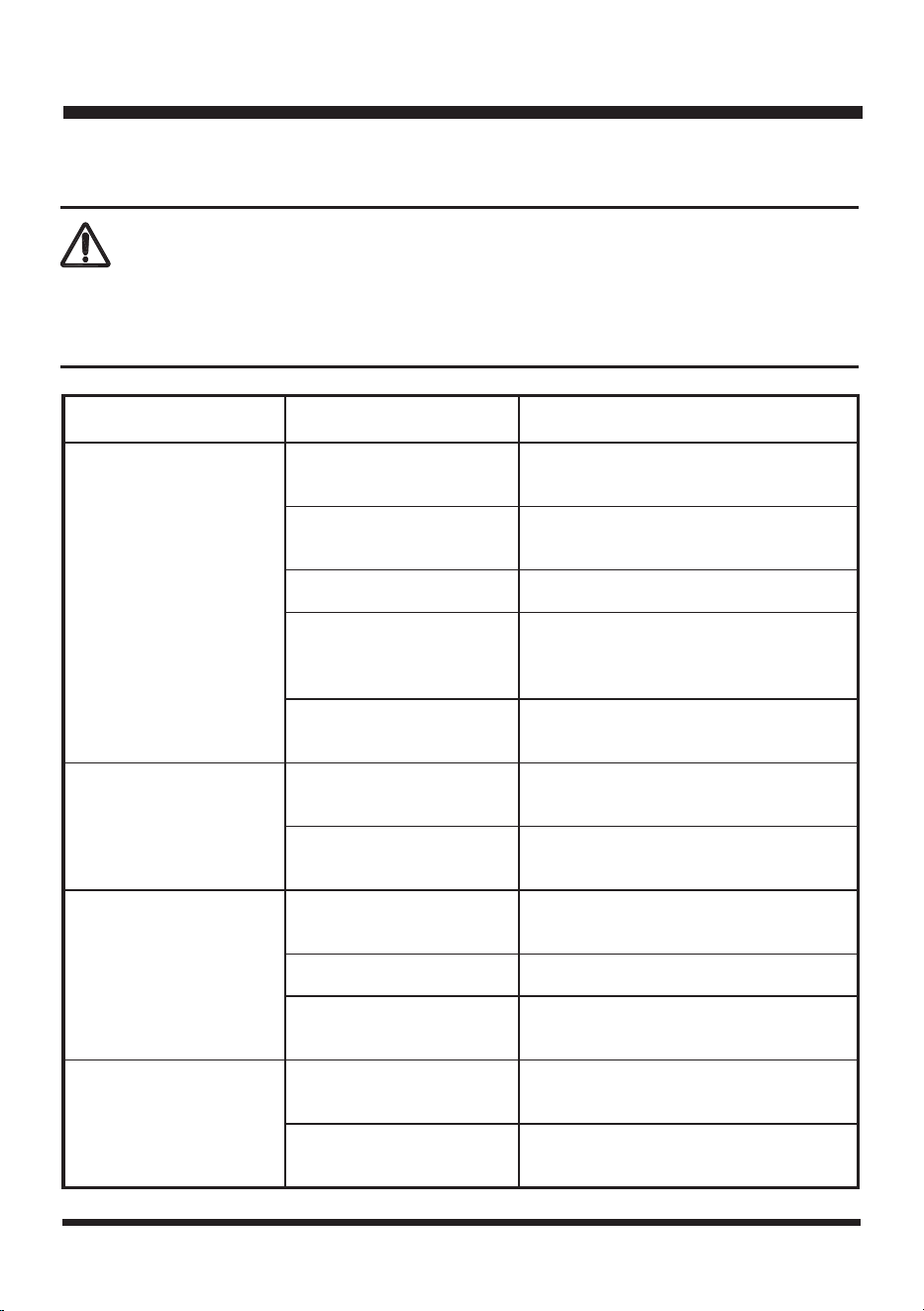
TROUBLESHOOTING
Suspected malfunctions are often due to causes that the user can fix themselves.
Therefore, check the product using this section. In most cases the problem can be solved quickly.
WARNING
Only perform the steps described within these instructions!
All further inspection, maintenance and repair work must be performed by an authorized service center
or a similarly qualified specialist if you cannot solve the problem yourself!
Problem Possible Cause Solution
Product will not start
when the on/off switch is
depressed.
Lock-off switch is not
pressed.
Press the lock-off switch and press the
on/off switch to switch the trimmer on.
The battery is not secure.
To secure the battery pack, make sure
the battery pack clicks into place.
The battery is not charged Remove and charge the battery pack.
The battery is defective. Replace with a new, charged battery.
Defective trigger
mechanism.
Call Customer Service for assistance
(Toll free number 866-384-8432).
Product does not reach
full power.
Battery pack capacity is
too low.
Charge the battery pack.
Air vents are blocked.
Remove the battery and clean the air
vents.
Unsatisfactory result.
The trimming line is worn
or damaged.
Replace the trimming line. Refer to the
Line Replacement section.
The trimmer head is dirty. Clean the trimmer head.
Cutting tall grass at ground
level.
Cut the tall grass from the top down to
prevent wrapping.
Line will not advance.
The trimming line is worn,
depleted, or tangled.
Install more trimming line. Refer to the
Line Replacement section.
The spool is worn.
Replace the spool. Refer to the Spool
Replacement section.
29
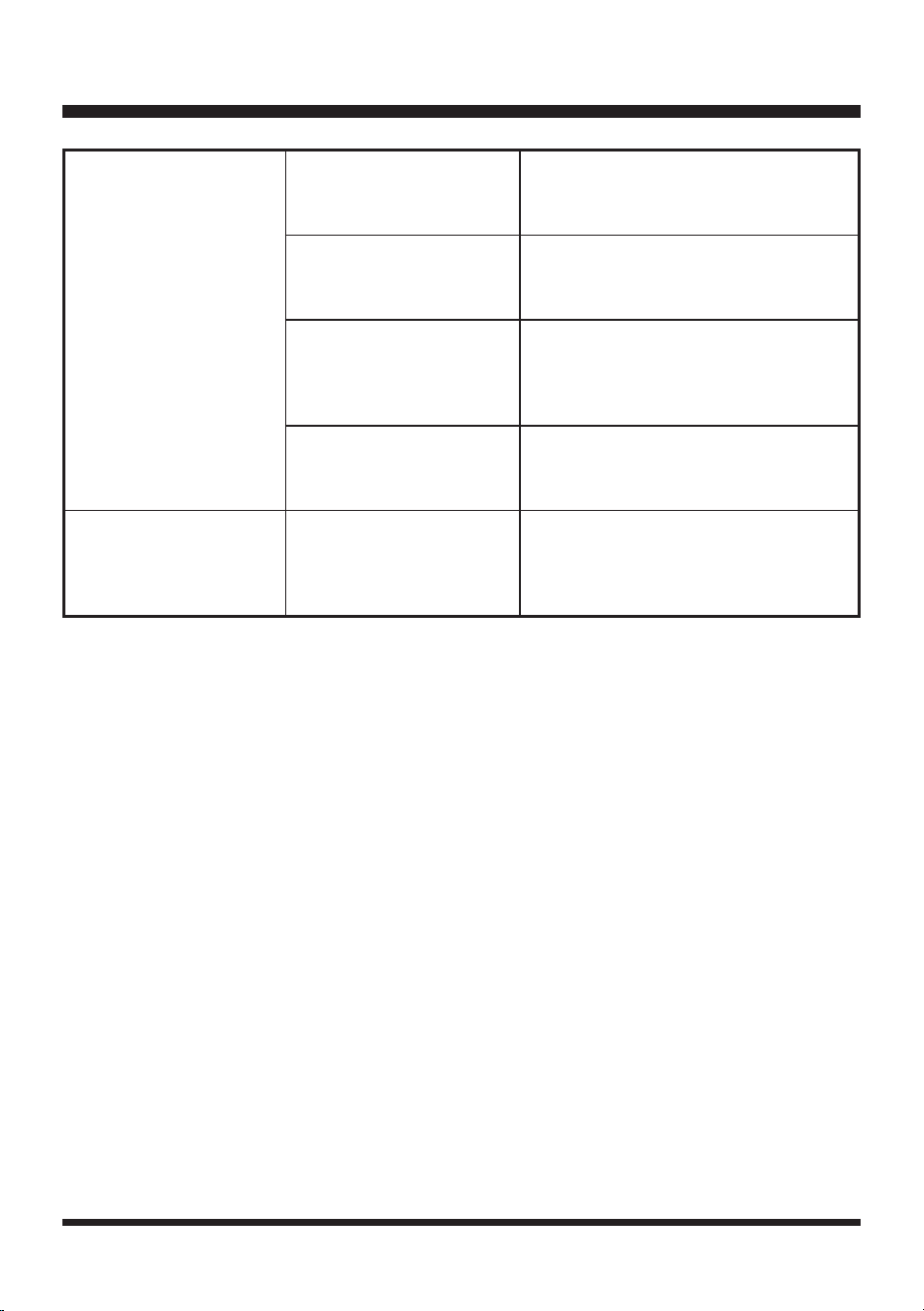
TROUBLESHOOTING
No charging procedure
possible.
The battery contacts are
contaminated.
Clean the battery contacts (e.g. by
inserting and removing the battery
several times) or replace the battery.
Mains plug of battery
charger is not plugged in
properly.
Insert mains plug fully into the socket
outlet.
Socket outlet, mains cable
or battery charger are
defective.
Check the mains voltage and if
necessary, contact the Customer
Service for assistance (Toll free number
866-384-8432).
The battery has a fault.
Contact the Customer Service for
assistance (Toll free number 866-384-
8432).
Charger 2Hz red LED
light flashing.
Battery pack is too hot.
Allow the battery pack to reach normal
temperature. Charging will begin
when battery pack returns to normal
temperature.
For more status of the indicator lights on battery & charger, refer to page 15 & 16.
30
LAWNMASTER
®
WARRANTY
31
EXPLODED VIEW
32
PARTS LIST
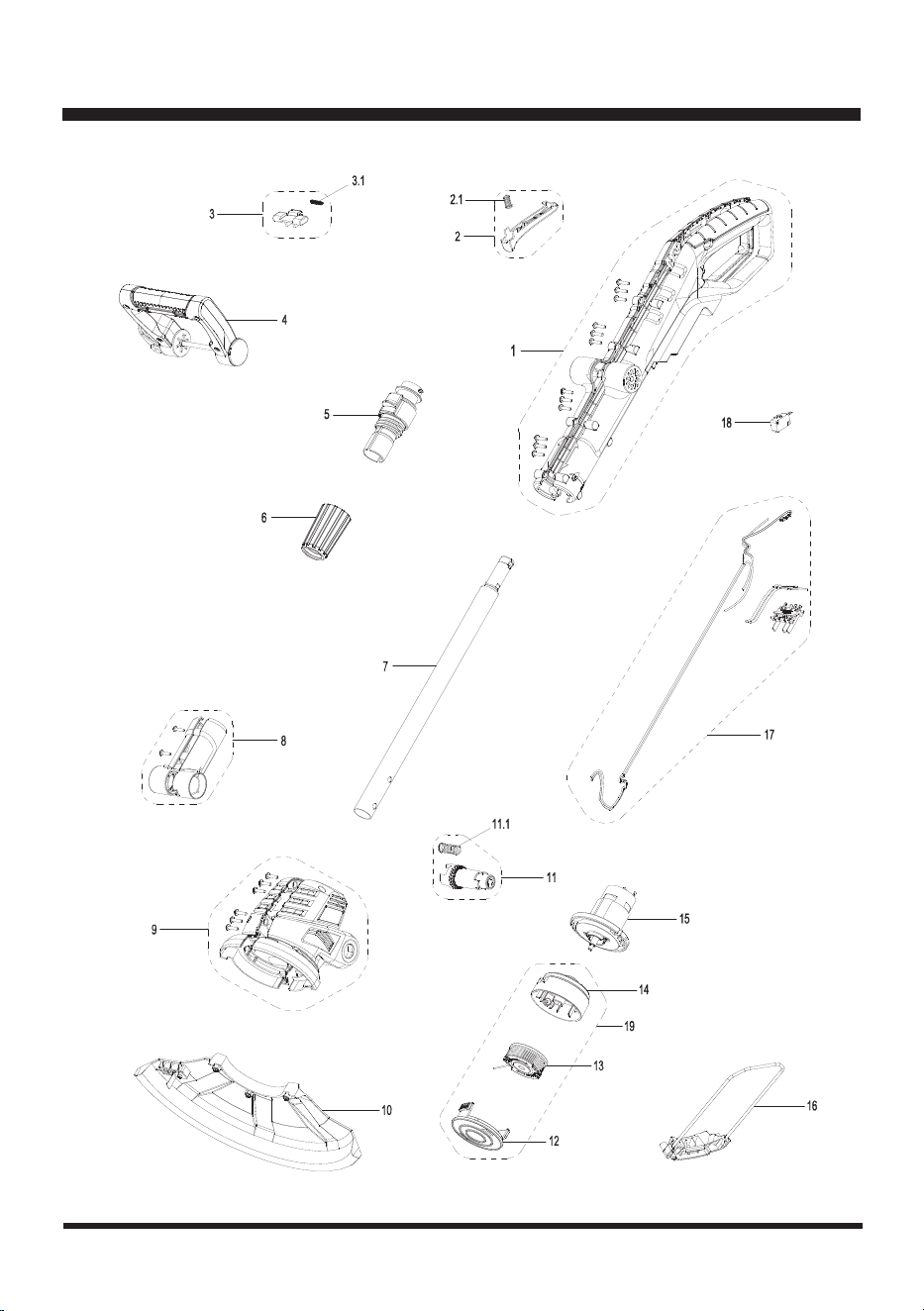
Key Number Drawing Number Description Quantity
1 Handle Assy. 1
2 Switch Button Assy. 1
2.1 Compression Spring 1
3 Safe-Locking Button Assy. 1
3.1 Spring 1
4 Auxiliary Handle Assy. 1
5 Upper Aluminum Tube Assy. 1
6 Locking Collar 1
7 Lower Aluminum Tube Assy. 1
8 Rotary Handle Assy. 1
9 Motor Housing Assy. 1
10 221008109 Debris Guard 1
11 Shaft Lock Button Assy. 1
11.1 Compression Spring 1
12 Spool Cover 1
13 221007116 Spool With Line 1
14 Spool Holder 1
15 Motor Assy. 1
16 Flower Guard Assy. 1
17 PCB Assy. 1
18 Micro Switch 1
19 221040108 Spool Assy. 1
Replacement parts highlighted in grey are available for after sales purchase. Replacement of repair or
internal parts should only be done by a qualified service professional. Please contact your authorized
service dealer or Customer Service at 866-384-8432.

33
NOTES

34
NOTES