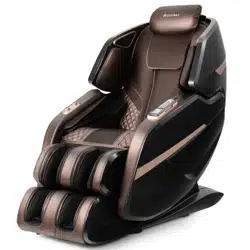
JL10023WL-BN
Massage Chair
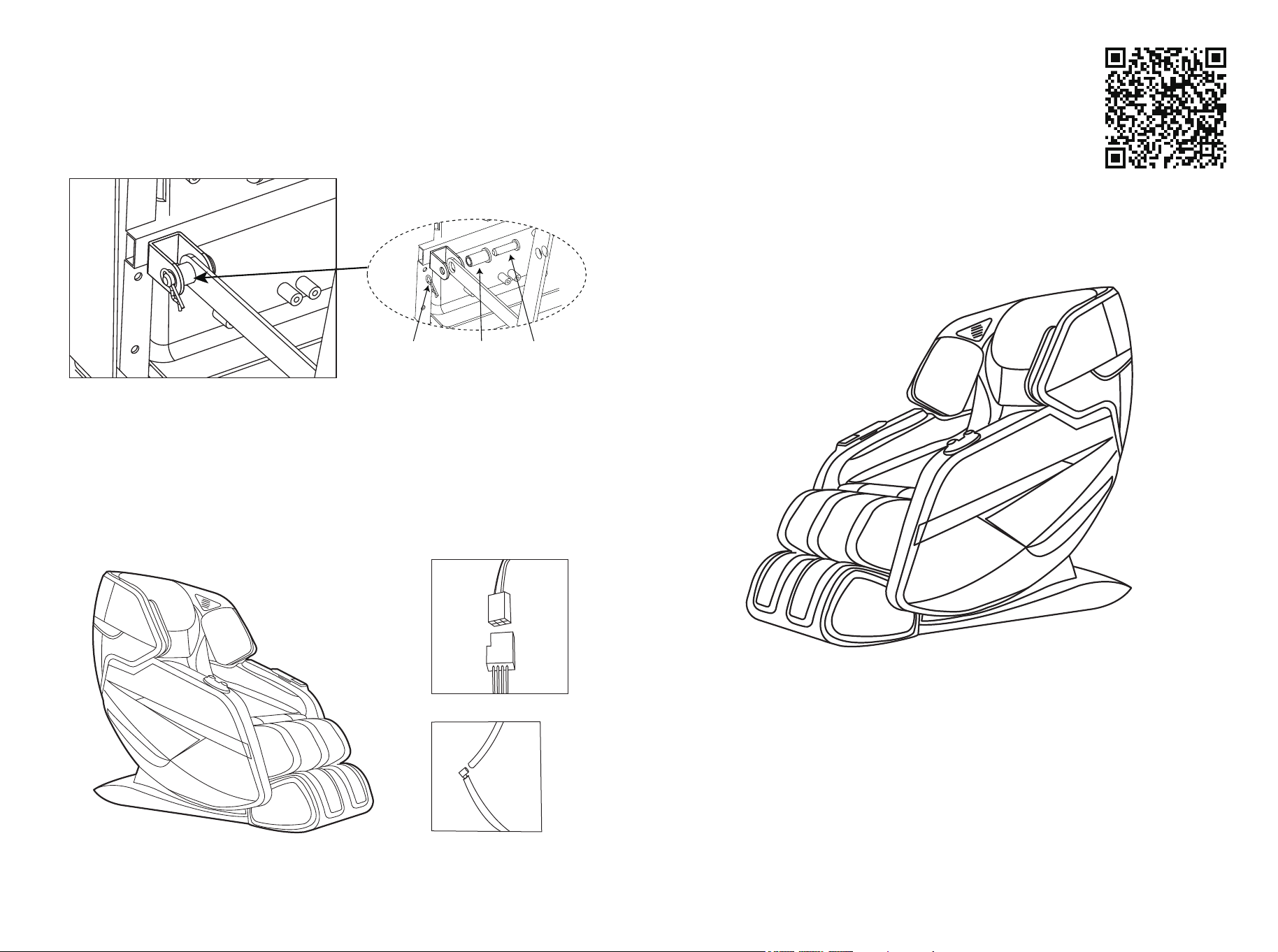
3. Install leg link shaft.
Shaft
sleeve
Pin
R pin
4. Connect the docking wire to the air pipe.
20
Scan QR code for
assembly instructions

1. People with the following conditions should consult their physician
before using the product:
2. Do not let water enter the product or splash the surface of the product.
3. Water contact with electricity is dangerous. Do not leave the product in a
humid environment (such as in bathroom or shower room or next to
swimming pool).
4. Before connecting the product to the power supply, make sure the
product voltage and supply voltage are the same.
* Who uses a medical electronic device, which is embedded in the body,
such as a pacemaker.
* Who suffers from heart disease.
* Who suffers from backbone disease.
* Who is suffering from bone fragility, especially on the backbone.
* After surgery.
* Who is pregnant, after delivery or in a period of monthly illness.
* Who suffers from malignant tumors.
* Who is suffering from osteoporosis.
* Who is suffering from skin disease or affection.
* Who is undergoing medical treatment or feels some physical
abnormality previously or is being treated now.
* Who has some abnormality or deformity of limbs or backbone.
* Who has backbone problems or injuries due to illness or accident.
Note: Never massage the swollen or inflamed parts of the body.
SAFETY PRECAUTIONS
5. If the plug, power cord or product itself is damaged, do not use
the product.
6. In order to prevent the risk of electric shock, do not open the
product outer casing.
7. Product is not intended for use by the disabled,sensory or mental
impaired (including children), unless there is supervision or
guidance by the people responsible for their safety when they
use the product.
8. If the product or the power cord is damaged, in order to avoid
danger, do not try to repair the product. This must be handled by
specialist/technician.
9. Children should not use the product. They should be under
supervision to ensure that they will not treat the product as a toy.
10. lf unusual sound or noise is being heard from the product,turn off
the product and immediately disconnect the power connection.
Please contact the after-sales service center.
11. Do not use the product if the cover is damaged or if there is a
mechanical or electronic failure. You should contact the
after-sales service center.
12. Only place the product in accordance with the instructions in this
user manual.
13. Do not use the product in humid conditions and high temperature
environment or beside hot objects such as heaters, stoves.
14. Do not apply medical or cosmetic cream on the product or on
your body before or when using the product.
15. When massaging around or near the neck, take care of the
movement of rollers and refrain from using excessive intensity.
16. Do not destroy, bend, stretch, twist or tie the power cord.
Damaged power cord can cause fire or electric shock.
02 03
17. Do not use the product on bare skin.
18. Recommended usage time for an individual is within 30 minutes a day.
19. The maximum capacity is 220lbs. If it is over 220lbs, permanent damage
to the product would be resulted.
20. Always keep the product clean and never insert any object into the gaps
on and around the product.
21. The product is designed for household use only.
22. Do not stand, sit or jump on the calf-rest when the product is in use to
prevent any injury or damage.
23. Do not attempt to stand on the backrest and armrest to prevent any
injury to person.
Warning:
* Who should avoid using this product: those who are physically, sensory,
or mentally impaired, or who are lack of experience and knowledge.
Unless they are supervised or directed by the person responsible for their
safety regarding the use of this product.
* Children should be supervised to ensure that they cannot play with the
massage chair.
* If the power cord is damaged, it must be replaced with a dedicated cord.
* The surface of the appliance is hot, and people who are not sensitive to
heat must use with caution.
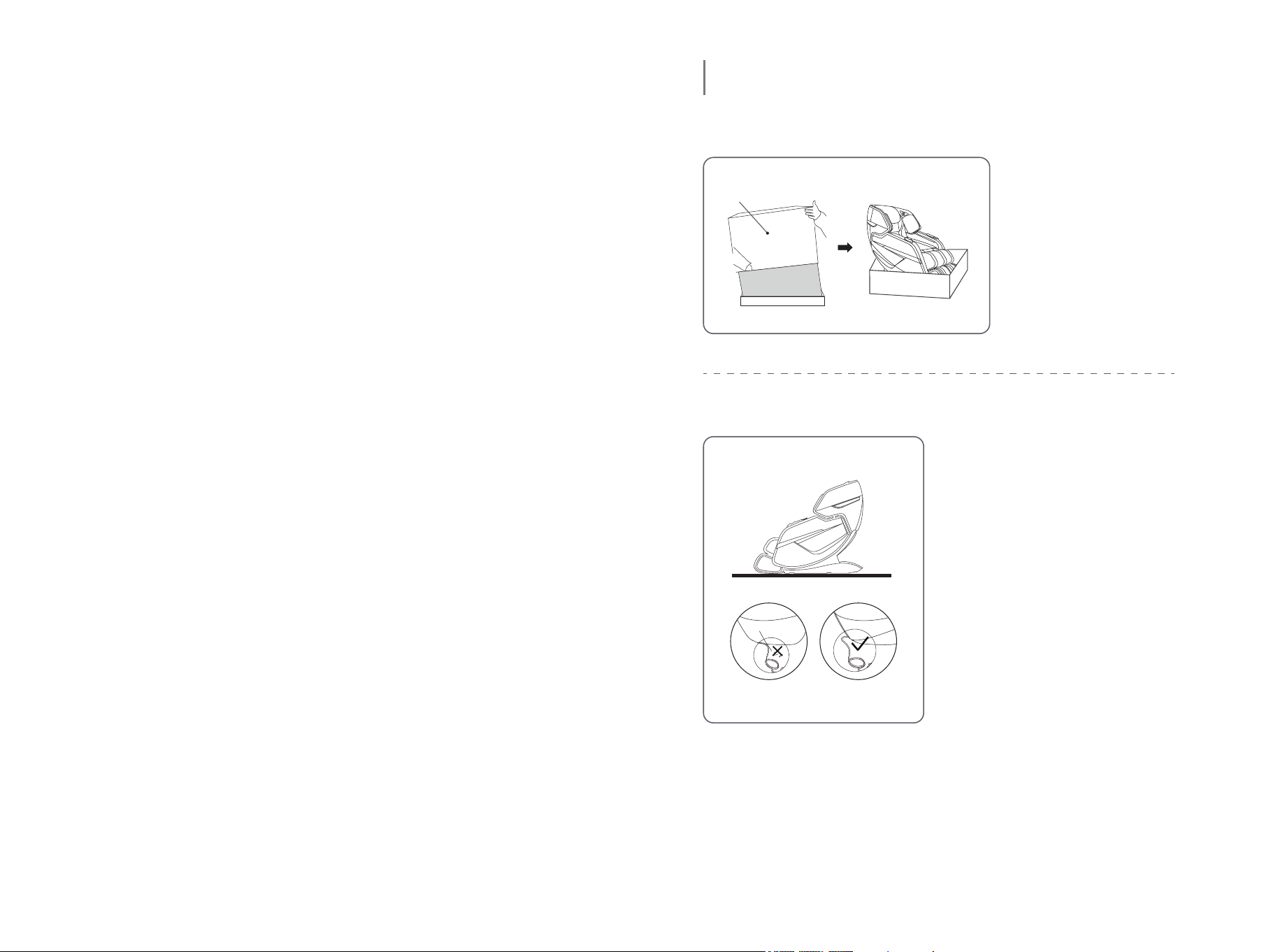
1. Open the packing case and take out the accessories
2. Place the chair in an open area
Lift upwards
PREPARATION FOR USE
1) Remove the
carton.Take out the
chair.
2) Install the pillow and
backrest cover.
* Allow sufficient space around
the chair for reclining purposes.
* To avoid damage to the floor
and to reduce noise, please put
a rug under the chair.
* Make sure that there is no
barrier at the front and the back
of the chair.
* Please do not put the chair on
wet or uneven floor.
* To avoid signal interference,
please place the chair 3.3ft
away from TV and radio.
Warning:
Do not put the power cord under the chair! Beware of damaging the
power cord while moving the chair!
04 05
3. Move the chair
* Do not move the chair when occupied or in use.
* Moving the chair may cause damage to the floor.
Floor protection is recommended (e.g.rugs or carpet).
* Do not drop or suddenly let go of the chair when moving as it may
damage the chair.
* To avoid injury to the massage chair or the transporter, it is
recommended that two people carry the massage chair together
with special care.
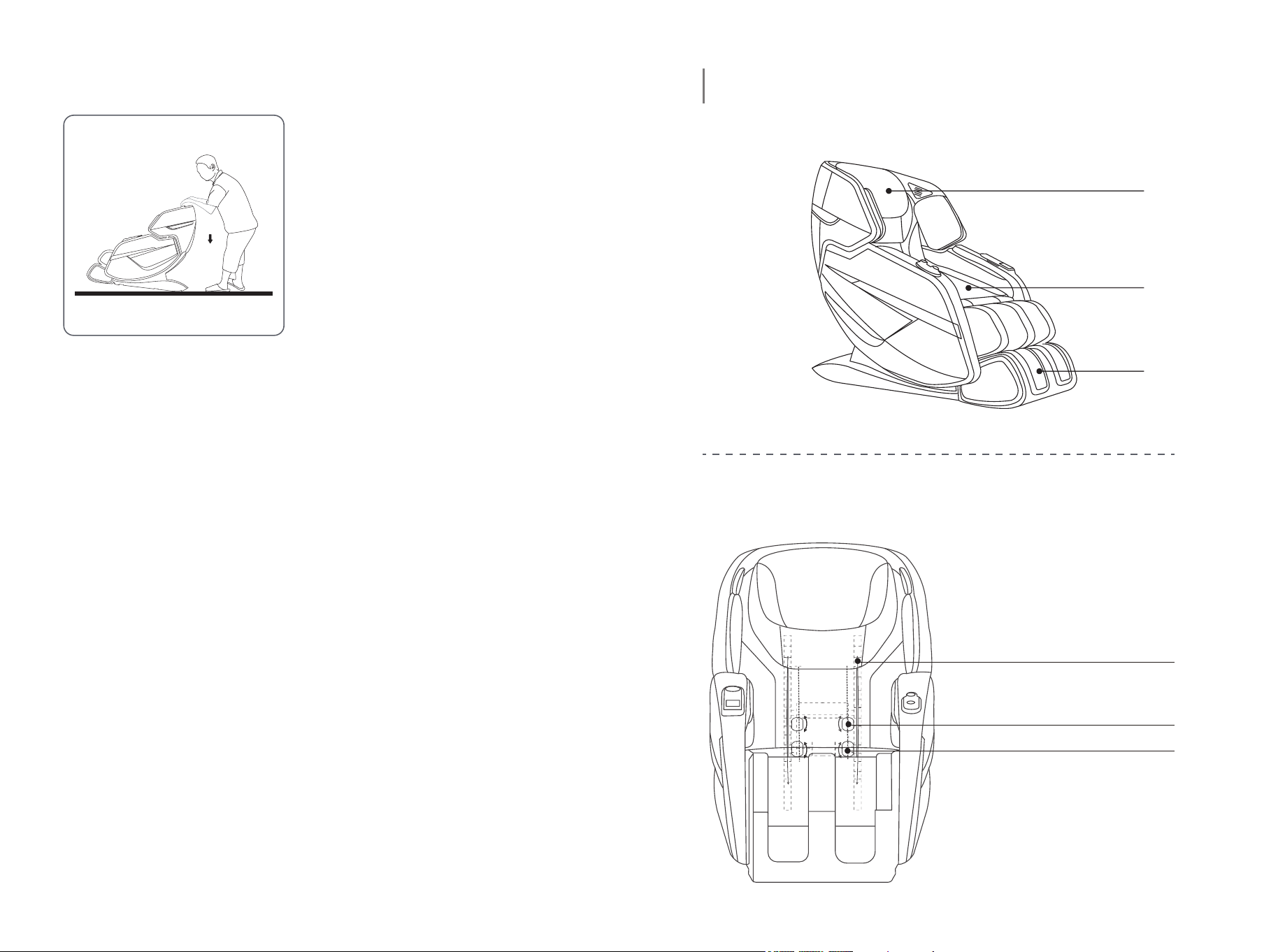
1) As illustrated, push the backrest
downwards and tilt chair on to
its wheels at a 45° angle.
2) Slowly push and move the chair
to the desired location.
3) Lower the chair slowly and
smoothly until it is fully flat on
the ground.
Warning:
Front View
Moving Parts of Massage Chair
PRODUCT DESCRIPTION
Headrest
Seat
Leg
SL-Massage Track
Massage Roller Mechanism
Massage Ball
06 07
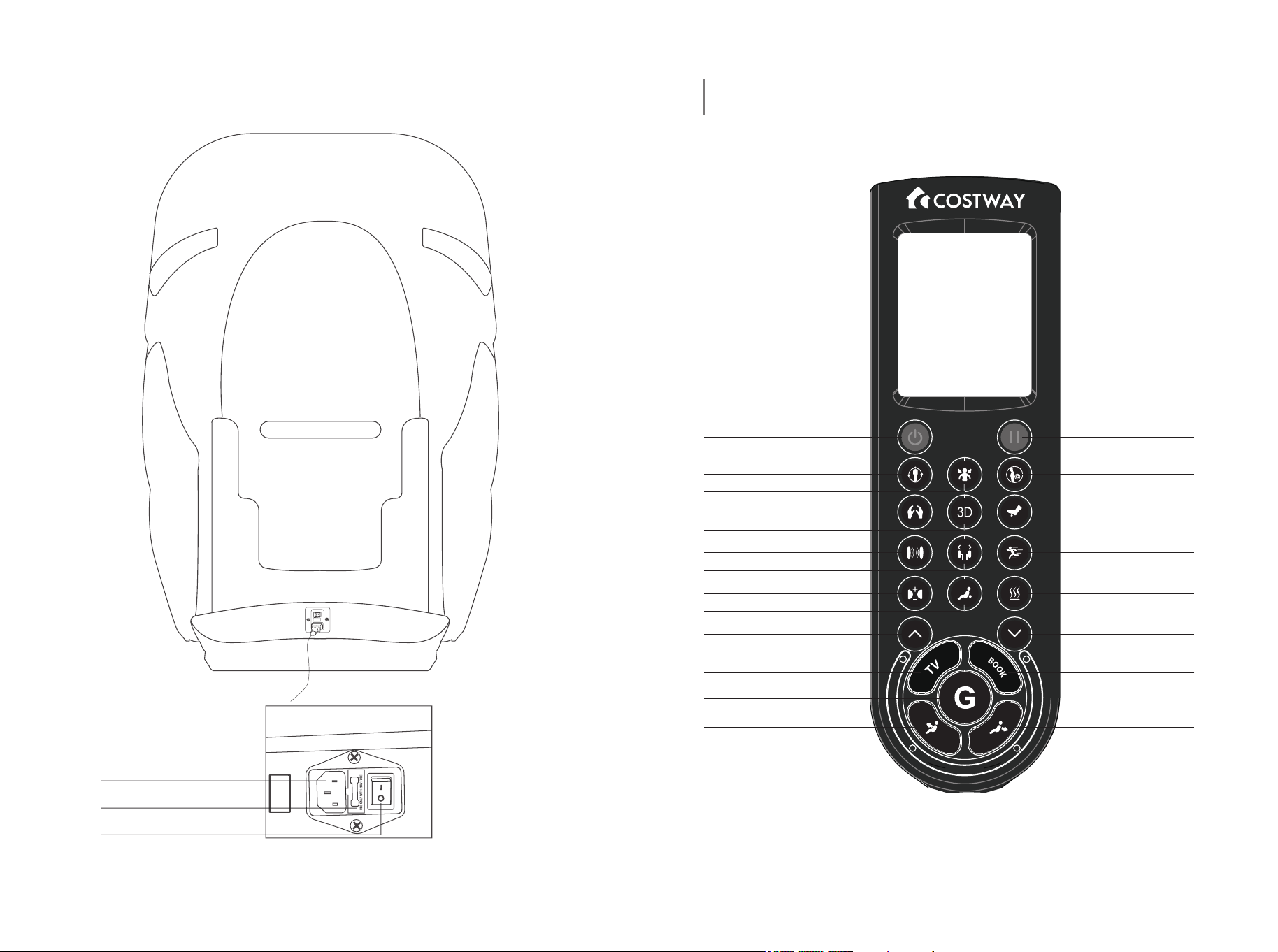
Rear View
Main Power Socket
The Fuse
Power Switch
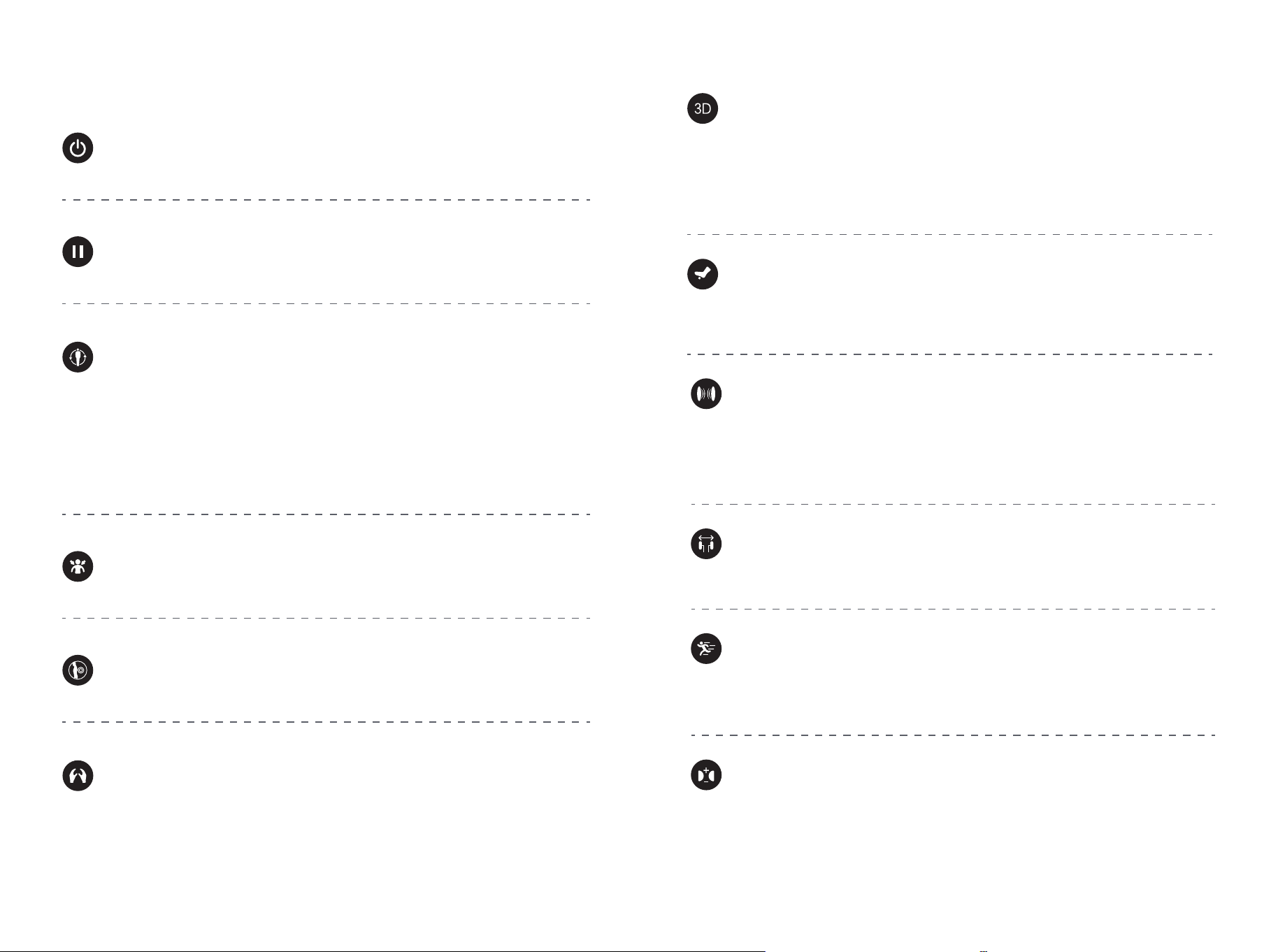
REMOTE CONTROLLER
On/Off Pause
Waist & Hip
Foot Roller
Speed Adjustment
Heat On/Off
Spot Massage
Down
BOOK
Backrest Down
Auto Program
Neck & Shoulder
Manual Massage
3D On/Off
Airbag Massage Area
Width Adjustment
Intensity Adjustment
Spot Massage
Spot Massage Up
TV
Zero Gravity
Backrest Up
08 09
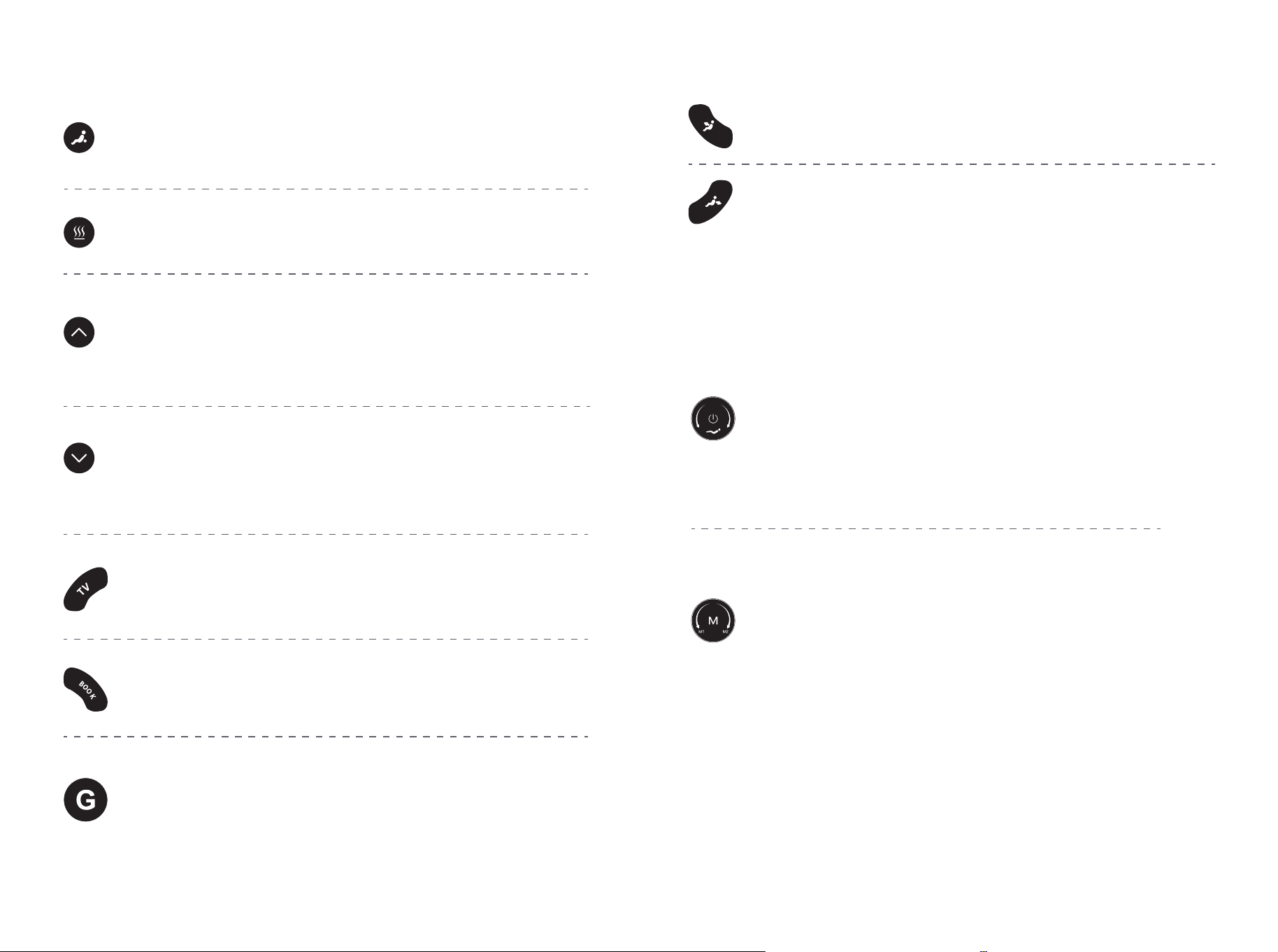
Function Description of Control Panel
On/Off
Press once to enter standby mode. Press the button again to stop
current massage function and return to standby mode.
Pause
Press to pause all the functions that are currently running or
continue to run the functions before the pause.
Auto Program
Press to start the automatic massage mode. The 8 automatic
massage modes in sequence are: ① whole body massage mode; ②
double 3D massage mode; ③ healthy massage mode; ④ cradle
massage mode; ⑤ neck and shoulder massage mode; ⑥ waist and
hip massage mode; ⑦ upper body massage mode; ⑧ lower body
massage mode. Press the button ninth to stop the automatic
massage mode.
Neck & Shoulder
Press this button to enter automatic massage mode ⑦, press this
button again to stop.
Waist & Hip
Press this button to enter automatic massage mode ⑧, press this
button again to stop.
Manual Massage
Press this button to enter the manual massage movement up mode,
and switch four manual modes in turn: ① kneading 1; ② kneading 2;
③ kneading 3; ④ Shiatsu. Press the button fifth to stop the manual
massage mode.
3D On/Off
Press this button to enter 3D massage mode, the “Strength” note on
the controller screen lights up, and the massage movement bulges
forward to enhance the massage body feeling; Press this button
again to stop 3D massage chair mode, and the “Strength” note on
the controller screen is off. “Strength” is not adjustable.
Foot Roller
Press this button to switch on or off the function of the foot roller.
This function can be switched on or off in automatic mode or manual
mode.
Massage Speed Adjustment
Press this button to adjust the massage speed of the upper
massage mechanism, corresponding to “Speed” note on the screen.
Adjustable in low, medium and high speed.
Airbag Massage Area
Press this button to manually enter the airbag massage mode in the
corresponding area, in the order of: ① foot; ② foot & arm; ③ foot &
shoulder; ④ shoulder & arm. Press the button fifth to stop the
manual airbag massage adjustment.
Massage Width Adjustment
When the “Width” note on the screen lights up, the width of the
massage movement can be adjusted.
Intensity Adjustment
Press to select from 3 levels of air pressure massage intensity,
corresponding to “Intensity” note on the screen.
10 11
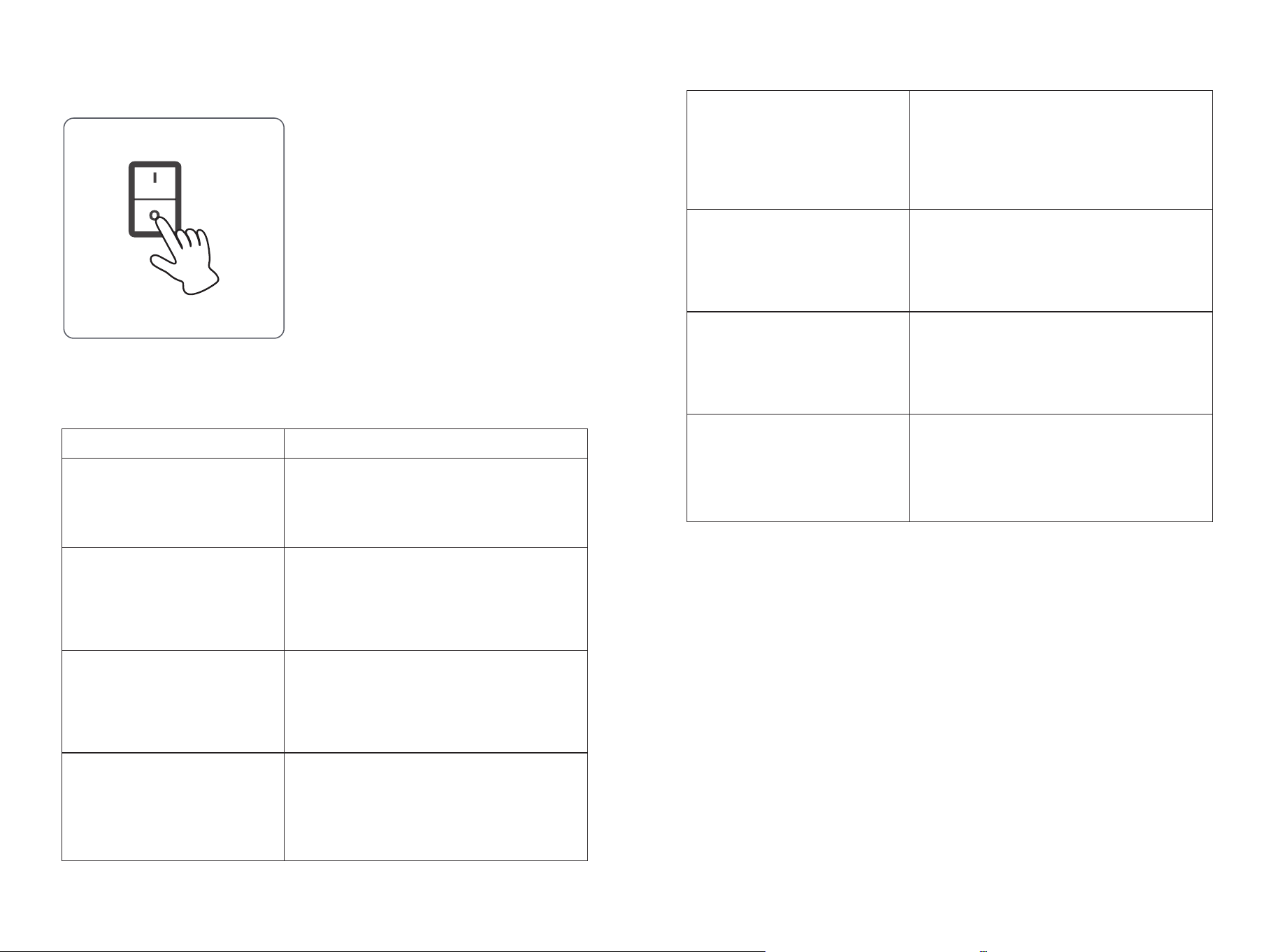
Spot Massage
Press this button to start/stop the spot massage mode; The position of
upper massage mechanism can be controlled only in manual mode.
Heat On/Off
Press this button to start/stop the heating function on the back.
Spot Massage Up
Press this button, the upper massage mechanism will move up
along the guide rail; The position of upper massage mechanism can
be controlled only in manual mode.
Spot Massage Down
Press this button, the upper massage mechanism will move down
along the guide rail; The position of upper massage mechanism can
be controlled only in manual mode.
TV
Press this button to adjust the angle of the massage chair to the
comfortable level, in order to watch TV.
BOOK
Press this button to adjust the angle of the massage chair to a
comfortable reading angle.
Zero Gravity
Press this button to enter zero gravity mode, which simulates the
zero-gravity state of space to distribute body weight evenly on the
massage chair. Release physical and mental stress.
Backrest Up
Press and hold this button to move up the backrest.
Backrest Down
Press and hold this button to recline the backrest.
Knob Description
Knob 1
1. When the power is on, the red light of the knob flashes; Long
press this button, the blue light will turn on, the massage chair will
start up and enter the standby state.
2. When the power is on, turn the knob to adjust the Angle of the
chair back.
Knob 2
1. When the power is on, press this button, the purple light will turn
on, and you can switch four manual modes in turn: ① kneading; ②
kneading 2; ③ kneading 3; ④ Shiatsu.
2. When the power is on, turn the knob to switch between the
automatic program ①(A1) and the automatic program ②(A2). Turn to
A1, red light is on, and turn to A2, blue light is on.
12 13
1) Press the On/Off button to disable all
functions before putting the remote
controller into the controller pocket.
2) Turn off the power switch ( to "O" )
located at the back of the chair.
3) Remove plug from power socket.
* Please do not pull on the power cord to
remove the plug.
After use
Auto Program Description
Auto Program
① whole body massage
mode
With moderate massage intensity and
airbag strength. Suitable for the whole
body muscle relaxation after exercise.
Massage deeper into deep muscles and
acupoints to better relieve muscle
soreness and lower back discomfort and
promote blood circulation.
With gentle massage intensity and
airbag strength. Improve the whole body
of middle-aged and elderly people's
waist and back and muscle discomfort.
The massage chair cyclically swings by
cyclically adjusting the Angle of the
backrest, and gently massages to help
relax and sleep.
② double 3D massage
mode
③ healthy massage mode
④ cradle massage mode
Description
⑤ neck and shoulder
massage mode
Focus on the neck and shoulder
massage with harder kneading intensity.
Suitable for long-term desk worker to
better relax muscle and relieve pain.
Focus on the waist and hip massage
with moderate massage intensity.
Conducive to reduce the waist and hip
pain caused by sitting for a long time.
Upper body massage only. Focus on the
massage on the neck & shoulder, waist
& back. With moderate massage
strength.
Lower body massage only. Focus on the
hip & thighs. With moderate massage
strength.
⑥ waist and hip massage
mode
⑦ upper body massage
mode
⑧ lower body massage mode
14 15
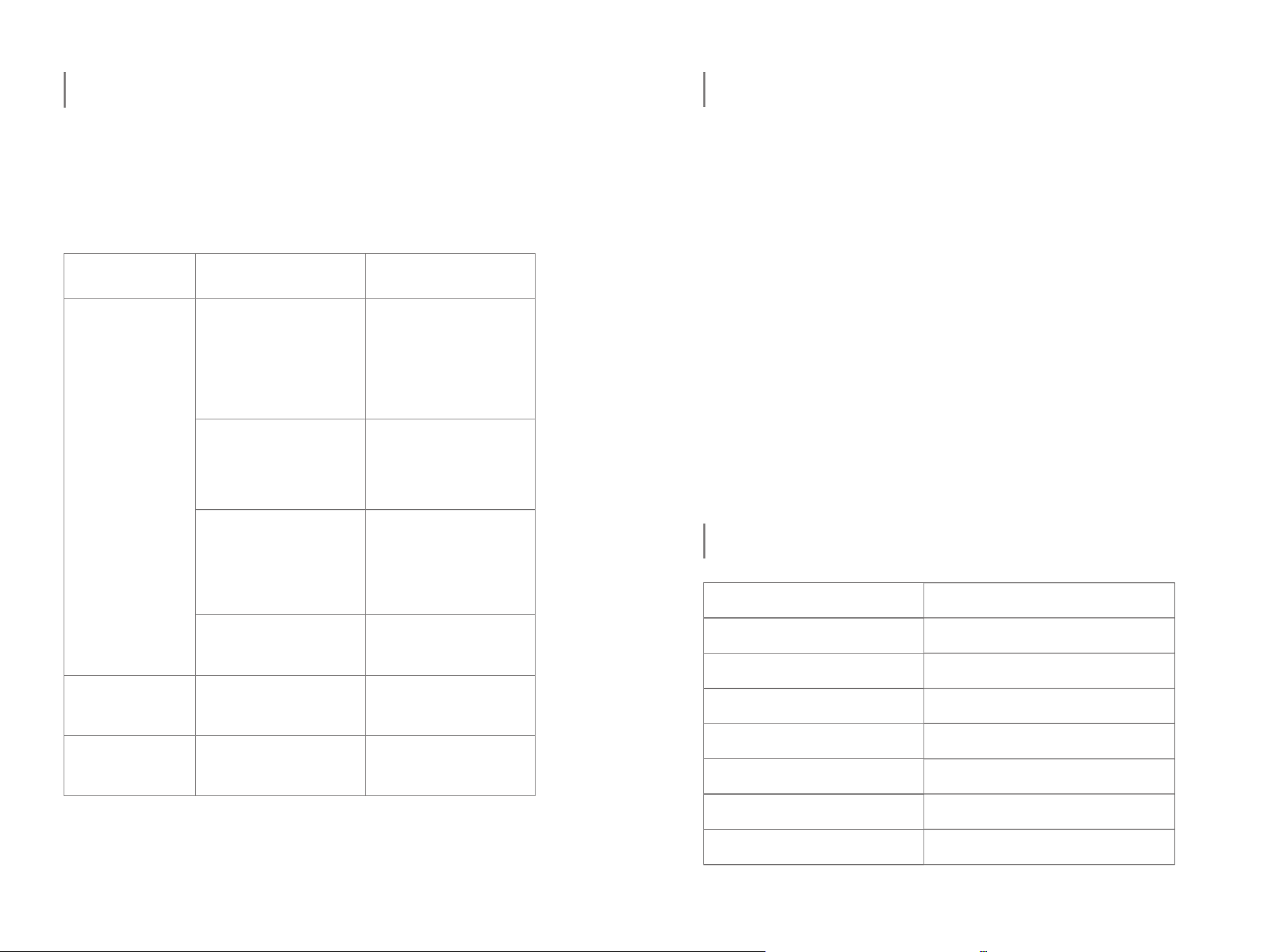
This page summarizes the most common problems you would
encounter with the product.
If you are unable to solve the problem with information below,
please contact the after-sales service center immediately.
TROUBLESHOOTING
The problem
situation
Possible Cause Suggestion
The product
does not work
The product is not
plugged in properly.
Ensure the voltage on
the product
corresponds to the
local mains voltage
and then plug in again.
Then press on the
power switch.
The product is
abnormally warm
The product is likely to
be overused.
Unplug the product and
let it cool down before
using it again.
Noise can be
heard from the
product
Noise is made by the
mechanical parts of the
product.
This is normal and does
not mean that the
product is faulty.
The product has just
finished its 15-min auto
timer session and has
automatically switched
to standby mode.
If you want another
session, press the
On/Off button again.
You may have used
the product continuously
for more than 45
minutes and the
overheat protection has
been activated.
Unplug the product and
let it cool down for 60
minutes before you use
it again.
An excessive load has
been applied on the
product.
Reduce the
excessive load and
start again.
PRODUCT SPECIFICATIONS
Product Name
Mode
Rated Voltage
Power Input
Power Consumption
Packing Size
Net Weight
Gross Weight
Massage Chair
JL10023WL-BN
120V
60Hz
150W
58" x 32" x 34"(L x W x H)
184 LBS
227 LBS
Cleaning
If the cover is damaged or there is any mechanical failure, please
stop using the product. Contact the after-sales service immediately.
1). Unplug the plug from the power socket.
2). Store the product in a cool dry place away from sunlight.
3). Do not put a heavy weight load on the product.
1. Do not use steel wool, abrasive cleaning agents or corrosive
liquids (such as gasoline or acetone) to clean the product.
2. Unplug the plug from the power socket.
3. Wipe with a dry cloth to clean the chair, remote controller and
power cord.
4. Do not use a damp cloth or detergent.
CARE & MAINTENANCE
16 17
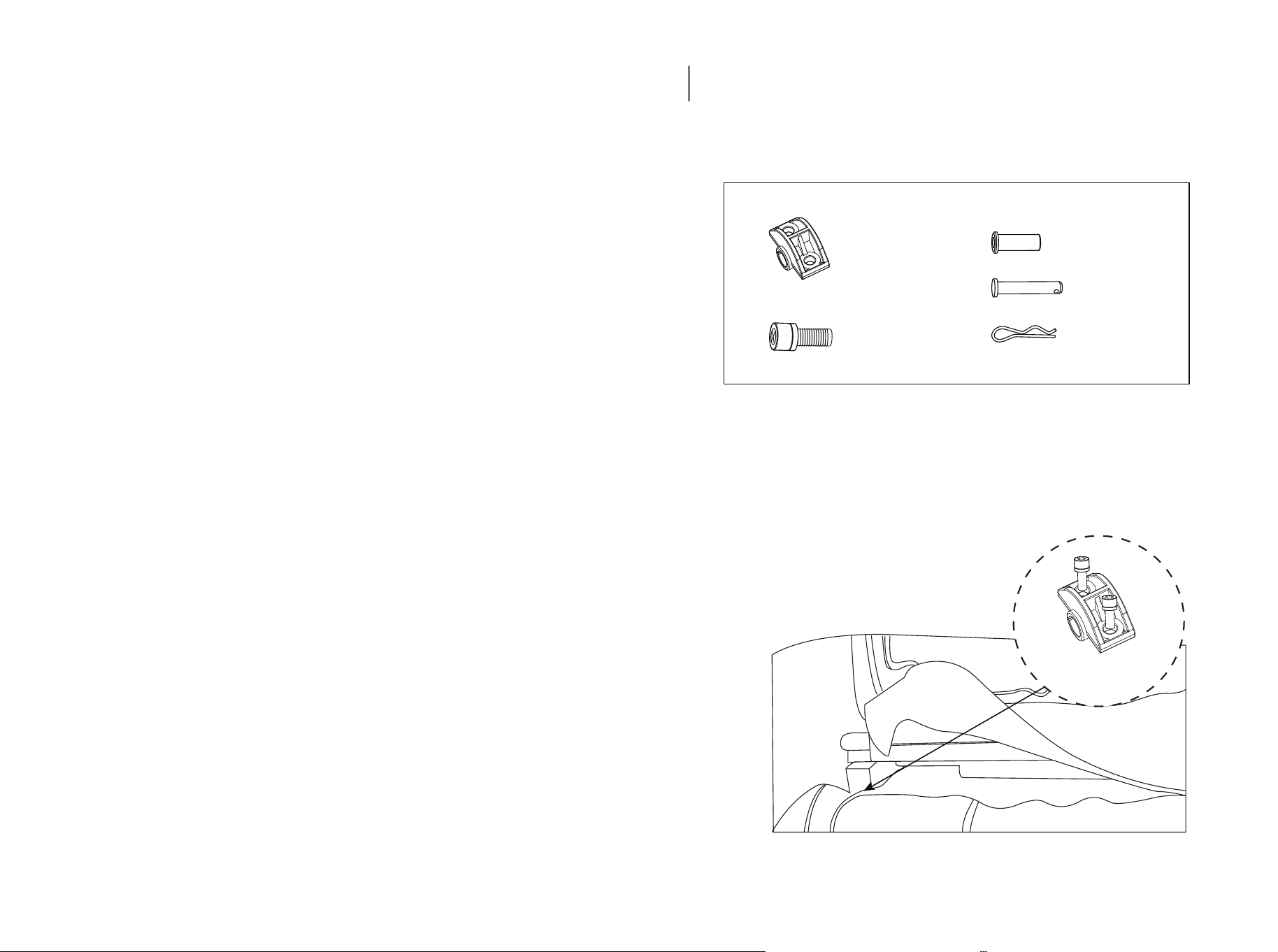
Leg Mounting Instruction Card
1. Open the box, slowly take out the massage chair and legs, and check
whether the installation accessories are complete.
Shaft sleeve x2
Press block x2
Screw x4
Pin x2
R pin x2
2. Place the shank shaft into the slot, then install the leg press block and
tighten the cross screw with the appropriate tool.
Press block
Thank you very much!
Thank you for choosing products that meet your health needs. All
products have been tested and confirmed to be safe and suitable for
personal use.
Please read the manual carefully for correct usage and operation.
All rights reserved
Without permission, any form of reproduction, storage, transmission,
translation, whether in part or in whole content will be considered
copyright infringement.
Thank you for choosing this massage chair. Please read this
instruction carefully before use, especially the safety precautions
section, in order to use the massage chair correctly. Please store
this manual properly after reading and refer to it whenever
necessary.
Functions are subject to upgrade and change without prior notice.
Please refer to the actual product.
18 19

Costway Massage Chair Customer Warranty
Costway products include the following warranty:
This Costway massage chair has a three-year warranty for both parts and
labor.
Costway customer service will not issue Return Material Authorizations
(RMAs) for products due to buyer’s remorse. RMAs will be issued only
when product has quality problem. Costway products will be either
repaired by the customer or by an in-home technician.
Service And Technical Support:
Customers can contact Costway's customer service department at
213-401-2666 at any time Monday through Friday or via email at
topsupport@costway.com for warranty or service issues.
Customers are required to provide dated proof of purchase (sales receipt)
when they contact Costway service department regarding a repair.

A Costway customer service representative will attend to most customer
inquiries, however, in some cases, when necessary, a technical service
specialist will provide advanced support.
Non-warranty repair is provided on a "per incident" basis. Costway
customer service will verify that the unit has failed and provide
instructions for repairing a unit. All applicable repairs, parts, shipping,
handling, local tax, and a "per incident" fee will be charged for
non-warranty repairs.
You can visit www.costway.com and www.costway.ca for the latest terms
and pricing depending on the type of issue or incident.
Proof of purchase (sales receipt) is required for all warranty repairs or
service.
Extended Warranties:
Costway offers extended warranty programs to enhance ownership of
Costway products.
Extended warranty provides: A maximum 2-year limited repair or

replacement massage chair warranty with on-site service in certain
areas.
Please visit www.costway.com and www.costway.ca for the latest terms
for extended warranties.
Product Repairs
Many Costway product repairs may be performed by the customer in
their own home with parts and instructions supplied by Costway, such as
remote controller replacements that don't require a technician.
Customers may contact Costway's customer service department at
topsupport@costway.com for warranty or service issues.
Floor Models and Demonstration Units have a prorated warranty period
that begins the day the model is placed on the floor and connected to an
electrical outlet by the retail partner. Proof of purchase (sales receipt) is
required in order to obtain warranty service and parts. Non-warranty
parts and service are available at a "per incident" rate.
Warranty Coverage Period: Warranty coverage begins on the date of
customer purchase. Proof of purchase (sales receipt) is required for all

warranty repairs. The warranty period is measured by continuous
calendar days based on a seven-day week.
Field Service: The Costway customer service department will diagnose
the problem and schedule an authorized service provider to repair a
chair in the customer's residence. If the area is not covered by Costway
official or authorized service provider, after the Costway service team
diagnose the problem and provide approval, customers may find their
own qualified technician. Customers will be reimbursement once an
invoice and proof of the technician’s qualifications are submitted to the
Costway customer service department. The value of reimbursement
should not exceed the cost of a Costway official or authorized service
provider.
Parts: All parts deemed necessary for repairs will be shipped to the
customer at no charge.
CUSTOMER WARRANTY LIMITATIONS AND EXCLUSIONS
Warranties are not valid in certain areas. Invalid areas in Canada: NT, NU,
YT.

Postcodes start with A0K, A0P, A0R, A2V, G0G, G4T, J0M, R0B, T0P, T0V,
V0T, V0L, V0V, V0W, X0A, X0B, X0C, X0G, X0E, X1A, Y0A, Y0B, Y1A.
Invalid areas in US: Alaska, Hawaii, Puerto Rico, and Guam.
The warranty only applies to Costway products and does not include any
accessories or enhancements.
Field service requires pre-approval and must be performed by qualified
technicians. Costway official and authorized field service is only available
in certain areas. Please visit www.costway.com and www.costway.ca for
the latest information regarding authorized field service.
Softening of foams and filling composites in pillows, pads, and memory
foam occurs naturally and does not constitute a defect under this
warranty.
Fading, wear, and piling of fabrics occurs naturally and does not
constitute a defect under this warranty.
Natural markings, grain, and dye variations in leather do not constitute a
defect under this warranty.

Warranties do not cover any loss or damage resulting from improper
installation, unauthorized repairs or modifications, improper use of
electrical/power supply, loss of power, dropped products, a malfunction
of or damage to an operating part from failure to provide manufacturer's
recommended maintenance, transportation damage, theft, abuse,
misuse, neglect, vandalism, or environmental conditions (fire, floods,
rust, corrosion, sand, dirt, windstorms, hail, earthquakes, or exposure to
other weather conditions), loss of use during the period the product is at
a repair facility, or otherwise awaiting parts or repair.
Damage due to shipping and handling does not constitute a defect under
this warranty.
Under no circumstance shall Costway or its representatives be liable for
indirect, consequential, or incidental damages (including damages for
lost profits, business interruption, bodily injury, medical harm, and the
like), even if any party has been advised of the possibility of such
damages.
Warranties are non-transferable and shall be in lieu of any other
warranty, express or implied, including but not limited to any implied

warranty or merchant ability or fitness for particular use.
Costway's sole liability and the purchaser's exclusive right shall be for the
repair, or at Costway's option, for the replacement of defective part.
Notwithstanding the above, if replacements parts for defective materials
are not available, Costway reserves the right to make substitutions in lieu
of repair or replacement.
All warranties begin on the date of purchase; no allowance or extension
is offered for delivery and/or installation.
Warranties do not apply to rental, business, commercial, institutional, or
other non-residential users.
Extended Warranty
LIMITED REPAIR OR REPLACEMENT MASSAGE CHAIR WARRANTY WITH
ON-SITE SERVICE
If you have a warranty or product question, please contact Costway's
support team at 213-401-2666 at any time Monday through Friday, or via
email at topsupport@costway.com.

In the event you detect and report a defect in the workmanship or
material of the Equipment, during the Service Period, then the
Administrator shall provide the services hereinafter described.
Your purchase of the Extended Warranty shall constitute your
acceptance to the terms of this Limited Warranty including the
indemnification provisions.
1) DEFINITIONS - For the purpose of this Limited Warranty, the following
terms shall have the following meanings:
(1) "Equipment" shall mean a Costway product or system;
(2) "Customer" shall mean only the residential end-user of the
Equipment who is the original purchaser of the equipment from the
Distributor, from an authorized reseller.
(3) Usages of "you" or "your" refer to the Customer;
(4) "Commencement Date" shall mean the date on which the Equipment
is first purchased by a Customer from the Distributor or from an
authorized reseller;
(5) "Service Period" shall mean the period commencing on the
Commencement Date;

(6) "Administrator" shall mean Costway. Usage of "we," "us," or "our"
shall mean the Administrator. You may contact the Administrator if you
have questions regarding this coverage. We can be reached by phone at
213-401-2666.
2) COVERAGE - During the Service Period, we will repair or replace, at
our sole discretion, any defective Equipment. We will return the
Equipment to a properly functioning state. To obtain such service, you
must be able to provide us with the original, dated proof of purchase
(sales receipt) for the Equipment. This Limited Warranty extends only to
Customers. Only our representatives may perform repairs on the
Equipment under this Limited Warranty. Replaced parts shall be covered
under this Limited Warranty for the remainder of the Service Period or
for thirty (30) days, whichever is longer. We will provide on-site service
as necessary on regular workdays. Submission of the Extended Warranty
Card form is not a condition precedent to obtaining service under this
Limited Warranty. If a particular replacement part is not available from
the manufacturer, we will make reasonable efforts to locate a compatible
replacement part. If we are unable to locate a compatible part, we may
replace your Equipment with a similar product. Under no circumstances

shall the retail replacement value exceed the original net price paid for
the Equipment. In the event you choose not to accept a replacement for
your Equipment, we shall no longer be responsible for making repairs
under this Limited Warranty.
3) EXCLUSIONS - This Limited Warranty does not include service needed
on Equipment as a result of any of the following:
(1) Installation, set-up, moving, or relocation from the originally
installed location;
(2) Cosmetic changes, tears, or failure of fabrics, woods, foam, pads,
plastics, upholsteries, exterior coverings, and damages and changes
resulting from normal wear and tear;
(3) Negligence, misuse, abuse, improper maintenance, electrical
disturbances and power surges, acts of nature, or work, attachments,
additions, alterations, or modifications by persons other than authorized
Administrator service providers;
(4) Failure by the Customer to use a high-quality surge protector during
the entire Service Period; (5) Improper operating environments;

(6) Any problem not involving a defect;
(7) Damage or malfunction whatsoever caused by an animal or pet;
(8) Damage or malfunction whatsoever caused by liquids of any kind;
(9) Rental, business, commercial, institutional, or other non-residential
use;
(10) Unnecessary service requirement. If no problem is found upon
diagnosis by us or any other third party, you may be charged our
standard rate for shipping costs and parts;
(11) Dropped products or components (including remote controls);
(12) Use of any item with the Equipment that is not designated for use
with the Equipment; and
(13) Field service requires pre-approval and must be performed by
Costway's authorized field service personnel. Field service is only
available in certain areas. Please visit www.costway.com and
www.costway.ca for the latest information regarding field service.
4) YOUR RESPONSIBILITIES - You shall:
(1) Operate the Equipment in an environment meeting the

requirements delineated in the Equipment's owner manual and other
provided instructions;
(2) Protect the supply of electricity to the Equipment through the use a
high-quality surge protection device;
(3) Permit no work on the Equipment except by our authorized service
providers;
(4) Have an adult representative present whenever we provide support
services;
(5) Perform telephone or email diagnostic procedures as requested by
us;
(6) Safeguard and return (at our expense) all replacement parts shipped
to you. Either the part to be replaced or the replacement part or item
shipped to you must be returned to the Distributor upon request.
5) EXCULPATION AND INDEMNIFICATION - Our maximum liability under
this Limited Warranty is limited to the cost of repairing or replacing
defective Equipment. We shall not be liable to you for incidental and

consequential damages. Under no circumstances shall you or anyone
else ever be deemed to be a third-party beneficiary of the agreement.
We shall not be liable for, and you hereby indemnify and hold us and
every authorized service provider innocent from, any and all loss,
damage, claim, or cause of action, direct or indirect, incidental or
consequential, occurring to you, or to the employees or agents of you, or
to any other third party, or to the property of any of the foregoing, which
may arise as a result of any defect covered by this Limited Warranty or as
a result of any service performed under this Limited Warranty.
Exclusions:
- Any malfunction that is caused by circumstance beyond Costway's
control.
- Damage or malfunction resulting from misuse or abuse including, but
not limited to, damage from liquids of any kind, transit, shipping,
relocation damage, incorrect voltage, operation contrary to what is
detailed in the Owner's Manual, modification or repair by the user, use
by anyone (whether the product is open or stowed) over weight capacity,
or any use by more than one person at a time, outdoor usage, and any
flood, fire, or other Acts of God.
- Normal wear and tear and all cosmetic damage to fabric or other
exterior parts of the chair.

- Under no circumstances whatsoever shall Costway be liable for special,
incidental, or consequential damages.
- Rental, business, commercial, institutional, or other non-residential use
