THIS INSTRUCTION BOOKLET CONTAINS IMPORTANT SAFETY INFORMATION. PLEASE READ AND KEEP FOR FUTURE REFERENCE.
Follow Costway
Please give us a chance to make it right and do better!
Contact our friendly customer service department for help first.
Replacements for missing or damaged parts will be shipped ASAP!
USER’S MANUAL
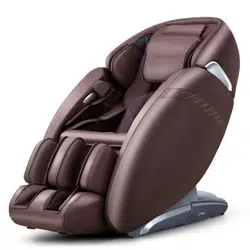
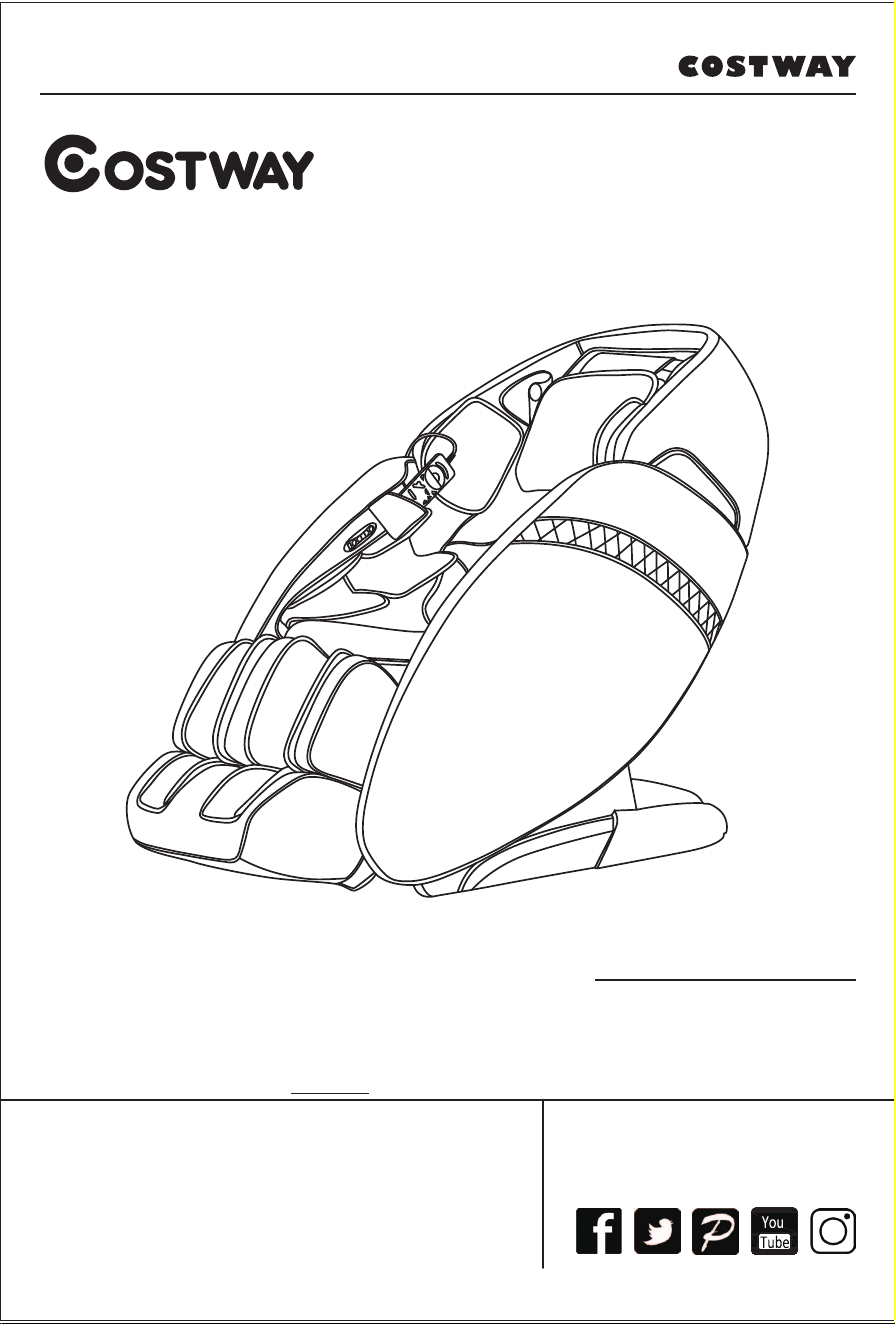
MASSAGE CHAIR
JL10009
Contact Us!
Do NOT return this item.
Contact our friendly customer service department for help first.
E-mail
US: cs.us@costway.com
UK: cs.uk@costway.com
Before You StartBefore You Start
Please read all instructions carefully.
Retain instructions for future reference.
Separate and count all parts and hardware.
Read through each step carefully and follow the proper order.
We recommend that, where possible, all items are assembled near to the
area in which they will be placed in use, to avoid moving the product
unnecessarily once assembled.
Always place the product on a flat, steady and stable surface.
Keep all small parts and packaging materials for this product away from
babies and children as they potentially pose a serious choking hazard.
02
Thanks for purchasing this product. Please read this manual
instruction carefully in order to know how to use this product
correctly before operation. Please pay more attention to some
important safety warning and keep this manual book properly for
future use.
Note: Our Company reserves the right to revise the design and
description of this product without any further notice. Please
refer to the actual color of this product.
CONTENTS
Safety and maintenance
Use safety warning
Name of components
Function
Method of usage
Product specification
Features, maintenance and cleaning of microfiber leather
Maintenance and cleaning of PU synthetic leather
4
8
10
11
13
26
27
28
.......................................................
................................................................
............................................................
.................................................................................
....................................................................
.............................................................
..
.............
03
1.Important Safety Warnings
·Do not allow children to touch any movable part of this product.
·Use the well-grounded power supply unit suitable for this
product.
·Pull out the plug after use or before cleaning to avoid any
physical injury or damage to the product.
·Operate this product as instructed in this manual.
·Do not use any parts or accessories which are not
recommended.
·Do not use this product outdoors.
·Please read the Operation Instructions carefully before
operation.
·Never use this product for any other purpose not listed herein.
·20 minutes of usage each time is recommended.
·Do not use this product if the leather is broken or damaged.
·Do not use this product if the cover or leather is broken or
damaged.
·Do not use this product if the radiator hole is covered or
blocked.
·Do not drop anything into this product.
·Never fall asleep while using this product.
·Do not use this product if you are drunk or feel unwell.
·Do not use this product within one hour after a meal.
·Do not use this product with excessive force to avoid any injury.
2. Operating Environment
·Do not use this product in a very moist environment such as the
bathroom.
·Stop using this product immediately when the ambient
temperature changes sharply.
Safety and maintenance
04

·Do not use this product in any heavily-dusty or caustic
environment.
·Do not use this product in a small space or a place without good
ventilation.
3. The following populations should not use this product
·Patients with osteoporosis.
·Patients with heart disease or wearing electronic medical
devices such as a pacemaker.
·People who have a fever.
·Pregnant women or women on their menstrual period.
·Patients who are injured or have a skin disease.
·When unsupervised, any children are under the age of 14 and
those unconscious are not allowed to use this product.
·People who are told by their physicians to have rest or who feel
unwell.
·People whose bodies are wet are forbidden to use this product.
·This product has a hot surface. Persons insensitive to heat
must pay attention when using this product.
4. Safety Precautions
·Check whether voltage is consistent with the specification of
this product.
·Never insert or pull out the plug with a wet hand.
·Do not let water flow into this product to avoid electric shock or
cause damage to this product.
·Do not pull the power cord when plugging or unplugging it.
Rough handling is forbidden.
·Do not damage the wire or modify the circuit of this product.
·Do not clean live parts of this product with a wet cloth such as a
power switch and plug.
·Be away from this product in case of power failure to avoid any
injury if power is restored suddenly.
05

·Stop using this product at once while it works abnormal, and
consult your local supplier.
·Stop using this product if you feel unwell, and consult your
health care practitioner.
·This product is not intended for use by persons (including
children) with reduced physical, sensory or mental capabilities,
or lack of experience and knowledge, unless they have been
given supervision or instruction concerning the use of this
product by the personnel responsible for their safety. Children
should be supervised to ensure that they do not play with this
product.
·If the power cord is damaged, it must be replaced by the
manufacturer, its service agent or similarly qualified staff in order
to avoid hazards.
5. Product Service and Maintenance
·This product should be maintained by the service center
designated by the manufacturer only. No user should
disassemble or maintain it without permission.
·Do not forget to turn off the main power switch after usage.
·Do not use this product if the power socket becomes loose.
·If this product will be left unused for a long period of time, it is
necessary to roll up the power cord of this product and store this
product in a dry and dust-free environment.
·Do not store this product at a high temperature or near open
flame. Avoid prolonged exposure to direct sunshine.
·Please clean this product with dry cloth. Never use thinner,
benzene or alcohol.
·The mechanical components of this product are specially
designed and manufactured, so no special maintenance is
needed.
·Do not use a sharp object to stab at this product.
06

·Do not roll or pull this product on any uneven ground. Instead, it
should be lifted before moving.
·Please use this product intermittently. Do not keep it working
continuously for a long period of time.
6. Solutions to Ordinary Malfunctions
·If the motor sounds during operation of this product, this is the
normal operation sound.
·If the controller cannot work normally, check whether the plug
and the power socket are connected reliably, and whether the
power switch is turned on.
·If the rated working time is over, this product will automatically
activate the power-off key; If this product keeps operating for a
long period of time, the temperature protector will stop this
product automatically. The product can be used again after half
an hour.
07
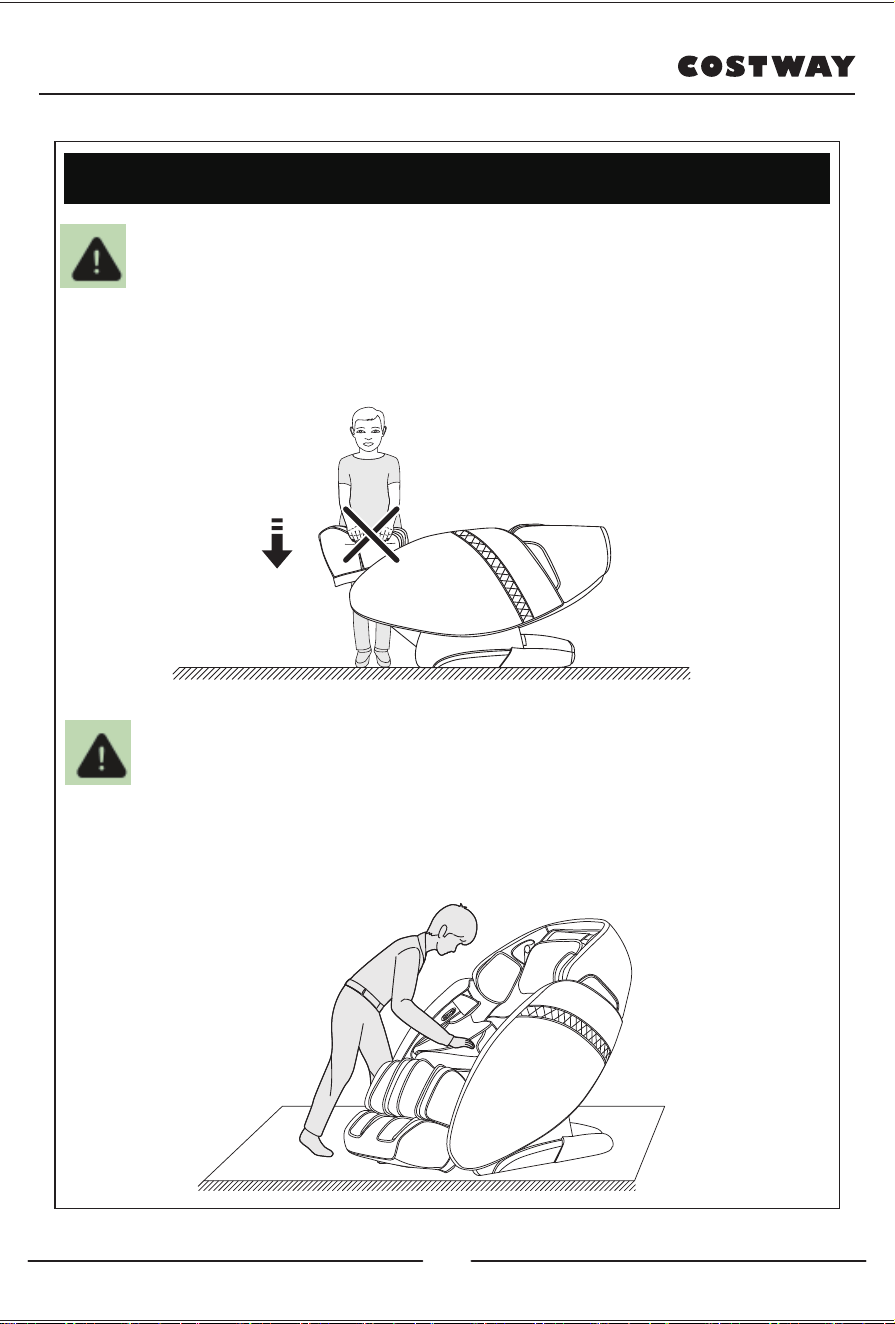
·When the footrest lifting, people should not apply pressure on
the footrest to avoid the massage chair falling forward to
damage the product or cause personal injuries.
Use safety warning
Warning
·Before sitting on the massage chair, Please make sure the
massage hand cannot place in the seat position, so as to avoid
the massage hand to damage the product or cause personal
buttocks injuries.
Warning
Prohibit pressing
08
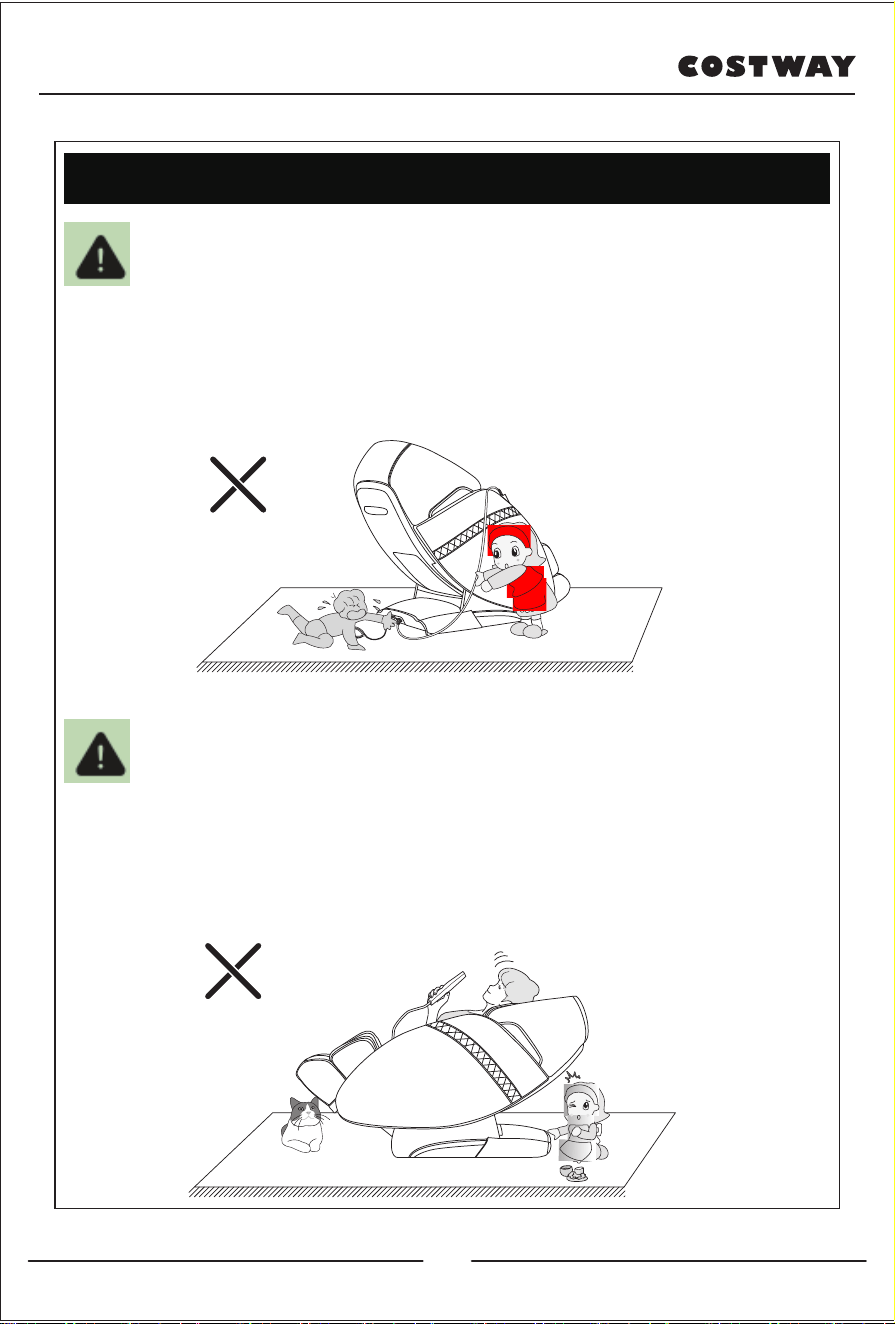
·Do not strive to pull out the control cable or power cord during
standby or power on-state to avoid product damaged or
electrocution accidents. Advise you unplug the controller cable
and power cord and put away after you use the chair.
Warning
·When turning on the zero-gravity lying function, be sure to
notice whether there are children or pets under the massage
table under the bottom of the calf and the backrest to stay or
play to avoid product damage and personal injury.
Warning
Use safety warning
09
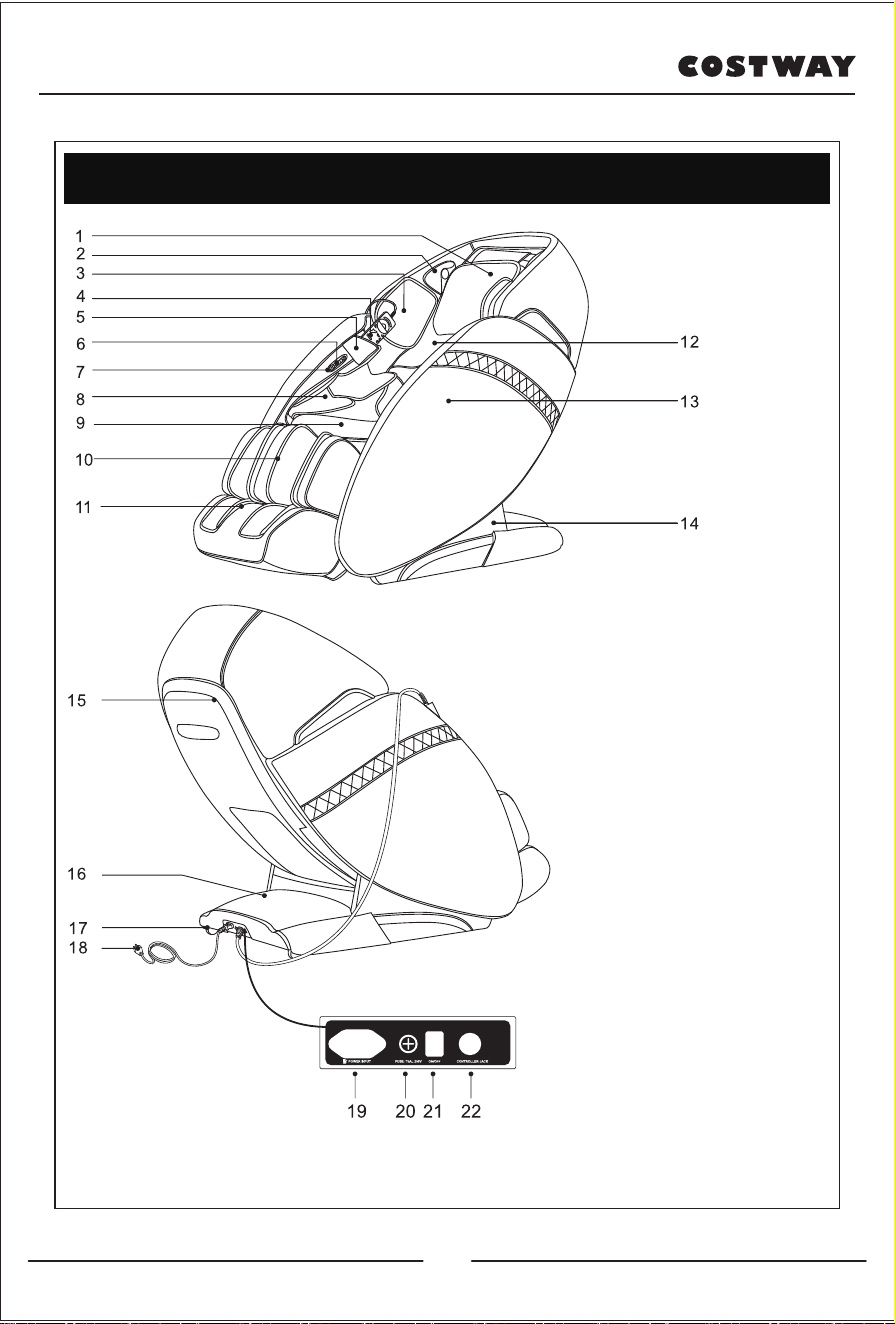
Name of components
1. Head cushion
2.3D digital sound and
Negative oxygen ion generator
3. Upper arm capsule assembly
4. Hand controller
5. Hand-controller storage bag
6. Quick armrest
7. USB charging interface
8. Arm bag assembly
9. Seat cushion
10. Leg rest
11. Footrest
12. Back cushion
13. Armrest
14. Side cover
15. Backrest cover
16. Drive box cover
17. Mobile pulley
18. Power cord and plug
19. Power cord plug
20. Fuse box
21. Power switch
22. Controller cable plug
10
·This product is designed with a set of massage machines that
can move up and down, four-wheel drive, and static design.
·Set five simulated massage techniques: Shiatsu, kneading,
tapping, knocking, kneading and tapping synchronously.
·Set shoulder automatic detection and positioning.
·Set characteristic automatic massage function: soreness
improvement, comfort, relaxation, quick press mode, upper half
and lower half automatic mode.
·Set with memory storage functions M1 and M2.
·Set the upper half manual massage function to five massage
position selections: full body, partial body, fixed point, upper
body, lower body. There are five kinds of simulation massages:
Shiatsu, kneading, tapping, knocking, kneading and tapping
synchronously. The speed of each massage method can be
adjusted in three levels as a whole. In the fixed point and partial
body state, the mechanical hand can adjust the position of the
upper and lower positions; in the slap, acupressure, and
percussion massages, the width of the massage ball has big,
medium, and small gear selections).
·Pressure massage function: full body pressure, arm pressure (4
sacs built in the upper arm, 8 sacs built in the arm) leg pressure
(16 sacs built in leg), a certain mode of pressure , Three-level
intensity.
·The bottom of the leg is equipped with a bottom roller massage
function, two pairs of mastoid massage the toe roots; scrape
massage the feet and heels.
·Front-end hyperthermia function: collect plasma carbon fiber as
far-infrared heat source.
·The small leg frame has double-section non-level telescopic
adjustment function to adapt to different people's tibias.
Function
11

Resting and picking sliding rail technology under the backrest
frame keeps the backrest away from the wall always with zero
space, saving space to the greatest extent.
·The function of adjusting the lifting and lowering of the leg
frame, the backrest frame and the automatic lying mode.
·The backrest rail adopts curved curve rail technology, which
completely fits the curve of the back of the body, and you can
enjoy a close massage from the head to the legs.
·The upper arm has a built-in 3D digital sound, which can be
connected through the Bluetooth function of a smart device
(such as a mobile phone or tablet) for music playback.
·The left and right upper arms are equipped with negative ion
generators.
·On the right hand, there are shortcut keys such as on/off key,
zero weight key, auto key, linkage key, etc.
·The upper right hand armrests USB charging function.
·The headrest cushion is designed with a foldable design for
picking two tibia sections (folded back into two layers). The
number of sidewall layers can be determined according to your
own needs to reduce the degree of massage of the neck and
shoulders; unfold the headrest to extend to the top. Suitable for
different people so that the eaves can be chosen freely.
12
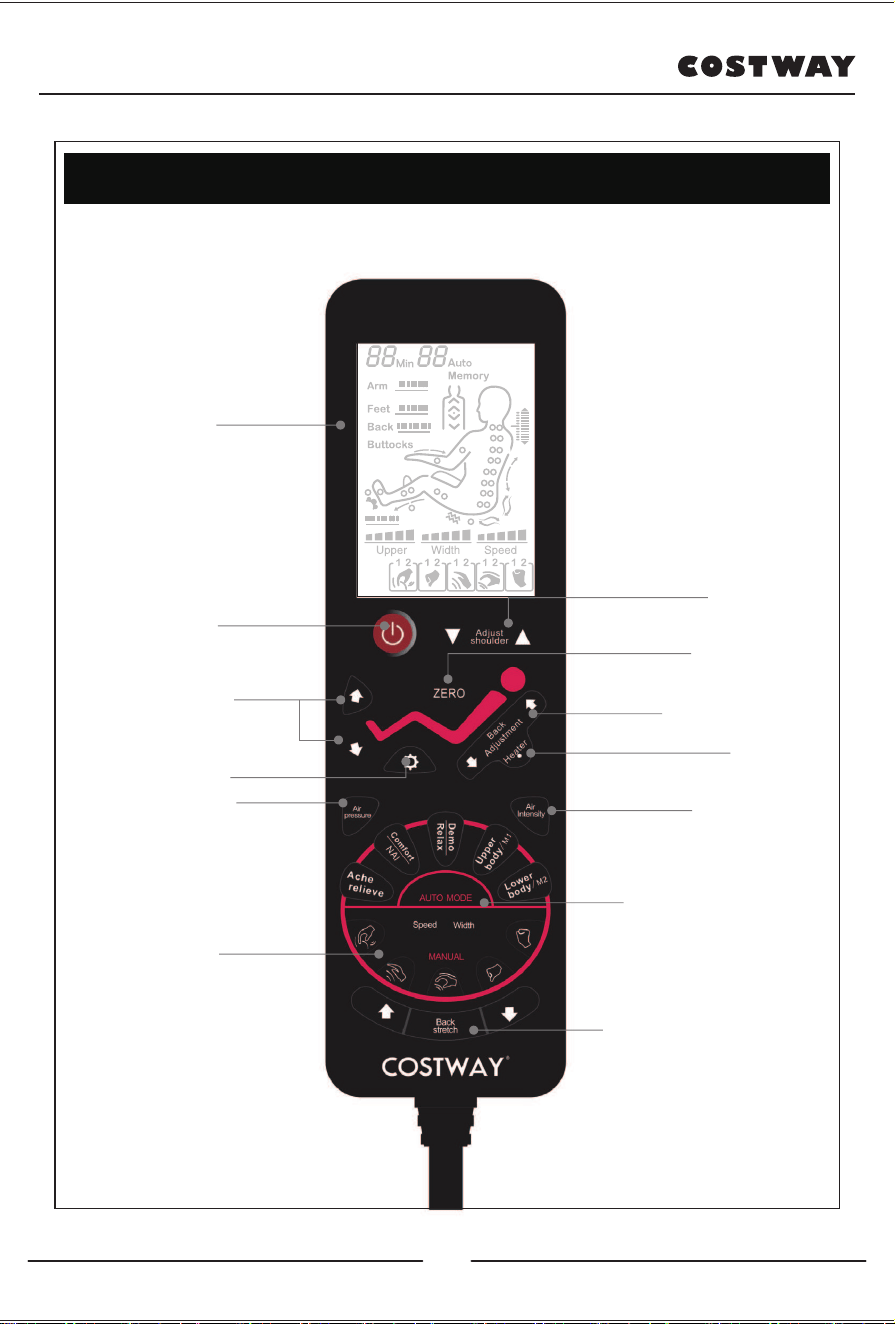
Method of usage
Note: The specific display is subject to the actual product!
LCD screen
All massage function diagrams
are displayed.
Power switch
Turn on/off all massage
functions.
Air pressure
Turn on/off the pressure
massage function
Manual massage
Foot roller massage
Manually adjust the position of the shoulders
and massage the acupressure points.
Adjust shoulder
There are three automatic lying modes, which
can be switched according to your needs.
Auto lying
Adjust the backrest frame to rise or fall.
Backrest adjustment
Turn on/off the heating massage function.
Heater
Adjust the pressure intensity.
Air intensity
Auto massage
Back stretch
Adjust leg
Adjust the leg to go up or
down.
13
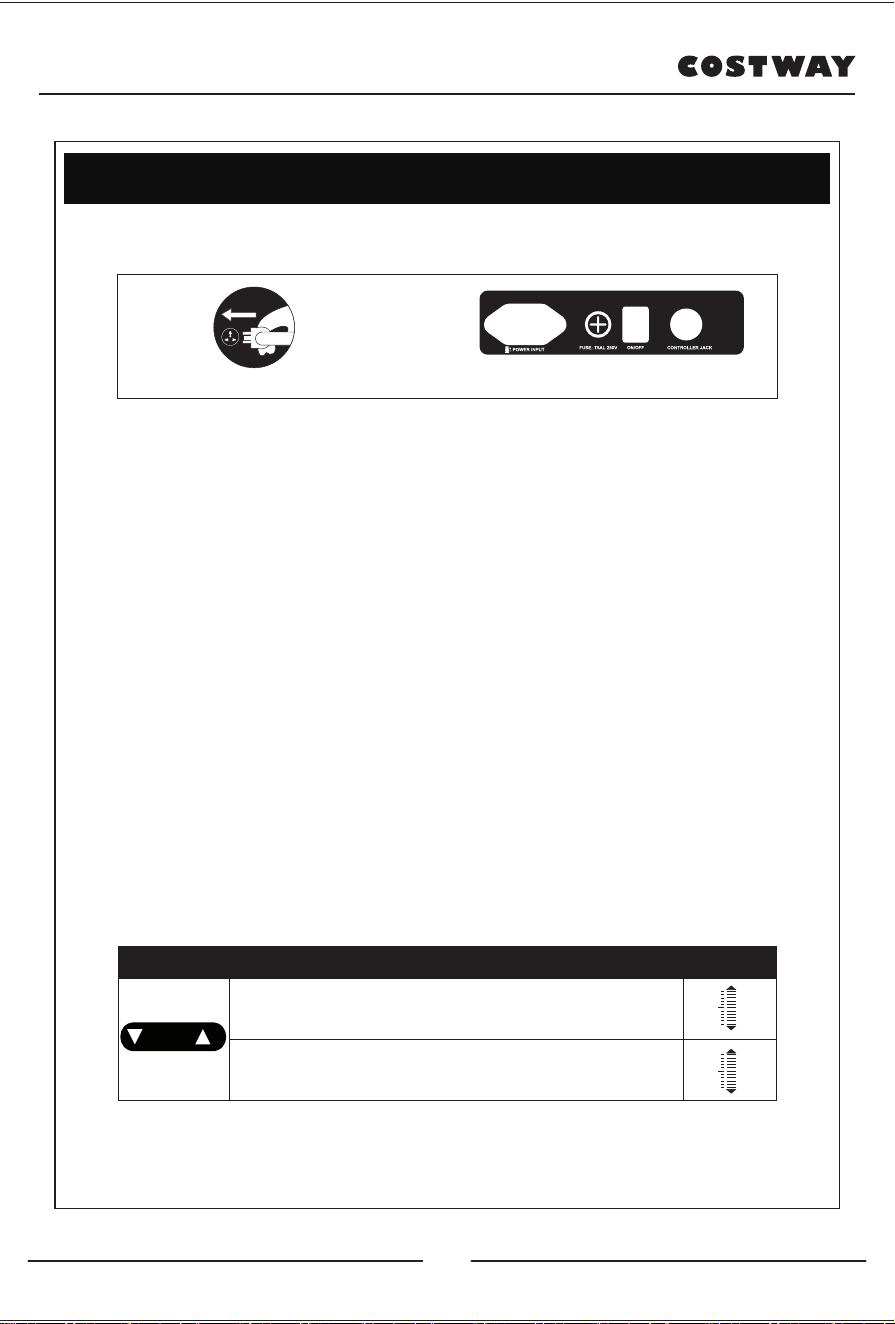
1). Press the power key to automatically lie down and start the
massage.
2). Automatically carry out the detection of body shoulder
position and massage points, and wait for the detection to be
completed.
3). If there is a deviation between the detected shoulder position
and the actual shoulder position, adjust the shoulder position up
and down to the suitable position. There are a total of 10
shoulder positions. If there is no shoulder position adjustment
within 10 seconds, the massage function will automatically start
to work.
Method of usage
1.Power on the whole machine
2.Start massage
·Plug in to connect ·Power switch
Key Description
Display
Adjust the position of the massage ball upwards to make it
reach a suitable shoulder position.
Adjust the position of the massage ball downwards to make
it reach a suitable shoulder position.
Adjust
shoulder
14
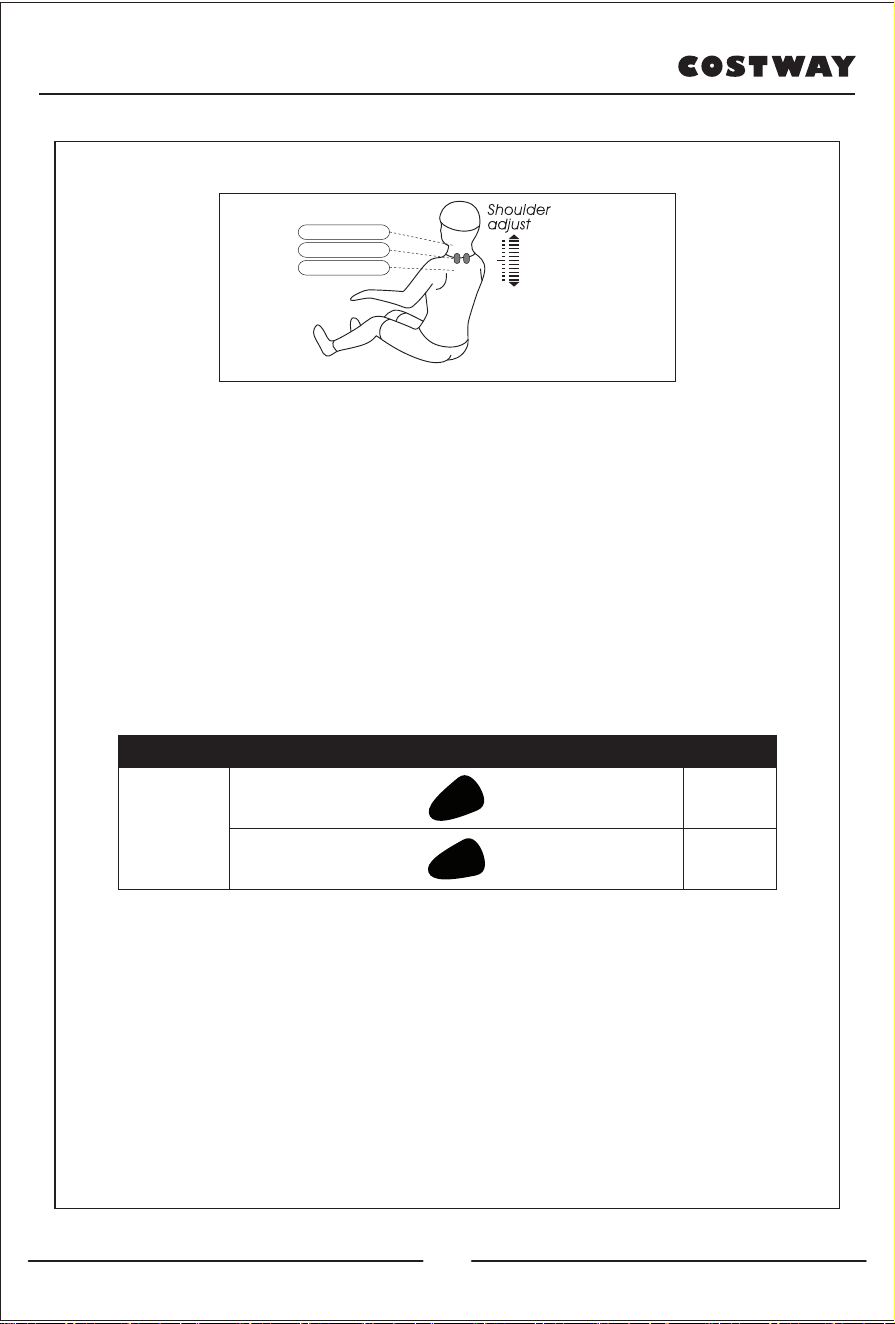
4).Select the massage function to start the massage.
·Memory function massage:
Select the upper body/M1, lower body/M2 mode, press for 3
seconds, enter the previous function M1 or M2, then it will return
to the massage setting state that was previously stored in
memory for massage.
High position
Suitable position
Low position
Memory
Massage
Memory 1
Memory 2
Function Key Display
Upper
body/M1
Lower
body/M2
15
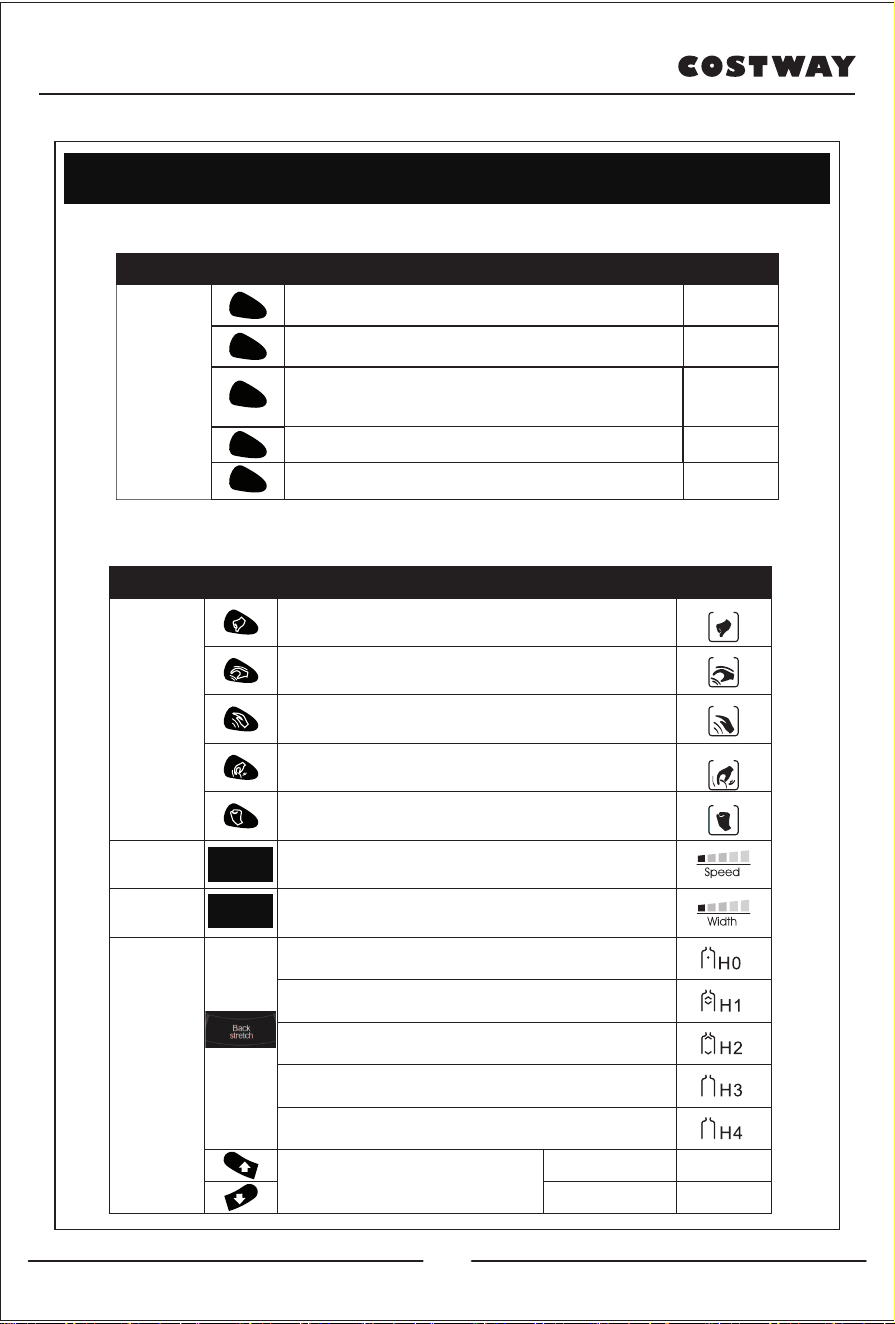
Method of usage
Specially automatic massage
Manual massage of the upper body
Specially
automatic
massage
Massage
techniques
Speed
Width
Back
stretch
Go up
Go down
Auto F1
Auto F2
Auto F4
Auto F5
Auto
F3/Auto F0
Deep massage on the acupressure points can
effectively relieve soreness.
Shiatsu: speed, width
Kneading: speed
Tapping: speed, width
Kneading and tapping: speed
Knocking: speed, width
Three adjustable speed
Three adjustable width
Fixed position massage.
Small range partial massage back and forth.
Full back-and-forth body massage.
Upper body back-and-forth massage .
Lower body back-and-forth massage.
Massage position adjustment (The
massage position can be adjusted
at fixed or partial point).
Loose body muscles.
Promote fluid circulation. Quickly experience all
massage effects (press for 3 seconds, switch to quick
press).
Upper body is the focus of massage.
Lower body is the focus of massage.
Display Button Massage features Display
Ache
relieve
Comfort
NAL
Demo
Relax
Upper
body/M1
Lower
body/M2
Function
Key
Adjustment of massage ball Display
16
Speed
Width
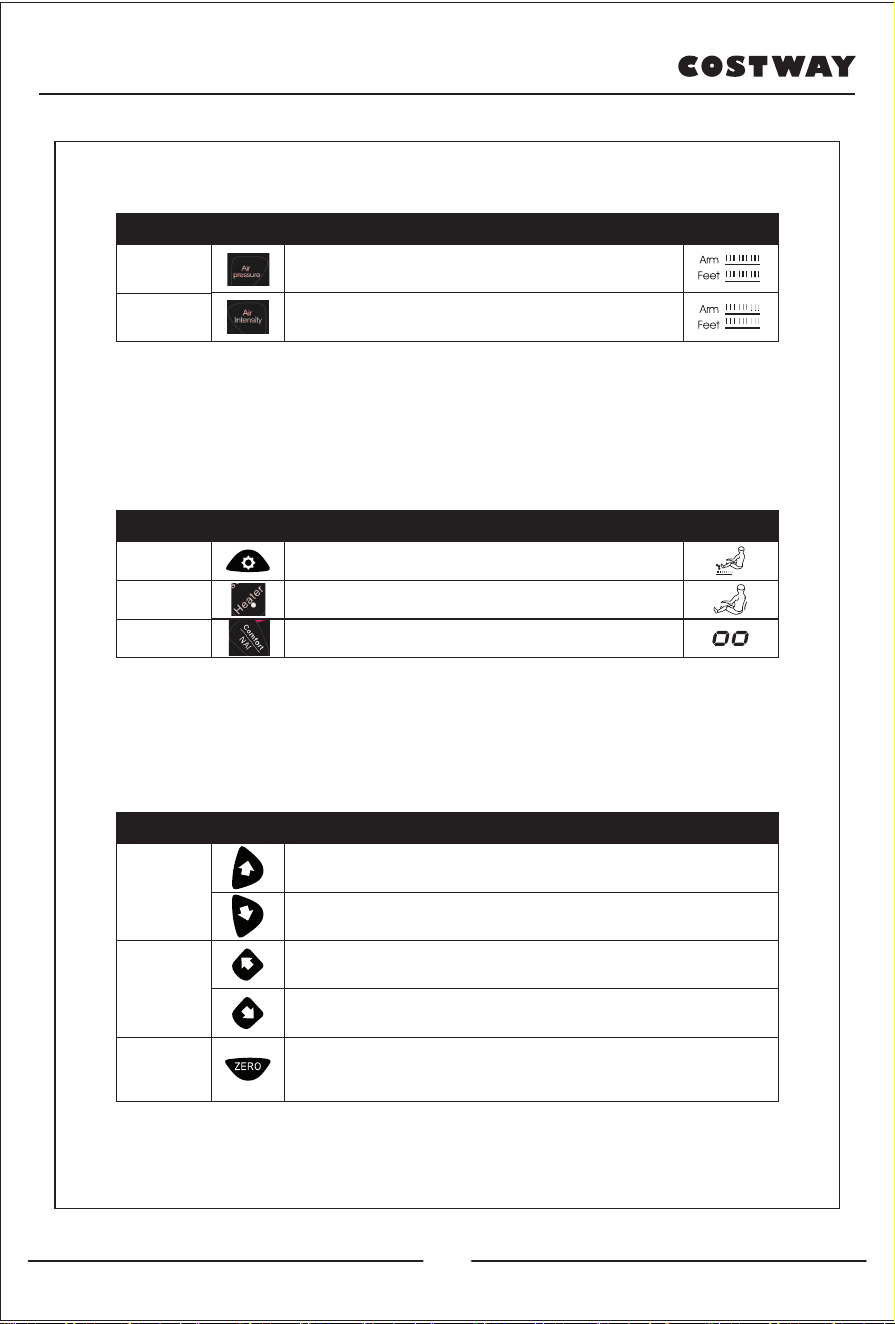
Air pressure massage
Other manual functions
Other manual functions
Air
pressure
Three mode selection (full body pressure, arm
pressure, leg pressure).
Three adjustable intensity selections
Air
intensity
Function Key Description
Display
Foot roller
massage
Heater
NAI
Bottom foot roller massage switch and speed
adjustment. Three speeds can be adjusted.
Far-infrared hyperthermia on the back, it will be
warm after 3 minutes of opening.
Press for 3 seconds to turn on or off the negative
oxygen ionization function.
Function Key Description Display
Adjust leg
Adjust
backrest
Auto lying
Lower leg up: Press this key, the lower leg rises
slowly, release it to stop.
Lower leg down: Press and hold this key, the lower
leg will slowly goes down, release it to stop.
Backrest up: Press this key, the backrest rises
slowly, release it to stop.
Backrest down: Press and hold this key to slowly
lower the backrest, release it to stop.
Lying Mode: Each time you press the key, you can switch to an
automatic Lying Mode. There are three modes in total, which can be
switched cyclically.
Function Key Description
17
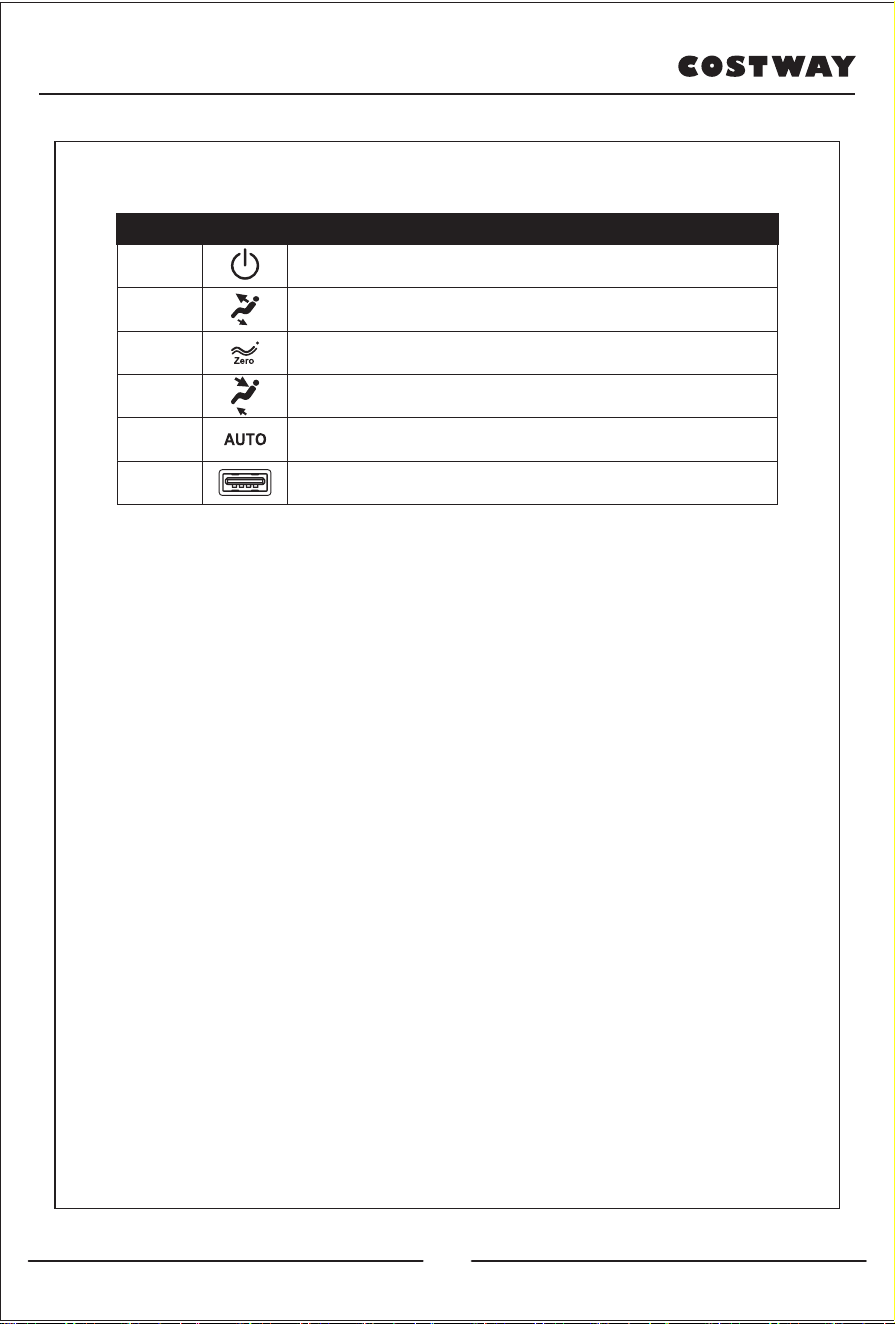
1). During the massage process, press the power switch button,
immediately turn off all massage functions, the chair back and
foot pads are reset, the same time can be stored by memory
function. When the massage time is up, all massage functions
will be turned off immediately, and the memory can be stored at
the same time. The chair back and foot pads are not reset.
2).Memory function storage: the display screen Memory will
flash and indicate, at this time, you can press the memory
function key of M1 or M2 to store the massage selection
statistics before the end of the massage.
3). Cut off the power supply of the whole machine. As the picture
shows.
Quick Armrest Key
3. Turn off the power and end the massage
Function
Key Description
Switch
Up
Zero
Gravity
Down
Auto
mode
USB
Press and hold this key to turn on or off the
massage function.
Press and hold this button to slowly raise the backrest, and at the
same time, the lower leg support slowly lowers, release it to stop.
Each time you press the key, one automatic lying mode is
switched, and three automatic lying modes can be adjusted.
Press and hold this button to slowly lower the backrest, and at the
same time the lower leg support slowly rises, release it to stop.
Each time you press it, the automatic massage
function switches.
USB charging port can charge smart devices (like a
mobile phone).
18
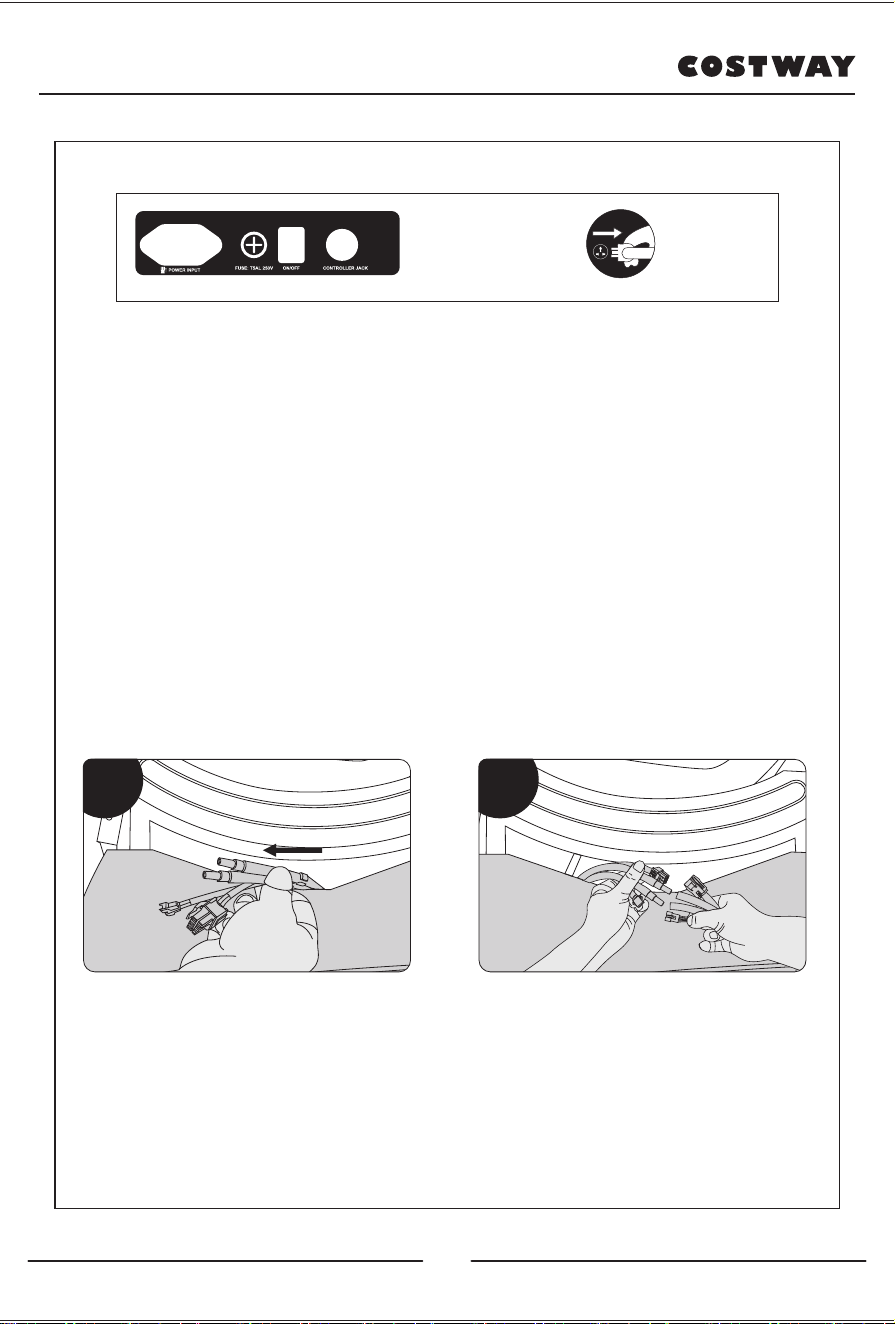
1). Find the connecting plug corresponding to the armrest from
the bottom of the seat frame, and pass it out from the middle of
the rear end of the seat frame (Figure 1).
2). After passing the connecting plug from the middle of the back
end of the seat frame, correspond to each pair of wiring plugs
(connect according to the mark on the pair of wiring) (Figure 2).
4. Armrest installation
Power switch Unplug the power supply
Figure 1
Figure 2Figure 1
19
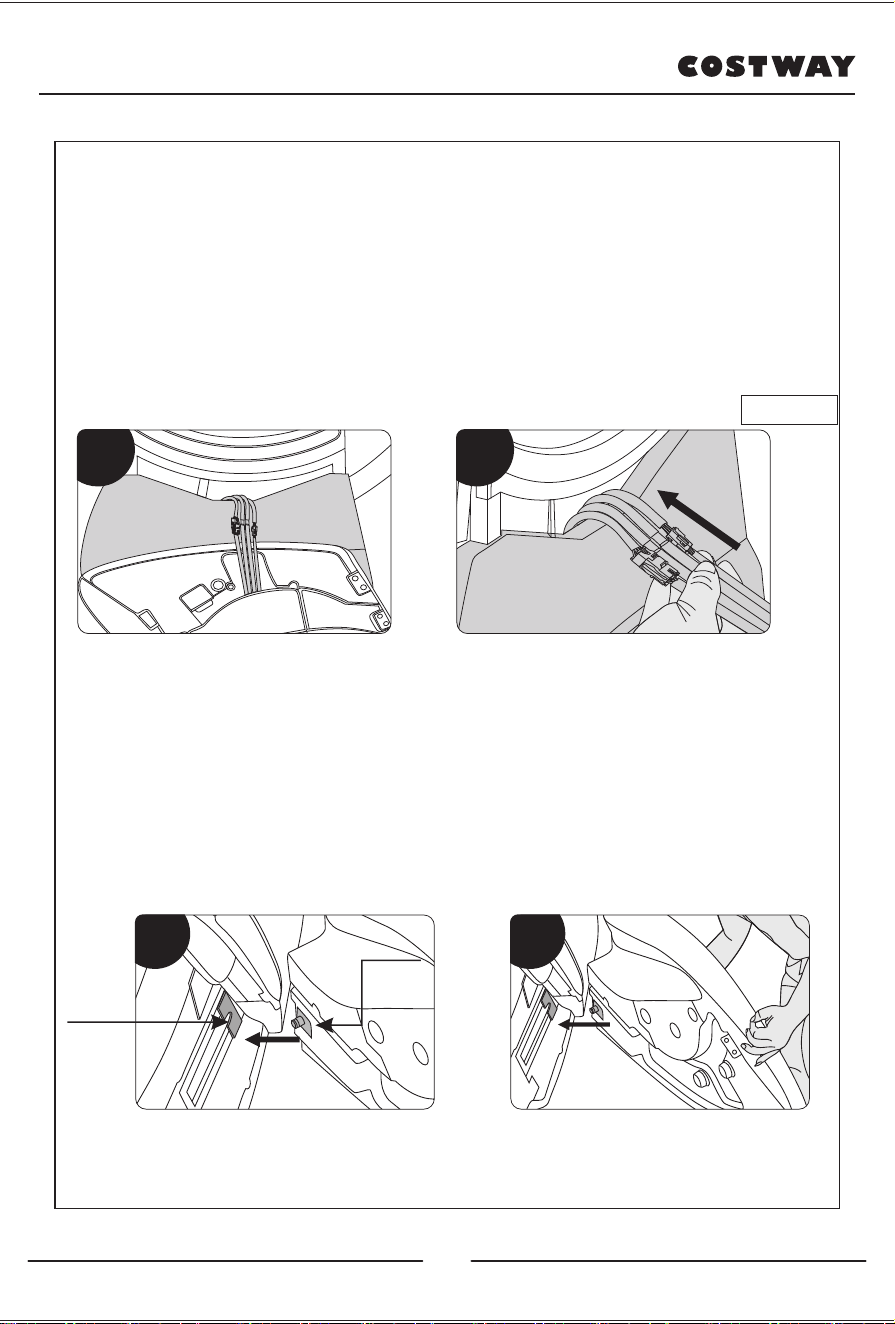
3). The joints drawn from the bottom of the seat frame are firmly
inserted into the armrest joints, and the pipe joints are also
inserted in place (Figure 3).
4). After connecting with the corresponding connecting wire,
gently use your hand to follow the steel pipe in the middle of the
steel frame of the seat frame and insert it into the bottom of the
seat frame. Then pull the cloth cover well, and take care to
prevent the tube from being broken (Figure 4).
5). Hands hold the front and rear ends of the armrest, first put
the rear end of the armrest close to the lower end of the capsule
(Figure 5).
6). Then insert the limit shaft of the armrest into the limit block of
the space capsule (Figure 6).
Tuck into the bottom
of the seat frame
→
Figure 5
limit shaft
limit block
Figure 6
Figure 3 Figure 4
20
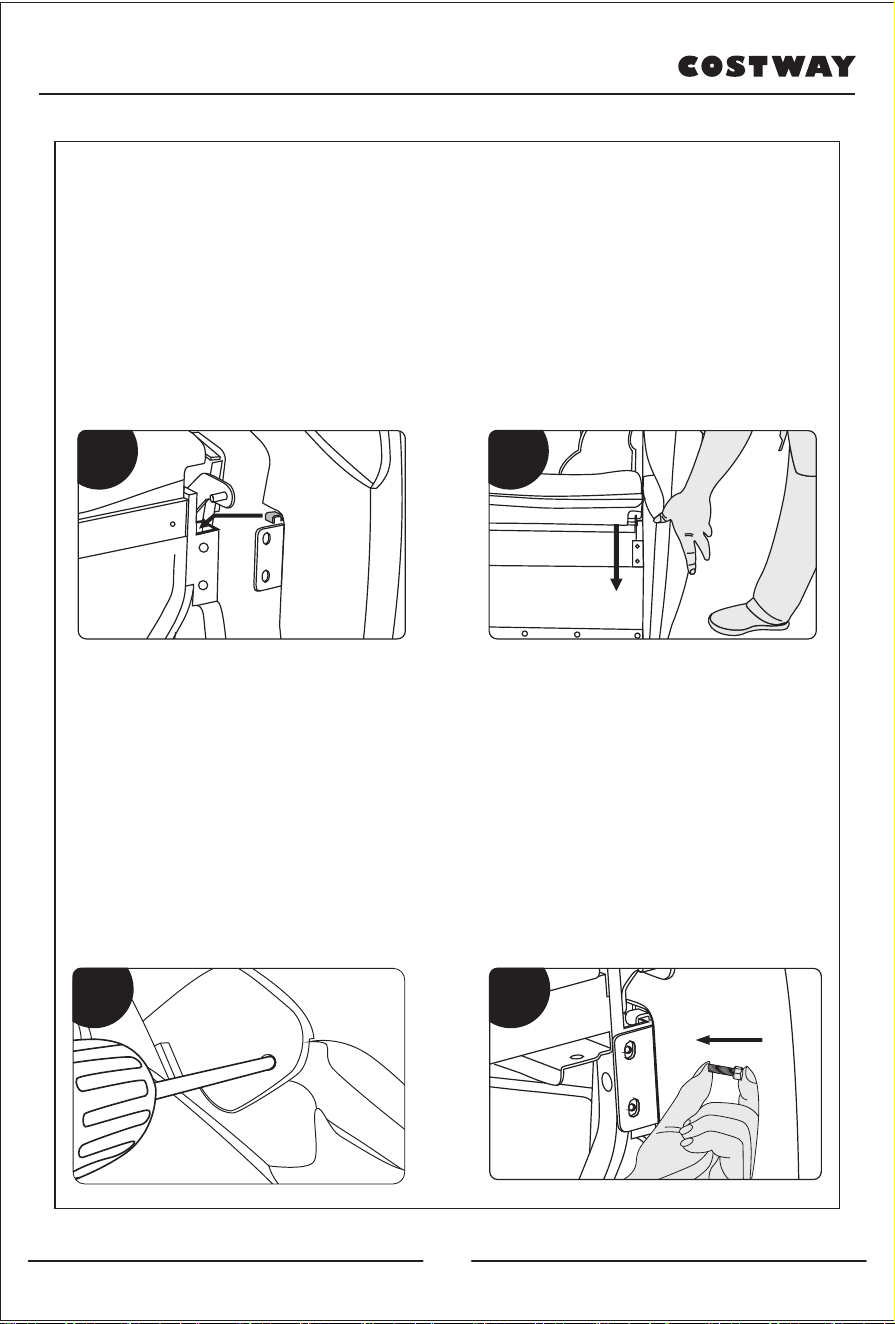
7). After inserting the rear end, move the front end of the armrest
close to the steel frame and hook the front end of the armrest
into the steel pipe of the seat frame (Figure 7).
8). After hanging up, press down on the armrest, press it in
place, and then push up the front end of the armrest. Place the
hook at the front end of the armrest close to the steel pipe, and
then shake the armrest lightly to check whether the front and
back ends of the armrest are in place (Figure 8).
9). Unzip the upper arm sleeve, and then use the cross-head
screw to fix cross-head screws through the hole of the space
capsule. Tighten it with the armrest, and then zip the upper arm
cover (Figure 9).
10). Align the mounting holes on the armrest, and then use the
cross-head screws to tighten the cross-head screws and fix
them on the armrest. Then the armrest is completed. The same
installation procedure to the other armrest(Figure 10).
Figure 5
Figure 7
Figure 6
Figure 8
Figure 7 Figure 8
Figure 9 Figure 10
Figure 9 Figure 10
21
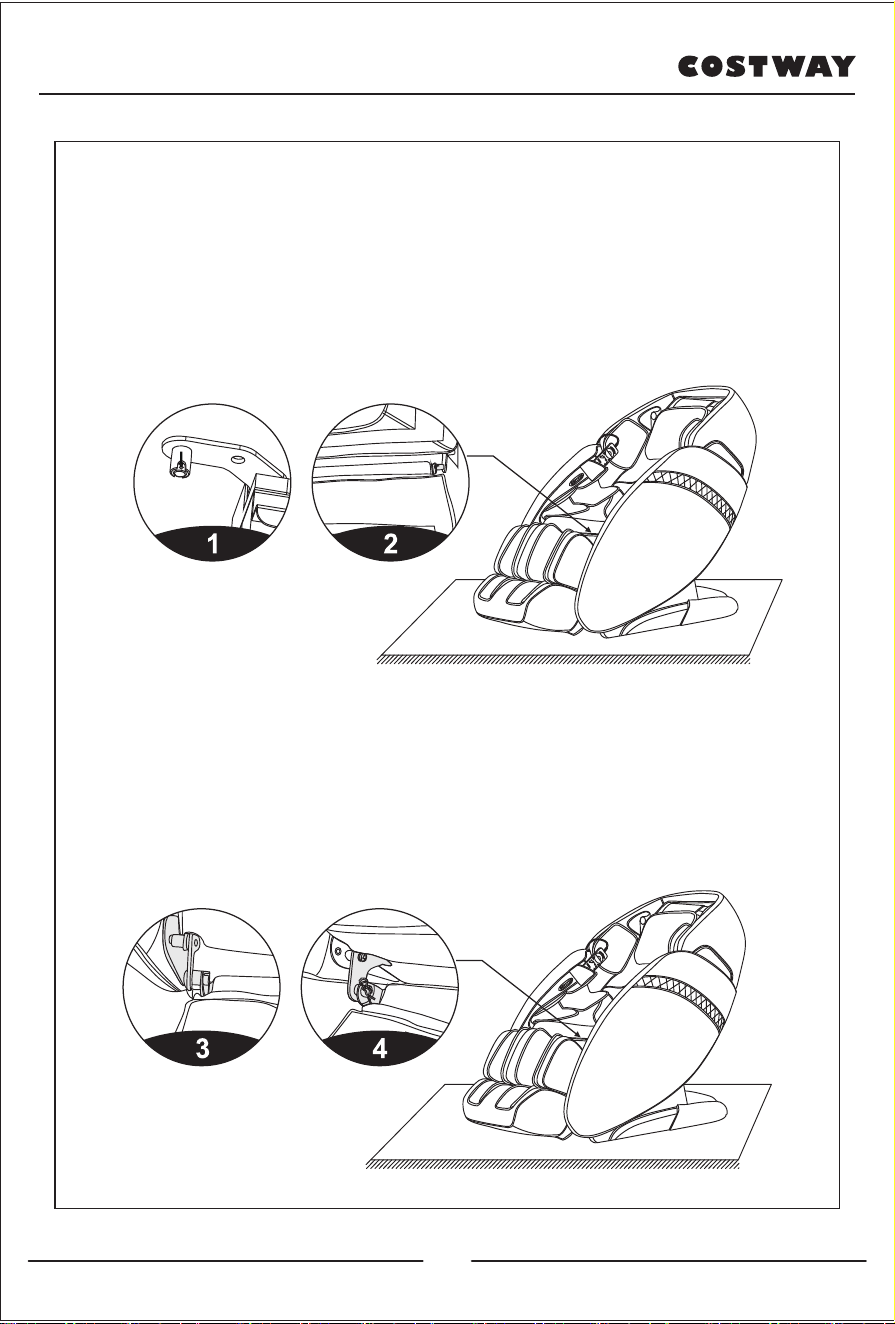
1). Put the rotating shaft on the fixed shaft of the calf first, and
pay attention to the alignment of the hole position to facilitate the
disassembly and assembly of the R-shaped pin (Figure 1).
2). Align one end of the lower leg with the fixed shaft and insert it
(Figure 2).
3). Insert the R-shaped pin, move the calf to the other side, and
insert the R-shaped pin (Figure
4). The installation of the calf is completed (Figure 4).
5.The Calf Installation
22
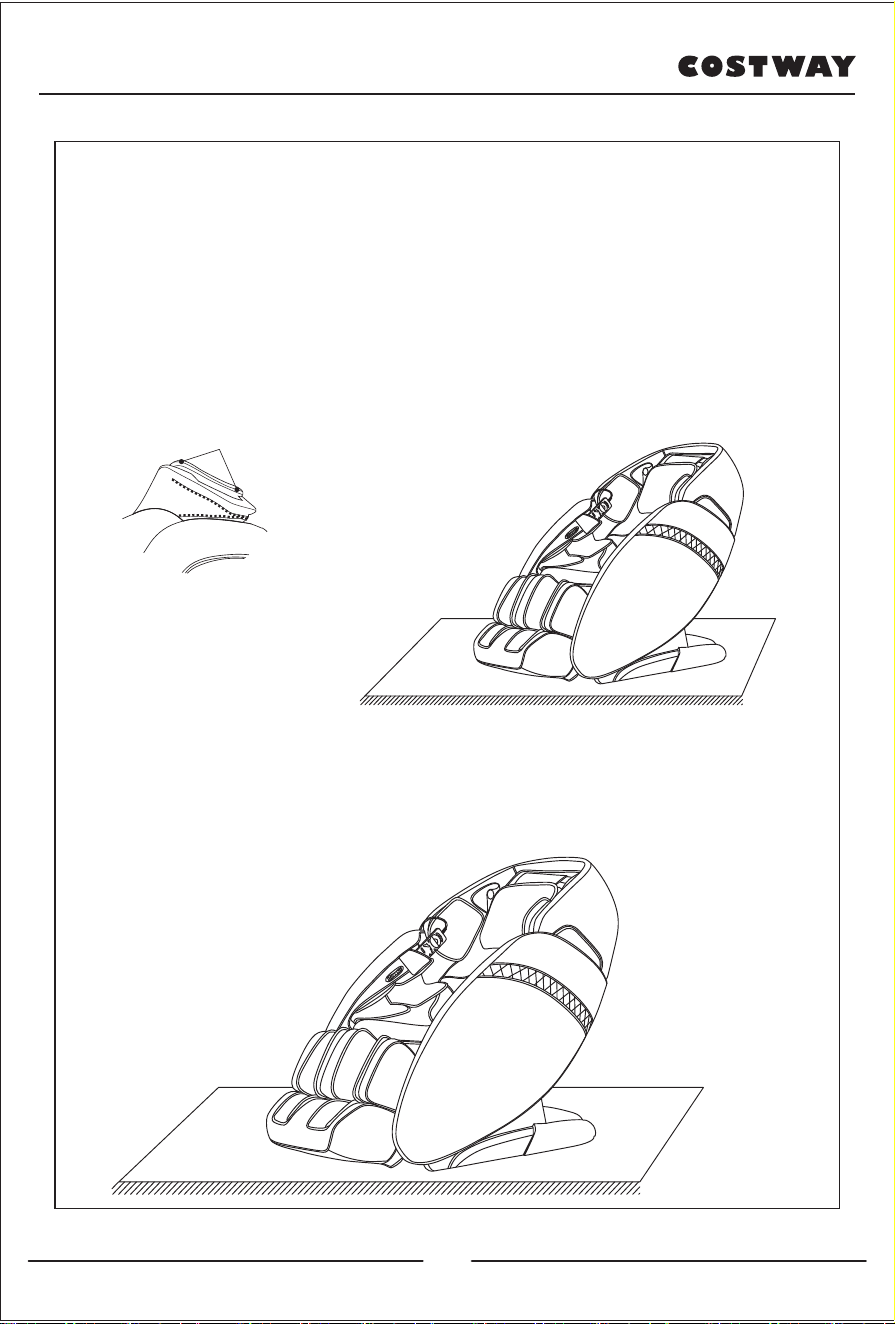
·Using head cushions can reduce the kneading massage
intensity on neck and shoulder, according to your needs to
decide whether the head cushions is needed (recommend head
cushions). Backrest cushion and backrest connected by zipper
(1), head cushions and backrest pad connected by thread gluing
(2).
6. Head cushion and backrest pad's dismounting and use
manual
·Put the heavy massage chairs on the wood floor may damage
the floor, so please place a carpet or other object to avoid this
damage.
7.Floor protection
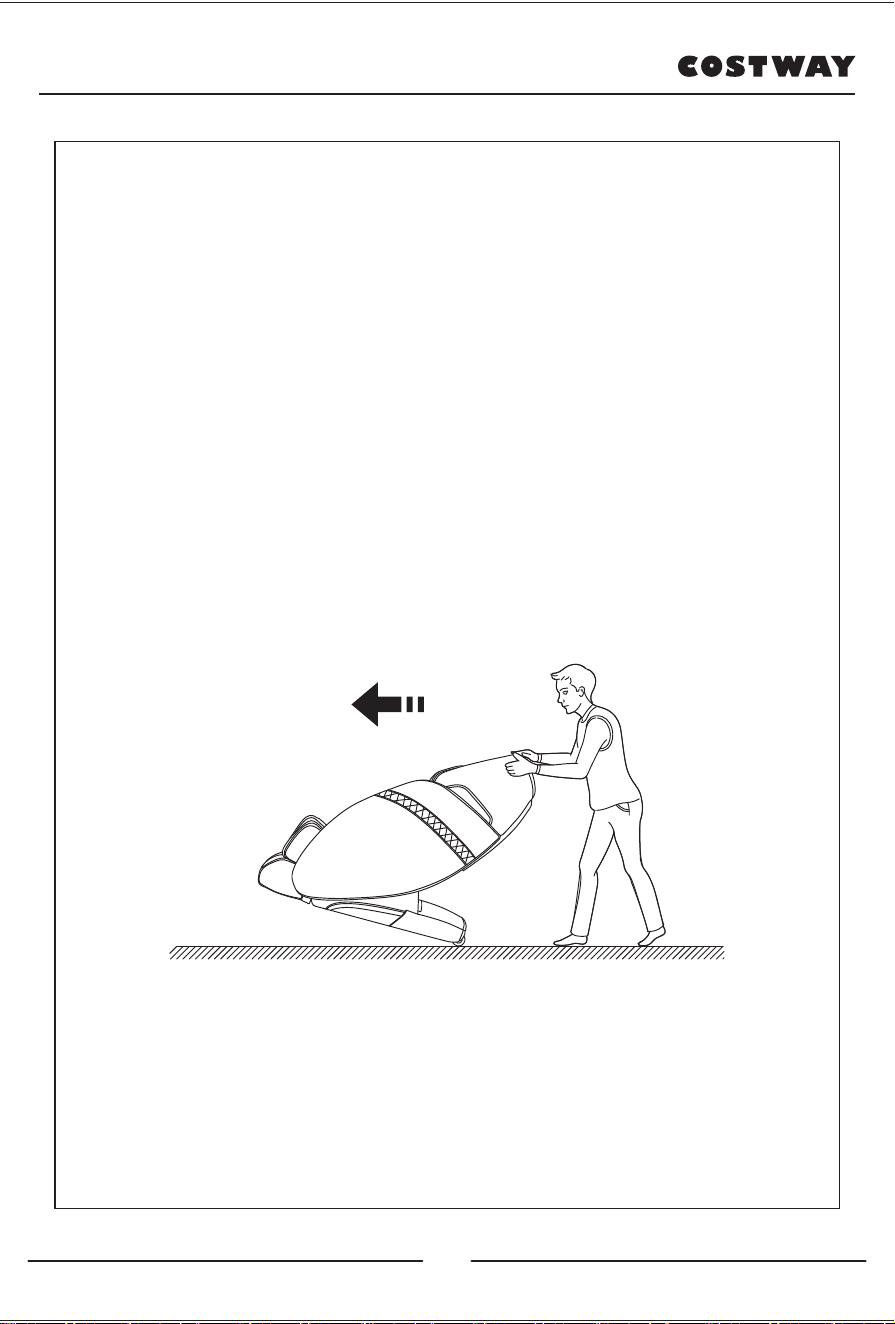
Caution: Do not move the chairs with its wheels on wood floor,
rough ground or in a narrow space. Two people are required to
lift the chair. During the lifting period, take the calf rest end
sealing plate and backrest cover grooves as the force-bearing
point (Please do not lift armrest directly.)
Warning : Massage chair rear wheels are only suitable for short
distance movement for long distances, please use other
assistive tools to move the massage chair.
·Make sure that all wires are far above the ground, tilt the
backrest backward to a certain degree (with the gravity center
resting on the wheels), push the chair forward or backward with
your hands and finally resume the chair to the normal position in
a slow and gentle manner.
(Note: During movement you must turn off the power first and
then unplug the power cord and the controller cord.)
8.Method of movement
Figure 1 Figure 2
24
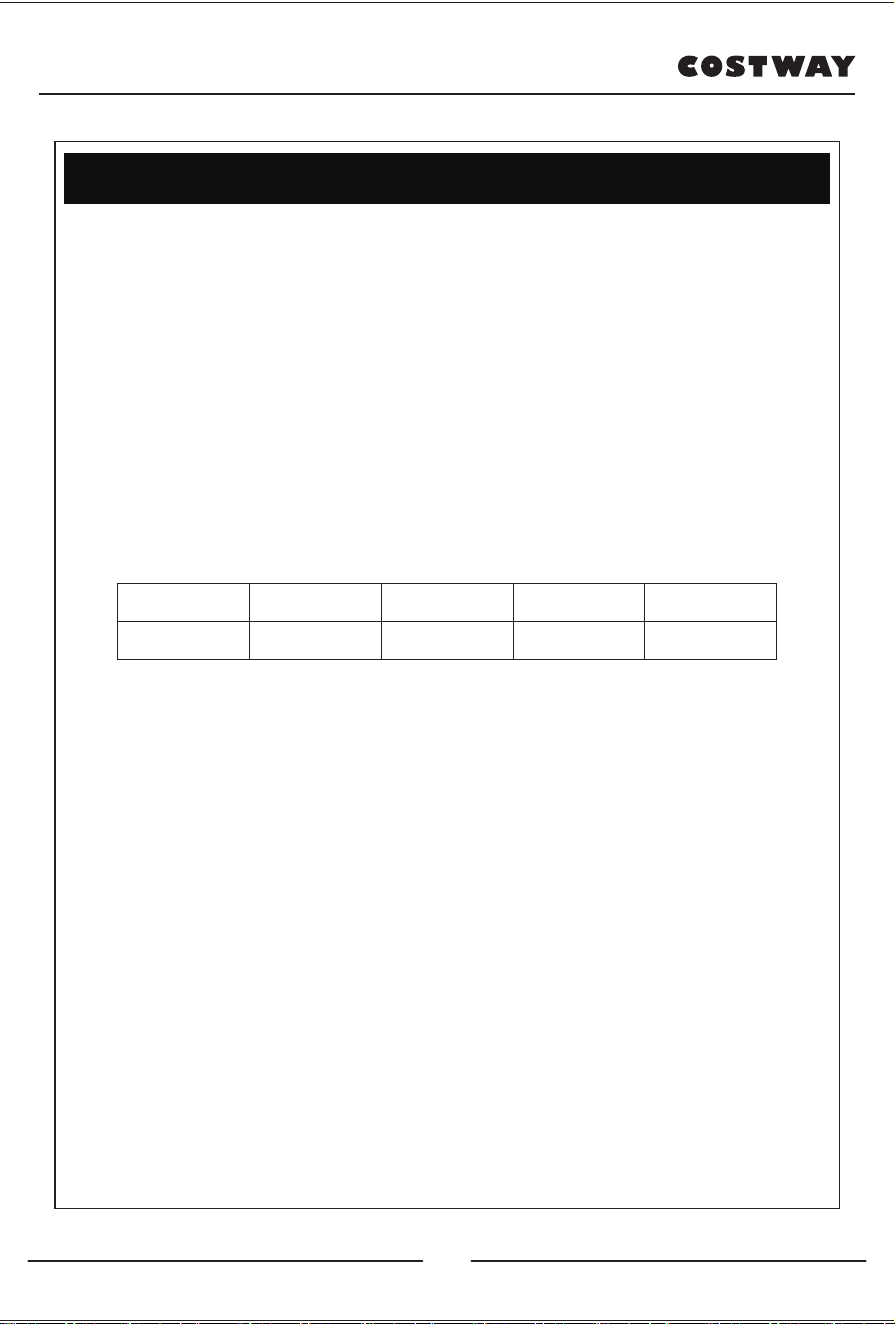
Model: JL10009
Name: Massage Chair
Rated voltage: 110-120V~ 60Hz
Rated power input:150W
Rated time: 20Min
Safety structure: Class I
Material introduction: PVC, PA, steel parts and electric &
electron parts
Figure 3 Figure 4
Product specification
MATERIAL PU LEATHER CLOTH WOOD
25
The full name of microfiber is "ultra fine fiber reinforced PU", also
called refinish, and it belongs to a newly developed high-grade
leather. It has excellent wear resistance, excellent permeability,
chemical resistance, with softness and comfort, and strong
flexibility. Microfiber is the best hand-made material, the texture
is similar to the real one, and the hand feels soft.
It is abrasion resistant, cold resistant, permeable, texture
resistant. With soft texture and beautiful appearance, it has
become an ideal choice.
■Maintenance method:
1). Must be kept in a place where air is circulated.
2). NOT to be exposed to violent sunlight.
3). If the surface of the equipment is wet, it is necessary to clean
the surface with a cloth immediately, and place it in a cool, dry
place.
4). Smudges or other traces on the surface are evenly wiped on
the surface of the smudges with a cloth, but water leakage must
be avoided.
5). Regularly use a small amount of care solution to wipe the
surface to regain its luster.
■Cleaning method:
1). Clean with water and detergent, avoid gasoline scrubbing.
2). Cannot be washed.
3). It can only be washed in water, and the temperature of water
washing cannot exceed 40 degrees/ 104 Fahrenheit degree.
4). Can not be exposed to sunlight.
5). Do not touch some organic solvents.
6). PU need to be stored in a bag, and cannot be folded.
Figure 6
Figure 8
Features, maintenance and cleaning
of microfiber leather
26
PU synthetic leather is made of polyurethane. Compared with other
materials, it has better acid and alkali resistance, heat resistance,
and sunlight resistance features. While also Avoid placing it in dust,
high temperature, high humidity, and low temperature. Strong light
exposure and environment containing acid and alkali chemicals,
which makes it easy to crack and accelerates the conversion and
dissolution.
■Cleaning for PU synthetic leather:
1). Do not use organic reagents, grease solutions and compounds,
especially strong solvents. Otherwise it is easy to corrode the PU
surface;
2). Do not use clean water or washing powder to scrub the PU
surface, as it is easy to produce cracks;
3). The pH value should be selected: the PH value = 5~7 range, no
abrasives, and environmentally friendly cleaners to clean the PU
surface;
4). For the dirty PU surface, wipe the dirt with a soft cloth, and avoid
cleaning it with a brush.
■Maintenance for PU synthetic leather:
1). To ensure the indoor communication, too dry or damp will
accelerate deterioration;
2). Do not place the leather in a place where the sun can reach it
directly or where the air conditioner blows it directly, otherwise it will
damage the floor. Direct sunlight will make the color fade;
3). High temperature and humidity will cause the chemical react with
the leather, which is easy to produce peculiar smell. In this regard,
wipe with a slightly damp soft cloth frequently;
4). When wiping the sofa, do not use alkaline cleaning fluid.
Because it is acidic treatment during preparation, alkalinity will
reduce the flexibility of the paper and cause damages and cracks
during long-term use.
Figure 10
Maintenance and cleaning of PU
synthetic leather
27
Welcome to visit our website and purchase our quality products!
this product and giving us valuable feedbacks.
With your inspiring rating, COSTWAY will be more consistent to offer you
EASY SHOPPING EXPERIENCE, GOOD PRODUCTS and EFFICIENT SERVICE!
US office: Fontana, California
UK office: Ipswich
Reward Points
Exclusive Customer Service
Permanent Shopping Cart
Order History
28

Costway Massage Chair Customer Warranty
Costway products include the following warranty:
This Costway massage chair has a three-year warranty for both parts and
labor.
Costway customer service will not issue Return Material Authorizations
(RMAs) for products due to buyer’s remorse. RMAs will be issued only
when product has quality problem. Costway products will be either
repaired by the customer or by an in-home technician.
Service And Technical Support:
Customers can contact Costway's customer service department at
213-401-2666 at any time Monday through Friday or via email at
topsupport@costway.com for warranty or service issues.
Customers are required to provide dated proof of purchase (sales receipt)
when they contact Costway service department regarding a repair.

A Costway customer service representative will attend to most customer
inquiries, however, in some cases, when necessary, a technical service
specialist will provide advanced support.
Non-warranty repair is provided on a "per incident" basis. Costway
customer service will verify that the unit has failed and provide
instructions for repairing a unit. All applicable repairs, parts, shipping,
handling, local tax, and a "per incident" fee will be charged for
non-warranty repairs.
You can visit www.costway.com and
www.costway.ca for the latest terms
and pricing depending on the type of issue or incident.
Proof of purchase (sales receipt) is required for all warranty repairs or
service.
Extended Warranties:
Costway offers extended warranty programs to enhance ownership of
Costway products.
Extended warranty provides: A maximum 2-year limited repair or

replacement massage chair warranty with on-site service in certain
areas.
Please visit www.costway.com and
www.costway.ca for the latest terms
for extended warranties.
Product Repairs
Many Costway product repairs may be performed by the customer in
their own home with parts and instructions supplied by Costway, such as
remote controller replacements that don't require a technician.
Customers may contact Costway's customer service department at
topsupport@costway.com for warranty or service issues.
Floor Models and Demonstration Units have a prorated warranty period
that begins the day the model is placed on the floor and connected to an
electrical outlet by the retail partner. Proof of purchase (sales receipt) is
required in order to obtain warranty service and parts. Non-warranty
parts and service are available at a "per incident" rate.
Warranty Coverage Period: Warranty coverage begins on the date of
customer purchase. Proof of purchase (sales receipt) is required for all

warranty repairs. The warranty period is measured by continuous
calendar days based on a seven-day week.
Field Service: The Costway customer service department will diagnose
the problem and schedule an authorized service provider to repair a
chair in the customer's residence. If the area is not covered by Costway
official or authorized service provider, after the Costway service team
diagnose the problem and provide approval, customers may find their
own qualified technician. Customers will be reimbursement once an
invoice and proof of the technician’s qualifications are submitted to the
Costway customer service department. The value of reimbursement
should not exceed the cost of a Costway official or authorized service
provider.
Parts: All parts deemed necessary for repairs will be shipped to the
customer at no charge.
CUSTOMER WARRANTY LIMITATIONS AND EXCLUSIONS
Warranties are not valid in certain areas. Invalid areas in Canada: NT, NU,
YT.

Postcodes start with A0K, A0P, A0R, A2V, G0G, G4T, J0M, R0B, T0P, T0V,
V0T, V0L, V0V, V0W, X0A, X0B, X0C, X0G, X0E, X1A, Y0A, Y0B, Y1A.
Invalid areas in US: Alaska, Hawaii, Puerto Rico, and Guam.
The warranty only applies to Costway products and does not include any
accessories or enhancements.
Field service requires pre-approval and must be performed by qualified
technicians. Costway official and authorized field service is only available
in certain areas. Please visit www.costway.com and
www.costway.ca for
the latest information regarding authorized field service.
Softening of foams and filling composites in pillows, pads, and memory
foam occurs naturally and does not constitute a defect under this
warranty.
Fading, wear, and piling of fabrics occurs naturally and does not
constitute a defect under this warranty.
Natural markings, grain, and dye variations in leather do not constitute a
defect under this warranty.

Warranties do not cover any loss or damage resulting from improper
installation, unauthorized repairs or modifications, improper use of
electrical/power supply, loss of power, dropped products, a malfunction
of or damage to an operating part from failure to provide manufacturer's
recommended maintenance, transportation damage, theft, abuse,
misuse, neglect, vandalism, or environmental conditions (fire, floods,
rust, corrosion, sand, dirt, windstorms, hail, earthquakes, or exposure to
other weather conditions), loss of use during the period the product is at
a repair facility, or otherwise awaiting parts or repair.
Damage due to shipping and handling does not constitute a defect under
this warranty.
Under no circumstance shall Costway or its representatives be liable for
indirect, consequential, or incidental damages (including damages for
lost profits, business interruption, bodily injury, medical harm, and the
like), even if any party has been advised of the possibility of such
damages.
Warranties are non-transferable and shall be in lieu of any other
warranty, express or implied, including but not limited to any implied

warranty or merchant ability or fitness for particular use.
Costway's sole liability and the purchaser's exclusive right shall be for the
repair, or at Costway's option, for the replacement of defective part.
Notwithstanding the above, if replacements parts for defective materials
are not available, Costway reserves the right to make substitutions in lieu
of repair or replacement.
All warranties begin on the date of purchase; no allowance or extension
is offered for delivery and/or installation.
Warranties do not apply to rental, business, commercial, institutional, or
other non-residential users.
Extended Warranty
LIMITED REPAIR OR REPLACEMENT MASSAGE CHAIR WARRANTY WITH
ON-SITE SERVICE
If you have a warranty or product question, please contact Costway's
support team at 213-401-2666 at any time Monday through Friday, or via
email at topsupport@costway.com.

In the event you detect and report a defect in the workmanship or
material of the Equipment, during the Service Period, then the
Administrator shall provide the services hereinafter described.
Your purchase of the Extended Warranty shall constitute your
acceptance to the terms of this Limited Warranty including the
indemnification provisions.
1) DEFINITIONS - For the purpose of this Limited Warranty, the following
terms shall have the following meanings:
(1) "Equipment" shall mean a Costway product or system;
(2) "Customer" shall mean only the residential end-user of the
Equipment who is the original purchaser of the equipment from the
Distributor, from an authorized reseller.
(3) Usages of "you" or "your" refer to the Customer;
(4) "Commencement Date" shall mean the date on which the Equipment
is first purchased by a Customer from the Distributor or from an
authorized reseller;
(5) "Service Period" shall mean the period commencing on the
Commencement Date;

(6) "Administrator" shall mean Costway. Usage of "we," "us," or "our"
shall mean the Administrator. You may contact the Administrator if you
have questions regarding this coverage. We can be reached by phone at
213-401-2666.
2) COVERAGE - During the Service Period, we will repair or replace, at
our sole discretion, any defective Equipment. We will return the
Equipment to a properly functioning state. To obtain such service, you
must be able to provide us with the original, dated proof of purchase
(sales receipt) for the Equipment. This Limited Warranty extends only to
Customers. Only our representatives may perform repairs on the
Equipment under this Limited Warranty. Replaced parts shall be covered
under this Limited Warranty for the remainder of the Service Period or
for thirty (30) days, whichever is longer. We will provide on-site service
as necessary on regular workdays. Submission of the Extended Warranty
Card form is not a condition precedent to obtaining service under this
Limited Warranty. If a particular replacement part is not available from
the manufacturer, we will make reasonable efforts to locate a compatible
replacement part. If we are unable to locate a compatible part, we may
replace your Equipment with a similar product. Under no circumstances

shall the retail replacement value exceed the original net price paid for
the Equipment. In the event you choose not to accept a replacement for
your Equipment, we shall no longer be responsible for making repairs
under this Limited Warranty.
3) EXCLUSIONS - This Limited Warranty does not include service needed
on Equipment as a result of any of the following:
(1) Installation, set-up, moving, or relocation from the originally
installed location;
(2) Cosmetic changes, tears, or failure of fabrics, woods, foam, pads,
plastics, upholsteries, exterior coverings, and damages and changes
resulting from normal wear and tear;
(3) Negligence, misuse, abuse, improper maintenance, electrical
disturbances and power surges, acts of nature, or work, attachments,
additions, alterations, or modifications by persons other than authorized
Administrator service providers;
(4) Failure by the Customer to use a high-quality surge protector during
the entire Service Period; (5) Improper operating environments;

(6) Any problem not involving a defect;
(7) Damage or malfunction whatsoever caused by an animal or pet;
(8) Damage or malfunction whatsoever caused by liquids of any kind;
(9) Rental, business, commercial, institutional, or other non-residential
use;
(10) Unnecessary service requirement. If no problem is found upon
diagnosis by us or any other third party, you may be charged our
standard rate for shipping costs and parts;
(11) Dropped products or components (including remote controls);
(12) Use of any item with the Equipment that is not designated for use
with the Equipment; and
(13) Field service requires pre-approval and must be performed by
Costway's authorized field service personnel. Field service is only
available in certain areas. Please visit www.costway.com and
www.costway.ca for the latest information regarding field service.
4) YOUR RESPONSIBILITIES - You shall:
(1) Operate the Equipment in an environment meeting the

requirements delineated in the Equipment's owner manual and other
provided instructions;
(2) Protect the supply of electricity to the Equipment through the use a
high-quality surge protection device;
(3) Permit no work on the Equipment except by our authorized service
providers;
(4) Have an adult representative present whenever we provide support
services;
(5) Perform telephone or email diagnostic procedures as requested by
us;
(6) Safeguard and return (at our expense) all replacement parts shipped
to you. Either the part to be replaced or the replacement part or item
shipped to you must be returned to the Distributor upon request.
5) EXCULPATION AND INDEMNIFICATION - Our maximum liability under
this Limited Warranty is limited to the cost of repairing or replacing
defective Equipment. We shall not be liable to you for incidental and

consequential damages. Under no circumstances shall you or anyone
else ever be deemed to be a third-party beneficiary of the agreement.
We shall not be liable for, and you hereby indemnify and hold us and
every authorized service provider innocent from, any and all loss,
damage, claim, or cause of action, direct or indirect, incidental or
consequential, occurring to you, or to the employees or agents of you, or
to any other third party, or to the property of any of the foregoing, which
may arise as a result of any defect covered by this Limited Warranty or as
a result of any service performed under this Limited Warranty.
Exclusions:
- Any malfunction that is caused by circumstance beyond Costway's
control.
- Damage or malfunction resulting from misuse or abuse including, but
not limited to, damage from liquids of any kind, transit, shipping,
relocation damage, incorrect voltage, operation contrary to what is
detailed in the Owner's Manual, modification or repair by the user, use
by anyone (whether the product is open or stowed) over weight capacity,
or any use by more than one person at a time, outdoor usage, and any
flood, fire, or other Acts of God.
- Normal wear and tear and all cosmetic damage to fabric or other
exterior parts of the chair.

- Under no circumstances whatsoever shall Costway be liable for special,
incidental, or consequential damages.
- Rental, business, commercial, institutional, or other non-residential use
