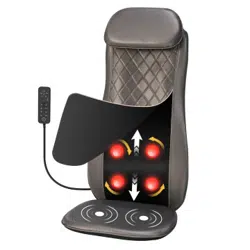
THIS INSTRUCTION BOOKLET CONTAINS IMPORTANT SAFETY INFORMATION. PLEASE READ AND KEEP FOR FUTURE REFERENCE.
Follow Costway
Please give us a chance to make it right and do better!
Contact our friendly customer service department for help first.
Replacements for missing or damaged parts will be shipped ASAP!
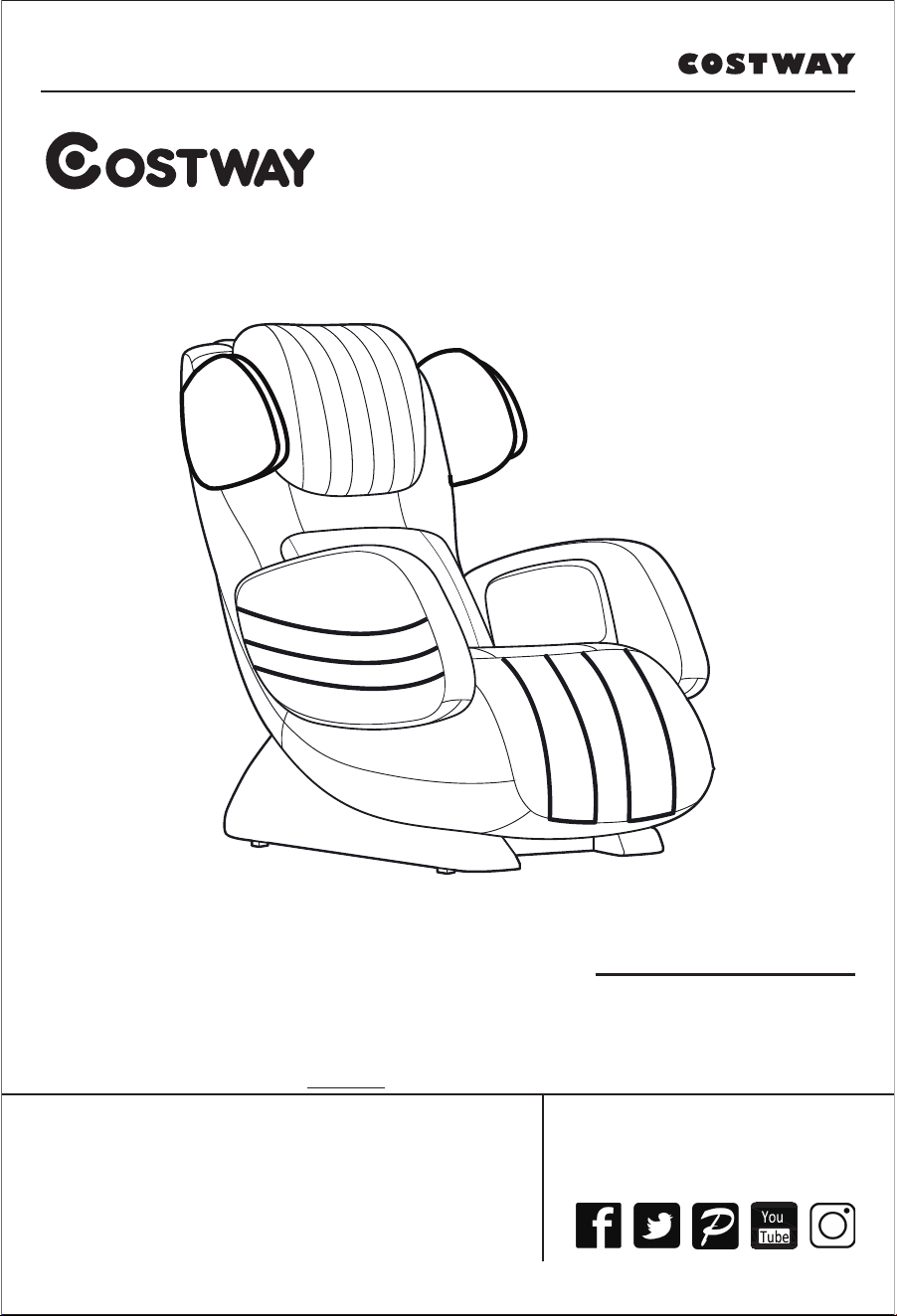
USER’S MANUAL
Massage Chair
JL10007WL
E-mail
US: cs.us@costway.com
UK: cs.uk@costway.com
02

FCC CAUTION:
This device complies with part 15 of the FCC Rules. Operation is subject to the following
two conditions:
(1) This device may not cause harmful interference, and
(2) this device must accept any interference received, including interference that may cause
undesired operation.
Any changes or modifications not expressly approved by the party responsible for compliance
could voidthe user's authority to operate the equipment.
NOTE: This equipment has been tested and found to comply with the limits for a Class B digital device,
pursuant to part 15 of the FCC Rules. These limits are designed to provide reasonable protection
against harmful interference in a residential installation. This equipment generates, uses and can
radiate radio frequency energy and, if not installed and used in accordance with the instructions,
may cause harmful interference to radio communications. However, there is no guarantee that
interference will not occur in a particular installation. If this equipment does cause harmful interference
to radio or television reception, which can be determined by turning the equipment off and on,
the user is encouraged to try to correct the interference by one or more of the following measures:
— Reorient or relocate the receiving antenna.
— Increase the separation between the equipment and receiver.
— Connect the equipment into an outlet on a circuit different from that to which the receiver
is connected.
— Consult the dealer or an experienced radio/TV technician for help.
The equipment complies with FCC radiation exposure limits set forth for an uncontrolled environment,
This transmitter must not be co-located or operating in conjunction with any other antenna or transmitter.
The equipment should be installed and operated with minimum distance 8” (20cm) between the radiator and
your body.
IC WARNING:
This device complies with Industry Canada licence-exempt RSS standard(s).
Operation is subject to the following two conditions:
(1) this device may not cause interference, and
(2) this device must accept any interference, including interference that may cause undesired
operation of the device.
Le présent appareil est conforme aux CNR d'Industrie Canada applicables aux appareils
radio exempts de licence. L'exploitation est autorisée aux deux conditions suivantes :
(1) l'appareil ne doit pas produire de brouillage, et
(2) l'utilisateur de l'appareil doit accepter tout brouillage radioélectrique subi,
même si le brouillage est susceptible d'en compromettre le fonctionnement.
This Class B digital apparatus complies with Canadian ICES-003.
Cet appareil numérique de la classe B est conforme à la norme NMB-003 du Canada.
The device is compliance with RF exposure guidelines, user can obtain Canadian
information on RF exposure and compliance. The equipment should be installed and operated
with minimum distance 8” (20cm) between the radiator and your body.
Le présent appareil est conforme
Après examen de ce materiel aux conformité ou aux limites d'intensitè de champ RF,
Les utilisateurs peuvent sur l'exposition aux radiofréquences et la conformité and compliance
d'acquérir. Installation et mise en oeuvre de ce matériel devrait avec échangeur distance minimale
entre 8” (20cm) ton corps.
03
CONTENTS
Before use
• IMPORTANT SAFETY INSTRUCTIONS
• Important safety matters
• Grounding description
• Installation
• Before use
• Structure
• Controller
USAGE
• Instruction for use
MAINTENANCE
• Clean & maintenance
Q/A /IMPORTANT
• Q/A
• Specification
• Contact us
04

IMPORTANT SAFETY INSTRUCTIONS
When using an electrical appliance, basic precautions should always be followed, including the following:
Read all instructions before using (this appliance).
DANGER
– To reduce the risk of electric shock:
1) Always unplug this appliance from the electrical outlet immediately after using and before cleaning.
WARNING
1) An appliance should never be left unattended when plugged in. Unplug from outlet when not in use, and
before putting on or taking off parts.
2) Do not operate under blanket or pillow. Excessive heating can occur and cause fire, electric shock, or injury
to persons.
3) Close supervision is necessary when this appliance is used by, on, or near children, invalids, or disabled
persons. Keep children away from extended foot support (or other similar parts).
4) Use this appliance only for its intended use as described in this manual. Do not use attachments not
recommended by the manufacturer.
5) Never operate this appliance if it has a damaged cord or plug, if it is not working properly, if it has been
dropped or damaged, or dropped into water. Return the appliance to a service center for examination and
repair.
6) Do not carry this appliance by supply cord or use cord as a handle.
7) Keep the cord away from heated surfaces.
8) Never operate the appliance with the air openings blocked. Keep the air openings free of lint, hair, and the
like.
9) Never drop or insert any object into any opening.
10) Do not use outdoors.
11) Do not operate where aerosol (spray) products are being used or where oxygen is being administered.
12) To disconnect, turn all controls to the off position, then remove plug from outlet.
13) Connect this appliance to a properly grounded outlet only. See Grounding Instructions.
14) Do not use massager in close proximity to loose clothing or jewelry. Keep long hair away from massager
while in use.
– To reduce the risk of burns, fire, electric shock, or injury to persons:
DANGER:
i) Never use pins or other metallic fasteners with this appliance.
ii) Carefully examine the covering before each use. Discard the appliance if the covering shows any sign of
deterioration, such as checking, blistering, or cracking.
iii) Keep Dry – Do not operate in a wet or moist condition.
WARNING:
i) Temperatures sufficiently high to cause burns may occur regardless of the control setting. Do not use on an
infant or invalid or on a sleeping or unconscious person.
Do not use on insensitive skin or on a person with poor blood circulation. Check the skin in contact with the
heated area of the appliance frequently to reduce the risk of blistering.
ii) Do Not Crush – Avoid sharp folds.
CAUTION:
To prevent electric shock, unplug before replacing the fuse and other service.
WARNING:
The maximum rated user weight (load) is 264 Lbs / 120 KGS.
WARNING:
To reduce the risk of personal injury, read and understand all the instructions before using this product.
05
WARNING:
In any case, the user can not disassemble the back cushion.
CAUTION:
HOUSEHOLD AND INDOOR USE ONLY.
This product must be grounded. If it should malfunction or breakdown, grounding provides a path of least
resistance for electric current to reduce the risk of electric shock. This product is equipped with a cord having
an equipment-grounding conductor and a grounding plug.
The plug must be plugged into an appropriate outlet that is properly installed and groundedin accordance
with all local codes and ordinances.
DANGER
– Improper connection of the equipment-grounding conductor can result in a risk of electric
shock. Check with a qualified electrician or serviceman if you are in doubt as to whether the product is
properly grounded. Do not modify the plug provided with the product – if it will not fit the outlet, have a
proper outlet installed by a qualified electrician.
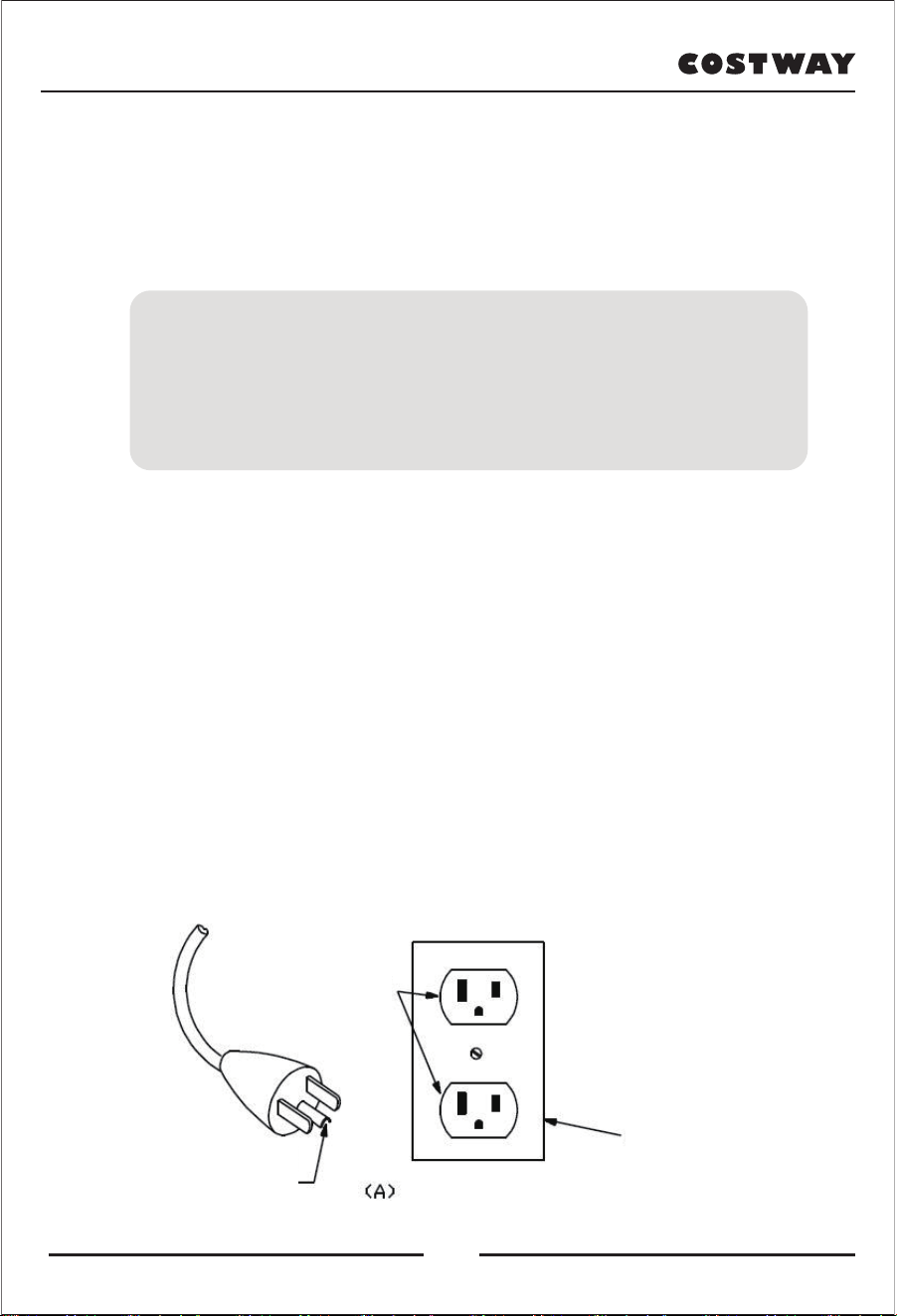
This product is for use on a nominal 120V circuit and has a grounding plug that looks like the plug illustrated
in sketch A. Make sure that the product is connected to an outlet having the same configuration as the plug.
No adapter should be used with this product.
WARNING
BURNS WILL RESULT FROM IMPROPER USE
READ INSTRUCTIONS BEFORE USING
DO NOT WET - DO NOT USE PINS
NEVER REMOVE THE COVER.
SAVE THESE INSTRUCTIONS
GROUNDING INSTRUCTIONS
GROUNDED
OUTLET BOX
GROUNDING
PIN
GROUNDED
OUTLET
06
• Please read this safety precaution carefully before starting to use product.
• The precautions shown here are to remind you and use this product properly to
prevent you and others from being hurt or damaged.
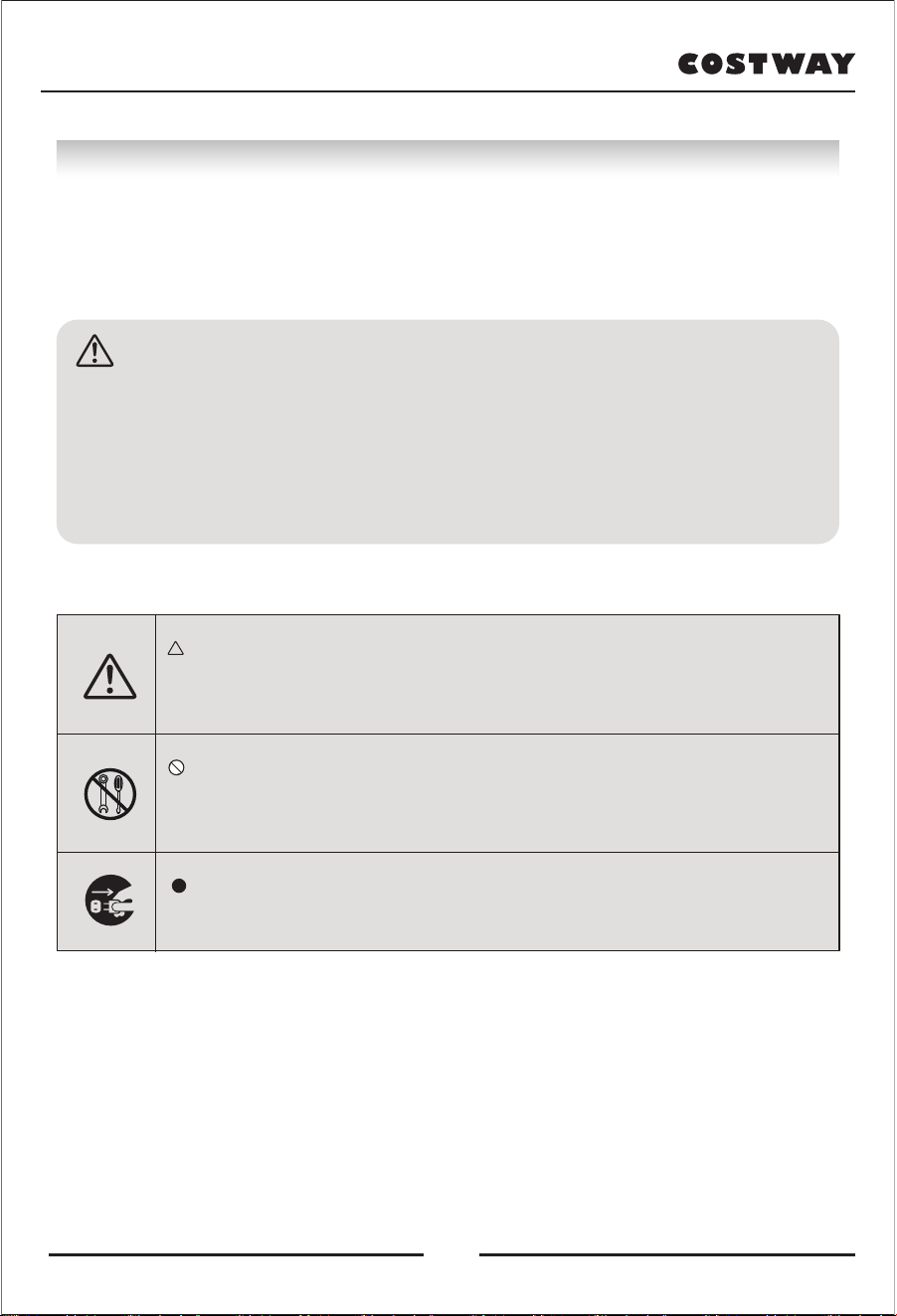
Indicates that there is a warning or an attention
(The example on the left shows general warnings and
cautions.)
Indicates prohibited behavior
(The example on the left shows that disassembly is
prohibited.)
Indication of mandatory and instructional content
(The example on the left shows unplugging)
• Please keep it in a place where you can check it at any time.
EXAMPLE OF ICON
Caution:
If used incorrectly, the user may be harmed, or the
items may be harmed or damaged, which includes the
damage to houses, household property, livestock, and
pets.
The appliance has a heated surface. Persons insensitive
to heat must be careful when using the appliance.
Important safety matters
07
The following people must consult your doctor
before using:
• Patients with cancers
• Maternal or menstrual period
• High fever
• Patients with acute illness (painful)
• Patients with osteoporosis
• Patients with perceptual disturbance
• Cardiopath
• Anemia
• Users of cardiac rhythm devices or other implanted devices
• Spine abnormalities or curvatures
• People receiving treatment or feeling physically abnormal
• For use in previously treated or injured areas
• People who need quiet
• People with severe blood circulation disorders on the feet
• Sometimes cause physical abnormalities
Please unplug the power immediately when the product is unable to operate
or abnormal, and ask the seller to check and repair to avoid electric shock,
leakage, short circuit and fire.
When massaging around the neck, please pay attention to the movement of
the massage roller and do not over-massage. This may cause accidents or
injuries.
Please make sure that the chair cover is not damaged before use. (If it is
damaged, stop using it immediately, unplug the power, and request repair.)
In order to avoid injury or electric shock due to the damaged chair cover.
When lifting/declining the seat back and legrest, please make sure that there
are no people, objects or pets on the back and under the legrest to avoid any
injuries.
ATTENTION
08
Before using, please make sure that you are not wearing any accessories to
avoid injury.
Move the chair stably to avoid scratching the surface.
Please check the position of the massage rollers before you use it to avoid
accidents or injuries.
Please control the massage time within 15 minutes. In addition, please control
the massage time of the same part within 5 minutes. Continuous massage for
too long may cause muscle and nerve pain. It is recommended to control the
massage time within 30 minutes for 1 day.
If you have or feel any abnormalities during massage, please stop using
immediately.
After use, please turn of the power switch to prevent accidents caused by
children playing around.
Please use it in a horizontal place to avoid malfunctions and accidents.
Be careful not to trip over the remote-control cable to avoid accidents or
injuries.
If the power cord or plug is damaged, stop using it immediately to avoid
electric shock, short circuit and sparks.
Do not allow children to use it alone and keep young children away.
Do not allow children to play on the chair to avoid injury or malfunction.
Do not use other therapeutic equipment while using this machine.
Do not use near open flames, such as a stove. Do not use while smoking.
Do not use on heating appliances, such as electric blankets, as it may cause
a fire.
Be sure to insert the power plug all the way, and make sure that no pins or
garbage are stuck on the plug. It may cause electric shock, short circuit and
fire.
Do not fall asleep during the massage as unconscious massage may cause
injury or discomfort.
Do not use it for any purpose other than massage to avoid malfunction or
accident.
Do not use a power source other than 220-240V to avoid electric shock or sparks.
Take care of the power cord. Do not damage, re-process, forcibly bend,
stretch, twist, stick, or tighten the power cord. In addition, do not place under
the heavy objects, especially do not get caught in or pinch the power cord
during moving. Otherwise, the power cord may be damaged, causing electric
shock or sparks.
09
Do not place it in a humid place such as a bathroom, as it may cause electric
shock, fire, failure, and rust.
With the exception of service technicians, no one should disassemble, repair,
or modify the chair. Doing so may cause fire or electric shock.
In the event of a power failure, please immediately turn off the power switch
and disconnect the power plug from the outlet to avoid accidents when the
power is reapplied.
When unplugging the power plug, please hold the plug part on the front side
and do not pull the power cord. It may cause electric shock or short circuit,
which may cause fire.
When the chair is not in use, please unplug the power plug from the socket,
as the dust and moisture will cause wires to age and cause a leakage fire.
When performing maintenance, please unplug the power plug from the
socket. In addition, do not insert or remove the plug with wet hands, as it
may cause electric shock and injury.
Do not use it when wearing hard objects, such as hair accessories, in case of
injury.
Do not put your head and hands under the legrest and under the chair to
avoid accidents or injuries.
Do not use on elbows, knees, head, abdomen. Do not sandwich your hands
and feet between the massage rollers to avoid injury and discomfort.
Do not seat more than two people on the chair at the same time to avoid
injury or malfunction.
Do not use the chair right after a meal to avoid discomfort.
Do not move the chair when carrying people or objects to avoid injury or
malfunction.
Do not drop the chair or hit it with strong force to avoid injury or malfunction.
Do not move the casters or drag the chair on the surface that is easy to be
scratched, such as wooden floors or carpets.
Do not sit on the backrest, armrest, or legrest to avoid injury or malfunction.
Do not wipe with gasoline, diluent, etc. Do not spray insecticide to avoid
electric shock and sparks.
Do not pull the leather too hard. Do not puncture it with force or sharp
objects to avoid injury and malfunction.
This appliance is not intended for use by persons (including children) with
reduced physical, sensory or mental capabilities, or lack of experience and
knowledge, unless they have been given supervision or instruction concerning
use of the appliance by a person responsible for their safety. Children should
be supervised to ensure that they do not play with the appliance.
10
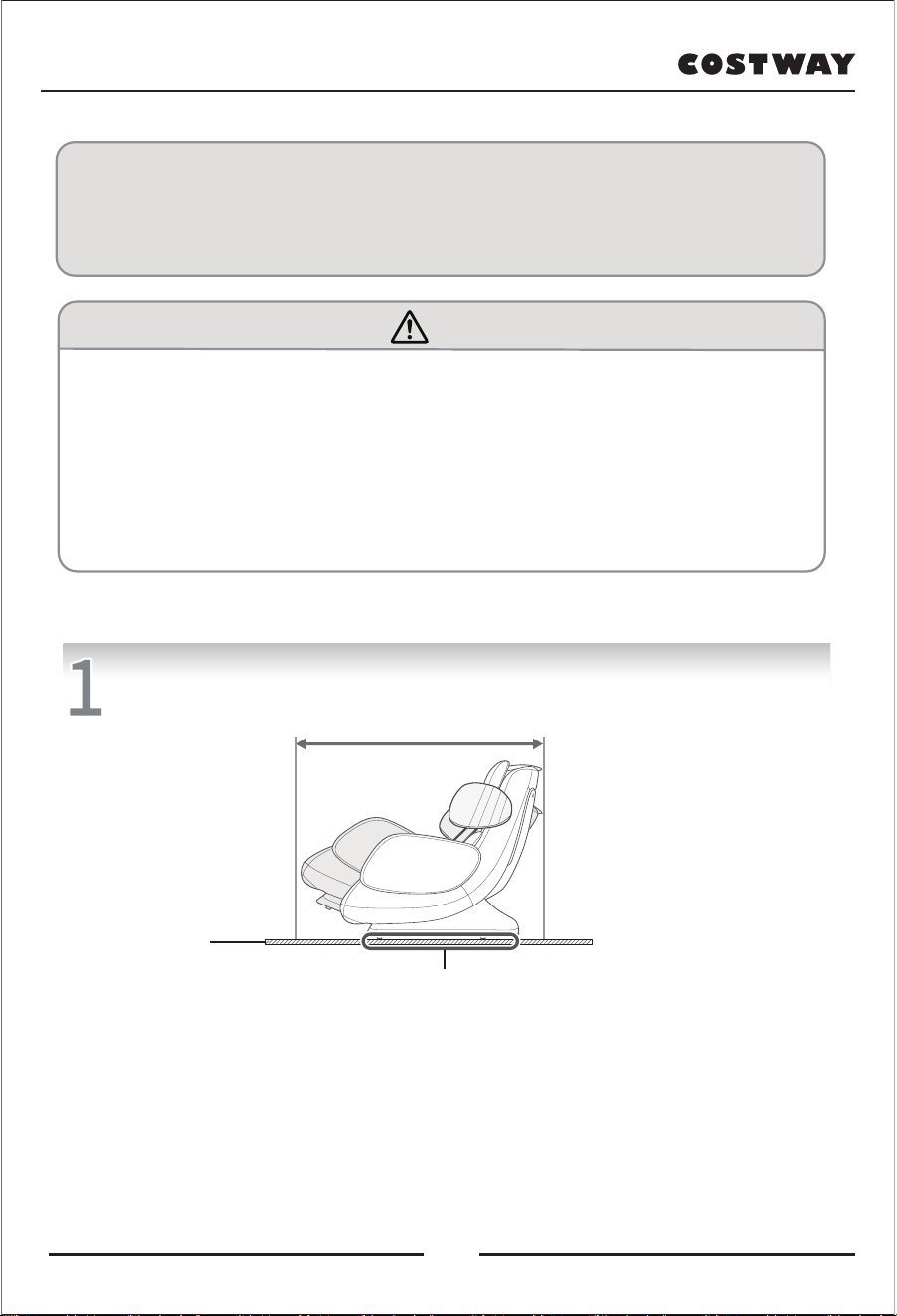
Installation site
Make sure there is enough space for the massage chair to tilt.
Cushion
The area where the seat frame touches the floor.
● Do not expose the massage chair to direct sunlight or high temperature environments
(such as before heating equipment), because this may cause the massage chair's synthetic
leather to fade or harden.
● To avoid damage to the floor, place a mat under the machine. When tiling the mat,
the size of the mat should be large enough to cover the area where the base frame of
the machine touches the floor (at least 35.5” x 21”/90 x 53 cm), as shown in the picture.
● The machine should be installed close to the power outlet.
Installation
Grounding description
This machine must be grounded.
* This product must be grounded. If it should malfunction or breakdown, grounding provides a path of least
resistance for electric current to reduce the risk of electric shock.
* This product is equipped with a cord having an equipment-grounding conductor and a grounding plug.
The plug must be plugged into an appropriate outlet that is properly installed and grounded in accordance
with all local codes and ordinances.
* Improper connection of the equipment-grounding conductor can result in a risk of electric shock.
Check with a qualified electrician or serviceman if you are in doubt as to whether the product is properly
grounded. Do not modify the plug provided with the product – if it will not fit the outlet, have a proper outlet
installed by a qualified electrician.
* This product has a grounding plug, make sure that the product is connected to an outlet having the same
configuration as the plug.
* No adapter should be used with this product.
* If the power cord is damaged, it must be replaced with a dedicated power cord or a dedicated component
purchased from its manufacturer or maintenance department.
* The appliance has a heated surface. Persons insensitive to heat must be careful when using the appliance.
Attention
11
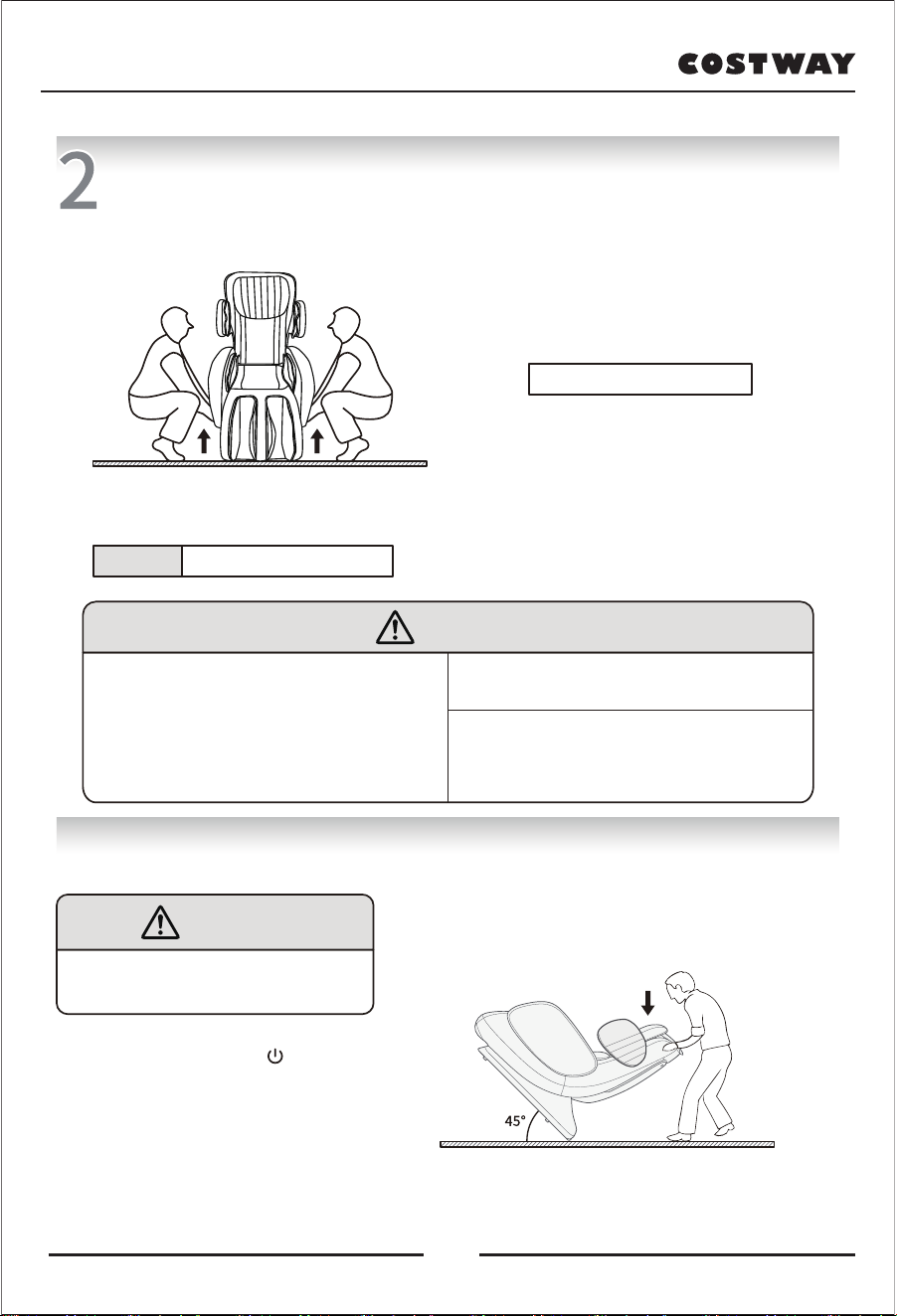
Product moving instructions
Method 1:Hold both sides of the handrail, then lift and move.
● Since this machine is heavy, please be careful
when carrying it to avoid back strain.
(This method must be carried by two or more people)
Weight
About 128LBS / 58KG
※ Attention
1, Please lift the massage chair to move on the
vulnerable ground such as wooden floor.
2, Please reach under the armrest to support the
armrest while lifting it.
Place the unit on the floor
● Put down the machine slowly, taking care not to
injure your feet.
● Do not let go of the machine until the machine
is completely flat. If you suddenly let go,
it may cause damage to the machine.
● The floor may be damaged, therefore, it is
recommended to lay mats and other items on
the floor.
Attention
• Do not drag or push the machine when
it is not fully installed.
• To move the machine on casters after use,
it is recommended to lay a mat under the moving
position to avoid scratches on the floor.
• Do not move the unit when someone is seated.
Otherwise, it may cause the unit to malfunction
or personal injury due to a fall.
• Please turn off the machine before moving the
machine and make sure that the backrest and feet
are fully reset.
Otherwise, it may cause malfunction of the unit or
personal injury.
Method 2:Use the rear casters to move the massage chair
Attention
If you use the rear casters to move the unit,
please put a cushion on the floor,
otherwise it may leave scratches on the floor.
1,Press the standby button " " on the control
panel to turn off all functions.
2, Reset the machine to its original position.
Press the power switch on the lower back of the machine
to "O" (off) position, unplug the power plug.
• As shown in the figure, tilt the chair down and back about 45
degrees to move it.
Note: Please don't push it down too far to avoid the chair from
being completely overturned and causing damage to the hood.
12
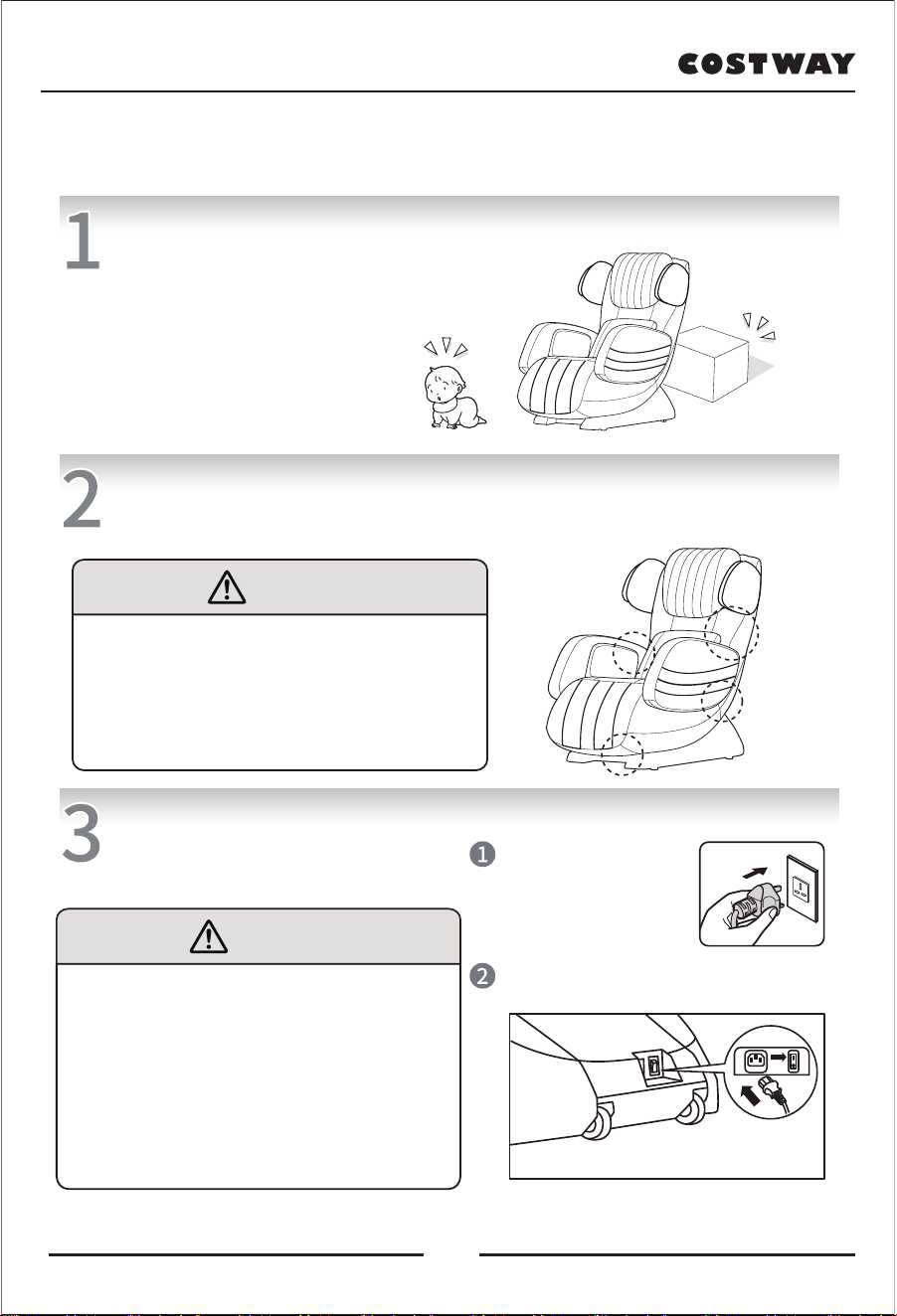
Before use
Check around
Make sure that there are no people, pets and
other objects around the machine.
Make sure that there is no objects between the gaps of the machine.
Before massage, please make sure that there is no objects
caught in the gap of the massage chair.
Attention
• Do not put your hands, fingers, feet, or head into the
gaps between the legs and the seat and armrests.
• Before seating, please make sure that there are no
foreign objects between the various parts of the machine.
• Do not put your hands, arms or head deep between the
backrest and the back cover.
• Do not put pets on the massage chair (seat, backrest,
armrests, legs, etc.).
Turn on the power
Before massage, please make sure
that no foreign objects are caught in
the legs etc.
Warning
• Please check whether the power cord and power
plug are damaged before use.
• Before seating, please make sure that there are
no foreign objects between the various parts of the
machine. Be sure to insert the power plug all the way.
Otherwise, electric shock or overheating may cause fire.
• Please use 120V~50Hz alternating current.
Do not connect the transformer without authorization.
Otherwise, it may cause electric shock, machine
malfunction or overheating and cause a fire.
• Do not plug or unplug the power plug with wet hands.
Insert the power plug into
the power socket.
Press the power switch at the pedestal,
turn the switch to "l" (on) position.
13
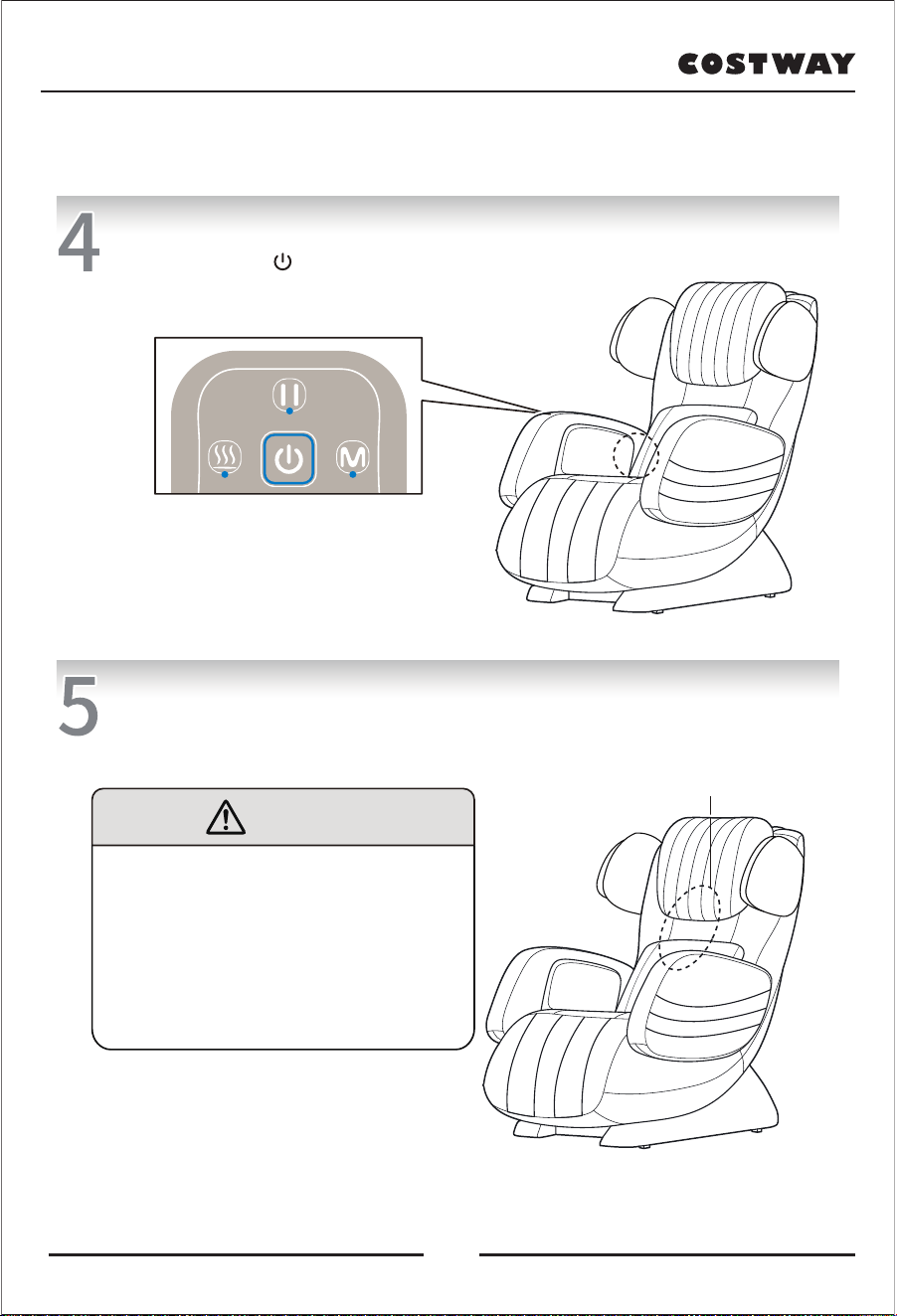
Make sure the massage rollers is in the storage position.
If not, press the " " at the control panel to set.
Make sure the fabric is not damaged and no cracks.
Key inspection area: The area of the back covering the
range of motion of the massage balls.
Key inspection area
Before use
Attention
• Before using the massage chair, be sure to open
the cushion and check whether the fabric in the
key area as shown in the figure is damaged.
Please also check whether the fabric is damaged
in other parts. (No matter how small the damage is,
please stop using it immediately, unplug the power
plug, and send the unit for repair.) Using this
massage chair with the fabric damaged may
cause the danger of injury or electric shock.
14
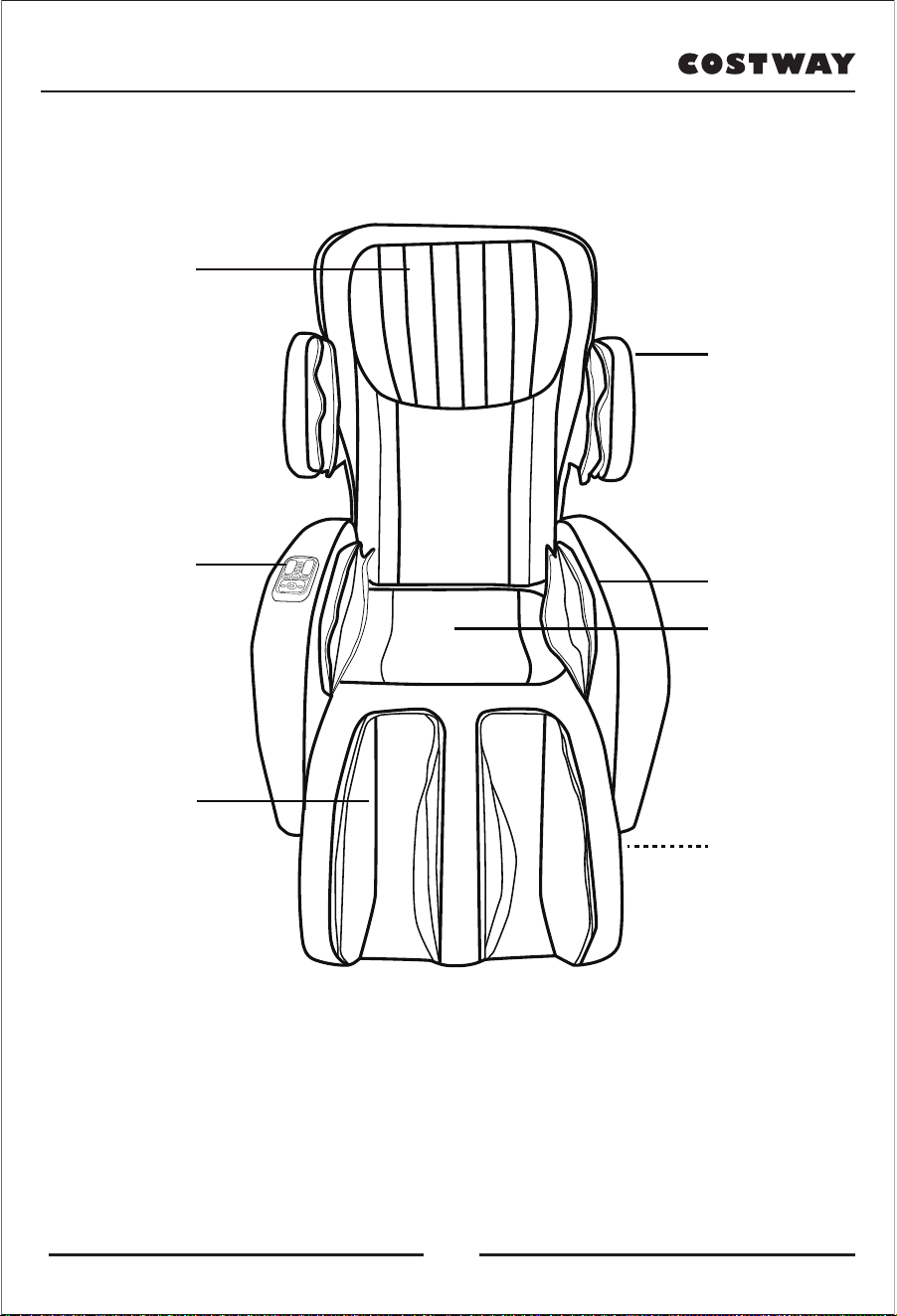
Product Structure
Headrest
Controller
Leg part
Backrest
Side air bag
Cushion
Caster
15
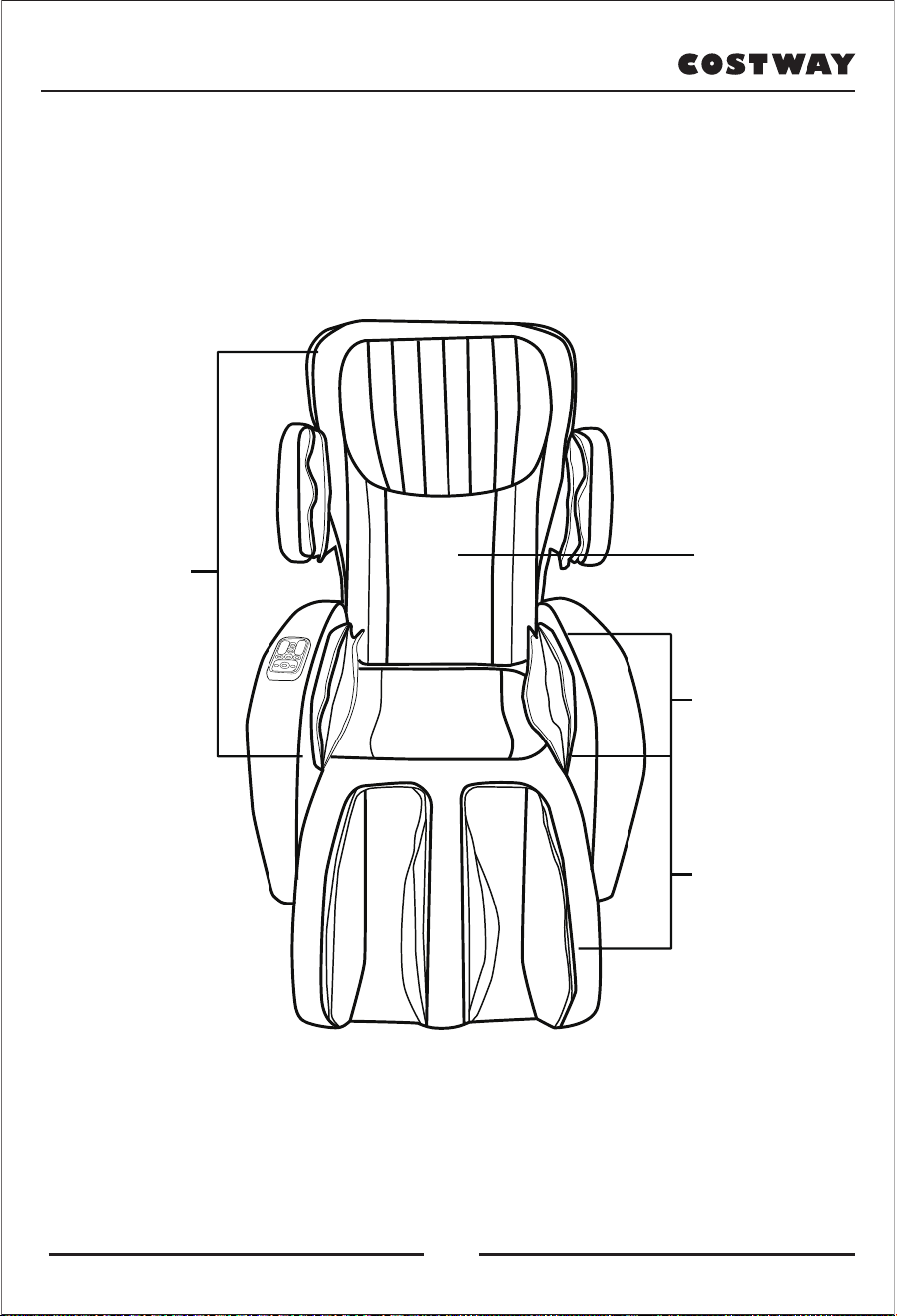
Product Structure
Massage position
Neck to seat:
Shiatsu, Tapping ,
Rolling massage
Flap cover:
hot compress
Lateral Airbags:
Air bag pressure
massage
Leg part:
Air pressure
massage
16
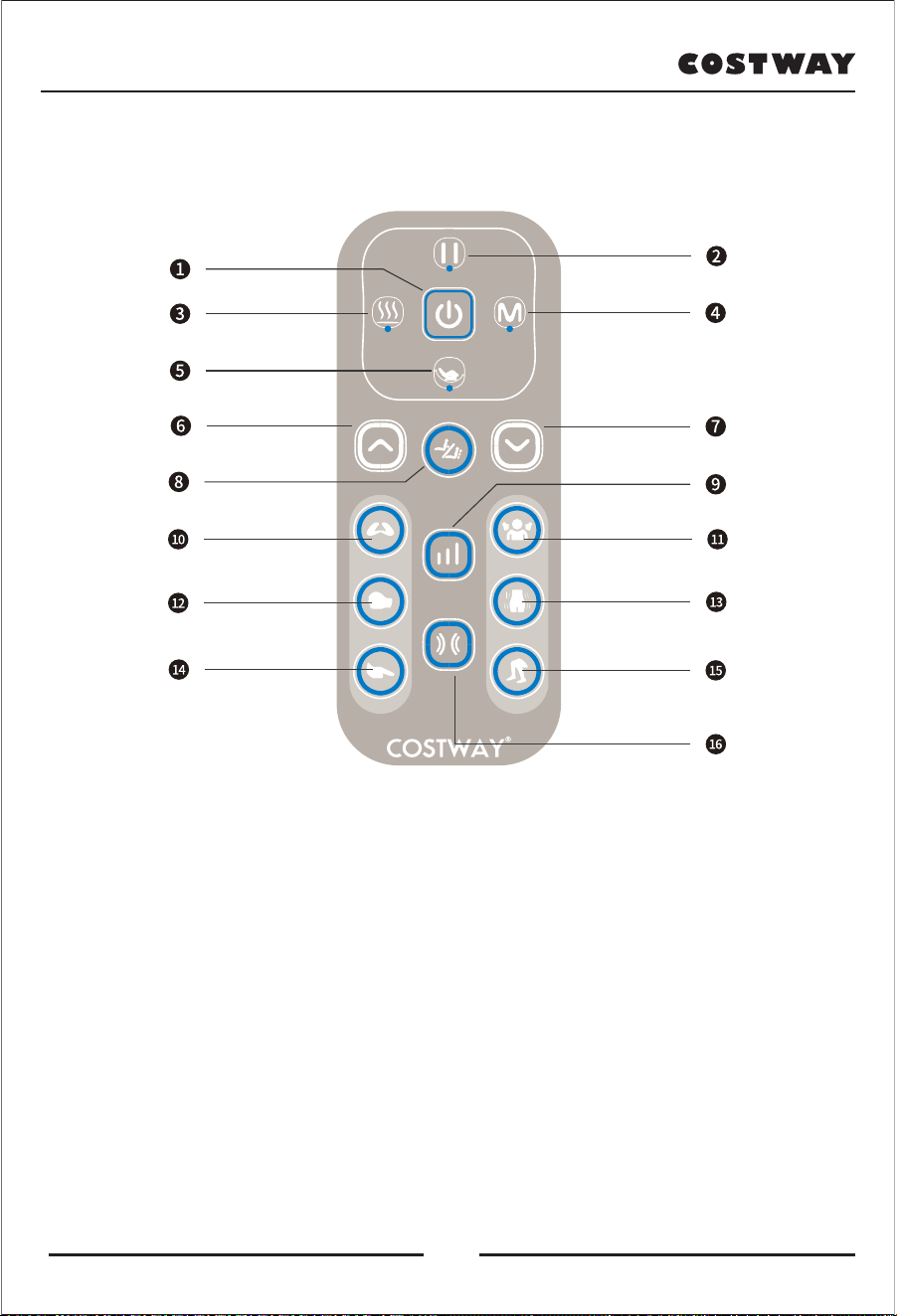
Controller description
1. Power On/Off: turn on/off the massage chair.
2. Pause: stop all the massage.
3. Heat: turn on/off the heating function.
4. Mode: to choose auto modes.
5. Swing function: turn on/off the swing function.
6/7. Up/Down: massage position adjustment.
8. Spot/Zone: fixed point/area chosing.
9. Strength: adjust massage strength.
10. Shiatsu: turn on/off shiatsu massage.
11. Shoulder Airbags: inflate/deflate airbags for shoulder.
12. Tapping: turn on/off tapping function.
13. Lateral Airbags: inflate/deflate airbags for lateral.
14. Rolling: turn on/off rolling function.
15. Leg Airbags: inflate/deflate airbags for calf.
16. Air pressure intensity: adjust air pressure intensity.
Spot
Shiatsu
Massage technique
Massage
intensity
Pressure
intensity
Shoulders
Hips
Calf
Air pressure
Kneading
Tapping
17

Instructions for use
Button Description
1. POWER ON/OFF: turn on/off the massage chair
Press this button when the product is in standby state, the indicator light on and come
with a beep, turn to default timing 15mins. The Chair would stop working after 15 minutes.
Then press this button to turn off the chair, the indicator light will twinkle and massage chair
will start to be stored, once stored, the indicator light will be off.
2. PAUSE: stop all the massage
Press this button, it will pause all the actions of the massage chair, the indicator light on
and come with a beep. Press again, there will be a beep and indicator light off,
the chair restart.
*When the massage chair is shut down and reset, in case of emergency, you can press
this key.
3. HEAT: turn on/off the heating function
Press this button to turn on the heat function, the indicator light on and come with a beep.
Press again to turn off the heat function, the indicator light will go out with a beeping sound.
4. MODE: to choose auto modes
The air pressure function will be automatically turned on and maintained at a weak intensity,
press this button in the power-on state.
• Whole body mode---press the MODE button once, the indicator light is on (green light) and
accompanied by a beep.
• Neck and shoulder mode---press the MODE button for the second time, the indicator light
(blue light) will be on and a beep will sound.
• Waist-hip mode---press the MODE button for the third time, the indicator light is on (red light)
and a beep sounds.
• Exit the MODE function---press the MODE button for the fourth time, the indicator light will
be off and a beep will sound.
If you press this button multiple times, the mode will cycle sequentially.
5. Swing function: turn on/off the swing function
Press once to start the cradle mode, the indicator light will be on and there will be a beep.
Press again to exit this mode, the indicator light will be off with a beep.
18

6/7. UP/DOWN: rise and fall the massage heads
In SPOT/ZONE mode or after the shoulder-to-neck position is automatically detected and
the beep sounds, press UP or DOWN to adjust the massage head to move up or down.
The indicator light flashes.
Note: The indicator light does not light up when adjusting the shoulder and neck position.
The green light flashes in SPOT mode, and the blue light flashes in ZONE mode.
8. Spot/Zone: fixed point/area chosing
This button is effective in manual mode with Roll, Shiatsu or tapping on.
• In SHIATSU/TAPPING mode: Press this button once to exit the overall massage mode,
and the fixed-point massage function (SPOT) is turned on (there is a prompt sound, and
the indicator light is green). Press this button again, the SPOT function is turned off, and
the ZONE function is turned on (blue light). Press this button for the third time, the ZONE
function is turned off, and the overall massage function is turned on (the light is off).
• In ROLL mode: Press this button once, the light is on (blue), and the SPOT function is off.
Press this button again, the light is on (blue), and the ZONE function is turned on.
Press this button again to exit the ZONE function and the overall Roll on (light off).
When exiting the Roll function, the ZONE function is automatically exited.
9. Strength: adjust massage strength
Press this button to adjust the intensity when the MODE/SHIATSU/ROLL/TAPPING/LEG
is on. The indicator light would be changed accordingly from green, blue and red
(weak, mid, strong).
10. SHIATSU --- Press this button to turn on the SHIATSU function and light on.
Press once again,exit SHIATSU function and light off.
PS: Pressing this button in automatic mode will automatically exit the MODE function,
and only stay in SHIATSU mode.
11. Shoulder Airbags: inflate/deflate airbags for shoulder
• In automatic mode (Mode function): Press this button to adjust the intensity of the airbag
according to the middle gear (blue light), strong gear (red light), airbag off (light off) and weak
gear (green light).
• In manual mode: Press this button to adjust the airbag intensity according to weak gear (green
light), middle gear (blue light), strong gear (red light) and off (light off).
PS: Every time you press the button, there will be a beep.
Instructions for use
19

Instructions for use
12. Tapping: turn on/off tapping function
Press this button to turn on the Tapping function. Press once again,quit Tapping function
and light off.
PS: press this button under automatic mode would automatically quit from Mode function and
maintaining in the tapping mode only.
13. Lateral Airbags: inflate/deflate airbags for lateral
Press this button to turn on the Hip air inflation function, light on and come with a beep.
Press once again,quit Hip air inflation function, light off and come with a beep.
14. Rolling: turn on/off rolling function
Press this button to turn on the Rolling function, light on and come with a beep.
Press once again, quit Roll function, light off and come with a beep.
PS: press this button under automatic mode would automatically quit from Mode function
and maintaining in the rolling mode only.
15. Leg Airbags: inflate/deflate airbags for calf
Press this button to turn on the Leg Air Pressure function, light on and come with a beep.
Press once again, exit Leg Air Pressure function, light off and come with a beep.
16. Air pressure intensity: adjust air pressure intensity
Press this button to adjust the intensity when the Mode/ Shoulder Airbags / Lateral
Airbags / Leg Airbags is on state. The indicator light would be changed accordingly from green,
blue and red (weak, mid, strong).
Operation Complete
After use, please press the Power button, and the product will reset automatically. After reset,
please press the power switch to “O” position under the back of the massage chair .
Please pull out the power plug if not used for a long time.
20
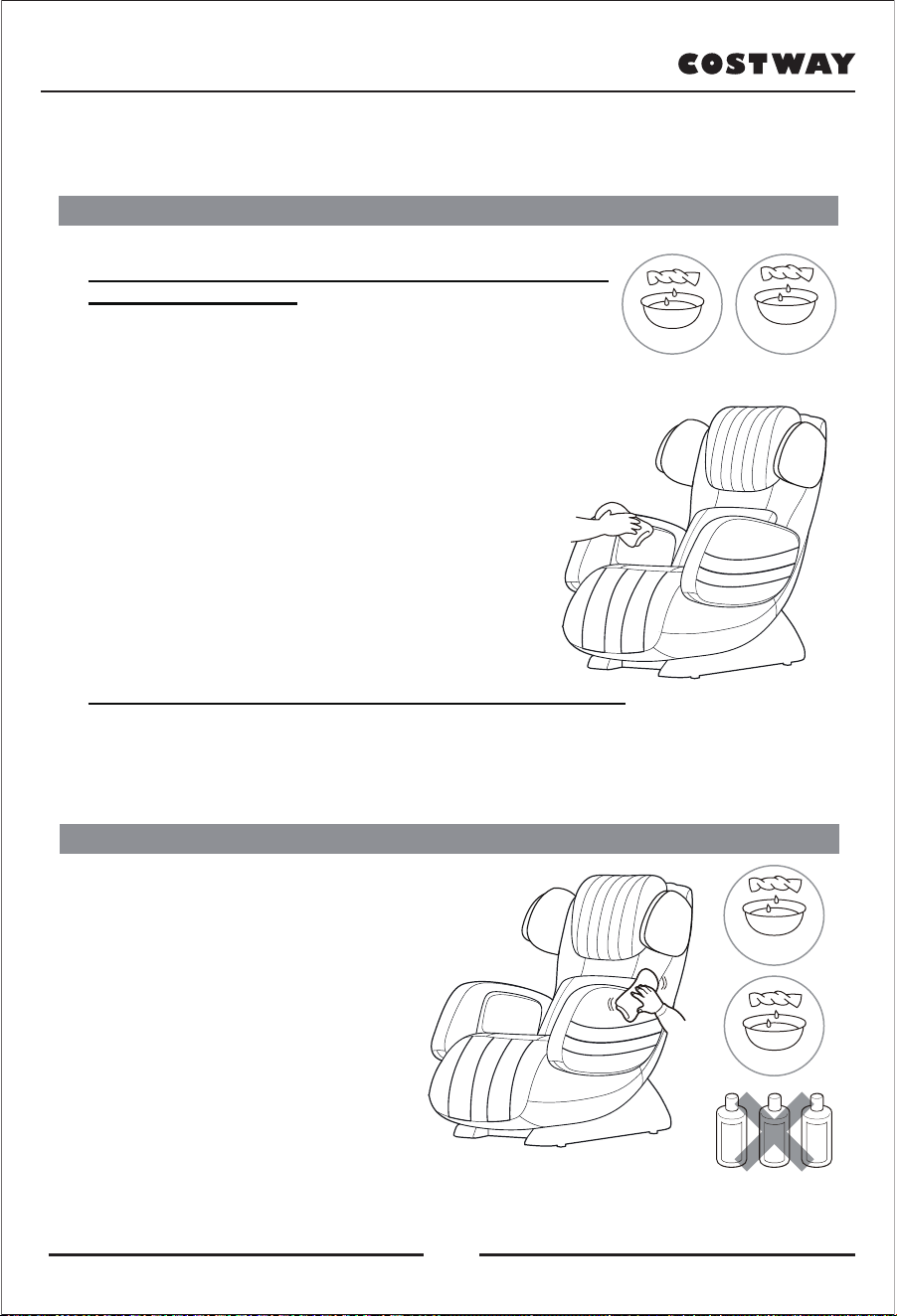
Clean & Maintenance
Clean synthetic leather parts
Clean plastic part
1. Soak the soft cloth in water or hot water with neutral
detergent, wring it out, and and wipe the plastic
part of the machine.
* Do not use chemicals such as thinner, gasoline,
alcohol and so on to clean the machine.
2. Wipe with a cloth soaked in water and
thoroughly wrung out.
* Be sure to wring out the cloth before
wiping the control panel.
3. Let it air dry.
Wipe the leather with a soft, dry cloth.
1. Do not use chemicals such as thinner, gasoline, alcohol and so
on to clean the machine.
2. Please follow the instructions when using commercially available
leather care products (rag).
3. If the synthetic leather is particularly dirty, wipe it as follows.
① Dip a soft cloth in water or hot water with 3% to 5% neutral detergent,
and then squeeze it out thoroughly.
② Use the soft cloth to wipe the leather surface.
③ Wipe off the cleaning fluid with a cloth that has been soaked in
water and wrung out thoroughly.
④Use a soft cloth to wipe dry.
⑤ Let it air dry naturally.
4. If stains are difficult to remove, please soak commercially
purchased melamine foam in neutral detergent, then wipe
the unit with it.
5. Do not use a hair dryer to dry surfaces.
6. Since the color of the cloth will stain the surface of the
synthetic leather, cattle are used.
Be careful when wiping the machine with cloth and colored cloth.
7. Do not keep these areas in contact with plastic for long periods of time,
as this will cause discoloration.
8. Synthetic leather has the potential to change color, so please contact it when
using hair dye covered with a towel.
gasoline
alcohol
chemicals
21
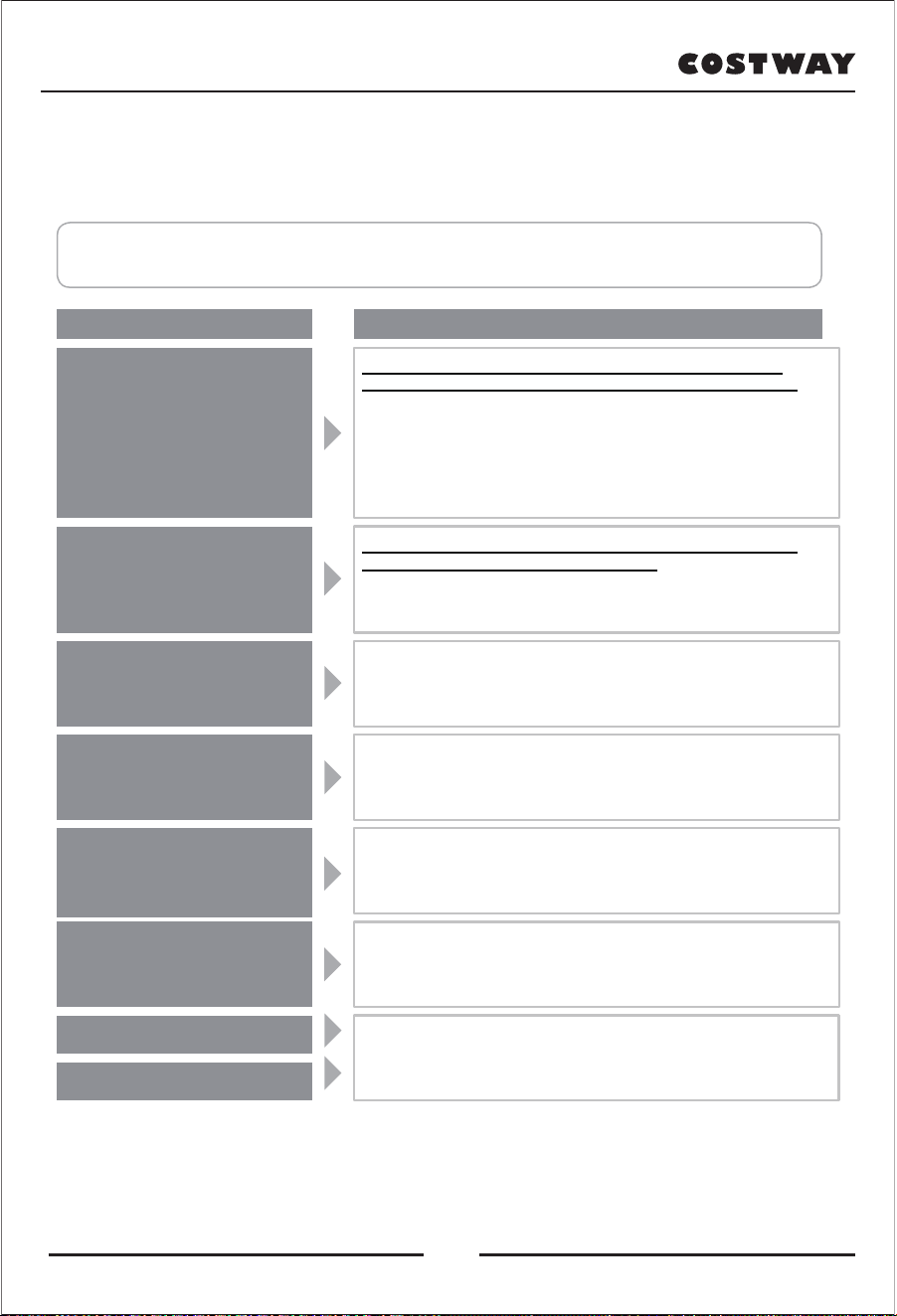
TROUBLE SHOOTING (Q&A)
When a fault is found, first check and try the following methods.
If the failure persists after trying, please contact our customer service.
The problem Cause and treatment
If the above treatment method is invalid, please contact our customer service.
The massage nodes stop during use
(The massage chair beeps, and all
the display icons and buttons on the
control panel flash then go out)
Don't tilt
(Control panel light off then stop
running after beeps)
The massage nodes do not reach the
shoulders or neck.
Different intensities of the left and right
massage nodes
The massage chair doesn't work at all.
* Upper body (neck to waist) massage
* Air pressure massage
Even if the heating function is
turned off, the temperature cannot
be lowered
The machine has been damaged.
Abnormal heating of the power cord
or power plug.
In the process of use, when the massage nodes encounter too much
external force, the massage wheel may stop moving for safety reasons.
If all the icons and buttons on the control panel start flashing, which is
extremely unusual, please turn off the power switch, wait for about 10
seconds, and then turn it on again.
If the massage nodes stop again, adjust your sitting position so that your
back is not completely attached to the backrest. (Relevant precautions
should be observed, especially for persons weighing 220lbs / 100kg or more
when used.)
If the massage chair encounters obstacles or too much force during use,
the machine will stop working for safety reasons.
When all the displayed contents and buttons are flashing and the
backrest has stopped working, Power off the unit once, press "on"
again 10 seconds later, and then operate it.
If the head doesn’t get to the pillow, or the back doesn’t get to the
backrest, neck and shoulder position may be lower than actual position
during body detection. Rest your head fully on the pillow and start again
This situation occurs because the massage movement which can carry
out the interactive pounding/tapping action of the massage nodes are
equipped. It's not a malfunction.
* The power cord connection is disconnected.
* The power switch is not turned on.
* No program is selected after pressing the Power button on the control panel.
Because of the structure of the heater, it will still feel warm for a moment
after heating because of the waste heat.
Even if the warm function is turned off, continuous massage of the same
part will make the body temperature rise.
In order to prevent accidents, please be sure to contact the authorized
service center.
22
TROUBLE SHOOTING (Q&A)
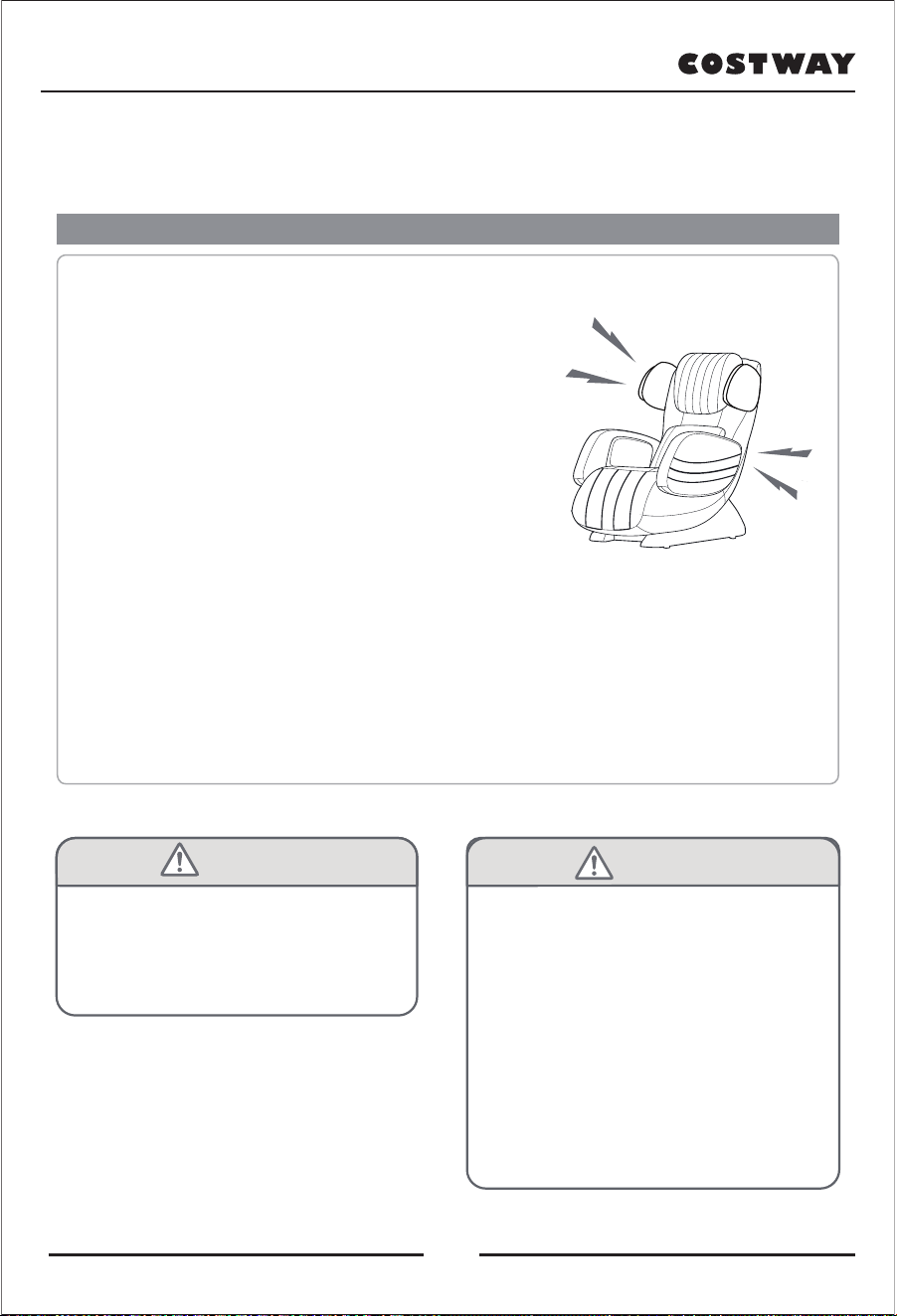
About the sounds and caring feelings of the machine during operation
During use, the following action sounds and feelings will occur, but this is due to
the structure of the massage chair, not abnormal.
1. The sound of massage nodes changing from "extending" to "retracting".
2. When in use, the massage nodes can make a sound and feel
when it rubs the wrinkles on the fabric.
3. The movement sounds of kneading, tapping etc.
4. The friction sound of the massage nodes.
5. Motion sounds when moving up and down.
6. The rotating sound of the conveyor belt.
7. The motor sound.
8. The sound of the massage nodes changing from
"Squeeze" to "Stretch".
9. The sound of sitting down.
10. The friction sound of armrest and cushion when the back is tilted.
11. The friction sound of rubbing between massage nodes and the cloth.
12. Air pump working sound when air bag massage is in operation
13. Exhaust sound of air bag massage operation
14. The working sound of the solenoid valve under the seat during the operation of air bag massage.
15. Shoulder extension and movement sound.
16. Air bag action sound
17. The sound of the cushion rubbing against the leather on the back cover when the back is tilted
It's also possible that something went wrong when the sound got louder.
At this point, please entrust authorized service center for inspection and maintenance.
WARNING:
Do not modify the massage chair without
authorization. Do not decompose or repair
the machine by yourself.
Otherwise, it may cause fire, abnormal action
and personal injury.
In case of abnormal or malfunction, stop
using immediately and unplug the power..
(Otherwise, smoke, fire or electric shock
may occur.)
< Examples of exception and fault >
• It may not work after turning on the power
switch.
• Move the power cord, sometimes energized
and sometimes not.
• Burn odor and abnormal sounds in operation
• Deformed massage chair or abnormal heat
→ Please entrust the authorized service
center to check and repair immediately.
WARNING:
Gada
Click
23
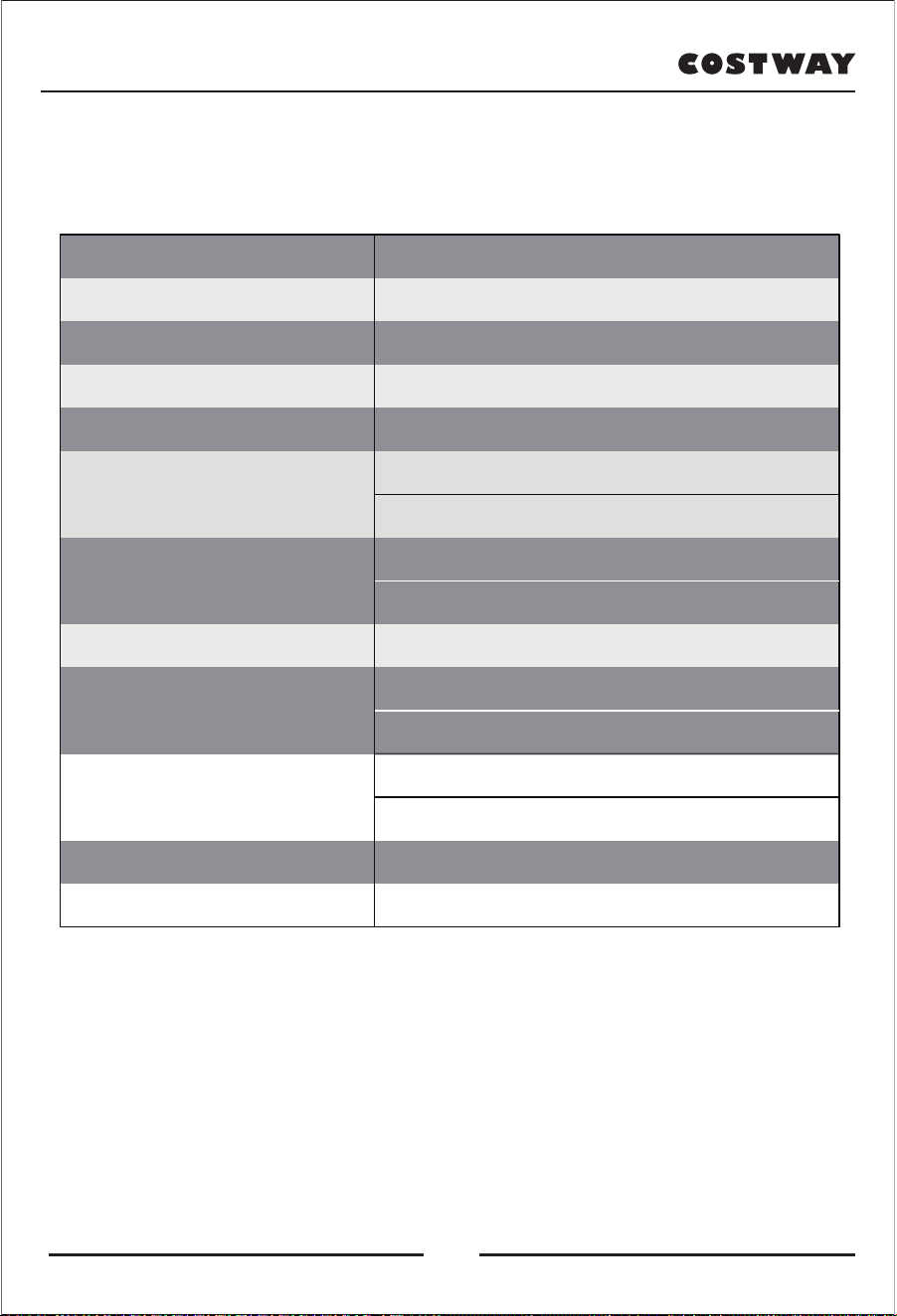
PRODUCT SPECIFICATION
Product name
Model
Rated Voltage
Rated power
Rated time
Dimension(L*W*H)
Upright position: 49”x27”x39”/124*68*100cm(LxWxH)
Horizontal: 58”x27”x32”/147*68*80cm(LxWxH)
Weight
G.W: 159LBS / 72KG
N.W: 128LBS / 58KG
Powerline length 6 FT / 180CM
Working environment
Temperature: 32℉~ 95℉/ 0℃~35℃
Humidity: 20%~80%
Storage
Temperature: 23℉~ 95℉/ -5℃~35℃
Humidity level: 20%~80%
Safety functions Thermal and overcurrent protection
VIP Massage chair
EW-15005
120V~ 60Hz
100W
15min
Maximum weight for user
220LBS / 100KG
24
Welcome to visit our website and purchase our quality products!
We would like to extend our hear�elt thanks to
all of our customers for taking �me to assemble
this product and giving us valuable feedbacks.
With your inspiring rating, COSTWAY will be more consistent to offer you
EASY SHOPPING EXPERIENCE, GOOD PRODUCTS and EFFICIENT SERVICE!
US office: Fontana, California
UK office: Ipswich
Reward Points
Exclusive Customer Service
Personalized Recommenda�ons
Permanent Shopping Cart
Order History
25

Costway Massage Chair Customer Warranty
Costway products include the following warranty:
This Costway massage chair has a three-year warranty for both parts and
labor.
Costway customer service will not issue Return Material Authorizations
(RMAs) for products due to buyer’s remorse. RMAs will be issued only
when product has quality problem. Costway products will be either
repaired by the customer or by an in-home technician.
Service And Technical Support:
Customers can contact Costway's customer service department at
213-401-2666 at any time Monday through Friday or via email at
topsupport@costway.com for warranty or service issues.
Customers are required to provide dated proof of purchase (sales receipt)
when they contact Costway service department regarding a repair.

A Costway customer service representative will attend to most customer
inquiries, however, in some cases, when necessary, a technical service
specialist will provide advanced support.
Non-warranty repair is provided on a "per incident" basis. Costway
customer service will verify that the unit has failed and provide
instructions for repairing a unit. All applicable repairs, parts, shipping,
handling, local tax, and a "per incident" fee will be charged for
non-warranty repairs.
You can visit www.costway.com and www.costway.ca for the latest terms
and pricing depending on the type of issue or incident.
Proof of purchase (sales receipt) is required for all warranty repairs or
service.
Extended Warranties:
Costway offers extended warranty programs to enhance ownership of
Costway products.
Extended warranty provides: A maximum 2-year limited repair or

replacement massage chair warranty with on-site service in certain
areas.
Please visit www.costway.com and www.costway.ca for the latest terms
for extended warranties.
Product Repairs
Many Costway product repairs may be performed by the customer in
their own home with parts and instructions supplied by Costway, such as
remote controller replacements that don't require a technician.
Customers may contact Costway's customer service department at
topsupport@costway.com for warranty or service issues.
Floor Models and Demonstration Units have a prorated warranty period
that begins the day the model is placed on the floor and connected to an
electrical outlet by the retail partner. Proof of purchase (sales receipt) is
required in order to obtain warranty service and parts. Non-warranty
parts and service are available at a "per incident" rate.
Warranty Coverage Period: Warranty coverage begins on the date of
customer purchase. Proof of purchase (sales receipt) is required for all

warranty repairs. The warranty period is measured by continuous
calendar days based on a seven-day week.
Field Service: The Costway customer service department will diagnose
the problem and schedule an authorized service provider to repair a
chair in the customer's residence. If the area is not covered by Costway
official or authorized service provider, after the Costway service team
diagnose the problem and provide approval, customers may find their
own qualified technician. Customers will be reimbursement once an
invoice and proof of the technician’s qualifications are submitted to the
Costway customer service department. The value of reimbursement
should not exceed the cost of a Costway official or authorized service
provider.
Parts: All parts deemed necessary for repairs will be shipped to the
customer at no charge.
CUSTOMER WARRANTY LIMITATIONS AND EXCLUSIONS
Warranties are not valid in certain areas. Invalid areas in Canada: NT, NU,
YT.

Postcodes start with A0K, A0P, A0R, A2V, G0G, G4T, J0M, R0B, T0P, T0V,
V0T, V0L, V0V, V0W, X0A, X0B, X0C, X0G, X0E, X1A, Y0A, Y0B, Y1A.
Invalid areas in US: Alaska, Hawaii, Puerto Rico, and Guam.
The warranty only applies to Costway products and does not include any
accessories or enhancements.
Field service requires pre-approval and must be performed by qualified
technicians. Costway official and authorized field service is only available
in certain areas. Please visit www.costway.com and www.costway.ca for
the latest information regarding authorized field service.
Softening of foams and filling composites in pillows, pads, and memory
foam occurs naturally and does not constitute a defect under this
warranty.
Fading, wear, and piling of fabrics occurs naturally and does not
constitute a defect under this warranty.
Natural markings, grain, and dye variations in leather do not constitute a
defect under this warranty.

Warranties do not cover any loss or damage resulting from improper
installation, unauthorized repairs or modifications, improper use of
electrical/power supply, loss of power, dropped products, a malfunction
of or damage to an operating part from failure to provide manufacturer's
recommended maintenance, transportation damage, theft, abuse,
misuse, neglect, vandalism, or environmental conditions (fire, floods,
rust, corrosion, sand, dirt, windstorms, hail, earthquakes, or exposure to
other weather conditions), loss of use during the period the product is at
a repair facility, or otherwise awaiting parts or repair.
Damage due to shipping and handling does not constitute a defect under
this warranty.
Under no circumstance shall Costway or its representatives be liable for
indirect, consequential, or incidental damages (including damages for
lost profits, business interruption, bodily injury, medical harm, and the
like), even if any party has been advised of the possibility of such
damages.
Warranties are non-transferable and shall be in lieu of any other
warranty, express or implied, including but not limited to any implied

warranty or merchant ability or fitness for particular use.
Costway's sole liability and the purchaser's exclusive right shall be for the
repair, or at Costway's option, for the replacement of defective part.
Notwithstanding the above, if replacements parts for defective materials
are not available, Costway reserves the right to make substitutions in lieu
of repair or replacement.
All warranties begin on the date of purchase; no allowance or extension
is offered for delivery and/or installation.
Warranties do not apply to rental, business, commercial, institutional, or
other non-residential users.
Extended Warranty
LIMITED REPAIR OR REPLACEMENT MASSAGE CHAIR WARRANTY WITH
ON-SITE SERVICE
If you have a warranty or product question, please contact Costway's
support team at 213-401-2666 at any time Monday through Friday, or via
email at topsupport@costway.com.

In the event you detect and report a defect in the workmanship or
material of the Equipment, during the Service Period, then the
Administrator shall provide the services hereinafter described.
Your purchase of the Extended Warranty shall constitute your
acceptance to the terms of this Limited Warranty including the
indemnification provisions.
1) DEFINITIONS - For the purpose of this Limited Warranty, the following
terms shall have the following meanings:
(1) "Equipment" shall mean a Costway product or system;
(2) "Customer" shall mean only the residential end-user of the
Equipment who is the original purchaser of the equipment from the
Distributor, from an authorized reseller.
(3) Usages of "you" or "your" refer to the Customer;
(4) "Commencement Date" shall mean the date on which the Equipment
is first purchased by a Customer from the Distributor or from an
authorized reseller;
(5) "Service Period" shall mean the period commencing on the
Commencement Date;

(6) "Administrator" shall mean Costway. Usage of "we," "us," or "our"
shall mean the Administrator. You may contact the Administrator if you
have questions regarding this coverage. We can be reached by phone at
213-401-2666.
2) COVERAGE - During the Service Period, we will repair or replace, at
our sole discretion, any defective Equipment. We will return the
Equipment to a properly functioning state. To obtain such service, you
must be able to provide us with the original, dated proof of purchase
(sales receipt) for the Equipment. This Limited Warranty extends only to
Customers. Only our representatives may perform repairs on the
Equipment under this Limited Warranty. Replaced parts shall be covered
under this Limited Warranty for the remainder of the Service Period or
for thirty (30) days, whichever is longer. We will provide on-site service
as necessary on regular workdays. Submission of the Extended Warranty
Card form is not a condition precedent to obtaining service under this
Limited Warranty. If a particular replacement part is not available from
the manufacturer, we will make reasonable efforts to locate a compatible
replacement part. If we are unable to locate a compatible part, we may
replace your Equipment with a similar product. Under no circumstances

shall the retail replacement value exceed the original net price paid for
the Equipment. In the event you choose not to accept a replacement for
your Equipment, we shall no longer be responsible for making repairs
under this Limited Warranty.
3) EXCLUSIONS - This Limited Warranty does not include service needed
on Equipment as a result of any of the following:
(1) Installation, set-up, moving, or relocation from the originally
installed location;
(2) Cosmetic changes, tears, or failure of fabrics, woods, foam, pads,
plastics, upholsteries, exterior coverings, and damages and changes
resulting from normal wear and tear;
(3) Negligence, misuse, abuse, improper maintenance, electrical
disturbances and power surges, acts of nature, or work, attachments,
additions, alterations, or modifications by persons other than authorized
Administrator service providers;
(4) Failure by the Customer to use a high-quality surge protector during
the entire Service Period; (5) Improper operating environments;

(6) Any problem not involving a defect;
(7) Damage or malfunction whatsoever caused by an animal or pet;
(8) Damage or malfunction whatsoever caused by liquids of any kind;
(9) Rental, business, commercial, institutional, or other non-residential
use;
(10) Unnecessary service requirement. If no problem is found upon
diagnosis by us or any other third party, you may be charged our
standard rate for shipping costs and parts;
(11) Dropped products or components (including remote controls);
(12) Use of any item with the Equipment that is not designated for use
with the Equipment; and
(13) Field service requires pre-approval and must be performed by
Costway's authorized field service personnel. Field service is only
available in certain areas. Please visit www.costway.com and
www.costway.ca for the latest information regarding field service.
4) YOUR RESPONSIBILITIES - You shall:
(1) Operate the Equipment in an environment meeting the

requirements delineated in the Equipment's owner manual and other
provided instructions;
(2) Protect the supply of electricity to the Equipment through the use a
high-quality surge protection device;
(3) Permit no work on the Equipment except by our authorized service
providers;
(4) Have an adult representative present whenever we provide support
services;
(5) Perform telephone or email diagnostic procedures as requested by
us;
(6) Safeguard and return (at our expense) all replacement parts shipped
to you. Either the part to be replaced or the replacement part or item
shipped to you must be returned to the Distributor upon request.
5) EXCULPATION AND INDEMNIFICATION - Our maximum liability under
this Limited Warranty is limited to the cost of repairing or replacing
defective Equipment. We shall not be liable to you for incidental and

consequential damages. Under no circumstances shall you or anyone
else ever be deemed to be a third-party beneficiary of the agreement.
We shall not be liable for, and you hereby indemnify and hold us and
every authorized service provider innocent from, any and all loss,
damage, claim, or cause of action, direct or indirect, incidental or
consequential, occurring to you, or to the employees or agents of you, or
to any other third party, or to the property of any of the foregoing, which
may arise as a result of any defect covered by this Limited Warranty or as
a result of any service performed under this Limited Warranty.
Exclusions:
- Any malfunction that is caused by circumstance beyond Costway's
control.
- Damage or malfunction resulting from misuse or abuse including, but
not limited to, damage from liquids of any kind, transit, shipping,
relocation damage, incorrect voltage, operation contrary to what is
detailed in the Owner's Manual, modification or repair by the user, use
by anyone (whether the product is open or stowed) over weight capacity,
or any use by more than one person at a time, outdoor usage, and any
flood, fire, or other Acts of God.
- Normal wear and tear and all cosmetic damage to fabric or other
exterior parts of the chair.

- Under no circumstances whatsoever shall Costway be liable for special,
incidental, or consequential damages.
- Rental, business, commercial, institutional, or other non-residential use