USER INSTRUCTIONS
FM+DEX
9 514 0198 001 #05.indd 1 05-11-2020 14:16:15
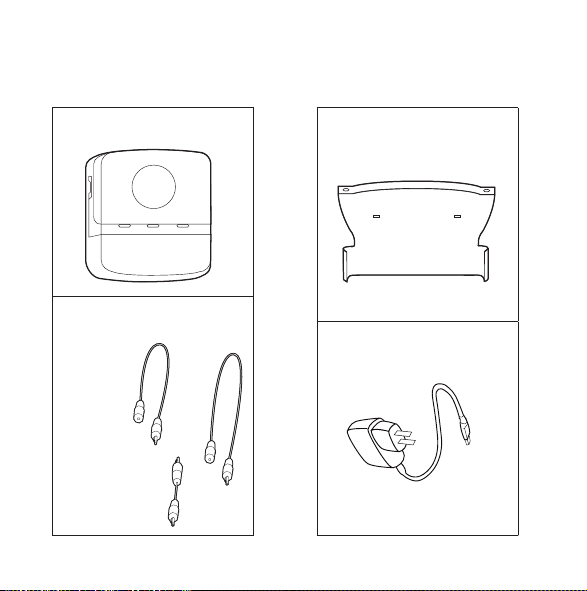
PACKAGE CONTENTS
FM+DEX
Neck loop antenna
(two lengths)
Click-on module
Charger
2
9 514 0198 001 #05.indd 2 05-11-2020 14:16:18
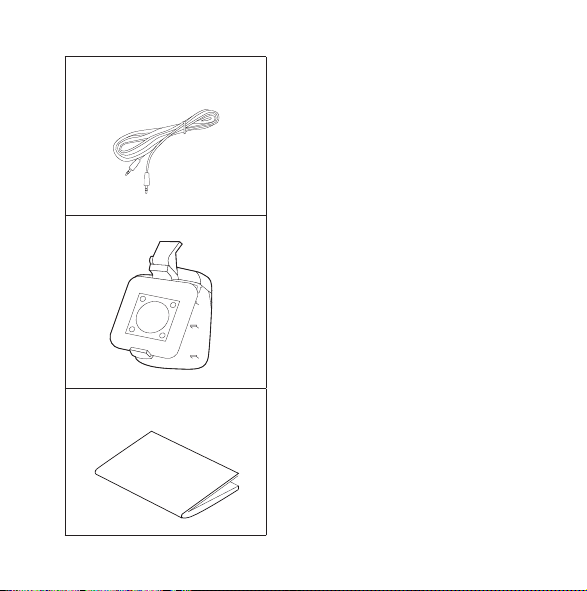
Jack-to-jack cable
Clip
User instructions
3
9 514 0198 001 #05.indd 3 05-11-2020 14:16:18

CONTENTS
YOUR NEW FM+DEX ..............................................6
Intended use......................................................6
Description of device ..............................................7
FM+DEX OVERVIEW ..............................................8
LEDS .......................................................... 10
OPERATING RANGES ........................................... 11
GETTING STARTED.............................................. 12
Charging the battery .............................................12
Preparing for Telecoil, FM or Audio ................................14
Antenna .........................................................22
TURNING ON THE DEVICE ....................................... 29
ACOUSTIC INDICATORS .........................................30
SELECTING INPUT SOURCE ...................................... 31
VOLUME ADJUSTMENT.......................................... 32
ROOM OFF ..................................................... 33
TURNING OFF THE DEVICE ...................................... 34
TAMPER SWITCH ............................................... 35
CARING FOR YOUR FM+DEX ..................................... 36
4
9 514 0198 001 #05.indd 4 05-11-2020 14:16:18

WARNINGS .................................................... 37
SAFETY WARNING.............................................. 40
IN CASE OF MALFUNCTION.... ................................... 41
REGULATORY INFORMATION .................................... 46
SYMBOLS...................................................... 52
5
9 514 0198 001 #05.indd 5 05-11-2020 14:16:18
YOUR NEW FM+DEX
Your FM+DEX is part of the DEX™ family of assistive listening
devices. These user instructions explain how the FM+DEX should
be operated.
WARNING
This booklet contains important information and instructions. Please
read this booklet care fully before you start using the device.
Intended use
The FM+DEX is a battery-powered device intended to transmit (or
stream) signals to Widex hearing aids using the wireless Widex-
Link technology; i.e. signals are received, altered and transmit-
ted to the hearing aid.
6
9 514 0198 001 #05.indd 6 05-11-2020 14:16:18

Description of device
The FM+DEX is offered in order to support Widex hearing aids
without DAI (direct audio input) or a telecoil.
When the FM module is attached, the user is able to receive FM
signals.
In the same way, the device can substitute for a telecoil in hearing
aids not fitted with a telecoil. The third input possibility is the line
in, which can be used to stream music, etc., by connecting a com-
puter or portable unit to the device.
The FM+DEX is worn on a neck loop antenna or attached directly
to clothing using the included clip.
If you need help to identify the serial number (usually six or seven
digits) on the product, please contact your hearing care profes-
sional.
7
9 514 0198 001 #05.indd 7 05-11-2020 14:16:18

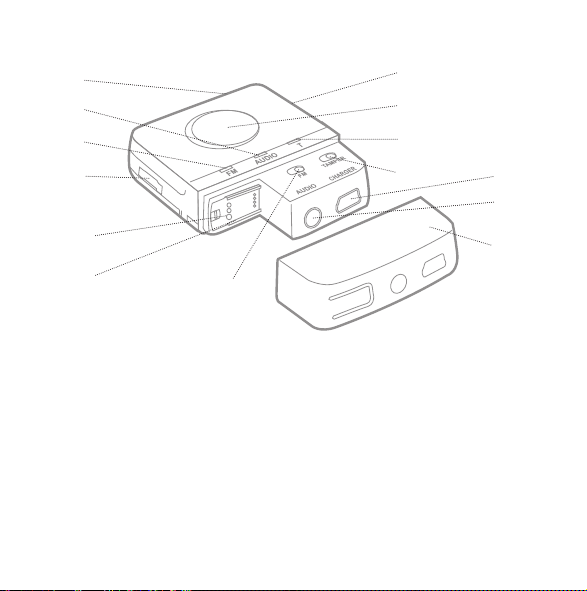
FM+DEX OVERVIEW
1. On/Off
2. Input toggle key/Room off
3. Volume up/down
4. FM input LED
5. Audio input LED
6. T (telecoil) LED
7. Battery level indicator
8. Tamper switch
9. FM switch
10. FM connector (Europlug)
11. FM connector (SCOLA FLEX receiver)
12. Charge (mini USB socket)
13. Audio (line-in)
14. Cover
8
9 514 0198 001 #05.indd 8 05-11-2020 14:16:19
1.
7.
2.
6.
8.
12.
13.
3.
4.
10.
11.
5.
14.
9.
9
9 514 0198 001 #05.indd 9 05-11-2020 14:16:20
LEDS
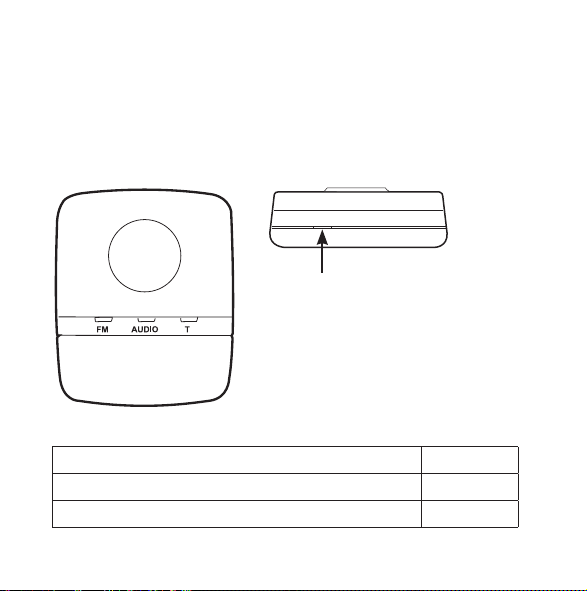
Input indicators
Green light in any of the three input LEDs indicates that this input
source has been chosen.
Battery indicator
Battery indicator
Battery low red
Battery charging orange
Battery fully charged, charging unit still connected green
10
9 514 0198 001 #05.indd 10 05-11-2020 14:16:22
OPERATING RANGES
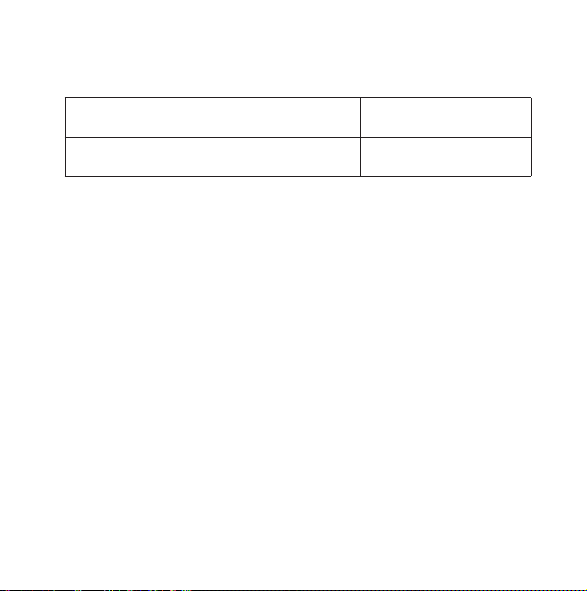
From FM+DEX to hearing aids Up to 40 cm
From FM transmitter to FM+DEX Up to 30 metres
11
9 514 0198 001 #05.indd 11 05-11-2020 14:16:22
GETTING STARTED
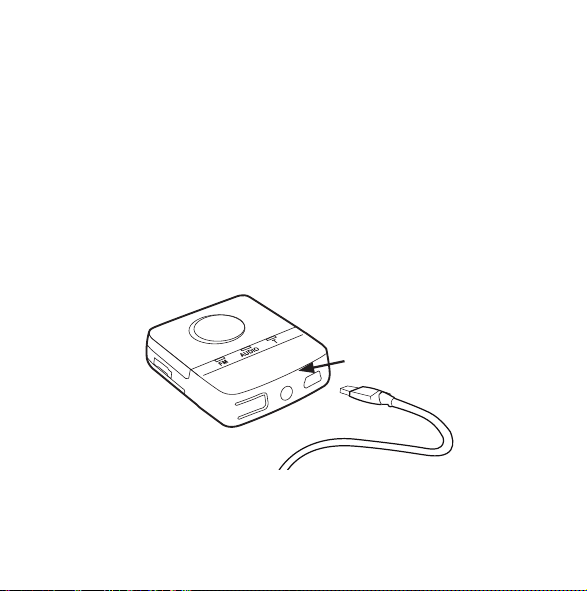
Charging the battery
The device uses a rechargeable battery that is charged through
the mini USB connector. When fully charged, the battery has a
capacity of approx. 10 hours of continuous use. The charger is
available in four country versions. The version you have may
therefore not look exactly as illustrated in this booklet.
12
9 514 0198 001 #05.indd 12 05-11-2020 14:16:23
1. Connect the charger to the mini USB connector at the bottom
of the FM+DEX.
2. Plug the charger into a wall socket.
It takes approximately 4 hours to charge the battery the first
time. Recharging takes approx. 2 hours. The device cannot
stream while recharging.
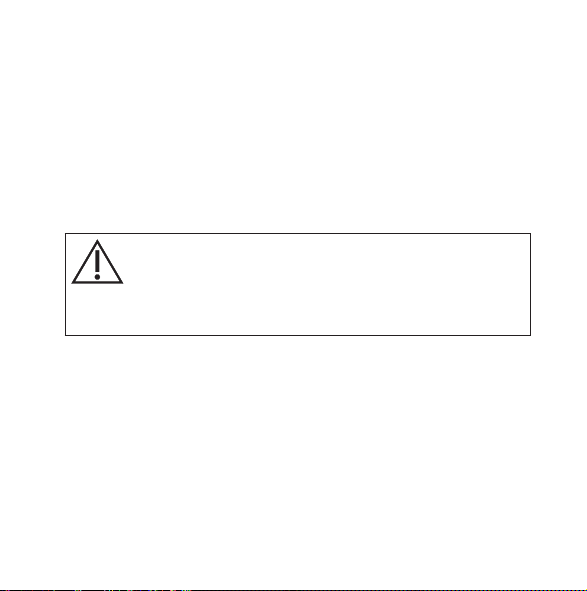
WARNING
Do not attempt to change the battery. Contact your hearing care pro-
fessional.
13
9 514 0198 001 #05.indd 13 05-11-2020 14:16:23
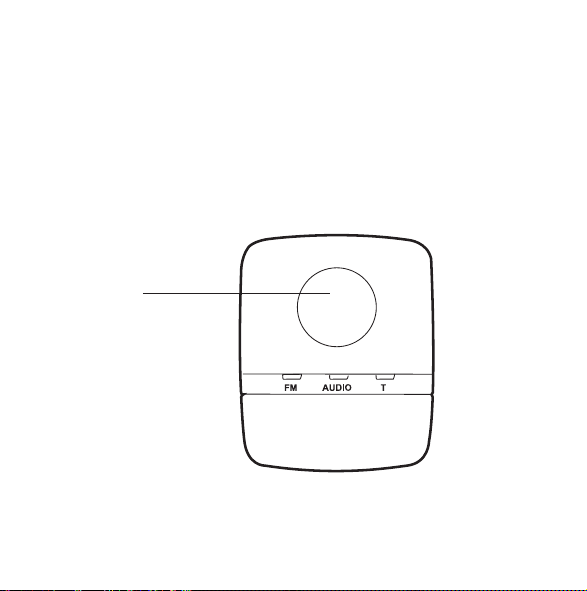
Preparing for Telecoil, FM or Audio
The toggle key allows you to choose between three input sources,
depending on whether you wish to receive Telecoil, FM or Audio
signals. If you wish to use the Telecoil function, you just need to
press the toggle key until the T LED is green. However, to prepare
for FM or Audio reception, you need to do the following:
Toggle key
14
9 514 0198 001 #05.indd 14 05-11-2020 14:16:23
FM
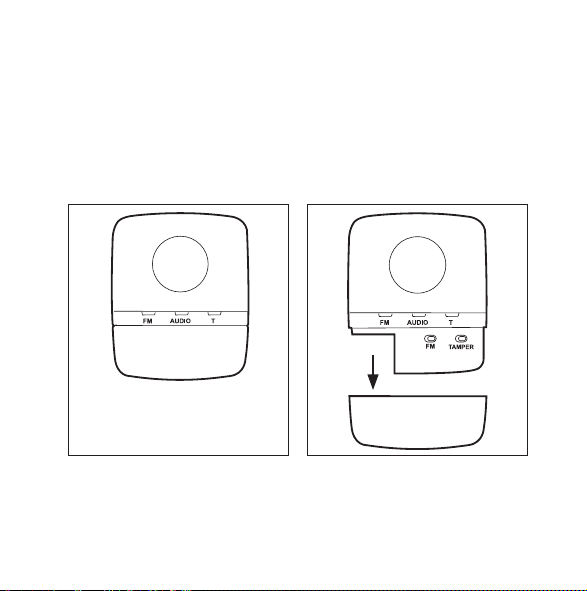
If you wish to listen to an FM source, you will first need to connect
the appropriate FM receiver module.
1. Remove the cover at the bottom of the device by pressing
the sides of the cover.
15
9 514 0198 001 #05.indd 15 05-11-2020 14:16:26
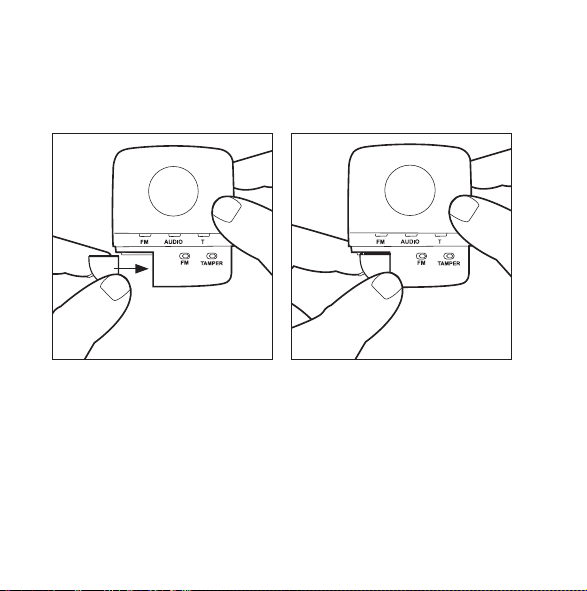
2a. If you have a Widex SCOLA FLEX receiver, slide it into place
as shown. Set the receiver’s mode switch in position 2
“FM+M”.
16
9 514 0198 001 #05.indd 16 05-11-2020 14:16:29
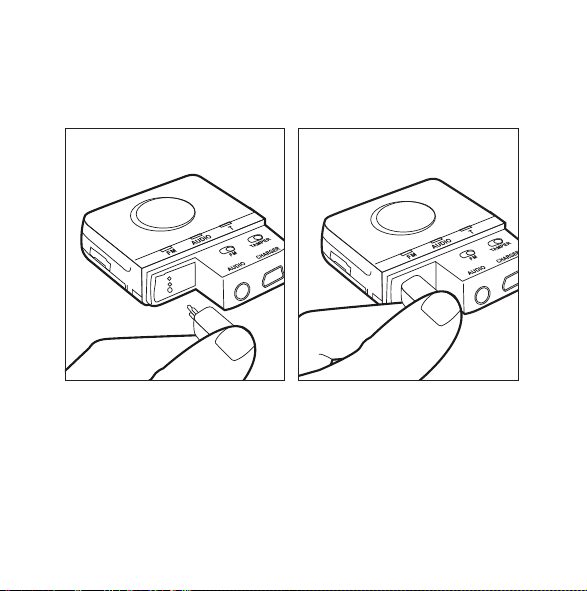
2b. Other compatible modules are connected to the device via a
Europlug. Please be sure to turn and position the Europlug
correctly, i.e. according to the thickness of the pins.
3. Turn the receiver module on.
17
9 514 0198 001 #05.indd 17 05-11-2020 14:16:32
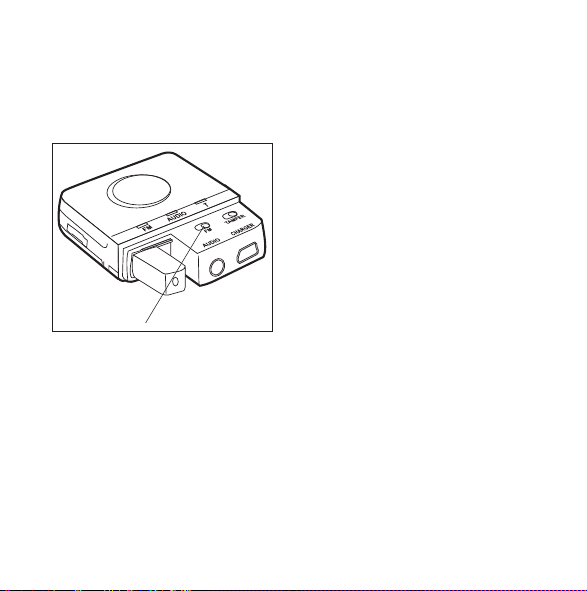
4. Slide the FM switch to the right if you are using a
SCOLA FLEX interface or to the left if you are using a
Europlug.
4.
18
9 514 0198 001 #05.indd 18 05-11-2020 14:16:33
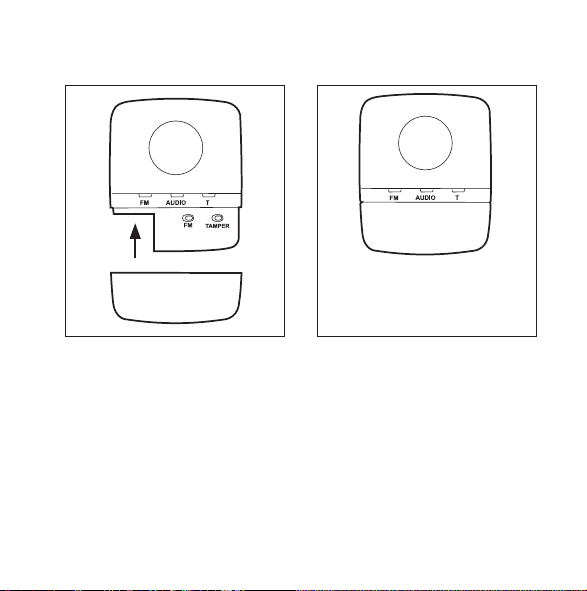
5. Attach the cover again.
19
9 514 0198 001 #05.indd 19 05-11-2020 14:16:33
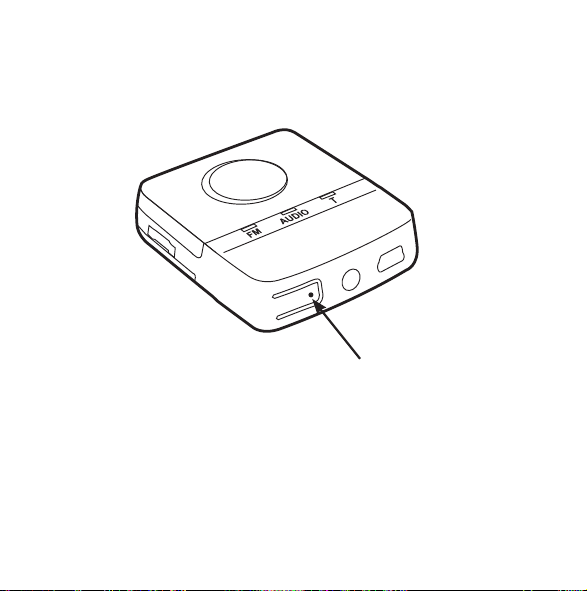
Pressing the “button” indicated by the arrow allows you to acti-
vate the scan button of the receiver module.
20
9 514 0198 001 #05.indd 20 05-11-2020 14:16:34
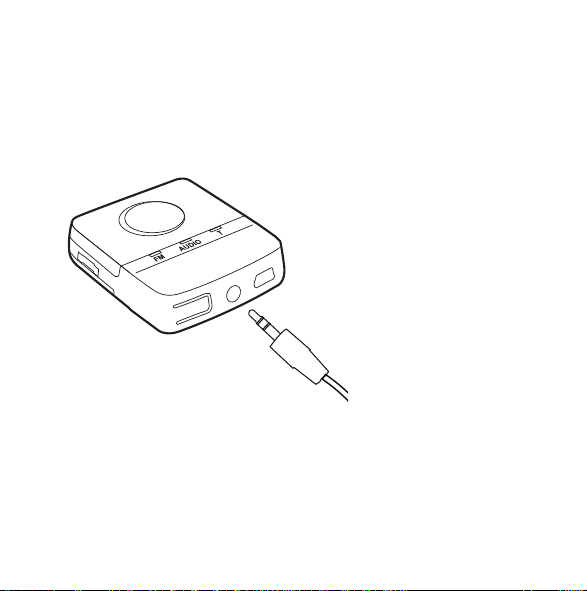
Audio
If you wish to listen to an audio source, plug the jack-to-jack cable
provided into the Audio (line-in) socket. Connect the other end to
the audio source.
21
9 514 0198 001 #05.indd 21 05-11-2020 14:16:34
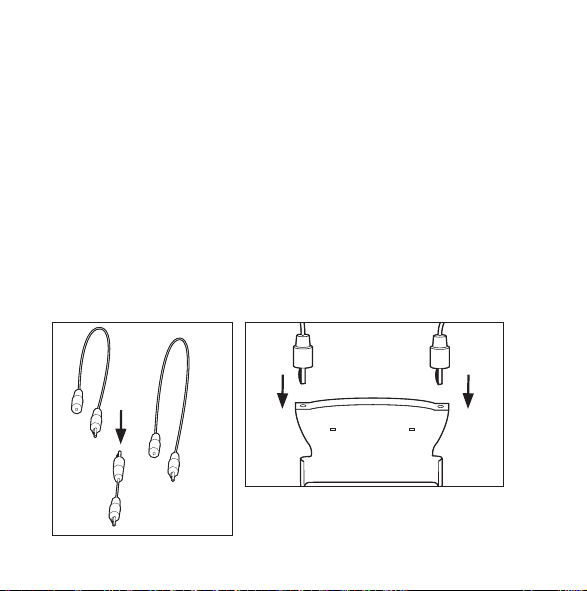
Antenna
The FM+DEX can be used with or without an external neck loop
antenna.
Attaching the neck loop antenna
Assemble the two neck loop wires (if not already assembled) by
connecting the male jack on the short wire to the female jack on
the long wire. Then connect the jack connectors at the end of the
neck loop wires to the holes in the click-on module.
22
9 514 0198 001 #05.indd 22 05-11-2020 14:16:36
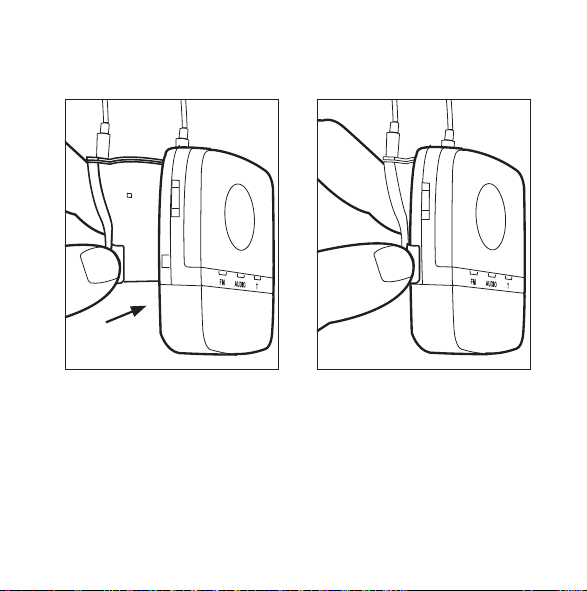
Then attach the assembled module to the device as illustrated.
23
9 514 0198 001 #05.indd 23 05-11-2020 14:16:37
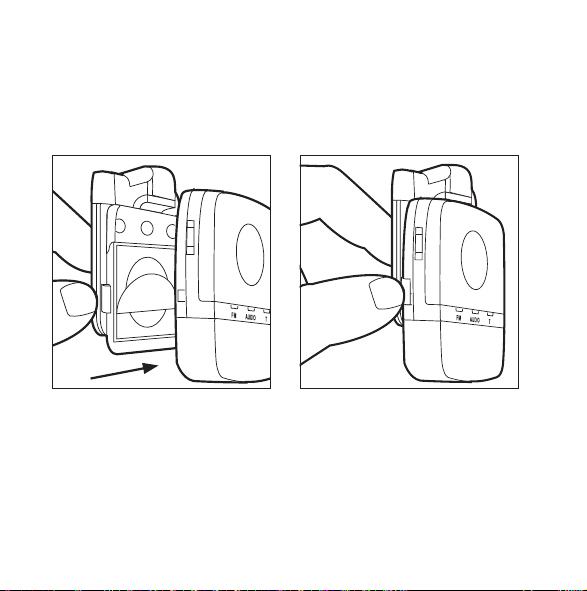
An alternative way of using the device is by attaching it to your
clothes using the detachable clip. These first two illustrations
show how to attach the clip to the device.
24
9 514 0198 001 #05.indd 24 05-11-2020 14:16:39
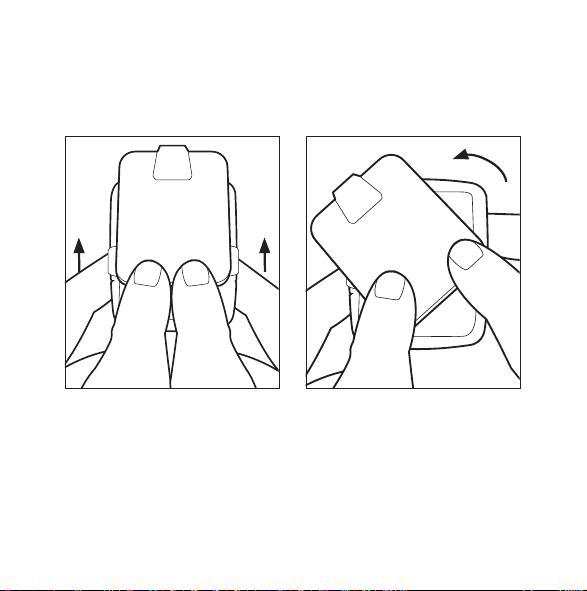
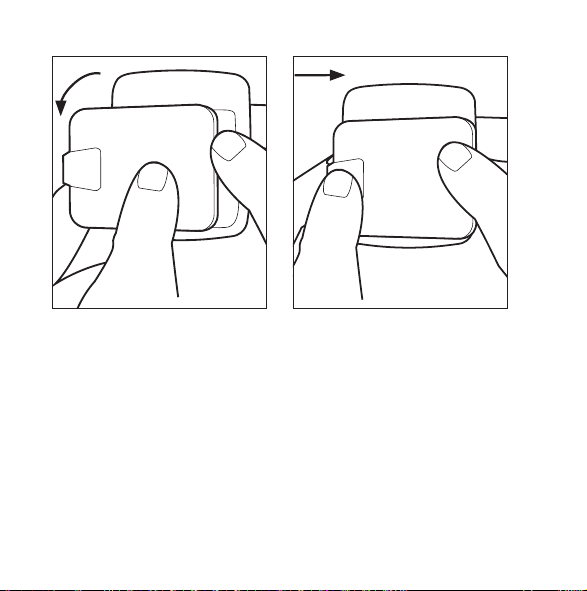
Pushing the clip upwards with two fingers allows you to turn the
clip as required. Push it backwards to fix it in the desired position.
25
9 514 0198 001 #05.indd 25 05-11-2020 14:16:42
26
9 514 0198 001 #05.indd 26 05-11-2020 14:16:45
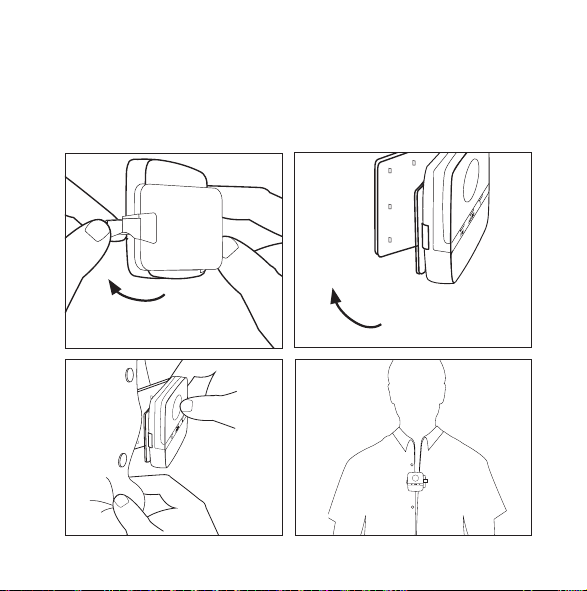
To open the clip, click the lock open, place it on your clothes and
click it closed.
27
9 514 0198 001 #05.indd 27 05-11-2020 14:16:52
WARNING
Interference with active Implants
• In order to show caution, we advise to follow the guidelines recom-
mended by manufacturers of defibrillators and pacemakers regard-
ing use of mobile phones:
• If you wear an active implantable device keep the Wireless Hearing
Aids and Hearing Aid Accessories such as wireless devices or com-
municators at least 15 cm away from the implant.
• If you experience any interference, do not use the hearing aids and/or
hearing aid accessories and contact the manufacturer of the implant.
Please note that interference can also be caused by power lines, elec-
trostatic discharge, airport metal detectors etc.
• If you have an active brain implant, please contact the manufacturer
of the implant for risk evaluation.
If you have an implantable device, we advise to keep magnets* at least
15 cm away from the implant. (*= can be specified as Autophone mag-
net, hearing instrument case, magnet in a tool, etc.)
28
9 514 0198 001 #05.indd 28 05-11-2020 14:16:52
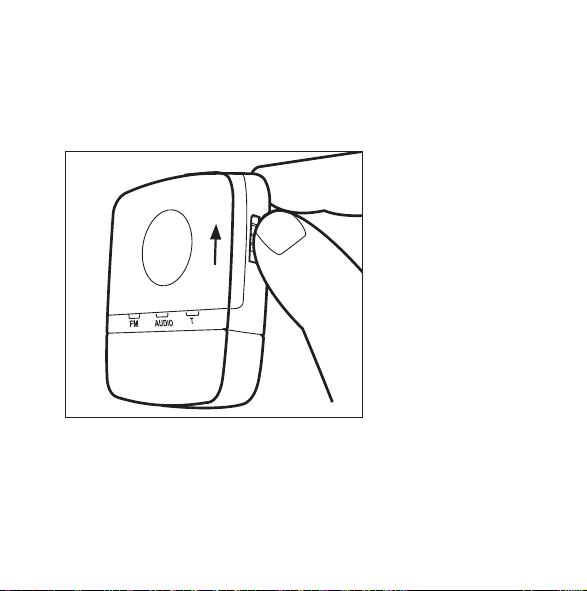
TURNING ON THE DEVICE
Push the slide button on the right side upwards.
29
9 514 0198 001 #05.indd 29 05-11-2020 14:16:54
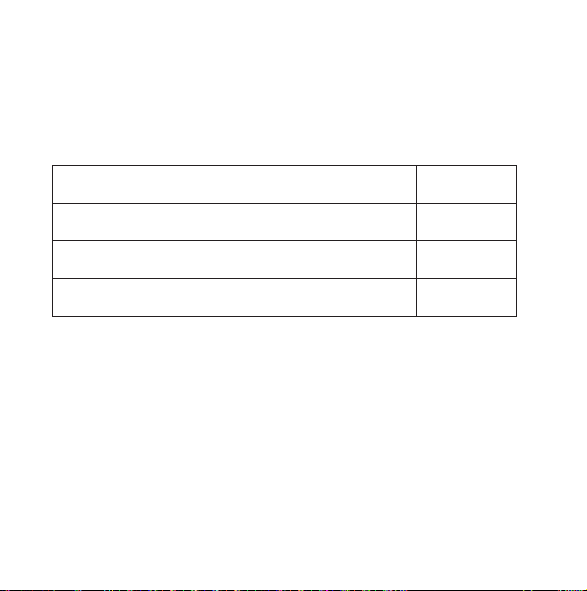
ACOUSTIC INDICATORS
When using any button/switch, a corresponding acoustic indica-
tor will be presented in the hearing aids.
Turning the device on Tone
Change of input source Tone
Room on (start-up setting: On) Tone
Volume adjustment Tones
30
9 514 0198 001 #05.indd 30 05-11-2020 14:16:54
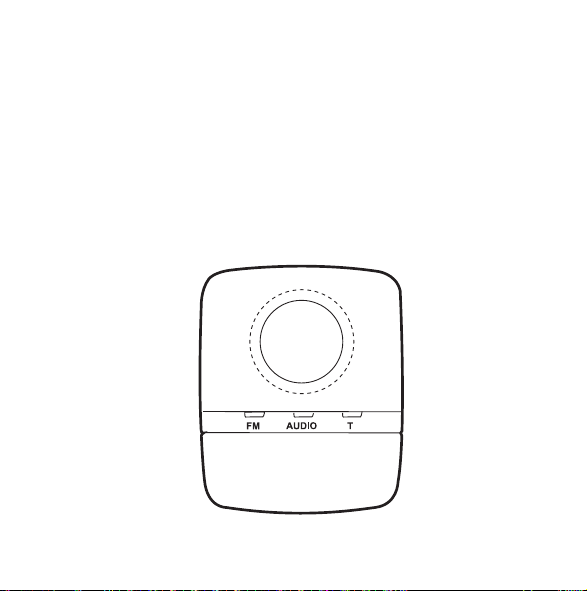
SELECTING INPUT SOURCE
The device starts up in the FM input setting. Using the toggle key
you can change between the three input options: FM, AUDIO or
T (telecoil). The current input source is indicated by a green light
in the corresponding LED. Make sure that the desired source has
been chosen.
31
9 514 0198 001 #05.indd 31 05-11-2020 14:16:55
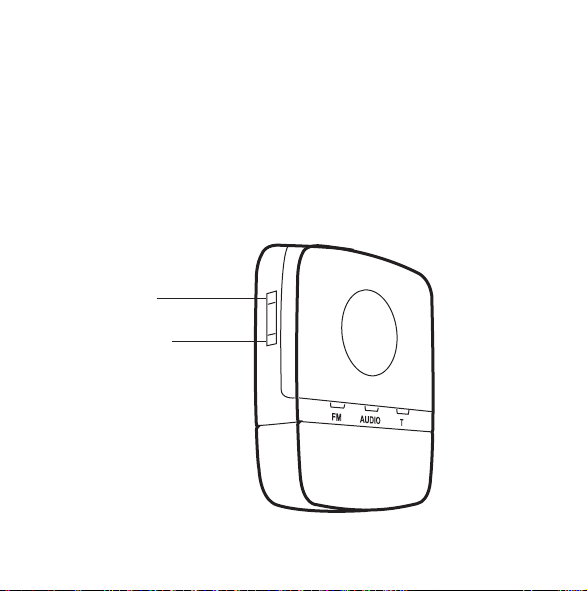
VOLUME ADJUSTMENT
The device starts up at the default volume level.
Use the volume control on the left side to adjust the volume up
or down.
volume up
volume down
32
9 514 0198 001 #05.indd 32 05-11-2020 14:16:57

ROOM OFF
If you wish to listen to the input signal only, push the input tog-
gle key and hold it in for more than one second. This will disable
the hearing aid microphones. To deactivate this function again,
push the input toggle key and hold it in again for more than one
second.
33
9 514 0198 001 #05.indd 33 05-11-2020 14:16:57
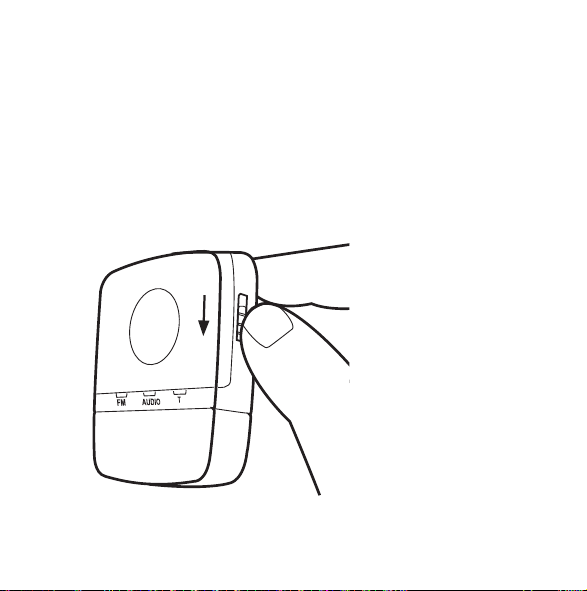
TURNING OFF THE DEVICE
To turn the device off, push the slide button on the right side of
the device downward.
When you turn the device off, it stops streaming and the hearing
aids return to program 1 (usually the Master program).
34
9 514 0198 001 #05.indd 34 05-11-2020 14:16:58
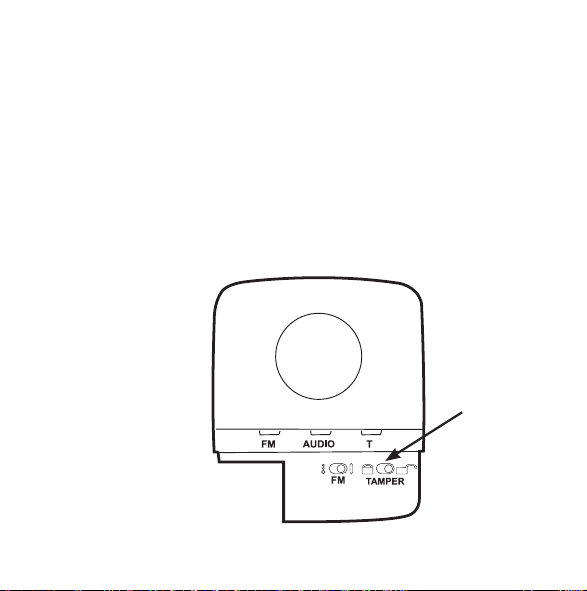
TAMPER SWITCH
The input toggle/room off key and volume control can be locked
using the tamper switch. Slide the switch to the left to lock the
functions, and to the right to unlock them. When the device is
turned off and on again, it will start up in FM. The input toggle key
will still be locked.
AUDIO CHARGE
35
9 514 0198 001 #05.indd 35 05-11-2020 14:17:00
CARING FOR YOUR FM+DEX
The device is a valuable object and should be treated with care.
Here are some things you can do to prolong the life of your
device:
CAUTION
• Do not expose the device to extreme temperatures or high humidity.
• Do not immerse it in water or other liquids.
• Clean the device with a dry, soft cloth. Never clean it with acids, alco-
hol, strong detergents or other liquids.
• Avoid dropping the device.
• When the device is not in use, keep it in its case in a dry location out
of reach of children and pets.
36
9 514 0198 001 #05.indd 36 05-11-2020 14:17:00
WARNINGS
WARNING
• Keep the FM+DEX and its parts and accessories out of reach of chil-
dren and anyone else who might swallow parts of the device, or
otherwise cause injury to themselves with these items. In case of
ingestion, contact a physician immediately.
• Do not carry your FM+DEX with you during X-rays, MRIs, CT or
other medical treatments and scans, and never place your device
in a microwave oven. These are some of the types of radiation that
can damage your device.
• Radiation from, for example, room surveillance equipment, burglar
alarms and mobile phones is weaker and will not damage the device,
but may create audible interference.
• Do not use the device on aircraft or in hospitals without permission.
• Do not use the device in mines or other areas with explosive gases.
37
9 514 0198 001 #05.indd 37 05-11-2020 14:17:00
CAUTION
• Never try to open or repair the device yourself. (This should only be
done by authorized personnel.)
• Although the device has been designed to comply with the most
stringent international electromagnetic compatibility standards, the
possibility cannot be excluded that it may cause interference with
other equipment, such as medical devices.
38
9 514 0198 001 #05.indd 38 05-11-2020 14:17:00
WARNING
Interference with active Implants
• In order to show caution, we advise to follow the guidelines recom-
mended by manufacturers of defibrillators and pacemakers regard-
ing use of mobile phones:
• If you wear an active implantable device keep the Wireless Hearing
Aids and Hearing Aid Accessories such as wireless devices or com-
municators at least 15 cm away from the implant.
• If you experience any interference, do not use the hearing aids and/or
hearing aid accessories and contact the manufacturer of the implant.
Please note that interference can also be caused by power lines, elec-
trostatic discharge, airport metal detectors etc.
• If you have an active brain implant, please contact the manufacturer
of the implant for risk evaluation.
If you have an implantable device, we advise to keep magnets* at least
15 cm away from the implant. (*= can be specified as Autophone mag-
net, hearing instrument case, magnet in a tool, etc.)
39
9 514 0198 001 #05.indd 39 05-11-2020 14:17:00

SAFETY WARNING
This device is charged by an external power charger.
• Only connect a charger that is compatible with the FM+DEX.
• The charger must have an output rating of 5VDC, 500mA, and
a mini USB connector.
• The charger input rating voltage and wall plug must be com-
patible with the AC wall outlet in your region.
• The charger must have the certification marks showing certifi-
cation by a safety agency acceptable in your region.
Widex strongly recommends that you always use a charger unit
that is supplied by your Widex Distributor to ensure safe and effi-
cient use of your FM+DEX.
When the FM+DEX is connected to external mains-operated
equipment like a PC, audio source or similar, this equipment must
comply with IEC 60065, IEC 60950, IEC 60601-1 or equivalent
safety standards.
40
9 514 0198 001 #05.indd 40 05-11-2020 14:17:00

IN CASE OF MALFUNCTION....
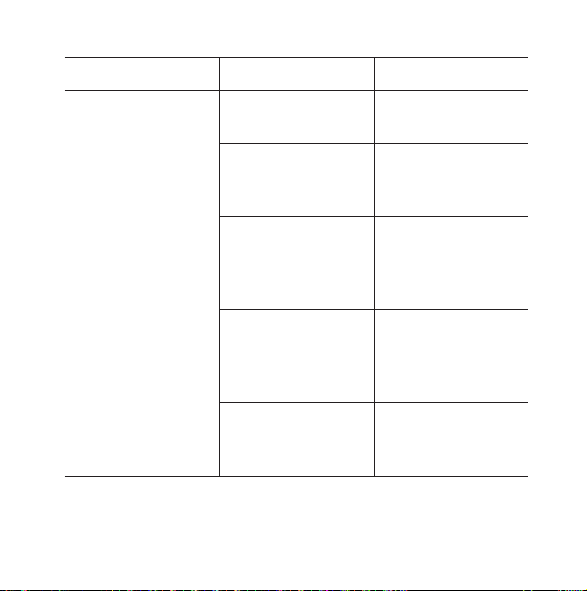
Problem Possible cause Solution
Your FM+DEX does
not work
The device is not
turned on
Turn it on
The device is out of
range
Move the device
within range. See
page 11.
No sound when listen-
ing to audio
FM+DEX is not within
range of the hearing
aids
Move the device
within range
Temporary suspen-
sion of communication
between hearing aids.
Message: “Partner
check”
FM+DEX is not within
range of the hearing
aids
Move the device
within range
41
9 514 0198 001 #05.indd 41 05-11-2020 14:17:00
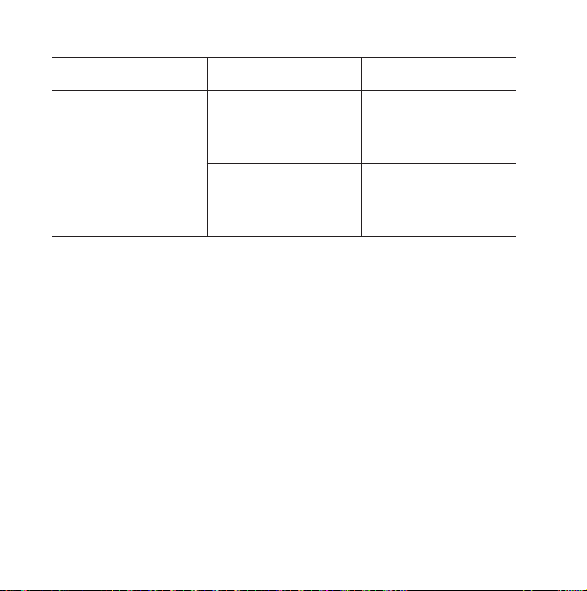
Problem Possible cause Solution
Streaming is inter-
rupted
Interference with
another device
Move one of the
devices out of range
of the other (2 m)
The FM+DEX is out of
range
Move the device
within range. See
page 11.
42
9 514 0198 001 #05.indd 42 05-11-2020 14:17:00
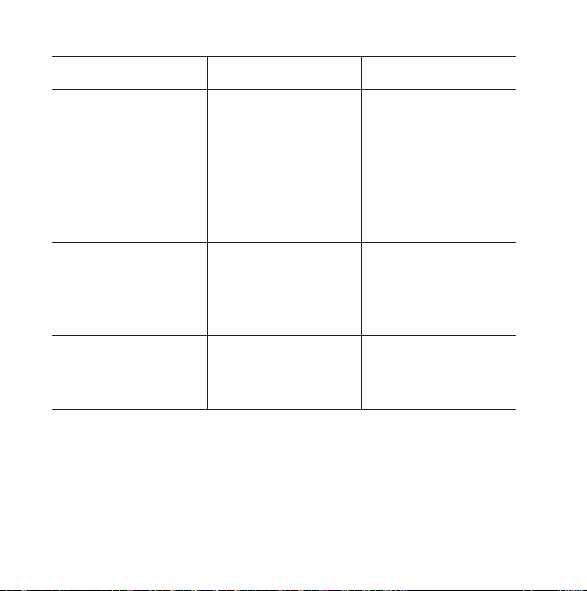
Problem Possible cause Solution
The input toggle key
does not work
The FM+DEX is not
turned on
Turn the FM+DEX on
The battery is low Charge the battery
using the included
charger
The battery does not
work
Contact your hearing
care professional to
have the battery
replaced
The charger is con-
nected to the FM+DEX
Disconnect the
charger when the
FM+DEX has been
charged
Functions have been
locked with tamper
switch
Unlock
43
9 514 0198 001 #05.indd 43 05-11-2020 14:17:00
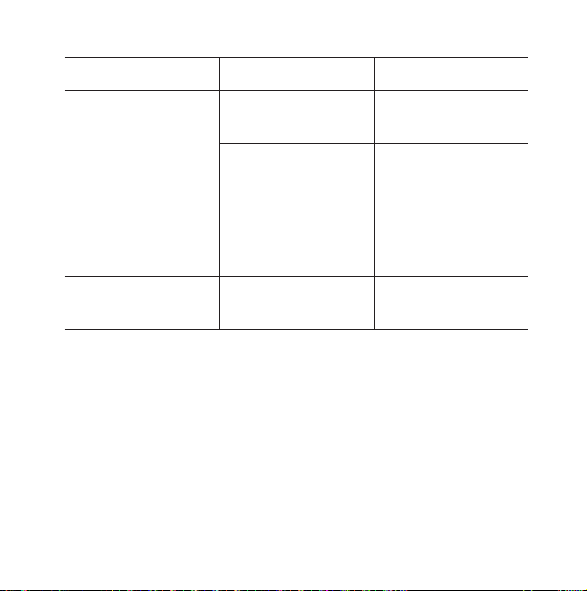
Problem Possible cause Solution
The charger is con-
nected but does not
charge (LEDs are not
green)
The power supply to
the FM+DEX has been
interrupted
Check that the charger
is properly connected
to the FM+DEX mini
USB socket and a wall
socket, and that the
wall socket is switched
on
No streamed audio
sound even though
the audio input LED is
green.
The cable between
the sound source and
the FM+DEX has been
disconnected.
Connect the sound
source to the FM+DEX
No streamed signals
even though the tele-
coil (T) LED is green.
No teleloop signal Place the FM+DEX in
an area with teleloop
signals
44
9 514 0198 001 #05.indd 44 05-11-2020 14:17:00
Problem Possible cause Solution
No streamed FM sig-
nals even though the
FM input LED is green
No FM module is
attached
Check that an FM
module is attached
The FM module or the
FM transmitter is
switched off
Check that the FM
module and the FM
transmitter are
switched on and are
set to the same chan-
nel
Battery level indicator
is red
The battery is low Charge the battery
45
9 514 0198 001 #05.indd 45 05-11-2020 14:17:00

REGULATORY INFORMATION
FCC ID: TTY-FMD
IC: 5676B-FMD
Federal Communications Commission Statement
This device complies with part 15 of the FCC Rules. Operation is subject
to the following two conditions:
(1) This device may not cause harmful interference, and
(2) this device must accept any interference received, including interfer-
ence that may cause undesired operation.
46
9 514 0198 001 #05.indd 46 05-11-2020 14:17:00

NOTE:
This equipment has been tested and found to comply with the limits for
a Class B digital device, pursuant to part 15 of the FCC Rules. These limits
are designed to provide reasonable protection against harmful interfer-
ence in a residential installation. This equipment generates, uses and
can radiate radio frequency energy and, if not installed and used in
accordance with the instructions, may cause harmful interference to
radio communications. However, there is no guarantee that interference
will not occur in a particular installation. If this equipment does cause
harmful interference to radio or television reception, which can be
determined by turning the equipment off and on, the user is encouraged
to try to correct the interference by one or more of the following meas-
ures:
— Reorient or relocate the receiving antenna.
— Increase the separation between the equipment and receiver.
— Connect the equipment into an outlet on a circuit different from that
to which the receiver is connected.
— Consult the dealer or an experienced radio/TV technician for help.
47
9 514 0198 001 #05.indd 47 05-11-2020 14:17:01

NOTE:
This equipment complies with FCC radiation exposure limits set forth for
an uncontrolled environment. This transmitter must not be co-located or
operating in conjunction with any other antenna or transmitter.
Changes or modifications to the equipment not expressly approved by
WSAUD A/S could void the user’s authority to operate the equipment.
Industry Canada Statement / Déclaration d’industrie Canada
Under Industry Canada regulations, this radio transmitter may only
operate using an antenna of a type and maximum (or lesser) gain
approved for the transmitter by Industry Canada.
To reduce potential radio interference to other users, the antenna type
and its gain should be so chosen that the equivalent isotropically radi-
ated power (e.i.r.p.) is not more than that necessary for successful com-
munication.
This device complies with Industry Canada licence-exempt RSS
standard(s). Operation is subject to the following two conditions:
(1) this device may not cause interference, and
(2) this device must accept any interference, including interference that
may cause undesired operation of the device.
48
9 514 0198 001 #05.indd 48 05-11-2020 14:17:01

Conformément à la réglementation d’Industrie Canada, le présent émet-
teur radio peut fonctionner avec une antenne d’un type et d’un gain
maximal (ou inférieur) approuvé pour l’émetteur par Industrie Canada.
Dans le but de réduire les risques de brouillage radioélectrique à
l’intention des autres utilisateurs, il faut choisir le type d’antenne et son
gain de sorte que la puissance isotrope rayonnée équivalente (p.i.r.e.)
ne dépasse pas l’intensité nécessaire à l’établissement d’une communi-
cation satisfaisante.
Le présent appareil est conforme aux CNR d’Industrie Canada applica-
bles aux appareils radio exempts de licence. L’exploitation est autorisée
aux deux conditions suivantes:
(1) l’appareil ne doit pas produire de brouillage, et
(2) l’utilisateur de l’appareil doit accepter tout brouillage radioélectrique
subi, même si le brouillage est susceptible d’en compromettre le fonc-
tionnement.
49
9 514 0198 001 #05.indd 49 05-11-2020 14:17:01
Directive 1999/5/EC
Hereby, WSAUD A/S declares that this FM+DEX is in compliance
with the essential requirements and other relevant provisions of
Directive 1999/5/EC.
A copy of the Declaration of Conformity according to 1999/5/EC
can be found at:
http://www.widex.com/doc
50
9 514 0198 001 #05.indd 50 05-11-2020 14:17:01
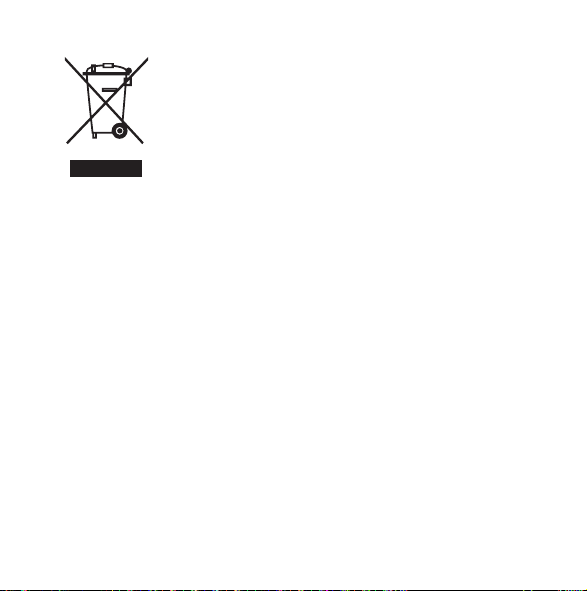
Electrical and electronic equipment (EEE) contains
materials, components and substances that can be
hazardous and present a risk to human health and
the environment when waste electrical and elec-
tronic equipment (WEEE) is not handled correctly.
Do not dispose of hearing aids, hearing aid accessories and bat-
teries with ordinary household waste.
Hearing aids, batteries and hearing aid accessories should be
disposed of at sites intended for waste electrical and electronic
equipment, or given to your hearing care professional for safe
disposal. Proper disposal helps to protect human health and the
environment.
51
9 514 0198 001 #05.indd 51 05-11-2020 14:17:01
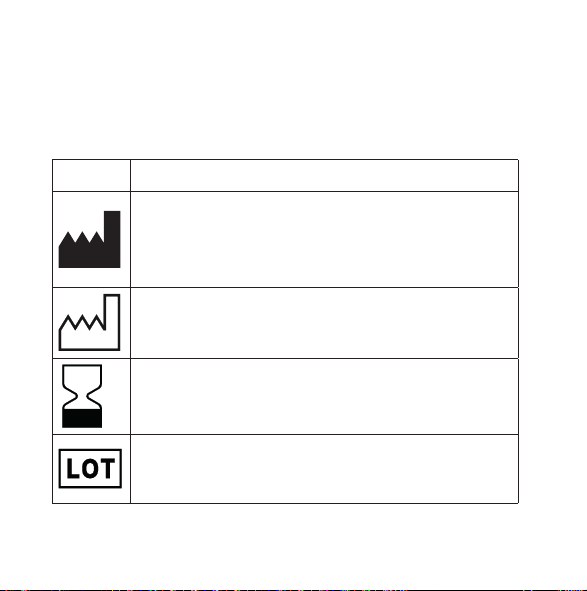
SYMBOLS
Symbols commonly used by WSAUD A/S in medical device labelling
(labels/IFU/etc.)
Symbol Title/Description
Manufacturer
The product is produced by the manufacturer whose name
and address are stated next to the symbol. If appropriate,
the date of manufacture may also be stated.
Date of manufacture
The date when the product was manufactured.
Use-by date
The date after which the product is not to be used.
Batch code
The product’s batch code (lot or batch identification).
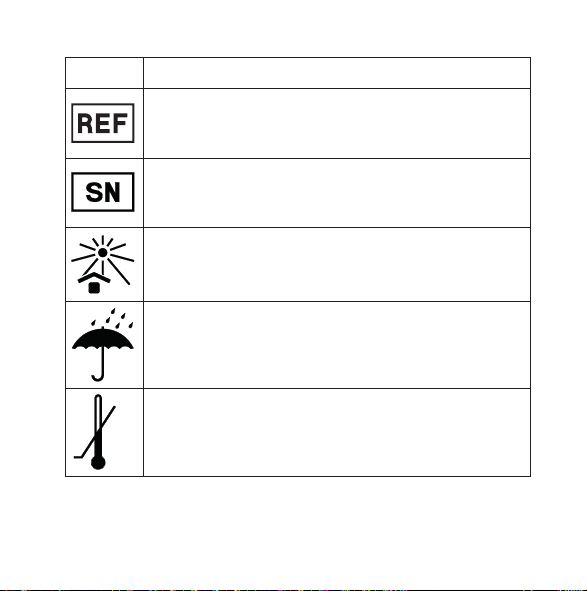
Symbol Title/Description
Catalogue number
The product’s catalogue (item) number.
Serial number
The product’s serial number.*
Keep away from sunlight
The product must be protected from light sources and/or
The product must be kept away from heat
Keep dry
The product must be protected from moisture and/or The
product must be kept away from rain
Lower limit of temperature
The lowest temperature to which the product can be safely
exposed.
52
9 514 0198 001 #05.indd 52 05-11-2020 14:17:07
Symbols commonly used by WSAUD A/S in medical device labelling
(labels/IFU/etc.)
Symbol Title/Description
Manufacturer
The product is produced by the manufacturer whose name
and address are stated next to the symbol. If appropriate,
the date of manufacture may also be stated.
Date of manufacture
The date when the product was manufactured.
Use-by date
The date after which the product is not to be used.
Batch code
The product’s batch code (lot or batch identification).
Symbol Title/Description
Catalogue number
The product’s catalogue (item) number.
Serial number
The product’s serial number.*
Keep away from sunlight
The product must be protected from light sources and/or
The product must be kept away from heat
Keep dry
The product must be protected from moisture and/or The
product must be kept away from rain
Lower limit of temperature
The lowest temperature to which the product can be safely
exposed.
53
9 514 0198 001 #05.indd 53 05-11-2020 14:17:07
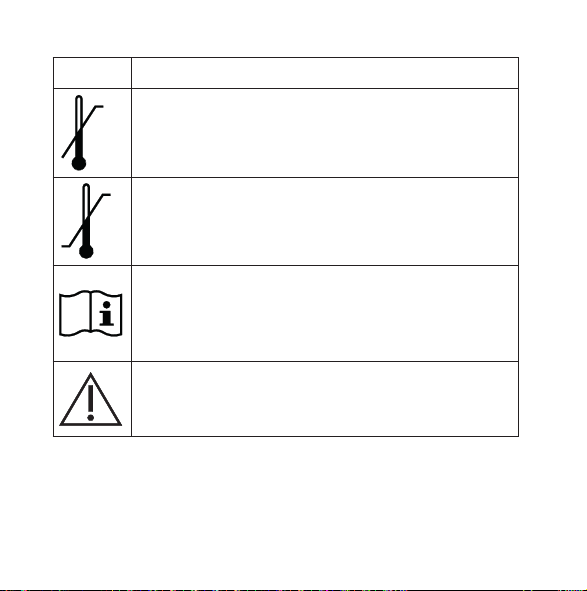
Symbol Title/Description
Upper limit of temperature
The highest temperature to which the product can be
safely exposed.
Temperature limits
The highest and lowest temperatures to which the product
can be safely exposed.
Consult instructions for use
The user instructions contain important cautionary infor-
mation (warnings/precautions) and must be read before
using the product.
Caution/Warning
Text marked with a caution/warning symbol must be read
before using the product.
Symbol Title/Description
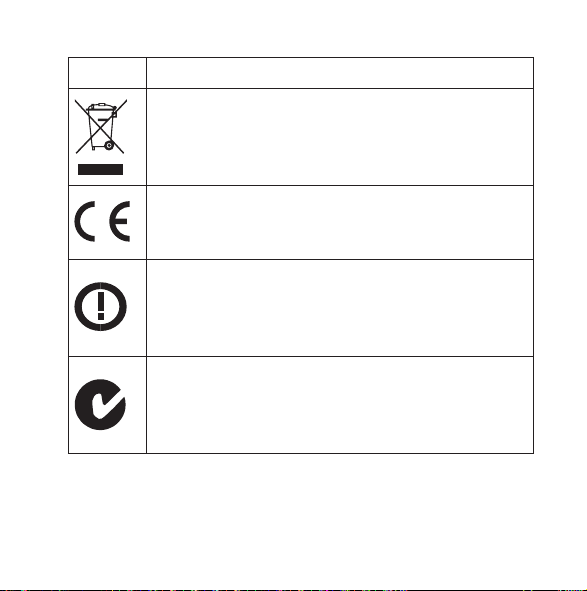
WEEE mark
“Not for general waste”
When the product is to be discarded, it must be sent to a
designated collection point for recycling and recovery.
CE mark
The product is in conformity with the requirements set out
in European CE marking directives.
Alert
The product is identified by R&TTE Directive 1999/5/EC as
an equipment Class 2 product with some restrictions on
use in some CE member states.
C-Tick mark
The product complies with EMC and radio spectrum
regulatory requirements for products supplied to the
Australian or New Zealand market.
54
9 514 0198 001 #05.indd 54 05-11-2020 14:17:10
Symbol Title/Description
Upper limit of temperature
The highest temperature to which the product can be
safely exposed.
Temperature limits
The highest and lowest temperatures to which the product
can be safely exposed.
Consult instructions for use
The user instructions contain important cautionary infor-
mation (warnings/precautions) and must be read before
using the product.
Caution/Warning
Text marked with a caution/warning symbol must be read
before using the product.
Symbol Title/Description
WEEE mark
“Not for general waste”
When the product is to be discarded, it must be sent to a
designated collection point for recycling and recovery.
CE mark
The product is in conformity with the requirements set out
in European CE marking directives.
Alert
The product is identified by R&TTE Directive 1999/5/EC as
an equipment Class 2 product with some restrictions on
use in some CE member states.
C-Tick mark
The product complies with EMC and radio spectrum
regulatory requirements for products supplied to the
Australian or New Zealand market.
55
9 514 0198 001 #05.indd 55 05-11-2020 14:17:10
Symbol Title/Description
Interference
Electromagnetic interference may occur in the vicinity of
the product.
*The six- or seven-digit number on the product is the serial number. Se-
rial numbers may not always be preceded by
56
9 514 0198 001 #05.indd 56 05-11-2020 14:17:10

Symbol Title/Description
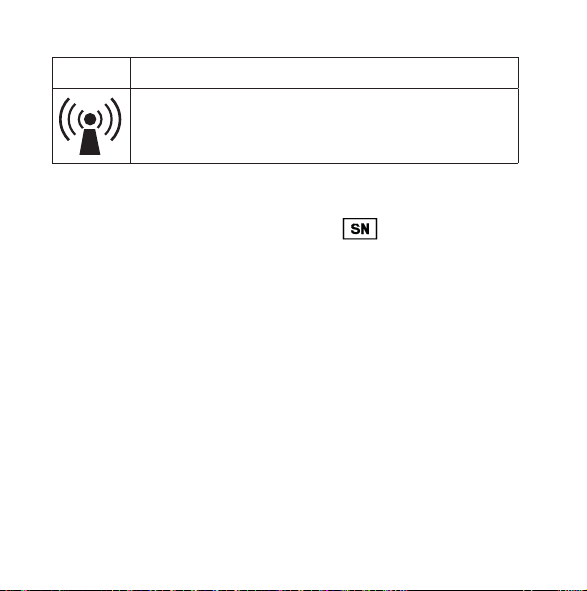
Interference
Electromagnetic interference may occur in the vicinity of
the product.
*The six- or seven-digit number on the product is the serial number. Se-
rial numbers may not always be preceded by
57
9 514 0198 001 #05.indd 57 05-11-2020 14:17:10

58
9 514 0198 001 #05.indd 58 05-11-2020 14:17:10

59
9 514 0198 001 #05.indd 59 05-11-2020 14:17:10
É[5qr0q9|k;;a;h]
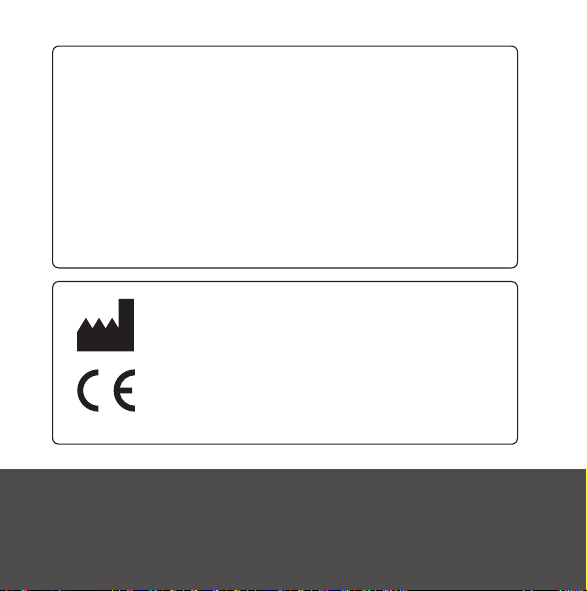
Manual no.:
9 514 0198 001 #05
Issue:
2020-11
WSAUD A/S Nymoellevej 6, DK-3540 Lynge, Denmark
https://global.widex.com
9 514 0198 001 #05.indd 60 05-11-2020 14:17:11
