USER INSTRUCTIONS
WIDEX ZEN2GO™
C2-PA (RIC)
tinnitus devices

2
CONTENTS
SYMBOLS. . . . . . . . . . . . . . . . . . . . . . . . . . . . . . . . . . . . . . . .
DESCRIPTION . . . . . . . . . . . . . . . . . . . . . . . . . . . . . . . . . . . .
Indicationsforuse. . . . . . . . . . . . . . . . . . . . . . . . . . . . . . . . .
Acousticindicators . . . . . . . . . . . . . . . . . . . . . . . . . . . . . . . .
Thebattery. . . . . . . . . . . . . . . . . . . . . . . . . . . . . . . . . . . . . . .
Insertingthebattery. . . . . . . . . . . . . . . . . . . . . . . . . . . . .
Lowbatteryindication . . . . . . . . . . . . . . . . . . . . . . . . . .
Turningthedeviceonandoff . . . . . . . . . . . . . . . . . . . . . .
Positioningthedevice . . . . . . . . . . . . . . . . . . . . . . . . . . . .
Removingthedevice . . . . . . . . . . . . . . . . . . . . . . . . . . . . .
Volumeadjustment. . . . . . . . . . . . . . . . . . . . . . . . . . . . . . .
Listeningprograms . . . . . . . . . . . . . . . . . . . . . . . . . . . . . . .
Switchingbetweentheprograms. . . . . . . . . . . . . . . . .
Cleaning . . . . . . . . . . . . . . . . . . . . . . . . . . . . . . . . . . . . . . . .
Cleaningthedevice . . . . . . . . . . . . . . . . . . . . . . . . . . . .
Cleaningtheear-set . . . . . . . . . . . . . . . . . . . . . . . . . . . .
Placingtheear-tipontheearwire . . . . . . . . . . . . . . . . . .
THENANOCAREWAXGUARD . . . . . . . . . . . . . . . . . . . . .
Changingthewaxguard . . . . . . . . . . . . . . . . . . . . . . . . . .
THEANCHOR . . . . . . . . . . . . . . . . . . . . . . . . . . . . . . . . . . .
RC-DEXREMOTECONTROL . . . . . . . . . . . . . . . . . . . . . . .
INCASEOFMALFUNCTION . . . . . . . . . . . . . . . . . . . . . . .
CARINGFORYOURTINNITUSDEVICES . . . . . . . . . . . . .
WARNINGS. . . . . . . . . . . . . . . . . . . . . . . . . . . . . . . . . . . . .
ADVICE . . . . . . . . . . . . . . . . . . . . . . . . . . . . . . . . . . . . . . . .
REGULATORYINFORMATION. . . . . . . . . . . . . . . . . . . . . .
3
SYMBOLS
The following symbols will be used throughout the
manual
WARNING
Messages with this heading indicate serious adverse reactions,
potential safety hazards and inadequate performance of device.
CAUTION
Messages with this heading indicate/include information regard-
ing any special care to be exercised.
Not for general waste.
4
DESCRIPTION
YourWIDEXZENGOpackageincludestwoC-PAtin-
nitusdevicesandanRC-DEXremotecontrolThede-
vices are provided with ear-sets which consist of an
earwire and an open ear-tip in which the receiver is
placed The devices use a proprietary wireless tech-
nology Widex Linktoenablecommunicationbetween
them The devices provide Zen listening programs
whichmakemusicaltonesandorarushingnoiseinthe
background
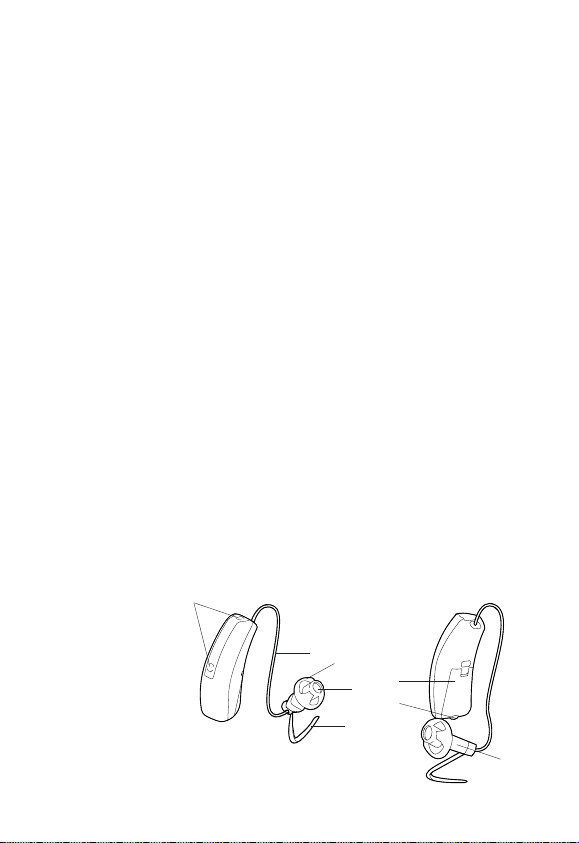
Theillustrationsbelowshowthetinnitusdevices
Microphoneopenings
Batterydrawer(onofffunction)
Nailgrip
Earwire
Receiver
Ear-tip
Waxguard
Anchor

5
WARNING
This booklet contains important information and instructions.
Please read this booklet carefully before you start using the
tinnitus devices.
NOTE
The descriptions provided in this manual apply to both tinni-
tus devices.
Please also read “User instructions - RC-DEX remote control for
Widex tinnitus devices”.

6
Indicationsforuse
The Zen program is intended to provide a relaxing
soundbackgroundforadults(yearsandolder)who
desiretolistentosuchabackgroundinquietItmay
beusedasasoundtherapytoolinatinnitustreatment
programthatisprogrammedbyalicensedhearingcare
professional(audiologistshearingaidspecialistsoto-
laryngologists)whoistrainedintinnitusmanagement

7
Acousticindicators
Thetinnitusdevicesmaybesettoproduceasignalto
indicatetheuseofcertainfunctions
Functions Settings
Adjustingvolumeviaremotecontrol Tone
ConfirmingRCprogramkeyuse Clickingsound
Changingprogramviaremotecontrol Clickingsound
Startingupthedevice Tone
Warningaboutlowbattery tones
8
Thebattery
We recommend zinc-airbatteriesUseasizebat-
teryforthedevices
To obtain replacement batteries please consult your
hearingcareprofessionalItisimportanttotakenote
oftheexpirydateandtherecommendationsregarding
disposalofusedbatteriesonthebatterypack
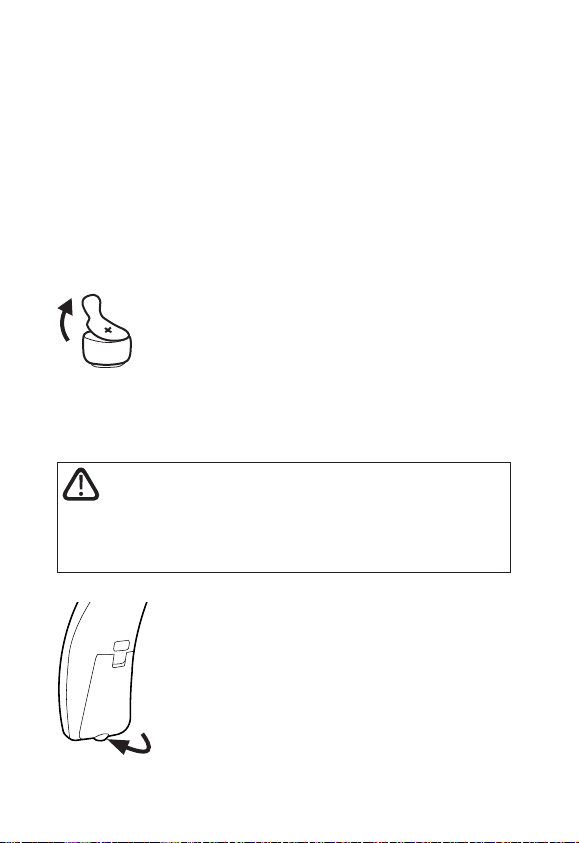
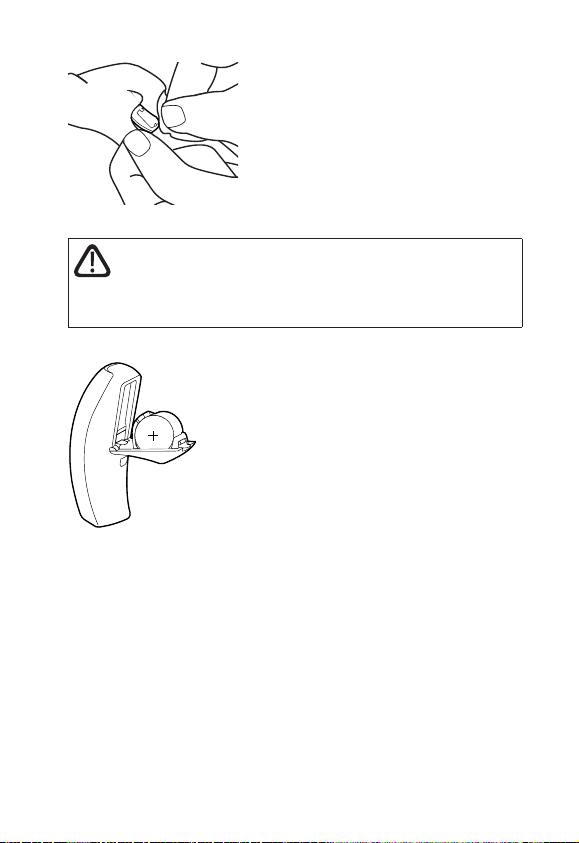
Insertingthebattery
Beforeinsertinganewbatteryintothede-
viceremembertoremovetheadhesive
tab Once the tab has been removed the
batterywillstartfunctioningafterafew
seconds
CAUTION
Do not use batteries if there is a sticky residue from the tab or
other unwanted substance, as this can cause the device to mal-
function.
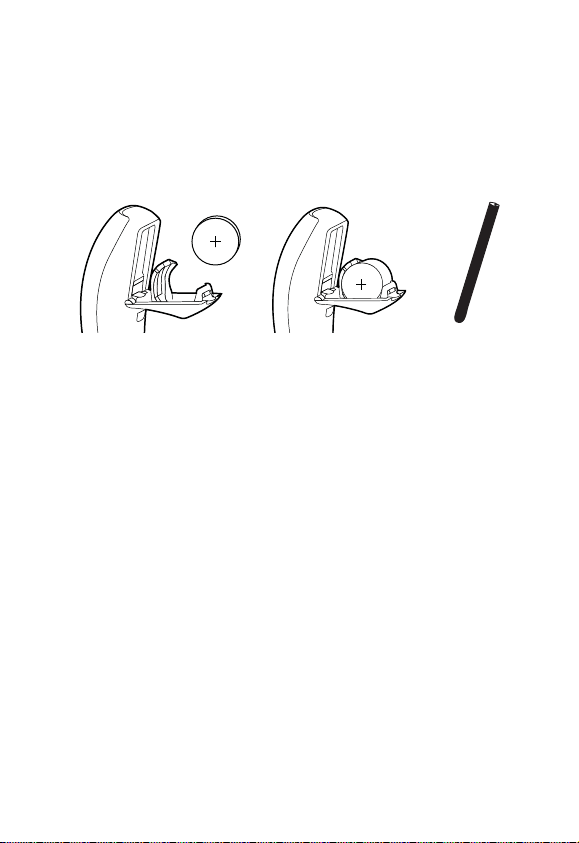
Usethenailgriptogentlyswingthebat-
terydraweropenDonotpressthedraw-
erbeyondtheopenposition
9
Placethebatteryinthedrawerasillustratedsothatthe
plus()signonthebatteryisfacingtowardsyouwhen
youholdthedeviceasshownYoucanusethebattery
magnetprovidedtosteerthebatteryintoplace
Ifthebatterydrawerdoesnotcloseeasilythebattery
isincorrectlyinserted
Whenchangingbatteryitisagoodideatoholdthede-
viceoveratable
10
Lowbatteryindication
An acoustic indicator will sound when the battery is
nearlyexhaustedunlessthisfunctionhasbeendisa-
bledExactlyhowlongthedevicewillfunctionafterthe
lowbatteryindicationvariesfromonecasetoanoth-
erWerecommendthatyoualwayshaveasparebat-
terywithyou
WARNING
Never leave an exhausted battery in the device. Exhausted bat-
teries may leak, damaging the device.
11
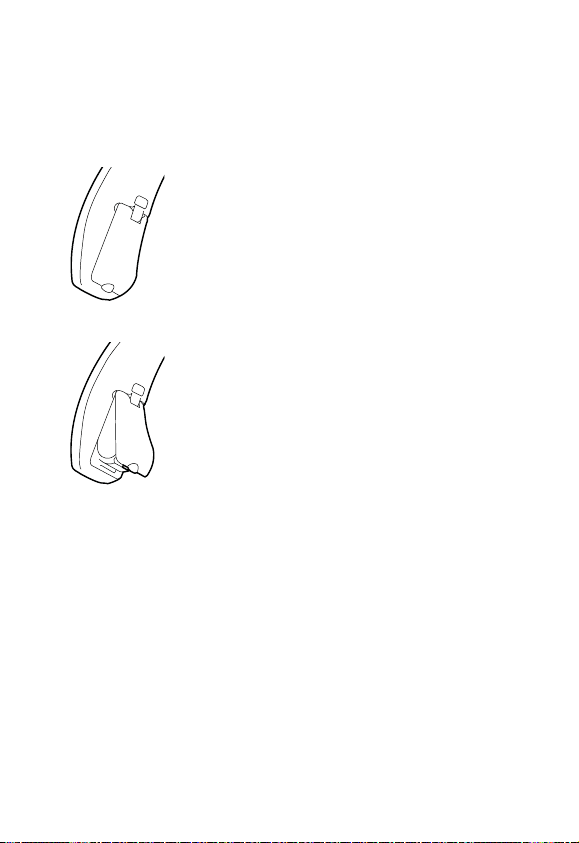
Turningthedeviceonandoff
Thebatterydrawerofthedevicealsofunctionsasthe
onoffswitch
Close the battery drawertoturn on the
deviceAnacousticindicatorwillindicate
thatthedevicehasbeenswitchedonun-
lessthisfunctionhasbeendisabled
Openthebatterydrawertoturnoffthe
device
Please remember to turn off the device
whenitisnotinuseRemovethebattery
ifthedevicewillnotbeusedforsever-
aldays
12
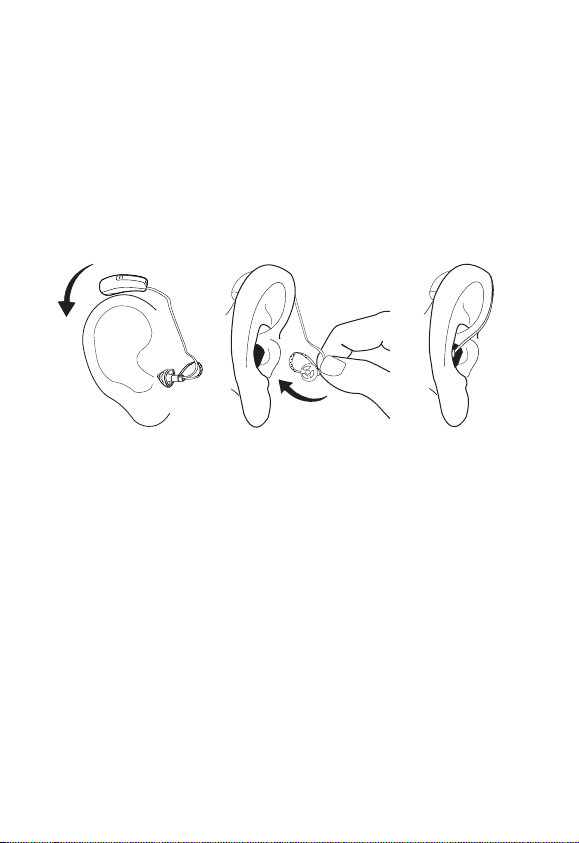
Positioningthedevice
Inserttheear-tipintheearcanalwhileholdingthelow-
erpartoftheearwireItmayhelptopulltheouterear
backwardsandupwardswiththeoppositehand
Placethedevicebehindtheearsothatthedeviceand
earwirerestcomfortablyontheearclosetoyourhead
Ananchorisusedwiththeopenear-tiptohelpsecure
thedeviceintheear PleaserefertothesectionThe
anchor
13
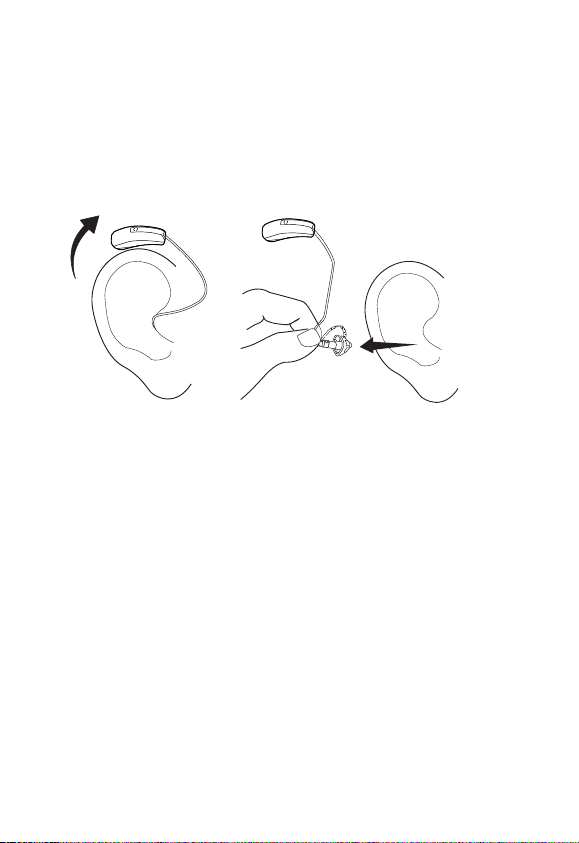
Removingthedevice
Removethedevicefromitspositionbehindtheear
Carefullypulltheear-tipoutoftheearcanalwhile
holdingthelowerpartoftheearwire

14
Volumeadjustment
Theremotecontrolallowsyoutofine-tunethevolume
Anyvolumeadjustmentviatheremotecontrolwillaf-
fectbothdevices
Pleasealsorefertotheuserinstructionsfortheremote
control
CAUTION
If the volume in the device is generally too loud or too weak,
or the reproduced sounds are distorted, or if you would like
any further information, consult your hearing care professional.
Tomutethedevicewiththeremotecontrol
Keep pressing the volume down key on the remote
controlafterthelongbeep-tonehassoundedandun-
tilitstopsPressingoneofthevolumekeysbrieflywill
bringbackthesound

15
Listeningprograms
Yourdeviceshaveastart-upprogramandthreesound
stimulationprogramscalledZenprograms
Start-up ThedevicesareprefittedtodBHTLandnoZen
tonesorZennoise
ZenA Tones
ZenB TonesandNoise
ZenC Noise
Switchingbetweentheprograms
Whenyouturnonyourtinnitusdevicestheywillbein
the start-up program From this program you access
theZenprogrammode byalongpress(morethan
second)ontheprogramkeyoftheremotecontrolA
shortpressthenallowsyoutocyclethroughtheavail-
ableZenprogramsYoucanreturntothestart-uppro-
grambypressingandholdingtheprogramkeyfor
morethanasecond
TheZenprograms
Because of the unique ways in which Zen is pro-
grammedinyourdevicepleasefollowtherecommen-
dationsofyourhearingcareprofessionalsastohowto
use the programs when touse the programs andor
howlong

16
CAUTION
Use of the different Zen programs may interfere with hearing
surrounding sounds including speech. Zen should not be used
when hearing such sounds is important.
CAUTION
If after two days of use you perceive a decrease in loudness,
tolerance of sounds, speech not as clear, or worsening tinnitus,
contact your hearing care professional.
Benefits
The Zen program may provide a relaxing listening
backgroundforsomepeopleWhentheZenprogram
isusedinatinnitusmanagementprogramitswearer
mayexperiencesomerelieffromtinnitus

17
Precautions
ToensurethesafetyandeffectivenessoftheZenpro-
gramswhenusedasasoundtherapytoolfortinnitus
the tinnitus management program must be designed
andconductedbyhearingcareprofessionalswhoare
trained in tinnitus management A tinnitus manage-
mentprogramshouldincludeacompleteaudiological
evaluationtinnitusdiagnosiscounsellinguseofprop-
eramplificationandorsoundtherapytools
Priortoanytinnitusmanagementprogramitisadvis-
able that you seek medical attention to exhaust any
medicalorsurgicaltreatmentoptions
UseyourdevicesandtheZenprogramsaccordingto
the directions and schedule recommended by your
hearingcareprofessionals
18
Cleaning
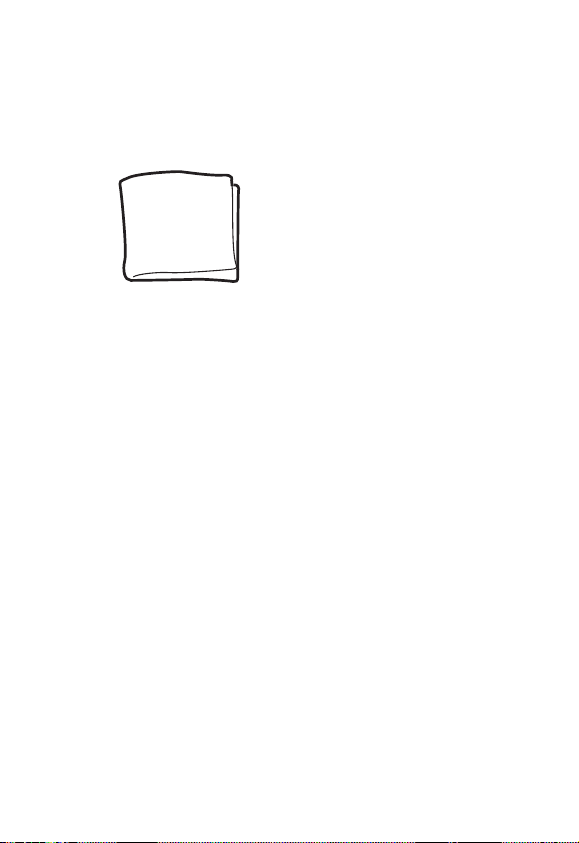
Forcleaningyourdeviceandear-setaclothisprovid-
ed
Contact your hearing care professional if you need a
newcloth
19
Cleaningthedevice
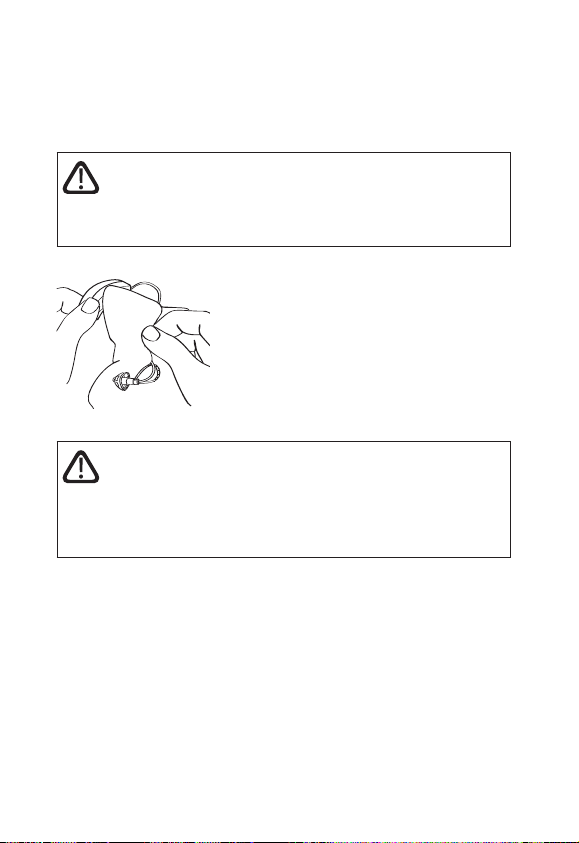
Cleanthedeviceafterusewith
theclothprovided
WARNING
Never use water or cleaning solutions to clean the device, as
this may cause it to malfunction.
Whenthedeviceisnotinusekeepit
inawarmdryplacewiththebattery
draweropentoventilatethedevice
andallowittodry
20
Cleaningtheear-set
Makesurethatyourear-setisalwayscleanandfreeof
earwaxmoistureandthelike
WARNING
Never use alcohol or other cleaning solutions to clean the ear-
set, as this can discolour it.
Clean the earwire with the cloth
afteruse
WARNING
Never use water or cleaning solutions to clean the earwire.
The receiver must never come into contact with water, as this
can damage the receiver.
Ifdirthascollectedonthereceiverusetheclothtore-
moveitafterfirstpullingthereceiveroutoftheear-tip
21
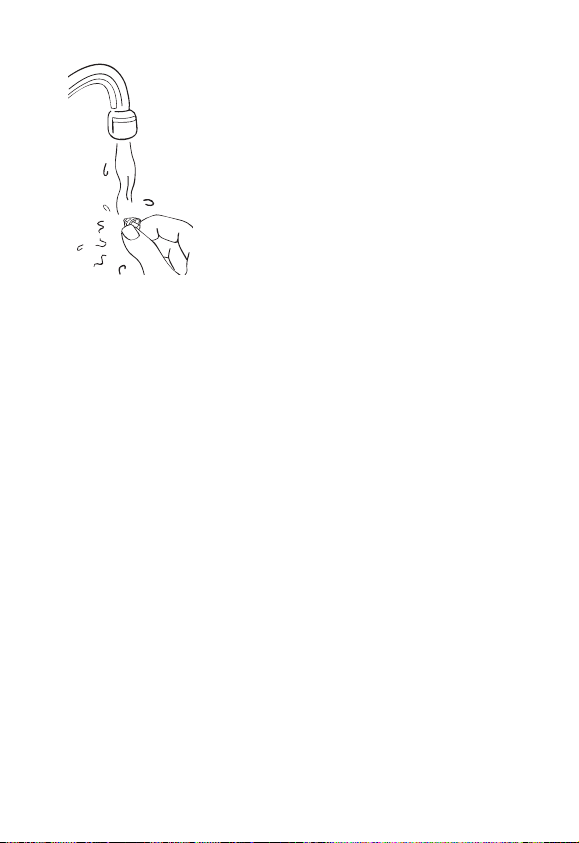
Ifnecessarytheopenear-tipcanbe
rinsedthoroughlyinlukewarmwater
after disconnecting it from therest
oftheear-setAllowittodryover-
night
22
Placingtheear-tipontheearwire
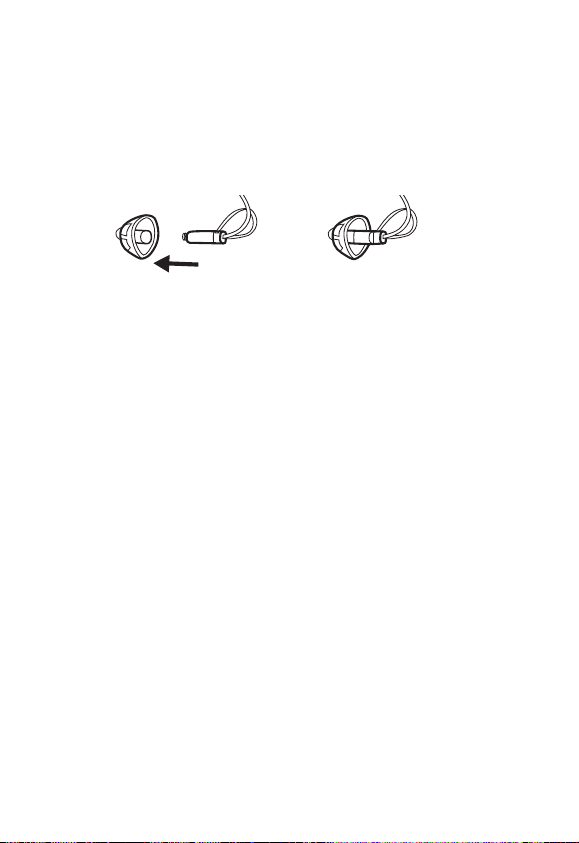
Gentlyinsertthereceiverattheendoftheearwireinto
theear-tipuntilittouchestheendItisveryimportant
toensurethattheear-tipisfirmlysecured
23
THE NANOCARE WAX GUARD
The NanoCare waxguard helps toprotectthedevice
againstearwaxAlwaysuseNanoCarewaxguardswith
yourdeviceOtherwisethewarrantyforthedevicewill
bevoid
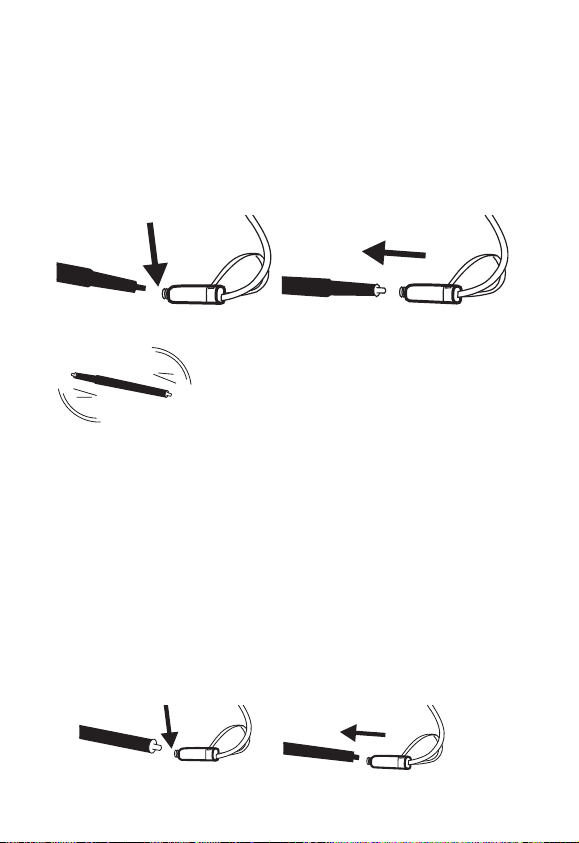
Thewaxguardsystemconsistsofthefollowingparts
Holder
Removalhook
Waxguard
CAUTION
The wax guard is disposable and for one-time use only. Do not
attempt to clean or reuse a wax guard. This could damage your
device and/or cause the wax guard to become dislodged in
your ear.
24
Changingthewaxguard
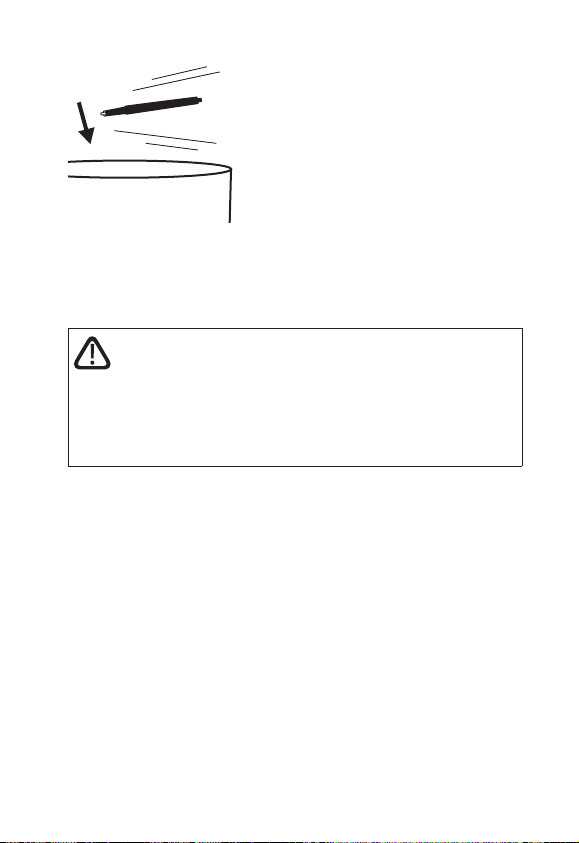
Removetheear-tipfromtheearwire
Inserttheremovalhookintotheusedwaxguard
placedinthesoundoutlet
Pullthewaxguardstraightout
Nowturntheholderaroundsothat
theusedwaxguardisawayfromthe
receiverandthenewoneisinposi-
tiontobeinserted
Inserttheholderintotheopeningofthesound
outletandgentlypressthewaxguardontothe
receiver
PulltheholderstraightoutThenewwaxguard
willautomaticallydetachfromtheholderPressthe
receivergentlyagainstaflatsurfacetoensurethat
thewaxguardremainsinplace
Placetheear-tipontheearwire
25
Discardtheholderwiththeused
waxguard
The frequency with which the
wax guard should be changed
variesfromoneindividualtoan-
other
Ifyouhaveanyquestionsregardingyourwaxguard
pleasecontactyourhearingcareprofessional
WARNING
If the wax guard fits loosely, discard it and insert another. If the
wax guard becomes dislodged while the ear-tip is placed in the
ear canal, please contact your physician. Do not try to remove
the wax guard from your ear canal yourself.
26
THE ANCHOR
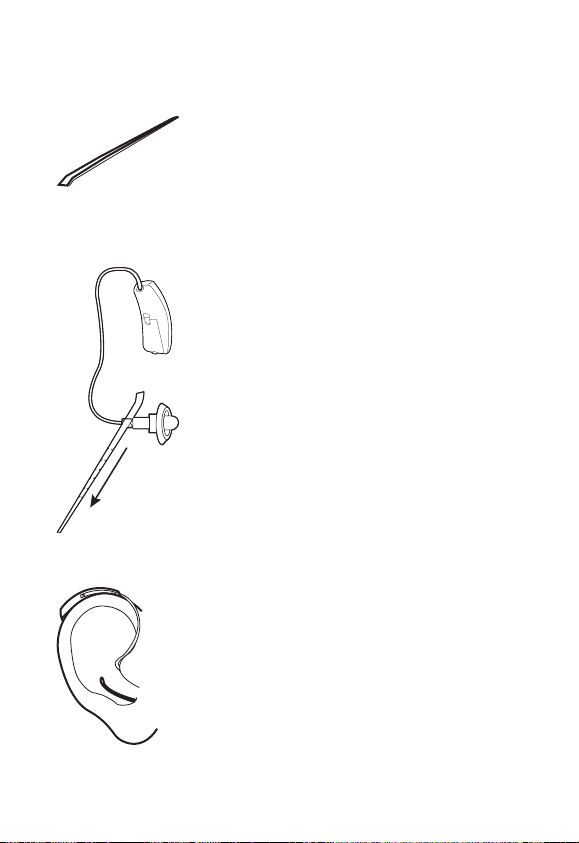
The anchor is supplied separately
fromtherestoftheear-setandcan
beusedindifferentwaysFirstlywe
showhowtheanchorcanbeused
withoutpriortrimming
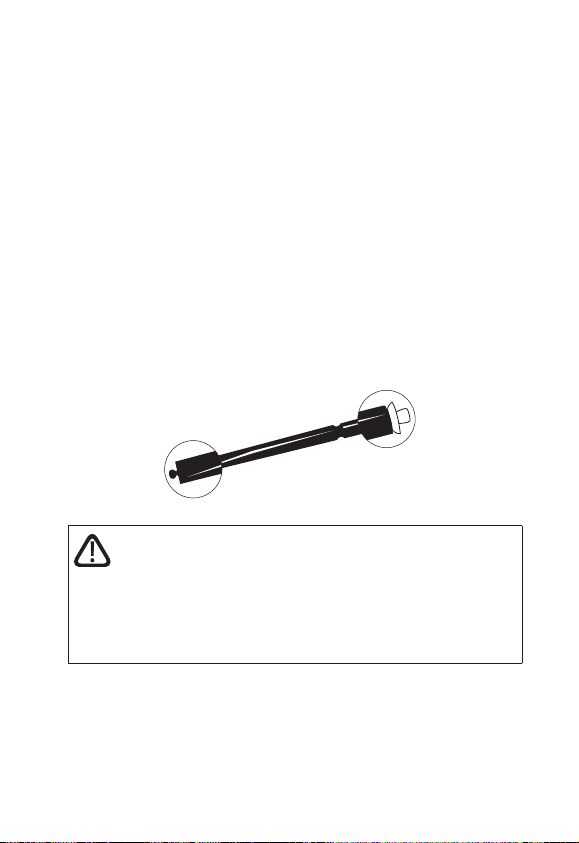
Pullthepointedendoftheanchor
throughtheupperholeonthereceiv-
erlocatedattheendoftheearwire
Theangledgripshouldbepointing
towardsthedevice
Continuepullinguntiltheanchoris
stoppedbythegripattheend
Yourear-setisnowreadyforuseandis
positionedsothatitrestscomfortablyin
yourear
27
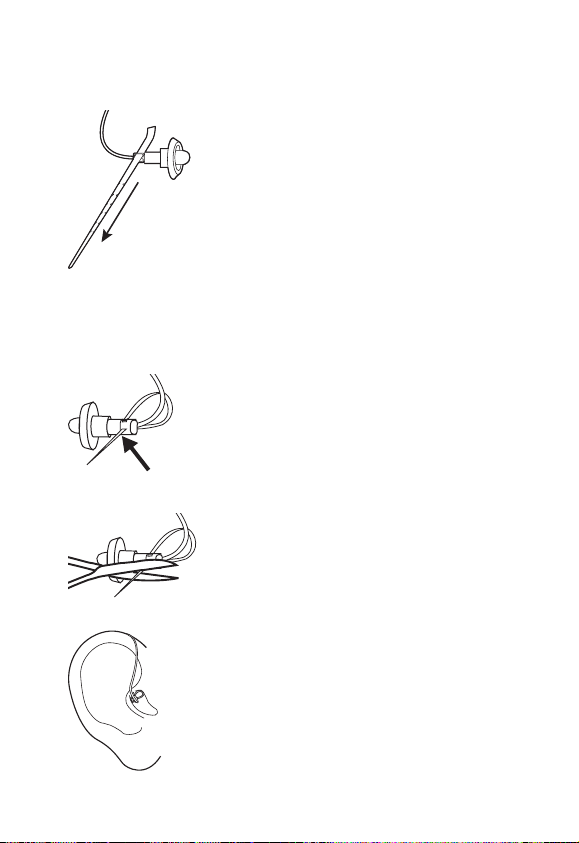
Theanchorcanalsobetrimmedtofityourear
Pullthepointedendoftheanchor
throughtheupperholeonthereceiv-
erlocatedattheendoftheearwire
Theangledgripshouldbepointing
towardsthedevice
Continuepullinguntiltheanchorisstoppedbythegrip
attheendNowturntheear-setaround
Thenguidethepointedendofthean-
chorthroughthelowerholetoforma
loop
Whentheloopisthecorrectsizecut
anyexcessoffleavingonlytheloop
Theanchorloophasthecorrectsizewhen
it supports the position of the ear-tip in
theearcanalandtheear-setsitssecure-
lyinandontheear

28
Takegreatcaretocutoffalltheexcess
so that the end of the anchor loop is
flushwiththesmallholeandthereare
nosharpedgesUsethetipofyourfin-
gertocheckforsharpedgesIfpartof
theanchorsticksoutthroughthehole
creatinganunevensurfacethismaycauseirritationof
theear
29
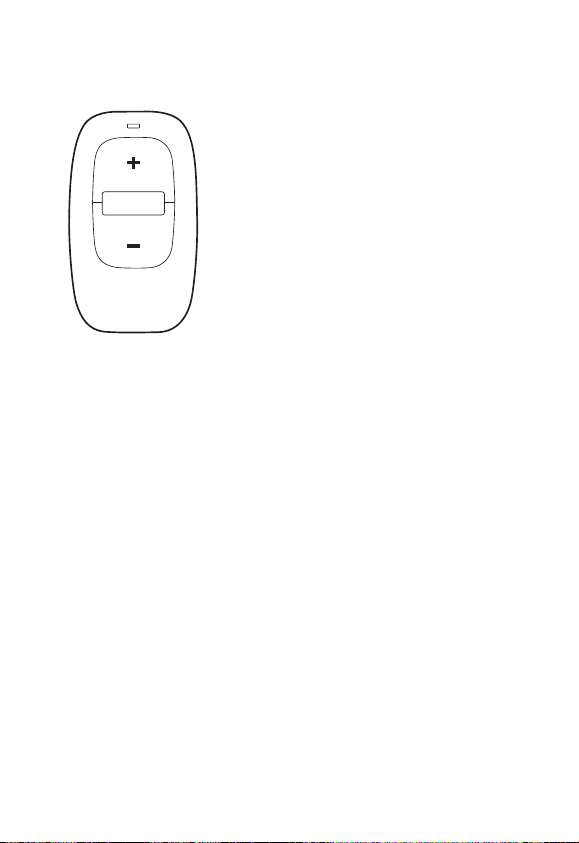
RC-DEX REMOTE CONTROL
Aremotecontrolissuppliedwith
yourdevicesPleaserefertothe
“RC-DEXforWidextinnitusdevices”
userinstructionsforfurtherinforma-
tion

30
IN CASE OF MALFUNCTION
Problem Potentialcause Solution
Thedeviceis
dead
Thedeviceisnot
turnedon
Makesurethebattery
drawerisclosed
Theearwireis
broken
Contactyourhearing
careprofessional
Thebatterydoesnot
work
Insertanewbatteryin
thebatterydrawerof
thedevice
TheNanoCarewax
guardisblocked
Changethewaxguard
Thedevice
volumeisnot
powerful
enough
TheNanoCarewax
guardisblocked
Changethewaxguard
Yourearisblocked
byearwax
ContactyourENT
doctorphysician
Yourhearingtinnitus
mayhavechanged
Contactyourhearing
careprofessional
Thedevice
whistles
continuously
Yourearisblocked
byearwax
ContactyourENT
doctorphysician
Theear-tipisnot
correctlyplacedin
yourearcanal
Taketheear-tipoutand
reinsertit
Theear-tipfitistoo
loose
Contactyourhearing
careprofessional
Thereceiverisnot
adequatelysecured
intheear-tip
Replacetheear-tipIf
theproblempersists
contactyourhearing
careprofessional

31
Problem Potentialcause Solution
Yourtwo
devicesare
notworkingin
synchrony
Theconnection
betweenthedevices
islost
Turnthedevicesoffand
onagain
Thedevices
donotre-
spondwitha
corresponding
changeinvol-
umeorpro-
gramtothe
RC-DEX
a TheRC-DEXis
usedbeyondthe
trans missionrange
(m)
b Strongelectro-
magneticinterfer-
enceinthevicinity
c TheRC-DEXand
thedevicesarenot
matched
a MovetheRC-DEX
closertothedevices
b Moveawayfrom
knownsourceofEM
interference
c Checkwithdispenser
tomakesureRC-DEX
ismatchedwiththe
devices

32
CARING FOR YOUR TINNITUS
DEVICES
Yourtinnitusdeviceisavaluableobjectandshouldbe
treatedwithcareHerearesomethingsyoucandoto
prolongthelifeofyourdevice
CAUTION
•TurnoffyourdevicewhenitisnotinuseRemovethebattery
ifthedevicewillnotbeusedforseveraldays
•Whenthedeviceisnotinusekeepitinitscaseinadryloca-
tionoutofreachofchildrenandpets
•Do not expose the device toextreme temperatures or high
humidityMakesuretodrythedevicethoroughlyafterheavy
perspiration such as that which may occur during intense
physicalactivityegplayingsports
•Avoiddroppingyourdevice–performcleaningandbattery
changeswhileholdingthedeviceaboveasoftsurface
•Donotwearyourdevicewhileintheshowerorswimming
orwhenusingahairdryerperfumehairandbodyspraysor
gelssuchassuntanninglotionsorcreams

33
WARNINGS
WARNING
Tinnitus devices and batteries can be dangerous if swal lowed
or used improperly. Swallowing or improper use can result in
severe injury or even fatalities. In case of ingestion, contact a
physician immediately.
•Keeptinnitusdevicesandtheirpartsaccessoriesandbatter-
iesoutofreachofchildrenandanyoneelsewhomightswal-
lowsuchitemsorotherwisecauseinjury tothemselvesDo
notchangebatteriesinfrontofthemanddonotletthemsee
whereyoukeepyourbatterysupplyDiscardusedbatteries
carefully
•Batteriesareverysmallandcaneasilybemistakenforpillsor
thelikeNeverputabatteryordeviceinyourmouthforany
reasonasyoumayriskswallowingit
•Riskofexplosionifbatteryisreplacedbyanincorrecttype
orrechargedDisposeofusedbatteriesaccordingtothein-
structions
•Neverallowotherstowearyourdevice
•The device is made of modern non-allergenic materials
NonethelessinrarecasesskinirritationmayoccurIfyouno-
ticeskinirritationinoraroundyourearorearcanalcontact
yourhearingcareprofessional

34
WARNING
•Beawarethattheuseoftinnitusdevicesmayinvolveaslight-
lyincreasedriskofinfectionintheearcanalAninfectioncan
ariseasaresultofinadequateventilationoftheearWethere-
forerecommendthatyouremovethedeviceandear-setfrom
yourearatnighttoallowtheearcanaltobeventilatedMake
surethatyoucleanandinspectyourdeviceandear-setasre-
quiredIfaninfectionoccursyoushouldseekmedicalatten-
tionandcontactyourhearingcareprofessionalforadviceon
howtodisinfectthevariousdevicepartsDonotunderany
circumstancesusealcoholchlorineorsimilarsubstances
•Regularuseofade-humidifierisrecommendedtohelpavoid
malfunctionofthehearingaid
•DonotuseWidextinnitusdevicesinminesorotherareaswith
explosivegases
•DonotwearyourdeviceduringradiationX-raysMRIsCT
orothermedicaltreatmentsandscansTheemissionsfrom
theseproceduresaswellasfromothertypesofradiation
suchasthatinamicrowaveovencandamageyourdevice
Radiation from for example room surveillance equipment
burglaralarmsandmobilephonesisweakerandwillnotdam-
agethedevicebutmaycreateaudibleinterference

35
CAUTION
•Yourdevicehasbeentestedforinterferenceaccordingtoin-
ternationalstandardsNeverthelessitispossiblethatunfore-
seeninterferencemayoccurinthedeviceduetoelectromag-
netic radiation from other products such as alarm systems
roomsurveillanceequipmentandmobilephones
•Althoughyourdevicehasbeendesignedtocomplywiththe
moststringentinternationalelectromagneticcompatibili-
tystandardsthepossibilitycannotbeexcludedthatitmay
causeinterferencewithotherequipmentsuchasmedicalde-
vices
•Nevertrytoopenorrepairthedeviceyourself

36
ADVICE
NOTE
•Theuseofthedevicesincreasestheriskofaccumulationof
earwaxContactyourphysicianENTdoctorifyoususpect
that aplug of earwax has accumulatedin your earEarwax
maynotonlyreduceyourownhearingbutalsotheeffectof
thedeviceconsiderablyItisagoodideatoaskyourphysician
tocleanyourearsacoupleoftimesayear

37
REGULATORY INFORMATION
FCCIDTTY-CPA
ICB-CPA
FederalCommunicationsCommissionStatement
ThisdevicecomplieswithpartoftheFCCRulesOper-
ationissubjecttothefollowingtwoconditions
()Thisdevicemaynotcauseharmfulinterferenceand
()thisdevicemustacceptanyinterferencereceivedin-
cludinginterferencethatmaycauseundesiredoperation
NOTE
Thisequipmenthasbeentestedandfoundtocomply
withthelimitsforaClassBdigitaldevicepursuantto
partoftheFCCRulesTheselimitsaredesignedto
providereasonableprotectionagainstharmfulinterfer-
enceinaresidentialinstallationThisequipmentgener-
atesusesandcanradiateradiofrequencyenergyandif
notinstalledandusedinaccordancewiththeinstruc-
tionsmaycauseharmfulinterferencetoradiocommuni-
cationsHoweverthereisnoguaranteethatinterference
willnotoccurinaparticularinstallationIfthisequipment
doescauseharmfulinterferencetoradioortelevisionre-
ceptionwhichcanbedeterminedbyturningtheequip-
mentoffandontheuserisencouragedtotrytocorrect
theinterferencebyoneormoreofthefollowingmeas-
ures
—Reorientorrelocatethereceivingantenna
— Increasetheseparationbetweentheequipmentand
receiver

38
— Connecttheequipmentintoanoutletonacircuitdif-
ferentfromthattowhichthereceiverisconnected
— ConsultthedealeroranexperiencedradioTVtechni-
cianforhelp
NOTE
ThisequipmentcomplieswithFCCradiationexposure
limitssetforthforanuncontrolledenvironmentThis
transmittermustnotbeco-locatedoroperatingincon-
junctionwithanyotherantennaortransmitter
Changesormodificationstotheequipmentnotexpressly
approvedbyWidexcouldvoidtheuser’sauthoritytoop-
eratetheequipment
IndustryCanadaStatement
Déclarationd’industrieCanada
UnderIndustryCanadaregulationsthisradiotransmitter
mayonlyoperateusinganantennaofatypeandmaxi-
mum(orlesser)gainapprovedforthetransmitterbyIn-
dustryCanada
Toreducepotentialradiointerferencetootherusersthe
antennatypeanditsgainshouldbesochosenthatthe
equivalentisotropicallyradiatedpower(eirp)isnot
morethanthatnecessaryforsuccessfulcommunication
ThisdevicecomplieswithIndustryCanadalicence-ex-
emptRSSstandard(s)Operationissubjecttothefollow-
ingtwoconditions
()thisdevicemaynotcauseinterferenceand
()thisdevicemustacceptanyinterferenceincludingin-
terferencethatmaycauseundesiredoperationofthede-
vice

39
Conformémentàlaréglementationd’IndustrieCanadale
présentémetteurradiopeutfonctionneravecunean-
tenned’untypeetd’ungainmaximal(ouinférieur)ap-
prouvépourl’émetteurparIndustrieCanada
Danslebutderéduirelesrisquesdebrouillageradioélec-
triqueàl’intentiondesautresutilisateursilfautchoisirle
typed’antenneetsongaindesortequelapuissanceiso-
troperayonnéeéquivalente(pire)nedépassepas
l’intensiténécessaireàl’établissementd’unecommunica-
tionsatisfaisante
LeprésentappareilestconformeauxCNRd’Industrie
Canadaapplicablesauxappareilsradioexemptsdeli-
cenceL’exploitationestautoriséeauxdeuxconditions
suivantes
()l’appareilnedoitpasproduiredebrouillageet
()l’utilisateurdel’appareildoitacceptertoutbrouillage
radioélectriquesubimêmesilebrouillageestsuscepti-
bled’encompromettrelefonctionnement

40
HerebyWidexASdeclaresthatthisC-PAisincom-
pliancewiththeessentialrequirementsandotherrele-
vantprovisionsofDirectiveEC
AcopyoftheDeclarationofConformitycanbefound
athttpwwwwidexcom

41
Tinnitus devices accessories and batter-
iesshouldnotbedisposedofwithnormal
household waste Please consult your na-
tionalWidexdistributorforadviceonhow
todisposeoftheseitems

42

43
¡9 514 0171 001m¤
Printed by HTO / 2012-09
9 514 0236 001 #01
¡#01v¤
Manufacturer