USER INSTRUCTIONS
THE WIDEX EVOKE™ FAMILY
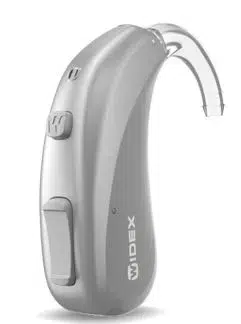
EBB3D model
BTE
(Behind-the-ear)
YOUR HEARING AID
(To be filled out by the hearing care professional)
Your hearing aid series:
PROGRAMS
Universal Audibility Extender
Quiet Audibility Extender
Comfort Audibility Extender
Transport Audibility Extender
Urban Audibility Extender
Impact Audibility Extender
Party Audibility Extender
Social Audibility Extender
Music Audibility Extender
T Audibility Extender
M+T Audibility Extender
2
SPECIAL PROGRAMS
Zen Audibility Extender
Phone Audibility Extender
SMARTTOGGLE PROGRAMS
Zen+ Audibility Extender
NOTE
The description and use of the Phone program in this user guide refer only to
normal phone conversations, not phone conversations using direct streaming
from your smartphone.
NOTE
Read this booklet and the booklet "Ear-sets for Widex hearing aids" carefully
before you start using your hearing aid.
NOTE
This hearing aid allows direct wireless control and sound streaming from smart-
phones and other devices. For more help and information contact your hearing
care professional or visit: https://global.widex.com/EVOKE.
This hearing aid works wirelessly with the EVOKE app. We take no responsibility
if the hearing aid is used with any third party app or if the EVOKE app is used
with any unsupported devices.
3

CONTENTS
YOUR HEARING AID...................................................................................6
Welcome...........................................................................................................6
Your hearing aid at a glance.......................................................................6
Important safety information.........................................................................8
Operating conditions..................................................................................10
Storage and transportation conditions....................................................10
THE HEARING AID..................................................................................... 11
Indications for use...........................................................................................11
Intended use.................................................................................................... 11
The battery.......................................................................................................11
Low battery indication...............................................................................12
Changing the battery................................................................................. 12
Tamper-resistant battery drawer.............................................................13
Sound signals..................................................................................................13
Lost partner ................................................................................................14
How to tell right from left..............................................................................14
Turning the hearing aid on and off.............................................................. 14
Putting on and removing the hearing aid...................................................15
Sound adjustment..........................................................................................15
Programs......................................................................................................... 17
4

The Zen program........................................................................................19
Program adjustment......................................................................................19
Using a phone with your hearing aids........................................................20
PAIRING YOUR HEARING AID AND SMARTPHONE....................................21
COMPATIBILITY WITH SMARTPHONES.......................................................21
CLEANING................................................................................................22
Tools................................................................................................................22
Cleaning..........................................................................................................22
ACCESSORIES..........................................................................................24
TROUBLESHOOTING................................................................................ 25
REGULATORY INFORMATION...................................................................27
EU directives...................................................................................................27
Directive 2014/53/EU................................................................................ 27
Information regarding disposal................................................................27
FCC and ISED statements.............................................................................28
SYMBOLS..................................................................................................31
5
YOUR HEARING AID
Welcome
Congratulations on your new hearing aid.
Use your hearing aid regularly, even if it takes some time getting used to it.
Infrequent users don’t usually get the full benefit of a hearing aid.
NOTE
Your hearing aid and its accessories may not look exactly as illustrated in this
booklet. We also reserve the right to make any changes we consider necessary.
Your hearing aid at a glance
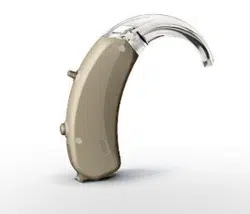
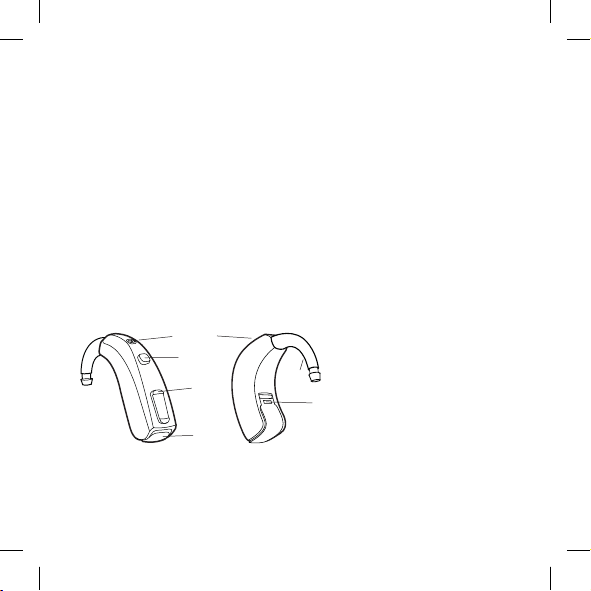
The illustration shows your hearing aid without the ear-set. For further in-
formation on the ear-set see the ear-set manual. The ear-set consists of a
tube and an ear-tip or earmould, and it is the part of your hearing aid that
you wear inside your ear.
3
4 + 5
2
1
1
7
6
1. Microphone openings
2. Program button
3. Volume control
4. Battery lid with nail grip
5. On/off switch
6. Hook
7. Left/right identification.
Blue indicates your left
hearing aid, while red is for
your right hearing aid.
6
NOTE
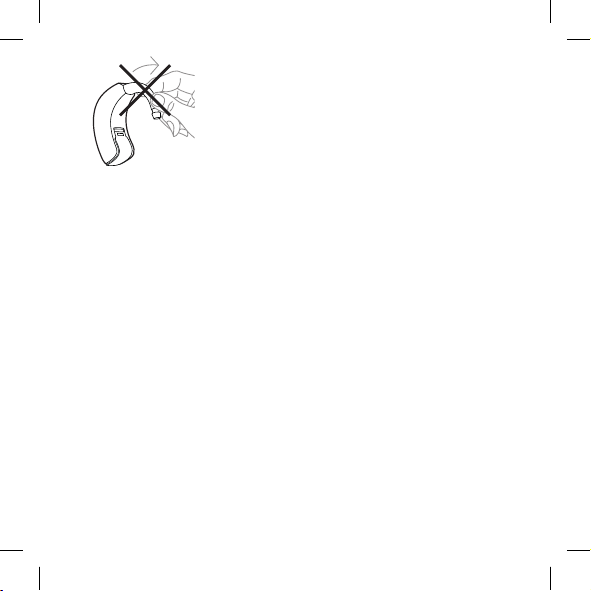
Please note that the hook is fixed to the hearing aid and should not be removed.
7
Important safety information
Read these pages carefully before you begin using your hearing aid.
Hearing aids and batteries can be dangerous if swallowed or used im-
properly. Swallowing or improper use can result in severe injury or even
fatalities. In case of ingestion, contact your local emergency number or
hospital immediately.
Take your hearing aids out when you are not using them. This will help to
ventilate the ear canal and prevent ear infections.
Contact your doctor or hearing care professional immediately if you sus-
pect you may have an ear infection or an allergic reaction.
Contact your hearing care professional if the hearing aid doesn't feel
comfortable, or if it doesn't fit properly, causing irritation, redness or the
like.
Remove your hearing aids before showering, swimming or using a hair
dryer.
Do not wear your hearing aids when applying perfume, spray, gels, lotion
or cream.
Do not dry your hearing aid in a microwave oven - this will ruin it.
Never use other people’s hearing aids and never allow others to use
yours, as this could damage your hearing.
Never use your hearing aids in environments where there may be explo-
sive gases, such as in mines, etc.
8
Keep hearing aids, their parts, accessories and batteries away from chil-
dren and mentally disabled people.
Never try to open or repair the hearing aid yourself. Contact your hearing
care professional if you need to have your hearing aid repaired.
Your hearing aids contain radio communication technology. Always ob-
serve the environment in which you are using them. If any restrictions ap-
ply, you must take precautions to comply with these.
Your device has been designed to comply with international electromag-
netic compatibility standards. However, it cannot be excluded that it may
cause interference with other electrical equipment. If you experience in-
terference, keep a distance to other electrical equipment.
Please note that streaming sound to your hearing aids at a high volume
can prevent you from hearing other important sounds such as alarms
and traffic noise. In such situations make sure to keep the volume of the
streamed sound at a suitable level.
Your hearing aid is very powerful and it can play sounds that exceed a
level of 132 dB. There may therefore be a risk of damaging your remain-
ing hearing.
Do not expose your hearing aids to extreme temperatures or high humid-
ity, and dry them quickly if they get wet, or if you perspire heavily.
There is a risk of explosion if you replace the battery with an incorrect
type.
9
Operating conditions
Your hearing aid has been designed to operate in everyday situations, and it
works in environmental conditions that are comfortable for you. You can
wear your hearing aid during flights, but you should remove it before show-
ering or swimming.
The specific operating conditions for your hearing aid are listed below:
Minimum Maximum
Temperature 0°C (32°F) 50°C (122°F)
Humidity 10% rH 95% rH
Atmospheric pressure 750 mbar 1060 mbar
Storage and transportation conditions
Your hearing aid is sensitive to extreme conditions such as high tempera-
ture. See the specific storage and transportation conditions below:
Minimum
Maximum
Temperature -20°C (-4°F) 55°C (131°F)
Humidity 10% rH 95% rH
You can find technical data sheets and additional information on your hear-
ing aids on https://global.widex.com.
10

THE HEARING AID
Indications for use
The hearing aids are indicated for individuals with a range of hearing loss
from minimal (10 dB HL) to severe-to-profound (105 dB HL) and all hearing
loss configurations.
They are to be programmed by licensed hearing care professionals (audiol-
ogists, hearing aid specialists, otolaryngologists) who are trained in hearing
(re)habilitation.
For individuals younger than 36 months, the following limitations apply:
● A standard hook and a custom earmold must be used.
● A tamper-resistant battery drawer must be used.
Intended use
The hearing aids are intended as air conduction amplification devices to be
used in everyday listening environments. The hearing aids may be equipped
with the Zen program, intended to provide a relaxing sound background
(i.e. music/noise source) for adults who desire to listen to such a back-
ground in the quiet.
The battery
Use a type 13 zinc-air battery for your hearing aid.
Always use a fresh, new battery that is precisely the kind recommended by
your hearing care professional.
11
NOTE
Check that the battery is completely clean and free of any residue before insert-
ing it in the hearing aid. Otherwise your hearing aid may not function as expec-
ted.
Never attempt to recharge your hearing aid batteries, as they could ex-
plode.
Never leave a dead battery in the hearing aids while storing them. It could
leak and ruin your hearing aid.
Dispose of used batteries as indicated on the packaging and take note of
the expiry date.
Low battery indication
When the battery is flat, a sound signal will play. If the battery drains sud-
denly there may however be no warning. We recommend carrying a spare
battery with you wherever you go.
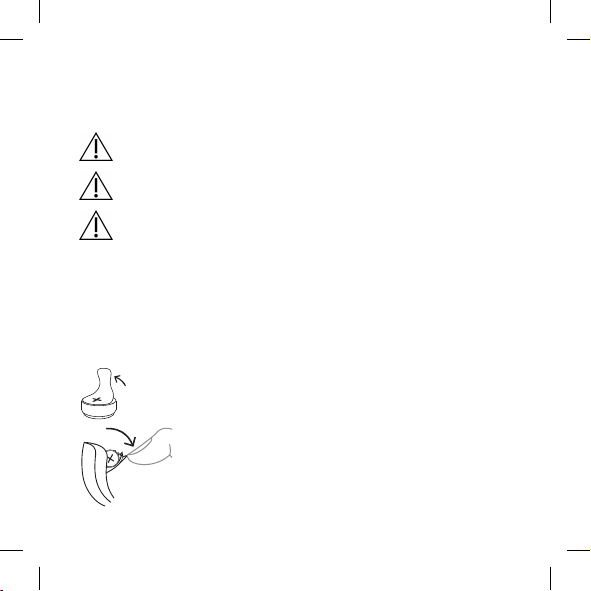
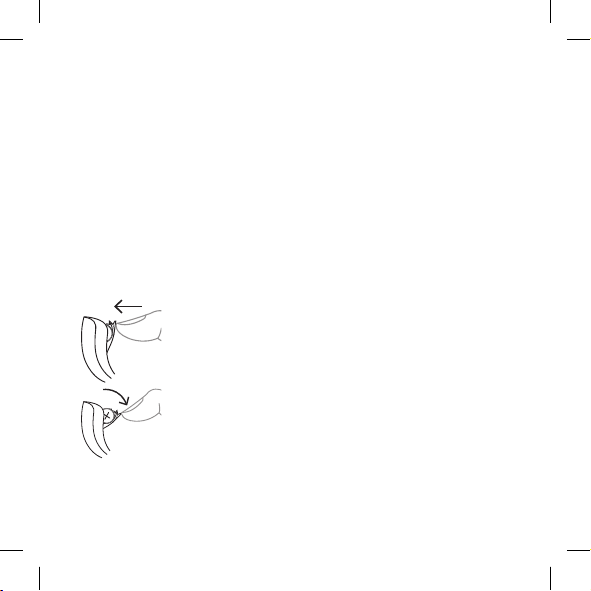
Changing the battery
To change the battery, do as follows:
Take the adhesive tab off the new battery and make
sure there is no sticky substance left on it. Let it
"breathe" for 60 seconds.
Use the nail grip to gently swing the battery door
open and remove the old battery.
12
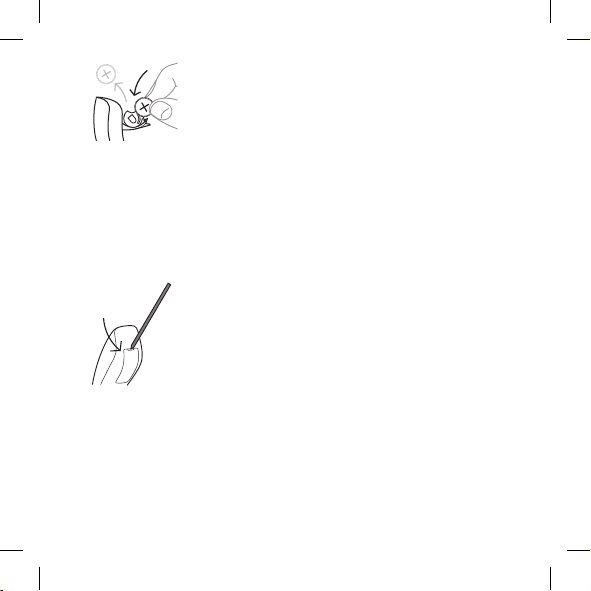
Now place the new battery in the drawer as shown.
Close the drawer. If it doesn't close easily, the bat-
tery is not placed correctly.
If you are not using the hearing aid for a few days,
remove the battery.
NOTE
Avoid dropping your hearing aid - hold the hearing aid above a soft surface
while changing the battery.
Tamper-resistant battery drawer
If the hearing aid is going to be used by a child or a mentally disabled per-
son, you can ask your hearing care professional to provide it with a tamper-
resistant battery drawer.
To open battery drawer, use the special tool you've
received, and do as illustrated.
Sound signals
Your hearing aid plays sounds to inform you that certain features have been
activated or that you have changed program. These sounds can be spoken
messages or tones.
13
Ask your hearing care professional to turn these sounds off if you don't need
them.
Lost partner
(Only available in selected models)
Your hearing care professional can turn on a feature in your hearing aid that
warns you whenever it loses contact with the hearing aid in the opposite
ear. You will hear a spoken message in your ear.
How to tell right from left
The hearing aid for your right ear has a red mark. The hearing aid for your
left ear has a blue mark.
Turning the hearing aid on and off
To turn the hearing aid on, close the battery door. The
hearing aid will play a sound signal to indicate that it is
on, unless your hearing care professional has deactiva-
ted this function.
To turn off the hearing aid, pull the battery door
downwards.
NOTE
Don't forget to turn off the hearing aid when it is not in use.
14
Putting on and removing the hearing aid
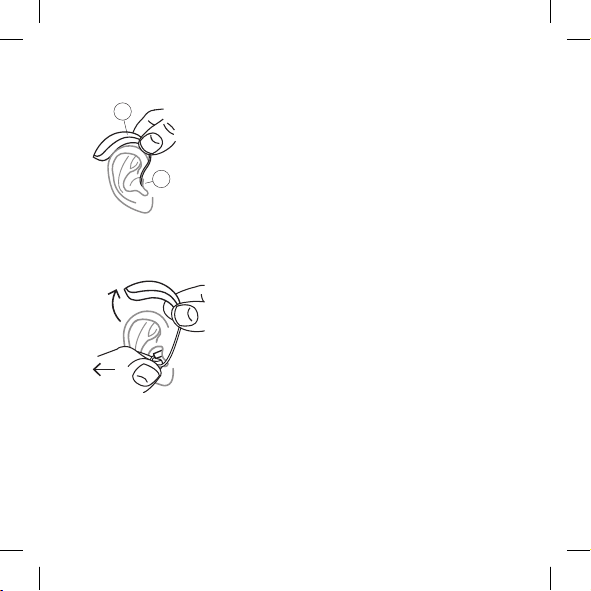
Putting on the hearing aid
1
2
1. Insert the ear-set in the ear while holding the lower
part of the tube/earwire. Pulling the outer ear upwards
and backwards at the same time can be helpful.
2. Then place the hearing aid behind the ear. The hearing
aid should rest comfortably on the ear, close to your
head.
Your hearing aid can be fitted using different types of ear-sets. See the sep-
arate ear-set manual for more information about your ear-set.
Removing the hearing aid
Start by removing the hearing aid from behind the
ear.
Then take the ear-set carefully out of the ear canal
while you hold the lower part of the tube/earwire.
Sound adjustment
Your hearing aid adjusts the sound automatically according to your sound
environment.
15

You can also adjust the sound manually to achieve more comfort or more
audibility, depending on your needs and preferences. For more information
on how this works, consult your hearing care professional.
Depending on the hearing aid settings and features, any sound adjustment
you make will affect both hearing aids.
Each time you operate the volume control, you will hear a beep-tone unless
your hearing care professional has deactivated this function. When you
reach the maximum or minimum setting, you will hear a steady tone.
To mute your hearing aid do as follows:
● Keep pressing the lower part of the volume control until you can hear
the steady sound
To turn the sound on again:
● Press the upper part of the volume control or
● Change program
Any adjustment of the volume will be cancelled when you turn off your
hearing aid or if you change program.
NOTE
You can also use your app for changing programs and adjusting the sound in
your hearing aids.
16
Programs
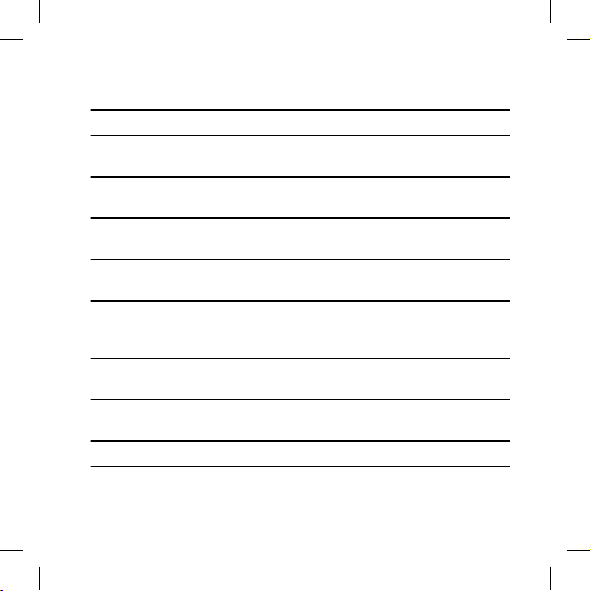
PROGRAMS USE
Universal For everyday use
Quiet Special program for listening in quiet envi-
ronments
Comfort Special program for listening in noisy envi-
ronments
Transport For listening in situations with noise from
cars, trains, etc.
Impact Use this program if you prefer a clear and
sharp sound
Urban For listening in situations with changing
sound levels (in supermarkets, noisy work-
places or similar)
Party For listening in situations with many people
talking at the same time
Social Use this program if you are in small social
gatherings, such as family dinners
Music For listening to music
17
PROGRAMS USE
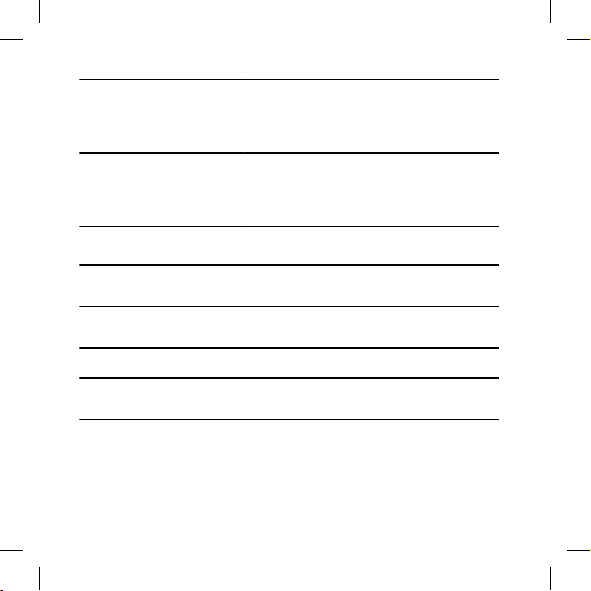
T With this program you listen through the
hearing aid's telecoil, which allows you to lis-
ten directly to the sound without background
noise (requires a teleloop system)
M+T This program is a combination of the hearing
aid's microphone and the telecoil. You listen
to the sound source, but can also hear other
sounds
SPECIAL PROGRAMS USE
Zen Plays tones or noise for a relaxing sound
background
Phone This program is designed for listening to
phone conversations
SMARTTOGGLE PROGRAMS USE
Zen+ This program is similar to Zen but allows you
to listen to different types of tones or noise
NOTE
The names in the list of programs are the default names. Your hearing care pro-
fessional can also select an alternative program name from a preselected list.
Then it is even easier for you to select the right program in each listening situa-
tion.
18
Depending on your hearing loss, your hearing care professional can activate
the Audibility Extender feature. Ask your hearing care professional if you
could benefit from this.
If your needs and preferences change over time, your hearing care profes-
sional can easily change your program selection.
The Zen program
Your hearing aid may be provided with a unique optional listening program
called Zen. It makes musical tones (and sometimes a rushing noise) in the back-
ground.
If you perceive a decrease in loudness or tolerance of sounds, speech not
to be as clear, or worsening tinnitus, contact your hearing care professio-
nal.
Use of the Zen program may interfere with hearing everyday sounds, in-
cluding speech. It should not be used when it is important to be able to
hear such sounds. Switch the hearing aid to a non-Zen program in these
situations.
Program adjustment
To change programs, just press the program button. To access and exit the
SmartToggle program, press and hold the push button down for more than
one second (this setting is optional). Once you have accessed the Smart-
Toggle program, you can change among the different Zen styles selected
for you by short presses on the button.
19
NOTE
You can also use your app for changing programs and adjusting the sound in
your hearing aids.
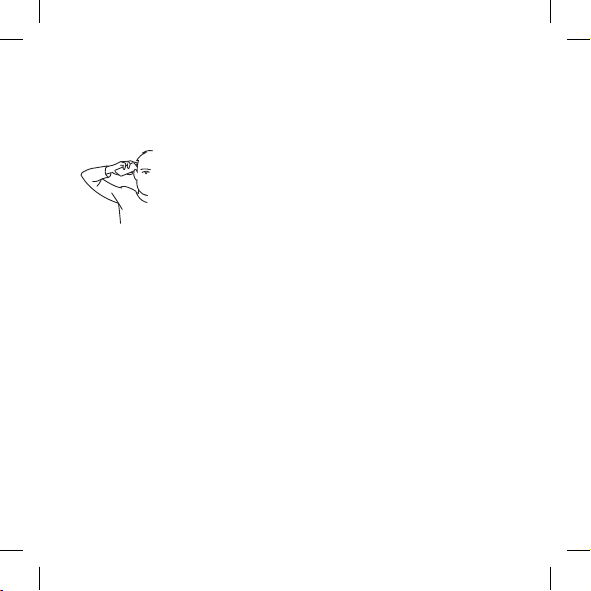
Using a phone with your hearing aids
When speaking on the phone, hold the phone against
your head at an angle above your ear, rather than directly
against the ear.
20

PAIRING YOUR HEARING AID AND SMARTPHONE
To pair your hearing aids and smartphone you need to restart your hearing
aid. Do as follows:
1. Restart your hearing aids by opening and closing the battery compart-
ment.
2. Keep the hearing aids close to your phone and follow the instructions on
your phone.
3. The hearing aids and smartphone are now ready to use.
NOTE
Your hearing aids are only in pairing mode for three minutes after you re-
start them. You might need to restart them again if you didn't pair them in
time.
COMPATIBILITY WITH SMARTPHONES
You can see a list of compatible smartphones, tablets, etc. at this website:
https://global.widex.com.
21
CLEANING
Tools
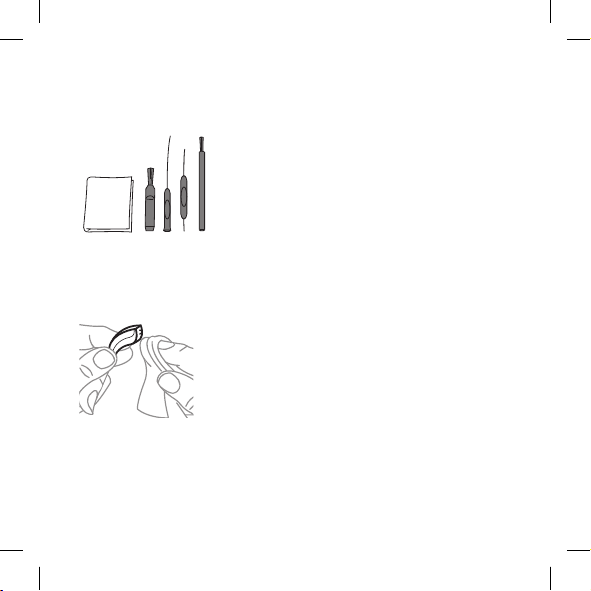
You will receive the following cleaning tools with your hearing aid:
1. 2. 3. 4. 5.
1. Cloth
2. Brush
3. Long wax-removing tool
4. Short wax-removing tool
5. Battery magnet
Cleaning
Cleaning your hearing aid every day will make it more efficient and more
comfortable to wear.
Wipe the hearing aid with a soft cloth (for example
the cloth you received from your hearing care profes-
sional).
If the microphone openings are blocked, contact your
hearing care professional.
Dry your hearing aid quickly if it gets wet, or if you perspire heavily. Some
people use a special dehumidifier like Widex PerfectDry Lux to help keep
their hearing aids dry and clean. Ask your hearing care professional if this is
right for you.
22
When not in use leave the battery compartment open to ventilate the hear-
ing aid. For information on how to clean your ear-set, see the ear-set man-
ual.
Do not use any kind of liquid or disinfectant to clean your hearing aid.
Clean and inspect your hearing aid every day after use to check that it is
not broken. If the hearing aid breaks while you are wearing it, leaving
small fragments in your ear canal, contact your doctor. Never try to take
out the fragments yourself.
23
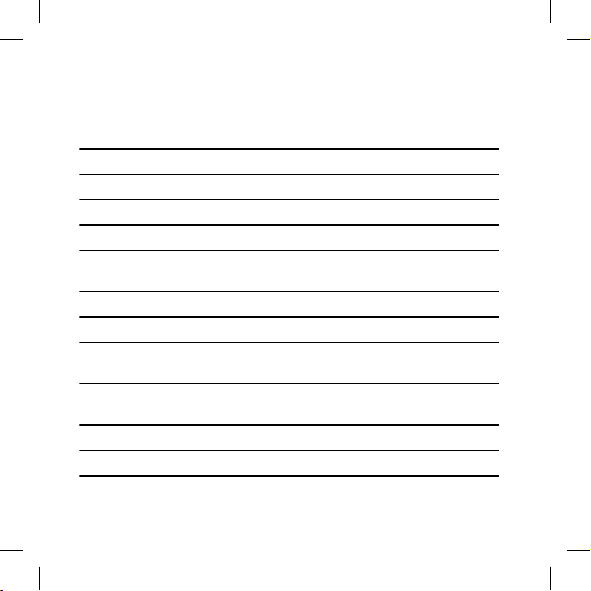
ACCESSORIES
You can use various accessories with your hearing aid. Ask your hearing
care professional to find out if you can benefit from these.
Name Use
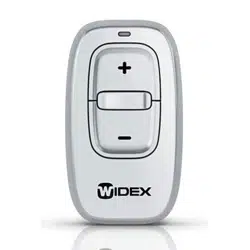
RC-DEX remote control
TV-DEX for listening to TV and audio
PHONE-DEX 2 for easy landline use
FM+DEX for streaming audio and FM signals
T-DEX for connecting hearing aids to mobile phones via a tele-
coil
UNI-DEX for connecting hearing aids to mobile phones
CALL-DEX for easy wireless connection to mobile phones
COM-DEX for wireless connection to mobile phones and other de-
vices via Bluetooth
COM-DEX Re-
mote Mic
for helping hearing aid users hear speech in difficult lis-
tening situations
TV PLAY for direct TV streaming
EVOKE APP for using your smartphone to control your hearing aids
Available in some countries only.
24
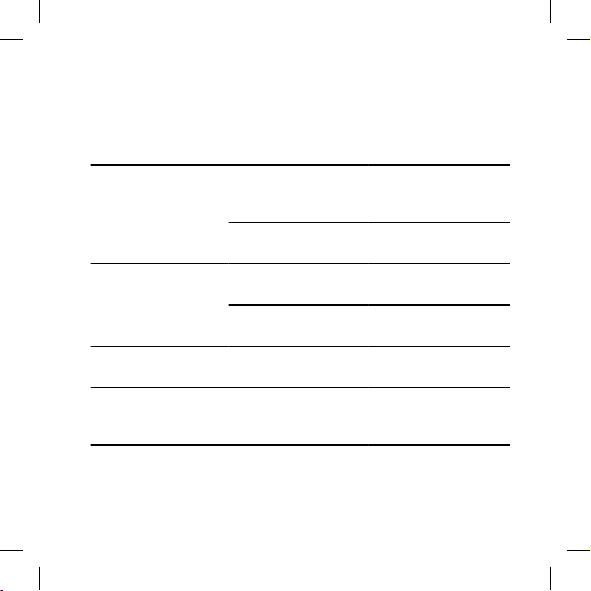
TROUBLESHOOTING
These pages contain advice on what to do if your hearing aid stops working
or if it doesn't work as expected. If the problem persists, contact your hear-
ing care professional.
Problem Possible cause Solution
The hearing aid is com-
pletely silent
It is not turned on Make sure the battery
drawer is completely
closed
The battery does not
work
Insert a new battery
The hearing aid volume
is not powerful enough
Your ear is blocked by
earwax
Contact your doctor
Your hearing may have
changed
Contact your hearing
care professional/doctor
The hearing aid whistles
continuously
Your ear is blocked by
earwax
Contact your doctor
Your two hearing aids
are not working in syn-
chrony
The connection between
the hearing aids is lost
Turn them off and on
again
25
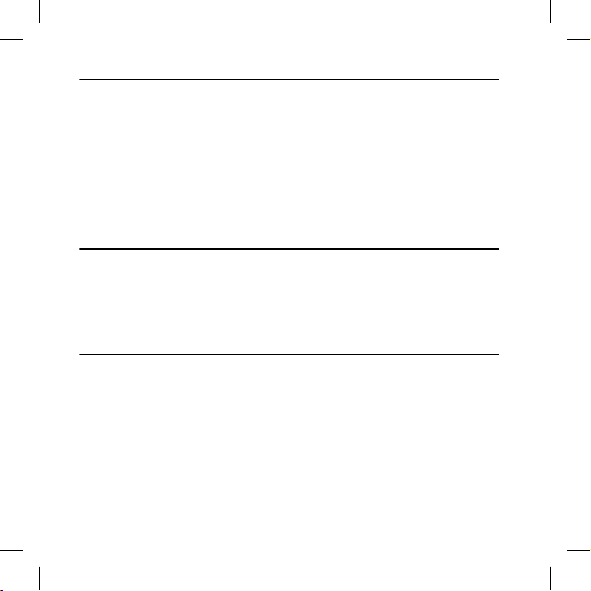
Problem Possible cause Solution
The hearing aids do not
respond with a corre-
sponding change in vol-
ume or program to the
control device
a. The device is used be-
yond the transmission
range
b. Strong electromag-
netic interference in the
vicinity
c. The device and the
hearing aids are not
matched
a. Move the device closer
to the hearing aids.
b. Move away from
known source of EM in-
terference
c. Check with your hear-
ing care professional to
make sure the device is
matched with hearing
aids
You hear “interrupted”
speech (on and off)
from the hearing aids or
no speech (muted) from
the opposite hearing
aid.
a. The battery in one of
the hearing aids has ex-
pired
b. Strong electromag-
netic interference in the
vicinity
a. Replace battery in one
or both hearing aids
b. Move away from
known sources of inter-
ference
NOTE
This information covers only the hearing aid. See the "Ear-sets for Widex hear-
ing aids" user manual for information specific to your ear-set. If the problems
persist, contact your hearing care professional for assistance.
26
REGULATORY INFORMATION
EU directives
Directive 2014/53/EU
Hereby, Widex A/S declares that this EBB3D is in compliance with the es-
sential requirements and other relevant provisions of Directive 2014/53/EU.
The EBB3D contains radio transmitters operating at: 10.6 MHz, -54 dBµA/m
@10 m, 2.4 GHz, 0.9 mW EIRP.
A copy of the Declaration of Conformity according to 2014/53/EU can be
found at:
https://global.widex.com/doc
N26346
To avoid potential degradation of radio performance, your device should be
separated by at least 25 cm (10 inches) to other radio communications
equipment.
Information regarding disposal
Do not dispose of hearing aids, hearing aid accessories and batteries along
with ordinary household waste.
Hearing aids, batteries and hearing aid accessories should be disposed of at
sites intended for electrical waste and electronic equipment, or given to
your hearing care professional for safe disposal.
27

FCC and ISED statements
FCC ID: TTY-EBB3D
IC: 5676B-EBB3D
Federal Communications Commission Statement
This device complies with part 15 of the FCC Rules. Operation is subject to
the following two conditions:
(1) This device may not cause harmful interference, and
(2) this device must accept any interference received, including interference
that may cause undesired operation.
NOTE:
This equipment has been tested and found to comply with the limits for a
Class B digital device, pursuant to part 15 of the FCC Rules. These limits are
designed to provide reasonable protection against harmful interference in a
residential installation. This equipment generates, uses and can radiate radio
frequency energy and, if not installed and used in accordance with the in-
structions, may cause harmful interference to radio communications. How-
ever, there is no guarantee that interference will not occur in a particular in-
stallation. If this equipment does cause harmful interference to radio or tele-
vision reception, which can be determined by turning the equipment off and
on, the user is encouraged to try to correct the interference by one or more
of the following measures:
— Reorient or relocate the receiving antenna.
— Increase the separation between the equipment and receiver.
28

— Connect the equipment into an outlet on a circuit different from that to
which the receiver is connected.
— Consult the dealer or an experienced radio/TV technician for help.
NOTE:
This equipment complies with FCC radiation exposure limits set forth for an
uncontrolled environment. This transmitter must not be co-located or oper-
ating in conjunction with any other antenna or transmitter.
Changes or modifications to the equipment not expressly approved by Wi-
dex could void the user’s authority to operate the equipment.
ISED Statement / Déclaration d’ISED
This device contains licence-exempt transmitter(s)/receiver(s) that comply
with Innovation, Science and Economic Development Canada’s licence-ex-
empt RSS(s). Operation is subject to the following two conditions:
(1) This device may not cause interference.
(2) This device must accept any interference, including interference that
may cause undesired operation of the device.
L’émetteur/récepteur exempt de licence contenu dans le présent appareil
est conforme aux CNR d’Innovation, Sciences et Développement économi-
que Canada applicables aux appareils radio exempts de licence. L’exploita-
tion est autorisée aux deux conditions suivantes:
(1) L’appareil ne doit pas produire de brouillage;
(2) L’appareil doit accepter tout brouillage radioélectrique subi, même si le
brouillage est susceptible d’en compromettre le fonctionnement.
29

ISED RADIATION EXPOSURE STATEMENT:
This equipment complies with ISED RF radiation exposure limits set forth for
an uncontrolled environment. This transmitter must not be co-located or
operating in conjunction with any other antenna or transmitter.
ISED EXPOSITION AUX RADIATIONS:
Cet équipement est conforme avec ISED les limites d’exposition aux
rayonnements défi nies pour un contrôlé environnement. Cet émetteur ne
doit pas être co-localisés ou fonctionner en conjonction avec une autre an-
tenne ou émetteur.
30
SYMBOLS
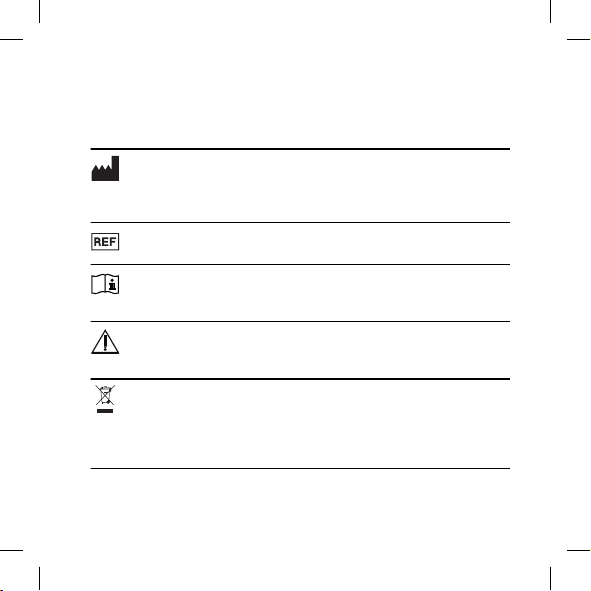
Symbols commonly used by Widex A/S in medical device labelling (la-
bels/IFU/etc.)
Symbol Title/Description
Manufacturer
The product is produced by the manufacturer whose name and address are
stated next to the symbol. If appropriate, the date of manufacture may also
be stated.
Catalogue number
The product’s catalogue (item) number.
Consult instructions for use
The user instructions contain important cautionary information (warn-
ings/precautions) and must be read before using the product.
Warning
Text marked with a warning symbol must be read before using the
product.
WEEE mark
“Not for general waste”. When a product is to be discarded, it must be
sent to a designated collection point for recycling and recovering to
prevent the risk of harm to the environment or human health as a re-
sult of the presence of hazardous substances.
31
Symbol Title/Description
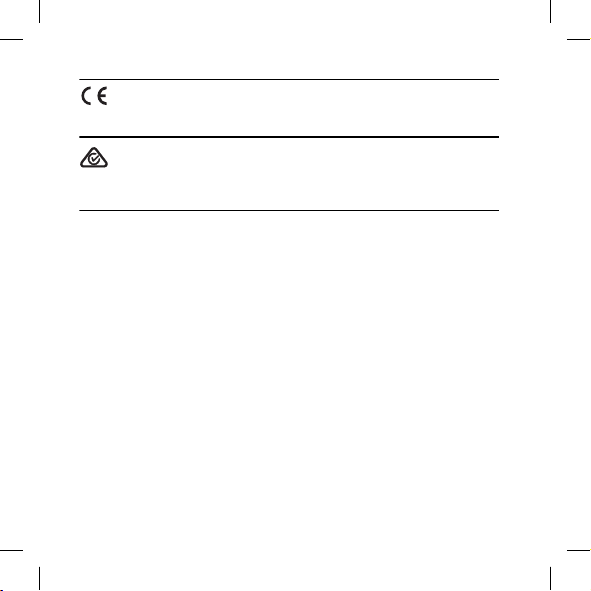
CE mark
The product is in conformity with the requirements set out in European
CE marking directives.
RCM mark
The product complies with electrical safety, EMC and radio spectrum regula-
tory requirements for products supplied to the Australian or New Zealand
markets.
32

33

34

35
WIDEX A/S Nymoellevej 6, DK-3540 Lynge, Denmark
https://global.widex.com
Manual no.:
9 514 0529 001 #02
Issue:
2020-05
9 514 0529 001 02